
Tech
GeekWire Awards: Young Entrepreneur of the Year finalists tackling AI, robotics, and more



From farm robots to cybersecurity to AI-powered medical records, the 2026 GeekWire Awards Young Entrepreneur of the Year finalists represent some of the ambitious bets being made in the Pacific Northwest startup scene.
The finalists in this category, presented by Prime Team Partners, are: Emily Choi-Greene (Clearly AI); Caleb John (Pioneer Square Labs); Kavian Mojabe (MediScan AI); Charles Wu (Orchard Robotics); and Zheqing (Bill) Zhu (Pokee AI).

Now in its 18th year, the GeekWire Awards is the premier event recognizing the top leaders, companies and breakthroughs in Pacific Northwest tech, bringing together hundreds of people to celebrate innovation and the entrepreneurial spirit. It takes place May 7 at the Showbox SoDo in Seattle.
Continue reading for information on the Young Entrepreneur of the Year finalists, who were chosen by a panel of independent judges from community nominations. You can help pick the winner: Cast your ballot here or in the embedded form at the bottom. Voting runs through April 16.
Emily Choi-Greene is co-founder and CEO of Clearly AI, a cybersecurity startup that helps security, privacy, and compliance teams review new products, features, vendors, and AI deployments before they ship.
Less than two years after launching, Clearly AI raised an $8.4 million seed round. The company was also named one of 10 finalists in the RSAC 2026 Innovation Sandbox Contest, a high-profile competition tied to the RSA Conference, a major event for the cybersecurity industry. Choi-Greene previously worked on natural language understanding for Amazon’s Alexa and later on device security teams at the tech giant.
Caleb John is an engineer and investor at Pioneer Square Labs, the Seattle-based startup studio and venture fund.
John’s previous experience spans robotics, AI, and defense tech. He co-founded the AI search ranking startup Pongo (acquired by M87 Labs) and founded Cedar Robotics, which built robot waiters for restaurants. He also contributed to national security AI at Anduril Industries and was recognized on the Forbes Under 30 Seattle list in 2023.
Kavian Mojabe is co-founder and CEO of MediScan AI, a Seattle startup using AI to help medical professionals evaluate patient records.
Launched in 2024, MediScan AI raised $1.4 million in funding last June. Its platform can quickly scan records — including typed and hand-written notes — and generate summaries and comprehensive reports, reducing the time it takes human evaluators to perform such tasks. The startup has positioned itself at the intersection of medicine, insurance and legal industries. Mojabe was previously a software engineer at Amazon.
Charles Wu is founder and CEO of Orchard Robotics, an agtech startup using AI to deliver precise data on farm operations.
Wu is a Thiel Fellow who dropped out of Cornell University to launch Orchard Robotics. The startup, which raised $22 million in Series A funding last September, has developed a system with cameras that are mounted on tractors and other equipment to gather images as they traverse a farm. The collected images are then analyzed by Orchard Robotics’ AI to generate data on vines, trees and crops, which is then processed to track the growth, yield and health of crops.
Zheqing (Bill) Zhu is founder and CEO of Pokee AI, a Seattle-area startup building AI agents that automate online workflows.
Pokee, which raised a $12 million seed round last July, differentiates itself by applying reinforcement learning to help agents sequence and use tools efficiently, rather than relying solely on large language models. Zhu was previously head of applied reinforcement learning at Meta, where he worked for more than seven years. He completed his Ph.D. at Stanford in the same field and did his graduate and undergrad studies at Duke.
Astound Business Solutions is the presenting sponsor of the 2026 GeekWire Awards. Thanks also to gold sponsors Amazon Sustainability, Baird, BECU, JLL, First Tech and Wilson Sonsini, and silver sponsors Prime Team Partners.
The event will feature a VIP reception, sit-down dinner and fun entertainment mixed in. Tickets go fast. A limited number of half-table and full-table sponsorships are available. Contact events@geekwire.com to reserve a spot for your team today.
(function(t,e,s,n){var o,a,c;t.SMCX=t.SMCX||[],e.getElementById(n)||(o=e.getElementsByTagName(s),a=o[o.length-1],c=e.createElement(s),c.type=”text/javascript”,c.async=!0,c.id=n,c.src=”https://widget.surveymonkey.com/collect/website/js/tRaiETqnLgj758hTBazgd5M58tggxeII7bOlSeQcq8A_2FgMSV6oauwlPEL4WBj_2Fnb.js”,a.parentNode.insertBefore(c,a))})(window,document,”script”,”smcx-sdk”); Create your own user feedback survey

Tech
Trump Still Pretending The Most Dangerous Domestic Terrorists Are People Who Don’t Like Fascism

from the his-own-people-are-still-the-worst dept
Just to be clear, when I refer to “Trump” in terms of his administration, I’m referring to the collective hive mind of dangerous enablers he employs. Trump, by himself, is incapable of closing an umbrella. It’s the people around him that are dangerous, since they’re able to convert his rants and brain stem impulses into action.
While it’s understandable that an aspiring autocrat like Trump would feel threatened by a movement dedicated to opposing fascists, it’s only now that he’s returned to office that he can do anything about it. Deliberately ignoring the fact that the most dangerous domestic terrorists are located on the far right of the political spectrum (including the hundreds of people he pardoned for assaulting police officers and raiding a federal building following his 2020 election loss), Trump’s administration is once again attempting to turn protected First Amendment activity into terroristic acts worthy of lengthy minimum federal sentences.
The United States was as concerned as always about Islamist terrorism, said the official, Monica A. Jacobsen, according to a copy of her prepared remarks reviewed by The New York Times and three officials briefed on the meeting. But, she told her counterparts from Europe, Canada and Australia, the Trump administration also wanted more attention on what it believed was an insidious, underestimated threat: the far left.
Western governments must combat “antifa and far-left terrorism,” Ms. Jacobsen’s prepared remarks asserted, casting the effort as an evolution in counterterrorism following the “global war on terror.” Her prepared speech defined far-left terrorism to include threats from communists, Marxists, anarchists, anticapitalists and those with “eco-extremist” and “other self-identified antifascist ideologies.”
“As always” is a nice touch. It’s always a good idea to keep an “Islamist” scapegoat in the yard, especially when you’re busy losing a war with Iran. Not only does it generate steady work for bored FBI agents, but it also allows Trump to continue pretending the mass deportation of hardworking, tax-paying non-whites is somehow contributing to the effort to root out an alleged “1,700 Iran sleeper cells” in the United States. (No “sleeper cell” has been broken up or deported despite Trump claiming the government already knows who these “sleepers” are and where they’re located.)
As evidence of the dangerousness of “far left” terrorists, Jacobsen pointed to a single protest in Milan, Italy, in which police and protesters “clashed” — the favorite euphemism deployed by people who wish readers to believe protesters were just as violent as law enforcement officers.
Meanwhile, the administration can’t actually find any hard evidence to back up its assertions about the supposed violent threat posed by far left activists.
In November, the State Department took the first major step in the strategy by designating four leftist groups in Europe — two in Greece, one in Germany and another in Italy — as terrorist organizations. None of the groups has been known to have plotted attacks on Americans in the past decade, which is usually a criterion for such a designation.
All it can do — as it did late last year when Trump unilaterally declared “antifa” a terrorist organization — is disappear any evidence to the contrary — something it did less than 48 hours after Charlie Kirk was killed by gunman during a campus appearance.
Even if you were to decide that what’s being claimed about “far left terrorism” in Europe by this administration is somehow true, you can’t ignore the facts on the ground here in the United States:
Over the past decade, right-wing extremists have killed 112 people across 152 terrorist attacks in the United States, according to an analysis by the Center for Strategic and International Studies, a bipartisan research institution. Over the same period, left-wing extremists killed 13 people over 35 attacks, according to the analysis, while jihadist attacks left 82 dead.
Even if Trump hadn’t spent his entire term so far routinely insulting and berating our European allies, it’s still unlikely he would have been able to convince them to ignore the reality of the situation for the sole purpose of future abuses of civil liberties and rights.
Trump has been pounding this table since late last year, but now he’s finding fewer world leaders willing to indulge his fantasies or nod politely as Trump’s emissaries literally make shit up about left-wing activist groups.
The State Department wants to bring foreign law enforcement officials from at least 17 countries to The Hague in May for a workshop on how to fight far-left groups like antifa.
[…]
Formal invitations had not been sent as of last week, in part because Congress had to approve funding. U.S. officials told The Times that foreign governments had expressed less interest in the events than the State Department had hoped.
Once again, let’s pause to reflect on these claims. “Antifa” simply stands for “anti-fascist.” You barely have to move left at all to oppose fascism. All you would have to do is move to the left just far enough to align with… I don’t know… Ronald Reagan? And yet this administration is so stupid and thuggish that it actually thinks it can portray people opposed to fascism as more dangerous than US citizens who actively support it.
Everything else on Trump’s list of “domestic threats” is just a lazy rip-off of McCarthyism. “Far left” supposedly covers Communists, Marxists, “anti-capitalists” (yet another tell), and “eco-extremists.” In other words, people who disagree with this particular president and his policies. Free speech is what it is. But Trump and his enablers want people to go away for decades by turning dissent into terrorism.
Meanwhile, the true terrorist threat that is the extremely foreseeable result of the war in Iran is being back-burnered in favor of locking up people who just want to see this country remain a democratic republic. Fortunately for us, the rest of the world is no longer interested (Israel, Hungary, and Russia aside) in pretending Trump poses less of a threat than the people he wants to punish.
Filed Under: antifa, domestic terrorists, donald trump, eu, far right extremists, fascism, free speech, insurrection, january 6, trump administration, white christian nationalists
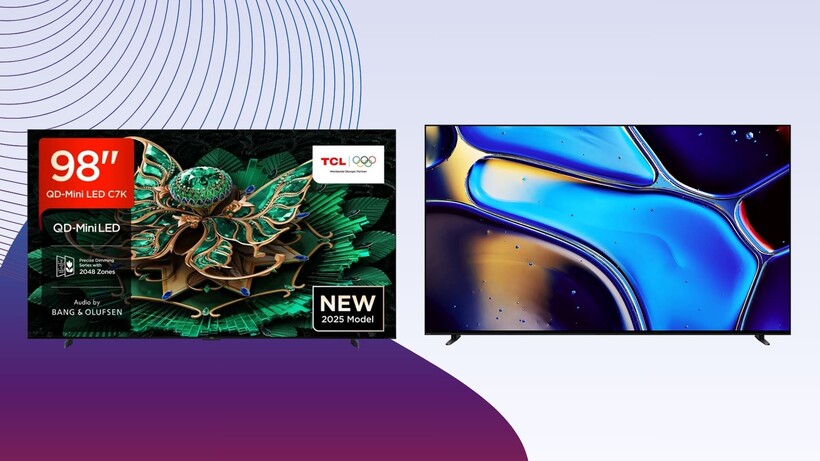

There are plenty of 4K TVs available to buy these days, but the ones we’ve hand-selected here truly stand out as the best of the best.
If you want to do real justice to 4K HDR, then buying a cheap TV won’t really offer the benefits you’re after. Instead you’ll need to buy one of the best 4K TVs on our list, which have all been selected for different budgets.
We’ve aimed to include at least one model from each major manufacturer. Every TV has been tested and reviewed by our expert team.
They’re assessed by how easy they are to assemble, how long it takes, how easy they are to use, the level of feature support they have in comparison to toher models. They are, of course, all put through their paces when it comes to picture and sound testing.
The 4K TVs on our list are all £1,000 or above. If you’re looking for something a bit cheaper, we’d recommend taking a look at our best cheap TV list. If you’re looking for other options, our comprehensive best TV list will give you the answers.
Best 4K TV at a glance
-
Best LG 4K TV:
-
Best Philips 4K TV:
-
Best Samsung 4K TV:
-
Best TCL TV:
-
Best Panasonic 4K TV :
-
Best Hisense TV:
-
Best Sony 4K TV:
-
Best large 4K TV:
-
Best Sky TV:
SQUIRREL_ANCHOR_LIST
Every TV we review is put through the same set of tests to gauge its picture performance, usability, and smart features. Tests are carried out over several days and are done by eye but supported with technical measurements. Testing by eye involves an expert watching a wide range of material to understand and determine a TV’s performance in fields such as brightness, contrast, motion processing, colour handling and screen uniformity.
We’ll consider the design of the TV in terms of build quality, study the spec sheets and see if the TV’s connections are up to spec, as well as playing video and audio content to ensure that the set handles playback as it claims. We also take note whether a product’s compatible formats and features are in line with industry trends or not to gauge whether it’s relevant for you.
Comparison to other related and similarly priced products is also important, to see if it’s missing any vital features and whether it impresses as a whole. After all this, we’ll come to a judgement on how the TV performs as a whole.
Best LG 4K TV
Pros
Superbly bright and colourful image
Outstanding upscaling
Easy to use interface
Top tier gaming spec
Five years of OS updates
Cons
Sound quality is merely fine
Would be nice to have the new remote
The LG OLED55G5 (G5) is simply an outstanding 4K TV. Not only does it boast a vibrant and colourful picture, but its upscaling and processing capabilities are up there with the best. Plus, and unlike some other OLED panels, the LG G5 is impressively bright too.
If you opt for the 48-, 55- or 65-inch models then you can choose between the wall-mounted option or a version that comes with a stand. However, anything over 77-inch will only support wall-mounting, so keep that in mind. The LG interface is easy to use and can be controlled either via the included remote or through LG’s ThinQ smartphone app. There’s no lag and the amount of content doesn’t overwhelm like the Fire TV. However there’s no Freeview Play support and, instead, you’ll see LG Channels.
Gamers will appreciate ALLM which we tested had an input lag at 13ms in Standard and 9.3ms in Boost modes. In addition, the G5 can hit up to 165Hz in PC games, has VRR compatibility in AMD FreeSync Premium and includes the LG Game Optimizer for deeper customisation in game.
Sporting a Primary RGB Tandem panel, where the G5 really impresses is with its brightness, and can hit a peak of 4000 nits. That’s seriously impressive for an OLED TV.
We should note that although there’s no unsightly green tint on display here, which is an issue we’ve seen with other LG TVs, we have concluded that it can’t quite match a Mini LED panel. However, that’s not an issue with just the G5 as not many OLEDs can match a Mini LED’s performance. Another area where the G5 excels is with upscaling, as 1080p content could be mistaken for a true 4K image.
Generally sound quality is decent enough, with dialogue especially sounding clear and natural. However, lower frequencies bring out some buzzing and it can sometimes lack the energy of other TVs. With this in mind, it might be a good idea to invest in one of the best soundbars.
Best Philips 4K TV
Pros
Bright, colourful and detailed picture
Excellent sound for a TV
Wide HDR support
Ambilight
Aggressive price
Cons
Missing iPlayer
Motion processing can be heavy-handed
Where’s IMAX Enhanced?
The Philips 65OLED+910 is a terrific OLED TV from the brand, with a bright and detailed picture, an affordable price tag and one of the best built-in sound systems we’ve tested.
The sound system is courtesy of Bowers & Wilkins, and sits at the bottom of the OLED910. It’s wrapped in a fabric that gives the TV a warm, lifestyle feel which is a nice touch too. However, most importantly, the sound is powerful with a spacious soundstage and clear dialogue. We don’t even think you need a soundbar with this one. Otherwise, the OLED910 is fitted with the same RGB Tandem screen used in the LG G5 and supports HDR10, HLG, HDR10+ Adaptive and Dolby Vision. While there’s no IMAX Enhanced support, there’s also Dolby Vision x Filmmaker Mode that combines the two.
Annoyingly, out of the box the OLED910 has Auto Film Picture Style enabled which makes motion seem more stuttery. You’ll have to dive into the settings to turn this off, but once you do the difference is unmistakable.
While the TV isn’t as bright as the likes of the LG G5 or Samsung S95F, where the Philips excels is with its contrast and level of detail. Even the divisive Crystal Clear picture mode looks excellent, although some films don’t seem to quite suit it as well as others.
Upscaling is solid too, although there are options that do a better job as refining details. Finally, the OLED910 runs on Google TV which, although is easy enough to use, does have a few apps missing – mainly BBC iPlayer. You can stream iPlayer via Google Cast but a built-in solution would be better.
Best Samsung 4K TV Pros
Matte Glare-Free screen
Incredibly bright HDR performance
Advanced gaming support
Cons
Slight bloom and dimming delay
No Dolby Vision support
Sound system lacks bass
The arrival of the Samsung QN90F marks a big change in Samsung’s approach to its TV in that its OLEDs are as important if not more so than its LCD TVs.
It has an RRP of £2499 / $2499, which doesn’t make it the most affordable at launch and a little over the price point we have in mind for this list. But if you’re willing to wait, the price will eventually come in the months ahead.
Peak brightness is a scorching 2500 nits on 10% window, making this a suitable TV for those in need of a bright TV or watch in a room with lots of ambient light. There’s a big step up in AI processing from the QN90D’s 20 neural networks to the QN90F’s 128. This extra AI horsepower helps to upscale non-4K images in a clean, crisp, and natural way thanks to its ability to tell the difference between detail and noise.
With 4K HDR content, the TV pumps out some rich and vibrant colours, although our reviewer did find that its pictures can look overly vibrant at times. Regardless, the processing produces supreme levels of detail and sharpness. Local dimming is effective though we did note some blooming around bright objects.
The sound system is on the impressive side for a flatscreen TV. It offers power, clarity and space, confidently planting sounds across the screen and beyond its frame. Bass remains limited but that’s to be expected.
For gaming, all four HDMI inputs support 4K/144Hz with 165Hz available for PC gamers. There’s HDMI VRR as well as AMD FreeSync Premium Pro. We measured input lag to 9.2ms, which is lightning fast and the best on the market. The latest Tizen smart interface is better than previous ones offering a more polished, content-first approach. It’s quick to load and there’s customisation on the table in the form of re-ordering apps.
Best TCL TV Pros
Spectacularly bright, colourful images
Excellent local dimming system
Great price for what’s on offer
Cons
Only two HDMI inputs deliver full gaming features
Audio system sometimes loses focus
No support for Freely or Freeview Play
TCL has made a name for itself in offering high-spec TVs at lower prices, and the 65C8K is the perfect solution for those who want maximum value at affordable prices (for a 65-inch 4K TV).
The 65C8K has a huge levels of brightness at its disposal, and this leads into a colour performance that’s both vibrant and natural looking to the eye. And despite the near 4000 nits of brightness that this TV can summon, it does a very good job at producing solid black levels when it needs to.
Compared to Fire TV OS which tends to prioritise Prime Video content, Google TV does a good job of gathering content from all of your available subscriptions in one place. If you know exactly what you want to get to then you can use Google Assistant voice control to ask for it. Gamers will benefit from ow input lag (13.1ms), VRR support and refresh rates up to 165Hz to offer smooth, fast gameplay, especially if you’re a PC fan.
When it comes to the default sound profile of most TVs, we usually recommend that consumers pick up a soundbar, but this isn’t immediately the case with the TCL 65C8K.
With speakers that have had input from Bang & Olufsen, there’s an impressive degree of clarity and detail, although we would have liked a bit more power to the bass levels.
Best Panasonic 4K TV
Pros
Impressive picture quality
Excellent sound for a TV
Speedy gaming performance
Fast Fire TV interface
Quick to assemble
Cons
Freely is strangely laggy
Lack of DTS audio is a shame
Slight black crush out of the box
If you’re the type of person who likes to keep a minimal, clutter-free entertainment unit in their living room then you’ll probably want to consider the Panasonic TV-65Z90B as your next upgrade. Panasonic’s stunning set is one of the best TVs we’ve reviewed in terms of offering a complete, all-in-one experience across visual and audio quality, not to mention gaming chops and smart features. Starting with the image quality, there’s nothing about Panasonic’s offering that’ll leave you wanting. The OLED panel brings true-to-earth colours to life, with a brightness that draws you in and a contrast that only heightens the darker elements of a scene through deep, true blacks. What’s even more impressive for a modern TV is that the sound quality is right up there with some of the best we’ve tested.
Typically as TVs have continued to slim down, the potency of built-in speakers has diminished in tandem, but the TV-65Z90B packs quite a punch on the audio front, right from the get-go. There’s a tangible weight to the bass that really helps to bring forth the expression of explosions and punches, but more importantly it’s the dialogue that comes across with outstanding clarity, so you won’t be struggling to hear what’s being said.
Keeping in tandem with the idea of having an all-in-one device without the need for accessories, the Panasonic TV-65Z90B utilises Amazon’s Fire TV operating system by default, providing users with quick access to all of the major streaming services, either via the remote which includes a wealth of dedicated streaming service buttons, or the Alexa voice assistant.
If you do have a console nearby however then you’re in for an absolute treat. With a 144Hz refresh rate alongside next to no input lag, you can kick back and enjoy a whirlwind of a gaming experience that brings more fast-paced titles to life. The Game Control Board also lets you toggle various visual and audio modes that are designed to make the most out of certain genres. Best Hisense TV
Pros
Bright, colourful HDR pictures
Solid sound system
Accessible smart interface
Impressive local dimming
Well built
Cons
Price has gone up
Average viewing angles
Audio ducking with AI mode
Default local dimming setting too bright
We concluded that the Hisense 65U8Q is the best Hisense TV we’ve ever reviewed here, thanks to its picture quality, impressive brightness and a solid sound system that outranks the LG G5.
Available in three sizes (55-, 65- and 75-inches), the U8Q is quite a hefty TV and weighs a whopping 29.2kg and has a depth of 45mm. It’s certainly not the slimmest, but that shouldn’t be too much of an issue for many.
The U8Q runs on Hisense’s VIDAA interface in the UK which is a simple operating system and includes all the apps you’d expect from a smart TV. It’s not the most polished OS, but it’s easy enough to use.
All HDR formats are covered here, and the processing is performed by Hisense’s Hi-View Engine Pro which can optimise picture and sound in real-time. Although some blooming is noticeable, the U8Q is easily as bright as a Mini LED TV, and recorded 857 nits on 100% HDR window – that’s the brightest full screen output we’ve seen. In addition, the black level and bright highlights offer a Samsung-esque performance too.
When it comes to audio, while it doesn’t quite have the same punch and force as the Philips 65OLED809, there’s enough power that you don’t often get with a TV. While we’d still recommend pairing it with one of the best soundbars, it’s still a better overall performer than LG and Samsung TVs.
Gamers are covered here too, with AMD FreeSync Premium Pro VRR, 165Hz refresh rate for PC gamers, or 120Hz for console users, and ALLM which automatically puts the TV into its lowest latency – which we measured at 13.5ms.
Best Sony 4K TV
Pros
Expressive and natural picture quality
Engaging Google TV smarts
Convenient design
Dolby and DTS support
Cons
Less bright than the competition
Sounds tamer than previous models
The Sony Bravia 8 replaces the Sony A80L, but you could more or less say it’s the same TV. There are a few differences in terms of picture quality, with the Bravia 8 OLED reaching higher levels of peak brightness in some modes (Professional, Vivid) but less in others (Cinema Standard).
There are slight improvements over the A80L with a richer, bolder HDR performance that looks lovely when paired with colourful films and TV series. Motion processing is again excellent, smooth and with very few issues noted, while contrast is strong for an OLED TV although we did notice some crushing (loss) of detail with its black levels.
We’d love for Sony to push the brightness out more for this OLED, but for those who want a brighter HDR performance, the Bravia 8 II is set for launch in June 2025.
We’d recommend the Bravia 8 as one of the best Sony TVs for PS5 owners. It includes Auto Genre Picture mode that automatically switches the TV in and out of its game-ready state so the A80L isn’t stuck in game mode all the time; along with Auto HDR Tone Mapping enhances the HDR performance for best brightness and contrast. Dolby Vision Gaming is supported and the TV does also include 4K/120Hz and variable refresh rates (VRR) across two HDMI 2.1 inputs (one of which is shared with the eARC port). We measured input lag at 12.7ms, which is as good as the LG C4.
The sound quality is fine though not as dynamic or as loud as the A80L.
We’d recommend you consider adding a soundbar or sound system, and Sony has plenty including its Bravia Theatre Bar 8 and the Theatre Sound System 6 to choose from.
Best large 4K TV
Pros
Bright, colourful pictures at an epic size
Excellent backlight control
Great value for what’s on offer
Cons
Sporadic backlight fluctuations
More bass would be nice
Unhelpful foot placement
At a jaw-dropping 98-inches, the TCL 98C7K is not a TV that’s designed for everyone. However, if you have the space and want to truly immerse yourself in a massive screen, all for a surprisingly reasonable price tag, then the TCL 98C7K is an easy recommendation. Although it’s such a mighty screen, there’s very little supporting bodywork around it, with a narrow frame and such slim feet that they become almost invisible when viewing the TV head-on. Speaking of the feet, keep in mind that they’re annoyingly set quite far apart from one another, so you’ll need a hefty piece of furniture to place it on top of.
The 98C7K runs on Google TV which is a decent enough interface, and includes all the apps and even the main UK terrestrial broadcaster catch-up services you’d expect. Not all Google TVs offer that.
While Google TV can be overwhelming to use at times, it’s easy to get your head around and usefully supports Google’s voice assistant too.
With the above in mind, let’s jump to the star of the show: the panel. The Mini LED lighting system is divided into 2048 separate local dimming zones – enough to provide even a screen this big with promisingly localised light control. Considering it can hit almost a peak of 3000 nits, this is a necessary addition. The panel also supports wider viewing angles than most LCD TVs while TCL’s AiPQ Pro processor is on hand to keep things running smoothly.
Overall, the 98C7K’s picture quality is seriously a vision for such an affordable yet mighty TV. In its Standard preset, which is the one you’re likely to use the most, images are bright and vibrant, with the screen covering more than 97% of the DCI-P3 colour spectrum and near 80% of the BT2020 spectrum too.
A key feature of the 98C7K is its Bang & Olufsen-assisted sound system which delivers a refined, clean and detailed tone. It’s not the best at handling bass, especially when compared to the dedicated subwoofers previously used in premium TCL TVs, but it certainly does the job.
Although it has an RRP of £2399, which feels reasonable given the size and performance, it’s not impossible to pick up the TCL 98C7K with a decent price cut too. With that in mind, if you want a mighty screen, this is a hard option to beat. Best Sky TV
Pros
Brighter, more colourful picture over Gen 1 Glass
Less blooming
Spacious audio performance
Sky OS
Cons
Still lacks detail and sharpness
Bass feels flat
Iffy upscaling in places
Add-ons add up in price
It should be noted that the Gen 2 version of Sky Glass is an improvement over the Gen 1 version, but that doesn’t make it a TV designed to satisfy everyone.
If you’re a home cinema enthusiast, a gamer or even just a casual TV watcher, there are better TVs on this list. But if you have a family, or are someone who is not interested in the complications of the TV buying experience. Sky Glass 2 is practically ideal for you.
Firstly, the installation is handled by the courier team that delivers the TV to you. If you want it on a pedestal or hauled onto your wall, they’ll carry that out and take the packaging away so you don’t have to worry about it. The TV itself is the same dimensions as before, so it’s a chunky effort, but it’s lighter, so if you ever feel the need to move it, it won’t be such a difficult task.
Sky OS doesn’t feature every entertainment app on this earth, but it does feature the popular ones whether it’s the UK catch-up apps, Netflix, Disney+, Prime Video, Apple TV+ and an assortment of others. And what it does as good as any other TV interface is that it does not treat them any differently from one another. All Sky wants is for you to tuck into whatever it is that you enjoy.
The rails of content are there to help you plunder what you like more easily, with Sky OS getting to know what you like over time and personalising those recommendations further.
The Playlist section acts as a way to keep track of what you want to watch, and you can create different personalised playlists for everyone in your household. The interface is quick, and the voice control has become more accurate and responsive over time.
The picture quality is much improved over the original model. It’s brighter without as much blooming, better with colours and handles the darker parts of the picture better than it did before. It’s not the sharpest or most detailed image though, and the upscaling is patchy, with stripey colours noticeable with HD programming. The built-in Dolby Atmos sound system is described as offering more power over the Gen 1 version, but to our ears it doesn’t sound too much different. It’s a spacious and tall sound, but like the picture quality, it’s not the clearest or most detailed performance. But considering the competition it’s up against, it’s a better effort at TV sound than most.
For those who want their TV, sound and content all wrapped into one convenient package, Sky Glass Gen 2 will be a compelling option, especially if you’re not fussed about getting the highest quality image and sound. It does come at a premium once all the subscriptions are tallied up, but Sky does have a cheaper option with its Glass Air TV.
The LG OLED65C4 supports every gaming feature going, with ALLM, VRR, 4K/120Hz HFR, AMD FreeSync Premium, Nvidia G-Sync and Google Stadia.
The post Best 4K TV 2026: Our favourite 4K TVs to buy right now appeared first on Trusted Reviews.
How we test

LG OLED55G5
Pros
Cons

Philips 65OLED+910
Pros
Cons

Samsung QE65QN90F
Pros
Cons

TCL 65C8K
Pros
Cons

Panasonic TV-65Z90B
Pros
Cons

Hisense 65U8Q
Pros
Cons

Sony Bravia 8
Pros
Cons

TCL 98C7K
Pros
Cons

Sky Glass Gen 2
Pros
Cons

LG OLED55G5

Philips 65OLED+910

Samsung QE65QN90F

TCL 65C8K

Panasonic TV-65Z90B

Hisense 65U8Q

Sony Bravia 8

TCL 98C7K

Sky Glass Gen 2
Test Data
LG OLED55G5
Philips 65OLED+910
Samsung QE65QN90F
TCL 65C8K
Panasonic TV-65Z90B
Hisense 65U8Q
Sony Bravia 8
TCL 98C7K
Sky Glass Gen 2
Contrast ratio
–
Infinity
–
–
–
–
–
–
–
Input lag (ms)
13 ms
12.6 ms
9.2 ms
13.1 ms
12.7 ms
–
12.7 ms
13.1 ms
65.3 ms
Peak brightness (nits) 5%
–
1021 nits
2592 nits
4100 nits
1258 nits
–
463 nits
2940 nits
765 nits
Peak brightness (nits) 2%
–
1004 nits
1589 nits
2200 nits
1269 nits
1598 nits
462 nits
2000 nits
586 nits
Peak brightness (nits) 10%
–
1021 nits
2552 nits
–
1159 nits
–
430 nits
–
910 nits
Peak brightness (nits) 100%
–
293 nits
885 nits
790 nits
245 nits
857 nits
121 nits
850 nits
897 nits
Set up TV (timed)
421 Seconds
85 Seconds
–
360 Seconds
68 Seconds
277 Seconds
69 Seconds
840 Seconds
–
Full Specs
LG OLED55G5 Review
Philips 65OLED+910 Review
Samsung QE65QN90F Review
TCL 65C8K Review
Panasonic TV-65Z90B Review
Hisense 65U8Q Review
Sony Bravia 8 Review
TCL 98C7K Review
Sky Glass Gen 2 Review
UK RRP
£2399
£1799
£2599
£1299
£2499
£2199
£2199
£2399
£1199
USA RRP
$2499
–
$2499
$1699
–
$2199
–
–
–
CA RRP
–
–
–
CA$1999
–
–
–
–
–
AUD RRP
–
–
AU$3499
AU$2495
–
–
–
–
–
Manufacturer
LG
Philips
Samsung
TCL
Panasonic
Hisense
Sony
TCL
Sky
Screen Size
54.6 inches
64.5 inches
64.5 mm
64.5 inches
64.5 inches
64.5 inches
54.6 inches
97.5 inches
64.5 inches
Size (Dimensions)
1222 x 263 x 742 MM
x x INCHES
x x INCHES
1435 x 368 x 861 MM
1444 x 348 x 910 MM
1448 x 290 x 914 MM
1223 x 248 x 786 MM
2180 x 420 x 1285 MM
1447.8 x 329 x 911.1 MM
Size (Dimensions without stand)
703 x 1222 x 27.2 MM
x x INCHES
x x MM
824 x 1435 x 51 MM
892 x 1444 x 58 MM
838 x 1448 x 45 MM
706 x 1223 x 37 MM
1247 x 2180 x 64 MM
903.3 x 1447.8 x 47.7 MM
Weight
22.1 KG
–
24.2 KG
21.1 KG
30 KG
29.2 KG
18 KG
54.6 KG
30.3 KG
ASIN
B0F9PFNQJJ
–
–
–
–
B0F7WFH1HL
B0CZTZTQXJ
–
–
Operating System
webOS 25
Google TV
Tizen
Google TV
Fire TV OS
VIDAA
Google TV
Google TV
Sky OS
Release Date
2025
2025
2025
2025
2025
2025
2024
2025
2025
Model Number
–
OLED+910/12
QE65QN90FATXXU
–
–
–
K55XR80
–
–
Resolution
3840 x 2160
3840 x 2160
3840 x 2160
3840 x 2160
3840 x 2160
3840 x 2160
3840 x 2160
3840 x 2160
3840 x 2160
HDR
Yes
Yes
Yes
Yes
Yes
Yes
Yes
Yes
Yes
Types of HDR
HDR10, HLG, Dolby Vision
HDR10, HDR10+, Dolby Vision, HLG
HDR10, HLG, HDR10+ Adaptive
HDR10, HLG, HDR10+ Adaptive, Dolby Vision
HDR10, HLG, Dolby Vision IQ, HDR10+ Adaptive
HDR10, HLG, Dolby Vision IQ, HDR10+ Adaptive
HDR10, HLG, Dolby Vision
HDR10, HLG, Dolby Vision, Dolby Vision IQ, HDR10+, HDR10+ Adaptive
HDR10, HLG, Dolby Vision
Refresh Rate TVs
48 – 165 Hz
48 – 144 Hz
48 – 165 Hz
48 – 144 Hz
48 – 144 Hz
48 – 165 Hz
40 – 120 Hz
48 – 144 Hz
50 – 60 Hz
Ports
Four HDMI 2.1, three USB, ethernet, optical digital out, CI+, two RF tuners
–
Four HDMI, digital audio output, two USB ports, Ethernet, Terrestrial/satellite
Four HDMI inputs (two with full HDMI 2.1 features), 1 x USB 3.0, Ethernet, RF input, optical digital audio output
Four HDMI, digital audio out, three USB ports, Ethernet, two satellite, RF terrestrial, headphone/subwoofer out
Four HDMI 2.1, three USB, ethernet, optical digital out, CI+, two RF tuners
Four HDMI, digital audio out, two USB ports, Ethernet, two satellite, RF terrestrial
Four HDMIs (two with full HDMI 2.1 features), USB 3.0, Ethernet, RF input, optical digital audio output
Three HDMI, terestrial antennae, two USB-C, Ethernet
HDMI (2.1)
eARC, ALLM, VRR, HFR, QMS, QFT
VRR, ALLM, eARC, 4K/144Hz
eARC, ALLM, VRR, HFR
eARC, ALLM, VRR, HFR
eARC, ALLM, VRR, HFR
eARC, ALLM, VRR, HFR
eARC, ALLM, VRR, HFR, SBTM
eARC, ALLM, VRR, HFR
eARC, ALLM
Audio (Power output)
60 W
80 W
60 W
85 W
60 W
70 W
50 W
60 W
250 W
Connectivity
Wi-Fi, Bluetooth 5.3, AirPlay 2, Google Cast
Wi-Fi, Bluetooth 5.2, AirPlay 2, Google Cast, Matter, Control4
Wi-Fi, Bluetooth
Wi-Fi, Bluetooth, Google Cast, AirPlay 2
Wi-Fi, Bluetooth 5.3, AirPlay 2, Mirroring
Wi-Fi, Bluetooth 5.3, AirPlay 2
Wi-Fi, AirPlay 2, Google Cast, Bluetooth 5.3
Wi-Fi, Bluetooth 5.4, Miracast
Wi-Fi, Bluetooth 5.2, AirPlay 2
Colours
–
–
–
–
Black
–
–
–
Grey, Silver, Blue
Display Technology
OLED
OLED
Mini LED
Mini LED
OLED
Mini LED, VA, QLED
OLED
Mini LED
LED

An anonymous reader quotes a report from Ars Technica: On Thursday, OpenAI announced it had developed a large language model specifically trained on common biology workflows. Called GPT-Rosalind after Rosalind Franklin, the model appears to differ from most science-focused models from major tech companies, which have generally taken a more generic approach that works for various fields. In a press briefing, Yunyun Wang, OpenAI’s Life Sciences Product Lead, said the system was designed to tackle two major roadblocks faced by current biology researchers. One is the massive datasets created by decades of genome sequencing and protein biochemistry, which can be too much for any one researcher to take in. The second is that biology has many highly specialized subfields, each with its own techniques and jargon. So, for example, a geneticist who finds themselves working on a gene that’s active in brain cells might struggle to understand the immense neurobiological literature.
Wang said the company had taken an LLM and trained it on 50 of the most common biological workflows, as well as on how to access the major public databases of biological information. Further training has resulted in a system that can suggest likely biological pathways and prioritize potential drug targets. “We’re connecting genotype to phenotype through known pathways and regulatory mechanisms, infer likely structural or functional properties of proteins, and really leveraging this mechanistic understanding,” Wang said. To address LLMs’ tendencies toward sycophancy and overenthusiasm, OpenAI says it has tuned the model to be more skeptical, so it’s more likely to tell you when something is a bad drug target. There was a lot of talk about GPT-Rosalind’s “reasoning” and “expert-level” abilities. We were told that the former was defined as being able to work through complex, multi-step processes, while the latter was derived from the model’s performance on a handful of benchmarks. Access to GPT-Rosalind is currently limited “due to concerns about the model’s potential for harmful outputs if asked to do something like optimize a virus’s infectivity,” notes Ars. Only U.S.-based organizations can request access at the moment.
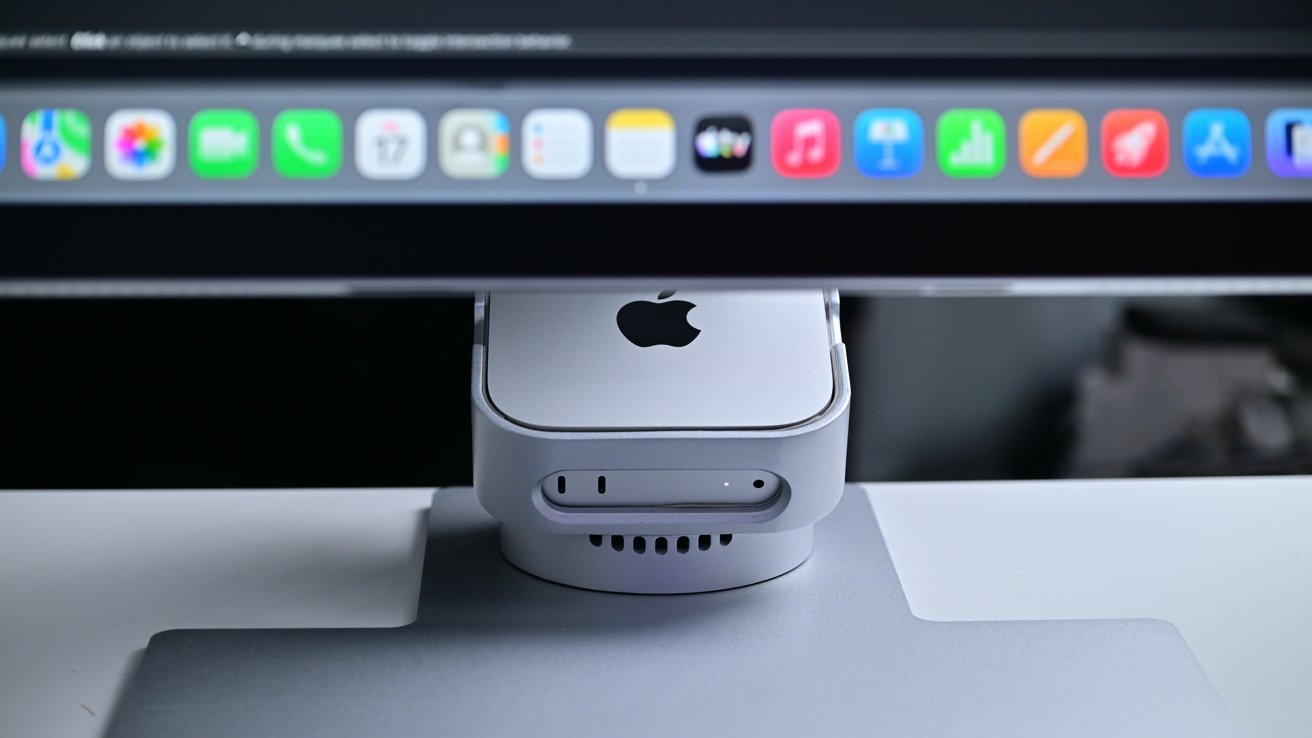
So far in our testing, the Aspekt Touch 4K UHD Monitor touchscreen works pretty well with macOS drawing apps, and the Omni Fold stand Mac mini dock is cool. The combo costing more than a Studio Display is a turn-off.
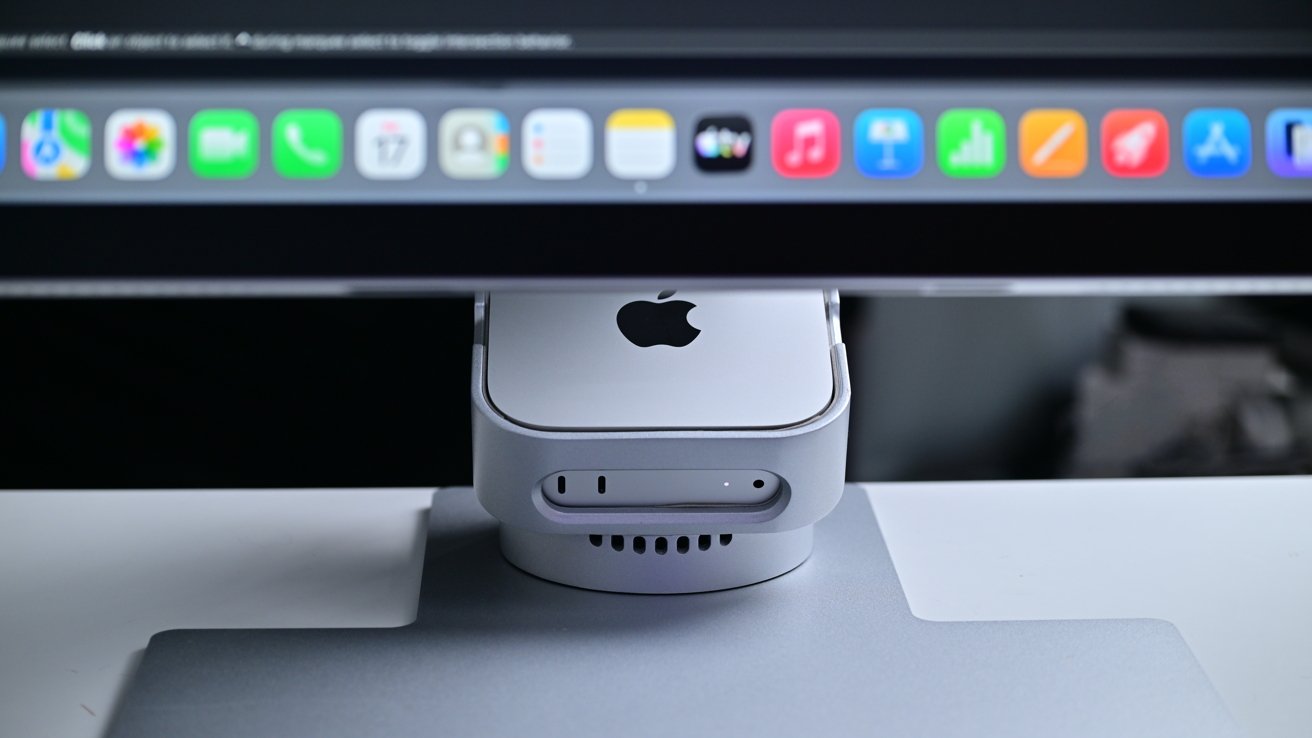
The new Aspekt Touch 4K Monitor with Mac mini dock
We talked about this pair in a news post a few months ago, you guys had opinions, and I knew almost instantly that we’d have to get it on our test bench. We’ve had this combo for all of 24 hours at this point, and we thought we’d talk a bit about it now, in advance of a full review later.
Let’s get into the hardware. The Aspekt Touch 4K UHD Monitor touchscreen is a decently-performing 4K display, with integrated touch. The main issue with touch here is not the hardware, but macOS.
Continue Reading on AppleInsider | Discuss on our Forums


Kyrgyzstan-based cryptocurrency exchange Grinex has suspended its operations after suffering a $13.7 million hack attributed to Western intelligence agencies.
The funds were stolen from cryptocurrency wallets belonging to Russian users, as the platform enables crypto-ruble exchange operations between Russian businesses and individuals.
Launched early last year, Grinex has Russian links and is believed to be a rebrand of Garantex, a Russian crypto exchange whose admin was arrested and whose domains were seized over allegations of processing more than $100 million in illicit transactions and enabling money laundering.

In August 2025, the U.S. Department of the Treasury announced sanctions against Grinex, based on evidence that the exchange service was a continuation of Garantex activity, accepting the same actors, their funds, and facilitating an identical role as an illegal operations enabler.
Grinex continued to operate, providing Russia with some level of financial sovereignty and ability to bypass international sanctions that impacted banking and transactions, mainly through a Russian ruble-backed stablecoin named A7A5, which was directly adopted from Garantex.
The exchange says that the type of attack and the digital footprint indicate a threat actor associated with “foreign intelligence agencies” that have “an unprecedented level of resources and technology, accessible only to entities of hostile states.”
“According to preliminary data, the attack was coordinated with the aim of directly harming Russia’s financial sovereignty,” Grinex states.
Blockchain analysis firm Elliptic reports that the theft occurred on Wednesday at 12:00 UTC, and the stolen funds were sent to TRON and Ethereum addresses, then converted into TRX and ETH through the SunSwap decentralized trading protocol.
TRM Labs identified 70 attacker addresses and also discovered a second hack at TokenSpot, another exchange based in Kyrgyzstan with ties to Grinex.
TRM Labs links TokenSpot to Houthi-linked laundering operations, weapons procurement, and the InfoLider influence operation in Moldova, all aligning with Russian strategic goals.
Neither Grinex’s announcement nor Elliptic’s or TRM Labs’ reports provides any evidence pointing to a specific perpetrator, and no technical evidence or indicators were provided to support the exchange’s attribution to Western intelligence services.
BleepingComputer has contacted Grinex about attribution of the attack, but we have not received a response by publishing time.

AI chained four zero-days into one exploit that bypassed both renderer and OS sandboxes. A wave of new exploits is coming.
At the Autonomous Validation Summit (May 12 & 14), see how autonomous, context-rich validation finds what’s exploitable, proves controls hold, and closes the remediation loop.
Tech
The $100-a-month workforce: How an entrepreneur bootstrapped a Portland delivery startup with AI bots


Taylor Marean is a lifelong entrepreneur, tracing his first venture to mowing lawns in his Hood River, Ore., neighborhood at age 11. His latest startup is Fetchlist, which pairs delivery services with platforms like Craigslist and Facebook Marketplace. The company handles the awkward logistics of coordinating with strangers and moving bulky items — tasks that can prevent secondhand goods from finding new homes.
Marean — who also runs a Columbia River-based tourism business renting kayaks and e-bikes and shuttling visitors to outdoors destinations — is set on bootstrapping his startup. That has him leaning heavily on artificial intelligence to get Fetchlist up and running.
“I would definitely consider myself a power user of AI,” he said. “It’s insane what can be done now by one person. I feel like I have a whole team working for me, because I have a bunch of bots that literally work 24 hours a day, seven days a week.”
His virtual employees cost $100 a month thanks to Anthropic’s Claude Pro, his prime source for agentic AI.
Marean’s startup helps online marketplace shoppers by acting as an intermediary and delivery service. When a buyer finds a listing they like, Fetchlist contacts the seller and sets up a time for one of the company’s drivers or “fetchers” to check out the item and review it with the buyer. If the buyer is in, that person pays the seller for the item as well as Fetchlist to move and deliver it to them.

Those are the human roles. Behind the scenes, Marean is using AI agents to build and revise his website. The bots are posting ads and listings on Craigslist in popular categories to drum up interest. The agents are contacting sellers of large items, zeroing in on those whose couch or table has languished for a couple of weeks to see if they want to offer delivery.
Marean said he’s always thinking of how to get customers and experimenting with new approaches. “The agents test all of my ideas — and I’m not saying that they all work,” he said. But the costs are so low, “there’s no harm in trying.”
The startup launched earlier this year, is operating just in Portland for now and has completed dozens of deliveries. The service costs $30–$75 depending on mileage, and large items requiring two people to move them are double the rate.
Marean said it has been easy to hire fetchers, many of whom are DoorDash and Uber drivers with large vehicles that are underutilized for those services. They work as independent contractors, and Fetchlist is currently passing all of the fee to them and operating at a small loss.
There’s competition in the secondhand sales sector beyond existing platforms, though each targets different challenges in resale. In the Pacific Northwest, Gone.com is a Seattle venture focused on clearing out large spaces of unwanted items and selling desks, chairs and other goods. Portland-based Sella charges customers a flat fee for reselling and shipping their used items.
Marean realizes that while his company aims to help the environment, the bots he deploys contribute to the AI infrastructure demands — model training, data centers — that are straining energy and water systems worldwide.
When considering the relative climate and sustainability impacts, Marean said, “the individual AI query is orders of magnitude cleaner than buying a single piece of flat-pack furniture.”
He hopes that if Fetchlist is successful, it can address a fundamental problem with modern society.
“For a lot of people, it’s easier just to get rid of something in the garbage than it is to even deal with the hassle of selling it on Craigslist or something like that,” Marean said. “We’re just trying to be a solution in climate change and in sustainability.”
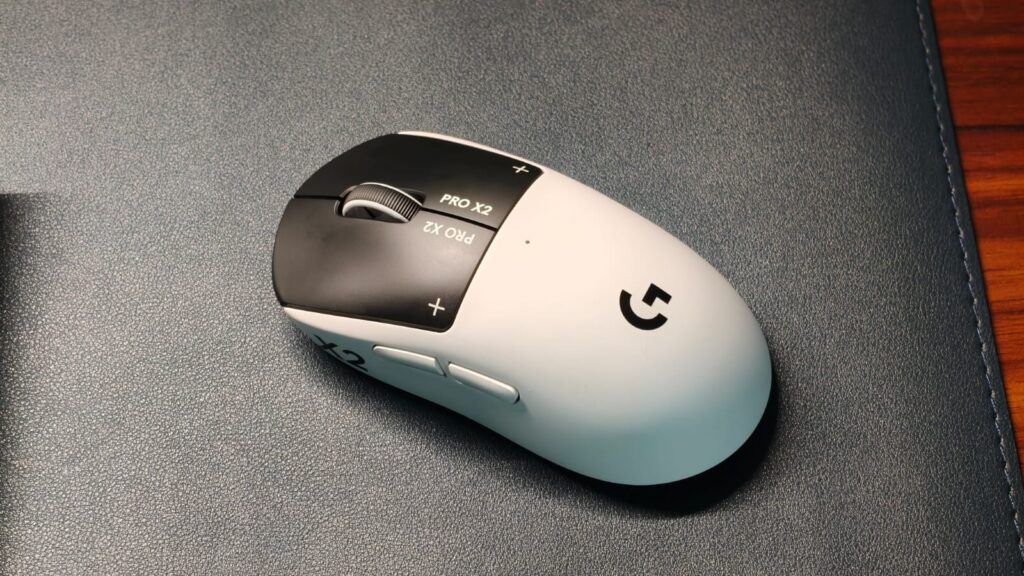
Gaming mice used to be at the forefront of exciting features, with brands working hard to gain a competitive edge. Sadly, that hasn’t happened in the last few years, as we’ve slowly gone down the numbers-game road, which isn’t scenic at all. These days, it’s only about which mouse has a DPI reaching high enough to operate a projector screen, or a weight so light it’s difficult to comprehend if you’re even holding something or not. Logitech, however, with its all-new Pro X2 Superstrike, has seen this trend and just said, “yeah, no.”
So, what’s the Pro X2 Superstrike about? It’s a mouse, of course, that takes the clicks of a conventional one and throws them away. Instead, the Superstrike takes a page from the MacBook playbook by borrowing its haptic motors for the clicking mechanism. It’s something that’s never been done before, yet still makes a ton of sense for serious gamers. But are these latency benefits even worth it? To answer this very question, I used the Pro X2 Superstrike for over two weeks. Spoiler alert: it might be the best gaming mouse I’ve used. Here’s why.
Logitech Pro X2 Superstrike Review
Summary
The Logitech Pro X2 Superstrike is something genuinely different. The haptic buttons are one-of-a-kind and work exceptionally well for both gaming and general productivity. In fast-paced games, the reduced actuation distance can actually make a noticeable difference to reaction times. The Logitech G Hub software is easy to use and offers plenty of customization, while the lightweight design makes it comfortable for long sessions.
Design & No Clicks???

Despite the all-new mechanism, which we’ll talk about soon, Logitech hasn’t changed much about the Superstrike’s design. Instead, it bears a striking resemblance to the SuperLight 2, and that’s not a bad thing. I’m a fan of this new Stormtrooper-inspired color with the white shell and black buttons. The shape is fairly standard without all the ergonomic trickery. The finish is smooth, doesn’t attract any fingerprints, and is super easy to clean, if you like eating Doritos like me when gaming. Weight is kept at 61g, for which the company pulled a lot of strings, like using titanium screws and drilling holes in the PCB. While comfort is subjective, my pain-prone wrists did like the Superstrike during long gaming sessions.
Let’s talk buttons and clicks. The two extra buttons on the left side are the standard kind, meaning they push down when you press them. The real magic happens on the left and right clicks. Logitech has developed a new system called HITS (Haptic Inductive Trigger System). It’s a bit of a mouthful for something that means the mouse combines tiny haptic motors with an electrical sensor to register a click. Remember the Hall Effect on the keyboard? It’s pretty much the same thing, except you can change when the click is registered.

The benefits of this system are pretty obvious. In most mice, the click is activated after 0.6mm of travel. It’s not a lot, but still more than an eSports player in the heat of a battle would like. With the Superstrike, you can set it to activate after just 0.1mm of travel. That’s incredibly sensitive and means your movements will be registered faster than anyone else’s when coming out of a corner in Valorant or CS2. Logitech claims up to a 30ms reduction in latency.
Speaking of those clicks, I do like them a lot. If you’ve used a MacBook trackpad, then these would be familiar. They are not quite as sharp but still really tactile. You can configure how hard the click should be. The feedback at the highest setting is simply lovely, and I’d actually much rather have these than buttons. What makes things even better is the consistency. Usually, when playing games that require rapid right-clicking, you need to press the button at the optimal area to minimize resistance. But with the Superstrike, you can tap anywhere, and both the feedback and actuation would remain the same.
Gaming on the Logitech Pro X2 Superstrike

Let me get one thing straight: the Pro X2 Superstrike won’t make a bad gamer like me into an eSports player. It can, however, put a good player into eSports territory. I noticed that difference right away, when I first used the mouse, and thought, “Yup, this is it.” Logitech’s Hero sensors play beautifully with the HITS system. Sure, DPI can be set to an oblivion-like 44,000, but for the sake of my tiny 27-inch monitor, I kept it between 900 and 2,000. Tracking was more precise than any other mouse I’ve tested.
Let’s talk numbers. For testing, I picked up a generic ASUS mouse that used the same 2.5 GHz connection. The software of choice was AimLabs, a training ground for players to improve their reaction time by quickly hitting different objects on the screen. I first locked in with the regular mouse (three tries) and got an average reaction time of 243ms (not bad, right?). Then I switched to the Superstrike, with the clicks set to activate as soon as possible. In my best attempt, the reaction time was 218ms, which was noticeably better than my usual results.

But that’s not all the Superstrike has to offer. That’s because it introduces Rapid Triggers to a mouse for the very first time. For the uninitiated, Rapid Triggers are a keyboard technology that allows the keys to reset and re-actuate instantly after a slight lift of your finger.
I loved how it all comes together in games like CS2, where I went from averaging a few kills to at least landing some headshots. And that pretty much explains the Pro X2 Superstrike. It’s the best tool for gaming, and something you can rely on to help climb the eSports ladder.
For all my fellow Excel and Google Sheets users, while Superstrike isn’t really designed for productivity, I still used it as my daily driver for research. The results? I was doing spreadsheets a tad bit quicker thanks to the haptic clicks, which I configured to perfection. After a long day of work, I also noticed that my index finger didn’t hurt as much with a normal mouse.
Software & Customization
I talked about the customization part above, but to reiterate, the G Hub app handles it all. It’s available on both macOS and Windows and works pretty well. The app is neatly laid out with different sections. At the top is Sensitivity, which, as the name suggests, lets you adjust the DPI. If you’re new, Logitech has a bunch of presets baked in for different types of games. You can adjust the XY axis split, too. Beyond that, there are Assignments that let you assign different functions to the buttons and configure macros. The Scroll Wheel section has BHOP mode, designed to prevent activation from accidental bumps on the scroll wheel.
The real star is the HITS Configuration. Here, you adjust the Actuation point, or the point at which the haptic system registers a click. It can be set from a scale of 0-10, with zero requiring the least effort, and is better for gaming. Then there’s the Rapid Trigger adjustment, and lastly, Click Haptics. While a stronger haptic results in higher battery drain, I didn’t worry much as the Superstrike’s battery life is impressive. It lasted more than a week on a single charge, and I used it as my primary work mouse every day for 8 hours, too.
Verdict

At $189.99 or ₹23,995 on Amazon in India, I agree that the Logitech Pro X2 Superstrike is a premium mouse. But unlike others, it’s something genuinely different. The haptic buttons are one-of-a-kind and work exceptionally well for both gaming and general productivity. In fast-paced games, the reduced actuation distance can actually make a noticeable difference to reaction times. The Logitech G Hub software is easy to use and offers plenty of customization, while the lightweight design makes it comfortable for long sessions. I’m sure we’ll see this tech being copied by others, but until then, if you’re shopping for a serious mouse, the Logitech Pro X2 Superstrike should be on your list.
Tech
Anthropic just launched Claude Design, an AI tool that turns prompts into prototypes and challenges Figma
Anthropic today launched Claude Design, a new product from its Anthropic Labs division that allows users to create polished visual work — designs, interactive prototypes, slide decks, one-pagers, and marketing collateral — through conversational prompts and fine-grained editing controls. The release, available immediately in research preview to all paid Claude subscribers, is the company’s most aggressive expansion beyond its core language model business and into the application layer that has historically belonged to companies like Figma, Adobe, and Canva.
Claude Design is powered by Claude Opus 4.7, Anthropic’s most capable generally available vision model, which the company also released today. Anthropic says it is rolling access out gradually throughout the day to Claude Pro, Max, Team, and Enterprise subscribers.
The simultaneous launches mark a watershed for Anthropic, whose ambitions now visibly extend from foundation model provider to full-stack product company — one that wants to own the arc from a rough idea to a shipped product. The timing is also significant: Anthropic hit roughly $20 billion in annualized revenue in early March 2026, according to Bloomberg, up from $9 billion at the end of 2025 — and surpassed $30 billion by early April 2026. The company is in early talks with Goldman Sachs, JPMorgan, and Morgan Stanley about a potential IPO that could come as early as October 2026.
How Claude Design turns a text prompt into a working prototype
The product follows a workflow that Anthropic has designed to feel like a natural creative conversation. Users describe what they need, and Claude generates a first version. From there, refinement happens through a combination of channels: chat-based conversation, inline comments on specific elements, direct text editing, and custom adjustment sliders that Claude itself generates to let users tweak spacing, color, and layout in real time.
During onboarding, Claude reads a team’s codebase and design files and builds a design system — colors, typography, and components — that it automatically applies to every subsequent project. Teams can refine the system over time and maintain more than one. The import surface is broad: users can start from a text prompt, upload images and documents in various formats, or point Claude at their codebase. A web capture tool grabs elements directly from a live website so prototypes look like the real product.
What distinguishes Claude Design from the wave of AI design experiments that have proliferated in the past year is the handoff mechanism. When a design is ready to build, Claude packages everything into a handoff bundle that can be passed to Claude Code with a single instruction. That creates a closed loop — exploration to prototype to production code — all within Anthropic’s ecosystem. The export options acknowledge that not everyone’s next step is Claude Code: users can also share designs as an internal URL within their organization, save as a folder, or export to Canva, PDF, PPTX, or standalone HTML files.
Anthropic points to Brilliant, the education technology company known for intricate interactive lessons, as an early proof point. The company’s senior product designer reported that the most complex pages required 20 or more prompts to recreate in competing tools but needed only 2 in Claude Design. The Brilliant team then turned static mockups into interactive prototypes they could share and user-test without code review, and handed everything — including the design intent — to Claude Code for implementation. Datadog’s product team described a similar shift, compressing what had been a week-long cycle of briefs, mockups, and review rounds into a single conversation.
Why Anthropic’s chief product officer just resigned from Figma’s board
The launch arrives against a backdrop that makes Anthropic’s claim of complementarity with existing design tools difficult to take entirely at face value. Mike Krieger, Anthropic’s chief product officer, resigned from the board of Figma on April 14 — the same day The Information reported Anthropic’s next model would include design tools that could compete with Figma’s primary offering.
Figma has collaborated closely with Anthropic to integrate the frontier lab’s AI models into its products. Just two months ago, in February, Figma launched “Code to Canvas,” a feature that converts code generated in AI tools like Claude Code into fully editable designs inside Figma — creating a bridge between AI coding tools and Figma’s design process. The partnership felt like a mutual bet that AI would make design more essential, not less. Claude Design complicates that narrative significantly.
Anthropic’s position, based on VentureBeat’s background conversations with the company, is that Claude Design is built around interoperability and is meant to meet teams where they already work, not replace incumbent tools. The company points to the Canva export, PPTX and PDF support, and plans to make it easier for other tools to connect via MCPs (model context protocols) as evidence of that philosophy. Anthropic is also making it possible for other tools to build integrations with Claude Design, a move clearly designed to preempt accusations of walled-garden ambitions.
But the market read the signals differently. The structural tension is clear: Figma commands an estimated 80 to 90% market share in UI and UX design, according to The Next Web. Both Figma and Adobe assume a trained designer is in the loop. Anthropic’s tool does not. Claude Design is not merely another AI copilot embedded in an existing design application. It is a standalone product that generates complete, interactive prototypes from natural language — accessible to founders, product managers, and marketers who have never opened Figma. The expansion of the design user base to non-designers is the real competitive threat, even if the professional designer’s workflow remains anchored in Figma for now.
Inside Claude Opus 4.7, the model Anthropic deliberately made less dangerous
The model powering Claude Design is itself a significant story. Claude Opus 4.7 is Anthropic’s most capable generally available model, with notable improvements over its predecessor Opus 4.6 in software engineering, instruction following, and vision — but it is intentionally less capable than Anthropic’s most powerful offering, Claude Mythos Preview, the model the company announced earlier this month as too dangerous for broad release due to its cybersecurity capabilities.
That dual-track approach — one model for the public, one model locked behind a vetted-access program — is unprecedented in the AI industry. Anthropic used Claude Mythos Preview to identify thousands of zero-day vulnerabilities in every major operating system and web browser, as reported by multiple outlets. The Project Glasswing initiative that houses Mythos brings together Amazon Web Services, Apple, Broadcom, Cisco, CrowdStrike, Google, JPMorganChase, the Linux Foundation, Microsoft, Nvidia, and Palo Alto Networks as launch partners.
Opus 4.7 sits a deliberate step below Mythos. Anthropic stated in its release that it “experimented with efforts to differentially reduce” the new model’s cyber capabilities during training and ships it with safeguards that automatically detect and block requests indicating prohibited or high-risk cybersecurity uses. What Anthropic learns from those real-world safeguards will inform the eventual goal of broader release for Mythos-class models. For security professionals with legitimate needs, the company has created a new Cyber Verification Program.
On benchmarks, the model posts strong numbers. Opus 4.7 reached 64.3% on SWE-bench Pro, and on Anthropic’s internal 93-task coding benchmark, it delivered a 13% resolution improvement over Opus 4.6, including solving four tasks that neither Opus 4.6 nor Sonnet 4.6 could crack.
The vision improvements are substantial and directly relevant to Claude Design: Opus 4.7 can accept images up to 2,576 pixels on the long edge — roughly 3.75 megapixels, more than three times the resolution of prior Claude models. Early access partner XBOW, the autonomous penetration testing company, reported that the new model scored 98.5% on their visual-acuity benchmark versus 54.5% for Opus 4.6.
Meanwhile, Bloomberg reported that the White House is preparing to make a version of Mythos available to major federal agencies, with the Office of Management and Budget setting up protections for Cabinet departments — a sign that the government views the model’s capabilities as too important to leave solely in private hands.
What enterprise buyers need to know about data privacy and pricing
For enterprise and regulated-industry buyers, the data handling architecture of Claude Design will be a critical evaluation criterion. Based on VentureBeat’s exclusive background discussions with Anthropic, the system stores the design-system representation it generates — not the source files themselves. When users link a local copy of their code, it is not uploaded to or stored on Anthropic’s servers. The company is also adding the ability to connect directly to GitHub. Anthropic states unequivocally that it does not train on this data. For Enterprise customers, Claude Design is off by default — administrators choose whether to enable it and control who has access.
On pricing, Claude Design is included at no additional cost with Pro, Max, Team, and Enterprise plans, using existing subscription limits with optional extra usage beyond those caps. Opus 4.7 holds the same API pricing as its predecessor: $5 per million input tokens and $25 per million output tokens. The pricing strategy mirrors the approach Anthropic took with Claude Code, which launched as a bundled feature and rapidly grew into a major revenue driver. Anthropic’s reasoning is straightforward: the best way to learn what people will build with a new product category is to put it in their hands, then build monetization around demonstrated value.
Anthropic is also being transparent about the product’s limitations. The design system import works best with a clean codebase; messy source code produces messy output. Collaboration is basic and not yet fully multiplayer. The editing experience has rough edges. There is no general availability date, and Anthropic says that is intentional — it will let the product and user feedback determine when Claude Design is ready for prime time.
Anthropic’s bet that owning the full creative stack is worth the risk
Claude Design is the most visible expression of a trend that has been accelerating for months: the major AI labs are moving up the stack from model providers into full application builders, directly entering categories previously owned by established software companies. Anthropic now offers a coding agent (Claude Code), a knowledge-work assistant (Claude Cowork), desktop computer control, office integrations for Word, Excel, and PowerPoint, a browser agent in Chrome, and now a design tool. Each product reinforces the others. A designer can explore concepts in Claude Design, export a prototype, hand it to Claude Code for implementation, and have Claude Cowork manage the review cycle — all within Anthropic’s platform.
The financial momentum behind this expansion is staggering. Anthropic has received investor offers valuing the company at approximately $800 billion, according to Reuters, more than doubling its $380 billion valuation from a funding round closed just two months ago. But building an application empire while simultaneously navigating an AI safety reputation, an impending IPO, growing public hostility toward the technology, and the diplomatic fallout of competing with your own partners is a balancing act that no technology company has attempted at this scale or speed.
When Figma launched Code to Canvas in February, the implicit promise was that AI coding tools and design tools would grow together, each making the other more valuable. Two months later, Anthropic’s chief product officer has left Figma’s board, and the company has shipped a product that lets anyone who can type a sentence create the kind of interactive prototype that once required years of design training and a Figma license. The partnership may survive. But the power dynamic just changed — and in the AI industry, that tends to be the only kind of change that matters.
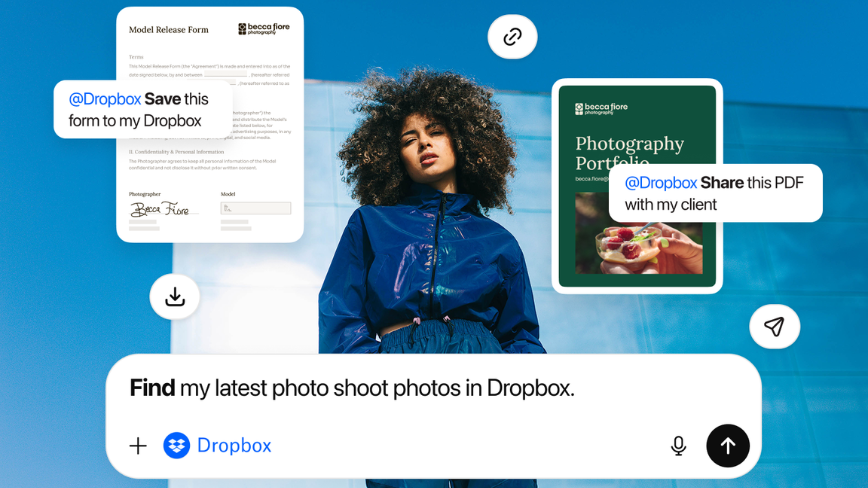
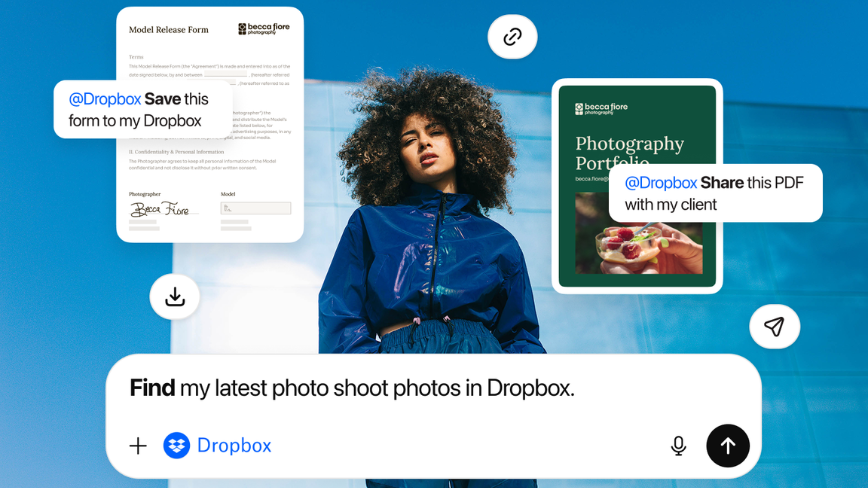
The storage company is launching a Dropbox file app, a Dropbox Dash enterprise search app, and a Reclaim AI calendar app inside ChatGPT, letting users access, save, and act on their work without leaving the AI interface.
The move is the latest sign that ChatGPT is positioning itself as a productivity operating system, not just a chat tool.
Dropbox is launching three new apps inside ChatGPT, extending its file storage, enterprise search, and AI calendar products into OpenAI’s chat interface.
The three apps, a core Dropbox file app, a Dropbox Dash app, and a Reclaim AI calendar app, cover the three main coordination tasks that knowledge workers switch between constantly: finding documents, getting answers from company knowledge, and managing time.
All three are available or coming shortly to the ChatGPT app directory.
The core Dropbox app, now globally available to customers on any plan, lets users access and preview their Dropbox files, save AI-generated content directly back to Dropbox, and share links from within a ChatGPT conversation.
ChatGPT can also reference files already stored in a user’s Dropbox account when generating drafts or answering questions, providing relevant context without requiring manual uploads or copy-pasting between tools.
Dropbox says existing sharing permissions and access controls are preserved when files are accessed through the ChatGPT integration.
The Dropbox Dash app extends that context significantly. Dash, Dropbox’s enterprise search product, already aggregates content from more than 30 connected workplace applications, including email, Slack, Google Workspace, and other commonly used tools, into a single searchable surface.
The ChatGPT integration means a user can ask a question in ChatGPT and receive an answer drawn from that broader company knowledge base, personalised to what that user and their team have access to.
The Dash app will be available in the coming weeks for existing Dash customers, with a free 30-day trial available for new users.
The third app brings Reclaim AI, the AI scheduling tool Dropbox acquired for $40.2 million in July 2024, directly into ChatGPT. Reclaim uses AI to automatically manage and optimise Google Calendar and Microsoft Outlook schedules, defending focus time, scheduling around preferences, and resolving conflicts.
The ChatGPT integration lets users add events, find meeting times, analyse productivity patterns, and get an overview of their day from within a chat conversation.
The app is available globally in English to users on the latest version of the Reclaim AI calendar system.
The three launches reflect a broader shift in how productivity software companies are positioning themselves relative to AI chat interfaces.
Rather than build competing AI assistants, a path that would put Dropbox in direct contest with OpenAI, Google, and Microsoft, Dropbox is making its products available within the interface where users are increasingly spending time.
The strategy mirrors moves by other enterprise software companies building apps into the ChatGPT ecosystem, which has rapidly expanded beyond conversational AI toward something resembling a task-execution layer: a place where users not only ask questions but act on the answers.
For Dropbox, whose core file-sync business faces competition from Google Drive and Microsoft OneDrive, the ability to make Dropbox the preferred storage endpoint for AI-generated content could meaningfully reinforce the product’s relevance.
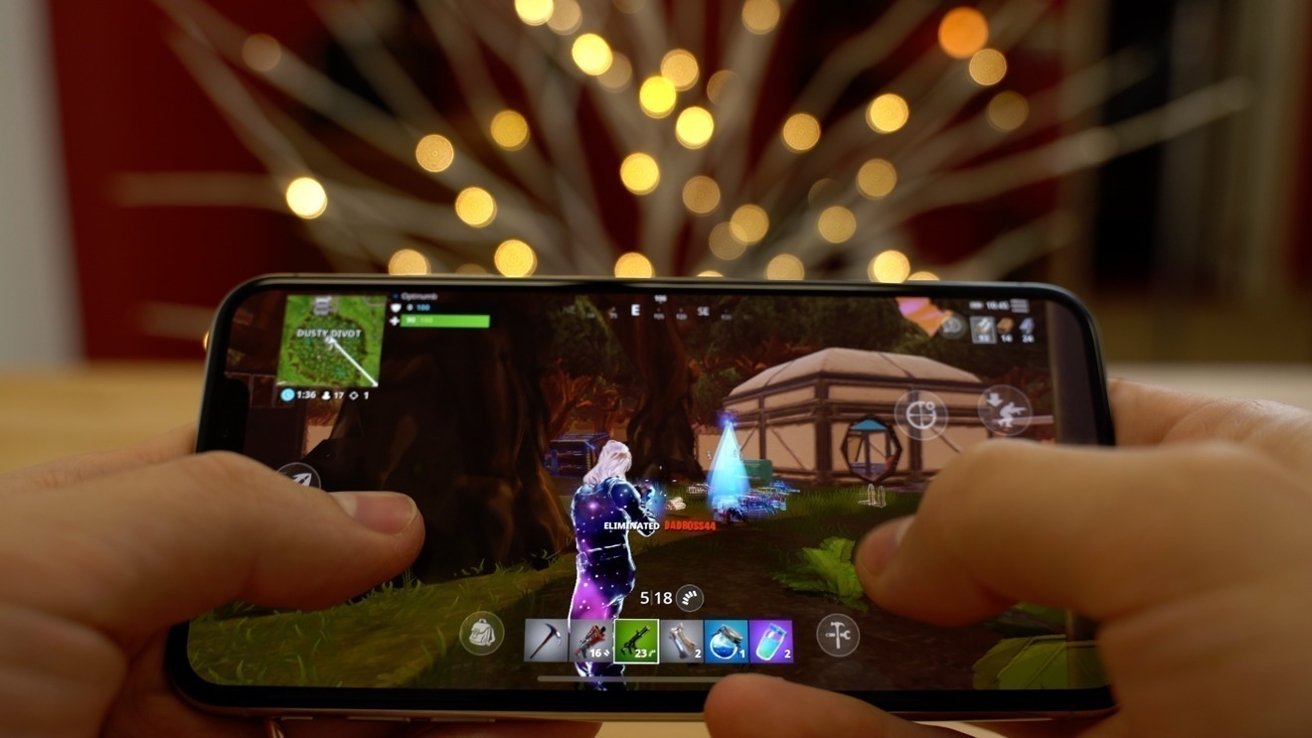
The Epic Games “Fortnite” versus Apple’s AppStore antitrust trial has completed its last week. Here’s what you need to know about the saga, with closing arguments left to go. Between Epic CEO Tim Sweeney’s ongoing complaints, the trial, Apple’s lies, and the Supreme Court, the Epic vs. Apple App Store lawsuit continues to roll on years later. Here’s all you need to know about the long-running courtroom drama, updated on April 17, 2026.
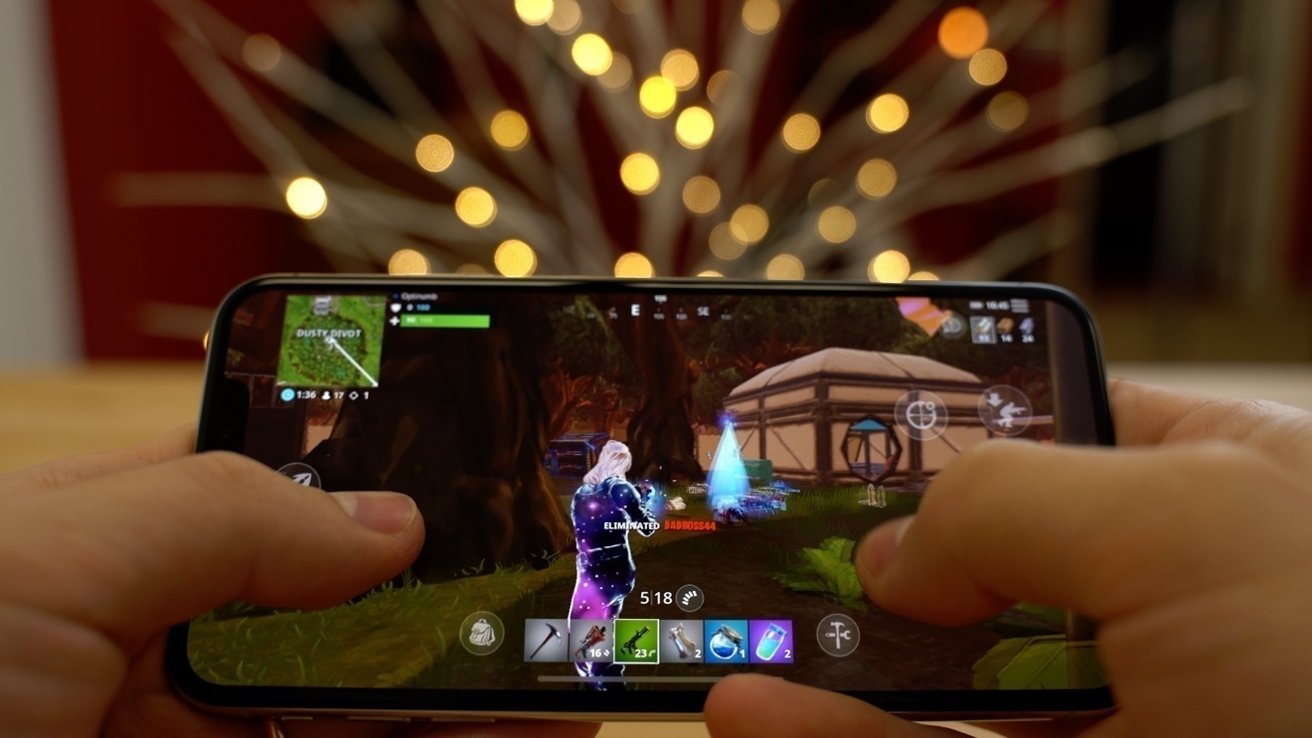
Within the space of a few weeks in 2020, a disagreement between the ambitions of Epic Games and the intention to maintain the App Store status quo by Apple courted considerable controversy. The affair commenced with little warning to consumers but quickly led to international interest as the battle sought to change one of the fundamental elements of the App Store: how much Apple earns.
Apple’s dominance has previously led to an antitrust probe by the U.S. Justice Department into the App Store’s fees and policies. Still, the disagreement between Apple and Epic was being made more public and directly affected younger customers.
Form 13F Cornell Pochily Investment Advisors For: 17 April

Singapore Gulf Bank Launches USDC Mint Service With 24/7 USD Conversion on Solana

Israel calls Lebanese man to say ‘die in car with family or get out and die alone’


-

 Politics5 days ago
World Cup exit makes Italy enter crisis mode
-

 Business7 days ago
Tesla Model Y Tops China Auto Sales in March 2026 With 39,827 Registrations, Beating Cheaper EVs and Gas Cars
-
 NewsBeat5 days ago
Pep Guardiola and Gary Neville agree over Arsenal title problem that benefits Man City
-

 Crypto World4 days ago
The SEC Conditionalises DeFi Platforms to Be Avoided for Broker Registration
-

 Crypto World4 days ago
SEC Signals Exemption for Crypto Interfaces From Broker Registration
-

 News Videos2 days ago
Secure crypto trading starts with an FIU-registered
-

 Sports10 hours ago
NWFL Suspends Two Players Over Post-Match Clash in Ado-Ekiti
-

 Crypto World4 days ago
SEC Proposes Certain Crypto Interfaces Don’t Need to Register as Brokers
-

 Business6 days ago
Ireland Fuel Protests Enter Day 5 as Blockades Spark Shortages and Government Prepares Support Package
-

 NewsBeat3 days ago
Trump and Pope Leo: Behind their disagreement over Iran war
-

 Crypto World7 days ago
Federal judge blocks Arizona from bringing criminal charges against Kalshi
-
 NewsBeat5 days ago
JD Vance announces ‘no agreement’ with Iran over nuclear weapons fear
-

 Business7 days ago
IMF retains floor for precautionary balances at SDR 20 billion
-
Sports5 days ago
Dexter Lawrence, Stefon Diggs, Trading for De’Von Achane
-

 Business7 days ago
Former Liverpool CEO eviscerates FIFA for World Cup ticket pricing
-
Crypto World5 days ago
Sei Network Enters Quiet Reset Phase as On-Chain Metrics Signal a Slowdown in 2026
-

 Crypto World4 days ago
Trump whales load up ahead of Mar-a-Lago luncheon.
-
Business7 days ago
Coreweave CSO Venturo sells $5.5m in class a common stock
-
Sports7 days ago
1st-Round WR Enters Vikings Mock Draft Orbit
-
Business4 days ago
Kering slides after Morgan Stanley downgrade, Gucci woes loom
You must be logged in to post a comment Login