





Connect with us
DAPA Banner

Tech

This Might be the World’s First AI-Enhanced Talking C-3PO Head

Published

on

AI Talking C-3PO Head
Samuel Potozkin spent months shaping a life-size C-3PO head from plastic filament and careful layers of paint. What started as a simple Star Wars fan project grew into a working machine that listens to spoken words and replies in the droid’s familiar voice. Anyone who has ever wished the golden protocol droid from Star Wars could answer back now has a real version sitting on a shelf or desk.


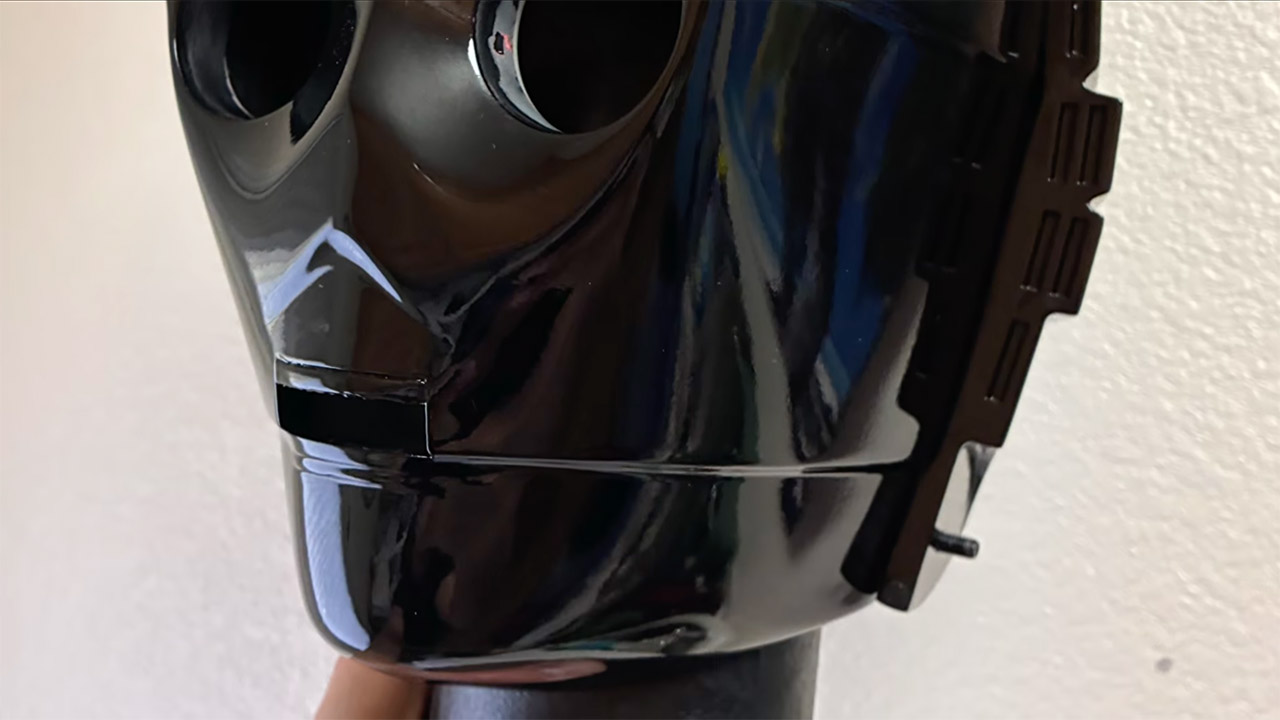
Potozkin printed the head on a Prusa Core 1 machine with PETG filament and a few wobbly layers. Hours of hand sanding later, the curves are velvety smooth. Primer was then used, followed by many layers of Alclad II chrome paint to achieve the desired reflecting gold surface. To achieve that movie-accurate gloss, apply a final layer of yellow-orange color and seal with clear 2K resin. There was a hiccup when the object fell off the desk and a crack formed, but a dab of glue and putty fixed it and work resumed as usual.

Sale


Bambu Lab A1 mini 3D Printer + LED Lamp Kit, Set Up in 20 Mins, High Speed & Precision, Full-Auto…
  • A1 mini + LED Lamp Kit for Functional Light Projects: Bambu Lab A1 mini + LED Lamp Kit lets you create illuminated models. Simply print compatible…
  • High-Speed Precision: Experience unparalleled speed and precision with the Bambu Lab A1 Mini 3D Printer. With an impressive acceleration of…
  • Multi-Color Printing with AMS lite: Unlock your creativity with vibrant and multi-colored 3D prints. The Bambu Lab A1 Mini 3D printers make…

AI Talking C-3PO Head
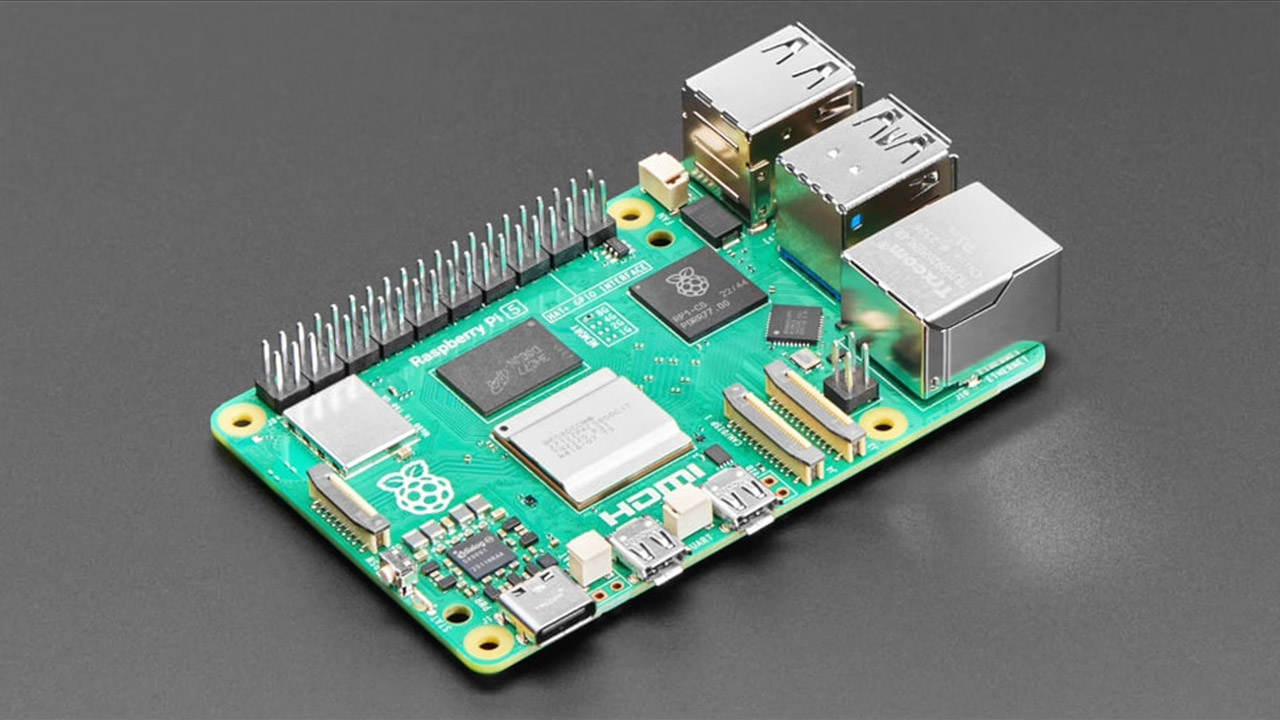
Inside the hollow head, there’s a Raspberry Pi 5, a tiny microphone, and a speaker, all neatly wired. The Pi runs a special piece of programming that manages the conversation. The sound from the microphone is routed through a Whisper-based speech-to-text system and then to a large language model, which generates a response in the style of C-3PO, the bot from the films. A voice-synthesis layer then converts the text into proper speech that sounds similar to Anthony Daniels’ original performance, with a speaker pushing it all out so the head appears to be speaking to you.

AI Talking C-3PO Head
Conversations with the head feel natural, even if there is a small delay between asking and receiving an answer. Ask who the droid is, and you’ll get a nice protocol-droid response. When you ask about Earth, it regales you with statistics in the same super-formal tone that fans associate with the films. The lag was a bit of an issue at first, but with a few code modifications, everything is fine again. When it comes to running the device, no further equipment is required because it is completely self-contained and does not require a separate computer or smartphone app.

AI Talking C-3PO Head
He’s also made the complete code and 3D files available on GitHub so that anyone can try their hand at creating their own version. If you’re curious about how the software pipeline works, there’s a lengthy paper on the same repository that explains everything. Potozkin believes that this effort is simply a modest step toward machines that can sit with humans in the real world rather than merely live on a screen all the time.
[Source]?

Advertisement

Source link

Continue Reading
Click to comment

You must be logged in to post a comment Login

Leave a Reply

Tech

Why Does Wikipedia Think I’m Evan Spiegel?

Published

on

For fifty-one weeks out of the year, I’m 100 percent not the CEO of Snap, the company behind Snapchat. That’s Evan Spiegel, the company’s billionaire cofounder. No one in their right mind would question that. But for one week out of the year, specifically last week, some people may have thought I was the social media firm’s top executive. If you looked on Wikipedia, it sure seemed like I was.

Starting on Sunday, when you clicked on Spiegel’s Wikipedia page, there was a picture of me. The same thing happened if you ran a Google Search for Evan Spiegel or asked Google Gemini about him. At the time of publication, that’s still the case.

How did this happen? Despite what the internet might have you believe, I’m Maxwell Zeff (friends call me Max). The photo on Spiegel’s Wikipedia page was taken at a TechCrunch conference last year. I’m a reporter in my twenties, and while I write about technology companies for a living, I’ve never met Spiegel and have barely ever written about Snapchat.

But now I’m the CEO—according to Wikipedia. This first came to my attention on Monday, when I was scrolling through social media and I saw a random account post “that doesn’t look like Evan Spiegel” with a screenshot of my photo on his Wikipedia page. I paused for a second, wondering if I was seeing things. I reposted the photo on Twitter and said, “Very flattering but that is indeed me, and not the CEO of Snap.” My followers were amused, responding with comments such as “Congrats on the promotion” and “when yacht invitation max.”

Advertisement

The next day, I was still Wikipedia Evan Spiegel. A Snap employee texted a mutual friend a screenshot of a Google search for Spiegel, saying, “Not Max being the second photo that comes up on Google now …” A day later, more colleagues, friends, and family members had started to notice. One texted me, “Why are you Evan Spiegel?” I didn’t have a good answer. Before I knew it, I had spent a whole week as Wikipedia Evan Spiegel. I decided to do some sleuthing.

On April 26, someone with the username “Artem G” changed the photo of Evan Spiegel to one of me with the comment “Newer photo,” according to the page’s revision history. Then, a few days later, someone changed it back, correctly stating: “That’s Maxwell Zeff, not Evan Spiegel.” Within hours, Artem G hopped back on and reverted the change, returning my face to the Wikipedia page saying, “Nah, new photo is better, take it to the talk page if you must.”

Artem G’s attitude and dedication piqued my interest. For the uninitiated, the talk page is where Wikipedia editors go to settle disputes. Who was this person who felt adamantly that I should be Wikipedia Evan Spiegel and was willing to throw down in the talk page to keep me there?

I scrolled a bit further down and found that Artem G had actually tried to make me Wikipedia Evan Spiegel another time, back in February, but the photo had stayed up for only a few hours. I clicked on Artem G’s contributions page to see what other Wikipedia pages he had made changes to. There were lots. He’d made hundreds of contributions to various pages—ranging from Swiss scientists to space artifacts to Claude—just in the past month.

Advertisement

Source link

Continue Reading

Tech

This Twenty-Dollar Maclock Clock Boots the Real Macintosh Desktop

Published

on

Maclock Clock Macintosh Mini Mod
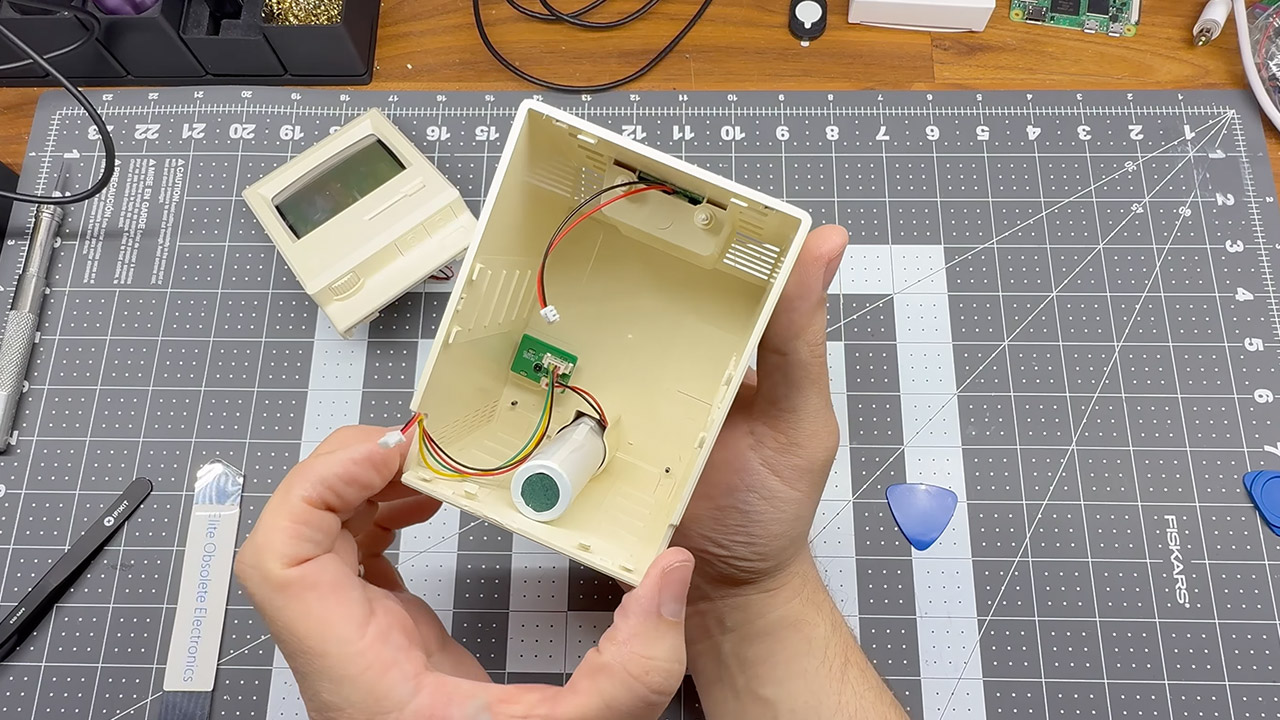
Plenty of people scroll past cheap desk gadgets online without a second thought. One particular alarm clock shaped like the original 1984 Macintosh caught the eye of builder Wells Riley. Sold on AliExpress for around twenty dollars, the Maclock looks shockingly close to the real thing from the outside, complete with the distinctive beige case, floppy disk slot detail, and even a small screen area. Inside, though, it held nothing more than basic clock circuitry and a speaker for alarms.


First, he decided to strip out the components and replace them with parts capable of running genuine Classic Mac OS software, resulting in a tiny little gadget that yet provides a rather accurate retro computer experience. Every original button still works, the brightness knob really adjusts the display, the speaker plays the startup bells and system noises, and the entire thing can be powered by a battery. Of course, no external monitor or keyboard is required to get started, but if you do want to connect to something, use the USB ports.

Sale


Dralaw Maclock Retro Pixel Alarm Clock, 1984 Computer-Inspired USB Desk Clock with Pixel Display…
  • 【Retro 1984 PC Design】 This miniature ivory-colored ABS/PMMA alarm clock revives the charm of the early computer era. A perfect nostalgic piece…
  • 【Multi-Mode Pixel Display】 The high-contrast LCD simultaneously displays time, calendar, date, and room temperature. A hidden pixel smiley…
  • 【Adjustable Brightness for Comfort】 Gentle, warm backlighting in the morning and dim lighting at night protect your sleep. Simple bottom dial…

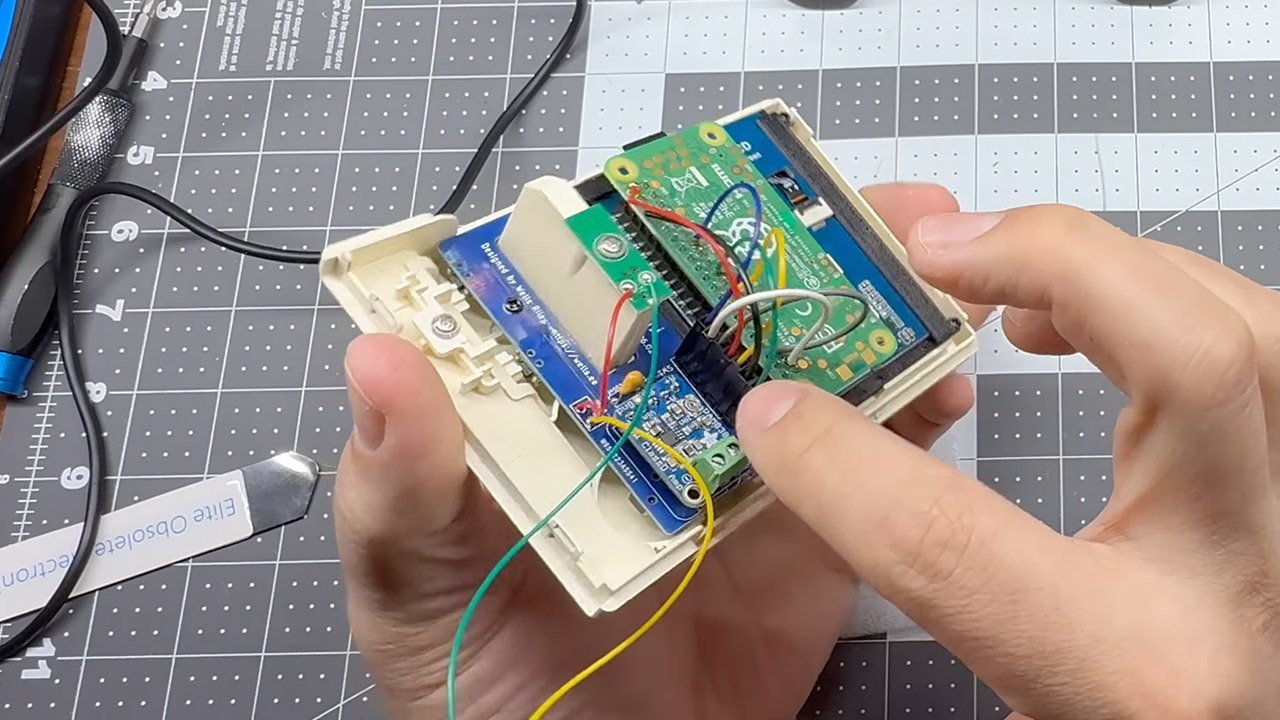
Core hardware choices made the tight fit possible. A Raspberry Pi Zero 2W provides the processing power in a board small enough to hide inside the four-inch-tall case. A Waveshare 2.8-inch IPS LCD replaces the original clock face and delivers crisp pixels at a resolution suitable for the era’s software. To make the screen sit flush behind the curved plastic lens, Riley designed and 3D-printed a custom bezel that adapts the display perfectly to the Maclock’s contours. Without that printed part, the modern panel would sit too deep or sit crooked.

Advertisement

Maclock Clock Macintosh Mini Mod
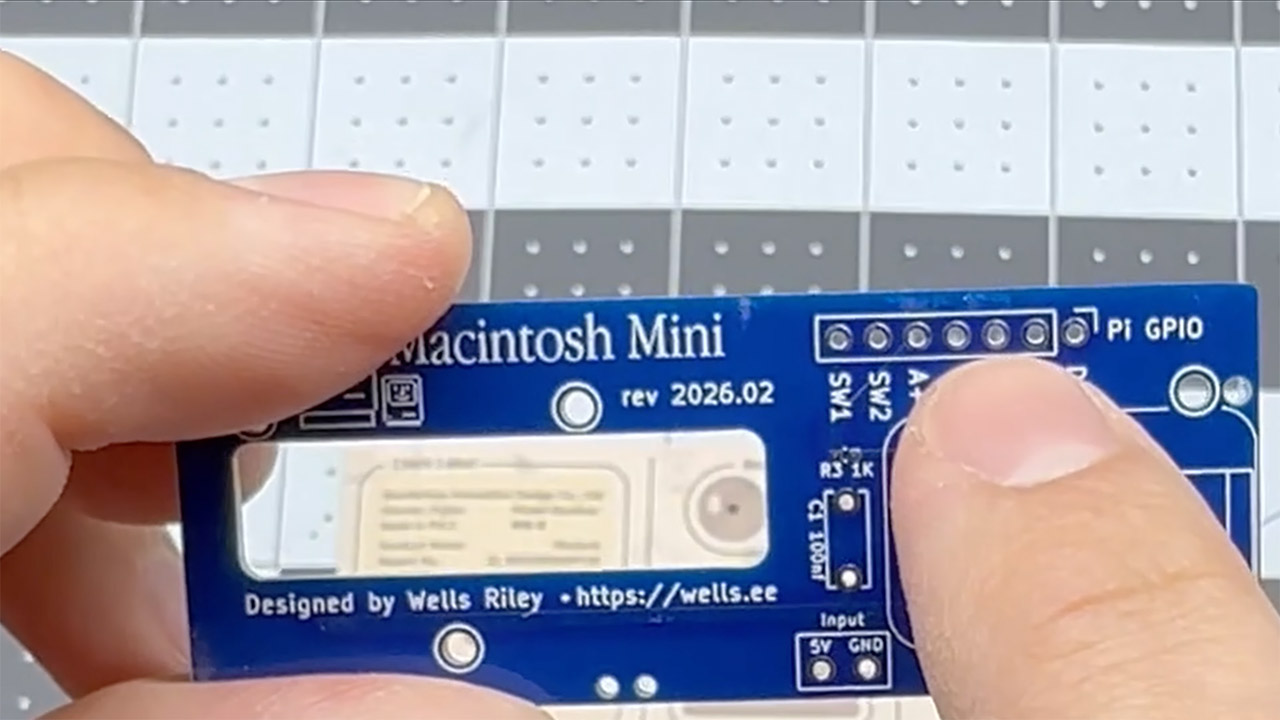
Wiring it all together required additional equipment. Riley created an open-source breakout board called the Macintosh Mini PCB. It may be obtained from sites such as PCBWay, and there is even a shared URL in the project files that anyone can use if they so desire. The board manages the connections for the buttons, the brightness dial, audio output via a small amp, and power. It also has an area where you may bend or remove specific pins on the Pi so that they do not interfere with the screen. The guidelines also provide a basic wiring table that shows you which pins on the breakout board connect to which on the Pi, making the entire soldering procedure much easier even if you’re new to it.

Maclock Clock Macintosh Mini Mod
Assembly is actually a rather simple process. First, you disassemble the Maclock, which means detaching the base and exterior case. You will need to remove all of the original circuitry. Now it’s time to install the 3D-printed bezel and snap it into place. Once completed, the LCD is neatly attached behind it, and the custom PCB is inserted into its allotted location at the bottom. Wires must then be routed to the Pi Zero, which is located in the lower compartment with a small speaker module.

Maclock Clock Macintosh Mini Mod
Getting the software up and running is also rather straightforward. Flash a copy of Raspberry Pi OS Lite onto a microSD card and boot up the Pi, and you’re almost done. Next, locate a Classic Mac OS disk image file that ends in.hda (don’t forget to obtain a compatible ROM file) then transfer those data to the card using a proper computer. Now, connect to the Pi from another computer on the network and perform a single command to retrieve a setup script from the GitHub repository. The script will install the SheepShaver emulator, configure the display drivers to work with your Waveshare panel (with a custom overlay that can be changed), start python scripts for handling the buttons and brightness control, and start all of the system services. After rebooting, the device should launch into the Macintosh environment without any problems, including that nice startup chime.

Source link

Continue Reading

Tech

Kenwood MultiPro Go review: this food processor is excellent for its price and size

Published

on

Why you can trust TechRadar


We spend hours testing every product or service we review, so you can be sure you’re buying the best. Find out more about how we test.

Kenwood MultiPro Go food processor: two-minute review

Full disclosure: I live in a tiny apartment that has more of a kitchenette than a kitchen, so space — both countertop and cabinet — is at a premium. So I usually try to find essential appliances that are compact and eyed the Kenwood MultiPro Go for a long while before putting my faith in it.

The main reason it caught my attention was its design — available in lovely light colours (Clay Red and Storm Blue as Kenwood calls them in Australia, there’s an additional green one in the UK), the appliance is eye-catching and memorable compared to the usual black or grey machines. Another positive is its Express Serve attachment that drops processed foods directly into a container of your choice. You do need to use a wide-mouthed container, though, as the processed items won’t to scatter through the relatively large opening of the attachment.

Advertisement

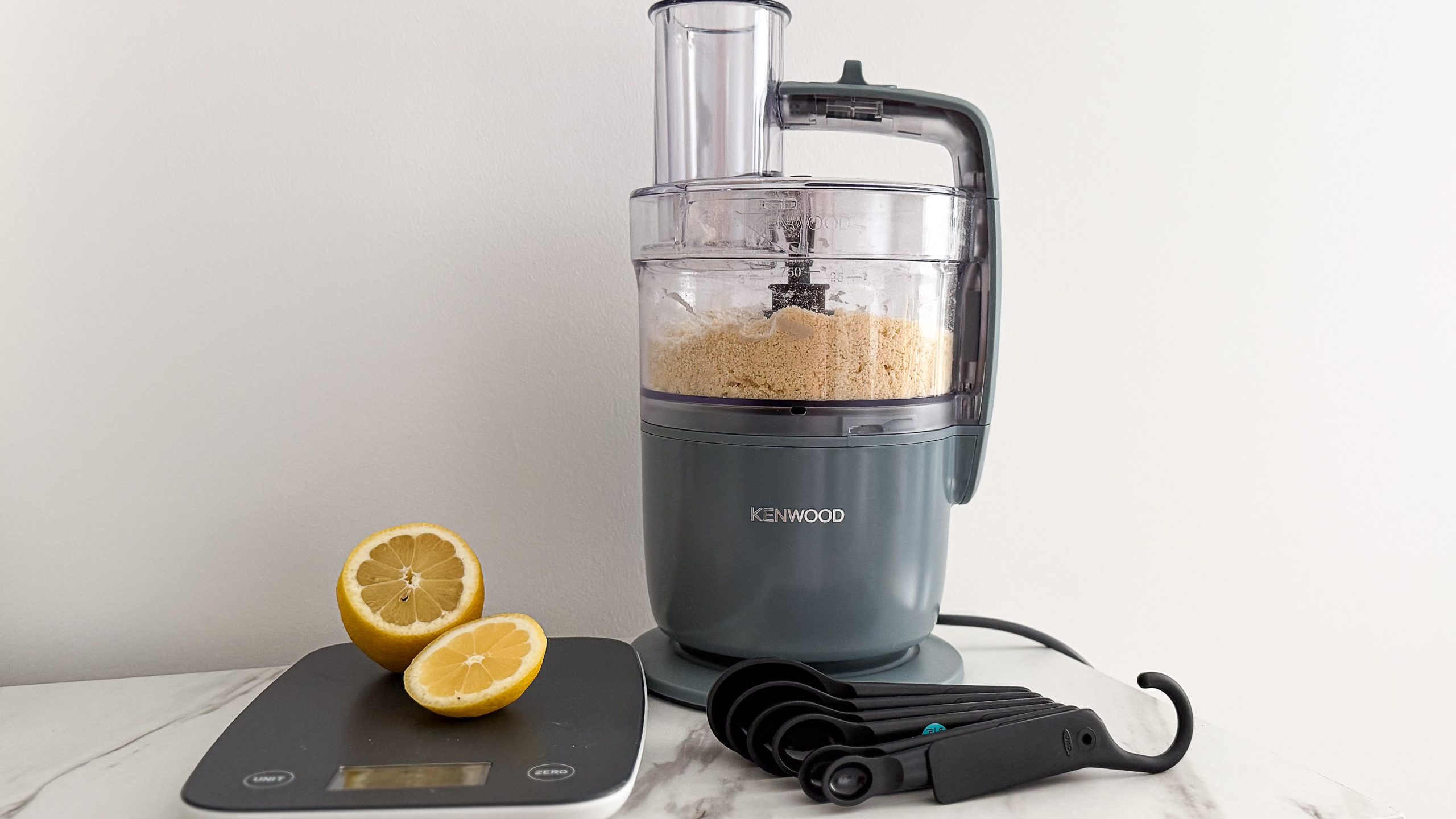
Kenwood MultiPro Go food processor on a table beside kitchen scales, lemon pieces and measuring spoons

(Image credit: Sharmishta Sarkar / TechRadar)

To keep the whole system compact, Kenwood has thoughtfully added a groove for winding the power cable around when stored, although the plug is too large and hangs off the bottom of the base.

Source link

Continue Reading

Tech

The Mother's Day Gifts Our Editors Love (2026)

Published

on

From smart rings and everlasting flowers to weighted vests and LED masks, there’s a gift for every kind of mom.

Source link

Continue Reading

Tech

Dot is the Mac calendar app I wish I had found sooner in 2026

Published

on

I always loved menu bar calendar apps. They let me check upcoming events, add events quickly, and access my calendar without switching apps. It’s one of those small quality-of-life improvements that, once you experience it, you can’t go back from.

My menu bar calendar journey started with Fantastical. It’s one of the best calendar apps on Mac, period. But when Flexibits moved to a subscription model, I couldn’t justify paying for features I wasn’t using. So I moved on.

I then switched to Dato, which is a solid app and served me well for a long time. But it lacks some features, and again, the pricing didn’t feel right. I needed something modern, cleaner, and more affordable. That’s when I discovered Dot.

Is Dot actually worth switching to?

Dot is a menu bar-only Mac calendar app, and it does exactly what it promises without any bloat. It works with iCloud, Google, Outlook, and Exchange by reading directly from your Mac’s built-in Calendar app, so there’s no separate account to create or sign into.

Advertisement

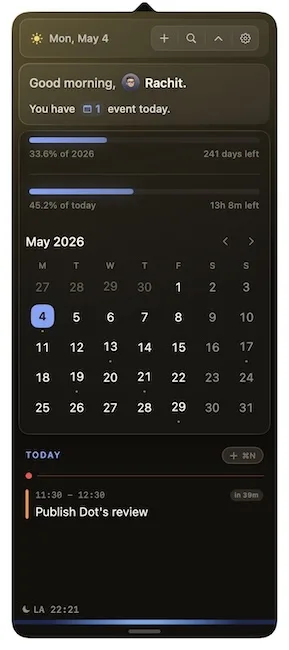
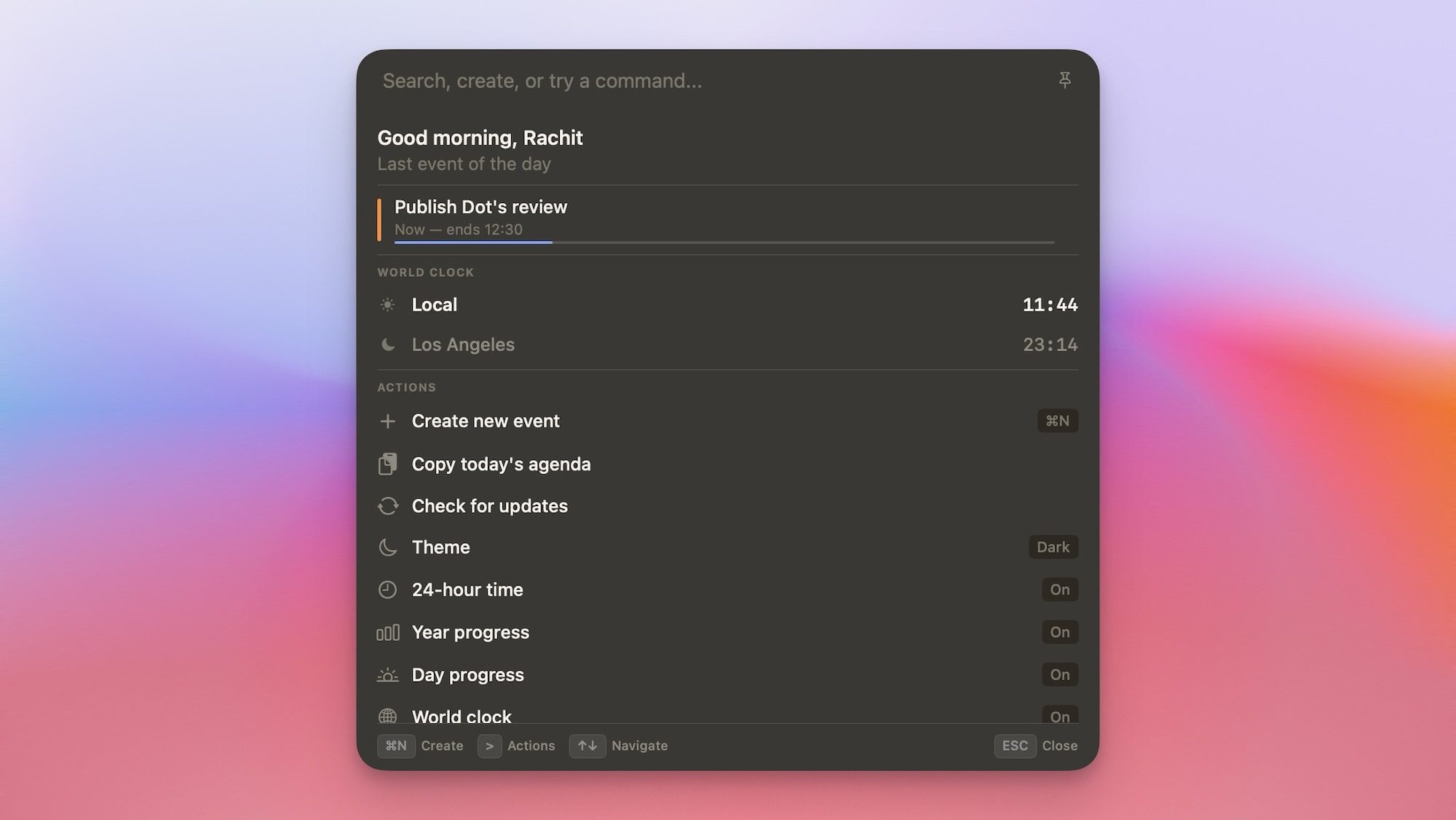
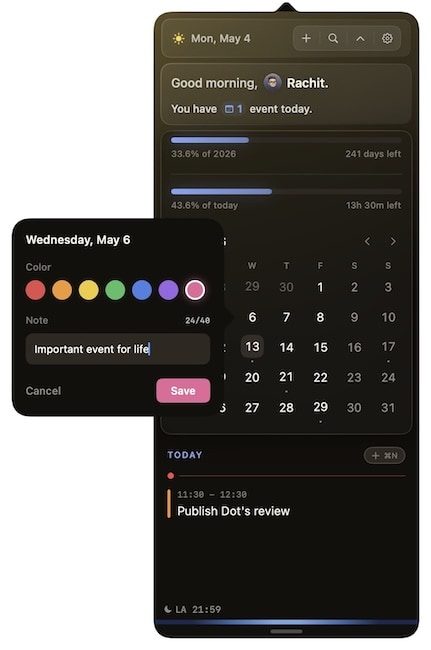
The interface is clean and looks beautiful. At the top, you get a quick glance at today’s event count, the day and date, and a settings icon. You can also add a Day and Year progress bar, which shows how much time is left before the end of the day or year. 

Below that, there’s a month view with small dots marking days that have events scheduled, which makes it easy to spot busy days at a glance. Scroll further and you get a full list of upcoming events.

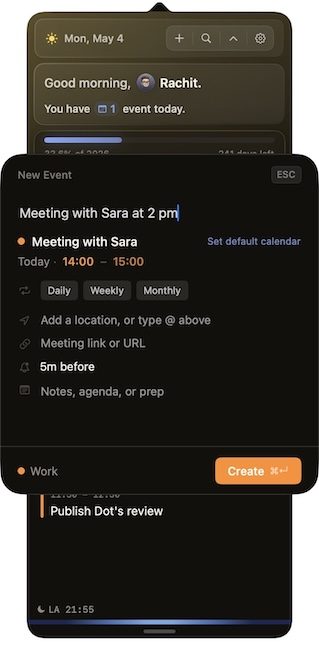
Adding events is fast and supports natural language input. You can type something like “publish Dot’s review at 11:30 am” or “meeting with Sara at 2 PM” and Dot figures out the rest. You can also jump to any date by pressing F and typing it in, which is a small but genuinely useful touch.

What makes Dot stand out?

A few features make Dot feel more considered than its competition. The first is the customizability. You can change the accent color, choose what information appears in the calendar, and how the calendar appears in the Menu Bar. 

Meeting prep is another feature I like a lot. When you have a video call scheduled, Dot automatically surfaces links from your invite, so you are not digging through your email five minutes before the call. It also supports one-click joining for Zoom, Google Meet, Teams, and Webex, along with a camera and mic preview so you can check your setup before jumping in.

The Command Bar is another highlight, and a feature I have not seen in any other calendar app. With a single shortcut, I can create events, search my schedule, check world clocks, or copy my day’s agenda without leaving whatever I am doing.

Dot also lets you mark special dates on your calendar by right-clicking any day, giving it a title and a color, and it shows up highlighted with the label on hover. It’s a simple feature, but surprisingly useful for flagging things like deadlines, paydays, or trips.

And these are just some of the features. Dot is one of my favorite Mac apps I discovered in 2026, and I highly recommend you use its 14-day trial to explore the app and check it out for yourself by visiting trydot.app

If you are happy with it, you can purchase it for a one-time price of $14.99 (currently $9.99 with the launch code). There’s no subscription and no account required, and your data stays on your Mac. For anyone tired of paying monthly for a calendar app, Dot is the answer.

Advertisement

Source link

Continue Reading

Tech

An Editor’s Picks: The Best Gifts for Bird Lovers

Published

on

You may be familiar with the various memes detailing the fact that once you reach middle age, you’re automatically sorted, Harry Potter hat–style, into one of a handful of hobbies, such as sourdough bread making, gardening, or bird-watching. I can’t contradict this, since I’m a middle-aged person who got sorted into bird-watching. But I do know that enjoying birds and their various activities is fun for all ages. Birds are beautiful, interesting, and unpredictable, and it’s fascinating to keep a running life list of all the birds you’ve seen and hope to see in your lifetime.

Whether someone you know is in their bird-watching phase, preparing for this phase, or has been in it for decades, all of these unique gifts—for traveling bird-watchers and backyard bird enthusiasts alike—are things either I or another bird-loving Reviews team member tested, was gifted, or bought IRL and enjoyed.

For more specific equipment recommendations, check out our guides to the Best Smart Bird Feeders and the Best Binoculars. For other gift ideas, check out all our gift guide coverage, including the Best White Elephant Gifts, Best Gifts for Men, and Best Viral TikTok Gifts.

Updated May 2026: I’ve overhauled this guide into a new format, swapped out picks, and added a game, a smart nest box, a journal, and a new jacket. I’ve also ensured that links and prices are up to date.

Advertisement

Jump to Section

Our Favorite Smart Bird Feeder

Netvue

Birdfy Lite Smart Bird Feeder

If you love birds, nothing beats seeing them up close and personal, conducting all their birdy activities. I have learned more about birds in the past two years of testing smart bird feeders than I have over my entire lifetime, such as the fact that cowbirds will lay their eggs in other birds’ nests (such as juncos) and the “host” birds will raise the cowbird chicks as their own, even if they look nothing alike. Or that jays and other corvids are scatter-hoarders, and will spend an entire day picking nuts out of a feeder’s seed mix to hide caches around the yard. There are many smart seed feeders on the market, but Birdfy’s high-quality basic model (available with a blue or yellow roof) stands out for its balance of price, features, reliability, and usability without a subscription, making it a great gift option that I have personally given.

Advertisement

A Family Pick

Image may contain: Animal, Bird, Adult, and Person

My mom gifted this to my family about 10 years ago, and to this day, it is the single most-played and most-enjoyed game we have ever owned, in any genre. Shuffle the small cards and call them out; players place a blue cardstock square on their bingo card if they have that bird. My son loved it, his friends loved it, neighbors loved it, extended family loved it—it can be played by up to six people at a time, and is suitable for all ages. No reading or parsing of rules required. Best of all, neither my husband nor I minded playing it multiple times a day for years on end (a bonus feature important for any parent of young kids).

For Beginning Birders

The Bushnell Powerview binoculars compactly folded in the palm of a person's hand, lenses facing inward.

Bushnell

Powerview 2 8×21 Binoculars

Experienced birders probably already have a decent set of binoculars, but for the birding-curious, kids, or someone just starting out, quality binoculars and a life list journal ($22) would make a great gift. WIRED contributing reviewer Caramel Quin declared these the Best Budget Binoculars. I bought a set for each member of my family for a cruise to Alaska last summer, and I’m glad I did. They’re lightweight (7.2 ounces) yet sturdy, with an aluminum casing instead of plastic, and small enough to slip into a pocket if you’ll be hiking and don’t want to deal with them around your neck.

Advertisement

A Bird Nerd Classic

David Allen Sibley

“What It’s Like to Be a Bird: From Flying to Nesting, Eating to Singing—What Birds Are Doing, and Why”

This 8- by 11-inch hardcover by famed ornithologist David Sibley (known for his Sibley field guides) may be too big and too heavy to fit in a backpack for field reading, but it remains the definitive source for interesting bird facts. Did you know mallard nestlings have only a 15 percent chance of fledging and that once they’re hatched, fewer than half of ducklings survive? And that jays in the Northeastern US often eat paint chips in search of calcium, which doesn’t occur naturally in that region’s soil? Or that chickadees specifically seek out spiders to feed their young for the first week after they hatch, as spiders are high in taurine? Whether you want to or not, you will know all these things and more if you give someone close to you this book.

A Different Kind of Bird Food

Advertisement

My husband and I received this feeder basket and some suet cakes as a gift about 10 years ago. The basket has fallen on the ground countless times; been chewed on and used as gymnastics equipment by squirrels; and survived windstorms, snow, and pretty much everything Pacific Northwest winters have to offer. Sure, looks-wise, it’s seen better days, but it still does the job.

Source link

Continue Reading

Tech

The Air Filter Mistake That Makes Your Chainsaw Perform Worse

Published

on


Some people might tell you that a good chainsaw is one of those tools that you don’t know you need until you actually need one. They’d likely also tell you that adding one to your power tool arsenal can seriously up your lawn care game. While that may be true, that only applies if you take care of it properly.

Maintenance is likely one area where many power tool owners fall short, especially in light the rigors those devices face on the job. Such maintenance is, perhaps, more important with chainsaws than with some smaller tools, as they have several moving parts that, if not properly maintained, could lead to an under-performing tool — and a potentially dangerous one.

Advertisement

Given the stakes, you’d be wise to ensure your chainsaw is clean and oiled before every use, among other essential chainsaw maintenance tips. As for performance, there’s another step you can take to ensure your chainsaw is delivering the goods when you put it to use. That step is the regular cleaning of the tool’s air filter. This filter limits the amount of debris that enters the motor, and thus ensures maximum output during usage. And yes, failure to clean that filter will eventually lead to an underperforming or non-starting device. Here’s how to clean your chainsaw’s air filter. 

Advertisement

How to clean your chainsaw’s air filter

The air filter on your chainsaw is pretty easy to clean, which is a good thing considering some companies recommend doing so after every use. The process may vary slightly with different chainsaws, but you’ll likely need a socket wrench, a screwdriver, and a small bowl of warm soapy water for the job. If you’re unsure where the air filter is on your device, consult your owner’s manual for help. Otherwise, follow these steps to clean your chainsaw’s air filter.

For a sponge filter:

  1. Loosen the bolts holding the chainsaw’s cover in place and remove them.
  2. Remove the cover itself.
  3. Use the screwdriver or another suitable tool to loosen and remove the filter.
  4. Once the filter is removed, soak it in the soapy water and thoroughly clean it.
  5. Rinse the filter clean and tamp it dry with a clean cloth.
  6. Allow it to completely dry before re-installing it.

For a pleated or paper filter:

  1. Loosen and remove the bolts on the chainsaw’s cover and lift it out of place.
  2. Remove the filter using a screwdriver or a suitable tool. Extra screws and fasteners may be holding the filter in place.
  3. Clean the filter by hand using warm, soapy water. A clean, delicate brush may also work.
  4. Allow the filter to completely dry before reinstalling it and operating the chainsaw.

Regardless of the filter type, you should inspect it closely for holes or tears when cleaning. If you believe the filter is damaged, simply replace it with a new one.

Advertisement


Source link

Continue Reading

Tech

Ubuntu is adding AI features, and it's on a collision course with its own user base

Published

on


Earlier this week, Canonical VP Engineering Jon Seager unveiled the company’s plan for integrating AI solutions into Ubuntu. The open source operating system, one of the most popular Linux distros for general desktop usage and cloud instances, is going to adopt many AI-based features for accessibility and other tasks. Users…
Read Entire Article
Source link

Continue Reading

Tech

Gordon Freeman Steps Into Leon Kennedy’s Boots in Resident Evil Requiem for Ravenholm

Published

on

Resident Evil Requiem for Ravenholm Half-Life Mod
Fans of survival horror and classic shooters now have a unique way to experience the latest Resident Evil title. A fresh mod called Requiem for Ravenholm arrived in early access and it transforms Resident Evil Requiem using assets pulled straight from the Half-Life series. Created by FlamingosPeak Workshop the project replaces key elements throughout the game.


Weapons, props, and even the enemies are all given a Half-Life makeover, which means you’re now walking through places that were once populated with standard infected who are now stumbling around with Headcrabs clinging to their heads. Meanwhile, Combine soldiers wait in the shadows, just as they did in Half-Life 2. The Ravenholm name is a dead giveaway, as this mod recreates the desperate, isolated mood that made Half-Life 2 so unforgettable, but set within Requiem’s lovingly constructed locales.

Sale


ASUS ROG Xbox Ally – 7” 1080p 120Hz Touchscreen Gaming Handheld, 3-month Xbox Game Pass Premium…
  • XBOX EXPERIENCE BROUGHT TO LIFE BY ROG The Xbox gaming legacy meets ROG’s decades of premium hardware design in the ROG Xbox Ally. Boot straight into…
  • XBOX GAME BAR INTEGRATION Launch Game Bar with a tap of the Xbox button or play your favorite titles natively from platforms like Xbox Game Pass…
  • ALL YOUR GAMES, ALL YOUR PROGRESS Powered by Windows 11, the ROG Xbox Ally gives you access to your full library of PC games from Xbox and other game…

Resident Evil Requiem for Ravenholm Half-Life Mod
The gameplay remains the same as in the original, with alternating perspectives between the characters and careful resource management, but every time you pick up a crowbar to whack some zombies instead of using your standard melee option, or find yourself creeping through a dark corridor feeling that familiar (and a little creepy) sci-fi dread creeping over you, it feels completely new.

Resident Evil Requiem for Ravenholm Half-Life Mod
The mod is still in early access, so expect some rough edges, especially in the opening scene, where it first interacts with the source game’s code. The team is working on an earlier version of Requiem, so anticipate the occasional issue to appear, but they invite you to report them on the Nexus page so they can be corrected, and yes, updates will be released over time to iron out the bugs. This mod is simple to download and install; simply navigate to the Resident Evil Requiem Nexus Mods page and you’re ready to go.
[Source]

Advertisement

Source link

Continue Reading

Tech

A Professional Bike Fitting Will Make You Want to Ride Even More

Published

on

I’ve been into cycling for decades—riding with grade-school buddies, kicking around in college, then city commuting in Boston, Paris, Barcelona, New York, and now Seattle. Somehow only in the last 10 years, when I became a volunteer mechanic at a bike-centric Seattle nonprofit, did I think about adjusting anything more than the seat height. Now I’m diligent about making sure I have the right bike and that it’s fit for my body and my riding style.

I wish I could have figured that stuff out sooner, so for this story, I wanted to gather expert advice on the basics of what people should look for and what questions to ask when buying a bike. (My colleague Michael Venutolo-Mantovani has more advice if you’re going that route.) After that, I’d take my own bike to a professional fitter and go deep into the nitty-gritty of bike fit to find out what it means to have a tailored ride.

I start with no bike at all. I walk to meet Rebekah Ko, the community resources director at Seattle’s Bike Works, the nonprofit where I volunteer. Ko previously ran the sales floor as general manager at the city’s Mend Bicycles, and for the purposes of this story we pretend like I am in the market for a bike that I’d use for transportation and general kicking-around fun. We make sure it’s unlike my own bike, so I won’t be comparing the two in the back of my mind.

Bike Works sells new bikes and refurbished older bikes, and after a round of questions about what I was looking for, particularly about how and how often I planned to use it, Ko wheels out a Trek Multitrack 7200, a sturdy hybrid likely from the late aughts. This Trek is upright and handsome and silver and blue, with a short wheelbase, flat bars, grip shifters, and a big, squishy seat, all of which are very different from what I’m used to.

Advertisement

“Hybrids are a soft landing ground for many people looking to get into cycling,” she explains.

She checks for about two inches of standover clearance between me and the top of the frame. She then has me put a thumb on top of my left hip and extend my hand out flat in the air next to it, setting the initial seat height just beneath it. With Ko bracing the bike, I hop on, so she can fine-tune the saddle height, making sure I have a slight bend in my knee with the pedal at its lowest point.

“That slight bend helps make sure we are engaging the larger muscles—the glutes and the thighs—where the power comes from,” she says. “It also helps keep pressure off of the knees.”

From there, it’s time to grab the bars, which can typically be raised, lowered, and pivoted. We then adjust the brake lever angle to make sure my hands rest on them in a relaxed position.

Advertisement

Ko makes sure I look comfortable, not overreached, without locked elbows or a pinched neck, not scrunched into what some call “meerkat position,” with a straight back and the wrists and elbows very bent like you’re peering over the top of them.

After these adjustments, it’s generally a good time for some preliminary stock-taking, as you’ll hopefully be spending a lot of time on this bike. So how’s your keister feel? If the saddle feels wonky, consider a different one. If it feels good, it’s time for a test drive.

I hop on the Trek and pedal around a parking lot, first noticing that giant squishy seat, which is kind of weird … but kinda fun! It fits the bike’s vibe, and I like it. The brakes are nice and grabby. The whole thing feels surprisingly nimble.

Source link

Advertisement
Continue Reading

Trending

Copyright © 2025