A new Entertainment Software Associationstudy found that most Americans think video games provide the most entertainment value for their money compared to other forms of entertainment
75% of parents are actively play video games each week, while 81% enjoy playing with their children
The majority of players across all age groups are also spending money on in-game content
A new Entertainment Software Association (ESA) study has found that the majority of gamers in the United States prefer to spend their money on video games because they think they provide more entertainment value than other forms of media.
According to the ESA, 67% of Americans between the ages of five and 90 are now playing video games one or more hours per week, which equates to 212.3 million. This is up by 3% (7.2million) compared to 2025, and split fairly equally between men and women, with 53% of men and 46% of women actively playing.
Latest Videos From
The latest stats show that parents actually like their children playing video games and enjoy gaming with them, with 75% actively playing video games each week, and 81% saying they also game with their children (52% at least weekly).
Nearly half (49%) of parents also believe that their children playing games teaches important skills, such as problem solving and creative thinking, while the majority of American adults recognize the positive benefits of play.
Advertisement
85% find games to be fun, 78% say they offer stress relief, and 79% say they provide mental stimulation. Younger gamers in the Gen Z category (88%) also believe gaming brings people together and builds relationships (87%).
Gaming is a billion-dollar industry, and the cost of consoles and software has been increasing over the past few years, with most AAA first-party games now costing upwards of $80 to $90.
Sign up for breaking news, reviews, opinion, top tech deals, and more.
Advertisement
However, according to the study, most Americans (63%) believe games offer the most value for their money compared to other forms of media like video streaming services for music, TV, movies, books, and magazines.
The majority of players across all age groups are also spending additional money on in-game content, with 69% of Gen Alpha, 78% of Gen Z, and 67% of Millennials typically spending $20 per month.
54% of parents are even purchasing in-game content for their children, although we don’t know which games. 93% of them also said they require approval for in-game purchases made by their kids.
For certain professions, like designers, developers, and digital creators, the portfolio-first idea keeps coming back. As the argument goes, if your work speaks for itself, why would you ever need a resume? However, anyone who has recently applied for a contract or full-time role knows the reality of the situation.
Hiring still very much happens through structured filters, applicant tracking systems (ATS), and busy recruiters. Yes, you need a decent portfolio to be memorable but having a compelling resume is what gets you screened in.
Here’s the good news: resume builders in 2026 have caught up. The best ones are AI-integrated, ATS-intelligent, and allow you to balance personal branding with structured information.
If you’re a freelancer, a designer, a developer, or a digital creator, then using one of these resume builders is the perfect way to compliment your personal website.
Advertisement
What makes a resume builder worth using in 2026
You need to understand that the category for this type of software has evolved. A few years ago, most resume builders were nothing more than template libraries. The bar is much higher now.
Ideally, a resume builder that’s worth your time and money has these four major facets:
AI that understands resumes, not just text. General AI tools rewrite bullets without knowing what a recruiter is actually looking for. Tools trained on resume best practices focus on the specifics, like action verbs, quantified results, and missing keywords from the job description.
ATS intelligence without hacks. The ideal resume builder employs clear layouts and logical keyword placement, ensuring that your resume is easily readable by both machine algorithms and people.
Real-time feedback. The builders that offer you real value can tell you exactly which bullet is vague, which section is light, and what you need to fix.
Design that compliments a portfolio. For designers and developers, a resume that looks like it was made in the previous decade contradicts the work it’s attached to. Layout, typography, and visual hierarchy still matter.
Now let’s go over the tools that meet most of the criteria.
Side-by-side resume builder comparison
Tool
Best for
AI features
ATS-friendly
Free plan
Enhancv
Best overall for personal branding
ATS intelligence, AI content tailoring, real-time feedback
Yes
Limited
Canva
Full creative control
Basic AI writing
Mixed
Generous
Novoresume
Structured, polished layouts
Content suggestions
Yes
Limited
Resume.io
Speed and simplicity
Pre-written bullets
Yes
No
Kickresume
AI-assisted writing
GPT-based generator
Yes
Limited
FlowCV
Minimalist resumes
Light AI assistance
Yes
Generous
Now let’s take a closer look at each tool.
Enhancv: best overall resume builder for personal branding
Enhancv is the strongest all-rounder resume builder. It’s the most consistent pick for developers and digital creators who want their resume to do more than list jobs. It combines AI assistance with real-time feedback. That’s what separates it from tools that only generate text.
Advertisement
You can use the AI resume tailoring feature to analyze a job description and adjust your resume to match it. It will rework your keywords, skills, accomplishments, and phrasing. The Resume Checker runs 27 distinct checks across content, layout, formatting, and style, and explains the why behind every recommendation. The content checker is trained on hiring patterns, rewording weak bullets into active, quantified ones.
The template library is ATS-tested. And the drag-and-drop editor gives high degrees of customization. For digital creators who want personality and recruiter-readiness in one document, Enhancv’s resume templates are the safest default.
However, Enhancv isn’t a design tool. Despite the high levels of personalization you can achieve with it, you’d need a dedicated design tool for complete visual control. This brings us to the next best option.
Canva: best for full creative control
Canva gives you a lot of freedom to make your design look the way you want it to. Drag, drop, recolor, add an icon, swap a font. The flexibility is genuine, and for portfolio-related positions where the resume serves as a design example, Canva is effective.
Advertisement
But the trade-off is also real. ATS parsability on heavily designed Canva documents can be a hit or miss. Multi-column layouts, embedded graphics, and non-standard visuals can confuse older parsers.
Canva’s AI writing tools have advanced, yet they still seem more general-purpose compared to the specialized ones designed for resumes. The optimal approach is to utilize Canva when the focus is on the design itself. Nonetheless, combine it with a simpler version for the ATS systems.
Novoresume: best for structured, polished layouts
Novoresume leans more into clean, structured layouts. The sections of the resume are clearly defined, the spacing is uniform, and the final product appears refined immediately. This is an excellent option for those who desire their resume to appear traditional and professional without investing much time in making adjustments.
AI assistance is lesser here than at Enhancv. It provides you with content ideas, but the feedback loop is much narrower. The main idea is that Novoresume is perfect for those who have their content ready and just need help with the design.
Advertisement
Resume.io: best for speed and simplicity
Resume.io optimizes for the quickest path between a blank page and finished ATS-ready PDF. The interface is straightforward, the prompts are simple to comprehend, and the suggested pre-written bullet points help you with the most tedious aspect of resume writing.
However, what this tool lacks is depth. Customization is limited, design variation is modest, and the AI is limited to filling in blanks rather than diagnosing what’s weak. Still, if you need a resume real quick, then Resume.io will suffice.
Kickresume: best for AI-assisted resume writing
As a product, Kickresume bets heavily on AI-generated content. It can create a complete initial draft from a job title and some prompts. This is useful if you’re unable to get beyond looking at an empty document. The template library is robust, and ATS compatibility is typically effective.
But keep in mind that drafts generated by AI still require editing and personal contributions. Kickresume produces a polished output, but recruiters can easily identify a generic application from afar. Utilize it to start, then rephrase the bullet points in your unique style.Your portfolio and your resume should look like they were made by the person so make sure your resume sounds like you and shows your character.
Advertisement
FlowCV: best minimalist resume builder
FlowCV is known for minimal, ATS-friendly resumes. There’s little friction and the free plan is unusually generous. The interface is calm, and the output is pretty much what you’d expect for a developer who wants a straightforward document.
The AI features are light, design options are intentionally narrow to minimize choice fatigue, and the tool assumes you know exactly what to say in your document. If you’re a developer or a freelance engineer, and you prefer a visually quiet resume, then FlowCV is a reliable option.
Resume builder vs. personal website: what should you use?
As we established, the two formats serve different parts of the same job search.
When a resume builder is enough
Modern resume builders cover what most hiring pipelines actually require:
Advertisement
Applying through traditional channels (job boards, company career pages, recruiter inboxes).
structured document that an ATS can read in under a second.
The role values consistency and credentials over visual differentiation.
Corporate design teams, in-house developer roles, and full-time positions routed through HR usually expect a resume. A polished personal site you have to ask the recruiter to bookmark won’t suffice.
When you should build a personal website instead
A personal website is the better investment when the work is the pitch:
You’re a freelancer, contractor, or creator selling services directly.
Your portfolio needs to breathe (case studies, process write-ups, video, interactive demos).
You want clients finding you via search, not just applying through a job board.
You care about branding (domain, design system, voice, all within your control).
For independent designers and developers, a well-put WordPress website is often the difference between getting referrals and chasing them.
The hybrid approach (recommended)
For most digital creators, it’s best to have both.
Use a resume builder that suits you for your applications. When a recruiter asks for a PDF, you’ll have one ready.
Meanwhile, use your WordPress site for presence and credibility. That’s the long tail of work that wins trust before the interview. Besides, you can link to your site from your resume header.
Advertisement
Final thoughts
The portfolio-first mindset is partially correct. Portfolios continue to serve as evidence. The thing is, recruiters usually look at your resume first to decide if they want to consider you for a job. Portfolios are evidence of your work and skills and resumes help recruiters screen people from a sea of candidates.
In 2026, the top resume creators connect the two. They offer AI that comprehends recruitment, feedback that enhances the resume, and formats that succeed in ATS.
If you choose to invest in just one tool, Enhancv is the safest overall choice. It is particularly effective for developers and creators seeking to establish personal branding while ensuring recruiter appeal in one document.
The company is expected to complete the round in the next couple of weeks.
Chinese AI leader DeepSeek is close to finalising a $7.4bn funding round led by Tencent and Contemporary Amperex (CATL), with participation from the $8bn state-backed National Artificial Intelligence Industry Investment Fund, multiple publications have reported.
The round is expected to value the GenAI darling between $52bn and $59bn, sources added, placing it leagues ahead of rival Moonshot, which raised $2bn last month at a valuation of $20bn.
External participants are expected to invest around $4.4bn, with Tencent pitching in $1.5bn and battery giant CATL around $735m, while company founder Liang Wenfeng has personally invested around $2.94bn, reports suggested.
Advertisement
Alibaba was also reported to be taking part in this round, while Tencent was reported to have proposed taking a 20pc stake in the company, which is expected to complete the round in the next couple of weeks.
DeepSeek’s latest funding round comes as AI contemporaries across the world are raising capital to compete in the fast-advancing race for enterprise adoption.
Claude parent Anthropic announced that it filed to go public earlier this week, with reports estimating the company’s valuation could soar above $1trn. The AI leader raised $65bn at a $965bn valuation in its last private round.
OpenAI, recently valued at $852bn, is also planning to go public. CNBC reported that the company was preparing to confidentially file for an IPO late last month.
The company took more than a year after R1 to release its long-awaited V4 large language model, which, it claimed at the time, “redefine[d] the state-of-the-art for open models”. V4 was hyped to be the company’s most important launch since R1, and V3 in late 2024.
Other AI rivals in China made a flurry of launches ahead of V4 to avoid competition, including Alibaba with Qwen3.5; ByteDance’s Seedance 2.0; Zhipu’s GLM-5, trained entirely using Chinese chips; MiniMax, which released M2.5; and the Alibaba-backed Moonshot AI, which came out with Kimi K2.5.
Don’t miss out on the knowledge you need to succeed. Sign up for the Daily Brief, Silicon Republic’s digest of need-to-know sci-tech news.
The BCG report found that many organisations are struggling to turn AI into a resource that shows genuine company-wide value.
New research from Boston Consulting Group (BCG), has found that for some organisations, artificial intelligence is fundamentally reshaping the nature of work, leadership and how employees experience the workplace. However, whether the change is positive or negative is up for debate.
To collect data for BCG’s fourth annual AI at Work report, the organisation gathered information from 11,749 globally dispersed employees across 14 markets in a broad range of industries. What was discovered is that 72pc of respondents believe AI has already considerably changed skills expectations in their roles. Almost half report spending more time managing and directing AI than doing the work itself.
More than two-thirds of people who regularly use AI say it has improved their job satisfaction. However, four out of every 10 contributors to the research find that it has increased cognitive load, creating a ‘joy paradox’ where AI is making work better and harder at the same time.
Advertisement
Despite widespread usage, many companies are finding that they are not necessarily converting supposed AI-driven efficiency gains into something that is of measurable value.
For example, while 42pc of regular frontline users report saving at least a full workday through AI per week, 66pc also reported that they get limited or no guidance on what to do with that time. More than half don’t redirect it into strategic work, meaning any time saved leaks out of the organisation.
“The first wave of AI focused on individual productivity. The coming wave will need to transform collective work,” said Vinciane Beauchene, a managing director and partner at BCG, who is also a co-author of the report.
“Everyone is talking about AI replacing work, but it is in fact really about rethinking the human value-add inside. This is the role of leaders. Our survey reveals a true managerial revolution in the age of AI. 65pc of managers and leaders now believe agents will take over at least half of their job in the next three years and frontline workers see their jobs evolving towards more managing and directing AI.”
Advertisement
Strategic clarity
Since last year’s report, more than double the number of respondents said that AI agents are already integrated into workflows, however, there are clear issues around clarity and efficacy. 61pc of contributors agreed that agents could do at least half their job within three years, yet more than half (52pc) still have a limited understanding of what agents are and governance still lags far behind the technology.
The report finds that strategic clarity emerges from the survey as “the most crucial differentiator in sustaining AI’s impact over time as organisations are moving past simply implementing AI tools in use-case deployment initiatives”. This has resulted in what the report authors called the ‘reshape/invent dividend’, which “leads to more value captured and a better employee experience”.
Sylvain Duranton, another co-author and the global leader of BCG X said: “The joy equation rewrites itself within a year of using AI. Early on, AI’s novelty and cognitive stretch fuel enjoyment, but that ‘AI honeymoon’ fades without strategic clarity.
“Employees don’t push back on AI intensity, they thrive when the strategy is clear, the direction is real and the message reaches them. Business value and employee enjoyment aren’t trade-offs. The organisations capturing the greatest business value are the same ones where employees enjoy work the most.”
Advertisement
In mid-May, International Data Corporation (IDC), in partnership with Dell Technologies, published a global study exploring how European governments and public sector organisations are approaching sovereign and agentic AI and what it will take to deploy the technology at scale.
What was discovered is that leaders in Europe’s public sector are showing strong drive in accelerating modernisation through agentic AI, although they also face a critical gap in the skills that are needed to operate advanced technologies. This is creating a significant divide between ambition and operational capacity, according to the report.
Don’t miss out on the knowledge you need to succeed. Sign up for the Daily Brief, Silicon Republic’s digest of need-to-know sci-tech news.
Meta is scaling back parts of its employee tracking initiative after staff objected to software that collected mouse movements, clicks, keystrokes, and other actions for AI training data. According to Reuters, the company will now let workers pause collection for up to 30 minutes and request exemptions. Reuters reports: [Stephane Kasriel, a vice president in Meta’s AI model-building Superintelligence Labs unit] said the team behind the software had also introduced “several optimizations” to reduce its impact on computer battery life, after employees complained it was consuming so much data it was causing their home internet usage to spike. “While we remain confident in the privacy protections we put in place at launch, which went through several layers of risk review, we have heard your concerns about personal data on work devices, battery life, and wanting more control over when capturing happens,” Kasriel said in the memo.
Previously, I looked at using the Linux video loopback system from the command line. The basic trick was simple enough: capture video from a real camera, process it with something like ffmpeg, and write the result to a fake camera device via the v4l2loopback device. Then a browser, or any camera-enabled software, sees the fake camera as if it were real. This allows you to manipulate video before sending it to the rest of the world.
That works, and for those of us who like command lines, it’s easy enough to execute. But not everyone loves the command line. In the comments, there was another obvious answer: use OBS Studio.
While OBS is excellent, it is also a bit like using a laser to chop a carrot. If you already use OBS, fine. If you only want to crop a webcam, add an effect, mirror an image, or feed a virtual camera, it can feel like a lot. If you must have a GUI, you can try Webcamoid, which sits somewhere between a simple webcam viewer and a full video production system.
Webcamoid gives you a GUI for selecting a camera, applying effects, and sending the result to a virtual camera. Conceptually, it is much closer to the command-line loopback setup from the previous post than to OBS. You are still building a pipeline from input camera to output camera, but now you can do much of it with buttons and menus instead of shell commands.
Advertisement
That’s in theory, of course. Implementing Webcamoid turned out to be quite the exercise. Granted, this probably varies depending on where you install software. If your distro has a clean working copy of Webcamoid and its dependencies, good for you. For everyone else, keep reading.
The Moving Parts
There are two pieces to understand. Webcamoid is the GUI application. It captures video, previews it, applies effects, and can write to a virtual camera. You also need a driver to produce the fake or virtual camera. AkVCam is one of the virtual camera drivers that Webcamoid can use on Linux. It can also use v4l2loopback, as we discussed last time. Both approaches create fake /dev/videoX devices, but their configuration models are different.
With v4l2loopback, the typical setup is command-line oriented:
Then some program writes frames to /dev/video10. For example, ffmpeg can read from a real webcam and write to the virtual one. Of course, if you want a permanent virtual camera, you can make an entry in /etc/modprobe.d.
Advertisement
AkVCam is more structured. Instead of simply creating a generic loopback device, it uses a configuration file that defines one or more virtual cameras, their input/output relationship, and the formats they support. That sounds like more work, and in a way it is. But it also gives you tighter control over what formats the virtual camera advertises. This sometimes matters more than you might expect.
Install, Remove, Install…
The hard part of Linux webcam work is often not getting video — it’s getting every piece of the chain to agree on width, height, frame rate, and pixel format, along with matching each other’s API expectations.
I tried three different ways to install Webcamoid. First, I used the normal OpenSUSE Tumbleweed repos to install the program. It couldn’t find any cameras. My next stop was a Flatpak version. That worked well, but it is deliberately crippled and won’t even try to drive a virtual camera, directing you to install the regular version instead. Then I tried an AppImage. This seemed to work OK, but the virtual camera would never display anything but a black screen.
Note that the version on AppImageHub is old, and the source project requires payment for prebuilt binaries. I didn’t try either of those options.
Advertisement
I tried a lot of things to make it work. My final answer was to use the AppImage, but I had to build my own version of AkvCam from GitHub.
Even then, at first, the video output was highly pixelated. The culprit was AkVCam using the 640×480 RGB format. Upscaling created a blocky mess.
You can see what a device is doing with:
v4l2-ctl -d /dev/video3 --all
In my case, the virtual output reported:
Advertisement
Width/Height : 640/480
Pixel Format : 'RGB3'
scaling_mode : Fast
aspect_ratio_mode : Ignore
That explains it. “Fast” scaling usually means “not pretty,” and 640×480 is not a great starting point for modern video calls.
The fix was to simplify the AkVCam configuration. Instead of giving the virtual camera a long list of supported formats, I configured it with essentially one useful format. For example, if the pipeline is meant to be 1280×720 at 30 fps, make that the format. Do not give every program in the chain an opportunity to negotiate itself down to postage-stamp resolution.
A minimal AkVCam setup generally defines a capture device, an output device, a connection between them, and formats. In the generated config I was using, the output camera had several formats:
The problem was that format 19 was 640×480. The high-resolution formats were present, but not preferred. Reordering the list might help, but for reliability, using only the desired format is even better.
Advertisement
Webcamoid As A GUI Pipeline
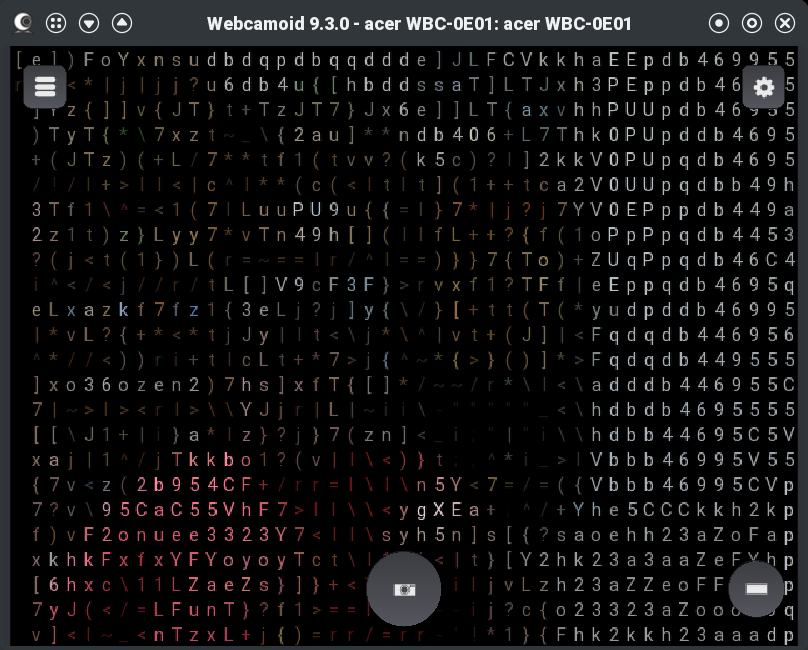
ASCII filter in action.
Once the virtual camera driver is sane, Webcamoid works well. You select the real camera as the source, apply whatever effects you want, and select the AkVCam virtual camera as the output. The receiving application then sees the virtual camera.
Compared to the command-line approach, Webcamoid makes experimentation easier. Want to flip the image, adjust color, crop, blur, or test silly filters? That is all much easier in a GUI than in an ffmpeg or gstreamer filter chain, although I still don’t mind the command line. There’s not much difference between using Webcamoid as a friendly front end or manipulating the image as we did last time.
However, I would not oversell it. Webcamoid is not OBS. It is not really a scene compositor. If you want multiple live sources — say, a screen capture as the main image and your webcam as picture-in-picture — OBS is the obvious GUI tool. With the command line, you can easily do things like this by calling ffmpeg directly.
That’s a Wrap!
If you want a full production environment, OBS is still the right answer. It handles scenes, multiple sources, transitions, screen capture, overlays, and virtual camera output in a single application. But if you liked the command-line loopback idea and wished it had a friendlier face, Webcamoid plus AkVCam is worth a look. It gives you a GUI for the common case: one camera in, effects applied, one virtual camera out. You just need to fight through the installation and configuration with your specific setup. Hopefully, yours will be easier than mine.
As usual, Linux rewards knowing what is happening under the hood. Webcamoid can make the workflow friendlier, but v4l2-ctl is still your friend, and, at least for some people, you’ll need some Linux Fu to get it all working in harmony.
LabsDigest is built for those who learn best by doing. Whether you’re preparing for a CompTIA certification or diving into Python development, our platform offers interactive labs that simulate real-world tasks—no passive watching or reading, just real experience. Work through performance-based exercises for CompTIA A+, Network+, Security+, and more, or sharpen your coding skills with hands-on Python projects. Learn by solving problems, fixing bugs, and applying your knowledge in practical scenarios that prepare you for the real world. It’s on sale for $30.
Note: The Techdirt Deals Store is powered and curated by StackSocial. A portion of all sales from Techdirt Deals helps support Techdirt. The products featured do not reflect endorsements by our editorial team.
The Swedish app-builder, processing a million new projects a week, is making Google Cloud a primary partner, with Gemini models and a security layer aimed at corporate buyers.
The pitch behind Lovable has always been that anyone can build software by chatting with an AI. The harder pitch, the one that turns a viral tool into a durable business, is that a large company can trust what gets built.
On 3 June, at Google Cloud’s Nordics summit in Stockholm, Lovable set out to make that second case, announcing an expanded multi-year collaboration with Google Cloud aimed squarely at enterprise buyers.
The deal makes Google Cloud one of Lovable’s primary technology partners, anchoring its platform on Google’s AI infrastructure and Gemini models. Lovable says its users are now processing more than one million new projects every week, a volume that has outgrown the scrappy infrastructure a consumer tool can run on and needs the secure, enterprise-grade backing a hyperscaler provides.
Advertisement
Lovable is one of the more remarkable growth stories in recent software. Founded in Sweden and built around what the industry has taken to calling “vibe coding,” turning natural-language prompts into full-stack applications, it raised a $200M Series A in mid-2025 at a $1.8bn valuation and was reported to be valued at around $6.6bn by the end of the year. The company says builders created more than 25 million projects in its first year, and that Lovable-built applications now draw 600 million visits a month.
The collaboration is built on three pillars, and they read as a checklist of what enterprises demand before they let an AI tool near production. The first is a verified agent: Lovable has launched its Lovable Agent in Google Cloud’s Gemini Enterprise Agent Gallery, a vetted catalogue of third-party agents that corporate customers can adopt with some assurance about what they are running.
The second is security, reinforced by a new integration with Wiz, the cloud-security company Google is acquiring, to identify and remediate vulnerabilities in AI-generated code in real time, alongside continuous scanning, dependency checks, permissioning and audit trails.
The third pillar is the least glamorous and arguably the most telling: simplified procurement and billing through Google Cloud Marketplace and Gemini Enterprise.
Advertisement
Enterprises buy software through approved channels with predictable invoicing, and being available where a corporate buyer already has a billing relationship removes a quiet but real barrier to adoption. The pillar exists because procurement, not capability, is often what stalls enterprise deals.
The security emphasis is the substantive part of the announcement, because it speaks to the central anxiety about AI-generated code. Tools that let non-engineers ship applications also let them ship vulnerabilities they cannot see, and for a regulated enterprise that risk is disqualifying.
Wrapping Lovable’s output in continuous scanning and remediation is the company conceding that “anyone can build” needs “and it will be checked” attached before a serious buyer signs on.
There is a competitive subtext worth noting. Lovable sits in a crowded vibe-coding field alongside Cursor, Replit and Bolt, and the AI model providers themselves are building rival app-creation tools.
Advertisement
Tying tightly to Google Cloud, and to Gemini, gives Lovable a hyperscaler’s distribution and infrastructure at a moment when its rivals are racing for the same enterprise budgets. It also slots into Google’s broader campaign to win the “agentic enterprise,” the same push behind its $750M partner fund for agentic AI.
As a Google Cloud announcement, the framing is naturally Google’s, and the deeper commercial terms, what each side pays and commits, are not disclosed. What the partnership establishes is direction.
Lovable has decided its next phase runs through the enterprise, and that getting there means less talk of how easy building is and more proof that what gets built is secure, governed and accountable. The million projects a week are the easy part. Convincing a Fortune 500 compliance team is the part this deal is for.
Most larger ride-around landscaping machinery has a similar transmission, a transaxle containing a gearbox, or in some cases, a continuously variable drive. [Made In Garage] has a Toro lawn tractor with just such a setup, and when the transaxle failed he replaced it with a hydraulic drive.
The video below is a classic bit of workshop porn, as he fabricates both the hubs and the rear frame to fit a pair of hydraulic motors. The throttle pedal is a hydraulic valve with the lever swapped for a pedal, and the hydraulic reservoir, in a nice touch, is an old fire extinguisher.
We’re not so sure about the pipework in such an exposed position under the machine as we think it would inevitably be damaged, but you can’t argue with the results. Having used a rough service mower with a hydraulic drive in the past, we appreciate always being exactly at the right ratio for the engine.
The U.S. Cybersecurity and Infrastructure Security Agency (CISA) is warning that hackers are exploiting vulnerabilities in the Linux kernel and Android operating system.
The most recent flaw the agency added to its Known Exploited Vulnerabilities (KEV) catalog, CVE-2025-48595, is a high-severity integer overflow vulnerability in the Android Framework, which can be leveraged for increased privileges.
According to Google’s recent security bulletin, the security issue impacts Android 14 through 16, and requires no user interaction to exploit.
Google indicated that CVE-2025-48595 may be under limited targeted exploitation in the wild, but provided no specific details about the activity or technical information about the flaw or the incidents.
The issue has been addressed with the release of June 2026 security patches (2026-06-01 and 2026-06-05 security patch levels).
Advertisement
The second vulnerability CISA added to KEV is tracked as CVE-2022-0492, a high-severity privilege escalation flaw that impacts multiple Linux kernel branches, from 2.6 through 4.20, and from 5.5 through 5.17.
The flaw lies in the ‘cgroup_release_agent_write()’ function of the cgroups v1 subsystem, which, due to insufficient authentication checks, can be abused by a local attacker to bypass namespace isolation, escalate privileges, and potentially escape from a container to gain root-level access on the host system.
According to past reports from Aqua Security and Palo Alto Networks, the issue primarily impacts containerized environments using cgroups v1, and is especially dangerous when containers are granted elevated capabilities.
The Linux kernel versions that address the issue are:
Advertisement
4.9.301+
4.14.266+
4.19.229+
5.4.177+
5.10.97+
5.15.20+
5.16.6+
5.17-rc3+
By including the two flaws in KEV, all federal agencies bound by the BOD 22-01 directive are required to apply the vendor-provided security updates and mitigations, or to stop using the impacted software. CISA set the deadline for June 5.
However, the KEV also serves as a notice board for critical infrastructure entities and large organizations in general, who should take security measures against these flaws with the same urgency.
Neither of the flaws is marked as exploited by ransomware groups, which is a specific flag CISA uses on its KEV entries to highlight additional severity and patching urgency.
Automated pentesting tools deliver real value, but they were built to answer one question: can an attacker move through the network? They were not built to test whether your controls block threats, your detection rules fire, or your cloud configs hold.
This guide covers the 6 surfaces you actually need to validate.
Before the current wave of laws banning mobile phones in schools, we had published a piece from some researchers who had looked at how similar bans had worked in Australia, with the conclusion that… they didn’t. At best, the research showed the evidence on school phone bans to be “weak and inconclusive.” Those authors suggested that rather than doing outright bans, politicians should leave the issue to the schools themselves to determine what’s best.
So it should come as little surprise that two years later, after many similar bans have gone into effect in the US that… the studies are showing up as (you guessed it) weak and inconclusive. The new study from the National Bureau of Economic Research (NBER) has some people shaking their heads because it can find no evidence of better student performance in schools.
Schools that adopted strict bans — requiring students to keep their devices in locked pouches throughout the school day — saw a meaningful decline in student cellphone use. But test scores have not increased in those places on average. And at first, banning phones led to higher suspension rates.
That’s not to say there should be a free for all in schools. But, once again, it would be nice if politicians, the media, and other commentators could finally (for once) recognize that blanket bans of technology are almost never the answer. The relationship between students and technology is complex and nuanced and doesn’t have a single effect in a single direction. Instead, it’s highly context and individual dependent.
A reasonable, nuanced approach is (1) better equipping teachers with tools to be flexible, (2) better educating students on the tradeoffs of technology use, and (3) improving the overall education environment with an actual recognition that context matters.
Advertisement
Obviously, if kids are just sitting in class all day staring at their phones instead of paying attention to the teacher, that’s a problem. But there are ways to deal with that specific scenario that don’t require a full ban. For some schools a full ban could absolutely make sense, and for others it doesn’t.
We’re going through this in our own local school district where, starting a few years ago, the high school (after studying and then testing different solutions) put boards in every classroom with pockets, where students were asked to deposit their phone at the beginning of every class. This created some challenges, such as when some teachers used the phones in pockets as an attendance-taking short-cut and some students (including my own kid) did not have a phone with them at all in school (by their own choice at the time). But it also meant kids could have phones on them between classes and at lunch.
It’s not a perfect solution, but that’s an important point: nothing is a perfect solution, and pretending otherwise is a problem.
But then California passed a new law, which required schools to come up with plans to ban phones. While the law was not nearly as strict as many other school phone ban laws and does actually give schools more freedom in creating a policy for their own community, it already has resulted in a bunch of wasted time where our school district feels they need to go back to the drawing board and come up with a new phone ban plan, even though the old one appeared to be working decently well.
Advertisement
At the last minute, California has even scaled back its original law, giving schools even more freedom — but also more confusion.
But this whole episode reeks of the usual political and media reflex of “we must do something, this is something, therefore we will do it.”
Letting communities and schools decide how best to handle in school distractions seems like a much more appropriate approach. And part of that is teaching everyone that there is no magic bullet solution to problems. Kids are in school to learn, and part of that learning should be “hey, you shouldn’t be staring at your phone all day, but also it shouldn’t take a law to get you to put down the phone.”
The new study just confirms what the earlier research already showed. Blanket bans make for good press releases. They don’t make for better students.
Advertisement
The hard, unglamorous work of actually improving education — better-equipped teachers, more engaged classrooms, students who’ve been taught to think critically about their own technology use — doesn’t fit on a campaign mailer. So we keep getting laws instead of solutions.



























































You must be logged in to post a comment Login