There are so many cables out there, and plenty of solid options did not make the cut as a top choice. Here are a few honorable mentions I’ve tested and liked.
Statik MagStack Pro for $25: I quite like the automatic magnetic coiling this cable features, as it stays neat, and the colors could be handy if you want something that stands out (I tested the bright orange version). But performance is distinctly average at 100W for charging and 480 Mbps for data transfer. It is 6.6 feet and comes with a two-year warranty.
Advertisement
Baseus 2-in-1 Charging Cable for $25: I love the idea of a single cable that splits into two, allowing you to charge both devices from one USB-C port, but I found this cable’s performance to be unpredictable. You can get up to 140 watts for a single device, but when you split it between two devices, the charging rate drops well below that as a combined total. It’ll work fine if you use it for overnight charging a laptop and a phone, or a pair of phones.
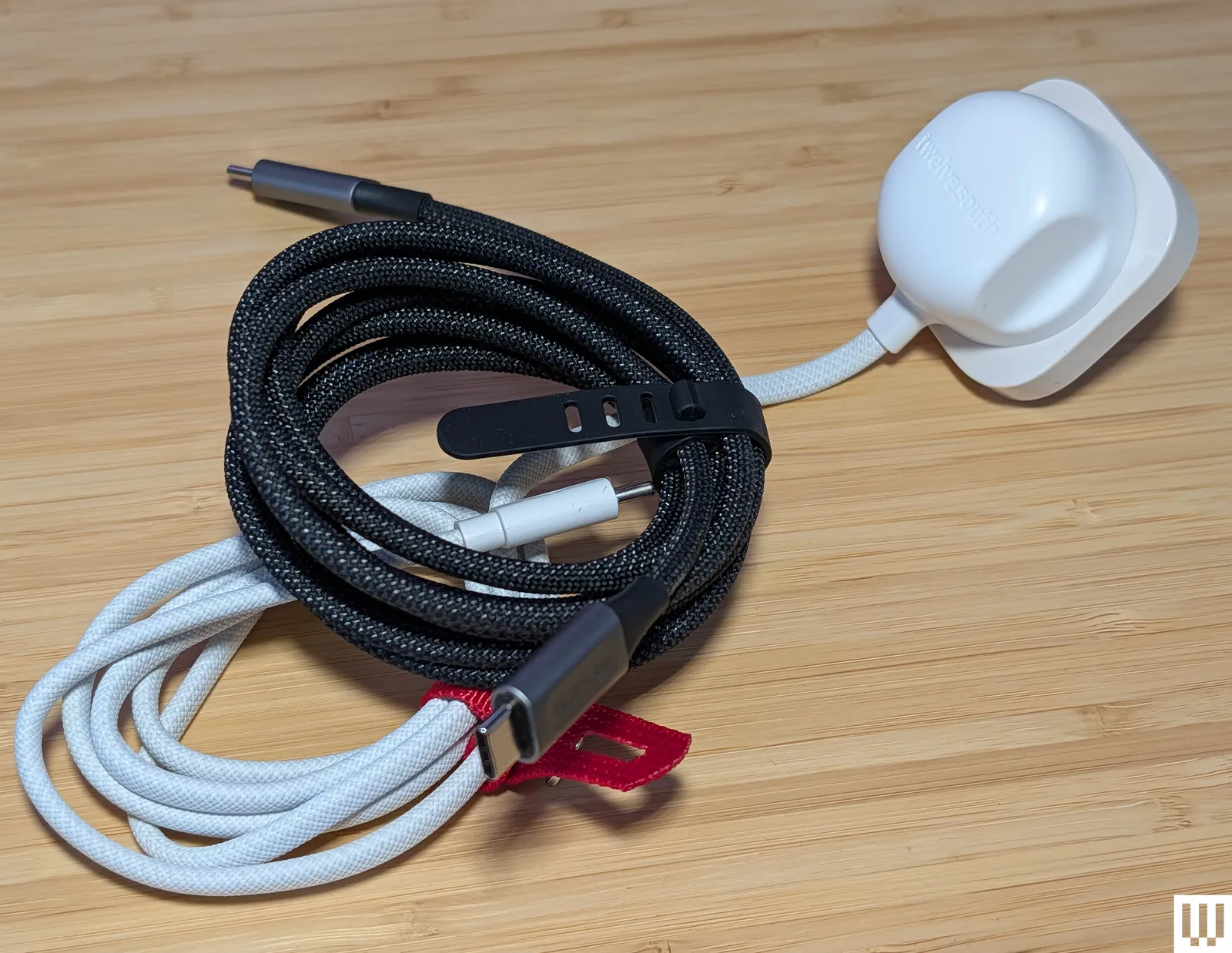
Twelve South PowerCord for $30: While I don’t think we want to go back to a landscape of devices with permanently attached cables and power adapters, they do offer a simplicity that could be useful for some folks or situations. The PowerCord from Twelve South is thick and durable-feeling, with a tangle-resistant woven (4- or 10-foot) USB-C cable attached to a compact 30-watt (power delivery) wall plug.
Photograph: Simon Hill
Smartish Crown Joule 3-in-1 Cable for $20: This clever offering from Smartish packs three connection types into one. It is technically USB-A to MicroUSB, but there’s an adapter at the tip that converts it to USB-C or Lightning. It has a durable fabric finish in a choice of four colors and can charge most of your gadgets at top speed (up to 100 watts). WIRED reviews editor Julian Chokkattu has used it to juice up a range of devices, including wireless keyboards and a Fire tablet. It’s also MFi-certified for Apple devices.
EcoFlow Rapid Pro for $25: This durable charging cable from EcoFlow is a solid choice for fast charging, thanks to its 240-W capability. It also has tough metal ends, a lovely woven finish, and comes with a cable tie.
Advertisement
Nomad Chargekey for $29 and USB-C Cable for $25: The Chargekey is a handy wee addition to your key ring with 12 cm of braided cable capable of delivering 240 watts and up to 10 Gbps data transfer, though it can be a little awkward to use. I also tried Nomad’s new Kevlar-reinforced USB-C cable, which is also 240 W but only has 480 Mbps data transfer. It feels durable with metal ends and braided cable, but you can get more capable cables for less money.
QDOS PowerMotion Ultra for £40: This USB 4.0 cable is a solid alternative to our top picks for folks in the UK, combining up to 240-watt charging with data transfer speeds up to 40 Gbps. It is relatively thick, feels durable, and comes with a lifetime warranty. I like the braided nylon finish and color-matched cable tie. I also tried the QDOS Powerloop (£20), a handy wearable charging cable that doubles as a lanyard strap. It’s thick, woven, and durable, with screw-off ends that reveal a USB-C cable capable of supplying 60 watts of power and 480 Mbps of data.
Advertisement
Chargeasap Connect Pro for $40: Magnetic-tip cables can be handy for kids and folks with dexterity issues. The idea is you stick the relevant tip in your device and then attach the cable magnetically when you need to charge. This one also has an LED display to show real-time power usage. It works best if you leave the tips in your devices, but that means they can’t be charged by regular cables, and the tips are very easy to lose if you remove them. Performance-wise, it’s a standard 100-watt charging cable.
Krafted Connex for £30: I like the idea of a Swiss Army Knife–style charging cable key ring, but the execution here is flawed. It does offer USB-A, USB-C, Lightning, and MicroUSB, but the flip-out plugs don’t have any cable attached, so they are not very adjustable, making it tough to plug into some ports. The Rolling Square InCharge X 6-in-1 Cable above is about the same price and works far better.
Scosche Strikeline Premium USB-C Cable for $25: This braided cable comes in various lengths, all the way up to the 10-foot cable I tested. It’s a good alternative to my pick for the best long cable above if data transfer is more important to you than charging speed because it offers 5 Gbps data speeds, but only 60 watts for charging.
Advertisement
Ugreen Uno USB-C Cable for $10: I love the smiley-faced Uno line from UGreen, but I assumed the display on this cable would show the charging rate. It does not. It just displays smiley eyes when charging and changes when fully charged. I tested the 6.6-foot cable, but it also comes in 1.6-, 3.3-, and 10-foot lengths. It feels durable and is reasonably priced, but it is rated at a very ordinary 100 watts and 480 Mbps.
Native Union Pocket Cable for $30: This wee braided USB-C to USB-C cable is perfect for slipping on a key ring to ensure you are never caught without a cable. It’s a nice design with braided cables, but you only get around 7 inches, and it maxes out at 60 watts. It’s built to last, constructed from recycled materials, is USB-IF certified, and comes with a lifetime warranty.
Caudabe ChargeFlex for $25: This is a good option for a Lightning cable, but it’s a little more expensive than I’d like. It is a thick braided cable reinforced with Kevlar for durability. There is a leather clip you can use for cable management, and the ridged finish on the connectors makes them easy to grip when unplugging.
Cable Matters Gen 2 USB-A to USB-C cable for $10: This is a good alternative to my top pick for best USB-A to USB-C if you want faster data transfer speeds (it maxes out at 10 Gbps). The trade-off is that it’s limited to 15 watts for charging.
Advertisement
Bluebonnet Eco-Friendly Charging Cable for $25: Bluebonnet (an Austin-based studio named after the Texas state flower) made this cable from naturally biodegradable wheat straw. It promises the ability to survive 50,000-plus bends and uses plastic-free packaging. I love the dappled blue finish and the cream ends, which both look good and are easy to pick out of a tangle of cords. It’s nothing special performance-wise, offering up to 60-watt charging and 480 Mbps data transfer.
RUGD Rhino Power USB-C to USB-C for £11: This is a solid option for folks in the UK seeking a tough cable. It has a braided nylon finish and has been tested to withstand at least 100 kilograms of tension and 100,000 bends. It can also deliver up to 60 watts.
Iniu Braided USB-C Cable for $10: This is a cheap, 6.6-foot USB-C to USB-C charging cable that tops out at 100 watts. Data transfer is only 480 Mbps. One end lights up green when it’s charging.
Advertisement
Lindy USB 3.2 Type C to C Cable for $22: These active cables are suitable for hooking up monitors to your computer, and they support up to 8K at 60 Hz and 4K at 120 Hz. They also support DisplayPort 1.4. I tested the longer 3- and 5-meter variants that max out at 60 watts for power delivery and 10 Gbps for data (but they’re out of stock). The shorter cable linked here can go up to 20 Gbps. They work well and feel durable, but they’re a bit pricey.
Satechi USB-C to USB-C Charging Cable for $20: Gear from Satechi always has a classy look, and its braided nylon cables are no exception. This one is 6.5 feet and has a Velcro strap. It’s also capable of 100-watt charging with support for PD and QC. Sadly, data transfer is limited to 480 Mbps.
Plugable Thunderbolt 4 Transfer Cable for $70: This active Thunderbolt 4 USB-C to USB-C cable matches my top pick with support for 100-watt charging and data transfers up to 40 Gbps. It is 6.6 feet long and comes with a two-year warranty.
Advertisement
Belkin Boost Charge USB-C for $10: This cable maxes out at 12 watts and 480 Mbps. The basic PVC finish is the cheapest, but you can opt for braided nylon ($16). Both come in black or white at 3.3 or 6.6 feet. These cables are USB-IF certified and work as advertised (I’ve been using one in the car for the last few months).
More Cable Management
Photograph: Simon Hill
TwelveSouth CableStay for $30: A round textured weight finished in silicone, the CableStay will keep your cable handy. It comes with a 5-foot braided cable (in a matching color) that’s capable of delivering up to 60 watts. You can just about fit two cables under it if you need to do so.
Advertisement
Smartish Cable Wrangler for $30: I used this on my desktop for a long time to stop cable ends from disappearing off the back of my desk. It works great with metal connectors, but for some cables, you must attach a special cable collar that sticks magnetically (you get three in the box).
What to Know Before You Buy
Cables are usually included in the box for whatever device you purchase. These are generally capable of charging the device at the maximum rate. Keep it safe, keep it simple, and if it is unmarked, consider labeling it.
Check your device’s standards. Look for a cable that matches your needs. For example, if your device supports Power Delivery, then get a PD cable. Remember: The charging adapter also must support the same standards. We have more details about standards below.
Advertisement
You can use USB-C for displays. Manufacturers will state the data transfer speed or list support for 4K or 8K video on select cables. That means you can use a USB-C to USB-C cable to transmit video from your laptop to your monitor. You should consider DisplayPort Alt Mode (DP Alt Mode) support, as this enables you to hook up displays and video sources that support DisplayPort.
It is safe to use your phone while it is charging, but it will charge at a slower rate. Heat is also bad for battery health, so it is best to take a break when your phone feels warm.
Poorly made cables can overheat and start fires. To boost your chances of buying a dependable cable, look for an option with a USB-IF certification (learn more about this below), or stick to trustworthy brands like those in this guide, including Anker, Cable Matters, or Baseus.
Charging Standards and Certification
Advertisement
With various standards and charging technologies at work, it is much harder than it should be to work out what a cable can do. There are a few key points worth knowing when shopping:
USB Standards: The Universal Serial Bus (USB) standard dates back to 1996 but has seen many new standards, revisions, and connector types in the years since. Instead of running through all of them here, I’ll highlight what matters most right now:
Connectors: While USB-C is mercifully becoming a standard connection type, you want cables with connectors that fit your existing devices. Today, that still might mean USB-A, Lightning, or even MicroUSB. Remember that the capabilities of any cable are limited to its oldest connection type.
Data: The data transfer speed is always in megabits per second (Mbps) or gigabits per second (Gbps). The top speed capability of a given cable depends on the standard:
Advertisement
USB 2.0 supports 480 Mvps
USB 3.0 supports 5 Gbps
USB 3.1 supports 10 Gbps
USB 3.2 Gen 1 supports 5 Gbps
USB 3.2 Gen 2 supports 10 Gbps
USB 3.2 Gen 3 supports 20 Gbps
USB 4.0 supports 40 Gbps
Power: While cable manufacturers always list the maximum charging rate, your device determines how much power to draw, so it’s important to know what standards it supports and then combine your cable with the correct power adapter. The charging rate of a cable is measured in watts (W). Sometimes manufacturers will list specifications on the cable in tiny print. If there’s no listed watt rate, you can calculate it by multiplying the voltage (V) and the current (A), assuming those are listed.
Basic USB-C cables are passive and can only carry up to 60 watts. Cables that can carry 100 watts or more—sometimes described as “active” cables—must contain an e-marker chip that identifies the cable and its capabilities.
The Power Delivery (PD) standard is as close as we have to a common standard. A few manufacturers, like OnePlus, Oppo, and Xiaomi, still have proprietary charging standards. Then there’s Qualcomm’s Quick Charge (QC), which was the most popular for phones for many years, although Quick Charge 4+ supports PD. Even PD has a variant called programmable power supply (PPS), which is part of the USB PD 3.0 standard. PPS allows for real-time adjustments to maximize efficiency and charge phones, like Samsung’s Galaxy S22 range, at up to 45 watts instead of the usual 18. The latest addition to PD is an extended power range (EPR), which allows USB-C cables to carry up to 240 watts (they used to be limited to 100 watts).
Thunderbolt was a proprietary interface developed by Intel and Apple, but it’s now open for royalty-free use (still certified by Intel). With Thunderbolt 3, the standard adopted the USB-C connector and is capable of data transfer speeds up to 40 Gbps and can deliver 100 watts of power using the PD standard. Thunderbolt 4 brings various improvements, mostly related to the video signal (support for two 4K displays or an 8K display). It also supports the USB 4 standard and is backward compatible with previous standards. Thunderbolt 5 can double the transfer speed of Thunderbolt 4 and can support three 4K displays or two 8K displays.
Cable Certification: There are a few types of cable certification. When a cable is certified, that usually means it was independently tested and conforms to specific standards. It gives you, as a buyer, peace of mind that your cable performs as the manufacturer claims. Certification can be expensive, so many cable manufacturers shun it, but that doesn’t necessarily mean their cables are poor quality. The USB Implementers Forum (USB-IF) is a non-profit organization dedicated to advancing USB technology. Run by members like Apple, Google, HP, Microsoft, and Intel, it sets specifications and offers certification. If a cable is certified by the USB-IF, it has been tested to ensure it complies with its standards. Apple has its own Made for iPhone (MFi) certification for Lightning cables. Intel certifies Thunderbolt cables. Certified cables usually have the relevant logo on the connector. (For example, Thunderbolt cables have a lightning bolt.)
Looking for the most recent Mini Crossword answer? Click here for today’s Mini Crossword hints, as well as our daily answers and hints for The New York Times Wordle, Strands, Connections and Connections: Sports Edition puzzles.
Need some help with today’s Mini Crossword? I admit, 7-Across threw me for a bit, but I figured it out eventually. Read on for all the answers. And if you could use some hints and guidance for daily solving, check out our Mini Crossword tips.
If you’re looking for today’s Wordle, Connections, Connections: Sports Edition and Strands answers, you can visit CNET’s NYT puzzle hints page.
After teasing the newest addition to the lineup of colorful characters in its team shooter earlier this week, Blizzard has released the gameplay trailer for another new damage hero. Shion will join Overwatch when its next season, the third since the Reign of Talon reboot, kicks off on June 16. This character won’t do anything to change the impression that Blizz is leaning hard on making hot heroes or that it’s starting to suffer same-face syndrome with its female lineup. But at the very least, Shion is one of the team’s most dramatic creations in a while, looking very stylish in an all-white suit paired with petite red horns and cybernetic red eyes.
Advertisement
Appearance-wise she might call to mind the moody Reaper character, but Shion’s kit actually feels more reminiscent of Tracer. She’s dual-wielding semi-automatic pistols as her base weapon, but can focus fire in a more powerful burst to finish off a low-health opponent. Mobility also seems core for this hero, since she has both a dash move and can ride actual motorcycle in-game. The bike seems especially satisfying, since it looks like there’s an ability for Shion to jump off and launch the vehicle forward into a rival. Her ultimate ability turns Shion into a damage-dealing vortex that can dash toward enemies.
Considering the big Overwatch reboot aims to emphasize a bigger narrative tying together the characters, it seems likely that the next lore drops will highlight story threads surrounding the Hashimoto clan where Shion is a boss. So expect more background on support heroes Kiriko and Mizuki as part of the larger drama about Vendetta’s efforts to take over the world as Talon’s new villain-in-charge.
There are existing methods to collect water from the ambient air, but most of them are large or cumbersome. Recent research by the University of Texas at Austin is taking that concept and transforming it something you could have on hand at all times. Or more literally, on your back at all times. In a study published in Scientific Advances, the team used a special textile to create a jacket capable of atmospheric water harvesting.
“We wanted to rethink the form of the technology,” said UT Austin’s Guihua Yu, one of the authors on the latest study. “If the fabric itself can collect water from air, it opens a new direction for personal and portable water access.”
The jacket used a special fabric designed to collect moisture from the air and gather it in detachable harvesting units rather than simply having the textile absorb the water. “That transport design is what allows the material to work not just in a small lab test, but in a wearable system,” added co-author Keith Johnston, also of UT Austin. The harvesters are then placed in a foldable collector piece and heated to produce drinkable water.
University of Texas at Austin
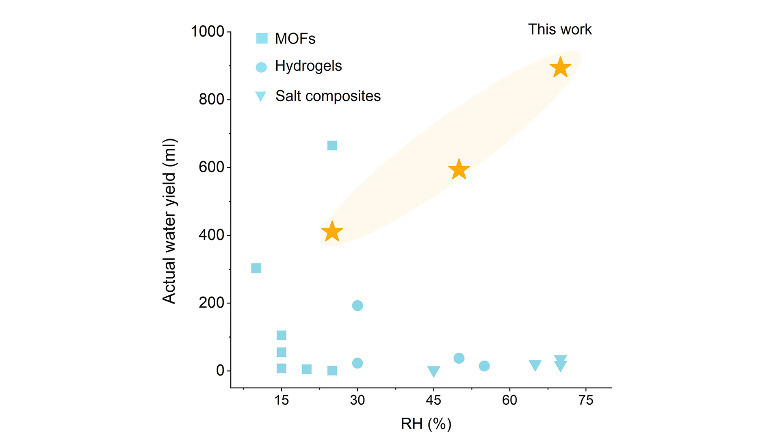
Depending on humidity levels, the jacket produced between 400 and 900 milliliters (about 14 to 30 ounces) of drinkable water per day in testing. The form factor created for this particular study was a jacket, but the investigators suggested that the same textile could be used to manufacture other objects, such as a backpack or a tent, to lend them water-collecting capabilities. The technology could have applications for medical response teams or during emergencies, particularly in remote places. On the commercial side, it could also make for some pretty useful hiking and extreme sports gear.
We areresearchers affiliated with Arizona State University’s scientist opinion panel survey, known as SciOPS, a 5-year research program designed to monitor, understand and improve how scientists communicate with the public. We wanted to know more about the reality inside today’s universities as researchers grapple with Trump administration policies.
Advertisement
Alongwithourcolleagues, we fielded a survey of randomly sampled members of the academic science community participating in the SciOPS panel. We obtained responses from 280 scientists from several fields, including biology, chemistry, civil and environmental engineering, computer and information science engineering, geography and public health from 131 universities.
Our results show dramatic, mostly negative, effects of federal policy changes on researchers, the research system and American competitiveness.
Declines in federal funding have had knock-on effects. Around one-quarter of scientists reported that state and local and university internal funding have also declined. Another 9% reported that internal funding has increased, presumably as universities have provided emergency funds to researchers to support critical studies.
According to the scientists who responded to our survey, Trump administration policies have also affected the scientific workforce pipeline, hampering their ability to recruit internationally and domestically.
We hypothesize that these hiring issues can be related to visa and immigration policies, which make it difficult for international graduate students and postdocs to work in the U.S. or attend international conferences. Just over half of scientists in our survey reported that international students or postdocs have expressed concerns to them about deportation.
Advertisement
Concerns about longer-term career impacts are also to blame for trouble recruiting the next generation of researchers. Over 80% of surveyed scientists reported that graduate students or postdocs on their research team have increased concerns about future job prospects.
These impacts have taken a toll on scientists’ professional work environment and overall outlook. Over two-thirds reported more work-related stress and almost half reported increased workloads since January 2025. About half reported decreased work motivation.
How are scientists and engineers reacting?
We found scientists’ responses to be a mixture of resilience, acquiescence and considering an exit.
Advertisement
While many scientists said they were less motivated at work, most reported no change in their efforts to obtain federal research funding. Small proportions did report successfully increasing their efforts to obtain funding from non-federal sources.
Our survey also asked scientists whether they had taken any self-censoring actions since January 2025 due to concern over potential negative consequences for their work or career. Over half reported having reviewed or adjusted key words in research proposals, and almost half said they’d reframed research topics. Forty-three percent had also cautioned students or collaborators to be careful what they say publicly and more than a third had abandoned plans on one or more research topics.
Although scientists are adopting strategies to cope with the new challenges, nearly two-thirds of the scientists in our sample appear to be considering one or more other career options.
Advertisement
Scientists look to the long term
Scientists and engineers in our sample have strong opinions about the impacts of current U.S. science policy. A large majority (87%) believe the administration’s actions have influenced research priorities more than previous administrations. Most scientists in our survey had a negative opinion of the Trump administration’s overall changes to science policy.
Scientists in our sample believed that administration policies have had a negative effect on the future scientific workforce and the ability of scientists and engineers in the U.S. to produce breakthroughs and discoveries and contribute to national welfare.
Advertisement
Large majorities believe these policies have harmed public perceptions of the integrity of U.S. scientists (85%) and hurt public trust in science (84%).
Academic scientists’ reactions to the Trump administration’s changes to science policy are perhaps not surprising given the perceived level of threat these actions represent to the research community. What is less certain is whether the dramatic changes we are currently witnessing – cuts to grant funding, politicization of research, downsizing of federal agencies, restrictive immigration policies, attacks on the autonomy of higher education and more – are temporary or if they represent the initial phase of a transition to a new research environment with less federal support for American science.
Looking for the most recent regular Connections answers? Click here for today’s Connections hints, as well as our daily answers and hints for The New York Times Mini Crossword, Wordle and Strands puzzles.
Today’s Connections: Sports Edition features a fun soccer topic that World Cup watchers might appreciate. If you’re struggling with the puzzle but still want to solve it, read on for hints and the answers.
Connections: Sports Edition is published by The Athletic, the subscription-based sports journalism site owned by The Times. It doesn’t appear in the NYT Games app, but it does in The Athletic’s own app. Or you can play it for free online.
Hints for today’s Connections: Sports Edition groups
Here are four hints for the groupings in today’s Connections: Sports Edition puzzle, ranked from the easiest yellow group to the tough (and sometimes bizarre) purple group.
Yellow group hint: You might build a house with them.
Advertisement
Green group hint: Hoops stars.
Blue group hint: Start your engines.
Purple group hint: World Cup wonders.
Answers for today’s Connections: Sports Edition groups
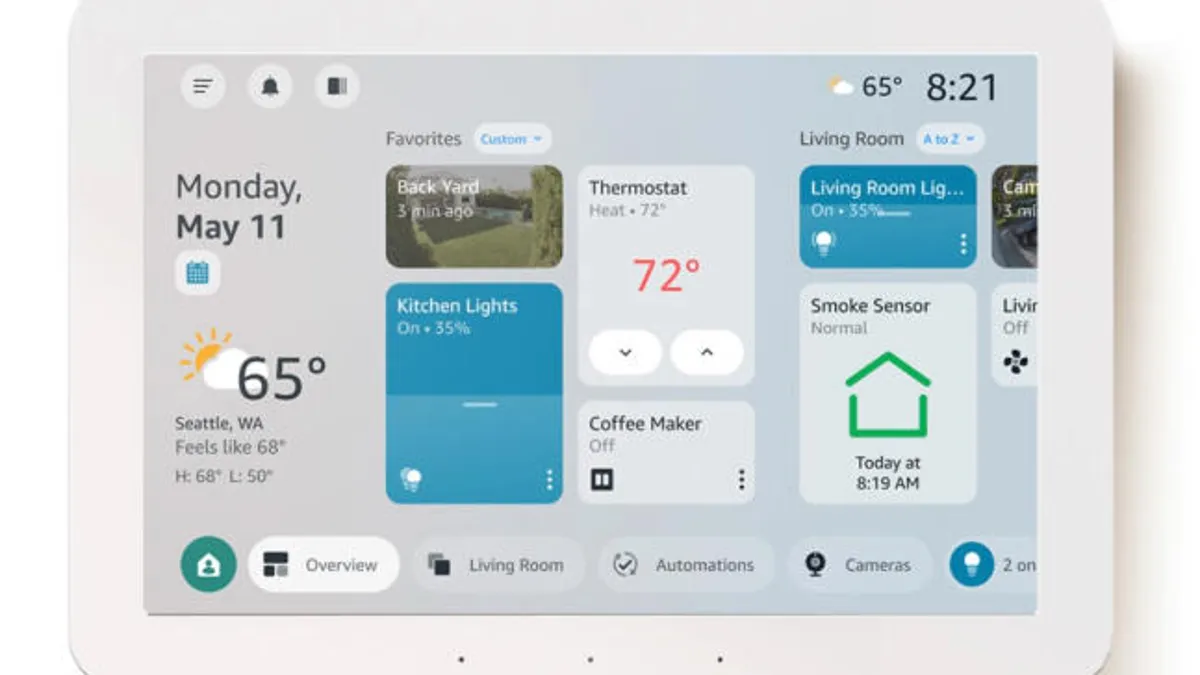
During normal operation, the Echo Hub usually shows controls for the devices you use the most, including those that use Matter, Zigbee, Thread and Bluetooth connections (as long as they work with Alexa). But you can also move these tiles around, enlarge or shrink them, and you can choose specific devices to add to the home screen for easier access.
A representative from Amazon didn’t immediately respond to a request for comment.
Advertisement
While devices are now grouped automatically by room and function, you can manually create your own groups to add a series of controls to. That includes routines that you may have previously set up.
Another innovation adds more granular controls, which is more useful than it may sound. For example, you can now access supported smart light bulbs, allowing you to dim them from 1% to 100% and to choose specific colors.
Echo Hubs can now give in-depth video information and answers with Alexa Plus and Ring AI.
Advertisement
Amazon
If you use Alexa Plus (free with Amazon Prime or $20 per month) and have a Ring AI subscription for Ring security cameras, the Echo Hub can also provide a summary of camera events and video clips of the relevant actions (for example, delivered packages) for up to four feeds at the same time. You can also search through existing security videos directly on the Hub with Alexa voice commands.
These sound like convenient changes for the Echo Hub, but I’d look forward to them coming to Echo Show devices like mine, too. Echo Shows have traditionally had a broader focus than smart home controls, like showing video calls or TV shows, but this new customizable screen sounds better than the news and ads my Show has instead. Hopefully, Amazon will push similar features to other Echo devices.
An anonymous reader quotes a report from ZDNet: If digital sovereignty is important to you, and it certainly is in the European Union (EU), then you’ll be pleased to know that EuroOffice, a new open-source browser-based office suite alternative to Microsoft 365 and Google Workspace, has officially reached its first stable release. A coalition of EU-based companies, including Nextcloud, Ionos, and other Euro-Stack participants, is positioning Euro-Office as a cornerstone of European digital sovereignty. However, The Document Foundation (TDF), LibreOffice’s steward, accuses the project of reinforcing Microsoft’s document lock-in, which TDF argues isn’t friendly to open standards.
Setting aside the open-source politics for the moment, here’s what Euro-Office brings you. The release went live on June 9. It is, however, not a stand-alone office suite. As the software’s backers explain in a FAQ, “Euro-Office is more of an integration component. It merely handles document editing itself. Storage, as well as navigation, permissions, and sharing logic, have to be offered by a platform it is integrated in, like Proton Docs, Nextcloud Hub, or OpenProject.” So, while you can install Euro-Office on your own Linux server, you’ll need to integrate it yourself. If you’re not a Linux expert, however, don’t give up hope. Some companies have already released packaged, ready-to-install Euro-Office stacks, including Nextcloud Hub 26 Spring, Ionos’ Nextcloud Workspace, and Office.eu. These initial deployments are web-based rather than standalone desktop suites.
The goal, organizers say, is to give European organizations a way to host their office suite on EU infrastructure under EU law, while maintaining an experience familiar to Microsoft Office users. Specifically, Euro-Office is meant to be “a solution for editing documents, spreadsheets, and presentations, developed as a true sovereign community collaboration of over a dozen different organizations.” TDF’s main objection is that Euro-Office’s decision to default to Microsoft’s OOXML format undercuts its claims of European digital sovereignty, since OOXML remains closely tied to Microsoft Office behavior and control. “Compatibility is not sovereignty,” TDF warned, saying a European-branded suite that saves files in OOXML by default “is de facto an ally of Microsoft in its content lock-in strategy.”
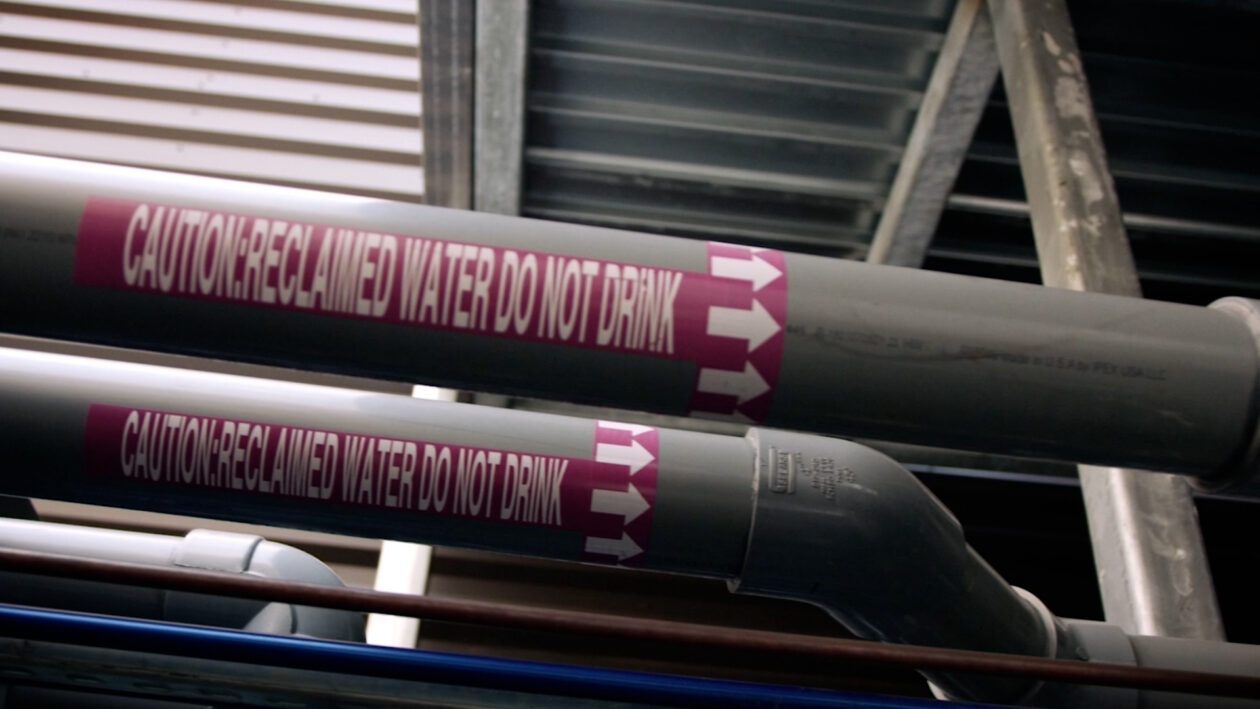
Pipes carrying reclaimed water for cooling at an Amazon Web Services data center. (AWS Photo)
Amazon Web Services on Thursday announced that efforts to curb water use at its data centers have made it seven times more water-efficient than the industry average.
The company says it’s 75% of the way toward its goal of being water positive by 2030, meaning for each gallon consumed at a data center, it will return a greater volume to the same community where it was drawn.
Data center operators are trying to address concerns about water and energy usage as AI adoption drives massive expansion of the facilities.
Even in Amazon’s backyard, resistance is growing. Seattle’s city council this week unanimously approved a one-year emergency moratorium on new large data centers inside city limits.
AWS executives said the reality of these facilities can differ from public perception.
Advertisement
“As we’ve been engaging with our local communities, they’ve been very pleasantly surprised about how little water we are using,” Kerry Person, AWS vice president of Data Center Operations, told GeekWire. “We’re starting to share more and more of this information publicly to really just educate folks.”
Data centers use a variety of strategies to keep their electronics cool. Those include fans, air that’s cooled using evaporated water, air conditioning and direct liquid cooling. The approaches involve resource tradeoffs: air conditioning draws more electricity but saves water, while evaporative cooling is less energy-intensive but consumes more water.
AWS uses fans to cool its facilities about 90% of the time, drawing in outside air, blowing it past server racks and releasing it back outside. The company switches to evaporative cooling when outside temperatures exceed roughly 85 degrees. Another water savings was gained by researching the maximum temperatures its electronics can tolerate, and running machines under warmer conditions.
That allows the company to use 0.12 liters of water per kilowatt-hour of operations, compared to an industry average of 0.84 liters. The rate applies to both Amazon-owned facilities and leased data center space internationally, and has been verified by outside auditors.
Advertisement
While it touts its own accomplishments, Amazon also notes that the global data center industry uses less water than many may realize, accounting for 0.5% of all industrial water use worldwide.
Other tech companies are likewise implementing water-saving strategies and policies. Earlier this year, Microsoft pledged a 40% improvement in water efficiency by 2030 and committed to replenishing more water than it uses in each district where it operates. It also started installing closed-loop systems where water flows past heat-generating processing chips, drawing off heat that it carries to chillers. Then the cooled water starts the journey all over again.
But public concerns persist, particularly in regions facing water shortages. In 2025, Bloomberg reported that nearly two-thirds of the U.S. data centers that were built or are under development in the past three years are located in water-stressed areas.
Simon Hans Edasi, a Seattle-area data scientist and geospatial researcher, has examined data center locations in Washington state relative to water availability, energy access and other factors. He raised concerns about Amazon’s planned $4.8 billion campus in Burbank, near the Columbia River. The industry overall is moving “deeper into arid eastern Washington,” Edasi said.
Advertisement
Without addressing that specific project, Will Hewes, Amazon’s water stewardship lead, said the company focuses on three things at each location: drawing as little water as possible, using recycled water sourced from treatment plants rather than drinking water supplies, and partnering with local organizations to replenish water back into the area.
“For any of those water-stressed basins where we’re operating, we’re making sure that in each of those we’re also putting more back,” Hewes said.
Replenishment efforts vary by location. They can include programs such as helping farmers use wastewater from data centers for irrigation, or working with building managers to fix water loss from running toilets and leaky faucets.
AWS consumed about 2.5 billion gallons of water for its data centers worldwide last year. Through replenishment efforts, the company reports returning 3 gallons for every 4 that it used.
If you work with radio, the chances are that before too long you’ll be winding an inductor. At radio frequencies these won’t be big chunky transformer style chokes, but often air-cored affairs supported by their own rigidity. As grizzled old radio amateurs will tell you though, relying on such a coil for stability is a fool’s errand. It will shift inductance from the slightest movement, thermal expansion, or even sound. Luckily [SolderSmoke] is here to remind us of the trusty fix, in the form of Q-dope, or a polystyrene solution that dries to form a rigid low-dielectric coating.
Where this is being written it wasn’t on the market so it was more usual to use nail lacquer, but reading the piece it seems American hams swore by the stuff. That’s in the past tense because it seems it’s no longer on the market. Even there though help is at hand, because dissolving packaging polystyrene in solvent yields an acceptable substitute. There’s even an 11-year-old how-to video linked from the SolderSmoke post, should you fancy making some of your own. We suggest you proceed with caution though, polymers dissolved in solvents sounds a lot like home-made napalm, and probably puts out fumes you don’t want to breathe.
Meanwhile should you fancy experiments of your own with inductors, we’ve got you covered.
Unlike on Mars where for decades we have had dozens of orbital and ground-based platforms zipping and scurrying about to prod at every bit of emitted radiation, rock type and twitch of dust devils in its thin atmosphere, for other planets and their moons we have to do a lot more speculative interpretation of data. Such was the case with the presumed existence of water plumes on Jupiter’s moon Europa. These now appear to have been a statistical fluke, per research by [L. Roth] et al. in Astronomy & Astrophysics.
As succinctly summarized in the article on this by [Javier Barbuzano] of Sky and Telescope, the original 2013 finding of said water plumes by the same team was based on faint UV emissions from Europa’s southern hemisphere as captured by the Hubble Space Telescope. However, in more recent captures these emissions were not detected again, leading them to reexamine their original analysis of the 2013 data.
One of the main flaws was in the assumption of where Europe was located on Hubble’s 1,000 x 1,000 resolution detector, with the re-analysis showing that they were off by a couple of pixels. A second flaw was quite understandable as since 2013 we have learned that Europa has a thin hydrogen exosphere which interacts with the Sun’s UV radiation. The resulting scattering induces a UV glow which could be mistaken for UV radiation emanating from the moon’s surface.
Advertisement
Even with this one intriguing feature turning out to be a mirage, it doesn’t make Europa any less interesting as it’s still assumed to have vast liquid water oceans. Along with Uranus’ moon Miranda this makes it very worth it to experience more of the sights and sounds of these alien worlds, whether in person or via our robotic friends.















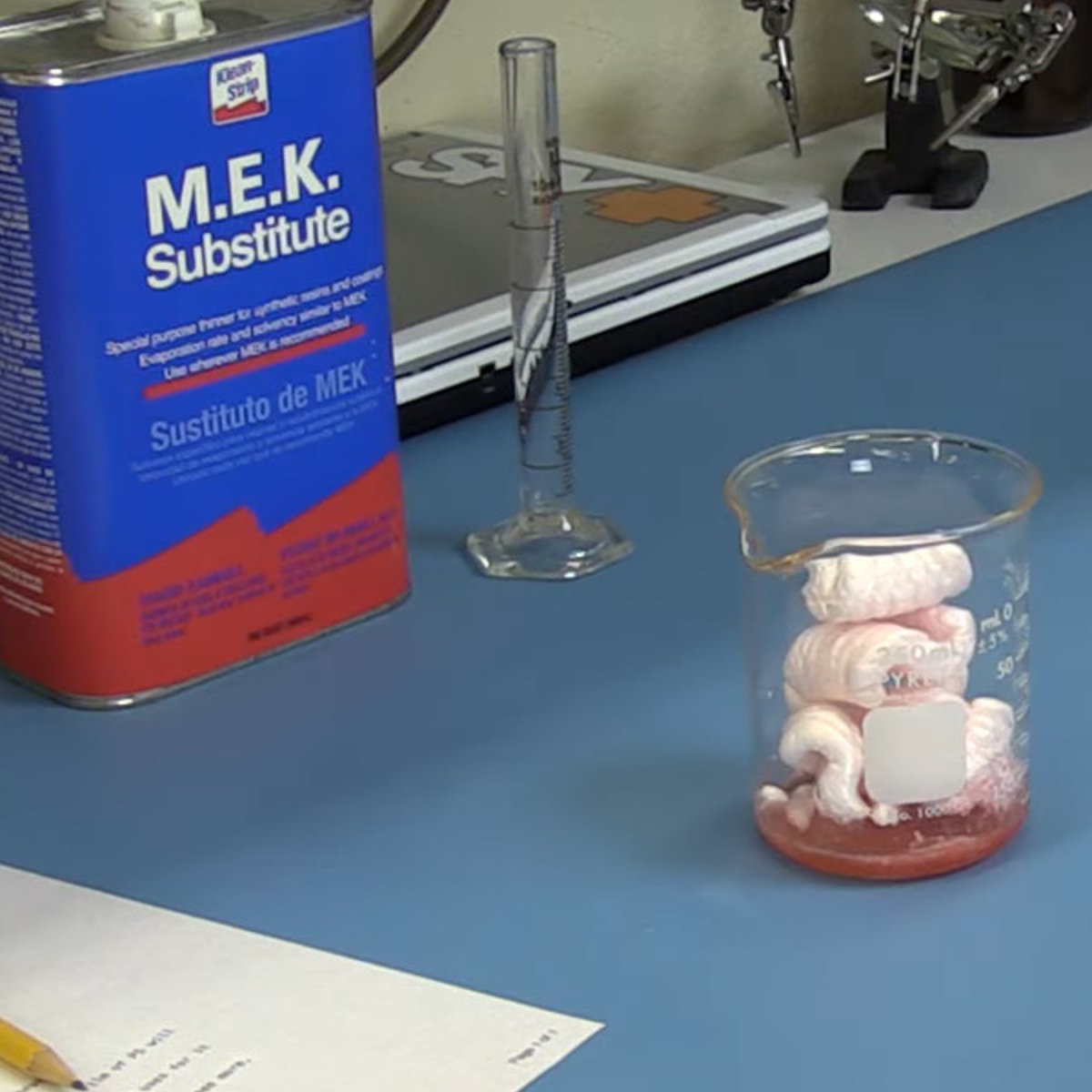 Where this is being written it wasn’t on the market so it was more usual to use nail lacquer, but reading the piece it seems American hams swore by the stuff. That’s in the past tense because it seems it’s no longer on the market. Even there though help is at hand, because dissolving packaging polystyrene in solvent yields an acceptable substitute. There’s even an 11-year-old how-to video linked from the SolderSmoke post, should you fancy making some of your own. We suggest you proceed with caution though, polymers dissolved in solvents sounds a lot like home-made napalm, and probably puts out fumes you don’t want to breathe.





































You must be logged in to post a comment Login