

Connect with us
DAPA Banner
DAPA Coin
DAPA
COIN PAYMENT ASSET
PRIVACY · BLOCKDAG · HOMOMORPHIC ENCRYPTION · RUST
ElGamal Encrypted MINE DAPA
🚫 GENESIS SOLD OUT
DAPAPAY COMING

Tech

Aura’s impressive e-ink photo frame doesn’t even look digital

Published

on

What’s the most cliche possible gift you can give a relative? A digital photo frame, displaying a rotating slideshow of family photos. Now Aura has completely refreshed this product space with its gorgeous Aura Ink frame, which uses e-ink to create a display that doesn’t even look digital.

Digital frames have always been so popular (yet mostly disappointing) because there’s an undeniable allure to the idea of them — it feels like magic to imagine hanging artwork on your wall that you can change depending on your mood. In practice, these devices usually look clunky. You need to plug them in and figure out how to hide a bulky cord, and does anyone even want another bright screen in their home anyway? This problem was already on the Aura founders’ minds when they started the company 10 years ago, but color e-ink wasn’t feasible until now to use in a digital frame.

“E-ink is definitely next level,” co-founder and CTO Eric Jensen told TechCrunch. “We have people tell us that they hung it up, had friends over, and their friends were like, ‘How did you print that picture so quickly?’”

E-ink is the same technology that you see on e-readers, which lets you read a book without feeling the same strain that you get from staring at an LED screen for too long. But there aren’t that many color e-ink devices on the market aside from the Kindle Colorsoft, because the company that manufactures e-ink displays can only currently produce six colors: red, blue, green, yellow, white, and black.

Advertisement

It’s hard to imagine what your favorite family portraits and travel photos would look like with only six colors. But Aura has created a dithering algorithm — a technique that blends a limited color palette into patterns the eye reads as smooth gradients — that renders images close enough to the originals that its e-ink frame could finally go to market.

“I’m learning color theory from our chief scientists, and as far as I understand it, there’s not a good definition for how many colors this represents well,” Jensen said. “It’s all sort of theoretical and comes down to how people perceive it. Everyone’s a little different, so it’s actually taken a lot of testing with a lot of people in a lot of different spaces and different lighting conditions in order to get where we are today.”

How Aura’s dithering algorithm breaks photos down into six e-ink colorsImage Credits:Aura

All of Aura’s frames connect to the Aura app, which is where you can upload photos from your phone, web, email, iCloud, or Google Photos. I found the process to be pretty user-friendly — easy enough for a less tech-savvy relative to navigate, which matters for a product that lives or dies on whether non-technical users will actually set it up.

The app also has social features, so if your sister has a great new photo of her baby, she can upload it to your shared library and it will appear on your frame. (I didn’t try this, since I don’t know anyone else with an Aura frame, but if I did, I would probably use this feature to prank my family members with ridiculous photos. Am I a bad person?)

In addition to the 13.3-inch Ink frame, Aura also sent me its more classic, 12-inch LED Aspen frame as a point of comparison. But the LED frame surprised me with how good it looks in its own right (it feels like the Prada of digital frames). The lighting is about as unobtrusive as an LED screen can be, and it’s anti-glare, which makes the frame look way more premium. Aura’s frames also benefit by surrounding the LED screen with a paper-like matting display, which helps trick the eye into reading it as a printed photograph.

Advertisement

Aura says it designed its dithering algorithm for portraits of people, since users tend to highlight family photos. I’m a rebel, so I decided to load my frames with travel photos. When comparing the same photo on the Ink and the Aspen, it’s very clear that the colors aren’t exact, but as a digital photographer who isn’t that picky, I didn’t care very much. The distorted color palette almost seems like an artistic choice, even if I know it’s reflective of a technological limitation. But when I showed the two Aura frames to an analog film photographer who painstakingly studies the small color aberrations in his darkroom prints, he thought that the Ink frame needed some work. I disagree, but if you look at the photos below and are bothered that the white balance isn’t perfectly consistent across each of the three image from my phone, then you might not like the Ink frame.

Image Credits:TechCrunch

By default, the Ink frame changes photos once per day, and it will usually do this change in the middle of the night, when you’re least likely to be paying attention. If you manually change the pictures via the app, do not be alarmed if the frame looks like it’s glitching — it takes about a minute for the hardware to run the dithering process and render the six-color, e-ink version of your image.

I am very bad with anything involving hammers and nails — all of the art in my apartment is hung up using Command strips — but mounting hardware that Aura includes feels sturdy. It’s easy to take the frame on and off the wall, but you probably only will need to take it down to charge the frame via USB-C once per month. (When the lights are off or you’re not in the room, the display will go to sleep, helping save battery.) I don’t think that the Ink frame looks too out of place, but if it does, maybe it’s because it’s surrounded by art made in other mediums. Or maybe it’s the black frame. Or I did a bad job at placement. Look, I can’t help that I added the Ink frame to a gallery wall that I assembled three years ago!

Image Credits:TechCrunch

At $499, I wouldn’t call the Ink frame cheap (the Aspen runs $229, by the way). But aside from its color inconsistencies — which you can argue are more of a feature than a bug — I’ve loved having the Ink frame on my wall. With the unavoidable technical limitations of e-ink in mind, it’s hard for me to imagine how Aura could’ve made a better product.

When you purchase through links in our articles, we may earn a small commission. This doesn’t affect our editorial independence.

Source link

Advertisement
Continue Reading
Click to comment

You must be logged in to post a comment Login

Leave a Reply

Tech

Tensordyne makes a big bet on log math to beat Nvidia

Published

on

AI infrastructure startup Tensordyne has taped out its first commercial accelerator, with fabrication on TSMC’s 3nm process already underway.

Developed in collaboration with Juniper Networks and Broadcom, Tensordyne’s systems promise higher throughput and lower power consumption than GPUs. It claims to achieve this using an unorthodox approach to mathematics that uses logarithms – which you might recall from high school arithmetic – to make matrix multiplication heavy AI workloads less computationally intensive to run.

In conventional computing, addition is cheap, and multiplication is expensive. Logarithms flip this on its head. Using logs, multiplication essentially becomes an addition problem. a*b becomes log(a) + log(b). 

The trick is converting those values to logs and back again efficiently. There are a couple of ways of dealing with this. One of the easier options would have been to use a lookup table (LUT). However, Tensordyne cofounder Gilles Backhus tells El Reg that relying on LUTs would have been too large to be practical.

Advertisement

Instead, the company uses a heuristic, specifically the Mitchell approximation, to estimate log and antilog for each value. This is still an approximation and on its own introduces too much error to be tenable. To overcome this, Backhus tells us Tensordyne has implemented a section-wise correction mechanism in hardware that delivers accuracy equivalent to that of FP16. However, it’s worth noting that Napier will also support FP8 and 4-bit block floating data types.

In effect, Tensordyne claims to have built a chip in which the multiply accumulate (MAC) unit works without actually doing multiplication in the conventional sense. The result is a chip that delivers power efficiency significantly greater than what you’d see on modern GPUs. Or at least that’s the claim.

Check our rack scale deep dive here for a closer look at how companies like Nvidia, AMD, and others are leaning on high-speed networking to make multiple smaller accelerators behave as one great big one.

Tensordyne says its rack systems will spit out up to 17x more tokens per watt and achieve 13x higher throughput than Nvidia’s Blackwell systems.

Advertisement

Dissecting Napier

Tensordyne’s first commercial chip, Napier, boasts many of the same specs you’d have seen from a high-end GPU just a couple of years ago. 

The accelerator boasts a 300-watt nominal TDP, 144 GB of HBM3e spread across four stacks, 4.7 TB/s of memory bandwidth, and up to 2.1 petaFLOPS of dense FP8 performance. This makes it roughly comparable to Nvidia’s H200 accelerators announced in 2023, while using nearly 60 percent less power.

Having said that, max achieved FLOPS often fall far short of peak FLOPS, so take that comparison with a grain of salt. We won’t know how Napier actually compares to Nvidia or AMD’s latest generation of GPUs until it arrives next year.

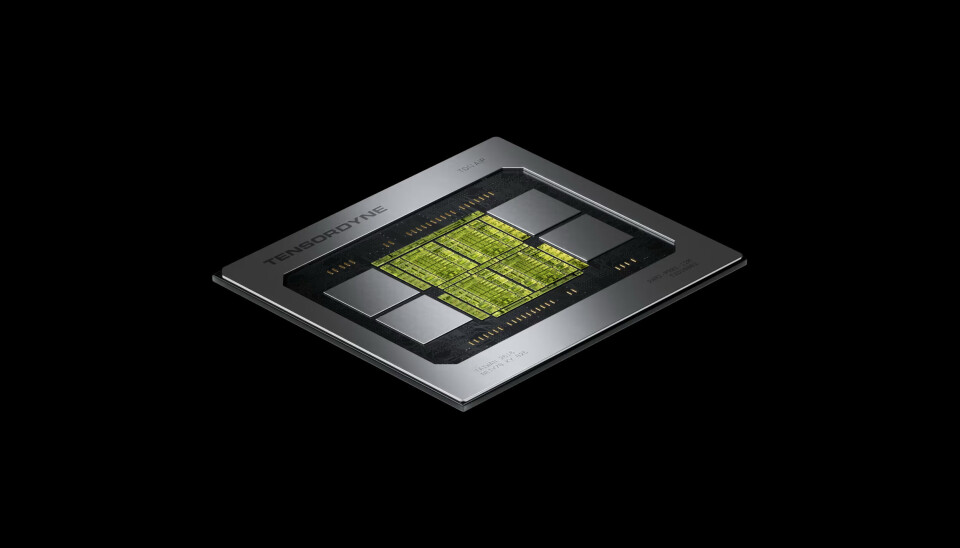
Here's a look at Tensordyne's first commercial chip, Napier

Here’s a look at Tensordyne’s first commercial chip, Napier

Backhus tells us that Tensordyne is leaning heavily on the scalability of its accelerators rather than individual performance. Each chip features roughly a terabyte of interconnect bandwidth, allowing for rack-scale deployments of up to 72 accelerators per pod.

Advertisement

The TDN72

Tensordyne’s system, codenamed the TDN72, consists of eight air-cooled compute blades, each with a single 10-core Intel Xeon-D host CPU and nine Napier accelerators.

These chips are interconnected by a high-speed interconnect fabric topology reminiscent of the one used by Nvidia’s GB200 NVL72 rack systems.

Each chip connects to six proprietary fabric switch blades developed by Tensordyne’s networking partner Juniper, located at the back of the system, in an all-to-all fabric.

Tensordyne's TDN72 is a 30kW system with eight compute blades and 72 Napier accelerators.

Tensordyne’s TDN72 is a 30kW system with eight compute blades and 72 Napier accelerators

Despite some similarities to Nvidia’s NVL72 racks, Tensordyne’s TDN72 will be much smaller and won’t require liquid cooling, which should make it easier to deploy in older brownfield datacenters.

Advertisement

According to Backhus, up to four 30 kW TDN72 systems can be packed into an – admittedly large – 52U rack. That works out to 608 petaFLOPS in a 120 kW footprint, or about 1.68x more dense FP8 compute per rack than Nvidia’s GB200 NVL72. That doesn’t take into consideration the fact that Nvidia’s kit supports NVFP4 acceleration while Napier is limited to FP4 weights. But again, don’t read too much into that comparison. Peak FLOPS are not representative of real-world performance.

Tensordyne’s TDN72 launches next year, and it’ll be competing against Nvidia’s next-gen Vera Rubin and Vera Rubin Ultra systems, which will no doubt be a stiffer fight, especially when software compatibility is taken into consideration.

Software promises

Since building its first prototype silicon a few years ago, the company has gone to great lengths to keep its software platform as simple and easy for customers to deploy, as possible.

For example, the prototype lacked the error correction found in its Napier chips, and would have required users to use quantization-aware training to adapt their models to run accurately on the hardware – not exactly feasible for those looking to run trillion-parameter models.

Advertisement

The software has also matured such that the hardware’s compiler can convert existing models to run directly on its latest hardware, an approach we’ve seen from other chip startups like Tenstorrent.

For inference, Tensordyne has developed its own proprietary serving platform, as well as a runtime environment that Backhus says will allow customers to use their preferred inference servers, such as vLLM. PyTorch support is under development.

Before the chip has even shipped, the company is making some bold performance claims. Backhus expects the chips to deliver upwards of 1,000 tokens a second, and that’s without relying on multi-token prediction or other forms of speculative decoding to boost token generation.

Tensordyne’s platform has certainly attracted the attention of neocloud providers like Cirrascale and BlueSky Compute, both of which have expressed interest in deploying the company’s hardware when available.

Advertisement

But, as we’ve seen with AMD and others, software can make or break a chipmaker. With Napier slated for release in Q2 or Q3 of 2027, Tensordyne won’t have long to get things right. ®

Source link

Continue Reading

Tech

Working in the biopharma space is a family affair for this MSD engineer

Published

on

Shibu Kaithalamattathil, a senior engineer at MSD, explores the day to day as an engineer in the biopharma space and having the opportunity to watch his son enter the industry.

Shibu Kaithalamattathil is a senior engineer at MSD Biotech in Dublin.

In this role, he oversees the day-to-day engineering activities that support manufacturing, “ensuring that equipment, processes and systems operate safely, reliably and in full compliance with site standards”, he tells SiliconRepublic.com.

Kaithalamattathil says that no two days feel alike in her job, which he puts down to the team and the culture on-site.

Advertisement

“You’re genuinely excited to go to work every morning,” he says.

Never was this truer, Kaithalamattathil says, than last year, when he had a “unique opportunity”.

“My son Alan joined MSD Biotech, Dublin as an intern and worked on-site alongside me,” he explains. “Alan is studying chemical engineering in college and to be able to work alongside him for that period of time was amazing, not just because of the feeling of pride I got knowing my son was following in my footsteps, but also the sense that he’s taking his first professional steps in what will be a hugely exciting and rewarding career.

“With the way science is advancing, I think it’s safe to say his day to day will eventually look very different to my own, but there’s so much excitement in that.”

Advertisement
What skills do you use on a daily basis?

One of the things I enjoy most about my role is that every day I have to use both technical and non-technical skills alike. My role is as much about dealing with machinery, systems and equipment as it is about dealing with people, so it’s a mix of very technical troubleshooting skills as well as communications, teamwork and project management.

And at the heart of it, the biggest skill I think is problem-solving, whether looking at equipment or looking at our ways of working, it’s about being able to adapt and solve any issues or challenges as they arise.

That is something I think Alan experienced first-hand during his internship as well. While at university, you’re so focused on the technical side of things with the science, the engineering and chemistry. Across STEM, softer skills can sometimes be an afterthought. But on a day-to-day basis, whatever area you end up specialising in, the skills that will come in handy are usually communication and problem-solving.

What is the hardest part of your working day?

The most challenging part of the day is dealing with the unexpected. It creates a sense of excitement and learning, but at the same time it is always a challenge to manage unexpected breakdowns or issues, all while ensuring that planned work is completed on time no matter what is going on.

Advertisement

That requires quick decisions and effective prioritisation, as well as a real passion for problem-solving. Whatever issue is in front of you, it’s really about just stepping back, looking at it holistically and then figuring out what the best way to fix or address it is. It’s about not just finding a solution, but making sure you’re finding the best solution.

Do you have any productivity tips that help you through the working day?

I start my day by taking a few minutes to prioritise my workload, focusing on key tasks and then I get working on the to-do list. Engineering roles can be fast-paced and unpredictable, so having a clear structure helps me stay focused and calm, even when challenges arise.

I tend to break tasks into smaller, manageable steps, which keeps me organised and makes it easier to maintain momentum throughout the day. I also make a point of taking short breaks to reset, especially during busy periods. Staying refreshed helps me think more clearly and safely, both are essential in a biotech environment. And finally, I’ve learned the value of leaning on the team.

When you first started this job, what were you most surprised to learn was important in the role?

I was struck by the importance of adaptability. Even with years of experience, I quickly learned that continuous learning is part of daily life here.

Advertisement

The facility is equipped with modern, cutting‑edge technology and the systems evolve regularly as the industry advances. Being open to new tools, new processes and new ideas has been just as important as any technical skill I brought with me. Having my son on-site with me, I tried to encourage those same habits and behaviours for him too as I really do think they make a difference. And it’s been brilliant to see him taking them on, both in his academic and professional development.

How has this role changed as this sector has grown and evolved?

The biopharmaceutical sector is expanding rapidly and with that growth has come significant technological advancement. My role has evolved from focusing mainly on hands-on engineering tasks to now also incorporating more data-driven decision-making and working with highly sophisticated equipment, which has been very exciting.

Automation, digital systems and advanced monitoring tools have become part of our daily operations, allowing us to work more efficiently while maintaining the highest standards of safety and quality. I’m also sure that by the time Alan finishes university and moves fully into the workforce, the role will have evolved even further, given the pace at which technology, automation and digital systems continue to develop across the sector.

However, although the tools and processes have evolved, what hasn’t changed is the purpose behind the work. We’re producing medicines that make a real difference to people’s health and you can really feel how much that sense of responsibility guides everything our team does.

Advertisement
What do you enjoy most about the job?

What I enjoy most is the atmosphere on-site. There’s a real sense of community at MSD Biotech, Dublin. People are friendly, supportive and proud of the work they do. It genuinely feels like a home away from home in a way and that makes a huge difference in an industry where teamwork and trust are so important.

Every day, I also get to work with colleagues who share the same commitment to quality and the same passion for improving patients’ lives. That always feels very powerful too.

Seeing Alan walk into the same site where I work and watching him experience the same warm, welcoming environment was such a proud moment. It just reinforced everything I love about this job, the strong culture, the sense of belonging and the meaningful work we do every day.

Don’t miss out on the knowledge you need to succeed. Sign up for the Daily Brief, Silicon Republic’s digest of need-to-know sci-tech news.

Advertisement

Source link

Continue Reading

Tech

The Best Art TVs | WIRED

Published

on

  • Intuitive new OS.
  • Excellent contrast and picture quality.
  • Massive number of art images.
  • Anti-glare coating actually works.

  • High refresh rate for gaming.

TIRED

  • Monthly subscription required to access most artwork.

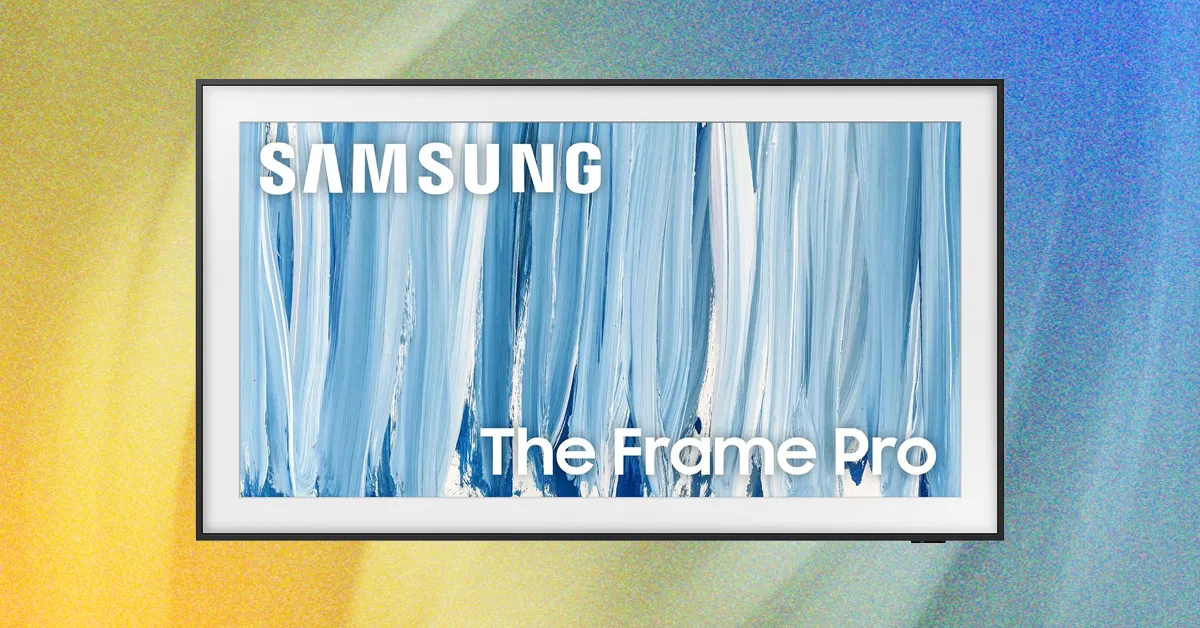
I still remember the moment I realized Samsung’s The Frame Pro 2026 is the best art television around. I loaded Van Gogh’s The Starry Night painting with its various shades of blue. The masterpiece came alive with texture and realism thanks to the contrast ratio and clear picture quality. I marched friends and family members down to my office to gaze in wonder.

Installing The Frame Pro is a bit of a process, though. I ended up watching a YouTube video for help. About an inch thin, this model sits mostly flush to the wall. Rather than connecting your streaming boxes directly to the TV, Samsung’s Wireless One Connect breakout box acts as a bridge. I connected my Xbox Series X and PC to the HDMI ports (there are four total) on the breakout box, which then connects to The Frame Pro using Wi-Fi 7 from across the room. Navigating The Frame Pro was also easy, thanks to the intuitive UI and the lightweight, long-lasting remote.

Free users have access to Samsung’s rotating catalog of 30 free images, but subscribers willing to pay $4.99 monthly will have access to 5,000 pieces of art. The Frame Pro 2026 has the widest variety of artwork, including hundreds of masterpieces, but I preferred Amazon’s Ember Artline “moving artwork” feature better.

At $2,000, The Frame Pro is the most expensive option on our list, and it’s worth its price. Even though most manufacturers, Samsung included, don’t list specs for their art TVs, The Frame Pro 2026 displayed artwork and photos with the best contrast and picture quality.

I was blown away by the picture quality for movies. When viewing Netflix’s Awake, which displays a lot of night scenes, I was able to still see all of the action. In comparison, the same scenes looked muddy and dull on the TCL NXTVISION and Amazon Ember Artline.

Advertisement

The 2026 model now supports high-fidelity gaming with a 240 Hz refresh rate when connected to a gaming computer (though it does lower the resolution). I played Crimson Desert and the main character—wearing a black suit of armor—moved realistically and responded quickly to my controller nudges.

For AI features, you have a few options. Samsung lets you pick from Alexa+ or Samsung’s Bixby to control the volume by voice or ask about which thrillers came out this month. You can also use Microsoft Copilot or Perplexity. However, the Amazon Ember Artline was the only art television that let me generate AI artwork by voice.

The Frame Pro 2026 is my top pick for art TVs because paintings looked the most realistic. If you want the best quality and are willing to pay a higher price, it’s a phenomenal choice.

Best on a Budget

Advertisement

WIRED

Source link

Continue Reading

Tech

‘What makes a CV stand out is the personal touch you add to it’: Even professional CV writers are warning not to use AI to write a resume

Published

on


  • More than half of CV writers say the work they receive now contains AI
  • AI-generated text risks being impersonal and exaggerative
  • But the tech is helping expression, creativity and storytelling

While workers continue to explore ways to adopt AI in their everyday workflows, recruiters are warning they should be doing so when writing their resumes, new research has claimed.

More than half (56%) say they often or always receive resumes that contain at least some AI-generated text – two-thirds (67%) also note an increase in AI-generated content.

Source link

Advertisement
Continue Reading

Tech

After social media ban, AI bans could be next for school kids

Published

on

Artificial intelligence is rapidly becoming part of everyday life, and that includes classrooms. Students are turning to tools like ChatGPT for homework, research, writing assistance, and even basic questions. But a growing number of educators, researchers, and policymakers are questioning whether introducing children to AI at such a young age could do more harm than good.

Norway appears to agree. The country has announced a near-total ban on generative AI tools for elementary school students, arguing that children need to develop fundamental reading, writing, and math skills without relying on AI. The move could become an early sign of a broader trend, especially as governments around the world take a tougher stance on children’s use of technology.

Why is Norway restricting AI in schools?

Norwegian Prime Minister Jonas Gahr Støre said the government is concerned that AI could cause younger students to skip important stages of learning. The administration argues that reading, writing, and mathematics should remain the primary focus during a child’s early education.

That said, Norway is not completely shutting the door on AI in education. Under the new guidance, students aged 6 to 13 should generally not use generative AI tools, while those between 14 and 16 may use them under teacher supervision. Students in upper secondary education, aged 17 to 19, will be taught how to use AI responsibly so they are better prepared for higher education and the workplace.

A recent study found that even short periods of AI-assisted work may reduce independent critical thinking. Participants who relied on AI assistance were significantly more likely to struggle or give up when that assistance was removed, suggesting that frequent reliance on AI may reduce persistence and independent thinking.

The study focused on adults, which raises an obvious question. If mature minds can become dependent on AI after only brief exposure, what happens when children with developing brains use these tools every day? That question is becoming increasingly difficult for educators and policymakers to ignore, and Norway’s new restrictions suggest some governments are no longer willing to wait for a definitive answer.

Advertisement

Are AI restrictions the next big policy trend?

Norway’s AI restrictions are part of a wider trend. The country has already banned smartphones in schools and has proposed tighter controls on children’s access to social media. Similar debates are taking place around the world as governments become increasingly willing to intervene when new technologies are seen as posing risks to young users.

Just a few years ago, the idea of restricting children’s access to social media platforms was viewed by many as unrealistic. Today, age-verification laws, smartphone bans, and social media restrictions are becoming increasingly common. AI could be heading down a similar path.

Source link

Advertisement
Continue Reading

Tech

Epson HX-20 Gets A Drive Upgrade

Published

on

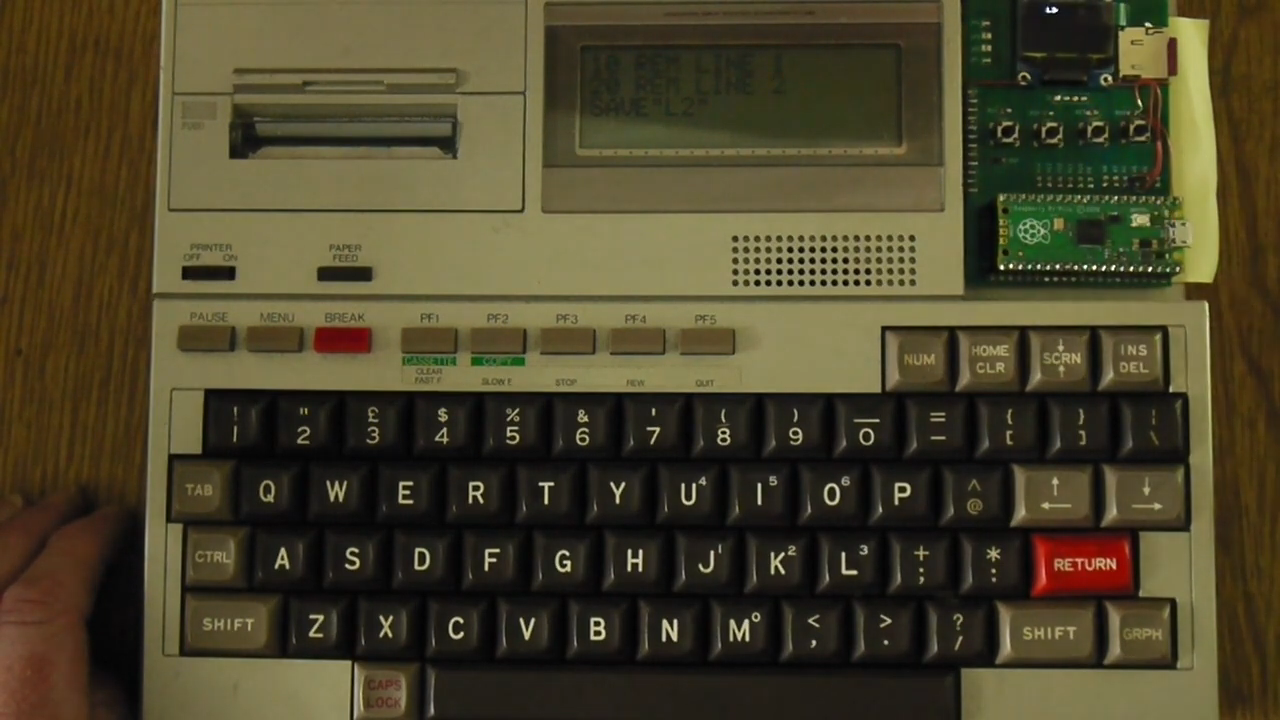
The Epson HX-20 is sometimes referred to as an early laptop computer. It’s a little odd in its form factor, and in its storage, relying on a microcassette drive to store data. It can be problematic to keep these tapes and drives going after so many decades, so [Andrew Menadue] has been tinkering with a more modern solution.

The replacement drive uses a Raspberry Pi Pico to emulate the original tape drive. The Pico uses a microSD card to store data instead of the magnetic media of old. The device has a small screen for showing status information and four buttons for navigation, allowing the faux drive to be controlled as to what “tape” it’s pretending to be. It’s also possible to use the device to emulate ROM cartridges that could be used with the HX-20 in place of its original tape deck storage solution.

We’ve seen some other old hardware get similar drive upgrades before, too. No surprise, because mechanical drives and media simply don’t last forever. Sometimes you need to build a replacement that’s viable today. Video after the break.

Advertisement

Source link

Advertisement
Continue Reading

Tech

Amazon Drops Sam Altman Movie After Announcing OpenAI Partnership

Published

on

Amazon MGM has dropped Luca Guadagnino’s nearly completed Sam Altman biopic Artificial and is seeking another distributor for the film. The move comes months after Amazon expanded its multibillion-dollar partnership with OpenAI, fueling speculation about a potential conflict given the movie’s reportedly unflattering portrayal of Altman. The Independent reports: Artificial would have marked the Oscar-nominated Call Me By Your Name director’s third Amazon film, following the critically acclaimed Zendaya-led tennis romance Challengers (2024) and the academic scandal drama After the Hunt (2025), starring Julia Roberts. The new movie is said to chronicle the brief period when Altman was abruptly ousted as OpenAI’s CEO in 2023 and subsequently rehired. Monica Barbaro and Ike Barinholtz star alongside Garfield as former OpenAI CTO Mira Murati and SpaceX founder Elon Musk, while Yura Borisov, Cooper Hoffman, Jason Schwartzman, Cooper Koch, Billie Lourd, Zosia Mamet, Angus Imrie, Chris O’Dowd, Mark Rylance and Margo’s Got Money Troubles breakout Thaddea Graham round out the cast.

It is unclear exactly why the film was dropped, but according to Variety, the news came after it had already undergone positive screen tests. An early viewer told the publication that the film’s portrayals of Altman and newly minted trillionaire Musk are the two characters audiences would “like the least.” It was also reported that Amazon had already seen every early iteration of the script before Guadagnino was hired to direct. Altman and Amazon founder Jeff Bezos have developed a high-profile friendship over the years. In fact, the former was in attendance at Bezos’s wedding to Lauren Sanchez, which took place in Venice, Italy, in 2025. In recent months, the two have continued to deepen their professional partnership that began in 2015, when Amazon became one of OpenAI’s first investors. Ten years later, the companies closed their first major deal in November 2025, allowing the ChatGPT maker to run its systems on Amazon’s U.S. data centers.

Source link

Continue Reading

Tech

Worlds collide at Amazon Spheres as pro-Palestinian group protests cloud giant’s Israel contracts

Published

on

Protesters outside the Spheres on Amazon’s Seattle campus Thursday evening. (GeekWire Photo / Todd Bishop)

Carrying bullhorns and signs depicting Amazon executives as war criminals, about two dozen people protested outside the Amazon Spheres in Seattle on Thursday evening, calling on the company to stop providing technology to Israel for what they described as genocide in Gaza.

The protesters said they were trying to disrupt what they believed to be a gathering of Amazon executives, state and local leaders, U.S. State Department officials and Australian government representatives on an upper floor of the Spheres, on the eve of the World Cup match between the U.S. and Australia.

Contacted Friday, Amazon described the gathering differently. The company said the event underway during the protest was for members of Seattle’s business and sports communities, Australian parliamentarians, and Amazon employees celebrating the World Cup. A separate meeting concluded before the protests began, the company said, without specifying who attended that meeting.

“We respect individuals’ rights to engage in peaceful public demonstrations,” said Montana MacLachlan, Amazon spokesperson, in response to GeekWire’s inquiry. The company, she added, is “committed to being a responsible corporate citizen in the Puget Sound region, Washington state, and every community we serve.”

The protest group, which goes by the name Amazon Worker Intifada, described the protest as part of an effort to escalate pressure on the company’s leaders over the issues. An affiliated group, No Azure for Apartheid, has been protesting Microsoft for more than a year over its work for Israel.

Advertisement

The protesters object to Amazon’s work with Israel, including Project Nimbus, a $1.2 billion contract that Amazon and Google won in 2021 to provide cloud and AI services to the Israeli government, including the Israeli military and weapons suppliers, according to leaked contract and procurement documents.

The protesters marched to the Spheres shortly before 6 p.m. Thursday, walking in a circle outside the glass-domed buildings with signs, drums, balloons, noisemakers and Palestinian flags, engaging in call-and-repeat chants such as, “Say it loud and say it clear — Amazon’s a war profiteer.” 

Protesters march outside the Amazon Spheres before raising balloons with noisemakers, attempting to disrupt an event inside.

Amazon workers and soccer fans walked by on the sidewalk, some stopping to take in the scene. Small groups of people in business attire walked through the protest to the Spheres entrance.

A banner at the edge of the space read “Amazon War Criminals Meeting Here.” Another depicted Amazon CEO Andy Jassy and AWS CEO Matt Garman, with blood on their hands, embracing what appeared to be a bomb. “We See Your Crimes,” it read.

Advertisement

Members of what appeared to be a wedding party, including a woman in a white bridal dress and a man in a suit, emerged at one point from one of the restaurants at the base of the Spheres and tried unsuccessfully to persuade the protesters to stop or move elsewhere.

In a press release after the protest, the group said its demonstration forced Amazon to reroute attendees, and that an arriving Australian delegation had to use a different entrance to get around the protesters. The group also said an event attendee grabbed and shoved a protester’s camera.

After protesting for an hour at entrances on both ends of the courtyard between the Spheres and Amazon’s Day One tower, the group moved to the Lenora Street side of the Spheres, where they released two helium balloons on strings with loud noisemakers attached, attempting to position the noisemakers outside the windows where an event could be seen taking place inside. 

One of the leaders of the protest Thursday was Ahmed Shahrour, a Palestinian software engineer in Amazon’s Whole Foods division in Seattle who was fired in October over internal Slack posts criticizing the company’s ties to Israel.

Advertisement

Amazon said at the time that he violated multiple company policies, alleging that he “misused company resources, including by posting numerous non-work-related messages pertaining to the Israel-Palestine conflict.”

Shahrour called it “a blatant act of retaliation designed to silence dissent from Palestinian voices within Amazon and shield Amazon’s collaboration in the genocide from internal scrutiny.”

On Friday, Amazon spokesperson MacLachlan said of that incident, “We don’t tolerate discrimination, harassment, or threatening behavior or language of any kind in our workplace, and when any conduct of that nature is reported, we investigate it and take appropriate action based on our findings.”

No Azure for Apartheid, which includes current and former Microsoft workers, has staged repeated protests of its own, similarly calling on Microsoft to cut ties with Israel.

Advertisement

They set up an encampment on the Redmond campus last year, where 20 people were arrested for trespassing, and later occupied the office of Microsoft President Brad Smith. Microsoft has fired several employees over various protests and activities, citing violations of company policies.

After a Guardian investigation revealed that an Israeli military unit had used Microsoft’s Azure cloud to store millions of intercepted Palestinian phone calls, the company cut off the unit’s access and opened a review that recently led the company to announce that it would tighten its human-rights controls on its work with national security agencies.

Source link

Advertisement
Continue Reading

Tech

Gen Z Singles Are Trying to Make ‘Solomaxxing’ Aspirational

Published

on

For young people, the trend removes the stigma of being unmarried and alone, and recasts it as something to aim for, not avoid.

Source link

Continue Reading

Tech

Top Apple tablets tested and ranked

Published

on

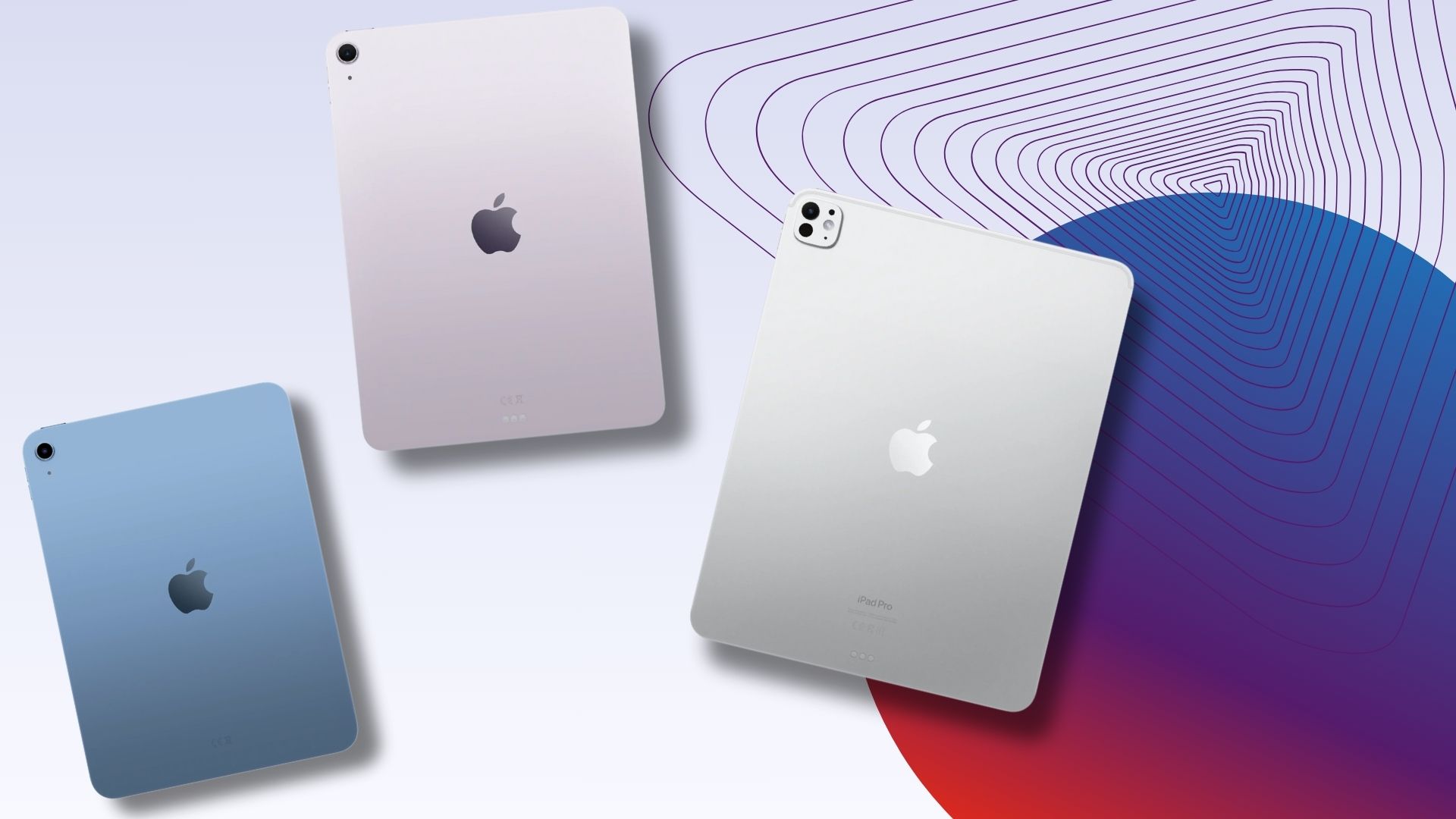
Although there’s more competition than ever from the likes of Samsung, OnePlus and Honor, iPads still reign as some of the best tablet computers you can buy. Even if you are a longtime Apple fan however, it can be tricky to know which iPad is best suited for your needs given just how many options there are in 2026. If you’re tempted to upgrade or buy your very first iPad tablet then here are our current rankings.

One of the best things about buying an iPad in 2026 is that there’s a model to suit pretty much every use case and budget. For instance, the standard entry-level iPad is ideal for budget buyers, whilst the iPad Air is ideal for students who need a solid all-rounder for their studies. The iPad Pro is perfect for professionals who require all the power they can get, and the iPad Mini is made with artists in mind who love to draw and sketch throughout the day.

There are lots of great reasons to buy each for the aforementioned models but what unites them all is iPadOS. Easily the biggest reason as to why you should buy an iPad over one of the best Android tablets, iPadOS is unparalleled when it comes to offering a robust App Store filled with all of your go-to apps, alongside a UI that now allows for seamless multitasking.

iPadOS also comes into its own if you’re already part of the wider Apple ecosystem. AirPods of all varieties will immediately swap from your iPhone to your iPad depending on which device you’re using in the moment, and you can see health data collected via your Apple Watch as well.

Advertisement

There are plenty of other reasons as to why iPads are largely unbeaten in the tablet space, but the important thing to know is that this list can pair you with the model that makes the most sense for your needs so that you don’t inadvertently overspend. Keep reading to see which iPads impressed our team the most, or check out our round-up of the best tablets to see what Apple’s devices are up against. The best cheap tablets are also an instant win for anyone tied to a strict budget.

Advertisement

SQUIRREL_ANCHOR_LIST

How we test all the iPads we review

Every tablet in this list has been properly tested and used for an extended period of time by one of our product experts. We will never recommend a tablet to you that we haven’t personally used and put through a set series of tests.

Advertisement

These tests can include colourimeter checks to gauge screen accuracy and brightness levels, various benchmarks to evaluate performance, and battery drains to judge endurance.

Our reviewer will also always judge performance for everyday use. This will see them use it as their primary tablet to conduct typical tasks like gaming, web browsing and video calling.

If the device is targeted at a specific market such as digital artists, they’ll also consider areas such as digital stylus support and whether it can effectively run relevant applications.

  • The performance of the mid-range iPad continues to improve

  • Improved connectivity

  • Two size options is always welcome

  • Great accessories

Advertisement
  • No ProMotion

  • Colour options are welcome, but a little drab

Even though it’s not the cheapest iPad in the range, the iPad Air is easily the best value option of the bunch given just how much you get in return for your money, especially with the new iPad Air M4. This is a tablet that boasts iPad Pro-levels of power but without the hefty price tag that typically comes with it.

Apple fans may remember that the launch of the iPad Pro M4 was a big deal as it was the first Apple device anywhere to feature the M4 chip, leapfrogging the various MacBooks available at the time. Well, that power has now trickled down to the iPad Air range and it blows pretty much every other tablet around the £599/$599 mark out of the water.

You probably won’t notice that much up an uptick if you own the iPad Air M3, but compared to older M-series chips it’s a big leap. Multitasking happens without issue and you can indulge in fairly heavy-duty video and photo editing without ever seeing where the limits are. It’s all very impressive for a tablet, and it’s made even better with the Magic Keyboard in tow.

Advertisement

There’s also improved connectivity in this iPad Air with the N1 network chip which adds Wi-Fi 7 for faster internet speeds as you work. Of course, for as great as the iPad Air is for productivity, it still remains a solid entertainment device with a bright, vibrant screen that really shows off some impressive detail when streaming the latest shows on Apple TV.

It would have been nice for Apple to finally bring the 120Hz ProMotion display down to the iPad Air range in a similar fashion to the entry-level iPhone 17, but it’s so much of an issue to detract from how much fun the tablet is to use on a daily basis.

SQUIRREL_PLAYLIST_10208285

Advertisement
  • Upgraded base RAM

  • Wi-Fi 7 support

  • The best screen on any tablet

  • iPadOS is getting better and better

  • Give us some fun colours

  • A fairly minor update

If you want the absolute best that Apple’s iPad lineup has to offer, the iPad Pro M5 is it.

Loaded with premium hardware, the finest screen you’ll find on any iPad, and performance that genuinely impresses.

Advertisement

It’s also the best-looking tablet money can buy right now. Thin, light, and supremely sleek, the design carries over from the previous generation, and that’s no bad thing.

Under the hood, however, things have moved on. A new M5 chip handles everything from casual browsing to demanding creative work without breaking a sweat, and an N1 networking chip joins the party too.

The specific chip configuration varies depending on which storage tier you go for, but every version of the Pro M5 delivers serious power. Apple has also bumped the base RAM up to 12GB, a genuine step up from the 8GB found in the older model, and the difference is felt in day-to-day use. iPadOS has matured significantly as well, and the software now feels worthy of the hardware it runs on.

What truly sets the Pro apart from something like the Air is the screen. That OLED panel remains in a league of its own, hitting peak brightness of 1600 nits with rich, accurate colours and excellent HDR support.

Advertisement

Whether you’re watching films, editing photos, or cutting video, it looks stunning throughout.

  • The design is a massive upgrade

  • USB-C is far more convenient than Lightning

  • Smart front camera placement

  • Unbeatable tablet apps and software

  • Huge price jump, especially in Europe makes its position in Apple’s iPad range confusing

  • Odd Apple Pencil integration

  • 64GB isn’t enough (256GB probably too much)

Advertisement

Apple’s baffling decision to increase the price of the iPad in its 10th generation made the tablet tricky to recommend at launch. However, a recent drop down to $329/£329 has pulled the iPad 10 back to an affordable price, making it our go-to budget iPad once again.

The iPad has taken design queues from the pricier iPad Air, including flat edges, slimmer bezels and the absence of a home button. The tablet is also 10g lighter and chargers via USB-C, meaning it can share its charger with more devices.

While the 10.9-inch Liquid Retina Display lacks the P3 colour gamut and anti-glare coating found on higher-end iPads, it still has a higher resolution than that of the iPad 9, making it an easy upgrade compared to its predecessor, while producing a sharp, colourful image.

There’s a 12-megapixel rear camera for snapping photos and scanning documents, along with a 12-megapixel ultra-wide front camera that now sits on the long edge for holding video calls in landscape orientation.

Advertisement

The A14 Bionic chip delivers strong performance, including a noticeable improvement in gaming performance and video export times compared to previous generations. The RAM is up from 3GB to 4GB too, though the storage remains lacking with 64GB being the base configuration.

The 10-hour battery life is in line with most iPads, while Apple Pencil and Magic Keyboard Folio compatibility makes the iPad 10 a very versatile device.

  • Great new design

  • Works with the second-gen Apple Pencil

  • Super-speedy thanks to the A15 Bionic chipset

  • 5G option makes for great portability

Advertisement
  • Odd storage sizes

  • Expensive

  • Some iOS elements are too small

The iPad Mini 6 won’t be everyone. It’s expensive, lacks the Magic Keyboard support of the Air and Pro and suffers from slightly inferior battery life. However, if you’re after a small iPad for watching videos, reading or note-taking then this is still an option we’re happy to recommend,

Most of the features here are stripped from the iPad Air series. It mirrors that slate’s design, colour choices and screen tech. However the performance isn’t quite as high-end, so it scores lower in benchmark tests. In real-world use though, it’s still very snappy in all ways.

The smaller 8.3-inch display makes this a different proposition from the iPad Air. It’s less of a laptop replacement and more of a companion; a media-centric device that fits in smaller bags.

Advertisement

Pair it with the Apple Pencil (2nd gen) and you’ve got a fantastic mini notebook and sketchpad. The smaller display also makes it great for gaming, especially if you pair up a Bluetooth controller.

We found that the battery life is a little shorter than the iPad Air, but at least there’s a USB-C port on the bottom.

FAQs

Can an M5 iPad Pro run Mac Apps?
Advertisement

No, no iPad can natively run Mac apps – even if you have an M1 iPad and the app is built for an M1 Mac. Instead, all apps for an iPad must come from the App Store.

What is the difference between the three versions of Apple Pencil?

The original Apple Pencil has a glossy finish and charges by plugging directly into an iPad’s Lightning port – though no iPad in our list supports this older accessory. The Apple Pencil 2nd Gen charges wirelessly and has a matte finish. Any iPad with a USB-C port will support this Pencil. The new Apple Pencil Pro, with support for rotation and squeeze gestures, will only work with the latest iPad Air and iPad Pro M4 due to the relocation of the magnets within the iPad chassis.

Advertisement

Test Data

  Apple iPad Air M4 Apple iPad Pro M5 Apple iPad (10th gen) iPad Mini 6
Geekbench 5 single core 1557 1594
Geekbench 5 multi core 3190 4687
Geekbench 6 single core 3726 4081
Geekbench 6 multi core 13286 16441
Geekbench 6 GPU 52607 74536
3DMark Solar Bay 12727
sRGB 90 %
Adobe RGB 62.8 %
DCI-P3 64 %
Max brightness 467 nits 439 nits
1 hour video playback (Netflix, HDR) 3 % 6 % 6 %
30 minute gaming (intensive) 7 % 9 %
30 minute gaming (light) 5 % 8 %
1 hour music streaming (online) 1 %
1 hour music streaming (offline) 1 % 1 %
Time from 0-100% charge 120 min
GFXBench – Aztec Ruins 60 fps 60 fps
GFXBench – Car Chase 60 fps 60 fps

Advertisement

Full Specs

  Apple iPad Air M4 Review Apple iPad Pro M5 Review Apple iPad (10th gen) Review iPad Mini 6 Review
UK RRP £599 £999 £349 £479
USA RRP $599 $995 $349 $499
EU RRP €439 €559
CA RRP CA$649
AUD RRP AU$749
Manufacturer Apple Apple Apple Apple
Screen Size 11 inches 11 inches 10.9 inches 8.2 inches
Storage Capacity 128GB, 256GB, 512GB, 1TB 256GB, 512GB, 1TB, 2TB 64GB 256GB, 64GB
Rear Camera 12MP 12MP 12MP 12MP
Front Camera 12MP 12MP 12MP 12MP
Video Recording Yes Yes Yes Yes
IP rating No No IP57 No
Battery 28.93 Whr 31.29 Whr 19.3 Whr
Fast Charging Yes Yes Yes
Size (Dimensions) x x INCHES x x INCHES 179.5 x 248.6 x 7 MM 5.3 x 7.69 x 0.25 INCHES
Weight 462 G 446 G 477 G 293 G
ASIN B0BJLG85NS B09G9LDWYQ
Operating System iPadOS 26 iPadOS iPadOS 16.1 iPadOS 15
Release Date 2026 2025 2022 2021
First Reviewed Date 09/03/2026 16/06/2026 08/10/2021
Resolution 2360 x 1640 2420 x 1668 1640 x 2360 2266 x 1488
HDR Yes Yes Yes
Refresh Rate 60 Hz 120 Hz 60 Hz 60 Hz
Ports USB-C Thunderbolt / USB 4 port USB-C USB-C
Chipset Apple M4 Apple M5 Apple A14 Bionic (5 nm) A15
RAM 12GB 12GB, 16GB 4GB 12GB
Colours Blue, Purple, Starlight, Space Grey Grey, Silver Silver, Blue, Pink, White Space Gray, Pink, Purple, Starlight

Source link

Advertisement
Continue Reading

Trending

Copyright © 2025