Security teams log 54% of successful attacks and alert on just 14%. The rest move through your environment unseen.
The Picus whitepaper shows how breach and attack simulation tests your SIEM and EDR rules so threats stop slipping by detection.





Anthropic appears to be testing Claude Cowork support on mobile, allowing you to manage long-running Claude tasks from your phone.
For those unaware, Claude Cowork is Anthropic’s desktop-focused agentic mode for Claude, and it brings some of Claude Code’s task-running abilities to regular knowledge work.
Unlike Claude Code, which is optimized for coding/development tasks, Cowork can work on longer tasks, use files, create documents, generate spreadsheets, write reports, and continue working in the background while you monitor progress.

In my tests, I’ve found Cowork to be useful when I have to deal with documentation, pictures, and even managing my storage partition.
For example, when I was compiling a React Native app on my local storage, and it ran out of storage, Cowork investigated all my local folders in the partition and found files using most of my storage that I may not have been aware of.
Until now, Cowork has been mostly tied to Claude Desktop on macOS and Windows, but screenshots posted on X suggest Anthropic is preparing a proper mobile experience for it.
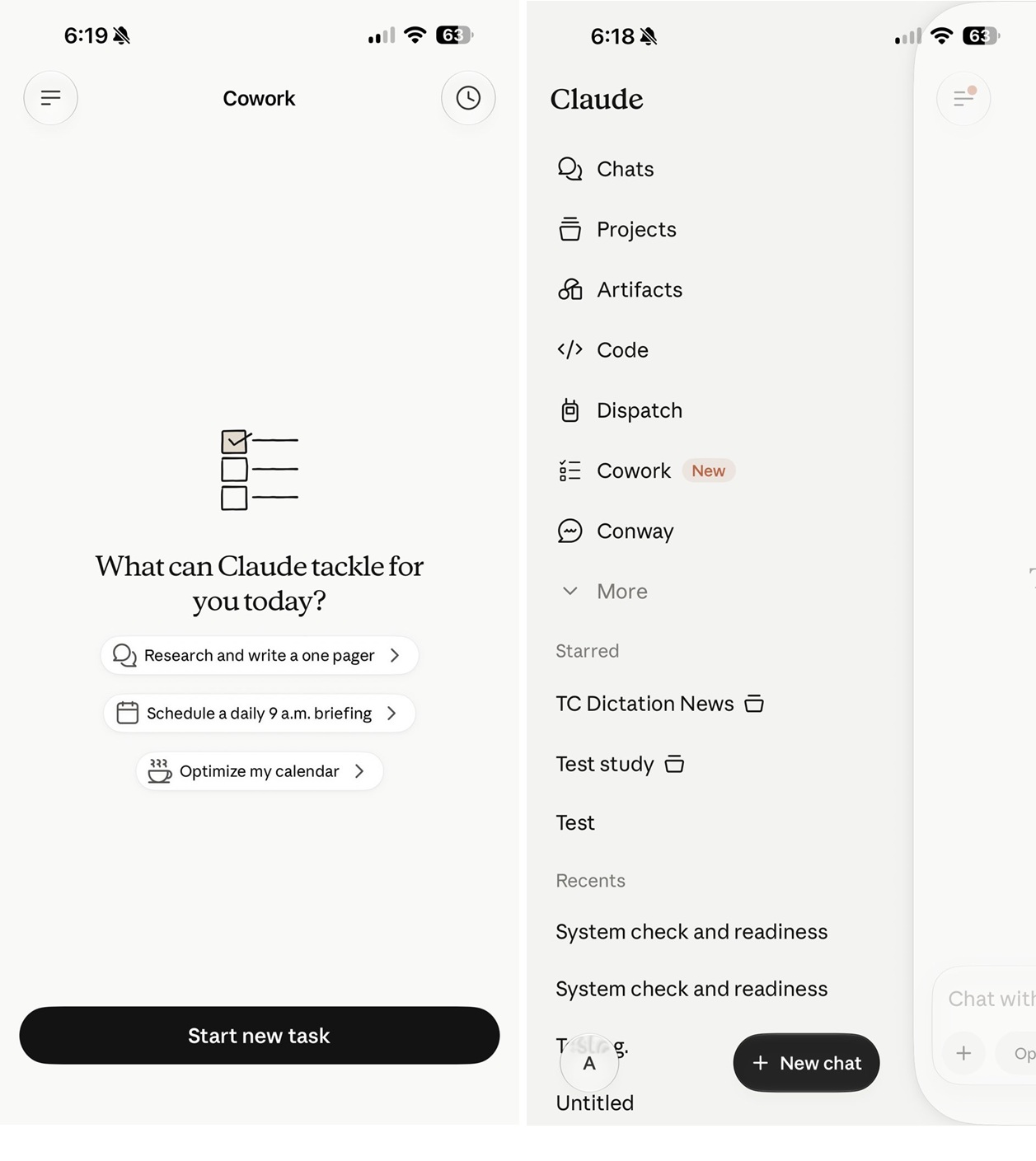
If you look at the above screenshot, it clearly confirms that you will be able to “start and steer tasks directly from your phone,” and also “check in from your phone, browser, or Claude desktop app.”
Most importantly, Anthropic notes that “work continues in the background, even when you close the app.”
Based on the screenshots, it’s quite obvious that Anthropic does not plan to turn Claude’s mobile app into a full desktop app.
Instead, it appears that Claude Cowork on mobile would be similar to a remote control for Cowork on your PC.
This aligns with Anthropic’s current explanation of Cowork. The company says Cowork runs directly on your computer, giving Claude access to the files you choose to share.
In other words, your phone may become the remote control for Cowork, but your computer is still where the actual heavy lifting happens.
Anthropic has not publicly announced full mobile Cowork support yet, but the screenshots suggest the feature is already being prepared inside Claude for mobile.

Security teams log 54% of successful attacks and alert on just 14%. The rest move through your environment unseen.
The Picus whitepaper shows how breach and attack simulation tests your SIEM and EDR rules so threats stop slipping by detection.
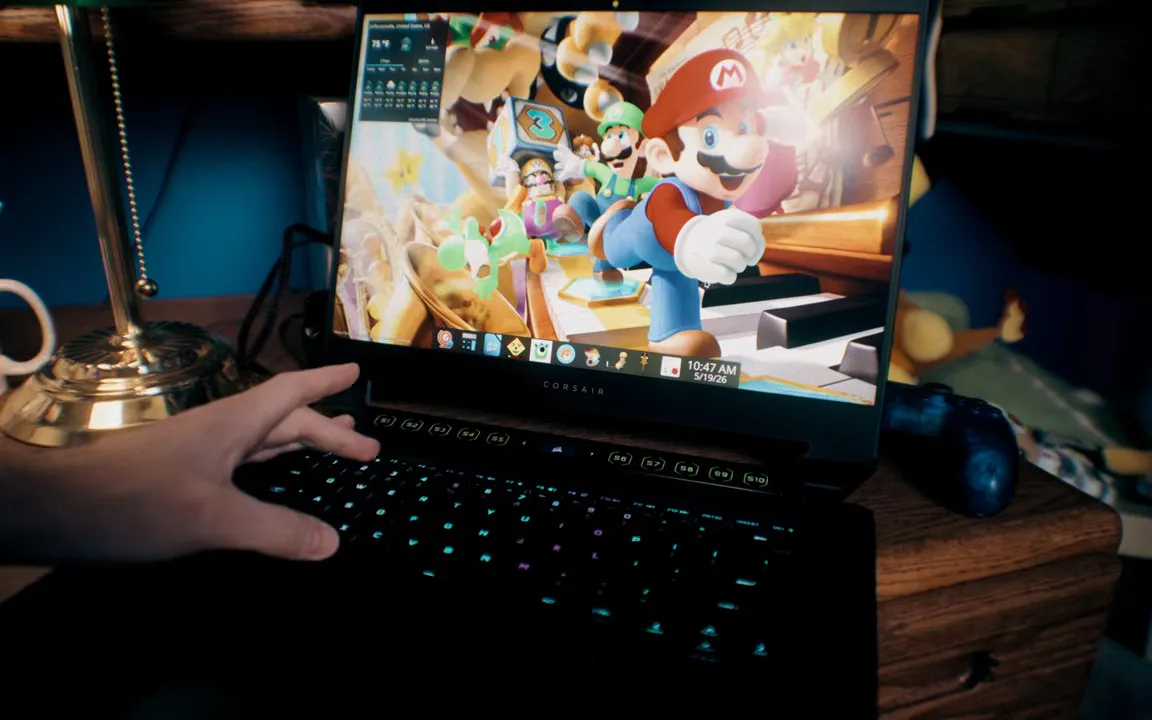
Age-verification has been a topic of hot debate recently, with many in the community feeling that keeping kids safe online is better handled by the parents. But what does that look like these days? [EposVox] has been working on a child-safe laptop to try and solve the problem, but depending on how you look at it, it also shows why non-technical people may feel they need the government involved.
His setup may seem simple to many readers — a carefully curated selection of edutainment apps running under Kubuntu on an old laptop. We particularly like his choice not to give access to the applications menu, but give himself a hotkey for the terminal if he needs to access something outside of the curated selection of software. Most things are local, though some browser games and cloud tools are made available via Vivaldi’s app mode. In this case there is no actual browser access for junior just yet, as the child in question is seven years old.
All in all, it sounds like less than an hour to set up. Assuming you’ve got experience with desktop Linux, anyway. Consider, though that it took [EposVox] an entire day just to get Kubuntu installed, and you begin to see why the average person might look kindly on a politician offering to solve these problems for them. For those that need it, [EposVox] points out some Windows-based alternatives for childproofing your PC, including the absolute minimum of DNS filtering. But the same problem applies: how many people outside our bubble know how to set that up?
While there’s an argument to be made that the sort of age-verification laws being passed are examples of government overreach, these laws aren’t facing a lot of push-back because most people aren’t technically literate enough to realize the problems with them. They like the idea of their kids being protected, and they don’t know how to set up an old PC the way [EposVox] does here.
It’s a real shame, especially considering that none of this is new. We featured a kid-friendly, Windows-based computer setup years ago. But it is what it is. Hopefully these sorts of hacks don’t end with the roll-out of age verification, because it’s a much better way to do it.


Threat actors are increasingly abusing Shop, the order-tracking app from Shopify, by adding fake purchase receipts in users’ order histories to trick them into providing sensitive data or installing remote access software.
The Shop digital shopping assistant serves as a centralized platform where users can track orders from multiple online retailers, access receipts and shipping updates, and discover and purchase products from merchants that use Shopify.
The app is very popular in North America, where support and purchasing options are more substantial. It has 50 million downloads on Google Play and 7 million ratings in Apple’s App Store.
According to cybersecurity company Gen Digital, scammers are inserting fake orders that appear alongside legitimate purchases, impersonating brands such as Norton, McAfee, Apple, and PayPal.

The threat actor also listed a phone number in the digital receipts that users can call to dispute purchases. However, at the other end is a scammer posing as a support agent.
Using social engineering tactics, the fraudster tries to convince the victim to disclose account credentials, payment card details, and temporary authentication codes (OTPs).
In some cases, the researchers say that victims are tricked into installing software that grants remote access to the device.
Gen Digital researchers note that inserting the fake receipts in the Shop app is a more effective method than using email to deliver fraudulent purchase notifications, a more common technique known as callback phishing.
Shop is a legitimate shopping app, and users inherently trust it, so orders that appear there are far more likely to prompt responses from unsuspecting users.
However, the researchers say that many of the false receipts contain poor grammar, which is an obvious red flag. Nevertheless, users may miss the mistakes when they see an invoice for a large purchase.
Despite the observed wave of fraudulent invoices, it is unclear how they are inserted into the Shop app.
The researchers say that Shop can populate orders from multiple sources, including email parsing, account association, and order workflows, but no particular one could be confirmed as the delivery channel for the fraudulent notifications.
Gen Digital underlines that they found no evidence that Shop, Shopify, or any of the impersonated companies were compromised.
BleepingComputer has reached out to Shopify with related questions, but we have not received a response as of publishing.
Until the situation clears up, users who see receipts for orders they didn’t place on Shop are advised not to call the phone number listed on them, but instead to verify any alleged charge directly with their bank.
Those who have already contacted the scammers and disclosed sensitive information should immediately reset their account passwords and contact their card issuer for cancellation.
Security teams log 54% of successful attacks and alert on just 14%. The rest move through your environment unseen.
The Picus whitepaper shows how breach and attack simulation tests your SIEM and EDR rules so threats stop slipping by detection.


A law is only as strong as the door it actually closes, and Australia’s ban on social media for under-16s appears to have left a window open. On 26 June, six months after the world-first measure took effect, Prime Minister Anthony Albanese said he was keen to make the ban as strong as possible, after a new study found it had done little to keep teenagers off the platforms it targets.
The study, published in the British Medical Journal, is the awkward part. It found that 85% of Australians aged 12 to 15 were still using social media three months after the ban began.
Two-thirds of underage users stayed online by the simplest means available, declaring an age over 16, or posting a selfie that the platform’s system accepted as belonging to someone older. The gate exists. Teenagers have largely walked around it.
The government’s response is to harden enforcement rather than rewrite the rule. Canberra plans to stress-test the law, which bars platforms including Meta’s Instagram and Google’s YouTube from giving accounts to under-16s.
A central focus, Albanese indicated, is making sure the eSafety Commission, the country’s internet regulator, is sufficiently empowered to do the job it has been handed.
The regulator had already said Meta, TikTok, and YouTube were not complying with the ban.
That regulator is not waiting quietly. The eSafety Commission and Communications Minister Anika Wells have said they are preparing legal action against multiple platforms.
Companies found to have systemically failed to uphold the ban face a maximum penalty of A$49.5m, around $34m, a figure large enough to concentrate corporate attention without being large enough to threaten the businesses it applies to.
The numbers in the study sharpen the case the government is trying to make. The BMJ paper suggests the rule has changed where teenagers say they are rather than where they actually are.
An age limit that depends on a user honestly entering a date of birth, or on an algorithm correctly guessing an age from a selfie, is an age limit with an obvious soft spot, and two-thirds of underage users appear to have found it.
Australia’s position as the first mover gives the experiment an audience well beyond its own borders. Governments in Europe and elsewhere have floated similar age thresholds.
Norway moved to follow Australia with its own under-16 ban, the UK has weighed comparable restrictions, and several have watched Canberra to see whether a hard ban can be made to work in practice rather than only on the statute book.
The early evidence is mixed enough to be useful to both camps: proof that a law can be passed and platforms compelled to act, and proof that passing the law is the easier half of the problem. Italy’s prime minister has gone further, cautioning that such bans are easily dodged.
The deeper problem is the one the BMJ paper exposes: an age limit enforced largely by self-declaration is an age limit enforced largely on trust. Australia legislated first, ahead of the rest of the world, and is now discovering in public what enforcement of such a law actually requires.
Other governments watching the experiment will have noted both the ambition and the gap between the rule and the result.
What comes next is procedural. Legal action against named platforms, a review of the eSafety Commission’s powers, and, presumably, a second study to measure whether tougher enforcement moves the 85% figure at all. The ban is six months old. The question of whether it works is still open.
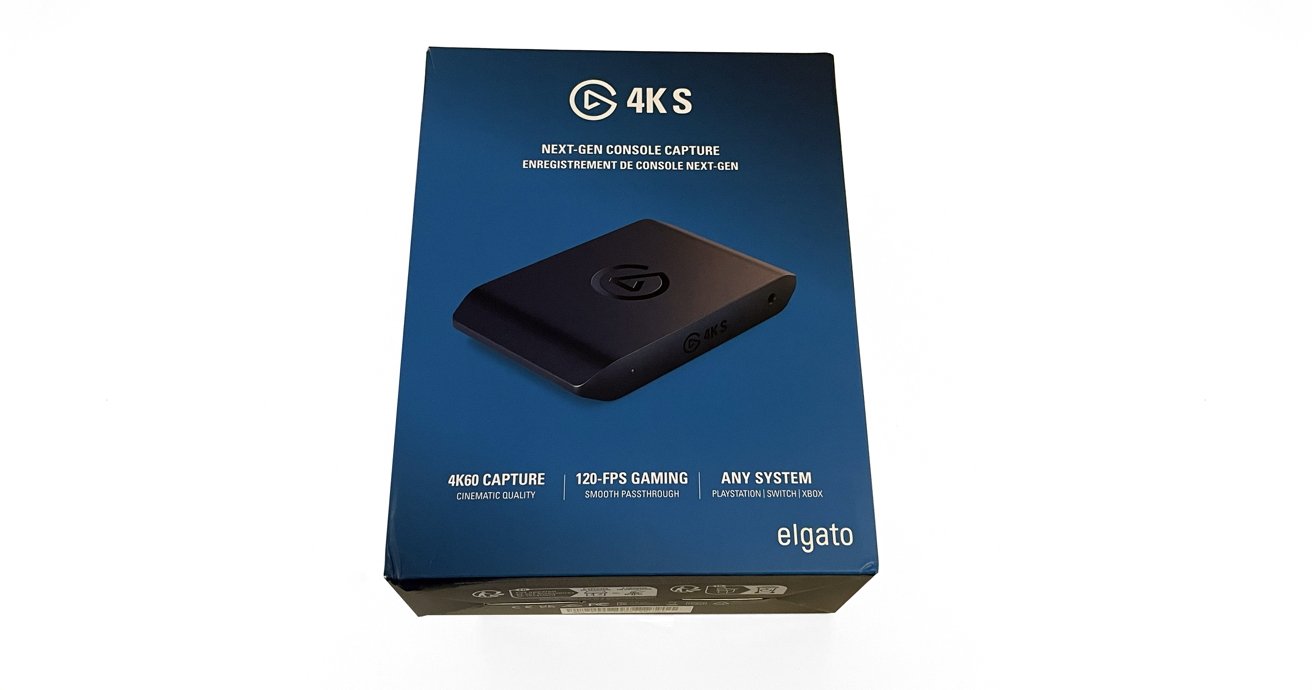
The Elgato 4K S is a powerful external peripheral that provides an easy way for Mac users to not just capture video, but also stream gameplay to Twitch, or to just about any place that will allow live video streaming.
In this day and age, the odds are very high that you, or someone you know, is livestreaming on one of the major streaming platforms.
From video games to art and crafts, to music and talk shows, streaming is ingrained into modern media. Many use services like Twitch as a way to cultivate communities, bring friends together, and share experiences.
There’s also the small chance of making a few dollars for drinks and pizza in the process.
In the early days of the livestreaming industry, the prohibitive cost of entry held back new streamers and limited the overall quality of their content.
However, in 2025, streaming hardware and software is more affordable and accessible than ever. Multiple companies are clamoring for consumer dollars with high-quality kit.
At the front of the pack is Elgato, one of the original innovators in the streaming hardware market. It has a deep catalog of quality streaming peripherals and accessories, from microphones to green screens, cameras, stream decks, and teleprompters.
In effect, Elgato has positioned itself as the one-stop shop for all things streaming-related.
The Elgato 4K S external capture card is its newest capture card, and one was sent over to put it through its paces in a Mac-specific environment.
The Elgato 4K S is an HDMI capture card that Elgato advertises as powerful and easy to use. Its feature list includes 4K60 support, lag-free passthrough, high resolutions, variable refresh rate support, and portability/functionality for mobile workspaces.
While the primary focus of my review is the performance of the Elgato 4KS in a macOS environment, I did conduct a quick Windows test as well.
Mac Requirements:
Windows Requirements:
For testing in a macOS environment, I used my current daily workspace setup and equipment. I use an M1 Max Mac Studio with a Xencelabs 24 Pen Display as my primary screen and an ASUS VY279 as my secondary.
For streaming, I use OBS Studio, while the first Nintendo Switch serves as the console to be connected to the unit.
The Elgato 4K S arrived in a single, well-secured Elgato-branded box. Inside was the Elgato 4K S unit, a single HDMI 2.0 cable, a single USB-C to USB-C cable, and a quick start guide.
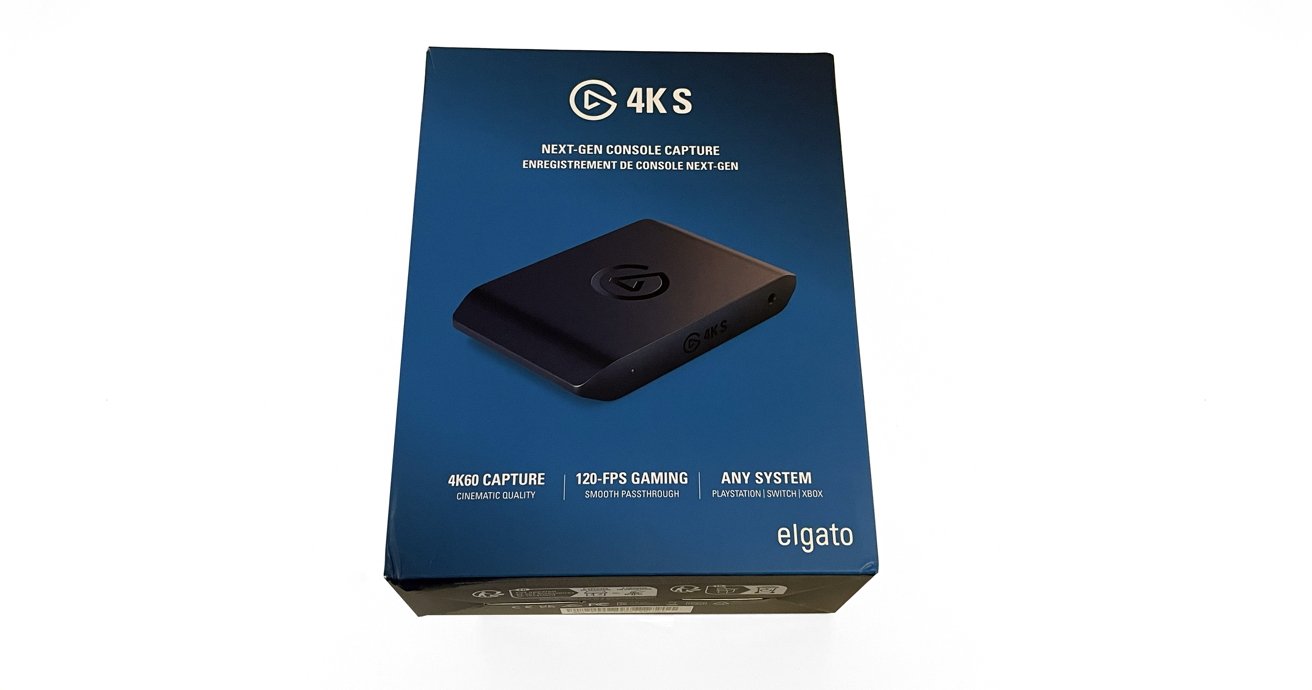
Elgato 4K S review: The box.
Out of the box, the Elgato 4K S is a compact, rectangular unit. It has a clean, black matte finish and a simple shiny Elgato icon on the center top.
The Elgato 4K S is only sold in black, which I do not mind personally. But with Elgato offering their Stream Decks in white as well as black, I could see some consumers wanting to keep a consistent look across their peripherals.
It would be nice to have white as an option in the future.
The HDMI input and output ports and the single USB-C port reside on the back side of the Elgato 4K S. A 3.5mm analog line input and power indicator light are on the front side.
There is no external AC port or plug required with the Elgato 4K S, as it is bus-powered over USB-C. This is a nice feature for cable management and clean workspaces in mind.
Setting up out of the box is the smoothest and easiest experience I have ever had with a capture card.
I plugged one HDMI cable into the input and my Nintendo Switch dock. A second HDMI cable was connected to the output and my ASUS monitor.
Lastly, I plugged the USB-C cable into the port on the Elgato 4K S and my Mac Studio.
Powering everything on, the Nintendo Switch feed immediately appeared on the ASUS monitor with no issues.
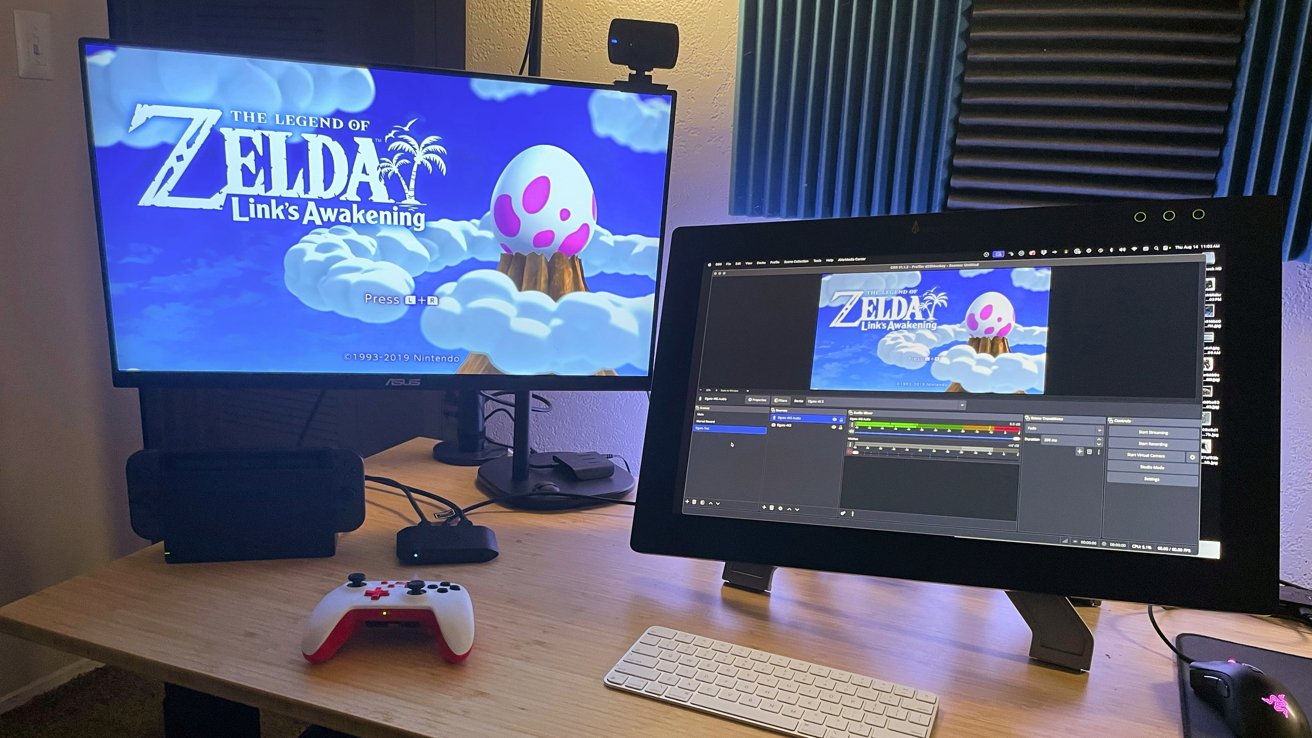
Elgato 4K S review: In use in the test streaming setup.
Elgato recently released its Elgato Studio software. While it is very polished and user-friendly, the app is basic, and users cannot stream directly from it the way Streamlabs, OBS Studio, and others do.
Elgato Studio is designed purely to capture gameplay. It does that task well, but that isn’t the focus of my review and testing.
I opened OBS Studio, created a scene, and added a new video input capture. The Elgato 4K S option appeared immediately, and after selecting it, the Nintendo Switch feed appeared in OBS Studio.
After that, I added a new audio input capture for the Elgato 4K S, then tweaked my sound monitoring and output settings. In less than 10 minutes, I was ready to hit “Go Live” in OBS Studio and stream Link’s Awakening if I wanted to.
To be thorough, I also tested the same setup with Streamlabs, and everything worked perfectly. I could not ask for a more seamless setup experience.
Some capture card manufacturers use proprietary apps to gate-keep the full potential of their hardware. With Elgato, the apps are add-ons that enhance the experience and provide deeper levels of control, but they never hide or restrict functions.
The Elgato 4K S takes advantage of HDMI 2.0 ports for the input and the passthrough. This is an excellent feature that allows you to get the most out of 4K at 60 fps.
Variable refresh rate support is a welcome addition to overall video quality.
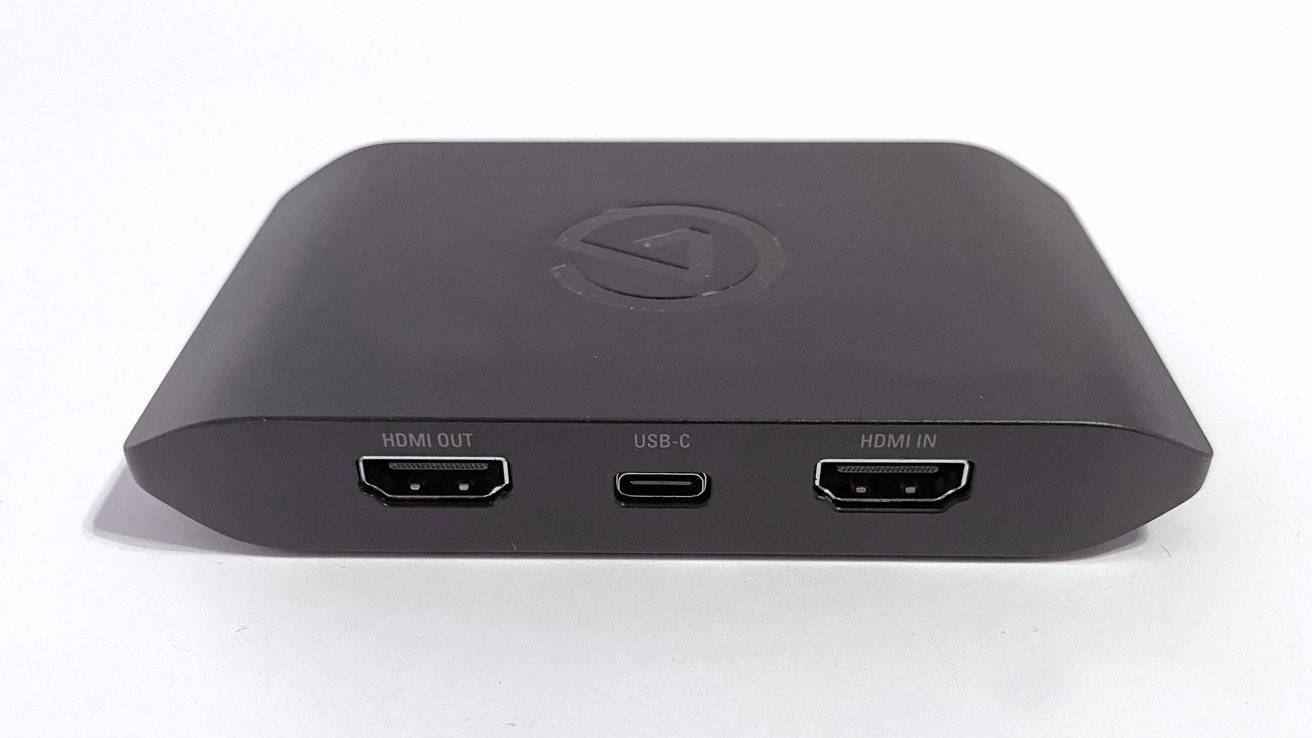
Elgato 4K S review: The main ports for video.
In the time I spent playing, I did not experience any video or audio lag in the captures. That said, the Nintendo Switch is not a heavy lift for a capture card like the Elgato 4K S.
I did a bit of research outside of my own testing and didn’t discover any issues that would prevent me from recommending the use of the Elgato 4K S with beefier systems. That includes more powerful gaming PCs and consoles like the PS5 or Xbox consoles.
The capture quality of the Elgato 4K S is staggering, considering it is such a small package. This capture card is perfect for permanent residence in a home setup, or as an added component for mobile gaming and streaming.
It’s not hard to imagine seeing the Elgato 4K S making trips to gaming conventions, gatherings, and events for streamers on the go. Both for live streaming purposes and for capturing gameplay to be published later.
The only two drawbacks are the system requirements and the (obvious) inability of the device to capture HDCP-protected video.
At $159, the Elgato 4K S is not inexpensive, but it does not break the bank. For me, the investment is worth the cost for the quality delivered.
For streamers leaning into console play as their driving source of content, the Elgato 4K S works as intended and delivers on the claims made by the company.
This is a very good capture card, and as a part-time streamer myself, the Elgato 4K S now holds a permanent spot on my desk for future Zelda and Mario RPG streams.
The Elgato 4KS is available in Elgato online store for $159. It’s also available from Amazon for a discounted $113.95.


Authorities in Poland have arrested four members of an organized cybercrime group accused of breaching telecommunications partners and hijacking email accounts to carry out SIM-swapping attacks.
The operation was carried out by the Polish Cybercrime Bureau (CBZC) with support from the FBI and Homeland Security Investigations (HSI) in the United States.
According to investigators, the suspects carried out sophisticated cyberattacks to obtain data used in SIM-swapping attacks.

They hijacked victims’ phone numbers, intercepted SMS messages and email communications, and ultimately gained control of accounts at cryptocurrency exchanges.
It is estimated that millions of U.S. dollars have been stolen this way and then laundered “via a distributed financial network.”
“Using specialized software and social engineering, the perpetrators gained unauthorized access to the infrastructure of entities cooperating with telecommunications operators and employee email accounts,” reads CBZC’s announcement (automated translation).
“The data obtained in this way enabled so-called SIM swap attacks, which involve the illegal cloning and takeover of victims’ phone numbers.”
Polish authorities comment that the actors treated these activities as “a regular source of income,” using multiple bank accounts across various countries and digital wallets to transfer the stolen funds.
“It is estimated that the total value of the funds laundered in this manner exceeds several tens of millions of Polish złoty,” mentions CBZC, which would translate into at least $5 million based on the current exchange rate.
The four arrested individuals, who have all been placed in pre-trial detention, now face offenses of participation in an organized criminal group, hacking into IT systems to commit theft, and money laundering.
The maximum penalty for these offenses is 25 years in prison.
Although CBZC didn’t name any of the threat actors arrested in this action, blockchain crime investigation ZachXBT identified one of them as Wojtek Kulisz, aka “Merry,” based on the images the authorities released from the police raid.
Security teams log 54% of successful attacks and alert on just 14%. The rest move through your environment unseen.
The Picus whitepaper shows how breach and attack simulation tests your SIEM and EDR rules so threats stop slipping by detection.


The hiring push comes amid additional plans to raise significant funds of roughly $7.4bn.
Chinese AI company DeepSeek will reportedly double the size of all of its departments amid a push to compete with domestic rivals and global leaders in the artificial intelligence space.
DeepSeek announced the hiring plans for technical and engineering professionals on messaging platform WeChat, noting that the company is specifically looking to employ additional data engineers, development engineers and AI cross-disciplinary technical talent.
In mid-June, it was reported that DeepSeek is in the process of raising $7.4bn, which would bring the platform to a post-money valuation of more than $50bn. According to Bloomberg, the organisation is in the final stages of the fundraising, in what will be one of China’s largest start-up fundraising efforts.
The round comes with an odd caveat however, in that it apparently requires investors to put their funds into a limited partnership managed by DeepSeek founder and CEO Liang Wenfeng rather than the company itself. Investors’ funds are also subject to a five-year lock up period and they will not have voting rights.
It is believed that among the investors are WeChat creator Tencent and battery manufacturer Contemporary Amperex. Tencent is also reported to have proposed taking a 20pc stake in the company.
DeepSeek’s strategy comes amid efforts to compete with rivals operating in the AI field. In early June, OpenAI revealed future plans to file as an IPO, with projections suggesting that this could potentially value the ChatGPT maker at up to $1trn, one of the largest listings in history.
This announcement came just days after rival Anthropic announced a similar plan to go public. Meanwhile, domestically, DeepSeek faces competition from organisations such as Alibaba Group Holding and MiniMax Group, which have introduced their own competitive services.
Don’t miss out on the knowledge you need to succeed. Sign up for the Daily Brief, Silicon Republic’s digest of need-to-know sci-tech news.
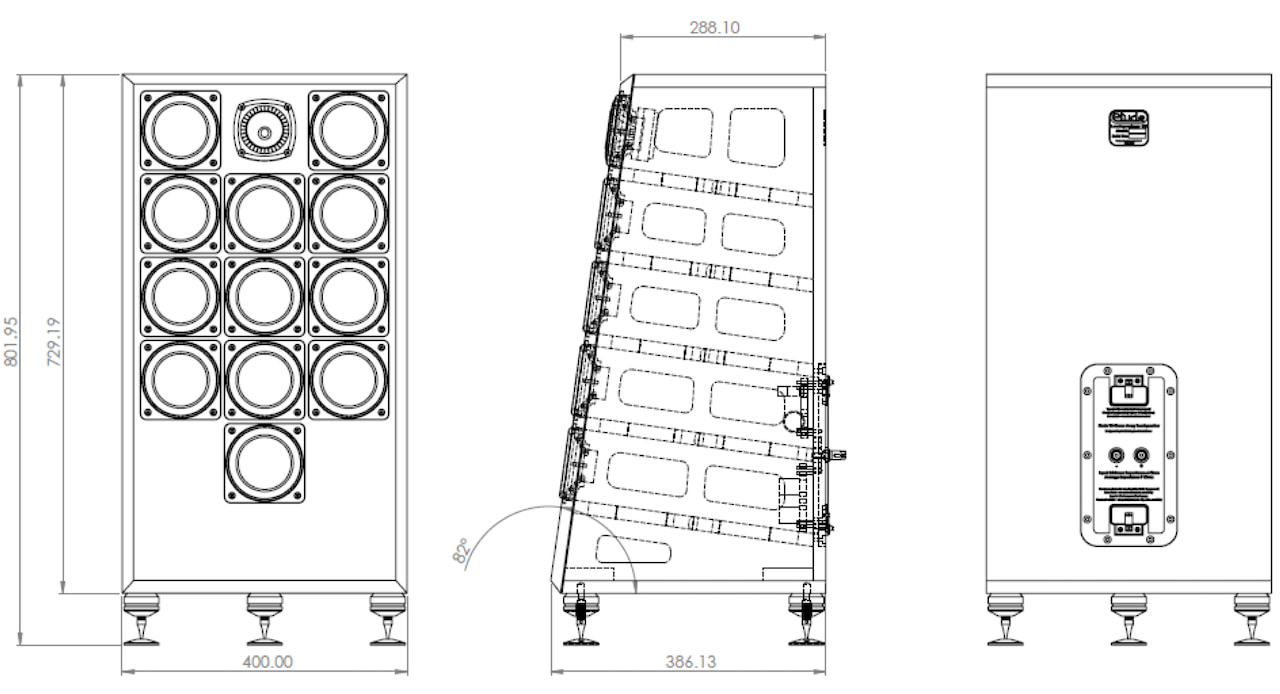
Most loudspeaker launches arrive with a familiar recipe: a slim bass reflex cabinet, some reassuringly expensive looking binding posts, and a promise that the laws of acoustics have finally been fired for incompetence. The Etude Tri Linear Array, or ETLA, takes a different route.
CML Music will launch the ETLA at the North West Audio Show 2026 in Cheshire. It is a sealed, boundary loaded floorstander built around twelve 85mm Balanced Mode Radiator drivers, a compression tweeter, and a cabinet designed to work close to the rear wall rather than demand that the rest of the room move out.
The ETLA is not a conventional narrow tower. At 760mm tall, 400mm wide, and 386mm deep (29.9 x 15.7 x 15.2 inches), it is a deliberately broad shouldered loudspeaker with an angled baffle intended to align the drivers with a seated listener. Its three vertical arrays of four BMR drivers share one sealed internal volume, while a compression tweeter above the central array begins contributing from approximately 4 to 5kHz through a second order roll in.
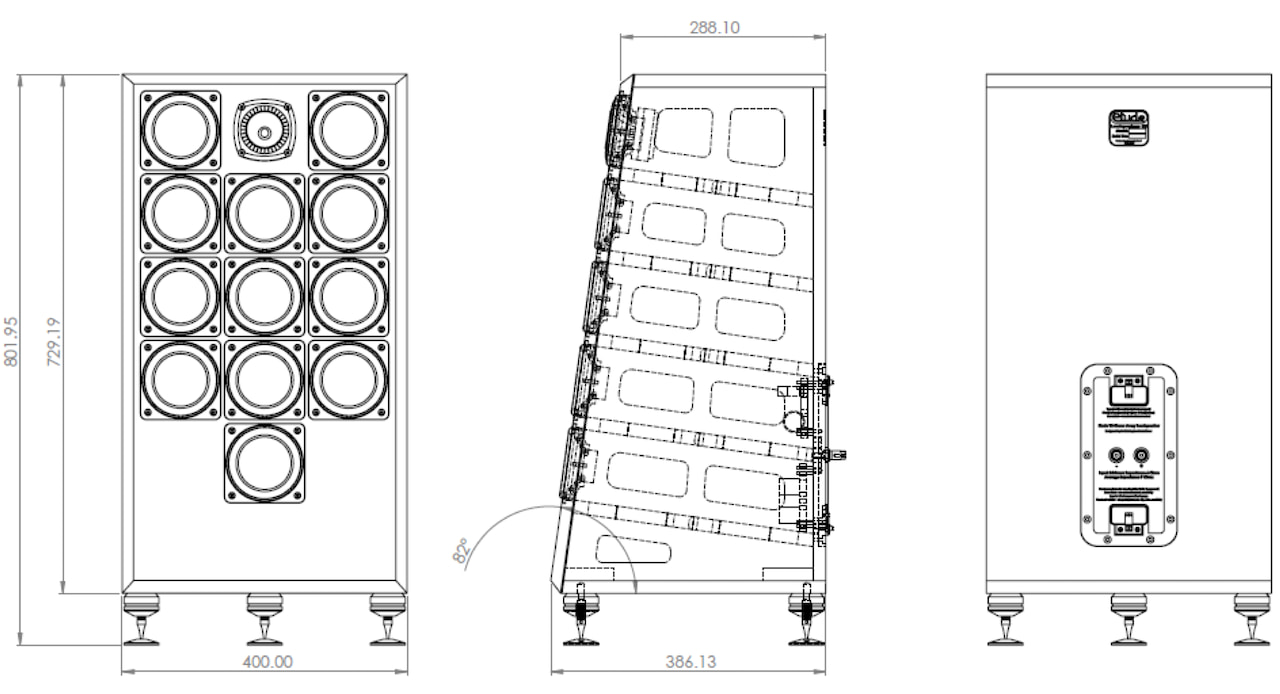
Etude claims sensitivity of approximately 99dB/W under its stated 600Hz measurement condition, with a nominal 8 ohm impedance and 240 watt programme power handling. The goal is clear: real output and dynamic freedom from amplifiers with modest power reserves, including single ended valve designs. The company says amps above 3 watts should be sufficient in an average UK sized room.
That may sound like the sort of thing normally claimed by a man in sandals selling a horn loudspeaker the size of a Fiat Panda, but the published impedance and EPDR data suggest the ETLA has been designed to be a relatively benign load.
Anyone see my Wavelength Audio Duetto?
The ETLA is voiced for boundary placement, meaning it is intended to sit relatively close to the wall behind it. Etude says the sealed system is tuned for even bass response to around 50Hz before room reinforcement extends the claimed in room reach to 32Hz at minus 6dB. Its published 32Hz to 20kHz response figure is based on sixth octave pink noise measurements in the designer’s listening room, so it should be treated as useful context rather than a standardized anechoic result that you can take to the bank.
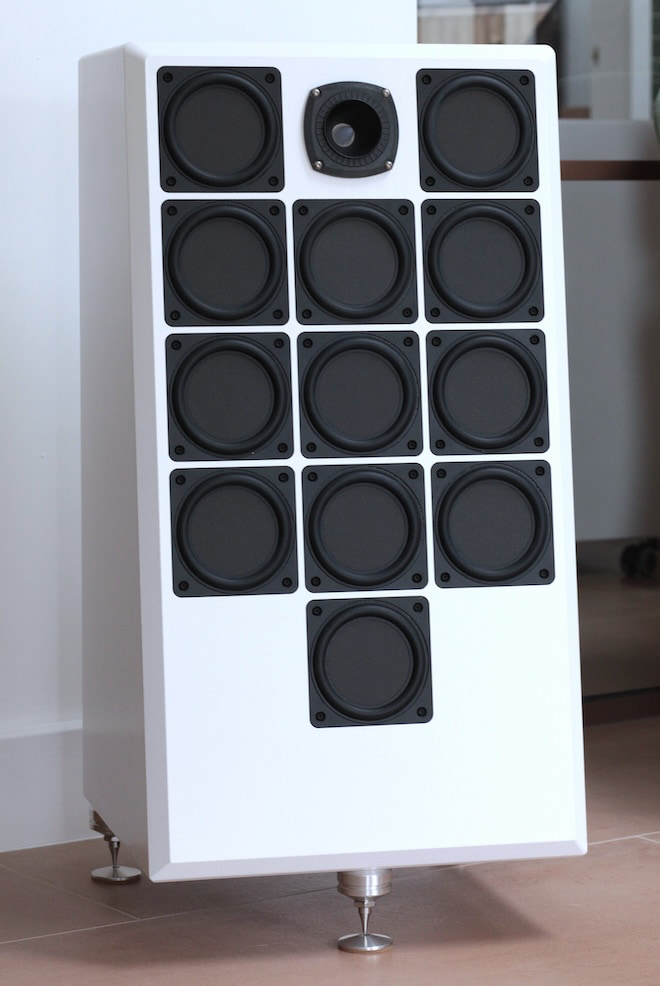
There is also more user control than one normally expects from a £3,000 loudspeaker. The two outer BMR arrays can be rolled off or stepped down to adjust the depth of the presence dip and horizontal dispersion. Owners can also alter the compression tweeter level through solderless resistor changes at the rear of the cabinet. This is either a genuinely useful way to tailor the ETLA to a real room or an excuse to lose an entire Saturday behind the speakers with a flashlight and a growing distrust of resistor values. Probably both. It certainly beats taking the kids to the park or joining the weekly grocery expedition. And if that answer gives you pause, perhaps call the therapist before ordering anything with binding posts.
The cabinet uses 18mm CNC machined, high density exterior grade MDF with internal bracing and no fibre or foam damping material. CML Music specifies crossover parts from Jantzen, Clarity Cap, Bourns, Customcoilsnstuff, and Vishay, with the network boards mounted on elastomeric isolators. Standard finish is satin crackle, with piano lacquer and veneer upgrades available.
The ETLA’s twelve 85mm Balanced Mode Radiator drivers are not conventional midrange units. At lower frequencies, they move like normal speaker cones. Higher up, the surface of each driver is designed to flex in a controlled way, helping it reproduce a wider range of frequencies and spread sound more evenly around the room than a typical small cone. Etude uses the drivers as a high-sensitivity array, handing off to its compression tweeter above the usual midrange crossover region rather than in the middle of the vocal range.
Etude has not identified the BMR manufacturer or exact model used in the ETLA, so it would be misleading to assign the drivers to a specific supplier. BMR technology itself is well established and appears in products from brands such as Cambridge Audio, but Etude’s application is rather different: twelve small wideband drivers arranged as a high-sensitivity array in a sealed, boundary-loaded floorstander, crossed to a compression tweeter above the usual 2kHz to 3kHz vocal range.
At the show, the ETLA will be demonstrated in Room 142 with Super Natural Audio electronics, including an 8 watt per channel 300B single ended triode integrated amplifier, plus the company’s valve DAC and preamplifier. Analog playback will come from the Clipaudio Dolomite turntable and Nine Wave titanium tonearm, fitted with an Ortofon Cadenza Bronze and partnered with an EAR Yoshino 834 phono stage.
CML Music says the ETLA will sell direct for £3,000 per pair in satin crackle finish with M8 polypropylene tipped furniture gliders. A grille has been designed, but its price is not final; the current estimate is an additional £200 per pair. The company has not announced North American distribution, U.S. pricing, or a final retail availability date. Its own release note also states that specifications and component choices remain subject to change.
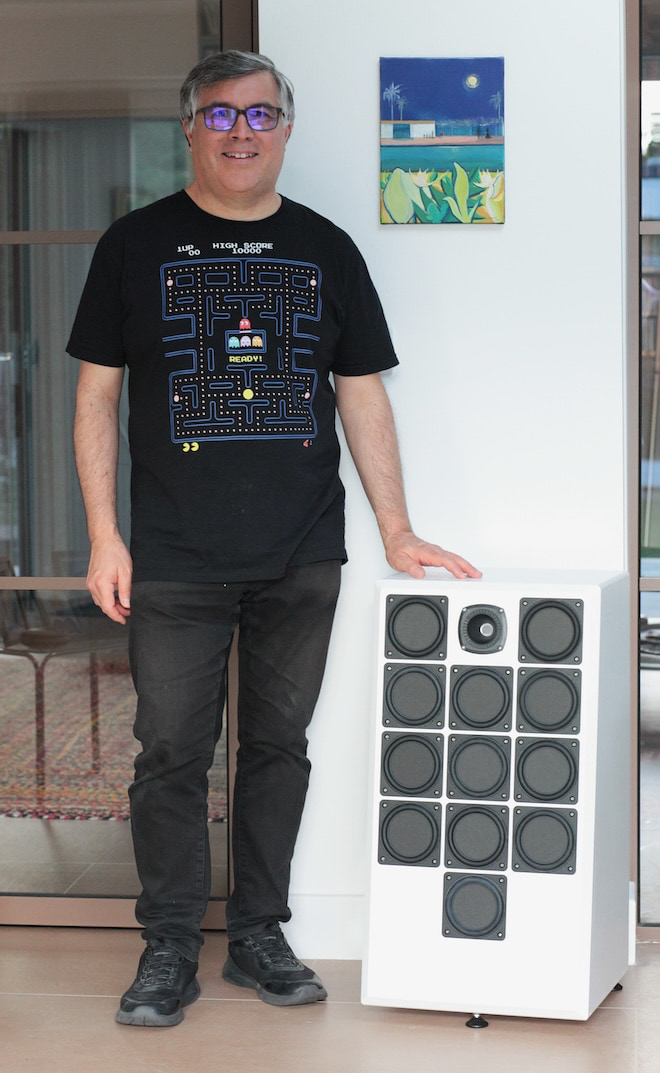
The ETLA is unusual because it combines a sealed, near wall friendly cabinet with 12 BMR drivers, claimed 99dB sensitivity, and compatibility with low powered 300B amplifiers. At £3,000 per pair, it is an ambitious alternative to the usual slim reflex tower. Whether it delivers real bass, scale, and dynamic ease outside its designer’s room remains the only question that matters.
For more information: etude-speakers.com
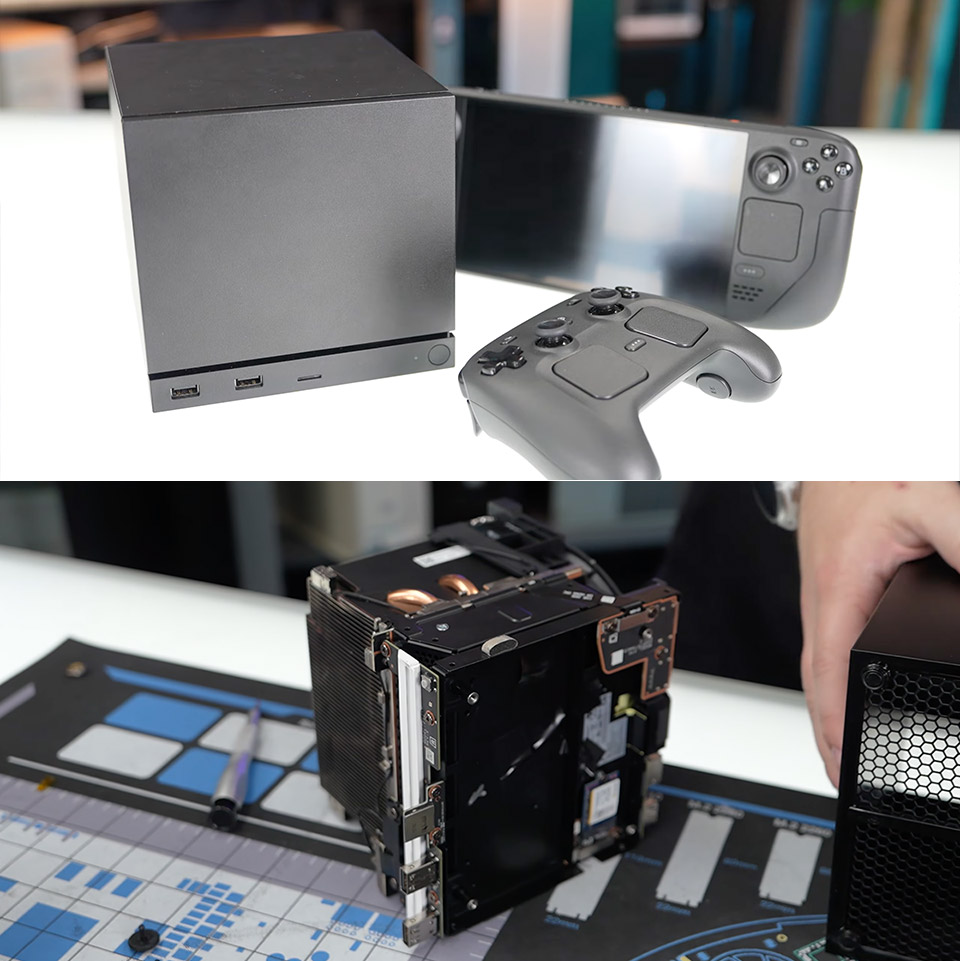
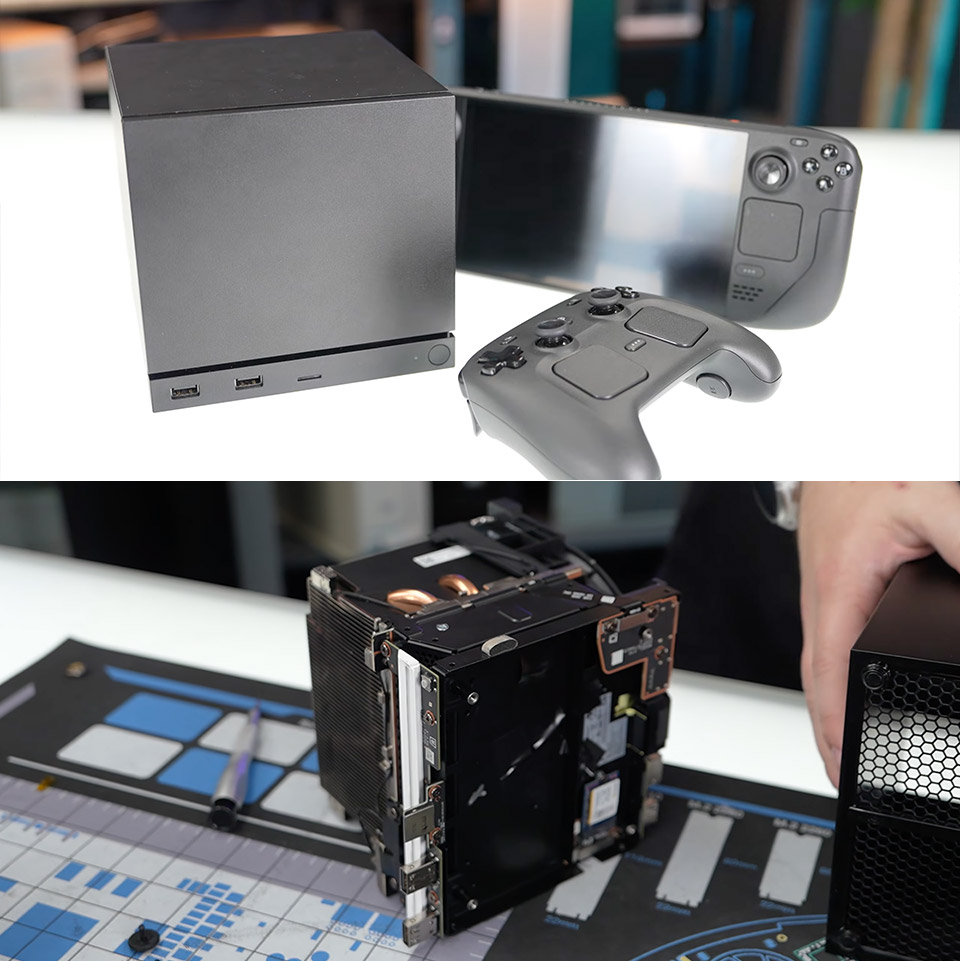
Valve released its Steam Machine as a compact desktop-style gaming system aimed at living room use with SteamOS. Even before units reached buyers, Gamers Nexus pulled one apart on camera and shared a detailed look at the internal layout, component choices, and assembly decisions.
Opening the chassis begins with simple steps that minimize the frequent difficulties of concealed clips or glued panels. After removing a few nuts, the front part lifts out. A hinged piece at the bottom is beneficial, and only a few screws are located at the back top edge. Once inside, the solid-state drive is visible and secured by captive Torx screws. There are no prying tools or delicate plastic tabs in the way. Feet on the bottom attach through rubber with screws rather than adhesive, ensuring that the replacement is clean and damage-free.
Sale

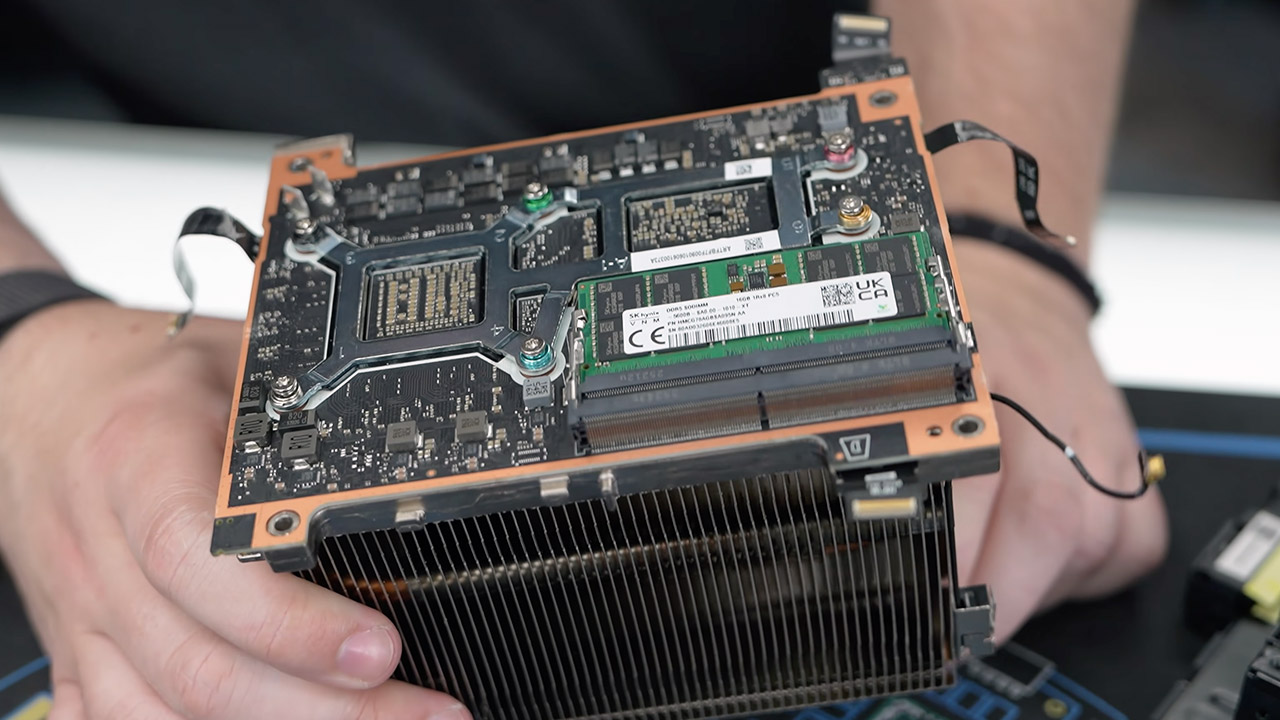
The mainboard stands out due to the amount of gear packed into such a small space. Digital Foundry examined photos from the teardown and described the board as a masterpiece of miniaturization. It’s comparable to Pico-ITX dimensions and substantially smaller than standard Mini-ITX boards, which measure 170 by 170 millimeters. An AMD CPU is at one end, and a graphics chip is at the other, both of which are covered in thermal paste during assembly. Four 2-gigabyte VRAM modules are located directly around the graphics processor. On the other side of the board, a single 16-gigabyte DDR5-5600 SODIMM module occupies one slot, leaving the second slot free for future upgrades. A unified backplate protects both major CPUs from the back.
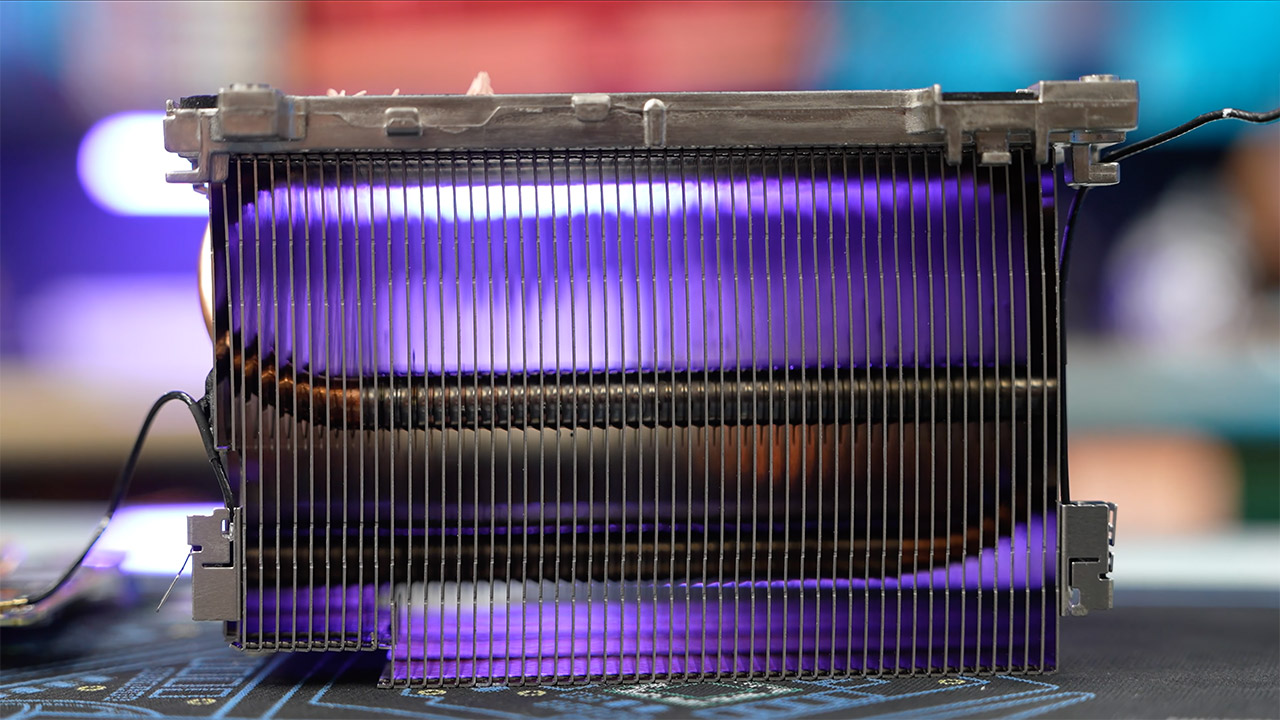
Cooling gets its own special treatment, with a custom fan sporting seven thick blades installed against a tall, vertically oriented fin stack in server architecture. The fins’ wide spacing decreases airflow resistance, while the blade shape prioritizes pressure to propel air through the dense stack. Thick heat pipes transport heat from processors to a copper sink. To increase contact across tight gaps, assemblers utilized thermal putty instead of hard pads on inductors, memory chips, and MOSFETs. Despite the fact that the machine is very small, the total system keeps temperatures under control.
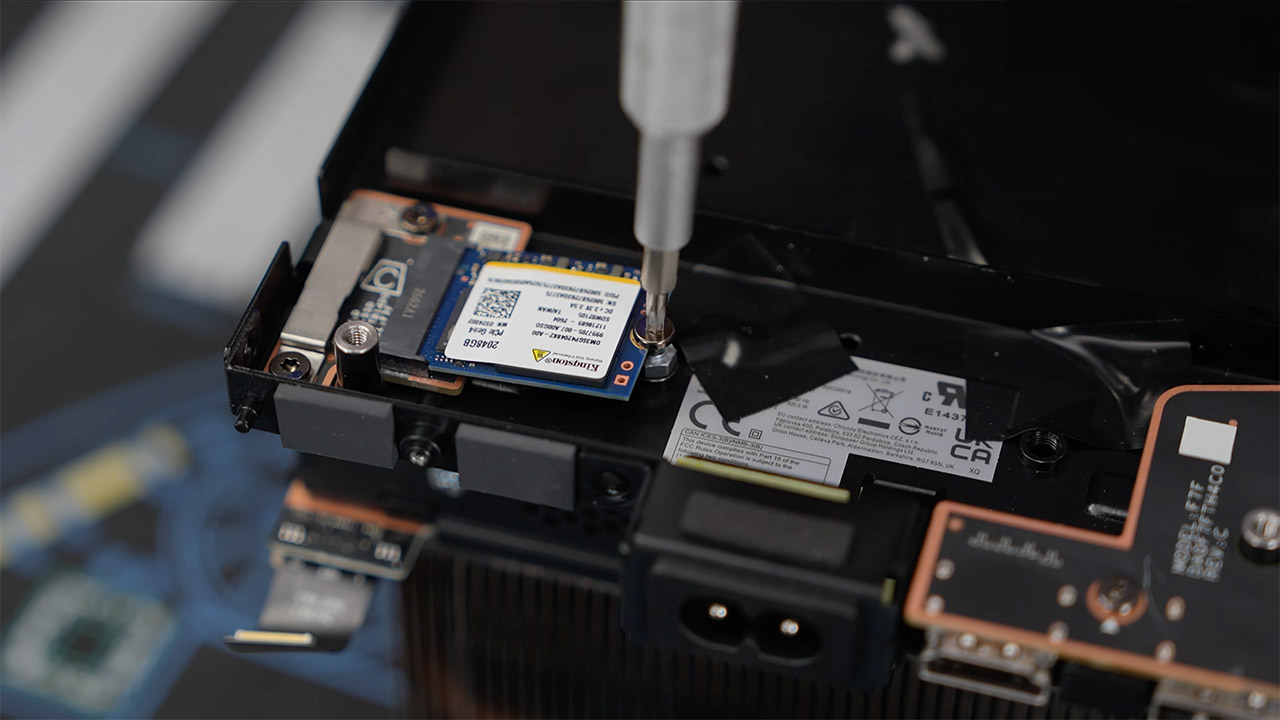
Access to memory follows a similar practical approach, with the single installed stick usually accessible without removing the entire heat sink. Some wires are bonded to the fin stack for compactness, as stated briefly during the disassembly. Still, the process remains far simpler than many other compact systems or consoles. Storage swaps prove even more straightforward once the outer shell is off.
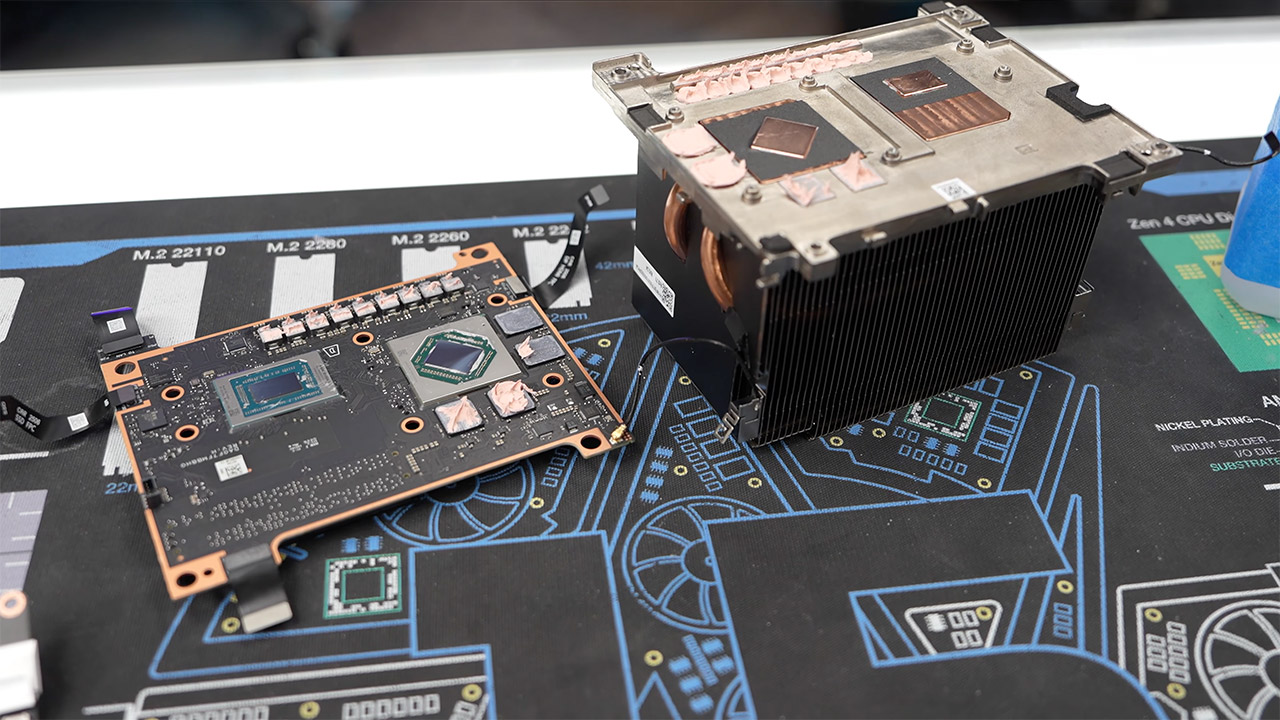
Labeling and documentation stand out as deliberate decisions. QR codes, plain text descriptions, revision numbers, directional arrows, and color-coded fasteners are employed throughout the inside. The numbers on the steps relate to the printed or screen-displayed instructions. The method is comparable to the repair-oriented thinking Valve used on the Steam Deck and previous controllers. According to Gamers Nexus, when it comes to critical components, the computer is easier to repair than most major game consoles, including the PlayStation 5.
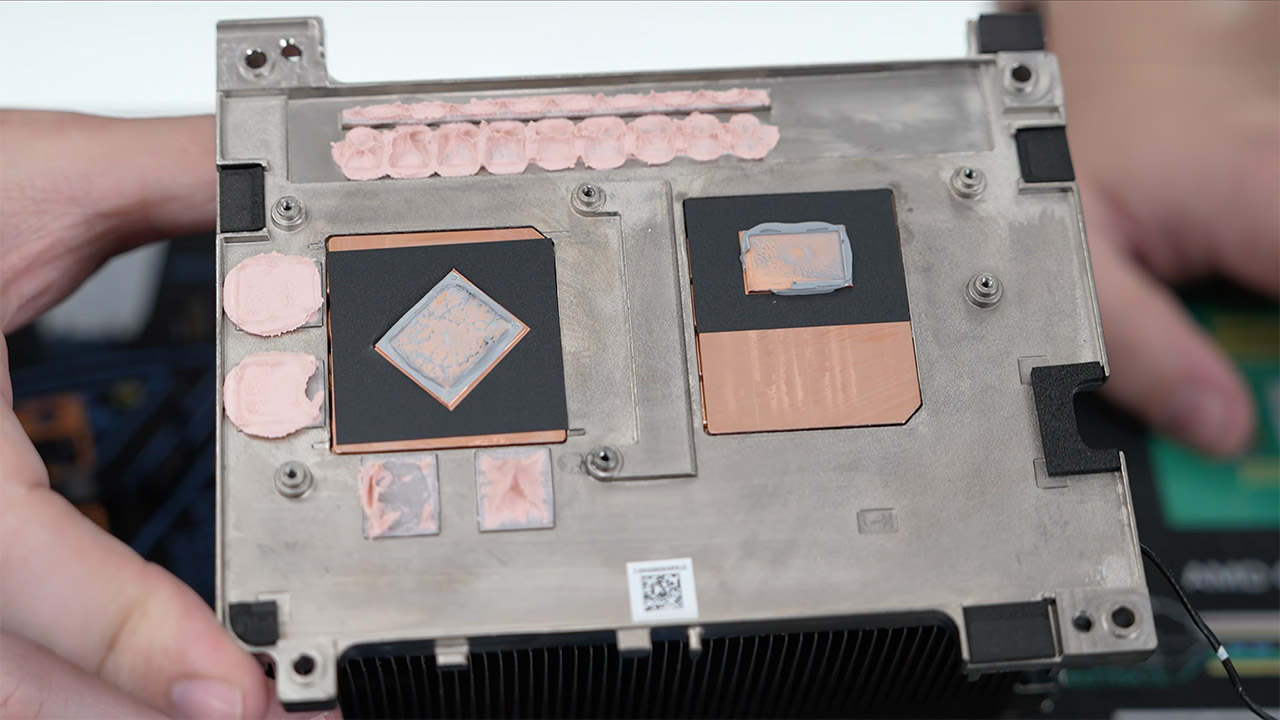
An internal power supply handles system needs through a custom blade-style connector. For safety reasons, the unit remains sealed, as is usual of high-voltage components. Input and output connectors are located on a separate board that also houses the display and wired networking capabilities. Some port sections appear modular, which may make repairs easier if a connector is damaged over time. Antennas are directly affixed to the fan frame, providing dependable WiFi and Bluetooth range without adding bulk.
Prime Day 2026 is winding down, and now is the time to snap up some of the lowest prices of the year before Apple’s Mac and iPad price increases hit Amazon.
The final day of Prime Day sees a return of popular Apple deals that are even more attractive considering Apple raised prices on Thursday.

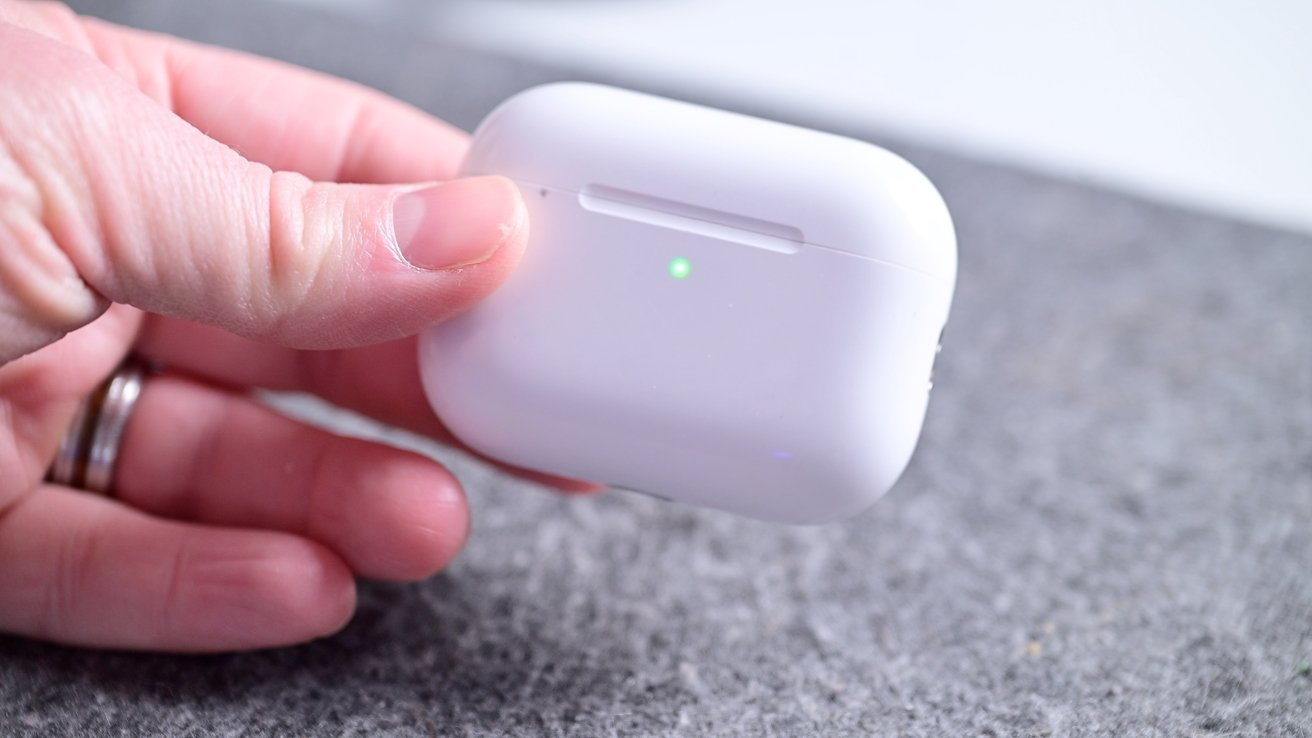
AirPods Pro 3 are down to $179 on the last day of Prime Day.
AirPods prices have dipped to as low as $99 as Prime Day nears an end, with AirPods Pro 3 coming in as a top-seller this Prime Day.

Apple’s AirTag 2 has received the first material discount for Prime Day.
Apple’s second-generation AirTag has been priced at MSRP since its release, but Amazon issued a material discount on both the single pack and 4-pack for Prime Day.

Apple’s entire iPad line is marked down during Prime Day.
You can score deals from just $299 in our iPad Price Guide, with a blowout iPad Pro discount of $250 off still available.

Apple Watch Series 11 prices have dipped to as low as $279.
Day 4 of the Prime Day shopping event is seeing even more Apple Watch deals sell out, but the popular $120 discount on the Series 11 is still available.

Save up to $300 on MacBooks with Prime Day deals.
Apple raised MacBook prices today, but these Prime Day deals are still available. Compare prices across dozens of configurations in our Mac Price Guide.

Save up to $700 on OLED TVs.
OLED TVs from LG, Samsung, and Sony are heavily discounted during the sale event.

Save up to 71% on accessories from Anker, Apple, and more.
From iPhone cases to docking stations for your Mac, accessories are up to 71% off for Prime Day.
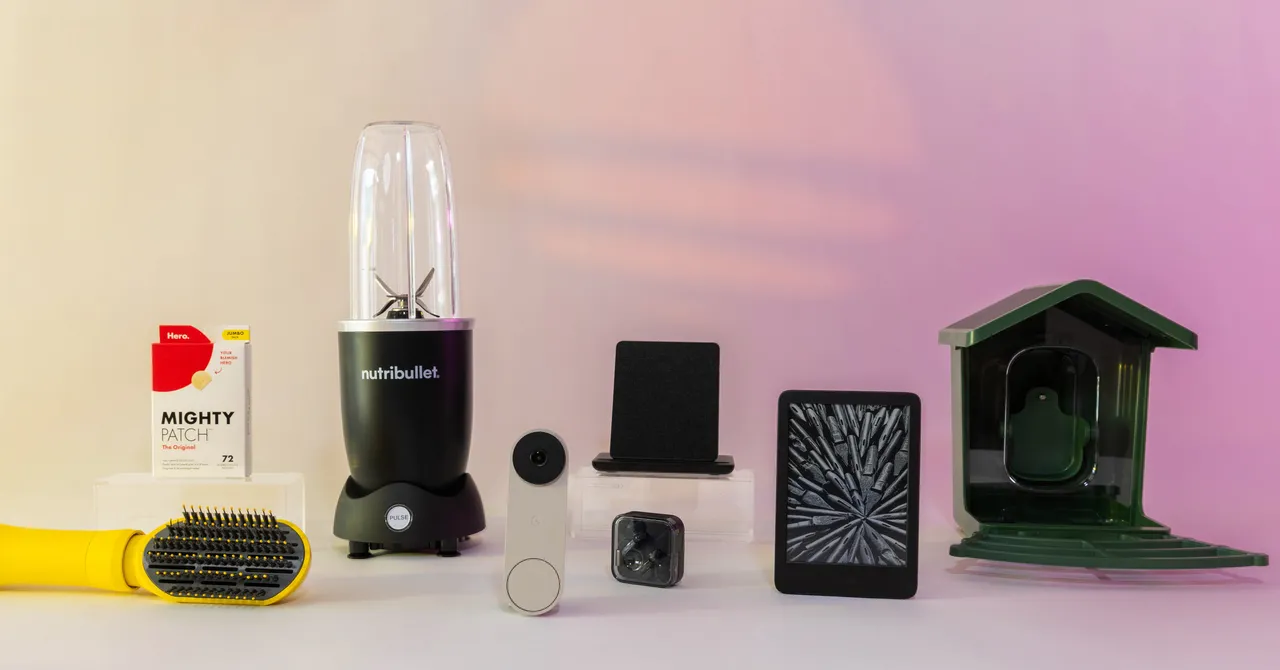
The Hisense TV is the epitome of a mid-tier model punching way above its weight. The mini-LED backlighting produces a spectacularly bright image, and it’s a particularly good choice of gamers thanks to its 165-Hz refresh rate and full-featured HDMI ports. Our own testing didn’t produce perfect results, such as its uneven backlighting and mediocre off-angle performance. But it’s easily the best Prime Day TV deal, with the price dropping to a new low of just $850. —Luke Larsen
Jump to Section: Best Tech Deals, Best Amazon Device Deals, Best Apple and Apple Accessory Deals, Best AV Deals, Best Home & Kitchen Deals, Best Beauty & Wellness Deals, Best Mobile & Wearable Deals
Easily the smartest indoor security camera currently available, Google’s third-generation Nest Cam indoor kicks the resolution up to 2K at 30 fps, with HDR and night vision. There’s also two-way audio, enforced two-factor authentication, and accurate detection to alert you about people, animals, or vehicles. The Google Home Premium subscription is pricey at $10 per month ($100/year) for 30 days of event video history and familiar face alerts, but it covers all your Nest devices. —Simon Hill



Weekend Open Thread: Miami – Corporette.com


Renter of Home in Anne Heche Crash Denies Settlement With Son

Two goals and an assist by sheer aura: Cristiano Ronaldo just entered the World Cup chat


Microsoft accidentally kills epic Outlook email threads


Soccer-U.S. defends Iran World Cup travel restrictions, says discussions ongoing


Potential 2028er World Cup attendee leaderboard


Andy Burnham and the meaning of Makerfield


Keir Starmer Allies Question His Chances For No 10


The House | Manchesterism won’t survive the painful trade-offs unless it gets citizens on board


A Look At A Gaggle Of Transputer Boards
Bitcoin (BTC) Dips Below $62K, Ethereum (ETH) Plunges 6% Daily: Market Watch


Securitize Wraps Roubini's SEC-Registered ETF as Dubai VARA Digital Security

Dell (DELL) Shares Tumble Over 5% Following Analyst Downgrade to Hold
Entergy settles forward sale agreements, raises $672 million in cash proceeds

Wall Street Week Ahead: Investors see Micron earnings as pulse check of AI rally momentum

Can Charles Hoskinson Really Rescue Cardano?


Jose Alvarado Wants Taylor Swift at More Knicks Games


HIVE shares jump as $220M AI deal speeds Bitcoin mining pivot


Jake Chervinsky accuses CME of protecting derivatives monopoly

Signal’s Meredith Whittaker says AI chatbots ‘are not your friends’ and calls Copilot agents a backdoor

You must be logged in to post a comment Login