From AI and upskilling, to new technologies and experimentation, there is much for professionals in the future health sector to get excited about.
Regardless of your role or industry, for the majority of professionals, a key concern is often finding an element of the job that drives excitement and motivation. Frequently, it is this drive that creates long-term satisfaction and career longevity.
For Deepak Chaudhari, the country head at TCS Ireland, of the aspects he finds most compelling within the healthcare and health-tech spaces, among them is being at the forefront of modernisation.
“One of the most exciting opportunities we are working on is enabling data‑driven, patient‑centred healthcare systems, aligned to Sláintecare’s vision for integrated and efficient care,” he said.
Advertisement
Chaudhari explained that there are significant challenges in ensuring that rapid digital transformation has the power to deliver on real-world clinical and operational demands, noting TCS addresses this through “data platforms, automation and responsible AI that improves both patient outcomes and workforce productivity”.
For Sohini De, the head of healthcare and innovation at BearingPoint Ireland, GenAI is playing a key role in generating excitement in her role.
“One of the most significant opportunities we are advancing is BearingPoint’s custom-built GenAIQ platform, an agentic, retrieval augmented generation-based solution designed to help organisations move from AI experimentation to practical, governed impact,” she explained.
For De, AI in healthcare is at its most valuable when it can be used to merge benefits across a wide array of groups, such as clinicians and patients. This can be in earlier diagnosis, better triage, stronger population health management and improved patient flow across acute, community and primary care.
Advertisement
Specifically for clinicians, she added: “AI can reduce administrative burden, support documentation and summarisation, and surface relevant information at the point of need, freeing more time for direct patient care. Its role should be to strengthen, not replace, clinical judgement and human-centred care.”
AI ability
De also finds that, as more and more organisations grow out of the experimental AI phase and start to develop realised AI strategies, it is becoming apparent that “technology in isolation will not deliver the benefits expected”.
“Much of our work remains focused on the alignment of organisations, processes, people and data to realise the benefit of new technologies,” she said. “From a workforce planning perspective we are seeing that it is professionals who can bridge policy, technology, clinical practice and change management will be critical to turning AI ambition into measurable improvements in access, quality, safety and experience.”
This was echoed by Chaudhari who explained that he is seeing increasing demand for professionals with the skills to work at the intersection of healthcare, technology and data.
Advertisement
He is of the opinion that vital abilities include digital health and EPR delivery experience; data and analytics expertise for reporting, insights and population health; automation and AI skills with a strong understanding of governance and ethical use; cloud‑native and interoperability capabilities, including API and FHIR‑based integration; and change, delivery and stakeholder management, which is critical in complex health environments.
“We value backgrounds in health informatics, data science, engineering, life sciences and clinical disciplines, alongside strong collaboration and problem‑solving skills. Above all, we look for people motivated by purpose and impact. We seek individuals who want to play a role in shaping the future direction of healthcare through thoughtful, responsible use of technology.”
De added: “Ultimately, the goal is to support a resilient, future-ready healthcare ecosystem in Ireland, one where AI is used responsibly to improve patient outcomes, reduce avoidable variation, support clinicians, maintain compliance and help services respond more effectively to growing demand.”
Don’t miss out on the knowledge you need to succeed. Sign up for the Daily Brief, Silicon Republic’s digest of need-to-know sci-tech news.
That perfect black foundation is driven by the alpha 9 AI Processor Gen8, which analyses and upscales every frame in real time to sharpen detail without making anything look artificially smoothed over or overworked.
Advertisement
Brightness Booster works alongside that same processor to lift highlights and punch through glare, so the picture holds its impact whether the room is pitch dark or lit by an unforgiving afternoon sun.
That kind of responsiveness carries straight into motion handling, where the 120Hz refresh rate keeps fast-paced sport and gaming sequences fluid rather than letting quick pans smear into a distracting blur.
That same fine texture in skin, foliage and fabric gets matched by sound, with Dolby Atmos and AI Sound Pro spreading dialogue and effects convincingly around the room via a virtual 11.1.2 up-mix.
Advertisement
None of that immersive setup requires extra hardware either, since the AI Magic Remote’s dedicated AI button lets you search, adjust settings or ask questions using nothing more than your own voice.
Connectivity has been built with the same forward thinking, offering four HDMI ports, three USB ports and both Bluetooth and Wi-Fi so every console, soundbar and streaming stick stays connected without a fuss.
The webOS platform ties the whole experience together, pulling in Netflix, Prime Video, Disney Plus and Apple TV without ever needing a separate streaming box cluttering up the cabinet underneath.
If you want to see how this LG model stacks up against rivals from Samsung, Sony and Panasonic, our Best OLED TV 2026 roundup breaks down the strongest option from every major brand.
Of the many impressive aircraft developed for the United States military, Lockheed’s SR-71 Blackbird is probably the most well-known. The high-altitude reconnaissance jet has set numerous world records for speed, and many of the SR-71’s records have yet to be broken. The SR-71 is unlike pretty much every aircraft ever operated by the U.S. Air Force, and it had strict build requirements that enabled its altitude and speed achievements.
Among its many unique requirements, the SR-71 cannot use standard jet fuel, and it was built out of highly expensive titanium, much of which was procured from the Soviet Union by the CIA. Working with titanium was challenging, leading to another interesting quirk of the aircraft’s design: many of the SR-71’s parts were prone to fail, but only when they were manufactured during the summer. At the time of its initial construction, the use of titanium was relatively new, so finding out what caused the problem took some time to figure out.
Advertisement
Winter-built parts functioned seemingly indefinitely, and the unusual reason for this early issue in the SR-71’s development was something few could have imagined: water. It turns out that water mucked up the wing panels that were welded during the summer, and it had everything to do with the chlorine content of the water used during manufacturing. Lockheed solved the problem after spending some time trying to determine its cause, and it’s something Lockheed’s engineers couldn’t have imagined being a problem in the construction of one of the most secretive and advanced aircraft ever built.
Advertisement
The problem chlorinated water posed to the SR-71
Titanium isn’t an easy metal to work with, and it is highly sensitive to contaminants capable of corroding it. Wing panels needed to be welded into place, but the water used to wash the panels after an acid treatment caused the summer problem because of chlorine. The SR-71 was assembled by Skunk Works out of the Burbank Airport in California. The Burbank Water treatment plant added chlorine to the water during the summer to prevent algae blooms. Because algae prospers in warm environments, chlorine wasn’t required during the winter.
As a result, the parts welded during the summer degraded within six to seven weeks. Conversely, the parts that were worked on during the winter didn’t have this problem. The fix was relatively easy, requiring the workers to switch to using distilled water devoid of chlorine or other contaminants for the post-acid treatment. Another contaminant caused similar issues, but it wasn’t found on the parts — it had to do with the tools.
Skunk Works’ personnel working on the problem found that cadmium-plated wrenches left enough residue that weakened the bolts, causing them to fail. Cadmium, like chlorine, degrades titanium, so they replaced the tools. All of these issues resulted in a great deal of titanium and expensive tools tossed in the trash, elevating costs and delaying the production of the SR-71 Blackbird. Ultimately, it all worked out; the aircraft took to the skies, where it was most often used to spy on the very nation that unknowingly supplied much of the metal that went into its construction.
Top Kalshi trader Caleb Davies usually speaks to the press about how prediction markets help him rake in money. The Minneapolis-based IT worker estimates he’s made $1.2 million overall across different prediction platforms, with $414,000 in winnings from Kalshi’s culture markets alone. He especially enjoys wagering on music charts, because he carefully analyzes Spotify data to pick winners. “Every single morning, I’m going in, downloading the data, and updating my projections,” he tells WIRED.
This summer, though, he’s become increasingly agitated about what he claims is an obvious, bot-fueled effort to manipulate Spotify-related markets. He recently began compiling and publishing evidence for his theory, eventually becoming so convinced that he contacted Spotify, Kalshi, and Polymarket with his concerns.
This week, the situation hit a boiling point when the song “Earrings” by Malcolm Todd surged to number one on a Spotify chart. In a series of X posts, Davies outlined his suspected culprit: “botting,” or scammers who purchase bots to juice streaming numbers. Davies argued that prediction market traders were botting the charts to influence the outcome of related events contracts. Todd’s song was such an underdog that it wasn’t even listed as an option on Polymarket: “Looking at the dataset of Sunday to Monday changes, it was a 11.24 sigma event, or a roughly 1 in 77 octillion chance of happening randomly,” Davies wrote.
It turns out that he was on to something. Spotify confirmed to WIRED that it investigated suspected manipulation incidents Davies flagged and found evidence of artificial streaming. “All streaming services face ever-changing stream manipulation. Spotify has best-in-class detection and mitigation practices for manipulated streams, and we don’t pay out associated royalties,” spokesperson Laura Batey says. (The company didn’t offer any explanation for the manipulation, however, so Davies’ theory that it was directly tied to a scheme to manipulate prediction markets remains just that.)
Advertisement
Spotify ultimately adjusted its charts to account for the discrepancy, culling over 500,000 artificial streams, which bumped Todd’s song from first to fourth. The process was not immediate, though, and Kalshi had already resolved the market to award traders who selected Todd’s song.
“We’re in touch with Spotify and are actively investigating this matter,” Kalshi spokesperson Elisabeth Diana tells WIRED. Those conversations did prompt a more immediate change: At the Swedish streaming giant’s request, Kalshi removed Spotify’s logo from its markets that relate to the company, and adjusted language that initially suggested Spotify had verified chart results.
When Davies first reached out to Kalshi with concerns, the company’s head of enforcement Robert DeNault told the trader that only Spotify would be able to definitively confirm whether it had been botted, and noted that there could be non-suspicious reasons for the uptick. DeNault also floated a theory that Kalshi traders could be merely copying what peers were doing on Polymarket.
“Nobody from Polymarket profited from the fraud. That’s what undermines Kalshi’s argument, because they didn’t have a Malcom Todd bracket,” Davies tells WIRED.
Advertisement
Polymarket refutes this theory as well. “It’s actually not plausible since we didn’t even have Malcolm Todd as an option on this Spotify market,” said spokesperson Annabel Walsh. The company confirmed it’s reviewing the broader streaming manipulation situation, but hasn’t identified any immediate manipulation thus far.
No one has spoken with the people or group of people behind the streaming manipulation, so their motivations remain unclear. (Todd did not respond to requests for comment, but there’s nothing to suggest he’s anything more than an innocent bystander.)
We spend hours testing every product or service we review, so you can be sure you’re buying the best. Find out more about how we test.
ASUS ProArt PZ14: 30-second review
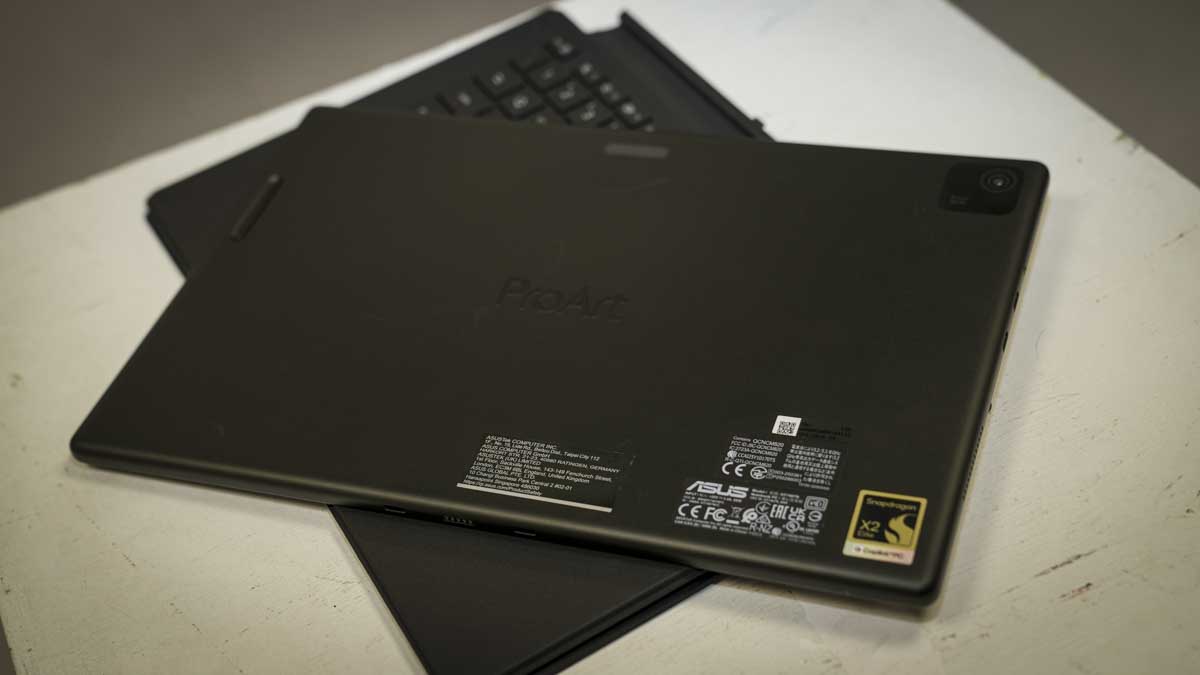
The Asus ProArt PZ14 arrives as one of the most impressive pieces of hardware to come through the test setup this year. At 9mm thick and weighing in at an impressive 0.79kg, it’s closer in scale to an iPad Pro than a conventional laptop, but with a 14-inch 3K OLED display, and the optional removable keyboard and Asus Pen 3.0, all powered by a Snapdragon X2 Elite processor, it proved to handle every Adobe Creative Suite application without issue.
Lightroom Classic, Photoshop, Premiere Pro, After Effects, and DaVinci Resolve all ran well, with no compatibility or performance issues that I have experienced when running ARM machines in the past. Microsoft Office ran as well as ever, and it was only when testing some of the games at the end of the test that those compatibility issues did appear. Some games, such as Indiana Jones and the Great Circle, were a no-go, while Hogwarts Legacy, suffered some graphics breakup, but beyond that, the performance was generally balanced.
Advertisement
Plugged into AC power you get the option to push the tablet into Performance mode, this boost the processing speed, and while it makes editing and game play smooth, the fans tended to kick in to quite a level.
The touchscreen display is the best 3K resolution display I’ve seen, and for creative work, the 144Hz, Pantone-validated panel with an anti-reflective coating looked great and handled bright outdoor conditions better than most OLED panels, with limited reflections.
One of the weak points was the detachable Bluetooth keyboard, which flexes at the joint, as is common with this type of design, making any use away from a solid desk difficult. Early on in the test, I realised that at a desk, the keyboard was great, away, it was best to use the Asus Pen 3.0 or a finger as the primary input method. Not only did this make sense, but it also transformed the machine’s use.
Advertisement
Overall, however, the power for the size and price is exceptional, and in the creative workflow, like the iPad Pro, it can integrate with the project from beginning to end, from being used to tether to your camera through to the editing, uploading and distribution of your work.
ASUS ProArt PZ14: Price and availability
(Image credit: Alastair Jennings)
How much does it cost? $2000 TBC
When is it out? Now
Where can you get it? From retailers such as Best Buy
Sign up to the TechRadar Pro newsletter to get all the top news, opinion, features and guidance your business needs to succeed!
Outside of the US, I can’t see much availability. UK pricing for the 32GB, 1TB configuration with the ASUS Pen 3.0 and Bluetooth keyboard has not been confirmed at the time of writing. Going on what has come before, expect the price to be around the £2,000 mark in the UK.
Advertisement
ASUS ProArt PZ14: Specs
CPU: Snapdragon X2 Elite X2E-88-100, 18 cores, up to 4.7GHz GPU: Qualcomm Adreno X2-90, 128MB dedicated GPU memory NPU: 80 TOPS RAM: 32GB LPDDR5X Storage: 1TB PCIe 4.0 SSD Display: 14-inch ASUS Lumina Pro OLED, 3K Connectivity: 2 × USB4 (40Gbps), SD card reader, WiFi 7, Bluetooth Battery: 75Wh Cameras: 8MP IR front, 13MP rear Durability: IP52, MIL-STD 810H OS: Windows 11 Home Weight: 0.79kg, 9mm thin Accessories optional: ASUS Pen 3.0, Bluetooth keyboard, stand cover
ASUS ProArt PZ14: Design
The ProArt PZ14 is an exceptionally well-built tablet, and the hardware is very minimal. On the left side of the screen are the two USB4 ports that let you plug into the mains and attach accessories, and these are joined by an SD card slot, which is covered. Around the edges are plenty of ventilation slots that help expel the heat away from the Snapdragon processor and electronics inside.
Advertisement
Lifting the tablet from the packaging, the Nano Black CNC-machined aluminium chassis gives an instant premium feel, and the finish proved to be pretty much smudge-resistant. Over the month of testing, the build quality proved exceptional as it was moved between the studio, office, and location work, and used at home in the evenings while catching up on TV.
The aluminium chassis gives the table a tough feel, and this is paired with the IP52 rating, which means it can withstand a light rain shower for a short time without issue, but doesn’t go as far as being left out in it.
During the test, I found that the detachable keyboard supplied with the PZ14 was fine for use on a desk, where it offers a decent enough typing surface with good key travel, and likewise, the touchpad. Away from a desk, however, the flex between the keyboard and tablet can make it difficult to use; this is a tablet.
Think of it this way: in the office/studio, the keyboard is a traditional input device; in the field, it’s just part of the protective shell, with the Asus Pen 3.0 and on-screen keyboard handling input.
Advertisement
(Image credit: Alastair Jennings)
I’m not used to using a pen to interact with a screen; however, the Asus Pen 3.0 with MPP 2.6 support and haptic feedback is excellent. It paired instantly, and, in Lightroom, Photoshop, and Asus’ own StoryCube and MuseTree apps, offers a more natural and intuitive way to navigate than the trackpad.
On location with the tablet held in hand, I started using the pen as the primary input method, and it worked far better than the keyboard and I expected.
The magnetic stand cover, of which the keyboard is part, enables you to fold out a small stand, which is handy when everything is supported on a desk, and there’s plenty of flexibility over the angle. In the studio, I tend to use a wired mouse and an external keyboard connected via USB4 to provide a fast input for video editing, which is standard.
Advertisement
ASUS ProArt PZ14: Features
(Image credit: Alastair Jennings)
The PZ14 has been designed with the Creator in mind and features a decent array of creative-focused apps that will help you organise files and generate ideas. The ProArt range has in the past been closely tied to Adobe products, and here the Adobe Creative Suite performance is in mind; the Snapdragon X2 Elite does seem to have been optimised.
Lightroom Classic, Photoshop, Premiere Pro, After Effects, and DaVinci Resolve all opened and ran without compatibility errors on the Snapdragon X2 Elite X2E-88-100, 18 cores, up to 4.7 GHz, with thumbnails and timelines rendered at speed, supported by the Qualcomm Adreno X2-90, 128 MB of dedicated GPU memory, and graphics.
Inside is a relatively small 1TB SSD, but this provides exceptional transfer rates, exactly what you need when transferring large quantities of files, although it would have been good to see at least 2TB with the file sizes associated with the latest cameras.
Testing the capabilities of this hardware, I checked the Adobe Bridge thumbnail rendering for images from a Sony a7 IV and a Canon EOS R5 C RAW files and was impressed by the speed, though the noise from the cooling system was louder than expected.
Advertisement
Lightroom’s touchscreen workflow seems to be made for the system, scrolling through the library and making adjustments with the slide controls; it felt natural on the 14-inch ASUS Lumina Pro OLED (3 K).
Alongside the CPU and GPU is an 80-TOPS NPU that enables Copilot+ features and boosts AI-powered tools in Premiere Pro and Photoshop. Generative fill and timeline expansion both ran smoothly and quickly. Local LLM inference via LM Studio was downloaded and was functional with a few issues.
However, if you really want to reach your full potential, StoryCube, Asus’ AI media management app, highlights exactly what can be done and works well alongside Adobe Bridge, offering useful automatic organisation of RAW files and video assets.
The hardware features of the tablet design differ slightly from those of most laptops and mini PCs, so there are some compatibility issues. For instance, when gaming, ARM isn’t always as compatible as other systems.
Advertisement
Indiana Jones and the Great Circle would not load at all due to a Vulkan plugin compatibility error. Hogwarts Legacy loaded slowly but ran smoothly once started, aside from some graphics break-up, and always with the background of the fans working hard. PCMark 10 and the Windows Experience Index did not run at all, even with the usual workarounds.
Through the test in the ProArt Creator Hub, I shifted the resources into Performance, although this mode is only accessible when plugged directly into the mains. While in all other modes, cooling and noise are well balanced, everything is cranked up to 11, including the fans. However, in the 0dB whisper mode, fans are kept off during light use, meaning the system runs silently.
In Performance mode, which I used for video editing, the fans activate during rendering and timeline processing, and are noticeably audible. If you’re working on audio-sensitive work, it’s best to switch to one of the quiet modes and then back when that content needs editing or wear headphones.
Advertisement
ASUS ProArt PZ14: Performance
(Image credit: Alastair Jennings)
As with most laptops and mini PCs, the tablet is almost ready to run out of the box. To get started, I plugged in the power supply and gave the tablet a full charge. It’s worth noting that the power supply is 65W, and while it is USB-C, if you plug in a higher-wattage USB-C connection, the machine will prompt you to use the provided power supply or one of equivalent rating.
Once the final steps of the Windows 11 Home setup were complete, I could install all the usual apps. It was apparent from the outset that the internal SSD was fast. With files downloading from my external storage nice and quickly. Sure enough, the benchmarks highlight results of 6,065 MB/s read and 5,356 MB/s write, really showing that the PCIe 4.0 SSD was close to the upper limit.
As the machine filled with all the test applications, the 1TB internal SSD quickly filled with programs and files, including most of the Adobe Creative Suite, local LLM models and video project files; games had to wait due to space limitations.
Storage is always a consideration, and with the ProArt PZ14, if you’re working with video, you’re going to have to supplement the internal storage with a USB4 external SSD or, in this review, a direct NAS connection. During the test, editing 4K Canon EOS R5 C footage via a Ugreen DXP4800 GT NAS connection delivered approximately 800MB/s transfer speeds over USB4-to-10GbE, which was more than enough for smooth Premiere Pro timeline editing.
Advertisement
Over the test period, using Lightroom Classic was one of the major highlights, tethering a camera to the tablet so I could shoot, adjust, and share files with other members of the team. Touch input via the screen, combined with pen interaction for adjustments, just made things easy and far more natural than using my MacBook Pro M1 Max for on-location work.
After the shoot, editing images in batch in Lightroom and editing footage in Premiere Pro were handled well by the system. Run in performance mode, the fans were on constantly; however, switching down to standard mode in Photoshop and Lightroom still provided a good balance of speed, but did cut out the fan noise.
When it came to video editing, a pair of headphones helped me to focus on the vocals and video audio rather than the noise from the machine. It’s also worth noting that Performance mode is only available when plugged into the mains, Standard is the default.
Benchmark results
Advertisement
CrystalDiskMark Read: 6,065.91 MB/s CrystalDiskMark Write: 5,356.66 MB/s Geekbench 6 CPU Multi-Core: 9,976 Geekbench 6 CPU Single-Core: 2,908 Geekbench 6 GPU: 39,018 Cinebench CPU Multi: 4,345 Cinebench CPU Single: 634 3DMark Fire Strike Overall: 8,174 3DMark Fire Strike Graphics: 8,787 3DMark Fire Strike Physics: 19,321 3DMark Fire Strike Combined: 3,423 3DMark Time Spy Overall: 3,522 3DMark Time Spy Graphics: 3166 3DMark Time Spy CPU: 9737 3DMark Wild Life Overall: 31,823 3DMark Steel Nomad Overall: 3,788 PCMark 10: N/A Windows Experience Index: N/A
Two other big points about the performance are the screen, which is just exceptional, with clean, clear detail and tone that, once calibrated, was absolutely ideal for all areas of creative work.
The other is the battery life, which just seemed unending. Usually, when video editing, image processing, or processing endless documents, this processing draws additional power, especially when accessories are also plugged in and drawing on resources.
However, with the combined use, the battery lasted all day, and a two-hour gaming session in Hogwarts Legacy the battery stood at 70%.
Advertisement
One other point to make is compatibility; while most applications load, some won’t. During the test, the usual benchmarking software, PCMark, refused to run a full test, and games such as Indiana Jones would not run either.
ASUS ProArt PZ14: Final verdict
(Image credit: Alastair Jennings)
The Asus ProArt PZ14 is a great machine for photographers who work in the field and need a slim, light, colour-accurate display for Lightroom editing and camera tethering. It’s also a decent option for lightweight Premiere Pro and DaVinci Resolve editing, especially as a, with a display quality that makes colour grading reliable even without a secondary monitor.
The keyboard is a bit of a compromise, depending on how you work. On a desk, it is adequate. Away from a desk, it’s frustrating, as this design tends to be with the flexible connector.
Advertisement
The Asus Pen is excellent and, in many workflows, becomes the better primary input device. You also have to consider the noise from the fans, which did seem louder than with past models, likely due to the increased performance.
ARM compatibility for creative applications is not an issue with all of the Adobe apps, Microsoft Office and the Asus AI apps running without issue. This is a tablet PC that would suit enthusiasts, photographers, and students, providing performance in a very flexible format and a great alternative to a laptop and actually better suited in many situations.
Should I buy the ASUS ProArt PZ14?
(Image credit: Alastair Jennings)
Swipe to scroll horizontally
Value
Advertisement
Well balanced for the OLED display, ARM performance and all-day battery
4/5
Design
Exceptional tablet chassis and display; although the keyboard flexibility is an issue
Advertisement
4.5/5
Features
Large touch screen, powerful CPU, USB4 and all day battery life
4.5/5
Advertisement
Performance
Snapdragon X2 Elite handles all creative applications and workflows; however, 1TB SSD fills quickly, and fans are audible under load
4/5
Overall
Advertisement
A great option for field photography and Lightroom, especially in the tablet format. Video editors will need external storage from day one.
Don’t count on the LLM to return your data – even if you pay up
They’re not bad; they’re just prompted that way. Sysdig threat hunters documented what they say is the first-ever documented agentic ransomware infection with an LLM – not a human – driving the entire extortion operation, from gaining initial access to compromising a production database server and destroying data.
The security shop’s research team named the agentic intruder JadePuffer and said it gained initial access to an internet-facing Langflow instance by exploiting CVE-2025-3248, and then ran a fully automated attack.
Advertisement
“The most striking characteristic, however, was the LLM’s behavior,” Sysdig director of threat research Michael Clark said in a blog about the agentic ransomware and extortion operation.
JadePuffer’s “self-narrating” payloads “contained natural language reasoning, target prioritization, and the kind of detailed annotations that human operators don’t often write but LLM-generated code produces reflexively,” Clark added. “The operation also adapted in real time, retrying failed steps within refined parameters. In one sequence, it went from a failed login to a working fix in 31 seconds.”
After exploiting CVE-2025-3248, a missing authentication vulnerability in Langflow that allows remote, unauthenticated attackers to execute arbitrary Python on the host, the AI agent began scanning for and collecting secrets, including LLM provider API keys, cloud credentials “with explicit coverage of Chinese providers” including Alibaba, Aliyun, Tencent, and Huawei, while also scanning for AWS, Azure and Google Cloud Platform, cryptocurrency wallets, and database credentials.
The AI also installed a crontab entry on the Langflow server to maintain persistence and call back to the attacker’s infrastructure every 30 minutes.
Advertisement
JadePuffer’s intended target was a separate internet-exposed production server running a MySQL database and an Alibaba Nacos configuration service, we’re told. Nacos is an open-source service-discovery and dynamic configuration platform developed by Alibaba and used in the cloud provider’s microservices applications.
The agent connected to the server’s exposed MySQL port using root credentials, although Sysdig doesn’t know how the attacker obtained them. These credentials weren’t stolen from the victim’s environment.
JadePuffer then attacked Nacos via multiple vectors including an authorization bypass flaw (CVE-2021-29441) and forging a valid JSON web token (JWT) using Nacos’s default signing key. Additionally, using its root database access, the LLM injected a backdoor administrator into the Nacos backing database.
It ultimately encrypted all 1,342 Nacos service configuration items using MySQL’s built-in AES encryption function, and created an extortion demand, ransom note, Bitcoin payment address, and a Proton Mail contact:
Advertisement
“YOUR DATA HAS BEEN ENCRYPTED. All NACOS configurations, REDACTED customer data, and REDACTED PII have been encrypted with AES-256.”, “3J98t1WpEZ73CNmQviecrnyiWrnqRhWNLy”, “e78393397[@]proton[.]me”
However, according to the threat hunters, the victim can’t recover the encrypted data, even if they paid the ransom demand, because the agent escalated “from row-level deletion to dropping entire database schemas, narrating its own targeting rationale,” without backing up any of the encrypted data.
There are a couple of things that security teams and vulnerability managers should do immediately to avoid being ransomed by this AI agent. First up: patch Langflow to a release that fixes CVE-2025-3248, and do not expose code-execution/validation endpoints to the internet.
Also, don’t ever expose Nacos to the open internet, change its default token.secret.key, and upgrade to a release that forces a custom key.
Advertisement
The threat hunters also recommend against running any AI orchestration servers with provider API keys or cloud credentials in their environment.
While the AI agent didn’t use any especially sophisticated or unique techniques in this attack, the fact that an LLM “strung them together into a complete ransomware operation against neglected internet-facing infrastructure,” is notable, according to Clark. “The skill floor for running ransomware has dropped to whatever it costs to run an agent, and if that agent is running on stolen credentials through LLMjacking, the cost to an attacker is close to zero.”®
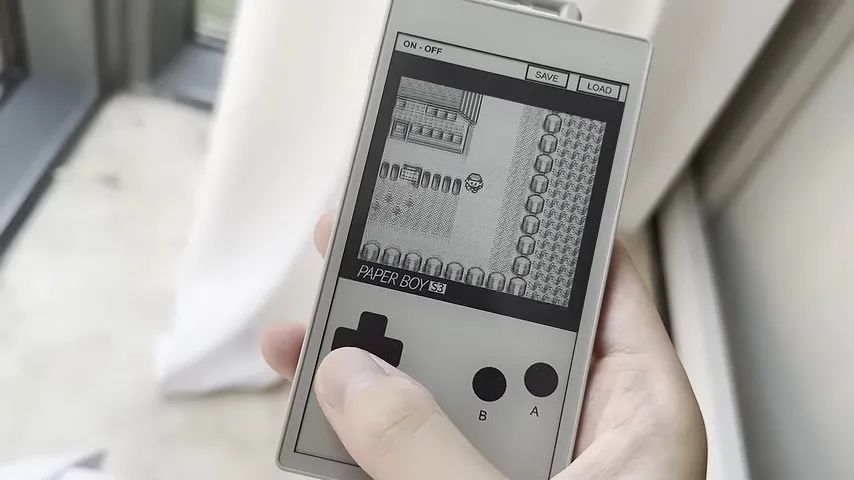
This is one of those projects that was both inspired and made possible by the absolute embarrassment of dev boards available to the modern hacker. In this case, the dev board was the M5Stack PaperS3, which as the name implies combines an ESP32-S3 with an e-ink panel. [Wenting Zhang] picked one up and was immediately inspired to try and make an e-ink Game Boy.
The M5Stack PaperS3 made this project possible by exposing the display with row/column control — parallel, some would call it, as opposed to the usual serial interface of SPI. That allowed [Wenting] to work some of the same e-ink magic he perfected on his Modos monitors to allow partial refresh at up to 60 Hz. That the ESP32-S3 is capable of emulating a Game Boy while driving the screen should surprise no one, since it can emulate an MSX while outputting VGA or even Windows 95 on a 386. In this case, he’s basing the actual Game Boy emulation on Crank Boy.
Of course the e-ink screen on the M5Stack is far larger and has a much higher resolution than what the Game Boy shipped with, which lets him implement touch controls and scale the image up 3X so he can fake a couple of shades of grayscale while actually outputting black and white. Even better, if he was actually playing this thing on the regular, once the high-refresh portion of the screen starts to wear out, he can flip the orientation and keep gaming on the virtually-unrefreshed control portion of the screen — doubling the lifetime of the system, something many of you raised as a concern when we last looked at a his e-ink monitor project.
Advertisement
The only real shortcoming of this hack is the sound. With one-bit beeps coming out of the M5Stack buzzer, it’s got nothing on Nintendo’s hardware. Of course, that’s partially down to using the hardware as-is. With the addition of an I2S sound chip like the one used in the MOD player project we featured recently, you’d just need to squeeze out enough processor cycles to make this sound as good as it looks.
from the maybe-don’t-compound-your-evilness-with-stupidity dept
Some readers might look at this headline and think there’s something off about it. And I’ll grant you that. There are several ways music can be played: to, for, not at all. Sometimes though, the only way to describe the playing of music is “at.”
One of Trump’s many vindictive “surges” targeting cities and states run by Democratic party members occurred in Washington DC. Not content to flood the streets with tons of federal officers, the administration decided these forces needed backup from the National Guard. Of course, Trump claimed the crime problem in DC was so bad it could only be dealt with by a surge that blended choice bits from “police state” and “martial law” into an unpalatable whole.
DC residents were less than thrilled. One resident — Sam O’Hara — made his displeasure known by doing the thing in the headline: playing music at National Guard troops.
Given the roughly 200-year-old tradition of civilian law enforcement in the United States, Mr. O’Hara was deeply concerned about the normalization of troops patrolling D.C. neighborhoods. And so, he began protesting the Guard members’ presence by walking several feet behind them when he saw them in the community. Using his phone and sometimes a small speaker, he played The Imperial March as he walked, keeping the music at a volume that was audible but not blaring. Mr. O’Hara recorded the encounters and posted the videos on his TikTok account, where millions of people have viewed them.
And here’s how it looked, from O’Hara’s POV:
I really hate to begin a sentence with “if you’re not familiar with The Imperial March.” And so I haven’t, via the clever use of punctuation. Just in case the presiding judge was unfamiliar, the lawsuit included a brief explainer:
In the Star Wars franchise, The Imperial March is the music that plays when Darth Vader or other dark forces enter a scene or succeed in their dastardly plans.
One of the National Guard troops objected to being Bluetoothed in public. Sgt. Devon Beck threatened to call the cops if O’Hara didn’t stop. Then he did exactly that. The DC Metro PD immediately fell down on the job, arresting O’Hara for crimes he couldn’t have possibly committed. He was not “harassing” the troops, as one of the officers claimed. Nor was he impeding their movement. Nor was he preventing people from entering a nearby store, as Officer Campbell alleged. He was standing to the side of it.
Advertisement
Officer Campbell wasn’t done being stupid quite yet.
In response to Mr. O’Hara’s statements that he was engaged in protest, Officer Campbell said, “That’s not a protest. You better define protest. This isn’t a protest. You are not protesting.”
You are wrong, Officer Campbell. Demonstrably wrong, which is a play on words or something… So enjoy that, readers. I’m taking English and grammar for a rough ride in this post, to borrow a bit of law enforcement vernacular. My apologies in arrears.
Anyway, O’Hara gets the last laugh, some money, and the unfortunate confirmation of the implication he made musically. And, while his original salvo targeted National Guard interlopers, it was the Metro PD officers who accosted/arrested him that truly proved the point.
The District of Columbia has reached a settlement agreement for an undisclosed amount of money with a resident who claims police illegally detained him for following an Ohio National Guard patrol while playing Darth Vader’s theme song from “Star Wars” on his phone — an act of protest against the Trump administration’s federal law-enforcement surge in the nation’s capital.
No one is saying how much the settlement is, but it seems like it’s big enough to mean something.
Advertisement
In an email on Friday, an ACLU spokesperson referred to the settlement’s financial terms as “a significant amount” that O’Hara “is pleased with” but said they aren’t disclosing the dollar figure to protect his privacy.
It also may not be O’Hara’s settlement check from the government. There’s still the matter of the National Guard troop who decided to call the police because he personally didn’t care for O’Hara’s playlist. Beck is still defending himself against the lawsuit, but I have no idea what kind of defense this is:
Attorneys for the Guard member, Sgt. Devon Beck, has asked a judge to dismiss O’Hara’s claims against him.
“He was there because that was his assigned duty,” Beck’s lawyers wrote. “This was not an accidental encounter or a one-time disagreement on a public sidewalk.”
So… Beck isn’t responsible for his direct (or contributory) rights violations because he didn’t ask to be deployed to Washington DC? It probably doesn’t matter. Members of the military are rarely sued by US citizens for rights violations because, well, until very recently they were never asked to patrol US neighborhoods or provide support for law enforcement. There are likely layers of immunity that haven’t even been probed yet, but even if the courts decide the troops were acting as federal officers, it’s almost impossible to successfully sue federal officers. If the government agrees to a settlement, it will because it’s afraid its lawyers might fuck things up so badly adverse precedent might be set.
But for now, some justice has been done. O’Hara gets his money. The Metro PD gets a lesson in why it’s rarely a good idea to provide backup to federal forces and, more hopefully, learns something about how to handle people engaged in protected speech.
If you’ve ever wanted to see fighter pilots performing at their superhuman best, then you should get to a Blue Angels air show. The Blue Angels are the US Navy’s elite demonstration team and operate a busy schedule across the U.S. Whether you’re lucky enough to have seen them before or you’re planning to catch them for the first time, making the effort to see one of their displays won’t leave you disappointed.
A Blue Angels show is a breathtaking display of teamwork, skill, aerial choreography, and immense courage. The team flies the Navy’s frontline carrier-based fighter — the F/A-18 Super Hornet – and they can be made combat-ready within 72 hours if needed, so you really are seeing the real deal in action. It’s a jet that’s also considered one of the best fighters ever made by Boeing.
This summer, the Blue Angels will be performing across the USA, with shows like the Great State of Maine Air Show in Brunswick, the Pensacola Beach Air Show on Florida’s Gulf Coast, Seattle’s Boeing Seafair Air Show, and the Thunder Over Louisiana Air Show among the highlights of a busy schedule. So, if the thought of watching the Blue Angels performing such maneuvers as the Opposing Knife Edge, the Diamond Aileron Roll, and the Sneak Pass, here’s a handy guide to where you can watch the Blue Angels this summer.
Advertisement
The best places to catch the Blue Angels in July and August
Kirk Wester/Getty Images
Among the highlights of July’s Blue Angels air shows is the Great State of Maine Air Show in Brunswick. This takes place on the 11th and 12 of July at the Brunswick Executive Airport, and the Blue Angels are scheduled to perform on both days. Tickets are available online only and can be purchased from the Great Maine Air Show website.
Next is the Pensacola Air Show, which takes place on Saturday, July 18. This is the Blue Angels “home” show, so it’s got to be worth catching if you get the chance. There is no admission fee for this one, and the best views are from Casino Beach. You can find out more from the Visit Pensacola website.
Advertisement
Moving on to August, the Boeing Seafair Air Show in Seattle runs from Friday, July 31, to Sunday, August 2. The event’s website lists the Blue Angels performing all three days at 3:30pm local time, with two practice runs on July 30th — though the latter are not set in stone. However, according to the Blue Angels website, the team is only performing on the Saturday and Sunday, so count on the weekend performances. Full details of the show can be found on the Boeing Seafair website. For fans of other military jets, you can also catch the F-35B, one of the most advanced fighter jets in the world here.
Rounding off August highlights, we have the Thunder Over Louisiana Air Show, which takes place on Friday, August 28, to Sunday, August 30, 2026, at Chennault International Airport, Lake Charles, Louisiana. If you fancy saying goodbye to August in style, then you can buy tickets for this event online from the Thunder Over Louisiana website.
Advertisement
Other Blue Angel summer shows
Olivia Lowman/Getty Images
As for some other performances this summer, the Joint Base Elmendorf-Richardson in Alaska is hosting the appropriately named Arctic Thunder Open House on Saturday, August 8, and Sunday, August 9, 2026. You can also catch them at the Oregon International Air Show, which takes place at McMinnville Airport from Friday, August 14, to Sunday, August 16, 2026.
September highlights have got to include the Cleveland National Air Show. This event takes place over Labor Day Weekend from Saturday, September 5, to Monday, September 7, 2026. and is a Labor Day weekend tradition in Cleveland. The shows take place at Burke Lakefront Airport in downtown Cleveland, and tickets can be purchased from the Cleveland National Air Show website.
Finally, as fall approaches and the days shorten, you can still catch the Blue Angels one more time at the MCAS Miramar Air Show at the Marine Corps Air Station Miramar, San Diego, California. Running from Friday, September 25, to Sunday, September 27, 2026, this one technically happens in the fall, but in sunny San Diego, you’ll still be feeling that summertime weather. Full details can be found on the Miramar Air Show website. Of course, this is not an exhaustive list, so you can catch the full slate of shows at the Blue Angels website.
Meta is introducing a subscription for expanded access to advanced smart-glasses features. According to Wired, “[U]sers will need the Meta One Premium Plan to unlock expanded access to some features for their smart glasses, whether it’s the Ray-Ban, Oakley, or Meta-branded version.” They’ll still be usable with a subscription, but “certain features will be limited,” the report says. From the report: Specifically, a feature called Conversation Focus, which boosts the audio of the person you’re speaking with so you can hear them better in loud environments. You’ll get three hours per month without a subscription, but if you want to use it more often, then you’ll need to pay up. Though even then, you’re still capped at 15 hours. Subscribing also nets you “Premium Device Support,” where you’ll get faster access to what Meta says are “human experts” trained on the smart glasses’ features, should any problems arise. Guess humans are better at some things after all.
A Meta spokesperson tells WIRED that this is “not an AI rate limit.” Rate limits are common on other AI platforms — users get free access to a feature until they hit a certain cap, then they’ll need to subscribe to use it more until the limit resets at the end of the month. However, the Conversation Focus feature runs on-device, meaning it doesn’t need to head to Meta’s servers for AI processing. There’s no real-time way to monitor how many hours you’ve used Conversation Focus, but you’ll receive a notification when you get near the limit.
“The subscription supports that ongoing work and gives power users expanded access along with premium device support,” the spokesperson says. “We’re going to start testing new optional subscription plans that offer more premium features and advanced capabilities for those who want to unlock more from our apps and AI glasses.”
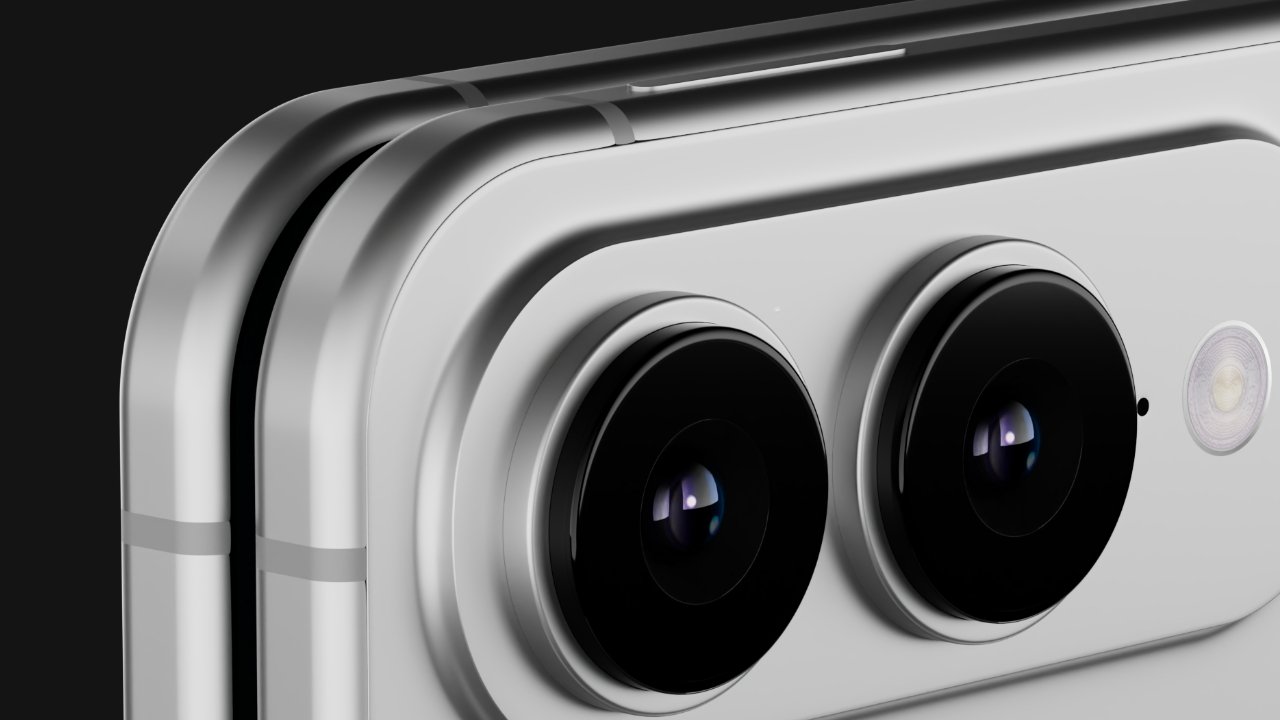
A new report claims that Apple expects to sell 10 million of the iPhone Fold in 2026 and into early 2027, considerably up from most previous estimates.
Nothing varies quite like the rumors that the iPhone Fold is or is not going to be launched in September, but the number Apple will make comes close. In April 2026, for example, Nikkei Asia and most other analysts believed that Apple was ordering 7 million to 8 million for the year.
At the same time leaker Digital Chat Station claimed it was 11 million.
Now Nikkei Asia has met the leaker halfway, and says that Apple is ordering ten million of the iPhone Fold for the rest of 2026. In total, across the whole of the year and all of its iPhone models, Apple expects to produce over 220 million devices.
Advertisement
That compares to late 2025, when it was estimated that Apple’s sales for the year would be around 247 million iPhones. In September 2025, it was reported that Apple was looking for options to speed up production of the iPhone Fold, and that it was predicting a 10% increase in all iPhone sales across 2026
The new report follows estimates that the iPhone Fold will account for 29% of all folding display orders in 2026. That compares to Samsung’s estimated 31%, and Huawei’s 24%.
If the report’s figure of 10 million iPhone Fold devices being produced in 2026 is correct, it bolsters claims that Apple has resolved the claimed manufacturing problems regarding the device’s hinge and circuit board.
Given that the figure is specifically for Apple’s 2026 orders for iPhones, it suggests the iPhone Fold will be launched in September, with shipments not delayed into 2027 as previously rumored. That’s not certain, however, and it remains possible that Apple could announce it in September, but not ship it until later.
Advertisement
Generally, Apple orders around 30 million of its Pro iPhone models for the weeks after launch. It’s not yet clear what the order volume will be, with the folding iPhone in the mix.
The global chip shortage may alter these figures. But generally Apple aims to order 20 million of the various non-Pro models to sell in September. This is likely not on the table for 2026, as the present rumors suggest the non-Pro iPhone 18 will be launched in the spring of 2027.
In May 2026, it was rumored that Apple was changing these ratios for the iPhone 17 range because of both demand, and possible delays for the iPhone 18. Those delays may be due to the expectation that Apple is to move its next non-Pro iPhone launches from September 2026 to spring 2027.
However, regardless of this, the new report also claims that Apple has asked suppliers to reserve an unknown number of iPhone 17 components. That suggests that Apple is looking to mitigate against shortages as much as possible.
























































You must be logged in to post a comment Login