Connect with us
DAPA Banner
DAPA Coin
DAPA
COIN PAYMENT ASSET
PRIVACY · BLOCKDAG · HOMOMORPHIC ENCRYPTION · RUST
ElGamal Encrypted MINE DAPA
🚫 GENESIS SOLD OUT
DAPAPAY COMING

Tech

Republicans Gleefully Celebrate Midterms Chaos in Maine

Published

on

All eyes are on Maine this week. Political operatives in Trumpworld tell Inner Loop they hope embattled senate candidate Graham Platner will stay in the race as long as possible—the state’s electoral chaos can only help Republicans, they claim.

Platner, a US Marine veteran, overcame a string of controversies to easily win the Democratic primary last month. Platner is supposed to face incumbent Republican Susan Collins in the general election in one of the nation’s most closely watched races in November, but a litany of Democratic officials are now calling for him to drop out.

On Monday, a woman in Maine accused Platner of sexual assault and told Politico that he had once forced her to have sex over her objections. (Platner’s campaign did not respond to a request for comment, though it previously denied the allegation in a statement to Politico.)

Platner had previously been accused of mistreating women, had covered up a Nazi tattoo, and was linked to multiple offensive online comments. Over the past 24 hours, Democrats from Senator Bernie Sanders to Senator Chuck Schumer have called for him to step out of the race.

Advertisement

Trumpworld operatives say their hope—unsurprisingly—is that Platner stays in the race, given his increasingly toxic political brand, his growing horde of political enemies in his own party, and the knock-on effects on his fundraising operation.

Basically, it’s a dumpster fire, and Republicans are all but making s’mores.

“Platner should stay in and fight the liberal lobbyist establishment!” one strategist jokingly told Inner Loop. Like others interviewed for this story, they spoke candidly on the condition of anonymity.

Funding is also going to be a problem, operatives noted with glee. The Democratic Senatorial Campaign Committee, or DSCC, has announced that it will not bankroll Platner’s campaign, should he stay in the race.

Advertisement

The operatives are thrilled by this: As a result, Platner would have to rely on small-dollar donors. Despite his fervent fan base, these donations would almost certainly not cover the tens of millions of dollars that both sides are expecting to have to pour into TV ads closer to the midterms. (The Boston-area media market is among the top 10 most expensive in the country, and Mainers do watch TV.)

But Trump operatives also think even if Platner does step aside, the Senate race in Maine firmly tilts in Collins’ favor.

Democrats have until July 13 for Platner to drop out, and a July 27 deadline for a special election to replace Platner’s name on the ballot. Democratic operatives in the state tell Inner Loop this could happen the weekend of July 25, but Trumpworld doesn’t think the alternative candidates would pose a major challenge.

Janet Mills, the governor of Maine who dropped out of the Democratic Senate primary, is seen as one option. But Mills has a similar profile to Collins, who the operatives still think would edge out a victory, especially given her performance bucking Joe Biden in 2020.

Advertisement

Another option is Troy Jackson, a former Maine state senator. But another longtime GOP strategist was skeptical whether voters would look past the baggage accompanying any Democratic candidate following the Platner saga.

“At the end of the day, Democrats have to run a perfect race to beat Collins, which they have not done. She’s still the least offensive candidate of the Senate Republican conference, and so the strongest candidate we could have in the race,” one longtime GOP strategist says.

Still, Trumpworld and the Republicans’ Senate campaign arm expect a bruising fight in the Maine Senate race that could cost them hundreds of millions of dollars. And while they believe Collins can win, it could end up being tight. Get the graham crackers.


This is an edition of Hugo Lowell’s Inner Loop newsletter. Read previous newsletters here.

Advertisement

Source link

Continue Reading
Click to comment

You must be logged in to post a comment Login

Leave a Reply

Tech

MIT researchers study avian mechanics to build robot that can dive, swim and fly

Published

on

The researchers aim for a future in which winged robots could used for research in aquatic regions often deemed too dangerous for traditional ocean vessels.

Researchers from Massachusetts Institute of Technology (MIT) have developed a robot with the ability to plunge underwater then emerge and continue flying through the air, much like how a bird dives and flies. 

Inspired by aquatic aviators – such as loons, gulls and puffins – engineers at MIT and EPFL in Lausanne, Switzerland, worked on the flapping wing aerial aquatic vehicle (FAAV), which weighs about half a pound and is designed to aid scientists in the study of the mechanics that enable real birds to navigate the air and water. 

Researchers also hope that the design could result in the development of a new class of aerial-aquatic drones and vehicles, noting that winged robots could be deployed in oceanography to fly to and carry out research in aquatic regions considered too dangerous for traditional ocean vessels to travel to. 

Advertisement

The robot has a central body or fuselage, two flexible wings capable of flapping and a tail designed for steering. 

Both the wings and the tail can be replaced with ones of a different size as it was noted during the experimentation phase that a combination of wing size, flapping frequency and tail angle enabled the robot to smoothly transition from swimming through the water, breaking through the surface and flying through the air.

To help wick away any water, the wings are made using thin membranes coated with hydrophobic nanoparticles.

“Our dream is for oceanographers, marine biologists and members of coastal communities to launch this robot from a boat, or from shore and it would fly close to the area of interest, such as an iceberg or a port facility, or over a pod of whales,” said Raphael Zufferey, the lead author of the study. 

Advertisement

“It would dive into the water to take a measurement or collect a sample and fly back to deliver the data at a fraction of the cost of traditional methods. Then it could go back out to dive for more.”

He explained that to make the transition from air and water, back to air significant adaptations have to be made. 

“Birds like puffins can fly very fast through the air and can dive and swim through water at speeds of 3 meters per second. They’re able to do pretty amazing things. So we knew it was possible. Just no one had tried this in a mobile robotic system.”

Future alterations include redesigning the wings to allow for turn. The team will also test the robot’s ability to perform in turbulent conditions, such as choppy water or high winds. 

Advertisement

Zufferey said: “One of the major challenges in ocean science is collecting data both frequently and across many locations, which is something this robot could do in the future. You could send this out not just every week, but every hour. It could fly out at high speeds, dive in, fly back, deliver its data and go back out, multiple times.”

Don’t miss out on the knowledge you need to succeed. Sign up for the Daily Brief, Silicon Republic’s digest of need-to-know sci-tech news.

Source link

Advertisement
Continue Reading

Tech

Florida ransomware negotiator convicted for helping ransomware gang extort US companies

Published

on

Florida man Angelo Martino has been sentenced to more than five years in prison for conspiring with hackers to deploy ransomware during his job as a ransomware negotiator for a U.S. cybersecurity company.

The U.S. Department of Justice confirmed the sentence on Thursday, noting that the government seized more than $10 million worth of cryptocurrency and assets. Martino allegedly bought these assets, which include a food truck and a luxury fishing boat, with money stolen in the hacks.

Martino is the third person to be jailed for the scheme, following the earlier incarceration of cybersecurity professionals Kevin Martin and Ryan Goldberg. The trio, prosecutors say, worked together to deploy the BlackCat ransomware against companies in the United States throughout 2023. In one successful attack, the cyber professionals moonlighting as criminals extorted a company for about $1.2 million, which they then split three ways after laundering the funds.

The investigation highlights a rare case of security professionals working for malicious hackers while on the job. Governments have long advised victims of hacking and extortion not to pay any ransom and prevent cybercriminals from profiting, some companies do so anyway in attempts to prevent their customers’ private data from being leaked.

Advertisement

Extortion attacks have helped create an entire insurance sub-sector in the U.S. for responding to ransomware and extortion attacks. Some companies in this space employ negotiators to try to bring down the cost of ransoms.

BlackCat (also known as ALPHV) is a ransomware-as-a-service operation that allows independent hackers, known as affiliates, to rent access to the gang’s file-encrypting malware in exchange for a cut of the profits from cyberattacks. 

The group’s ransomware was famously used to steal highly sensitive medical and billing data of more than 192 million people in America during a hack at U.S. health technology giant Change Healthcare in February 2024, though the affiliate hackers responsible for the 2024 data breach were never identified.

When you purchase through links in our articles, we may earn a small commission. This doesn’t affect our editorial independence.

Advertisement

Source link

Continue Reading

Tech

Which MacBook to Buy (2026): My Honest Advice on Which to Buy

Published

on

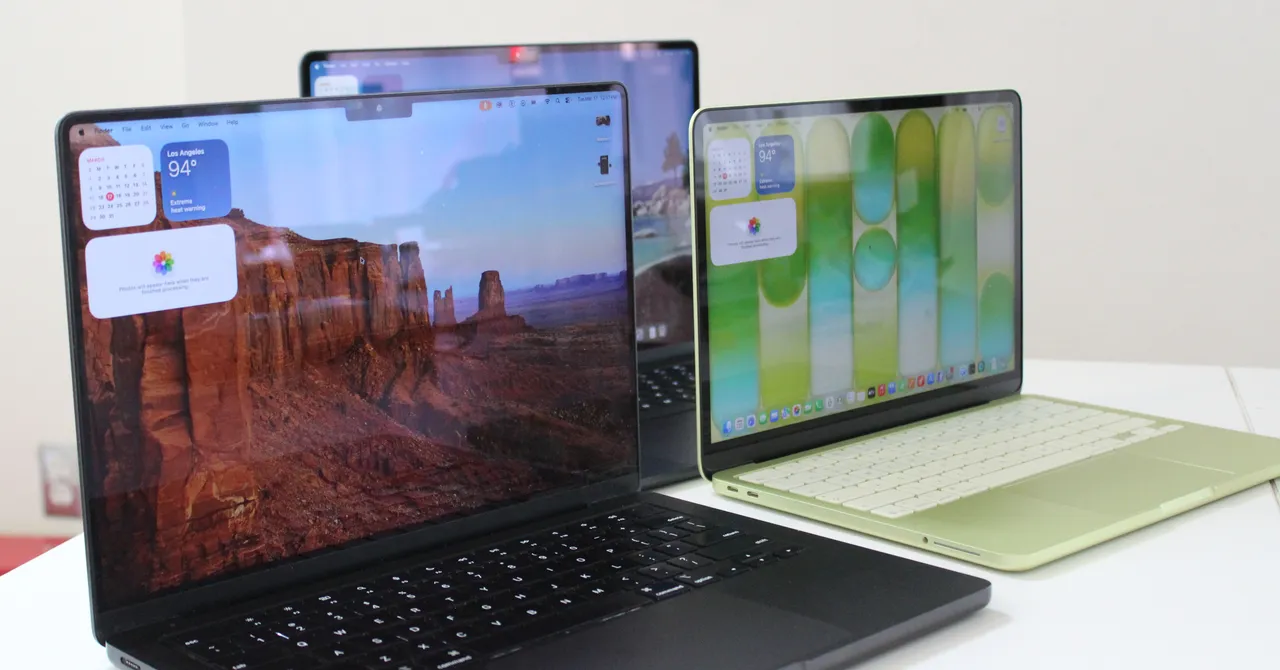
All of Apple’s processors are scattered throughout different MacBook models, and you can find older models at specific third-party retailers online, either completely new or refurbished. If you do stumble upon its older chips (which came out four years ago), you might be wondering how they compare to other options. Here, get a breakdown of the differences to consider.

M5 Series

M5: The M5 chips are the latest options from Apple, having arrived in late 2025 with the launch of the 14-inch MacBook Pro, iPad Pro, and Vision Pro. The base M5 still has up to a 10-core CPU and 10-core GPU, though there’s also a lower-tier 9-core CPU that’s available on the iPad Pro. The M5 is around 10 to 15 percent faster in CPU performance but also takes a significant step up in GPU, AI workloads, and even storage speed. Like Apple’s mobile chips, the M5 is now also available on the MacBook Air.

M5 Pro: Currently available exclusively on the 14-inch and 16-inch MacBook Pros, the M5 Pro comes with up to an 18-core CPU and a 20-core GPU. The base configuration starts with only a 15-core CPU and 16-core GPU. As with previous generations, the “Pro” chip gets all the same benefits as those in the M5 architecture but adds more cores and improved memory bandwidth. The biggest advantage is in GPU and on-device AI performance. This time around, however, both the M5 Pro and M5 Max also debuted an update: “Fusion Architecture” is a new version of UltraFusion (which was previously used only on the Ultra chips) that combines two dies together across a superfast interconnect.

M5 Max: The M5 Max is the M5 Pro—only with more GPU power. You get the option for up to 40 GPU cores, which puts the MacBook Pro on the level of high-end gaming laptops in terms of graphics performance. Add in the neural accelerators that are now built into each GPU core, and you’ve got one of the most powerful AI laptops on the market. In terms of Apple rankings, it’s only bested in GPU performance by the M3 Ultra, which is currently available only in the Mac Studio.

Advertisement

M4 Series

M4: The M4 originally launched in 2024. It has a 10-core CPU and a 10-core GPU. Apple claims the M4 delivers 1.8 times faster CPU performance and 2.2 times faster GPU performance than the M1. Meanwhile, the neural engine is more than three times faster than the original and twice as fast as the M3. It also starts with 16 GB of unified memory, which helps to power Apple Intelligence (the company’s suite of artificial intelligence features) more smoothly. It’s available on the 14-inch MacBook Pro (2024), iMac (2024), and MacBook Air (13-inch and 15-inch, 2025).

M4 Pro: The M4 Pro has a 14-core CPU (which Apple claims is up to 1.9 times faster than the M1 Pro) and up to a 20-core GPU, with up to 64 GB of unified memory. Built on a second-generation 3-nanometer process, it also supports enhanced GPU features like mesh shading and ray tracing—the latter of which is now twice as fast as on M3 chips. You’ll find it on the 2024 MacBook Pro (14-inch and 16-inch) and Mac Mini (2024).

M4 Max: This chip has a 16-core CPU and up to a 40-core GPU with support for up to 128 GB of unified memory. Apple says the CPU is up to 2.2 times faster than the M1 Max, while the GPU is up to 1.9 times faster. As with the M4 Pro, it packs support for mesh shading and ray tracing. The M4 Max is available as an option on the 2024 14-inch and 16-inch MacBook Pro, and you can also get it as an option in the current Mac Studio.


M3 Series

M3: The M3 was available on the 14-inch MacBook Pro (late 2023), 13-inch MacBook Air (2024), 15-inch MacBook Air (2024), and 24-inch iMac (2023). It packs an 8-core CPU and up to a 10-core GPU with 24 GB of unified memory. When compared with the M1, Apple claimed CPU performance was up to 35 percent faster, and GPU performance was up to 65 percent faster. The company said the CPU and GPU are both 20 percent faster than the M2. As with the M1 and M2, it was great for basic tasks like word processing, sending emails, using spreadsheets, and light gaming. With the 13-inch and 15-inch MacBook Air, you also had support for two external displays (one display with up to 6K resolution at 60 Hz and another with up to 5K resolution at 60 Hz).

Advertisement

M3 Pro: With a 12-core CPU and an 18-core GPU, Apple claimed the M3 Pro’s GPU was only up to 10 percent faster than the M2 Pro, making it a marginal upgrade from its predecessor. Compared with the M1 Pro, however, the M2 Pro was up to 40 percent faster in GPU performance and 20 percent faster in CPU performance. It was available on the 14-inch and 16-inch MacBook Pro from 2023. It was the ideal in-between for those who needed a chip that was more powerful than the M3 but wouldn’t use the full power of the M3 Max.

M3 Max: This was the next step up from the M2 Max. It had a 16-core CPU, 40-core GPU, and up to 128 GB of unified memory. According to Apple, the CPU performance was up to 80 percent faster than the M1 Max and up to 50 percent faster than the M2 Max. As for GPU performance, it was said to be up to 50 percent faster than the M1 Max and 20 percent faster than the M2 Max. The M3 Max was available on the 14-inch and 16-inch MacBook Pro (late 2023).

M3 Ultra: While the M3 lineup was introduced in 2023, Apple announced an M3 Ultra in 2025. Confusingly, it remains the most powerful chip in the M-series lineup—even better than the latest M4 Max and M5. It has a CPU of up to 32 cores (with 24 performance cores) and a GPU with up to 80 cores. Apple claims it’s up to 2.5 times faster than the M1 Ultra. It also comes with 96 GB of unified memory, with the option to upgrade up to 512 GB, while SSD storage can be increased to 16 TB. This chip is currently available only on the 2025 Mac Studio.


M2 Series

M2: The M2 was an entry-level chip like the M1, with slightly more processing power. It packed an 8-core CPU and up to a 10-core GPU (two more GPU cores than its predecessor), along with support for up to 24 GB of unified memory. Apple said the second-generation chip has an 18 percent faster CPU and a GPU that’s 35 percent more powerful than its earlier version. The M2 was great for daily tasks like word processing and web browsing, but such tasks as editing multiple streams of 4K footage and 3D rendering should be reserved for the M1 Pro or M1 Max (or the next two chips). It was available in the MacBook Air (13-inch, 2022), MacBook Air (15-inch, 2022), and MacBook Pro (13-inch, 2022).

Advertisement

M2 Pro: The M2 Pro was the next step up from the M2. It had up to 12 cores in the CPU and up to a 19-core GPU, with up to 32 GB of unified memory. Apple claimed performance was up to 20 percent faster than with the 10-core M1 Pro and graphics were 30 percent faster. We recommended this chip for intermediate video and photo editors. It was a marginal upgrade compared with the M1 Pro, but it was the best option for those who wanted a more future-proof processor. You could find it in the MacBook Pro (14-inch and 16-inch) from early 2023 and the Mac Mini (2023).

M2 Max: The M2 Max packs up to a 12-core CPU and up to a 38-core GPU (with support for up to 96 GB of unified memory). According to Apple, graphics are 30 percent faster than on the M1 Max. The M2 Max is an excellent choice for those who work with graphics-intensive content, including graphic design, 3D modeling, and heavy-duty video footage. But as with the M2 Pro, it’s an incremental upgrade if you’re coming from an M1 Max. It’s available in the MacBook Pro (14-inch and 16-inch) that came out early in 2023 and the Mac Studio (2023).

M2 Ultra: Successor to the M1 Ultra, the M2 Ultra was available on the second-generation Mac Studio and the Mac Pro (2023). Composed of two M2 Max chips, using Apple’s UltraFusion technology, the M2 Ultra had a 24-core CPU and a GPU configurable with 60 or 76 cores. Apple claimed the CPU delivered up to 20 percent faster performance and a 30 percent faster GPU than the M1 Ultra. This was the chip to get if you were working with extremely heavy-duty content that you believed the M1 Ultra, M2 Pro, or M2 Max simply wouldn’t be able to handle. You’d have known if you needed a chip this robust.


M1 Series

M1: For years, Apple continued to sell the M1 MacBook Air through Walmart for just $599, which was a killer price for this laptop. The MacBook Neo has since replaced it, using the A18 Pro iPhone chip. The M1 was the first custom silicon Apple debuted for its MacBook Air in 2020. It has an 8-core CPU and up to an 8-core GPU. Originally, there was support for up to 16 GB of unified memory (RAM) at an extra cost, but nowadays you can only purchase the 8-GB model. It was much faster than any previous Intel-powered MacBook Pro, and it was the practical choice for most people, as it was inside the most affordable MacBook Air you could buy (from third-party retailers). It packed more than enough processing power to get you through common day-to-day tasks and even light gaming. It could also handle more intense jobs, like photo editing.

Advertisement

M1 Pro: From there, the next step up was the M1 Pro. It had up to 10 cores in the CPU and up to a 16-core GPU, with up to 32 GB of unified memory. Apple said the performance and graphics were both twice as fast as on the M1. We found it to be considerably more capable than the base chip, making it ideal for anyone who works heavily on MacBooks for music production or photo and video editing. Only the MacBook Pro (14-inch and 16-inch) from 2021 used this chip.

M1 Max: Like the M1 Pro, the M1 Max had a 10-core CPU but a heftier 32-core GPU (with support for up to 64 GB of unified memory). Apple said it was four times faster than the M1 in terms of graphics. As proved in testing, this chip was extremely powerful and handled every heavy-duty task with ease. It was the go-to choice if you needed a computer that could handle multiple streams of 8K or 4K video footage, 3D rendering, or developing apps and running demos. You probably already knew whether you needed this much power. It was available in the MacBook Pro (14-inch and 16-inch) from 2021.

M1 Ultra: The M1 Ultra was the most powerful of them all. It’s two M1 Max chips connected with a technology called UltraFusion. It packs a 20-core CPU, 64-core GPU (which can be configured with up to 128 GB of unified memory), and a 32-core neural engine—complete with seven times more transistors than the base M1. Even with the M3 Ultra now available, the M1 Ultra remains powerful and a solid option for anyone who needs a heavy-duty processor for working with intense visuals and graphics. It was available only on the first-generation Mac Studio.

Source link

Advertisement
Continue Reading

Tech

How to Share Your Location on an iPhone or Android Phone (2026)

Published

on

Image may contain Neighborhood Outdoors Blackboard and Map

ScreenshotCourtesy of Simon Hill

Image may contain Electronics Mobile Phone Phone and Text

ScreenshotCourtesy of Simon Hill

Image may contain Chart Plot Neighborhood and Map

ScreenshotCourtesy of Simon Hill

You can stop sharing your location on the same People tab by tapping on the relevant person and choosing Stop Sharing My Location. You can quickly stop sharing with everyone by selecting the Me tab and turning off Share My Location.

How to Share Your Location Using Facebook Messenger

If you are already chatting to the person or group you want to send your location to in Facebook’s popular Messenger app, then you can share your location right there without exiting it. This works on Android and iOS.

  1. Open Messenger and select the relevant conversation with the person or people you want to share your location with.
  2. Tap the Options icon (plus) at the bottom left, then the Location icon (arrow).
  3. You may be prompted to grant the Messenger app location privileges.
  4. Tap Start sharing live location or if you’d rather share a static point, search for it in the search bar or tap the location pin at the bottom right and drag the map to place it where you want, then tap Send location.
  5. When you choose to share your live location, it is shared for one hour, and you will see the option to Stop Sharing with a countdown clock next to it.

How to Share Your Location Using WhatsApp

If the person or people you want to share with use WhatsApp, it’s easy to share your location with them. This is available on both Android and iOS.

Advertisement
  1. Open WhatsApp and select the Chats tab.
  2. Choose the person or group you want to share with.
  3. On an iPhone, tap the plus icon at the bottom left. On an Android phone, tap the paperclip icon at the bottom right.
  4. Choose Location. You may have to tap Continue and Allow to give WhatsApp access to your location data.
  5. Click Send Your Current Location for a snapshot of where you are now, or Share Live Location to share your real-time position as you move around for the period you specify (from 15 minutes up to 8 hours).

How to Use Emergency SOS on an iPhone

Apple’s iPhone has a feature called Emergency SOS. When triggered, it sends a text message and shares your location with your emergency contacts.

Image may contain Text Adult Person Face and Head

ScreenshotCourtesy of Simon Hill

Image may contain Person Text Face Head Electronics Phone and Mobile Phone

ScreenshotCourtesy of Simon Hill

Image may contain Text Electronics Mobile Phone and Phone

ScreenshotCourtesy of Simon Hill

Source link

Continue Reading

Tech

What Is A Red Light Flashlight Used For?

Published

on


We may receive a commission on purchases made from links.

We’re all pretty familiar with the standard white light flashlights we use to illuminate dark areas, but did you know that flashlights come in many different types? One such is a red light flashlight, which is a more specialized variety mainly used to preserve night vision. A red light has the longest wavelength of all colors on the visible spectrum, around 700 nanometers. It’s much less disruptive to human eyes and produces less glare compared to traditional white light.

Advertisement

These characteristics make a red light flashlight an excellent choice for astronomy and similar night activities. Science says that rhodopsin (a light-sensitive protein found in the retina that is responsible for our vision in dim light) isn’t affected by deep red light. In other words, our eyes don’t get temporarily blinded or need adjusting, as is the case with white light in the dark. Because of this, astronomers use red light flashlights to read star charts or adjust telescopes without ruining their dark-adapted vision. So, make sure you take a red light flashlight with you as one of the gadgets when you go stargazing.

Advertisement

Why do cops use red flashlights in the dark?

Since a red light preserves night vision, a red light flashlight has found its place in law enforcement as well. For instance, at night, police officers can use it to check paperwork or ID without temporarily blinding themselves or impairing their vision. A red light flashlight can also be used for signaling purposes, given that it’s less conspicuous than a white light. The military employs it similarly, for tactical operations that require subtlety and stealth. You can buy a specialized military flashlight yourself if you want to feel like a Ranger for a bit.

Other uses for a red flashlight involve hunting and wildlife observation. Because many mammals can’t see colors the same way humans do (and as such, fail to recognize red), using a red flashlight will make them less likely to be startled or scatter. It will also prevent any interference with the animals’ usual activities, such as their own hunting. This makes a red light flashlight (or another source of red light) an invaluable hunting gadget.

Advertisement


Source link

Continue Reading

Tech

Judge denies FTC request to presume Zillow-Redfin deal ‘unlawful’

Published

on

This story originally appeared on Real Estate News.

Illustration by Real Estate News/Shutterstock

A federal court has turned down the Federal Trade Commission’s request to declare a rentals deal between Zillow and Redfin “presumptively unlawful” before trial next month.

On Wednesday, July 8, Judge Anthony J. Trenga of the U.S. District Court for the Eastern District of Virginia denied the FTC’s motion for partial summary judgment in its case alleging Zillow and Redfin violated antitrust laws when Zillow paid $100 million to become Redfin’s exclusive multifamily rental listings provider in early 2025.

After a hearing Wednesday morning, Trenga said he found “genuine disputes of material fact” regarding the FTC’s ask.

Last October, five states joined the FTC in suing Zillow and Redfin over their rentals partnership, and the cases were merged in November. The defendants sought a dismissal earlier this year, which the judge denied, and on May 20 filed an official response to the FTC’s claims.

Advertisement

The complaint is scheduled for a bench trial, meaning the judge will hear and decide the case without a jury, on Aug. 24.

What the states and FTC asked for

In their June 10 motion, the plaintiffs asked for declarations that would have put more of a burden on Zillow and Redfin at trial if they had been granted. Specifically, they asked the court to:

  • Deem the nationwide market for internet listing service (ILS) advertising for rental properties and for multifamily rental properties as the “relevant markets” for the case
  • Declare the Zillow-Redfin deal an “acquisition of assets” under Section 7 of the Clayton Act, which prohibits mergers and acquisitions that would substantially lessen competition
  • Declare the deal “presumptively unlawful” for further concentrating already highly concentrated relevant markets and therefore lessening competition

Zillow, Redfin dispute FTC assumptions

On June 24, the defendants asked the court to reject the FTC’s motion outright. 

Regarding the relevant markets, they said rental competition is local, not national, and non-ILS companies such as Google and social media outlets compete for rental advertising dollars with ILSs like Redfin and Zillow. Thus, those types of companies should not be excluded as competitors in the same market. 

In response to the FTC’s request to to define the Zillow-Redfin deal as an acquisition of assets that is presumptively unlawful, the defendants argued that it is an open question whether the deal was a merger and that the presumption request was improper at this stage of the proceedings.

Advertisement

Judge convinced by defendants’ arguments

In his July 8 ruling, Trenga agreed with the defendants, finding that “genuine disputes of material fact existed” regarding “the relevant product market, relevant geographic market, and the presumptive illegality of Defendants’ challenged activity for purposes of Plaintiffs’ claim under Section 7 of the Clayton Act.”

The defendants, not surprisingly, supported the ruling. 

“The FTC asked the court to partially resolve this case before Zillow has the opportunity to present its full evidence at trial — evidence that will demonstrate the pro-competitive effects of this partnership for renters and housing providers,” Zillow said in a statement on its website. 

“We are pleased with the court’s decision today, and look forward to presenting the full record at trial next month.”

Advertisement

Similarly, a Redfin spokesperson told Real Estate News the company “strongly” disagrees with the FTC’s allegations and is eager to present “the full facts” at trial.

“The reality is simple: Redfin’s actions are pro-competitive and benefit consumers,” the spokesperson said in a statement.

“Redfin pursued the Zillow partnership to maintain and grow Redfin’s rental business.  And because of that decision, Redfin’s websites have more rental listings than ever before and Redfin can invest even more in search innovations that directly benefit our customers.”

The FTC declined to comment for this story. 

Advertisement

Source link

Continue Reading

Tech

Browser-Based Image Inpainting Runs Locally, If One Doesn’t Mind A Big Download

Published

on

[Simon Willison] ported the Moebuis 0.2B image inpainting model to run locally in a web browser.  The web tool simply requires a user to provide an image, mark a section of it to be removed, and the model will do it’s best to patch up the missing area. The project was handled by Claude Code as an experiment in how things in the AI coding world have evolved, but more on that in a moment.

The existence of this tool shows that it’s possible for this kind of image editing to be done on the client side, running entirely locally with no reliance on remote services or server-side GPU resources. The online demo (GitHub repository here) is available if you want to try it out, but be warned it triggers a 1.27 gigabyte download of the required model on the first run.

What’s also interesting is [Simon]’s write-up, because he used the project as an opportunity to learn what has changed in the realm of AI coding agents. [Simon] is a software developer but in this project he didn’t personally write any of the code. One may think that means he didn’t learn anything other than how to use the tools, but that’s not quite true.

Advertisement

He learned it’s possible to convert a PyTorch-based model to ONXX, that the converted model can run in supported browsers using local WebGPU acceleration, and that the CacheStorage API will work on large files. Last but not least, he learned Claude Opus 4.8 is capable of handling such a project pretty much autonomously, and even created an informative document explaining the underlying architecture.

One may consider AI coding agents to be disasters waiting to happen, but it’s also true that the landscape is changing quickly, and write-ups like [Simon]’s give a helpful peek at those developments.

Advertisement

Source link

Continue Reading

Tech

GIGABYTE Launches New Gaming PSUs That Can Detect GPU Cable Overheating

Published

on

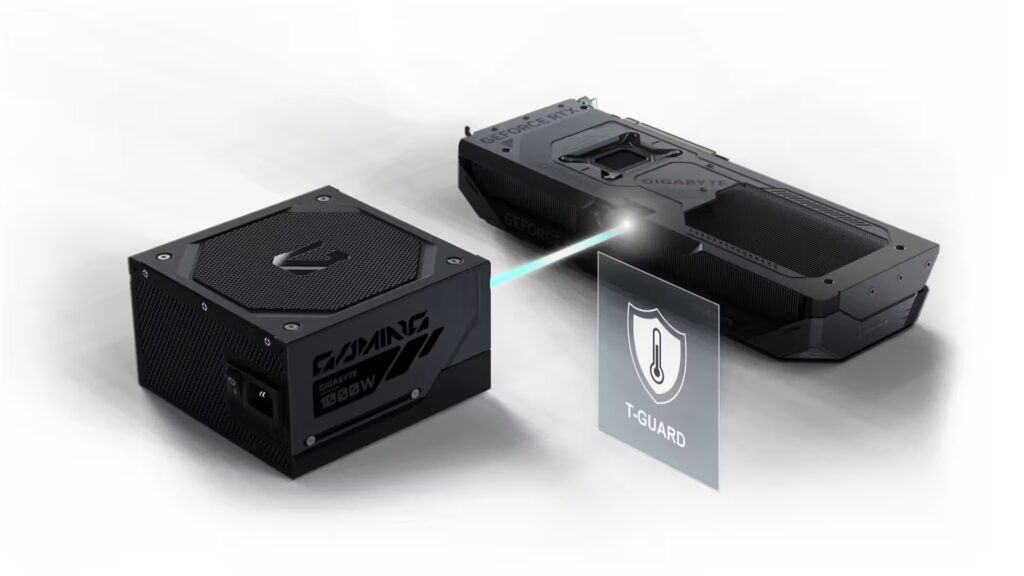
Power supplies aren’t exactly the most exciting PC component to talk about. But considering how expensive modern graphics cards have become, and the issues we’ve seen with melting 12V-2×6 connectors over the past few years, it’s probably one of the few components you don’t want to cheap out on. That’s why GIGABYTE’s new GAMING Series power supplies are interesting. The company has introduced a new feature called T-Guard, which actively monitors the temperature of the GPU power connector and steps in before things get out of hand.

T-Guard Monitors Your GPU Power Cable in Real Time

The biggest highlight of the new PSU lineup is T-Guard, an active safety system designed specifically for the newer 12V-2×6 graphics card connector. Instead of waiting for something to go wrong, the PSU continuously monitors the connector using built-in temperature sensors. If it detects abnormal heat, which can occur due to a loose cable or excessive electrical load, it immediately alerts the system and begins protecting the hardware.

Rather than shutting down the entire PC instantly, the PSU intelligently reduces power only to the graphics card. That means the rest of the system can continue running normally, giving users enough time to save any unsaved work before safely powering the machine off. If your processor has integrated graphics, you’ll still get video output even after the GPU power has been limited, making it much easier to troubleshoot the issue rather than staring at a black screen.

Combined with real-time temperature monitoring, automatic GPU power limiting, and the ability to recover your work before shutdown, GIGABYTE says T-Guard offers three layers of protection against connector failures.

Advertisement

Built for Modern Gaming PCs

Beyond the new safety features, the GAMING Series also ticks most of the boxes you’d expect from a modern enthusiast power supply. The units are fully compliant with the latest ATX 3.1 and PCIe 5.1 standards, making them ready for current and upcoming graphics cards. They’re available in 750W, 850W, and 1000W capacities and come in both Black and Ice color options to better match different PC builds. Internally, GIGABYTE uses 100% Japanese capacitors, while the included dual-color 12V-2×6 cable makes it easier to confirm that the GPU connector has been plugged in correctly before powering on the system.

GIGABYTE has also focused on efficiency and acoustics with the new lineup. The PSUs have received Cybenetics ETA Platinum certification for energy efficiency and the Cybenetics LAMBDA A+ certification for low noise. According to the company, average operating noise stays below 20 dB(A) under typical workloads. Cooling duties are handled by a 135mm Fluid Dynamic Bearing fan, while HybridCool technology can completely stop the fan during lighter workloads. This allows the PSU to operate almost silently when the system isn’t under heavy load.

Source link

Continue Reading

Tech

Little House on the Prairie season 2: everything we know so far about the Netflix reboot’s return

Published

on

Little House on the Prairie season 2: key information

– Season 2 renewed before season 1 even aired
– No confirmed release date or plot
– Main cast expected to return, new cast confirmed to be introduced
– Production is underway as of July 2026

If there’s a reboot I’ve been pleasantly surprised by in recent years, its Netflix‘s take on Little House on the Prairie.

Based on the classic book series by Laura Ingalls Wilder of the same name, we follow the Ingalls family as they relocate to the Prairie lands of Kansas. Seen through the eyes of youngest daughter Laura (Alice Halsey), we’re reminded of what’s important in life — respect, understanding and a willingness to grow.

Advertisement

Source link

Continue Reading

Tech

LEGO Brings the Hubble Space Telescope Down to Earth

Published

on

LEGO Icons Hubble Space Telescope 11382
Builders who follow space sets have another strong option arriving soon from the LEGO Icons line. Set 11382 comprises a detailed model of the Hubble Space Telescope, which rewards meticulous building and makes an excellent display piece once completed. This 1,252-piece kit is intended for adults and costs $139.99. It will be released on August 1st, with the finished model measuring over 12.5 inches tall, 15 inches long, and 15 inches wide with the aperture door open.


When you first start building this telescope, you’ll see that the main cylindrical body is constructed first, followed by the removable panels along the sides, which must be opened for some reason to see inside the instrument bay. There are various eye-catching pieces in there, such as gyroscopes, primary and secondary mirrors, which give you an idea of how a real telescope collects light.


LEGO Technic NASA Artemis Space Launch System Rocket Building Toy for Boys & Girls – STEM Learning…
  • BUILD AN OFFICIAL NASA ROCKET – Kids prepare to explore outer space with the LEGO Technic NASA Artemis Space Launch System Rocket (42221) building…
  • 3-STAGE ROCKET SEPARATION – Young builders can turn the hand crank to watch the rocket separate in 3 distinct stages: solid rocket boosters, core…
  • STEM BUILDING TOY FOR KIDS – This educational rocket kit was created in collaboration with NASA and ESA to showcase the authentic system that will…

LEGO Icons Hubble Space Telescope 11382
The solar panels spring out from the sides on nice adjustable supports, and the antennae are all in their proper places. If that wasn’t enough, you can actually open the enormous aperture door to look at the optical system. All of these moving parts work together perfectly to create a model that maintains its shape whether picked up or displayed. Of course, it’s not just about the model; an astronaut minifigure hangs around near the telescope to provide a feeling of size. Which, by the way, is fairly impressive since the actual Hubble is quite large in orbit to say the least. There is also a display stand to keep everything steady and a little plaque with some basic information about the expedition.

LEGO Icons Hubble Space Telescope 11382
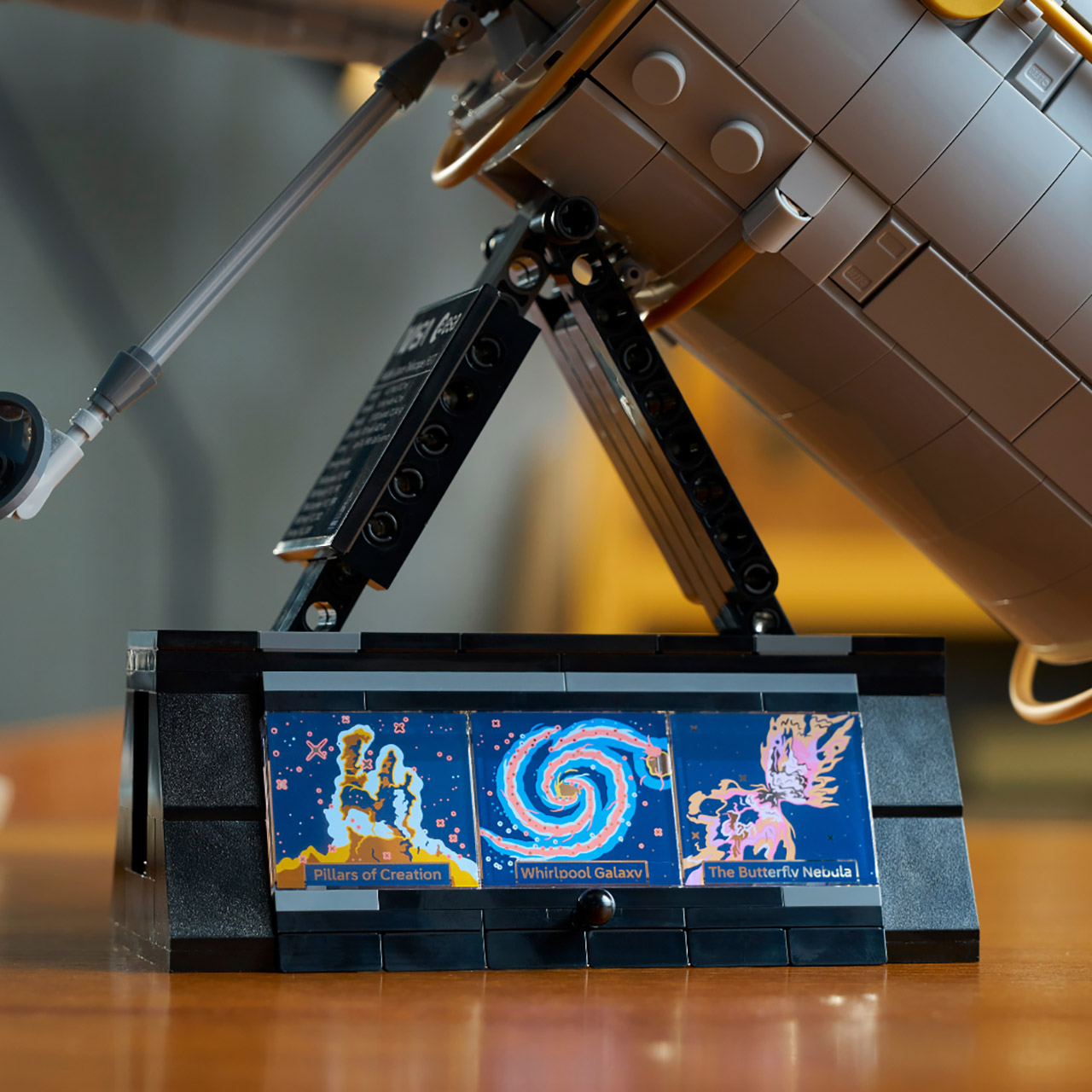
Another element that stands out is the base, which features printed tiles that recreate three renowned Hubble images: the Pillars of Creation, the Whirlpool Galaxy, and the Butterfly Nebula. The light shines through the glass panels from behind, creating a wonderful soft glow effect. It’s a nice touch that enhances the overall experience.

LEGO Icons Hubble Space Telescope 11382
Compared to the smaller Hubble set that came with the Space Shuttle Discovery, this one is a significant upgrade. The larger size allows you to dig into the inside features, and the proportions are much better, making it feel like a complete separate item rather than just an accessory thrown on. via terms of construction, the Icons series follows standard procedure: digital instructions via the LEGO Builder app, 3D model rotation, and step-by-step progress tracking. And everything moves at a great steady pace, keeping things interesting without speeding through the stages. You can see every major system on the telescope, which is a lovely touch.
[Source]

Source link

Advertisement
Continue Reading

Trending

Copyright © 2025