This week Jonathan chats with Michael Meeks about Collabora! What’s the origin story in this consulting company, why do they have an outstanding office suite, and where is the world headed to accomplish digital sovereignty? Watch to find out!
Did you know you can watch the live recording of the show right on our YouTube Channel? Have someone you’d like us to interview? Let us know, or have the guest contact us! Take a look at the schedule here.
Image Credit: Harvey IndustriesImage used with permission by copyright holder
For roughly a century, the drill press was the most stubbornly unchanged tool in the workshop. CNC routers went digital. Laser cutters got software brains. Even the table saw picked up intelligent blade-detection technology. The drill press, meanwhile, remained a cast-iron column with a chuck on top, the same basic machine it had been in 1925.
That’s starting to change, and the shift is happening faster than most woodworkers expected.
A Longer Time Coming
The broader power-tool industry has been absorbing smarter technology for years, mostly at the motor and interface level. Variable-speed drives, digital readouts, preset memory, and automatic depth stops arrived in stages. Tools became more consistent and easier to repeat across a production run. Those were meaningful upgrades. They still left one part of the process entirely up to the operator, though: finding the mark and getting the bit over it.
Alignment has always been the hidden labor cost of drilling. Mark the board, lower the bit, squint, lift, adjust, lower again, check the divot, correct, and drill. On a 30-hole shelf-pin pattern, that sequence can eat an afternoon. The repetition is tedious enough on its own, and it also introduces small, compounding errors that are hard to catch until a shelf wobbles or a joint doesn’t close.
The intelligence spread through much of the shop without ever quite reaching the drill press.
Advertisement
What Embedded Computer Vision Changes
The next wave of development in workshop tools is pulling the intelligence closer to the work itself, away from phone apps and separate accessories and into the machine directly. Computer vision, once limited to expensive industrial equipment, has become inexpensive enough to embed in tools aimed at small shops and serious hobbyists.
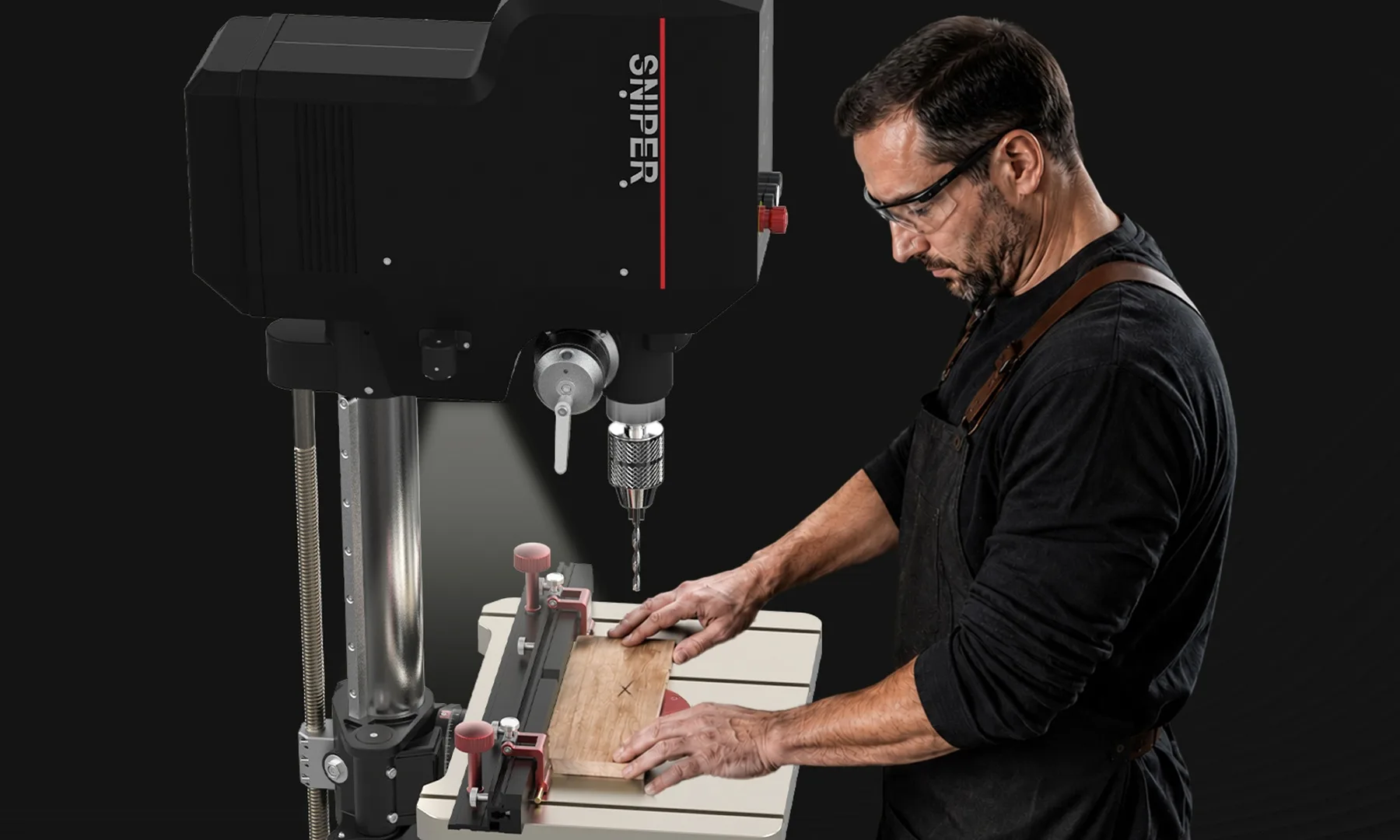
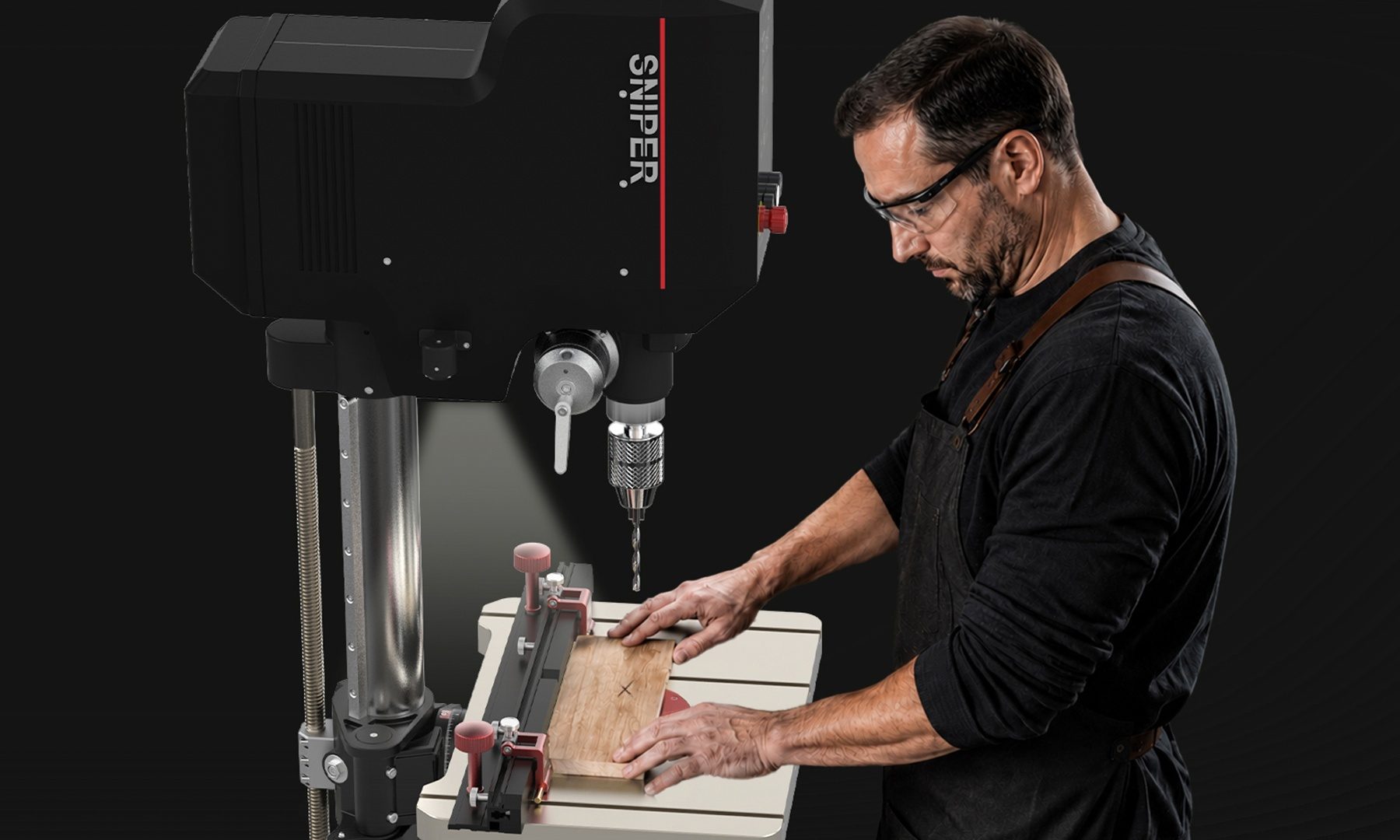
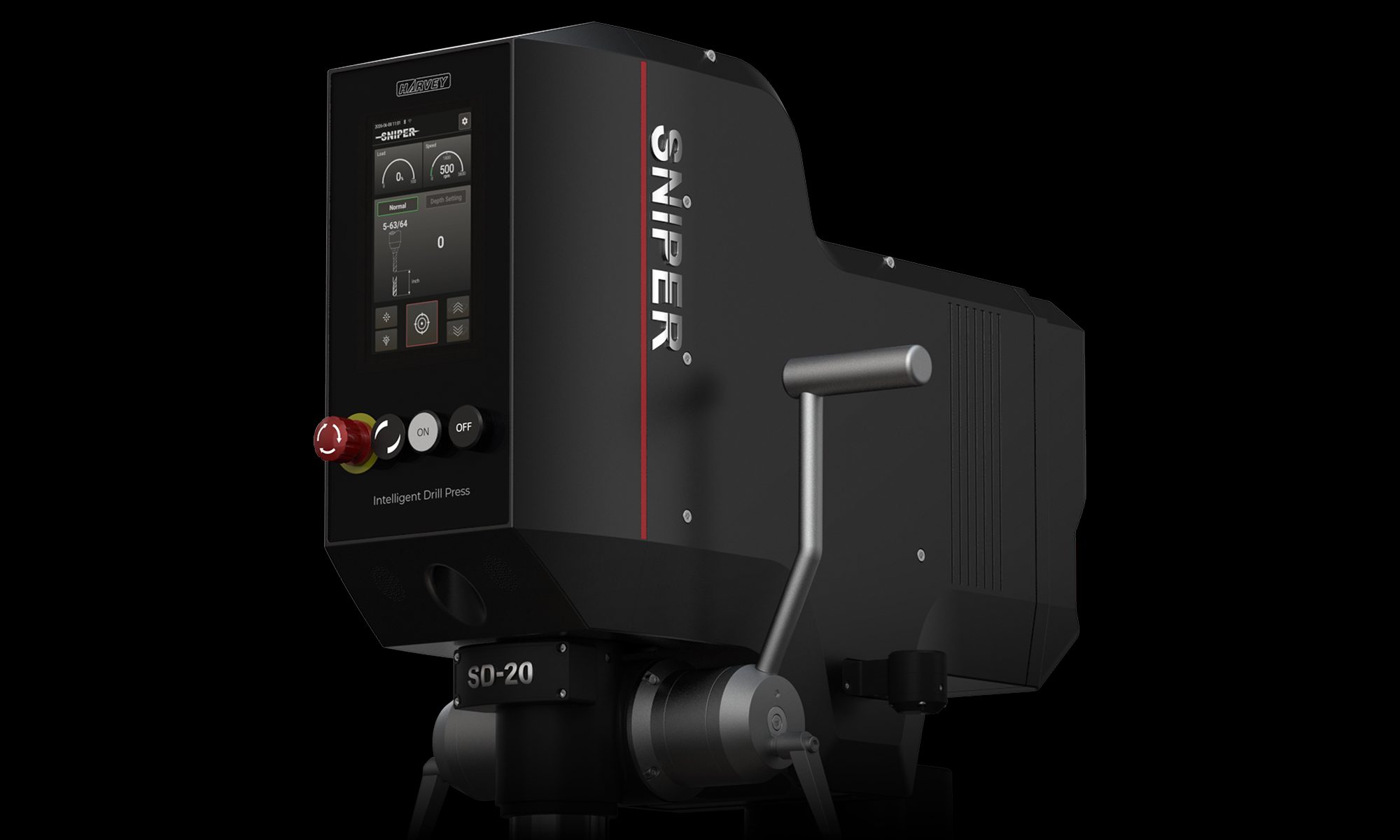
Harvey Industries is among the companies pushing in this direction. Their new Intelligent Drill Press, called Sniper, uses a downward-facing camera array, a neural network, and a robotic dual-axis servo platform to locate a pencil mark on a workpiece and move the spindle directly over it, with no repositioning required from the operator. Positioning accuracy is rated around 0.004 inches, which puts it in the range of shop-CNC precision in a machine sized for a one-car garage.
The neural network component handles what a simple camera cannot: distinguishing a valid target mark from sawdust, shadows, or the grain of figured wood. That kind of pattern recognition used to require controlled industrial environments.
The International Federation of Robotics has noted that falling costs for computer vision and AI components are enabling exactly this kind of capability shift. Machine intelligence that once lived on factory floors is now finding its way into smaller-scale professional and prosumer tools.
Advertisement
Image Credit: Harvey IndustriesImage used with permission by copyright holder
Safety as a Software Feature
Embedded vision is also reshaping how power-tool safety works. That change may be more consequential over time than any productivity gain.
Traditional power-tool safety has relied on physical systems: guards, kill switches, and friction brakes. They are effective, and once a tool ships, its safety profile is essentially fixed.
Vision-based systems open up a different approach. The same camera array that tracks a pencil mark can simultaneously monitor the operator’s hands. Harvey’s implementation, which the company calls the Proactive Safety Protection System, cuts spindle power and motion in the blink of an eye if a hand enters the danger zone. The interrupt occurs at the hardware level, which keeps response time tight regardless of software load.
The broader implication is philosophical. Safety systems built into software and firmware can be improved after the tool is already in the shop. A machine that ships in 2026 could be meaningfully safer in 2028 without any hardware change. Tool ownership starts to resemble the kind of ongoing development cycle familiar in consumer electronics, where the product on the shelf today is not necessarily the one it will be in two years.
What Comes Next for the Shop
Harvey Industries’ Sniper is one data point in a broader pattern. Phone apps now flag knots and grain defects before a board is cut. CNC routers communicate directly with design software. Table saws can distinguish wood from flesh in milliseconds. Computer vision and servo motion control are all converging in workshop tools at a pace that would have seemed implausible a decade ago.
Advertisement
Professional cabinet shops see the benefit in production costs. Hobbyists find the barrier to consistent results is lower than it used to be. In both cases, the machine is absorbing the positioning, monitoring, and correction work surrounding each cut, while the operator retains full control of the actual drilling.
Harvey Industries plans to release Sniper this summer. Pricing targets the custom-shop and advanced-hobbyist market, which is where most category-defining tools tend to start before the technology spreads more broadly.
The drill press took about a hundred years to learn to move. The next decade of workshop tools probably won’t need that long.
Digital Trends partners with external contributors. All contributor content is reviewed by the Digital Trends editorial staff.
Roderick de Greef, CEO of BioLife Solutions. (BioLife Photo)
BioLife Solutions, a Bothell, Wash.-based company developing tools for cell and gene therapy, is being acquired for $1.5 billion by the life sciences corporation Repligen.
BioLife is a publicly traded business that makes products used by biotech firms to keep living cells alive and healthy while they’re stored, shipped, frozen or thawed for medical therapies. Waltham, Mass.-based Repligen makes tools and other materials used to manufacture vaccines, antibodies and other biological therapies. Both companies launched in the 1980s.
Cell and gene therapies are advanced treatments that use living cells or genetic material to treat disease at the molecular level. Cell therapies replace or repair damaged tissue with healthy cells, while gene therapies add, fix or modify DNA to correct the underlying cause of a condition.
“Over the past several years, we have successfully repositioned BioLife around our market-leading biopreservation media franchise, while strengthening our financial profile and establishing a durable foundation for profitable growth,” said Roderick de Greef, CEO of BioLife, in a statement.
BioLife shareholders will get $11.25 in cash plus 0.1442 shares of Repligen stock for every share of BioLife they own—bringing the total deal value to $31 per share.
Advertisement
The deal is expected to close in the fourth quarter, pending BioLife stockholder approval and regulatory clearance.
The students representing Ireland competed alongside 666 of the world’s brightest young minds from 117 countries across the world.
Six students representing Ireland – Owen Barron, Vitalii Halushko, Angyang Li, Jack McAuliffe, Ben Maguire and Tianci Yan – have walked away from the International Maths Olympiad 2026 competition in Shanghai, China with three medals.
The secondary school students earned one silver and two bronze medals at the 67th International Mathematical Olympiad (IMO), the global championship in mathematics for second-level students. They competed against 666 of the world’s brightest young minds from 117 countries.
Each participant was given 4.5 hours per day to solve six highly complex mathematical problems, with each worth a maximum of seven points, for a possible total score of 42 points. The thresholds in 2026 were 29 points for a gold medal, 23 for silver and 16 for bronze, with gold medals awarded to only the top 16pc of competitors.
Advertisement
Maguire won Ireland’s fifth-ever silver medal, with Li and McAuliffe earning bronze medals. This is Ireland’s second time coming away with three medals, while Barron, Yan and Halushko – who each medalled at last year’s event – all earned honourable mentions for a complete and correct solution to at least one problem.
The team was led by Prof Steve Buckley of Maynooth University, Tianyiwa Xie of the University of Münster and Dr Mark Flanagan from UCD.
Following last year’s success, Irish Mathematical Trust (IMT) volunteers provided extracurricular maths training and coaching across the country, with recent expansion enabled by Stripe’s sponsorship of the IMT.
Commenting on the win, Alison Ahern, the head of education partnerships at Stripe, said, “Maths is the cornerstone of future success in fields as diverse as engineering, finance, medicine and software development.
Advertisement
“We are dedicated at Stripe to supporting excellence in maths and STEM education in Ireland, and we are hugely proud of this year’s International Maths Olympiad team, who represent Ireland’s sharpest mathematical minds at secondary level.”
Prior to the competition in Shanghai, the team participated in the International Mathematics Summer Camp in Beijing, which incorporated an Olympiad-style contest where Yan, Halushko and McAuliffe earned bronze medals, and Barron a silver.
Dr Neil Dobbs, a lecturer in mathematics at UCD and chair of the IMT, said, “That all six team members have medalled at the IMO either this year or last is simply extraordinary. The dreams, the hard work and the sense of community throughout the wider squad has been wonderful to witness.”
Don’t miss out on the knowledge you need to succeed. Sign up for the Daily Brief, Silicon Republic’s digest of need-to-know sci-tech news.
TechCrunch Startup Battlefield is coming to Australia — and we’re partnering with Stripe to find the country’s most exciting early-stage startups. On August 19, eight Australian startups will take the stage at Stripe Tour Sydney to pitch live in front of investors, press, and the tech community. Three will win prizes. One will earn an automatic ticket to TechCrunch Disrupt 2026, taking place in San Francisco from October 13-15.
The secret to finding the next breakout founder? The judges.
Startup Battlefield has a track record that speaks for itself. The competition has launched over 1,700 companies globally, including Dropbox, Cloudflare, Discord, and Trello. Alumni have collectively raised $32 billion and produced 250+ exits. The last time Startup Battlefield came to Sydney, the winner was HealthMatch — now valued at over $25 million with a million patients globally.
That success doesn’t happen by accident. It comes from having the right people in the room, the ones who can spot potential, ask the hard questions, and open doors for founders. This year, we’ve assembled three judges who represent the best of Australia’s startup ecosystem and global fintech innovation.
Advertisement
Meet your judges
Jasmine Liew, Head of Startup & Investor Partnerships for APAC, Stripe
Image Credits:Stripe
Stripe doesn’t just sponsor Startup Battlefield — the company is also deeply embedded in the startup ecosystem. Jasmine Liew brings institutional knowledge of what it takes to scale globally and the payment infrastructure that powers modern commerce. When a founder pitches in front of her, they’re pitching to someone who understands not just the vision, but also the mechanics of turning that vision into a revenue-generating machine.
Brendan Hill, angel investor and venture partner, Ten13
Image Credits:Ten13
Brendan Hill represents the investor class that actually writes checks. As a venture partner and active angel investor, he’s not just evaluating ideas — he’s also evaluating whether he’d bet his own money on a team. That’s the lens that matters when founders are trying to raise their next round.
Jarron Aizen, founder and CEO, Hapana
Image Credits:Hapana
Jarron Aizen is a founder himself, which means he knows what it’s like to stand where these eight pitchers will be standing. He’s walked the path from idea to company, and that perspective is invaluable. When he asks a question from the judge’s table, it’s informed by the wins and scars of building in the Australian market.
What’s on the line
The grand prize winner takes home $15,000 in Stripe fee credits — real money that can fuel growth — plus automatic entry into Startup Battlefield 200 at TechCrunch Disrupt 2026. That’s not just a prize. That’s a launchpad. Second place takes $5,000 in Stripe credits. Third place takes $2,000 in Stripe credits. But more importantly, all finalists get in the room with these judges, get press attention, and get access to the Stripe Tour Sydney audience of founders, operators, and investors.
The real spectacle happens on August 19
If you’re an investor, a founder who’s not ready to pitch, or just someone who wants to see the future of Australian startups unfold, Stripe Tour Sydney on August 19 is the event. Register to attend.
The stage is set. The judges are ready. The question is: Which startup will be next?
Hosted and MC’d by Isabelle Johannessen, director of Startup Battlefield.
Advertisement
When you purchase through links in our articles, we may earn a small commission. This doesn’t affect our editorial independence.
Bezos has been approached to join a consortium bidding £1.35B for a 30% stake in Liverpool FC from Fenway Sports Group. Amazon already holds Premier League TV rights in the UK.
Jeff Bezos has been approached to join a consortium seeking to buy a 30% stake in Liverpool Football Club from Fenway Sports Group, Sky Sports reported. The group is led by Amit Bhatia, the outgoing co-owner of Queens Park Rangers and son-in-law of steel billionaire Lakshmi Mittal. The provisional offer is £1.35 billion ($1.8 billion), valuing Liverpool at approximately £4.5 billion ($6 billion). Talks are in the early stages and Bezos is not certain to proceed.
If Bezos invests, he would be the latest American tech billionaire to buy into European football. The overlap between tech wealth and sports ownership has accelerated in the past two years, driven by rising media rights values and the Premier League’s global audience. Amazon already holds Premier League TV rights in the UK, broadcasting a package of live matches through Prime Video. Owning a stake in one of the league’s biggest clubs while streaming its games would raise questions about conflicts of interest that neither Amazon nor the Premier League has publicly addressed.
Bezos has never owned a sports team despite multiple reported attempts. He explored bids for the NFL’s Washington Commanders in 2023 and the Seattle Seahawks this year, but did not proceed with either. Tech companies are deploying tens of billions into strategic investments, and Liverpool would give Amazon’s streaming platform a direct connection to one of football’s most watched clubs. Whether that connection is a commercial advantage or a regulatory problem depends on which regulator is looking.
Liverpool is one of the most successful clubs in English football history, with six European Cup titles and 19 league championships. Fenway Sports Group, led by John Henry, bought the club in 2010 for £300 million. The £4.5 billion valuation represents a 15x return in 16 years. LeBron James holds a minority stake acquired in 2011 for $6.5 million, now worth an estimated $120 million. Sovereign and tech capital is converging on entertainment at unprecedented scale, the publisher behind EA Sports FC, football’s dominant video game. Tech and sovereign capital are converging on football from every direction: games, streaming, and now ownership.
Cathedral, a stealth military cybersecurity startup founded by four former Department of Government Efficiency staffers, has raised $160 million at a $1.4 billion valuation. Andreessen Horowitz and Sequoia Capital led the round and both took board seats. The company plans to secure US government contracts for AI-driven offensive and defensive cyber operations against adversaries including China.
The founders are Gavin Kliger, Luke Farritor, Marko Elez, and Jack Stein. Kliger served as chief data officer at the Pentagon, where he was involved in the department’s legal fight with Anthropic over how Claude would be used by the military. The founding team maintains deep ties to the Trump administration and national security officials. Cathedral is also looking to acquire or partner with a data centre provider for dedicated compute power to run its cyber operations.
The funding underscores how DOGE alumni are converting government access into venture capital. More than 250,000 people left the federal workforce during DOGE’s cost-cutting campaign in 2025. The staffers who ran those operations are now building companies that sell services back to the government they reshaped. Anduril raised $5 billion at a $61 billion valuation as the defence tech sector attracts capital at AI-lab pace, and Cathedral enters the same market with the additional advantage of founders who recently held senior positions inside the agencies they plan to sell to.
The $1.4 billion valuation for a company with no disclosed revenue or contracts reflects investor confidence in the team’s government relationships rather than the product’s track record. The White House launched Gold Eagle this month, an AI-powered cyber vulnerability clearinghouse, signalling that the administration sees AI-driven cyber defence as a priority. Cathedral is positioning itself to be one of the companies that benefits from that priority. Whether a startup founded by cost-cutters can build enterprise-grade military software is the question the next round will need to answer with contracts, not connections.
‘Bigger, brighter and lighter’: It was love at first use with the 3rd-generation Amazon Kindle Scribe (2025), but its height and price make it unwieldy
We spend hours testing every product or service we review, so you can be sure you’re buying the best. Find out more about how we test.
Amazon Kindle Scribe (2025): Two-minute review
I’ve used the 2024 release of the Kindle Scribe (2nd generation) for two years and I’ve loved every minute of it. I didn’t think there was a better E Ink display to write on (and read on for that matter) and I definitely didn’t think it could be improved. Yet that’s exactly what Amazon has done with the 2025 (3rd generation) Kindle Scribe with frontlight.
The epaper display is still one of the best to read and write on, but it looks even brighter and, indeed, it is bigger, with 11 inches of screen real estate to use. That’s fantastic for note-taking and drawing, but unnecessary for a device that also doubles up as an ereader.
Advertisement
Despite the additional height, the 3rd generation Kindle Scribe is both marginally thinner and lighter than its predecessor, but it is hard to hold in the hand for long periods of use — I constantly felt the need to place it on my lap or a table even when reading, but more so when jotting notes. Moreover, the lack of a broad bezel means it’s very easy to trigger a page turn as the thumb rests so close to the edge of the display.
Latest Videos From
The thinner chassis is solidly built, although there’s still no waterproofing (as is the case on most digital notebooks), so be careful if you decide to use it by the pool, the bath or the kitchen sink. And definitely keep it away from the sea’s salty water to avoid corrosion.
The new stylus is also redesigned and, while it might feel too smooth for some users, I adore it! It never slipped once, even with sweaty palms, and, personally, gave me one of the best writing experiences I’ve had on a digital notebook (with the exception of the ViWoods C1 ceramic stylus possibly). Additionally, the magnetic hold to the side of the device is the strongest I’ve seen to date on any such device.
The homescreen interface has been refreshed and is quite practical in my opinion, and renaming the previous Notebooks tab to Workspace kinda makes sense to me. There are a few new features here: a handful of fresh templates in Workspace, a Smart Shapes feature that some users might find useful and, importantly, Google Drive and Microsoft OneDrive connectivity for seamless cloud transfer of files. There’s even AI-enable search that can trawl through handwritten notes to give you a concise summary to answer your query.
Advertisement
What I’m struggling with is justifying its high price tag. While everything is now a lot more expensive, the extra screen real estate and handful of new features don’t go a long way in explaining the significant price increase over its predecessor but, then again, the base model now has double the storage at 32GB and it sure is a very fast performer.
Sign up for breaking news, reviews, opinion, top tech deals, and more.
As someone who’s extensively used reMarkables and Boox alternatives, I think the 3rd generation Kindle Scribe definitely gives its competitors a run for their money. I’d still only consider picking it up when discounted and only if you don’t already have a previous Scribe and are embedded in the Amazon ecosystem.
Book credits: Anirudh Kanisetti and Juggernaut Books (Image credit: Sharmishta Sarkar / TechRadar)
Advertisement
Amazon Kindle Scribe (2025) review: price and availability
First announced October 2025 in the US; available to buy since December 2025
Released in the UK and other select markets in early 2026, available in Australia since mid 2026
List price: from $499.99 / £449.99 / AU$849
The 3rd-generation Kindle Scribe is expensive — at a starting price of $499.99 / £449.99 / AU$849, it’s $100 / £70 / AU$200 more than its predecessor’s entry cost, but it does go some way in justifying the increase.
Firstly, as I’ve already mentioned, the entry model now has 32GB of storage compared to 16GB, plus the display is 11 inches (previously 10.2 inches). There are a few new software features that make it a better digital notepad compared to the 2nd-gen Kindle Scribe from 2024, but it’s still hard to justify paying full price when color E Ink devices don’t cost much more.
That said, color E Ink isn’t where it should be in 2026 and I wouldn’t recommend the $629 / £569 / AU$999 Kindle Scribe Colorsoft over this monochrome sibling.
On the other hand, the reMarkable Paper Pure, which also offers 32GB of storage, but a 10.3-inch screen and a minimal interface that’s not conducive to reading is a lot cheaper with a starting price of $399 / £359 / AU$629. Even the 64GB Boox Go 10.3 (Gen II) Lumi is cheaper at $449.99 / £429.99 / AU$729.
I would still recommend the 3rd-gen Kindle Scribe if you want both a reading and note-taking device in one, but perhaps consider picking it up when it’s discounted, which it invariably will be during a major sale, more so once Amazon discontinues the 2024 edition (which it invariably will).
Advertisement
However, if you already own the 2024 version, I wouldn’t recommend the 3rd-gen as an upgrade as you won’t miss much. And as long as it’s available to buy, the 2nd-gen is definitely better value even at full price.
• Value score: 3.5 / 5
The little Kindle logo on the bottom corner of the 2025 Scribes is a new addition (Image credit: Sharmishta Sarkar / TechRadar)
Amazon Kindle Scribe (2025) review: specs
Swipe to scroll horizontally
Display type:
Advertisement
E Ink Carta 1300
Screen size:
11 inches
Resolution:
Advertisement
300ppi
Processor:
Undisclosed quad-core chipset
Frontlight:
Advertisement
Yes (warm and cold) with ambient light sensor
Storage:
32GB / 64GB (non-expandable)
Battery:
Advertisement
Undisclosed capacity rated for up to 12 weeks
Speaker:
No
Water protection:
Advertisement
None
Software:
Linux-based
Connectivity:
Advertisement
Wi-Fi (2.4GHz + 5GHz); Bluetooth 5.1 USB-C
File support:
13 document, 4 image, 1 audio
Dimensions:
Advertisement
189 x 245 x 5.4 mm (7.4 x 9.6 x 0.21 inches)
Weight:
400g (without case and stylus)
Advertisement
Amazon Kindle Scribe (2025) review: design and display
11 inches of beautiful, bright E Ink Carta 1300 screen real estate
Sturdy, premium build, but slim bezels can be an issue
Thinner and lighter than previous generation, with newly designed Premium Pen
It might not seem all that different from the previous two Kindle Scribes, but the 3rd-gen model with frontlight is a different beast, at least physically. As already mentioned, it’s now a little taller thanks to an 11-inch display, but it’s ever-so-slightly thinner (5.4mm vs 5.7mm) and lighter than the second-generation Scribe (400g vs 433g).
How Amazon has managed that is beyond my understanding, but it’s a welcome change as it helps negates a little bit of the hand and wrist fatigue the extra height adds during handheld use over longer periods of time.
That, sadly, is exacerbated by the fact that the broader bezel from the previous generations is no longer there beside the screen where your thumb could rest. Now, all four sides are surrounded by even yet narrow bezels that can trigger a page turn if your finger or palm even remotely touches the edge of the screen. It’s something you can get used to but, even then, I think all the new 2025 Kindle Scribes are best used while on a table or desk, or your lap.
Other than that, the Kindle Scribe still looks like a premium device with a very sturdy build, despite being thin and light, with minimal embellishments for a clean look. Unlike the Kindle Scribe Colorsoft, though, the 3rd-gen model only comes in the usual Graphite (previously called Tungsten) variant, and I do wish another chassis color was available. You’re also not going to get any waterproofing here like with the other Kindles.
The 3rd-gen Kindle Scribe (right) is a bigger screen than the 2024 release (left) (Image credit: Sharmishta Sarkar / TechRadar)
What I’m thrilled about, though, is the new stylus. Amazon has redesigned the Premium Pen, which is now a white, smooth-bodied styls with a slightly sharper nib that adds better control to marking on the screen. The smoothness of the pen’s body might make it harder to hold for some users, but I didn’t have any issues with slipping, even if my palms ended up being sweaty for whatever reason.
Advertisement
Better yet is the magnet that attaches the pen to the side of the tablet, which is arguably the strongest I’ve come across on any such device. Even without a case, the Pen has never come off inside my bag when taking it in or out of a pocket. And I do mean never — it has shifted in angle, sure, but not completely fallen off. That’s just my experience, though.
You still get an eraser on the top and the customizable shortcut button, as well as five spare tips in the box. What you don’t get is the aforementioned sleep case, which you will need to purchase separately, but there are options galore directly from Amazon and third parties.
The white Premium Pen may not suit everyone, but I love it more than the 2024 Kindle Scribe stylus (in black) (Image credit: Sharmishta Sarkar / TechRadar)
As much as I would love to wax lyrical about the stylus, it’s the 11-inch E Ink Carta 1300 display that’s the star of the show here. It was already fantastic on the 10.2-inch 2024 Scribe, but now it just seems a touch better.
I’d like to say it’s because of the 100nit peak brightness that makes it look nicer, but even with the LEDs dimmed, it’s the cleanest, almost-white display I’ve used on an epaper tablet that still manages to seem like paper. In fact, I much prefer it over the duller-looking E Ink Kaleido 3 display on the Kindle Scribe Colorsoft.
Advertisement
The flush screen is protected by a top layer of glass that also has an anti-glare coating. You also get the standard 300ppi resolution which, despite being spread over a larger area, still renders text and writing in sharp clarity, and it’s arguably one of the most responsive screens on an epaper device to date.
• Design & display score: 4.5 / 5
Amazon Kindle Scribe (2025) review: Software
Refreshed homescreen setup which is cluttered with Kindle Store recommendations
Cloud service access is very welcome
More writing tools but not necessarily of note (pun not intended), but new a AI feature could prove useful
It’s not a complete makeover, but the homescreen setup on the top of the 2025 Kindle Scribes is different to what was previously on the older models. There’s easy access to what Amazon is calling a Quick Note — just tap on it and it opens up an empty notebook for you to start writing on — beside which is a single column of your recently opened items (now called Jump Back In) that were previously arranged horizontally.
By default, the Quick Note takes up more than half the left side of the screen, but it can be shrunk by tapping double arrows, which then separates your recently opened items list into two columns, thus adding more, whether that be notes or ebooks.
Advertisement
I like this setup better as it’s a quick glance at a fair few recently opened items, rather than you needing to scroll horizontally, plus you can see what you wrote in the Quick Note without needing to open it.
The new homescreen design is better than before, but it’s still cluttered once you scroll down (Image credit: Sharmishta Sarkar / TechRadar)
Below this section is a whole lot of what I think is clutter but some users who are embedded in the Amazon ecosystem would appreciate. These include the Recently Added items list, followed by new-feature intros and several Kindle Store recommendations based on your reading habits, which is what I really detest — it just feels like overkill and I much prefer Kobo’s homepage which looks neater to me.
While the bottom navigation menu still has four items, the previous Notebooks tab is now called Workspace and it has a few extra templates that I personally couldn’t find much use for. I would have loved a dedicated journal template but… oh well. Otherwise, everything else is carried over from before, with limited pen and brush options that artists perhaps won’t be very happy with.
Image 1 of 3
Advertisement
Active Canvas works even on sideloaded books…
(Image credit: Sharmishta Sarkar / TechRadar)
..as does the side margin
(Image credit: Sharmishta Sarkar / TechRadar)
I do wish the library would allow subfolders
(Image credit: Sharmishta Sarkar / TechRadar)
The biggest improvement here (across all three 2025 Scribes in fact) is the addition of Google Drive and Microsoft OneDrive support. As someone who uses the former, it’s made file transfer a lot easier than using the email sharing option that has previously been the clunkier norm.
There is, however, a caveat when it comes to PDFs: you can’t actually mark them up after exporting them if you need to do so. The only way to reflect changes is to export the file and open in Google Docs to edit. Despite that, I still think access to cloud services is a huge improvement and I hope Amazon rolls it out to the older Scribes as well.
Also new is a feature called Smart Shapes that you can access from the stylus menu in a note — if you need to create, say, flowcharts, you can roughly draw a circle or triangle and it will automatically get converted into a proper (or neat) shape. It’s not something I personally found useful, but I think it could be for students, teachers and scientists.
Smart Shapes could prove useful for some users (Image credit: Sharmishta Sarkar / TechRadar)
The AI-powered handwriting conversion and summary creation tools from the previous generation is available here, as are the ebook annotations (Active Canvas) and side-margin notes from before, but AI search in your notes is new. It allows you to enter a keyword or phrase and all your notes, including handwritten ones (uh-huh, that’s different, innit?) will be scanned to give you an AI-generated summary. It’s another feature that I don’t see everyone needing, but if you have a copious amount of notes on the same subject (like I occasionally do), it can be handy.
I should note that all this software improvement takes up a heck of a lot of storage. For example, when I looked into the Device Options on my 3rd-gen Scribe and Colorsoft units, I only had about 22GB and 21GB of usable storage respectively out of 32GB. This is still a good amount, but 11GB is still a heck of a lot of space to give up for power users who might want to store a lot of ebooks, audiobooks and documents on the device. To put it into context in another way: there was a time when 8GB storage was the norm in an ereader, meaning the Scribe software wouldn’t even fit into an older ereader!
Advertisement
Software score: 4 / 5
Amazon might offer 32GB of storage, but you can’t use all of it (Image credit: Sharmishta Sarkar / TechRadar)
Amazon Kindle Scribe (2025) review: User experience
Despite its size, it’s one of the best screens to read on
New stylus writes wonderfully, although writing and drawing features are still comparatively limited
Handful of new templates added for note taking
I have a few Kindle devices at home, including three of the 2024 releases, and yet I’m not really a Kindle fan because of how much the user interface forces you into the Amazon ecosystem.
However, the 3rd-generation Kindle Scribe with frontlight has come very close to changing my mind — I am willing to put up with the homescreen clutter because of how good reading and writing is on that glorious E Ink display. It’s hands down the best epaper tablet I’ve tested in 2026 (it’s a delayed review as it wasn’t released in Australia, where I’m based, until June this year).
Amazon has made it easier to transfer files, although file support is still lagging behind the competition (Image credit: Sharmishta Sarkar / TechRadar)
Advertisement
Reading
As I’ve already said, the 300ppi resolution looks a little better on this Scribe than it did on the previous generation because Amazon has optimized the display very well to render text in sharp clarity.
I’ve seen some users complain that the Scribes don’t look as good as the Paperwhite, but it’s important to keep in mind that the 7-inch Kindle has less surface area with the same amount of pixels as the 11-inch version, so the pixel size on the larger device will be slightly bigger. And that makes a difference, but not so much that it stands out. You have to look really carefully to see that kind of difference.
I am a big fan of the ambient light sensor on the display, which means the screen automatically dims or brightens up depending on whether I’m indoors or outdoors, or how bright or dark it might be around me. In other words, it automatically gives me a pleasing brightness for nighttime reading.
I may not need large fonts, but no matter the light setting, text is crystal clear (Image credit: Sharmishta Sarkar / TechRadar)
The larger screen makes it an ideal choice for comic book fans but, then again, color makes them more enjoyable while you’ll be reading them in grayscale. The bigger screen, however, is fantastic for those who prefer larger fonts, so you aren’t turning pages after a few sentences and, thus, conserving a little battery.
Advertisement
The Kindle font support is still not as good as flexible as on a Kobo or a Boox device. For example, sideloaded EPUBs added to the device via the Send To Kindle platform render well, but I found a few MOBI files that didn’t open as expected but work perfectly fine on my Kobo Libra Colour.
I am, however, very grateful for Amazon’s cloud storage where anything in your library previously added to older devices are accessible on any new Kindle.
Writing & drawing
I didn’t think Amazon could better the writing experience from the previous-generation Scribe, but lo and behold, a redesigned stylus has achieved just that. As I’ve previously stated, the pen is the real hero when it comes to epaper writing tablets and the white Premium Pen with a slightly sharper nib glides very well over the glass and yet has just the right friction.
Advertisement
Then again, a pen choice is very personal and some users might prefer more friction, which is understandable. Personally, my experience was perfect, allowing me very good control over the marks I made in a note.
Some writing templates are useful, but not all (Image credit: Sharmishta Sarkar / TechRadar)
What I’m not necessarily too enthused by are the limited writing tools. I think Kobo’s Advanced Notebooks are still a better option compared to what Amazon offers on the Scribe, although Android devices give you even more features and tools if you think you’d need them.
While there are some new templates for notes, I think their use would be very limited to select users, and I would have much preferred if Amazon had, instead, added more pen options. I may not be able to draw to save my life, but I can see how this limitation might affect artists. For everyday doodling, my colleague Lance Ulanoff finds the Kindle Scribe better than his iPad for drawing, especially when outdoors.
Writing and drawing limitations aside, the physical experience of putting words down on the 2025 Scribe is par excellence and, for that, I can’t deduct too many marks.
Advertisement
User experience score: 4.5 / 5
Renaming Notebooks on the 2024 Scribe (bottom) to Workspace on the 3rd-generation model (top) is neither here nor there (Image credit: Sharmishta Sarkar / TechRadar)
Amazon Kindle Scribe (2025) review: Performance
The fastest Kindle yet, with page turns barely visible (unless animated)
Absolutely no ghosting, even with image-heavy ebooks
Battery life takes a small hit compared to previous generation
Amazon doesn’t reveal what hardware components it uses under the hood of its devices — all we know is that there’s a quad-core chip with an indeterminate amount of RAM — to keep things ticking along, but whatever there is sure makes the 3rd-generation Scribe the fastest Kindle yet.
In fact, I think I might go so far as to say it’s arguably the fastest ereader and epaper writing tablet I’ve tested to date. I make that claim based on my recent Boox Go 10.3 (Gen II) Lumi review that I was testing at the same time the Amazon device and, despite being a 2026 release, was so significantly slower than the 2025 Scribe, specifically in terms of page turns.
On the Scribe, you can barely discern a page turn, unless you have the animation turned on of course. Several times during my two-week test period with the Scribe I didn’t even think a tap registered until I saw the words on the new page. The time I did notice a blip was when the device was doing a full refresh.
Advertisement
Like its predecessor, there’s absolutely no ghosting here, whether you’ve got image-heavy or word-heavy books. Not even a faded mark appears overlaid on notes, and I do wish Boox would learn how to achieve that.
(Image credit: Sharmishta Sarkar / TechRadar)
Battery capacity is another spec that Amazon doesn’t reveal, but it does say that it can last up to 12 weeks on a single charge when used for about 30 minutes a day. It’s definitely doable, but I think battery life on the previous 2024 edition was slightly better. Potentially more LEDs (another spec that Amazon doesn’t reveal) to power a larger display could be the main culprit here, but it doesn’t take too much of a hit in comparison.
In my use case, with up to four hours of reading and about 30 minutes of writing each day saw the battery nearly empty in five days. That’s with the ambient light sensor on, so no manual brightness adjustments were made and that does put pressure on the battery. Sleep timer was set to 30 minutes and Bluetooth was off, although Wi-Fi was always on. Similar use with the 2024 Kindle Scribe saw the battery drain in approximately seven days for me with the same settings.
Recharging, however, seems to be remarkably quick on the 2025 version of the Scribe with frontlight, with my unit taking just about 20 minutes to top up from 21% down when plugged into a 60W wall charger. That’s with the screen switched off, though. If I charged it while the device was in use, it took close to two hours via the same adaptor and USB-C cable.
Advertisement
On the other hand, my Kindle Scribe Colorsoft drains even quicker and takes a heck of a lot longer to recharge.
• Performance score: 5 / 5
With limited settings options, the Kindle UI is easy to wrap your head around (Image credit: Sharmishta Sarkar / TechRadar)
Should I buy the Amazon Kindle Scribe (2025) with frontlight?
Swipe to scroll horizontally
Attribute
Advertisement
Notes
Score
Value
It’s frightfully expensive and, despite, being larger with a few new features, it’s still hard to recommend at full price.
Advertisement
3.5 / 5
Design & display
The 11-inch E Ink Carta 1300 display is bright and full of contrast — it’s the headline act here. But the larger build makes it hard to use handheld for too long, especially without a broader bezel.
4.5 / 5
Advertisement
Software
The refreshed homepage setup is nice, and cloud services are a welcome addition. But not all new features will have as much value to the average user.
4 / 5
User experience
Advertisement
The new Premium Pen may not be to everyone’s liking but I can’t fault it, although I still think Amazon should have added more writing tools. As an ereader, though, it’s fantastic, albeit too large if that were its sole purpose.
4.5 / 5
Performance
It’s the fastest E Ink writing tablet I’ve tested to date, although its battery life has taken a small hit compared to previous generations.
Advertisement
5 / 5
Buy it if…
Don’t buy it if…
Advertisement
Also consider
The 3rd-generation Kindle Scribe with frontlight is easy to recommend and, for some users, it might even justify its high price tag. For anyone else, know that there are alternatives to consider, and they’ll actually save you a little cash even at full price.
How I tested the Amazon Kindle Scribe (2025)
The 3rd generation Kindle Scribe (left) might be better, but the 2024 edition (right) is better value (Image credit: Sharmishta Sarkar / TechRadar)
I sadly had the 3rd-generation Kindle Scribe for just two weeks for this review, but I ensured I spent as much time as I could with it. As I’ve previously mentioned, I spent an average of 4-5 hours with it each day during that time, sometimes more, both reading and writing.
I was able to access my existing library as soon as I signed into my Amazon account, but I also uploaded some new EPUBs using the Send To Kindle web platform. I also connected the Scribe to my Google Drive account to transfer a couple of PDFs to the device, but I also saved select notes to the cloud, which automatically upload as PDFs with handwriting (no automatic text conversion takes place, but you can manually trigger that on the Scribe if you wish).
Advertisement
I tried the Smart Shapes feature and used the new AI search to test if it would be able to summarize my own review notes for me, which is successfully did. Handwriting conversion was also tested, albeit using a colleague’s scrawl (I hate to admit but I can’t scribble chicken scratchings no matter how hard I try).
Kindle Unlimited and Audible were also accessed on the device, and I was able to pair a JBL Bluetooth speaker for listening.
Learn more about how we test devices here at TechRadar
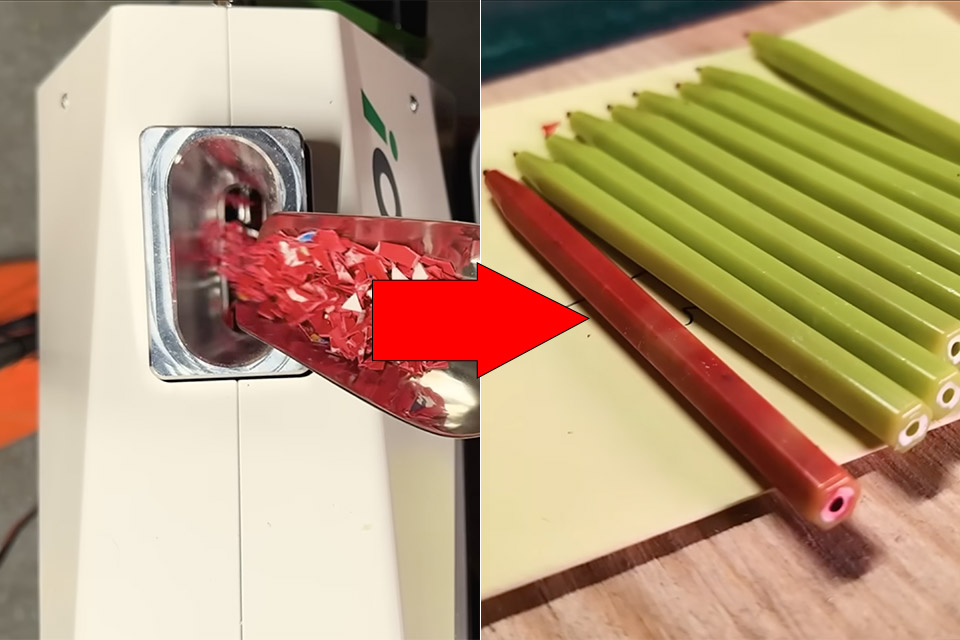
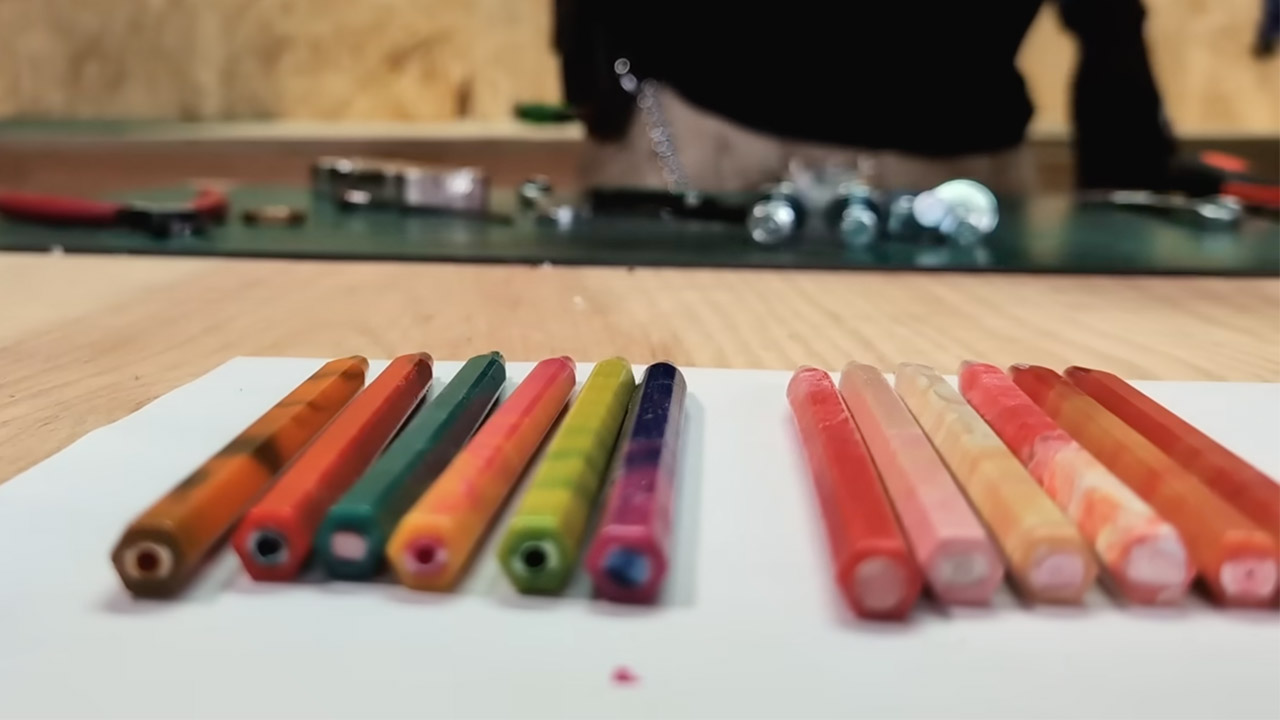
Most people toss broken baskets, empty food tubs, and leftover packaging without a second thought. Brothers Make decided to keep a pile of that material and feed it into a compact new machine called the DEGO. In one afternoon they turned the scraps into a set of usable pens, complete with unintentional swirl patterns, even when the colors refuse to stay neat.
The DEGO plastic extruder is the creation of plasticpreneur, an Austrian business that has spent years refining large recycling equipment for workshops and schools, but this new version is small enough to fit on a workbench at home. Weighing around 20 kilograms and measuring approximately 21cm by 55cm by 39cm, all you have to do is plug it in, put on a mold, and you’re ready to begin. A built-in fume extraction mechanism directs any unpleasant vapors directly through a filter, keeping the entire arrangement more cleaner than prior open versions.
A1 mini + LED Lamp Kit for Creative Light Projects: Bring your ideas to life with the included LED Lamp Kit. Simply print compatible lamp models and…
The Perfect 3D Printer for Beginners: A1 mini 3D Printer is designed to make 3D printing easy from day one with automatic calibration, simple setup…
Experience the Bambu Lab Ecosystem: Access MakerWorld’s huge library of ready-to-print models, manage prints through the Bambu Handy app, and enjoy…
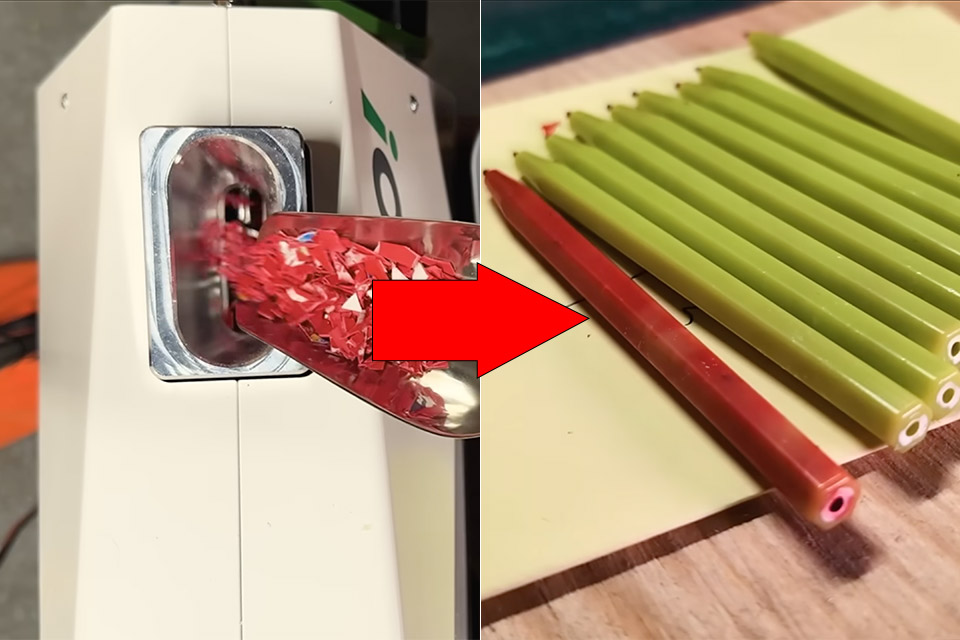
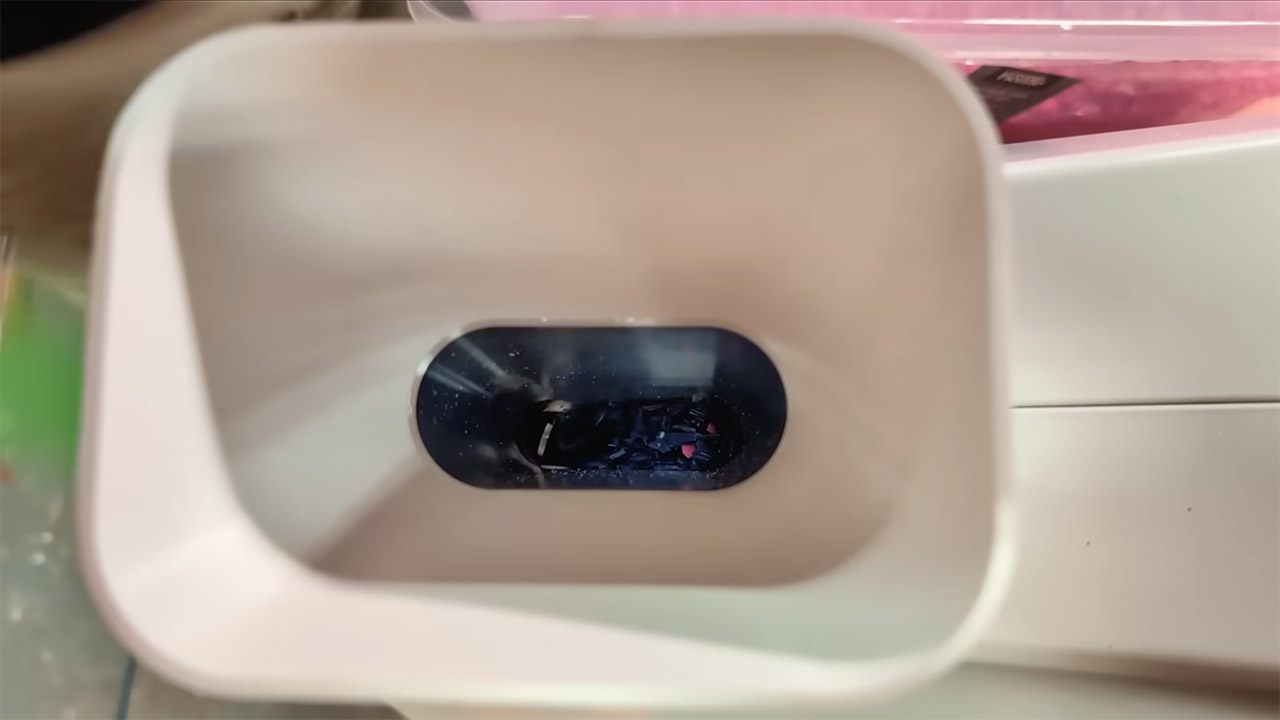
For those who like simplicity, the process is straightforward: shovel chopped-up plastic flakes in from the top and turn the hand crank. The crank cranks a screw inside a heated barrel, pulling the flakes forward, melting them down with friction and electric heat, and pushing the gooey plastic out the front nozzle. Put a mould on the nozzle, keep rotating the handle, and the cavity will fill; once finished, just open the mold, pull out your freshly created pen, and start again. The guys in the video built a bunch with a pen barrel mold and were churning them out one by one in only a few minutes.
Advertisement
They were largely experimenting with high-density polyethylene, the hard plastic used in laundry baskets, chocolate tubs, fishing rope, marker cases, and cracker containers. Each type of plastic had its own distinct color; a pale yellow-green basket looked great paired with bright red tubs, teal rope contrasted nicely with black pen barrels, and orange cracker packaging was a beautiful addition to the mix. They also added some white flakes for a little more contrast here and there. Because of the way the screw mixes the plastic, it is uncommon to achieve pure color blocks. Instead, you’ll see nice streaks, marbling, and delicate color transitions as you walk from one piece to the next.
Of course, there is still some preparation to be done before you can begin. You’ll need to remove any stickers and cut up any large pieces of plastic with scissors, shears, or a guillotine, and having a dedicated shredder to speed up the process is a major help, but the DEGO itself can run on plain old plastic flakes with no extra processing. Once the material is clean and dry, the machine does the rest, as the temperature is high enough to melt the plastic smoothly while remaining low enough not to burn most common varieties. It’s still a manual process, which keeps the learning curve low and safety concerns at a minimum.
The base model will cost roughly 3500 euros, with additional molds for pens or carabiners costing slightly more. When compared to a full industrial extruder, the DEGO is a bargain. It takes up almost no space, requires no compressed air or fussy hydraulics, and can be up and operating in a matter of minutes. Cleanup is a breeze; simply pass any residual material through till the barrel is empty.
The Keychron Q6 HE 8K is a solid mechanical keyboard with magnetic switches. While it’s not cheap, it’s got more than enough to give a great typing experience on Mac.
When it comes to mechanical keyboards, Keychron stands out as one of the industry leaders. All thanks to its vast array of styles, colors, and features aimed at both Windows and macOS users.
The Keychron Q6 HE 8K is a beefy new release, and I put it through an extended test drive in my ongoing series of reviews of Keychron products. It’s an ever-continuing search for the mechanical keyboard that will earn a permanent position on my workspace.
The Q6 HE 8K is a full-size magnetic switch mechanical keyboard with an 8K polling rate that supports a direct wired connection. It has a staggering variety of customizations.
Advertisement
Keychron Q6 HE 8K Review: Specifications
Size: 137 x 446mm
Front Height: 20.6 mm (without keycaps)
Back Height: 31.37 mm (without keycaps)
Feet Height: 1.24mm
Angle: 5.26 degrees
Weight: 2,268g +/- 10g
Body Material: Aluminum
Keycap: OSA double-shot PBT keycaps
Plate Material: Aluminum
Switch: Keychron Ultra-fast Lime Magnetic Switch
Stabilizer: Screw-in PCB stabilizer
Backlight: South-facing RGB LED
Compatible System: macOS/Windows/Linux
Operating Environment: -10 to 50C
Connectivity: Type-C Wired
Polling Rate: 8000 Hz / 4000 Hz / 1000 Hz
N-Key Rollover (NKRO): Yes
Rapid Trigger: Yes
Sensitivity: 0.01 mm
Adjustable Actuation Points: 0.1 – 3.35mm
Dynamic Keystrokes: 4-in-1 action keys
Hot-Swappable: Yes, compatible with Keychron Ultra-fast Lime Magnetic Switch only.
MCU: 1MB
Keychron Q6 HE 8K Review: Unboxing
The Q6 HE 8K arrives in a standard black box with a metallic Keychron logo. The keyboard and accessories are packaged in heavy foam cutouts for maximum travel safety.
1x Fully Assembled Keyboard
16x Gaskets (12 Installed and 4 in the Box)
8 sets x Stabilizers
1 set x Keycaps (PBT Double-shot)
1 set x Magnetic Switches
1x Type-C Cable
1x Type-A to Type-C Adapter
1x Keycap & Switch Puller
1x Screwdriver
1x Hex Key
User Guide
Keychron Q6 HE 8K Review: Build Quality
The Q6 HE 8K is a full-size mechanical keyboard with a metal case. Even by the industry standards for a keyboard of this size, I was surprised by the sheer weight and feel of it.
This is a very beefy keyboard that will easily withstand the rigors of daily use, at stationary or mobile workspaces alike.
Keychron offers the Q6 HE 8K in two colors: Black or white. That’s it.
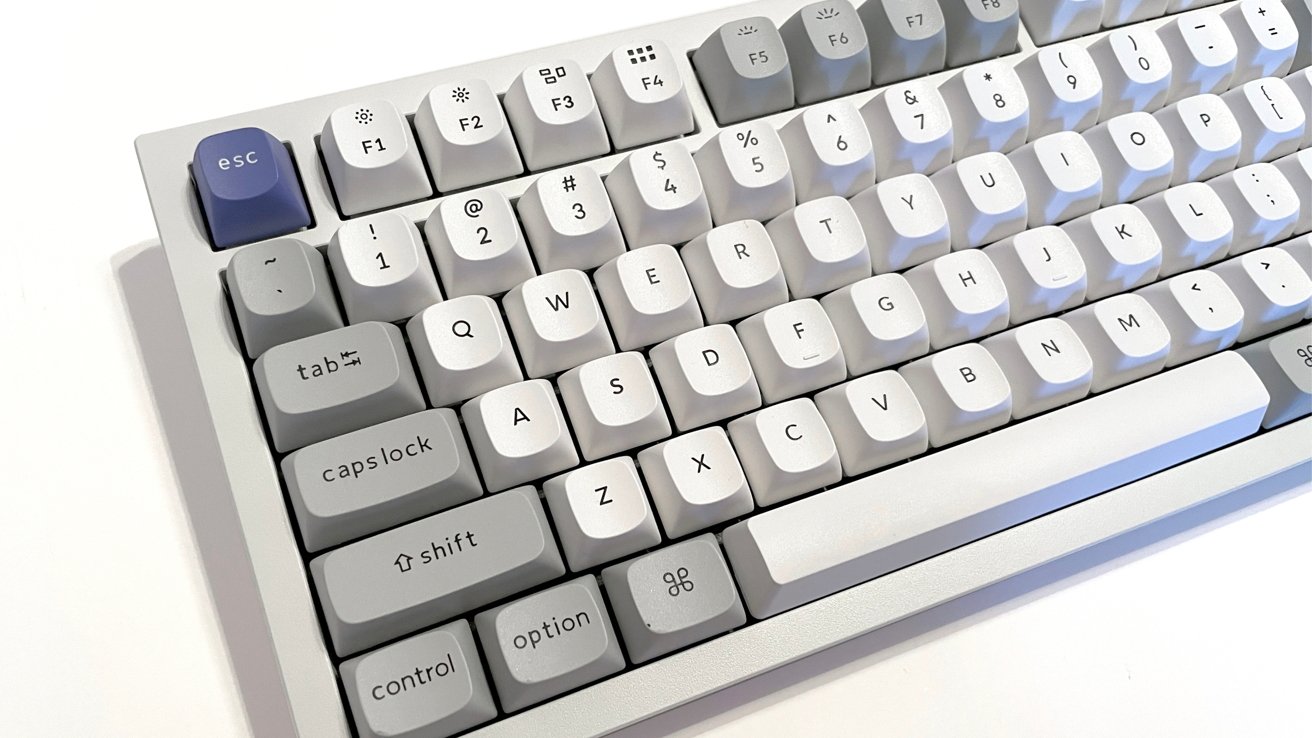
Keychron Q6 HE 8K Review: Left side with Mac keyset
Advertisement
This is a recurring theme with Keychron and their keyboards, and I have written about it in the past. But with the amazing quality of its keyboards, I would love to see it expand its range of colors.
I’ll be the first to admit I do not know its manufacturing limitations with such meticulously engineered products. But even so, the occasional red, blue, green, or pink would be welcome in this age of colorful workspaces and peripherals.
The Q6 HE 8K arrives with the proprietary Keychron Ultra-fast Lime Magnetic Switches as standard. Keychron sells Banana and Silent Red switches on the Keychron website for an added cost of $29.99, depending on the type of sound level or tactile feel you prefer.
Keychron products never feel cheap or like an afterthought. Every keyboard it makes uses premium materials and engineering built to last for years.
Advertisement
The Q6 HE 8K is certainly no exception. From the heavy aluminum case and double-gasket design to the double-shot keycaps, PCB stabilizers, adapters, and tools, everything in the box feels like bespoke, white-glove service.
Keychron Q6 HE 8K Review: Rear has USB-C and two control switches
The back of the Q6 HE 8K includes a USB-C port for connection and use. There are two switches next to the USB port.
One switch is a three-position switch to toggle between up to three potential keyboard configuration profiles. The second switch moves between default macOS and Windows configurations.
Advertisement
Keychron Q6 HE 8K Review: Customization
The Q6 HE 8K has a wide variety of customization options, including third-party keycaps and remapping variations available from Keychron’s proprietary Keychron Launcher tool. The pool of possibilities is very deep.
Keychron touts that the Q6 HE 8K is truly customizable from top to bottom, and it is. By default, Keychron includes keycaps for both macOS and Windows configurations.
The switches on the Q6 HE 8K are hot-swappable, with Keychron noting that hot-swapping works with Keychron Lime and Gateron Jade magnetic switches.
The new Keychron screw-in PCB stabilizers deliver incredible stability on the big keys, namely the space bar, shift, enter, and delete. The installation is quick and easy for experienced users and mechanical keyboard newbies alike.
Advertisement
Keychron Q6 HE 8K Review: Managing the actuation distance in the Keychron Launcher
The south-facing RGB lights on the Q6 HE 8K are vibrant and fully customizable to each individual key, using Keychron’s Per-Key RGB feature. The contrast of the bright lights against the white metal body and keycaps makes everything pop.
Keychron’s Launcher tool is web-based, and it allows you to adjust almost everything. Adjustments span keymapping, the internal RGB light configuration, and adding custom macros for use with the Q6 HE 8K.
Previous versions of the Keychron Launcher did not play well with macOS and several browsers. The process is incredibly smooth now. It’s nice to see a manufacturer like Keychron listen to the concerns of their customers and address them.
Advertisement
Keychron Q6 HE 8K Review: In use
I used the Q6 HE 8K for several weeks prior to writing this review, and it was the best Keychron experience I have had to date. That is, in a line of good Keychron experiences.
On my standard workspace layout, I use a digital pen display and stylus with my right hand. A wireless, low-profile keyboard is used by my left hand for key commands.
I need to move the tablet and the keyboard around often throughout my workday. I find most full-size keyboards to be cumbersome in this space, but despite its size, weight, and wired connection, the Q6 HE 8K handled the job incredibly well.
Keychron Q6 HE 8K Review: Right side with numpad and knob
Advertisement
I’ll admit, I tested this as my work keyboard only to be thorough and see how the Q6 HE 8K behaves at work and at play. I expected to dislike the work experience based on my personal preferences, but I was surprised by how well the keyboard worked for me.
I had a few initial hours where my muscle memory for low-profile keyboards worked against me, with a series of missed clicks or a bit of fatigue with the larger keycaps. That passed in time, and I found the size and weight of the Q6 HE 8K to be a welcome change.
Where I expected the Q6 HE 8K to excel was in my gaming space on my Windows machine. It lived up to everything I anticipated and more.
The weighty keyboard provides stability, and the ability to customize every key actuation point and utilize the LKP (last key priority) and DKS (dynamic keystrokes) opened up an entire world for me. Think pressure sensitivity adjustments and absolute control with games like Marvel Rivals, where quick, responsive actions are vital.
Advertisement
I am an older gamer, so experiencing these features for the first time truly made me feel a bit like a caveman cracking rocks together with my previous basic keyboard and mouse. Meanwhile, other gamers are building rockets.
Keychron Q6 HE 8K Review: Full top-down view
The Q6 HE 8K is not the quietest mechanical keyboard I have ever used. If I decide to get one for my gaming desk, I will absolutely purchase and use the Silent Red switches from Keychron.
The bumpy-clack of the standard switches is nice, but it is not my preference.
Advertisement
The volume adjustment push knob on the Q6 HE 8K is amazing, and it is a simple quality-of-life feature that I love. It isn’t something I expected, and the clickable knob made quick muting feel satisfying.
Keychron Q6 HE 8K Review: An excellent mechanical keyboard
The Q6 HE 8K is an amazing mechanical keyboard, and I recommend it for gamers.
The retail price of the Q6 HE 8K is $239, and that is not anywhere close to inexpensive or budget-friendly for most. But the price is worth it if you are looking for a rock-solid mechanical keyboard.
Keychron Q6 HE 8K Pros
High build quality
Great for daily typing
Excels at gaming
Excellent customization options in Keychron software
Keychron Q6 HE 8K Cons
High entry price for keyboards
Case color options are limited
Rating 4.5 out of 5
Where to buy the Keychron Q6 HE 8K
The Keychron Q3 HE is available on the Keychron website for $239. It’s also available from Amazon,
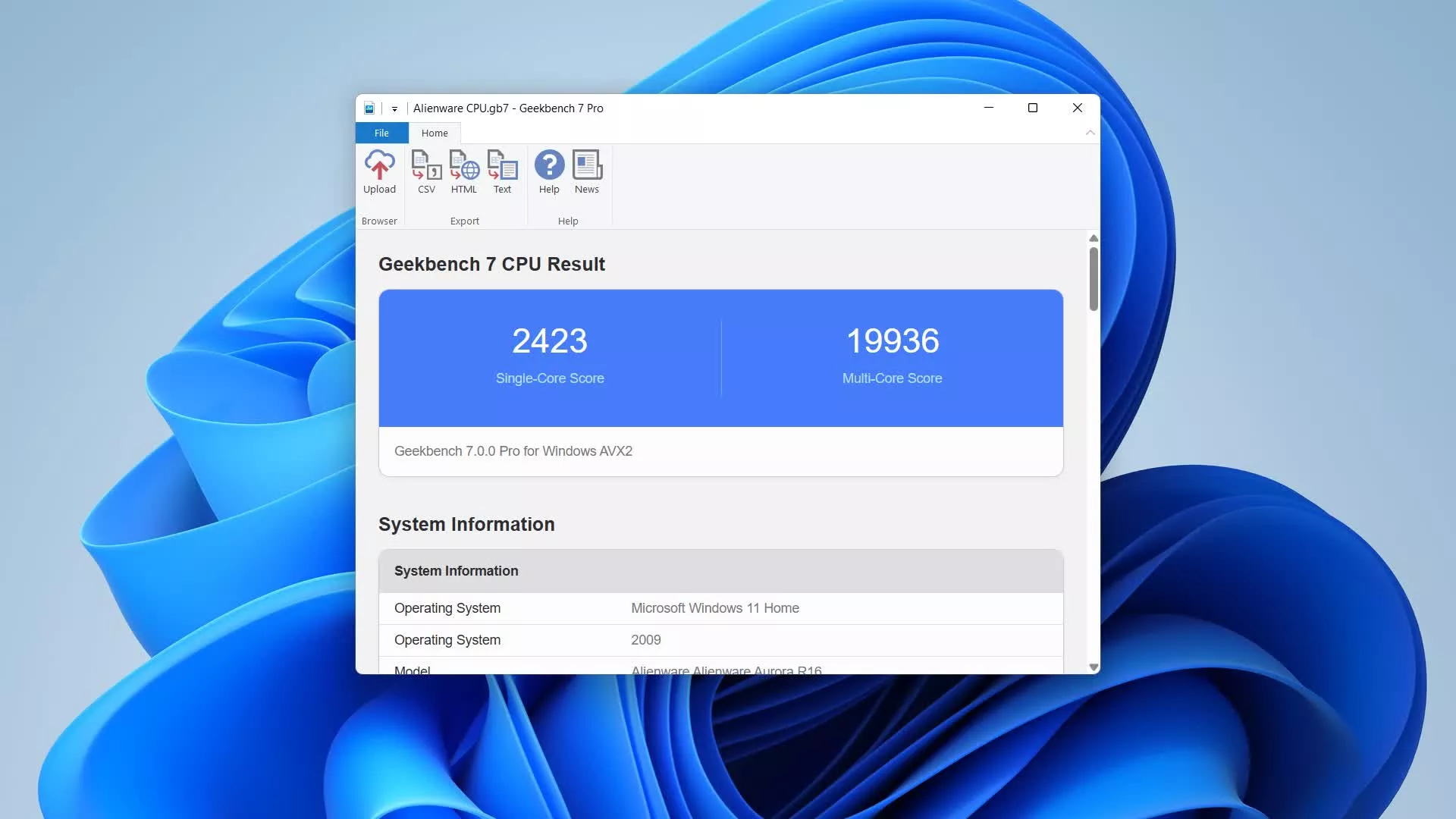
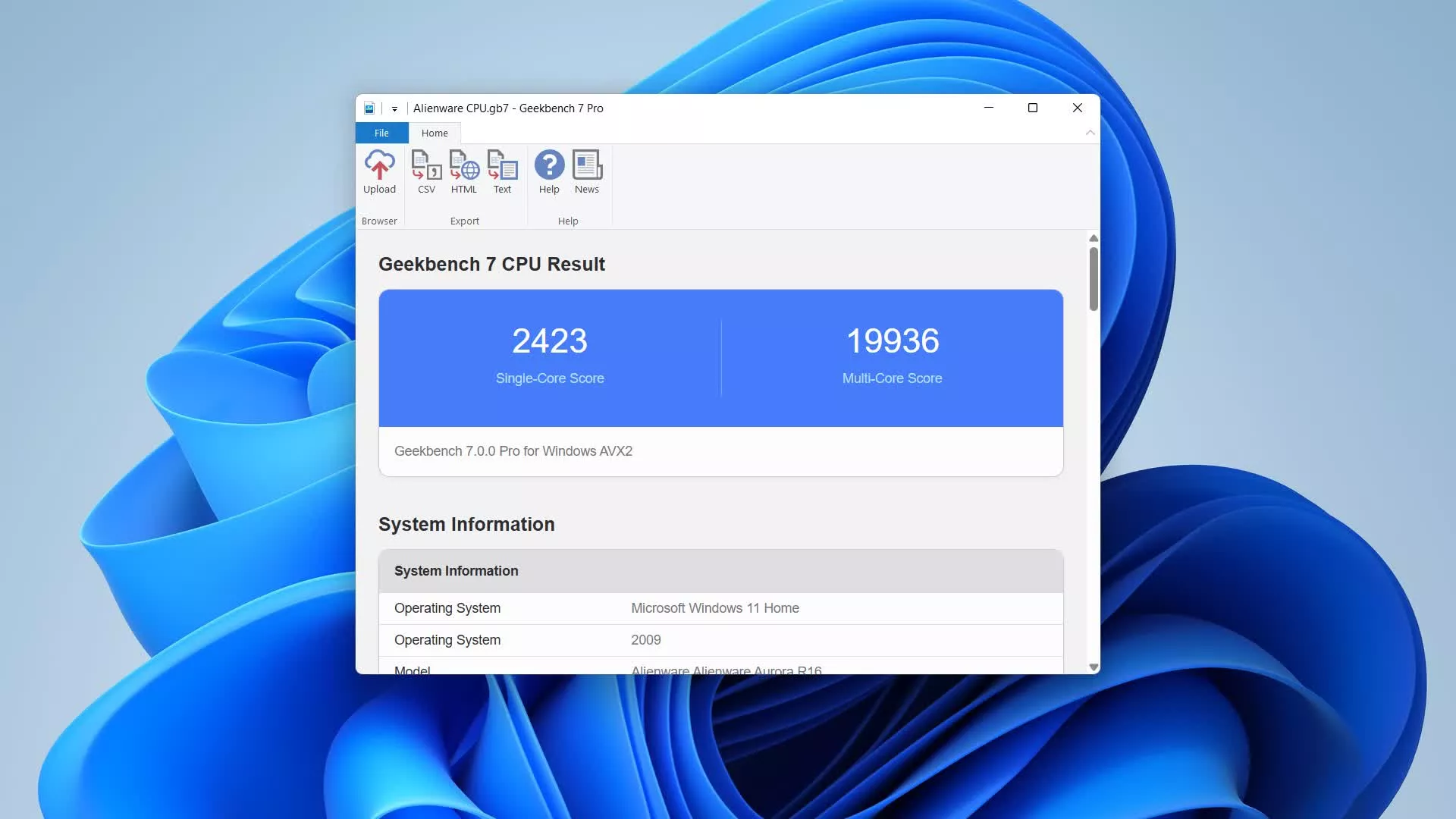
Geekbench includes updated CPU workloads and new Compute workloads that model real-world tasks and applications. Geekbench is a benchmark that reflects what actual users face on their mobile devices and personal computers.
Features
CPU Benchmark
Geekbench 7 measures your processor’s single-core and multi-core power, for everything from checking your email to taking a picture to playing music, or all of it at once. Geekbench 7’s CPU benchmark measures performance in new application areas including video conferencing, streaming, and game physics, so you’ll know how your system handles the tasks you rely on every day.
GPU Benchmark
Advertisement
Test your system’s potential for GPU compute tasks including machine learning, image processing, and video editing with the GPU Benchmark. Test your GPU’s power with support for the OpenCL, Metal, Vulkan, and CUDA APIs. New to Geekbench 7 is an increased focus on Machine Learning, and support for NVIDIA’S CUDA API.
Real-World Tests
Geekbench uses practical, everyday scenarios and datasets to measure performance. Each test is based on tasks found in popular real-world apps and uses realistic data sets, ensuring that your results are relevant and applicable. Geekbench 7’s multi-core tests only run multi-threaded when real applications do, so your scores reflect how software actually behaves.
Cross-Platform
Advertisement
Compare apples and oranges. Or Apples and Samsungs. Designed from the ground-up for cross-platform comparisons, Geekbench 7 allows you to compare system performance across devices, operating systems, and processor architectures. Geekbench 7 supports Android, iOS, macOS, Windows, and Linux.
Geekbench Browser
Upload your results to the Geekbench Browser to share them with others, or to let the world know how fast (or slow) your devices can go! You can track all your results in one place by creating an account, and find them easily from any of your devices.
Benchmark Charts
Advertisement
Verify device performance using the Geekbench Benchmark Charts. Available on the Geekbench Browser, these charts are based on data aggregated from real users in real-world environments. Whether you’re considering a new purchase or are curious about a device’s capabilities, use these charts to make informed decisions.
Stress Tests
Geekbench includes stress tests, which are tests that help determine the stability of your system. Stress tests help you find small problems with your system before they become big problems.
Multicore Aware
Advertisement
Every test in Geekbench is multi-core aware. This allows Geekbench to show you the true potential of your system. Whether you’re running Geekbench on a dual-core phone or a 32-core server, Geekbench is able to measure the performance of all the cores in your system.
Here’s what the different numbers mean:
Battery Runtime is the battery test runtime. If the test started with the battery completely charged and ended with the battery completely discharged then the test runtime is also the battery lifetime.
Battery Score is a combination of the runtime and the work completed during the battery test. If two phones have the same runtime but different scores, then the phone with the higher score completed more work. As with Geekbench scores, higher battery scores are better.
Advertisement
Battery Level is the battery level at the start and the end of the test.
What’s New
Geekbench 7, the latest version of Primate Labs’ cross-platform benchmark, has arrived and features both new and improved workloads to measure the performance of your CPUs and GPUs.
New Media Workloads
Geekbench 7 includes new media workloads that measure how well your CPU handles audio and video encoding, decoding, and processing. The workloads model the tasks behind video conferencing, screen sharing, and everyday content consumption. These new workloads:
Advertisement
Encode screen-sharing video with the AV1 codec, modeling the screen-sharing features in video conferencing apps.
Compress music and spoken-word audio with the Opus codec, modeling voice memo and podcast apps.
Decode video and audio while generating live captions with the Whisper speech recognition model, modeling video playback with automatic subtitles enabled.
Alongside the new media workloads, Geekbench 7 adds a Game Physics workload built on the Jolt Physics engine used in popular video games, expands the Photo Editor workload with a richer set of real-world edits, and updates the Photo Library workload to support importing and processing modern image formats such as JPEG XL and DNG.
A Smarter Multi-Core Benchmark
The multi-core benchmark in Geekbench 7 has been redesigned to better reflect how real applications behave. Not every task in the real world is multi-threaded, and pretending otherwise distorts scores without telling you anything useful about your device.
In Geekbench 7, a workload only runs in multi-threaded mode if the task it models actually runs multi-threaded in real applications. For example, the HTML5 Browser test isn’t included in the multi-threaded suite because web browsers are single-threaded (or lightly threaded).
The result is a multi-core score that’s a more accurate, more useful, and more relevant measure of how your device performs the work you actually do.
Advertisement
A Refreshed GPU Benchmark
The GPU benchmark has a new focus on the machine learning and content creation applications that increasingly define GPU performance. For machine learning, the GPU benchmark includes workloads that:
Track faces and apply real-time filter effects to video, modeling the face filters in social media apps.
Upscale images with machine learning, modeling super resolution features in content creation apps.
Blur backgrounds in video conferencing streams, modeling virtual background features in video conferencing apps.
Geekbench 7 also introduces new GPU image editing and synthesis workloads, including RAW image processing, LUT-based video color grading, path tracing, and fluid simulation.
And by popular demand, CUDA joins OpenCL, Vulkan, and Metal as a supported API in the GPU Benchmark. You can now measure your NVIDIA GPU using the API that powers its most demanding applications.
Larger Data Sets
Advertisement
Since the release of Geekbench 6, the tasks people perform have become more strenuous, and the data sets they use have grown larger and more demanding. To reflect this, we’ve updated the data sets the workloads process so they’re more challenging for your device and better reflect the files people work with today. This includes:
More (and more varied) archives in the File Compression workload, spanning source code, object code, and text documents.
More (and more varied) documents in the PDF Viewer workload, from park maps to technical documents to academic papers.
More assets and different image formats throughout the developer and image processing workloads.




























































You must be logged in to post a comment Login