Recent reports have raised alarm about the use of PatronScan, an ID-checking and face-scanning system, at multiple LGBTQ+ bars in San Francisco’s Castro neighborhood. Much of the attention has focused on reports that the system photographs patrons as they enter venues and questions about whether those images are used for facial recognition.
A broader privacy concern also deserves scrutiny. For years, PatronScan has marketed itself not just as an ID-verification tool, but as a system that allows bars and clubs to identify patrons, keep records about them, and share information across venues. As one news article published in 2019 documented, PatronScan built a network that allowed participating bars to flag patrons and share information about them with other establishments.
And in California, it’s not at all clear how PatronScan’s business model of scanning IDs and sharing the information from those scans with other bars comports with the law. California’s ID privacy law, which was amended in 2018 to add ID “scans,” states that no businesses shall “retain or use” any information from a scanned ID card except for limited purposes such as to verify age, comply with a legal requirement, or prevent fraud.
Californians should be deeply concerned about businesses that collect information from government-issued IDs and use it to build databases about where people go, whom they associate with, and whether they should be allowed into other public gathering places. That concern is especially strong in LGBTQ+ spaces, which have long served as refuges for people to go without being tracked, monitored, or put on lists.
Advertisement
We reached out to Patronscan with questions regarding their practices and their views on California ID law. They referred us to their published FAQ question “Is Patronscan privacy compliant in California?” which claims that the use of Patronscan kiosks is legal in California. They also said “Patronscan does not do facial recognition in North America, or any kind of automated analysis of the ID or the live photo image.”
The California Legislature Has Investigated PatronScan’s Business Model
In 2018, the California Legislature published bill analyses (on that year’s AB 2769) that went into detail about PatronScan’s business. Reviewing PatronScan’s own materials, the California Senate Judiciary Committee found that the company had collected and retained information on 561,087 customers in Sacramento alone during the first five months of 2018—a remarkable figure for a city whose population had only recently topped 500,000.
Lawmakers also found that at that time, PatronScan retained information for at least 90 days or longer in some cases, shared information among participating bars, and maintained bans that lasted an average of more than 19 years. A PatronScan “Public Safety Report” used 10,000 scans collected on a single day to report on “where customers live, how far they have traveled, and how many different venues the customers patronized.”
This was not simply checking IDs at the door. PatronScan was building a database.
Advertisement
An immigrants’ rights group, the Coalition for Human Immigrant Rights (CHIRLA), wrote about its concern at the time with these growing ID databases, saying that “placing individuals on a database that labels them a “threat to public safety” has “significant immigration consequences that could lead to deportation, revoking of current status, or denial of future immigration relief.”
Today, PatronScan states that it retains personal information about all customers for 21 days, and about flagged customers for up to five years. This includes the customer’s name, date of birth, photograph, gender, and zip code. It also includes the dates and times that the customer entered particular bars. Such databases are a grave privacy threat. Personal data is routinely stolen by thieves, misused by a company’s employees, seized by government agencies, and diverted to new purposes by a company’s executives.
California Law Still Bans ID-Scan Databases, And Bars Should Follow That Law
In 2018, California lawmakers closed what they viewed as a loophole. Existing law already prohibited businesses from retaining or using information obtained when they “swiped” a driver’s license, except for the narrow purposes of legal requirements (like a judicial warrant) or “preventing fraud, abuse, or material misrepresentation.”
After reviewing companies like PatronScan, the Legislature amended the law to make clear that the same restrictions that apply to businesses that “swipe” ID cards also apply when those IDs are “scanned.” PatronScan opposed that change, arguing it wanted to preserve the ability to share information among bars so participating venues could decide whether to admit patrons.
Advertisement
The bill became law anyway. Yet PatronScan continues to market and sell a system that apparently retains information from scanned IDs, and allows participating venues to flag patrons and share information across its network.
At a minimum, that raises serious questions about how those practices fit with California’s existing ID privacy law. Bar and nightlife venue owners who utilize PatronScan should think twice about its effects on their customers, and consider going back to standard, visual ID checks. These physical checks have been effective at keeping underage patrons out of 21-and-over venues for decades, and don’t present the serious privacy dangers of creating a private database of bar patrons.
For venues serving vulnerable communities like immigrants or the LGBTQ+ community, the stakes of using this technology are even higher. It’s disappointing and alarming to see some of California’s more well-known LGBTQ+ nightlife spots instead lining up as PatronScan’s early adopters. A venue cannot claim to be a safe space while feeding its patrons’ data to a third party database. These businesses should reject PatronScan, return to the standard ID checks that every other bar has been able to utilize, and prove to their customers that their privacy and security still matters.
With generally accurate auto-activity tracking, long battery life and a screenless design that keeps notifications and mid-workout stat-checking at bay, the Garmin Cirqa is a brilliant wearable for discreet monitoring. However, its somewhat bulky sensor and limited strap options mean it can’t help but stand out on your wrist. It’s also around £100/$100 more than the Fitbit Air, which makes it a slightly harder recommendation.
Screenless design for discrete wear
Up to 10 days of battery life
Accurate auto-activity tracking
Module is large and bulky
Strap selection is currently small
No built-in GPS
SQUIRREL_PLAYLIST_10208665
Advertisement
Key Features
Review Price:
£179.99
Advertisement
Screenless design
The Garmin Cirqa is designed to offer discrete health monitoring and fitness tracking, without a display to disturb you
Advertisement
Long-lasting battery
Expect up to 10 days between charges
Advertisement
Automatic activity tracking
Plus a useful button for quick starting an activity
Introduction
Garmin is the latest wearable brand to introduce a screenless fitness tracker.
Advertisement
Coined Cirqa, the tracker is designed to allow you to quietly yet accurately track your key metrics and workouts without distracting you with a shiny screen. But with Whoop leading the market for so many years, and Google’s Fitbit Air receiving a glowing five-star rating from us, where exactly does the Garmin Cirqa fit?
We’ve been reviewing the Cirqa for the past few weeks to find out whether it stands a chance at entering our best fitness trackers guide.
Advertisement
Design
Screenless design
Physical button that’s used to start tracking a workout
Module sticks out slightly
I’ve waxed lyrical about how screenless fitness trackers are the first to actually keep me motivated, so I was especially keen to get my hands on the Cirqa.
Much like the Whoop and Fitbit Air, the Cirqa is a screenless device designed to quietly track your health data and workouts, then sync all the info to its companion app for you to check later. The idea is that you’re not constantly distracted by notifications, or tempted to see how your metrics are looking while working out.
Advertisement
The module that houses the battery and sensor (which is a Gen 4 sensor and not the newer Gen 5, but more on that later) sits under the fabric strap, and has a physical button at its side. The button lets you quickly start tracking an activity without needing to rely on auto-tracking or dive into the app. Although you can assign only one activity to the button, it’s still very useful and comes in handy.
Side button on Garmin Cirqa. Image Credit (Trusted Reviews)
My biggest issue with the module isn’t that its sensor is an older generation, but that it doesn’t sit neatly under the small/medium-sized strap. Compared to the Fitbit Air and Whoop, its edges stick out slightly, yet the strap is noticeably thicker than the Fitbit Air’s at 24mm. It just doesn’t look quite as sleek or discreet as I’d like.
Advertisement
Image Credit (Trusted Reviews)
Speaking of the strap, the included fabric band, which comes in a choice between four colours, is undoubtedly on the sporty side. It doesn’t look so alarming when I’m exercising, but it doesn’t quite look the part in everyday outfits.
Admittedly, this is down to personal preference, but I’d like to see Garmin offer some less sporty-focused straps. Whoop, for example, offers sleek leather bands while the Fitbit Air has silicon straps that just look nicer than the Cirqa’s.
Whoop offers sleeker bands. Image Credit (Trusted Reviews)
Features and App
No built-in GPS but Garmin’s Connected GPS does offer accurate tracking
Auto-workout detection is reliable
Natural Cycles integration
Unlike many of the best Garmin watches, the Cirqa isn’t equipped with built-in GPS but Connected GPS instead, which means the Cirqa uses the GPS signal from your paired phone to accurately track your pace and location. That means you will need to bring your phone with you if you want to track your running route, for example.
Advertisement
Advertisement
I don’t see this as an issue at all, as I would always bring my phone out for a run with me for a variety of reasons (safety, listening to music and taking a photo of a sunset as an excuse to stop running, in that order). However, if you’ve grown accustomed to leaving your phone at home, then this might be a dealbreaker.
Even so, I found the location tracking to be pretty accurate, as it clearly follows and correctly maps my routes via the Garmin Connect app. It did once suggest I had meandered into the Thames while on a lunchtime walk into Canary Wharf, rather than walking neatly on the road alongside it, but that seems like an anomaly as I’ve done the route countless times since with no issue.
The Cirqa thought I went for a lunchtime dip in the Thames. Image Credit (Trusted Reviews)
Auto-workout detection is reliable overall, and the Cirqa does a good job of deciphering when I start and end both walks and runs. It did oddly detect that I was walking when I was sitting on a train into London, which was weird, but again that seems like a strange outlier rather than an ongoing issue.
One of the newer additions to Garmin is its Natural Cycles integration, an MHRA-registered fertility-tracking app. While this requires a separate subscription, Natural Cycles monitors your skin temperature overnight to determine your fertile and non-fertile days, so you can plan or prevent pregnancy.
I’ve previously used the Natural Cycles band to track my temperature overnight and, although I receive notifications to remind me to pop it on before bedtime, it can be easy to forget – especially when going to bed at different times. That’s where the Cirqa (and other compatible Garmin watches) comes in so handy, as I wear it 24/7, so I don’t need to worry about putting it on overnight.
Advertisement
Advertisement
Otherwise, as a screenless tracker, its companion app is naturally crucial. Enter Garmin Connect. The app, which is available on both iOS and Android, is easy to use with all your health and fitness metrics clearly labelled and listed. The At a Glance section is customisable, so you can pick and choose which metrics you can see instantly.
Unlike Whoop, a subscription isn’t required to make the most of the Cirqa, but you can choose to sign up to its Garmin Connect Plus plan. This unlocks Active Intelligence, Garmin’s AI-powered feature that provides personalised insights, nutrition tracking and Garmin Coach. It’ll set you back either £69.99 a year or £6.99 a month, and could come in handy for those who want access to Coach and AI.
Health and Fitness Tracking
Tracking for over 80 workouts
Body Battery monitoring
Excellent sleep tracking
Aside from its design, arguably the reason to opt for the Garmin Cirqa is its excellent health and fitness tracking features. Thanks to its Gen 4 sensor, the Cirqa can track metrics such as heart rate, blood oxygen saturation, stress levels, HRV, VO2 Max, and more.
However, it’s worth noting that Garmin has since introduced the Gen 5 sensor, which promises overall better responsiveness, the ability to take an ECG, and skin temperature sensing. Garmin explained its decision to use Gen 4 over the newer Gen 5 was because it’s smaller and would sit more discretely than the latter.
Advertisement
Advertisement
In fairness, I do understand the reasoning, and definitely wouldn’t want a larger sensor than this one, but it’s a shame nonetheless.
Even so, the Cirqa still offers accurate monitoring that aligns with my Whoop MG (a device that can take an ECG). For example, both devices give me an average HRV reading of between 74 and 75.
What’s especially interesting is its sleep tracking. Each morning you’re given a score out of 100 to reflect how well you slept, alongside a breakdown of your sleep cycle, restless moments and how sleep improved your Body Battery score over the night.
You can then visit the Sleep Coach tab, which advises you on how long you should sleep. Its data generally lines up with Whoop, though there are a few inconsistencies I’ve noticed, such as wake-up times and the exact sleep stages.
Advertisement
Image Credit (Trusted Reviews)
The Cirqa also shines with its activity tracking. Its auto-detection is incredibly accurate, which means I haven’t had to worry about reaching for my phone. Although the Cirqa isn’t fitted with built-in GPS, auto-workout detection still uses your smartphone’s GPS to provide accurate distance and location data.
Advertisement
Regardless of whether you’ve manually tracked a workout or let the Garmin auto-detect it, the Cirqa will provide you with a GPS map overlay so you can see how your pace, heart rate and elevation changes while out on your run or walk.
Image Credit (Trusted Reviews)
I also used the Cirqa to track a couple of light Yoga sessions, which provided an accurate overview of my heart and respiratory rates. However, I was surprised to see just one pose logged. After doing some digging, you’re actually meant to manually add in each pose that you do after the workout, which feels pretty laborious.
Image Credit (Trusted Reviews)
Otherwise, Training Readiness is available on the Cirqa, which helps advise you on what level of workout intensity you should do. Your score, out of 100, takes into account last night’s Sleep Score, your Acute Load, HRV status, and recent stress and sleep levels.
Generally, I had no disputes with my Training Readiness score during my review period, as it aligned with how I felt. Now, whether I took heed of its advice and ran a 10K is a different story.
Advertisement
Advertisement
Battery Life
Garmin’s claims of up to 10 days are accurate
Charging takes under two hours
Garmin claims that the Cirqa should see around 10 days of battery life, which puts it right between the Fitbit Air and Whoop, with the former promising up to seven days while the latter offers up to 14.
In my experience, I’ve found the Cirqa lives up to Garmin’s claim, as I last charged it six days ago and am currently sitting at 52%. That suggests it could surpass its 10-day promise and maybe edge towards the two-week mark.
You could probably eke out a bit more juice by switching on the Battery Saver option, which disables heart rate monitoring, auto-activity detection, the start activity function, and pulse oxygen monitoring. However, I doubt anyone would really need to, as even with the option turned off and all tracking settings enabled, I’ve still found that the Cirqa has a solid battery life.
I do wish there were on-wrist charging, like the Whoop, as it’s just so convenient. Instead, it uses Garmin’s usual proprietary cable, which I found took just over an hour to recharge the Cirqa.
SQUIRREL_PLAYLIST_10208665
Advertisement
Advertisement
Should you buy it?
You want a discrete, screenless Garmin that offers excellent tracking and doesn’t need a subscription
For accurate health and exercise tracking, an intuitive companion app and an interruption-free, screenless design, the Garmin Cirqa is one of the best options out there. And, unlike Whoop, it doesn’t need a subscription either.
Advertisement
The screenless nature of the Garmin Cirqa means it doesn’t support the expected smartwatch tools such as Google or Apple Pay, or the ability to receive notifications. If you want an extension of your phone, then a smartwatch is a better option.
Advertisement
Final Thoughts
Overall, I’m impressed with the Garmin Cirqa. Its screenless design makes a lot of sense for anyone who wants detailed health and fitness tracking without the constant temptation to check a display mid-workout, while Garmin Connect remains one of the easiest and most comprehensive companion apps around.
Its tracking is generally accurate, battery life is strong, and the lack of a mandatory subscription immediately makes it more appealing than a Whoop band for many people. You still get a broad range of health, sleep and activity insights without committing to another monthly cost, which is a huge advantage.
That said, the Cirqa isn’t perfect. Its sensor module is bulkier than I’d like, the strap options feel too sporty for everyday wear, and the lack of built-in GPS may be frustrating if you prefer to leave your phone behind. It’s also not as affordable or discreet as the Fitbit Air, which remains a strong alternative for anyone who wants a cheaper screenless tracker.
Advertisement
Even so, if you’re already invested in Garmin’s ecosystem, or you want a capable screenless wearable with excellent battery life and no required subscription, the Garmin Cirqa is an easy recommendation.
How We Test
We thoroughly test every smartwatch we review. We use industry-standard testing to compare features properly, and we use the watch as our main device over the review period. We’ll always tell you what we find, and we never, ever accept money to review a product.
Tested for over two weeks
Worn as our main tracker during the testing period
Heart rate data compared against other wearable devices
FAQs
Does the Garmin Cirqa have GPS?
No, the Garmin Cirqa doesn’t have GPS built-in. Instead, it uses Garmin’s Connected GPS, which uses your phone’s GPS signal to track your location.
Advertisement
Can you use the Garmin Cirqa without a subscription?
Yes, unlike Whoop and the Oura Ring 5, you do not need a subscription to use a Garmin Cirqa. While there is an optional subscription that unlocks additional features like Garmin Coach, Active Intelligence (Garmin’s AI tool) and more, it isn’t necessary for the wearable, and you can still track metrics like heart rate, temperature and activities without it.
For customers juggling multiple devices, Signal has some welcome news. The messaging app announced this week that Android customers can now link another Android phone or tablet to their account. The company also said that iOS customers can link an iPhone to their accounts. Customers can update their existing accounts with Signal iOS v8.22 in the Apple App Store and Signal Android v8.20 in the Google Play Store.
To link, download the Signal app onto the new device, then open the app to view a QR code. On the primary account phone, open Signal and go to Signal Settings > Linked devices > Link a new device. Scan the QR code to link the new device. Customers can link more than one device.
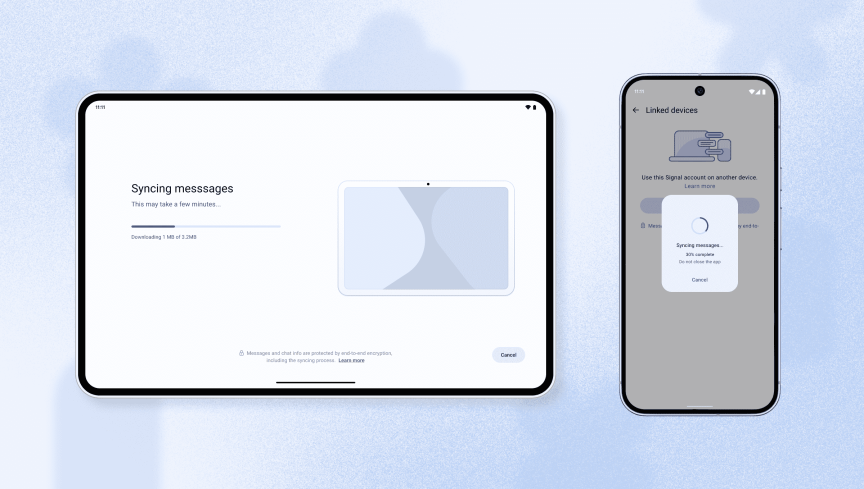
If desired, customers can transfer their message history and 45 previous days of saved media to the new device. The company said the transfers process is fully end-to-end encrypted, which means the data is scrambled and unreadable to others.
Advertisement
Customers can transfer their Signal message history to a new linked device.
Improved interface
Signal also says the app will now adapt its layout to different screen sizes so it looks more natural on linked devices, like tablets. When you look at the app on a tablet, it will adjust its appearance to match the tablet’s aspect ratio. The same will hold true for foldable phones, which can have wider screens when folded out, and for iPads and iPhones, the company said.
Signal said customers can also link Chromebooks but that the interface is not completely updated yet.
According to Signal, the rising popularity of foldable phones and devices with unconventional aspect ratios has forced the company to upgrade the app’s appearance across various devices.
Signal updated its app so that it fills the screen on whatever device the customer uses.
What is Signal?
Signal is a free-to-use messaging app launched in 2014 by American cryptographer Moxie Marlinspike (a pseudonym for Matthew Rosenfeld). The app encrypts text messages, scrambling them so they’re unreadable to outsiders, and only the sender and recipient can read them. The app also encrypts voice calls and video chats.
Other messaging apps that also use encryption include Facebook Messenger, WhatsApp, Session, Threema and Wire. Unlike text messages sent through your regular phone service, encrypted messages can’t be read by your mobile carrier, which can otherwise view and store the contents of SMS and MMS messages sent over its network.
A messaging app that uses encryption is generally secure, but customers should read the fine print, says CNET privacy expert Attila Tomaschek. “Even if your messaging app uses end-to-end encryption, it may still be logging metadata,” Tomaschek said. “In which case, it’s not as private or secure as you may want it to be. So it’s important to check the app’s privacy policy to see how it handles metadata.”
Advertisement
Signal has roughly 70 million customers,putting it well behind competitors such as WhatsApp (3 billion), Snapchat (932 million), WeChat (1.41 billion), Messenger (more than 1 billion) and Telegram (1 billion).
Ever since being admittedly fascinated by the Cambridge coffee webcam from the 1990s, I’ve written about VPNs, the NFL, smartphones, living wages, over/unders and everything in between.
See full bio
Henkel’s Jessica Ramos discusses the evolving nature of her role at the chemical and consumer goods company.
Jessica Ramos is a process engineer at Henkel’s pilot plant in Dublin and is responsible for supporting the scale-up and optimisation of processes from R&D, through to production, as well as scale-downs and troubleshooting activities from production.
“I work closely with cross-functional teams,” she said “My role involves troubleshooting, running trials, supporting CA batches and leading a range of projects, including process improvements, environmental initiatives and the implementation of new technologies.
“I also focus on ensuring safe and efficient process development. I enjoy the dynamic nature of the job and the problem-solving challenges it brings.”
Advertisement
As such, she finds the role she inhabits to demand constant cross-collaboration, communication and cross-functionality.
If there is such a thing, can you describe a typical day at work?
There isn’t really a ‘typical’ day in my role, but there is a general structure. I usually start by reviewing priorities for the day, checking emails and meeting timetables, project updates and any ongoing plant or lab activities on a weekly schedule. From there, I align my tasks based on urgency, whether that is supporting trials or runs, troubleshooting issues, or progressing project work.
A big part of my day involves interacting with different people and teams from operations, engineering, R&D and contractors. There is a lot of communication, coordination and planning involved. Depending on the phase of a project, I might be in between the pilot plant, in my office or in meetings, analysing data, or working on process improvements and documentation.
I manage my workload by breaking projects into smaller tasks and prioritising based on timelines and impact. Things can change quickly, especially when issues come up, so flexibility is important. That is actually something I really like about my job. Every day can be different, and I enjoy the problem-solving aspect. I usually finish the day by reviewing what has been completed and setting priorities for the next day, especially if there are ongoing operations, trials, batches or runs and contractors coming on-site.
Advertisement
What types of engineering projects do you work on?
I work on a range of different projects, mainly focused on scaling processes from R&D up to the pilot plant and eventually production, as well as supporting scale-down activities.
This includes running trials, optimising process conditions, troubleshooting issues and improving safety and efficiency. I’m also involved in process improvement, environmental initiatives, and the introduction of new technologies.
One project I have particularly enjoyed is the PUMA project. PUMA resins are polyurethane resins containing TDI and MDI, which are hazardous compounds, so safety is a key focus. I have been involved in HAZOPs and risk assessments and I have supported the design and implementation of the project in the pilot plant. I have been part of the project since October 2024, working closely with cross-functional teams including ACM, SHE, external partners, technicians and process safety.
My role has also involved engaging with other Henkel sites, such as Puerto Rico, Ballyfermot and China, to understand the process and critical production steps and helping define equipment requirements and formulations for the pilot plant. It has been a great opportunity for the pilot plant in terms of innovation and introducing new technology and addition of the 50l research vessel. For me personally, it has been very rewarding and I have learned a lot about project management and how to effectively align engineering and chemistry.
Advertisement
What engineering skills do you use on a daily basis?
I use a mix of technical and soft chemical engineering skills on a daily basis. From a technical perspective, this includes process understanding, data analysis, P&ID analysis, troubleshooting and applying process safety principles, especially when working with hazardous materials such as CMRs (carcinogenic, mutagenic, or toxic to reproduction), toxic, flammable substances. I also regularly review and interpret data to optimise processes and support decision-making.
Communication and collaboration are also key parts of the role. I work closely with pilot plant technicians, other departments and sites, so being able to clearly explain technical concepts and align with different teams is really important.
One skill I didn’t fully expect to use as much is adaptability and quick acting. Things don’t always go as planned in the pilot plant, so being able to think and respond to issues in real time is essential. I have also developed stronger project management skills than I initially expected, especially when coordinating across multiple teams and keeping projects on track.
What are the hardest parts of engineering and how do you navigate them?
One of the hardest parts is dealing with uncertainty, as things don’t always go as planned. I manage this by staying flexible and focusing on problem-solving.
Advertisement
Communication can also be challenging, especially when working with different teams, so I make an effort to keep things clear and simple.
Managing multiple projects at once can be busy, but I prioritise tasks and stay organised to keep everything on track. Maintaining a healthy work-life balance is also important to me. I find that managing my time effectively, setting realistic priorities and taking time to recharge helps me stay focused, productive and able to perform consistently, especially during busy periods.
What skills and tools are you using to communicate daily with your colleagues?
I use a mix of communication skills and digital tools in my day-to-day work. Clear and simple communication is key, especially when discussing technical topics with different teams.
In terms of tools, I mainly use email, Teams, OneNote, and SharePoint to share updates, track actions and document work. Meetings and calls also play an important role in staying aligned. On the social side, quick chats on Teams and informal conversations in the pilot plant, my office or technician office help build good relationships and keep communication open.
Advertisement
How has this role changed as the engineering sector has grown and evolved?
The role has become more focused on safety, sustainability and digitalisation. There’s a stronger emphasis now on working with hazardous materials safely, improving environmental impact and using data or AI to support decisions and trials or batches. There’s also more collaboration across sites and departments, so communication and teamwork are even more important than before. Overall, the role has become more dynamic, with a greater focus on innovation and efficiency.
What do you enjoy most about working as an engineer?
What I enjoy most is the problem-solving aspect of the role. Every day can be different and I like the challenge of finding solutions, especially when things don’t go as planned. I also enjoy seeing a process or project develop from early stages through to a successful implementation. It’s very rewarding to know your work has a real impact. On top of that, working with different teams and people makes the job really interesting and keeps it dynamic.
What advice would you give to someone who wants to work in engineering?
Stay curious and keep learning. Don’t be afraid of challenges. That’s where you grow the most.
Focus on building problem-solving and communication skills and try to get as much hands-on experience as possible, as it really helps you understand how things work in practice and builds confidence. Student programmes and work experience in companies make a huge difference in getting exposure to the field.
Advertisement
Also, try to find a good mentor. Learning from someone who can guide and support your path can really help your development.
Don’t miss out on the knowledge you need to succeed. Sign up for the Daily Brief, Silicon Republic’s digest of need-to-know sci-tech news.
The congressman thinks it’s time for a “Data Center Bill of Rights.”
Alex Wong/Getty Images
Representative Ro Khanna (D-CA) has introduced a new resolution calling on the House of Representatives to preserve local communities’ ability to reject data center projects near their homes. The resolution’s pitch for a “Data Center Bill of Rights” follows several state-levelattempts to block or pause data center projects, including a one-year data center moratorium in New York.
The idea behind Khanna’s resolution is to protect people’s ability to regulate data center development, “without being preempted or overruled by the State,” the measure says. Communities should ideally be able to reject any data center project through a “transparent community process” and have the option to ban data center projects in residential areas and “within 2,500 feet of homes, schools, childcare facilities, hospitals or nursing homes.” The measure also says communities should have the option to demand transparency from data center providers, block changes to their electricity rates and require data centers to use clean energy.
The resolution is essentially an outline of a bill rather than a law that can be passed now, but it does highlight several concerns that make regulation worth pursuing. Those include the harmful pollution produced by the generators and turbines that power data centers and the up to 32 billion gallons of water AI data centers could consume each year by 2028.
Advertisement
The environmental and financial impacts of rapid data center buildout have been the primary concerns motivating data center protests and regulation across the country. It would be one thing if those issues were settled at the state level, but the federal government has largely tried to make it harder to do so, exempting data centers from existing environmental laws and pushing to prevent states from regulating them at all. A bill of rights could be one way to protect people’s ability to oppose data centers, in the absence of a nationwide data center moratorium. The resolution is the inverse of the housing laws of Khanna’s home state of California, which have largely tried to combat “NIMBY” objections to high-density development.
There are plenty of situations where you need multiple monitors to display the same or different things: sports bars showing football games, concerts with several camera angles, presentations in large conference halls, and other live events. For personal use, multiple displays can be a cool way to support your everyday workflow and boost productivity, like if you’re a trader or developer. And if you’re a creative professional, being able to dock your laptop to view your work on a larger, more color-accurate screen is practically essential.
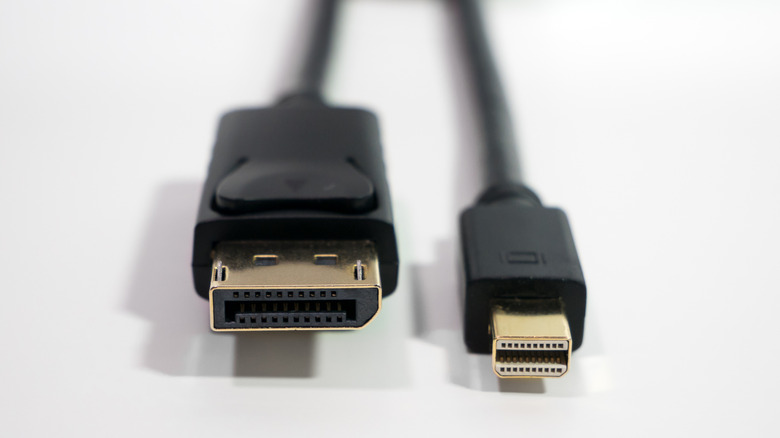
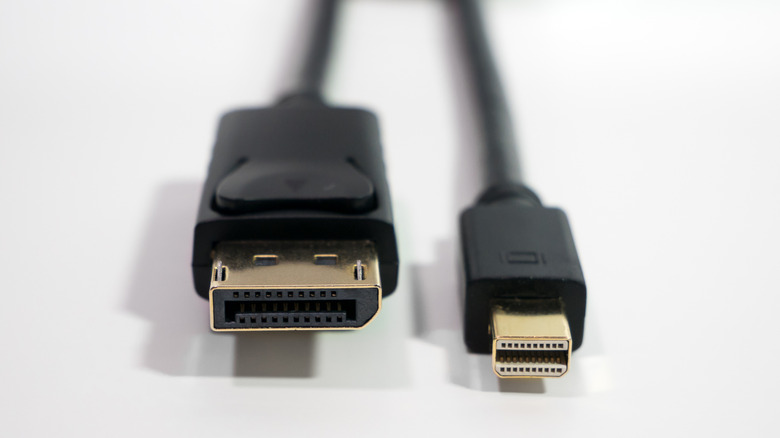
While most commercial TV manufacturers think the HDMI port already hits all the right notes, there’s still a certain segment of society who will always prefer DisplayPort instead: gamers. Due to its bandwidth and high refresh rate capabilities, DisplayPort is a godsend for maxing out their high-end PC specs or virtual reality headsets. Often, DisplayPort beats out the HDMI connectors when it comes to purely visual experiences, offering smoother frames and a tendency to have less lag. That is, of course, when it works properly. If you’re unlucky, you may encounter issues with your DisplayPort, such as tearing, flickering images, or the dreaded “DisplayPort not detected” error. So, whether you’re using a Mac or Windows device, there are two main possible reasons why your DisplayPort isn’t working: hardware and software issues. Here’s what to look out for in both and how to fix it.
Advertisement
Investigate your hardware
AlexanDior/Shutterstock
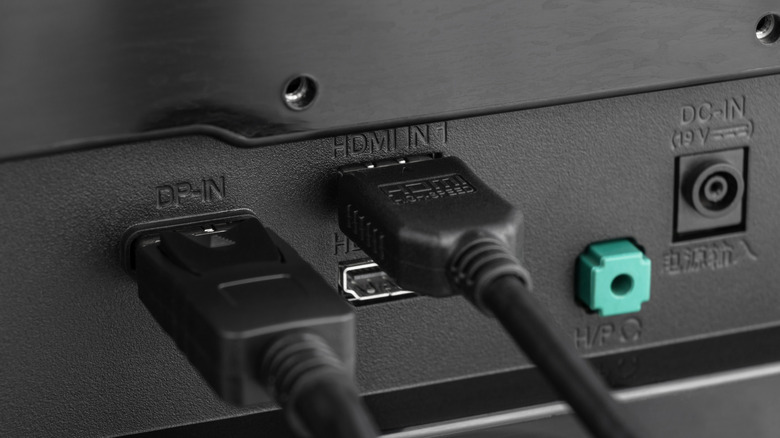
When it comes to your DisplayPort hardware issues, there are three main components: the input, the output, and the cable itself. To know if the cause is any of these, you’ll need to test each one separately. To start with, you’ll want to look at your DisplayPort cable for any damage that can affect signal stability. You’ll want to check the body of the cable for cuts or slices and the ends for things like bent pins or signs of dust or corrosion. These can happen if you don’t store your cables properly or expose them to the elements, but they can also just be bad quality. If you have a spare cable that you already know works, it can help to swap it out for testing. Should the cable be the problem, the easiest way to fix it is to replace it with a higher-version one.
The next step is to inspect the ports. You’ll want to avoid any loose connections between the ports and cable by unplugging and plugging it back in. It’s possible that things like dust and debris can affect its ability to transmit or receive data. Similar to cleaning your computer’s USB ports, you’ll need to shut it down before using a soft-bristle brush, compressed air, isopropyl alcohol, and a cotton swab to clean it. If you are using any adapters, such as DisplayPort to HDMI adapters, these might also interfere with performance if they are broken or not compatible.
Advertisement
Check your software
Antonio_diaz/Getty Images
Before you assume the worst, the first thing you should do is turn your monitor and computer off and back on again. Similar to many other tech problems, a quick restart might just do the job and fix any connection kinks. If that doesn’t work, you’ll want to check your display settings, such as whether you’ve set the right input source. If you have multiple devices connected to a monitor, such as a computer, console, or media player, it might not be set to the correct one. Depending on the kind of monitor you’re using, you might actually need to install additional drivers before you can use it. If you’re not sure, you can either check the instruction manual that comes with your monitor or the manufacturer’s official website. For some models, you may even be able to find YouTube instruction videos to reference.
Alternatively, it’s possible that your GPU drivers are outdated, which you can solve by downloading updates from their website. Depending on what GPU you own, there are also companion tools like Nvidia GeForce Experience and AMD Adrenalin that can automatically manage these updates. However, there are times that you might want to roll back your drivers as well, especially if your DisplayPort errors began after an update. This is because the update may have been corrupted in the process. When all else fails, it may be time to get in touch with the manufacturer for support. If your monitor is still under warranty, it may be worth having it replaced.
We spend hours testing every product or service we review, so you can be sure you’re buying the best. Find out more about how we test.
Chuwi UniBook: 30-second review
The Chuwi UniBook is a 14-inch Windows laptop built around Intel’s newly launched Core 3 304 processor, part of the Wildcat Lake family and the first Series 3 chip to appear in a laptop at this price. It weighs a claimed 1.2 kg, comes housed in an anodised aluminium chassis, and pairs a 16:10 IPS display with 8GB of memory and a 256GB SSD.
Positioning this model directly against Apple’s MacBook Neo, undercutting it by around $250 while offering a larger screen, the same memory and storage as the base Neo configuration, and a far wider set of ports. Early benchmarks of the Core 3 304 from other devices suggest genuinely strong single-core performance for a chip this cheap, which makes the UniBook one of the more interesting budget launches of the year on paper.
Advertisement
The critical caveat is that macOS runs reasonably well with 8GB of RAM and 256GB of storage, where Windows 11 is a singularly less spectacular experience.
While you can upgrade the storage to any Gen 3 or 4 NVMe 2280 drive, the amount of RAM isn’t able to be expanded.
Price is therefore the trade-off, which means the UniBook isn’t ideal for substantial tasks, even if it’s acceptable for light work. One side benefit of not being especially powerful is that the battery will last easily more than a working day, and it might even stretch to two.
Advertisement
From a value perspective, the Chuwi UniBook looks like an excellent deal, but the specification precludes it from being one of the best business laptops.
Chuwi UniBook: Price and availability
(Image credit: Mark Pickavance)
How much does it cost? From $450
When is it out? Available now
Where can you get it? Direct from Chuwiretailers
Chuwi initially opened pre-orders for the UniBook at $449 US dollars, positioning it as the cheapest laptop yet built around Intel’s Wildcat Lake platform. At the time of writing, using the Global Chuwi store, it’s priced at $449 for US customers, £335 for the UK and €449 for Europeans.
Sign up to the TechRadar Pro newsletter to get all the top news, opinion, features and guidance your business needs to succeed!
Advertisement
Given that this is a fully functional laptop with RAM and storage, and new processor technology, that price seems remarkably good.
However, there is only a single SKU that offers one processor, the Intel Core 3 304, 8GB of RAM (not upgradable) and only 256GB of storage.
I’m only aware of two other laptop makers with products built around this platform. They would be HP with the OmniBook 3 AI 14″ Laptop and Lenovo’s ThinkPad E16 Gen 4.
The HP is available in the UK through Currys for £799, for a model with 8GB of RAM and 512GB of storage.
Advertisement
The version of the ThinkPad E16 Gen 4 that uses the Intel Core 3 304 costs £954.60 in the UK direct from Lenovo, but does come with 16GB of RAM and Wi-Fi 6E. At the time of writing, both these models have yet to be launched in the US.
The UK pricing we have strongly hints that Chuwi’s pricing is remarkably competitive, and I wouldn’t be surprised if it were raised in the coming months.
It will be interesting to see how other brands price hardware based on this platform.
For those wondering, Apple’s MacBook Neo sells for £699 in the UK and $699 in the USA, for a machine with 8GB of RAM and 256GB of storage, without a charger.
Advertisement
Chuwi UniBook: Specs
Swipe to scroll horizontally
Laptop:
Chuwi UniBook
CPU:
Advertisement
Intel Core 3 Processor 304, Series 3 Wildcat Lake (5 Cores, 5 Threads, up to 4.3 GHz, Intel 18A process)
GPU:
Intel Graphics, Xe3 architecture, up to 2.3 GHz, 9 TOPS
NPU:
Advertisement
Intel NPU 5, 15 TOPS
RAM:
8GB LPDDR5, 6400 MT/s not upgradable
Storage:
Advertisement
256GB PCIe 3.0 SSD, single M.2 2280 slot rated up to PCIe 4.0 x4
Screen:
14.0-inch IPS, 1920 x 1200 (16:10)
Ports:
Advertisement
2x USB C (5 Gbps, PD, 4K@60Hz video), 2x USB A 3.2 Gen 1, 1x USB A 2.0, 1x HDMI 1.4b (4K@30Hz), 1x Gigabit Ethernet, 1x TF card slot, 1x 3.5mm audio
Camera:
720p webcam with physical privacy shutter
Networking:
Advertisement
Wi-Fi 6, Bluetooth 5.2
Dimensions:
314.5 x 221 x 16.4 mm
Weight:
Advertisement
1240g
OS:
Windows 11 Pro, pre-installed
Battery:
Advertisement
53.38Wh Lithium Polymer
Power supply:
65W USB-C PD charger
Advertisement
Chuwi UniBook: Design
(Image credit: Mark Pickavance)
Anodised aluminium alloy chassis
Lightweight and thin
Lots of ports
The chassis on the UniBook is made from anodised aluminium alloy, and Chuwi quotes a weight of approximately 1.2 kg and a thickness of 16.4 mm. Those figures put the UniBook among the lighter 14-inch Windows laptops at this price, assuming they hold up on a scale. The hinge opens to 180 degrees, and the marketing page states an 88% screen-to-body ratio thanks to narrow bezels around the 16:10 panel.
The specification lists two full-function USB-C ports, two USB-A 3.2 ports, one USB-A 2.0 port, HDMI, Gigabit Ethernet, a TF card slot, and a 3.5mm jack, which, on paper, is a generous selection for a budget machine. What’s odd, when I think about it, is that more expensive laptops tend to have fewer ports, forcing the owners to consider using docking stations to add those connections.
The inclusion of a LAN port is a definite advantage, especially in that awkward new Windows PC phase where Microsoft attempts to download all of human knowledge in the full knowledge that it needs almost none of it.
The USB-C and two USB-A ports are only 5Gbs, which is slightly disappointing not to have one that is 10Gbps, but there is HDMI out and a MicroSD card reader.
(Image credit: Mark Pickavance)
The keyboard is full-size and has two-level backlighting. It’s not ideal for creating dissertations, but for small input jobs it’s fine. The provided review hardware was a US layout, which I assume is the one most buyers will get.
Advertisement
Since I know how the UK layout maps to the US one, this wasn’t a huge problem for me, except that this keyboard annoyingly doesn’t have a PrtScn key. That made screen capture slightly more convoluted.
As trackpads go, this one is on the smaller side, measuring approximately 120 mm by 70 mm, and it uses the flexible-click methodology.
Overall, considering the low cost of this device, its construction is much better than I’d anticipated. The use of metal skins and a simple but effective style works well. What it lacks is a fingerprint sensor or a Windows Hello camera. But with so many USB ports, it could easily use a security fob if you want to add extra protection.
However, given the specifications and price, I see this device being more oriented towards education than business, and I have some thoughts on its suitability for that in the next section.
Advertisement
(Image credit: Mark Pickavance)
Chuwi UniBook: Hardware
Wildcat Lake Intel Core 3 304
NPU and GPU short of Copilot Plus certification
8GB of RAM can’t be upgraded
Wildcat Lake is Intel’s answer to a question that has irked it for years. How do you bring modern chip design to the cheapest laptops without pricing them out of the market they serve? The family was announced quietly at CES 2026 alongside the much bigger Panther Lake launch, and its job is to replace the ageing Alder Lake N and Twin Lake chips that have powered budget laptops, mini PCs and Chromebooks since 2023.
Where those older chips relied on Gracemont efficiency cores alone, Wildcat Lake borrows directly from Panther Lake’s playbook. It pairs Cougar Cove performance cores with Darkmont low-power efficiency cores, adds Xe3 graphics and an NPU 5 neural engine, and builds the whole thing on Intel’s 18A process.
In effect, Intel has taken its flagship architecture and squeezed a scaled-down version of it into a chip built for machines costing a few hundred dollars rather than a few thousand.
Well, that’s the promise, and on paper it sounds perfect for the budget consumer. Modern architecture at 18A should bring a genuine efficiency jump over the older Intel 7 process used by the N-series chips, and early single-core benchmarks on Wildcat Lake devices back that up, with some results landing close to flagship phone silicon. For a family aimed squarely at browsing, office work and video calls, single-core strength matters more than raw multi-core muscle ever would.
Advertisement
However, in the time-honoured Intel tradition of grasping potential defeat from the jaws of victory, this series has become more about what Intel chose to cut.
Wildcat Lake uses a simpler organic substrate and flip chip packaging rather than the advanced packaging found on Panther Lake, which keeps costs down but limits how far the platform can scale. Core counts are modest across the board, topping out at six, and GPU configurations are similarly trimmed.
None of that is a flaw exactly, since this was never meant to compete with premium silicon, but it does mean the ceiling was made low by design.
The Core 3 304 sits right at the bottom of that stack. It carries five cores across five threads, just one Cougar Cove performance core paired with four Darkmont low-power efficiency cores, and turbo clocks reaching 4.3GHz. That single performance core is notably light even by Wildcat Lake standards, since every other chip in the family carries two. Graphics come from a single Xe3 core rated at 9 TOPS, alongside an NPU rated at 15 TOPS.
Advertisement
What it lacks is just as telling. There is no second performance core to lean on for heavier multitasking, no multi-core Xe3 graphics block, and no ray tracing.
Combined NPU and GPU output falls well short of Microsoft’s 40 TOPS Copilot Plus threshold. The dedicated NPU is rated at 15 TOPS Int8. Combined with the GPU’s 9 TOPS, that gives a platform total of 24 TOPS. Microsoft’s Copilot Plus certification requires 40 TOPS from the NPU alone, so despite Chuwi’s AI Laptop branding, the UniBook does not qualify and will not run Copilot Plus-specific features.
Memory is 8GB of LPDDR5 running at 6400 MT/s, a healthy speed for this class of chip even if the capacity is modest. Is it enough for Windows 11?
The fact is that when you fire up the machine with the default installation, 6.3 GB of RAM has already been eaten before the first app is launched. Launch a browser and open 10 webpages; the system starts paging, and things get jerky from that point onwards. Where it really struggles is multitasking, since there is only a single performance core, alongside the four efficiency cores.
Advertisement
There may be ways to reduce Windows 11’s memory usage, and you’ll need to use them all if you intend to run multiple apps and not find yourself waiting on this system. In times long gone, you would open the laptop, find the 8GB SODIMM, and replace it with a larger one, but that’s not possible with this design.
The very week I wrote this review, Microsoft threw a few of its disposable developers at members of the press to talk about changes they intend to make Windows 11 work better with less memory. Technically, the minimum memory requirement is 4GB, but Microsoft have focused apparently on improving the 8GB experience. While these updates are not yet launched, and when they will be is unclear, these are clearly driven by the catastrophic price hikes in RAM cost.
(Image credit: Mark Pickavance)
I need to point out that Windows 11 launched in 2021; therefore, for five years, Microsoft sat on its overly profit-padded backside, ignoring users who complained that their operating system wasn’t an efficient user of memory.
But a few PC makers whine that they need to reduce the RAM complement to 8GB from 16GB on some of their lines, and those in Redmond leap into action? The poor optics of these announcements won’t surprise many.
Advertisement
It’s also interesting to note that this machine was built to compete with Apple’s MacBook Neo, and that comes with the same 8GB+256GB entry-level profile, but nobody is complaining that it doesn’t work smoothly with macOS.
This would be less of an issue for laptops in general if the makers all hadn’t chosen to make memory non-upgradable. A choice they made, not the people buying them.
The only upgrades available here are the M.2 Wi-Fi adapter and storage, and getting to them is relatively easy if you remove the 11 screws that hold the underside in place.
If anyone is reading this and has this system, just be aware that 8 of the screws are short and three are long, and getting them mixed up could have dire consequences when you reassemble the system.
Advertisement
There is only one M.2 2280 for storage, so you will need a USB caddy to do a drive cloning, and there isn’t room for a drive with a heatsink inside.
One major disappointment I noticed is that the pre-installed drive is only PCIe 3.0 x4, where the slot is rated for PCIe 4.0 x4. And, as the drive is only 256GB, finding a 500GB or 1TB replacement drive that’s PCIe 4.0 would be a good upgrade.
Overall, this system is cut to the bone in some critical areas, specifically RAM, making it less than ideal for those who like to load multiple apps and multitask between them.
It needed those Microsoft efficiency upgrades yesterday, or it’s likely to be a contributing factor in the switch to Linux for those owning this hardware.
Advertisement
(Image credit: Mark Pickavance)
Chuwi UniBook: Performance
Swipe to scroll horizontally
Laptops
Row 0 – Cell 1
Chuwi UniBook
Chuwi CoreBook X 7430U
Advertisement
CPU
Row 1 – Cell 1
Intel Core 3 304
AMD Ryzen 5 7430U
Cores/Threads
Advertisement
Row 2 – Cell 1
5C 6T
6C 12T
TPD
Row 3 – Cell 1
15W
Advertisement
15W
RAM
Row 4 – Cell 1
8GB LPDDR5
16GB DDR4 (1x 16GB)
Advertisement
SSD
Row 5 – Cell 1
HOGE H750L 256GB
512GB Wodposit WPBSNM8
Graphics
Advertisement
Row 6 – Cell 1
Intel UHD Graphics (Gen 12.2)
AMD Radeon Graphics
NPU
Row 7 – Cell 1
Intel NPU (15 TOPS)
Advertisement
N/A
3DMark
WildLife
5,198
Advertisement
4,581
Row 9 – Cell 0
FireStrike
1796
2085
Advertisement
Row 10 – Cell 0
TimeSpy
830
836
Row 11 – Cell 0
Steel Nomad.L
Advertisement
590
716
CineBench24
Single
Advertisement
N/A
63
Row 13 – Cell 0
Multi
N/A
Advertisement
254
Row 14 – Cell 0
Ratio
N/A
4.05
Advertisement
GeekBench 6
Single
1962
1442
Advertisement
Row 16 – Cell 0
Multi
5338
4848
Row 17 – Cell 0
OpenCL
Advertisement
6006
11015
Row 18 – Cell 0
Vulkan
7304
Advertisement
10122
CrystalDIsk
Read MB/s
2315
Advertisement
3588
Row 20 – Cell 0
Write MB/s
2087
1852
Advertisement
PCMark 10
Office
4351
4676
Advertisement
Row 22 – Cell 0
Battery
20h 26m
9h 30m
Battery
Advertisement
Whr
55.38
46.2
Row 24 – Cell 0
PSU
Advertisement
65W
65W
WEI
Score
Advertisement
8.1
6.6
It was difficult for me to find laptops I’ve reviewed that would make a suitable comparison, since most of them use much more powerful chips than the one in the UniBook.
In the end, I found that the results for the Chuwi CoreBook X 7430U are reasonably comparable, especially with respect to GPU performance. However, one massive advantage that the CoreBook X 7430U had was 16GB of RAM, even if it was DDR4. That allows it to share more with the GPU, which is why the scores for that hardware improve as the graphics challenges increase.
Advertisement
One unexpected casualty of the 8GB memory capacity was the CineBench24 benchmark, which failed to run due to the amount of RAM allocated to the Intel UHD Graphics (Gen 12.2) GPU.
Another disappointing result is the NVMe drive’s speed. But this is exactly what happens when you use a cheap Gen 3 drive in a Gen 4 slot. The battery performance is thankfully a more positive story.
Chuwi’s own promotional material quotes up to 13 hours of 1080p video playback from the 53.38Wh battery, tested at 50% brightness and volume with Wi-Fi on, Bluetooth off, and Best Efficiency Mode engaged.
However, you can use this machine with the screen much less bright, and in my testing, it lasted over 20 hours at full capacity on its 55.38Wh battery. Easily the best result of these tests.
Advertisement
That’s a couple of busy days at least, or one dawn-till-dusk exercise. That capacity can be replaced on the provided 65W charger in a little over 2 hours, enabling a quarter of the capacity to be recovered in just 30 minutes.
(Image credit: Mark Pickavance)
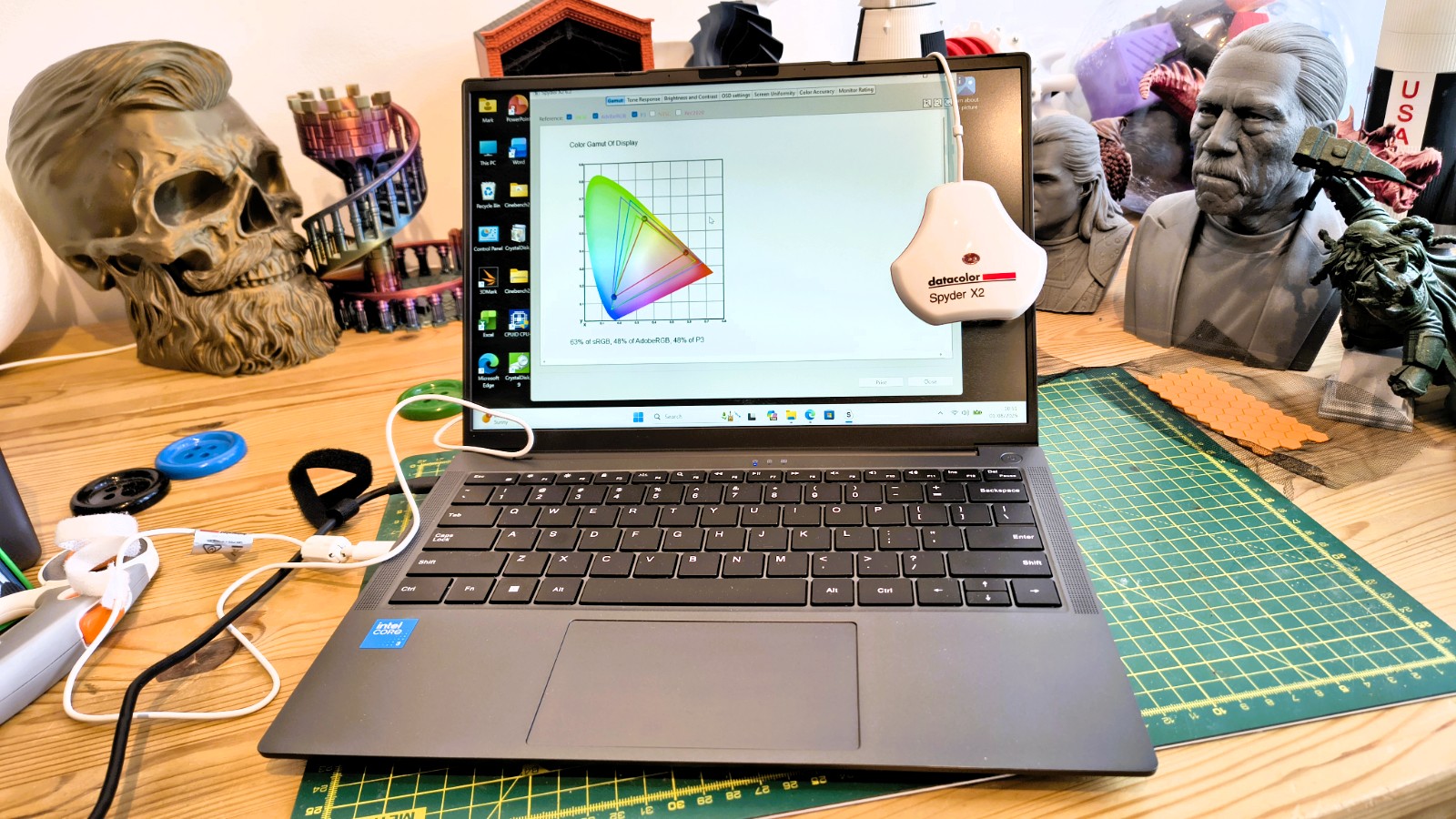
The screen performance levels that Chuwi quotes are 100% sRGB and 300-nit peak brightness. While the 300nit value is reasonably accurate, the colour gamut of the screen on the supplied UniBook sample came nowhere near 100% sRGB. It managed just 63% of sRGB, 43% of AdobeRGB and 34% of Rec2020.
Gamut is certainly a weakness, but contrast, uniformity (brightness and colour) and tone response are all decent. My conclusion was that this isn’t a bad screen, unless you are specifically looking for colour accuracy.
Those looking for a performance laptop won’t be interested in this hardware, which is nailed down by a processor with only five cores and only 8GB of RAM running on a PCIe 3.0 SSD.
Advertisement
When using this system, keep your expectations low, and keep the number of web pages open small.
I was almost tempted to put a PCIe 4.0 SSD drive in the review unit, and put a modern Linux distro on it to see how much better the experience might be, but time was against me.
In short, this system is cheap for a reason, and even with Intel’s new silicon, the performance is undermined on numerous other fronts.
(Image credit: Mark Pickavance)
Advertisement
Chuwi UniBook: Final verdict
UniBook is a genuinely interesting proposition on paper. It is the first widely available laptop built around Intel’s new Wildcat Lake platform; it undercuts Apple’s MacBook Neo on price while offering more ports and a bigger screen, and early third-party benchmarks of the Core 3 304 hinted at unusually strong single-core performance for the money.
However, a Windows 11 system with 8GB of RAM that can’t be upgraded and a storage drive that undersells the socket it sits in combine to undermine what could be a much more useful system than it ultimately is. The overselling of its AI capability doesn’t help either.
What is good about this system is the excellent battery life and the wide number of ports, even if the best it can offer is USB 3.2 Gen 1.
None of that rules the UniBook out. It simply means the value case pivots on the purchaser’s use case, and it needs to be modest. For that reason, I wouldn’t recommend this to a student, as they’ll discover its limitations on the first day of use.
Advertisement
Should you buy a Chuwi UniBook?
Swipe to scroll horizontally
Value
Competitively priced for the specification
4.5/5
Advertisement
Design
Lightweight chassis with plenty of ports
4/5
Hardware
Advertisement
New Intel Wildcat Lake platform but only 8GB of RAM
3.5/5
Performance
Only suitable for light tasks due to Windows 11
Advertisement
3/5
Overall
Inexpensive hardware suitable only for light tasks
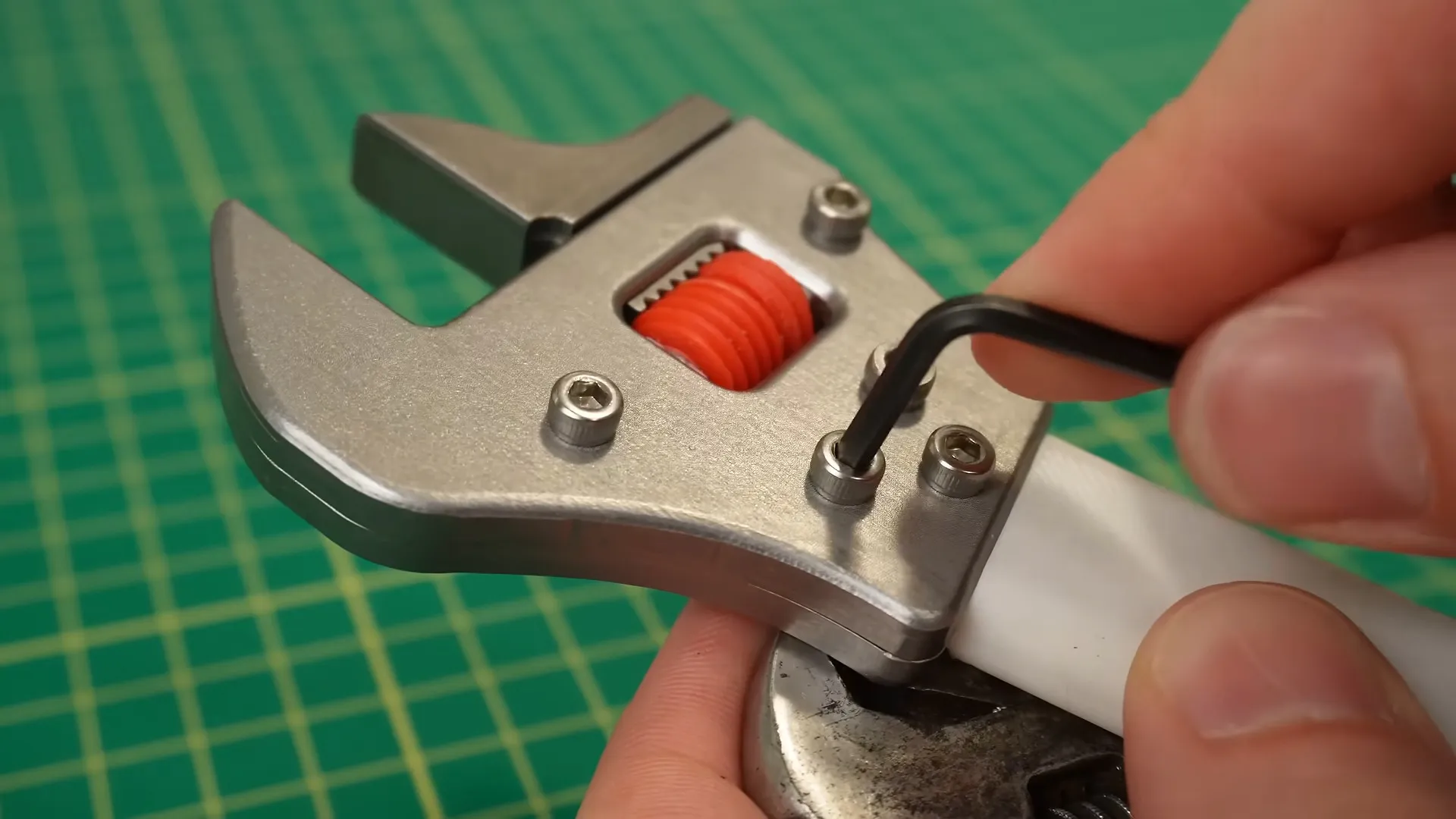
We’ve probably all got one item in our toolboxes or chests that we really, really don’t like, but find too handy to toss. For [Someone Should Make That], that item was the bolt-rounding adjustable wrench. Rather than continuing to gripe about it, or alter his habits to make greater use of the full wrench set he also owns, he decided to build a better mousetrap. By mousetrap, we mean adjustable wrench.
It took a couple of iterations on-screen before he hits on a solution that seems to work quite well indeed. The problem [Someone] had with his adjustable wrench was one of physical slop: once adjusted, there’s just too much play in the mechanism, which results in rounded-off bolt heads. [Someone]’s CNC’d solution takes inspiration from the CNC machine that manufactures it: he’s using spring-loading in the adjustment screw akin to what you find in the anti-backlash nut on your CNC mill or 3D printer’s ball threads. The tension from the springs keeps the wrench tight to the bolt, and that keeps [Someone] from rounding them off. Speaking of 3D printers, he prototyped in plastic before machining, and the screw in the end product stayed that way. It would be interesting to see how well that holds up.
Not only do we appreciate that it’s solved a common problem many of us have, the ethos of “this angers me, so I shall hack it” is one we support 100%, so do give a watch unless you’re one of those people who absolutely can’t stand videos, even when they’re spring-loaded to have no slop. There’s some good tips for beginner CNC operators in there, too.
This isn’t the first time someone’s tried to reinvent this particular wheel, though the last version we liked was a ratchet.
Major milestones typically call for quite a bit of fanfare and fuss. A 40th birthday, for instance, or a 50th wedding anniversary. However, there will likely be few milestones as worthy of fanfare as the U.S.’ 250th anniversary on July 4th, 2026. Unsurprisingly, there have been all kinds of patriotic products produced to mark this famous date, including a rather special set of 8-inch diagonal cutting pliers from Klein Tools.
The Klein Tools 250th Edition Diagonal Cutting Pliers have a red, white, and blue colorway on the handles, with red and white on one and blue and white on the other. Functionally, however, these are the same Journeyman handles that Klein Tools customers will be familiar with. Klein complements the special colors with a laser-etched legend that states “250 USA Est. 1776” on the jaws, alongside a stylized version of Stars and Stripes above it.
Advertisement
These $34.98 Klein pliers have proved popular with customers, to the point that availability varies significantly between outlets at the time of writing. Let’s take a look at what these pliers offer and how customers like them to see if they’re one of the many Klein Tools worth adding to your tool box – as well as run through the 250th anniversary Klein Tools collection it’s a part of.
Advertisement
Klein Tools’ anniversary pliers and the rest of its 250th anniversary collection
Klein Tools’ 250th Edition pliers are essentially its standard pliers, just with new colors and iconography. Thus, they have the same 2000 Series cutting knives, stubby jaws, and a design that allegedly allows for 36% more cutting power than other pliers. The Journeyman handles still use a blend of two materials, which makes them durable yet comfortable to hold. Unsurprisingly, then, Lowe’s customers seem to like these pliers a lot, with the product receiving 4.9 out of 5 stars from 117 ratings and a 100% recommended ratio.
It’s not every day that your nation turns 250, of course, and Klein Tools, which makes a lot of its tools in the U.S., didn’t stop at celebrating the milestone with just a pair of pliers. Alongside the 8-inch pliers, Klein also sells 250th Edition 9-inch Journeyman Lineman’s Pliers, a 250th Edition screwdriver set, and a 250th Edition Wire Stripper/Cutter. Each item boasts the same patriotic colors for the handles and semiquicentennial iconography, tweaked to suit the tool’s design. In the case of the screwdrivers, that means separate red, white, and blue sections. If you’re interested in the 250th Edition pliers, or any of the other anniversary tools, you can check the Lowe’s website or any of the retailers listed on the Where to Buy section of Klein’s website.
Charles Lamanna, EVP of Copilot, Agents and Platform at Microsoft, at a GeekWire event in March 2026. (GeekWire Photo / Kevin Lisota)
GeekWire is profiling over the next few weeks some of the people and teams that are shaping the evolution of Microsoft in what we’re calling its “Microsoft 2.5” era.
The Copilot Super App cat is only partially out of the bag. Sometime in the coming weeks, Microsoft will launch its entry into the AI “super app” space, company officials have said. But Microsoft hasn’t talked much about what the coming Copilot Super App will include beyond a few of the top-level experiences that are meant to unify and organize consumer and business users’ access to key Microsoft AI properties.
Executive Vice President Charles Lamanna is part of the inner circle known as the Copilot Leadership Team that is spearheading the Super App effort. He also oversees building out and securing the back-end services that will power the Copilot Super App.
Advertisement
As head of Copilot, Agents, and Platform, Lamanna has a lot of responsibility for someone who has been with Microsoft for “only” 13.5 years. He has actually been with the company a bit longer than that, as he has done three tours at Microsoft: He first interned for Windows Live OneCare, then returned in 2009 to work on message-filtering services. He rejoined Microsoft when it bought his cloud performance-management startup MetricsHub Inc. in 2013. He worked as an engineering manager on Azure, then ran the Power Platform and Dynamics 365 teams, before assuming his current role in March 2026.
Lamanna says he emphasizes three things with his team: Be customer-obsessed; get things done by having a “total ownership mindset”; and be kind, not jerks.
Every six months, he writes a “State of the Business” paper for the team, in which he outlines their priorities. In addition to focusing on changing how people work — from tooling, technology, budgeting and organization perspectives — he emphasizes the importance of keeping “the crown jewels” of Office and Microsoft 365 up, reliable and secure.
“There’s going to be a massive surge of demand on the back end (Microsoft 365) because of agents. They’re nonstop,” said Lamanna during GeekWire‘s interview with him this week.
Advertisement
While the Super App itself will likely be free (like the Copilot App today), the services it exposes will likely not. The company has been moving toward usage-based pricing with its AI products, the way it already has with GitHub Copilot and Microsoft 365 Cowork. That kind of model makes sense for the company in a world where always-on agents, not the number of users, drive a lot of the demand.
He also said his team needs to be at the frontier for AI products. “We need to have AI startup and lab characteristics but with Microsoft sensibilities,” he said.
Reining in the Copilot-Palooza. Despite the rise of agents and all things “agentic,” Copilot is still Microsoft’s top priority, Lamanna said. Microsoft’s goal is for Copilot to be a truly personal AI assistant that will know how you work, the apps you use, the processes and workflows that matter to you, and more.
Advertisement
“We had some missteps because we fragmented,” he acknowledged. “It’s like we had a consumer Copilot and we have like a commercial Copilot and we have GitHub Copilot and yeah — ‘Copilot Palooza’ is what I call it internally.”
This is where the coming Copilot Super App fits in. Microsoft wants it to be a single destination that brings the key Copilots together on the work and home fronts.
He said to think of the Super App “almost like a browser or an operating system.” In the same way a browser might have a bunch of different tabs, or Windows a bunch of different apps, the Super App will be the home for Code, Chat, Cowork and Autopilots, or always-on agents. Microsoft is expecting that users still will go directly to apps when needed, but it’s working to make Copilot the first app people boot into and live in, similar to the way many do today with Outlook or Teams, he said.
Microsoft’s goal is to wire into the Super App even more of its core franchises over time. Dynamics 365, its CRM and ERP offerings, are morphing into a set of agents that connect to Dynamics Model Context Protocol (MCP) servers, which connect AI models to back-end data. The plan is to integrate those Dynamics agents into the Super App.
Advertisement
The company also is in the midst of integrating the Dataverse storage and management platform that underlies its Power Platform and Dynamics directly with Copilot. That capability, in testing now, would give users a more streamlined way to query data stored in their ERP and CRM systems from inside Copilot.
Rethinking the ‘headless’ approach. With Microsoft looking to make the Super App its new front-end user experience, what happens to Office? Its competitors like Salesforce and SAP are moving toward the idea of a “headless” approach, meaning customers would access the backend CRM or Commerce data via agents, rather than traditional desktop apps.
Lamanna said he’s not a fan of the “headless” term, as it implies “it’s dumb.” He also said you can’t simply connect an AI model to a programming interface built 10 years ago without working through how to optimize for cost, performance, and retrieval.
He said the Microsoft IQ suite of intelligence layers is the key here. Work IQ analyzes emails, chats, meetings and usage patterns and preferences so Copilot and agents can make context-aware suggestions. Fabric IQ is a similar layer for Microsoft’s data platform.
Work IQ is becoming like the headless version of Microsoft 365, Lamanna said. That means users can get to their email, docs, and files without having to use applications like SharePoint or Outlook in between. Work IQ becomes a kind of in-the-background version of Microsoft 365, and the Super App automatically invokes whichever IQ/service/backend is needed.
“Copilot can navigate to these IQs as needed. For email, go to Work IQ. Info inside Dynamics 365, go to the MCP servers that it publishes. Data from Salesforce or ServiceNow, we have connectors. But you stay in the Super App,” Lamanna explained.
If Microsoft is no longer the Windows company or the Office company, what is it going to be when it grows up?
Advertisement
“We want to be the Copilot company,” said Lamanna without hesitation. “Copilot with the Super App is the front door to basically everything, from Dynamics, to GitHub, to Exchange, to SharePoint, to OneDrive, to other services I don’t even remember.”
Alongside that, Microsoft will continue to be an infrastructure company, he added, focusing on tokens, compute and storage.
“Those are probably the two most interesting businesses in technology for the next 10 years.”
I couldn’t believe it. Had Roku really just casually inserted global viral raccoon sensation Jimothy into Roku City? I’d seen a post claiming so, but knowing how easy it is to fake things with AI, I had to see it for myself.
I powered up one of my home’s half-dozen Roku streaming boxes and spent 10 minutes trying to force the platform into screen-saver mode, which then opens up Roku City. Ever since the most recent Roku platform update, I see this interface far less often than I used to.
Roku City is Roku’s fictional, purple cityscape populated by thinly disguised iconic characters and objects from film, TV, and life.
Advertisement
Latest Videos FromTechRadar
After a few minutes of hunting, I figured out how to set my screen saver timeout to one minute. A moment later, the side-scrolling Roku City appeared, and in it, caught mid-waddle atop a chain-link fence, was Jimothy’s unmistakable silhouette.
For those who’ve thrown out their phones, computers, and TVs, Jimothy is a Seattle-based raccoon with a rare disorder called “short spine syndrome.” Don’t worry, it doesn’t appear to impact his mobility or lifestyle, but once you see Jimothy, you never forget him.
“You share the same problem we all share, which is when we really want to get to Roku City, like right now, we wonder, ‘How do we get there?” Damon Van Deusen, Roku’s Vice President, Global Brand and Creative, told me this week, but added that a solution is already in the works: Roku is adding a Roku City tile to the home screen for instant access.
Sign up for breaking news, reviews, opinion, top tech deals, and more.
Advertisement
Van Deusen agreed to sit down and explain how Jimothy made his way — virtually — from the alleys of a Seattle suburb to Roku’s iconic services.
Jimothy’s appearance, while surprising, is not out of character for the screen saver enjoyed by Roku’s roughly 100 million customers.
“The Jimothy journey starts six or seven years ago when we actually started realizing that social was paying attention to the screen saver,” explained Van Deusen. Back in 2021, they noticed likely pandemic-quarantined consumers posting about how they’d like to visit the city, share a kiss there, or even get married in the purple space.
“We’ve been putting Easter eggs in the screen saver as a way to engage some fans and social ever since,” he added.
Over the years, the city’s been populated by, among other things, characters from popular films (like the rock monster from Galaxy Questand Star Trek’s Enterprise). Still, there was something about Jimothy’s timeliness that struck me.
Seattle resident Kiana Hall posted an Instagram video about the unusual raccoon on July 16, 2026. I spotted Jimothy in Roku City on July 31, and the post I saw about the raccoon’s integration in the platform was a few days older than that.
“In the last two years, we created what’s called the Rapid Response Easter Egg Team,” explained Van Deusen.
Advertisement
This cross-functional group cuts through typical product development, and “we figured out a system where we could publish these things really fast. So now everything we do is quicker and quicker and quicker.”
Tracking and choosing from the Zeitgeist
The team, which often communicates on Slack, is constantly kicking around watercooler moments like Punch the Money and Goat on Car. They choose “anything that tickles us, anything that feels really fun. I mean, again, that’s the bar; it’s gotta be delightful, playful, fun, lift spirits, and create conversation,” Van Deusen told me, who later added that delight, or something that triggers an “unexpected smile,” is “really the heart of the whole brand.”
Van Deusen loved that I more or less stumbled on Jimothy’s existence in the city. “An unexpected smile, if you think about it, it’s like it comes out of nowhere. It’s not like you’re looking for it; it’s just like you spotting Jimothy. It’s like, ‘Wait a minute, are you, wait, is that Jimothy?’”
Advertisement
The Jimothy journey starts six or seven years ago when we actually started realizing that social was paying attention to the screen saver,
Not every viral moment can make it in. The Rapid Response Easter Egg Team avoids bummers and negative news. However, they did do a retrospective of Moira Rose’s wigs as a way to memorialize the great Catherine O’Hara, who played Moira in Schitt’s Creek and died on January 30 of this year.
When the right idea comes along, the team knows it. “Then we’ll be like, ‘Oh my God, that’s so cool,’ and then we’ll make it happen right away…and that’s how Jimothy came about.”
(Image credit: Tim Cook– Designer. Illustrator. Director. @ Roku Inc.)
Looking at the Roku City Jimothy, I was struck by the silhouette’s uncanny accuracy — it could be no other raccoon.
Van Deusen told me Roku has, over the last five years, built a world-class illustration team, which includes comic book illustrators and former Disney artists.
Advertisement
The company shared the Roku Designer, Illustrator, and Director Tim Cook‘s early Jimothy sketch and how he might appear in Roku City (above). Even in pencil, you can see how he captured the shape and signature gait of the lovable critter.
The making of an icon
To create Jimothy, the team focused on that “iconic sort of hunch.” Van Deusen said that there was a feedback session to ensure they got the look just right.
Silhouettes also happen to be part of Roku City’s DNA, giving you the clear impression of a character or viral figure without a lot of detail.
Advertisement
“We had tried doing less silhouetted versions of the city when we tried to localize for different markets once, and the more you see, the further you get away from the City,” he said.
The suggestion of these shapes and recognizable figures forces you to lean in and engage even more with what is arguably just a screen saver.
“It’s kind of a little bit of a wink, obviously, you know, and we do that on purpose; we never want to say too much. And we never reveal what the Easter eggs are; we always just sort of suggest and like elude, and again, it’s so much more fun,” said Van Deusen, smiling, I think, at the thought of Jimothy’s unmistakable shape.
We developed a tool where we can basically come up with an idea, something we want to do, the illustration team quickly mocks something up, and we can put it in the screen saver, all within a couple of hours.”
As for how Jimothy made it to millions of screen saves so quickly, Roku’s Rapid Response team can add new elements to Roku City in a matter of hours.
Advertisement
“We developed a tool,” Van Deusen said, “where we can basically come up with an idea, something we want to do, the illustration team quickly mocks something up, and we can put it in the screen saver, all within a couple of hours.”
That kind of speed puts Roku City firmly inside the zeitgeist. But that, too, is fast changing, and I wondered how long Jimothy would be waddling across Roku City screens.
Roku does rotate out the Easter eggs, though a backlog of four years or more can rotate in and out of the side-scrolling interface. Roku, by the way, recently added a user-controllable version where you can slide back and forth for a better look at all these hidden gems, including Jimothy.
The lovable raccoons should appear in Roku City “as long as Jimothy is in the zeitgeist,” said Van Deusen, adding, “[he] will eventually, probably be replaced. I don’t know if we’ll always have a rotational raccoon, but we will find the next, you know, popping character.”
Advertisement
Until then, enjoy Jimothy in real and virtual life.





























































You must be logged in to post a comment Login