Connect with us

Tech

The Kindle Scribe Colorsoft is a lot of fun, but it’s not a must-have

Published

on

After testing the Kindle Scribe Colorsoft for two months, I found that it was made for a very specific kind of note-taker and reader. While the device is pretty and lightweight, it’s not something the everyday person needs due to its hefty price tag and size. 

However, for those who have been waiting for a color Kindle that doubles as a digital notebook, the Kindle Scribe Colorsoft is worth considering. 

The device starts at a steep $630 and is available in two colors: Black and Fig, a pretty purple shade. It weighs just 400 grams and features an 11-inch display that makes it similar in size to a traditional sheet of paper.

Its thin design is impressive, but its larger size means it’s not exactly something you can hold comfortably with one hand. I found it most comfortable to use when it was propped up against my knees while sitting on a bed or placed flat on a desk.

Advertisement

One thing I like about e-readers is that they’re usually quite portable, so I can easily pop one into my purse when I’m on the go. That wasn’t the case with the Kindle Scribe Colorsoft because its size meant I never ended up taking it out of the house. However, if you’re an avid note-taker or researcher, I could see why you’d want to put it in your work bag to take with you to the office or to a coffee shop to get some work done. Beyond those situations, it’s not a device I’d reach for during a quick trip in an Uber or while waiting at a doctor’s office.

The larger size does mean that there’s more room for writing and note-taking, or even sketches and diagrams. And of course, the larger display makes reading PDFs and other documents easier.

When it comes to reading, the larger screen has both benefits and drawbacks, as the extra space is helpful when reading books with charts or maps, but the size also gets rid of the cozy feeling that makes smaller Kindles appealing.

Image Credits:TechCrunch /

What I liked about the larger size was that I was able to create an easy-to-read color-coded digital planner and reading journal, especially since the device comes with templates for daily, weekly, and monthly planners. And as someone who normally has a physical reading journal, I found it quite efficient to be able to finish a book and then open up a digital notebook on the same device to log my reading. 

The device comes with a Kindle Scribe Pen that attaches magnetically to the side of the e-reader. The pen feels nice in your hand and can be programmed for various actions. The eraser works smoothly and responds almost instantly. 

Advertisement

While the color display is fun, it’s important to recognize that colors look more like soft highlighter shades rather than the vibrant tones you see on a regular tablet. That’s not necessarily an issue for note-taking, but it does mean that comics and other visual content won’t look as rich as the original colors.

The device’s color options were useful when highlighting books because I could assign specific colors to different types of notes. For example, while reading a twisty thriller, I used blue to mark details I thought I might need to remember later and red for quotes I enjoyed and wanted to note. It’s also easy to quickly switch between the different colors thanks to the device’s fast refresh rate. 

As for battery life, I found it to be excellent. I only had to charge the device twice over the course of two months. It is worth noting, however, that writing uses more power than reading.

All in all, the Kindle Scribe Colorsoft makes the most sense for students, researchers, and journalers who want one device for reading, annotating, and organizing handwritten notes. For everyone else, the steep cost is hard to justify.

Advertisement

If you’re simply looking to upgrade an older Kindle, I don’t think the Kindle Scribe Colorsoft is worth the investment, as you’d be better off with the more reasonably priced Kindle Paperwhite, which starts at $159.99.

When you purchase through links in our articles, we may earn a small commission. This doesn’t affect our editorial independence.

Source link

Advertisement
Continue Reading
Click to comment

You must be logged in to post a comment Login

Leave a Reply

Tech

Paying for AI, freezing iPhones, & avoiding scams

Published

on

Someone has to pay for all this AI, nothing is foolproof, and Apple’s lawsuit with OpenAI is only just beginning, all on the AppleInsider Podcast.

As Wesley briefly covered on the previous episode, artificial intelligence is costing companies billions with very little return. Every new tool comes with a new cost, sometimes money, sometimes privacy.

It’s a grab bag of topics with people putting iPhones in freezers, getting Uber email scams, and Google Health gaining Apple Health syncing capabilities. There’s also talk about Apple’s lawsuit with OpenAI, which doesn’t seem to be going well for OpenAI even though court hasn’t even convened yet.

Your hosts discuss what’s expected for the iPhone 18 Pro and iPhone Fold, which should be announced in just under six weeks. The event itself could be announced at any time, but it most certainly won’t be live.

Advertisement

BONUS: Subscribe via Patreon or Apple Podcasts to hear AppleInsider+, the extended edition. This time, speaking of payments, the discussion is on technology and money, specifically how we need to manage our finances and how options like Apple Card can usually help.

More AppleInsider podcasts

Tune in to our Smart Home Insider podcast covering the latest news, products, apps, and everything HomeKit related. Subscribe in Apple Podcasts, Overcast, or just search for HomeKit Insider wherever you get your podcasts.

Podcast artwork from Basic Apple Guy. Download the free wallpaper pack here.

Those interested in sponsoring the show can reach out to us at: [email protected].

Advertisement

Subscribe to AppleInsider on:

Keep up with everything Apple in the weekly AppleInsider Podcast. Just say, “Hey, Siri,” to your HomePod mini and ask for these podcasts, and our latest HomeKit Insider episode too. If you want an ad-free main AppleInsider Podcast experience, you can support the AppleInsider podcast by subscribing for $5 per month through Apple’s Podcasts app, or via Patreon if you prefer any other podcast player.

Source link

Advertisement
Continue Reading

Tech

Brit boffins boast of beating barriers to building fusion power

Published

on

SCIENCE

MAST Upgrade installation hit highest pressure ever achieved without the super-hot plasma destabilizing

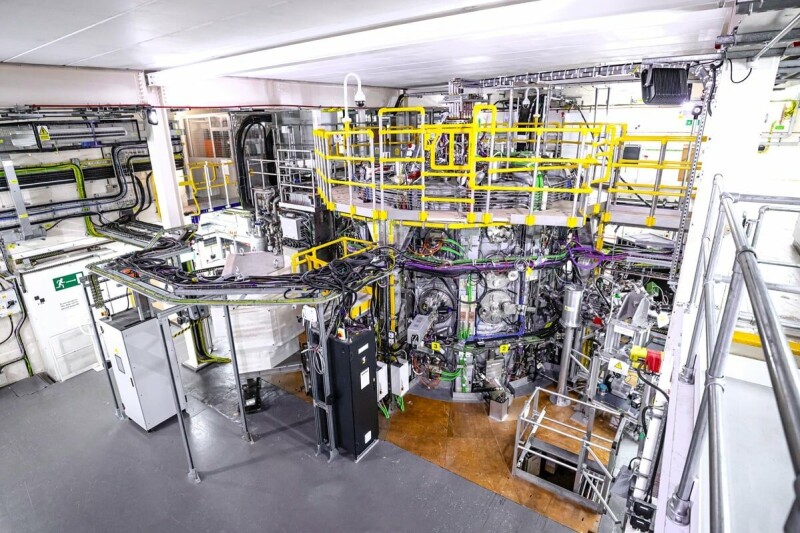
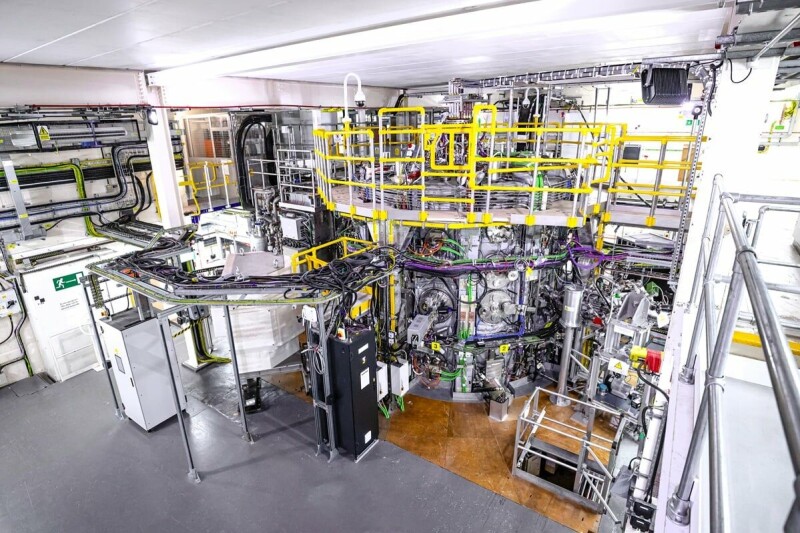
Scientists at the UK Atomic Energy Authority (UKAEA) say that they have overcome plasma instability issues standing in the way of commercial fusion power plants.

The boffins overseeing the MAST (Mega Amp Spherical Tokamak) Upgrade installation at UKAEA’s Culham Campus in Oxfordshire conducted a fifth series of experiments on it during 2025 and 2026 and produced more than 1,100 fusion plasmas.

Advertisement

During these experiments, the team demonstrated the highest pressure ever achieved with the MAST Upgrade machine, without the super-hot plasma destabilizing, they say.

One of the challenges they set out to address is to figure out how to suppress instabilities known as Edge Localised Modes or ELMs. These are described as “sudden bursts at the plasma’s outer edge” that can cause a loss of plasma pressure and also lose up to a tenth of its stored energy in a single event.

Over time, these occurrences will damage the tokamak’s inner wall and exhaust components, and were therefore seen as a serious obstacle to commercial viability.

To cure this, the team adopted two techniques already previously tested to avoid these damaging heat bursts; Quasi-Continuous Exhaust mode (QCE-mode) and Resonant Magnetic Perturbations (RMP).

Advertisement

With QCE, the plasma edge experiences high-frequency, low-amplitude filaments that act to bleed off pressure before it can build to a destructive level. Likewise, RMPs use a magnetic field to induce small perturbations at the edge of the plasma that bleed off the pressure leading to ELMs.

The team also accessed two additional stable operating regimes known as Quiescent H-mode (QH-mode) and I-mode (Intermediate-mode), improved plasma confinement techniques that deliver better energy confinement while mitigating issues associated with large ELMs.

QH-mode is understood to tackle ELM using an edge electromagnetic instability called the Edge Harmonic Oscillation (EHO) to steadily remove excess heat, while I-mode is a confinement technique that features a steep thermal barrier at the edge that allows particles to escape, again preventing the buildup of pressure.

The Culham scientists also claim to have developed a technique for controlling the plasma’s position. This involves measuring visible light created by deuterium emitted from the machine’s upper and lower outer divertors (the exhaust system), allowing minute positional imbalances to be detected in real-time.

Advertisement

Detecting changes in position is a step towards automated, real-time control systems that future commercial power plants will need to operate without constant manual intervention, according to the team.

The series of experiments also explored “negative triangularity” plasma shapes that allow high-power operations without ELMs. This is said to be an approach being closely watched by the international fusion community.

This MAST Upgrade installation is set to get further enhancements this year. These will include two new neutral beam injectors, doubling the machine’s heating capacity, and the installation of an Electron Bernstein Wave (EBW) system that will provide an additional 1.6 MW of heating power.

Following this further upgrade, a sixth series of experiments is planned for 2028.

Advertisement

EBW systems use high-frequency, electrostatic plasma waves to heat and drive currents in dense fusion plasmas, and the technology is planned for use in STEP, (Spherical Tokamak for Energy Production), the UK’s pilot fusion power plant to be built at the site of a former coal power station in Nottinghamshire.

“These findings take us another step closer to practical fusion energy,” claimed James Harrison, head of MAST Upgrade science at UKAEA.

 “The results genuinely shape the design of future fusion power plants. Accessing four stable high-performance plasma regimes demonstrates that MAST Upgrade is producing science at the leading edge of what is possible.”

Earlier this year, the UKAEA published a roadmap of targets it wants scientists to hit before the end of the decade, in order to drive forward development of working commercial fusion reactors.

Advertisement

Reg readers will no doubt be aware of the old chestnut that working fusion power is perpetually 30 years away, but there have been developments in recent years, such as “ignition” being achieved at the National Ignition Facility (NIF) at Lawrence Livermore National Laboratory (LLNL) in California, while UK fusion firm Tokamak Energy said it expected to deliver commercial fusion energy in the next decade. ®

Source link

Continue Reading

Tech

Amazon Weekend Deal $500 off M5 Max 14 Inch MacBook Pro

Published

on

Amazon is again offering steep price cuts on Apple’s current MacBook Pro line, with a $500 discount in effect this weekend on a high-end M5 Max model with a spacious 2TB SSD.

This weekend’s $500 discount applies to the M5 Max MacBook Pro 14-inch with an 18-core CPU, 32-core GPU, and 36GB of RAM. The Space Black laptop also has 2TB of storage, providing extra space for files and apps over the entry-level 1TB M5 Pro.

Save $500 on M5 Max 14″ MacBook Pro

Normally retailing for $4,099, Amazon’s discounted $3,599 price is the lowest available, according to our 14-inch MacBook Pro M5 Max Price Guide, which is updated throughout the day.

Advertisement

If you don’t need the power of the M5 Max chip, Amazon has the 2TB M5 Pro 14-inch MacBook Pro on sale for $2,499, also $500 off.

You can save on 16-inch models too, with a loaded M5 Max spec with a 40-core GPU marked down to $4,499, a $500 discount as well.

Latest 14-inch MacBook Pro deals

  • 14″ MacBook Pro M5 (10C CPU, 10C GPU, 16GB, 1TB, Standard Display): $1,847.50 ($152 off)
  • 14″ MacBook Pro M5 Pro (15C CPU, 16C GPU, 24GB, 1TB, Standard Display): $2,346 ($153 off)
  • 14″ MacBook Pro M5 Pro (15C CPU, 16C GPU, 24GB, 2TB, Standard Display): $2,499 ($500 off)
  • 14″ MacBook Pro M5 Pro (18C CPU, 20C GPU, 24GB, 2TB, Standard Display): $2,899 ($300 off)
  • 14″ MacBook Pro M5 Max (18C CPU, 32C GPU, 36GB, 2TB, Standard Display): $3,599 ($500 off)

Weekend 16-inch MacBook Pro sale

  • 16″ MacBook Pro M5 Pro (18C CPU, 20C GPU, 24GB, 1TB, Standard Display): $2,758.49 ($241 off)
  • 16″ MacBook Pro M5 Pro (18C CPU, 20C GPU, 48GB, 1TB, Standard Display): $3,299 ($300 off)
  • 16″ MacBook Pro M5 Max (18C CPU, 32C GPU, 36GB, 2TB, Standard Display): $3,999 ($400 off)
  • 16″ MacBook Pro M5 Max (18C CPU, 40C GPU, 48GB, 2TB, Standard Display): $4,499 ($500 off)

Source link

Continue Reading

Tech

Ransomware attacks spike as world distracted by AI

Published

on

security

What, you didn’t think the top gangs were busy watching agents escape their sandboxes too, did you?

Ransomware attacks jumped nearly 20 percent in July, with UK firm Comparitech counting 799 incidents, up from 668 in June.

Of those, 51 had been confirmed by victims. The tally makes July the second-busiest month of the year for ransomware, behind March, albeit just barely, when the firm recorded 805 attacks.

Advertisement

The most interesting data after this surging month of attacks is the targets: While news of widespread cyberattacks targeting water infrastructure in the United States may be dominating security headlines lately, those attacks aren’t ransomware, and ransomware attacks on utility companies were actually down 44 percent last month.

In addition to a decline in attacks on utilities, legal firms and government agencies also became less attractive targets, with attacks on those sectors down 31 percent and 11 percent, respectively, Comparitech said.

On the other hand, ransomware attacks increased most heavily in July against finance companies, tech firms, pharmaceutical companies and medical billers, and the education sector, with rates up 71 percent, 62 percent, 46 percent and 44 percent, respectively.

Those numbers should come as no surprise given what pentesting firm DeepStrike reported about the most frequent payers of ransomware: Manufacturing, education, healthcare, and financial sector firms are the most likely to pay out a ransom, the firm says, with even the least likely (finance) still paying ransoms 51 percent of the time. Ripe targets, in other words. 

Advertisement

The United States was the most-targeted country, with 322 of the 799 attacks recorded last month, Comparitech said. Germany, in second place, saw just 40 incidents.

As for who’s doing the dastardly deeds, there’s a familiar name in the mix, but they’re competing with a relative newcomer who has quickly become prolific. 

Qilin, the ransomware gang behind the 2024 attack on pathology provider Synnovis that disrupted NHS services in the UK, claimed 125 ransomware victims in July. The Gentlemen, a relative newcomer that has quickly become one of the most prolific ransomware operations and earlier this year claimed responsibility for an attack on UK software consultancy Adaptavist Group, led July with 135 claimed victims. Between them, the two gangs accounted for nearly 33 percent of attacks logged last month.

As for how the crims keep getting in, Comparitech provided no information on ingress routes, but given what we know of the top-tier gangs, it could be simply using stolen credentials, as Trend Micro said of The Gentlemen’s methodology, or it could be abuse of zero-day vulnerabilities, as Qilin told The Register it abused to break into Synnovis in June of 2024. 

Advertisement

Either way, the takeaway is the same: Ensure employees are using a second secure factor to log in, keep systems updated, and be sure you’re making regular backups. All eyes may be on what AI is doing to the security landscape, but old-school threats aren’t going away. ®

Source link

Continue Reading

Tech

Slashdot Reader Builds a Photo-Verification App for iPhones

Published

on

Long-time Slashdot reader BrianFagioli is announcing that he’s released a new iPhone app that creates a cryptographic witness for photos without uploading the original image.

The app hashes the file, signs the hash using a dedicated identity stored in Apple Keychain, and publishes the witness to Nostr relays while keeping the photo inside the app unless the user chooses to export it.

Rather than trying to determine whether a scene was genuine, the app — named Veridenz — answers a narrower question, by verifying whether a photo file matches the one that was originally witnessed.

Users do not need a Nostr account because the app creates its own signing identity, keeping private documentation separate from a public Nostr profile.

Advertisement

“The developer does not collect any data from this app,” says its page in Apple’s iPhone store. The app’s tagline is “Capture. Prove. Verify.”

Read more of this story at Slashdot.

Source link

Advertisement
Continue Reading

Tech

Time to Fly: Google Earth Opens Its Secret Flight Simulator to All Users

Published

on

An airplane simulator in Google Earth showing the Columbus Zoo
You can soar above the earth for free.Google Earth

Longing to soar above some breathtaking scenery? For decades, Google has hidden a flight simulator game in the desktop app for Google Earth. Now, the whole world can take off online, for free.

The game is part of a larger push by Google to add pro-level features to the website interface. Some of those features include elevation profiles, new import types, extra data layers and the flight simulator. 

Most of the above features are for professional and hobbyist use, but the flight simulator is just for fun. It’s been around since 2007 in the desktop app, and Friday marks its first appearance in the website version of Google Earth. 

Advertisement
A Google Earth view of the Grand Canyon

It’s not as in-depth as some other flight sims, but you can’t argue with the breadth of places where you can fly.

Google Earth

How to play the flight simulator in Google Earth

It doesn’t take a lot of effort to get into the game. Start by following this link to the Google Earth website and clicking the Explore Earth button in the top right corner. Use the search bar to load the point on Earth where you would like to fly. Finally, click Tools, and the flight simulator is the last option on the list. 

The controls aren’t shown in the game, but you can find them on Google’s developer website. You can choose to use the mouse or arrow keys to control the pitch and roll of the plane. The Page Up and Page Down buttons increase and decrease thrust, respectively. But be careful — it’s quite easy to lose control of the airplane, leading to a topsy-turvy browser screen. The game ends if you crash the airplane, but Google lets you try again as often as you want. 

An aerial view of Alabama University's college football stadium.

Google Earth Flight Simulator doesn’t use rendered graphics. These are actual, real-life photographs. 

Google Earth

What’s it like to play Google’s flight simulator?

The Google Earth flight simulator is an Easter egg in what is ultimately a tool used for education and by a surprising number of businesses.

Playing the game is fun, but not in the same serious-gaming sense as playing Microsoft Flight Simulator or Ace Combat. Those are the types of games you play to complete objectives, for the enjoyment of realistic flight, and the scenery. The only part of that mix where Google Earth’s flight simulator keeps up is its breathtaking scenery. 

Advertisement

Microsoft Flight Simulator models the Earth at 1:1 scale, allowing players to fly globally using real-world geography, airports, and terrain. It combines Bing Maps data, satellite imagery, and AI-assisted procedural generation to create a highly detailed and often photorealistic representation of the planet. Google Earth lets you do the same, except your map is made up of pictures taken by the Google Maps team or sourced from satellites and low-flying aircraft. 

Both platforms present a similar global-scale environment and incorporate photorealistic elements. Microsoft Flight Simulator generally delivers a higher level of visual fidelity through real-time rendering, while Google Earth relies on actual aerial and satellite photography, offering a different form of realism based on real-world imagery rather than fully rendered graphics.

A view of a flight simulator flying underneath the Golden Gate Bridge

Flying under the Golden Gate Bridge is possible in Google Earth’s flight simulator.

Google Earth

The photorealism is the best part of Google Earth’s flight sim. The controls are too simple for experienced flight sim players, and they can be a little janky at times, making control of your virtual aircraft frustrating. Other than the thrust settings, there are no additional customization features. This was intended to be a lightweight, novelty experience, not a serious flight simulator.

That said, its simplicity is part of its appeal. Pausing for 15 minutes in a busy day to glide over a football field or descend toward Mount Rushmore — freely accessible from a browser tab and without the need for specialized gaming hardware — remains a quietly remarkable experience.

Advertisement

Source link

Continue Reading

Tech

OpenAI acquires presentation startup NextSlide

Published

on

NextSlide recently announced that it’s joining OpenAI, with the presentation startup’s team members now working on ChatGPT.

The NextSlide website currently displays a note from founder Ahmed Beshry describing the startup’s product as one “that could turn prompts, notes, documents, or research into a polished, editable presentation.”

The ultimate goal, Beshry said, was “to make visual communication more accessible and help more people express their ideas clearly.” So by joining OpenAI, the team will “continue pursuing that same mission: building AI products that help people create, communicate, and turn their ideas into meaningful work.”

The financial terms of the deal were not disclosed. In a note on LinkedIn, Beshry said the announcement is coming “a few months late,” as the acquisition took place “earlier this year.”

Advertisement

Beshry was previously a co-founder at Caper AI, a smart cart/cashier-less checkout startup acquired by Instacart in 2021.

Source link

Continue Reading

Tech

Robotic Screw And Bolt Sorter Seeks A New Challenge

Published

on

As someone who disassembles and repairs hardware, [Aad] eventually ended up with a huge collection of mixed bolts and screws. This led to creating the automatic bolt and screw sorting system you see here, although in a way it is just a proof of concept. Bolts and screws happen to be a useful application for now, but the system is capable of sorting just about any small objects.

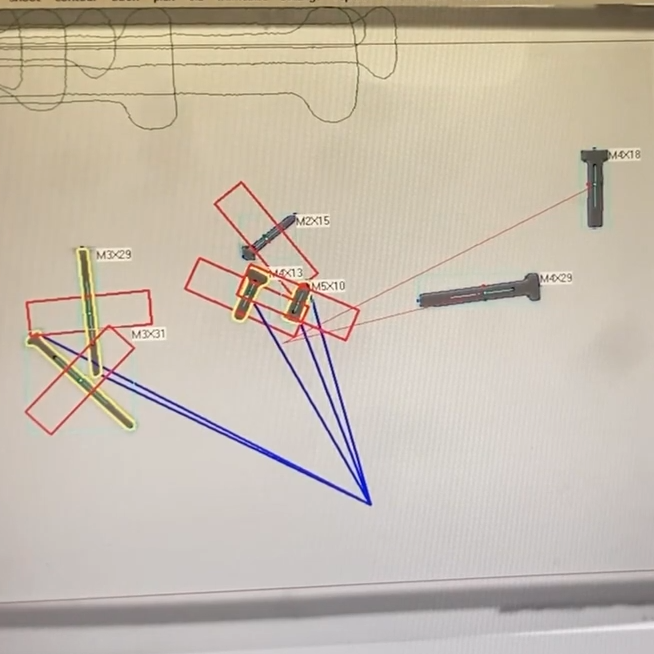
A bit of machine vision detects the size and shape of each object. Weight can also be measured.

Mixed pieces go onto a large conveyor belt, shown on the right. This feeds a few screws at a time down a chute, where they roll onto an illuminated platform.

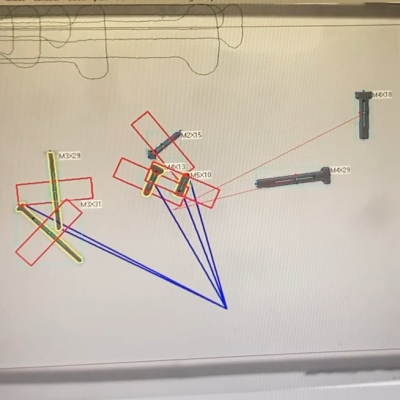
Above the lit platform is a camera, and machine vision is used to detect the size and shape and orientation of each screw. A robotic gripper on a gantry picks the screws up one by one — separating them first if they happened to clump together — and places each in a drop-off cart. The cart drops the object into a receptacle with its brethren, making sure similar ones are grouped together. Watch it in action in the video, embedded below the page break.

It’s a great build that shows fancy components aren’t necessary for good results. Servos and steppers are controlled with an ESP32-WROOM board, and a piezo sensor detects screws falling off the conveyor. Some of you may have noticed a repurposed Ultimaker 3D printer serving as the bulk of the system, its hot end having been replaced with a gripper that can raise and lower. The overhead camera is an ESP32-CAM adapted to accept M12 lenses so it can focus on the platform.

There’s one more feature worth mentioning — the system also has the ability to measure the weight of a picked object by placing it onto a moveable inspection platform, which can optionally put it under a USB microscope for a closer look. Everything is controlled by a nearby PC, so there’s a lot of flexibility built into the system.

Advertisement

We suppose that once all the screws and bolts in a shop are sorted, it only makes sense to sort all the nuts. Are there other objects besides screws and bolts that would be useful to sort with a system like this? If you have any ideas, don’t keep them to yourself! [Aad] would love to hear your comments and ideas, so share them below.

Source link

Advertisement
Continue Reading

Tech

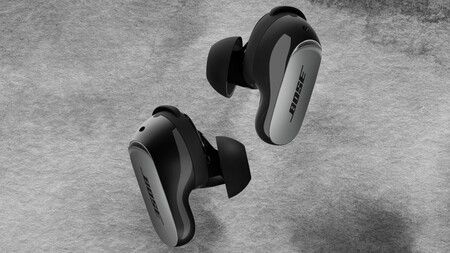
Bose’s best ANC buds are back down to their lowest price

Published

on

Bose QuietComfort Ultra Earbuds are some of the best ANC buds around, and now they’re a little more affordable – at least for a limited time.

The second-generation Bose QuietComfort Ultra Earbuds down to $249 from a $299 list price, a straight $50 saving and their lowest in a while.

A $50 cut might not rewrite the budget, but it’s still a chance to own the brand’s best in-ear noise cancellation without paying full whack.

Deal Bose New QuietComfort Ultra Earbuds 2nd Gen BlackDeal Bose New QuietComfort Ultra Earbuds 2nd Gen Black

Bose’s top noise-cancelling earbuds just hit their lowest price in a while, and it’s a serious drop

Advertisement

Bose rarely discounts its QuietComfort Ultra Earbuds, but they’ve just dropped to $249 at Amazon, $50 off their usual $299 list price.

View Deal

Advertisement

Noise cancellation is where these earn their reputation, with ActiveSense technology smoothing the sudden spikes in surrounding sound so that even Aware Mode keeps distractions from creeping in.

CustomTune technology takes it further, scanning the shape of your ears on every play and tailoring both the sound and the cancellation to fit them, so tracks land with the bigger chills Bose keeps promising.

Advertisement

Then there’s Bose Immersive Audio, which lifts sound out of your head and places it beyond the earbuds for that acoustic-sweet-spot feel, while In-Ear Cinema Sound lends films a genuinely theatre-like sense of depth.

Advertisement

Practicalities are handled too. Nine eartip and stability-band combos lock in a secure fit, SpeechClarity mics strip background noise from calls, and Bluetooth multipoint lets you hop between phone and laptop without missing a beat.

The Whatsapp LogoThe Whatsapp Logo

Get Updates Straight to Your WhatsApp

Join Now

Advertisement

Stamina backs it all up, with each bud running to six hours on a charge and the case tucking away three more full top-ups before either needs a cable. Noise Control adds the finishing flourish, letting you dial the cancellation up or down on the fly or switch it off entirely to stretch every session, with USB-C and wireless charging making the refills painless.

SQUIRREL_PLAYLIST_10148964

Advertisement

Advertisement

Source link

Continue Reading

Tech

Slashdot Reader Builds a Free Photo-Verification App for iPhones

Published

on

Long-time Slashdot reader BrianFagioli is announcing that he’s released a new iPhone app that creates a cryptographic witness for photos without uploading the original image.

The app hashes the file, signs the hash using a dedicated identity stored in Apple Keychain, and publishes the witness to Nostr relays while keeping the photo inside the app unless the user chooses to export it.

Rather than trying to determine whether a scene was genuine, the app — named Veridenz — answers a narrower question, by verifying whether a photo file matches the one that was originally witnessed.

Users do not need a Nostr account because the app creates its own signing identity, keeping private documentation separate from a public Nostr profile.

Advertisement

“The developer does not collect any data from this app,” says its page in Apple’s iPhone store. The free app’s tagline is “Capture. Prove. Verify.”

Read more of this story at Slashdot.

Source link

Advertisement
Continue Reading

Trending

Copyright © 2025