The right washing machine is all about space. Enough space on the inside, first and foremost, but it’s just as much about the amount of available space in your laundry room, too. That’s the part that determines whether the appliance even fits properly, not to mention operates safely. It’s one of those mistakes everyone makes when installing appliances: Too many homeowners focus only on the machine’s internal space without thinking about this second part at all. As a rule of thumb, you should always consider the external space, too.
Without the right amount of clearance behind the washer, you won’t have enough room for water hoses, power cords, or proper ventilation. On installation, you should leave at least 6 inches of space between the back of a washing machine and the wall. That gap leaves just enough space to connect water lines and electrical cords without crimping or damaging them. You also need to leave that room for airflow and whatever vibration might come from the machine during operation.
Advertisement
Other measurements to know when installing a washing machine
Maryana Serdynska/Getty Images
In addition to those 6 inches of space in the back, you should also leave about an inch of clearance on each side of the washer. It needs that space for ventilation, most importantly, but it also helps with noise reduction and damage control. Without it, the machine might bump up against the dryer or the wall… especially if yours tends to walk across the floor.
Because there’s no universal standard washer size across the major washing machine brands, dimensions are going vary tremendously depending on whether it’s a front-load, top-load, compact, stackable, or large capacity machine. That’s why it’s essential to take measurements before buying and installing. Of course, be sure to factor the 6-inch and 1-inch guidances into your measurements.
Don’t forget about door clearance, either. It’s easy to forget, but the machine is going to have to both fit through the door, and also have enough space around the machine for the door to swing open all the way. You’ll need at least 20 inches of open space in front of or above the appliance as well as an unobstructed path through whatever doorways, hallways, or tight corners you’ll need to get through upon delivery.
Website support widget lasted 18 months before Redmond ended the conversation
Microsoft is killing Live chat in Teams about 18 months after launch as it seeks to “focus investments on newer customer engagement and communication experiences.”
The service will be retired on October 5, when customer messages will stop reaching Teams. Microsoft blocked new setups on August 6 and told users to remove the widget from their websites before retirement. Any remaining instances will be hidden afterward.
Advertisement
Live chat was a relatively simple feature available with the Teams versions of Microsoft 365 Business Basic, Standard, and Premium. Companies embedded a chat widget on their websites, and messages from visitors were routed to a support team in Teams. Administrators could specify business hours and assign up to 25 users to handle conversations.
Existing customer data and Teams channels will remain available, but no new conversations, escalations, or interactions will be possible.
Microsoft pointed customers toward Dynamics 365 Contact Center with Live Chat and Copilot Studio’s contact center AI tools instead.
In March 2025, it was all going to be very different as Microsoft trumpeted the service’s arrival. Brenna Robinson, General Manager, Microsoft 365 & Copilot, Small and Medium Business, wrote: “Today we’re excited to take that customer experience to a new level with the introduction of live chat in Microsoft Teams – a faster and more engaging way for you to connect with your customers.”
Advertisement
Robinson has since become Microsoft’s General Manager for AI Business Solutions. Live chat, meanwhile, has been wheeled into the Raiders of the Lost Ark-style warehouse where Microsoft stores everything that once seemed like a good idea.
Microsoft has axed several Teams services over the last few months. In February, it announced the end of Teams live events, replaced by a Teams “events experience.” The Teams Together mode, which placed users in a virtual meeting space, was also ditched.
Live chat is another casualty of Microsoft’s efforts to tidy Teams’ unwieldy collection of features. The company has not elaborated on those “newer customer engagement and communication experiences,” although its recommendation of Copilot Studio means AI is already waiting in the wings. ®
OpenAI continues to churn out upgrades to its various GPT models, the latest GPT-5.6 promises to be more succinct and provide confident wrong answers less often. Here’s what’s new.
Apple and OpenAI have a relationship where ChatGPT is an extension for the previous version of Siri, though that could come to an end soon. The latest updates don’t affect users of that specific function, but the Mac utilities and iOS app will gain new features and performance.
Now, we’re going to have to sift through OpenAI’s anthropomorphized language of its chatbot models to understand exactly what’s being introduced here. The press release says a lot about “thinking” versus instant answers, but always remember: artificial intelligence can’t think, reason, understand, or sympathize.
GPT-5.6 Sol appears to be a release hoping to address several concerns brought up by users of ChatGPT. They often complain it uses too many filler words, takes too long to get to the point, and provides affirming answers even when the user is wrong.
Advertisement
ChatGPT caveman
According to the release, GPT-5.6 Sol provides “more focused answers, adapts its level of detail to the question, avoids unnecessary formatting, and offers a helpful correction when simply agreeing wouldn’t be useful.” These problems have become so well known and bothersome users have turned to skills like “caveman” to force ChatGPT to be brief and direct.
SiriAI gets to the point, while OpenAI does shows some restraint
The example provided by OpenAI looks incredibly similar to what a user might see when using Siri AI. A brief summary of a weather result with a weather widget is shown instead of a wall of text padded with filler.
Incredibly, the release mentions “more reliable facts.” Hallucinations are a part of AI no matter how many guardrails are introduced, so it’ll be interesting to see if OpenAI has actually accomplished this in a meaningful way.
Advertisement
For example, Siri AI tends to avoid hallucinations by not summarizing content when possible. When you ask a question, the source is quoted and linked directly, which ensures random incorrect information isn’t inserted. Of course, that’s only if the answer is correct in the first place.
While AI tools can be used for research, AppleInsider strongly urges users to avoid any AI-generated content from appearing in a finished work. Lawyers, doctors, and financial advisors have encountered horrific problems when relying too heavily on AI to perform their work.
No amount of promises and fixes from OpenAI will create a foolproof AI tool.
A “Think” button
If you’ve used Siri AI, you might notice that the same question can sometimes produce very different results in terms of detail. That’s because on-device models are much smaller and seek an end result that is much less computationally expensive versus server-side models.
Advertisement
Apple and ChatGPT have similar ideas on how to approach AI chatbots
Apply that same idea to ChatGPT “Thinking” and Instant modes, and you’ll understand what’s happening. Previously, these two models would be so different that the answers would vary wildly in tone or style.
The names say what they do: Thinking takes longer with a heavier model while Instant is fast with a smaller model. There’s also a new “thought” slider.
This terrible naming convention is yet another attempt to humanize the chatbots, but basically, think of it as a compute slider. Lower means less compute, faster results, while higher means more compute, longer, more detailed results.
Advertisement
Obviously, OpenAI hopes users will change the slider for more simple queries that don’t need a lot of information resources. It’s computationally less expensive, uses less tokens on input, and likely means less tokens on output.
That’s likely going to be useful for private ChatGPT use, but corporate users never bother. Research shows that OpenAI’s most expensive ChatGPT users are in an office, choosing the most complex GPT version available, and doing so to convert a PDF into a slideshow.
It’s wasteful and expensive, especially for OpenAI, which is likely giving that compute time away at a bargain. Sliders would be helpful for the company that can’t turn a profit, but not if users just ignore them.
Free GPT
Free users are also getting an upgrade as everyone will default to GPT-5.6 Luna and gain a “Think” button for questions users believe are harder.
Advertisement
AI is a tool that is now easily found on your iPhone, which is a problem for OpenAI
Analyzing such an update can provide interesting insight into OpenAI. It’s priorities as a company providing AI to the masses while developing a HomePod that can wiggle is interesting. Especially given the Apple lawsuit.
One of the biggest reasons why OpenAI has such a large valuation is because it released a powerful technology and essentially gave it away for free. Like Spotify, the free use of this technology is draining the company and all that keeps them afloat are whales and investors.
The AI bubble is teetering on collapse, or is at least deflating, even as consumers tire of AI as a concept. It isn’t clear if OpenAI will find its footing before it runs out of cash sometime in 2028, or if everything comes crashing down around it.
Advertisement
As an Apple fan, the whole thing is a train wreck observed in real time. Sure, it took two years for Apple to find the right path forward with AI and execute that plan, but it spent pennies on that compared to its competitors.
There are real draws to flat-top cooking. I asked an award-winning pitmaster for a breakdown of the trendy grill type.
Andrew Collins
Just when we all thought we had grilling figured out, flat-top grills burst on the scene and offered another buying decision for outdoor cooking. I grew up on grated grills, and they’re still the most widely used style in the US, whether powered by wood pellets, charcoal or gas, but this new flavor offers a slightly different take — and some real benefits — with regard to the time-honored summer tradition.
At its core, “grill” means the direct application of high heat even if it has become synonymous with a slatted cooking surface. If you’ve struggled with the feeling that you’re supposed to use a grill during warm months but find yourself looking for excuses not to use it — either because it’s too hard to clean or because you can’t seem to get it right — a flat-top model might be the answer.
The 9 Best Grills Out of 30 We Tested
Advertisement
So, is a flat-top grill worth it? I consulted a seasoned grillmaster, Erica Blaire. The former attorney and licensed sommelier is also a Food Network BBQ Brawl champion and voracious outdoor cooking ambassador. Blaire offered insight into the nuances of flat-top cooking and whether it might be right for you.
What is a flat-top grill and how does it work?
Flat-top grills have become popular. There’s less daily cleaning but slightly more ongoing maintenance to consider.
Weber
While the term may be obvious to some, many people associate flat tops with indoor cooking, such as on a griddle. “A flat-top grill is basically a griddle,” says Blaire. “You’re going to be searing. You’re not smoking, and you’re not grilling in the traditional sense,” she said. With a flat-top grill, “you are searing on a uniformly hot surface with no airflow underneath it.”
Flat-top grills feature a flat, solid metal cooking surface with zones powered by individual burners, depending on the model’s size. While many small griddles are available for indoor use, some of which can sit directly on your kitchen range for heat, outdoor flat-top grills are typically electric or gas-powered.
What can you use a flat-top grill for?
Smashburgers, pancakes, and home fries are just a few flat-top grill foods you can make with ease.
Weber
Consider your typical grill fare or outdoor cooking needs, then ask yourself whether a griddle or flat top might be a better fit than a traditional grill.
Advertisement
“For a flat top, you’re thinking burgers — especially smashburgers — you’re thinking fajitas,” Blaire said, as well as other batch preparations that are entirely out of the grill’s league, like fried rice, eggs and anything that you’re worried would too easily slip through the grates or that which otherwise regularly misbehaves on a traditional grill. (Looking at you, salmon.)
“Because you’re getting such high temperatures and such uniformity on a flat-top surface, the sky’s the limit on what you can do,” she said, which of course also includes the ultimate grill expression: steaks.
Many chefs say cast iron the absolute best way to cook certain types of steaks, even during grilling season; an outdoor flat-top grill offers the same functionality, letting you really crank the heat without smoking up your whole kitchen.
“If you’re doing super thin cuts like a flank steak or a skirt steak, on a griddle, you’re able to get the outside perfectly seared but keep the inside super moist and have lots of flavor without worrying about drying it out,” Blaire said.
Advertisement
You wouldn’t want to try pancakes on a grated grill.
Blackstone
What’s more, “with a traditional grill, you’re fighting against the open spaces,” said Blaire, “so all the sauces, those butters, and your herbs or other aromatics may end up in the void. With a griddle, you can put everything on there, and it’s going to stay.”
Maintaining and cleaning a flat top grill
Flat-top grills need seasoning much like a cast-iron skillet.
Chris Wedel/CNET
Like a good cast iron, preparing a flat top by seasoning it goes a long way toward making your life easier every time you use it. “Using a thin layer of oil with a high smoke point, you turn up the heat until the oil smokes,” said Blaire, “then let it cool, and do it a few more times, wiping away any excess.” This essentially gives you a nonstick surface.
The particular challenge with a flat-top grill isn’t so much cleaning it, which can be extremely easy, especially if you’ve seasoned it; the challenge is timing the cleaning. “A lot of times after you use a flat top, you might just go eat, and think you’ll get to it later,” said Blaire, “but now you’ve ruined your life because it doesn’t have the holes and the void spaces in it, like a grill does.”
If you’re not ready to go full force, you can buy a griddle attachment for your grated grill.
David Watsky/CNET
A flat top really needs to be cleaned right away, or at least while it’s still warm, so you’ve got a moment to start enjoying the fruits of your flat top labor, but in the pause you risk forgetting about it until after it has cooled. “When a flat top dries and cools, everything is stuck on there,” Blaire says. “So you’re going to be having to take a scraper and use a lot of arm power, but if you clean your griddle as soon as you’re finished cooking, and while it’s still warm, you wipe it down and it’s done.” Most flat tops designed for outdoor cooking also have a small well or catcher for the bits and scraps that collect during the wiping-down process.
The cleaning factor is an important consideration for an outdoor cooking host, especially if you have a personality type that makes your life difficult every time you use the flat top. Basically, a flat-top grill can be much easier to clean than a grates grill, but it can also be much harder.
How much does a flat-top grill cost?
Blackstone’s flat-top grills start at around $300.
Much like charcoal or gas grills, there’s a real range to what you can spend, depending on your size needs and budget. “It really depends on what you’re trying to get, because now every brand is making options in affordable tiers for all levels,” said Blaire.
A quick look at Amazon shows that many standing flat-top grills range in price from about $250 to $700, depending on what accessories you might want included, such as prep shelves and utensil hooks, with a little savings if you’re looking for a tabletop camping model.
Advertisement
Premium models, including complete outdoor flat-top cooking islands, can go from $700 and well beyond. The good news, according to Blaire, is that nearly any flat-top model will get the job done. “As long as all the burners work and the surface level gets hot, you’re good to go,” she said, whereas grated grills that include lids and multiple cooking levels have a lot more factors to consider in terms of value versus functionality.
So you know, for less than $100, you can even get a flat top surface to sit on top of your grated grill — in case you’re reading this and bemoaning the fact that you already own the wrong type for you.
Pamela Vachon
Contributor
Pamela is a freelance food and travel writer based in Astoria, Queens. While she writes about most things edible and potable (and accessories dedicated to those topics,) her real areas of expertise are cheese, chocolate, cooking and wine. She’s a culinary school grad, certified sommelier, former bartender and fine dining captain with 10 years in the industry. When not sitting at the keys, she leads in-home cheese classes, wine tastings and cocktail demonstrations.
See full bio
Two Polish security researchers wanted to find out how vulnerable their country’s internet was to potential cyberattacks and quickly found that thousands of public agencies and websites were at risk of being hacked.
At the Def Con cybersecurity conference in Las Vegas on Friday, security researchers Robert Kruczek and Kamil Szczurowski said they wanted to understand the state of Poland’s public web out of a sense of patriotism and a desire to make it safer for everyone.
Before long, the duo discovered more than 10,000 affected public entities with 250,000 websites with security flaws, including airports, hospitals, and government offices.
The researchers found that some of the vendors’ buggy software, coupled with a lack of bug bounties and ways to report security flaws, are putting Poland’s public services at risk of hijacks and other attacks. The researchers also said that some bugs were incredibly easy to exploit but were not always taken seriously, with some vendors describing the bug reports as inconveniences.
Advertisement
The research comes as Poland is trying to shore up its cyber defenses after a wave of suspected Russian hacks targeting the country’s energy and water providers. Some of the hacks have been carried out by taking advantage of weak cybersecurity.
Kruczek and Szczurowski found critical vulnerabilities in the widely used content management system Pad CMS, which allowed them to easily access over 300 public websites without needing a password. The software developer did not patch the software because it had become “end of life” and was no longer supported.
Another bug allowed them to gain access to the websites of some two-thirds of Poland’s judiciary, or about 245 courts, they said.
The duo reported their findings to the government through various official channels.
Advertisement
The researchers said during their talk that it was ultimately worth the hassle, saying that as a result we are “a little bit more safe.”
When you purchase through links in our articles, we may earn a small commission. This doesn’t affect our editorial independence.
Smartwatches and fitness trackers are generally pretty great, as they’re packed with plenty of features that promise to offer a solid overview on your health.
Among the likes of heart rate monitoring and workout tracking, many of the best smartwatches and best fitness trackers provide users with a so-called fitness age which has the power to either give you bragging rights or keep you incredibly humble.
Having said that, how much weight does a device’s calculated fitness age really have? Should you take the age with a pinch of salt, or is there factual evidence behind the number on the screen?
I’ve explored the science behind the so-called fitness age and found out whether you really need to worry about it.
Advertisement
How does a smartwatch calculate fitness age?
The exact measurements that go into a smartwatch’s fitness age calculation can vary slightly from device to device. However, calculating fitness age ultimately comes down to your VO2 max measurement, which is the maximum volume of oxygen that your body can use per minute. The higher the figure the better, as this means your body is generally able to take in more oxygen during more strenuous workouts.
Advertisement
With this in mind, it’s unsurprising that Garmin assesses your VO2 max figure to accurately decipher your fitness age. Garmin explains it does this by comparing your figure to those of people “of different ages within your same gender”.
However, Garmin states that on its newer devices, fitness age takes additional factors into account. These factors include activity intensity, your resting heart rate and, controversially, your BMI.
Advertisement
The latter is controversial, as many have criticised BMI as being an outdated way of measuring someone’s actual health. In fact, a 2023 study revealed that BMI “does not properly assess body fat percentage and muscle mass or distinguish abdominal fat from gluteofemoral fat” and explains that women and minorities were either “not included at all, or only comprised a small percentage of the 7462 men” within a 1972 study which sparked the modern use of BMI in research and medical settings.
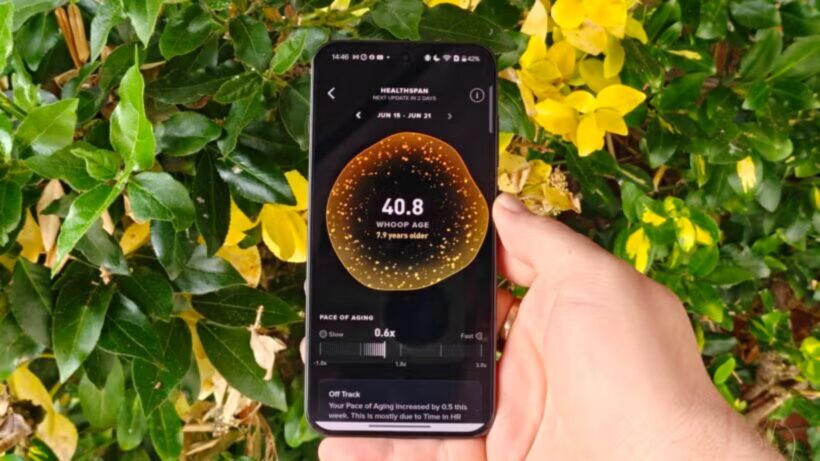
Whoop age. Image Credit (Trusted Reviews)
Alongside VO2 Max levels, Whoop analyses your resting heart rate, sleep pattern and the amount of time each week you’ve spent exercising to determine your Whoop age. In addition, Whoop also factors in your lean body mass, if you’ve entered that detail into the app.
Otherwise, devices like Apple Watch and Fitbit don’t actually offer a built-in fitness age. Instead, you can download third-party apps for your Apple Watch which measure your potential fitness age, while Fitbit offers a cardiovascular fitness score rather than an age.
Advertisement
What is VO2 max, and do wearables provide an accurate measurement?
So, although smartwatches assess multiple factors, your individual VO2 max level is one of the key measurements to determine your fitness age – but how do devices actually measure this?
Advertisement
Both Garmin and Whoop disclaim that their VO2 max level is an estimate and isn’t totally accurate. Even so, both do provide insights into how they reach their respective figures. Whoop, for example, explains it estimates VO2 max by using its own three-tier proprietary algorithm that analyses your health and fitness data and “your demographic data including your age and biological sex”.Whoop promises that its VO2 Max tracking is within 3.3 to 3.7mL/kg/min of a lab-measured value. That roughly translates to around 7 to 8% of error.
Garmin, on the other hand, explains that its VO2 max estimations rely on an accurate user profile and your elevated heart rate. While Garmin doesn’t publicly reveal its level of accuracy, I’ve seen various reports of anywhere between 5 to 15% of error. However, a study conducted back in 2024 determined the accuracy of VO2 max estimates specifically with the Garmin Forerunner 265, which suggested that Garmin “may overestimate oxygen consumption compared to values acquired in the laboratory”.
Garmin VO2 max
Whoop VO2 max
Advertisement
I have a Whoop MG and a Garmin Cirqa, so had a look to see how each device has determined my VO2 max level. Interestingly, they differ slightly with their exact measures, with Whoop claiming my VO2 max is 46 while the Cirqa states a result of 43. Though Whoop’s estimate is higher, my fitness age is slightly older than Garmin’s at a very precise 28.9 years old. Garmin, ever the flatterer, says I have the fitness of a 26 year old.
Although the results aren’t too dissimilar from one another, the fact they vary slightly confirms that VO2 max and fitness age shouldn’t be taken as gospel, as two devices I wear constantly have provided me with different results.
Advertisement
Advertisement
Verdict – does fitness age matter?
Considering VO2 max is one of the key factors in determining an individual’s long-term health, the fact that Whoop and many of the best Garmin watches have the ability to estimate your level is undeniably brilliant. Sure, you can’t expect a 100% accurate reading, but an approach is surely better than nothing, right?
However, that error margin should be factored in when receiving your estimate, and therefore your fitness age, as it means the levels are likely not completely accurate. They might not be too far off, with Whoop promising up to 8% of error, but that’s still enough doubt that you shouldn’t completely rely on the ages provided. Not only that, but remember devices factor in additional measurements that are seen as outdated in modern terms, like BMI.
Essentially, we’d advise that while your fitness age is a solid indicator of your overall fitness level, it should be taken with a pinch of salt. That’s not to say you should ignore an age that’s double your actual age, nor that you shouldn’t be pleased with one that’s younger, but just keep in mind that it isn’t actually a completely reliable measurement.
Voyager drone boats tracked smugglers before US Navy forces intercepted the shipment
Autonomous vessels helped seize cocaine worth more than $81 million offshore
Electric-powered drone boats can patrol continuously for more than 100 days
Unmanned surface vessels have helped the US Navy intercept a cocaine shipment worth more than $81 million in the Caribbean Sea.
Two Voyager drone boats, built by California-based Saildrone, tracked a vessel of interest before coordinating directly with naval forces stationed nearby.
This coordination allowed a Navy ship to move in, intercept the suspect craft, and seize its illegal cargo without delay.
Latest Videos FromTechRadar
Advertisement
Built for extended maritime patrols
The Voyager measures over 10 meters (33 feet) in length and runs on an electric motor rather than conventional fuel.
It can operate continuously for more than 100 days before returning to port for maintenance work.
Saildrone describes the vessel as a high-capacity platform supporting advanced sensor integration across a wide range of maritime surveillance missions.
According to the company, Voyager remains the only unmanned surface vessel maintaining continuous operations with the Navy’s Fourth Fleet.
Sign up to the TechRadar Pro newsletter to get all the top news, opinion, features and guidance your business needs to succeed!
This fleet oversees the Caribbean along with sections of the Atlantic and Pacific near Central and South America.
Advertisement
Unlike a typical budget drone built for hobbyist use, this system is a purpose-built military asset designed for sustained, long-range ocean surveillance.
A growing role for autonomous systems
Saildrone argues that the recent seizure shows how autonomous vessels can support real operational missions rather than remaining limited to experimental demonstrations.
“The continuity of Saildrone’s presence along the southern border for nearly three years demonstrates the strategic value we bring as the world’s most experienced operators of unmanned surface vehicles,” said John Mustin, president of Saildrone.
“Our unmatched ability to remain on station and on mission in critical regions for months at a time is why our fleet serves as a powerful deterrent to bad actors.”
The company expects continued cooperation with the Navy as maritime security efforts extend across the country’s southern approaches and border regions.
It describes the Voyager as a high-capacity platform capable of supporting numerous surveillance sensors while maintaining long endurance without requiring frequent maintenance or logistical support.
Advertisement
The US Navy previously awarded Saildrone a task order worth $16.3 million to expand Voyager operations across the Caribbean and the Eastern Pacific region.
That contract specifically supports efforts to combat drug trafficking alongside other illicit activity occurring across international waters.
Whether autonomous drone boats can consistently replace crewed vessels for high-risk interdiction work still remains an open question for naval planners.
However, the technology clearly reduces risk to personnel by allowing unmanned surface vessels to do the hard job before a US Navy ship swoops in.
Advertisement
What started as something closer to a beginner drone concept for coastal monitoring has evolved into a sophisticated tool for international drug enforcement.
Investigation into whether staff improperly accessed Minnie Merriman’s file after she was named for the first time this week
A Scottish NHS trust is investigating a data breach concerning the medical records of a nine-year-old girl who died earlier this week and was named publicly for the first time on Wednesday after a man was charged with her death.
The alleged breach occurred at Ninewells Hospital in Dundee, and reportedly involved staff members accessing the girl’s medical records without authorization or clinical need.
Advertisement
A spokesperson for NHS Tayside, which oversees Ninewells Hospital, said: “NHS Tayside is currently investigating the circumstances of an alleged data breach which happened in a working clinical area where staff access patient information.
“As a matter of governance, any data protection breach would be recorded and investigated by NHS Tayside and, where appropriate, reported to the Information Commissioner’s Office (ICO). It would not be appropriate for us to comment further on individual staffing matters.”
NHS Tayside did not respond to questions about the nature of the accessed data nor who is thought to be behind the intrusion.
Medical records in the UK are protected by the UK GDPR, contained in the Data Protection Act 2018 as well as several common law confidentiality rules. NHS staff are only allowed to access patient information where there is a legitimate clinical or other work-related need.
Advertisement
A 35-year-old man whom police say was known to the child, was arrested and appeared in court on August 5 over the death of Minnie Merriman.
The man issued no plea at Forfar Sheriff Court on the day of his arrest and has been remanded in custody.
Merriman was found in Elliot Industrial Estate at approximately 0002 on Monday, August 3, with serious injuries.
The young girl was then taken to Ninewells Hospital in Dundee, where she later died.
Advertisement
Police Scotland said that they are not currently looking for anyone else in connection with her death.
Other members of Merriman’s family, who are from West Yorkshire and were camping nearby, are being supported by specialists.
A family statement, released through Police Scotland, read: “We are devastated with the loss of our beloved, absolutely incredible, beautiful and brave Minnie Moo. Our family asks that our privacy is respected at this extremely difficult time.”
Detective Inspector Mike Ness of Police Scotland’s major investigation team said: “Our thoughts remain with everyone affected by these events, especially Minnie’s family.
Advertisement
“A police presence will remain in the area while our enquiries continue.
“Anyone with any concerns, or information, should approach these officers or contact Police Scotland on 101, quoting incident number 0008 of Monday, 3 August 2026.” ®
Jon Prosser was sued by Apple over the alleged theft of pre-release information, saw a default ruling due to inaction, had that overturned, and is once again failing to provide discovery materials. There’s a reason this time.
Life hasn’t been easy for Jon Prosser since a July 2025 lawsuit from Apple accused him and Michael Ramacciotti of stealing information from Apple employee Ethan Lipnik’s test device. He says he’s not guilty, but has created roadblocks at every possible point in this case.
According to a new filing, Jon Prosser has not been responding to requests for discovery since he rejoined the case in June. Apple last heard from Prosser’s counsel on July 6, 2026.
In the interim, Prosser had a second child. The lack of response is attributed to the newborn.
Advertisement
He allegedly hasn’t had time to provide requested materials. In the filing he says that he “will find dates when additional discovery may be provided to Apple.”
However, given the situation involves a newborn, Apple appears to be a little more understanding of this delay. The joint filing suggests that Apple has approved the delays in discovery and the new dates.
What isn’t clear is whether Apple will take a softer approach to the final determination and punishment for Prosser. The worst case here is that he is barred from reporting on Apple, which is a significant portion of his business.
A new deposition is set to take place in September 2026. The next legal filing is expected on October 7, 2026.
We spend hours testing every product or service we review, so you can be sure you’re buying the best. Find out more about how we test.
TP-Link Roam 7: 30-second review
The TP-Link Roam 7 is a compact travel router that lets you connect to whatever internet you can find and turns that into your own private network. This helps reduce the need to reconnect all your devices in each new location; just connect the router and all other devices will connect automatically through it.
The Roam 7 differs from a mobile router insofar as there’s no internal SIM or battery; power is supplied through a USB source such as a power bank, and the internet connection comes from a range of available options, including Ethernet at a hotel or business, public Wi-Fi, your phone tethered or a USB modem.
Advertisement
The size and weight are compact, so it’ll fit easily in a backpack or travel bag. The design is simple with a vented front: two fold-down aerials, and a customisable button on the side.
Latest Videos FromTechRadar
Setup is quick with the mobile Tether app, which lets you use the QR code on the base of the box to complete setup and configure logins. If you want anything more involved then once your device is connected to the router you can access the full web admin at 192.168.0.1.
Advertisement
This is all very clean and while it looks a little dated next to the app, it goes far deeper on the options and settings enabling you to manage the primary and guest networks, assign clients to 2.4GHz or 5GHz, configure Multi-Link Operation so one device takes priority over another, and monitor live CPU and memory usage. Considering this is a travel router, the amount of control is impressive.
There’s also a good level of built-in protection, which is helpful when connecting to public Wi-Fi or hotel networks. While the more advanced protections, including VPNs, are all paid options, there’s a good basic level of security and parental controls built in. The Web interface also gives you a huge amount of options.
Through the test, the one feature that really stood out as I wrote this review was the failover; with the router connected to the Netgear Nighthawk M7 through LAN and public Wi-Fi in a café. The café Wi-Fi was initially good, but as the hour progressed and the place filled, the speed dipped, and the router automatically switched over to the stronger SIM connection.
Sign up to the TechRadar Pro newsletter to get all the top news, opinion, features and guidance your business needs to succeed!
Advertisement
Overall, this is a well-balanced product that, at the price, offers far more than most, especially that Wi-Fi 7 connection speed. The internal hardware is, however, mid-range, and with only three devices connected, the web admin showed a CPU load of 40-60%. However, as a few more devices were added, the figure remained around the same.
If you work in different locations with multiple devices, then an option like the TP-Link Roam 7 makes absolute sense. Connect the router to the internet, then connect all other devices to it; no need to reconnect each. It offers a balanced set of security features, including VPN support, making it a great solution at a lower price than most mobile routers.
TP-Link Roam 7: Price and availability
How much does it cost? From $139 / £99
When is it out? Available now
Where can you get it? Directly from tp-link and online retailers
(Image credit: Alastair Jennings)
The Roam 7 is available directly from TP-Link here for $139.99 / £99.99. In the US, it’s also available for $130 at Amazon (down to $90 at time of review). In the UK, it’s priced at £99.99 at Amazon.co.uk. Outside of that, it’s widely available from online retailers.
Advertisement
TP-Link Roam 7: Specs
RAM: 512MB Rear Ports: One 2.5Gbps WAN, one 1Gbps LAN, one USB-A 3.0, one USB-C power input Connectivity: Dual-band Wi-Fi 7 at 2.4GHz and 5GHz, Ethernet, public Wi-Fi, USB phone tethering, 3G/4G/5G USB modem Wireless Speed: 2,882Mbps at 5GHz and 688Mbps at 2.4GHz VPN: OpenVPN, WireGuard, PPTP and L2TP, client and server Size: 126 x 93.5 x 36mm Weight: Approximately 250g Power: 5V/3A USB-C, no built-in battery Accessories: Power adapter, Ethernet cable, USB cable, quick-installation guide and Wi-Fi information card
TP-Link Roam 7: Design
(Image credit: Alastair Jennings)
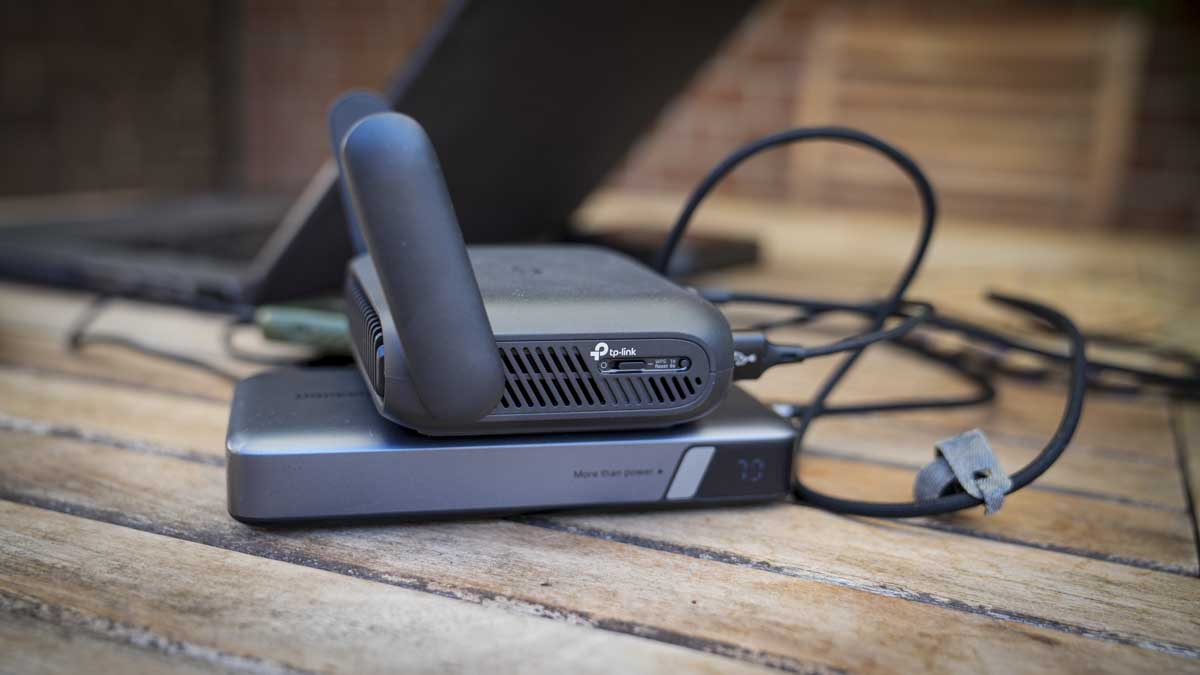
The Roam 7 is a relatively compact black box that measures 126 x 93.5 x 36mm and weighs in at 250g. It features a large front vent and two aerials that fold flat against the sides when transporting. One thing to note about the design is that it’s noticeably larger than a pocket hotspot but still small enough to slip into a backpack or bag easily.
Advertisement
It’s also worth noting that while the Roam 7 is relatively small, it requires a power supply, and an AC plug is included in the box; alternatively, you can plug it into a power bank, and in this review I’ve used the Ugreen 145W. On top of the power supply, you’ll also need a way to connect the router to the internet, and this is where the clever bit of this device comes into play.
You can either connect directly to a WAN or LAN via the two ports at the back, hardwire a phone via a USB cable and piggyback off the phone’s cellular network or use it as a pass-through for a Wi-Fi network, say, if you’re in a café.
(Image credit: Alastair Jennings)
Once plugged in, a simple status LED on the front illuminates to indicate connections or activity. While the design is simple, with most options and settings being controlled through the app or web interface, there is a physical toggle button on the side that can be configured to control power, the status LED, or the VPN connection.
The rear panel houses all the connections: a 2.5 Gbps WAN port, a 1 Gbps LAN port, USB-A 3.0 for storage or tethering, and USB-C for power.
Advertisement
As this is a travel router, it would have been great to see a carry case supplied as well. Unfortunately, aside from the power supply, USB-C-to-USB-A adapter, and network cable, there are no other accessories.
TP-Link Roam 7: Features
(Image credit: Alastair Jennings)
Taking a look at the feature set, it really highlights how the Roam 7 differs from a standard router or mobile router. In the case of the first, the compact size and weight mean it can be taken anywhere, and the build and design are robust and highly portable, with power supplied via USB-C rather than the standard barrel-style connector to mains power, which is more common.
Unlike a mobile router, it has no built-in battery or SIM card, so it relies on other devices for both. I’ll come on to why this can be a great option in the performance section.
Advertisement
The Roam supports dual-band BE3600 Wi-Fi 7 with Multi-Link Operation, 4K-QAM, and four wireless streams, rated at 2,882 Mbps on 5GHz and 688 Mbps on 2.4GHz. Those are link rates rather than throughput figures, and there is no 6GHz band, so this is Wi-Fi 7 in its dual-band form rather than the full tri-band specification.
Looking through the different operating modes, there are seven in total: cover router, hotspot or WISP, USB tethering, USB modem, access point, range extender and client. Switching between Ethernet, USB tethering, USB modem, and hotspot occurs through the web interface, and in testing, it took around 45-50 seconds to switch between each. USB tethering to an iPhone was slower, occasionally up to a minute, but on Android it was far faster.
One of the modes I was pleased to see was Failover, as it lets you connect to a mobile router and a tethered phone at the same time, and the Roam 7 prioritises whichever provides the better connection.
There’s also VPN support for major brands, including OpenVPN, WireGuard, PPTP, and L2TP, as both client and server. A VPN connection can run alongside ordinary traffic rather than being on all the time; the physical switch on the side can be allocated as a quick on/off for the VPN, so for general browsing you can switch it off, and for financials, shopping, etc you can switch it on for that additional protection.
Advertisement
The device management is also well thought out, with two options tailored to the type of user, or you can switch between them, as I find myself doing. For most people, the Tether app, which enables initial setup via a QR code, provides access to most of the settings.
During the test, there were a couple of occasions when I was unable to find the settings I wanted through the mobile app, such as assigning the connection type. The Web Admin, however, made this easy and offered a more traditional approach to router and network settings along with many advanced options, including what I was looking for, which was an easy way to switch between inputs.
The web admin panel can be located once you have connected to the router through 192.168.0.1 in your browser, and once you log in, you have all the primary and guest network management, assigning clients between 2.4GHz and 5GHz, Multi-Link Operation configuration to give one device priority over another, and a live view of CPU and memory load, which is interesting especially as more devices connect.
The best way to look at the two options is that the app is for consumers and the web client is for businesses, so actually having both is a good balance.
Advertisement
Another point about this router is that, as it doesn’t have its own power source, it will be a drain on whatever it’s plugged into. However, a check of the power usage shows it is extremely low at less than 4W; still, TP-Link do offer three power modes. Boost is the default and the option I used in the test to maximise performance; below it are Balance and Eco for managing speed, heat, and power draw. The MLO mode that I mentioned earlier will increase power use, but again, this power usage is extremely well managed.
Alongside the hardware admin, there’s a good level of software support, including HomeShield, which adds a network scanner, parental controls, and device-level quality of service. For each of these features, there is a Free tier, but the more robust parental controls and Security+ features require a paid subscription.
TP-Link Roam 7: Performance
(Image credit: Alastair Jennings)
Benchmarks
Advertisement
Boot time: 1 minute 52 seconds, plus roughly a further minute to connect a client and get online Time to internet from cold, MacBook Air M3: 2-3 minutes Mode switching time: 45 seconds; up to 1 minute when switching to iPhone USB tethering Power consumption, three clients connected: 3.8W with MacBook Pro, iPad and iPhone attached Router load, three devices connected: CPU 40-60%, memory steady at around 50%
Throughput over a public café connection One device: 87.3Mbps down / 98.5Mbps up Two devices, device 1: 46.6Mbps down / 101.8Mbps up Two devices, device 2: 61.3Mbps down / 27.3Mbps up Three devices, device 1: 11.5Mbps down / 9.08Mbps up Three devices, device 2: 75.4Mbps down / 44.4Mbps up Three devices, device 3: 17.0Mbps down / 72.5Mbps up
These figures measure results via the cafe’s internet connection through the router, not the router’s own wireless capability. The three-device total of 103.9 Mbps down exceeds the single-device figure of 87.3 Mbps, highlighting the influx of people into the cafe and the effect on bandwidth.
Initial setup is relatively straightforward, as there’s nothing to install. Or charge. Once unboxed, the AC adapter of a power bank can be plugged in, and the front light glows orange. You then go to the Tether Mobile App, scan the QR code, complete the rest of the process, and you’re set.
Advertisement
After that initial setup, I took the Roam 7 to a café, plugged it into a power bank, joined the venue’s Wi-Fi via the Tether app, connected my MacBook to the router’s network, and enabled the VPN. The whole sequence took between two and three minutes depending on the connection type and strength. It required no laptop configuration at all, having already connected to the router at home; likewise, the same for the connection to my phone and iPad, which were all previously connected.
One issue that struck me early on was the number of wires and gadgets I had suddenly accumulated around the MacBook; I had my phone, the power bank, and the router all connected along with wires. While it didn’t take up a huge amount of space, it was more than I’m used to.
One point about the connection speeds is that the public Wi-Fi connection was faster than connection tethered through my mobile phone. During testing on location, the 4G connection showed as full, however connected to the Wi-Fi without a VPN, I saw speeds of around 150 Mbps, down to around 120 Mbps with VPN on.
Through a series of checks to see how long it takes to connect in the café location from cold, it I found it took just under two minutes to boot, and connecting and getting the computer online added another minute. There’s also time to unpack the three devices you need to make that connection: the router, the power bank, and the mobile device.
Advertisement
The average connection time in the test was just under three minutes from nothing to a working connection on a public Wi-Fi network. OK, it’s faster to connect directly, but a public Wi-Fi, isn’t secure and the cost saving of the Roam 7 compared with a mobile router is huge.
Through the test, I was interested to see how long it would take to switch between connection types, say, from Wi-Fi to a tethered mobile connection. To do this you need to dip into the web interface, not the app, and the switchover took around 45-50 seconds.
As highlighted, there is no internal power, so the draw from the host machine is an important factor for travel, and surprisingly it’s very low. With a MacBook Pro, an iPad and an iPhone all connected, the router pulled 3.8W. This is really nothing, and my 145W power bank essentially ran through a working day without issue. It was also good that I was able to set up a local network, and the colleagues were also able to connect as guests, again all easily set up through the web interface.
For the most part, I was piggybacking off the wireless network in the café, and, interestingly, a single device connected, I saw 87.3 Mbps down and 98.5 Mbps up. With three connected, the individual figures ranged from 11.5 Mbps to 75.4 Mbps down, but their combined total came to 103.9 Mbps, more than that first single device. The issue is that the café’s internet is open to the public, so there will be some fluctuation due to other users.
Advertisement
Internet speed is part of the picture, especially as more devices connect. One of the features I liked was that, through the web admin, you can see live CPU and memory usage. With only three devices connected, CPU load averaged 40-60%, while memory sat at around 50% of the installed 512 MB.
TP-Link states that it supports up to 90 devices, which I think may be a little bit hopeful. Still, for the three I had connected during the test, all checking the internet speed, then watching a 4K YouTube video and uploading files to an ftp this speed generally felt stable and fast.
A travel router like this has a very focused job and won’t be for everyone; however, if you connect multiple devices to an internet connection away from home and need something lightweight and portable, this is a great solution that balances features, performance, and cost.
Advertisement
TP-Link Roam 7: Final verdict
(Image credit: Alastair Jennings)
At first it may be difficult to see why you would want the Roam 7 over just connecting directly to your mobile phone or the public Wi-Fi. But then, in the workplace, where you may have multiple devices you use while travelling, or you’re dubious about using public Wi-Fi, this well-priced travel router makes sense.
Setup is easy, and whatever connection mode you use, once you’ve run through the process a few times, it all makes sense. Essentially, arrive, plug in, order a coffee, and by the time you’ve unpacked and set up your computer you’ll be ready to go.
Overall, the connection seemed robust, especially with the failover. While the router can only be as good as the local connections, the test proved it was a solid option, switching from mobile to Wi-Fi to enable the fastest connection without issue.
I had to ask: with mobile routers also available, who is this best for? The Roam 7 is an ideal solution if you travel and use multiple devices. It essentially lets you connect all devices to it, and you just need to connect it to an internet connection. When you arrive at your destination, you connect to the router, and everything else follows suit, without you needing to log in to every device individually.
Advertisement
While you can do this with your mobile, the added network features and the ability to turn your phone into a mobile router are definitely appealing and much cheaper than a dedicated mobile router.
Then there’s the price, which at a fraction of dedicated mobile routers and with all the additional features suddenly makes this very appealing as an option to use anywhere, be that travelling or in a location that you just want to set up a private network, such as in an office, studio or workshop where a separate network can be useful.
Should I buy a TP-Link Roam 7?
(Image credit: Alastair Jennings)
Swipe to scroll horizontally
Value
Advertisement
Excellent value at around £90, although you’ll need power and internet connection in addition
4.5/5
Design
Compact, design perfect for slipping into a backpack, though no case is supplied
Advertisement
4.5/5
Features
Seven modes, including full VPN support, storage sharing and decent web admin
4/5
Advertisement
Performance
Quick to set up and low power consumption, balanced by the mid-range hardware
4/5
Overall
Advertisement
A flexible, business travel router that will keep you connected and safe as you travel
Crystal ball: Just a couple of months after Cloudflare revealed that bots have officially surpassed human traffic online, the company has given its view on what things will look like in five years. It’s not good news for us fleshy meatsacks: non-human traffic could be up to 1,000 times higher than human traffic.
CDN and cybersecurity giant Cloudflare held its Q2 earnings call on Thursday, during which chief financial officer Thomas Seifert gave a concerning prediction about what the web will look like in the future.
“If the current trends continue, we think in five years, non-human traffic will be as much as 1,000 times as much as human traffic,” he said.
“In other words, humans will be a rounding error on the internet, not because human traffic goes down, but that’s just how fast we’re seeing non-human traffic grow.”
Advertisement
Seifert did add the important caveat that his predictions have been wrong in the past. Cloudflare CEO and co-founder Matthew Prince will likely be able to relate to this. He had predicted that bot traffic would surpass humans at the end of 2027, but it happened earlier this year.
It goes without saying that the sudden acceleration in non-human traffic is being driven by AI – agentic AI, specifically. Agentic systems behave very differently from traditional web crawlers and fraud bots. Their activity can closely resemble ordinary browsing, but it happens at machine speed and can be repeated on an enormous scale.
Advertisement
Even a straightforward prompt may trigger thousands of requests. Prince illustrated the difference using online shopping: someone searching for a camera might check five retailers, while an AI agent could examine 5,000 sites on their behalf. Multiply that behavior across millions of users asking assistants to compare products and airfares, research topics, collect information, or condense articles, and you can see why Seifert believes humanity’s online presence will become a rounding error.
Seifert said that if traffic does grow the way he expects, “we’ve got to get a lot more efficient,” which is where Cloudflare’s services come in, of course. He also mentioned the security implications of a web made up pretty much entirely of bots.
The idea that Dead Internet Theory – the concept that the internet is mostly run by bots and AI – will be demonstrably true in a few years (or now, arguably) is a concerning one. For a start, it could see the end of independent sites that have relied on the web’s business model since the 1990s.
There’s also the fact that an internet full of bots, AI slop, and privacy risks is making more people pull away from the online world. In our poll, 97% of people said the internet today was a hellscape compared to its early days, and it looks like things are only going to get worse.


































































You must be logged in to post a comment Login