Investigation into whether staff improperly accessed Minnie Merriman’s file after she was named for the first time this week
A Scottish NHS trust is investigating a data breach concerning the medical records of a nine-year-old girl who died earlier this week and was named publicly for the first time on Wednesday after a man was charged with her death.
The alleged breach occurred at Ninewells Hospital in Dundee, and reportedly involved staff members accessing the girl’s medical records without authorization or clinical need.
Advertisement
A spokesperson for NHS Tayside, which oversees Ninewells Hospital, said: “NHS Tayside is currently investigating the circumstances of an alleged data breach which happened in a working clinical area where staff access patient information.
“As a matter of governance, any data protection breach would be recorded and investigated by NHS Tayside and, where appropriate, reported to the Information Commissioner’s Office (ICO). It would not be appropriate for us to comment further on individual staffing matters.”
NHS Tayside did not respond to questions about the nature of the accessed data nor who is thought to be behind the intrusion.
Medical records in the UK are protected by the UK GDPR, contained in the Data Protection Act 2018 as well as several common law confidentiality rules. NHS staff are only allowed to access patient information where there is a legitimate clinical or other work-related need.
Advertisement
A 35-year-old man whom police say was known to the child, was arrested and appeared in court on August 5 over the death of Minnie Merriman.
The man issued no plea at Forfar Sheriff Court on the day of his arrest and has been remanded in custody.
Merriman was found in Elliot Industrial Estate at approximately 0002 on Monday, August 3, with serious injuries.
The young girl was then taken to Ninewells Hospital in Dundee, where she later died.
Advertisement
Police Scotland said that they are not currently looking for anyone else in connection with her death.
Other members of Merriman’s family, who are from West Yorkshire and were camping nearby, are being supported by specialists.
A family statement, released through Police Scotland, read: “We are devastated with the loss of our beloved, absolutely incredible, beautiful and brave Minnie Moo. Our family asks that our privacy is respected at this extremely difficult time.”
Detective Inspector Mike Ness of Police Scotland’s major investigation team said: “Our thoughts remain with everyone affected by these events, especially Minnie’s family.
Advertisement
“A police presence will remain in the area while our enquiries continue.
“Anyone with any concerns, or information, should approach these officers or contact Police Scotland on 101, quoting incident number 0008 of Monday, 3 August 2026.” ®
Smartwatches and fitness trackers are generally pretty great, as they’re packed with plenty of features that promise to offer a solid overview on your health.
Among the likes of heart rate monitoring and workout tracking, many of the best smartwatches and best fitness trackers provide users with a so-called fitness age which has the power to either give you bragging rights or keep you incredibly humble.
Having said that, how much weight does a device’s calculated fitness age really have? Should you take the age with a pinch of salt, or is there factual evidence behind the number on the screen?
I’ve explored the science behind the so-called fitness age and found out whether you really need to worry about it.
Advertisement
How does a smartwatch calculate fitness age?
The exact measurements that go into a smartwatch’s fitness age calculation can vary slightly from device to device. However, calculating fitness age ultimately comes down to your VO2 max measurement, which is the maximum volume of oxygen that your body can use per minute. The higher the figure the better, as this means your body is generally able to take in more oxygen during more strenuous workouts.
Advertisement
With this in mind, it’s unsurprising that Garmin assesses your VO2 max figure to accurately decipher your fitness age. Garmin explains it does this by comparing your figure to those of people “of different ages within your same gender”.
However, Garmin states that on its newer devices, fitness age takes additional factors into account. These factors include activity intensity, your resting heart rate and, controversially, your BMI.
Advertisement
The latter is controversial, as many have criticised BMI as being an outdated way of measuring someone’s actual health. In fact, a 2023 study revealed that BMI “does not properly assess body fat percentage and muscle mass or distinguish abdominal fat from gluteofemoral fat” and explains that women and minorities were either “not included at all, or only comprised a small percentage of the 7462 men” within a 1972 study which sparked the modern use of BMI in research and medical settings.
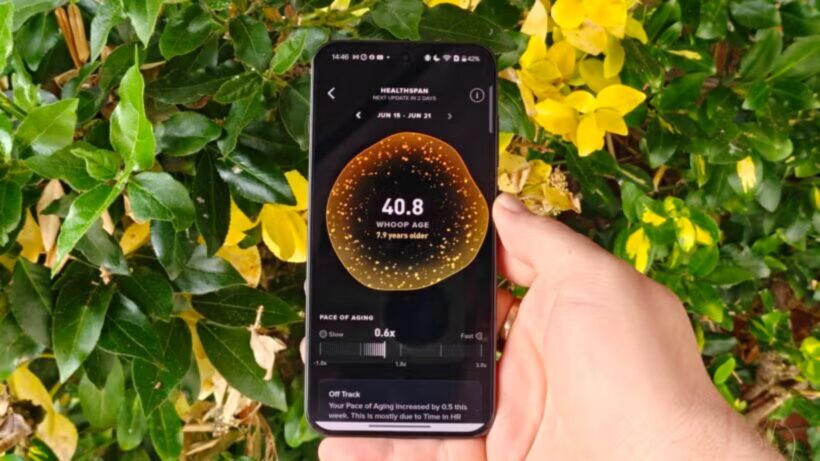
Whoop age. Image Credit (Trusted Reviews)
Alongside VO2 Max levels, Whoop analyses your resting heart rate, sleep pattern and the amount of time each week you’ve spent exercising to determine your Whoop age. In addition, Whoop also factors in your lean body mass, if you’ve entered that detail into the app.
Otherwise, devices like Apple Watch and Fitbit don’t actually offer a built-in fitness age. Instead, you can download third-party apps for your Apple Watch which measure your potential fitness age, while Fitbit offers a cardiovascular fitness score rather than an age.
Advertisement
What is VO2 max, and do wearables provide an accurate measurement?
So, although smartwatches assess multiple factors, your individual VO2 max level is one of the key measurements to determine your fitness age – but how do devices actually measure this?
Advertisement
Both Garmin and Whoop disclaim that their VO2 max level is an estimate and isn’t totally accurate. Even so, both do provide insights into how they reach their respective figures. Whoop, for example, explains it estimates VO2 max by using its own three-tier proprietary algorithm that analyses your health and fitness data and “your demographic data including your age and biological sex”.Whoop promises that its VO2 Max tracking is within 3.3 to 3.7mL/kg/min of a lab-measured value. That roughly translates to around 7 to 8% of error.
Garmin, on the other hand, explains that its VO2 max estimations rely on an accurate user profile and your elevated heart rate. While Garmin doesn’t publicly reveal its level of accuracy, I’ve seen various reports of anywhere between 5 to 15% of error. However, a study conducted back in 2024 determined the accuracy of VO2 max estimates specifically with the Garmin Forerunner 265, which suggested that Garmin “may overestimate oxygen consumption compared to values acquired in the laboratory”.
Garmin VO2 max
Whoop VO2 max
Advertisement
I have a Whoop MG and a Garmin Cirqa, so had a look to see how each device has determined my VO2 max level. Interestingly, they differ slightly with their exact measures, with Whoop claiming my VO2 max is 46 while the Cirqa states a result of 43. Though Whoop’s estimate is higher, my fitness age is slightly older than Garmin’s at a very precise 28.9 years old. Garmin, ever the flatterer, says I have the fitness of a 26 year old.
Although the results aren’t too dissimilar from one another, the fact they vary slightly confirms that VO2 max and fitness age shouldn’t be taken as gospel, as two devices I wear constantly have provided me with different results.
Advertisement
Advertisement
Verdict – does fitness age matter?
Considering VO2 max is one of the key factors in determining an individual’s long-term health, the fact that Whoop and many of the best Garmin watches have the ability to estimate your level is undeniably brilliant. Sure, you can’t expect a 100% accurate reading, but an approach is surely better than nothing, right?
However, that error margin should be factored in when receiving your estimate, and therefore your fitness age, as it means the levels are likely not completely accurate. They might not be too far off, with Whoop promising up to 8% of error, but that’s still enough doubt that you shouldn’t completely rely on the ages provided. Not only that, but remember devices factor in additional measurements that are seen as outdated in modern terms, like BMI.
Essentially, we’d advise that while your fitness age is a solid indicator of your overall fitness level, it should be taken with a pinch of salt. That’s not to say you should ignore an age that’s double your actual age, nor that you shouldn’t be pleased with one that’s younger, but just keep in mind that it isn’t actually a completely reliable measurement.
Voyager drone boats tracked smugglers before US Navy forces intercepted the shipment
Autonomous vessels helped seize cocaine worth more than $81 million offshore
Electric-powered drone boats can patrol continuously for more than 100 days
Unmanned surface vessels have helped the US Navy intercept a cocaine shipment worth more than $81 million in the Caribbean Sea.
Two Voyager drone boats, built by California-based Saildrone, tracked a vessel of interest before coordinating directly with naval forces stationed nearby.
This coordination allowed a Navy ship to move in, intercept the suspect craft, and seize its illegal cargo without delay.
Latest Videos FromTechRadar
Advertisement
Built for extended maritime patrols
The Voyager measures over 10 meters (33 feet) in length and runs on an electric motor rather than conventional fuel.
It can operate continuously for more than 100 days before returning to port for maintenance work.
Saildrone describes the vessel as a high-capacity platform supporting advanced sensor integration across a wide range of maritime surveillance missions.
According to the company, Voyager remains the only unmanned surface vessel maintaining continuous operations with the Navy’s Fourth Fleet.
Sign up to the TechRadar Pro newsletter to get all the top news, opinion, features and guidance your business needs to succeed!
This fleet oversees the Caribbean along with sections of the Atlantic and Pacific near Central and South America.
Advertisement
Unlike a typical budget drone built for hobbyist use, this system is a purpose-built military asset designed for sustained, long-range ocean surveillance.
A growing role for autonomous systems
Saildrone argues that the recent seizure shows how autonomous vessels can support real operational missions rather than remaining limited to experimental demonstrations.
“The continuity of Saildrone’s presence along the southern border for nearly three years demonstrates the strategic value we bring as the world’s most experienced operators of unmanned surface vehicles,” said John Mustin, president of Saildrone.
“Our unmatched ability to remain on station and on mission in critical regions for months at a time is why our fleet serves as a powerful deterrent to bad actors.”
The company expects continued cooperation with the Navy as maritime security efforts extend across the country’s southern approaches and border regions.
It describes the Voyager as a high-capacity platform capable of supporting numerous surveillance sensors while maintaining long endurance without requiring frequent maintenance or logistical support.
Advertisement
The US Navy previously awarded Saildrone a task order worth $16.3 million to expand Voyager operations across the Caribbean and the Eastern Pacific region.
That contract specifically supports efforts to combat drug trafficking alongside other illicit activity occurring across international waters.
Whether autonomous drone boats can consistently replace crewed vessels for high-risk interdiction work still remains an open question for naval planners.
However, the technology clearly reduces risk to personnel by allowing unmanned surface vessels to do the hard job before a US Navy ship swoops in.
Advertisement
What started as something closer to a beginner drone concept for coastal monitoring has evolved into a sophisticated tool for international drug enforcement.
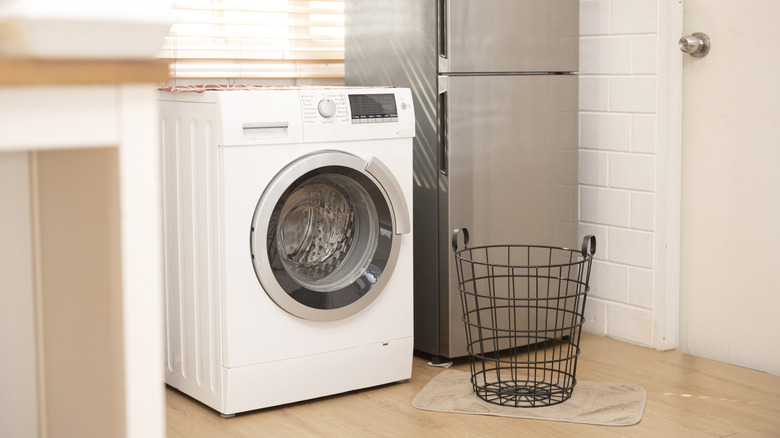
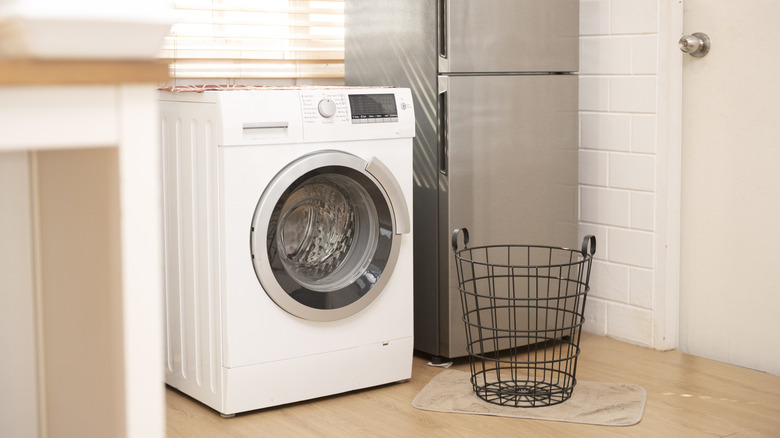
The right washing machine is all about space. Enough space on the inside, first and foremost, but it’s just as much about the amount of available space in your laundry room, too. That’s the part that determines whether the appliance even fits properly, not to mention operates safely. It’s one of those mistakes everyone makes when installing appliances: Too many homeowners focus only on the machine’s internal space without thinking about this second part at all. As a rule of thumb, you should always consider the external space, too.
Without the right amount of clearance behind the washer, you won’t have enough room for water hoses, power cords, or proper ventilation. On installation, you should leave at least 6 inches of space between the back of a washing machine and the wall. That gap leaves just enough space to connect water lines and electrical cords without crimping or damaging them. You also need to leave that room for airflow and whatever vibration might come from the machine during operation.
Advertisement
Other measurements to know when installing a washing machine
Maryana Serdynska/Getty Images
In addition to those 6 inches of space in the back, you should also leave about an inch of clearance on each side of the washer. It needs that space for ventilation, most importantly, but it also helps with noise reduction and damage control. Without it, the machine might bump up against the dryer or the wall… especially if yours tends to walk across the floor.
Because there’s no universal standard washer size across the major washing machine brands, dimensions are going vary tremendously depending on whether it’s a front-load, top-load, compact, stackable, or large capacity machine. That’s why it’s essential to take measurements before buying and installing. Of course, be sure to factor the 6-inch and 1-inch guidances into your measurements.
Don’t forget about door clearance, either. It’s easy to forget, but the machine is going to have to both fit through the door, and also have enough space around the machine for the door to swing open all the way. You’ll need at least 20 inches of open space in front of or above the appliance as well as an unobstructed path through whatever doorways, hallways, or tight corners you’ll need to get through upon delivery.
Jon Prosser was sued by Apple over the alleged theft of pre-release information, saw a default ruling due to inaction, had that overturned, and is once again failing to provide discovery materials. There’s a reason this time.
Life hasn’t been easy for Jon Prosser since a July 2025 lawsuit from Apple accused him and Michael Ramacciotti of stealing information from Apple employee Ethan Lipnik’s test device. He says he’s not guilty, but has created roadblocks at every possible point in this case.
According to a new filing, Jon Prosser has not been responding to requests for discovery since he rejoined the case in June. Apple last heard from Prosser’s counsel on July 6, 2026.
In the interim, Prosser had a second child. The lack of response is attributed to the newborn.
Advertisement
He allegedly hasn’t had time to provide requested materials. In the filing he says that he “will find dates when additional discovery may be provided to Apple.”
However, given the situation involves a newborn, Apple appears to be a little more understanding of this delay. The joint filing suggests that Apple has approved the delays in discovery and the new dates.
What isn’t clear is whether Apple will take a softer approach to the final determination and punishment for Prosser. The worst case here is that he is barred from reporting on Apple, which is a significant portion of his business.
A new deposition is set to take place in September 2026. The next legal filing is expected on October 7, 2026.
We spend hours testing every product or service we review, so you can be sure you’re buying the best. Find out more about how we test.
TP-Link Roam 7: 30-second review
The TP-Link Roam 7 is a compact travel router that lets you connect to whatever internet you can find and turns that into your own private network. This helps reduce the need to reconnect all your devices in each new location; just connect the router and all other devices will connect automatically through it.
The Roam 7 differs from a mobile router insofar as there’s no internal SIM or battery; power is supplied through a USB source such as a power bank, and the internet connection comes from a range of available options, including Ethernet at a hotel or business, public Wi-Fi, your phone tethered or a USB modem.
Advertisement
The size and weight are compact, so it’ll fit easily in a backpack or travel bag. The design is simple with a vented front: two fold-down aerials, and a customisable button on the side.
Latest Videos FromTechRadar
Setup is quick with the mobile Tether app, which lets you use the QR code on the base of the box to complete setup and configure logins. If you want anything more involved then once your device is connected to the router you can access the full web admin at 192.168.0.1.
Advertisement
This is all very clean and while it looks a little dated next to the app, it goes far deeper on the options and settings enabling you to manage the primary and guest networks, assign clients to 2.4GHz or 5GHz, configure Multi-Link Operation so one device takes priority over another, and monitor live CPU and memory usage. Considering this is a travel router, the amount of control is impressive.
There’s also a good level of built-in protection, which is helpful when connecting to public Wi-Fi or hotel networks. While the more advanced protections, including VPNs, are all paid options, there’s a good basic level of security and parental controls built in. The Web interface also gives you a huge amount of options.
Through the test, the one feature that really stood out as I wrote this review was the failover; with the router connected to the Netgear Nighthawk M7 through LAN and public Wi-Fi in a café. The café Wi-Fi was initially good, but as the hour progressed and the place filled, the speed dipped, and the router automatically switched over to the stronger SIM connection.
Sign up to the TechRadar Pro newsletter to get all the top news, opinion, features and guidance your business needs to succeed!
Advertisement
Overall, this is a well-balanced product that, at the price, offers far more than most, especially that Wi-Fi 7 connection speed. The internal hardware is, however, mid-range, and with only three devices connected, the web admin showed a CPU load of 40-60%. However, as a few more devices were added, the figure remained around the same.
If you work in different locations with multiple devices, then an option like the TP-Link Roam 7 makes absolute sense. Connect the router to the internet, then connect all other devices to it; no need to reconnect each. It offers a balanced set of security features, including VPN support, making it a great solution at a lower price than most mobile routers.
TP-Link Roam 7: Price and availability
How much does it cost? From $139 / £99
When is it out? Available now
Where can you get it? Directly from tp-link and online retailers
(Image credit: Alastair Jennings)
The Roam 7 is available directly from TP-Link here for $139.99 / £99.99. In the US, it’s also available for $130 at Amazon (down to $90 at time of review). In the UK, it’s priced at £99.99 at Amazon.co.uk. Outside of that, it’s widely available from online retailers.
Advertisement
TP-Link Roam 7: Specs
RAM: 512MB Rear Ports: One 2.5Gbps WAN, one 1Gbps LAN, one USB-A 3.0, one USB-C power input Connectivity: Dual-band Wi-Fi 7 at 2.4GHz and 5GHz, Ethernet, public Wi-Fi, USB phone tethering, 3G/4G/5G USB modem Wireless Speed: 2,882Mbps at 5GHz and 688Mbps at 2.4GHz VPN: OpenVPN, WireGuard, PPTP and L2TP, client and server Size: 126 x 93.5 x 36mm Weight: Approximately 250g Power: 5V/3A USB-C, no built-in battery Accessories: Power adapter, Ethernet cable, USB cable, quick-installation guide and Wi-Fi information card
TP-Link Roam 7: Design
(Image credit: Alastair Jennings)
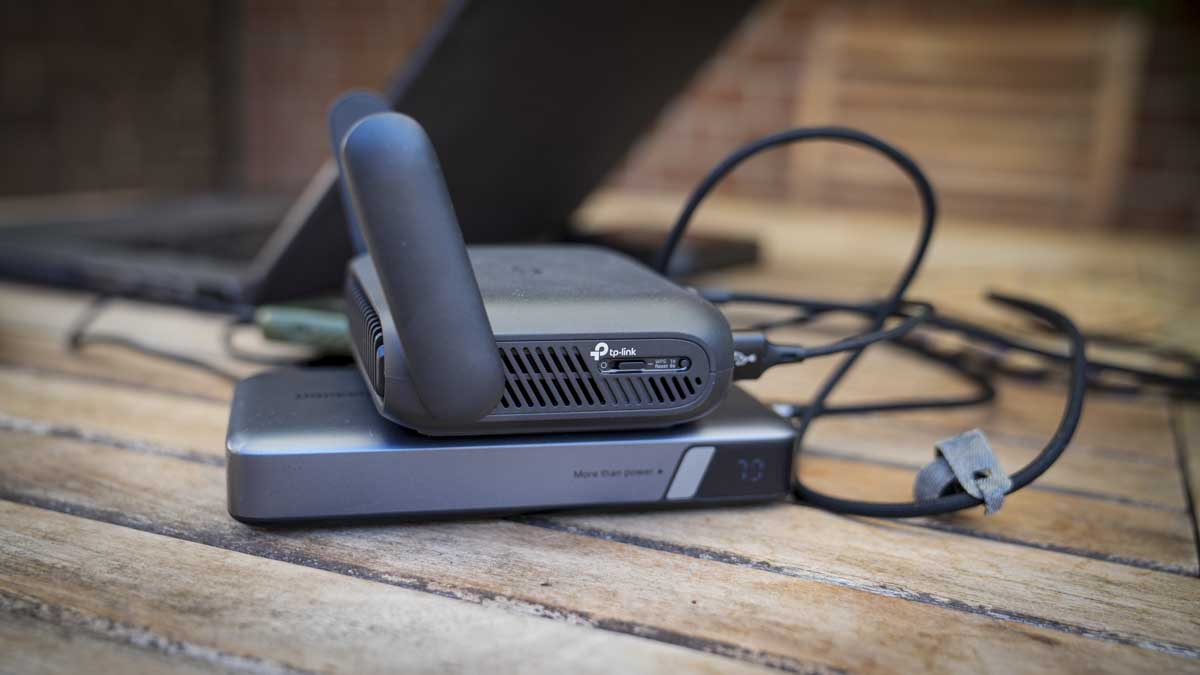
The Roam 7 is a relatively compact black box that measures 126 x 93.5 x 36mm and weighs in at 250g. It features a large front vent and two aerials that fold flat against the sides when transporting. One thing to note about the design is that it’s noticeably larger than a pocket hotspot but still small enough to slip into a backpack or bag easily.
Advertisement
It’s also worth noting that while the Roam 7 is relatively small, it requires a power supply, and an AC plug is included in the box; alternatively, you can plug it into a power bank, and in this review I’ve used the Ugreen 145W. On top of the power supply, you’ll also need a way to connect the router to the internet, and this is where the clever bit of this device comes into play.
You can either connect directly to a WAN or LAN via the two ports at the back, hardwire a phone via a USB cable and piggyback off the phone’s cellular network or use it as a pass-through for a Wi-Fi network, say, if you’re in a café.
(Image credit: Alastair Jennings)
Once plugged in, a simple status LED on the front illuminates to indicate connections or activity. While the design is simple, with most options and settings being controlled through the app or web interface, there is a physical toggle button on the side that can be configured to control power, the status LED, or the VPN connection.
The rear panel houses all the connections: a 2.5 Gbps WAN port, a 1 Gbps LAN port, USB-A 3.0 for storage or tethering, and USB-C for power.
Advertisement
As this is a travel router, it would have been great to see a carry case supplied as well. Unfortunately, aside from the power supply, USB-C-to-USB-A adapter, and network cable, there are no other accessories.
TP-Link Roam 7: Features
(Image credit: Alastair Jennings)
Taking a look at the feature set, it really highlights how the Roam 7 differs from a standard router or mobile router. In the case of the first, the compact size and weight mean it can be taken anywhere, and the build and design are robust and highly portable, with power supplied via USB-C rather than the standard barrel-style connector to mains power, which is more common.
Unlike a mobile router, it has no built-in battery or SIM card, so it relies on other devices for both. I’ll come on to why this can be a great option in the performance section.
Advertisement
The Roam supports dual-band BE3600 Wi-Fi 7 with Multi-Link Operation, 4K-QAM, and four wireless streams, rated at 2,882 Mbps on 5GHz and 688 Mbps on 2.4GHz. Those are link rates rather than throughput figures, and there is no 6GHz band, so this is Wi-Fi 7 in its dual-band form rather than the full tri-band specification.
Looking through the different operating modes, there are seven in total: cover router, hotspot or WISP, USB tethering, USB modem, access point, range extender and client. Switching between Ethernet, USB tethering, USB modem, and hotspot occurs through the web interface, and in testing, it took around 45-50 seconds to switch between each. USB tethering to an iPhone was slower, occasionally up to a minute, but on Android it was far faster.
One of the modes I was pleased to see was Failover, as it lets you connect to a mobile router and a tethered phone at the same time, and the Roam 7 prioritises whichever provides the better connection.
There’s also VPN support for major brands, including OpenVPN, WireGuard, PPTP, and L2TP, as both client and server. A VPN connection can run alongside ordinary traffic rather than being on all the time; the physical switch on the side can be allocated as a quick on/off for the VPN, so for general browsing you can switch it off, and for financials, shopping, etc you can switch it on for that additional protection.
Advertisement
The device management is also well thought out, with two options tailored to the type of user, or you can switch between them, as I find myself doing. For most people, the Tether app, which enables initial setup via a QR code, provides access to most of the settings.
During the test, there were a couple of occasions when I was unable to find the settings I wanted through the mobile app, such as assigning the connection type. The Web Admin, however, made this easy and offered a more traditional approach to router and network settings along with many advanced options, including what I was looking for, which was an easy way to switch between inputs.
The web admin panel can be located once you have connected to the router through 192.168.0.1 in your browser, and once you log in, you have all the primary and guest network management, assigning clients between 2.4GHz and 5GHz, Multi-Link Operation configuration to give one device priority over another, and a live view of CPU and memory load, which is interesting especially as more devices connect.
The best way to look at the two options is that the app is for consumers and the web client is for businesses, so actually having both is a good balance.
Advertisement
Another point about this router is that, as it doesn’t have its own power source, it will be a drain on whatever it’s plugged into. However, a check of the power usage shows it is extremely low at less than 4W; still, TP-Link do offer three power modes. Boost is the default and the option I used in the test to maximise performance; below it are Balance and Eco for managing speed, heat, and power draw. The MLO mode that I mentioned earlier will increase power use, but again, this power usage is extremely well managed.
Alongside the hardware admin, there’s a good level of software support, including HomeShield, which adds a network scanner, parental controls, and device-level quality of service. For each of these features, there is a Free tier, but the more robust parental controls and Security+ features require a paid subscription.
TP-Link Roam 7: Performance
(Image credit: Alastair Jennings)
Benchmarks
Advertisement
Boot time: 1 minute 52 seconds, plus roughly a further minute to connect a client and get online Time to internet from cold, MacBook Air M3: 2-3 minutes Mode switching time: 45 seconds; up to 1 minute when switching to iPhone USB tethering Power consumption, three clients connected: 3.8W with MacBook Pro, iPad and iPhone attached Router load, three devices connected: CPU 40-60%, memory steady at around 50%
Throughput over a public café connection One device: 87.3Mbps down / 98.5Mbps up Two devices, device 1: 46.6Mbps down / 101.8Mbps up Two devices, device 2: 61.3Mbps down / 27.3Mbps up Three devices, device 1: 11.5Mbps down / 9.08Mbps up Three devices, device 2: 75.4Mbps down / 44.4Mbps up Three devices, device 3: 17.0Mbps down / 72.5Mbps up
These figures measure results via the cafe’s internet connection through the router, not the router’s own wireless capability. The three-device total of 103.9 Mbps down exceeds the single-device figure of 87.3 Mbps, highlighting the influx of people into the cafe and the effect on bandwidth.
Initial setup is relatively straightforward, as there’s nothing to install. Or charge. Once unboxed, the AC adapter of a power bank can be plugged in, and the front light glows orange. You then go to the Tether Mobile App, scan the QR code, complete the rest of the process, and you’re set.
Advertisement
After that initial setup, I took the Roam 7 to a café, plugged it into a power bank, joined the venue’s Wi-Fi via the Tether app, connected my MacBook to the router’s network, and enabled the VPN. The whole sequence took between two and three minutes depending on the connection type and strength. It required no laptop configuration at all, having already connected to the router at home; likewise, the same for the connection to my phone and iPad, which were all previously connected.
One issue that struck me early on was the number of wires and gadgets I had suddenly accumulated around the MacBook; I had my phone, the power bank, and the router all connected along with wires. While it didn’t take up a huge amount of space, it was more than I’m used to.
One point about the connection speeds is that the public Wi-Fi connection was faster than connection tethered through my mobile phone. During testing on location, the 4G connection showed as full, however connected to the Wi-Fi without a VPN, I saw speeds of around 150 Mbps, down to around 120 Mbps with VPN on.
Through a series of checks to see how long it takes to connect in the café location from cold, it I found it took just under two minutes to boot, and connecting and getting the computer online added another minute. There’s also time to unpack the three devices you need to make that connection: the router, the power bank, and the mobile device.
Advertisement
The average connection time in the test was just under three minutes from nothing to a working connection on a public Wi-Fi network. OK, it’s faster to connect directly, but a public Wi-Fi, isn’t secure and the cost saving of the Roam 7 compared with a mobile router is huge.
Through the test, I was interested to see how long it would take to switch between connection types, say, from Wi-Fi to a tethered mobile connection. To do this you need to dip into the web interface, not the app, and the switchover took around 45-50 seconds.
As highlighted, there is no internal power, so the draw from the host machine is an important factor for travel, and surprisingly it’s very low. With a MacBook Pro, an iPad and an iPhone all connected, the router pulled 3.8W. This is really nothing, and my 145W power bank essentially ran through a working day without issue. It was also good that I was able to set up a local network, and the colleagues were also able to connect as guests, again all easily set up through the web interface.
For the most part, I was piggybacking off the wireless network in the café, and, interestingly, a single device connected, I saw 87.3 Mbps down and 98.5 Mbps up. With three connected, the individual figures ranged from 11.5 Mbps to 75.4 Mbps down, but their combined total came to 103.9 Mbps, more than that first single device. The issue is that the café’s internet is open to the public, so there will be some fluctuation due to other users.
Advertisement
Internet speed is part of the picture, especially as more devices connect. One of the features I liked was that, through the web admin, you can see live CPU and memory usage. With only three devices connected, CPU load averaged 40-60%, while memory sat at around 50% of the installed 512 MB.
TP-Link states that it supports up to 90 devices, which I think may be a little bit hopeful. Still, for the three I had connected during the test, all checking the internet speed, then watching a 4K YouTube video and uploading files to an ftp this speed generally felt stable and fast.
A travel router like this has a very focused job and won’t be for everyone; however, if you connect multiple devices to an internet connection away from home and need something lightweight and portable, this is a great solution that balances features, performance, and cost.
Advertisement
TP-Link Roam 7: Final verdict
(Image credit: Alastair Jennings)
At first it may be difficult to see why you would want the Roam 7 over just connecting directly to your mobile phone or the public Wi-Fi. But then, in the workplace, where you may have multiple devices you use while travelling, or you’re dubious about using public Wi-Fi, this well-priced travel router makes sense.
Setup is easy, and whatever connection mode you use, once you’ve run through the process a few times, it all makes sense. Essentially, arrive, plug in, order a coffee, and by the time you’ve unpacked and set up your computer you’ll be ready to go.
Overall, the connection seemed robust, especially with the failover. While the router can only be as good as the local connections, the test proved it was a solid option, switching from mobile to Wi-Fi to enable the fastest connection without issue.
I had to ask: with mobile routers also available, who is this best for? The Roam 7 is an ideal solution if you travel and use multiple devices. It essentially lets you connect all devices to it, and you just need to connect it to an internet connection. When you arrive at your destination, you connect to the router, and everything else follows suit, without you needing to log in to every device individually.
Advertisement
While you can do this with your mobile, the added network features and the ability to turn your phone into a mobile router are definitely appealing and much cheaper than a dedicated mobile router.
Then there’s the price, which at a fraction of dedicated mobile routers and with all the additional features suddenly makes this very appealing as an option to use anywhere, be that travelling or in a location that you just want to set up a private network, such as in an office, studio or workshop where a separate network can be useful.
Should I buy a TP-Link Roam 7?
(Image credit: Alastair Jennings)
Swipe to scroll horizontally
Value
Advertisement
Excellent value at around £90, although you’ll need power and internet connection in addition
4.5/5
Design
Compact, design perfect for slipping into a backpack, though no case is supplied
Advertisement
4.5/5
Features
Seven modes, including full VPN support, storage sharing and decent web admin
4/5
Advertisement
Performance
Quick to set up and low power consumption, balanced by the mid-range hardware
4/5
Overall
Advertisement
A flexible, business travel router that will keep you connected and safe as you travel
Crystal ball: Just a couple of months after Cloudflare revealed that bots have officially surpassed human traffic online, the company has given its view on what things will look like in five years. It’s not good news for us fleshy meatsacks: non-human traffic could be up to 1,000 times higher than human traffic.
CDN and cybersecurity giant Cloudflare held its Q2 earnings call on Thursday, during which chief financial officer Thomas Seifert gave a concerning prediction about what the web will look like in the future.
“If the current trends continue, we think in five years, non-human traffic will be as much as 1,000 times as much as human traffic,” he said.
“In other words, humans will be a rounding error on the internet, not because human traffic goes down, but that’s just how fast we’re seeing non-human traffic grow.”
Advertisement
Seifert did add the important caveat that his predictions have been wrong in the past. Cloudflare CEO and co-founder Matthew Prince will likely be able to relate to this. He had predicted that bot traffic would surpass humans at the end of 2027, but it happened earlier this year.
It goes without saying that the sudden acceleration in non-human traffic is being driven by AI – agentic AI, specifically. Agentic systems behave very differently from traditional web crawlers and fraud bots. Their activity can closely resemble ordinary browsing, but it happens at machine speed and can be repeated on an enormous scale.
Advertisement
Even a straightforward prompt may trigger thousands of requests. Prince illustrated the difference using online shopping: someone searching for a camera might check five retailers, while an AI agent could examine 5,000 sites on their behalf. Multiply that behavior across millions of users asking assistants to compare products and airfares, research topics, collect information, or condense articles, and you can see why Seifert believes humanity’s online presence will become a rounding error.
Seifert said that if traffic does grow the way he expects, “we’ve got to get a lot more efficient,” which is where Cloudflare’s services come in, of course. He also mentioned the security implications of a web made up pretty much entirely of bots.
The idea that Dead Internet Theory – the concept that the internet is mostly run by bots and AI – will be demonstrably true in a few years (or now, arguably) is a concerning one. For a start, it could see the end of independent sites that have relied on the web’s business model since the 1990s.
There’s also the fact that an internet full of bots, AI slop, and privacy risks is making more people pull away from the online world. In our poll, 97% of people said the internet today was a hellscape compared to its early days, and it looks like things are only going to get worse.
“Google should be required to divest the Chrome browser, and prohibited from paying Apple to distribute Google’s search engine, the nonprofit advocacy group Public Knowledge argues in a new court filing,” MediaPost reports, citing a friend-of-the-court brief filed Tuesday in the D.C. Circuit Court of Appeals:
The group adds that “independent ownership” of Chrome “would open the distribution channel Google controls and allow Chrome to serve browser users when it makes privacy decisions and determines how to integrate search and (artificial intelligence)…”
In September 2025, [U.S. District Court Judge] Mehta issued a remedies order that requires Google to share some data about users’ searches with “qualified” competitors and to provide syndicated search results and ads to those competitors. The order also prohibits Google from entering into exclusive distribution contracts for Google Search, Chrome, Google Assistant and the Gemini app for six years, but allows the company to continue to make payments for search-ad revenue or distribution to Apple, Mozilla and others…
Google recently appealed Mehta’s order. The company argued in its written brief that it “prevailed in the marketplace fair and square,” adding that Apple and Mozilla “sensibly chose” Google as the default search engine “because it gave their users the best experience,” and because Apple and Mozilla would earn the most ad revenue through the deals. The [U.S.] Justice Department and states countered to the appellate court last week that the liability finding should stand, and also argued that Google should have been banned from paying Apple and Mozilla for placement as the default search engine on their browsers.
[Antitrust enforcers had originally asked the judge to order Google to divest Chrome, but he’s already rejected that request.] The government did not argue in its appellate papers that Google should be forced to sell Chrome. But Public Knowledge independently contends in its friend-of-the-court brief that divestiture would benefit consumers… “Divestiture would place those decisions with an institution whose success depends on serving browser users primarily….” The group is calling the appellate court’s attention to Google’s April 2025 decision to preserve tracking cookies — a reversal from its earlier plans to block third-party cookies by default. “Google is in the position of both deciding Chrome’s tracking rules while running the advertising business affected by them,” Public Knowledge writes. “An independent Chrome could make those decisions on behalf of users alone.”
Advertisement
But Firefox developer Mozilla filed its own friend-of-the-court brief Thursday warning Firefox could be forced to “exit the browser and browser engine markets” if it can’t receive payment from Google for distributing its search engine, according to a later report from MediaPost:
Federal and state antitrust enforcers recently asked the appellate court to reverse the portion of Mehta’s order that allows those payments to continue. But Mozilla counters in its new friend-of-the-court brief that Mehta’s decision regarding those payments was supported by the evidence –including a study it conducted concluding that its revenue would “decline dramatically” if forced to replace Google with Bing as Firefox’s default search engine…
Google is expected to file new arguments with the appellate court next month.
Alibaba released Qwen 3.8-Max this week and marketed the preview as second only to Claude Fable 5 (their launch-day table was more equivocal: the model leads on one of 12 coding-agent rows). But an independent harness came close to the opposite conclusion: a benchmark run, apparently using the Preview version, put Qwen 3.8-Max’s best effort setting mid-pack, and its default setting last.
Both results are real and defensible. The gap between them is about token and time budgets, and that matters because those figures aren’t usually headline numbers. Alibaba’s footnotes give its coding numbers a five-hour timeout, and up to 12 hours per run on PaperBench. The independent harness, VulcanBench, allowed between 45 and 60 minutes of wall clock time. A time budget between five and 16 times larger on Alibaba’s side explains the huge difference in results.
It’s time to do two things to start accounting for these differences when choosing models. First, the metric to use is cost per successful task: total spend, including everything you spent on attempts that failed, divided by the tasks that actually passed your acceptance check. Second, you need to make time or token budgets an explicit part of your acceptance criteria, not a hidden detail.
Price per token has stopped predicting the bill
The comparison everyone published in Qwen 3.8-Max’s first week was a price comparison, because that was the only data available. It is not a cheap model. DeepSeek-V4-Flash-0731, which entered public API beta on July 31, lists at 14 cents per million input tokens and 28 cents output. Qwen 3.8-Max lists at $2 and $6. Kimi K3 sits at $3 and $15.
Advertisement
Those prices tell you less than they used to, for a reason specific to reasoning models like Qwen: getting to a result costs thinking tokens. A model that spends most of its token allowance on reasoning can reach a token cap before it writes the answer, giving you an empty result indistinguishable from a total failure at the cost of a full run.
Artificial Analysis has the cleanest published measurement of how this can affect real agent spend: running its Intelligence Index on DeepSeek-V4-Flash at maximum effort took 210 million output tokens against a class median of 100 million. Absolute cost stayed low anyway, because the tokens were so cheap. But verbosity costs time, not just money, and depending on your use case that can sink you.
What you need is a number that counts everything you spent, including the attempts that came back empty, against the tasks that actually got done in the time and token budget you specified. This is what a cost-per-success metric helps you see.
Your failure rate is partly a configuration setting
A run that produces a wrong answer and a run that runs out of budget are different events with different fixes. Almost no harness distinguishes them, and almost no leaderboard reports the split. I hit this building an agent benchmark of my own: the harness logged a failure and nothing about why, and I had to add the distinction myself. When you do separate them, budget exhaustion turns out to dominate.
Advertisement
Long-Horizon-Terminal-Bench, published in July, ran 17 frontier models across 46 tasks through a shared harness with one 90-minute attempt each. Timeouts accounted for 79% of unresolved runs, against 19% for agents that stopped on their own and 3% for harness errors. The authors are careful about what that does and does not mean: the timed-out runs were not close to finishing, with mean reward between 0.10 and 0.35, so you cannot assume more time would have resulted in success. But the lesson is: benchmarks are implicitly measuring time efficiency, whether or not they shout about that.
The clearest published example of the mechanism comes from VulcanBench, the same open-source harness behind the Qwen chart. In a report dated July 26, Claude Opus 5’s lowest-effort setting was its best, solving 20 of 23 tasks against 18 at high effort. The extra reasoning wasn’t useless: high effort returned the fewest wrong answers of any setting, one against three. It ran out of clock instead, and a timeout scores zero. Two of its three regressions were cutoffs on tasks that low effort solves, and given unlimited time on both it only ties its cheapest setting, at 3.1 times the cost.
That has a direct consequence for anyone building a routing ladder. The standard design escalates to more reasoning when a cheap attempt fails, on the assumption that the next rung is better and merely costs more. For a meaningful share of model and task combinations that assumption is wrong, and you pay the higher rung’s price to escalate into a timeout or hitting a cap.
Who is already measuring this
Several groups have landed on cost per successful task independently in the last few months, which is the strongest signal it’s becoming standard.
Advertisement
VulcanBench reports dollars per solved task as a headline column and has since its earliest reports. Long-Horizon-Terminal-Bench publishes per-task cost next to accuracy, and its most instructive row is GPT-5.4 at roughly $26 per task with a much lower pass rate than Grok 4.5 at about $11. TestEvo-Bench runs agents under a cost cap, and Claude Code’s test-generation score falls from 71% to 44% at the tighter cap.
Emit a failure reason on every agent run as a required field, with budget exhaustion, verifier failure and harness error as distinct values rather than one failure flag. Until you can separate a timeout from a wrong answer, your pass rate is measuring two things at once and you cannot tell which one to fix.
Compute cost per successful task per effort level, not just per model. Total spend including failed attempts, divided by tasks that passed your acceptance check. The ranking will not match the rate card, and the cheapest setting may well win.
Cap on tokens rather than wall clock unless latency is genuinely in your service level objective. A wall-clock cap scores your provider’s serving speed as model quality.
Check the default effort setting on everything you have deployed. Qwen 3.8-Max runs at its highest reasoning setting when the effort field is unset, and its highest setting was its worst performer in independent testing. A team that never touches that parameter is running the configuration that costs the most per solved task.
If your vintage gaming system eats through batteries in a hurry, this is for you.
Old-school gaming handhelds can be battery hogs. Whether it’s the original Game Boy’s four AA batteries or the Game Gear’s six, they tear through cells at a rate that makes modern consoles feel like luxuries. Here’s the easiest way to boost your battery setup on your old Nintendo, Sega or Atari portable.
For this guide, we’re focusing on the most popular battery-powered handhelds from the late ’80s through the early 2000s. Those would be Nintendo’s original Game Boy, Game Boy Color, Game Boy Pocket and Game Boy Advance, plus Sega’s Game Gear and the Atari Lynx.
Advertisement
The bottom line? Modern rechargeable batteries smooth much of the friction out of these retro handhelds. They save money, cut environmental waste and let you avoid the headaches that go along with disposable alkalines.
The right rechargeable batteries
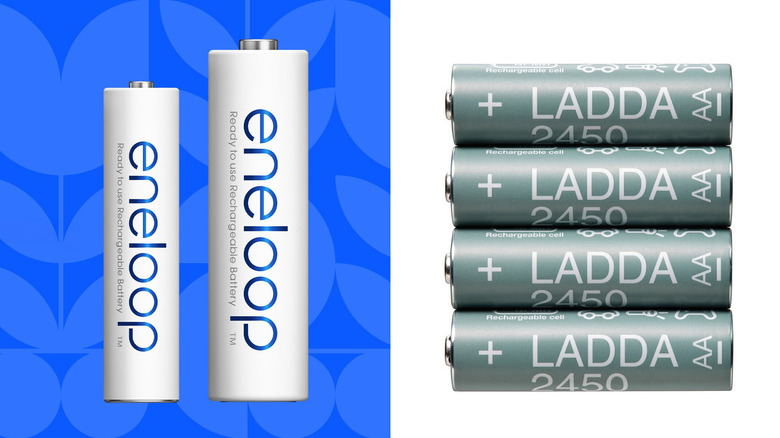
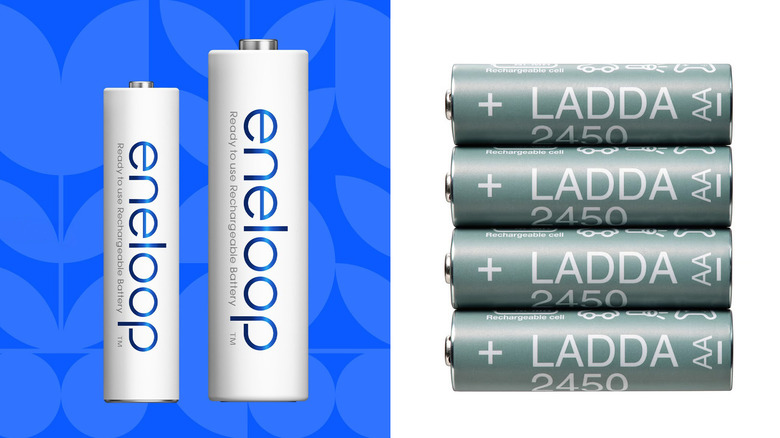
Panasonic / IKEA
For most people, a set of nickel-metal hydride (NiMH) rechargeable batteries is the way to go. They’re reliable, reusable and much cheaper over time than disposable alkalines.
Panasonic Eneloop is an Engadget staff favorite. It’s consistent and tends to hold up over time better than cheaper options. If you want to save a few bucks, IKEA LADDA is a good budget alternative. (Some have speculated that they’re rebranded Eneloops, but that isn’t confirmed.) Both are sold in the AA and AAA sizes you need for these systems.
Advertisement
Game Boy – 4 × AA
Game Boy Color – 2 × AA
Game Boy Pocket – 2 × AAA
Game Boy Advance – 2 × AA
Game Gear – 6 × AA
Atari Lynx – 6 × AA
Just keep in mind that the system’s battery indicators don’t always behave the same way with rechargeables. If the low-battery warning comes on, you may want to get in the habit of quickly saving your game to be safe.
As for how many batteries you need, a good rule of thumb is to buy two full sets. That way, you always have one in the handheld with another charged and ready to go.
One possible exception is modded retro handhelds, since things like brighter screens can run through batteries faster than the stock hardware. In that case, a third set could be in order. Some power-hungry or voltage-sensitive mods might work better with 1.5V rechargeable lithium batteries, although they tend to cost more than standard NiMH cells.
Advertisement
USB-C battery mods
Handheld Legend
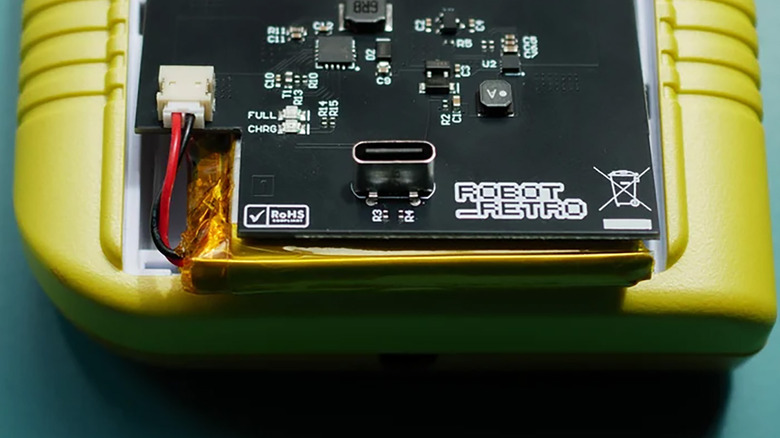
Some models, including the original Game Boy, can be modded with USB-C rechargeable battery pack kits. These make the handheld feel more like a modern system, removing the annoyance of battery swaps. Some work with USB-C power banks, although not all support charge-and-play.
There are a few risks and downsides. For example, some USB-C battery mods don’t fully isolate the battery while charging. This can generate extra heat and make it less safe to play while charging. So, it’s worth checking user feedback and sticking with well-regarded mods if you go that route.
We spend hours testing every product or service we review, so you can be sure you’re buying the best. Find out more about how we test.
RingConn Gen 3: One minute review
RingConn has always been a solid challenger to Oura in the smart ring space, and after spending two weeks testing it, I can safely say the new RingConn Gen 3 continues that trend. You’ll get most of the same health, sleep and recovery tracking features as rivals in our best smart rings guide here, but without the monthly subscription that puts some people off buying a smart ring altogether.
The Gen 3 tracks heart rate, heart rate variability (HRV), blood oxygen levels, skin temperature, respiratory rate, stress, activity and sleep. New additions include a haptic motor for some alerts and reminders, improved battery life and new vascular health trend insights, which are designed to give you a picture of your cardiovascular wellbeing over time.
Advertisement
However, this version does feel similar to the Gen 2 that came before it. The design and app experience feel largely unchanged and many of the core features will already be familiar to anyone thinking of upgrading from a RingConn Gen 2.
Latest Videos FromTechRadar
Although that’s not necessarily a bad thing. The lightweight titanium design is still incredibly comfortable to wear and the app is simple to navigate. RingConn also continues to stand out by offering useful features like sleep apnea monitoring, something that still isn’t standard across the smart ring market.
Advertisement
(Image credit: Future)
The experience here isn’t perfect. During my testing, I found that some health insights can feel generic, certain wellness scores lack meaningful context and some of the messaging around features like vascular insight trends can be confusing. And, while the app is clean and easy to use, it still doesn’t feel quite as refined or polished as Oura’s.
But RingConn continues to occupy a compelling middle ground. It isn’t the cheapest smart ring you can buy, but it undercuts premium competitors while delivering a similar experience overall.
The RingConn Gen 3 may not be the most exciting smart ring launch of the year, but for anyone looking for comprehensive health tracking without an ongoing subscription, it’s shaping up to be one of the easiest smart rings for me to recommend.
Sign up for breaking news, reviews, opinion, top tech deals, and more.
Advertisement
RingConn Gen 3: Specifications
Swipe to scroll horizontally
Component
RingConn Gen 3
Price
Advertisement
$426 (silver, gold, matte black) / $454 (brushed silver and brushed rose gold); £322 / £343 (approx)
Dimensions
2.3mm thick
Weight
Advertisement
2.5g to 3.5g (depending on size)
Finish
Silver, gold, matte black, brushed silver, brushed rose gold
Sizes
Advertisement
6 to 15
Material
Titanium body, medical-grade epoxy interior with a PVD coating
Battery life
Advertisement
10 to 12 days (with vibration on), 11 to 14 days (with vibration off)
Sensors
Optical Heart Rate Sensor, Temperature Sensor, 3-Axis Accelerometer and Vibration Feedback Motor
Connection
Advertisement
Bluetooth 5.0
Water resistance
IP68 / 10ATM
(Image credit: Future)
Advertisement
RingConn Gen 3: Price and availability
Priced at $426 / $454; £322 / £343 (approx)
Rolled out from late May 2026
No subscription needed
Pricing starts at $426 for the silver, gold and matte black versions. That rises to $454 if you’d like the new brushed silver and brushed rose gold finishes.
I only tested the standard silver, but the brushed effect is really appealing. At least what I can see from promo shots, it makes the ring look a little more refined and if I was buying one myself I’d probably pay extra for that finish.
UK pricing hasn’t yet been confirmed at the time of writing, but that US pricing works out at approximately £322 to £343, depending on the finish you choose.
That places the RingConn Gen 3 firmly in the premium smart ring category. It’s not cheap by any means. You can now find more affordable smart rings, like the Circular Ring 2, which starts at $349 / £280 / AU$497.
However, it still manages to undercut some of its biggest competitors, making a tempting value proposition. For context, the new Oura Ring 5 starts from £399. Which, granted, isn’t that much more expensive. But you do need to factor in the ongoing monthly subscription, which you’ll need to unlock all of the Oura’s features. That costs $5.99 / £5.99 per month. So paid monthly, that’s around an additional $70 / £70 per year.
Advertisement
What makes RingConn stand out is that there are no subscription fees here. Once you’ve bought the ring, you get access to all of the core health and wellness features without any additional monthly costs.
It’s worth mentioning that other smart ring brands are offering their devices without a monthly subscription too. And the gap between RingConn and its premium competitors isn’t quite as large as it once was, especially as smart ring prices continue to rise across the board. But when you factor in the lack of subscription fees and the breadth of features on offer, the RingConn Gen 3 still represents good value.
(Image credit: Future)
RingConn Gen 3: Design
Lightweight and comfortable design
Distinctive squared circle shape
New finishes and expanded sizing options
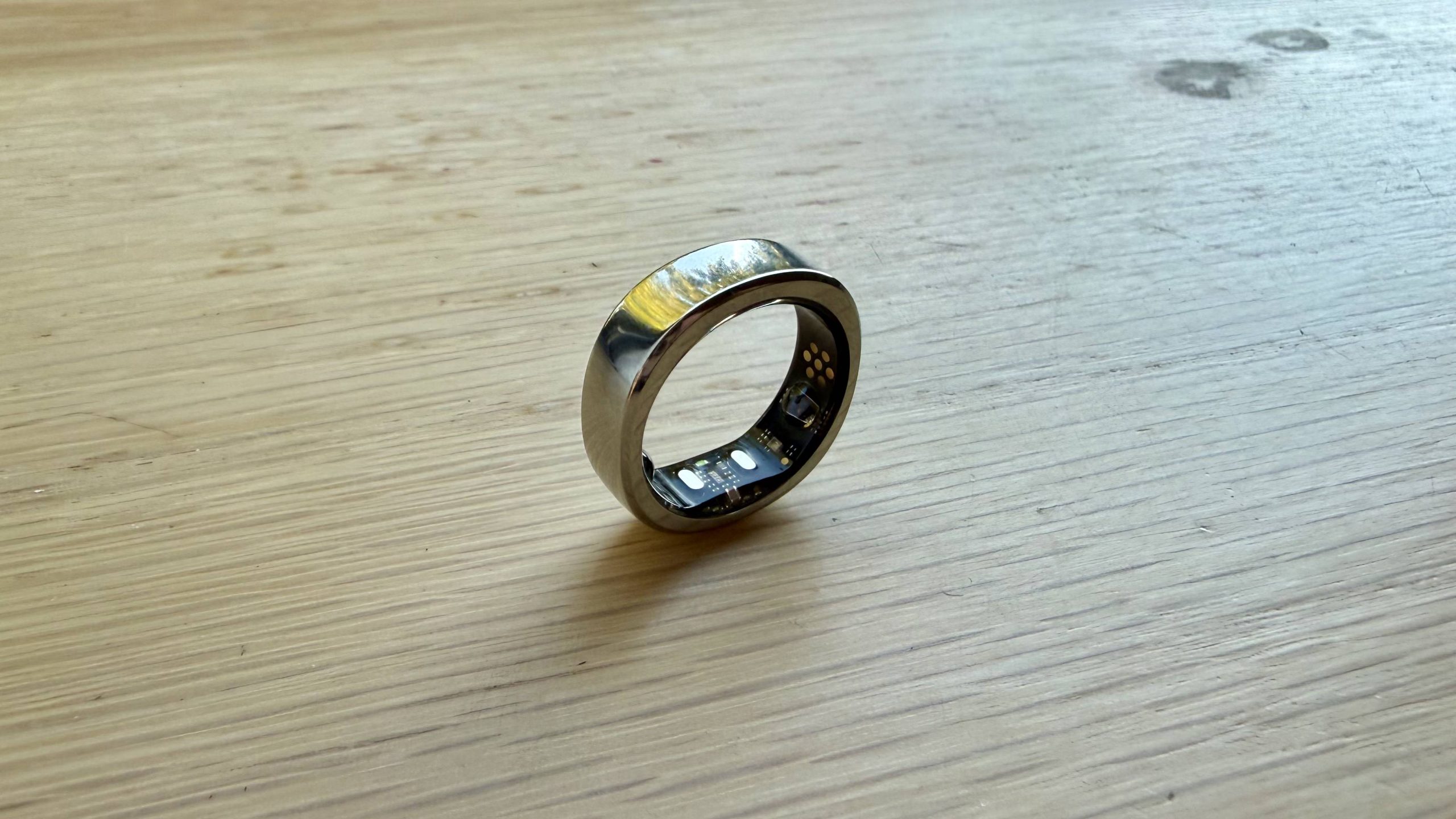
The first thing you’ll notice about the RingConn Gen 3 when you take it out of the box is its unusual shape. Rather than being perfectly round, it has a subtle squared-off design. It looks a little unusual at first, but I really liked it. Plus it seemed like a refreshing choice in a market where so many smart rings are almost indistinguishable from each other.
At between 2.5g and 3.5g depending on which size you get, and measuring 2.3mm thick, the ring is light and discreet enough to forget you’re wearing it. I wore it day and night when I was testing it, including while sleeping, without any issues.
Advertisement
That weight and thickness are both fairly standard compared to other smart rings. The only notable exception is the new Oura Ring 5, which has been designed to be slimmer and lighter than previous generations and almost all rivals.
The Gen 3 ring is made from titanium with a medical-grade resin interior and is rated IP68 and 10ATM for water resistance. In practical terms, that means you can wear it in the shower, while swimming and during workouts without worrying about taking it off. During testing, I rarely had to think about removing it, whether I was washing up, showering or exercising — though I did remove it when lifting weights to avoid any scratching.
RingConn has also expanded its sizing range this time around, now offering up to size 15. Many competing brands don’t go beyond size 14. One thing to be aware of here is that RingConn says the Gen 3 sizing may differ slightly from standard ring sizing and other smart rings. Which means it may be worth using the sizing kit first just to be safe. Although I tested my usual size without any issues.
There are several new finishes available, including brushed silver and brushed rose gold. I tested the glossy silver model, which held up surprisingly well during testing. After more than a week of daily wear, there were no visible scuffs or scratches, even on close inspection.
Advertisement
That’s really notable because when I’ve tested many smart rings in the past I’ve found that some finishes, particularly matte black ones, can start showing signs of wear after only a few days.
That said, if I were buying this ring myself rather than reviewing it, I’d probably choose one of the new brushed finishes, even though they cost a little more. After years of testing smart rings, I’ve come to think that the super glossy finishes are often what make them look like gadgets rather than jewellery. So if making sure a smart ring blends in is important to you, the brushed options are probably worth considering.
My only real criticism is that there isn’t an obvious external marker showing which way round the ring should be worn. That’s really nit-picking, but it’s something some competitors have added. While it’s easy enough to identify the correct orientation from the sensor placement inside the ring, a small external indicator, like a tiny notch, would make it quicker and easier to position correctly for the most accurate readings.
The charging case is handy. It’s compact, easy to throw into a bag and feels more refined than previous versions. Unlike some competitors, it’s also not tied to a specific ring size, which might be useful for you if you know someone else who has a RingConn ring.
Advertisement
RingConn Gen 3: Features
(Image credit: Future)
Subtle haptic alerts
Comprehensive health and wellness tracking
Sleep apnea monitoring and vascular insights
You’ll find all of the health and wellness features you’d expect from a premium smart ring here. The Gen 3 continuously tracks heart rate, heart rate variability (HRV), blood oxygen saturation (SpO2), respiratory rate, skin temperature, stress, activity levels and sleep. There’s also menstrual tracking and a Baby Prep mode to support ovulation prediction.
Alongside these core features, RingConn offers a few more advanced tools that are designed to help it stand out from rivals. One of the most useful is sleep apnea monitoring. Once enabled, it monitors for the core signs of sleep apnea and provides short-term risk indicators alongside longer-term trends.
Like any wearable health feature, it’s not designed to diagnose a medical condition. But I think it could be useful if you’re concerned about your sleep quality or breathing patterns and want some additional information before you speak to a doctor.
New for the Gen 3 is a built-in haptic motor, which means the ring can now vibrate for health alerts, inactivity reminders and low-battery warnings.
Advertisement
At first, I was conflicted about this addition. Part of the appeal of smart rings for me is that they collect data in the background without demanding attention in the way a smartwatch can. Fortunately, RingConn has taken a restrained approach. The vibrations are subtle, focused on health-related notifications rather than phone alerts and can be disabled entirely if you’d prefer that.
Another notable addition is RingConn’s vascular health tracking. Rather than attempting to estimate blood pressure directly, the feature combines overnight vascular load data with blood pressure readings and lifestyle information to provide longer-term cardiovascular insights.
To use it, you’ll need to periodically enter blood pressure readings from a traditional blood pressure cuff. Initially, I wasn’t convinced of the value of this feature. Wouldn’t you just use a cuff instead of the ring if you have one? But it became clear during testing that the goal here isn’t to replace a blood pressure monitor. Instead, it’s designed to help identify broader patterns over time.
One reason for the confusion is likely that in the app this section is labelled as ‘blood pressure trends’, which RingConn tells me is out-of-date copy and will be changed to ‘vascular insights’ soon to make it clear this isn’t just a blood pressure reading feature.
Advertisement
Because the data you get here is about circulation stress tracking, which RingConn describes as a measure of how effectively your body moves between activity and recovery. Results are then also broken down into areas such as day-night rhythm, sleep breathing, post-exercise recovery and stress response.
The insights aren’t especially deep, and if anything is flagged you’ll need to go and search for what it means, but they’re among the most detailed explanations available in the RingConn app and provide useful context without becoming overwhelming.
(Image credit: Future)
RingConn Gen 3: Performance
Clean, easy-to-use app
Excellent battery life
Strong sleep and wellness tracking
As with any smart ring, the Gen 3 relies heavily on its app, and RingConn gets a lot right here. While it doesn’t feel quite as polished as Oura’s software, I found it easy to navigate through the different menus. I also liked the flower-like Wellness Balance graphic at the top of the dashboard, which provides a quick visual snapshot of your overall health.
The app makes it easy to check key metrics at a glance, while more detailed charts, historical trends and explanations are there if you click through into each dedicated section, including sleep, activity and stress. Stress tracking was a particular highlight, making it easy to spot recurring patterns and periods of higher pressure throughout the day.
Advertisement
Some of the written insights can feel a little generic though, as daily summaries occasionally surfaced observations that felt obvious or lacked enough context to be genuinely useful. Sleep insights tended to be more helpful, with more detailed explanations and recommendations.
Sleep tracking is one of RingConn’s strongest areas. The app presents sleep duration, efficiency, stages, overnight heart rate and movement data clearly without overwhelming you with information. During testing, it also handled my occasionally unusual sleep schedule surprisingly well, which meant that on nights when I woke up for an hour in the early morning before falling back asleep, RingConn correctly identified this as a brief ‘awake’ period rather than ending the sleep session entirely.
In terms of accuracy, I wore the RingConn Gen 3 alongside a Whoop 5.0. The two devices produced very similar results. Whoop measured a 84% sleep performance, 6 hours and 31 minutes of sleep and a 49bpm average overnight heart rate. RingConn gave me a 77 sleep score, recorded 6 hours and16 minutes of sleep with a 48bpm average overnight heart rate
Sleep stage breakdowns also aligned closely, with only minor differences in deep and REM sleep estimates. No wearable tracks sleep perfectly, but the results were broadly consistent.
Advertisement
I also appreciated how RingConn handles unusual readings. Rather than generating alarming warnings whenever a metric moves outside of its normal range, the app generally presents changes with reasonable context. I’d still like more explanation in some areas, particularly when a metric is flagged. I was often felt feeling a little frustrated at the lack of context and additional information as to why a reading deviated and what that really means. But the overall approach feels useful and sensible.
Sleep apnea monitoring is well implemented here. The feature presents trends clearly, includes some useful explanations and feels more mature than some of the app’s other health insights. It’s worth noting though that monitoring won’t function properly once battery levels drop below 30%.
Exercise tracking is more basic than what you’ll get from a dedicated sports watch, although that’s true of most smart rings. During testing, the ring automatically detected walking, running and strength-training sessions without requiring manual input. You just need to acknowledge it’s identified your activity correctly and there are a wide range to choose from.
In the activity section you’ll find useful information like activity intensity, active time, calories burned and step count, which should be enough for most users.
Advertisement
Step tracking was accurate, although RingConn did seem to slightly under report compared to other devices. On one test day it recorded 5,167 steps versus 5,500 on the Whoop, a pattern I noticed in a few other comparisons.
Battery life is still one of RingConn’s biggest strengths. The company claims between 11 and 14 days per charge, and in my testing the ring lasted nearly 12.5 days with both vascular insights and haptic alerts enabled.
That comfortably exceeds most rivals these days. For comparison, the Oura Ring 5 offers up to 7 days, the Samsung Galaxy Ring up to 7 days, while the Ultrahuman Ring Air and Circular Ring 2 both offer around 6 days.
For me, this is one of the RingConn’s biggest selling points. The less often you need to remove a wearable for charging, the more likely you are to wear it consistently and collect uninterrupted data. RingConn also displays both remaining battery percentage and an estimate of days remaining in the map, which is a small but useful touch.
Advertisement
Overall, the RingConn Gen 3 delivers a strong experience. The app isn’t quite as refined as Oura’s, and some insights could go further, but the combination of comprehensive health tracking, clear data presentation, excellent battery life and a subscription-free model makes it one of the most compelling smart rings currently available.
(Image credit: Future)
RingConn Gen 3: Scorecard
Swipe to scroll horizontally
Category
Comment
Advertisement
Score
Value
There’s no subscription and it undercuts major rivals. But not by all that much.
3.5/5
Advertisement
Design
It’s lightweight, comfortable and has a non-standard squared circle design. Nice glossy finish with several more available in this version too. There’s no wearing indicator and sizing might differ this time around.
4.5/5
Features
Advertisement
A solid set of health and wellbeing features. Vascular insights are welcome, though not intuitive to use — you’ll need a separate cuff. Otherwise, it is pretty similar to the Gen 2 that came before it.
4/5
Performance
Solid insights presented simply in the app. Which is a little less refined than rivals, but easy to use. The battery life is standout and I found myself really engaging with the data rather than forgetting to check — a testament to a solid experience.
Advertisement
4/5
RingConn Gen 3: Should I buy?
Buy it if…
Advertisement
Don’t buy it if…
Also consider
How I tested
(Image credit: Future)
I tested the Ringconn Gen 3 for just over 2 weeks. I wore it all day and all night, only taking it off to either charge it or lift weights — I’ve learned many times in the past that smart rings are very easy to scratch with metal dumbbells. The smart ring was on throughout workouts, while I was working, out socializing, relaxing on an evening and sleeping at night.
I’ve been reviewing smart rings since the very first version of the Oura ring came out back in 2017. Since then, I’ve tested almost every generation from every smart ring brand that came after it. This puts me in a solid position to not only test the newest rings, but compare the models, tell you which one might be right for you and bring you loads of context about the smart ring space.





























































You must be logged in to post a comment Login