Powered machinery started the industrial revolution, and it was automation that kicked it up another notch in the 20th century. The ability for machines to make things by themselves spurred increased output and in turn boosted economic growth. The concept became widely popular for manufacturers to implement, as any change with serious economic benefit tends to do. Fast forward to today, and advanced robots and fancy machine vision systems running on powerful computers are the norm in modern factories which create the many wonderful products that we all purchase, use, and enjoy.
Once upon a time, though, things weren’t so sophisticated. [Nicola Cimmino] came to Hackaday Europe 2026 to tell us all about a remarkably simple 1-bit CPU that used to run factories.
Logic, But Make It Cheap!
Nicola Cimmino used to frequent a facility that used to recycle electronic waste, which sold old bits and pieces of hardware by the kilo. Many times, Nicola would pick up odd boards with an eye to repurposing components for future projects. Eventually, one unremarkable looking chip caught his attention—the Motorola MC14500B. This chip was rather unique, being a rather simple processor with just 16 instructions and a 1-bit data bus.
Advertisement
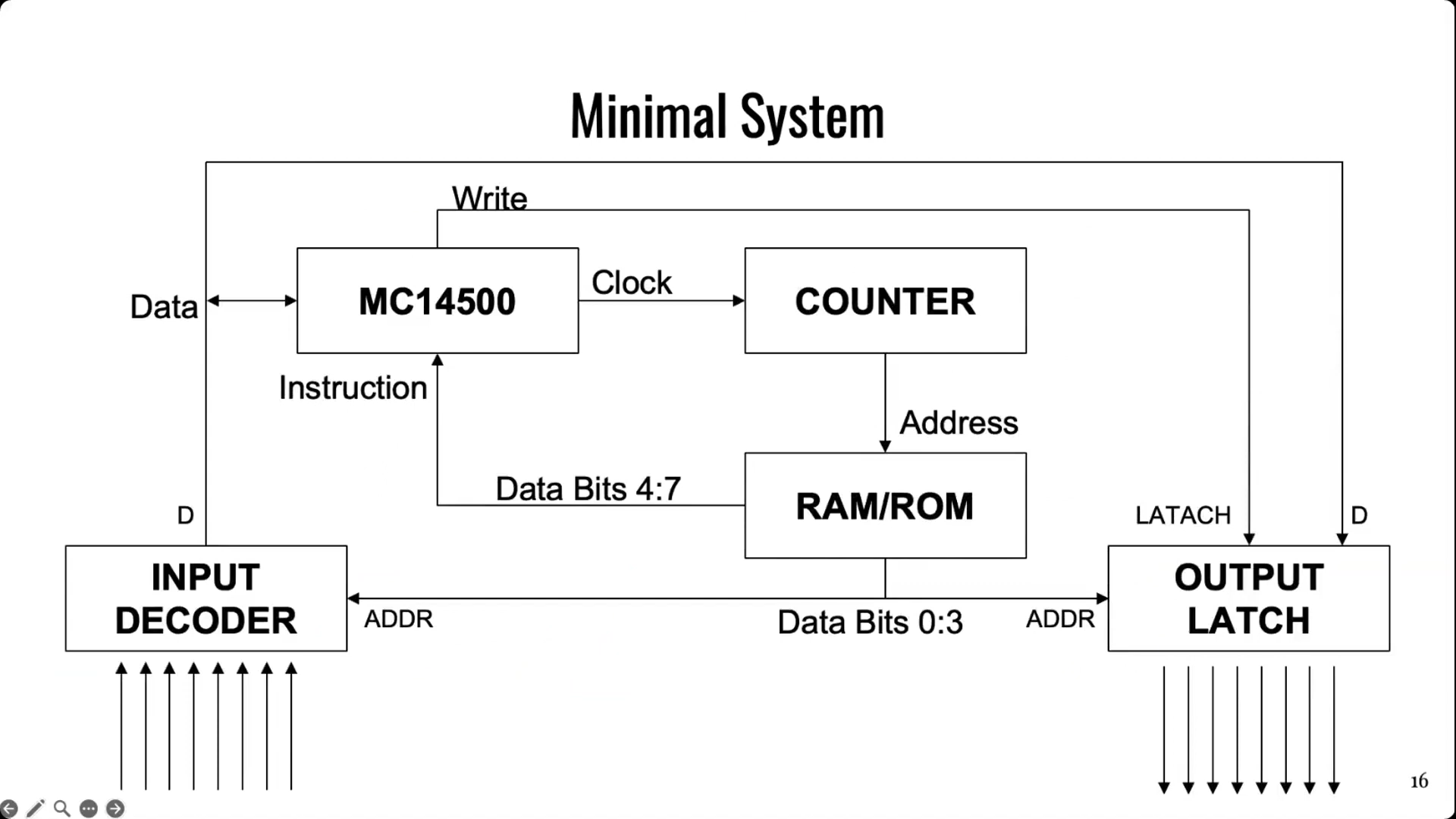
The simple architecture of Motorola’s basic 1-bit chip. Credit: talk slides
It’s worth examining the era in which this chip existed. Intel dropped the 4-bit 4004 in 1971, with the famous 8-bit 8080 landing in 1974. The Zilog Z80 came along in 1976, similarly an 8-bit design. And yet, when Motorola released the MC14500 in 1977, it landed with a rather slimline 1-bit design instead. Nicola notes that this likely came down to price, since populating a chip with more transistors cost more money quite significantly back in the 1970s. If the job could be done with less, it would make the part cheaper and thus more popular in the market. Bearing this out, Nicola explains that a 1976 Zilog Z80 used 8,500 transistors and cost around $200 USD, while an MC14500 used just 500 transistors and could be had in 1977 for the bargain price of just $5 USD.
It doesn’t take much supporting hardware to get an MC14500 up and running. Notably, though, there is no memory or program counter on board, so those have to be added externally. Credit: talk slides
Back in the mid-1970s, automation in industry often consisted of simple logic that was handled by cabinets full of relays. This took plenty of bulk, required hard-wiring everything, and also involved plenty of electromechanical parts that could wear out. Changing logic required manually rewiring things which could be fussy and tedious at the best of times. In those days, the Programmable Logic Controller was just coming into use, developed to be a reprogrammable system for industrial automation tasks that was more flexible and reconfigurable just by reprogramming it.
The MC14500 sprung up as a useful tool at this time, powering a great many programable industrial systems. It was designed to offer the bare minimum requirements for its application, while leaving extraneous hardware for designers to implement if and when it was needed. The architecture is simple enough for Nicola to explain with a single slide. The chip came with a 1-bit logic unit, operating with a result register, a 1-bit accumulator and the data bus. A minimal system could be lashed up with the MC14500, a counter, some external RAM or ROM (since none was onboard), and an input decoder and output latch of 8 bits each. This setup would only allow for doing combinational logic, since there is nowhere to store the current state of the system. However, hooking some outputs back to the inputs could allow for sequential logic, since it would allow for storing the current state of the system via those outputs. Nicola then steps through various other configurational changes to addressing and system architecture that could be made to optimize the MC14500 for use in different ways.
Nicola built a homebrew MC14500 system, allowing him to get to grips with the classic chip. Credit: talk slidesA more polished version came later, built on a custom PCB. Credit: talk slides
If you wanted to get to grips with using an MC14500 in industrial contexts, you would do well to pay attention to this talk, even if it came out some 40 years past the part’s heyday. Beyond the basic system architecture, Nicola explains how to use the limited instruction set, and how to get such a system executing simple programs in ladder logic, which remains somewhat of an industrial standard to this day. Beyond that, he steps up to more complex logic, like if/else conditionals and the use of some of the weirder instructions of the chip. He then shows off the hardware he built himself—both a breadboarded MC14500 setup built with wirewrap, and a more polished version on a custom PCB.
It’s not every day you get to learn about the nitty-gritty details of working with industrial hardware from the ground up. And yet, that’s exactly what Nicola brought to Hackaday Europe 2026. It’s an excellent primer on the topic, and also simply just good fun if you’re a fan of electronics and logic itself!
Apple sued OpenAI for alleged trade secret theft, and after OpenAI’s weak attempt to have the case dismissed, Apple has doubled down on its claims in a new filing.
The Apple lawsuit against OpenAI started with several odd public statements from the company denying the accusations. OpenAI filed for dismissal on August 5, simply arguing that it didn’t need Apple’s trade secrets and that Apple is the one that can’t compete.
In the latest filing viewed by AppleInsider on Wednesday, Apple said that OpenAI’s attempt to dismiss relied upon distortion, speculation, and improper extrinsic evidence. The company reiterates its allegations in detail, alleging evidence on their end of misappropriation of trade secrets and OpenAI encouraging as much.
First, Apple says that Mr. Liu didn’t accidentally get data from Apple’s corporate servers via unknown device syncing. Instead, he allegedly knew what he was doing by exploiting a bug and bragging about it — “LOL … so funny.”
Advertisement
OpenAI also didn’t take any time to explain why those being interviewed from Apple were being coached on how to steal information. Also, Mr. Tan’s requests were for secret prototypes, not publicly available products.
The filing says OpenAI mischaracterizes these accusations as innocent accidents and ignores the seriousness of the accusations in the lawsuit.
The filing straightforwardly puts it this way:
OpenAI Repeatedly Misappropriated Apple’s Trade Secrets Both Through The Actions Of Defendants Liu And Tan, And Through Its Own Independent Conduct.
Apple requests that the Court deny OpenAI’s motion for dismissal. The case will pick up again on October 1, where Apple’s request for expedited discovery will be heard.
Back in June, Trump FCC boss Brendan Carr announced he’d be reviewing the FCC E-Rate program with an eye on “reforms.” Generally, when Brendan Carr promises “reforms,” usually what he means is either “I’m going to destroy this program,” or “I’m going to illegally make changes to this congressionally-mandated program that ensures telecom giants like AT&T get more money with less accountability.”
E-Rate is a historically bipartisan and uncontroversial program that helps bring affordable broadband to rural libraries, schools, and communities. While it has had some issues with fraud at times (almost always at the hands of private companies), the program generally does a lot of good in bringing affordable internet access into communities neglected by telecom monopolies.
Without it, or under a pared down version, schools and rural schoolkids would be more inclined to have to rely on what regional telecom monopolies deem appropriate, which is usually either over-priced broadband, or nothing at all.
Carr’s June announcement proclaimed he was “taking a look” at the program because he’s worried about kids having too much “screen time”:
Advertisement
“Over the last several years—and especially during COVID—many schools dramatically increased screen time for kids, with many students now swiping for hours every day. Research has now been pouring in that America’s experiment with heightened screen time in schools may be related to the negative educational outcomes we are now seeing in classrooms across the country—from declining academic performance to diminished reading comprehension skills.”
That’s quite the act of misdirection. For one, the FCC doesn’t regulate “screen time,” so you’ve once again got Carr wandering into areas he should have no say in. Which is weird for a guy who has endlessly complained of “government overreach” every single time previous FCCs have tried to bolster broadband telecom consumer protection (see: net neutrality) or prevent harmful media consolidation.
E-Rate was also mandated by Congress. Much like other recent actions (like Carr’s illegal dismantling of media consolidation limits), Carr is pretending he’s only making modest tweaks to existing systems, so he can pretend he’s not openly breaking the law.
Carr’s FCC is also pretending to be seriously fielding comments on his upcoming E-Rate rule changes. Librarian organizations this week filed their input defending E-Rate, correctly noting that Carr’s obsession with “screen time” is a straw man designed to misdirect attention from the potential harm of gutting a useful subsidy program.
“E-Rate was established by Congress for a specific purpose – to ensure affordable connectivity for schools and libraries, and that mission must remain the focus of this proceeding. For nearly three decades, E-Rate has been successful in connecting students, educators, and library patrons in rural, suburban, and urban communities alike.
Questions about curriculum, instructional practice, or student behavior should not be used to undermine a proven program that helps schools and libraries maintain the networks modern education depends on.“
This sort of stuff doesn’t really get press attention, but it matters all the same.
The E-Rate program spends about $3 billion a year driving affordable broadband into parts of the country left high-and-dry by the regional telecom monopolies Carr refuses to regulate. While there is sometimes fraud in programs like this, the vast majority of the time it’s caused by private companies that Carr, again, refuses to competently regulate and is afraid to stand up to.
Were you seriously interested in reforming these programs, you’d start doing audits of major companies like AT&T, which have a long history of defrauding these and other initiatives. Instead, Carr’s trying to shift the focus to the idea that taxpayers are funding internet access that’s delivering “harmful content” to kids, which, if you’ve tracked Brendan Carr’s censorial extremism, should be a huge red flag.
Advertisement
I suspect there are several motivations here. One being big telecoms like AT&T that want E-rate revamped in a way that financially benefits them. The other being Carr and the right wing extremist mission to extend their censorship and ideological dominance into every aspect of American life, starting with the classroom, where they’re compelled to root out any and all criticism of right wing ideology.
This is how he framed his new plan for E-Rate reforms on a recent appearance on Fox News:
“There are school districts that have read our law as only requiring them to put Internet safety procedures in place on the devices that the school owns. If you bring your own device to a network supported by this program, you don’t necessarily have any filters on where you can go. Kids are ultimately finding pornography, and that’s a problem.”
To be clear, schools already employ filtering systems. Some work, some don’t. The nature of these systems is such that they not only tend to over-filter content, but they’re generally easy to bypass.
Still, it’s not the FCC’s job to determine what content is acceptable, or even to manage kid “screen time” on personally-owned devices. That’s not only an unworkable game of whack-a-mole that would waste a lot of taxpayer money, that’s the precise sort of weird overreach Carr (and Republicans, and “free market” Libertarians) have whined about for as long as I’ve been alive.
Advertisement
But as with so much Republican “policy,” the pretense that they’re protecting kids helps obscure the fact they’re actively hurting them. In this case by making already shaky U.S. broadband even more expensive and spotty in long-neglected rural, minority, and lower-income areas.
NASA has called off a $30 million mission to rescue its aging Swift space telescope after Katalyst Space’s Link spacecraft developed persistent control and positioning problems. The Associated Press reports: Katalyst said Link will not attempt to capture Swift and boost it to a higher orbit because of problems with controlling the spacecraft. NASA said this means the telescope will plunge through the atmosphere after more than 20 years of tracking some of the biggest explosions in the universe like gamma ray bursts and exploding stars. Its demise is not expected before October.
NASA paid $30 million to Katalyst in an attempt to raise the telescope to a safer, longer-lasting orbit. Intense solar activity caused it to lose altitude faster than expected. The rescue spacecraft went into an uncontrollable spin a few weeks after its liftoff in early July. While flight controllers managed to slow Link’s tumble, issues continued to plague its pointing and positioning in orbit.
“This is not the outcome we were working toward, but it does not change why this mission was worth attempting,” NASA Administrator Jared Isaacman said in a statement. As a consolation prize, Katalyst will continue to operate Link in proximity with the telescope to demonstrate capabilities for future rescue operations. Katalyst CEO Ghonhee Lee said it was an ambitious mission on an aggressive timeline that was thrown together in under a year. “We took on this high-risk, high-reward challenge and are proud of the milestones we reached along the way,” Lee said in a statement. “We have already learned a tremendous amount.”
Things used to be normal. We used to be doing alright here in the United States, limiting ourselves to catching people at the borders or picking up migrants with criminal charges or convictions with detainers at local jails.
Now, it’s just a constant swarm all day, every day. “Worst of the worst” has long been abandoned as a pretense. Under Trump, it’s “anyone of anyone,” so long as they fit the profile: not white from whatever countries Trump claims are “shitholes,” especially if they speak with an accent.
No more targeting. No more plugging holes in the migration dyke with border-focused deterrents. These days, its masked officers storming hardware store parking lots to grab day laborers, hanging around immigration courts to pick off people just trying to follow the naturalization process, leveraging surveillance tech and government data to find people with un-American surnames, and generally terrorizing entire neighborhoods — if not entire cities — just to satiate this administration’s bigoted bloodlust.
The Trump administration has begun arresting foreign citizens with expired U.S. visas as they travel through airports, including spouses of Americans, according to documents obtained by The New York Times and interviews with immigration lawyers — a tactic that opens up a vast new pool of people for deportation.
Immigration agents in plain clothes have whisked away targets at check-in counters and arrival gates, with enforcement actions in at least 15 airports in recent weeks. Some of the arrests have occurred quietly, while others have happened as angry fellow passengers filmed the encounters.
The obvious question is “why?” Why do we need to do this? Why are we ambushing people boarding or disembarking from planes over something as menial as an expired visa? Is this going to make America greater or safer? Or is it just going to cement our reputation as a nation of bigots who were just waiting for a white nationalist-leaning blowhard to finally start massaging our repressed id?
Whatever it is, it’s fucking ugly. And it doesn’t look like America. It looks like some “lets round up the Jews” action from Nazi Germany, except that Trump’s “Jews” are people who come from any country that doesn’t have a Caucasian majority.
And it’s even worse than jumping travelers at the gates. In some cases, ICE officers — greatly enabled by new TSA data sharing provisions — are attempting to board planes to arrest people.
Advertisement
On July 25, a Southwest agent prevented ICE from boarding a flight from Dallas to Orlando, according to documents reviewed by the journal. The gate agent reportedly wouldn’t allow officers to board without a judicial warrant signed by a judge.
Following the incident, Southwest said in a statement that it “has longstanding policies in place to ensure appropriate legal documentation is presented by law enforcement personnel before any information about customers is shared.”
The journal also reported that an unnamed airline at a southern airport recently declined to assist ICE in accessing a jet bridge so they could arrest a man traveling with his family.
The DHS has defended its actions. And by “defended,” I mean has issued yet another “we’re right and everyone else is wrong” bit of pissiness.
“This administration is working diligently to ensure that aliens in our country illegally can no longer fly unless it is out of our country to self-deport,” a spokesperson for the Homeland Security Department said in a statement.
I’m sure another equally bitter statement will greet “Welcome to the Resistance… Southwest Airlines?” activity. While the federal government is free to move about airports, it is not free to board private property (the planes themselves) without the proper paperwork. Good to know Southwest staffers can tell the difference between an “administrative warrant” (which is not a “warrant” in the generally accepted definition of the term) and a real, judicially authorized warrant. When even front line employees are willing to push back, you know the administration has pushed too far.
In one widely circulated video, Chantal Morales Rojas, a 27-year-old from Ecuador, was detained by plainclothes officers as she boarded a Southwest Airlines flight from Denver to Oakland, Calif., on July 20. She had been spending the weekend with the family for whom she had worked as an au pair, according to the family.
When Ms. Morales Rojas scanned her boarding pass, an alarm sounded and the gate agent asked her to wait. Moments later, two plainclothes agents intercepted her in the jetway.
However it all shakes out, it reeks of desperation. The administration can’t keep its arrest numbers up which means immigration agencies are becoming increasingly opportunistic. None of this has anything to do with public safety, crime reduction, or just enforcing the rules. It’s a war on migrants being waged on as many fronts as the DHS can at all times. It’s the government padding its stats while satiating the xenophobes that make up most of its party, as well as its voting base.
It all looks a whole lot like things this country swore it would never do (or never do again). It’s rounding up and caging undesirables who will also be blamed for any or all societal ills. And it’s not that far removed from pursuing escaped slaves who went north in hopes of actually partaking in the American dream.
Fortunately, the company had a policy of checking source code on GitHub first
PWNED Welcome back to PWNED, the column where we make fun of those who are security self-owned, so hopefully you don’t do the same. This week, we have a story that’s hot off the presses about a company almost sabotaging its security by using AI for programming.
Have a story about someone leaving a gaping hole in their network? Share it with us at pwned@sitpub.com. Anonymity is available upon request.
Advertisement
Our tale of machine learning malfeasance comes courtesy of Sergiy Fitsak, managing director of Softjourn, a consulting and software development company. He reminds us that, when it comes to AI, don’t trust: verify.
During the course of business, one engineer asked an AI agent to recommend a package that they needed for a common task. The agent came back with the name of a legitimate-sounding package, which was formatted like a familiar library.
At many organizations, this would have been the end of the story. The developer would have taken the AI agent’s advice and downloaded and installed the recommended package.
However, at Softjourn, the company has a policy which they actually followed: double-check any software recommendations made by AI to make sure they are legit. The developer skimmed the recommended package’s source code on GitHub and noticed that it had few downloads and had just been created a few days earlier. In other words, it was suspicious.
Advertisement
According to Fitsak, attackers have found a way to exploit package names hallucinated by AI models.
“The problem is that AI models sometimes invent package names that sound plausible but don’t exist, a pattern security researchers have started calling ‘slopsquatting,’” he told us. “Attackers have caught on and now register real packages under those exact invented names, betting that a developer under deadline pressure will install first and check later.”
If Softjourn hadn’t been so careful, they could have installed a malware package. We don’t know the exact payload, but this malware package could have given crims a backdoor into their systems and the ability to steal data or wreak other havoc.
“We caught it because we’d already built a habit of verifying download counts and reviewing source code on GitHub before installing anything an AI recommends, even when it looks routine,” Fitsak said. “It takes a few extra minutes. Skipping that step once is how a team ends up explaining a supply chain compromise instead of shipping a feature on time.”
Advertisement
The lesson here is a very simple one: Don’t trust the package names that AI agents recommend. Have a human check the supply chain. And always have a human in the loop so they can take the time to stop and approve any outside code that comes into a project. ®
memoryOS is a gamified mobile app designed to significantly improve your memory through short, interactive lessons. Guided by two-time World Memory Champion Jonas von Essen, the software teaches proven mnemonic techniques alongside spaced-repetition schedules. It features a digital library of 3D “Virtual Mind Palaces,” which allows users to easily visualize, organize, and store complex information for fast recall. You can get a 1 year expert plan subscription for $50, 3 years for $120, or 5 years for $150.
Note: The Techdirt Deals Store is powered and curated by StackSocial. A portion of all sales from Techdirt Deals helps support Techdirt. The products featured do not reflect endorsements by our editorial team.
Even as the wider EU was grinding through a long, drawn-out process to figure out which regulatory levers to pull on kids’ safety online, France decided to YOLO it earlier this summer by jumping at the chance to ban all social media for kids under 15. This kind of thing has become popular with out of touch adults in the grips of an ongoing moral panic, since Australia led the way after gambling companies pushed the ban as an alternative to banning gambling ads. Australia’s ban isn’t doing very well, with the majority of kids figuring out how to work around it, and those being left out being the most marginalized and in need of community.
And yet, countries around the globe have all suddenly decided — some based on reading Jonathan Haidt’s badly reasoned book — that they must do this too.
France was the first in the EU, with President Emmanuel Macron gleefully treating France’s willingness to rush in with little thought or understanding as a selling point:
“France is leading the way in Europe in protecting our children and our teenagers,” Macron said. “We will keep on going.”
He wanted the ban to be implemented in mere months, just as kids returned to school.
Advertisement
But that’s all run into a bit of a stumbling block known as the French Constitutional Council, which has said the ban is an unconstitutional attack on kids’ rights to free expression and communication. The Council also flagged a second problem: you can’t enforce an under-15 ban without making every user, adults included, prove their age. The law demanded exactly that, without defining a single condition, limit, or technical standard for how that verification would work.
A court in France on Friday shot downa bill seeking to ban access to social media for under-15s from September — a major blow to President Emmanuel Macron that raises fundamental questions about efforts to protect kids on the internet.
The Constitutional Council, which reviews the constitutionality of French legislation, said the restrictions in the bill disproportionately infringe on minors’ right to freedom of expression and communication.
Reading through the Google translation of the actual ruling, it’s pretty short and to the point. Similar to how the First Amendment requires any restriction on speech to be narrowly tailored to a specific government interest, here the Council says the ban is way too broad and not based on any specific, narrowly defined harm, though it admits that the aims of protecting children are certainly legitimate:
Furthermore, while the established prohibition does not apply to online encyclopedias, educational or scientific directories, or platforms for developing and sharing free software or open-source educational digital projects, the exceptions provided for in the contested provisions remain limited. In particular, these exemptions do not cover collaborative services for sharing leisure, information, or mutual aid content, online communication applications, or online games with strong collaborative and social features, nor do they cover online social networks which, while not inherently educational, are created in connection with educational activities.
Thus, the prohibition established is likely to apply to online communication services whose risks to the health and safety of minors, relating in particular to their content or mode of operation, are not established.
Advertisement
In short, the law goes way too far in issuing a blanket ban of all children, no matter what the circumstances. If you have a legitimate, well-defined problem, come up with a narrowly tailored solution. The French government rushed this one through with little concern for things like that.
It also leaves little room for parents to decide for their own kids what’s appropriate:
… neither the contested provisions nor any other provision sets out the conditions under which the holders of parental authority or the legal representative of the minor, duly informed of the potential risks and safeguards presented by the services concerned, may, in the child’s best interests and in the exercise of their duties under the law, decide to lift the prohibition, limit its scope or authorise access to certain services.
Thus, the prohibition established does not give rise to any particular assessment of the risk to the minor, taking into account in particular his age, his degree of maturity, his family situation as well as the nature of the service concerned.
Also, the age verification attack on privacy is important to recognize:
Advertisement
By prohibiting access for any minor under fifteen years of age to certain online services, the contested provisions imply, in themselves, that any person, even an adult, must prove their age before accessing them.
The Council further notes that the law makes no real effort to figure out how one might implement age verification in a manner that protects the privacy rights of adults.
Of course, having hitched his own legacy to this thing, there’s no way Macron lets it go quietly:
In a statement late Friday, the French presidential office said the government would not be giving up on the bill. It has set a new target date for spring 2027, which coincides with when Macron will leave office.
The statement said Macron “has instructed the Prime Minister to work, as quickly as possible, on a legally sound draft that takes into account” the court’s decision. The ruling hinted at what would make the age restriction align with fundamental rights: giving parents more flexibility.
Politico also spoke to Peter Craddock, a Brussels-based attorney who works on social media regulation, who notes that any other EU country attempting a similar blanket ban is likely to run into exactly the same wall:
Advertisement
“The reasoning is actually equally relevant internationally, throughout the EU, because this fundamental freedom is not specific to France,” he said.
Which is a useful reminder that the freedom of expression problem here isn’t a quirk of French constitutional law. It’s baked into the whole approach — and no amount of “but it’s for the children” framing makes it go away. That’s even more true of the problems with age verification requiring the scanning of everyone’s ID, which is an even touchier subject in large parts of the EU than elsewhere.
Really, though, the bigger, more important message here should be to slow down. What’s incredible is that for all of the political and media class whining that social media is some rogue experiment on our children, none of them seem to consider that abruptly trying to block all social media from kids is just as much an experiment, and one that might have equally damaging effects.
Why not wait and see how the Australian ban actually works in practice? The early results are a mess. I get that Macron and other politicians want headlines and a legacy to point at, but it would be nice if they actually followed what the research shows and looked at how the early experiments of these bans have worked out.
So what France produced here was a total rush job that sacrificed the expression rights of every teenager in the country, the ability of parents to make their own judgment calls regarding their own kids’ access to information and — as a cherry on top — the privacy of every adult who would now need to prove their age at the door to the internet. Thankfully, the Constitutional Council caught all three.
Real world economic potential of tokens will depend on efficient usage of scarce compute resources, Stripe’s Patrick Collison said.
After weeks of speculation, Stripe has announced that it is acquiring New York-based AI marketplace OpenRouter.
Terms of the deal have not been disclosed, but recent reports suggest the acquisition would cost Stripe between $7bn and $10bn – dramatically higher than the $1.3bn valuation OpenRouter hit after a $113m round a few months ago.
Stripe said the acquisition will improve its services that help businesses optimise token costs – something it has undertaken over the past year. It is also gaining a user-base of more than 10m OpenRouter users globally.
Advertisement
Token optimisation is difficult, Stripe explained. “The sheer matrix of variables – which model to use for which tasks, at which speed and at what price – makes managing cost-versus-performance trade-offs in real time extremely difficult,” it said in a statement announcing the acquisition.
Founded in 2023, OpenRouter is a new type of marketplace that offers access to more than 500 large language models (LLMs), routing user requests to the best available AI provider and letting users shop around based on price, speed and reliability among other factors.
It claims to be the first of its kind of platform set up for LLMs, reflecting a growing appetite for AI models and a fast diversifying market and is already used by the likes of Nvidia, Zoom and Swedish vibe-coding start-up Lovable.
“Together, Stripe and OpenRouter will be able to help companies manage both sides of profitability in the AI era; maximising revenue and efficacy while minimising costs,” Stripe said.
Advertisement
The company’s co-founder Patrick Collison said: “Tokens are the central currency for companies building with AI and it’s clear that the real-world economic potential will depend on making good use of scarce compute resources.”
Alex Atallah, the co-founder and CEO of OpenRouter once described his company as an AI equivalent of Stripe.
“Stripe has spent over a decade building trusted, neutral infrastructure for businesses, and OpenRouter was built on the same philosophy,” he said.
“We believe intelligence will be multi-model: no single model will be optimal for every task, and developers need a neutral layer to orchestrate and manage them all. Joining Stripe lets us accelerate that mission and bring the full AI ecosystem to every business.”
Advertisement
Don’t miss out on the knowledge you need to succeed. Sign up for the Daily Brief, Silicon Republic’s digest of need-to-know sci-tech news.
There has been very little pushback against Apple’s new business terms in the EU, primarily from Epic Games, and even the European Commission has welcomed the changes.
The Digital Markets Act forced Apple to rethink its business model in the European Union, which was initially rejected due to the Core Technology Fee and confusing rates. After going back to the negotiating table, Apple seemingly has found a solution that makes almost everyone happy.
A report from Irish Independent detailed the European Commission’s response to Apple’s new business terms for the EU. They share that they welcome the changes and will monitor Apple’s implementation of the terms.
Here is the EC’s full statement:
Advertisement
“The Commission welcomes Apple’s changes to their business terms, which follow a close dialogue between the Commission and Apple after the Commission issued a non-compliance decision related to Apple’s steering terms as well as preliminary findings related to alternative app distribution, both in April 2025,” the spokesperson said.
“Following today’s announcement, the Commission will monitor Apple’s effective implementation of the new terms. Under the DMA, users in the EU have a right to full and effective choice of alternative app distribution channels.”
The point of the DMA was to open up competition and choice for developers, which the EC seems to believe Apple’s terms have accomplished. The new rates eliminate the Core Technology fee and rely upon percentages from 5% to 26% based on how the developer interfaces with Apple’s platform.
One vocal developer was not happy with the results. Predictably, it was Epic Games.
“The law makes it clear that Apple must allow developers to offer link outs to the web for purchases ‘free of charge’ and has to allow ‘effective use’ of competing stores. Apple’s terms deliberately violate the Digital Markets Act.”
Epic has made it clear in the US and the EU that any fee above 0% on purchases made outside of the App Store is too much. Given the EC’s approval of these new business terms, Epic may have to finally accept the reality of the situation.
Advertisement
Either Epic pays, or it can invent its own smartphone platform to profit from. Of course, Epic will continue to litigate until the sun expires.
We haven’t heard the last of Epic either. The lawsuit against Apple involving commission rates is still ongoing as Apple awaits the Supreme Court’s decision in October.
Software subscriptions are easy to justify one at a time.
£10 a month for cloud storage. £20 for an AI tool. £40 for security software. Another £30 for design, £50 for project management, then a few smaller subscriptions that barely seem worth thinking about.
The problem appears when you add them together.
Software has shifted decisively toward recurring billing, which means many of us no longer buy a program once and use it for five years. We maintain a collection of monthly and annual subscriptions instead. For businesses, freelancers and even individual users, those recurring software costs can become a meaningful part of the monthly budget.
Advertisement
The obvious response is to start cancelling things. That can save money, but it can also be a bad trade if you remove software that genuinely saves time or helps you work.
A better approach is to make the subscriptions you keep work harder.
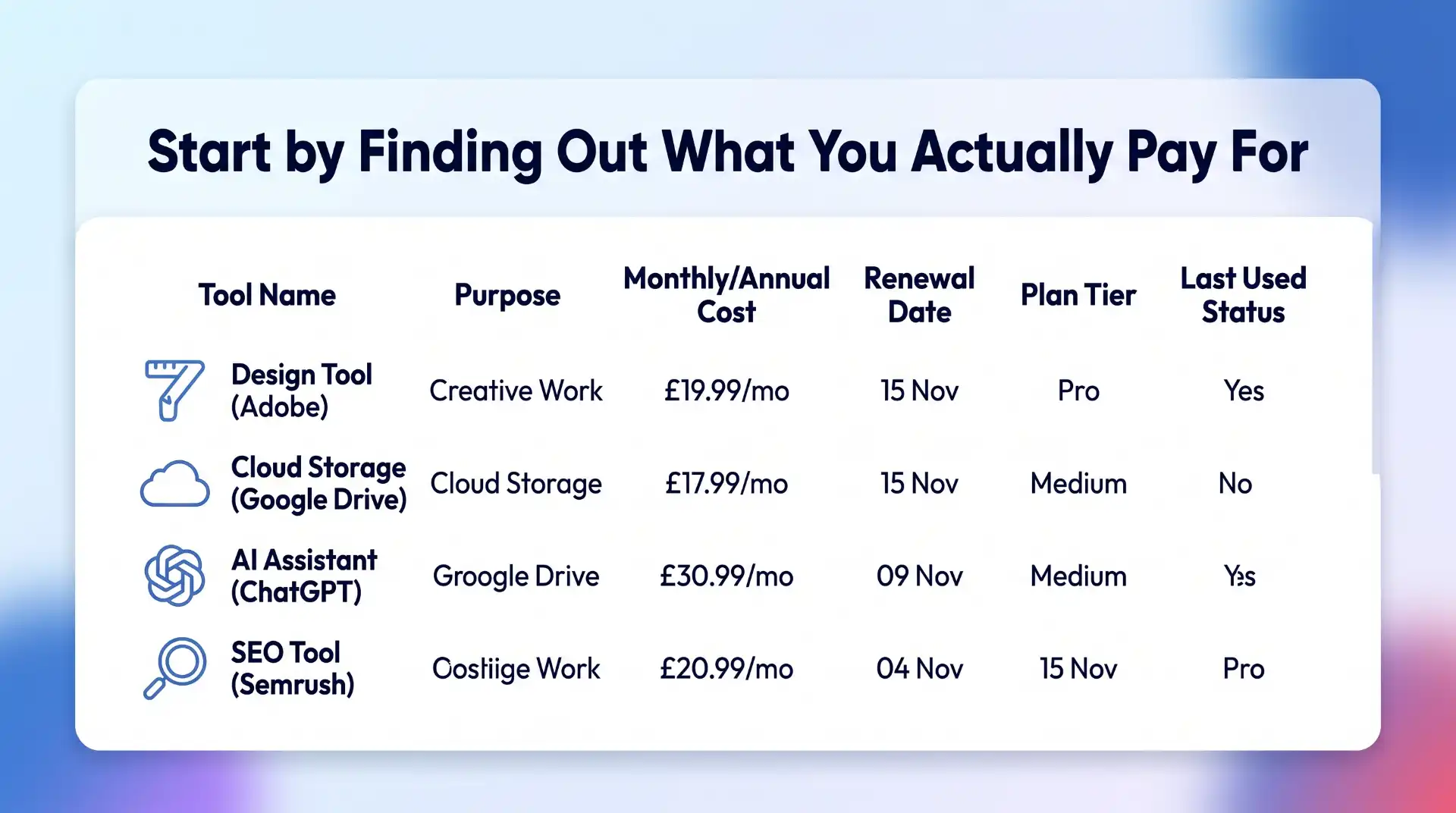
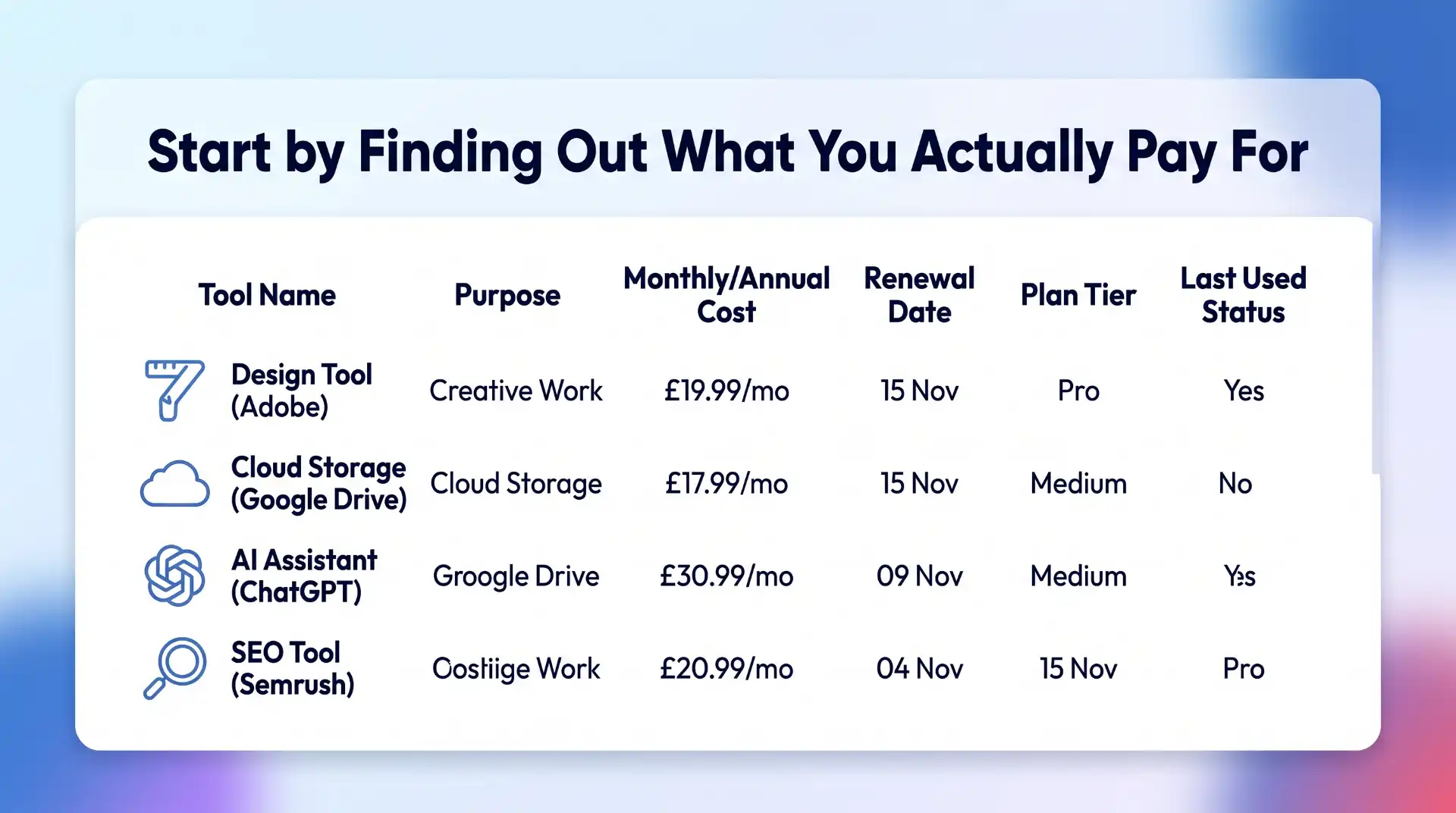
Start by Finding Out What You Actually Pay For
Before looking for cheaper software, work out what you already have.
This is less obvious than it sounds.
Advertisement
Subscriptions can be spread across credit cards, PayPal, app stores, business accounts and individual employee expenses. Annual subscriptions are particularly easy to forget because they disappear from view for eleven months before suddenly renewing.
Make a simple list containing:
Software name
Purpose
Monthly or annual price
Renewal date
Number of users
Current pricing plan
How frequently it is actually used
You do not need specialist subscription management software to do this. A spreadsheet is enough.
The important part is getting everything into one place.
Advertisement
You may find three categories almost immediately: software you use constantly, software you occasionally need, and software you forgot you were paying for.
The third category is the easiest place to start cutting.
Cancel Software You No Longer Use
Unused subscriptions are the least controversial saving.
Perhaps you needed a video editor for one project. You tested an AI research tool for a month. You signed up for a stock image service while redesigning a website.
Advertisement
The project ended. The subscription didn’t.
Small monthly payments are especially good at surviving unnoticed. A £12 subscription does not feel urgent enough to investigate, but £12 every month is £144 a year.
Multiply that across five or ten forgotten services and the numbers stop looking insignificant.
Before cancelling, check whether you have files or data stored in the platform that need to be exported. Once that is done, remove subscriptions with no current purpose.
Advertisement
There is no clever optimisation here. Stop paying for things you do not use.
Look for Overlapping Features
The next step requires a little more thought.
Software products rarely stay in their original lanes. Project management tools add document editing. Email platforms add CRM features. Design applications add AI image generation. SEO suites add content tools. AI platforms add research, coding and file analysis.
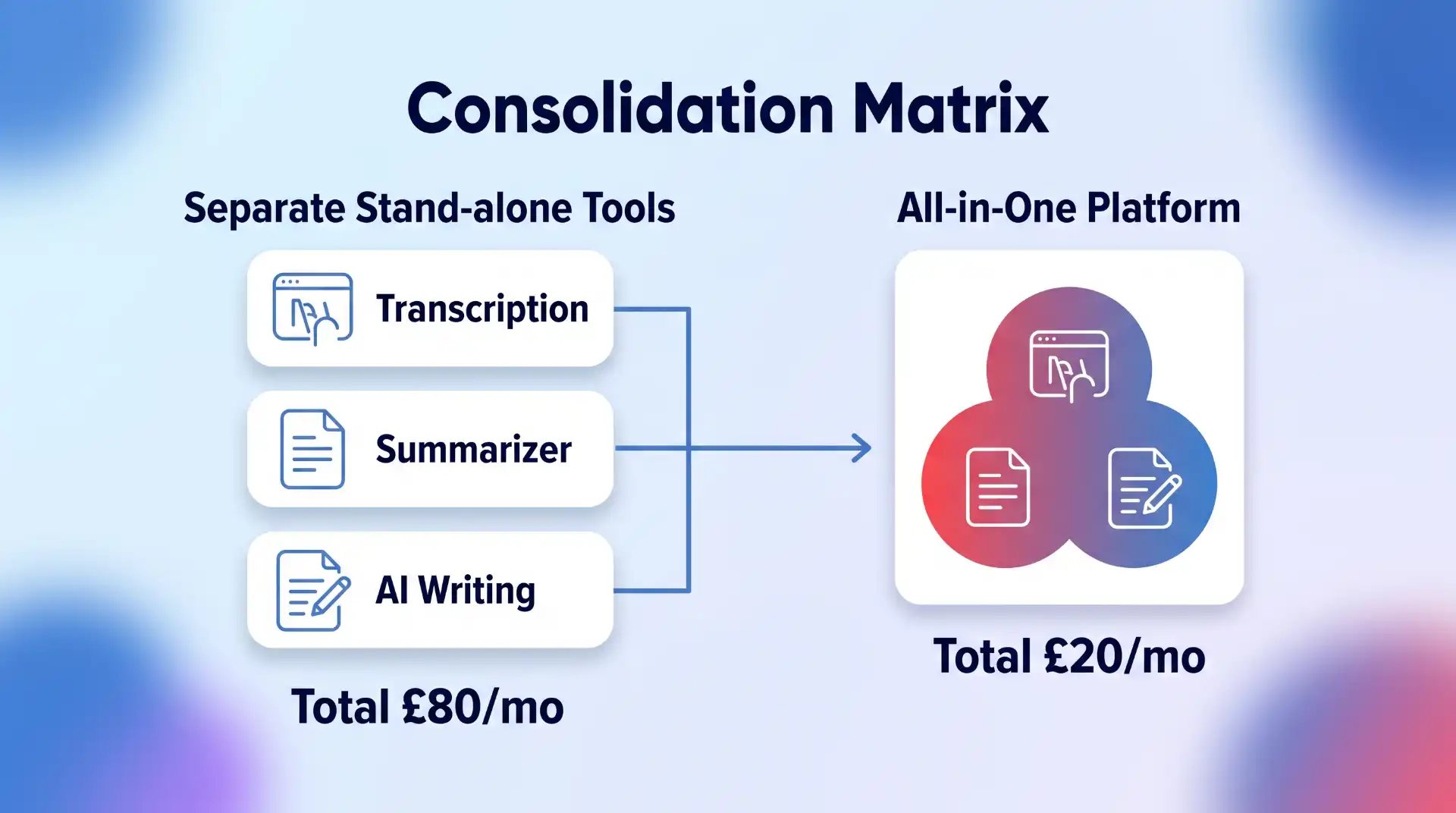
That means your software subscriptions may now overlap considerably.
Advertisement
Imagine paying separately for:
A meeting transcription tool
An AI assistant
A writing tool
A research platform
A document summariser
Two years ago, that might have made sense.
Today, one or two products may cover most of those jobs.
Go through the software you use and look at what each platform can actually do now, not what it could do when you first subscribed.
Advertisement
You might find that an existing subscription has quietly made another one redundant.
Do Not Replace Good Software Just Because Something Cheaper Exists
There is a trap at the other end of software cost cutting.
The cheapest subscription is not automatically the best value.
Suppose you pay £50 a month for software that saves five hours of work. Replacing it with a £20 alternative that adds two hours of manual work is unlikely to be a sensible saving.
Advertisement
Time has a cost too.
When comparing software subscriptions, consider:
Reliability
Time saved
Ease of use
Integrations
Support
Security
Export options
Collaboration features
Training required
Switching costs
This is especially important for software deeply embedded in a workflow.
Moving from one password manager to another is relatively manageable. Migrating a company CRM, automation stack or email marketing system can be considerably more disruptive.
Save money where the difference is largely financial. Be more cautious where the cheaper option creates operational problems.
Advertisement
Compare Monthly and Annual Software Plans
Once you know a product is staying, check how you are paying for it.
Many software companies charge less when customers pay annually rather than monthly.
The discount can be worthwhile, but only if you are confident you will use the software for most or all of the next year.
This creates a useful rule:
Advertisement
Use monthly billing while testing. Switch to annual billing once the software has proved itself.
Monthly plans cost more, but the flexibility has value when you are still deciding whether a product belongs in your workflow.
Annual billing makes more sense for established subscriptions.
If you have used the same software every week for three years and have no intention of replacing it, paying the monthly premium purely for flexibility probably achieves very little.
Advertisement
Check the actual saving before committing. Some annual discounts are substantial. Others barely justify paying twelve months upfront.
Compare the Real Annual Cost
Software pricing pages can make comparisons unnecessarily difficult.
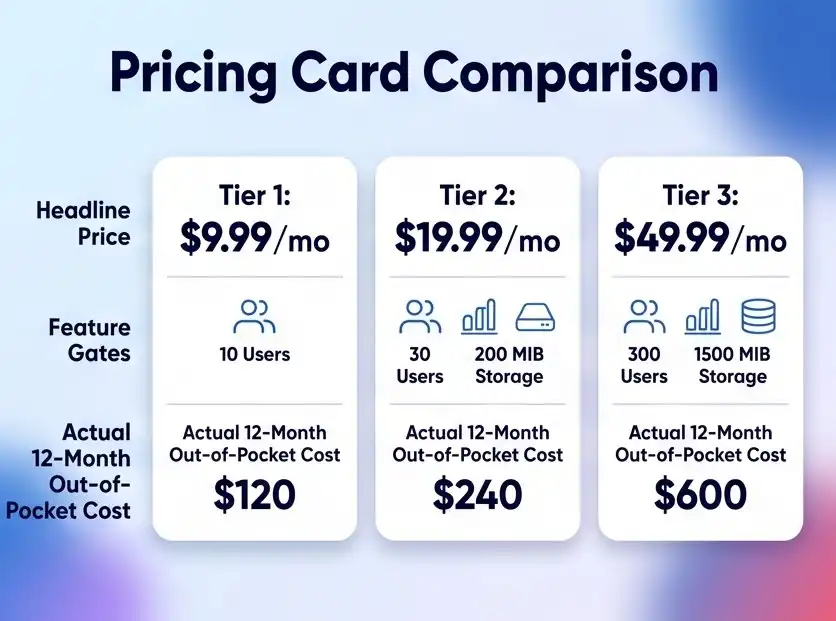
One service advertises “$9.99 per month” but requires annual payment. Another charges £14 monthly with no commitment. A third has a cheap starting plan but locks important functionality behind the next tier.
Compare the cost you will realistically pay over twelve months.
Advertisement
For example:
Software A: £10 per month billed annually = £120 upfront
Software B: £13 per month = £156 annually
Software C: £8 entry plan, but £16 for the features you need = £192 annually
Advertisement
Software A is cheapest in that example, but only if you are comfortable committing for the year.
The headline monthly price is not enough.
Look at the plan you actually need, billing frequency, taxes where applicable, user limits and any usage charges.
Review Your Pricing Tier
You may not need to change software at all.
Advertisement
You may simply be on the wrong plan.
Upgrades tend to happen for specific reasons. A team needs one premium feature. Storage reaches a limit. A business needs more users. An email list grows.
Months later, circumstances change but the expensive plan remains.
Look at the tier below your current subscription and ask what you would genuinely lose by downgrading.
Advertisement
Pay particular attention to:
Storage
Usage allowances
Number of users
AI credits
Export limits
Automations
Integrations
Reporting
Support levels
If you use premium features every day, keep them.
If you are paying an extra £40 a month for something nobody remembers using, downgrade.
Check Per-User Software Costs
Per-seat pricing can become expensive quickly.
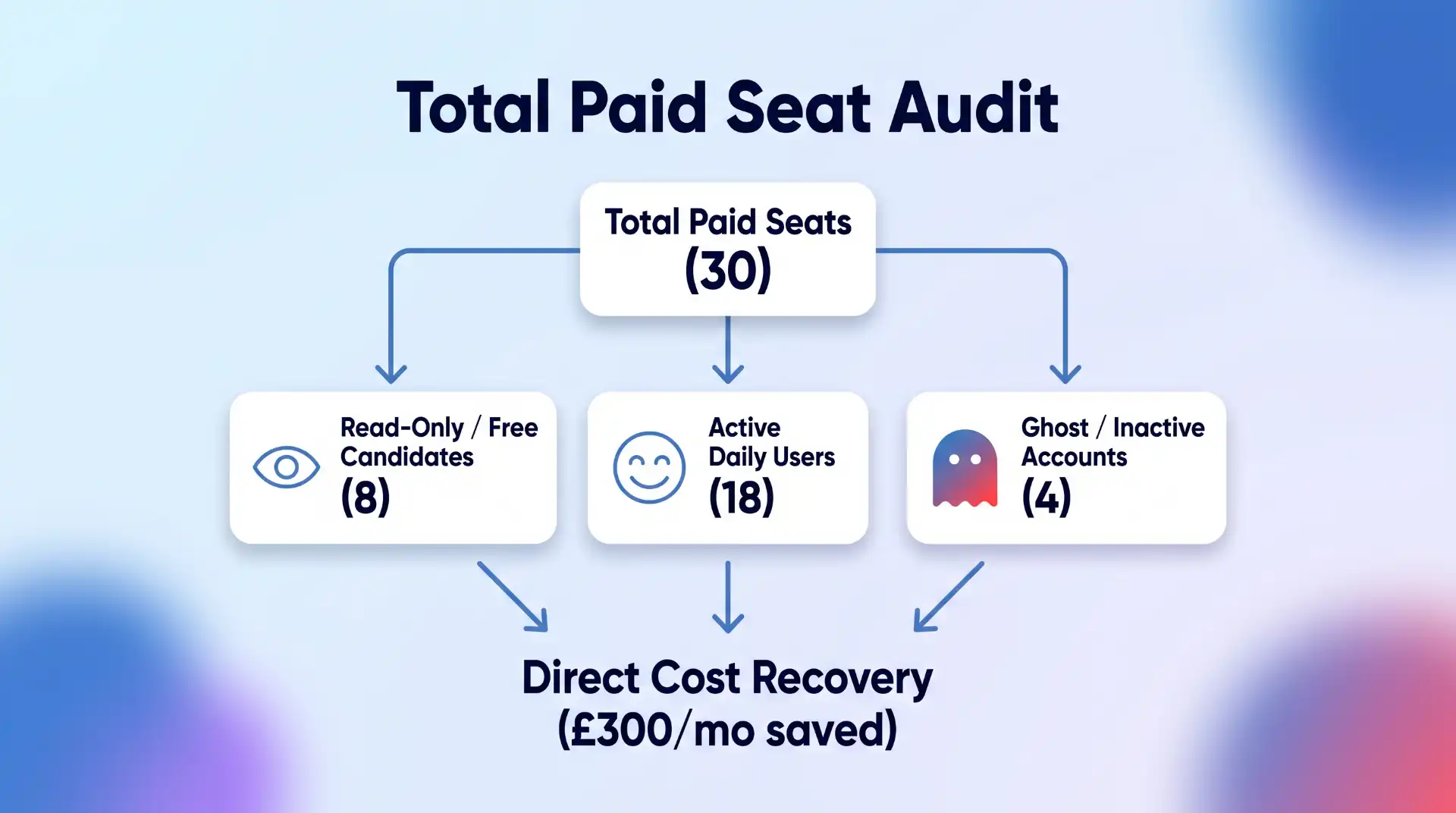
A tool that costs £25 per user looks reasonable for a team of three. At 30 users, it becomes £750 every month.
Advertisement
Regularly check who actually needs a paid account.
Former employees, temporary contractors and inactive team members sometimes remain on paid licences long after they stop using the software.
You may also find that some users only need view access or a free account.
For each major platform, compare the number of paid seats with the number of active users.
Advertisement
This is one of the simplest ways businesses can reduce software subscription costs without affecting productivity at all.
Be Careful With AI Subscription Creep
AI software deserves special attention because this market is moving unusually quickly.
It is easy to accumulate separate subscriptions for:
Writing
Research
Coding
Image generation
Video
Presentations
Transcription
Meeting notes
Search
Data analysis
The problem is that these categories increasingly overlap.
An AI platform you already pay for may have added a feature that makes a separate subscription unnecessary. Likewise, the specialist product may still be significantly better and worth keeping.
Advertisement
The point is not to consolidate everything automatically.
It is to keep checking.
AI tools can change considerably within a few months, so treating the software stack as something you review once a year may be too slow.
Compare Alternatives Before Every Major Renewal
Renewal dates create a natural opportunity to check the market.
Advertisement
If a software subscription costs £20 a month, you may decide that extensive comparison shopping is not worth your time.
If it costs £2,000 a year, the calculation changes.
Before renewing an expensive subscription, check:
What does the current plan cost now?
Has the price increased?
Are you still using all the features?
What do competing products offer?
Would switching create significant migration costs?
Is there a lower tier that now meets your needs?
Software markets change quickly.
The product that represented exceptional value three years ago may no longer be the obvious choice.
Advertisement
Equally, switching simply because a competitor is £5 cheaper is rarely worthwhile. Look at the whole package.
Look for Software Discounts Before Buying
Once you have decided which software you actually want, check whether you need to pay the full advertised price.
Depending on the product, there may be:
Annual billing discounts
Introductory offers
Student pricing
Startup programmes
Nonprofit discounts
Partner promotions
Seasonal sales
Bundled plans
Cashback offers
This step should come after choosing the software.
Buying the wrong product because it has a 30% discount is not saving money.
Advertisement
But if you were going to purchase the subscription anyway, there is little reason to ignore an available saving.
Platforms such as Rewardio offer cashback on software and digital subscriptions across categories including AI tools, marketing software, hosting, VPNs and other online services. Checking for cashback before going directly to the software provider can reduce the effective cost of a subscription without requiring you to switch to a different product.
That can be particularly useful for recurring software you already know you need.
Understand the Difference Between a Discount and Cashback
These are not quite the same thing.
Advertisement
A traditional software discount reduces the purchase price before you pay.
Cashback generally means you make an eligible purchase and receive part of the transaction value back afterwards.
For example, imagine a subscription costs £100.
A 20% discount might reduce the checkout price to £80.
Advertisement
A 20% cashback offer could mean paying £100 initially and receiving £20 back later, subject to the terms of the offer.
The economic result can be similar, but the process is different.
Always check:
Eligibility
Whether the offer applies to new or existing customers
Whether cashback is one-time or recurring
Minimum payout requirements
Tracking requirements
Excluded plans or products
Do not assume every offer works the same way.
Check Whether You Are Paying More Through an App Store
Some software subscriptions can be purchased either directly from the provider or through an app marketplace.
Advertisement
Compare the options.
Pricing, available plans and billing arrangements may differ depending on where the subscription originates.
Buying directly can sometimes give you more control over account management, billing and promotions.
There are also situations where an app-store subscription is more convenient, particularly if you actively manage multiple subscriptions through one account.
Advertisement
Convenience has value. Just make sure you know what you are paying for it.
Use Free Plans Strategically
Free software is not only for people who cannot afford paid tools.
Sometimes the free tier genuinely covers everything you need.
This is particularly common with:
Advertisement
Password managers
Cloud storage
Project management
Design tools
VPNs
Analytics
Note-taking apps
Developer tools
The mistake is assuming that “premium” automatically means “appropriate.”
For example, if you are choosing security software or a VPN, the decision should be based primarily on whether the product provides the privacy, performance and security features you need. BlogTheTech’s guide to Android VPNs is a good example of a category where both free and paid options can make sense depending on what you expect from the software.
Start with your requirements.
Then determine whether the paid tier actually solves a problem the free version does not.
Cancel Free Trials Properly
Free trials are useful because they reduce the risk of testing software.
Advertisement
They also have a tendency to become permanent subscriptions.
Whenever you begin a trial, immediately record:
Trial end date
Renewal price
Cancellation deadline
Whether payment details were required
Set a reminder several days before the trial converts.
That gives you time to decide properly rather than discovering the charge after it happens.
If you already know within two days that you do not want the product, cancel it immediately. Many services allow you to continue using the remaining trial period after cancellation.
Advertisement
Negotiate Business Software Contracts
Consumers generally pay the listed software price.
Businesses often have more room to negotiate, particularly when buying multiple licences or higher-value subscriptions.
If you are dealing with sales rather than simply entering card details at checkout, ask.
Questions worth raising include:
Advertisement
Is there a discount for annual payment?
Is there a better price for multiple seats?
Can unused features be removed?
Are there startup or small-business plans?
Is there a retention offer available?
What happens if we reduce our seat count?
Can the renewal price be fixed?
The larger the contract, the more worthwhile this becomes.
Do not assume the initial quote is necessarily the final commercial offer.
Watch Out for Introductory Pricing
A cheap first year can disguise a much more expensive long-term subscription.
Hosting companies, security software providers and other digital services sometimes advertise substantial introductory discounts.
There is nothing wrong with taking the deal.
Advertisement
Just check what happens afterwards.
If a service costs £30 in year one and renews at £120, think of it as a £120 subscription with a first-year promotion, not a permanently cheap £30 product.
Put the renewal date and standard price in your subscription list.
That prevents next year’s invoice from becoming an unpleasant surprise.
Advertisement
Do Not Ignore Software Bundles
Bundling can save money when you genuinely need several products from the same provider.
Perhaps one subscription combines:
Cloud storage
Email
Office software
Video calls
Or:
VPN
Password management
Security monitoring
Or:
Design
Photography
Video editing
Compare the bundled price with buying the components separately.
But apply the same rule as every other discount: only count features you would otherwise pay for.
A £50 bundle containing £200 worth of software is not a bargain if you only use one application that would cost £20 on its own.
Advertisement
Calculate the Cost Per Use
For smaller subscriptions, a useful test is to look at cost per use.
Suppose you pay £25 per month for a tool.
If you use it every working day, the cost per use is tiny.
If you open it twice a month, you are effectively paying £12.50 every time you use it.
Advertisement
That does not automatically mean you should cancel it. Specialist software used occasionally can still provide substantial value.
But cost per use forces you to think about whether the subscription model makes sense.
If you only need something occasionally, look for:
Pay-as-you-go alternatives
Monthly cancellation
Free versions
One-time purchase software
Open-source alternatives
A permanent recurring subscription is not always the right purchasing model.
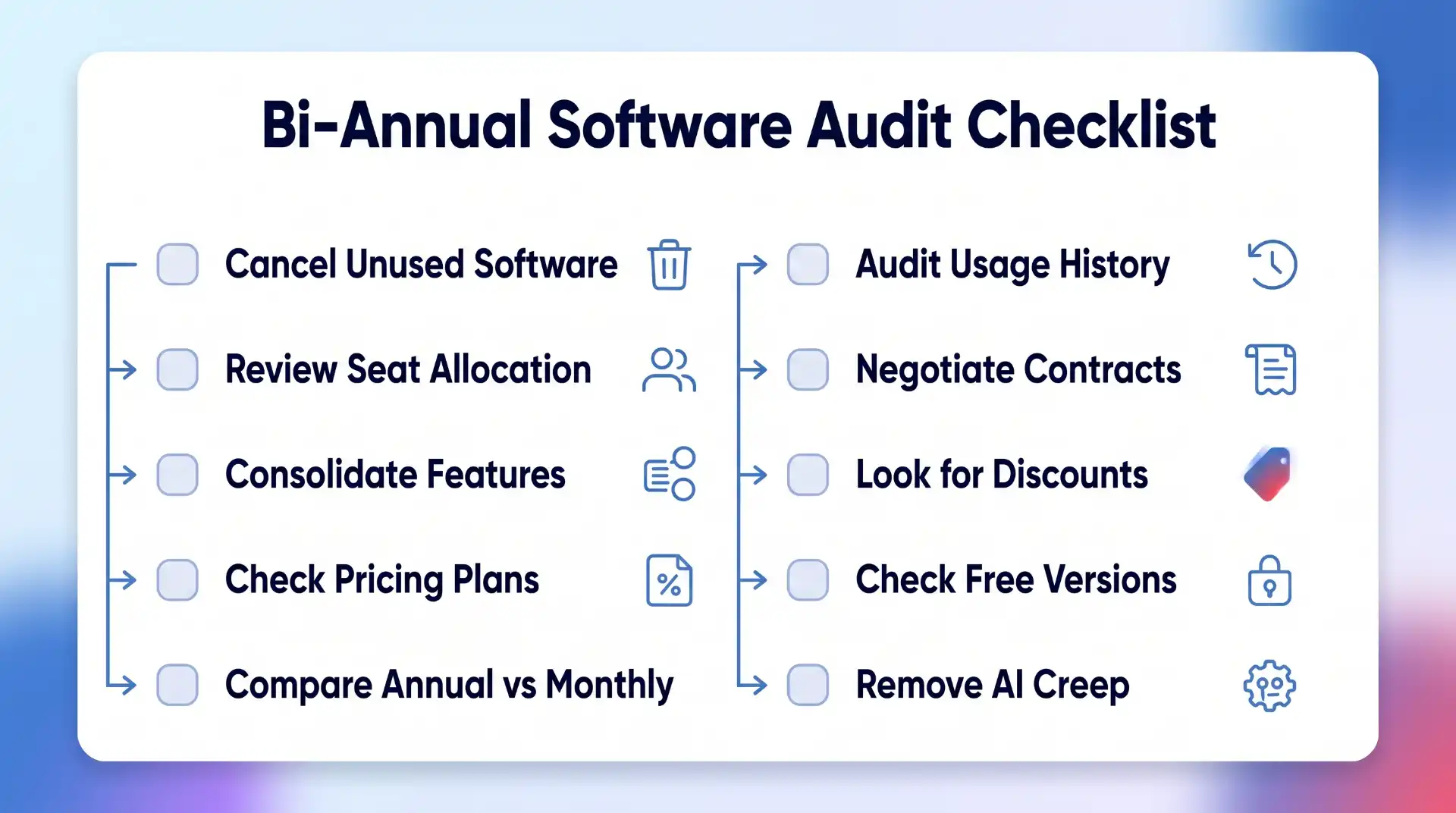
Schedule a Software Subscription Audit Twice a Year
Software costs become difficult to control when nobody revisits them.
Advertisement
Put a recurring review in your calendar every six months.
During the review:
Cancel unused software
Remove inactive users
Check for duplicate functionality
Compare pricing tiers
Review expensive renewals
Check annual versus monthly pricing
Evaluate new alternatives
Remove unnecessary AI subscriptions
Check available discounts and cashback
Update renewal dates
For a business with a large technology stack, quarterly reviews may make more sense.
The process does not need to become bureaucratic.
Advertisement
You are simply asking whether each recurring payment still deserves to recur.
The Goal Is Better Value, Not Fewer Subscriptions
There is nothing inherently wrong with paying for a lot of software.
A developer may need several professional tools. A marketer might rely on paid SEO, analytics, design and email platforms. A business may run almost entirely on cloud applications.
Those subscriptions can be excellent investments.
Advertisement
The waste appears when software remains on the bill after it stops providing enough value.
So do not judge your software stack by how short you can make it.
Judge it by how much useful work you get for what you spend.
Keep the tools that save time, protect your data or help you earn money. Cancel the ones you forgot about. Consolidate genuine overlap. Use annual pricing where commitment makes sense. Compare competitors before major renewals. Check discounts and cashback before paying full price.
Advertisement
Software subscriptions are unlikely to disappear.
That makes learning how to manage them properly increasingly important.
A few small changes across several recurring subscriptions can produce meaningful annual savings, without giving up any of the technology you actually rely on.
























































You must be logged in to post a comment Login