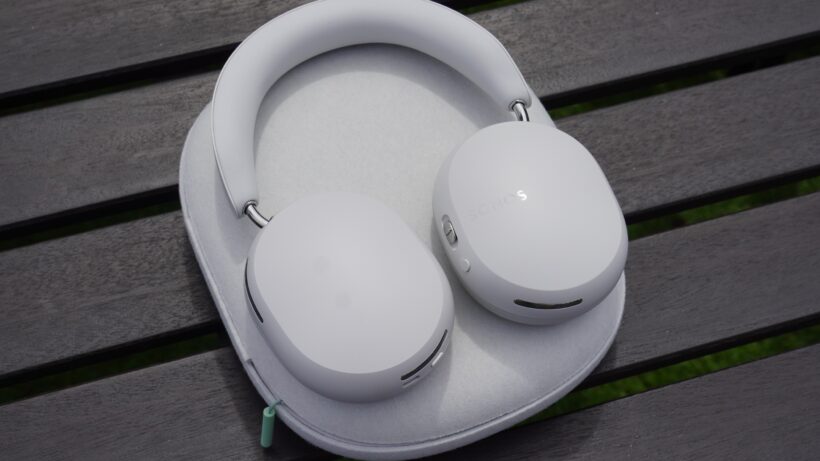
Sonos is launching a new pair of headphones soon, if online reports are accurate. When I heard these reports, I imagined they might be a true wireless considering rumours for that form factor have back years, but it looks like Sonos will announce a new pair of over-ears.
So what should we expect from them?
I think ‘expectations’ is an aspect that might dominate the conversation surrounding the Ace Ultra. I think hype and expectations ultimately led to the original Ace not having the impact Sonos imagined.
Even though I see the headphones on people’s heads every so often (in fact, I saw someone wearing a black version on the way to work); I suspect Sonos imagined that everyone who had a Sonos system in their home would sign up for a pair of Ace headphones as an extension of their system in the same the outdoor speakers such as the Move, Roam and Play have tried to do. But it didn’t quite work, and expectations played a part in that.
Advertisement
So how should we view these upcoming headphones? Has Sonos learnt from its previous mistakes and what areas should they have looked at in terms of improvements?
Advertisement
A new model or a replacement?
Image Credit (Trusted Reviews)
What we don’t know is what they’re called. The Ace Ultra designation appears to be just a rumour for now, and it appears we’ll find out in some official capacity in September.
A question I’d ask is whether the headphones are an expansion of Sonos’ headphones range, or a replacement for the Sonos Ace? You may ask whether there’s any difference, and I would say there is.
An expansion would position Sonos as looking to build its headphone line-up, introducing tiers in a similar way that Sony, Bose and JBL have headphones that appeal to different people at different prices. A replacement implies a do-over, that essentially we’re back to square and these headphones would be the answer to criticisms people had of the first one.
Advertisement
I’m inclined to think it’s the latter.
I think Sonos wants one pair of headphones in a bid for simplicity, a one-suits-all proposition at a premium price in a similar manner as Apple has done with its AirPods Max headphones. Has it ordered a massive redesign of the headphones? I suspect not, because there’s plenty that worked about the Ace (comfort especially) but there were areas where Sonos fell short of the competition. I’m thinking these headphones will be an ‘enhanced’ version, a 2.0 that shores up the issues people had.
Advertisement
But we’ll find out for sure in September.
Advertisement
Improvements needed for audio and noise-cancelling
The audio and noise-cancelling aspects of the Ace were fine – but in both regards the Ace were solid rather than exceptional. You can’t be in the same conversation as the likes of Sony and Bose by just being solid.
And in the two years since the launch of the Ace, rivals have only gotten stronger. Sony’s WH-1000XM6 are arguably the leader in the market. Bose has improved, and so has Sennheiser with the Momentum 5 Wireless, which sound fantastic. No one is resting on their laurels.
Considering Sonos’ inexperience in the headphones market, it will have had to accrue knowledge at a much faster rate than others, but it released its first pair of headphones, it got feedback from it, and like any feedback loop, that funnels resources into making the next pair better.
Here’s hoping that the noise-cancelling, which was already strong, has improved further; but more than that the sound this time around needs to have more character to it. Sonos aimed for a neutral presentation, which I found enjoyable but it had its limits. It was as detailed as other pairs, nor was it as dynamic as other pairs. When you don’t sound as good, or cancel noise as well as other pairs who are less expensive, that’s never a good sign. People will only pay a premium for quality. Sonos can’t be ‘as good’, in some ways it needs to be better.
Advertisement
Advertisement
They need to lean into Sonos’ strengths better
For years, Wi-Fi has been seen as some sort of holy grail for headphones; though despite the potential that offers, Bluetooth still dominates.
We’ve seen AKG deliver a pair of very good headphones that have a Wi-Fi dongle. This site has published reviews of Wi-Fi headphones in the HED Unity (average) and the Wi-Fi models from Hifiman (better). When the original Ace launched, we all thought it would have some Wi-Fi connectivity, which it did through the excellent TV Audio Swap, but it also didn’t feel like it realised the potential of Wi-Fi because it was only available in this form.
By the sounds of it, the new pair could connect directly to a Wi-Fi network, like any other Sonos product, and open up the possibility of lossless audio. Of course, there’s a limitation in that you wouldn’t be able to benefit from this in outside environments – partly why Wi-Fi headphones don’t seem to have taken off – and connecting directly to the Wi-Fi would lock the headphones into the home network anyway.
But if Sonos can sort out the presentation of audio (and throw in USB-C audio while they’re at it too), and open up the bit-rate, then that’s at least something that’s different from most of the competition. That differentiation is arguably what Sonos needs the most.
Definitions for the AI era. (GPT-5.6 Sol Illustration, Click for larger image.)
Jargon stinks. What do the terms open weights, RAG, and agent mean exactly? Here’s a plain English, slightly snarky glossary of befuddling AI terminology with references for further reading.
AI is a broad name for the technology. Machine learning is the part where a system learns from data instead of following rules somebody wrote, a neural network is the structure that does the learning, and deep learning just means a neural network with a lot of layers.
Here’s the nitty-gritty: the terms that get used loosely, and the distinctions the loose usage hides.
1. Model, LLM, frontier model
ChatGPT is the app you open; an LLM, or large language model, is the AI running inside it.
Advertisement
“Frontier” isn’t a technical category at all. It means the handful of biggest and most capable models at any given moment, so the trophy keeps changing hands.
Everyone says “LLM” and hardly anyone could define it on the spot. “Frontier model” is worse. It’s a ranking, announced by the people being ranked.
Further reading:How ChatGPT Works: A Non-Technical Primer (MIT Sloan). Rama Ramakrishnan walks through the predict-the-next-word mechanism everything else is built on.
2. Prompts, tokens, parameters
A prompt is the thought, question, or instructions you provide to the LLM (plus whatever the app added before it without telling you). The LLM takes the prompt and generates words, both in its internal “thinking” process and in the answer it shows you.
Advertisement
Tokens are (roughly) the words going in and coming out. The model chops your prompt into tokens, then produces more of them as it answers, and they’re what the industry charges by.
Parameters, also called weights, are the numbers inside the model. A frontier model has hundreds of billions of them and the biggest now run to trillions, and nobody can tell you what any single one does.
Parameter counts get quoted like horsepower. The number nobody advertises is how many tokens it takes to answer your question, and that’s the one that shows up on the bill.
Further reading: The only AI glossary you’ll need this year (TechCrunch, July 2026). Its entries on tokens and weights are the clearest short treatment of the building blocks.
Advertisement
3. Pre-training, post-training, fine-tuning
Pre-training is feeding the model most of the internet, so it learns to predict the next word in a sentence. That’s the expensive part, and it produces something that knows a great deal but can’t follow an instruction.
Post-training is where people rank its answers and it learns to give more of what ranked well. Fine-tuning is post-training done by you, to somebody else’s model, on your data.
Pre-training costs hundreds of millions and gets you a model that won’t answer a question well. Post-training is what gets you the product.
From scratch, you buy (or rent) the computers and do the work to build and train a model. Distillation trains a cheap model on an expensive model’s outputs, so it inherits the behavior without the bill. Distillation is against most AI companies’ terms of service.
OpenAI accused DeepSeek of distilling its models, which is a bold position for a company that trained on the whole internet without asking. Learning from other people’s work is fine right up until the other people are you.
Training is how you build a model. Inference is what happens every time it answers: the model runs and produces a result.
Advertisement
Training is a one-time cost. Inference is a cost you’ll pay forever. Training runs for months and costs hundreds of millions; one inference, meaning one answer, costs a fraction of a cent, and it happens billions of times a day.
Training costs get announced. Inference costs get discovered. Only one of them shows up in a press release.
We typically use LLMs by accessing an app like ChatGPT, Claude, or Gemini. But experts often want the model itself, not just an app wrapped around it. Open weights means that an AI expert can download the model and run it on a server. You don’t get the data or the code that made it.
Advertisement
Open source means data and software that experts can use and modify, which almost no major model offers (AI2’s Olmo is a rare exception).
API-only means you can’t have the model at all. You send your text to the company’s computers, the answer comes back, and you pay for every use, which is also what’s happening when you use ChatGPT or Claude through an ordinary account.
Open weights is how you claim the open-source mantle without giving much away. Open washing, basically.
The context window is how much text the model can hold in mind at once, including your question and everything pasted into the conversation.
Memory is a feature that saves facts about you and slips them back into the context window later.
RAG, short for retrieval-augmented generation, searches a document collection and drops the relevant passages into the context window before the model answers.
Nothing in the model remembers you. The app keeps a file on you and pastes it in before every conversation, and that’s a less charming way to describe the same feature.
Advertisement
Further reading:Glossary of Terms: Generative AI Basics (MIT Sloan Teaching & Learning Technologies). Defines context window and RAG in plain language, and is careful to put the model’s “memory” in quotation marks.
8. Chatbot, workflow, agent
A chatbot answers and stops. A workflow runs the steps you defined, in your order. An agent receives a goal instead of steps, and works out for itself what to do, calling out to other software and checking the results until it’s done or stuck.
Ask about a delayed flight and a chatbot quotes you the policy; a workflow uploads the refund form you built; an agent rebooks you.
Useful test: if it decides its own next step, it’s an agent. If you decided the steps, it’s a workflow.
Advertisement
Further reading:Building effective agents (Anthropic, December 2024). The source of the distinction: workflows run predefined code paths, agents direct their own.
9. Hallucination, AI slop, AI cream
A hallucination is a confident falsehood, like a citation to a paper that doesn’t exist. The model isn’t lying; it has no notion of truth to violate. It’s producing text that looks like the right kind of answer.
AI slop is a different failure: accurate, fluent, and worthless. Think of the LinkedIn post that says nothing in 300 fluent words.
AI cream is the third case and the rare one: superb writing authored with the help of AI.
Advertisement
Nobody sets out to make slop. Everyone believes they’re making cream.
Further reading: 2025 Word of the Year: Slop (Merriam-Webster, December 2025). The dictionary definition turns on quantity: low-quality content “produced usually in quantity” by AI.
Why language models hallucinate (OpenAI, September 2025). Argues that hallucinations persist because benchmarks score accuracy alone, so guessing beats admitting ignorance.
10. Alignment, guardrails, censorship
Alignment is the research problem of getting a model to do what people want when nobody’s watching. Guardrails are the rules behind its refusals: “no, I won’t tell you how to make a bio weapon.” Censorship is a guardrail that blocked something you wanted.
Advertisement
The same refusal is “safety” in the press release, “guardrails” in the documentation, and “censorship” on X.
Further reading: Model Spec (OpenAI, updated December 2025). A published rulebook for what one model will and won’t do, which makes refusals arguable rather than mysterious.
I snuck in one novel term that’s been sorely absent from the field. Can you tell which one?
Further reading: other glossaries
Five general AI glossaries, listed roughly from most opinionated to most technical.
Glossary of Terms: Generative AI Basics (MIT Sloan Teaching & Learning Technologies). Twenty-odd entries aimed at people who use the tools rather than build them.
Machine Learning Glossary (Google for Developers). Hundreds of technical entries, and the only glossary here that defines “AI slop” a few lines away from several hundred pieces of real math.
Brave1 lets Ukrainian units order drones built to exact specifications
Military units have spent nearly one billion dollars through Brave1 Market
Buyers can adjust seventeen different drone specifications before placing an order
A new procurement system launched by Ukraine’s Brave1 defense cluster now allows Ukrainian military units to commission drones built to their own specifications.
The system operates through the existing Brave1 Market platform, where military units can request drones tailored to particular operational requirements.
Military units placed roughly $1 billion worth of orders for defense technologies through the platform during its first year of operation.
Latest Videos FromTechRadar
Advertisement
A more flexible way to buy
This digital marketplace currently has over 1,000 defense innovations spanning unmanned aerial vehicles, ground robotic systems, electronic warfare and signals intelligence equipment, specialized components, AI-powered solutions, software applications, and ammunition.
Custom ordering, however, is currently limited to a small slice of that catalog. At this stage, only three drone categories qualify for custom orders: standard FPV strike drones, fiber-optic FPV variants, and fixed-wing interceptors.
Seventeen separate specifications are open to adjustment under the new system, ranging from communication equipment and cameras to payload capacity and flight time.
Submitted requests are routed automatically to a pool of suppliers, each of whom can choose to bid or opt out entirely.
Sign up to the TechRadar Pro newsletter to get all the top news, opinion, features and guidance your business needs to succeed!
“All stages of interaction and decision-making are automatically recorded in the system,” said Brave1.
Advertisement
If a military unit decides not to proceed with a purchase, it must provide a clearly justified reason for the decision.
Brave1 says the automated approach aims to give military units systems tailored to specific battlefield missions while keeping procurement rules transparent for suppliers.
The system also provides the state with a complete digital record and verified data for every transaction made across the platform.
Advertisement
The platform also allows complaints to be filed against either buyers or suppliers if disputes arise during the process at any later stage.
When multiple suppliers submit matching technical proposals, the system triggers a competitive bidding process, and the cheapest offer ultimately secures the deal.
Once bidding wraps up, the requesting unit finalizes an agreement directly with the chosen manufacturer, bypassing extra bureaucratic steps in the process.
Suppliers who decline a specific request face no penalty under the current system, according to the company’s statement released this week.
Advertisement
Expanding categories and remaining limits
Brave1 said the procurement process is designed to remain transparent and competitive for all participating suppliers throughout every stage of the transaction.
Brave1 plans to expand the range of eligible systems considerably further in the coming months, including the eventual addition of unmanned ground vehicles.
For now, the feature applies only to purchases financed with military units’ own funds, excluding the state eBaly procurement system.
Advertisement
Units can even request equipment that hasn’t received official classification yet, something the standard state procurement process typically does not allow.
This shift toward customer-driven procurement suggests Ukraine is trying to close the gap between battlefield needs and manufacturing speed during an active war.
Other governments observing Ukraine’s wartime innovations may eventually consider similar digital procurement models for their own defense industries in the years ahead.
China is moving its AI data centers into poor rural provinces
Guizhou offers cooler weather, cheap land, and abundant renewable power
New data centers must draw 80% of power from renewables
China is significantly expanding its data center capacity as artificial intelligence processing drives an unprecedented demand for computing power nationwide.
Much of this new infrastructure is being built away from the crowded eastern seaboard and placed in rural western provinces.
In 2021, the Chinese government formally named this approach the Eastern Data Western Computing strategy, marking a clear national policy shift.
Latest Videos FromTechRadar
Advertisement
Why the rural west has the advantage
Provinces such as Guizhou and Inner Mongolia offer cooler climates, abundant renewable energy, and vast amounts of empty, affordable land.
China has also mandated that all new data centers draw 80% of their power from renewable sources before the decade ends.
Regions with expanded solar and wind capacity, like Guizhou, make it easier for operators to meet those goals, according to Rystad Energy analyst Simeng Deng.
Large-scale server farms can also absorb curtailed renewable output, easing the ongoing problem of overproduced solar and wind energy nationwide.
Sign up to the TechRadar Pro newsletter to get all the top news, opinion, features and guidance your business needs to succeed!
Developing previously overlooked rural regions has become another expected benefit, though researchers remain sharply divided on its actual economic impact.
Advertisement
An uneven economic payoff
According to Andrew Stokols of Singapore Management University, data centers do not necessarily generate a meaningful ripple effect for local employment.
This pattern shows in Guizhou’s growth figures, where heavy data center investment helped drive average annual GDP growth of 7.4% over the past decade, yet wage growth over that same period ranked second to last among all Chinese provinces, according to Taiwan-based researchers at DSET.
The province also carries one of China’s heaviest public debt burdens, driven largely by heavy infrastructure spending and incentive programs.
In 2024, Guizhou also ranked 30th nationally for its debt-to-revenue ratio and 27th nationally for its debt-to-GDP ratio.
Still, residents of Guian New Area, a Guizhou district built around Huawei’s largest data center, describe visible local change, including new roads, growing trade, and steady new job opportunities for residents living close by today as well.
Two universities have reportedly opened in the area since the data centers were constructed, according to local vendors.
Advertisement
Despite this uneven mix of growth, debt, and stalled wages, fierce global competition over computing power keeps construction of new facilities moving steadily forward.
China is expected to nearly double its total data center capacity within the next five years, industry estimates suggest, momentum which shows why Chinese policy documents were already linking computing power to national strength, even before AI’s rapid growth.
“It’s essential for national competitiveness in the age of digital technology,” said Stokols.
Unlike in Europe and the United States, where data center projects often face local resistance, dissent in China remains tightly controlled.
Advertisement
The pattern suggests China is treating computing infrastructure as a matter of national strategy rather than pure local economic development.
Whether rural provinces eventually see the broader prosperity officials have long promised remains, for now, an open and unresolved question.
In this week’s Sunday Reboot, the AirPods Pro with cameras are probably the best alternative to smart glasses that Apple could’ve come up with.
Sunday Reboot is a weekly column covering some of the lighter stories within the Apple reality distortion field from the past seven days. All to get the next week underway with a good first step.
Confirmed and capable: AirPods Pro with cameras
There have been rumors about a new breed of AirPods Pro in development at Apple for quite some time. Personal audio devices that somehow dealt with visual elements, not just sound.
The rumors said that Apple was coming up with AirPods Pro with built-in cameras to capture images of the local environment. All to feed data into your iPhone‘s Visual Intelligence so you can ask queries about your local environment.
Advertisement
This isn’t entirely out of pocket for Apple, really. We have got heart rate tracking in AirPods Pro 3, as well as some models of Beats earbuds too.
Adding extra sensors in earbuds wasn’t hard to believe. That they would be sophisticated enough to read the outside world and to transfer that data to your iPhone, was a tiny bit of a stretch.
While we knew through the rumor mill that they were being worked on in some capacity, we didn’t know just how far along the idea had progressed.
Cue a leak from Apple itself seemingly confirming they exist. A video in the macOS Tahoe 26.7 release candidate gave a demonstration of what the earwear could feasibly do.
Advertisement
Admittedly, the ones shown looked like normal AirPods Pro, and could easily be used as placeholders in the video without revealing the real hardware. However, based on the angle, it could mean the sensor is positioned in the tip where the microphone is usually placed.
The video itself showed a person looking at a book, getting Siri to recognize the cover, and then to save it for later. We can probably expect a lot more potential capability from it, but it’s not a bad explanation that they have some form of imaging sensor onboard.
In the days that followed, more capabilities were raised, again from macOS. It was able to capture left and right-paired images, namely images from each AirPods Pro camera, and combine them into images seen by Visual Intelligence.
The stereoscopic view could give Visual Intelligence data about distance, which may give Apple’s AI more of an idea of where things are in the world, relatively speaking.
Advertisement
They would also be able to compensate for head movements and have passive and active modes. Impressively, the AirPods may even be able to process some of the data onboard instead of letting the iPhone handle it.
Capable, but not too privacy-breaking
There’s the obvious issue of privacy, as we have seen with practically all other smart glasses that have ever been created. Cameras on an item that seemingly hides them could lead to weird perverted behavior.
I’m not going to sugarcoat it, but the AirPods Pro with cameras will get the same sort of outrage over everyone’s sacred right to privacy. To be fair, it’s a justifiable outcry, but one that probably won’t be as much of a problem for Apple.
For a start, the paired images will just be up to 1 megapixel in size, versus 12MP photos and 3D video on the Meta Ray-Ban glasses.
Advertisement
Someone actually wearing Meta Ray-Bans – Image Credit: Meta
That’s an absolutely tiny resolution in this day and age. With a lack of a proper zoom function, that makes it extremely limited for spying purposes.
There’s also Apple itself, which does what it can to protect privacy as much as possible. It would be a really bad look for Apple to ruin the years of work on one badly thought-out product.
Realistically, you have little to fear of them being seriously used for privacy-breaking reasons.
Advertisement
These are incredibly capable earbuds. In my book, they’re probably going to be the most capable AI-centric product on Apple’s future wearables roster.
You just shouldn’t expect much of a privacy scandal from them.
Glasses-free smart glasses
Apple’s current wearables landscape is pretty much not futuristic at all. We have the Dick Tracy-style Apple Watch, we have the ability to talk to Siri with AirPods, and then we have the bulky headset that is the Apple Vision Pro.
When it comes to the future, we have a few options. There’s the weird pendant or brooch, Apple Glass, and now AirPods Pro with cameras.
Advertisement
Apple Glass was meant to be the product that would combat Meta’s smart glasses and usher in the personal AI revolution. To me, a committed wearer of spectacles, the AirPods Pro are the safer bet.
For a start, AirPods Pro with cameras are the same conceptually as smart glasses, except without the glasses bit. If you think about the Ray-Ban Meta smart glasses, they are basically a camera on each side, a microphone, and speakers for the wearer’s ears.
That seems a lot like AirPods Pro with cameras, conceptually. Of course, smart glasses with display elements are a different breed, but for the cheaper consumer-focused smart glasses, there is more of a direct comparison.
As a glasses wearer, that means I could have all of the benefits of wearing smart glasses with the future AirPods, but without needing to replace my frames.
Advertisement
It sounds like I’m being picky, but there are a few good reasons for it.
The thick frames of the Ray-Ban Meta range hide the electronics. It’s just not thin enough for me. Image Credit: Meta
For a start, I really don’t like the thick frames of the current Ray-Ban Meta collection. I like my thin frames, and most smart glasses on the market simply cannot match that styling.
The second and more practical reason is that if I don’t want the “smart” element anymore, I don’t have to change glasses. I just have to take out the AirPods from my ears, put them in the charging case, and put them away.
Advertisement
If I had prescription lenses in smart glasses, and someone was really insisting that the spying cameras on them had to go away, I’d have a problem. Either I’d have to change to a second pair of “dumb” glasses, or go glasses-free and see the world in soft focus for a bit.
I like having my vision, and I don’t like having to carry a second pair of glasses around with me. Especially if the smart ones have thick frames that barely hide the tech.
If I suddenly had a pile of free cash and an itch to buy some smart glasses, the AirPods Pro’s camera evolution would be the route I would take.
Sure, they’re not smart glasses. But for my glasses-wearing face, they are the much better answer.
Advertisement
Last week’s Sunday Reboot talked about Apple’s lawsuit with Epic Games, requests for delays, and Epic Games complaining about EU fee changes.
The Dutch Data Protection Authority is fining Uber €825 million (around $966 million) — the second largest penalty issued so far under Europe’s General Data Protection Regulation, according to Reuters.
The Dutch regulator was investigating complaints that Uber had deactivated driver accounts through an automated process without sufficient warning or human oversight. In a statement, deputy chair Monique Verdier said that the company had “committed serious infringements.”
“A computer should not make decisions on its own that have [such] major consequences,” Verdier said.
Uber, however, argued that most driver suspensions are brief, that no permanent deactivations take place without human review, and that drivers have the ability to appeal. (Dutch regulators said some drivers were permanently deactivated without human review, which Uber disputes.) The company said it will appeal the decision.
Advertisement
“We strongly disagree with this decision and disproportionate fine,” an Uber spokesperson told Reuters. TechCrunch has reached out to the company for additional comment.
Brahim Ben Ali, a former Uber driver in France, told the Dutch newspaper de Volkskrant that after his account was deactivated in 2019, he collected testimonies from 170 other Uber drivers and eventually brought his complaint to the Netherlands, where Uber’s European headquarters are located.
Ben Ali was assisted in this effort by a Swiss nonprofit focused on digital rights called PersonalData.io, which helped the drivers collect data about how the deactivation decisions were made. Founder Paul-Olivier Dehaye said a driver “can complete a thousand journeys with satisfied passengers, but if just one person reports a very serious problem, the consequences can be enormous.”
In fact, Dehaye said these fines all originate with complaints made by the same group of drivers. And he’s starting a new company called StartClaims to support the litigation and other regulatory action — first against Uber and then eventually expanding to other gig economy cases, as well as related areas like adtech.
While discussing the case with Dehaye (who I’ve known casually since college), I brought up a blog post by Daring Fireball’s John Gruber, in which Gruber worried that this fine makes it “unlawful in the EU for Uber to monitor its drivers for pulling scams against customers, or just never picking riders up, leaving them stranded.”
Gruber also took issue with Verdier’s statement, arguing, “Saying that ‘a computer’ made these decisions is like saying that when a company suspends or fires a habitually late employee, that ‘the time clock’ made the decision. Managers at the company set the policies, and the devices measure employee compliance.”
Dehaye countered that Gruber “misses the point.”
Advertisement
“Uber is free to use humans to punish drivers who scam, but then [it] has to take responsibility for this decision making (like ‘being an employer’, not ‘being a marketplace’),” he said.
When you purchase through links in our articles, we may earn a small commission. This doesn’t affect our editorial independence.
We spend hours testing every product or service we review, so you can be sure you’re buying the best. Find out more about how we test.
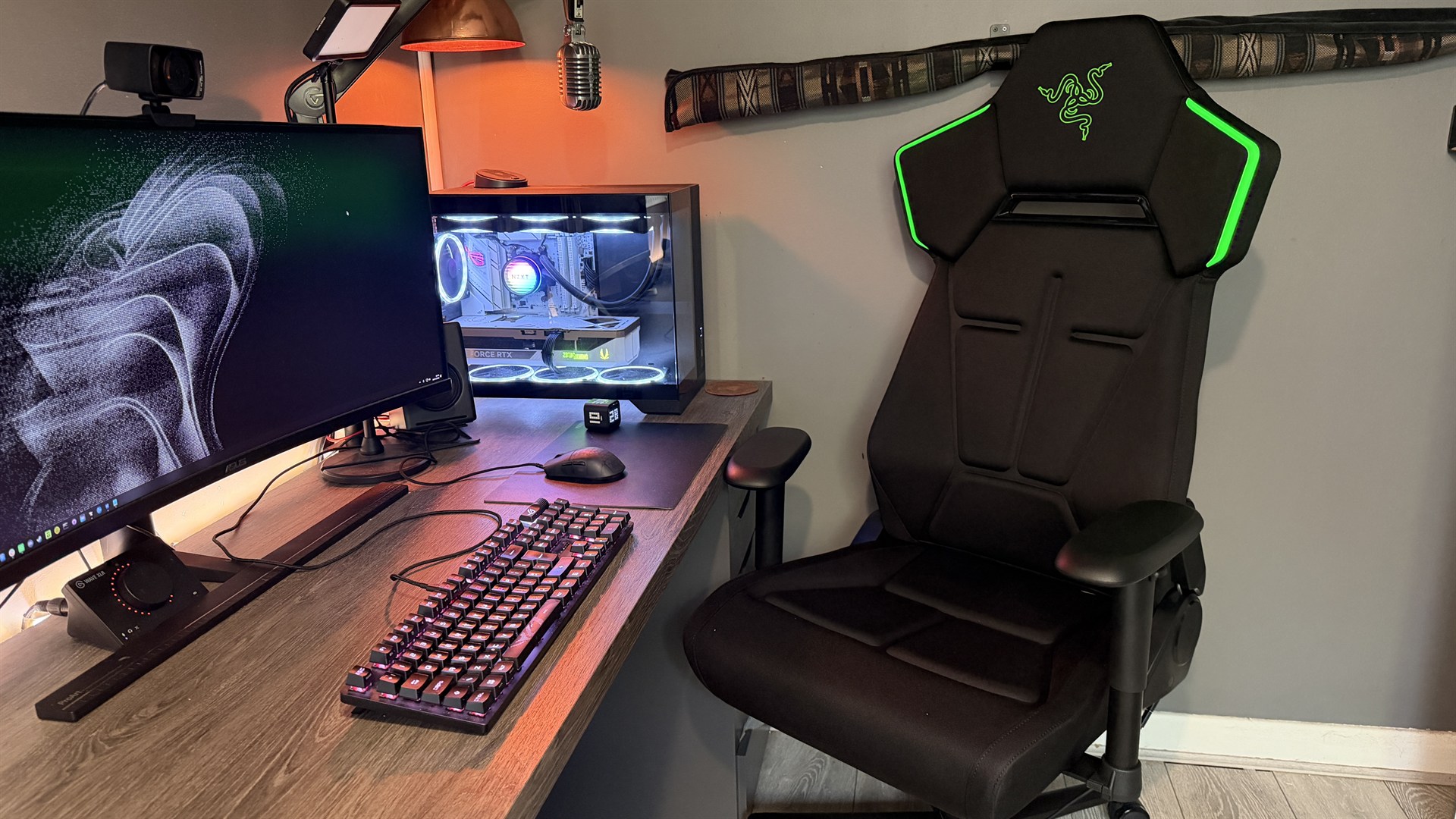
Razer Soma Chroma: One-minute review
I’ve reviewed a lot of gaming chairs, sat my butt on plenty of seats promising the best of the best comfort, or ergonomic longevity (I’m convinced noblechairs wants my posture to last me until I’m 126 years old), and I’ve got to say, aside from possibly the AndaSeat Novis, this might be the most comfortable chair I’ve ever sat in.
At least, part of it is. The seat base. The fabric, the material, lovely; the base width, great. The backrest? Right up my street. But the Soma is a bit of an odd one when it comes to everything else it’s trying to do. And an even bigger issue is its launch day price tag.
Advertisement
It’s $500/£500 (about $954 AUD), which is a lot, and yes, there’s RGB lighting in this, but Razer doesn’t include an integrated battery (or even an optional one at checkout), doesn’t pack a long enough cable, and doesn’t include an adapter. The brand doesn’t even include a cushioned headrest (you have to buy that separately). For 500 bones, frankly, that’s utter madness.
Latest Videos FromTechRadar
The RGB itself (two diffused strips that run alongside the upper part of the backrest) is forward-facing only, and you can’t really see it when you’re sat down. It’s not like a keyboard or a mouse, which is at least in your periphery, and needing your machine on with the cable hooked up separately if you opt to go without a battery bank means you’ll probably spend about 5-10 seconds every session watching it just light up.
Advertisement
It’s great for a streamer, sure, but even then it does feel more like an advert rather than something classy.
I had the lighting on for a day when I first got it for testing, then promptly unhooked the USB cable Razer graciously provided me with and never touched it again. Best gaming chair? Well, it won’t be because of its RGB; that’s for sure.
(Image credit: Future)
Razer Soma Chroma: Price and Availability
Costs $500/£500 (about $954 AUD)
Remarkably expensive given what it lacks
Single colorway and fabric option
Right, now you can grab the Razer Soma Chroma for $500 USD and £500 GBP (about $954 AUD). It sits roughly between the Razer Iskur V2 X (at about $350) and the standard V2 (that’s $600 or so).
Sign up for breaking news, reviews, opinion, top tech deals, and more.
Advertisement
You can pick one of these up today, although there’s little in the way of choice. No different color options, no different materials, you get what you get.
Sold separately, of course, you can also get a male-to-female USB-C extension cable, headrest, and power source (you’ll have to source your own on the latter).
On the warranty front, Razer’s got you somewhat covered with a 14-day returns policy via the RazerStore, and as standard it comes with a 3-year warranty, which upgrades to 5 if purchased direct and registered.
Advertisement
Razer Soma Chroma: Specs
Swipe to scroll horizontally
Price
$500/£500 (about AU$954)
Dimensions
53.1 x 26.4 x 28.1in / 135 x 67 x 71.5cm
Advertisement
Max user weight
331lbs / 150kg
Max seat height
20.1in / 51cm
Advertisement
Seat depth
18.5in / 47cm
Recline angle
Up to 155°
Advertisement
Warranty
3 years (free 5-year upgrade via Razer.com)
Material
Knit fabric, cold-cured foam
Advertisement
AndaSeat Phantom 4 Pro: Design and Aesthetics
Bold gamer style
Perforated channels for air (read: debris)
Green logo on an RGB product
The Soma Chroma is unabashedly gamer. There’s just no two ways about it: the sharp lines, jagged polygonal design, the channelling, the RGB, the stitching — it doesn’t exactly give off this allure of premium professionalism. That’s to say I’m sure 16-year-old Zak would’ve loved it, but me, sat here in my ‘rustic’ office, dealing with media, clients, and more on the daily, yeah it kinda sticks out like a sore thumb.
Particularly with the striking green Razer logo etched in the backrest right behind my head, in a not-so-obscure glossy green plastic. Which again I have to question. This is an RGB product, right? That means you can set that lighting (hypothetically, if you use it) to any color you like.
That’s great, but certain colors clash with green quite aggressively. Bright reds, neon blue, pinks, high-saturation yellows. Basically all off limits, all because the logo’s bright neon green. It’s 2026, guys; we’ve had RGB products for a seriously long time now. I thought it was common knowledge that you don’t stick colored accents on them.
The lighting is also awkwardly placed. You can’t actually see it from the back of the chair, and it’s solely positioned behind your head, facing forward, so you literally never see it, outside of the five to ten seconds you go to the toilet and sit back down again. It’s diffused, it looks good when you do manage to catch a glimpse of the stuff, and you can easily configure it in Synapse, but honestly it just feels like a bit of a swing and a miss.
Advertisement
(Image credit: Future)
How’d you connect all that? Well, there’s a short USB-C cable located in the back of the chair that hooks up to your battery bank, which you can then stow away in a small zip pocket in the seat base. But it’s really short; that cable. If you’re imagining some retractable 6-foot thing you can pull out when you need it, no, it’s not that.
You’re not connecting this thing to a wall plug, or anything of the sort. Razer provided me with a seriously long extension cable (two in fact) for it, but that doesn’t come by default, annoyingly. And of course, there’s no built-in battery, or included power bank, or the option to add one to your order. I used the extension cable to effectively run the entire chair to the back of my PC, and it does run off USB power. That said, you don’t have to go that route; you can just use a USB plug, and then let the included wireless dongle handle the RGB side of things.
Now I’m done wailing on the lighting; the good news is the finish is genuinely lush, it’s like a neoprene-feel soft-touch fabric, and it’s a delight to sit on. I’m writing this review in the midst of yet another heat wave in the UK, and skin-on-chair contact has been genuinely lovely. Compare that to the number of AndaSeat’s chairs I’ve reviewed recently that leave me begging for AC, and well, it’s a nice change that’s for sure.
Ok, we’ve had bad, we’ve had good, now it’s back to bad. There are channels in the chair base, and I get the concept. The idea is that it helps air circulate your, well, back passage, to stop you heating up so quickly, and it kind of works. But it comes with a major caveat, and that’s that it also holds onto all manner of dust and debris.
Advertisement
If you own a dog, or cat, or have a habit of sitting at your desk eating from time to time, you’re cooked. You’ll be getting the blow duster out you use for your PC on the chair base at least once a week.
(Image credit: Future)
Razer Soma Chroma: Comfort and adjustability
Super comfortable, wide seat base
Generous lumbar support
Armrests and the castors are letdowns
Fortunately for the Soma, sitting on it is a treat. The cold-foam base is comfortable as all hell, and the seat base is wide enough for the weirdos like me who sit cross-legged to do so in absolute bliss.
The armrests, however, are more basic, two-dimensional affairs. There’s no four- or even three-directional setup here like you’d find on almost all of its modern counterparts from competitors at this price.
You can raise them up and down and swivel them, and that’s it. They’re padded and modestly squishy, but if you’d put them on an Ikea chair, I wouldn’t be able to tell that they were Razer-designed and made.
Advertisement
Oh, and it doesn’t roll. Well, it does, but it’s just so frustratingly stiff it beggars belief. I wrote about this in the AndaSeat Phantom 4 Pro review earlier this year. It’s basically, I think, a result of overcompliance with the EU’s EN 1335-2 safety measure, which means that in an emergency any unmanned chair shouldn’t move easily. I don’t quite understand the logic behind that, but here we are.
(Image credit: Future)
And it frustrates me because I can’t roll up and down my desk, or if I need to lightly move it to put my shoes on, or I just want to get more comfortable at my setup, it’s a minor struggle. And yes, I know that’s a first-world problem, but it’s $500/£500 for this thing, from a seriously reputable brand.
One final flag from me before I move on. There’s no headrest cushion included either. Razer will sell you a headrest, but it’s at additional cost. Eugh. No magnetic freebie for you, no sir. Not even a strapped one.
Advertisement
Razer Soma Chroma: Assembly
Seamless, standard build
Missing shear bolt on recline
Massive manual
As far as building the thing goes, the Soma Chroma is genuinely smooth. If you’ve built one gaming chair before, you’ll get along with this one just fine. It’s a bit heavy; Razer recommends you’ll need two people to build it, but it’s more than easy enough to do solo.
Plus the manual is massive, and printed onto a giant sheet of card, which feels a bit overkill (a book would’ve been fine; I’m not that old, I can read).
The only cause for concern is that you do need to be a touch careful installing the backrest, as there’s no safety bolt sitting between you and the tilt angle arm. So if you do hit that lever too aggressively, there’s a chance the bracket can snap forward. So do bear that in mind.
(Image credit: Future)
Should You Buy The Razer Soma Chroma?
Advertisement
Buy it if…
Don’t buy it if…
Also consider…
Make sure to consider these alternatives as well.
Swipe to scroll horizontally
Row 0 – Cell 0
Razer Soma Chroma
Advertisement
Secretlab Titan Evo 2022
Razer Iskur V2
Price
$500 / £500 (about AU$954)
Advertisement
$519 / £414 / AU$724
$650 / £600 (or around AU$1,128)
Dimensions
53.1 x 26.4 x 28.1in / 135 x 67 x 71.5cm
Advertisement
54.3–58.3 x 27.6 x 27.6in / 138–148 x 70 x 70 cm
51.0–54.7 x 27.2 x 27.2in / 129.5–139 x 69 x 69cm
Max user weight
331lbs / 150kg
Advertisement
285lbs / 130kg
300lbs / 136kg
Max seat height
20.1in / 51cm
Advertisement
21.9in / 55.5cm
21.1in / 53.5cm
Seat depth
18.5in / 47cm
Advertisement
20.9in / 53cm
17.7in / 45cm
Recline angle
Up to 155°
Advertisement
85–165°
85–153.5°
Warranty
3 years (5 direct)
Advertisement
5-Years (extended warranty)
3-Years
Material
Knit fabric, cold-cured foam
Advertisement
NEO Hybrid Leatherette, SoftWeave Plus Fabric, Napa Leather
EPU Leatherette, Fabric
How I tested the Razer Soma Chroma
Used for over a month
Fully built by hand solo
Set up in all manner of configurations
I spent well over a month with the Razer Soma Chroma, testing the ins and outs of how it held up under serious usage. Working from home, it endured the hardships of a constant 9-5 “office” job, along with late evening gaming sessions, through normal operating conditions and heatwaves abound.
I’ve spent years testing gaming chairs from all manner of manufacturers, and I compared this one directly to a slew of products from AndaSeat, Noblechairs, and Secretlab as well. I also fully tested the Synapse and WiFi dongle, and tracked the real-world usage and feel of it throughout the month, documenting any moment where I thought “ahh this is good” or “ahh not so good”.
Advertisement
I also got my five-foot-five partner to sit in and provide me with her direct feedback as well, along with a few close friends to get their thoughts and feelings on it, which directly feeds the opinions you see here as well. I questioned them intensely on the comfort, the feel, and the build quality of the Soma Chroma to get a broad picture of opinions on it.
Most people experience constipation at some point in their lives. For astronauts, it’s a common occurrence. The problem is that no one knew exactly why. Now, science seems to have figured out the No. 1 reason why astronauts have problems going No. 2 in space.
Research dating back nearly three decades has explored the effects of low- or zero-gravity environments on human digestion. A new study published in Nature by researchers at the University of Copenhagen working in tandem with NASA suggests that because astronauts spend so much time in microgravity, this state of near weightlessness causes food to move more slowly through the gut.
To carry out the study, researchers took samples from 52 astronauts who had spent months aboard the International Space Station. They found that time in space significantly affected their gut microbiomes, likely leading to constipation and other gastrointestinal problems.
Here’s how it works. The gut microbiome generally breaks down carbohydrates and fiber first as its main energy source. Without gravity, however, food moves much more slowly through an astronaut’s digestive tract. This delay causes gut microbes to finish all available carbohydrates early and switch to fermenting protein for energy instead. This protein fermentation releases specific compounds into the bloodstream — that’s what allowed researchers to prove that a lack of gut-accessible carbs leads to slower bowel movements.
Advertisement
“We see changes in astronauts’ blood samples that indicate that the gut bacteria begin to ferment protein to a greater extent than usual within weeks after the astronauts arrive in space, and this change continues until they are back on Earth,” Giorgia La Barbera, one of the authors of the study and an associate professor in the Department of Nutrition, Exercise and Sports at the University of Copenhagen, said in a statement.
A solution to the digestion traffic jam
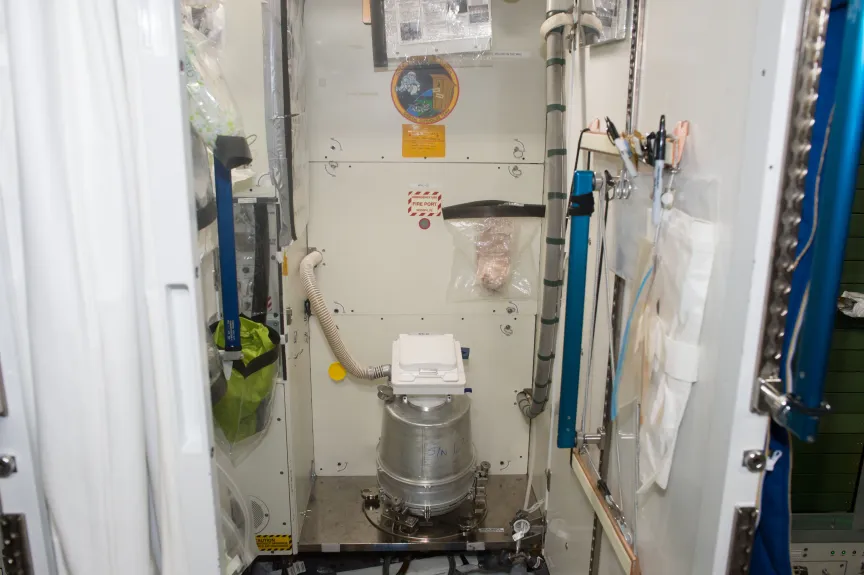
Space toilets are high-tech gadgets that cost tens of millions of dollars, and NASA wants astronauts to use them more often.NASA
While astronauts may be reaching for the stars, their digestive systems are firmly grounded in the laws of gravity.
Researchers say that a potential solution for off-planet travel is a diet richer in “slow-fermented carbohydrates.” These carbs take longer for the body to process, giving astronauts’ gut biomes something to chew on, figuratively and literally, as the material moves through the intestines.
”Eating whole foods, rich in dietary fiber, such as vegetables, lentils and nuts, would be important to keep the gut motility up to speed and to provide additional substrates for the bacteria during space missions,” Henrik Roager, study co-author and associate professor at the University of Copenhagen, said in an email. “This way, the gut microbes would be kept busy fermenting dietary fiber instead of protein.”
Roager also says that “supplementation with prebiotics” and other treatments may also help decrease gut transit time, thereby helping astronauts avoid constipation.
Advertisement
If the prescription sounds familiar, that’s because it’s also the recommended course of action for avoiding constipation here on Earth. Doctors regularly tell patients to drink more water and eat more fiber. Diets low in fiber cause stool to move more slowly in one’s digestive tract, even with gravity assistance.
Since these results are linked to both terrestrial and space life, the study’s findings may be helpful in other areas as well, such as with bedridden patients suffering from chronic disease who also experience constipation, Lars Ove Dragsted, another author of the study, said in a statement.
Houston, we have a bowel movement
A journey to Mars would take roughly seven to nine months. That’s a long time to be constipated.NASA/JPL-Caltech/ASU
Issues like constipation may seem mild in the grand scheme of things, but they’re among the many that NASA and other space agencies need to solve before sending astronauts on much longer voyages — like when humans eventually go to Mars.
The problem is twofold. It’s no secret that constipation is a major pain in the butt. Irregularity leads to bloating, pain, cramping, and in some cases, hemorrhoids and other short-term symptoms, which astronauts already deal with on the ISS during their months-long stays.
But there are long-term consequences to worry about as well. Potential long-term issues include heart disease, chronic kidney disease and other health effects like an increased risk of colorectal cancer and possibly also inflammatory bowel disease. A mission to Mars without a solution to constipation would put astronauts at risk of developing these additional complications.
Advertisement
“Whether constipation is also linked to mental health is not clear, but some of the molecules that we found to be increased among astronauts during space missions have been linked to increased anxiety and stress in animal models, so that is another potential concern,” Roager said.
NASA seems amenable to making dietary changes. “We are always looking at diet and health, working to use nutrition as a means to mitigate negative effects of spaceflight on crew health and performance,” said Scott M. Smith, manager for nutritional biochemistry at NASA. “The findings in this recent paper are intriguing, and we will continue to look at this and make recommendations where appropriate.”
It’s all a reminder that gravity keeps our bodies moving in the right direction.
One connects to your phone, and the other one doesn’t.
The Bold Bureau/Shutterstock
Android Auto and Android Automotive sound like two names for the same product, which isn’t exactly helping anyone. Thankfully, the difference is pretty simple.
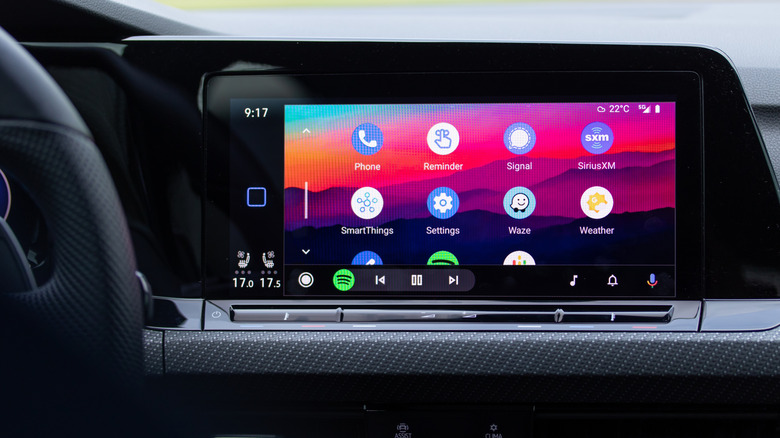
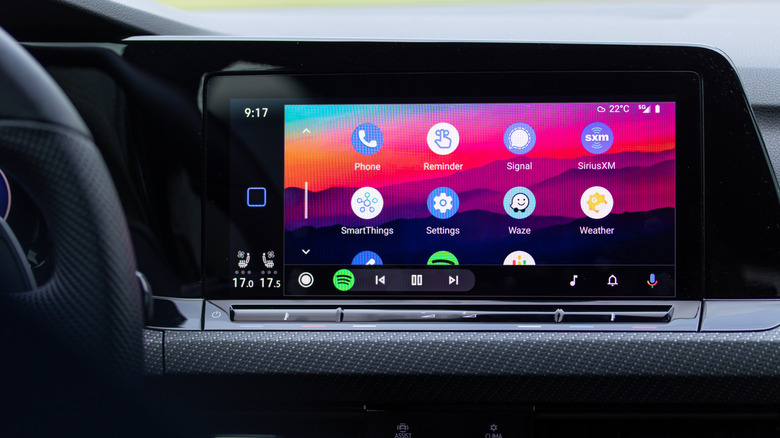
The one that most drivers will be familiar with is Android Auto. The experience is powered by your Android phone, and a compatible car display provides you with a driving-friendly interface for navigation, music, messaging and supported applications. It’s Google’s response to Apple CarPlay and can be used via USB or wirelessly, depending on your phone and car.
Android Automotive OS (AAOS) is a different animal. It operates directly on the car’s hardware, meaning there’s no need for a phone to do the heavy lifting. It gets a little more complicated when Google built-in comes into the mix (as if the naming wasn’t confusing enough), but that’s another story.
Advertisement
Android Auto needs your phone
dennizn/Shutterstock
Consider your phone the brain and the dashboard the larger, less distracting place to put everything while driving.
Android Auto is not a substitute for the software that is already in your car. It displays a specialized interface from your phone on the car’s screen, allowing you to use compatible apps like Google Maps, Spotify and messaging services without having to handle the phone.
That phone dependency is part of the attraction too. You can connect to another compatible vehicle and bring your apps, accounts and preferences with you. The car itself may be running Android, another operating system or something completely proprietary.
Advertisement
The concept behind Apple CarPlay is similar. Even CarPlay Ultra, which extends further into compatible vehicles by taking over more displays and surfacing some vehicle controls, still requires an iPhone.
Android Auto apps can also access some vehicle data if supported by the car manufacturer, such as battery level or estimated range.
Advertisement
Android Automotive lives in the car
Torkgaur/Shutterstock
Android Automotive OS is more than that, as it is the software platform that is installed in the vehicle itself and allows automakers to integrate it with infotainment, instrument displays, climate controls, EV information and other vehicle functions rather than just providing an interface from a connected phone.
So, is Google built-in the same as Android Automotive?
AAOS is open source, while Google built-in relies on a separately licensed collection of Google Automotive Services. That can provide a car with native Google Maps, Google Play and Google’s voice assistant, without the driver’s phone. Google treats those services as a separate, optional package rather than part of AAOS itself.
That difference is important when you’re reading a spec sheet. For instance, Rivian builds its own software experience on top of AAOS and doesn’t offer Android Auto or CarPlay projection.
Polestar demonstrates how flexible things can be. It can have Google built-in in its AAOS-based cars and still be compatible with Android Auto and Apple CarPlay, so it’s not a case of either/or. In 2020, the Polestar 2 was the first production car to feature Android Automotive OS.
A mysterious new AI model called Ox Alpha has driven certain corners of the internet into a frenzy of speculation about who actually built it.
The free model was released on OpenRouter on Thursday, where it was described as “a reasoning model designed for coding, sustained agentic work, and production workload.” On X, Stripe CEO Patrick Collison (whose company is acquiring OpenRouter) described Ox Alpha as “very impressive.”
So who’s actually behind Ox Alpha? The OpenRouter listing described it as a “stealth model” and said it was “developed and operated by a third-party provider who has chosen to remain anonymous during this preview.”
Unsurprisingly, much of the speculation has revolved around China. AI analyst Andrew Curran posted on Friday that the initial speculation focused on the GLM models developed by Chinese company Z.ai, but “this morning people seem less sure of anything.”
Advertisement
Similarly, an article on Wccftech first suggested that the evidence pointed to GLM, but an update suggested that Ox Alpha could be an unreleased version of Microsoft’s MAI. And on Reddit, there’s at least one post declaring that Ox Alpha “can’t be the Chinese,” while another expressed “high confidence” that it is, in fact, Chinese.
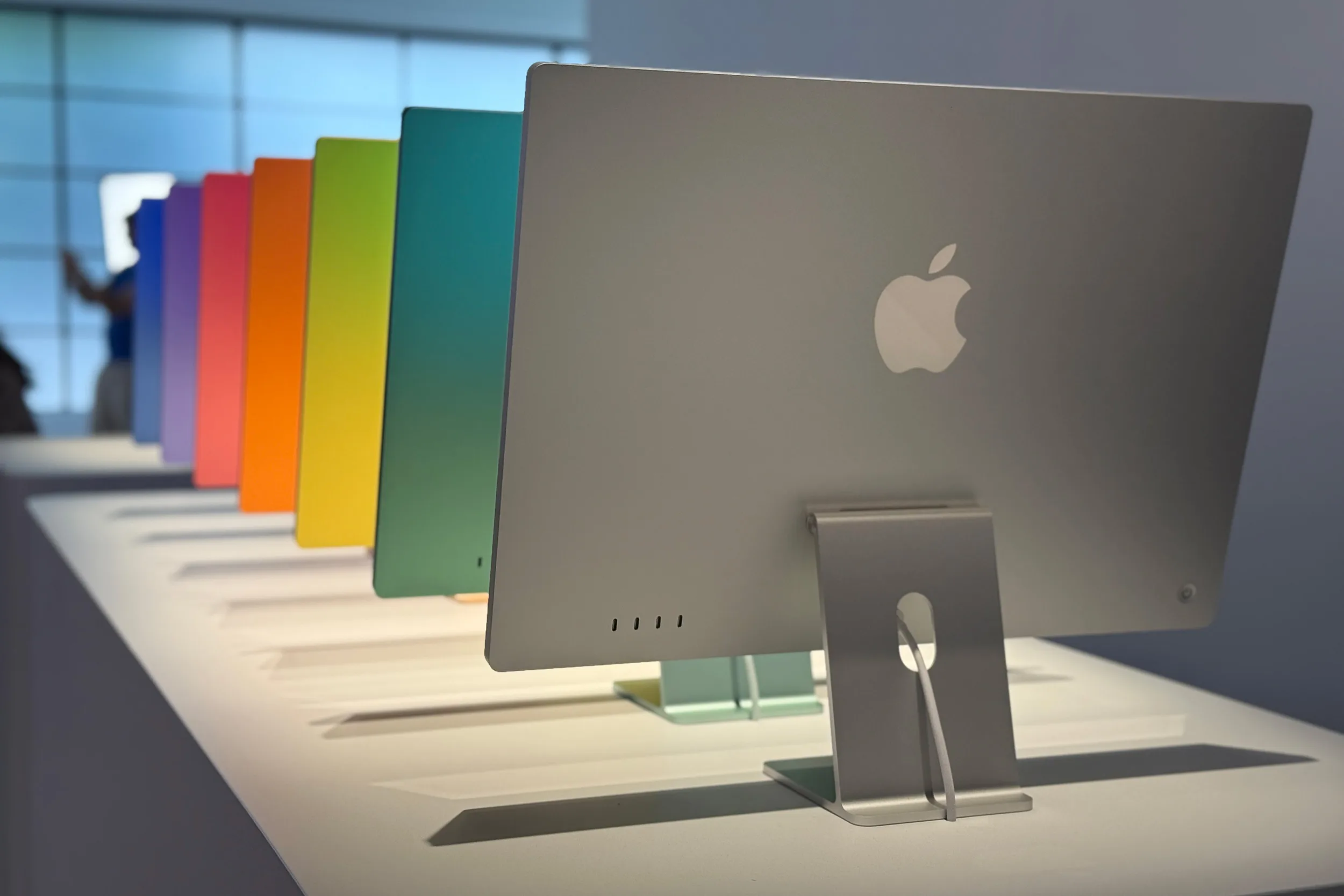
Anyone waiting for a new iMac may only have a few more months to go. According to Bloomberg’s Mark Gurman, Apple is preparing an updated model that should be available to buy before the end of 2026.
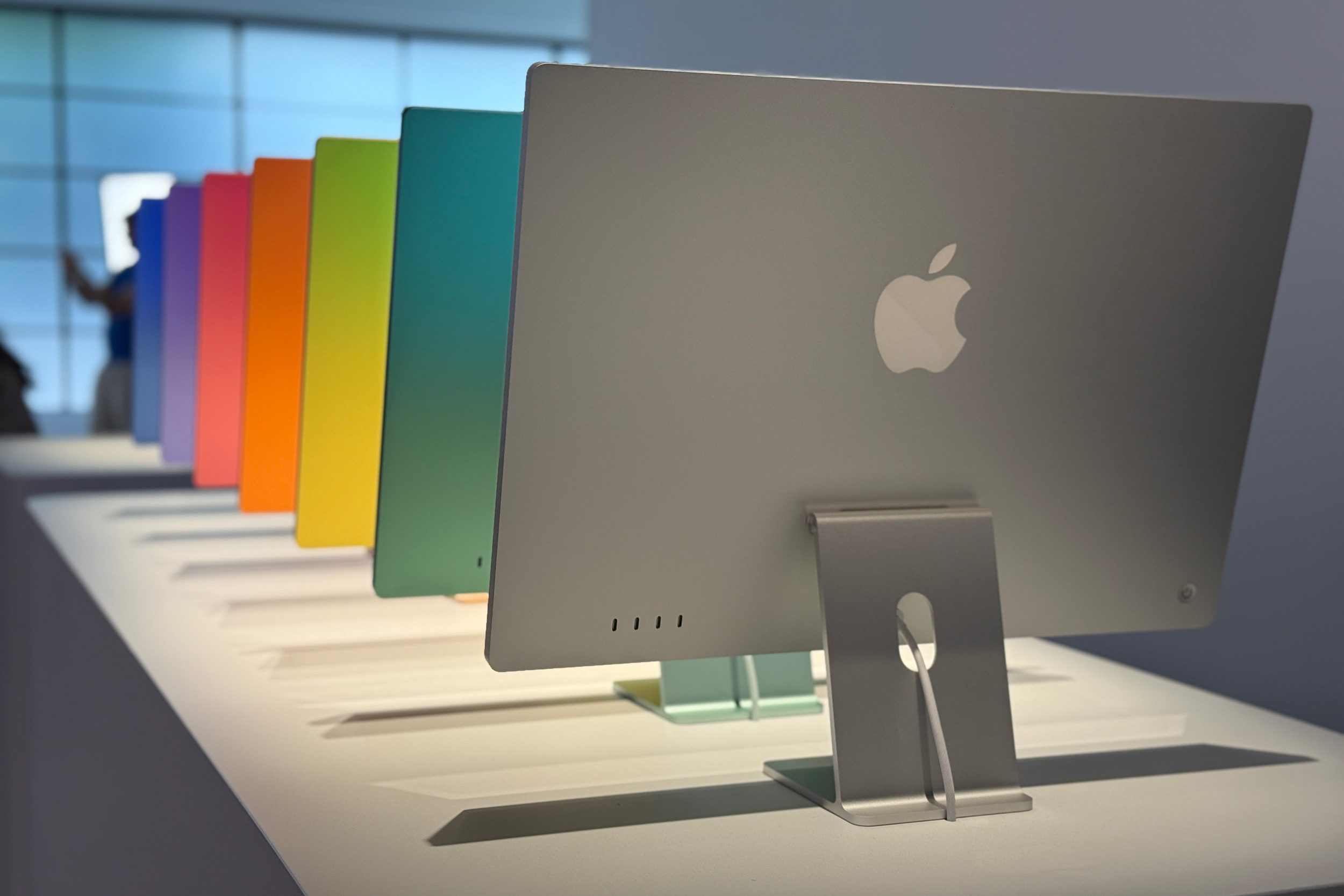
The refresh is expected to bring Apple’s upcoming M6 chip alongside some new color options. Beyond that, though, buyers shouldn’t expect Apple to reinvent its all-in-one desktop this year. Gurman says the upcoming model won’t change much else, suggesting Apple will stick with the familiar 24-inch design rather than introducing a larger screen, OLED panel, or substantial chassis redesign.
The iMac could be a natural fit for Apple’s unusual M6
The processor upgrade is easily the most interesting part of the upcoming refresh. Apple is reportedly taking a very unusual approach with the M6 generation. Previous reports suggest the company will only release a baseline version of the chip, skipping M6 Pro, Max, and Ultra variants entirely before moving to a broader M7 lineup in 2027.
Caleb Denison / Digital Trends
Apple’s 24-inch all-in-one has never needed Pro or Max-class silicon, making it a natural fit for the baseline M6. The new chip is expected to bring higher memory bandwidth, a more powerful Neural Engine, and a GPU with up to 12 cores. In other words, the new iMac could still receive a meaningful performance upgrade even if almost everything around the chip stays familiar.
The upgrades people really want are still years away
The new iMac may not arrive alongside Apple’s upcoming iPhone 18 Pro lineup either. The M4 iMac followed a separate launch schedule in 2024, with Apple announcing it on October 28 and releasing it on November 8, more than a month after the iPhone 16 event. If Apple follows a similar pattern this year, the M6 iMac could instead make its debut sometime in October or November.
Waiting may make even more sense given what happened to the current model in June. Apple raised the starting price of the M4 iMac from $1,299 to $1,499, making it considerably more expensive than it was at the start of the year. Unless Apple starts offering substantial discounts on that machine, anyone who doesn’t need a new desktop immediately may be better off waiting to see what the M6 model brings.
























































You must be logged in to post a comment Login