Rugged outdoor watches with military-grade certification and multi-week battery life rarely fall this far, since most rivals with comparable build quality and GPS accuracy still sit above the £250 mark even during major sales.
Advertisement
The T-Rex 3 wraps a 316L stainless steel bezel around a body rated to withstand 70 degrees of heat and temperatures as low as minus 30 degrees, the kind of engineering that turns a broken heatwave or a sudden mountain frost into a non issue rather than a reason to leave the watch at home. That same resilience carries into the water, where the watch holds a 100 metre water resistance rating and is certified for freediving to a depth of 45 metres, meaning a pool session, a coastal swim, or a proper dive all sit comfortably within what the T-Rex 3 was built to handle.
Battery life stretches to 27 days of typical use and up to 180 hours in GPS Long Battery Life mode, a serious gap between the T-Rex 3 and most touchscreen smartwatches that still need a nightly charge just to survive a single workday. Free global, contour, and snow maps also come loaded onto the watch, paired with dual-band GPS across six satellite systems for a fast connection, giving hikers and cyclists precise turn-by-turn navigation without a subscription or patchy signal in unfamiliar terrain.
All those maps and metrics still need to be seen clearly outdoors, which is where a 1.5 inch AMOLED display peaking at 2,000 nits comes in, backed by Night Mode for glare after dark and Glove Mode for touchscreen use through gloves 2mm thick.
Advertisement
For only £188.99, you are getting a rugged Garmin rival with military-grade toughness, weeks of battery life, and built-in GPS mapping.
According to strings accidentally left in a macOS Tahoe update, Apple’s Home Hub will offer user profiles, with identity verification provided by ambient sensing and built-in cameras.
With the macOS 26.7 release candidate build, Apple inadvertently revealed details about several of its upcoming products, including a camera-equipped model of AirPods. Also present was code related to the company’s upcoming Home Hub, an AI-focused device with an operating system that’s said to resemble tvOS.
Rumors have suggested the product will ship in two variants, one with a speaker-type base, and another wall-mounted version. This two-model approach was corroborated by macOS Tahoe code, and now even more details about the Home Hub have surfaced.
As noted by MacRumors, the macOS 26.7 RC build indicates Apple’s Home Hub will offer a Personal Content feature, meaning the device will display different content depending on who’s using it. This will seemingly be facilitated through user accounts or profiles.
Advertisement
Home Hub users will see the option to enable Personal Content after opening the Settings app and tapping their name. Once the feature is active, users will be able to access Personal Content by selecting their profile or account from the Home Hub’s Control Center.
Strings found in macOS Tahoe code reveal Apple’s Home Hub will feature cameras and “ambient sensing” for user recognition. “Sorry, since this device hasn’t seen you in a while, you’ll need to ask again in front of the camera,” reads one string. Another one asks the user to “come in front of this device and ask again.”
Aside from the new Personal Context feature, the macOS 26.7 RC also contains references to “Pebble,” which is believed to be the codename for Apple’s upcoming homeOS. The Home Hub operating system will seemingly feature “Faces” and a “Face Gallery,” which could be similar to what’s already avaialble on watchOS.
Also present are identifiers for both Home Hub variants, with J490 being the one with a speaker base, and J491 being the wall-mounted model. The descriptors “HomeAccessory” and “HomeAccessory_wall” appear to refer to these Home Hub variants as well.
Advertisement
Overall, while it looks as though the Home Hub will offer personalization options, the product’s software seemingly won’t be much of a departure from tvOS or watchOS.
President Donald Trump bought as much as $50,000 worth of SpaceX shares on June 23, according to a financial disclosure first reported by Reuters, two weeks after the record-setting IPO of Elon Musk’s company.
It’s not clear what price Trump paid for the shares, but by that point they had fallen from their highs of over $200. SpaceX shares were trading in the mid-$150 range on June 23. At the end of trading on Monday, shares closed at the IPO price of $135, possibly putting the president’s stake underwater.
Trump and Musk are close, despite a brief falling out last summer that involved the businessman accusing the president of withholding the Department of Justice’s files on Jeffrey Epstein because of how often Trump’s name appears in them. SpaceX has been hoovering up an increasing amount of government contracts and benefiting from the Trump administration’s deregulatory stance, according to a recent Wall Street Journal analysis.
White House spokesman Davis Ingle told Reuters that the president’s stock portfolio is managed by third-party financial institutions and replicate “recognized indexes, such as the Schwab 1000.” SpaceX lobbied popular indexes to change their rules to allow for faster inclusion ahead of its IPO, which means many people likely own some of the company’s stock even if they don’t know it.
Hackers are attempting to exploit two critical authentication bypass vulnerabilities in the miniOrange SAML 2.0 Single Sign On plugin for WordPress that can be used to forge SAML responses and log in as administrators.
The miniOrange SAML SSO plugin turns a WordPress site into a SAML service provider, letting users log in through corporate identity platforms such as Microsoft Entra ID, Okta, Google Workspace, or OneLogin instead of separate WordPress credentials.
Created by Xecurify, miniOrange is a family of seven plugins, with a free version that has 10,000 downloads and 30,000 customers for the other six.
The two vulnerabilities observed in exploitation attempts are tracked as CVE-2026-61979 and CVE-2026-15981 and can be chained together to bypass authentication.
Because the miniOrange SAML SSO plugin accepts the signature algorithm from incoming SAML responses instead of enforcing the configured one, an attacker can leverage CVE-2026-61979 to select HMAC-SHA1. This causes the plugin to treat the RSA public key from the identity provider (IdP) as the shared secret.
Advertisement
Since the public key is known, the attacker can forge a signature that the plugin accepts as authentic.
The second security issue, CVE-2026-15981, causes the plugin to treat an OpenSSL verification error (-1) as a successful result, allowing malformed signatures to pass validation.
According to security firm Patchstack, the two vulnerabilities were publicly disclosed and fixed in July. However, the vendor’s advisory covered only the free edition, leaving the six paid editions without an alert, even though fixes were provided for those too.
Failing to disclose the risk across all versions of the plugin reportedly led many sites running the paid editions to take no action, creating an opportunity for threat actors to exploit the two vulnerabilities.
Patchstack reports that, on August 16, DigitalOcean blocked an anomalous WordPress administrator session originating outside its trusted network.
The investigation showed that attackers have chained the two flaws to obtain an admin session cookie through the Standard edition plugin in version 16.1.9.
Patchstack’s data shows that exploitation attempts and opportunistic scanning are underway, launched from six IP addresses across Europe, Africa, and the United States.
A proof-of-concept (PoC) exploit targeting the free edition is also publicly available, so the pace of attacks could increase at any time.
Advertisement
Patchstack warns that the WordPress administrator dashboard will not show update warnings for the paid versions of the plugin, so website owners must manually upgrade to a patched release.
Overall prevention scores can hide what happens after initial access. Once attackers are using valid credentials, prevention drops sharply.
The Blue Report 2026 measures defenses technique by technique across 338 million simulations run in customer production environments.
If you’re after a cheap printer that won’t cost you a fortune in ink, HP’s Smart Tank 210 is bang on the money. While it’s basic, and it can be achingly slow, it’s surprisingly good at turning out photos or plain paper prints. Most importantly, it arrives with enough ink for around 6,000 pages or more, making it far better value than a cartridge-based equivalent. Unless you only print very occasionally, this printer should save you a tidy sum.
Very cheap to own
Good print quality
Reasonably smart
Key Features
Advertisement
Review Price:
£130
An ink-tank printer
Advertisement
This printer uses bottles of ink that cost less and last longer than cartridges. It’s a little more expensive to buy, but it should be far cheaper to own in the long run.
Pretty basic
Advertisement
The Smart Tank 210 is a printer only: it can’t scan, fax or copy. It doesn’t have a screen and it can’t automatically print both sides of each page, but you can share it over Wi-Fi.
Introduction
If you’re after a budget printer, you could spend as little as £40 picking up an entry level inkjet. The problem is that cheap printers often come with punishing running costs; it’s not uncommon for new cartridges to cost as much as the printer did, and to last only a couple of hundred pages. The HP Smart Tank 210 takes a different tack. While it’s significantly more expensive to buy, it’s almost guaranteed to cost you less overall to own.
That’s chiefly because it’s an ink tank printer, fitted with refillable tanks rather than slots for conventional cartridges. It arrives with a full set of bottles that should last for around 6000 full-colour pages – in fact, if you didn’t use black, the three colour bottles could last for more than 10000 prints. You’d spend £100s or even £1000s buying an equivalent number of cartridges or toners for a regular printer.
These low running costs are one of the reasons I love ink-tank printers, but another is that with long-lasting bottles rather than short-lived cartridges, they generate much less plastic waste. In theory, you could buy this printer and churn out 6000 pages for only around £130, a cost-per-page of around 2.2p including the printer. That’s hard to beat, so what’s the HP Smart Tank 210 itself actually like?
Advertisement
Advertisement
Design and Features
Basic but smart
Fiddly to set up
No exciting features
There’s not all that much to this printer. It’s a squat off-white box with a few dark grey highlights, and a reasonably uncluttered appearance.
Image Credit (Trusted Reviews)
On the back you’ll find a simple extendable paper input tray, which outputs to an even simpler fold-out tray at the front. With no scanner, the top panel is almost featureless apart from a very basic set of buttons and a small LCD.
Image Credit (Trusted Reviews)
That would be it if the HP Smart Tank 210 wasn’t an ink tank printer. The splash of colour on its front panel isn’t just for show; the four windows here reveal the levels in its black, cyan, magenta and yellow tanks. It arrives with them empty, so the first job is to fill them up from the provided bottles of ink.
Advertisement
Image Credit (Trusted Reviews)
Like most refillable printers, you prime this one for action by simply removing the lid from a bottle, and upending it over the spigot on the relevant tank. Here there’s an important thing to watch out for – this printer’s bottles and tanks aren’t keyed to prevent mixing the colours up. That’s bad enough on a normal inkjet, but with a full tank potentially lasting years, here it could lead to thousands of pages of crossed colours.
Image Credit (Trusted Reviews)
Unlike rival ink tank printers from Epson and Canon, you also need to fit the print heads to the HP Smart Tank 210. I found this a needlessly fiddly job, particularly given the relatively narrow access available. Still, at least it’s a one-time only routine. In use you’ll need to keep an eye on the tank levels and top them up occasionally. My experience is that you can typically go many months – or even a couple of years – between refills.
Image Credit (Trusted Reviews)
The final setup task is to join this printer to your Wi-Fi, for which you’ll need the HP app. This detects the printer, asks you an unreasonable number of times if you want to share user data, and finally makes the HP Smart Tank 210 available to other devices on your network. If you have a PC you may prefer to download the Easy Start app and opt for the full suite of drivers, but without scan functionality it’s not really necessary.
Advertisement
Image Credit (Trusted Reviews)
Ink-tank printers cost more to buy than a cartridge equivalent, and pay you back over the long-term in lower running costs. They usually only become better value than a cheap cartridge device once you’ve printed a couple of thousand pages, which might take some users several years. With that in mind I prefer them to have a multi-year warranty, giving you the reassurance they’ll stay working long enough for you to recoup your money. While I’ve no reason to doubt HP’s build quality, it’s a shame this printer only gets 12 months’ cover.
On the other end of the scale, the HP Smart Tank 210 should save you bucket loads if you print in volume. Extra bottles of ink work out at about 0.2p per black page, or 0.5p for a full-colour page – far cheaper than standard inkjet or laser printers.
Advertisement
There’s precious little else of interest here. Although you can connect and share the HP Smart Tank 210 over a wireless network, there’s no wired Ethernet port or memory card slot. This printer can’t automatically print on both sides of a sheet – you’ll need to manually turn pages over if you want to duplex.
Image Credit (Trusted Reviews)
Print speed and quality
Leisurely black printing, slower still in colour
Surprisingly good print quality
Quiet
Advertisement
If you’re in a hurry, the HP Smart Tank 210 isn’t the printer for you. It’s not too bad when printing black text, managing to deliver a first page in 13 seconds, and five pages in 36 seconds – that’s equivalent to 8.3 pages per minute (ppm). It’s a bit faster on longer jobs, especially if you can live with slightly less good Draft quality: it printed 20 pages of text at a rate of 10.3ppm.
Things are much, much less impressive in colour. The HP Smart Tank 210 shuffled its feet when printing a lightweight page of black text and colour graphics, delivering a first copy in 29 seconds, and needing fully two minutes to squeeze out five copies. Our 20 page colour job inched along at a woeful 1.8ppm, one of the slowest results we’ve measured in recent years.
Commendably, HP has resisted the urge to de-content this printer in silly ways. It supports borderless printing on paper up to A4, and is happy to turn its hand to the family snaps. Using the Maximum DPI setting means you’ll get up to 4,800×1,200 dots per inch (dpi) quality, but you’ll have to wait a long time to see if it’s any good. I timed a borderless A4 print at a beard-lengthening 14 minutes and 23 seconds. The printer took almost half an hour to hand over six borderless postcard (6×4”) prints.
Advertisement
One of the benefits of a slow printer is that they tend to be quiet, and that’s certainly the case here. It’s easy to live with the Smart Tank 210 in a small home office, or even in the lounge.
Happily, what the 210 lacked in speed it made up for in print quality, beginning with dark, crisp black text that was easily good enough for formal letters or business use. Printing in Draft quality reduced the impact a little, but the results were still quite impressive. Colours stood up well on plain paper, too. Our test graphics looked fairly punchy, if a little undersaturated, and there was nothing to suggest these prints had come from a particularly low-end printer.
The real surprise came when I looked at the photos I’d printed. While no match for a high-end photo printer, these snaps were more than good enough for family scrapbooks or creative projects. The only real disappointment here was that skin tones all seemed a bit too pale, with the fairest people looking almost ashen in a couple of shots.
Advertisement
Advertisement
Should you buy it?
You’re looking for a bargain
The HP Smart Tank 210 is inexpensive by ink-tank standards, and ridiculously cheap to run by any measure. It’s a great choice where you want to keep print costs down.
Advertisement
You want speed, panache, or lots of features
This is a simple printer. It’s slow, it can’t copy or scan, and it’s missing duplex printing. If it sounds too basic for your needs you’ll need to spend more.
Advertisement
Final Thoughts
I can’t pretend this is the best printer I’ve ever reviewed. If I ran a small business it would be too slow, and I’d bemoan its lack of scan and copy functionality. Even for my home office I’d strongly prefer it to have automatic duplex printing – it’s an easy and convenient way to save on paper.
But park all that. Considering its purchase price and how much ink you get in the box, the HP Smart Tank 210 has to be one of the best value printers you can buy. If I was on a tight budget, and looking for a printer that could deliver a few thousand pages for as little as possible, this one would be right at the top of my list. That could make it ideal for students, writers, or anyone who needs to print a reasonable amount on the smallest budget possible.
Advertisement
FAQs
How do I connect my HP Smart Tank 210 printer to Wi-Fi?
You’ll need to install the HP app on a PC, tablet or smartphone. Make sure Bluetooth is on, and that you’re connected to your wireless network, then click the plus button in the app. It should find the printer and configure it for your network.
Is the HP Smart Tank worth it?
Advertisement
For many users, yes. An ink-tank printer costs more to buy, but less to run. The more you print, the more likely you are to find that a tank-based device costs less to run than a conventional cartridge-based inkjet, or a laser printer. In practice the breakeven point is typically around 2,000 pages – if you print significantly more than that in the printer’s lifetime you should end up paying a lot less.
The flip side is that if you don’t print that much, or the printer fails before you can and isn’t under warranty, you’ll end up losing out. For this reason it’s ideal to try and get at least a couple of years’ warranty if you can.
Advertisement
Test Data
Full Specs
HP Smart Tank 210 Review
Manufacturer
HP
Quiet Mark Accredited
No
Size (Dimensions)
434 x 360 x 135 MM
Weight
3.73 KG
ASIN
B0GSGG1F19
Release Date
2026
First Reviewed Date
13/08/2026
Model Number
4A8H8A
Ports
USB 2
Connectivity
802.11b/g/n Wi-Fi (2.4GHz only)
Ink Cartridge support
32XL black ink (6,700 pages), 31 cyan, magenta and yellow inks (10,100 pages each)
The third season of Percy Jackson and the Olympians is fast approaching, and at Disney’s D23 convention in Anaheim, California, last weekend, we got a glimpse of what’s to come as the cast answered fan questions during a panel discussion.
Earlier during Disney’s D23 Entertainment Showcase, the show got a fresh, new trailer for November’s third season. Walker Scobell, who plays the title character of Percy Jackson, was joined on stage by Ming-Na Wen (Hera) and Andra Day (Athena) to present the new trailer, which showed Percy fighting underwater and in arenas as a titan emerges.
After the ill-fated, critically panned movies released in the 2010s made it only to the second book in Rick Riordan’s series, the Disney Plus original will be the first time The Titan’s Curse has gotten an adaptation. It follows Percy and his Camp Half-Blood crew on their mission to rescue the goddess Artemis (played by Dafne Keen).
“Season 3 is the season where some people get what they deserve,” Scobell said during Saturday’s panel. There will also be a lot of improv in season 3, Scobell said, with the cast now close enough to play off each other like siblings bantering (which they did, all panel long, arguing over who is the most powerful).
Advertisement
Tamara Smart, who plays Thalia, said scenes exploring the past and Olympus were her favorites to shoot. “Season 3 is the season where women run it,” she said.
“It’s great to play a powerful, confident woman,” Smart added. “She’s 100% angry, 100% sad, 100% yelling at Percy.” (She added that after every single take where she was forced to yell at Scobell, she apologized to him.)
Keen wasn’t allowed to tease much from the upcoming season, but said the newcomers to the show had a huntress camp where they all got to train together, learn as a pack and master archery.
Advertisement
“Love and loss inform all decisions,” she said of Season 3.
Saara Chaudry said bringing Zoë Nightshade to life in the new season “has been the absolute privilege of my life.”
“Season 3 is the season where the stars align,” Chaudry added.
Dan Shotz, a showrunner, writer and executive producer, had some more detailed hints about the upcoming season.
Advertisement
“We have this great source material, and we get to dive a lot deeper… You’re going to see all these great things you love from this book, but so much more,” he said. “We cannot have a season of this show without Annabeth.”
Shotz said we will meet all the gods this season, as well as get to see the junkyard of the gods.
But not everyone makes it out alive, executive producer Jonathan Steinberg said.
“I’m excited for everyone to go on that ride shown in the trailer,” Steinberg said. “The trailer doesn’t lie.”
Corinne Reichert (she/her) grew up in Sydney, Australia and moved to California in 2019. She holds degrees in law and communications, and currently writes news, analysis and features for CNET across the topics of electric vehicles, broadband networks, mobile devices, big tech, artificial intelligence, home technology and entertainment. In her spare time, she watches soccer games and F1 races, and goes to Disneyland as often as possible.
See full bio
An unpatched vulnerability in Calix GS7 XGS (GS5239XG) residential routers used by multiple U.S. broadband providers allows remote, unauthenticated attackers to create port-forwarding rules that can expose local network devices to the public internet.
The flaw is tracked as CVE-2026-75501 and is described as a missing authentication issue that affects devices running EXOS/6.6.47 firmware.
Security researcher Brian Khan Quintana discovered the flaw and, after trying to notify the vendor on June 7 without success, he reported the vulnerability to the Carnegie Mellon CERT Coordination Center.
Following multiple attempts to contact the vendor and receiving no response, CERT/CC coordinated a public disclosure, and Quintana published the technical details.
Calix is a significant vendor in the US broadband-provider market, working with large entities such as Cox Communications, Brightspeed, ALLO, CityFibre, and Conexon.
Advertisement
The affected model, GS5239XG, is also marketed as the GigaSpire 7u10txg and is a new, premium gateway device that combines Wi-Fi 7 capabilities with an integrated XGS-PON fiber terminal.
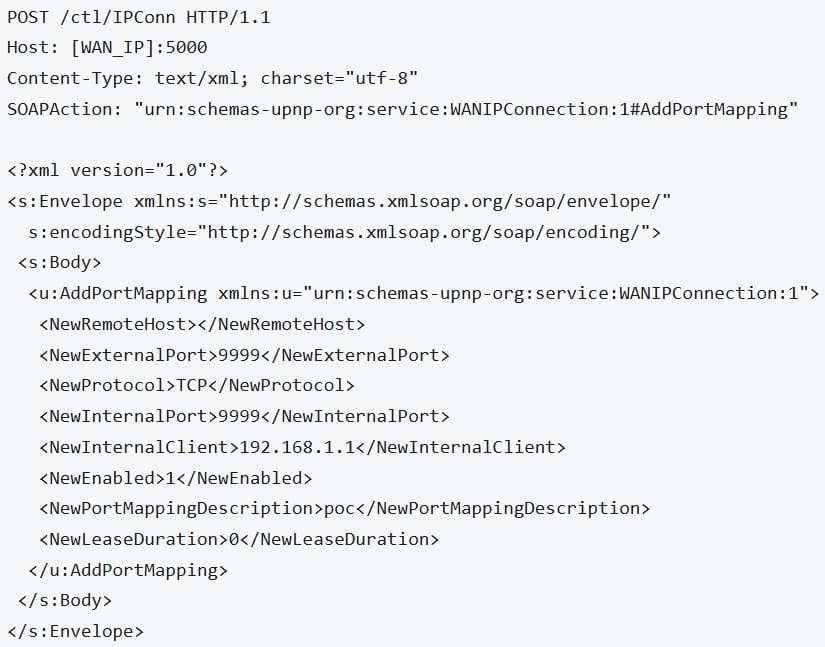
The CVE-2026-75501 vulnerability is caused by the device exposing “the MiniUPnPd control endpoint on the WAN interface on TCP port 5000 without access controls.”
“In affected firmware versions, the router binds its UPnP WANIPConnection SOAP service to the public WAN interface on TCP port 5000,” CERT/CC warns.
This allows an attacker on the public web to send the device unauthenticated “SOAP requests to add, delete, or enumerate port mappings, or to query the external IP address.”
Advertisement
This way, hackers can bypass the router’s Network Address Translation (NAT) and firewall protections and expose internal cameras, network-attached storage (NAS) devices, administrative interfaces, and IoT appliances.
“One unauthenticated request from anywhere in the world is enough to open a permanent hole through the router’s firewall to any device inside the house. No password. No prompt. Nothing on screen. The rule survives a reboot,” Quintatna says.
The researcher says that an attacker leveraging the security issue could take the following actions:
Create arbitrary port-forwarding rules
Delete existing mappings
Enumerate the router’s current mappings
Retrieve its public IP address
Quintana tested the finding by sending requests outside his home network to create a port mapping that exposed an internal address. A mapping configured with no expiration remained active after the router was power-cycled.
Proof of concept HTTP/SOAP request Source: drkq.github.io
This practically means anyone on the internet can instruct vulnerable Calix routers to forward traffic from a public-facing port to a chosen device on the home network.
Given that there’s no fix for CVE-2026-75501, Quintana recommends that users of the vulnerable device disable UPnP through the administrative interface (Advanced → Security → UPnP).
Advertisement
The researcher notes that this workaround disables automatic port opening, which some games rely on, but it’s always possible to open specific ports manually.
CERT/CC also notes that the setting might be locked in some cases, and users who can’t change it should contact their ISP to request the deactivation.
BleepingComputer has contacted Calix for a comment about the flaw, the device models it impacts, and if a patch will be released, but we have not heard back as of publishing.
Overall prevention scores can hide what happens after initial access. Once attackers are using valid credentials, prevention drops sharply.
The Blue Report 2026 measures defenses technique by technique across 338 million simulations run in customer production environments.
The Trump administration is proposing to make permanent a $103,265 fee on certain new H-1B visas, dramatically increasing costs for employers that rely on highly skilled foreign workers in tech, education, and research. “A federal judge in June ruled that the fee was illegal and blocked the Trump administration from collecting it,” reports Reuters. “A Boston-based appeals court is reviewing that decision while a different court considers whether a judge properly rejected a challenge to the fee by a major business group.” From the report: Trump’s temporary fee increase expires in September, one year after it was issued. The proposed rule by the U.S. Department of Homeland Security, posted in the Federal Register on Monday, would make a fee of $103,265 permanent. It could be finalized by the end of the year. The H-1B program allows U.S. employers to hire foreign workers with training in specialty fields and offers 65,000 visas annually, with another 20,000 for workers with advanced degrees, approved for three to six years. Those visas typically came with fees between $2,000 and $5,000 before Trump’s order. The fee would not apply to visas granted to foreign citizens already in the United States on student visas, who make up a large share of new H-1B recipients, or to renewals of current visas.
For most of my career, my IEEE membership sat quietly in the background—a line on my résumé, a discount code for a conference registration, and access to the IEEE Xploredigital library, which I underutilized. I didn’t think much about the grade of membership available above that of the regular member. I assumed senior membership was reserved for people further along in their career than I was. They published more papers, had more gray hair, and had worked longer in the field.
I was wrong on all three counts. The misunderstanding cost me an important validation of my skills and professional competency.
I suspect a lot of other qualified members are where I was one year ago: eligible but unaware of the benefits of senior membership, and one application away from a meaningful career credential.
The myths that almost stopped me
Here are a few of the misconceptions about senior membership:
Advertisement
It’s mostly for academics and longtime IEEE volunteers. It isn’t. The grade is explicitly built around a person’s professional engineering experience. Plenty of successful applicants have never published a paper. Industry experience counts for a lot.
You need a graduate degree. You don’t. A bachelor’s degree plus enough years of qualifying experience is sufficient on its own. An advanced degree simply offsets some of the required years of experience.
If I’m not well-known in my field, I won’t qualify. Senior membership isn’t a popularity contest. Rather, it hinges on whether you meet specific experience metrics. The requirement is “sustained, significant technical contribution,” not “known beyond your organization.”
I should wait until I have more significant achievements to point to. I believed this for longer than I should have. If you meet the 10-year experience threshold with five years of significant performance, you’re already eligible. Waiting doesn’t strengthen a qualifying application; it just delays getting a credential you’ve already earned.
I wanted a credential that reflected that shift from “engineer who codes” to “engineer who helps shape the field.”
The IEEE senior member grade turned out to be the validation of my work I was looking for. It’s not an award for a single achievement. You have to apply for it, and it’s a peer-evaluated process that confirms you’ve sustained a meaningful level of professional contributions over time.
That distinction matters. Having a research paper published or being granted a patent proves a moment in time. Senior membership reflects a pattern of continuous contributions.
Advertisement
The benefits to my career happened faster than I expected. It strengthened how search committees, IEEE conference organizers, and IEEE awards panels viewed me. Only senior members can hold certain IEEE leadership positions.
The senior grade also opened doors to editorial and reviewer roles I hadn’t even pursued before. Journal editors and conference organizers often look for reviewers with a track record they can verify quickly, and senior membership gives them that signal without extra vetting on their end. It also gave me a credential I could point to in professional contexts, including, in my case, supporting documentation for a U.S. employment-based immigration petition, where third-party peer recognition carries real evidentiary weight.
Navigating the process
The process for applying for senior membership is easier than the title might suggest. To qualify, you need a combination of professional and academic experience in an IEEE-designated field: engineering, computer science, information technology, physical sciences, mathematics, or technical communications. The two must total at least 10 years, with at least five of them showing significant performance. Crucially, experience isn’t limited to job titles. Graduate research, technical leadership, and progressively responsible engineering work all count toward the total number of years. I’d been quietly accumulating qualifying years without ever framing them that way.
“I suspect a lot of other qualified members are exactly where I was a year ago: eligible but unaware of the benefits of senior membership, and one application away from a meaningful career credential.”
Advertisement
You submit your application through IEEE’s member portal, mapped against the experience requirement, along with three references from current IEEE members—at least two of whom must be senior members or IEEE Fellows who can vouch for the credibility of your work.
The part everyone underestimates is references.Applications can stall at this point. References must be IEEE members in good standing, and at least two need to be IEEE senior members—which means you can’t necessarily ask people who know you best. You need to find references who are both willing to vouch for you and are grade-eligible.
My advice is to identify and confirm all three references before you submit your application. It might be difficult to add or swap a reference during the process, and a stalled reference could delay your file.
Advertisement
Where to find references is the part I worried most about. But it turned out to be far easier than I expected.
Here are several sources:
IEEE Collabratec. This is IEEE’s professional networking platform and, in my opinion, is an underused resource. You can search by technical interest, geography, or society membership and message members directly. I found several of my eventual references this way—colleagues I’d never have thought to ask simply because we hadn’t worked together directly, but ones who knew my technical work through shared communities or conference circles.
Coworkers and colleagues, current and former. If you’ve worked alongside IEEE members—especially ones senior to you—they’re often the most natural fit because they can speak specifically to your day-to-day technical contributions.
Former professors. If you did graduate work, your advisor or committee members are usually IEEE members and are well positioned to speak to your research contributions, even years later.
LinkedIn. A surprising number of my qualifying references came from reconnecting with people on LinkedIn I’d lost touch with professionally. A short, specific, polite message explaining what you’re applying for and why you thought of the person can go a long way.
A pattern I noticed when looking for references is that people are generally glad to be asked. Serving as a reference is a small lift for them and a meaningful one for you. Most senior engineers remember someone doing the same for them and are happy to pay it forward.
If you’re on the fence
If you’ve been in the field for a decade or more, doing real technical work, and IEEE membership has been sitting quietly in the background of your career the way it did in mine, it’s worth 10 minutes to check the eligibility criteria against your history. You might find, as I did, that you qualified for the membership upgrade a while ago.
Google TV is a smart TV interface that holds over 10,000 apps and offers access to over 400,000 episodes and movies in one place. These apps include the likes of Netflix, Disney Plus, BT Sport and even Spotify.
Advertisement
Advertisement
TCL A400 Pro Google TV. Image Credit (Trusted Reviews)
You can set up multiple profiles on Google TV and see your own personalised recommendations based on what you’ve watched in the past. Apps can be downloaded to specific profiles, and there’s supervision for children with Kid’s profiles where apps can be blocked or unblocked, viewing time limited and activity controlled via The Family Link app.
In addition, each profile also has access to its own watchlist, which allows you to save shows and films for later.
Or, if you know exactly what you want to watch but can’t find it, you can simply ask Google Assistant to fetch it for you – though you will need a compatible TV with a voice remote.
Despite its name, Google TV isn’t just for watching content. In fact, it can double as a smart home hub for controlling compatible products like smart light bulbs and the thermostat. You can also receive doorbell notifications from your TV and see a live view from your security cameras too.
Advertisement
Essentially, Google TV isn’t its own streaming platform that offers original content. Instead, it’s an interface that brings content from lots of different apps and platforms together into one place.
Advertisement
Is Google TV free?
Yes, the Google TV interface is completely free to access. Just remember that you will need to pay for any subscription costs from third-party platforms.
How does Google TV work?
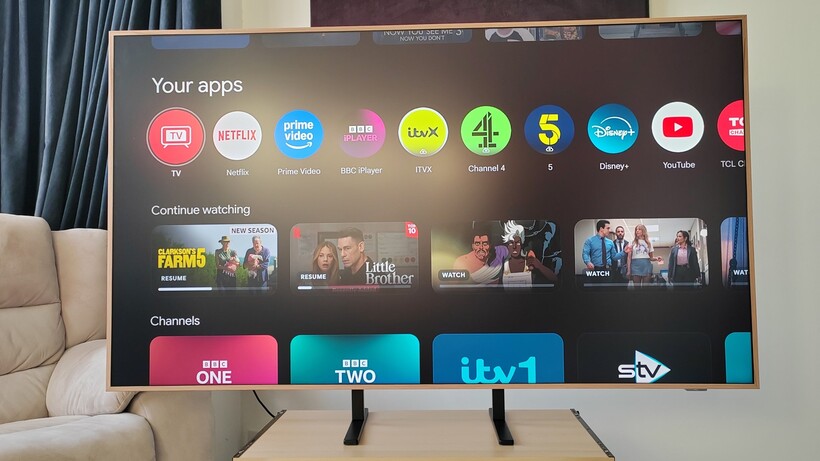
At the top of the screen is a row of tabs such as ‘Search’, ‘For You’ and ‘Library’ to make it easier and faster for users to jump back into what they were watching or start something new.
Advertisement
Below that is a curated row of personal ‘top picks’ recommendations based on what you’ve watched and what you’re interested in. It also puts those recommendations in the ‘For You’ tab, which is aggregated from your subscriptions and content in other apps.
Anker Soundcore Nebula P1 Google TV. Image Credit (Trusted Reviews)
Beneath that row are apps you’ve downloaded. Any app available on Android TV is available on Google TV, which means YouTube, Netflix, Disney+, Prime Video, ITV Hub, My 5, Prime Video and more work with the interface.
You can also ask “What should I watch” and be presented with a list of popular films and TV episodes with options of how you can watch the content (stream, rent or buy). You can also click onto a title’s landing page and be met with a bevy of similar content, sending you down the rabbit hole for films and TV shows to watch.
Advertisement
Google TV vs Android TV: What’s the difference now?
There’s been some confusion in the past surrounding how Google TV differs from Android TV. While many have assumed that Google TV has taken over from Android TV, this actually isn’t the case. Instead, Google TV is powered by Android TV operating system (OS). That means there are other smart TVs and streaming sticks that are also powered by Android TV OS but don’t share the Google TV interface – called Android TV devices.
Advertisement
It’s a bit like the best Android phones, where they all run on Android OS but different manufacturers like Samsung or Google use different skins or interfaces.
What devices support Google TV?
There are a couple of ways to get Google TV. Firstly, if you already have a compatible TV set then you can plug in a Google TV Streamer to access the platform. This is a great way to make use of your existing TV without buying a new one – though make sure that your TV has an HDMI port, is near a plug socket and can access the internet.
If, on the other hand, you’d prefer to upgrade then you can simply buy a new TV with Google TV built-in. At the time of writing, you can enjoy Google TV built into models from the following brands:
Whether you’re using a Streamer or a dedicated Google TV device, you’ll need to ensure you have an internet connection and a Google account.
Advertisement
Advertisement
The Google TV app
There’s also a dedicated Google TV app that’s available for both iOS and Android devices. Once you’ve signed into your Google account, you’ll be able to find movies and TV series to stream from across different platforms. When choosing something to watch, you’ll be redirected to either the corresponding app or to the App Store where you’ll be prompted to download the platform.
You can also use the app as a remote control, and can move from watching on your phone to a nearby TV on the same Wi-Fi network.
Zillow and Redfin have reached a settlement with the Federal Trade Commission (FTC) and five states, ending a legal fight over a 2025 partnership that the FTC claimed hurt competition in the rental-listing market. The settlement was announced on Monday, just as the case was scheduled to head toward trial this morning.
The case stems from a deal announced last year in which Redfin agreed to display Zillow’s rental listings on its websites rather than compete directly with Zillow for rental advertisers. The arrangement could have kept Redfin out of the rental advertising business for as long as nine years. Redfin owns Rent.com and ApartmentGuide.com, two major rental-listing platforms.
According to the FTC and attorneys general from Arizona, Connecticut, New York, Virginia, and Washington, Zillow agreed to pay Redfin $100 million to keep Redfin from competing with Zillow.
The companies defended the partnership as a way to give renters access to a larger pool of listings. The FTC, however, argued that Zillow was paying one of its largest competitors to stop competing, potentially allowing the company to charge higher prices and provide less favorable terms to property managers. It could have also reduced the quality of rental listings available to consumers.
Advertisement
Under the proposed settlement, Redfin will be required to reenter the rental advertising business. The order also removes restrictions that previously limited Redfin’s ability to compete independently for property-management customers.
The settlement doesn’t completely end the relationship between the two companies. Redfin can continue displaying Zillow’s rental listings, but it will once again be able to compete for its own customers. Redfin will be able to sell advertising, display listings from its own clients, and pursue new rental customers without being required to share sensitive business information with Zillow.
The Zillow-Redfin case comes just months after the DOJ’s settlement with Ticketmaster, another antitrust case involving allegations that a dominant company used its power to suppress competition. However, 26 of the 30 state attorneys general who initially sued Live Nation alongside the DOJ chose to continue pursuing the case and won their lawsuit in April.
When you purchase through links in our articles, we may earn a small commission. This doesn’t affect our editorial independence.
































































You must be logged in to post a comment Login