AI is making it harder to find a job. AI-driven Application Tracking Systems (ATS) can dump your resume before a recruiter has ever seen it, even if you have all of your qualifications clearly spelled out. TopResume takes the guesswork out of the process by giving you a fresh, professionally-written resume, as well as a free resume review that focuses on these tracking systems—essential in a time where AI is making the decisions on who moves forward in the interview process.
TopResume doesn’t offer a ton of discount codes, coupons, or promos. However, you can get four weeks of free access to TopResume’s Career Services Platform that includes interview training, resume critiques, and recruiter access when you pick up a package through WIRED.
TopResume Free Resume Review: Start With the No-Cost Option
TopResume’s free resume review will get an extra set of eyes on your CV. It’s a free resume critique, not a rewrite or a fresh resume made from scratch like TopResume’s paid offerings.
The free CV review is good to dip your toe in the water, particularly when it comes to highlighting keywords that could get your resume buried in an Application Tracking System (ATS). After you drop your resume on TopResume’s website, you’ll need to wait up to 48 hours before your review. I threw mine in on a Friday, expecting to find a critique in my inbox on Monday morning. It showed up about six hours later.
Advertisement
I was shocked how detailed even the free resume review was. Some of the points were generic, but there was a ton of useful information even in the free review. For instance, apparently, the file size for my resume is massive compared to others because I saved it as a PDF. I would’ve never even considered that.
TopResume also feeds your CV into an ATS with its free review, showcasing how these systems will categorize you. That was enlightening. I hadn’t realized that my resume focused on responsibilities over outcomes, so it was difficult for the ATS to nail down my demonstrable skills.
How Much Is TopResume at the Moment?
TopResume offers free DIY Career Tools to explore their Resume Builder to get personalized job matches. There are also programs to help you save time on your job search, and you can try Premium at $3 for a 7-day trial, and after it becomes $25 per month. With this program, you’ll get 18 career tools like unlimited resumes and cover letters, AI resume tailoring, resume distribution, and access to more than 400 expert-led courses. Resume Writing services start at $179 for a resume crafted by an expert, with prices varying depending on whichever package you choose. With this service, you can do things like add a LinkedIn makeover or a cover letter to help you stand out. For full, one-on-one support until you’re hired, try Get Hired Now which starts at $1,995 and includes a dedicated career coach to help with your resume, job search strategy, interview preparation, and more to ensure you get the job you deserve.
TopResume Has a Package for Every Career Path
There are several TopResume packages available if you want to go beyond the free review. TopResume charges varying amounts depending on your package, starting at $180. Regardless of the package you choose, you’ll get access to TopResume’s Career Services Platform for four weeks, free of charge. It’s a service that can go beyond just your resume, helping with interview prep, resume circulation, and more.
Advertisement
TopResume’s standard service is called Professional Growth, and it provides a fresh resume with one of TopResume’s ATS-optimized templates, the Career Services Platform, three applications sent for you, and TopResume’s interview guarantee. Above that is Career Evolution, which includes everything that Professional Growth includes, plus a professionally-written cover letter.
If you need the best of the best, TopResume has two options available. The Career Confidence package matches you to a writer in the top 20% of TopResume’s network, and it even includes an interview coaching session and a LinkedIn makeover. The Executive Priority package further restricts the writer pool to the top 10% in TopResume’s network, and it comes with all previous perks, along with an extra interview coaching session.
How much do you hate typing? The advent of large language models has rapidly advanced voice-to-text technology. Whether it’s Wispr Flow joining your meetings to summarize discussions or Google debuting smarter on-device dictation in its latest Pixel smartphone, these tools do far more than transcribe: They intelligently strip filler words, clean up unscripted thoughts on the fly, and seamlessly mediate multilingual conversations.
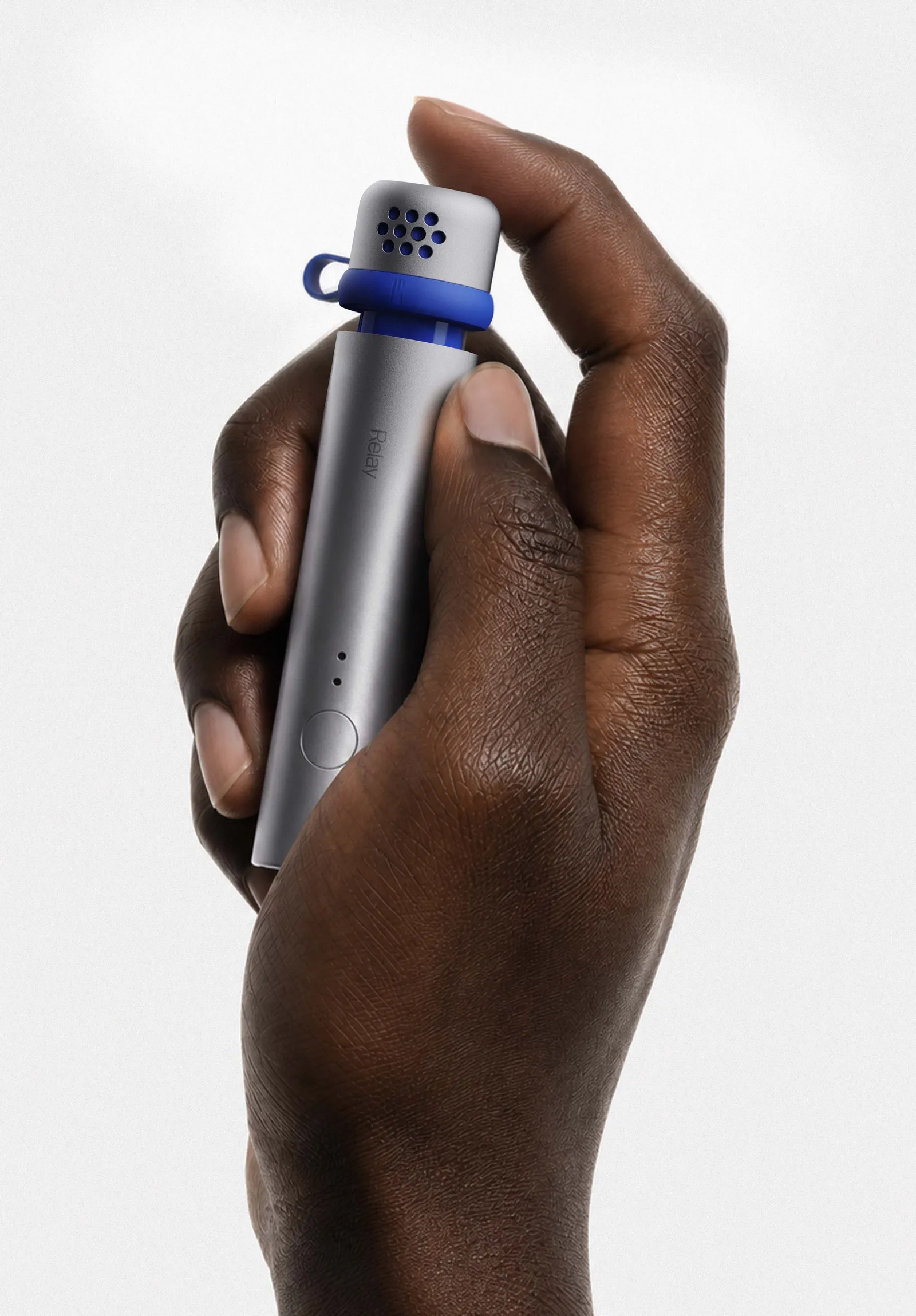
Now, a new startup is entering the fray. Unlike its software-focused peers, Relay is building a dedicated, portable microphone for high-fidelity voice-to-text anywhere. Based in London, Relay was founded by two former Nothing employees: Cookie Xu, who was Nothing’s head of AI and services, and Raymond Zhu, a hardware product manager. While the company is debuting its software today, the hardware—what it calls the Relay Q—won’t be available until early 2027.
Zhu says when he and Xu worked at Nothing, they used Wispr Flow’s transcription software to “type” most of their messages at work. He says it greatly helped with thinking out ideas, but they kept running into an issue: talking loudly in an office.
“In the office, we never really could get the right volume for input,” Zhu tells WIRED. “If I whisper too quietly, the Mac wouldn’t be able to pick it up; too loud and my coworker next to me can hear. Sometimes I would actually pull out my earbud and go like this,” he says over a video call, holding an earbud in front of his mouth to demonstrate. “It calls for dedicated hardware.”
Advertisement
Courtesy of Relay
Relay is exclusive to macOS at launch, though the company has plans to bring it to Windows, iOS, and Android. It’s starting with the desktop because Zhu believes conversations are most complex there. Chats with friends and family are simple on phones, but at work in front of a computer, you’re sharing ideas, brainstorming, and using varied tone and formality.
Though the microphone is still months away from being ready, I’ve been using a beta version of Relay’s macOS app, which works with or without the dedicated mic.
During setup, you’ll need to choose a hotkey that will trigger Relay in any text field—the default is Fn. Press and hold the key while your cursor is in any text field, and Relay activates and handles the voice dictation. The voice-to-text engine is powered by Google’s Gemini models.
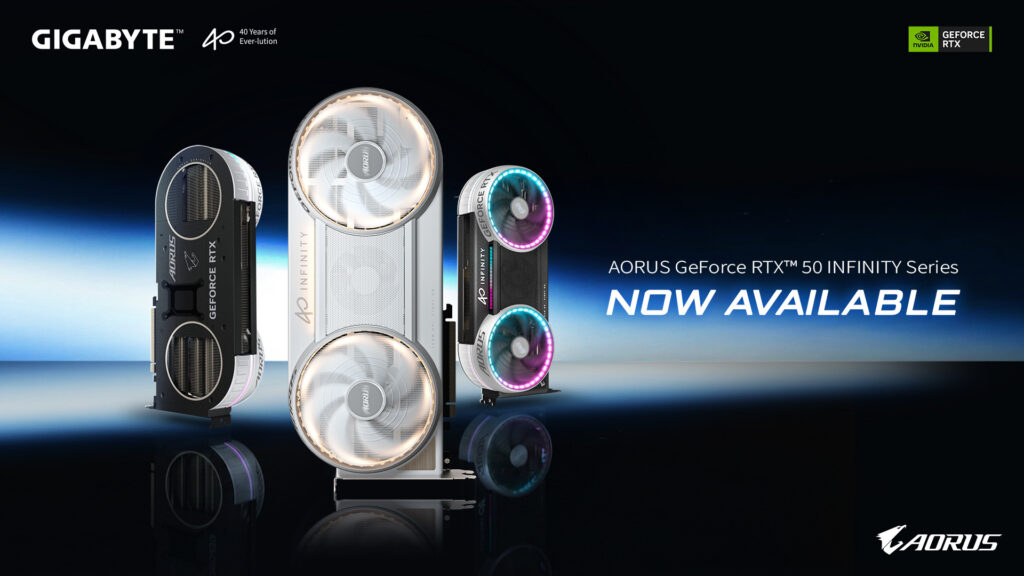
If you’re in the market for a new high-performance GPU, GIGABYTE has expanded its premium graphics card lineup with the launch of the AORUS GeForce RTX 5090, RTX 5080, RTX 5070 Ti, and RTX 5070 INFINITY series. The new GPUs focus on high-end performance while introducing a cleaner PC-building approach with hidden rear-facing power connectors, an upgraded Windforce cooling system, and customizable RGB Halo lighting. Here’s everything you need to know about them.
Windforce Hyperburst Cooling System
The headline feature across the INFINITY lineup is GIGABYTE’s new WINDFORCE HYPERBURST cooling system. It combines a double flow-through heatsink design with the company’s patented Hawk fans to improve airflow and thermal performance during demanding gaming and creative workloads.
According to GIGABYTE, the Hawk fans deliver up to 53.6% higher air pressure and 12.5% more airflow compared to previous designs. An intelligent Overdrive Fan, positioned at the center of the card, automatically activates under heavy loads to provide additional cooling while keeping noise levels in check.
One of the more interesting design changes is the relocation of the GPU’s power connector to the rear of the graphics card. Instead of cables protruding from the side, users can route them behind the motherboard tray for a much cleaner-looking build. GIGABYTE also includes a magnetic cover that fully hides the connector, giving the cards a minimalist appearance once installed. The design is compatible with STEALTH-style PC builds that prioritize hidden cable routing.
Alongside the standard models, GIGABYTE has unveiled the AORUS GeForce RTX 5080 INFINITY WOOD, which pairs wood-grain accents with premium materials to match the company’s WOOD-themed motherboards.
The new jobs, spanning engineering, operations, finance, consulting and technology, will be created over coming years.
US professional services firm Highspring is creating 50 new jobs in its recently established Irish presence.
The new jobs, spanning engineering, operations, finance, consulting and technology, will be created over the course of the coming years, the company said in a statement today (27 August). Highspring did not provide a timeline.
The Tennessee-headquartered company said the fresh investment will support its managed services, consulting and talent solutions businesses and reinforce its ability to service its European clients. Ireland is expected to play a key role in supporting the company’s multinational client base, it said.
Advertisement
Highspring, formerly branded under Vaco Holdings, has a presence across more than 45 countries with more than 10,000 employees. Vaco continues as the talent solutions division of the business, providing services across accounting and finance, business and digital transformation, risk and compliance and IT.
Highspring officially launched its Dublin office last year as part of a major international push. The Irish launch was followed by an office is Lisbon this February.
“The new roles across engineering, operations, finance, consulting and technology will provide excellent opportunities for highly skilled professionals and further strengthen Ireland’s position as a hub for innovation, talent and business excellence,” said Minister for Enterprise, Tourism and Employment, Peter Burke TD.
Brian Waller, the CEO of Highspring said: “Our talented team in Ireland has become a critical part of how we deliver for clients around the world and has enabled Highspring’s accelerated growth. These new roles build on the success we’ve already experienced here and reinforce our commitment to Ireland as an important part of our global strategy.”
AROS is an all-FOSS re-implementation of AmigaOS, and after years of effort, it now supports Arm kit – both 32-bit and 64-bit Raspberry Pi hardware, especially the Pi 3.
The AROS project’s nightly builds page has some interesting new offerings. Notably, there’s raspi-aarch64-system for 64-bit capable Raspberry Pi hardware, including the Pi 3 and Pi Zero, and raspi-armhf-system for older ARMv6 based devices.
We first mentioned AROS 13 years ago, and last took a proper look in May 2025. Building a version of AROS that runs natively on Arm processors has been a long term goal, as the AROS Arm support page details. It has made good progress, though, and now the nightly images include a version which runs well on the Raspberry Pi 3. (Unfortunately, the Reg FOSS desk’s Pi 3 is currently running PiHole full-time, and Pi 4 support is slightly lagging, with no sound or networking.)
Advertisement
There’s no specific mention of what has changed on the project’s Github repo, but we suspect that some judicious use of LLM has enabled this sudden burst of progress. Since May 2026, there have been 13 commits by Claude Code.
Even so, it works. This is an existing, human-written OS which can now boot and run on a Raspberry Pi 3. The install images are small – only slightly over 100 MB in size – but if you want to give them a try, you should also copy the contents of the additional raspi-aarch64-contrib or raspi-armhf-contrib files, which contain an additional gigabyte of compressed files with apps, demos, accessories, and supplementary tools.
Whether or not it has been made with LLM bot assistance, we think this is an impressive step forwards. AROS has been able to run on Arm CPUs for years, but until this, it ran hosted on top of another Arm OS – usually Linux. Now it can boot and run on bare metal.
Advertisement
YouTuber Dan Wood tried out the experimental new version
We feel this is a good step for several reasons. Although the native platform for AROS was for many years x86-32, on that platform, AROS is a small fish in a big pond: there’s a vast array of off-the-shelf hardware for x86 PCs, and it’s impossible for a tiny experimental OS to support more than a fraction of it. We have tried and failed to get AROS running on bare metal more than once. For many years, the best way to try it was to run it under VMware thanks to a specialized distro called Icaros Desktop.
Advertisement
The Raspberry Pi represents a much narrower platform: there are only a handful of models of Pi, and as a result, a very small number of GPUs and network interfaces that AROS needs to support. That makes it much easier to offer complete coverage. The Pi is also a fairly severely constrained platform: except for the most recent – and most expensive – models, most of the older and cheaper Pi kit only has either 512 MB or 1 GB of RAM. That isn’t enough to do full justice to Linux, Windows, or any BSD with a graphical desktop – but it’s plenty for AROS. This initial build boots to the Workbench desktop in about five seconds.
And, of course, those lower-end Pis are still cheap, which is always welcome. For now, the Pi version of AROS is a prototype: it’s incomplete, may not be very stable, and lots of things don’t work yet. An important missing part is that it doesn’t have any 680×0 emulation yet, so it can’t run any classic Amiga apps. Even so, we suspect that quite a few old Amiga fans might enjoy playing with a brand-new £30 ($40) Amiga.
If you just want to play your old games, there are much easier ways to do that on a PC. Last year, we also looked at Commodore OS 3 – and in there, we gave PiMiga a mention as well. Both products are free Linux distros bundled with emulators and tons of Amiga apps, games, and demos. Easier still, if you’re a Windows user, just buy a copy of Amiga Forever. Either way, knock yourself out.
AROS is re-invigorating other bits of the Amiga world, as well. Later in 2025, we also reported on a new Amiga web browser, which runs on the A600 GS and A1200 NG computers. These are Arm-based machines which run Amiga software via emulation on an OS called AmiBench – which uses parts of AROS.
However, THEA1200 just recently moved one step closer to Amiga legitimacy. On its Facebook page, RGL announced that THEA1200 is officially an Amiga product:
“The Amiga name has a new chapter. With the recent announcement from Mike Battilana and the Amiga Corporate [sic], we’re delighted to see the Amiga brand move forward with a clear and unified future. We’re proud to be part of that future with THEA1200, bringing the Amiga experience to a new generation while celebrating everything that made the original so special.”
As we said last year, THEA1200 is an Arm computer running Linux, which runs a bundled emulator derived from Amiberry. The same is true of the AmigaKit machines we mentioned earlier, the A600 GS and A1200 NG: they too run an emulator based on Amiberry on top of Linux, and inside that, they run AmigaKit’s AmiBench OS.
Advertisement
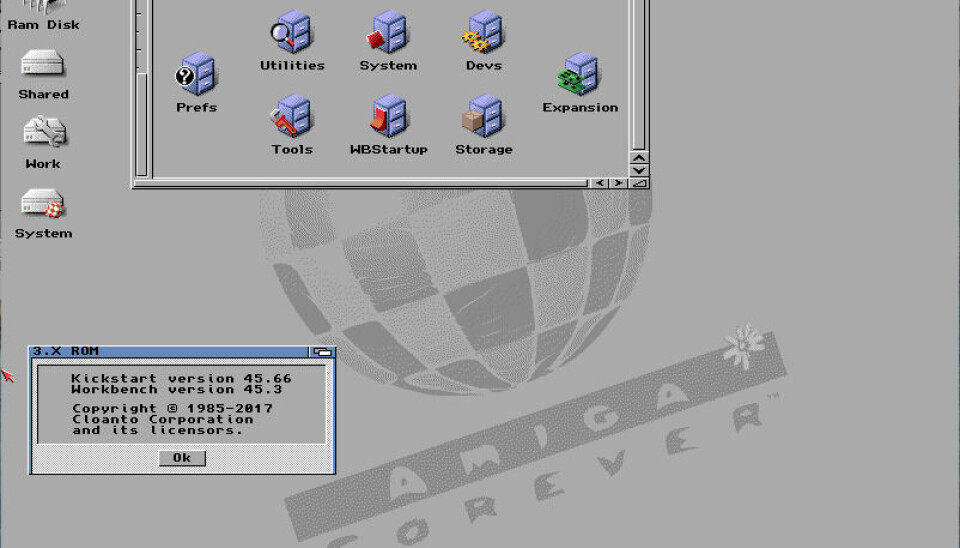
When RGL says it has come to an agreement with Mike Battilana and Amiga Corp, that means Cloanto. Cloanto is the company that sells AmigaForever, and it owns the Amiga trademarks, the Kickstart ROM, and the rights to the original 680×0 AmigaOS. Inside AmigaForever, along with various retro models for games compatibility, there’s even a higher-spec VM running Cloanto’s updated version of classic AmigaOS, which it calls 3.X – it also has a page about the improvements 3.X contains.
Cloanto’s AmigaOS 3.X running inside AmigaForever – a little more colorful than in the old daysLiam Proven
A deal with Cloanto means RGL can bundle the genuine original AmigaOS with TheA1200. This could give TheA1200 an edge over the AmigaKit models in terms of its compatibility with older games and original Amiga apps.
(As one sign of the complexity of Amiga ownership, German developer Hyperion also has an AmigaOS license, for the purposes of developing a PowerPC version. The Registercovered this back in 2004, and Hyperion used it to develop AmigaOS 4 – used in, among other things, the Amiga X1000 which The Reg covered in 2010. Controversially, Hyperion is using this license to flog updates to classic AmigaOS: in 2022, we reported on AmigaOS 3.2.2 and in 2025 on AmigaOS 3.2.3.)
Christian Simpson – known on YouTube as Peri Fractic – recently revived Commodore International, and following its FPGA-powered Commodore 64 Ultimate computer, the company also launched a Sailfish-powered smart flip-phone, as The Registercovered back in June. The Commodore brand is back, and it’s in the news. However, the revived Commodore doesn’t own the Amiga name, or IP, or code.
Advertisement
Feel free to call us excessively cynical, but we suspect that this could be a motivation behind licensing some Amiga rights to another vendor in 2026. This exposure will increase the value of Cloanto’s IP. Hypothetically, if Cloanto were to sell its rights to the revived Commodore, that could mean it could ask for more money. ®
A French court has for the first time recognized cosmic radiation as a contributing occupational factor in a flight attendant’s breast cancer, alongside passive smoking and years of night work. The landmark ruling could open the door to similar claims from other aircrew, as research continues to link long-term high-altitude flying with elevated exposure to radiation-related cancers. The BBC reports: Sophie Lainault, a 59 year-old former stewardess on Air France, sought to have her cancer recognized as an occupational disease, brought on by conditions at work. This has now been confirmed in a landmark court ruling in the southwestern town of Bayonne, which said that cosmic radiation was one of three carcinogenic hazards arising from her profession. […] As stewardess and later purser on Air France airliners, Lainault clocked up 12,600 flight hours between 1989 and 2019. More than half of these were at night. Many long-distance high-altitude flights from Paris would have taken her near the North Pole, where exposure to radiation from space — strictly speaking particles from the sun and other stars — is the most intense.
A study this month at the Harvard Medical School in the US found that flight attendants and pilots had the highest level of radiation-related cancer deaths among more than 500 different professions. In all, about 6.9% of deaths among flight attendants and 6.7% of deaths among pilots were from radiation-related cancers, according to the analysis. These proportions were higher than for other professions including nuclear technologists, who are routinely exposed to radiation from non-cosmic sources yet placed 12th on the list, the authors said. “In France the link between breast cancer and certain hazards has been established for a number of professions, such as nurses … but this is the first time for an air-hostess,” said Lainault’s lawyer Elisabeth Leroux.
The inaugural one-day, in-person event is designed to provide a forum for IEEE and IEEE-HKN undergraduate and graduate student authors to present their original research papers. A keynote address and thematic presentation sessions are planned as well. Student attendees can network with their peers and gain firsthand experience with the academic publishing process.
To present at the conference, students had to submit an abstract of their research before 1 May. Students whose work was accepted were assigned a volunteer IEEE member to mentor them and guide them through the research writing process, including presenting and publishing their original work.
Those whose paper was accepted by 1 August were invited to present at the conference. The conference proceedings will be submitted for publication in the IEEE Xplore Digital Library.
Advertisement
Upholding research integrity in a changing landscape
IEEE Life FellowManuel Castro, the conference’s technical program chair, oversees IEEE-HKN’s Innovating the Future program committee. It manages the review process, organizes logistics, and handles the mentoring component.
“This new conference is important to IEEE, as well as to IEEE-HKN,” Castro says, “because it allows student authors to grow in their skills and competencies, and be supported while turning their technical activities into publications.”
“The conference offers me a chance to learn how to communicate my research to a broader audience, gain feedback from other student researchers beyond my institution, and see how my work can be made more accessible.” —David Kwabi-Addo
IEEE Life Fellow Sorel Reisman, a California State University professor emeritus and an IEEE-HKN governor-at-large, says that because the academic research landscape is rapidly shifting, the conference is timely.
Advertisement
“As AI increasingly threatens the integrity of research papers being published in leading journals and conference proceedings, it is essential that future scholars—many of them current IEEE-HKN students—grasp the established standards of legitimate, peer-reviewed research publishing,” Reisman says.
Perspectives from mentors and students
A cornerstone of the conference is its rigorous mentorship initiative, which pairs each author of an accepted abstract with an experienced IEEE volunteer. The mentors provide personalized guidance on organizing the students’ technical content into the correct format for publishing. They also discuss navigating the peer review process, structuring presentations, and preparing the final manuscript for publication.
The impact of the guided process can be valuable for both the mentors and their mentees. IEEE Member Wafa Elmannai, associate professor and chair of the electrical and computer engineering department at Manhattan University, in Riverdale, N.Y., and faculty advisor to the IEEE-HKN Gamma Alpha chapter, serves as a mentor.
“Research is essential to advancing technology and driving innovation,” Elmannai says.
Advertisement
She volunteered to be a mentor, she says, because she has seen how conducting research can transform a student’s future by building their confidence, curiosity, and critical thinking skills.
“Mentoring encourages students to step outside their comfort zones and develop innovative solutions that contribute to society,” she says.
For the students, the conference can be a critical stepping stone. David Kwabi-Addo, an IEEE graduate student member who is researching computational biology at MIT, is president of the IEEE-HKN Beta Theta chapter. He says he views the program as an opportunity to gain experience in producing academic scholarship.
“I submitted an abstract of my research paper because I see the conference as a chance to produce what could become my first conference publication,” Kwabi-Addo says. “The conference offers me a chance to learn how to communicate my research to a broader audience, gain feedback from other student researchers beyond my institution, and see how my work can be made more accessible.”
Advertisement
He says he hopes his participation will highlight the diverse breadth of research that future conferences can showcase.
Workshops on the publishing process
Conference organizers are holding a series of workshops to guide students through every step of the academic publishing process. The workshops are open to anyone and available on the IEEE-HKN YouTube channel.
Topics previously covered are:
Registration is open to all for this upcoming workshop:
Advertisement
A launchpad for the next generation
The Innovating the Future program is designed not only to improve the quality of submissions but also to foster long-term professional development and research communication skills to develop the next generation of IEEE authors. The conference is more than a venue for presenting research; it is a launchpad for innovators committed to advancing technology for humanity.
Free VPN to protect your privacy. We believe online privacy is a fundamental human right. Providing free access is part of our mission. The Proton VPN free plan is unlimited and designed for security. No catches, no gimmicks. Just online privacy and freedom for those who need it.
Our mission is to provide private and secure Internet access to all. ProtonVPN is used by activists and journalists all around the world. Our free plan is the only one that:
Has no data or speed limits
Has no advertisements
Does not log your online activity
Is protected by Swiss privacy laws
What is the difference between the Stealth protocol and other protocols like WireGuard?
The Stealth protocol is designed to help users bypass censorship by disguising VPN traffic as regular HTTPS traffic. This makes it effective in restrictive regions. However, it may be slower than other protocols like WireGuard, which is typically faster and more efficient for general use if censorship is not a concern.
Can I stream content using ProtonVPN?
Yes, ProtonVPN supports streaming on its paid plans, particularly when using servers optimized for this purpose. These servers provide reliable access to popular streaming platforms and better speed. However, streaming support is not available on the free plan.
How many devices can I connect simultaneously with ProtonVPN?
The number of devices you can connect depends on your subscription. The free plan allows only one device at a time, while the paid Plus plan supports up to 10 simultaneous connections, making it suitable for users with multiple devices or families sharing the same account.
Advertisement
Features
Security
Our secure VPN sends your internet traffic through an encrypted VPN tunnel, so your passwords and confidential data stay safe, even over public or untrusted Internet connections.
Secure Core VPN
Secure Core protects your connection by routing your traffic through multiple servers before it leaves our network, defending you against advanced, network-based attacks. Secure Core servers are located in hardened data centers in Switzerland, Iceland, and Sweden, protected by strong privacy laws, and operated on Proton’s dedicated networks.
Advertisement
Kill switch
A VPN kill switch keeps your IP address safe if something goes wrong with your VPN connection. If your VPN connection fails, the kill switch will prevent your device from connecting to the internet until your device reconnects to a VPN server.
Adblocker (NetShield)
NetShield speeds up your connection and protects you from malware by filtering out images, scripts, and other resources that are from domains known to host malware. Available for VPN Plus and Proton Unlimited users, NetShield can also block online trackers and ads.
Advertisement
Apps
Regardless if you use a PC, tablet, phone, or anything in between, Proton VPN has you covered with Free VPN apps for all of the major operating systems.
Servers
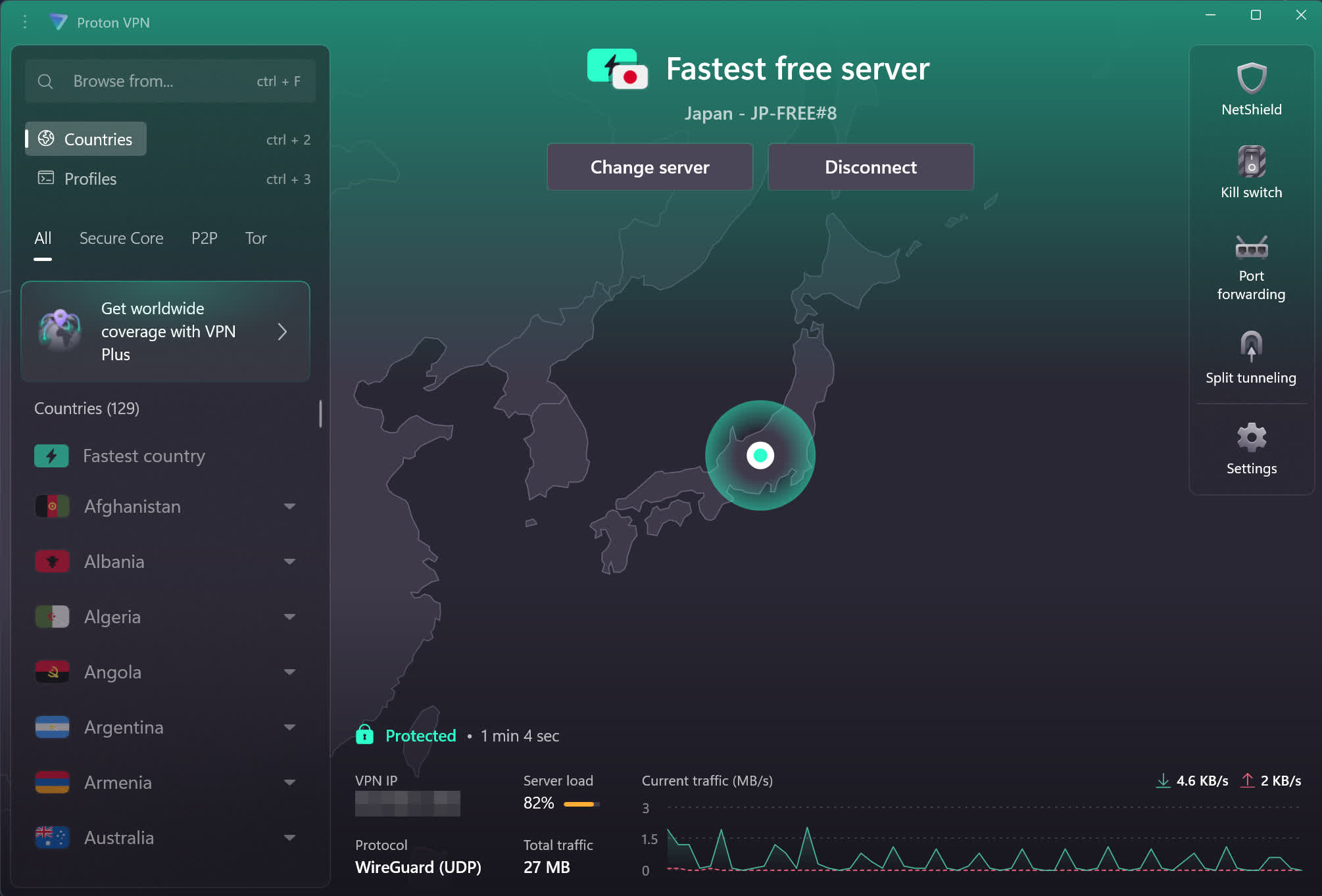
Proton VPN offers free access to VPN servers in the United States, Netherlands, and Japan. The Proton VPN free plan has a strict no-logs policy backed by the Swiss data privacy laws. Additionally, Proton VPN does not apply any bandwidth, duration, or speed limits to free users.
Advertisement
Privacy
Keep your browsing history private. As a Swiss VPN provider, we do not log user activity or share data with third parties. Our anonymous VPN service enables Internet without surveillance.
Freedom
We created ProtonVPN to protect the journalists and activists who use ProtonMail. ProtonVPN breaks down the barriers of Internet censorship, allowing you to access any website or content.
Advertisement
Perfect forward secrecy
ProtonVPN exclusively uses ciphers with Perfect Forward Secrecy, meaning that your encrypted traffic cannot be captured and decrypted later, even if an encryption key gets compromised in the future.
No-log policy
ProtonVPN is a no logs VPN service. We do not track or record your internet activity, and therefore, we are unable to disclose this information to third parties.
Advertisement
Tor over VPN
ProtonVPN also integrates with the Tor anonymity network. With a single click, you can route all your traffic through the Tor network and access Onion sites.
ProtonVPN Plus
Upgrading to a paid account provides access to advanced features, but our core privacy and anti-censorship features are available to all users:
Advertisement
VPN Accelerator
Strict no-logs policy
Kill Switch
Access blocked content
What’s New
ProtonVPN’s Windows latest version is 5.1.6
ProtonVPN’s macOS latest version is 6.5.1
ProtonVPN’s Android latest version is 5.19.99.0
ProtonVPN’s iOS latest version is 7.5.2
Redesigned Windows and iOS apps
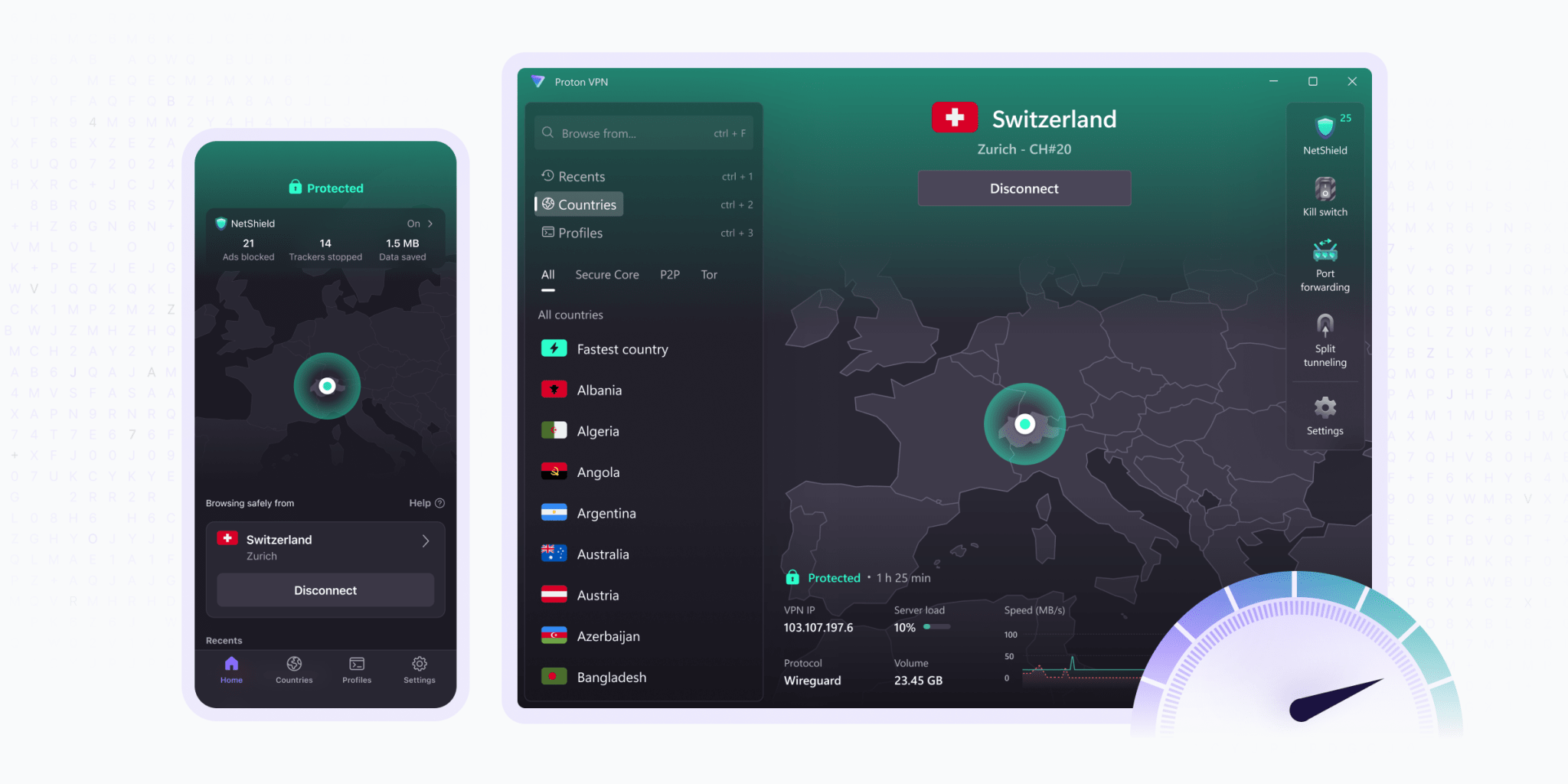
Following last year’s introduction of our all-new Android app we’re bringing the same modern design and intuitive-to-use experience to our Windows and iOS apps. The Windows app is optimized for desktop experience to ensure the features you need are at your fingertips.
The new iOS app now provides the same core mobile experience as our Android app, and both have been improved and refined thanks to enthusiastic feedback from the Proton VPN community.
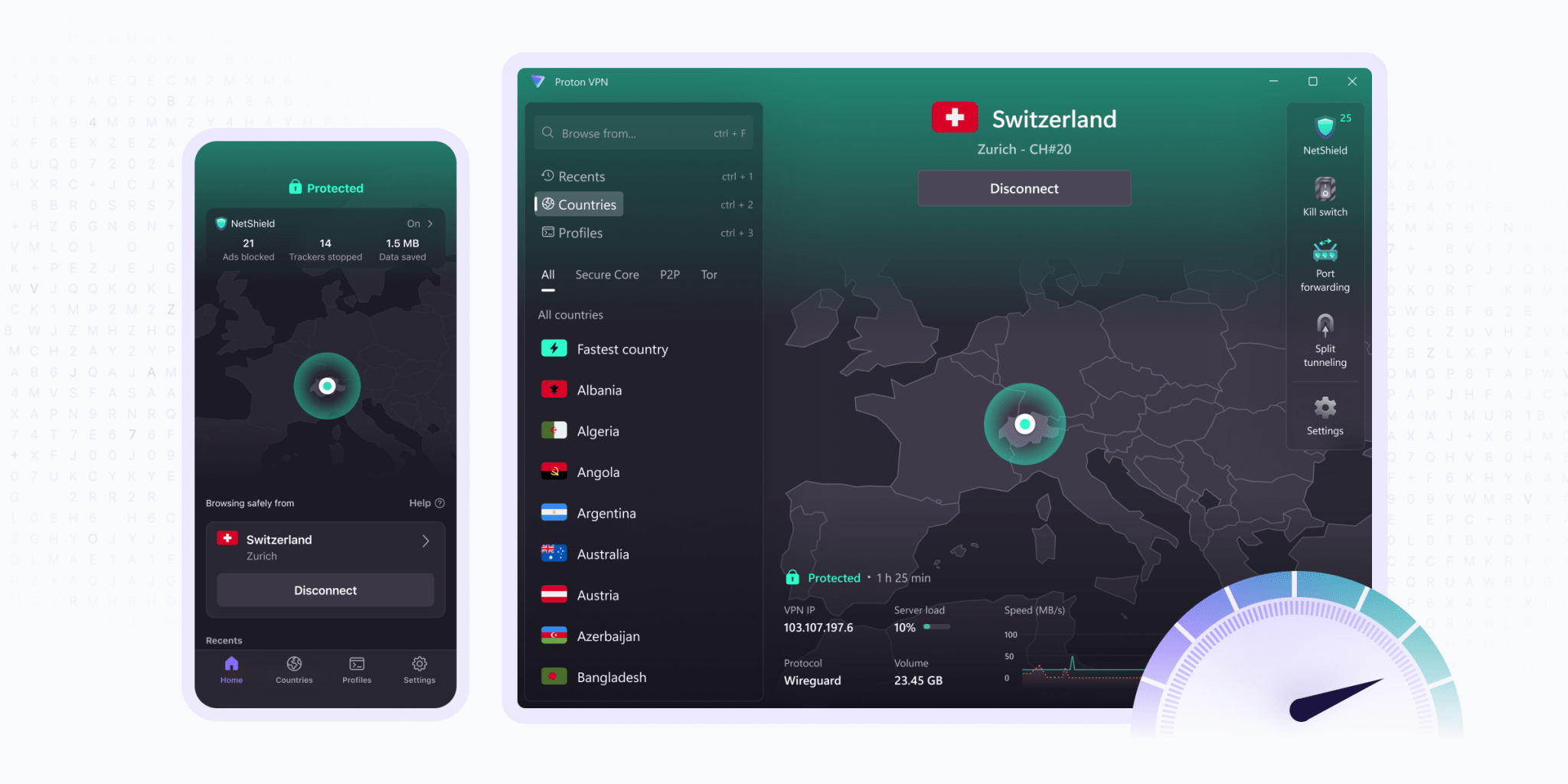
On both the new Windows and iOS apps, the Home screen is the focal point. With it, you can:
Know at-a-glance that you’re protected by Proton VPN with a map showing your connection location
Easily track how many ads and trackers NetShield Ad-blocker has blocked – and how much data this has saved
Quickly see and connect to your recent VPN connections and profiles
Pin your favorite recent VPN connections and profiles for easy one-tap access
Click or tap on a connection for its details
Filter by country, city or state, or individual server (results automatically sorted by server load)
Tap Info ⓘ next to any feature for a clear, concise explanation
You can also use the redesigned Settings menus on Windows to quickly explore and use the app’s advanced features, including:
Kill switch and advanced kill switch
Port forwarding
Split tunneling
Custom DNS servers
NAT type
For convenience, we’ve also provided shortcuts to some of these advanced features on the Home screen.
Advanced VPN profiles on Windows and Android
Advertisement
Custom VPN profiles are now more flexible and easier to use on Windows and Android. With this redesigned tool, you can quickly connect to our service in exactly the way you like – or use one of our pre-built profiles.
New widgets for Android and iOS
We’ve introduced a brand new widget for Android, and a completely redesigned widget for iOS. These widgets can be placed anywhere on your Home screen, making it easy to see if you’re connected and providing convenient one-tap access to connections and profiles without opening the Proton VPN app.
The Glorious GHS Wireless InfinitePlay trades outright audio drama for practicality, pairing tactile on-board controls and versatile connectivity with a swappable battery system that trounces the competition on runtime. Its balanced sound signature is a little light on bass and treble bite, and the plastic build feels underwhelming for a higher price tag, but a standout boom mic and best-in-class battery life make it a headset built for longevity over spectacle.
Fantastic battery life
Comfortable fit
Tactile controls
No ANC
Could do with some more bass
Software is more basic than rivals
Key Features
Advertisement
Review Price:
£199.99
Swappable batteries:
Advertisement
The GHS Wireless InfinitePlay features swappable batteries with up to 85 hours of endurance each, making this an efficiency champion.
Dual wireless connectivity:
Advertisement
This headset can also work over both Bluetooth and 2.4GHz, as well as USB-C wired.
Tactile controls:
Advertisement
The GHS Wireless InfinitePlay has tactile dial-driven controls for sorting everything from connectivity to media playback.
Introduction
Breaking into the gaming headset market is hard enough as it is, let alone while working on a novel concept – that’s what Glorious is trying to do with its new GHS Wireless InfinitePlay.
It’s a brand I associate more with enthusiast-grade mechanical keyboards and excellent ultralight gaming mice than headsets, although it has slowly been getting into gaming headsets in more recent times. The GHS Wireless InfinitePlay feels like the culmination of a lot of hard work.
Advertisement
We’ve seen this before with the SteelSeries Arctis Nova Pro Wireless and more recently SteelSeries’ Arctis Nova Pro Omni, although it’s otherwise been a bit of an untapped market. Glorious is attacking the top end of the gaming headset market with this headset, too, packing a fair amount of features inside for a premium £199.99/$229.99 price tag.
I’ve been putting the GHS Wireless InfinitePlay through its paces for the last couple of weeks to see if it’s one of the best gaming headsets we’ve tested.
Advertisement
Design and Features
Non-descript black chassis
Lovely tactile controls
Clever swappable batteries and versatile connectivity
With the GHS Wireless InfinitePlay, Glorious hasn’t opted for an off-the-wall or ridiculous design and has instead kept things quite tame. The earcups are a bit of a funny shape, but apart from that, this design is understated and rather pleasant for being so.
The build here is predominantly plastic, which is a bit of a shame for the higher price tag against rivals, but the quality is adequate, and there aren’t any unwanted creaks or funny noises from the plastic.
Image Credit (Trusted Reviews)
Advertisement
The GHS Wireless InfinitePlay is rather comfortable, too, owing to deep and plush earcups, plus a suspension-style headband. The headband also adjusts independently, and this headset can fold flat with ease, too. At 360g, though, it is on the heavier side with the boom microphone attached, although the tighter clamping force lends itself to this headset offering some excellent passive noise isolation.
Where this Glorious headset excels is with its on-board controls, as most of it feels lovely and tactile, perhaps as you’d expect from a firm more known for its keyboards and mice than its headsets. On the left we’ve got a USB-C port, a jack for connecting the boom mic, a mic mute toggle and a rotary dial for chat and game mix. The right side has a toggle for wireless connectivity methods, while the dial controls master volume and media playback.
Image Credit (Trusted Reviews)
The rotary dials are the star of the show here, and they feel tactile in use, although it can be a little difficult to distinguish between the controls here as they don’t feel any different. It’s simply a case of remembering what each dial does.
Additional software comes in the form of Glorious’ Core suite, the same as it’s used for keyboards and mice in the past. It provides functions you need, and little else, such as different EQ modes, with two custom profiles, while you can also adjust game and chat sound balance via a slider, adjust mic volume and enable sidetone, and turn the Environmental Noise Cancellation on or off for the microphone specifically. This headset doesn’t have any form of active noise cancellation, though.
Advertisement
Image Credit (Trusted Reviews)
Advertisement
As for connectivity, the GHS Wireless InfinitePlay is rated to work over both Bluetooth 5.4 and 2.4GHz wireless for versatile cordless connectivity, plus it can also work USB-C wired, too. Switching between them is made simple with the toggle switch on the rear of the headset, and I had no issues connecting the headset to both my Windows gaming PC over 2.4GHz and my Honor Magic V3 over Bluetooth simultaneously. Glorious rates these cans to work with PC, mobile, Nintendo Switch, Switch 2 and PS5; there isn’t any Xbox connectivity on offer.
The party trick for this headset is its swappable batteries, though, which is what gives it the InfinitePlay moniker. Each one can last for up to 85 hours on a charge, and charging is done through a base station included with the headset. Swapping the batteries is also easy, as there isn’t a finicky hidden compartment or any other guff required, and these will run for more than double what you’ll get out of the rival options from SteelSeries. There is also a guardian battery inside the headset to prevent any real downtime if both batteries you have go fully flat. I suppose that’s the benefit of not having any noise cancellation here.
Audio and Microphone
More balanced approach
Wide soundstage and decent detail
Can be lacking some bass
The GHS Wireless InfinitePlay opts for a more balanced and even-handed approach to its sound than other headsets, with something that’s approaching a reference-like feel. This gives equal weight to the bass, mids and, to some extent, treble to present a headset that’s designed to be as versatile for games as it is for general listening.
To my ears, I actually think this headset is lacking a little in low-end thump and power. Spinning up Rush’s YYZ, for instance, the bass has a tight feel with reasonable extension, but it’s lacking the sub-bass and general power you get more of from other headsets. It means things such as explosions from grenades and the like in Counter-Strike 2 lack the same immersive feel as you’ll get from some rival options.
Image Credit (Trusted Reviews)
Advertisement
Saying that, the mid-range is decently clear, with forward vocals in my testing tracks from James Taylor and Gloria Estefan, while there is good detail retention to boot. This aids with the crispness of elements such as in-game voices and footsteps and gives the sound more of an immersive quality.
Advertisement
The treble here, as I noted when listening to Steely Dan’s Do It Again, can lack some punch and attack, though, feeling quite smoothed over in the track’s competing percussion intro. I’d have liked a bit more bit here, if I’m being critical.
Image Credit (Trusted Reviews)
The GHS Wireless Infiniteplay features a decently wide and precise soundstage for games and music, too. This headset isn’t as precise as wider open backs I’ve tested, but it’s cromulent for my usual tests in Counter-Strike 2, with solid directionality and breathing space for footsteps, distant gunshots and more besides.
The piece that surprised me with this headset was how strong the detachable boom microphone is, with it offering fantastic substance and body to my voice, alongside good plosive handling. If I’m being a little nitpicky, the noise cancellation on the microphone isn’t quite as strong as with other cans, as the noise of my keyboard still got through while I was talking in some sample audio.
Advertisement
Should you buy it?
Advertisement
You want class-leading battery life
Glorious’ first gaming headset is a smash when it comes to battery life, putting established rivals to shame thanks to its innovative swappable battery system.
Advertisement
The fact the bass feels a bit pared back means the audio here isn’t as strong or immersive as rivals choices, though.
Final Thoughts
The Glorious GHS Wireless InfinitePlay trades outright audio drama for practicality, pairing tactile on-board controls and versatile connectivity with a swappable battery system that trounces the competition on runtime. Its balanced sound signature is a little light on bass and treble bite, and the plastic build feels underwhelming for a higher price tag, but a standout boom mic and best-in-class battery life make it a headset built for longevity over spectacle.
Advertisement
The USP of its swappable batteries are genuinely useful, and means this headset holds a commanding lead in its endurance against both the SteelSeries Arctis Nova Pro Wireless and its Arctis Nova Pro Omni. Connectivity here is also strong against rivals, as is the comfortable fit and fantastic microphone that puts a lot of rivals to shame.
That being said, the couple of shortcomings this headset has peg it back from being a true giant killer. For instance, the lack of ANC and the fact its audio is lacking in low-end power and precision means rivals such as Razer BlackShark V3 Pro and Alienware Pro Headset are a better buy for not much more money.
If you’re prioritising endurance above everything else, then you’ll be hard-pressed to find a stronger choice than the Glorious GHS Wireless InfinitePlay, For more options, check out our list of the best gaming headsets we’ve tested.
How We Test
We use every headset we test for at least a week. During that time, we’ll check it for ease of use and put it through its paces by using it in a variety of games, as well as playing music in order to get the full experience.
Advertisement
We also check each headset’s software (if applicable) to see how easy it is to customise and set up.
We use every headset we test for at least a week.
Use on as many platforms as possible to test versatility.
Judge audio for both gaming and music playback.
Use with multiple games to test audio.
FAQs
Does the Glorious GHS Wireless InfinitePlay have noise cancellation?
No, the Glorious GHS Wireless InfinitePlay doesn’t have active noise cancellation, relying instead on passive noise isolation.
Back in my college days, I remember recording lectures on a budget Android phone, hoping to save all the important information right before exams. Yes, it wasn’t a perfect solution. My phone’s microphone wasn’t the best, and sorting through an hour-long lecture just to find something was like looking for a needle in a haystack. The same problems still apply in my professional life. I like to record in-person meetings because of my goldfish memory, but it’s a bit of a faff. And I’m not alone. Many professionals suffer from this exact problem, which is the reason the iFlyTek P1 and P1 Pro exist.
In essence, they are AI voice-recording devices that help you record meetings, transcribe them, and provide detailed summaries of what needs to be done and when. You can also translate meetings into different languages. They also work as conventional voice recorders for taking interviews and such, but the real appeal is with the Deepting app. But should you spend $119 on the P1 or $159 on the P1 Pro? To find out, I’ve been testing both for the better part of two weeks, recording meetings and sorting through all the information and its legitimacy.
iFlyTek P1 & P1 Pro Review
Hisan Kidwai
Advertisement
Summary
The iFlyTek P1 and P1 Pro solve the genuine problem of recording and sorting through meetings, turning it into an automated experience that requires little oversight. The recording quality, even for larger conferences, was excellent, and iFlyTek’s AI does a really solid job of transcribing the content. This, coupled with the fact that you can ask questions about the meeting directly, makes both genuinely useful tools.
Advertisement
Design & Hardware
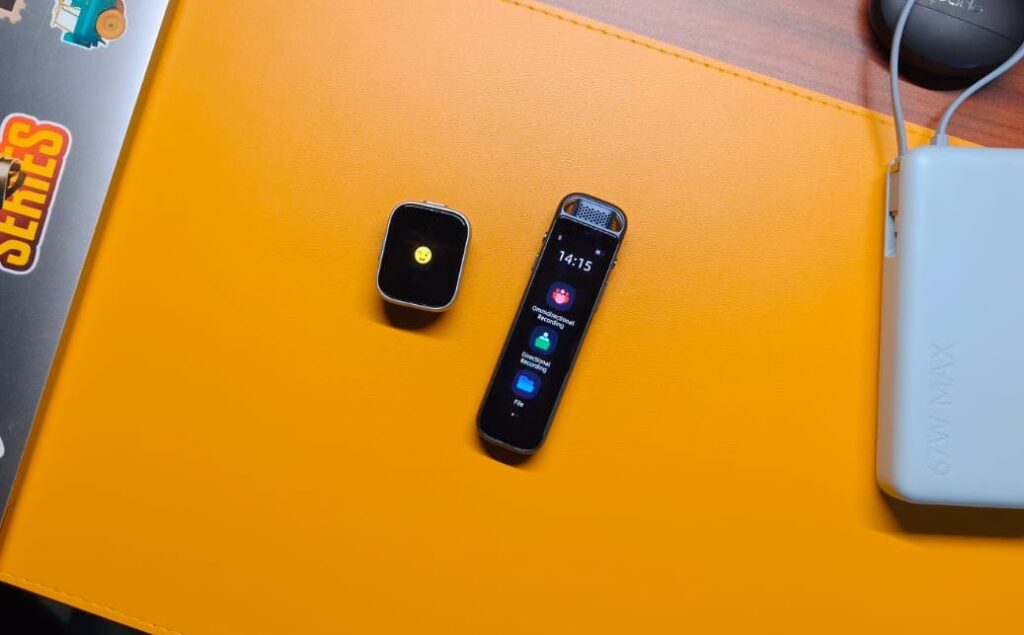
The iFlyTek P1 and P1 Pro are fundamentally different devices. Yes, both record meetings, but that’s where the similarities end. Starting with the P1, it looks like a smartwatch. A small rectangular device with a display on the front and buttons on the top and left side. The first time I unboxed it, I mistook it for an Apple Watch, and I wasn’t the only one who thought that. The second thing I noticed was the weight, or lack thereof. The P1 is extremely light because you actually have to wear it. It comes with a magnetic accessory, which sticks to the back. You can either hook the magnet onto your shirt, like those fancy microphones, or use the clips. The latter are spring-loaded so they won’t fall off whenever you move.
The build is plastic, but I don’t mind since the P1 is extremely well made, with no moving parts or loose ends. There are two buttons on the device, each serving a different purpose. You power it on by holding the button on the left side for two seconds. Now, press the top button for two seconds to start/stop recording. So what does the display actually do? Well, that’s a great question you may have asked. The display on the P1 is very small. Possibly the smallest display I’ve ever seen to date. And it’s not that useful. All it does is show a winking emoji when the device powers on and a microphone emoji when it’s recording. Nope, you can’t change any settings or listen back to what you just recorded. For all that, you’ll need to rely on the Deepting app.
If not having a screen or speakers to play back what you just recorded is a problem for you, then the P1 Pro is what you need. It ditches the smartwatch form factor for a more elongated design, with a 3.2-inch OLED display nestled in between. It runs on custom software, allowing you to toggle between omnidirectional and directional recording, check the stored files, and adjust settings. The screen is plenty responsive, and iFlyTek has designed the UI quite thoughtfully. You also get a more premium metal-and-glass build, along with an extra flagging button to mark important moments of a meeting. Sadly, you can’t hook the P1 Pro to your clothing, so it’s more of a hands-on tool you might see people using during interviews.
Microphones & Recording Quality
As with the design, the microphones on the iFlyTek P1 and P1 Pro are different. The smaller one has two mics that can record either omnidirectional or directional audio. iFlyTek says it can record someone speaking clearly up to 5 meters, but I found the reality to be different. With some background noise, you should always aim to be around 3-4 meters max from the subject, after which the AI will have a hard time transcribing all the information. Speaking of the quality, I like it. The mics pick up conversation effectively without letting background noise interfere much. You will hear the playback clearly and not have to guess what the subject was saying.
The P1 Pro adds an extra mic, bringing the total to three. This increases the effective range of the P1 Pro to 10 m, which should be sufficient for recording conference room meetings. There is also support for 96 kHz/24-bit hi-res audio, which I put to the test when doing an interview with an eSports player at a PUBG Mobile tournament. Despite the abysmally loud background music, the P1 Pro picked up both of our voices surprisingly well, and the details were on point. I also put it in a conference room, and it effectively picked up voices from about 8 m away. Though after that, picking up quieter words became a problem. Both devices come with 64GB of onboard storage, which should be sufficient for years to come.
App Experience
So far, I’ve been impressed by the iFlyTek P1 and P1 Pro, but the app experience is the real deciding factor. Both devices pair with the Deepting app, available on both the Google Play Store and the App Store. Once paired, the app gives you unlimited cloud storage and 300 minutes of transcription every month. That was enough for a casual user like me, but if you’d be using it every day, I can see this being limiting. If that’s the case for you, there’s a Deepting Pro subscription. I’m not the biggest fan of subscriptions, but it does give you 1800 minutes of transcription, so you can be the judge.
All that aside, the recordings are synced from the device pretty fast. Each recording is stored separately, and you can play them at different speeds. There is a transcribe button front and center, which uploads your conversations to a remote server for processing. As for the quality itself, I found no problems. The transcription was accurate over 95% of the time, with clear separation between speakers, sentences, and pauses. It can sometimes mess up specific names, but that wasn’t a big problem and happened only 1 out of 10 times. You can also translate these transcriptions into 11 different languages.
Advertisement
On the top right, there’s the AI button, which itself has three sections: Overview, Notes, and Ask AI. The first gives you a concise summary of the meeting. If you want more detail, then the Notes section is where you need to be. It formats the content into headings, points, and other elements, which was great for digging up important information from an hour-long corporate jargon meeting. There’s also this ChatGPT-powered Ask AI feature. With it, you can ask questions about the meeting directly, instead of having to find everything yourself.
Verdict
After extensive testing, I can say both the iFlyTek P1 and P1 Pro deserve a place in the market. They solve the genuine problem of recording and sorting through meetings, turning it into an automated experience that requires little oversight. The recording quality, even for larger conferences, was excellent, and iFlyTek’s AI does a really solid job of transcribing the content. This, coupled with the fact that you can ask questions about the meeting directly, makes both genuinely useful tools. Yes, they do have a few flaws, namely the subscription, but if you have a use case, you should consider them.
As data center developers compete for a cut of the hundreds of billions of dollars flowing into the artificial intelligence industry, the queue to join the UK’s power grid has become jammed with projects that will likely never get built. The snarl is exacerbating already years-long wait times for viable projects, and it’s messing with attempts to forecast energy demand and plan grid expansions.
In July, the UK’s energy regulator, Ofgem, laid out a proposal meant to force phantom data centers out of the swollen queue. Under the plans, set to be finalized after an industry feedback process that ends in September, developers would be required to put down a steep, nonrefundable deposit that could balloon to hundreds of millions of dollars for the very largest data centers. Developers would also be required to line up customers in advance and prove they have the funding to complete their builds.
However, Ofgem faces a Goldilocks conundrum: The reforms must be burdensome enough to deter speculators but not so much that they drive legitimate data center projects to other shores, undermining the UK’s ambitions to meet the voracious demand for the compute required to run sophisticated AI models.
Data center developers face delays almost everywhere; similar grid congestion issues afflict the US and countries across Europe. But whereas the US is a highly desirable market, Ofgem’s reforms risk making the UK—already unattractive for the high cost of energy and dearth of land—one of the world’s most expensive places to build a data center, industry experts believe.
Advertisement
The frenzied data center buildout “is bringing a huge amount of capital investment into the UK,” says Alex Burgoyne, head of data centers at real estate consultancy Knight Frank. “We don’t want to shoot the golden goose.”
Ofgem says that it will take into account industry concerns before settling on a fee, but that differences between international energy markets make like-for-like comparison difficult. “We recognize data centers are a key part of the UK’s AI ambitions and future economic growth. Enabling viable data centers to connect more quickly is an enabler of this,” Nathan Macwhinnie, deputy director of strategic planning and connections at Ofgem, tells WIRED in a statement.
The queue to join the UK grid began to balloon toward the end of 2024, around the time the government designated data centers “critical national infrastructure.” Between November 2024 and June 2025, the total energy demand of the projects in the connection queue increased from 41 gigawatts to 125 gigawatts, according to Ofgem. New data centers make up 73 gigawatts of that—equivalent to one and a half times the peak demand for the entire UK last year—and counting.
The government has said it believes much of that demand is a mirage. “It’s absolutely insane,” says Taco Engelaar, managing director at grid optimization company Neara. “No one really understands … what the real grid demand will be because of these phantom projects.”
Advertisement
The crowded queue is largely the product of an incentives problem. Because developers face a years-long wait for grid access, and it has previously cost only a few thousand dollars to join the queue, they might as well apply for power, even if they do not have a watertight plan to develop a site. It’s a no-downside bet that allows developers to hedge for a future in which demand for compute remains sky-high.
However, because grid operators have to account for the combined effect of large infrastructure proposals on network stability before granting individual connections, phantom data centers can exacerbate already-lengthy delays for viable projects. “They have to treat every project as serious when they try to study whether the system can handle them,” says Olivier Darmouni, associate professor of finance at HEC Paris Business School, who has published research on the impact of AI on power grids. “The more speculative projects are especially damaging because they make these studies more complex, more expensive, longer.”





























































You must be logged in to post a comment Login