Multiple extensions for Google Chrome and Microsoft Edge delivered a malware framework that deployed modules to steal cryptocurrency, sensitive data, and browser history, and to inject ClickFix lures.
Researchers say all 19 malicious modules uncovered in the campaign serve distinct purposes and are designed to be “highly extensible.”
The operation was uncovered by application security company Socket, and the investigation indicates that it may have been active since early 2024.
Socket says that when initially published on the Chrome Web Store, many of the extensions provided the advertised functionality and contained no malware.
According to the researchers, five of the extensions were acquired from their original creators and injected with malware via updates delivered automatically.
Advertisement
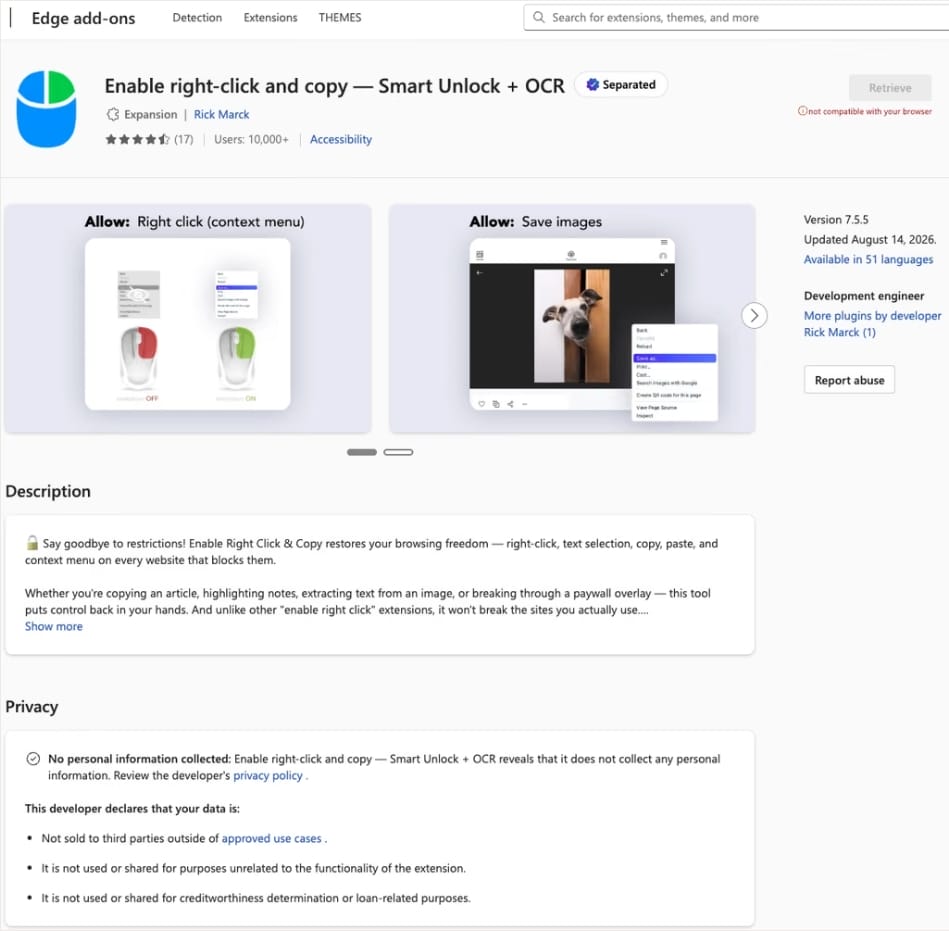
One example is the “Enable Right Click & Copy — Smart Unlock + OCR” extension, which had a Chrome user base of at least 70,000 when it turned malicious. The number of installs on Edge was 10,000 at the time.
Google caught the threat early and removed the extension from its add-ons marketplace, but at the time of Socket publishing its report, the Edge version remained available.
Malicious extensions available on the Edge add-ons store Source: Socket
Once installed, the malware establishes an encrypted WebSocket connection with command-and-control (C2) servers, downloads JavaScript modules, removes Content Security Policy (CSP) headers from every website visited, and injects malicious scripts into websites through hidden HTML elements.
Socket observed malware modules with the following capabilities:
Draining EVM, Solana, and Tron wallets by hijacking legitimate “Connect Wallet” and “Swap” buttons
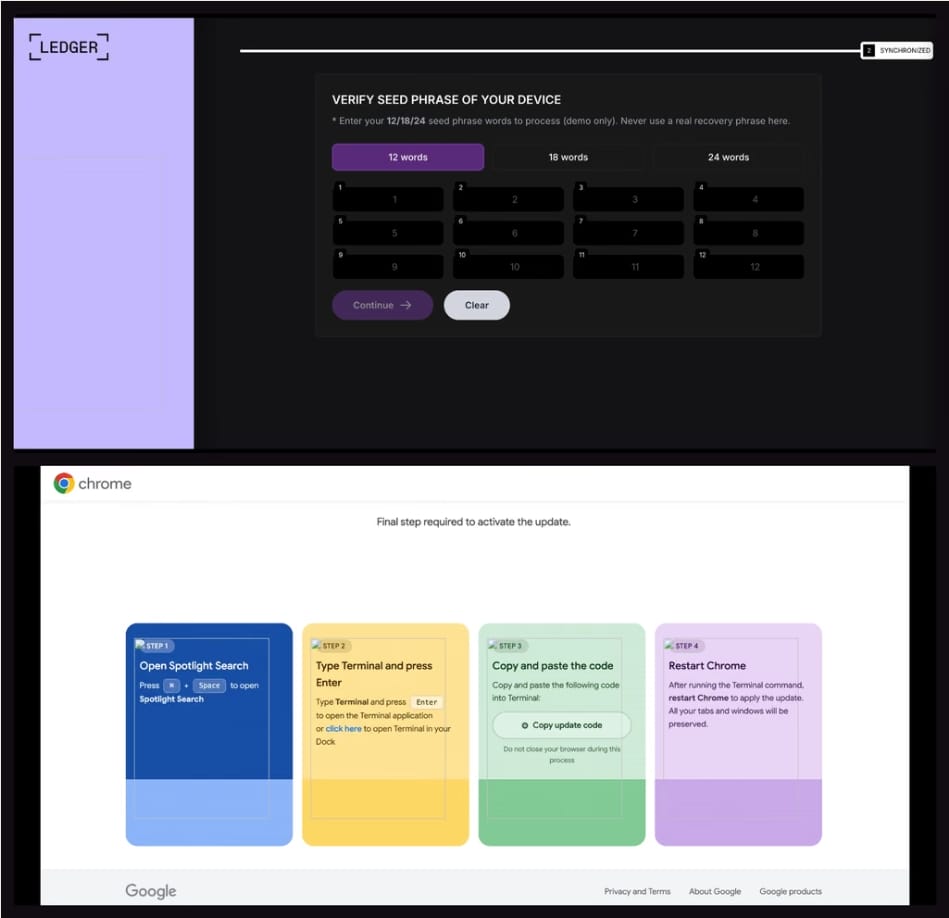
Replacing Ledger and Trezor websites with convincing seed-phrase phishing pages
Stealing sessions, tokens, account data, and balances from Coinbase, Binance, Kraken, OKX, MEXC, KuCoin, Bybit, and MetaMask
Recording credentials and form entries across websites
Harvesting Facebook and LinkedIn account information
Exfiltrating browser history
Displaying ClickFix-style fake browser updates that instruct victims to execute attacker-provided commands
Crypto wallet seed theft page Source: Socket
Socket warns that the malicious framework may have more modules and that as the malware evolves over time, new payloads are expected to be deployed.
At the time of publishing, none of the malicious extensions are available in the Chrome Web Store.
Advertisement
Socket’s report provides the full list of extension IDs uncovered in the campaign along with the domains used for C2 communication.
Extension ID
Extension Name
pkoccklolohdacbfooifnpebakpbeipc
Enable Right Click & Copy — Smart Unlock + OCR
fegckejpfnlmfgkfjpinlbgmeeijjkel
Advertisement
RapidLens – Google Lens for Screen Search & Images
kdenlnncndfnhkognokgfpabgkgehodd
QuickLens – Search Screen with Google Lens
jamminefolhgepgihbmcjjhgldbfcikp
Password Protect PDF
inmkjedjdhgpknjogbjomhnbgdccckkg
Allow Copy – Select & Enable Right Click (Edge extension)
Since early 2023, photographer Jingna Zhang and a small crew of volunteers have worked tirelessly to maintain an image-sharing social media and portfolio app called Cara. So far, it has attracted about 1.5 million artists. What drew them to the platform? A shared opposition to the unauthorized use of their work to train AI models and a desire to publicize their art while avoiding exploitation by Big Tech.
But while Cara filters out AI images and offers some minimal protective features, preventing scrapes themselves is nearly impossible. And just this month, beginning on August 13, Cara was subjected to three major scrapes, which spiked its server fees and alarmed creators who had migrated there from platforms like Instagram, where all content is explicitly available to Meta as training data.
The first of these incidents came to light when the individual responsible took to the subreddit r/DefendingAIArt to announce he had obtained a 12-terabyte archive of 12 million works from Cara—more or less its entire library of publicly available images. “It was a fun project,” he wrote under the handle MandarinDawnPoppy994 in his since-deleted post, saying the process cost him less than $10.
“We actually found out about it through our users tagging us,” Zhang tells WIRED, since the scraper was “gloating and looking for other people to join him to do something with the dataset on Reddit,” sparking a fierce debate across AI-related forums about the ethics of what he had done. “I just feel it’s targeted and very hurtful,” she adds, noting that “laws are not caught up on” protections against such data harvests, meaning that scrapers can often justify it as technically legal. (Zhang is separately part of two ongoing class actions brought by visual artists, one against Stability AI, Midjourney, and others and the second against Google, alleging that the companies’ image generator tools were trained on their copyrighted work.)
Advertisement
In a surprising turn of events, however, the person who grabbed all the art off Cara would turn out to regret his stunt and agree to collaborate with Zhang on a new open-source tool to protect artists.
In the meantime, unfortunately, other scrapers continued to take advantage of Cara’s vulnerabilities and minimal resources. While a number of AI proponents objected to going after Cara, a few were apparently emboldened by MandarinDawnPoppy994 to carry out what Zhang sees as “copycat” attacks.
A second scraper pulled about 8.5 million links from Cara, as well as metadata like usernames, titles, and tags, and uploaded these to Hugging Face, the AI developer platform. After Hugging Face was bombarded with takedown requests, it responded in a statement that while it would issue a notice to the user, “CaptiveDreamer,” to remove the personal metadata, it could not do the same for the URLs, since “no copies of the artworks are hosted here,” and the links “point to the copies the artists published on Cara.” The company concluded that “further copyright reports on the same basis will not change this outcome.”
Finally, on August 22, a third scraper obtained 123,000 images from Cara, along with text posts and user bios that included personal information, sharing it all on a site called Academic Torrents. Zhang then launched a GoFundMe for legal fees, setting a goal of $120,000, explaining that the money would go toward exploring any and all strategies of defending Cara through cyber and copyright laws. As of Thursday, she has raised more than $100,000, and she says Cara is actively looking for any additional legal assistance.
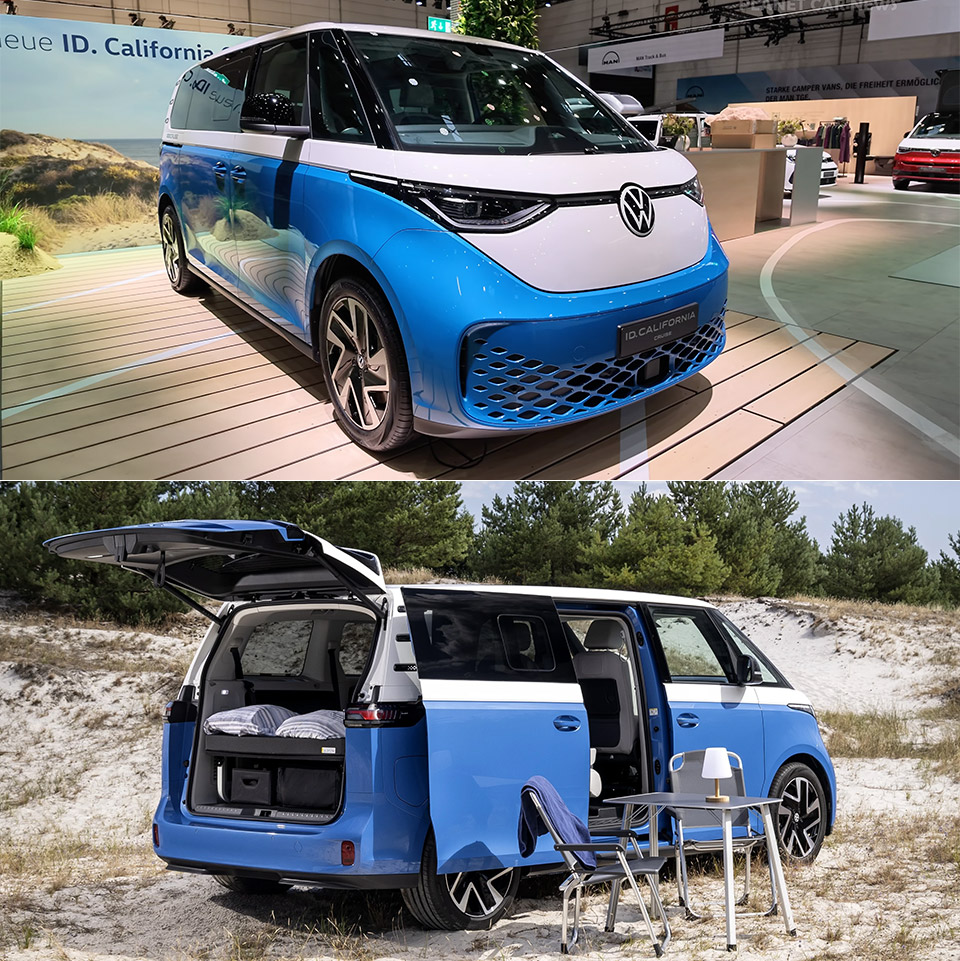
Volkswagen Commercial Vehicles put the ID. California Cruise on the floor at Düsseldorf’s Caravan Salon as the first battery-powered member of a name that has lived on diesel since 1988. Built on the ID. Buzz Pro, the van arrives in short and long wheelbases and keeps the familiar two-tone shape, adding only California lettering on the tailgate and Cruise graphics along the flanks. German pricing starts at €60,761, about $70,500, which undercuts the midsize diesel California Beach by a few thousand euros. First customer vans are due in early 2027, with more electric California variants promised by 2028.
Short wheelbase variants feature a 79 kWh useable pack and a WLTP range of around 286 miles. The extended wheelbase variants offer a little more, with an 86 kWh battery pack and a range of around 302 miles. Unlike what you may anticipate, they both employ the same rear motor: 210 kW, 286 horsepower, and 560 Nm of torque. Official 0 to 62 mph times range from 7.6 to 7.9 seconds, with DC charging reaching 185 kw on the short van and 200 kw on the long one. This will take you from 10 to 80 percent in approximately 26 to 30 minutes. Just bear in mind that adding camping gear will likely reduce your range significantly, thus trip planning must now be done in the California app, which maps out charging stations along your route and even allows Plug & Charge at compatible stations.
CAMPER VAN BUILDING SET – Kids can enjoy vacations every day with this LEGO City Holiday Adventure Camper Van building set
TOY FIGURES & CAMPER PLAYSET – This vehicle set includes everything kids need to build a camper van with a detailed living space, plus a campfire…
FUN FEATURES – The camper van opens up for full access to an interior living space with a kitchen, toilet, 2 bunk beds, a crib and a removable…
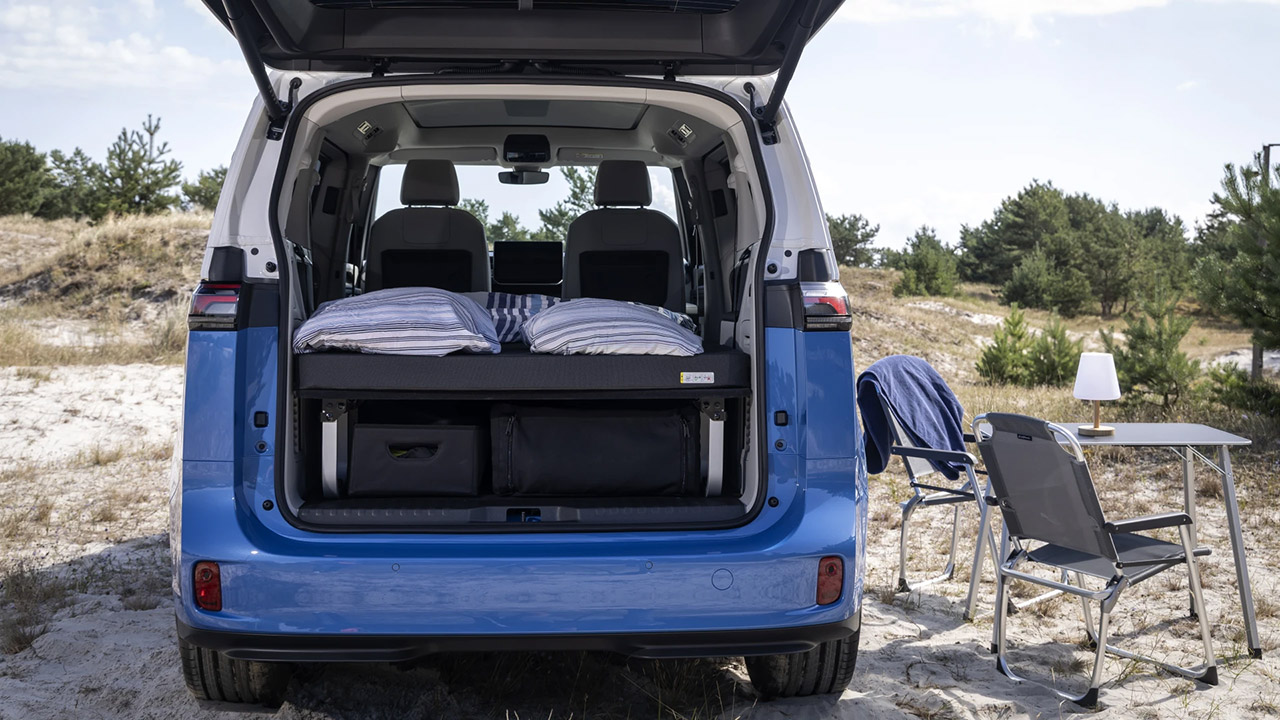
The back seats fold flat, and a 9cm mattress pops out over them to provide a comfortable 80 by 47 inch sleeping platform for two persons. Blackout blinds cover the windows, including the optional panoramic roof, and ventilation grills are put in up front to allow the cabin to catch some fresh air without having to open the doors. A folding table and a set of chairs are stored in dedicated areas under the bed platform and slide out when needed, right next to the open hatch. You won’t receive a pop top or a built-in kitchen, so you’ll need to bring your own induction cooktop or portable fridge to charge your gadgets.
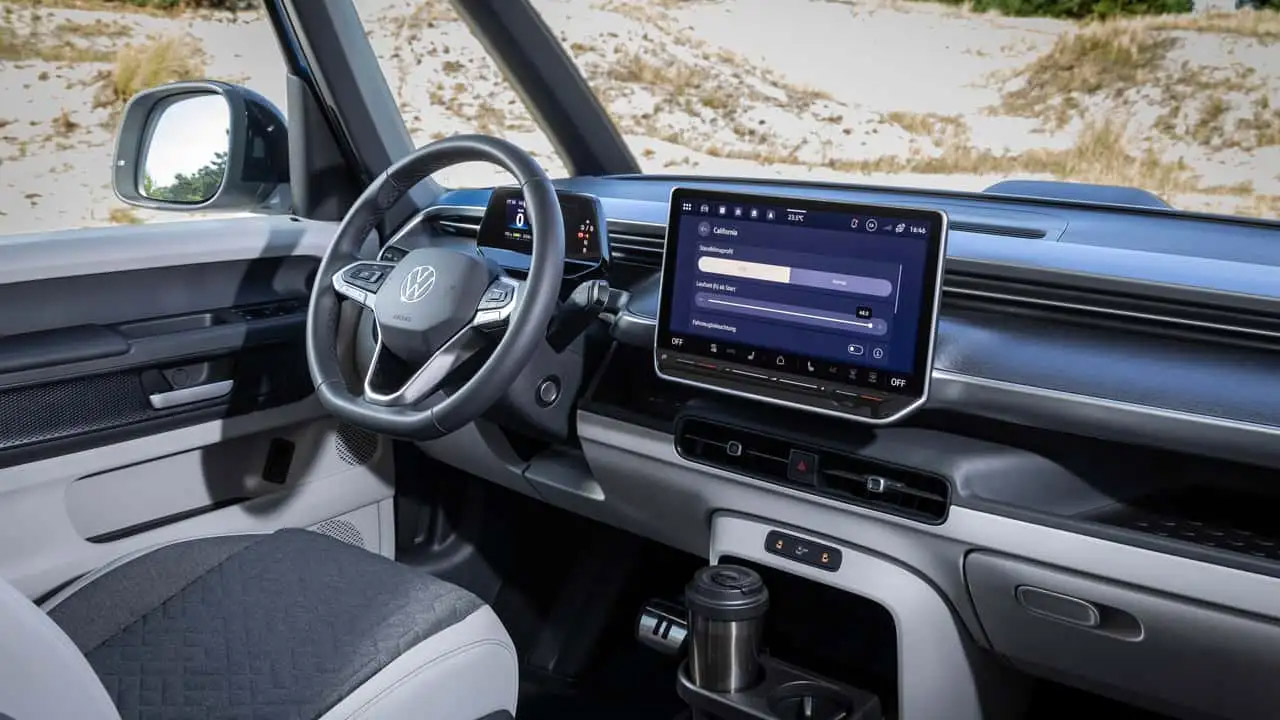
California mode is the piece of software that makes it all work, as it keeps the lights, USB ports, and climate control running while the van is parked overnight, with VW claiming a reasonable 48 hours of heating or cooling depending on the battery charge and outside conditions. However, if the charge level dips below 20%, it will turn off that mode, ensuring that you have somewhere to charge in the morning. If you need to charge some toys while camping, VW has a solution: a PowerSocket adapter on the charge port that offers 2Kw continuous and 3.6Kw peak, which is enough to power a coffee machine, an induction plate, or even an e-bike charger. So, the same battery that powers the car may now power your campground without the use of a generator.
Exclusive Miwo seat covers feature high-quality California woodwork and typography. This van is all about interior style and comfort, which come as standard, along with a handy discharge adapter. Storage is straightforward and simple: simply fold the mattress in the tailgate area when you’re on the go, and there’s room underneath for chairs and a table. Any extra room is just used for luggage. Getting set up takes minutes, not hours, as with other aftermarket boxes. This factory-built sleeper is ideal for brief weekend vacations or short tours while driving normally during the week.
However, the Americans will not be receiving this same variant of the badged van. VW stopped ID. Buzz sales in the United States for 2026, and they’re bringing it back for 2027 with a new Trim called Tourer, which is just a direct copy of the same idea, a fold-out mattress and platform, some window shutters, front panels for ventilation, a table and chairs outside, and their Overnight Mode software. Captain’s seats and an electric canopy that darkens are optional features on the US version. In Europe, the ID. California Cruise remains the first real electric California, a little two-person campervan that costs less than the diesel it replaces and makes room for a larger electric family van later. [Source]
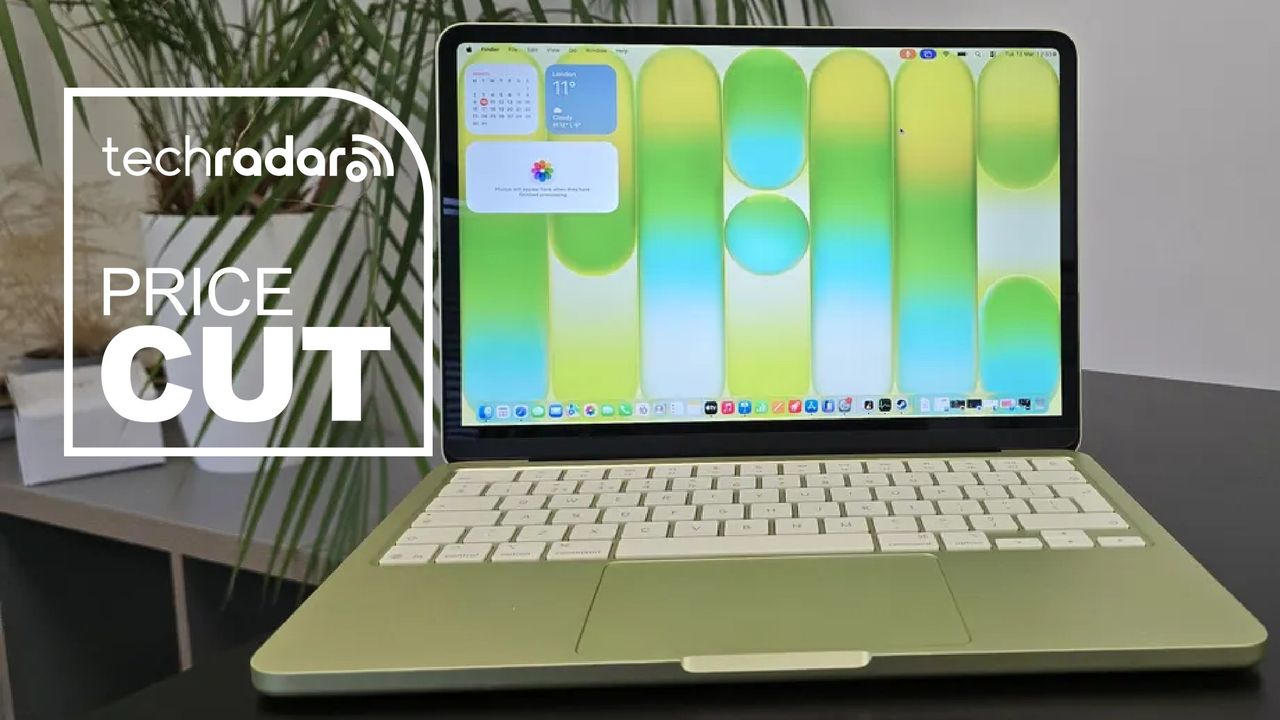
Apple made headlines earlier this year with the launch of the MacBook Neo, which we called “the best budget laptop you can buy” in our review thanks to its low AU$899 launch price and premium materials — all while in the midst of RAM and storage shortages.
Apple achieves the low-for-a-MacBook AU$1,049 price point by cleverly employing an iPhone processor, the A18 Pro chip found in the iPhone 16 Pro and Pro Max, instead of its M-series silicon found in higher-end MacBooks. The Neo also only comes in a base configuration of 8GB RAM and 256GB storage. You can increase storage to a 512GB SSD and gain Touch ID capabilities for AU$1,249 — Amazon currently has it discounted to AU$1,199.
What I like the most about the Neo is its repairability, which is very much an improvement over its more expensive siblings, with plenty of online content creators having demonstrated how easy the laptop is to take apart and reassemble.
Even with the price increase, I still believe the Neo is a fantastic budget laptop that will easily handle basic tasks like web browsing and media consumption, and it can even do some light gaming and video editing. Our tests have found that the 8GB RAM isn’t as much of a limitation as initially thought, with the laptop running most Mac apps with no issues.
The all-metal chassis, hi-res display and repairability still make the MacBook Neo a standout in the budget space, and the fun colours are a nice touch as well.
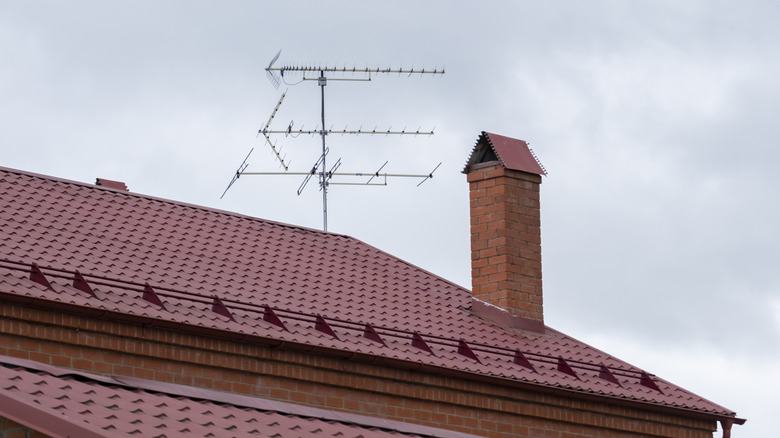
If you’re using a TV antenna, an indoor one to be precise, that struggles to pick up signals, you may have wondered whether it can be used outdoors. It’s often seen that mounting the antenna in the open generally delivers a better experience because the antenna has a clearer view and can receive stronger signals. Inside, you may be getting a lower signal strength due to walls and windows. So, if you’re considering moving your indoor antenna outside, the setup will work, but there are a few things you need to keep in mind.
Let’s first understand how indoor and outdoor antennas differ, even though both perform a similar job. Indoor antennas are generally smaller and work well in urban areas where broadcast towers are within a 15-30 mile range. These antennas may lack weatherproofing since they’re not made to withstand prolonged exposure to direct sunlight, rain, and snow. Plus, their design doesn’t allow easy mounting on roofs. Outdoor antennas, on the other hand, are weatherproof and tend to have better signal reception. A good one can capture signals from broadcast towers as far as 50-70 miles away.
It’s these two aspects that make placing even the best indoor TV antennas outside a less practical option. While the antenna will work, and you may even notice improved signal reception, long-term outdoor use can shorten its lifespan.
Advertisement
The setup works, but it’s not the best choice
Denis Klimov 3000/Shutterstock
If you’re temporarily placing or mounting the antenna outdoors while taking the necessary precautions like grounding and avoiding common electrical mistakes, there’s little harm in doing so. But in the long run, the design constraints will have a negative impact on the antenna. Apart from that, simply placing the antenna outdoors doesn’t guarantee better signal reception or more channels, as its placement and positioning are also important. With an indoor antenna, however, you generally don’t have a lot of options. More often than not, you will have to rely on DIY techniques to mount it properly.
If you do plan to use an indoor antenna outdoors, make sure to properly waterproof the setup, though even that wouldn’t necessarily stop moisture or other outdoor factors from affecting it over time. For flat indoor antennas, specifically, you could move them to the other side of the window if the glass panel is affecting signal strength, but it’s also not feasible in the long run for the aforementioned reasons. Essentially, for outdoor use, it’s always better to use an antenna that’s designed for the job, unless you’re prepared to replace it sooner than you otherwise would.
Microsoft released the KB5120998 preview cumulative update for Windows 11 versions 25H2 and 24H2, which comes with 35 changes, including improvements to the Start menu, taskbar, and Windows search.
KB5120998 is a preview update that lets IT administrators test Windows bug fixes, improvements, and new features before they roll out to all users during next month’s Patch Tuesday release.
However, unlike cumulative updates, monthly optional updates do not include security fixes and provide only quality improvements.
After installing the August 2026 preview update, users can move the taskbar to the bottom, top, left, or right side of their screen in Settings > Personalization > Taskbar > Taskbar behaviors > Taskbar position, with most customization settings, like never combining taskbar icons, working in every position.
The KB5120998 also adds a new smaller taskbar option that reduces the taskbar height and the size of taskbar icons to maximize screen space on smaller devices, and small or large size options for the Start menu (in Settings > Personalization > Taskbar > Taskbar behaviors > Taskbar size dialog), as well as the ability to independently show or hide the Pinned, Recommended, and All sections, and to hide the account name and profile picture.
Advertisement
With KB5120998, Microsoft has also started rolling out the administrator protection security feature that allows users to perform admin tasks using just-in-time privileges.
“Administrator protection is not classified as a formal security boundary; it hardens the security against elevation-of-privilege attacks with the introduction of profile separation,” Microsoft said. “This feature is turned off by default and can be enabled using OMA-URI in Microsoft Intune or through Group Policy.”
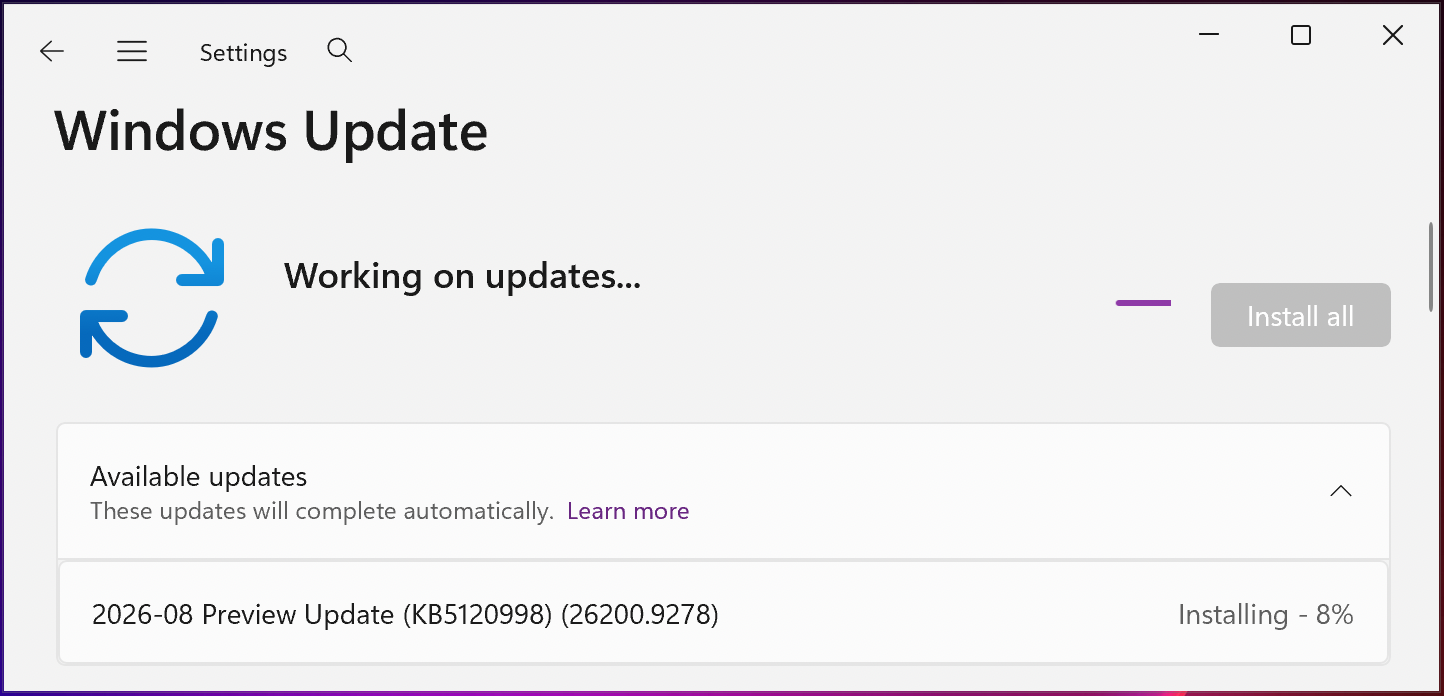
You can install KB5120998 by opening Windows Settings, clicking on Windows Update, and then clicking ‘Check for Updates.’
Since this is an optional update, you will need to click the “Download and install” link unless you already have the “Get the latest updates as soon as they’re they’re available” option enabled, which prompts the OS to install it automatically.
Advertisement
You can also manually download and install the KB5120998 preview update from the Microsoft Update Catalog.
KB5120998 preview update (BleepingComputer)
Windows 11 KB5120998 highlights
Once installed, this optional non-security update will upgrade Windows 11 25H2 and 24H2 devices to builds 26200.9278 and 26100.9278, respectively.
The August 2026 preview update comes with many other changes, some of the more important ones highlighted below:
Windows now automatically indexes your most-used folders so those files appear in subsequent search results. You can control the setting at Settings > Privacy & Security > Search > Automatically find additional relevant locations.
This update improves restart behavior so PCs that were manually put to sleep return to sleep after completing an update, even when automatic sleep is set to Never.
This update adds support for participating apps to coordinate their updates with Windows Update. Supported apps can benefit from improved scheduling and a more streamlined update experience. For more information, see Windows Update Orchestration Platform (UOP).
This update improves resiliency and recovery from potential VPN process-related background issues that can cause processes to stop responding.
Starting in August 2026, Windows 11, version 24H2 and 25H2 will no longer include the Windows Management Instrumentation Command-line (WMIC) utility. WMIC is already removed by default in new installations of Windows 11, versions 24H2 and 25H2, and will no longer be available as a Feature on Demand (FoD).
On Thursday, Microsoft warned customers that their systems may reboot one more time after deploying the August 2026 optional update and updates rolling out over the next several months.
“With recent and upcoming Windows updates over the next few months, a limited number of consumer and business devices might experience one additional restart during installation,” Microsoft noted in a message center update. “This one‑time restart occurs after a Secure Boot certificate update is applied as part of the Secure Boot update process.”
Earlier this month, it also reminded customers that devices running Home and Pro editions of Windows 11 24H2 will stop receiving updates in two months. However, Windows 11 24H2 Enterprise and Education editions will remain under mainstream support until October 2027.
The former Defense Intelligence Agency (DIA) IT specialist previously accused of trying to pass secret and top-secret information to foreign spies has pleaded guilty following a successful FBI sting.
Nathan Vilas Laatsch, then 28, and now 29, was arrested in May 2025 after an undercover FBI agent caught him for the second time transmitting intelligence packages in a public park that he believed would be collected by a foreign government’s spy.
The man, who had been employed at the DIA as a civilian employee since 2019, held top-secret clearance, and in March 2025 offered to transmit classified information to an overseas administration.
Advertisement
The identity of this country has never been revealed, but court documents [PDF] describe it as “a friendly foreign government.”
Laatsch was assigned to the DIA’s Insider Threat Division in “spring 2025,” a unit dedicated to identifying government workers who were likely to leak, or already were leaking, classified information to foreign powers.
According to the Justice Department, the FBI “became aware” of Laatsch’s offer in March.
The man’s initial email, sent from a newly created account, had the subject line: “Outreach from USA Defense Intelligence Agency (DIA) Officer.”
Advertisement
The email introduced Laatsch, his role at the DIA, and the service he was willing to provide. According to the complaint, Laatsch served in a technical role in support of the DIA’s internal Officer of Security (SEC). Among other things, his duties included “enabling user activity monitoring on individuals with access to DIA systems, including individuals who are under investigation” and “assisting external partners, such as law enforcement, on the use of insider threat tools.”
“I am willing to share classified information that I have access to, which are completed intelligence products, some unprocessed intelligence, and other assorted classified documentation,” the email stated.
The email included a picture of his government ID used to enter and exit his Washington, D.C. workplace, with name and image redacted, and a username associated with an encrypted messaging platform the recipient could use to continue the conversation.
Soon after Laatsch’s email was intercepted, the FBI instigated an undercover operation to trick the IT bod into thinking that he was talking to a genuine spy.
Advertisement
The feds’ efforts were not immediately successful. Agents replied on March 23, saying: “Good afternoon, I received your message and share your concerns. We are glad you reached out. I look forward to your response and learning more about your work.”
Laatsch did not respond until April 14, after the FBI sent a follow-up via the original email address on April 4.
Following additional conversations, in which Laatsch described what information he was offering to the “foreign spy,” on April 28, 205, Laatsch entered his office and within 20 minutes began accessing classified information.
Prosecutors said he spent much of the entire workday writing on a physical notepad while intermittently looking at his computer monitor, hiding the notebook when coworkers walked by.
Advertisement
“The defendant wrote multiple pages of notes, which he then removed from the notepad at his desk and folded into squares,” court documents state. “At the end of his workday, the defendant bent under his desk, placed the folded papers into his socks, and departed the office.”
Laatsch repeated the same behavior on April 29, and again on April 30, only this time placing the paper squares in the bottom of his lunchbox.
The next day, the IT specialist followed FBI instructions on where to dead-drop the thumb drive – onto which he had transposed state secrets – in an Arlington, Virginia park.
Although he believed he was leaving the device for a foreign spy to collect, the FBI instead gathered Laatsch’s deposit and found nine typed documents, eight of which contained information classified as top-secret and contained sensitive compartmented information.
Advertisement
Court documents confirmed that the nature of the files Laatsch transmitted included sensitive methods of intelligence collection, intelligence related to foreign military exercises, and analysis of the impact of those military exercises.
These were chosen entirely by Laatsch, who had not received a brief on what files to collect from the FBI. In exchanged messages, Laatsch stated he chose the files based on assumed interests.
The device also contained a note from Laatsch personally. In it, he said he hoped the initial tranche of files would serve as proof of the type of information to which he had access.
Laatsch, whom prosecutors described as an individual who had become disenfranchised with the current administration, also expressed his willingness to accept citizenship in the foreign nation.
Advertisement
Further, he said he was “not opposed to other compensation,” but was not in need of financial or other kinds of material rewards.
In the interim, Laatsch messaged the “spy” with additional details about how internal investigations are carried out at the DIA, the common “stupid mistakes” made by those under investigation, and that they “should not be too difficult” for him to avoid.
The undercover FBI agent arranged a second intel drop for the following month, to which Laatsch agreed.
According to the plea agreement, between May 15 and May 27, Laatsch would enter his workplace, log into his classified system, and spend most of the day transcribing classified information by hand into a notebook. He repeatedly folded up the pages and placed them in his socks before leaving at the end of the workday.
Advertisement
The FBI arranged the second intel drop for May 29, 2025. It instructed Laatsch to instead head to a specific picnic table in the same Arlington park and electronically transfer the files from his personal computer while situated at the picnic table.
Laatsch agreed, executed the transfer to the FBI-controlled address while sitting in the park, and was arrested on the spot.
The man waived his right to an attorney and admitted to the offenses when questioned by FBI agents.
“By his own admission, Laatsch betrayed his oath by offering classified information to a foreign government, the very thing he was supposed to prevent as an employee of DIA’s Insider Threat Division,” said Roman Rozhavsky, assistant director at the FBI’s Counterintelligence and Espionage Division.
Advertisement
“Those entrusted with our nation’s most sensitive information must not exploit their access for personal gain – in this case offering to sell American secrets to buy foreign citizenship. The FBI and our partners will continue to hold accountable all those who betray the trust of the American people.”
Laatsch’s plea agreement [PDF] recommends a sentence between 11 and 18 years, including time served, although the court is able to issue a maximum sentence that includes a life term and a $250,000 fine. ®
We spend hours testing every product or service we review, so you can be sure you’re buying the best. Find out more about how we test.
MechLands Vibe99: One-minute review
The MechLands Vibe99 is a mechanical keyboard that takes aim at the budget-end of the market, but does so without any apparent sacrifices to features or performance.
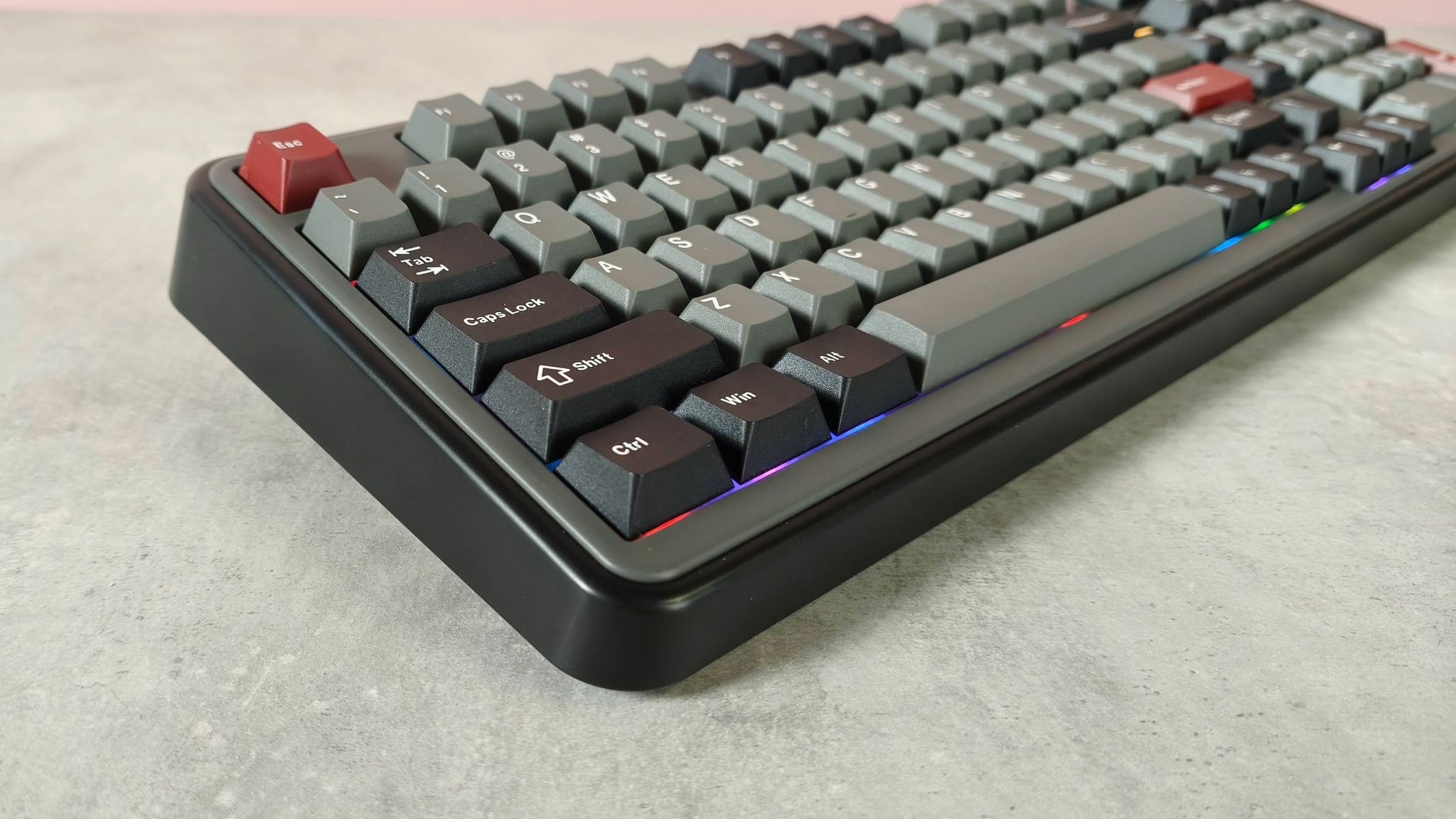
It doesn’t make a great first impression, however. The retro aesthetic fails to charm, with its chunky design and the copious amounts of grey in my review unit merely looking downmarket. Fortunately, the bright and customizable RGB backlighting does help to liven it up a little.
Advertisement
The build quality isn’t terribly impressive, either. The plastic chassis is solid but doesn’t feel premium. Fortunately, the Double-shot PBT keycaps are much better, although their opaque legends don’t allow that aforementioned backlighting to shine through. Their Fn shortcuts aren’t labelled, either, unlike those installed in the best gaming keyboards.
Latest Videos FromTechRadar
(Image credit: Future)
However, the compact width of the Vibe99 is impressive, and thanks to the smart 1800 layout, you still get plenty of keys. What’s more, it also features an integrated screen. It may be a basic TFT affair with limited information displayed, but what it does show is useful, such as the time, date, and battery level. You can also upload GIFs to it if you so wish, but I wouldn’t advise that you do, given the screen’s small size and low fidelity.
Advertisement
You’ll need to use MechLand’s peripheral software to upload them, but it takes an incredibly long time to do so, and you can’t do much else while it’s in progress. What’s more, the whole app has a poor UI, lacking sharpness and clarity. The remapping suite is also disappointing, with only a basic selection of assignments and no direct visual indication of your rebindings.
The performance of the Vibe99 itself fares better. The keys are generously lubed yet quite clicky, lacking the dampening of the very best in the space. However, they’re satisfying to use and have plenty of snap, actuating and rebounding quickly while forgiving accidental hits. The natural tilt of the layout and the folding feet help to make the board more comfortable to use as well, although I still wish it came with a wrist rest.
It’s impressive that the Vibe99 offers all that it does at such a low price point. It’s far cheaper than many of the mechanical models offered by the big brands, and it’s even cheaper than some other great budget options. It’s not perfect, and the software isn’t as good as it should be, but the Vibe99 is still worth shortlisting if you’re looking to save.
Sign up for breaking news, reviews, opinion, top tech deals, and more.
Advertisement
(Image credit: Future)
MechLands Vibe99 review: Price & availability
$82.99 / £63.99 / AU$120
Available now
One of the cheapest mechanical keyboards around
The Vibe99 costs $82.99 / £63.99 / AU$120 and is available now in various colorways but with one switch type, which is MechLand’s Linear Mint model. It comes with a keycap puller and a braided USB cable.
This is a very competitive price for a 1800 wireless mechanical keyboard with hot-swappable switches. It’s even cheaper than the aluminum variant of the MonsGeek FUN60 Ultra, which has fewer keys. However, the build quality of that board is superior, and thanks to its analog switches, it has far more performance-related tweaks.
The Vibe99 is also considerably cheaper than big-name mechanical models, such as the Razer BlackWidow V4 Pro 75%. But the BlackWidow has a far superior build and unrivaled performance, thanks to the glorious response of its switches. Its software is much better, too.
Advertisement
MechLands Vibe99 review: Specs
Swipe to scroll horizontally
Layout
1800
Switch
Mechanical (MechLands Cream Mint Linear)
Advertisement
Programmable keys
Yes
Dimensions
16.5 x 5.9 x 1.7 inch (418 x 150 x 42mm)
Advertisement
RGB or backlighting
Yes (customizable)
(Image credit: Future)
MechLands Vibe99 review: Design & features
Tired looks
Cheap-feeling plastics
Poor software
The Vibe99 aims for that faux-retro appeal, but I don’t think it succeeds. Not only does the thick base look dated, but the grey and black finish of my review unit looked quite dour. The bright RGB backlighting did at least add some vividness though.
Unfortunately, the build quality isn’t anything to write home about either. Although it feels solid enough, the plastics used throughout feel cut-price, especially when compared to the aluminum frames of more upmarket gaming keyboards. Its saving grace is its keycaps, which have a Cherry profile and are made from Double-shot PBT. They’re also solidly installed with next to no play. However, it’s a shame their legends aren’t transparent to allow the backlighting to shine through. Also, the default Fn shortcuts across the Function row and dotted around elsewhere aren’t labelled, so you’ll have to commit them to memory.
Advertisement
To speak in favor of the Vibe99’s design, it’s an impressively compact board, and its 1800 layout means it still manages to feature plenty of keys, including a number pad. It’s also quite light, which makes it easy to maneuver when required.
(Image credit: Future)
What’s more, a TFT display is nestled in the top corner, and while it’s small with a low resolution, it still provides some useful readouts, such as those for the time, date, and the battery life. You can also upload custom GIFs to it via the MechLands’ software for Windows, although I’m not sure it’s worth the effort given the screen’s quality.
This software also lets you record macros and customize the Vibe99’s backlighting. You can remap keys here as well, although the selection on offer is quite lackluster, with only a handful of system and media shortcuts available. What’s more, your selected bindings aren’t shown on the layout map directly; you have to hover over each individual key to see your remapped function, which is highly impractical.
The rest of the app’s UI has issues, too. Text and various other elements are fuzzy and sometimes oddly proportioned. Worse still is the aforementioned GIF uploader: during my testing it took an achingly long time for one to upload, and most of the app was inaccessible during the process. To add insult to injury, the dialog box for its progress remained on top of all my other windows, not just the app’s. If you’re hoping such issues will be patched, I wouldn’t get your hopes up; according to MechLand’s website, the last update for the software was in 2025.
Advertisement
(Image credit: Future)
MechLands Vibe99 review: Performance
Pre-lubed keys
Snappy response
Needs wrist support
In contrast to its somewhat incompetent software, the Vibe99 is a solid and impressive performer. The keys are well lubed, which makes them feel less harsh when pressed, yet they still retain a gratifying clickiness. They’re relatively loud, but thankfully the noise isn’t grating.
They’re also quite snappy, thanks to their reasonably shallow actuation point and fast rebound. However, they’re not so reactive that mere grazes will trigger them, which means you won’t be making many typos.
(Image credit: Future)
What also helps with typing are the keycaps, with their low Cherry profile making them easy to glide over. Additionally, they’re spaced far enough apart to prevent mis-hits, yet close enough to make gaming comfortable, with various common keys remaining easy to reach from the WASD position. The space bar is a triumph as well — the combination of its low profile and sloping shape makes it conducive to direct hits on its top surface, rather than on its back edge.
However, the Vibe99 really needs to be paired with a wrist rest to make it comfortable for long sessions. That aforementioned thick chassis strained my wrists as I reached for the keys. The natural tilt of the layout and the unit’s fold-out feet improve ergonomics to an extent, but neither can compensate entirely for the lack of additional support.
Advertisement
The Vibe99 connected to my Windows PCs via the 2.4GHz dongle and Bluetooth just fine, and hot-switching between them was quick thanks to the toggle switch on the back of the unit.
Should I buy the MechLands Vibe99?
Scorecard
Swipe to scroll horizontally
Attributes
Advertisement
Notes
Rating
Value
This keyboard has one of the best price-to-spec ratios I’ve ever seen.
Advertisement
4.5 / 5
Design and features
Solid enough, but it doesn’t look or feel premium. The software is functional but barebones and features a poor UI.
3 / 5
Advertisement
Performance
The switches are well lubed and have a snappy response. However, you’ll need some additional wrist support to get comfortable.
4 / 5
Overall
Advertisement
The Vibe99 is a veritable bargain at this price, considering all that it offers. You’ll need to bring your own wrist support, though, and I hope you’re not after incredible accompanying software.
3.5 / 5
Buy it if…
Advertisement
Don’t buy it if…
MechLands Vibe99 review: Also consider
(Image credit: Future)
How I tested the MechLands Vibe99
Tested for several weeks
Used for a variety of tasks
Plentiful gaming keyboard experience
I tested the Vibe99 for several weeks, during which time I used it for gaming, working, and general productivity. I used it with two Windows 11 PCs, one connected via the 2.4GHz dongle and the other via Bluetooth, and regularly hot-switched between them.
One of the games I played with the keyboard was Counter-Strike 2, which is a great test for peripherals since it requires quick and accurate movements.
Advertisement
I’ve been PC gaming for over a decade, and have used a large number of keyboards in that time. I’ve also reviewed plenty of them, from budget offerings to premium models from the likes of Razer, Corsair, and SteelSeries.
“Multikernel Technologies has put out mklinux v7.0-mk2, the first public release of the multikernel Linux tree it’s been building since last year,” reports the blog It’s FOSS:
The basic premise of the project is that one physical server can run several independent Linux kernels side by side, each with its own dedicated CPUs and memory. So, the same box could run a database on one kernel and a GPU training job on another without either kernel touching the other’s resources… One kernel runs as the host, controlling the machine’s CPUs, memory, and PCI devices. When it spins up a new kernel instance, that instance gets its own dedicated slice of hardware and boots straight onto it using Linux’s kexec mechanism, running natively rather than under a hypervisor.
The host tracks all of this through device tree overlays under /sys/fs/multikernel/, and it can shift hardware between running instances while everything stays up.
That’s a different setup from both VMs and containers. A VM still puts a hypervisor and a host kernel between the app and the hardware. A container skips the hypervisor, but every tenant on the machine shares one kernel… This release only supports x86_64 hardware, though Multikernel Technologies says the architecture-specific code is already modular enough for other ports to follow later.
Advertisement
The article notes they’re selling multiple products based on the kernel tree, including one for running AI agents in their own kernel with direct GPU access and one that promises to patch a running kernel without taking the system down.
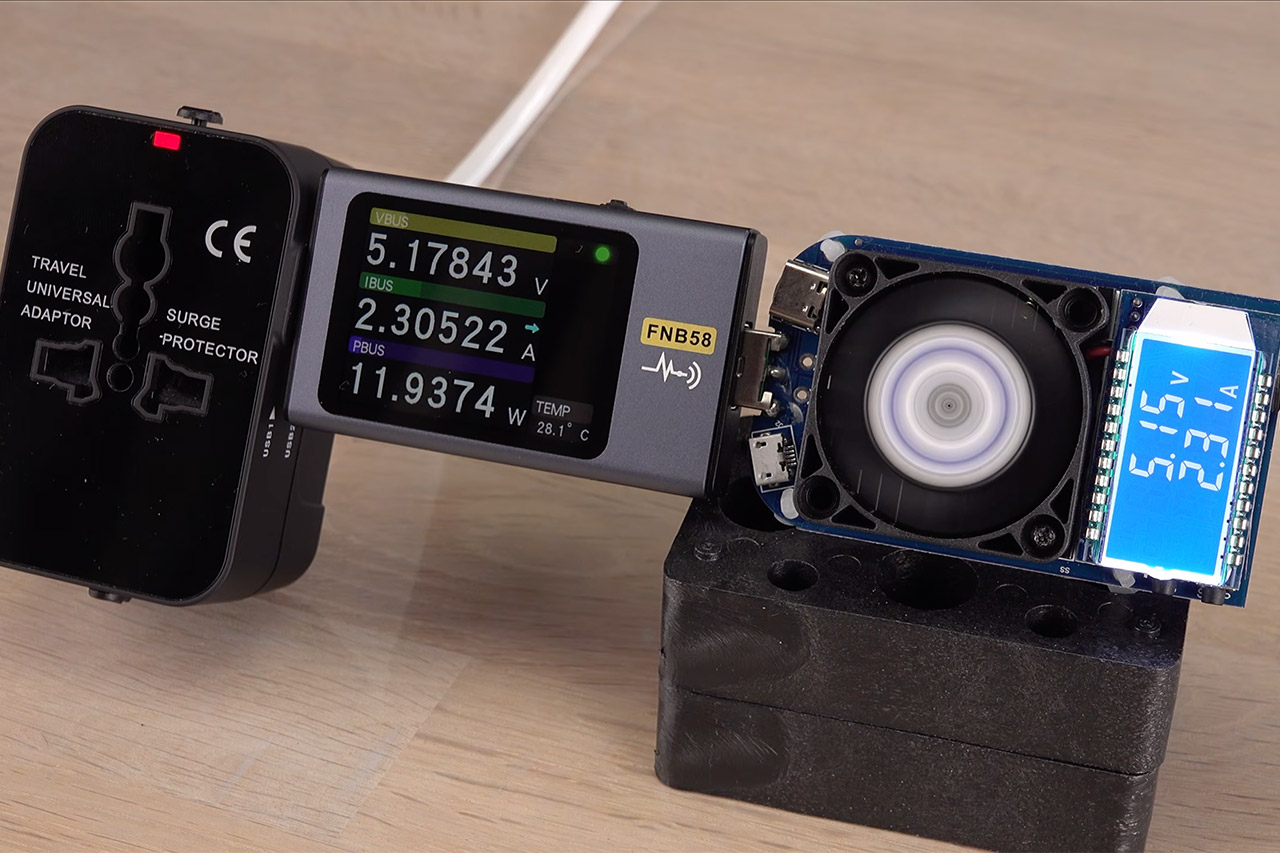
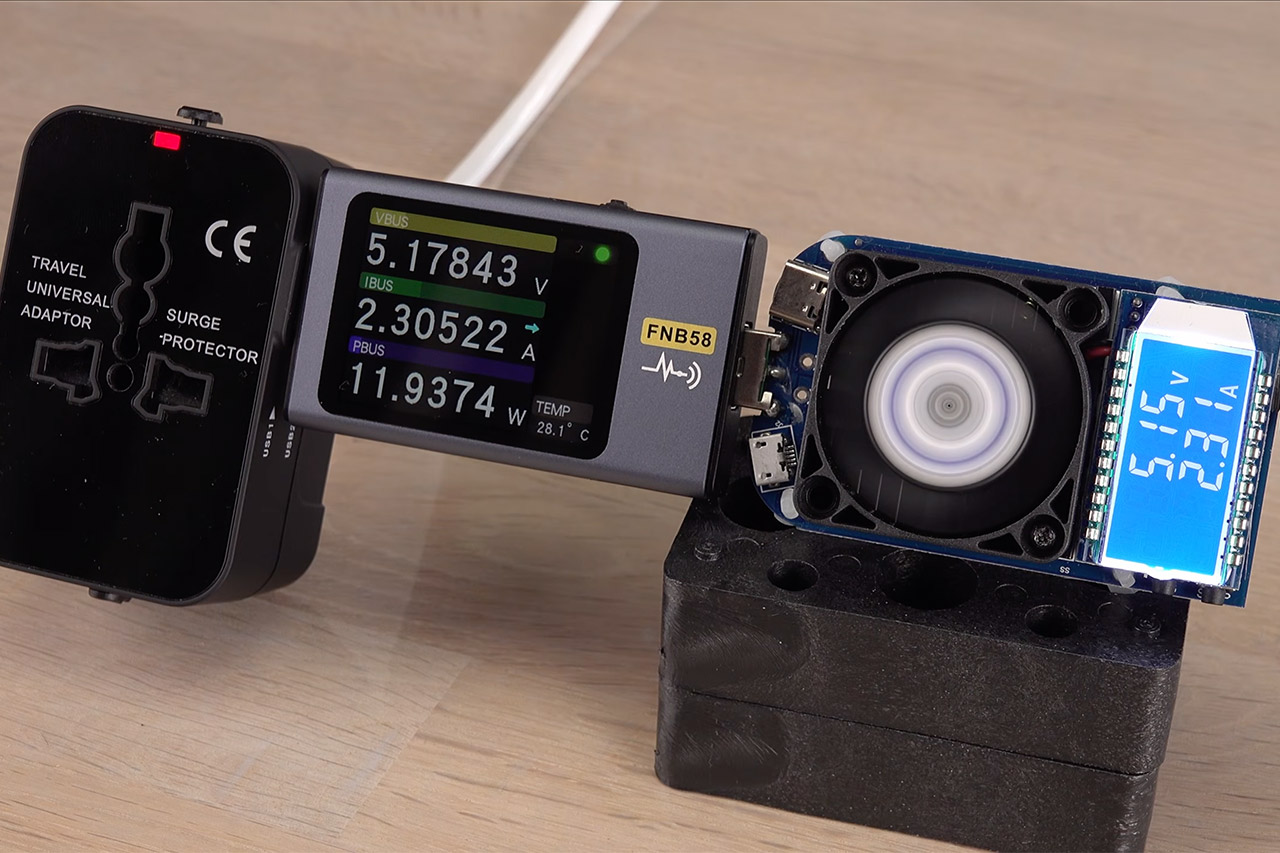
Cheap online listings sell universal travel adapters that pack sliding American, British and European prongs plus two USB ports into one small plastic block for just over nine dollars. Brainiac75 bought one and started testing it before anyone would ever pack it for a trip.
Plugging just one plug into a live wall socket is enough to send more than 220 volts racing through the unused metal pins protruding out the other side. A simple resistance test revealed that those pins are indeed linked to the same conductors as the ones being utilized, rather than just sitting there all alone. Make no mistake: those exposed pins aren’t just ghost voltage with a modest current behind them; they’re directly connected to the grid.
Universal Plug Compatibility: Type A (US / Canada / Japan / China), Type C (EU), Type G (UK / Singapore), and Type I (Australia).
Power 5 Devices at Once: Includes 1 AC outlet, 2 USB-A ports, and 2 USB-C ports. The USB ports support up to 20W total output or 15W max when shared…
Exceptionally Compact: Measuring just 3.39 × 1.97 × 0.98 in (86 × 50 × 25 mm), it has a credit card-sized footprint and is 43% smaller than…
When you slide a retractable pin all the way back in, you’d expect the internal switch to disconnect it from the circuit, but that’s not the case. There is no rule requiring you to push every unused set back in before utilizing the adapter. This means that if you forget to plug in the British or American plug, it will still be live while the European plug is snug in the wall, and to make matters worse, that little red power light continues to glow for a while after you unplug the whole thing, though to give the manufacturer credit, the voltage on the pins does drop back down to safe levels pretty quickly.
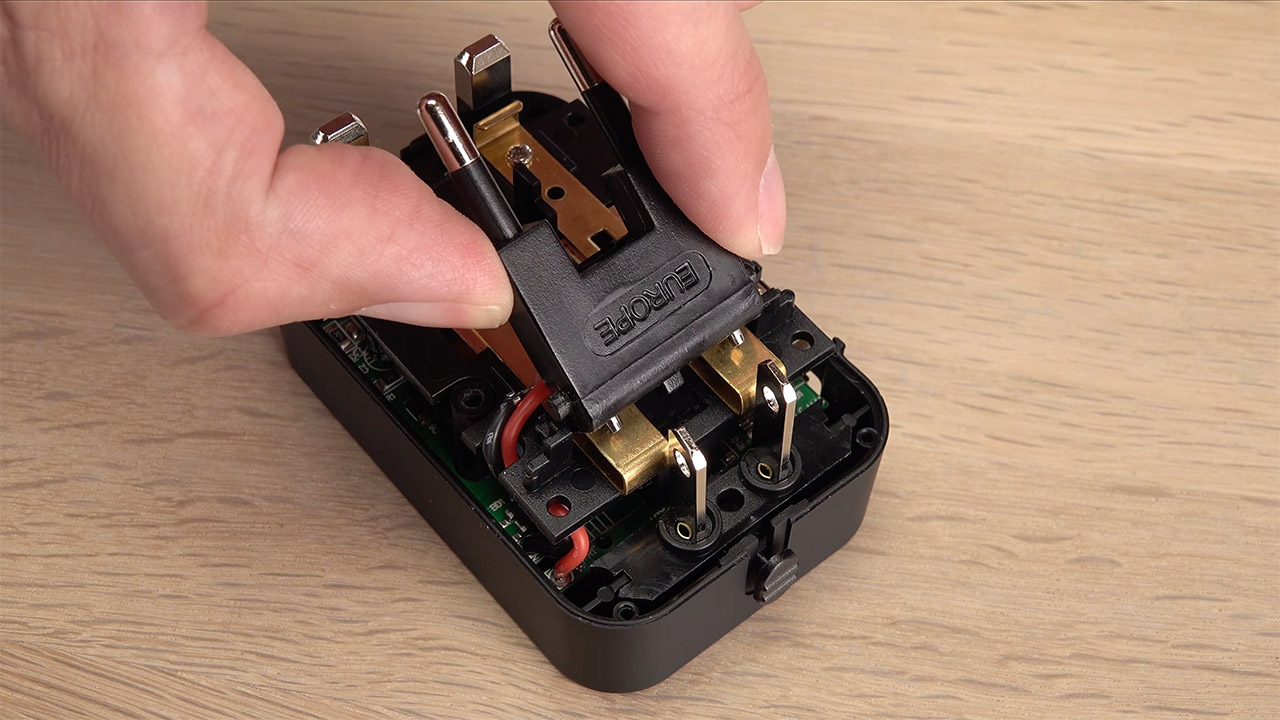
Ripping open the cover gave us a good idea of why the pins reacted in this way. When you insert one of the prong sets, it presses down on these contacts, which connect to a huge central bus bar. It is a simple design with cheap manufacturing costs. Best of all, there are no restrictions on how many different plug types you can use at the same time; simply slot them all in and you’re good to go.
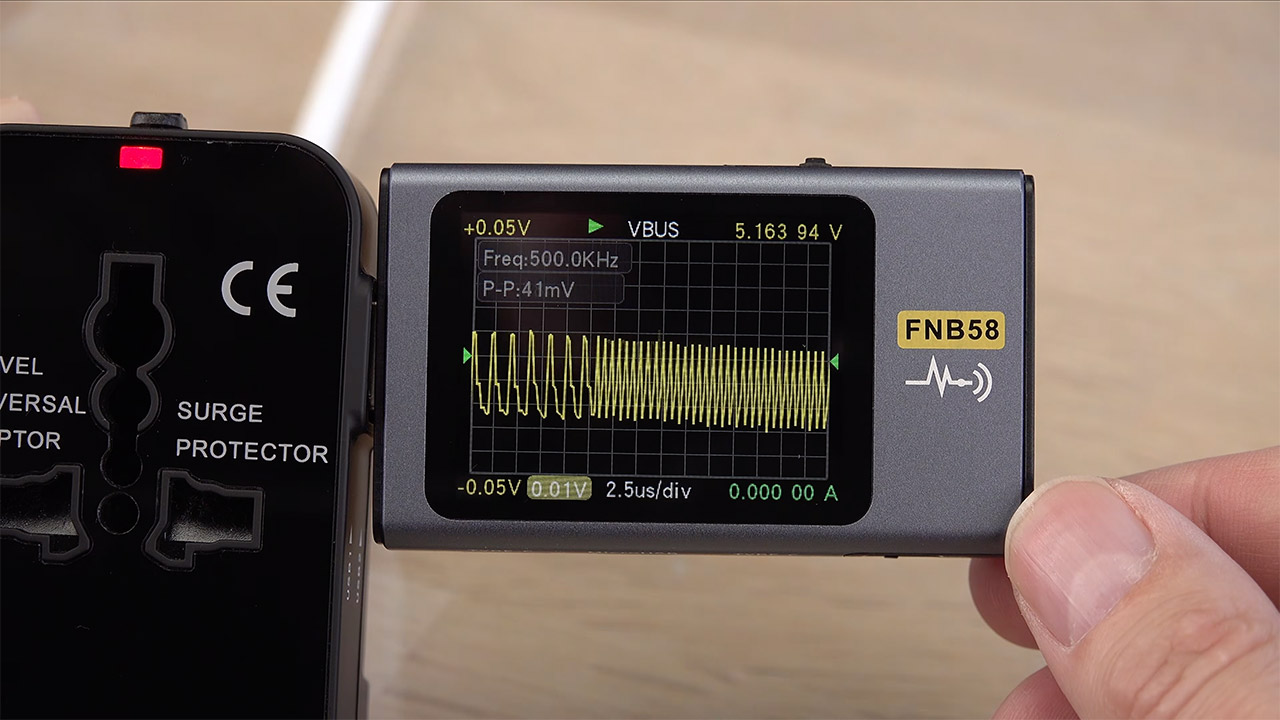
Those USB ports, on the other hand, were a bit of a surprise, as they were pumping out 5 volts despite the label stating 2.1 amps, and they got up to 2.4 amps on a load test before becoming unstable. Overall, not terrible, albeit they don’t provide any other charging protocols like some other adapters. After taking the device apart, he ended up removing the less useful American and British plug components and simply taping over the holes where they used to be. As a result, we have a USB charger that can accept a Schuko standard connector as well as random non-European plugs, which is more safer. [Source]
One of the more stubborn barriers to personal adoption of solar power is providing sufficient energy to certain power-hungry appliances. The average refrigerator, for example, can be quite the power hog, requiring a hearty injection of juice when it first starts up, followed by consistent power to keep it running. It’s not dissimilar to how an air conditioner works, and an A/C unit would require quite a few panels itself. Optimizing for solar power means figuring out exactly how many solar panels you need to power everything in your home, and if we’re factoring a refrigerator into the equation, you’ll likely need at least 3 to 4 dedicated solar panels for it alone.
The vital quantifier here is that, while just about every type of fridge is generally pretty power-thirsty, its exact power requirements can vary depending on factors like the fridge’s wattage and how large it is. If we’re assuming optimal sunlight draw, the aforementioned 3 to 4 panels can handle most refrigerators, but if you want to optimize even more than that, we need to take a look at the nitty-gritty details.
Advertisement
Requirements vary depending on the fridge’s size and wattage
Ryanjlane/Getty Images
Let’s say, for example, you had a relatively tiny mini fridge, the kind you’d use in a small camper van or at a jobsite. Compared to full-size models, this kind of fridge has much lower power needs, approximately 300-400 watts to get it going and 100-200 watts to keep it running. For that kind of power, you would only need a single 300W solar panel. So long as you’re getting enough sunlight, that’s more than enough power for both initial plug-in and allowing the fridge to run its cooling cycles.
On the other hand, if you’re looking to power a full-scale French door refrigerator with a lot more cubic feet, that’s naturally going to incur greater power costs. A French door fridge would need about 1,200-1,800 watts to get rolling, followed by 500-700 watts to run its cycles. For that, you would need at least 3 to 4 300W solar panels, possibly more just for the initial startup.
It’s also worth noting that a solar panel on its own would only keep a fridge running for as long as the sun is shining, which obviously isn’t all day. If you wanted to power a fridge constantly, regardless of size, you’d also need to consider installing solar batteries on your home or buying a portable power station. Either would allow you to store sufficient excess power to keep things running through the night.




































































You must be logged in to post a comment Login