








Connect with us

Tech

Ryobi 18V One+ Lithium Vs. Lithium Edge Batteries: What’s The Difference?

Published

on


Ryobi power tools are currently being utilized, or at least safely stored in, residential dwellings all over the globe. It is, perhaps, less certain what specific variety of Ryobi tool you might find in those dwellings, as the Techtronic Industries-owned manufacturer offers a variety of devices that are powered by multiple different power sources, ranging from low-voltage USB models to the punchier 40V set.

Somewhere in the middle is Ryobi’s generally well-regarded One+ 18V lineup, which features more than 300 different tools to choose from. And yes, any Ryobi battery bearing the 18V brand can be used to power those devices. There are also different types of 18V batteries, and we aren’t just talking about their ampere hour (Ah) ratings. Over the years Ryobi has developed the One+ Lithium Edge variety of 18V battery pack alongside its standard 18V models. Even some Ryobi diehards may not be entirely sure about what makes them different.

Advertisement

In the simplest terms we can offer, the Lithium Edge 18V batteries are high-performance models that are intended to provide both a power and a runtime upgrade over the standard 18V packs. They do so by utilizing Ryobi’s tabless cell design, which purports to improve the flow of energy and thus the overall performance of the tool. Lithium Edge 18V batteries can also help tools run cooler during heavy usage, and are designed to charge faster than standard-cell 18V power packs as well. 

Advertisement

What’s the price difference between Ryobi’s standard 18V and 18V Edge batteries?

Ryobi’s standard 18V battery packs are still designed to deliver solid results when it comes to power and performance. One could easily argue that the long-running popularity and general effectiveness of Ryobi’s 18V tools have helped it earn a spot alongside the best power tool brands in the game. There’s also one very good reason to opt for Ryobi’s standard 18V battery packs over those with the Lithium Edge branding, which is that they tend to be notably cheaper at the point of purchase.

In comparing the price points, we’ll look at the lowest-rated comparable batteries in both the standard 18V and Lithium Edge lines for ampere hours. As the latter group starts at 4Ah, we’ll tell you that a single 18V Lithium Battery in that range costs $149, and it does not come with a charger. By comparison, the standard 4Ah-rated 18V battery without a charger is priced at just $99. Moreover, in the standard 18V battery lineup, Ryobi also makes 2Ah and 1.5Ah models that can be purchased for far less.

As you can imagine, the prices increase incrementally with every jump in ampere hours. That will lead many shoppers to debate whether or not it’s better to buy several of the cheaper, standard 18V batteries, or pay extra to have fewer of Ryobi’s Lithium Edge models on hand, as their performance enhancements will likely require fewer battery swaps on the job. Unfortunately, we cannot make that decision for you. 

Advertisement


Source link

Advertisement
Continue Reading
Click to comment

You must be logged in to post a comment Login

Leave a Reply

Tech

Adobe brings image, video, and PDF creation directly into Slack

Published

on

Creating a marketing graphic or editing a PDF is now as easy as sending a Slack message. Starting today, Adobe for Slack lets you turn everyday conversations, shared files, and project briefs into polished images, videos, and documents, without leaving your Slack workspace.

Slack can now create Adobe content with simple prompts

Everything runs through Slackbot, Slack’s built-in AI assistant. Tell it what you’re after, like turning a marketing thread into a poster, and it figures out which Adobe tool needs to handle the job. That could be Firefly, Photoshop, Premiere, Acrobat, Illustrator, InDesign, or any of the other 70-plus tools now plugged in.

What makes this feature useful is that Slackbot reads context on its own. It’ll pull from relevant conversations, Canvases, and shared files, so you’re not stuck typing out background info it could’ve just found itself. You can also ask it to dig through your Creative Cloud library, searching by subject, style, or even mood, then pull those older assets straight into your current chat to keep working on them.

Repetitive stuff gets easier too, such as batch editing product shots, resizing approved campaign creative for different platforms, or turning a raw spreadsheet into something you can share with a client.

Creative teams can collaborate without leaving Slack

Adobe says the integration is built for more than individual creators. Teams can review assets, share feedback, and iterate on designs directly inside Slack channels while keeping projects connected to Adobe’s creative ecosystem. Businesses can also use Adobe Experience Platform agents to automate marketing and customer experience workflows from within Slack.

This feature isn’t free, though. You’ll need a qualifying Slack plan, either Business+ or Enterprise+, and your own separate Adobe subscription on top of that. This launch follows Adobe’s integration for ChatGPT last month, and an existing Claude integration. Adobe plans to release the same capabilities for Gemini in the sometime in future.

Advertisement

Source link

Continue Reading

Tech

Trump Administration Sides With OpenAI in New York Times Copyright Lawsuit

Published

on

The Trump Administration just took OpenAI’s side in the artificial intelligence company’s legal battle with the New York Times.

The media juggernaut sued OpenAI and Microsoft in 2023, alleging that the companies had violated copyright law by training their AI tools on its articles without permission. Now, the government has stepped in, arguing that OpenAI’s actions were within bounds.

On Tuesday, the federal government submitted a letter to the court stating that the United States has a “strong interest” in whether AI training on copyright works is considered “fair use,” because it connects to whether the country’s AI industry can “retain global leadership in artificial intelligence.” (The “fair use” rule shields certain uses of copyrighted materials.)

The letter argued that the Times’ definition of fair use is “inconsistent” with current copyright law, and that a win for the paper could have disastrous consequences. “Constraining LLM development under a misunderstanding of fair use doctrine would thwart such creative and scientific progress while hindering American prosperity and economic mobility,” lawyers for the government wrote.

Advertisement

While the letter focuses on the New York Times and OpenAI, the government noted that its arguments apply to all of the parties in this case and related cases, including other publishers and authors.

Training LLMs on copyrighted works is considered “extraordinarily transformative,” meaning that these systems meaningfully change their inputs, the administration argued. The administration also wrote that OpenAI’s LLMs do not significantly compete with The New York Times’ articles. Courts consider both of these conditions, as well as others, when deciding if the fair use doctrine is met.

Conflating AI training with what artificial intelligence tools produce would lead to “problematic implications for copyright law generally” by implying that it would be similarly illegal for human writers to practice their craft by training on the words of others, per the letter. (The lawyers compared it to how a teenage Joan Didion typed out Ernest Hemingway’s stories to figure out how to write.)

Evan Brown, an intellectual property lawyer with the firm Neal & McDevitt, tells WIRED that the US district judge overseeing this case, Sidney H. Stein, is not obliged to let this letter influence his ultimate decision. However, Brown says that Stein and other judges overseeing cases like this will almost certainly “take it quite seriously because it comes from the Department of Justice, and inherently carries a lot of weight.”

Advertisement

Pamela Samuelson, a copyright lawyer who codirects the Berkeley Center For Law & Technology, tells WIRED that the government’s brief is a “significant development,” and one which is consistent with AI copyright rulings thus far.

“The Administration is siding with a handful of trillion-dollar AI companies at the expense of the countless American creators whose work they stole,” New York Times spokesperson Graham James tells WIRED. “Both AI and creators can thrive–AI companies simply need to pay fairly for the content that makes their products possible, as copyright law requires.”

OpenAI and Microsoft did not immediately respond to WIRED’s request for comment.

Other plaintiffs are unhappy at the government’s incursion. Mary Rasenberger, the chief executive of the Author’s Guild—which filed its own lawsuit against OpenAI in 2023—tells WIRED that the nonprofit is “extremely disappointed” about the letter, which she calls ”replete with faulty arguments and a gross misunderstanding of the fair use doctrine and copyright law.”

Advertisement

There are dozens of ongoing, high-profile lawsuits over the legality of AI companies training their tools on copyrighted work. The two biggest decisions so far took place last year. Meta technically won its copyright case, Kadrey v. Meta, although the judge noted that the plaintiffs did not produce enough evidence that the training caused them harm while stressing that in other circumstances, training on copyrighted materials without permission might indeed be illegal.

Source link

Continue Reading

Tech

NYC Bans The Use Of Generative AI Tools In Public Schools For Students Through Eighth Grade

Published

on

New York City mayor Zohran Mamdani just announced a one-year ban of generative AI tools in public schools for students up to eighth grade. The legislation takes effect during the 2026-2027 school year and will impact around 600,000 students.

“This moratorium is a commitment to getting the future right,” Mayor Mamdani said. “We will embrace new technology, but only when it serves our students.” New York Governor Kathy Hochul added that the state “has been leading the way in our efforts to keep kids focused on learning and growing — not clicking and scrolling.”

Mayor Mamdani said this move was made to protect “human connection” in classrooms, suggesting that kids should develop problem-solving and social skills via teachers and peers instead of chatbots.

Advertisement

Throughout the one-year ban, studies will be conducted to analyze the technology’s impact on children. This coalition of educators, parents and elected officials will recommend next steps after that.

This doesn’t impact high schools, and a number of those classrooms will be allowed to participate in various AI pilot programs, though they will be closely monitored. All high school students will receive twice-yearly lessons “designed to help them think critically about AI before they begin to rely on it.”

Teachers will be able to use gen AI for lesson planning and administrative work, as long as the tools comply with public school safety standards. Additionally, there will be exceptions made for assistive technology usage by kids with disabilities, multilingual learners and students participating in career readiness programs, including computer science. 

Today’s policy also introduces new screen time guidelines for children. This includes daily caps of 30 minutes for many elementary school students and 45 minutes for middle schoolers. It’s worth noting that these are just guidelines. Households can do whatever they want.

Advertisement

This crackdown comes as NYC parents grow increasingly concerned about the impact AI is having on their kids. Advocacy groups have pushed for this moratorium and more than half of City Council members signed a letter urging the Mayor and the Department of Education to stop expanded AI use in classrooms.

United Federation of Teachers (UFT) President Michael Mulgrew recently told ABC News that AI was a “dangerous thing” and that “parents are getting very, very upset with AI because all they hear are these horror stories” and “they’re rightfully protective of their children.”

To that end, NYC isn’t the only place instituting these kinds of bans. Norway did something similar and Italy passed legislation that requires parental consent in order for kids under 14 to use the tech. The American Senate and House have been discussing a bill that would require AI companies to implement an age-verification process and ban them from providing chatbots to minors. We’ll have to see what happens there, though the industry has spent a whopping $41.8 million on lobbying in just the first half of 2026 alone.

“The tech industry wants us to believe that AI-powered early education is not only inevitable, but necessary. We do not see it that way,” Mayor Mamdani said in a statement ahead of today’s announcement.

Advertisement

Source link

Continue Reading

Tech

5 Drawbacks Of Using Ethernet Cables For Home Internet

Published

on


If you occasionally face network-related issues over Wi-Fi, whether it’s slow internet speeds or high latency, you may have considered switching to a wired connection. It seems simple, too. You get an Ethernet cable, plug one end of it into the router and the other into the device. But, as surprising as it may sound, setting up an Ethernet connection at home is neither simple nor convenient for many users. And it isn’t the best option either. Sometimes, Wi-Fi just makes more sense.

There are several downsides to using Ethernet cables. For instance, you sacrifice portability. While this works with largely stationary devices, smaller, more portable devices may suffer. There’s also the cost consideration. You can connect multiple devices to a regular home router without noticing any major impact on performance, but if you have the same in a wired setup, you will need as many or more Ethernet cables. Your router’s Ethernet ports are another limiting factor you can’t ignore. To bypass this limitation, you will need to invest in a network switch, an additional expense. And let’s not forget the cable runs themselves, which can be a hassle to set up.

Remember, there’s no denying that Ethernet has its benefits over Wi-Fi. The connection is more stable, has lower latency, and is less prone to interference from household appliances. So, if you are into gaming or other latency-intensive tasks, using Ethernet cables makes perfect sense. But for others, the downsides may far outweigh the benefits.

Advertisement

You lose out on portability

One of the biggest drawbacks of using Ethernet cables is that you can’t move the devices around as freely. As we said earlier, this may not be a problem with desktops, gaming consoles, and smart TVs — basically devices that stay in one place — but your laptop is designed to be moved around. And with an Ethernet cable, it’s restricted to a particular spot. If the cable is long enough, you can move it a little, but you will still be limited by its length. As a result, you lose out on the freedom to work in any corner of the house.

Of course, you can unplug the Ethernet cable as you please, but that defeats the very purpose of setting up a wired connection. You invest in cables and, sometimes, other networking devices, only to switch back to Wi-Fi because there’s little freedom of movement. Another option is to run Ethernet cables through the house and have a wall jack in every room, but that’s expensive.

Advertisement

That’s why a wired setup may not be the best choice if Wi-Fi already meets your requirements. Ethernet predates Wi-Fi by over two decades, and there’s a reason why people moved to the latter. Devices were no longer stationary; they had to be moved around, and Wi-Fi made that possible.

Advertisement

Ethernet is not always faster

For the longest time, it wouldn’t have been wrong to say that Ethernet is faster than Wi-Fi, but that’s no longer the case, at least for the average home user. We now have newer Wi-Fi generations that can deliver multi-Gbps speeds. So, as long as your router is in an optimal position near the critical devices, you should get good speeds. It goes without saying that older ones, say Wi-Fi 4 routers, may struggle, but newer ones, like Wi-Fi 6 and 7 routers, offer better performance, speed, and range.

Switching to Ethernet does not automatically guarantee faster speeds. There are a lot of variables at play. For instance, you could be using an older-generation Ethernet cable, say CAT5, which was designed to deliver speeds of up to 100 Mbps. Similarly, your router’s Ethernet ports could be the bottleneck in the network. That’s because not all Ethernet ports work the same way on your router. Some deliver faster speeds; others may be slower, and you may even find a dedicated gaming port on some routers that automatically prioritizes traffic from the connected device.


That said, Ethernet is still more stable and has lower latency. But if all you are looking for is faster internet speeds, perhaps upgrading the router will do the trick. It will also save you from the inconvenience of running Ethernet cables.

Advertisement

Cable runs can be a hassle

Running a cable from your router to a nearby PC isn’t necessarily a problem. A neater setup will require a little bit of effort, but it’s still relatively easy. Running cables throughout the house for every device, on the other hand, is a challenge. The bigger the house, the bigger the challenge, unless the cables are pre-routed.

As soon as the cable hits the floor, it suddenly becomes more exposed. Someone may trip over the cable, or your pet may chew on it. There are many ways it could be damaged. As for concealing the cables, cable raceways are an option, but they entail additional expense. Similarly, you could run cables through the walls for a more permanent setup, but this, too, is not an easy feat. In homes with multiple floors, the setup is even more complicated.

Remember, running Ethernet cables from your router to different devices is not the problem. That’s the easy part. You simply need cables of the right length. The real challenge lies in making the setup more aesthetically pleasing rather than looking temporary. You could get a professional to do it, but that’s another expense. That money could instead be spent on a modern router and a Wi-Fi mesh system, which could significantly improve signal strength and, in turn, internet speeds across the entire house.

Advertisement

The setup is more expensive than you think

For many people, Ethernet cables seem like the only requirement for a wired connection. But that’s far from true, especially if you plan to connect five to seven devices using Ethernet. Generally speaking, an average home router, even modern ones, has 4-5 Ethernet ports. Among them, one is typically reserved for the WAN connection. So, you have only 3-4 left.

This means you can only connect that many devices. If you have more, you will need a network switch. A network switch typically has anywhere from 5 to 48 LAN ports and lets you connect multiple devices to the network. And while a network switch is not that expensive, it’s still an expense most people don’t factor in initially. Similarly, if you don’t have cables that are long enough, you will need Ethernet couplers to join two or more cables, another expense many overlook.

A basic setup with one or two devices connected to the router via Ethernet cables doesn’t cost much. All you need are a couple of Ethernet cables, and they are affordable. But as the complexity of the setup increases, so does the cost. Apart from that, every new networking device you introduce is a potential bottleneck in your network and an additional potential point of failure.

Advertisement

Not every device features an Ethernet port

Ethernet is reliable and stable, but you benefit from this only when the device can actually connect using it. While you will find an Ethernet port on computer monitors, smart TVs, gaming consoles, desktops, and more, many devices we rely on heavily don’t have one. Even laptop manufacturers are dropping Ethernet ports from newer models to achieve thinner, sleeker designs. That’s why you don’t see an Ethernet port on many modern laptops.

So, for devices like your smartphones, tablets, and laptops, you will need a dedicated USB-to-Ethernet adapter to establish a wired connection. Additionally, depending on the port type on your devices, you may need more than one adapter. For instance, you may need a USB-A-to-Ethernet adapter for your laptop and a USB-C-to-Ethernet adapter for your smartphones and tablets. Let’s not forget that you will need an adapter that supports the internet speed your ISP offers. Besides, devices like smart plugs and other smart home appliances don’t support wired connections, so you will always have to rely on Wi-Fi.

Advertisement

All of this makes the setup much less appealing to the average home user. If Wi-Fi already meets your requirements, there’s little reason to switch to Ethernet cables. While Ethernet lowers latency and improves connection stability, you sacrifice convenience and portability and often end up spending way more than you initially anticipated.


Advertisement

Source link

Continue Reading

Tech

Over 5,000 Dropbox accounts have been hacked, and the attackers only needed an email address

Published

on


  • Hackers exploited Lenovo’s flawed email verification to hijack ~5,000 Dropbox accounts
  • Attackers created Lenovo IDs with victims’ emails, bypassing login; 2FA absence worsened impact
  • Dropbox ended Lenovo ID logins, expired sessions, and urged password changes plus 2FA setup

Around 5,000 Dropbox user accounts were compromised when hackers found a vulnerability in the Lenovo ID verification process. What does a Lenovo flaw have to do with people’s Dropbox accounts, you might ask? Here is what happened:

Earlier this week, Dropbox started notifying affected individuals about the incident. In the data breach notification email, the company explains:

Source link

Continue Reading

Tech

Popular Chrome extensions were quietly weaponized to steal crypto from 80,000 users

Published

on

Facepalm: Security experts recently uncovered a malicious campaign that had been active for years. Unknown cybercriminals abused Chrome’s extension system to infect tens of thousands of systems, and many victims may still be vulnerable if they haven’t manually changed their browser’s configuration.

Socket Inc. researchers have identified 19 malicious extensions targeting Chrome and Edge users. The cybercriminal campaign primarily targeted Google’s browser, but one extension gained significant popularity on both Chrome and Edge. In any case, the analysts believe a single “mind” is behind the campaign – and it’s determined to keep going even after the extensions have been removed from both browsers’ stores.

All of the malicious add-ons employed a similar strategy, Socket said. A majority of the extensions (14) were developed directly by the cybercriminals, while five others were purchased from legitimate developers and companies. Initially, the add-ons simply provided their advertised functionality. Over the past six months, however, the hackers updated the extensions with malicious code designed to compromise systems or start harvesting users’ data.

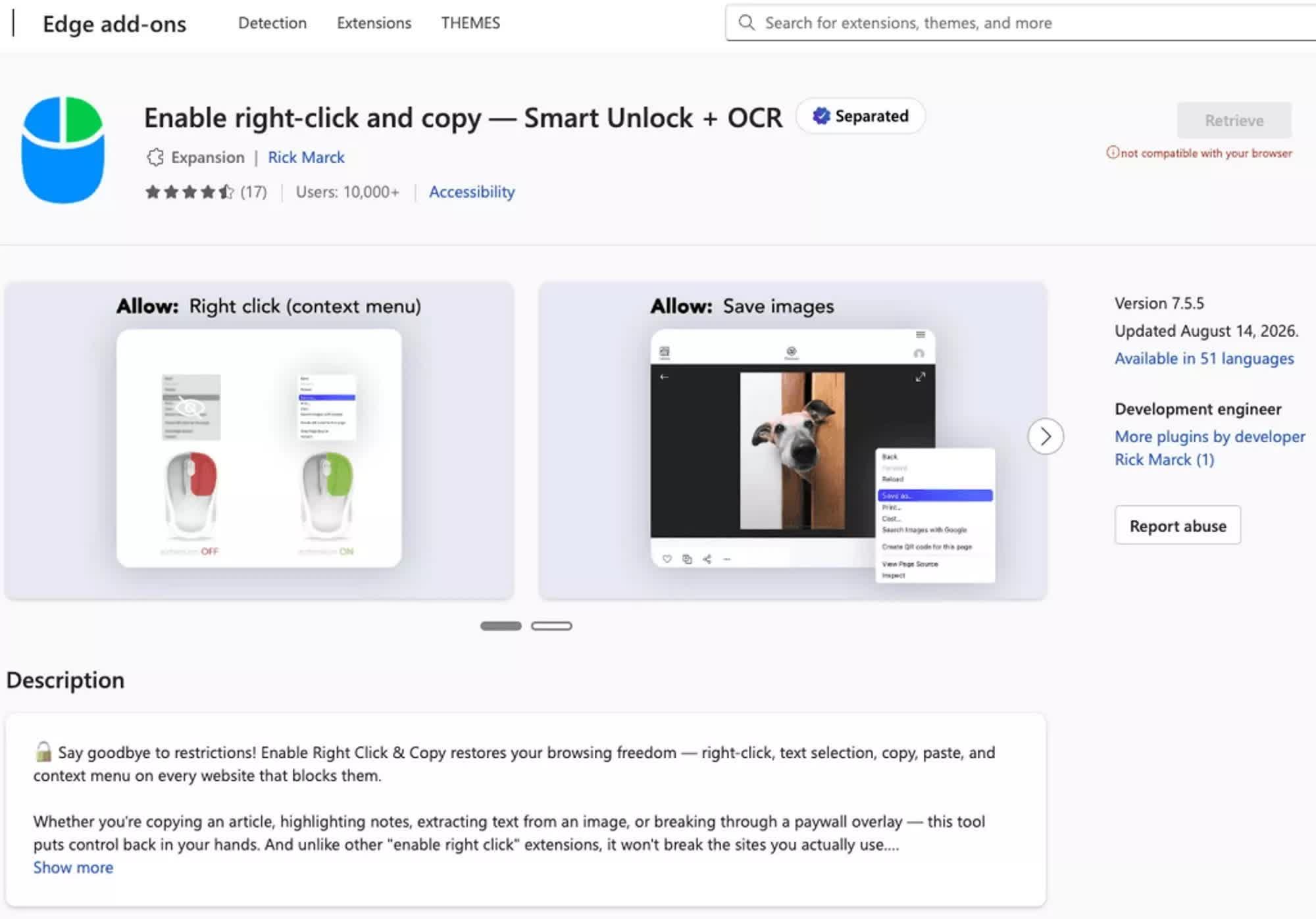
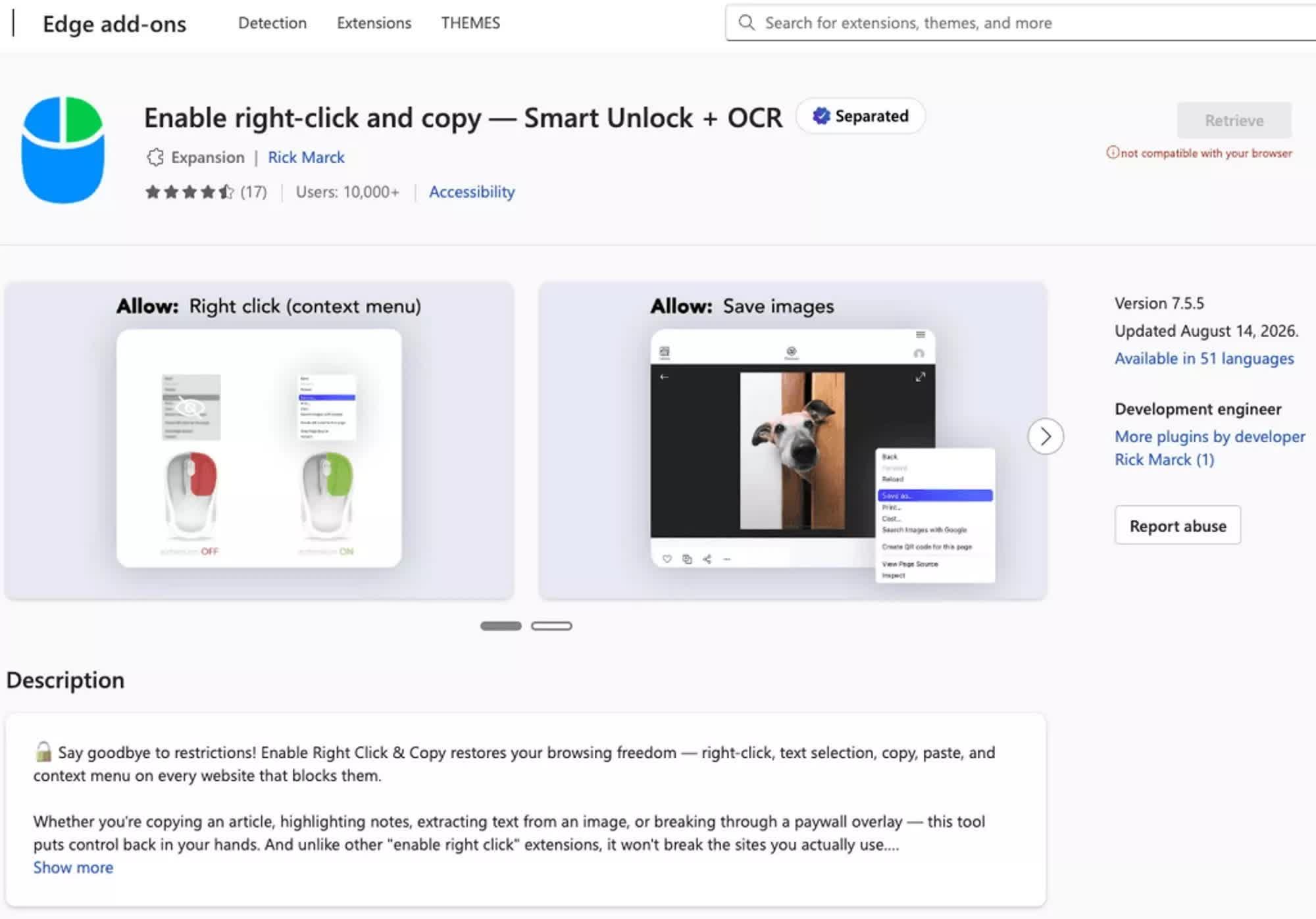
The list of add-ons included a particularly popular extension named “Enable Right Click & Copy – Smart Unlock + OCR.” It was ultimately installed on 70,000 Chrome browsers and another 10,000 Edge browsers. A total of 80,000 users were eventually exposed to the malicious extension, which primarily targeted crypto wallets and other cryptocurrency-related data.

Advertisement

The cybercriminals used some code-based attack patterns that were first identified in February 2024, Socket said. They injected malicious payloads after accumulating a considerable number of potential victims, managing the crypto-stealing campaign remotely through a flexible command-and-control domain infrastructure.

The malicious extensions were eventually removed from the Chrome and Edge stores. However, users might still be part of the C2 infrastructure if they haven’t checked for and manually removed all 19 add-ons listed by researchers.

In 2018, Google announced a major change to the extension technology used by the Chromium project. The Manifest V3 API was intended to improve the security architecture of add-ons across Chromium-based browsers, including Chrome and Microsoft Edge.

As the 19 malicious extensions retrofitted with malicious payloads clearly show, Google’s attempt to strengthen security might very well turn out to be wishful thinking. Cybercriminals are likely to continue targeting popular browser extensions even after Manifest V2 is gone.

Advertisement

Source link

Continue Reading

Tech

Pangram’s Max Spero on why AI detection is harder than ‘Real or Fake’

Published

on

The internet has a trust problem, and it’s not just because social media feeds are filling up with AI slop. AI-generated text and images are now making their way into job applications, product reviews, and even insurance claims, leaving platforms and users alike scrambling to figure out what’s real. 

A handful of startups have cropped up in the past couple of years to become the “trust layer” the internet needs — including Pangram. The startup recently snapped up $9 million for its AI detection system and landed a partnership with Substack, which is now using Pangram’s tech to show readers which of their favorite authors use AI to write their newsletters. Pangram also recently dropped a new AI image detection tool. 

Watch as Pangram co-founder and CEO Max Spero joins TechCrunch’s Equity podcast to dig into the promise of AI detection tools and where to draw the line between AI assisted and AI generated. 

Subscribe to Equity on YouTube, Apple Podcasts, Overcast, Spotify and all the casts. You also can follow Equity on X and Threads, at @EquityPod. 

Advertisement

Source link

Continue Reading

Tech

Is It Safe To Use A Hose On Your Riding Mower?

Published

on


As you would probably expect, given its job, a riding mower can get pretty gross after a few runs across your lawn. If you look around your yard for tools to clean it with, you’ll probably notice your garden hose. Technically speaking, you can use your hose to clean your riding mower, but it’s important that you only use it to clean the mower deck on the bottom. If you spray the top of the mower, where all of its sensitive components are stored, it could end up doing more harm than good.

Indeed, the hose has always been a quick and easy option for spraying down dirty stuff, and both the mower deck on the bottom and the housing on top can get covered with dirt, grass stains, and little bits of debris. But besides being unseemly, dried crud can gradually start to clog up the mower’s moving parts. This is why properly maintaining your mower is important, but you need to use the right tools for the job, and be careful when using them.

Advertisement

Don’t spray the top, but the deck is fine

As tempting as it may be to start spraying down your entire riding mower with reckless abandon, that’s a temptation that’s best tempered. While a blast from a hose may dislodge some stains and debris from the top housing of your mower, that housing almost definitely isn’t water-tight. That means you’re going to get water inside your mower’s more delicate components, including the oil and air filters and the spark plug housing. If any of these components get wet, they could suffer permanent damage. It’s the same reason you shouldn’t use a hose on an engine bay. Instead, you should clean off the top of your mower by hand, using useful mower cleaning tools like a wire brush or blower to physically dislodge debris and cleaning off stains with a rag.

On the literal flip side, the mower deck on the bottom of your riding mower is prime territory for a good hose-down. The mower deck is mostly self-contained, so as long as you’re careful to only spray the deck, it’s a great way to loosen any accumulated gunk. In fact, some mowers even have built-in washing ports that you can plug a hose right into, running the water alongside the blades to get a good, thorough wash going on the deck. If your mower doesn’t have a built-in port, however, just run the blades and spray the ground next to a corner of the deck. This will splash water up into the deck while it’s running. Just make sure to aim low to the ground so you don’t accidentally splash any parts of the upper housing.

Advertisement


Source link

Advertisement
Continue Reading

Tech

The Logical End Point of AI Job Interviews Is Two Bots Talking to Each Other

Published

on

Though AI has seeped into every step of the job hunt for both applicants and recruiters, it has taken time to catch on in interviews. Voice AI is infamously tricky to pull off, as agents get tripped up by accents or “ums.” Behavior that would be second nature to a human—like not interrupting a candidate—turns into a “very, very difficult engineering problem,” according to Ophir Samson, the head of voice AI at recruitment platform Greenhouse. But recruiters, overwhelmed with the glut of applications, have increasingly turned to voice AI tools to screen candidates, with 63 percent of job seekers reporting they’ve encountered an AI interview, according to Greenhouse.

As recruiters turned to AI, so did applicants. Candidates using AI in the interview process has become so common that AI recruitment startups like Ribbon promise to help identify “overly scripted, AI-assisted, or coached” responses—just like those in Christopher’s experiment.

Now there are rumblings that bot-on-bot interviews aren’t duplicitous but a preview of things to come. In many ways, it’s the “next logical stage,” Mark Monaghan, vice president of organizational development at call center company IQor, tells WIRED.

That doesn’t mean he’s entirely happy about it. In Christopher’s case, Monaghan believes, the use of AI was more than justified.

Advertisement

“If you’re going to send a bot to me,” he says, “I’ll send a bot to you.”

After his fifth interview with no follow-up, Christopher decided to apply for one more Everforth Apex job. Perhaps, Christopher thought, the problem wasn’t AI. Maybe it was him. Maybe if Riley were able to speak to the company’s dream candidate, things would go differently. So he created a fake candidate, whom he called Don Dickner, packing a résumé to the brim with qualifications pulled from an open job posting.

After Christopher submitted the application, Riley immediately reached out. This time, the virtual recruiter spoke with ChatGPT—posing as Dickner—for 23 minutes. They discussed “sustainable operational improvement,” protecting “customer experience under volume pressure,” and refusing to let “tribal knowledge drift.” ChatGPT had an answer for every question, and a personal anecdote for every qualification. As the interview wrapped up, ChatGPT said it had a “few more questions I’d like answered.”

“I appreciate it,” Riley responded. “Upon carefully reviewing your application, we will assess your qualifications for the position. Should you meet our criteria, a recruiter from Everforth Apex will reach out to schedule a brief conversation.”

Advertisement

Christopher never heard from Riley again.

Source link

Continue Reading

Tech

GOP Begs Supreme Court To Let It Flood Airwaves With Cheap Midterm Propaganda

Published

on

from the this-is-why-we-can’t-have-nice-things dept

Back in June, the Supreme Court ruled 6–3 in National Republican Senatorial Committee v. Federal Election Commission that federal limits on coordinated expenditures by political parties violate the First Amendment, opening the floodgates to a much broader array of political ads funded via no limit of rich assholes and their preferred dark money groups.

In preparation for the ruling, Trump FCC boss Brendan Carr revised FCC “Lowest Unit Charge Requirement” rules to try and make it much cheaper for the GOP to pummel the midterm elections with less-expensive TV ads carried via the nation’s soggy assortment of right wing broadcasters (which are currently petitioning the Trump FCC to approve massive new mergers).

But it hasn’t all been easy going for the GOP, which believes its massive funding advantage ($125 million for the GOP versus a bunch of debt for the mismanaged DNC) would give them a real leg up during the midterms.

For one thing, the Richmond, Virginia-based 4th Circuit Court of Appeals recently sided 2-1 against the FCC, temporarily suspending the FCC’s attempt at discount TV agitprop, and ruling that neither political parties nor joint fundraising committees with non-candidate members are allowed the discounted rates.

Advertisement

But the GOP has already set the wheels in motion to get this all quickly overturned by the Trump-friendly Supreme Court:

“The committees submitted an emergency motion for a stay and asked the 4th Circuit to rule on that motion immediately so they can file a petition to the Supreme Court. “Intervenors respectfully request that the Court rule on this stay motion as soon as possible—whether by expediting or waiving response briefs—to permit Intervenors to seek emergency relief at the Supreme Court,” Republican committees told the court.

The court responded quickly, issuing an order today to deny the Republican committee’s motion and to immediately issue a mandate that can be appealed to the Supreme Court. Republicans will now seek swift action from the Supreme Court in an attempt to overturn the 4th Circuit ruling before the 60-day discount period starts on September 4.”

If the GOP wins, local broadcasters will be forced to offer dodgy dark money groups the same discounts previously reserved directly for candidates, something the FCC’s lone Democrat, Anna Gomez, states will be “unleashing a flood of coordinated campaign money into broadcast advertising, just as the Supreme Court has cleared the way for unlimited coordinated spending between parties and candidates.”

It’s another reminder (as if you needed one) that unless the U.S. Supreme court is radically expanded and reformed in the next few years, corruption is likely to strip the country down to parts and sell it for scrap off the back loading dock.

Advertisement

Filed Under: ads, appeal, brendan carr, fcc, midterms, propaganda, supreme court

Source link

Advertisement
Continue Reading

Trending

Copyright © 2025