Commission reportedly seeks third-party views, although no formal investigation is underway
The European Commission (EC) may be laying the groundwork for an investigation into Oracle’s software licensing practices, according to reports.
Advertisement
The scrutiny follows the EC’s investigation into fellow enterprise software vendor SAP, which ended with the Commission accepting legally binding commitments from the German company to abolish reinstatement fees and reduce back-maintenance fees, among other concessions.
MLex is now reporting that the EC – the EU’s executive arm – has started to examine Oracle’s licensing practices ahead of a possible formal investigation. One source told the publication that the EC was seeking views from third parties.
An EC spokesperson told The Register it had concluded an investigation into SAP, and “will continue to monitor possible further anti-competitive practices and abusive conduct in this sector. At this stage however, there is no formal investigation into any company.”
The Register invited Oracle to comment.
Advertisement
Big Red’s licensing practices have attracted criticism for years, although the vendor maintains they are fair. One frequently criticized example is its treatment of Java, which came under Oracle’s stewardship after it agreed to buy Sun Microsystems in 2009.
OpenJDK, the reference implementation of the Java platform, is open source, but vendors can charge for proprietary development kits, runtime environments, and support.
Oracle announced a new licensing regime for Oracle Java SE in January 2023. It said Java SE Universal Subscription would offer customers “a simple, low-cost monthly subscription that includes Java SE Licensing and Support for use on Desktops, Servers or Cloud deployments.”
Industry experts pointed out that even businesses with limited use of Oracle Java could have to pay according to their total employee count under the model, a dramatic departure from Oracle’s previous licensing terms. Gartner estimated the per-employee subscription model to be two to five times more expensive than the legacy version.
Advertisement
Another licensing mechanism that has attracted criticism is the Unlimited License Agreement. Some licensing advisors claim the all-you-can-eat option offers poor value, locks users in, and limits their choice of alternative products. Oracle maintains that the agreement offers flexibility and good value.
Gartner welcomed the commitments, saying they gave customers more options for their legacy SAP applications by making third-party support a more viable alternative to migration. Vendor support for some older SAP products is due to end in 2027. ®
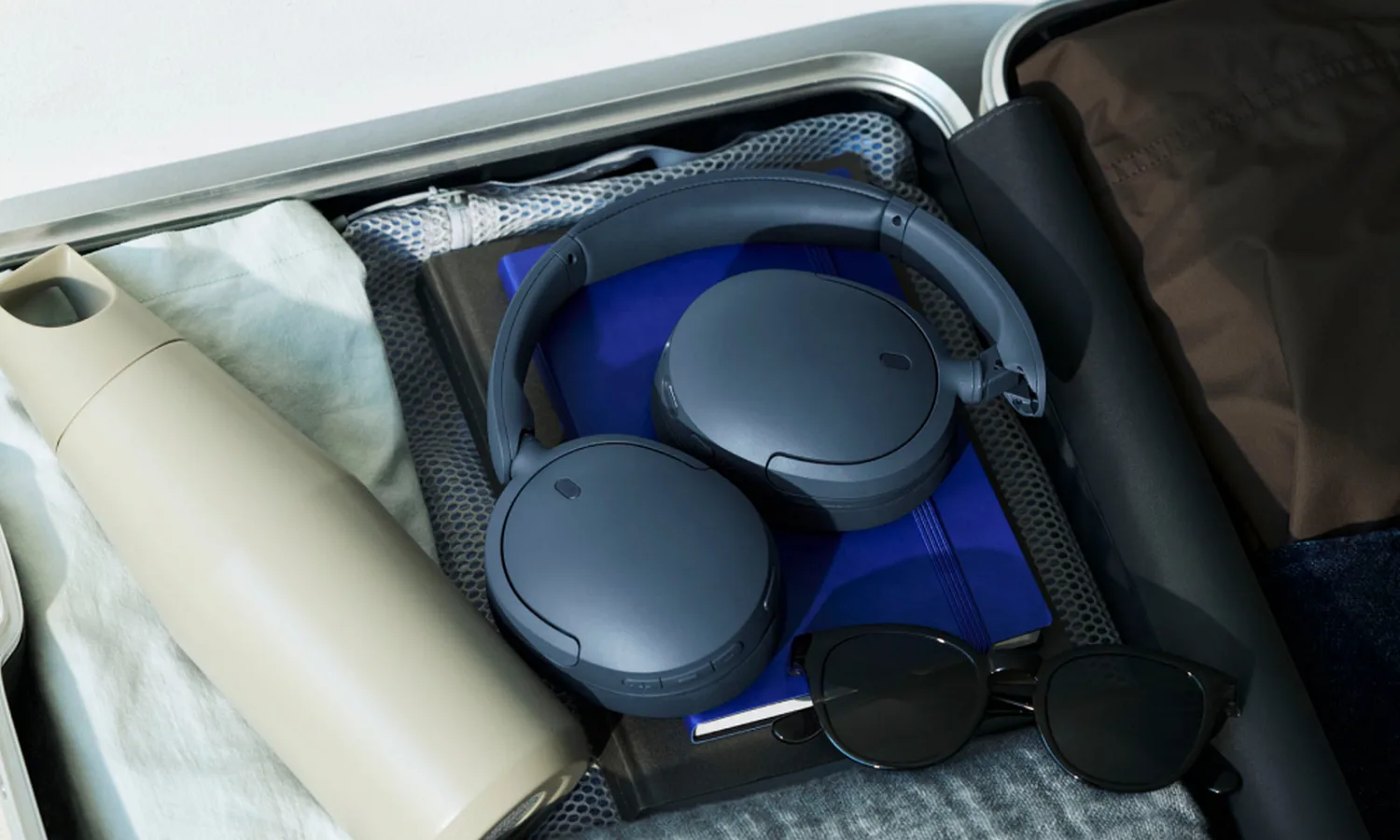
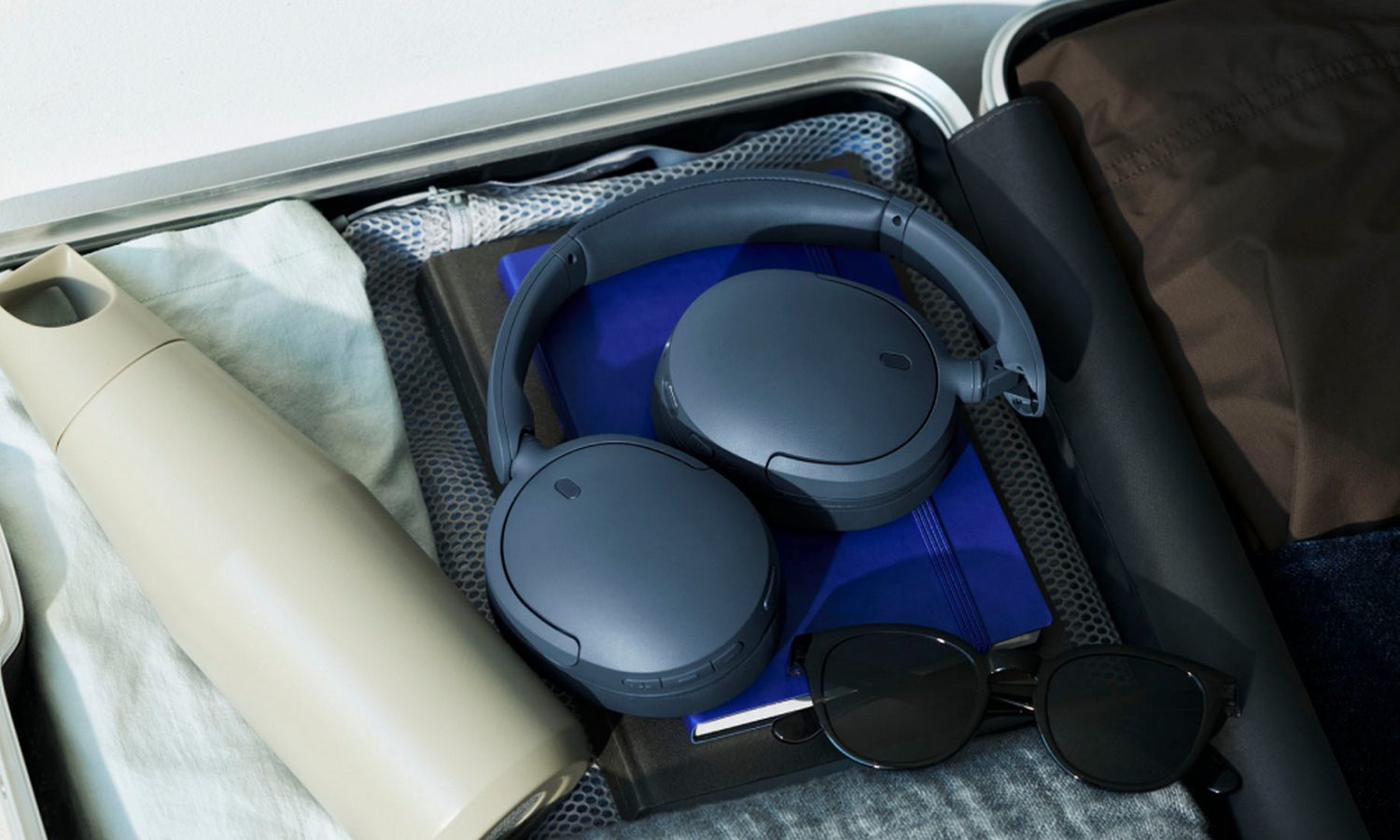
Sony is refreshing the more affordable end of its wireless headphone lineup. The company has launched the WH-CH730N and WH-CH530, successors to the WH-CH720N and WH-CH520 respectively.
We first heard about both headphones in July, when import documents revealed their model numbers and several expected colors. At the time, there was no information about battery life, audio upgrades, or connectivity changes. Now Sony has filled in those blanks.
The WH-CH730N gets a big battery upgrade
The WH-CH730N offers up to 50 hours of battery life with noise cancellation switched on and as much as 75 hours without it. Its predecessor topped out at 35 hours, so Sony has made a sizeable improvement here.
Sony
Sony has also added a foldable design while keeping the weight at about 207 grams. Dual Noise Sensor technology handles ANC, while Ambient Sound, which is what Sony calls its transparency mode, can be adjusted across 20 levels. Adaptive Sound Control can also change those settings based on where the headphones are being used.
Sound customization includes DSEE, a 10-band equalizer, Game EQ presets, and 360 Reality Audio. Bluetooth 6.0, LE Audio, Auracast, multipoint, Fast Pair, and Swift Pair are also supported. Call quality gets some attention too. Precise Voice Pickup uses beamforming microphones and AI processing to isolate the wearer’s voice, while a redesigned microphone structure helps cut wind noise.
Advertisement
The WH-CH530 keeps things simple
Sony
The WH-CH530 remains an on-ear pair without active noise cancellation. Battery life rises from 50 hours on the WH-CH520 to 55 hours, while a three-minute charge provides up to 1.5 hours of playback. The older model already offered multipoint, EQ controls, DSEE, and the same quick-charge figure.
Sony
Sony has added Bluetooth 6.0, LE Audio, Auracast, a 10-band EQ, Game EQ, and AI-based noise reduction for calls. The headphones weigh about 150 grams and come in Black, Cobalt, Mint, White, Pink, and Coral.
The WH-CH730N costs $179.99, while the WH-CH530 comes in at $69.99. Both are available from September through Sony, Amazon, Best Buy, and other retailers. Oat for the WH-CH730N and Coral and Mint for the WH-CH530 are limited to Sony and Amazon.
Imagine you’re settled in the backseat of a car, ready to enjoy some Apple TV on your iPhone or iPad during a long road trip or your daily commute. Don’t let a poor wireless signal reception or a limited data plan ruin your viewing experience.
Instead, download your favorite TV shows and movies before you hit the road. Whether you want to catch up on the latest dramas or keep the kids entertained with quality children’s content, we’ll guide you through the simple steps to download everything you need.
How to download Apple TV movies and shows on iPhone or iPad
Most people download movies and TV shows to watch them on the go, and there’s no better place to do it than on your iPhone or iPad. Here’s how to download your favorite Apple TV shows and movies on your iPhone or iPad.
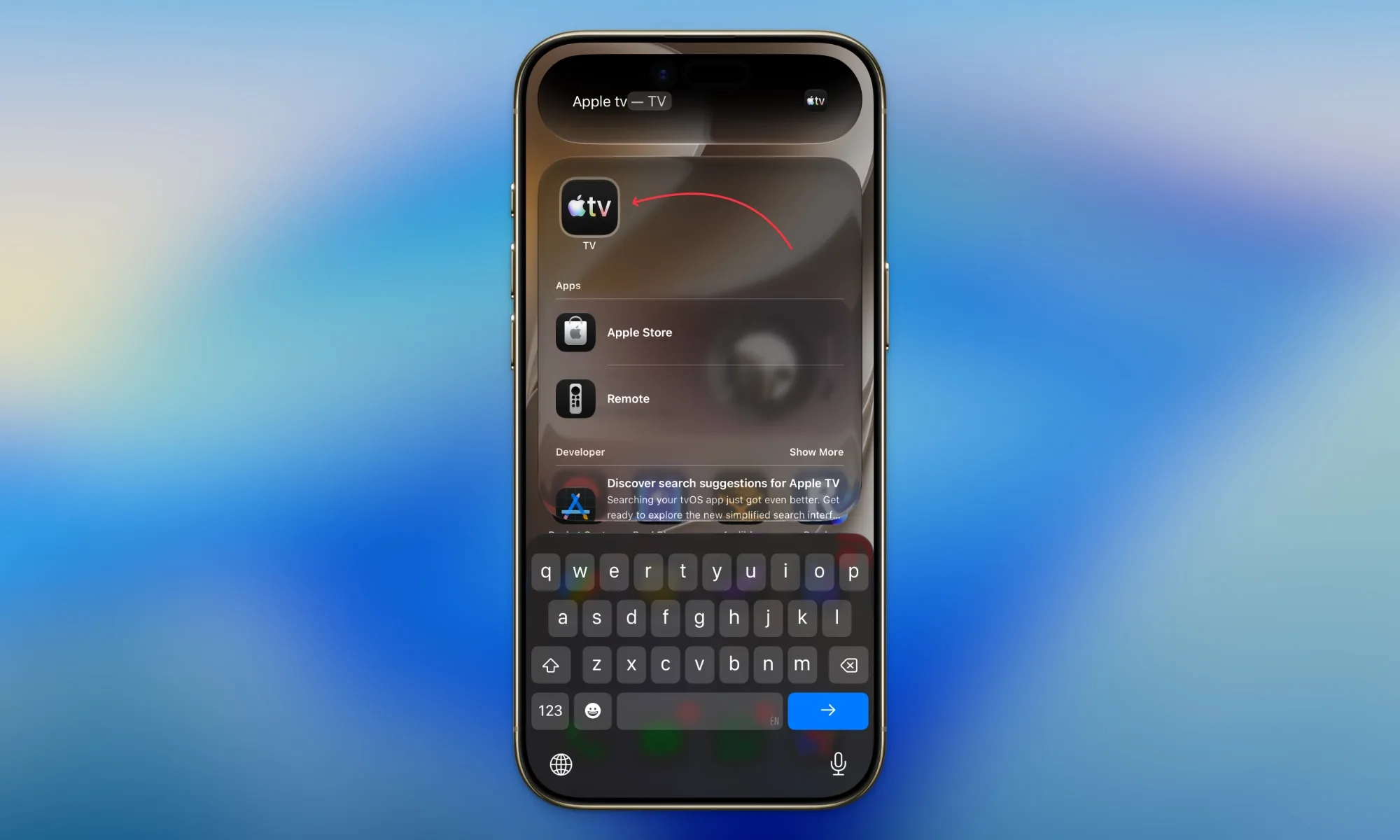
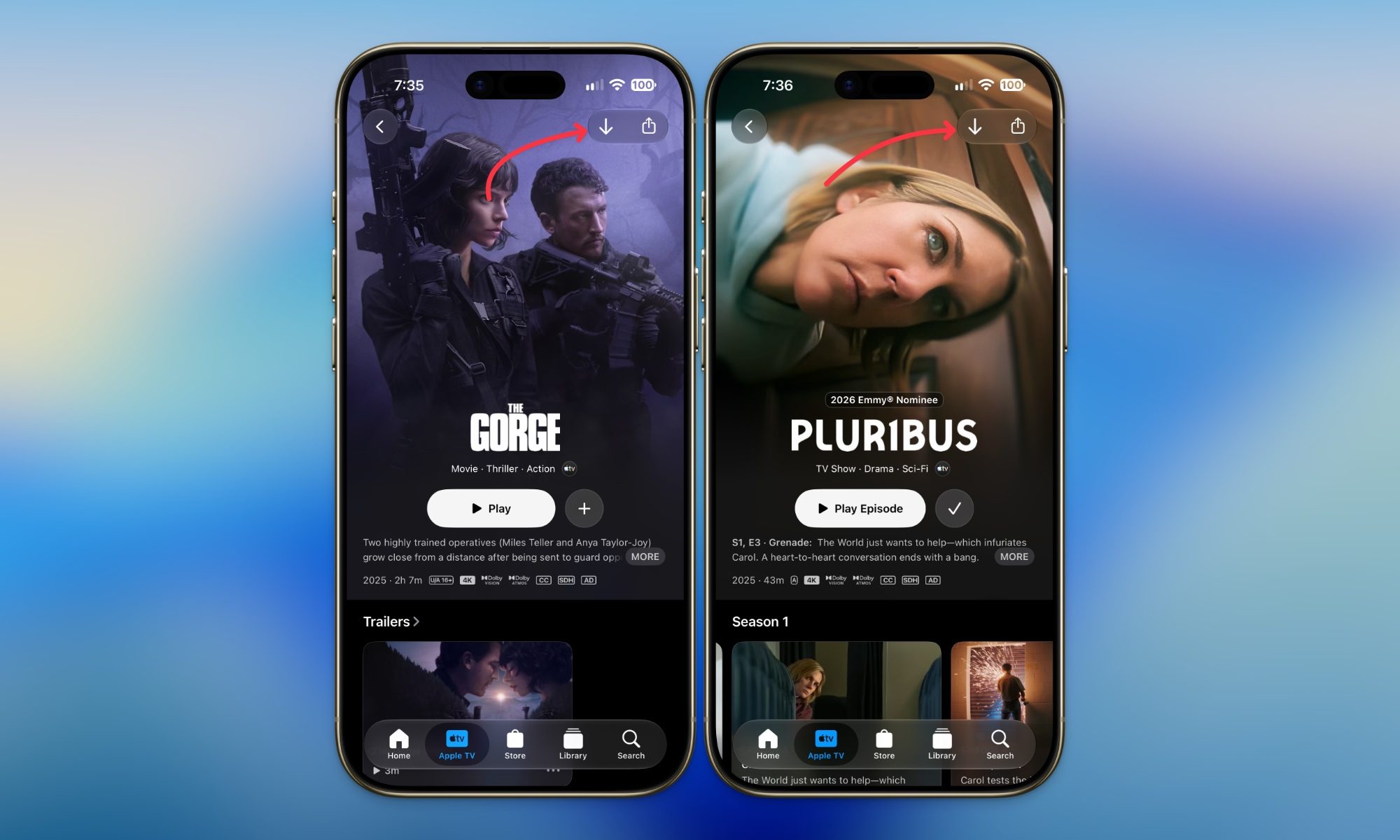
Step 1: Open the Apple TV app and search or browse for the movie, show, or event you want to save for later.
Rachit Agarwal / Digital Trends
Step 2:Tap the download button in the top-right corner. If it is a TV show, you can download the whole season at once.
Rachit Agarwal / Digital Trends
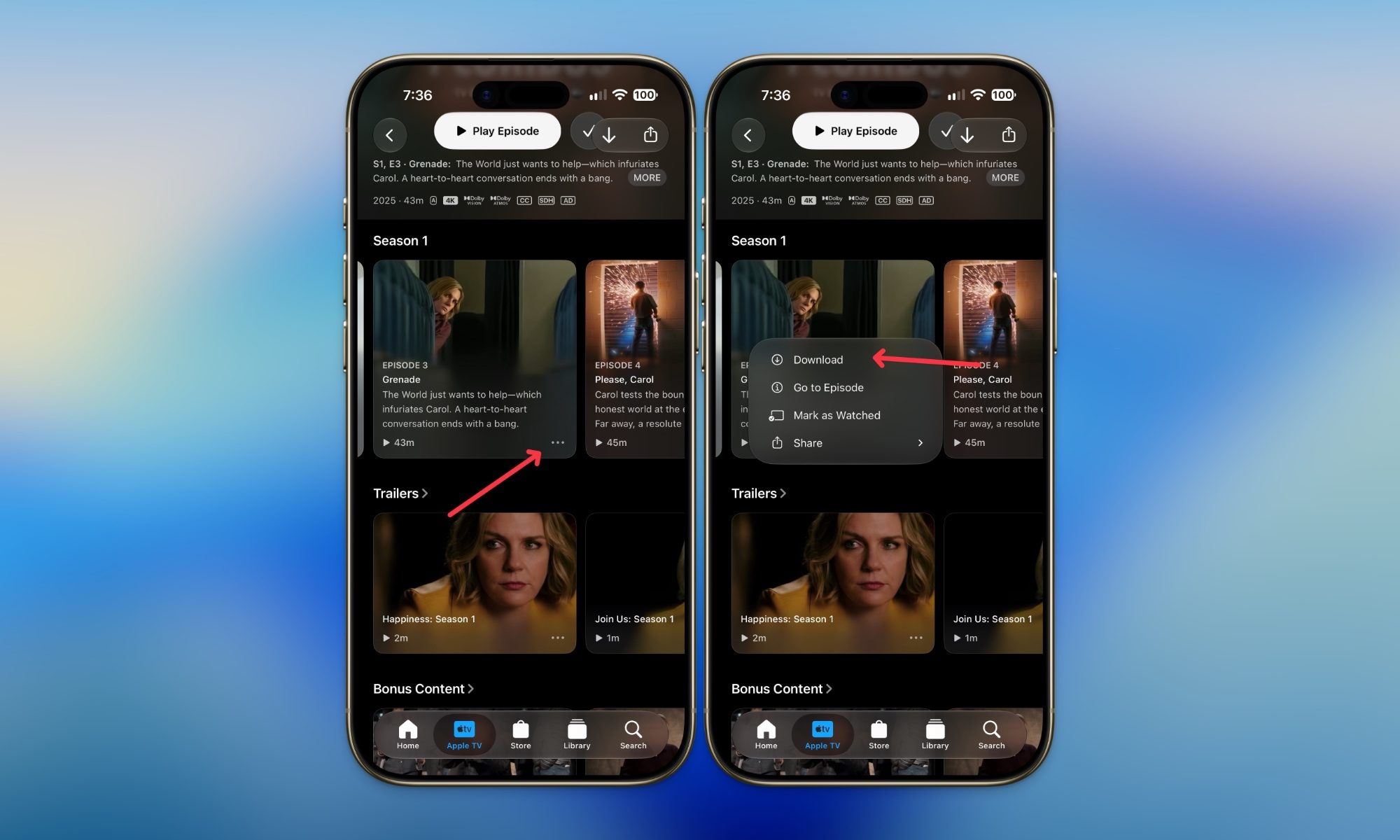
Step 3: To download an individual episode, tap the three-dot menu and select Download.
Rachit Agarwal / Digital Trends
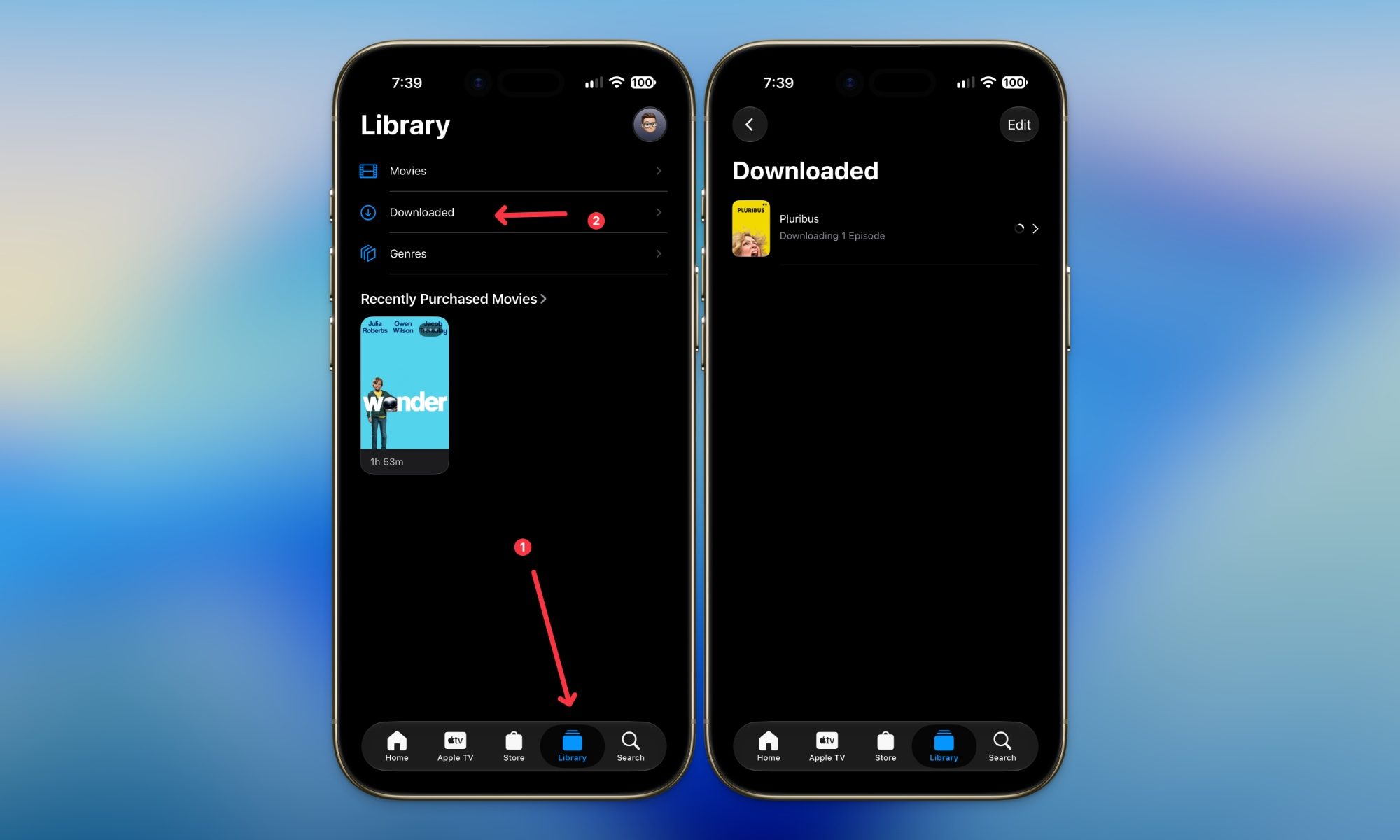
Step 4: Head to the Library tab and select Downloaded to find and play everything you have saved.
Rachit Agarwal / Digital Trends
If the Download button is missing or greyed out, do not panic just yet. It usually means one of two things: either you have hit your download limit, or the channel providing that particular show simply does not allow downloads. I will explain both of these further down.
How to download Apple TV shows and movies on Mac
I personally prefer to watch content on my Mac. Not only does it offer a bigger screen, but it also has better speakers that improve the media experience. Thankfully, unlike Netflix or other popular streaming platforms that don’t offer a native app, Apple TV not only has a native Mac app, but it also lets you download content for offline viewing.
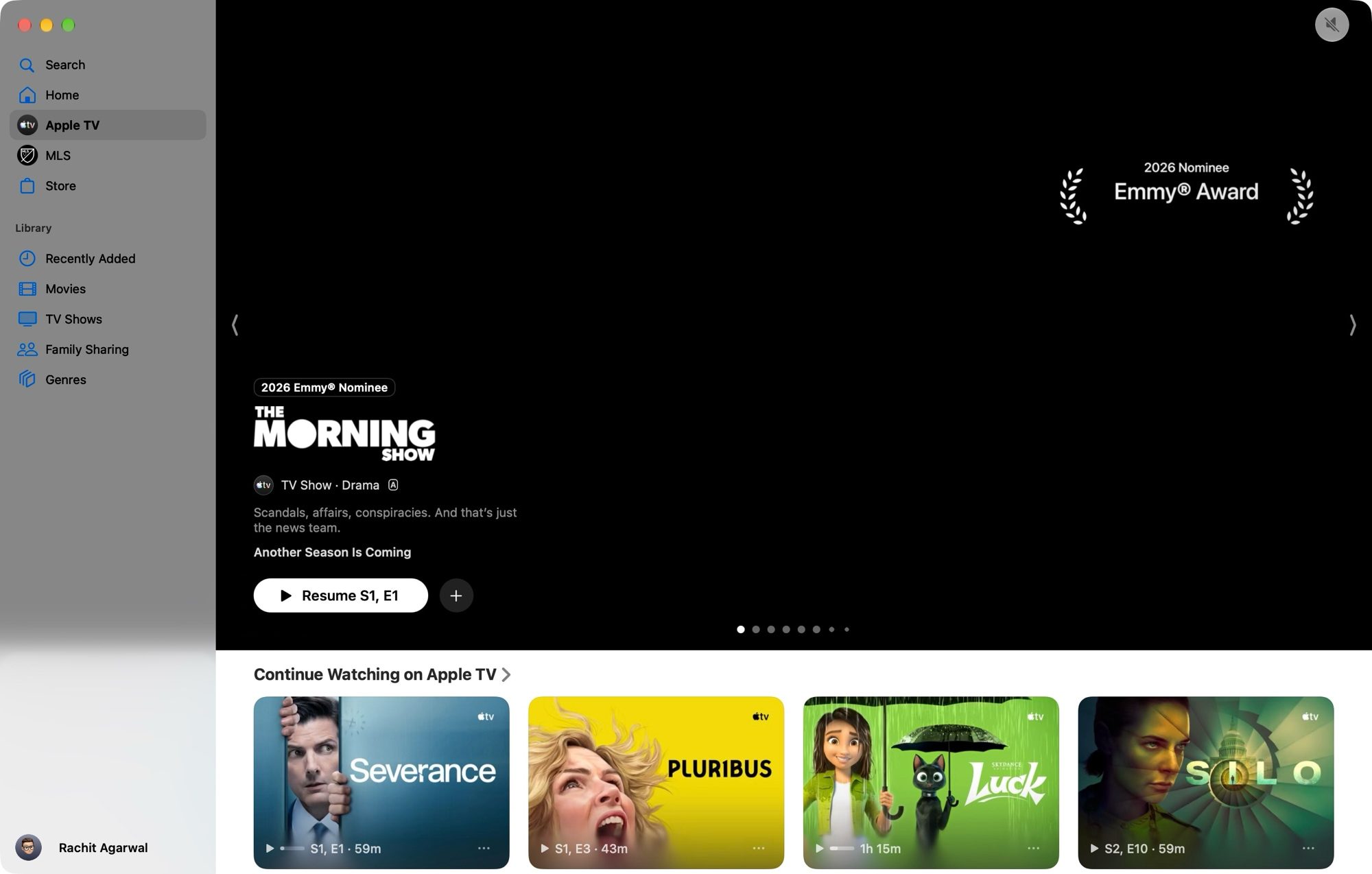
Step 1: Open the Apple TV app and find the movie, show, or event you want to download.
Advertisement
Rachit Agarwal / Digital Trends
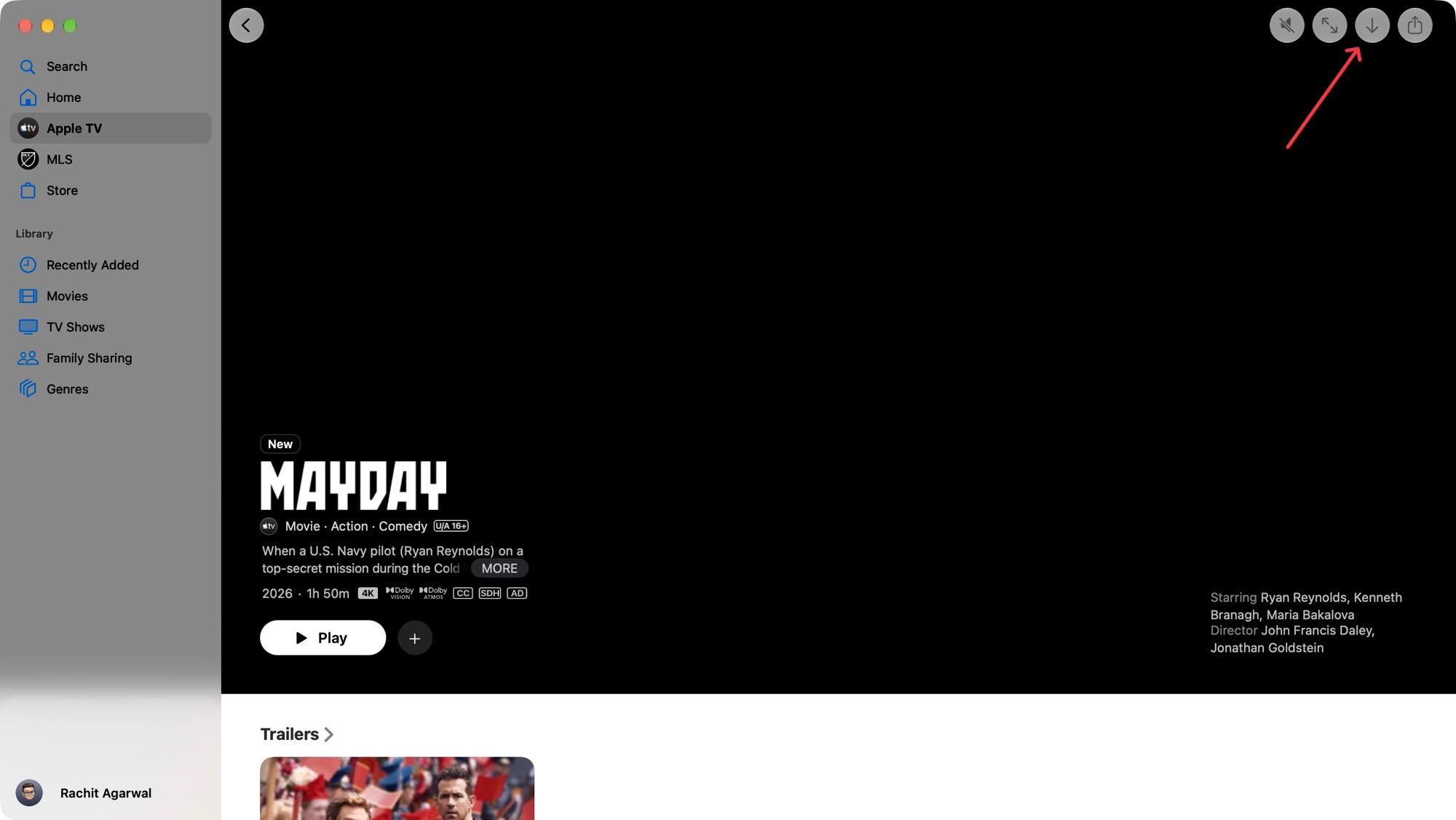
Step 2: For movies and events, click the Download button in the top-right corner.
Rachit Agarwal / Digital Trends
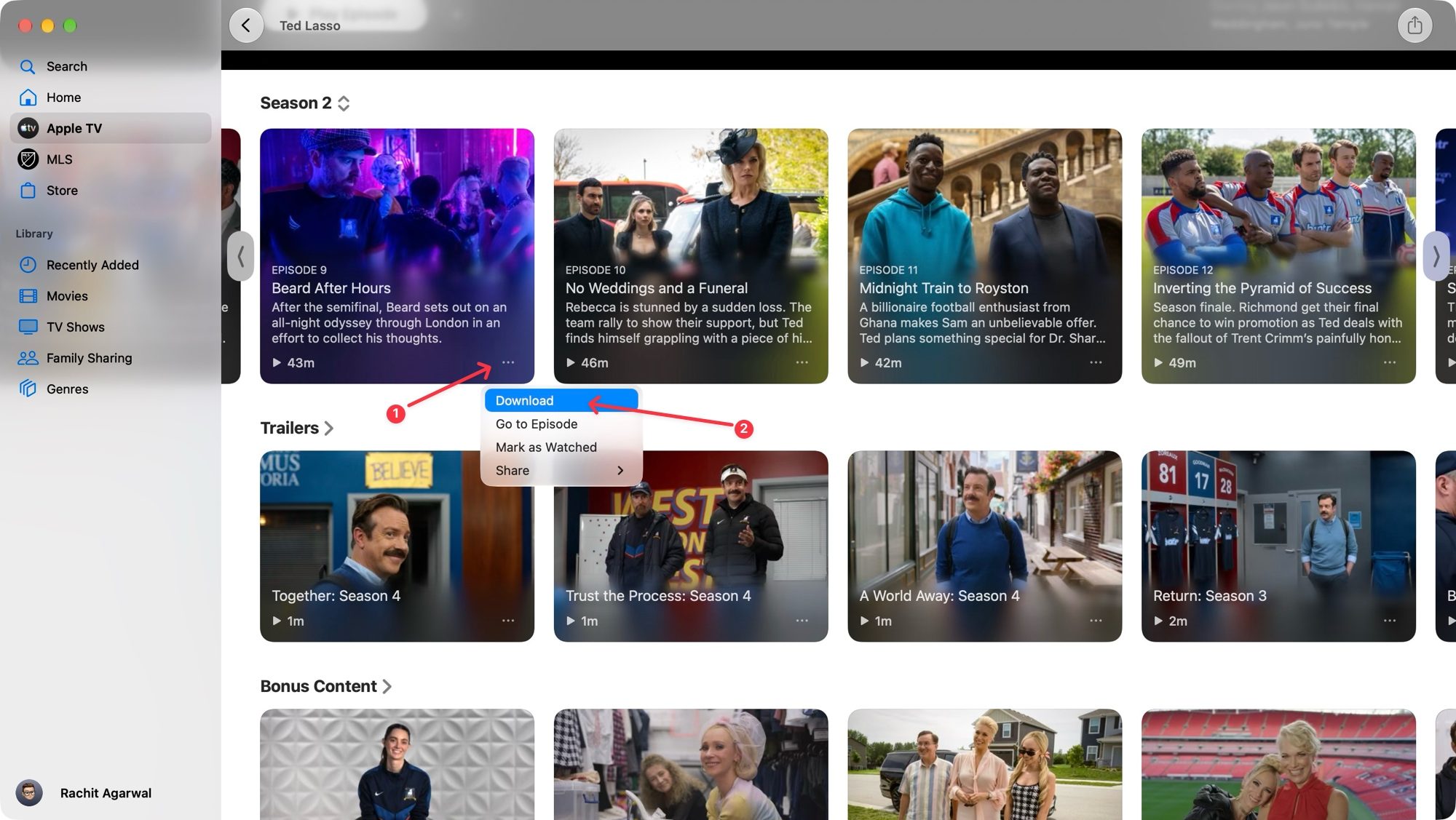
Step 3: For TV shows, open the episode, click the three-dot button, then select Download.
Rachit Agarwal / Digital Trends
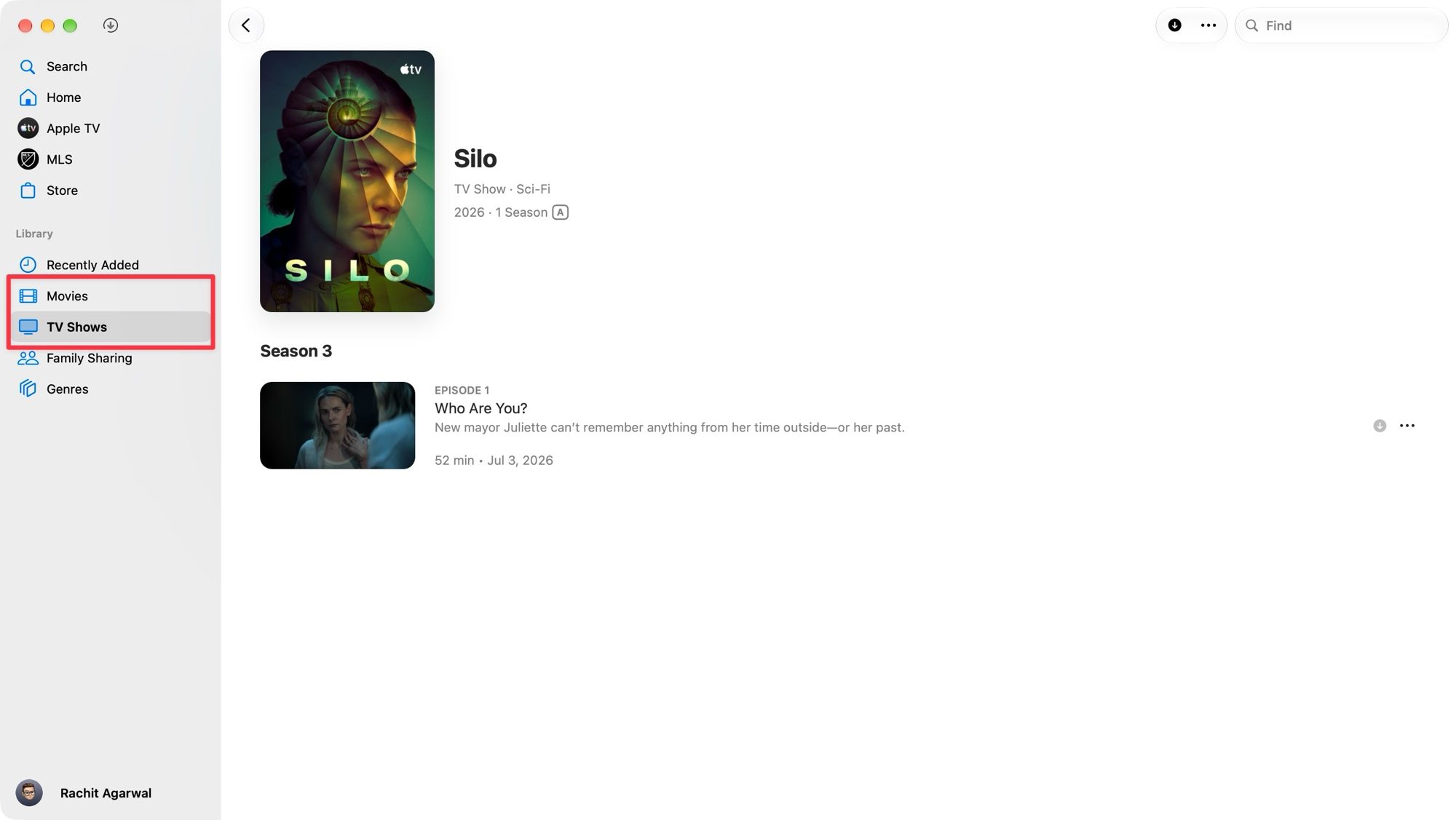
Step 4: You can find your downloads under the Library section.
Rachit Agarwal / Digital Trends
That’s it. Now you are ready to watch your favorite shows and movies without an internet connection.
How to download Apple TV shows and movies on Apple Vision Pro
If you are one of a few hundred Apple Vision Pro owners, you will be happy to know that you can download Apple TV shows and movies for offline viewing on your Vision Pro. Here’s how to do it:
Christine Romero-Chan / Digital Trends
Step 1: Open the Apple TV app.
Step 2: Find the TV show, film, or event you want to watch offline.
Step 3: Pinch and hold the title until the Download option appears, then tap it.
Step 4: Open the sidebar, tap Library, then tap Downloaded to find your saved content.
Advertisement
Where you cannot download content
Here is something worth knowing before you go hunting for the download button on your living room setup: downloading is not available everywhere. If you are using an Apple TV 4K, Apple TV HD, a smart TV, a streaming device, or watching through tv.apple.com on a browser, you are limited to streaming only. There is no offline option for these platforms, so plan accordingly if you are relying on your big-screen setup for travel prep.
Apple
How long do downloads last?
This is the part that trips a lot of people up, so pay attention. Downloads are not permanent, and the expiration rules can vary depending on what you are watching.
For most Apple TV channels, your downloaded content sticks around for up to 30 days before it disappears. Some channels are stricter and might expire their downloads sooner, so do not assume every show follows the same 30-day rule.
Content downloaded through your Apple TV subscription has an additional twist. Once you press play, the clock starts ticking, and you only get 48 hours to finish watching before it expires. Alternatively, if you never start watching it at all, it will still expire 30 days after you download it. Whichever limit hits first is the one that applies, so if you download something and forget about it for a month, do not be surprised when it is gone.
Watch out for download limits
Beyond expiration dates, there are also caps on how much you can download at once. Some Apple TV channels restrict how many titles you can download simultaneously, and there might also be a limit on how many devices you can download the same content to.
Advertisement
Your overall Apple TV subscription might also cap the total number of titles you can have downloaded at any given time. If you bump into this limit, the app will let you know with an alert. You can learn more about the limits on Apple’s support page.
The fix is simple: delete some episodes or movies you have already finished watching from your device, or from another device tied to your account or family sharing group, to free up space for new downloads.
Streaming limits if you are not downloading
If you are streaming instead of downloading, there are limits here too, and they are worth knowing if you have a household full of people trying to watch different things at once.
With a standard Apple TV subscription, you typically get 6 simultaneous streams for most content, though some specific titles might restrict that number further.
Advertisement
If you have an Apple Music student subscription that includes Apple TV access, you are limited to only one device streaming at a time, so you cannot stream on your phone while your roommate has it up on the TV.
For Apple TV channels specifically, most allow up to three simultaneous streams, but this number can change slightly depending on the individual channel rules.
Final thoughts
Downloading content from the Apple TV app is genuinely one of those features that quietly makes life easier once you actually start using it. Whether you are prepping for a long flight or just want a backup for when your Wi-Fi decides to act up, knowing exactly how to download, where you can do it, and how long you actually have before things expire will save you from a lot of frustration later. Just remember to plan your downloads a little ahead of time, given the 30-day and 48-hour windows, and you should be set for your next binge session.
The Astell & Kern HC5 wants to make your smartphone sound like one of the company’s super-expensive digital audio players – and it gets quite a long way towards it. With a little more low-end heft and substance to go along with its excellent soundstaging and sky-high levels of detail, it could be the complete article
Spacious, organised and impressively detailed sound
Specification, build and finish all impress
Small and light enough to be genuinely portable
Slightly short of low-frequency body and impact
The few physical controls don’t feel anything special
No EQ adjustment
Key Features
Advertisement
Review Price:
£399
DAC
Advertisement
AK4191EQ digital processor, AK4499EX DAC
Audio support
Advertisement
Up to 32-bit/768kHz, DSD512
Introduction
Astell & Kern has nothing to prove when it comes to implementing brilliantly effective digital-to-analogue conversion hardware – its range of witheringly expensive digital audio players make that point in some style.
So bringing its expertise to bear in a much smaller, much more affordable product that’s much more focused in its functionality seems to make sense. The HC5 portable DAC/headphone amp certainly looks (and, to a lesser extent) feels the part – but does it have the performance to do justice to the brand’s reputation?
Advertisement
Design
Weighs 46g
Aluminium construction
Advertisement
Unlike some portable DAC/headphone amplifiers, the ones that are really only fit to be ported to and from a desktop for use with a laptop, the Astell & Kern HC5 is small and light enough to go out and about without demanding a bag or a reinforced pocket in which to travel.
Its aluminium construction is smooth and clean, and the standard of build and finish of the box is everything I’ve come to expect from Astell & Kern. At 64 x 32 x 16mm (HWD) the HC5 is intuitively palm-shaped, and the concave sides only add to the impression of handiness. 46g is not a burden, even if you decide it needs to travel in the pocket of a T-shirt.
Image Credit (Trusted Reviews)
There’s a knurled dial at the top of the HC5 (I’ve decided the end with the USB-C input slot is the top – the bottom is where the 3.5mm and 4.4mm headphone outputs are), and a single control button taking care of everything except volume control along one side.
Neither feels super-substantial in operation, and in use the sensation is not exactly that of a premium product. The screen that occupies a good portion of the front of the HC5 is bright and crisp, though, and despite containing a fair amount of information at times it’s never less than legible.
Image Credit (Trusted Reviews)
Advertisement
Features
AK4191EQ digital processor, AK4499EX DAC
32-bit/768kHz, DSD512
Astell & Kern digital audio remaster upscaling
Astell & Kern is not shy when it comes to explaining the AKM’s flagship AK4191EQ digital processor and AK4499EX digital-to-analogue converter combination has never appeared in a product this small or affordable before.
Splitting the all-important decoding into two stages, says AKM, maintains greater signal integrity during the journey from digital to analogue. There’s certainly no arguing with support for 32-bit/768kHz and DSD512…
Advertisement
Image Credit (Trusted Reviews)
By way of an encore, Astell & Kern has also deployed its proprietary DAR (digital audio remaster) upsampling technology – switch it on (it functions with both PCM and DSD files) and the sampling rate increases more than somewhat. Then there are the six user-selectable filters (low dispersion, sharp roll-off, slow roll-off and so on) that help (in a very minor way) trim the sound of the HC5 to your taste. This is all the input the end-user gets, though – unlike some rival devices, there’s no EQ adjustment available here.
The HC5 features a variant on the ‘high driving mode’ technology Astell & Kern has deployed in some of its priciest DAPs. Horizontal op-amps help reduce the physical size of the device – but it also allows for uncommon driving power. It’s worth bearing in mind the HC5 is powered by your source device, though, so the amount of amplification power it can muster is something of a double-edged sword.
Advertisement
There are 150 steps of volume adjustment available, which I can’t help thinking seems like overkill. Of course it’s nice to be able to trim the volume carefully, but for the first 20-odd stages the HC5 is basically inaudible. It feels a little like an item of specification that’s flashy pretty much for the sake of it.
Image Credit (Trusted Reviews)
Performance
Open, detailed and energetic sound
Great facility with organisation and soundstaging
Not much meat on the low-frequency bones
No one should be surprised that a dedicated off-board DAC does a better job than the DAC chipset in an overworked smartphone or laptop – after all, there are plenty of products costing a fraction of the £399 Astell & Kern wants for the HC5 that prove the point.
But what is remarkable about the HC5 is, if used in conjunction with some equally capable headphones, just how significant and obvious the sound-quality improvements are.
Advertisement
Image Credit (Trusted Reviews)
Advertisement
The contrast between a Tidal-derived 24-bit/192kHz FLAC file of Ball and Biscuit by The White Stripes when played out of the 3.5mm headphone socket of an Apple MacBook Pro and when heard via the HC5 plugged into one of the laptop’s USB-C socket is night-and-day, black-and-white, hot-and-cold – choose your metaphor.
The Astell & Kern brings order to bear – the soundstage snaps into focus, and as well as being far more confidently laid out it’s also bigger in every direction. The spaces between the competing elements are made more apparent and are better defined.
There’s greater dynamism, too, and in every respect. The difference between verse, chorus and guitar solo in this recording, both in terms of volume and intensity, are far more apparent when explained by the HC5 – and the same is true with the lower-level dynamics of tonal and harmonic variation. On first acquaintance this might sound like a fairly ramshackle recording – but, in fact, it’s quite painstaking and deliberate, and the amount of fine detail the Astell & Kern can reveal and contextualise makes this apparent.
Image Credit (Trusted Reviews)
Nowhere does the uptick in detail levels make itself more obvious than in the midrange. The HC5 is a deft and eloquent communicator, able to bring a sensation of character and attitude to a voice along with the more obvious stuff regarding timbre and texture. The overall frequency response is quite balanced and even, but the midrange gets just a little nudge forwards in the interests of intelligibility – and the result is a direct and positive account of voices.
Tonality is equally consistent, with the HC5 maintaining a quite carefully neutral attitude from the top of the frequency range to the bottom. There’s no additional colour to the bright, substantial top end any more than there is in the midrange, and the bottom end is rapid and well-controlled – the attention paid to the attack and decay of bass sounds is such that rhythmic expression is confident and coherent.
Advertisement
Image Credit (Trusted Reviews)
There’s not a whole lot of substance to the low frequencies the HC5 describes, though. There’s a reasonable amount of punch, and undeniable momentum – but when it comes to body and heft, the Astell & Kern is more whippet than labrador. Which means there’s manoeuvrability and agility at the bottom, but not a huge amount of the out-and-out wallop some listeners are undoubtedly primed to expect.
But where energy and unity are concerned, the HC5 is back on much surer ground. There’s a well-supervised liveliness to the way it presents music, a sensation of togetherness and performance that ultimately goes a long way to illustrating how much more capable than a sub-£100 USB DAC this Astell & Kern is. Which, by extension, explains just how much better it is than the unassisted sound of your laptop or smartphone.
Advertisement
Should you buy it?
You want your tunes to sound better
Advertisement
You take portable listening seriously enough to have invested in proper wired headphones.
Advertisement
You’re all about dat bass
You’re expecting a lot of low-frequency heft and substance.
Advertisement
Final Thoughts
That Astell & Kern should turn out a tactile and good-looking device when it decides to enter a specific product category doesn’t surprise me in the slightest. That the product should be high-achieving doesn’t come as much of a shock either.
But the reminder that the company has not forgotten how to create a product that sells for a vaguely real-world price is perhaps the best thing about the HC5 (for me, at least).
How We Test
I connected the Astell & Kern HC5 to an Apple iPhone 15 Pro, a FiiO M15S digital audio player, and an Apple MacBook Pro using the supplied USB-C / USB-C cable.
Not only does this allow me to – access lots of content of different file types and resolutions, but it also allows me to compare the HC5 to the very impressive D-to-A abilities of the FiiO DAP.
At the other end I connect a pair of Sennheiser IE900 in-ear monitors to the 4.4mm balanced output, and also a pair of Austrian Audio The Arranger open-backed over-ear headphones to the 3.5mm unbalanced socket.
Tested for several days
Tested with real world use
FAQs
How many finishes are available?
Just one – A&K calls it satin silver but it’s basically the colour of the aluminium the HC5 is made from.
Advertisement
Can I use the HC5 with my old iPhone?
A&K provides USB-C / USB-C and USB-C / Lightning cables in the packaging – so yes, you can.
Is there a socket for my full-size headphones?
Advertisement
The HC5 has 3.5mm and 4.4mm outputs – so headphones that use anything else will need an adapter.
The launch is a key step in Europe’s goal to compete with US-based organisations for commercial space missions.
A rocket developed and controlled by German start-up Isar Aerospace has made history by becoming the first commercial launch to reach orbit from continental Europe.
As part of the ‘Onward and Upward’ mission, the uncrewed Spectrum rocket lifted off from Isar Aerospace’s launch complex at Andøya Space in Norway carrying a payload of satellites and reached orbit in around four minutes.
The achievement marks a major step in Europe’s ambitions to rival US counterparts for commercial space missions.
Advertisement
This was Isar’s second launch attempt, as there had previously been a range of factors causing delays, such as weather conditions, technical difficulties and disruption by a rogue boat. The first attempt saw the rocket launch for only 30 seconds before experiencing a crash.
Commenting after the successful launch, Daniel Metzler, the CEO and co-founder of Isar Aerospace, said: “Today, Isar Aerospace opened space from continental Europe. Launch continues to be the largest bottleneck for the global space industry and from today on, there is a true alternative for commercial and institutional customers.”
He added: “We achieved within a few years what had taken the European space industry decades before. Europe now has sovereign access to space. We have entered into a new chapter for European spaceflight.
“I am incredibly proud of our team, that has made this success story from Europe possible. We will now focus on rapidly scaling launch vehicle production, deliver on our order pipeline, and meet surging global demand.”
Advertisement
According to a statement released by Isar Aerospace, the company’s model is designed to build scalable launch capabilities. There is also a keen focus on building the “machine behind the machine”, which includes a vertically integrated manufacturing model and a high degree of automation in production.
And with the opening of a new 40,000 sq m production facility near Munich, Isar Aerospace will eventually have the capacity to manufacture up to 40 launch vehicles per year.
“All launches are special, but what Isar Aerospace achieved today is historic, the first European company to reach orbit with their own launch vehicle” said Géraldine Naja, ESA’s director of space transportation.
“A huge congratulation to the teams involved, who with this launch also complete the first milestone of ESA’s European Launcher Challenge, looking forward to seeing many more European launches, including from Andøya Spaceport in Norway in the near future.”
Advertisement
In July, Isar Aerospace was included in new data from Crunchbase that explored how organisations fared financially in Q2 of 2026, with European start-ups reporting the strongest quarter in four years for venture funding. Isar made the list for its successful late-stage funding efforts.
Don’t miss out on the knowledge you need to succeed. Sign up for the Daily Brief, Silicon Republic’s digest of need-to-know sci-tech news.
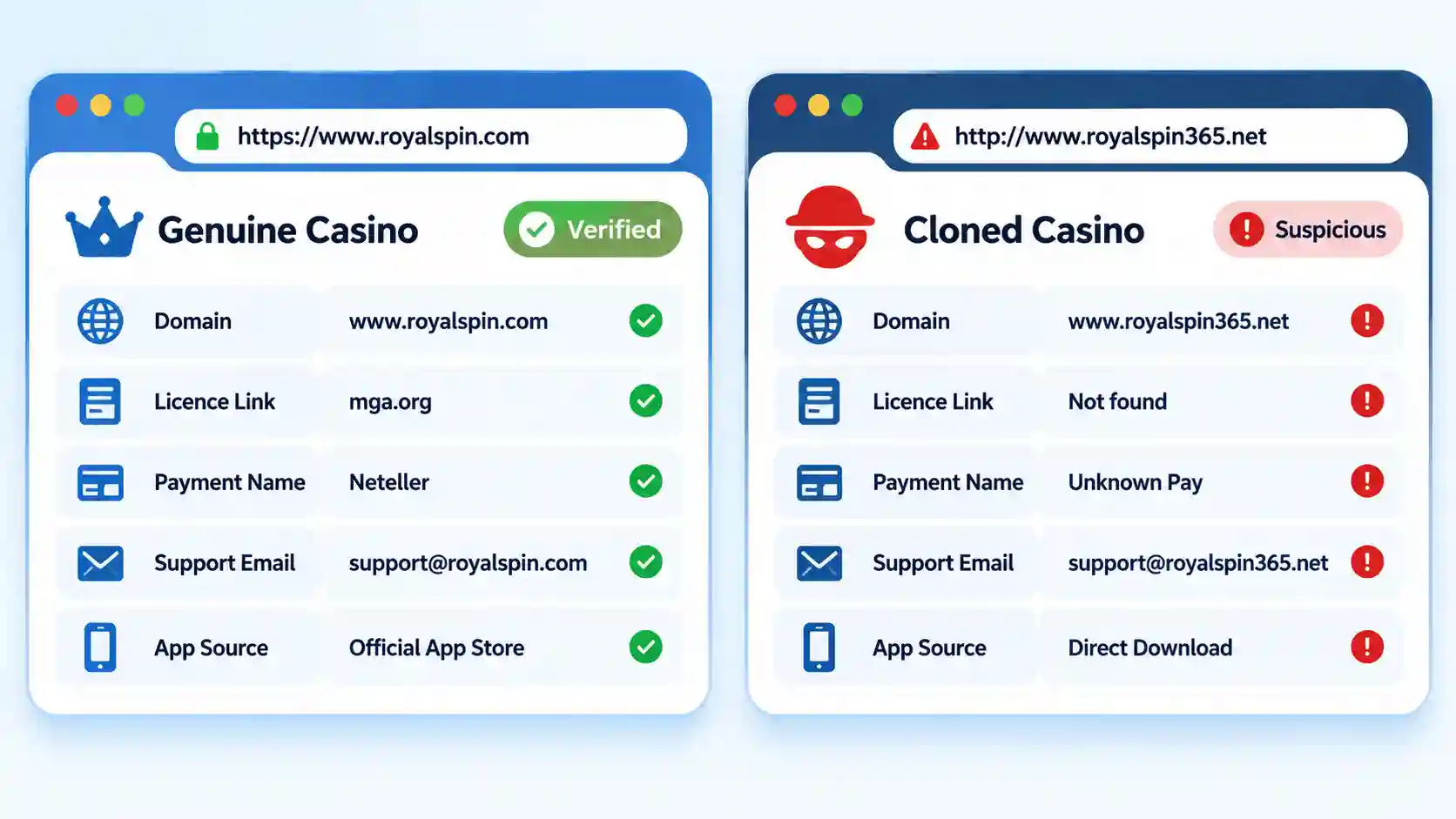
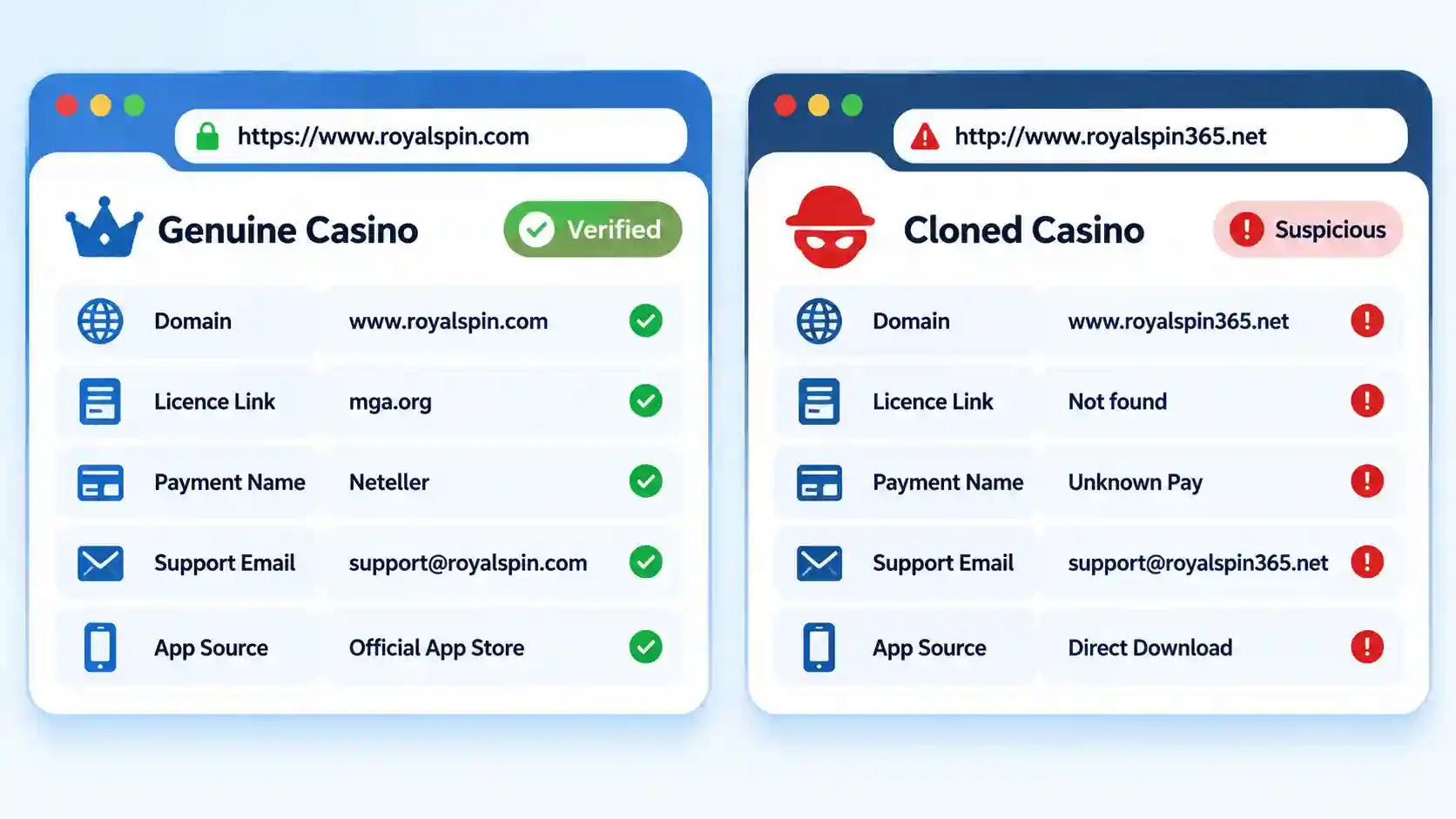
To spot a cloned online casino, compare its exact domain with the website listed by the regulator or verified operator. Treat mismatched licence details, lookalike domains, unexplained redirects, unrelated app publishers, and unfamiliar payment recipients as reasons to stop.
Do not sign in, upload identity documents, install an application, or deposit money while a material mismatch remains unresolved. A cloned casino can copy the design, games, legal text, and licence number of a legitimate operator.
Quick Take: The Strongest Clone Indicators
The exact domain is absent from the regulator’s record.
The licence number belongs to another company or website.
The address uses substituted letters, extra hyphens, misleading subdomains, or an unfamiliar ending.
The regulator badge opens a page that imitates the regulator instead of its official domain.
The login, document-upload, or payment page redirects to an unrelated website.
A recently registered domain claims a long operating history.
The website directs you to a fake app store or asks you to sideload an application.
The payment recipient does not correspond to the operator or a disclosed processor.
Support uses a free or unrelated email domain.
You are told to deposit more money to unlock a withdrawal, verification, or refund.
A single weak clue can have an innocent explanation. A failed regulatory match, copied licence, unrelated payment recipient, or fake application publisher is a much stronger stop signal.
What Is a Cloned Casino Website?
A cloned casino is a website or application that copies another organization’s identity to appear legitimate. The impersonated organization may be a licensed casino, a gambling regulator, a payment service, an app store, or a casino-software provider.
Some clones reproduce a real casino’s interface almost exactly. Others borrow only its brand name, logo, licence number, game catalogue, or customer-support language. The objective may be to collect deposits, steal account credentials, obtain identity documents, install malicious software, or redirect users to an unauthorized gambling service.
Advertisement
This is a documented regulatory problem. In July 2026, the Malta Gaming Authority reported a pattern of websites impersonating its licensees and publishing false regulatory claims. The authority’s impersonation warning instructs consumers to confirm both the operator and website through its official register.
Before You Check a Suspected Website
Limit further exposure while you investigate:
Do not log in or test a password on the suspected site.
Do not click its licence seal or customer-support link.
Do not install software or grant browser-notification permission.
Do not send a small deposit as a test.
Copy the URL as text or take a screenshot of the address bar.
Record whether you arrived through an advertisement, search result, email, text, social post, or application.
Use a separate browser tab to locate the regulator or genuine operator independently.
Hide account numbers and other sensitive information before sharing screenshots.
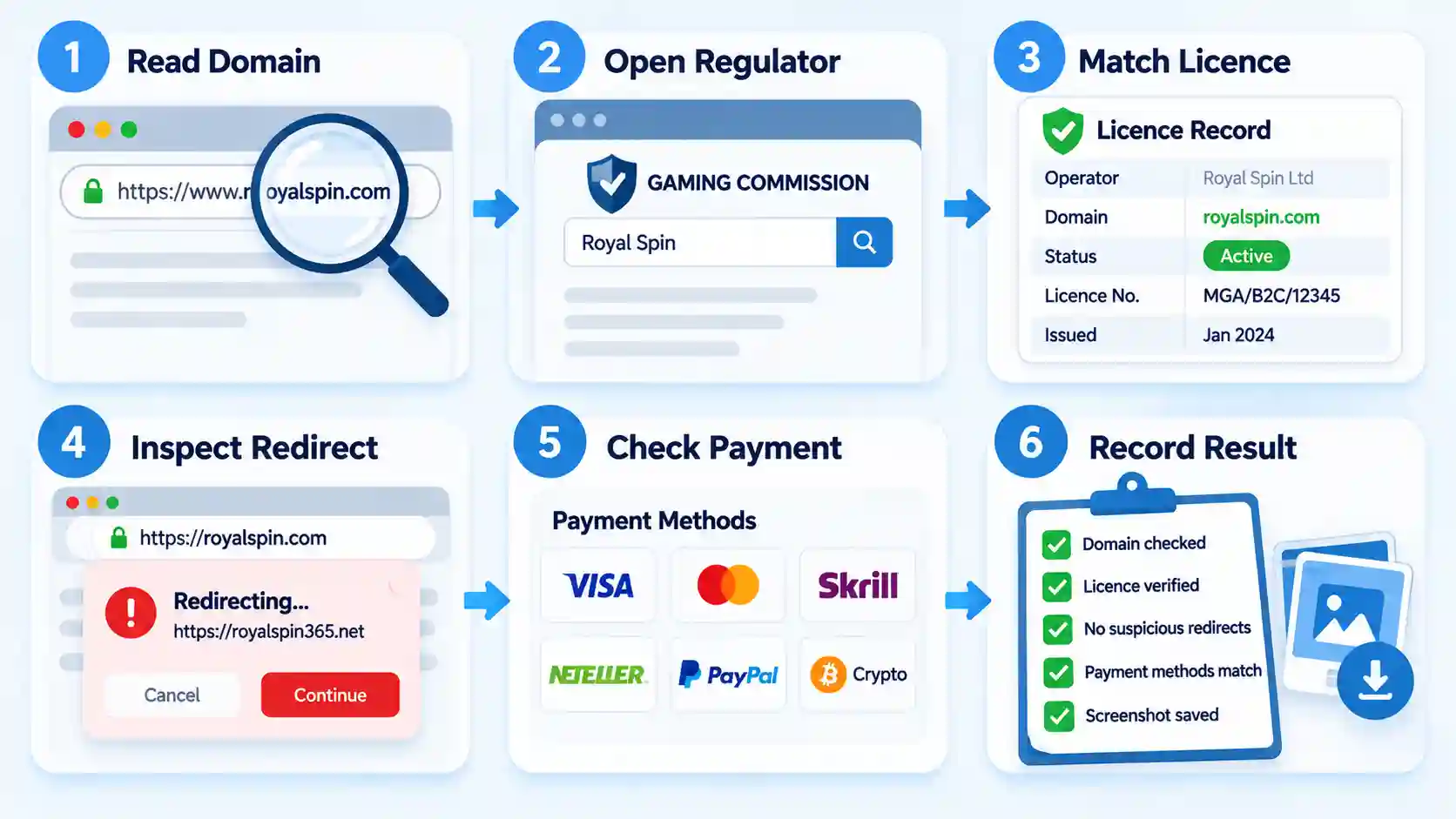
Read the address bar from right to left. A typical address contains a protocol, hostname, path, and optional tracking information. In `https://login.casino-example.com/account`, the registrable domain is `casino-example.com`. The word `login` is only a subdomain.
This distinction exposes addresses designed to mislead. In `casino-example.secure-payments.com`, the controlling domain is `secure-payments.com`, not `casino-example`. The trusted-looking words placed before it do not change who controls the destination.
Look for substituted characters such as `0` instead of `o`, `1` instead of `l`, or `rn` instead of `m`. Also check added words, doubled letters, hyphens, unexpected country codes, and endings such as `.bet`, `.vip`, or `.app` when the verified brand uses another address.
Advertisement
Expected result: You identify the core domain rather than relying on the brand name displayed on the page.
Find the genuine casino domain independently
Do not ask the suspected site to prove itself using links that it controls. Open the relevant gambling regulator’s website independently and search its register for the operator, brand, licence number, or domain.
You may also use a verified corporate page, established regulator record, or official regional directory to locate the genuine address. Compare the complete hostname, including any meaningful regional subdomain.
A search engine result can help you locate an official source, but ranking first does not prove authenticity. Advertisements and misleading pages can appear above the genuine website.
Expected result: You obtain an authoritative reference address that did not originate from the suspected website.
Advertisement
Match the operator and licence record
Compare the legal company, trading name, licence number, domain, authorization status, and permitted gambling activity. A clone may copy a genuine licence number from another business, so matching the number alone is insufficient.
The brand and legal operator can legitimately differ. This commonly occurs when one company operates several trading names or supplies a white-label casino platform. The regulator’s record must still connect the licence holder to the exact domain or explain the operating relationship.
If the licence exists but the domain is absent, inactive, or assigned to another company, do not deposit. Ask the regulator for clarification through contact details on its official website.
Expected result: The regulator independently connects the exact website to the licensed operator.
Inspect redirects and destination changes
Watch the address bar when moving from the homepage to login, registration, verification, support, and payment pages. A clone may begin on a convincing domain before redirecting sensitive actions elsewhere.
A separate domain is not automatically fraudulent. Licensed casinos often use disclosed identity, customer-support, and payment processors. The operator should identify the provider, and the transition should not disguise the new destination.
Advertisement
Stop if the login page unexpectedly opens on an unrelated domain, the document uploader uses an unexplained file-sharing service, or support directs you to a different website through chat.
Expected result: Every sensitive destination is either controlled by the verified operator or attributable to a disclosed provider.
Check domain registration data
Use the ICANN Lookup service for supported domains. Registration data may show the creation date, most recent update, expiry date, registrar, and nameservers. Personal registrant details are often redacted for privacy, so hidden ownership is not proof of fraud.
Since January 28, 2025, RDAP has replaced traditional WHOIS as the definitive delivery method for generic top-level domain registration data, according to the ICANN RDAP notice.
A domain created last week is suspicious when the website claims to have operated at that address for 15 years. However, domain age is supporting evidence only. A legitimate operator can launch a new regional site, while criminals can buy an old domain or compromise an established one.
Advertisement
Expected result: The registration timeline is either consistent with the website’s history or adds weight to other warning signs.
Check browser and Safe Browsing warnings
Do not continue past a browser warning about phishing, malware, an invalid certificate, or deceptive content. Record the warning and close the page.
Google says its Safe Browsing system examines URLs for known phishing and malware threats and displays warnings in supported browsers and search products. You can use its site-status tools as an additional check.
A clean result does not prove that a casino is licensed or harmless. New clone sites may not have been detected, and a legitimate site can later become compromised.
HTTPS also has a narrow meaning. It encrypts the connection between your browser and the website. Criminals can obtain valid certificates for domains they control, so a padlock does not confirm the operator’s identity or gambling authorization.
Advertisement
Expected result: You identify known technical threats without treating the absence of a warning as approval.
Verify the application and installation route
Reach the official mobile application through the verified operator’s website or a listing linked from an authoritative source. Compare the developer name, publisher, privacy-policy domain, support contact, download history, and recent updates.
Be cautious when an advertisement opens a page that visually copies Apple’s App Store or Google Play but remains inside a normal browser. A button labelled Install may add a progressive web app, configuration profile, or downloaded package instead of an app reviewed by the platform.
Do not sideload an APK, desktop installer, or mobile profile solely because a support agent says the regular store version is unavailable in your country. Geographic unavailability may indicate that the operator is not authorized to serve your location.
Expected result: The application publisher and distribution route connect to the verified operator.
Advertisement
Verify support contacts and payment recipients
Compare the support email’s domain with the verified operator’s address. A free email account or unrelated domain deserves scrutiny, especially when it requests identity documents, remote-device access, cryptocurrency, or payment outside the cashier.
Before authorizing a payment, inspect the card merchant, bank beneficiary, e-wallet merchant, or crypto instructions. A legitimate processor may have a different name from the casino, but that relationship should be disclosed or explainable.
Do not transfer funds to a support agent’s personal account. Treat constantly changing bank beneficiaries or wallet addresses as high-risk until independently verified.
Expected result: The recipient is the licensed operator or an identifiable payment provider rather than an unrelated person or company.
Compare the copied content for contradictions
Clones often reproduce the visible design while overlooking details deeper in the site. Check whether the terms name another brand, the privacy policy identifies a different company, or the responsible-gambling links lead to the wrong country.
Other inconsistencies include mixed currencies, contradictory minimum ages, placeholder addresses, broken complaint links, unexplained language changes, or support pages copied from another operator.
Advertisement
Recognizable games do not establish legitimacy. The UK Gambling Commission has documented licensed games appearing on unlicensed gambling websites. A familiar game studio or live-dealer interface is not a substitute for checking the casino itself.
Expected result: The legal and operational content is consistent with the verified operator and jurisdiction.
Assign a pass, caution, or fail result
Give the site a pass only when the regulator, operator, exact domain, app publisher, and payment route align. Use caution when a legitimate operator appears to have introduced a new regional domain, migration, white-label relationship, or processor that is not yet clearly documented.
Fail the site when the licence belongs to an unrelated company, the domain impersonates another brand, the regulator page is fake, or the payment recipient cannot be connected to the operator.
Expected result: You reach a decision before exposing credentials, documents, or money.
Advertisement
Verification Matrix: Genuine, Unclear, or Cloned
Check
Genuine indication
Caution
Clone or impersonation indication
Exact domain
Listed by the regulator or verified operator
New regional or migrated domain
Lookalike or unrelated domain
Licence number
Matches the operator and domain
Business relationship is unclear
Belongs to an unrelated company
Regulator link
Uses the authority’s official domain
Official link is temporarily unavailable
Opens an imitation verification page
Registration history
Consistent with the website’s stated history
Recent launch or ownership change
New domain claiming a long history
HTTPS
Valid encrypted connection
Recently changed certificate
Certificate or browser warning
Application
Publisher matches the verified operator
Related company is not explained
Unrelated publisher or fake store page
Payment recipient
Operator or disclosed processor
Unfamiliar but traceable descriptor
Personal or unrelated beneficiary
Games and design
Consistent brand and legal information
Minor regional variations
Copied assets with contradictory legal details
Regulatory, domain, publisher, and payment-recipient mismatches carry more weight than design quality. A polished clone can look more convincing than an older legitimate website.
What to Do If You Already Used the Suspected Clone
Danger✕
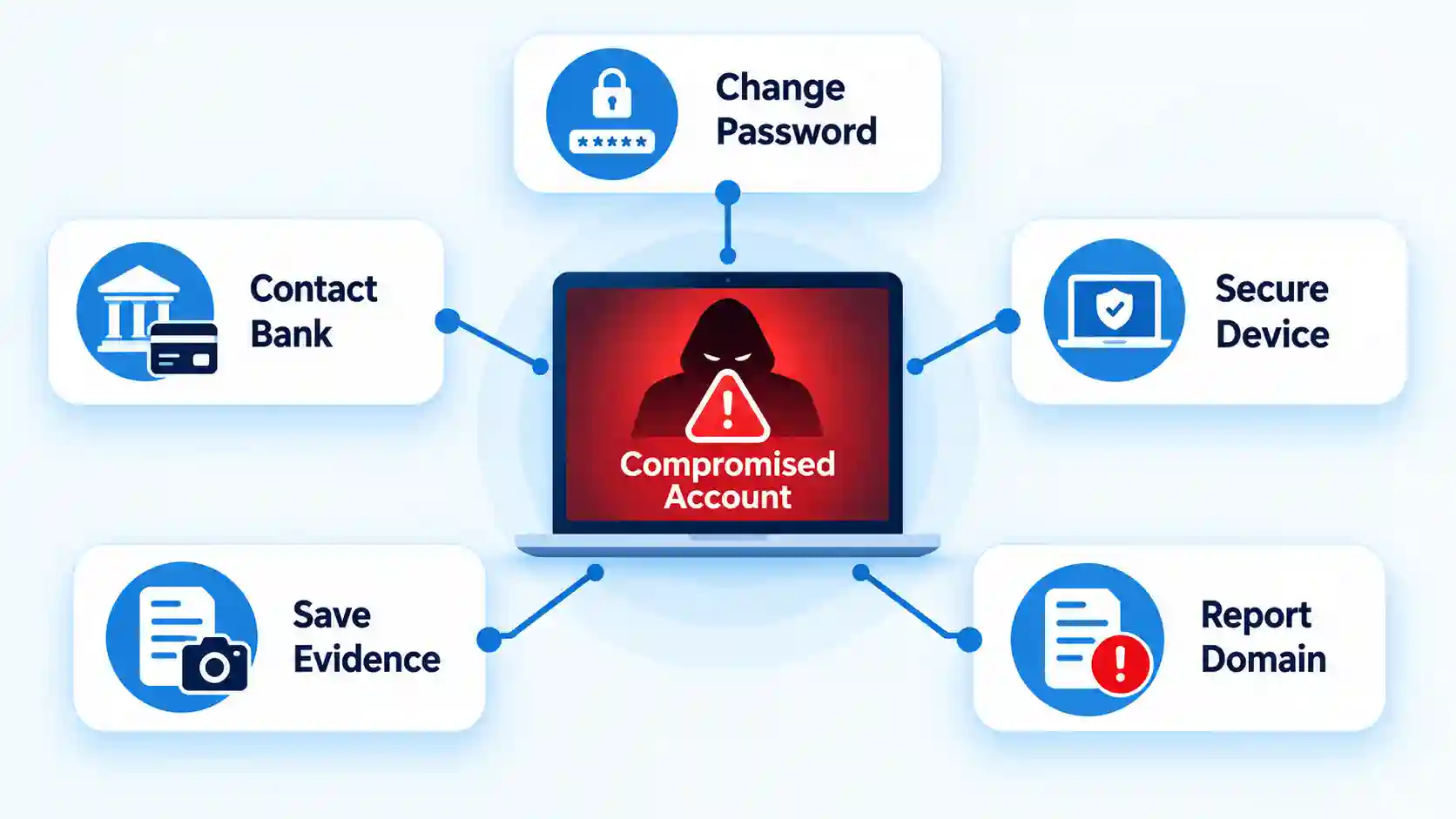
Stop interacting with it. Close the page or application. Do not confront support or follow new recovery instructions.
Preserve evidence. Save the exact URL, screenshots, emails, chat logs, phone numbers, payment details, transaction references, and crypto hashes.
Change exposed passwords. Use a trusted device and start with your email account. Change every account where the same or a similar password was used.
Enable multifactor authentication. Terminate unfamiliar sessions and remove unknown recovery addresses or devices.
Contact the payment provider. Tell your bank, card issuer, wallet, or exchange what information was exposed and identify unauthorized transactions accurately.
Protect affected cards and accounts. Freeze or replace them when advised. Monitor statements and alerts for new activity.
Secure the device. Remove suspicious applications or profiles, review permissions, install operating-system updates, and run a trusted security scan.
Protect your identity. Treat uploaded passports, licences, statements, and selfies as compromised. Follow the relevant identity-theft process in your country.
Report the clone. Notify the impersonated operator, gambling regulator, browser-security provider, hosting or advertising platform, and applicable national fraud-reporting service.
Avoid recovery scams. Do not pay an agent who guarantees that lost deposits or cryptocurrency can be recovered.
The urgency depends on what happened. Merely viewing a page creates a different risk from entering a password, uploading identity documents, authorizing a card payment, sending crypto, or installing software.
The US Federal Trade Commission’s phishing response guidance recommends protecting affected accounts and devices when scammers obtain personal or financial information. Readers who submitted documents should follow the extended checklist for ID uploaded to a scam site.
Common Mistakes That Make Verification Less Reliable
Mistake
Why it fails
Better check
Trusting the first search result
Advertisements and manipulated results can lead to impersonators
Start with an official regulator record
Clicking the casino’s licence seal
The suspected site controls the destination
Open the regulator independently
Trusting HTTPS
Encryption does not prove identity or authorization
Match the domain and operator
Checking reviews only
Reviews may concern a different domain or be manipulated
Verify the exact URL through primary sources
Relying on domain age
Old domains can be sold or compromised
Combine RDAP with regulatory evidence
Recognizing the games
Licensed games can appear on unauthorized sites
Verify the casino’s own licence
Testing with a small deposit
Successful payment confirms only that the site can receive money
Do not fund an unresolved website
Questioning suspicious support
You may reveal more information to the impersonator
Contact the verified operator separately
Operational Limits and Edge Cases
Not every unfamiliar address is a clone. Legitimate operators may use country-specific domains, white-label brands, dedicated identity providers, payment processors, or new addresses introduced during a migration.
A genuine exception should be independently documented. The regulator’s register, verified operator website, official app listing, or published provider relationship should explain why the domains or company names differ.
RDAP records can hide personal ownership details for legitimate privacy reasons. Safe Browsing may not yet recognize a newly launched phishing site. Conversely, an established legitimate website can be compromised and temporarily serve malicious content.
Progressive web apps also blur the difference between a normal website and an installed application. Their use is not automatically malicious, but the installation source and operator still require verification.
Advertisement
Do not assume a site is genuine because it is absent from a regulator’s unauthorized-domain list. Blacklists document known cases and can lag behind new domains. Positive verification through official records is stronger than the absence of a warning.
Key Takeaways
Read the registrable domain instead of trusting the logo or page title.
Navigate from the official regulator toward the casino.
Match the legal operator, licence number, exact domain, status, and activity.
Inspect redirects before entering passwords, documents, or payment information.
Use RDAP and Safe Browsing as supporting checks, not proof of legitimacy.
Do not treat HTTPS, polished design, or recognizable games as licensing evidence.
Verify application publishers, support contacts, and payment beneficiaries.
Stop when a regulatory, domain, publisher, or transaction-recipient mismatch appears.
Secure exposed accounts and devices immediately.
Preserve evidence before reporting or attempting recovery.
Frequently Asked Questions
Can two legitimate casino websites have almost the same name?
Yes. Separate companies, regional brands, and white-label casinos can use similar names. Similarity does not establish a connection. Verify each exact domain and its legal operator through the regulator responsible for your location.
Can a cloned casino rank above the real website in search results?
Yes. A clone can appear through paid advertising or temporarily rank for brand-related searches. Search position is not authentication. Use the regulator’s register or another independently verified brand source to locate the official domain.
Does a valid SSL certificate mean a casino website is genuine?
No. A valid certificate encrypts traffic between your browser and that domain. It does not prove that the domain belongs to the casino it claims to represent or that it holds a gambling licence.
Can scammers copy a real casino’s live chat?
Yes. They can copy the appearance of a chat widget or use a similar third-party service. Verify the website surrounding the chat and contact the genuine operator through details obtained independently.
Advertisement
Is a newly registered casino domain always fraudulent?
No. Operators can launch new brands, regional sites, and replacement domains. A recent registration becomes more concerning when the site claims a long history or lacks an official connection to the licensed operator.
What if the casino is not on an unauthorized-site list?
Its absence proves only that the specific domain may not have been listed. New threats can appear before regulators or security services detect them. Confirm the domain positively through the operator’s official regulatory record.
Bose refreshed its everyday over-ears and left the price at $199 (was $359). QuietComfort Headphones now carry Immersive Audio, two-way USB-C sound, and smarter canceling that used to live on the more expensive Ultra models.
The former spherical silhouette has been replaced with pill-shaped earcups and a broader sliding headband. Protein-leather pads are removable, and the entire rig weighs roughly 230 grams. That number is important for a red-eye flight. The cushioning around the ears and across the crown is thick enough that most people cease noticing the headset within twenty minutes. Glasses wearers have a cleaner seal than they did with the original QuietComfort Headphones.
NOISE CANCELLING HEADPHONES: Effortlessly combines noise cancellation technology with passive features so you can shut off the outside world, quiet…
COMFORTABLE HEADPHONES: Plush over-ear cushions softly hug your ears, while a secure and comfortable padded band gently keeps your studio headphones…
2 LISTENING MODES: These wireless Bluetooth headphones feature Quiet and Aware Modes that let you toggle between full noise cancelling or full…
QuietControl is the new term for the canceling system, and ActiveSense is the component that responds to noise surges. A bus hiss, a blender, and a cabin roar: the headphones add extra silence without requiring a menu dive. When canceling was turned on, SoundGuys found that perceived loudness decreased by 85 percent. Aware mode still let street noise and conversation through. If you merely want raw isolation from the pads, you can use the full off setting.
Advertisement
The stock tune features warm bass and rich mids. Treble remains courteous rather than harsh. The Bose app includes a three-band equalization that allows you to increase or decrease bass, mids, and highs without having to navigate ten sliders. TrueSpatial audio, previously reserved for Ultra, is now available in three versions. Still mode keeps the mix in the room as you turn your head. In motion mode, the stage moves with you. Cinema mode broadens the scope of films while attempting to keep voices central.
USB-C now supports bidirectional audio transmission at up to 24-bit/48 kHz. You may listen as the battery charges. A USB-C to 3.5 mm cable is included in the container for airplane seats and older plugs. Bluetooth 5.4 supports two devices at once. Codecs remain at AAC and SBC. AptX remains an Ultra perk. With canceling turned on, the battery life lasts 24 hours, however it drops to 18 hours if Immersive Audio is left on. Fifteen minutes on a charging provides approximately 2.5 hours. You may wear them as they charge, eliminating the usual “dead battery” dread on a long day.
Six microphones are used to conduct calls. Bose claims that voice pickup is cleaner than the previous generation. Independent testers continue to rate talking as the poorest capability of these devices. There is no wear sensor, thus music will not stop when you lift a cup. There are no water ratings either. On paper, their competitors will outlast them by 50 hours.
BLUETTI has unveiled the Pioneer 5000 E-Generator, built for construction, rental and remote-site power with 5kW continuous and 18kW surge output.
Construction sites across the EU answer to Stage V emissions standards phased in from 2019, while sites in London have faced the Non-Road Mobile Machinery Low Emission Zone since 2015, and BLUETTI enters that landscape with an E-Generator category built around the Pioneer 5000.
That combination suits noise‑sensitive sites and intermittent tool use, the system’s 5.12kWh battery (expandable to 35kWh) powers short‑burst tools and lighting, with load‑dependent runtime, and features IP65, IK10, and a -20°C to 55°C environmental tolerance.
Charging follows the same practical logic, since 5 to 80 percent takes around 60 minutes at up to 5kW of AC input and combined AC-solar charging can reach 6.2kW, while BLUETTI rates noise at no more than 50 decibels, a level that could appeal to operators working in noise-sensitive locations.
Advertisement
Remote oversight comes through the BLUETTI App and an optional 4G module, which combine location tracking, fault alerts, remote diagnostics and over-the-air updates to cut routine site visits for fleet managers.
The Pioneer 5000 forms one part of a wider portfolio BLUETTI is showing at IFA 2026 under the theme From Balcony to Everywhere, and the range spans professional power, home energy storage and portable devices for life on the move.
Advertisement
Home energy and portable additions
Household electricity costs echo that same pressure, since Eurostat’s second-half 2025 figures show EU household prices plateaued near their post-crisis highs at around 0.29 euros per kWh, above pre-2021 levels, and the Balco 500 responds with a 5,024Wh LFP battery paired with up to 4,600W of solar input.
Balco 500 combines grid-tied and off-grid backup modes with an IP65 rating, a 10-year product warranty and a separately stated 8,000-cycle rating for the pack itself, per BLUETTI’s published specifications.
Advertisement
As the AI‑driven brain of Balco 500, BlueBot learns household usage patterns to build a dynamic energy model, and incorporates the Plug & Play Phase‑Match Energy System to auto‑coordinate three‑phase wiring for optimal solar self‑consumption.
What is more interesting is Bluetti’s EnergyFlex System, it connects a compatible portable power station to home circuits through a Balco Transfer Hub, turning that power station into part of a home energy system.
Advertisement
Alongside that home energy solution, BLUETTI previewed the Elite mini Series, three compact power stations spanning from 288Wh to 2,010Wh that measure up to 42 percent smaller and 25 percent lighter than the equivalent Elite V2 models for camping or home use.
BLUETTI has not confirmed pricing or regional availability for the Pioneer 5000 or the wider lineup, and that figure will likely decide how compelling the E-Generator category looks to rental operators weighing it against diesel alternatives on purchase price and operating costs.
Advertisement
BLUETTI expects the Balco 500 to reach the market shortly after IFA concludes, and the wider range remains on display at Booth H2.2-176 during the event, which runs from 4 to 8 September at Messe Berlin.
Chromebooks offer some great advantages, but there are limitations to know before you start using one every day.
Savusia Konstantin/Getty Images
Chromebooks have come a long way since their initial release in 2011, and the future promises more interesting devices with the upcoming Googlebooks, which aim to harmonize Android and ChromeOS into a single package. If you’re considering switching from Windows or Mac into something more minimalist, a Chromebook can certainly be a good alternative. These machines have their quirks, though, and have proved divisive in tech communities over the years.
If you’re someone who wants a machine that’s lightweight, efficient and secure, and you largely work within office applications like emails and spreadsheets, it’s definitely worth looking into a Chromebook. However, there are a few drawbacks to be aware of before you take the plunge.
Advertisement
Pros of using a Chromebook
One of the best qualities of a Chromebook is its simplicity, both physically and digitally. They’re generally much lighter than a typical laptop, while simultaneously being more durable. They also boast enviable battery life, with many models lasting upwards of 10 hours on a single charge.
This battery life is largely due to the simplicity of ChromeOS. Modeled after the Chrome browser, it’s an interface most people are familiar with already, with much less learning needed to use it efficiently. This streamlined approach also means Chromebooks boot within a few seconds.
The OS is much more secure than a typical PC’s by default, thanks to a few different approaches. For one, it’s a read-only OS; because you can only make changes to your own files and cloud storage, it’s much harder for malicious programs to wreck system files. A verified boot system double-checks for suspicious changes each time the Chromebook starts, automatically reverting to a previous version if it detects something’s off. And a process called sandboxing — where every webpage and application runs in its own environment — ensures any issues that do arise don’t contaminate other areas.
Advertisement
Chromebooks aren’t completely immune to security threats, as they can still fall prey to attacks like malicious extensions or Play Store apps. And no matter what device you’re using, you can still fall for a phishing email or have your weak password guessed. But in general, Chromebooks offer fewer points of attack than a Windows machine.
If you want more control and don’t mind losing most of these security features, you can enable Developer Mode on your Chromebook to get full access to the system. This allows you to install Linux and access a full terminal.
Perhaps the biggest selling point for a Chromebook is its pricing. There are higher-end models that get closer to the prices of standard laptops, retailing upwards of $700, but the average Chromebook is much cheaper. Engadget’s Chromebook pick for 2026, the Acer Chromebook Plus 514, is only $400 (depending on where you find it). Many other Chromebooks fall into a similar price range.
Advertisement
Cons of using a Chromebook
Savusia Konstantin/Getty Images
Back when the Chromebook line was introduced, they were essentially useless when you didn’t have internet access. Fortunately, there have been several improvements in this area over the years — much of Google Workspace (like Docs and Sheets) will work offline, as will Gmail. Other apps like Netflix and YouTube offer video downloading for offline use. While the offline situation is better now, a Chromebook is still a cloud-dependent device, so you’ll find your options limited without internet. Gaming is streaming-focused on ChromeOS, so unless you’re looking to play downloaded Android games, you’re out of luck.
This streaming-heavy gaming landscape, which largely relies on services like Nvidia GeForce Now and Xbox Cloud Gaming to play non-Google Play Store games, is a symptom of a larger Chromebook problem: software incompatibility. Not only do programs like Steam not run on ChromeOS, but a myriad of professional tools like Adobe Creative Cloud and legacy enterprise software used in fields like healthcare won’t work either. If you need any of these programs for work, ChromeOS is a non-starter. Speaking of compatibility, ever since Google Cloud Print was discontinued in 2020, not all printers work with ChromeOS. While most modern Wi-Fi printers should work, checking Google’s page on Chromebook printers is a wise idea.
Even the best equivalents to missing software can struggle with heavier rendering and processing due to the typical Chromebook’s weaker hardware. Because the OS is much simpler and so cloud-reliant, Chromebooks usually offer far lower specs in key areas like RAM, CPU and storage. There are always exceptions, but higher-spec Chromebooks come with much heftier price tags. If you’re worried about the best specs for the money, you should probably buy one of the best standard laptops instead.
Changing your iPhone camera settings back to default is pretty simple, so long as you don’t mind flipping a few dozen toggles.
Dontree_M/Shutterstock
While it’s unlikely your iPhone will ever beat out a purpose-built camera, there’s a lot you can do to optimize its capture quality. Even an out-of-date iPhone will be chock-a-block with ways to take your photography and videography to the next level. However, sometimes the best way to measure that improvement is by going back to the basics of default settings.
There are many ways to improve your smartphone photography with any model, and iPhones are no different; there are thousands of great guides to help you choose the right settings for the pictures and videos you want. On the other hand, it can be hard to judge the change in quality if you’ve already spent a long time messing with your settings — or if you have a second-hand phone that arrived pre-muddled. Sometimes, it’s desirable to bring your camera back to default settings and build from there, but there’s no single button to carry out that reset. Luckily, it’s still relatively simple to set everything back to default.
Advertisement
The default iPhone camera settings
Wongsakorn 2468/Shutterstock
First things first, you’ll want to go from Settings to Camera, where you’ll find everything available to you laid out. Given how much the iPhone has changed in the last few years, this layout won’t be the same for every phone. Luckily, one thing that generally will be the same is the Preserve Settings option. Under this option are a number of toggles which, when turned off, automatically reset their given setting to default when you open the camera app. All of these toggles are initially turned off, save for the Live Photo toggle, meaning your camera already mostly returns to its original settings after you exit the application.
There are also further settings within this section that can be set back to a default state. Your frame rate for recording video should be 1080p at 30 fps (or 240 fps for Slo-mo), and should be the same for Cinematic recording if your phone supports the option. Further defaults include Stereo in Record Sound (or Spatial Audio on the iPhone 16 and above) and High Efficiency in the Formats section. Grid and Level shooting will also be turned off, while Smart HDR and Prioritise Faster Shooting should be turned on.
Advertisement
Default camera settings for iOS 26
Studio4/Getty Images
iPhones that can install iOS 26 have a few extra settings with their own defaults. For instance, Lens Correction, Macro Control, and Scene Detection should all start toggled on. Furthermore, the default resolution under Formats should be 24 MP. ProRAW & Resolution Control will also be off.
This is a lot to keep tabs on, of course, so there is a Hail Mary for those who don’t want to sift through a dozen toggles. If you navigate via Settings > Transfer or Reset iPhone, you can find the Reset options. There’s no option to just reset your camera settings, but you can reset all of your iPhone settings. This will remove any Apple Pay cards, keys and passes that you have, and bring all settings to their defaults, so only use this option if you’re absolutely sure and can switch back anything you don’t want as default.
Think tank Ceres found power generation for data centers in seven states withdraws 3.4 trillion gallons of freshwater a year, or 10.4 million acre-feet
The figure might be a bit overstated, as it counts withdrawals, including hydropower water returned to the river immediately
78% of electricity in those states comes from water-using plants, and 66% of those plants sit in water-stressed areas
Non-profit think tank Ceres has published a new report analyzing the water used to generate electricity for data centers across Virginia, Texas, California, Illinois, Georgia, Ohio, and Arizona.
Ceres estimates data centers use 3.4 trillion gallons of freshwater a year, or 10.4 million acre-feet.
An important difference withdrawal versus consumption
Ceres’s approach makes sense, but it paints only a partial picture at best. It measures water withdrawals, or the total volume of water a power company pulls from a water source like a river, lake, or aquifer, including water it essentially replaces shortly afterward.
For context, the LAO’s 8 million acre-feet is a different quantity: water actually delivered and applied to residential, commercial, industrial, and landscape uses across California, and it is unlikely to be channeled back to its source.
A large amount of the power being generated and measured is hydroelectric power. This makes it a bit ironic, given that using water for generation may not be considered ‘consumed’ effectively.
Sign up to the TechRadar Pro newsletter to get all the top news, opinion, features and guidance your business needs to succeed!
The number seems considerably higher than one would expect: Arizona State University researchers, using 2024 Lawrence Berkeley National Laboratory data, put the indirect consumption of US data centers, including power generation, at about 650,000 acre-feet a year nationwide.
Advertisement
Although the data are old, the numbers suggest data centers may be consuming a fraction of what Ceres implies, according to its own report, unless consumption rose drastically to 16 times its reported figure.
Ceres, however, for now projects that water for power generation could account for 72 percent of total US data center water consumption by 2030, on a consumption basis, even as cooling inside the buildings gets more efficient.
At a time when the two largest Colorado River reservoirs have hit record lows, Ceres noted that local opposition grounded in water and grid concerns disrupted $130 billion of data center projects in the first quarter of 2026 alone.
Advertisement
Shama Perveen, the report’s co-author and Ceres’ director of water research, framed this as a complex situation and one that required a more inclusive approach, saying “no single stakeholder can address these challenges alone”.
Whether it pans out at a time when AI companies are spending money hand over fist to get their hyperscale operations (and subsequent cooling and power requirements) out of the door as the search for AGI continues unabated remains to be seen, however.














































































You must be logged in to post a comment Login