
Tech
Account Recovery Is the New Attack Path



For years, security teams have been making account takeover harder. Multi-factor authentication (MFA) added crucial protection to password-only authentication, while conditional access and device trust add further checks before users can reach sensitive systems.
However, these controls give attackers a reason to look for another route. Some attacks that are becoming increasingly common target the processes around authentication mechanisms, in particular account recovery. After all, why steal a user’s second factor if you can convince someone with the rights to manage it to replace it for you?
That makes the service desk more than a support function. It makes it part of the organization’s identity security boundary.
MFA Has Raised the Cost of Account Takeover
Even if an attacker captures a user’s credentials, MFA means a second authentication factor still stands between them and the account.
Further strengthening that barrier is the fact that many organizations are moving away from weaker factors such as SMS and toward authenticator apps, FIDO security keys and passkeys. Phishing-resistant authentication can make credential theft considerably harder to turn into account access, while conditional access and device trust add further checks based on factors such as the device, location and context of a login.
None of this means that MFA has failed. In many cases, the opposite is true: MFA works well enough that attackers have an incentive to find ways around it rather than attack it head-on.
That can mean stealing session tokens, abusing existing authenticated sessions or targeting authentication processes that sit outside the normal login flow. And one of the most important processes is account recovery.
Every strong authentication system still needs an answer to a routine problem: what happens when a legitimate employee loses access to it? At that point, the security of the account may depend less on the MFA technology protecting it and more on the process used to reset it.
Verizon’s Data Breach Investigation Report found stolen credentials are involved in 44.7% of breaches.
Effortlessly secure Active Directory with compliant password policies, blocking 4+ billion compromised passwords, boosting security, and slashing support hassles!
When the Recovery Path Becomes the Attack Path
Employees replace phones, lose security keys, change numbers, damage devices, and forget credentials. Sometimes an authenticator simply becomes unavailable.
When self-service recovery is no longer possible, the service desk typically becomes the route back into the account.
Depending on the organization and the user’s privileges, an agent may be able to reset a password or MFA, remove an existing authentication method, issue temporary credentials, approve registration of a new authenticator, or otherwise restore access.
While these are necessary support functions, from a security perspective, they are also sensitive identity-management actions. That makes the verification step before the reset critical. If a user normally must satisfy multiple authentication factors to access an account but only has to answer a handful of questions to replace those factors, the recovery process can become the weaker path to the same identity.
This is increasingly being treated as an identity assurance problem rather than a conventional help desk problem. Microsoft, for example, now describes account recovery in Entra ID as a “high-assurance” process and contrasts traditional question-based help desk recovery with stronger identity verification designed to re-establish trust before access is restored.
The principle is simple: the process used to replace an authentication method should provide confidence that the person requesting the change is the person who owns the account. If it doesn’t, the recovery path can quickly become the attack path.
Recent Attacks Highlight the Risk
The tactics employed by hacking collective Scattered Spider are a clear example of the challenge service desks face. A joint advisory from CISA, the FBI and international partners say the group has posed as employees to persuade IT and help desk staff to reset passwords and transfer MFA to attacker-controlled devices.
The same advisory notes that attackers may spend several calls learning about an organization’s password-reset process before attempting the takeover.
The 2025 attack on Marks & Spencer shows how damaging sophisticated impersonation can be. Scattered Spider impersonated an employee to trick a third-party contractor into resetting their password to gain access. From there, the group compromised more accounts and eventually deployed ransomware across the retailer’s network.
M&S chairman Archie Norman told Parliament that the incident was expected to reduce profit by around £300 million before recoveries, underlining how a successful identity-focused social engineering attack can become a major business incident.
Make Identity Verification Part of the Service Desk Workflow
Closing this gap means moving the service desk away from questions such as “Does this person sound legitimate?” or “Can they answer our verification questions?” and toward a stronger one: Can this person securely prove they are the employee associated with the account?
That is where Specops Secure Service Desk fits. It makes identity verification a required part of sensitive service desk workflows, helping reduce reliance on easily guessed or phished information and judgement that a social engineer may be able to manipulate.
Specops Secure Service Desk can use existing identity data in Active Directory or Entra ID and integrate with authentication services such as Duo, Okta, PingID and Symantec VIP. With support for more than 15 MFA factors, service desks can verify different types of users without introducing a separate enrollment process.
Crucially, verification sits directly in front of high-risk actions. Agents can reset passwords, unlock accounts and require a password change at the next logon only after the caller has been successfully verified. Verification events can also be exported to SIEM and analytics platforms to support audit and SOC workflows.
Secure Your Service Desk with Specops
Strong authentication only works if the process used to reset or recover it is just as secure. Treating service desk verification as part of the identity security process helps reduce the risk of social engineering without making legitimate support harder.
Specops helps organizations put stronger identity verification in front of high-risk service desk actions such as password resets and account unlocks.
Contact Specops today to see how you can strengthen identity verification and secure your service desk
Sponsored and written by Specops Software.

Tech
LG accused of tracking smart TV users, scanning home networks, and recording audio through built-in microphones

WTF?! An investigation by YouTube channel Gamers Nexus has found that LG’s smart OLED TVs track users’ viewing patterns across streaming platforms, cable, and local media. The televisions also reportedly scan users’ home Wi-Fi network, collect information about connected devices without permission, and transmit the data to LG Ad Solutions to push targeted advertising.
The investigators found that LG was using Automatic Content Recognition (ACR) technology to track not only users’ viewing habits but also any content played through the TVs’ HDMI, USB, RJ45, optical, RCA, and coaxial ports. However, using ACR to track content is not just a problem limited to LG but an industry-wide practice used by almost all major smart TV manufacturers globally.
The investigation, which was conducted in collaboration with fellow tech YouTubers Level1Tech and multiple independent security researchers, also found that the TVs have a major security loophole that can be used by hackers and other malicious actors to surreptitiously record audio through the built-in microphone, even when the device is switched off.
Alarmingly, unplugging the TV from the power socket and shutting off the internet don’t automatically delete the recordings or prevent the data from being transmitted. According to the researchers, the recorded audio files can be safely stored on the TVs’ local storage and sent to third-party servers once it’s powered on and reconnected to the internet.
As if the risk of hacking and unauthorized data harvesting aren’t troubling enough, the researchers also found the TVs harbor critical remote-code-execution vulnerabilities that could potentially be exploited to steal user data. The report did not reveal details about the RCEs as the researchers are still in the process of reporting them to LG in accordance with industry practices.
It is worth noting that this is not the first time Gamers Nexus has called out LG for unsavory business practices. Earlier this year, the channel reported that several popular LG monitors were automatically installing a sketchy Windows app without permission. The monitors were also reportedly collecting user data and displaying pop-up ads for McAfee antivirus and other software.
Microsoft’s executive VP of Windows and Devices, Pavan Davuluri, later confirmed that Redmond had to intervene and force LG to remove the controversial app from the Windows Store after a massive outcry from users complaining about the pop-up ads and automatic app installations.
LG has since denied most of the claims. In a statement to Tom’s Hardware, it said:
The claims made in the recently published video are not true. LG TVs process voice data only when the voice button on the remote control is pressed and held, or when a wake word such as ‘Hi LG’ is recognized after the user has activated the Far-Field voice recognition feature. Other than these instances, the TVs do not collect or record ambient conversations. (If the wake word is not recognized, no voice data is transmitted to the server; the audio processing for wake word detection is performed locally on the device and is immediately deleted.)
Additionally, to provide smart TV functionalities, LG TVs feature the ability to scan for and connect to nearby devices on the same network. This is a standard function commonly provided by smart TVs and smart home devices.

This week, two educators trace what happened after a student said something that could have been dismissed as attitude but turned out to be something else entirely. One teacher heard it in the middle of a lesson on irony. The other heard it in a planning meeting for a brand new program. Neither could shake it, and both went looking for what it actually meant.
Skipping the Struggle: What “I Used ChatGPT” Really Meant
Melinda Medina has taught English and special education in Brooklyn for over a decade, and she knows what it sounds like when a student is struggling with a text. What she heard instead was a student who wasn’t struggling at all, just skipping the struggle altogether. She explains why that distinction matters more to her than plagiarism ever did, and what she now asks her students to do to counter the seemingly simpler path offered by AI.
Looking for Answers at a Coding Summit
An eighth grader’s question about the point of learning didn’t have an easy answer, so Beth Yirga went looking for one somewhere she didn’t expect, a room full of software engineers and tech executives who had never met a K-12 teacher. What she found there reshaped how she thinks about equity, identity, and what her students actually need heading into an AI-driven future.
Stories Mentioned in This Episode
Protecting Student Cognition in the Age of AI by Melinda Medina
The K-12 Silo Won’t Survive AI, But Our Relationships Might by Beth Yirga
This Week with EdSurge is a weekly podcast from EdSurge. Subscribe to the EdSurge newsletters for more news and analysis on education and technology.
Tech
Samsung’s Galaxy Z Fold8 is a Passport-Sized Smartphone That Puts a Tablet in Your Hands, Perfect iPhone Ultra Alternative
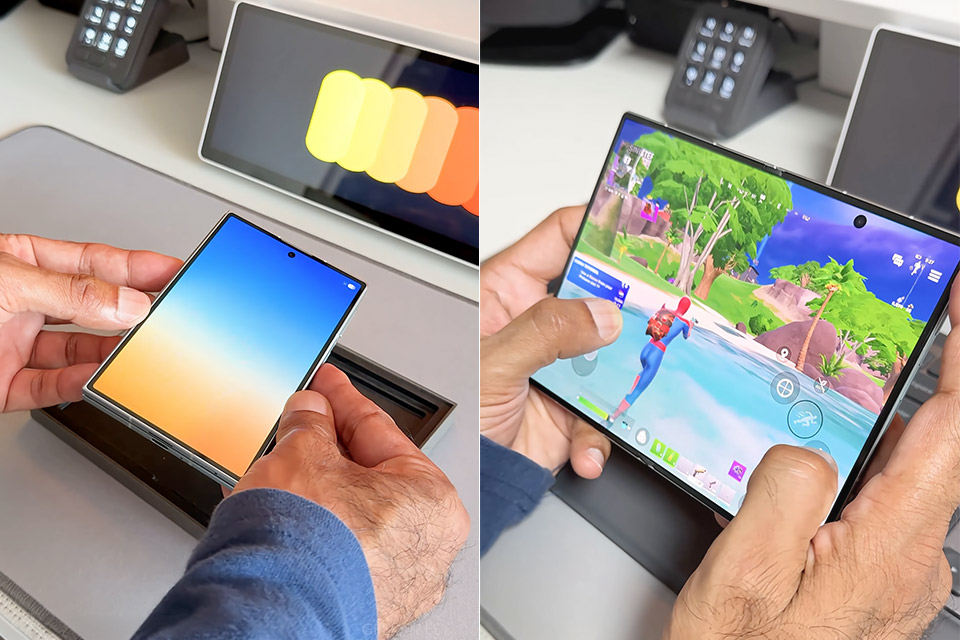
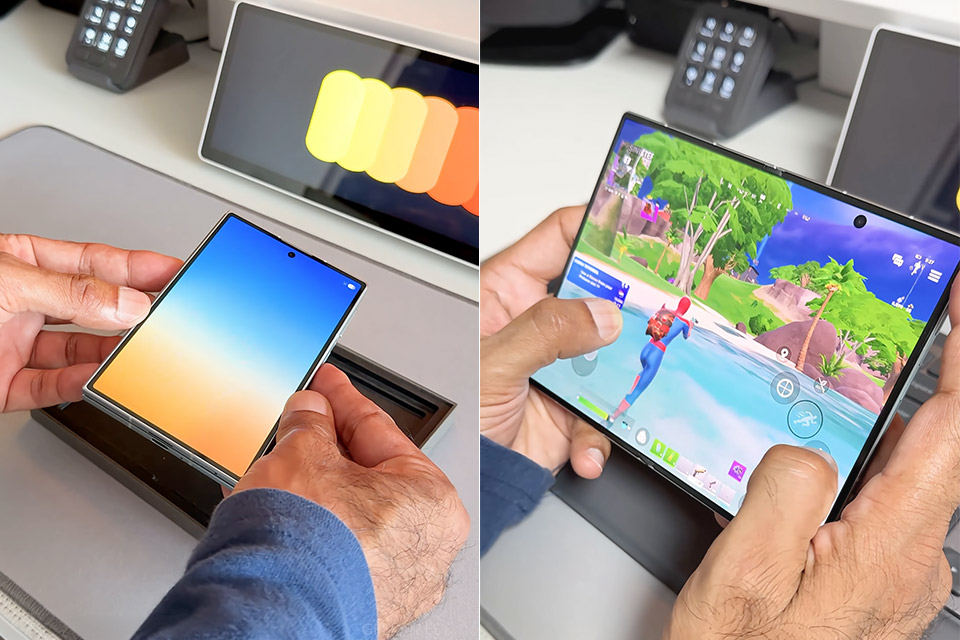
Samsung spent countless hours stretching book-style foldables taller and slimmer. Galaxy Z Fold8, priced at $1,649.99 (was $1,900), goes the other direction, folding into a short, wide slab that sits in a pocket like a passport and opens into a 7.6-inch screen built for movies, books, and two apps at once. Folded, the phone measures 123.9 by 81.9 by 9.7 millimeters and weighs 201 grams, light enough that reviewers keep comparing it to a regular flagship rather than a hinge-and-glass experiment. Opened, the body thins to 4.5 millimeters. Armor aluminum, Gorilla Glass Victus Ceramic 3 on the cover, and an IP48 rating (dust over 1 millimeter, 1.5 meters of water for 30 minutes) keep the package from feeling fragile after a month of daily carry.
A 5.5-inch Dynamic LTPO AMOLED 2X panel with 1248 by 1972 resolution, 428 pixels per inch, and a refresh rate of 1-to-120 Hz takes care of the cover duty. That outer screen is wide enough for two-thumb typing and social feeds, short enough that some testers shrink fonts to see more at once. Most people continue to rely on it for 80 percent of their daily needs. When unfolded, you’ll find a 7.6-inch inner panel with a resolution of 1848 by 2448, approximately 403 ppi, HDR10+, and a peak brightness of 3,000 nits.
Sale

Samsung Galaxy Z Fold8, 256GB, Cream
- CREATED FOR YOUR CONTENT: Any way you turn it, the new Galaxy Z Fold8 gives you a fuller viewing experience. Designed with your content in mind, this…
- WORLD’S LIGHTEST FOLD¹: Galaxy Z Fold8 is the newest foldable phone for content on the go. Unfolded, it fits movies and books for an immersive…
- THE BRIGHTEST DISPLAY ON A GALAXY PHONE: Our brightest smartphone display² provides you with a comfortable view, whether you’re inside or outside…
Flex Titanium has flattened the crease into a line that is only noticeable if you look for it. The aspect ratio is close to 4:3 in portrait and 16:10 in landscape, which is suitable for documents and video without the skinny-book cut that older Folds imposed on everything. Apps still stretch or letterbox from time to time, but One UI 9 on Android 17 improves on that with split view, pop-up windows, and DeX for desktop access. Seven significant OS updates are promised.
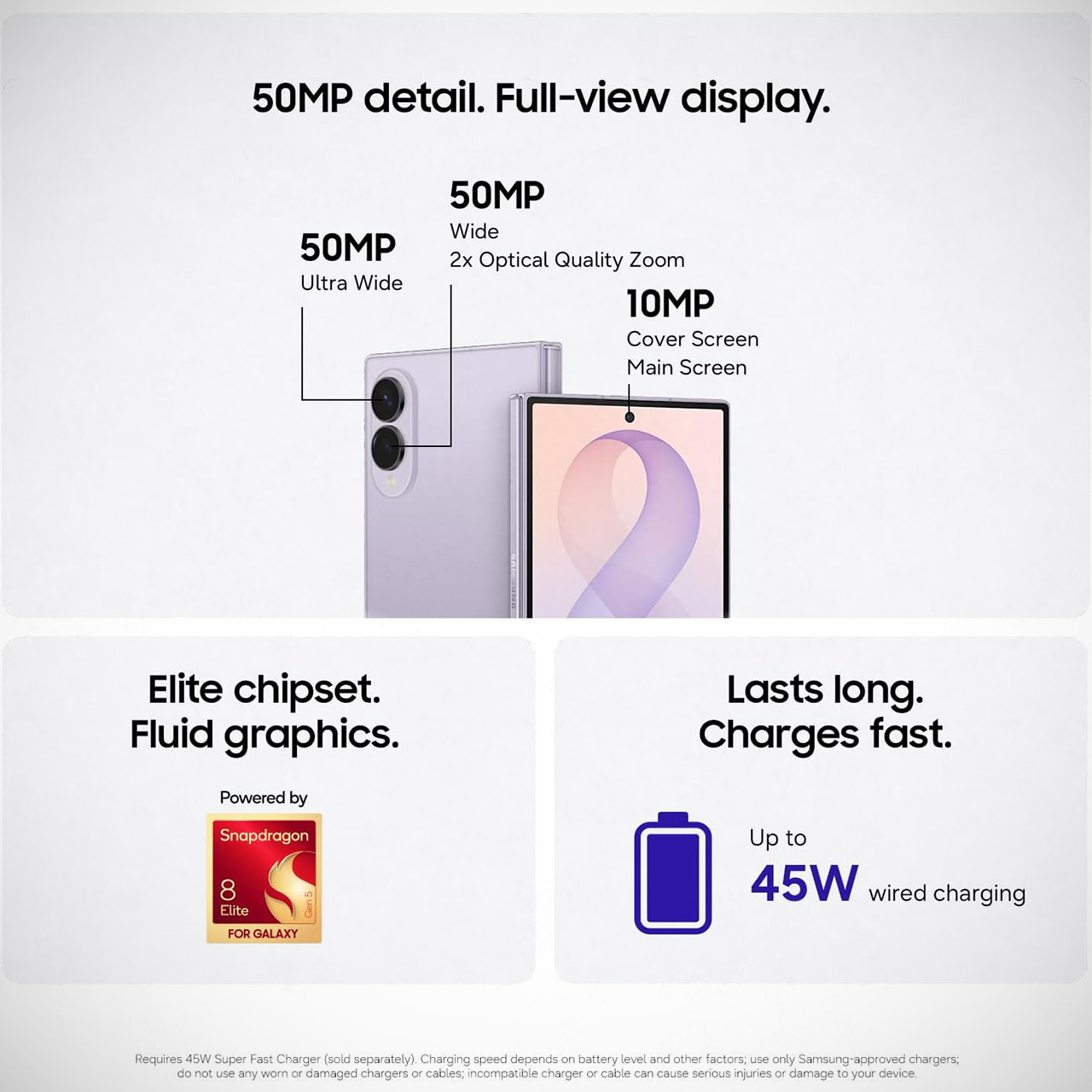
Qualcomm’s Snapdragon 8 Elite Gen 5 Samsung Galaxy, which uses the same 3-nanometer CPU as the S26 series, drives 12 GB of RAM on the 256 GB and 512 GB variants, and 16 GB on the 1 TB version. Everyday tasks, games, and three-app setups remain zippy. Sustained loads continue to produce heat and some throttling after half an hour, therefore many owners leave the performance profile set to lighter. The battery is a 4,800 mAh silicon-carbon cell, up from 4,400 mAh last year. Mixed use across both displays results in a full day, with video playback testing lasting more than 21 hours and Samsung claiming up to 26. Wired charging is 45 watts, or approximately 63% in 30 minutes. Wireless has a power output of 20 watts, whereas reverse wireless has 4.5 watts. The cycle rating spans from 1,200 to 80 percent, making it shorter than prior Folds, which is a minor trade-off for thinner cells.

Cameras are the standout feature. The rear duo has a 50-megapixel f/1.8 main camera with OIS and in-sensor 2x, as well as a 50-megapixel f/1.9 ultrawide camera with 120-degree coverage. Both 10-megapixel selfies are at f/2.2, one on the cover and one inside. Daylight stills and 8K or 4K footage appear clear. Ultrawide attention is advantageous. There is no dedicated telephoto lens, so zooming beyond 2x is digital, and the main sensor is smaller than the 200-megapixel units on the S26 Ultra and Fold8 Ultra. This Fold is not suitable for long-range photography. The speakers are stereo, but they only fire from one side when the phone is in landscape mode, causing movies to lose breadth. The remaining features include a side fingerprint scanner, Wi-Fi 7, Bluetooth 6.0, UWB, and dual eSIM.


Many drivers have been there — a sudden fender bender or a loss of control on a rainy day. When the worst happens, we rely on auto insurance to cover the damage. Almost every state requires auto insurance by law, and for good reason. If you cause an accident or damage another person’s property, you’re responsible. Even a minor accident can cause thousands in repair bills. You could also be on the hook for hospital and legal bills. If you finance your vehicle when you buy it, of course, your lender will likely require you to carry a certain amount of insurance coverage.
One policy makes sense, even if you don’t go with the highest-ranked auto insurance company, but what about two? If you use your vehicle for both work and pleasure or you want to cover expensive aftermarket additions that your standard policy excludes, you may have thought about purchasing a second policy. While no U.S. law prohibits carrying multiple insurance policies on one vehicle, paying for both is usually a waste of money.
Sometimes we accidentally end up carrying multiple policies for the same vehicle — it’s especially common when you change insurance companies and forget to cancel your old policy. Accidental or otherwise, you cannot make two claims after an accident to get double the payout. If you try, it could slow down the payout process, and both insurers may try to claim the other is responsible. Double-insuring may also go against an insurer’s policies, and could lead to you losing perks like good driver or bundling discounts.
What to know, and when two policies actually makes sense

Even when the process of filing an insurance claim goes smoothly, a payout takes time. If you have more than one insurance policy on your vehicle, it may delay the process even further. Your insurance companies will do something called a coordination of benefits to determine which policy is responsible for the claim. Unless one company pays first and the second company only pays for anything the first company did not cover, you’re committing insurance fraud.
Ultimately, paying two premiums for two insurance policies makes little sense for most drivers. You’re paying for double the coverage but only receiving benefits from one policy when you file a claim. If your insurance policy doesn’t offer all the coverage you need or want, you should shop around for a better policy rather than purchasing a second. Stay away from cheap car insurance, which may come with high deductibles, minimal coverage, and poor claims support.
For most people, the only instance when buying two policies makes sense is if you’re transitioning from one policy to another and need to fill a coverage gap. To avoid accidentally paying for two policies at once, know when the cancellation of your old policy is effective and start your new policy with as little overlap as possible. If you and your spouse share a vehicle, you only need one policy, with both of you listed as drivers. If you share a car with a significant other who doesn’t live with you, they likely fall under your insurance company’s permissive use clause, which lets them drive your vehicle with your consent, eliminating the need for a second policy.

A bipartisan group of U.S. lawmakers has asked the U.S. government to ban several hack-for-hire firms — companies that carry out cyberattacks on behalf of paying clients. The lawmakers accuse the firms of targeting Americans and abusing foreign courts to silence U.S. reporting on their activities.
Democratic senators Ron Wyden of Oregon and Sheldon Whitehouse of Rhode Island, and Republican congressman Pat Harrigan, on Wednesday sent a letter to U.S. Secretary of Commerce Howard Lutnick, urging him to add three Indian companies to the department’s economic sanctions “entity list.”
The list effectively bars U.S. businesses from transacting with a named entity, with the aim of restricting the companies from accessing critical technology needed to function, including software licenses and cloud infrastructure.
In the letter sent to Lutnick and shared with TechCrunch, the lawmakers say BellTroX, CyberRoot, and Sunkissed Organic Farms (which previously operated under its former name, Appin) have for more than a decade conducted cyberattacks and targeted espionage against Americans, business owners, and their lawyers, to “manipulate ongoing litigation.”
The lawmakers say that these mercenary hacking companies have stolen data from thousands of Americans, and accuse the hackers of an “aggressive censorship campaign” to suppress public awareness of their alleged activities.
“This coordinated effort effectively allows foreign entities to use foreign courts to keep the American public in the dark about cyber threats to their own country and undermines the fundamental constitutional rights of U.S. citizens,” the lawmakers said.
It’s not clear if the Commerce Department will add the companies to its entity list, and a spokesperson did not respond to TechCrunch’s request for comment.
The letter’s request to add the companies to the entity list follows extensive reporting and media investigations on the hack-for-hire industry, documenting how hackers are paid to break into the inboxes and devices of executives, lawmakers, and military officials to gain an advantage in lawsuits or influence their outcomes.
One of the companies, Appin, previously secured a global court order from an Indian court forcing Reuters to take down its reporting on the company while Reuters appealed the order. The notice that appeared on the page at the time said that Reuters “stands by its reporting.” The order was later lifted and the report republished.
The digital rights group Electronic Frontier Foundation previously defended two news organizations, Techdirt and the MuckRock Foundation, from legal threats after Appin engaged in “a campaign of bullying and censorship seeking to wipe out stories” about the company’s involvement in mercenary hacking.
The lawmakers’ letter said that the hack-for-hire companies “operated at the behest of the Qatari government” and that their targets included a former senior Republican lawmaker.
Appin has been linked to Qatar before. Earlier reporting tied Appin to a campaign of cyberattacks against FIFA officials, reportedly directed by Qatar as part of an effort to protect its plans to host the 2022 World Cup.
A representative from the Qatari government in Washington, D.C. did not respond to TechCrunch’s request for comment.
An email from TechCrunch to Anuj Khare, a director at Sunkissed Organic Farms, went unreturned.
Separate reporting by The New Yorker and digital investigative unit The Citizen Lab has also documented espionage activity by the two other hack-for-hire firms named in the lawmakers’ letter, BellTroX and CyberRoot.
TechCrunch sought comment from representatives at CyberRoot, but did not hear back prior to publication. BellTroX could not be reached for comment.
When you purchase through links in our articles, we may earn a small commission. This doesn’t affect our editorial independence.
Tech
US Authorities Accuse Chinese AI Companies Of Industrial-Scale Campaigns To Copy American Models


American authorities are accusing Chinese companies of “distillation activities at an industrial scale.” The National Security Agency (NSA), Cybersecurity and Infrastructure Security Agency (CISA) and Federal Bureau of Investigation (FBI) have issued a joint cybersecurity advisory, warning organizations that Chinese AI companies are extracting the “proprietary functionalities and capabilities” of frontier American models.
Specifically, the agencies are accusing DeepSeek, Moonshot AI, Alibaba, MiniMax, StepFun and Z.AI of extracting “billions of tokens across millions of exchanges/requests” from American models, including Anthropic’s Claude, OpenAI’s GPT, Google’s Gemini and xAI’s Grok, since 2024. Distillation is the term for a method in AI development in which the output of a powerful model is used to train newer ones.
The warning states that DeepSeek used data and capabilities from various Claude, Gemini, GPT and Grok models to train its own, including the R1. That’s the powerful, open-source reasoning model the company released in early 2025. Moonshot AI, the agencies said, extracted “significant” data from Claude’s Fable to train Kimi K3, which is considered one of the most advanced models developed by a Chinese company. Anthropic created Fable to bring some of the capabilities of Mythos, its state-of-the-art cybersecurity model exclusively available to Project Glasswing participants, to the public. Similarly, Moonshot’s Kimi K2 used GPT-4o data, the agencies add.
The warning lists the American frontier models the Chinese companies allegedly used to train their own, along with the mitigations US firms can implement to combat “malicious distillation campaigns.”
American companies have long alleged that Chinese firms are trying to copy their technologies. Shortly after DeepSeek became the top free iPhone app early last year, OpenAI said that, along with Microsoft, it had been banning accounts it suspected of “distilling” its technologies. DeepSeek was one of the companies it investigated. Earlier this year, Anthropic also accused DeepSeek, Moonshot and MiniMax of wide-scale distillation campaigns. But it’s not just Chinese companies: In OpenAI’s announcement about pulling its models from Cursor, it noted that Elon Musk admitted to using OpenAI’s output to train xAI models during cross-examination in the lawsuit he filed against the company.
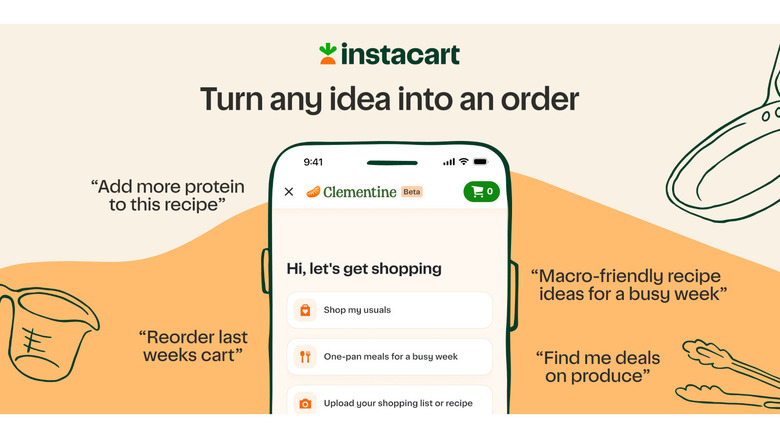
It can recommend recipes with ingredient lists you can quickly add to your cart.
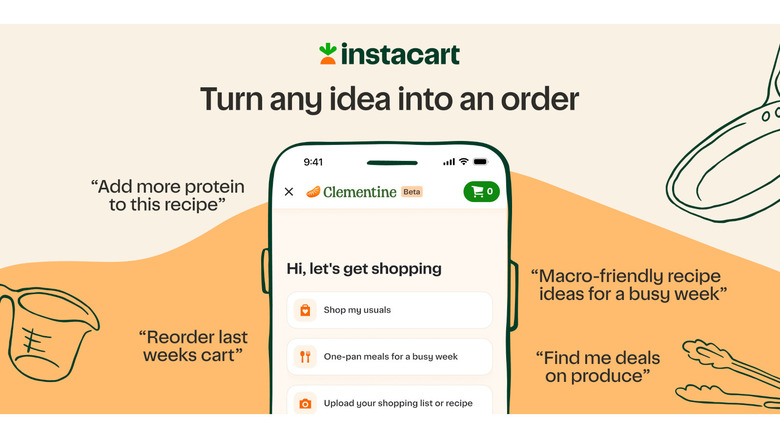
Instacart has launched Clementine, its own AI shopping assistant, which it says was designed to tackle the hardest parts of grocery shopping: deciding what to cook while staying within budget. Clementine, which is now available across North America on the Instacart Marketplace, understands natural language like other AI chatbots. You can tell it that you need “to make a high-protein easy dinner for two,” and it will respond with a recipe that comes with a list of items you can add to your cart with a tap.
The company says Clementine’s responses will be based on what’s currently available in your chosen store location, so you won’t end up considering a recipe that you can’t get ingredients for. If you already have some items in the ingredients list, you can remove them before adding the rest to your cart. Clementine can also make suggestions based on the choices you set in its preference center. For example, you can tell it to suggest only nut-free, vegetarian or gluten-free recipes to make sure it recommends food your household can actually eat.
In addition to helping you decide what’s for dinner, you can also use Clementine to quickly shop for your staple items. If you tell it to restock your pantry or to shop your usuals, it will take information from your previous orders to present you a list that you can swiftly add to cart and pay for. And if you like jotting down your grocery list by hand, you can take a photo and have Clementine turn it into an item list you can add straight to your cart. That said, you may want to review the assistant’s suggestions checking out: Instacart says orders placed with Clementine typically exceed its $115 average basket size, probably because it’s so easy just paying for everything it recommends.
While Clementine is Instacart’s own AI chatbot, it’s not the only one that works with its system. Over the past few months, the company has teamed up with tech companies to bring grocery integration to ChatGPT, Claude, Gemini or AI Mode in Google Search.

Choosing places to visit or the best flights just got a lot easier with Gemini.

Planning a great trip can be a lot of fun, especially if you’re the kind of person who really likes to know all the details. But it can also get exhausting pretty quickly. It usually involves diving into blogs, Reddit posts or YouTube vlogs. Not to mention all the long reviews you need to check on Google Maps. The result is probably a bunch of tabs in your browser — and you can really waste a lot of time doing all of that. Well, that’s how it used to be before AI. Tools like Gemini can make planning your next trip much easier. It’ll probably make you never want to plan a trip the old-fashioned way again.
Creating full travel itineraries with Gemini
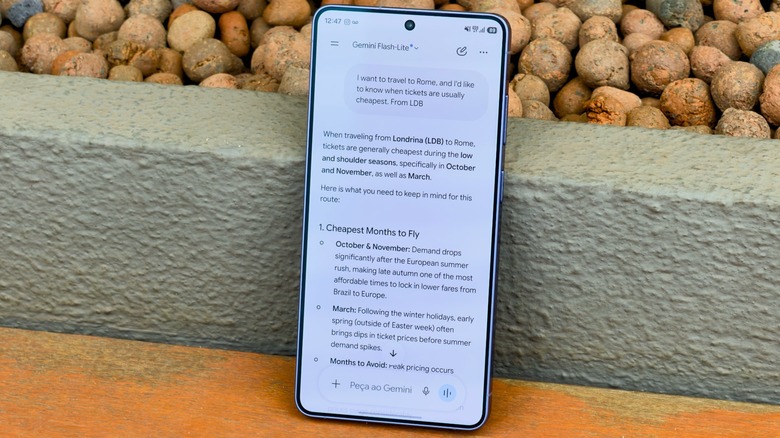
Of course, there are plenty of AI chatbots you can use to plan your trips — ChatGPT, Claude, even the new Siri app in iOS 27. But Gemini is even more interesting because it has deep access to other Google services like YouTube and Maps. Remember all those places you used to explore for travel ideas? Gemini knows them all very well. It also goes way beyond just providing you with a bunch of tourist attractions to visit. Here, the integration with Google Flights makes it especially powerful. Price tracking and Flight Deals are built in.
Let’s say you’re planning a trip to Rome. Ask Gemini when plane tickets are usually cheapest. It will give you a full breakdown of the best time to buy and the recommended flights from your local airport. You can even ask Gemini to handle your flight and hotel reservations for you — although a human touch might still be the best option for big decisions like these. And the results are quite accurate, though AI may get you into trouble sometimes. Looking for a good place to stay? Ask for a budget option. Or maybe spring for a fancy one. It’s up to you.
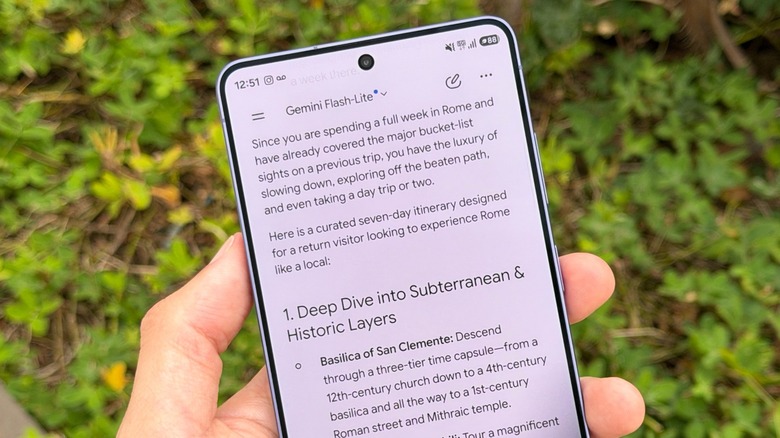
Maybe you’ve been to Rome before. If you use Gmail, there’s a good chance Gemini knows that. Or you can remind it, just to be sure. You’ll get a list of things to do that most people skip on their first trip there. And the more specific you are in your prompts, the more likely Gemini is to give you the best results. Tell it what you like and the schedule you have in mind.
AI can also save you during your trip
When it’s time to travel, Gemini can also make things easier. Ask it to create checklists for you with everything you need. That feeling of leaving something behind is the worst. And it’s always worth double-checking to make sure you have all your documents with you. It can even find a rental car or train tickets for you. And if you’re into having printed copies of everything, Gemini can create some handy printouts for you using your entire trip itinerary.
But the best part comes during the trip. Not just because you’re there, but because Gemini helps you with everyday navigation, too. Use the camera button to take photos of your surroundings. It can tell you the whole story behind that painting or statue you have no idea about. Sometimes it really feels like you’re talking to someone about your trip instead of just using a tool. Give it a try on your next trip, and going back to two dozen open tabs might feel impossible.

ASUS is getting ready to give its Vivobook lineup a major style refresh in India. The company has confirmed that its next-generation Vivobook laptops will launch on September 16 at 12 PM, bringing new colors, premium all-metal builds, and up to 38 hours of battery life under the campaign tagline “Your Vibe. Your Color.” The lineup will span both traditional clamshell and 2-in-1 convertible models powered by AMD, Intel, and Snapdragon processors.
Fun Asus Vivobook Colors and Design

The biggest visual change is the introduction of three new finishes: Light Blue, Cool Silver, and Matte Gray. While Silver and Gray cater to users who prefer understated, professional-looking machines, the new Light Blue variant adds a more youthful and lifestyle-oriented option to the lineup. All models will feature an all-metal chassis with a refined metallic finish, giving the laptops a more premium feel than traditional plastic-bodied notebooks. ASUS also claims the new Vivobooks can deliver up to 38 hours of battery life, though the exact endurance will depend on the processor and configuration.
The refreshed portfolio will include the Vivobook 14 Flip, Vivobook S14 Flip, Vivobook S14, Vivobook S16, and Vivobook 16. ASUS has confirmed that the lineup will span AMD, Intel, and Snapdragon-powered configurations, giving buyers a wider choice across traditional laptops and 2-in-1 convertibles. While the company has yet to reveal detailed specifications, the teaser suggests the new Vivobooks will continue to target users looking for everyday performance across work, studying, entertainment, and creative tasks.
ASUS is also bundling an introductory protection offer alongside the launch. Buyers will be able to purchase a package that includes two years of extended warranty and three years of accidental damage protection for just ₹99, despite the bundle being valued at ₹5,599.

Small and medium-sized business owners can lack the time and budget required to keep their audience engaged. If you work to fill in the gap and offer related services, getting things done in the right and professional way for your clients can be an easy flow at the onset, but it can become complex over time. From keeping the audience engaged with graphics, videos, and catchy captions, social media content requires extra effort.
However, using AI on the side changes the equation and makes it easier to handle these tasks for SMB clients. You can generate consistent visuals across platforms with a professional finish. Here is how you can scale the content production process.
Outline the Brand Details
Creating professional social media content for small and medium-sized business clients requires outlining and clearly defining the brand details. It is the first step, and it determines how the audience embraces the information. This ranges from the visuals to other elements. For your visuals, outline the colour codes, font families, and logo placement rules. In addition to your image style preferences, languages and audience engagement styles are extra details to state clearly and put forward. However, these details must be convertible into AI parameters.
Set up your Social Media Pages Guidelines
Social media platforms are more than one, with different rules applying to their use. To create professional content with AI, you need to set up approaches that will fit into any of the usage and aid your brand’s consistency. For instance, X is well-suited for short messaging, and you can easily engage in real-time conversations. LinkedIn comes in as more professional, usually best suited for long-form explanations and business-focused visuals. Facebook and Instagram present a broader channel for visual and text-based posts as well as community-driven conversations.
Select and Train the AI Tool
There are various available AI tools for content creation, both free and paid. Whether you are choosing any, the initial setup is essential for the overall content you want to create. You can make adjustments or refine your assets to match the auto-processing. This step-by-step process to set up these tools includes
- Upload brand assets, including logos, fonts, and colour palettes, to the AI tool you are using.
- Layout your preferred post types, themes, and message formats.
- You can generate professional sample posts that meet your brand standards.
- Make your custom adjustments from the feedback received from the tool.
Create Your Content Workflow
With assets and setup all in place, you can build a structured process for creating and managing social media content posts. For instance, you can generate multiple posts for SMB clients’ media platforms and schedule them for the day or week. Creating a professional content workflow also revolves around mapping out themes and campaign priorities.
Ways You Can Use AI for Social Media Content for Small Businesses
There are several ways of using AI to create professional social media content for small and medium-sized businesses. These help SMB clients cut work hours, improve work standards, and maintain brand consistency across platforms.
If there is multiple content to brainstorm before sharing across social media pages, AI tools are handy for breaking them down. Rather than going on long deliberations with a blank slate, you can input a few ideas on AI tools for suggestions. These include ideas about the business, production, and target audience.
- Repurpose Long-form Content
Aside from expanding ideas, you can repurpose and cut down long-form content with AI to match the demands of social media pages. Turn blog posts or newsletter articles into guides for X posts or Instagram carousel headings. You can also convert this content to generate Facebook reels.
- Schedule Posts and Hashtags
You can inquire from AI on the best posting time and lead on non-saturated hashtags that match your niches.
With an AI, you can generate alt-texts for photos and social media content to make it more professional. It helps patch product details like material, colours, and size that social media platforms can index.
- Automated Response Templates
Beyond creating content, one of the leverages of AI is automated professional responses. You can easily create polite and human-like reply templates for common questions. Training your AI tool over time best positions it to act on your behalf when you’re absent.
What are the Best AI Tools for Professional Social Media Content
Zawa
Zawa offers a worksuite for creating and coordinating social media content. The AI branding agent is an ideal tool for small and medium-sized business owners. And you can leverage it for content creation and marketing. Outline your business details and create an ideal brand kit – from logos to flyers and social media posts. Zawa AI image upscaler is a plus for enhancing image quality and conveying your content in all shades of professionalism.

Zawa AI Agent for Creating Social Media Content and SMB Clients
Zawa is a professional branding tool that helps designers serve SMB clients faster. The AI agent comprises a full-featured worksuite with various tools to plan, modify, and adjust brand content from scratch. Simply put, it is an add-on for creativity and branding. From logos to posters to social media posts, you can incorporate it into a small business’s workflow, especially if you are particular about professionalism. It allows you to establish a consistent visual identity without a design team and to bring your ideas to life across channels in high-quality formats.
With the Zawa AI Product Video Generator, you can easily create videos with your product image. The AI supports shoppable videos and UGC-style, ready-to-use videos in a few minutes while you select your preferred avatar. Also in the worksuite are smart social media tools that you can use to create standard captions and images for your page. Other tools, like the video text remover, video remix and logo generator, video enhancer, come in handy for your media creations.

Buffer
One of the best AI tools to share your content in a professional format is Buffer AI. Social media comprises multiple channels with different rules. And going through all of it at a time can be taxing. Buffer puts you in the mainstream by running multi-channel campaigns. You can bring together content topics, promotions, and schedule your posts. It helps adapt the content calendar with social channels, making feeds more valuable.

Canva
Canva is handy for creating professional social media content and images – for yourself and clients. You can generate media designs using AI-powered template suggestions and image placement. The tool features an extensive template library. As a small business owner, you can adopt the background removal, image enhancement, and text-to-image generation features.

Content Studio
For small business owners, following online leads and updates is essential for tracking and modifying media content. However, you cannot stay there all day. Content Studio reduces the scroll work and lets you track preferred topics. In addition to adding preferred topics, you can view metrics for each content piece, including your post. These range from news articles to social media posts.

Ford sales fall 10.3% in August as it ramps up F-Series production

Kalshi election data goes live on DoubleZero ahead of U.S. midterms

Why the 49ers Could Miss the Playoffs Despite Going 12-5 Last Season

Memory prices are slowing because buyers ran out of money

Phones confiscated, players sent home: Pakistan’s England tour turmoil revives memories of Mohammad Amir, Salman Butt and Mohammad Asif’s 2010 Lord’s spot-fixing scandal | Cricket News

Bitcoin price risks $76K drop as $78K support weakens


-
Tech1 day ago
Memory prices are slowing because buyers ran out of money
-
Sports1 day ago
Phones confiscated, players sent home: Pakistan’s England tour turmoil revives memories of Mohammad Amir, Salman Butt and Mohammad Asif’s 2010 Lord’s spot-fixing scandal | Cricket News
-
 Crypto World14 hours ago
Bitcoin price risks $76K drop as $78K support weakens
-

 NewsBeat1 day ago
England up in reading, maths and science rankings as Scotland and Wales dip
-

 Crypto World14 hours ago
Ethereum price stalls below $2,500 as ADX drops to 11
-

 Business1 day ago
Egyptian TV Presenter Sarah Khalifa, 11 Others Sentenced To Death In Major Drug Trafficking Case In Cairo
-

 Crypto World1 day ago
Visa expands stablecoin card network to 160 programs
-

 Business12 hours ago
Meta debuts long-awaited personal AI agent, Muse
-
 Tech1 day ago
Strong Password Policy and Password Manager Guide
-

 Crypto World1 day ago
Brent Crude Oil Moves Above $100 for the First Time in 3 Months
-

 Crypto World22 hours ago
Robinhood Stock: How To Take Advantage With Reduced Risk
-
 NewsBeat24 hours ago
Tehran’s assertive rhetoric signals a new and dangerous phase in conflict
-

 Tech23 hours ago
Google’s revived nuclear power plant gets $1.9B loan from US government
-

 Sports20 hours ago
Ballon d’Or 2026 Nominees: Lionel Messi In, Cristiano Ronaldo Out; Erling Haaland Included In Top 30
-
 Business17 hours ago
Oil Higher on Hormuz Escalation, Weighing on Sentiment
-

 Crypto World22 hours ago
Intel Stock Jumps 9% on Chip Price Hike Report, US Stake Gains $36 Billion
-

 Business1 day ago
Claim Your Share Of $50 Million Disney Streaming Price Settlement By Sept. 8 Tonight
-

 Tech1 day ago
Stoke Space raises another billion to rival SpaceX at re-flying rockets
-

 Politics1 day ago
Critics Rip Trump After He Revives His Most Dubious 9/11 Claim
-

 Politics23 hours ago
The Ultimate September Reset Guide: How To Refresh Your Mind And Life This Autumn
You must be logged in to post a comment Login