

Join Mikko Hyppönen and security leaders from the NFL, CHANEL, and Atlassian for a two-hour digital summit on what AI-speed attacks change, what defenders should stop doing, and how to validate, decide, fix, and re-validate at machine speed.
Tech
8 Highly-Rated TV Antennas That Work Right Out Of The Box

We may receive a commission on purchases made from links.
Cord cutters have usually relied on streaming services and live streaming apps to fill the void once occupied by cable TV. For the most part, this has served people well, but the rising cost and number of streaming services has forced many people to wonder whether these platforms are really worth the investment. If you find yourself wanting a cheap alternative to streaming services like Netflix, Disney+, Hulu, HBO Max, Paramount+, Apple TV, and Peacock, it might be time to use a digital TV antenna.
Depending on your location and the kind of content you consume, a TV antenna can let you access all the content you need without all the unwanted extra options. It may also sound appealing if you feel nostalgic for flipping through channels to watch movies and TV shows. That being said, a lot of antennas can be a downright pain to set up. If you don’t want to spend your valuable time — and money, if you resort to a professional’s help — assembling these devices, here are some convenient and reliable TV antennas that will work from the moment you plug them in.
Antennas Direct Clearstream 4Max
If you live in the suburbs and want an outdoor antenna, the Antennas Direct Clearstream 4Max could be an excellent pick. All it takes is five minutes — just set this antenna up on its 20-inch mast, and the multi-directional ultra high frequency (UHF) design will ensure that you can enjoy the strongest signal quality possible, regardless of what direction it’s facing. If your house is perfect for setting up this antenna, you can use the J-pole that comes with this purchase to mount it to the side of your house. Just make sure you use the sealing pads if you’re screwing this antenna to your roof, to prevent any water from seeping into your house when it rains. The screws can also be prone to rusting, so either apply a protective coating from time to time or keep some replacement screws handy in case you miss a few rounds of maintenance.
While you can get this antenna with a mast and reflector for $134.99, we recommend shelling out a bit extra for an additional amplifier, too. The antenna apparently has great reception, but the amplifier will help in receiving weaker signals properly and expanding the number of channels you can surf. However, it should perform admirably in poor weather conditions, so don’t worry about harsh winds or storms affecting your TV viewing experience all that much.
Channel Master Flatenna 35
People who want a convenient indoor antenna that sticks to a surface and provides you with enough reception to browse channels might love what the Channel Master Flatenna 35 brings to the table. At $35, this is easily one of the cheapest antennas you can get your hands on, though the Amplified version seems an even better bet. $59 isn’t a huge jump in price, and the amplifier will probably be a must-have for people who want to surf as many channels as possible, especially the ones with weak signals.
The Channel Master Flatenna 35 features an understated, minimalist design. You can use double-sided tape or thumbtacks to pin it to a wall or window, and it shouldn’t look out of place. Earlier Flatenna 35 models had a non-removable coaxial cable that was 6 feet long, but this issue has been rectified in the current model, which comes with a 12-foot coaxial cable that is removable. With a range of 35 miles, you should get access to a bunch of channels as long as you place this indoor antenna in an optimal location.
Winegard FlatWave Amped
Indoor antennas can be a bit of a mixed bag. Your location and the walls of your house play a huge role in determining overall signal quality. However, it you don’t want an outdoor antenna, the best indoor TV antennas out there can still provide excellent range and strong reception. The Winegard FlatWave Amped may possibly check all the boxes, offering a simple setup and crisp picture quality. The non-amplified variants of this antenna with ranges of either 30 or 40 miles are decent in their own right, but cord cutters who don’t want to make extra compromises will probably gravitate toward the $59.99 amplified variant that boasts a range of 60 miles.
If you don’t have too many power outlets, the built-in amplifier can conveniently plug into your TV’s USB port, though that may make cable management more of a priority. The unit comes with a bunch of 3M Command strips to make it easy to mount on a window or a wall. While the flat design is pretty low-key, some people may not be fans of a large square hanging in their room. Of course, that’s all ultimately a matter of personal preference — you may not care either way once the Winegard FlatWave Amped is set up and raring to go.
Antennas Direct ClearStream Eclipse
Yet another gadget that cord cutters will want to have in their homes, the Antennas Direct ClearStream Eclipse is as easy to set up as they come. First, download the Antenna Point app and figure out the direction of any broadcast towers. Once this is done, place the ClearStream Eclipse as high as possible in your room on a wall that’s facing these towers. Use the adhesive provided in the box to affix the antenna. Finally, run a scan on your TV, and you should get the signal of as many channels as you can receive.
The claimed range of more than 50 miles is impressive, and no doubt due to the antenna’s built-in amplifier. It should make tapping into UHF signals in metro cities and the suburbs a cinch. The reversible black-and-white design is also a neat addition, and it should help the antenna blend into the background of your home. If the coaxial cable isn’t long enough, you can detach it and use a longer cable. This replaceable aspect should help improve the longevity of the ClearStream Eclipse, too.
If all that isn’t enough, the ClearStream Eclipse also comes with a TV tuner, so there will be no need for you to pick one up separately. The antenna even offers DVR features. If the initial cost of $49.99 seems a bit high, the Antennas Direct ClearStream Eclipse is also on sale at the time of writing, so it could be yours for $34.99.
Antennas Direct ClearStream Flex Amplified
Antennas Direct is clearly deep into making TV antennas, with the ClearStream Flex Amplified being yet another potentially compelling antenna and amplifier combo. With a range of more than 50 miles, the installation process is very simple. Just stick the antenna to a wall or window facing the closest broadcast towers — again, the Antenna Point app will help you out here — and run a scan to access all the televisions within the ClearStream Flex Amplified’s range.
The Sure Grip feature that comes in the package makes this antenna even easier to instal. This adhesive strip can be placed and removed as many times as you wish. It won’t ruin the plaster of your wall, nor will it lose its grip. Even if it gets dirty, all you need to do is clean it with water, and the stickiness will still be maintained. The antenna’s reversible black-and-white will help it blend into a living room, though some feel it’s a bit too wide, so it may stick out no matter what you do.
Of course, ultimately it’s the performance of this antenna that matters the most, and the ClearStream Flex Amplified shouldn’t disappoint. The in-line amplifier, called the Volt Switch, can be toggled on or off easily. The antenna’s reception itself is also strong, which should make for excellent picture quality and a great viewing experience. The $49.99 price tag may seem a bit too high, but it’s a one time investment, compared to recurring monthly streaming service fees.
Mohu Leaf Supreme Pro
If you think paying anything above $50 is overkill for an indoor antenna, the Mohu Leaf Supreme Pro’s $68.99 price won’t make a great first impression. However, look past that, and you may decide that this amplified antenna is worth the cost. An admirable range of 65 miles, excellent 1080p reception, and a detachable 16-foot-long coaxial cable are all notable perks that make the Mohu Supreme Pro pretty compelling compared its competition.
The antenna is very easy to stick on a wall or window, courtesy of the Velcro-esque straps and push pins that come bundled with it. The amplifier is placed on the base antenna and uses LED lights to show signal strength. Just make sure your TV includes a USB port — or you have a port placed near the antenna — since the amplifier needs it for power to function properly. For people who live slightly farther away from the city, the Mohu Leaf Supreme Pro’s longer range could be a must-have.
Antennas Direct ClearStream 2Max
Indoor-outdoor antennas with lengthy ranges are designed for suburban households that want access to a decent array of channels, and the Antennas Direct ClearStream 2Max is a noteworthy option to keep in mind. We highly recommend placing this as high as possible to enjoy the best signal strength possible — ideally on your roof and on top of the 20-inch mast provided with the antenna. Alternatively, a tall enough house can make do with a regular stand, which is sturdy enough to keep this antenna upright and free from any harm in adverse weather conditions. However, you shouldn’t have to worry about the antenna losing signal in the rain — the ClearStream 2Max can still get an adequate level of reception in such a scenario.
This antenna can also pivot on its base, great for making quick adjustments if you’re not getting enough channels. At $89.99, the ClearStream 2Max is certainly more expensive than most of the dedicated indoor antennas we’ve mentioned. However, when compared to other indoor-outdoor variants, it’s very reasonably priced and boasts excellent signal reception. Watching the channel of your choice in 1080p will be easier than ever with this antenna.
Televes Dinova Boss Mix
While not quite as expensive as the Antennas Direct Clearstream 4Max, the Televes Dinova Boss Mix is still pretty pricey. As only the second antenna we’ve recommended to cross the $100 price range, it’s only natural to wonder how this antenna justifies retailing for $129.95. The answer is pretty straightforward: claims of brilliant picture quality, long range, and an easy setup process.
Unfortunately, this antenna doesn’t come with a coaxial cable, so make sure you have one handy during the setup process. The Dinova Boss Mix is quite a bit smaller than other outdoor antennas, so people who don’t want something that really stands out on their roof all the time may prefer it. That being said, you shouldn’t take this antenna if you’re too far away from the main city. A range of 50 miles is decent if you live close to major broadcasting towers, but plenty of people don’t.
Methodology
A diverse mix of indoor and outdoor TV antennas was chosen for this list, all of which have a setup process that takes 10 minutes or less. To ensure high-quality recommendations, we made these antennas all had good reviews that were either qualitative — positive recommendations — or quantitative — with scores of 4 out of 5 or 8 out of 10 and higher — across two or more professional review outlets. These publications include Antenna Land, PCWorld, The Gadgeteer, Tom’s Guide, CNET, Audioholics, Long Range Signal, TechRadar, What to Watch, The Free TV Project, and Solid Signal.
Continue Reading

A human pancreas typically contains about a billion beta cells, the primary producers of insulin. Among people with diabetes, these cells are either missing or dysfunctional, and thus scientists have been looking for ways to replenish their numbers as a possible long-term treatment or even cure for the condition. A team of researchers recently took a step closer to that reality, genetically altering another type of pancreatic cell to produce and release insulin in response to high blood sugar.
The researchers engineered ductal cells, which—as some previous studies had found—occasionally transform into beta cells all on their own. This is an unusual phenomenon among cells in adult bodies, which tend to be firmly fixed in their identities, and it hinted to the scientists that these ductal cells would be a good place to start.
Scientists previously had no clue what genes were driving this metamorphosis, said Jian Li, a postdoctoral researcher at Harvard Medical School who led the recent study in Science Translational Medicine. The researchers therefore took an approach called a genetic screen, which involves breaking little bits of DNA all across the genome to see which are important for a certain biological process. It’s a bit like individually removing pieces of a car engine without a schematic and seeing what breaks to learn which components are involved in delivering fuel or are essential for steering.
Through this process, the researchers found that taking out a gene called ALDH3B2 turned ductal cells into beta-like cells at a higher rate. Without the genetic alteration, fewer than 1 percent of ductal cells spontaneously took on a beta-cell-like state, but when ALDH3B2 was silenced, that proportion increased to about 8.5 percent.
Those initial experiments were performed on human cells in a dish, which the researchers then transplanted into mice with diabetes. Human insulin began circulating in the mice, and the animals’ glucose levels dropped to near-normal levels. These effects persisted for six weeks.
Science has previously explored some gene therapies for diabetes with the hopes of offering long-term relief. For example, a clinical trial launched earlier this year is taking the creative approach of equipping muscle cells with the genetic instructions to make insulin. Other emerging treatments aim to generate new insulin-producing cells in the laboratory and then transplant them into the patient.
This comes with a few risks, namely activation of the immune system. This new study points to another possibility: harnessing the cells that already exist in the pancreas and causing them to change function by turning off some of the genetic switches that maintain their identity.
That method also has its own hurdles, one of the most important of which is ensuring that only the target cells are edited. ALDH3B2 is used by many cells in the body, not just in the pancreas, so precision is important to prevent unforeseen complications.
There’s also a major lingering question: How is this gene involved in turning ductal cells into beta cells? “That’s the part we need to verify first,” Li said. Then, “the next step is either gene therapy or to find specific small molecules to inhibit this gene to see if we can achieve a similar—or even better—effect.”
Even partial improvement could make a massive impact in the lives of the estimated 830 million people who have diabetes worldwide, including many who die each year due to related complications.
This story originally appeared on WIRED en Español and has been translated from Spanish.
Update: Article rewritten with official confirmation from Citrix.
Citrix has confirmed that two critical NetScaler remote code execution vulnerabilities, tracked as CVE-2026-88771 and CVE-2026-88772, are being exploited in attacks and that it has released security updates to fix the flaws.
The vulnerabilities are the same zero-days that cybersecurity researchers, IT providers, and national cybersecurity agencies began privately warning organizations about over the weekend.
NetScaler appliances are particularly valuable targets because organizations commonly deploy them as Internet-facing edge devices that provide remote access and application delivery services for internal corporate networks.
Compromising one of these devices can give attackers an initial foothold at the perimeter of a victim’s network and potentially provide a path to internal systems without first compromising an endpoint inside the organization.
The first signs of the incident appeared when Citrix administrators began reporting on Reddit that IT suppliers and security teams were privately contacting their organizations and advising them to shut down their NetScaler appliances.
“We got a call from our IT supplier’s security team, they couldn’t give any details but they advised to shut our Netscalers down immediately,” one administrator wrote.
Other administrators said law enforcement, CERTs, and national cybersecurity agencies had also been contacting organizations about the issue.
Cybersecurity firm watchTowr later publicly warned that it was “rapidly reacting to rumors” that multiple unpatched Citrix NetScaler remote code execution vulnerabilities were being exploited in the wild after verifying the information with “authoratitive sources.”
“We are currently rapidly reacting to rumors that multiple unpatched Citrix NetScaler RCE vulnerabilities are circulating in the wild. While details are scarce, the information is credible,” watchTowr said.
Citrix confirms active exploitation
Citrix has now published security bulletin CTX697096, confirming the vulnerabilities and releasing patches for affected NetScaler ADC and NetScaler Gateway appliances.
CVE-2026-88771 is a remote code execution vulnerability caused by improper input validation, allowing an unauthenticated attacker to execute arbitrary commands. It has a severity score of 9.5.
Citrix says the flaw affects all NetScaler ADC and NetScaler Gateway deployments, including those using the default configuration, and does not require any additional feature to be enabled.
CVE-2026-88772 is a memory overflow vulnerability that can lead to remote code execution or a denial-of-service condition, also with a severity score of 9.5.
This vulnerability can be exploited when DTLS is enabled on a NetScaler ADC or NetScaler Gateway. Citrix notes that DTLS is enabled by default on VPN virtual servers.
Citrix has confirmed that both flaws have been exploited in attacks against NetScaler devices as zero-days.
“Exploits of CVE-2026-88771 and CVE-2026-88772 on unmitigated NetScaler deployments have been observed,” Citrix said in the security bulletin.
Citrix says the following versions are affected:
- NetScaler ADC and NetScaler Gateway 14.1 before 14.1-73.37
- NetScaler ADC and NetScaler Gateway 13.1 before 13.1-64.23
- NetScaler ADC FIPS before 14.1-73.37 FIPS
- NetScaler ADC FIPS and NDcPP before 13.1-37.279
Secure Private Access Hybrid deployments using NetScaler instances are also affected and must be upgraded to the recommended builds.
Citrix says the bulletin only applies to customer-managed NetScaler ADC and NetScaler Gateway appliances. Cloud Software Group is upgrading Citrix-managed cloud services and Citrix-managed Adaptive Authentication.
The security bulletin also fixes six other NetScaler vulnerabilities, bringing the total to eight flaws fixed in this update.
NCSC warned organizations before disclosure
Before Citrix publicly disclosed the vulnerabilities, the Dutch National Cyber Security Center (NCSC-NL) reportedly sent a pre-notification to organizations in the Netherlands warning about two critical NetScaler zero-days.
Multiple people shared copies of the notification online, which said the agency had received information from a European partner CERT regarding two vulnerabilities that could independently lead to remote code execution.
According to the notice, one vulnerability allowed attackers to place shellcode directly into memory, while technical details about the second vulnerability were still being researched.
At the time, no CVE identifiers had been assigned, and Citrix had not yet published an advisory.
The notification said Citrix discovered the vulnerabilities while investigating incidents in customer environments and identified active exploitation.
It also said Citrix submitted a notification under the European Union’s Cyber Resilience Act after discovering the attacks.
The NCSC said exploitation had been identified at multiple Citrix customers worldwide, although it did not know whether the attacks were widespread.
The agency also warned that exploitation attempts could increase once Citrix released patches and additional technical details.
Because NetScaler upgrades can cause downtime, the NCSC said the warning was intended to give organizations time to prepare, implement safeguards where possible, and install patches quickly once they became available.
BleepingComputer contacted the Dutch NCSC to confirm whether the advisory circulating online was legitimate.
The agency declined to confirm the notification, saying it could not provide further information to organizations outside its constituency.
“As part of our role as the National CSIRT and sectoral CSIRT for designated organizations, the NCSC-NL monitors relevant developments and cyber threats affecting the Netherlands 24/7,” the NCSC-NL told BleepingComputer.
“We provide information and advice to organizations so that they can take appropriate measures. As you’re not part of our constituency, we cannot disclose any further information at this time.”
Now that Citrix has released fixes and confirmed exploitation, administrators should upgrade affected NetScaler ADC and NetScaler Gateway appliances to the patched versions as soon as possible.
Organizations that cannot apply the updates immediately should reduce Internet exposure where operationally possible until they can patch the appliances.

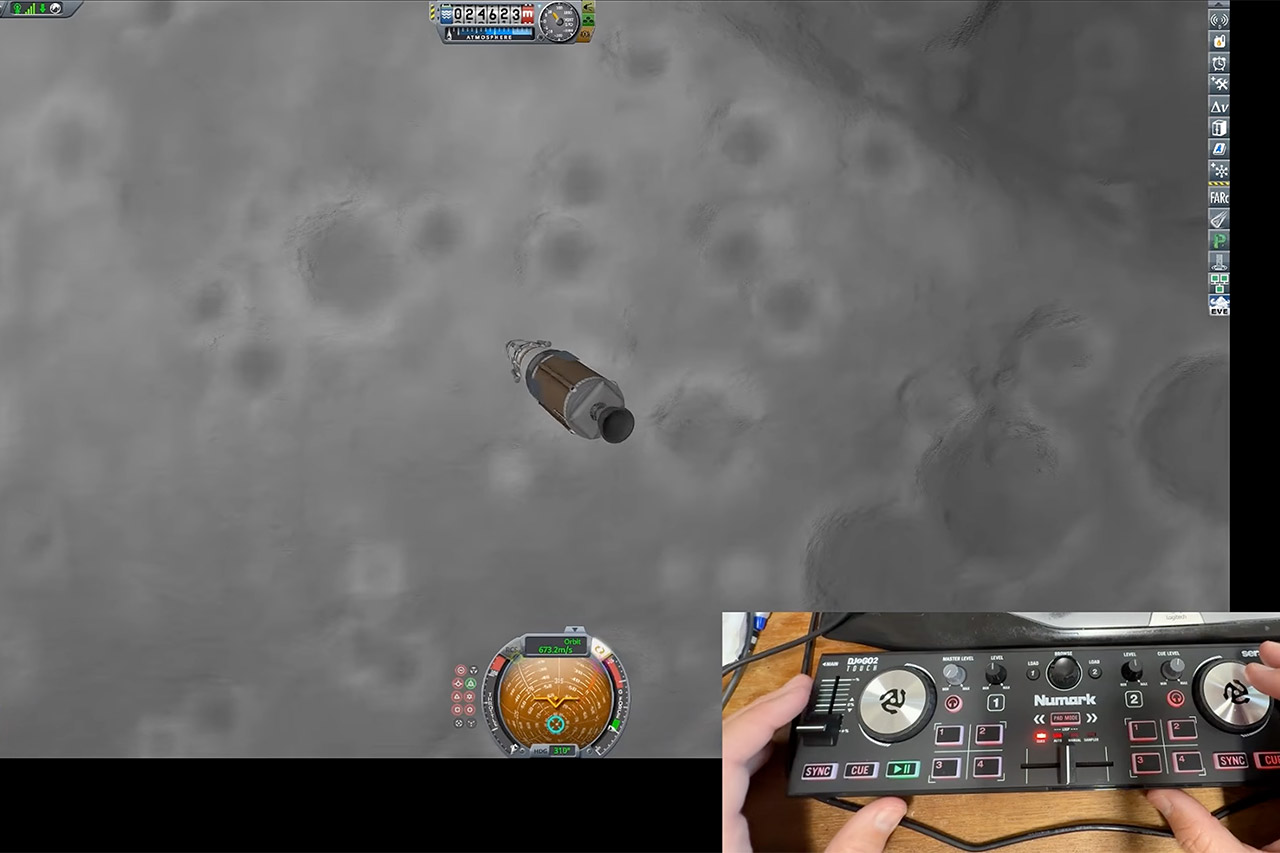
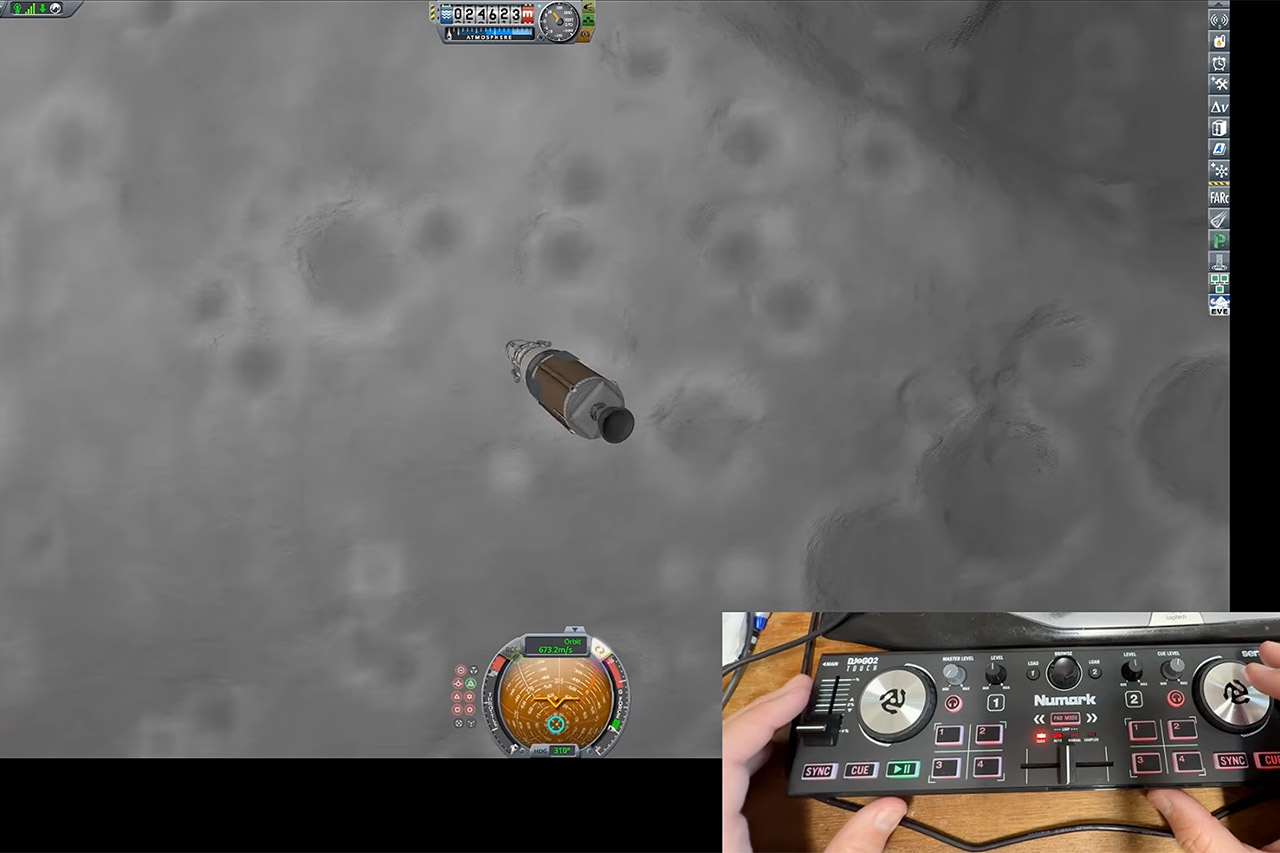
Scott Manley teaches orbital mechanics through Kerbal Space Program, and he also DJs. For his latest project, he wired those two lives together on a whim, writing a small Python program that reads MIDI events from a portable mixer and turns them into spacecraft commands. The question he set out to answer was simple enough to print in all caps: can you fly a spaceship using a DJ mixer? After one messy airplane test and one surprisingly clean lunar landing, the answer was yes.
A Numark DJ2Go2 is at the core of this operation, but in a very small way, as this 2-channel USB controller is small enough to carry in a backpack. Oh, and it runs totally on MIDI, so no power issues there. Manley needed to complete a task, so he began mapping inputs that were never intended for pitch or yaw to do so, among other things. He did it all through a config file, which allowed him to adjust the dead zones and response curves without having to start over. As a result, Kerbal’s kRPC remote control interface could accept the translated commands and send them to the 2015 simulator. Throttle originated from a slider on the speed dial that, if yanked the wrong direction, does the opposite of what you’d expect. The attitude was taken care of by the little self-centering sticks and the jog wheels, which always seem like you’re playing with a vinyl record when you only need a few degrees of pitch, such as when you’re descending. Finally, buttons were utilized to control staging, SAS modes, RCS, landing gear, and action groups.

Estes 1469 Tandem X Rocket-Building Kit, Beginner Flying-Rocket Model Kit for Ages 10+, Includes Launch…
- BEGINNER MODEL-ROCKET LAUNCH SET: The Tandem-X rocket-model launch set offers adults and kids ages 10+ hours of fun during the holidays as they…
- 2 SOARING ALTITUDE HEIGHTS: Our Tandem X set offers a high-performing power duo with our giant 30-inch Amazon model (600-foot projected altitude with…
- READY TO ASSEMBLE: Our beginner model-rocket launch set comes with 2 build options. The precolored Amazon model features plastic fins and self-stick…

First up was a plane, and it was a close call because the plane almost won, but Manley quickly discovered that the rotation on the mixer was far too delicate when close to the ground. He nearly crashed the plane into the trees by over-correcting, then spent far too much time battling the camera before eventually figuring it out. At that point, he stopped treating the board as a flight stick and began treating it as a collection of poorly labeled sliders. He described the learning curve as steep and the configuration as unsuitable for low-altitude flight. SAS modes that propel a rocket into space are ineffective when flying a winged plane that follows the terrain. That particular flight landed on the runway due to sheer chance and early saves, rather than design.

When it came to rockets, it was a very different situation. Manley fired one, kept a steady path with the jog wheels, and then let the SAS handle the ride through the first stage burn. It wasn’t until he was climbing that things became a little unstable, and he had to cut the thrust to save the thing from frying itself, before staging, restarting, and sending it on its way. After a few minutes, they were in a 100-kilometer circular orbit, with no drama. From there, he focused on the Mun, decreased the orbit’s lowest point, and began a drop toward a good, smooth crater that would be far superior than the surrounding ridges for landings. Then it was simply a matter of directing it down to the ground with the jog wheels until the lander tipped in and landed on the soil.

Time acceleration was a continual battle for him because a poorly mapped reset caused the clock to spool back and added some annoying visual artifacts, so he saved frequently and flew the coast phases in real time more than he wanted to. Don’t even get started on the radar altitude, which never seemed to appear on the board, thus the last hover was a bit of a gamble, relying on camera zooms and enough practice to overcome the homing inaccuracy. The familiar layout of staging buttons and SAS modes, however, came readily to him, as it was similar to thinking about mixing tracks as a DJ, with distinct cues and a continuous fader. The problem was that planes required a continual stream of micro corrections right near the ground, and rockets provided him with extended burn periods and some nice staging events, but he needed a computer that could at least retain its position while he mixed it all together.
[Source]


A council in north Devon backed a huge AI datacentre plan more than a year before the public knew about it. The documents were reported by Sandra Laville for the Guardian.
Campaigners got the papers through freedom of information requests. They show the developer, Xlinks, had been in private talks with Torridge district council since March 2025. The council sent a letter of support in April 2025, before any environmental study or public consultation.
The council told the Guardian that such early talks are standard and confidential, and do not mean a proposal has been approved.
Xlinks plans a 1.5GW AI data campus and a 1.8GW battery storage site on about 344 hectares near Great Torrington, in a Unesco biosphere reserve. The company puts the cost at up to £13.8bn and says the site will create 600 to 1,200 permanent jobs.
Local campaigners point to the protected countryside, the loss of farmland, water use, noise and fire risks from the batteries. North Devon is also still under a hosepipe ban after a record hot summer.
One document showed that in severe heat and drought, the site could use about 2.9bn litres of water a year. However, Xlinks told the Guardian that figure came from an old design, and that the campus will mainly reuse water and top up from rain.
“How can the largest and most costly infrastructure proposal in the nation be conducted almost exclusively in secret?” said Emily Clark of the Devon Datacentre and BESS action group.
Meanwhile, a national petition started by Devon county councillor Cheryl Cottle-Hunkin has passed 36,000 signatures. It calls for a pause on datacentres and battery sites outside the government’s AI growth zones.
The government rejected the idea on 17 September. It said such projects already face planning and environmental checks, and that battery storage is needed to clean up the power grid by 2030.
Xlinks said it will design the campus with care for local people and nature. A public consultation planned for July has been put back to later this year, the council said.
The fight in Devon follows a wave of datacentre protests in the US, where local groups blocked $130bn of projects in the first three months of this year.

What we know so far: World’s Edge, the Microsoft studio that oversees the Age of Empires franchise, has lost nearly half its staff in the latest round of Xbox layoffs. The cuts coincided with Microsoft’s decision to place the studio under Activision. Former employees also said the studio’s next project was canceled during the transition. The moves raise questions about World’s Edge’s future role and the direction of Age of Empires under Activision.
“Our studio was reorganized to be under the Activision umbrella,” former senior software engineer Andrew Martz said in a LinkedIn post. “As part of that reorg, our next project was canceled and a large chunk of our studio was laid off. I was part of that layoff.”
The layoffs are part of 268 job cuts across Microsoft’s Xbox business. They contribute to the company’s projected target of 3,200 job losses during the current financial year.
World’s Edge has played a different role from a conventional game-development studio. It has overseen the Age of Empires brand and worked with outside developers on new releases, expansions and ports. That setup has allowed Microsoft to maintain several games in the series at once, including remasters of older titles and newer releases for consoles.
– Pirat_Nation 🔴 (@Pirat_Nation) September 22, 2026
Relic Entertainment, for example, was the main developer of Age of Empires IV. World’s Edge helped guide the project as the franchise’s steward. Age of Empires IV arrived on PC in 2021 before later coming to Xbox and PlayStation.
The layoffs mean it’s unclear what happens next for the franchise. Microsoft has not detailed World’s Edge’s plans under Activision or said what the canceled project was. It is also unclear how much of the studio’s work will remain focused on Age of Empires.
Adam Isgreen, World’s Edge’s former studio creative director, said many longtime employees were affected. Isgreen had spent 16 years working on Age of Empires, including his time at World’s Edge.
“I am of course disappointed that this is the way the time with World’s Edge and Age ends for myself and many of my talented teammates that were also impacted – we had some great plans for what’s next,” Isgreen wrote. “I hope the team that remains can rise to the occasion down the line.”
The Age of Empires series has continued to expand beyond its original PC audience. Modern releases have had to support online multiplayer, regular updates, console controls and different hardware platforms, while maintaining the core systems that define the games: resource gathering, base building, large-scale unit control and civilization-specific strategies.
That work is spread across several teams and partners. World’s Edge has been responsible for keeping the franchise’s games and content aligned, even when another studio handled most of the development. A smaller staff could make that job more difficult, especially if Microsoft plans to pursue another major entry in the series.
The reduction comes as new Age of Empires content continues to arrive. Viking Sagas, the latest downloadable expansion for Age of Empires II: Definitive Edition, just launched. It adds three civilizations and 15 single-player campaign scenarios.
Another former World’s Edge employee, lead principal software engineer Greg Snook, said he was informed of his departure while on vacation.
“‘It was nice working with you’ was not a message I expected to get while on vacation,” Snook wrote. “Like many others, I was cut loose from Microsoft today. Turns out my last day with building access is also my exact 25-year hire anniversary.”
For now, the fate of World’s Edge under Activision remains uncertain. The studio still has a major franchise attached to it, but the layoffs and project cancellation suggest its role inside Microsoft’s gaming organization has changed significantly.


The EU’s special envoy for industrial AI has told the EU’s top officials to focus on using AI to lift Europe’s slow productivity. Racing to build the best models matters less, he told them. Zoya Sheftalovich reported the story for Politico.
Jim Hagemann Snabe gave the message to the 27 commissioners at a private seminar on 4 September, two Commission officials told Politico. He said AI could help health, farming, transport, defence and factories.
A week earlier, a Commission AI expert gave a similar briefing to the commissioners’ heads of cabinet. The US and China may lead on models and computing power, but Europe can still gain by putting AI to use, according to slides seen by Politico.
The slides gave examples such as easier testing rules for self-driving cars, secure data spaces for personalised medicine and a digital adviser for farmers.
Commission President Ursula von der Leyen made a similar point in her State of the Union speech on 16 September. She said Europe does not need to build frontier AI to get the most value from it.
Snabe, who chairs the supervisory board of Siemens, was appointed in June to advise von der Leyen and tech chief Henna Virkkunen. His appointment drew conflict-of-interest criticism at the time.
A Commission spokesperson, Thomas Regnier, told Politico the talk was about how Europe can get firms to use AI faster.
However, not everyone backs this plan. German MEP Axel Voss said the Commission was too slow to enforce its AI law, and pointed to recent hacks by AI agents, Politico reported.
Others want Europe to build more of its own AI capacity. Earlier this month, former commissioner Margrethe Vestager and economist Philippe Aghion called for Europe to hold 15% of global compute by 2030.
Snabe’s team will study how each sector can use AI until December, then draft new policies near the end of the year, according to Politico. A final report and strategy are expected in early 2027.

Amazon’s next big sale is still a little over a week away, with Prime Big Deal Days officially running on October 6 and 7. Even then, there are still plenty of Bluetooth speaker deals available for the early buyers, and a few of them are already considerably better than I expected.
I went through the early discounts and narrowed them down to five speakers I’d pay attention to right now. There’s a tiny JBL for less than $40, a Flip 7 sitting well below $100, and options from Bose, Ultimate Ears, and Marshall if you have a little more room in the budget.
Note: Amazon prices and discounts can change quickly and may differ between colors.
JBL Go 5 — $39.95 (27% off)
The JBL Go 5 is the easiest recommendation here if all you really want is a small speaker that can disappear into a backpack. Amazon has it at $39.95, which takes $15 off its $54.95 price. It is tiny at just 0.51 pounds, yet JBL still gives it an IP68 rating for dust and water resistance. Battery life reaches eight hours, with Playtime Boost squeezing another two hours out of it, and the Go 5 also supports Auracast if you eventually want to connect compatible speakers together.

JBL even added ambient edge lighting this generation, which is one of the upgrades over its predecessors At under $40, this is the one I’d throw into a bag for a trip, keep around the bathroom, or take somewhere I wouldn’t necessarily want to risk a more expensive speaker.
Key features
Details
Battery life
Up to 10 hours with Playtime Boost
Durability
IP68 dust and water resistance
Weight
0.51 pounds
Connectivity
Bluetooth with Auracast support
Standout feature
Ambient edge lighting
Ultimate Ears Wonderboom 4 — $51.44 (49% off)
Spending another $11 gets you something bigger. The blue Ultimate Ears Wonderboom 4 has dropped to $51.44 on Amazon, which is one of the better discounts in this entire list. Amazon commonly sells it below its $99.99 MSRP, yet $51.44 remains an unusually low price and sits only a couple of dollars above its previous Prime Day low.

I also like how it’s built for outdoor use with an IP67 rating. It can even float if it falls into water and survive drops from up to five feet. You get up to 14 hours of audio playback on a single full charge. Its 360-degree design makes placement fairly painless, while Outdoor Boost changes the tuning for open spaces and Podcast Mode focuses more heavily on voices. For just over $50, there’s a lot going on here.
Key features
Details
Battery life
Up to 14 hours
Durability
IP67 water and dust resistance
Drop protection
Rated for drops up to 5 feet
Audio
360-degree sound
Standout feature
Floats in water
Marshall Emberton III — $144 (20% off)
Marshall goes in a different direction from the utilitarian JBL and Bose designs, and the Emberton III is easily the speaker I’d pick if I cared about how the thing looked sitting on a desk or shelf. The Black/Silver Amazon listing has recently hovered around $144, putting it roughly $36 below Marshall’s $179.99 price.

The bigger reason I’d spend the extra money is battery life. Marshall claims more than 32 hours from a charge, comfortably the longest figure among these five speakers, and a 20-minute quick charge can add another six hours. The Emberton III also has an IP67 rating, Bluetooth 5.3 LE, a built-in microphone for calls, and Marshall’s True Stereophonic multidirectional sound. Two 2-inch 10W full-range drivers sit inside, accompanied by passive radiators.
It is the most expensive pick here. Still, the combination of battery life, ruggedness, and that iconic Marshall design gives it a clear place in this list.
Key features
Details
Battery life
More than 32 hours
Quick charging
6 hours from a 20-minute charge
Durability
IP67 water and dust resistance
Drivers
Two 2-inch 10W full-range drivers
Standout feature
True Stereophonic multidirectional audio
JBL Flip 7 — $119.95 (20% off)
For those looking for a bigger JBL portable speakers, the Flip 7 is the perfect pick. It’s compact enough to carry around without becoming luggage, while giving you considerably more speaker than the tiny Go 5. Amazon currently has the black model at $119.95. JBL rates the Flip 7 for up to 16 hours of playback with Playtime Boost, alongside an IP68 rating that covers water and dust resistance. It is also drop-proof from up to one meter. The newer PushLock system lets you attach interchangeable carrying accessories, and USB-C supports lossless audio when connected to a compatible source.

This makes the Flip 7 the safest all-rounder of these five for me. It has enough battery life and durability for travel, enough output to make sense outdoors, and still occupies very little room in a backpack. At around $120, it sits nicely between the cheaper compact speakers and the more style-driven Marshall.
Key features
Details
Battery life
Up to 16 hours with Playtime Boost
Durability
IP68 and drop-proof from up to 1 meter
Wired audio
USB-C lossless audio
Accessories
PushLock interchangeable accessories
Connectivity
Bluetooth with Auracast support
Beats Pill — $99.95 (33% off)
The Beats Pill has been around in one form or another for years, and the 2024 revival is currently available for under $100. It is currently listed on Amazon as a limited-time deal, with the price sitting at $99.95. Beats claims up to 24 hours from a charge, placing the Pill well ahead of both JBL models above. The USB-C port is useful in both directions too. You can use it for high-resolution lossless audio with a compatible wired source or pull power from the speaker to charge your phone.

Beats also gave the Pill an IP67 rating, a removable lanyard, Apple and Android one-touch pairing, Find My support, and the ability to pair two speakers together in Amplify or Stereo modes. There’s even a microphone for calls and voice assistants. Beats also gave the Pill an IP67 rating, a removable lanyard, Apple and Android one-touch pairing, Find My support, and the ability to pair two speakers together in Amplify or Stereo modes. There’s even a microphone for calls and voice assistants.
Key features
Details
Battery life
Up to 24 hours
Durability
IP67 water and dust resistance
USB-C
Lossless audio and phone charging
Pairing
Apple and Android one-touch pairing
Standout feature
Amplify and Stereo pairing modes
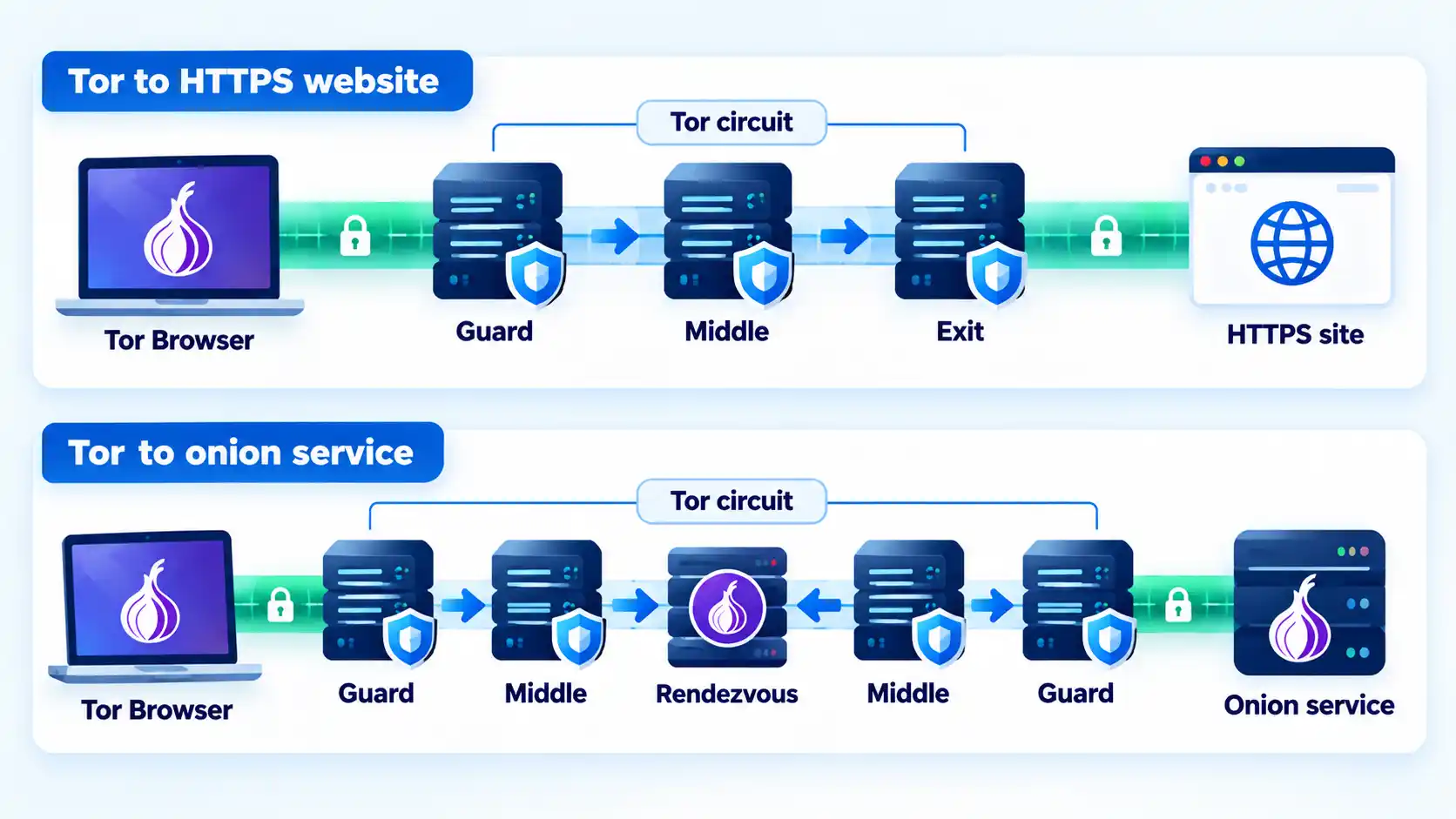
A VPN and Tor can both hide your normal public IP address from websites, but they use fundamentally different trust and routing models. A conventional VPN sends covered traffic through one provider-controlled endpoint, while Tor sends traffic through multiple relays so no single ordinary relay normally knows both where the connection originated and which destination it ultimately reaches.
Here, Tor means the Tor network as most people use it through Tor Browser. It does not mean the separate Tor VPN Beta, which the Tor Project currently describes as testing software that should not be relied on for sensitive activity.
Quick Take
- A VPN concentrates an important part of the connection’s trust in one VPN provider. Tor deliberately distributes route knowledge across multiple relays.
- Both can replace the public IP address a normal website sees, but Tor Browser also includes browser-level protections designed to reduce fingerprinting and tracking.
- A conventional VPN is commonly designed to cover broader device or application traffic, while Tor Browser protects its browser traffic by default and other applications require appropriate Tor configuration.
- Neither tool guarantees anonymity if you sign in to identifying accounts, reveal personal information, use a compromised device, or face an adversary outside the technology’s threat model.
VPN vs Tor at a Glance
The easiest way to compare VPN and Tor is to separate routing, trust, browser privacy, and application coverage. Neither option is universally better because they solve overlapping but different privacy problems.
| Feature | VPN | Tor / Tor Browser |
|---|---|---|
| Routing path | Covered traffic is routed through a VPN endpoint operated by the chosen provider or organization. | Traffic is routed through multiple Tor relays before reaching an ordinary internet destination. |
| Trust model | Places substantial routing trust in the VPN operator. | Distributes route knowledge across relays so one ordinary relay does not know the complete path. |
| Public IP seen by website | Normally the VPN server’s public IP for traffic exiting through the VPN. | Normally the Tor exit relay’s public IP for ordinary websites. |
| What the local ISP sees | For covered traffic, typically a connection to VPN infrastructure rather than the final tunneled destination. | When connecting directly to Tor, normally a connection to Tor nodes rather than the final destination. |
| Browser fingerprinting defenses | A VPN tunnel does not provide them by itself. | Tor Browser includes defenses intended to make users harder to distinguish by browser configuration. |
| Typical traffic scope | Can cover broad device or application traffic according to VPN routing policy. | Tor Browser covers its browser traffic by default; other compatible applications require appropriate Tor configuration. |
| Performance profile | Uses an additional VPN route and endpoint; performance depends on server, route, protocol, and network conditions. | Can add latency because traffic passes through multiple volunteer relays and is affected by network load and route conditions. |
| Onion-service support | Not a normal VPN function. | Tor Browser can access onion services through the Tor network. |
| Primary privacy model | Encrypted client-to-VPN transport plus an alternate network exit under a chosen provider. | Distributed onion routing plus Tor Browser privacy defenses. |
The table shows why “which one hides my IP?” is too narrow a comparison. Both can change the address a destination sees, but the more consequential difference is which parties can observe the user, the route, and the destination.
The Biggest Difference Is Where You Place Trust
A conventional VPN primarily changes the network intermediary you rely on. Your device establishes an encrypted tunnel to a VPN server, and covered traffic exits through that provider’s infrastructure before continuing toward its destination.
Cloudflare’s VPN explanation describes the client-to-server encrypted tunnel and the VPN server’s role as the network endpoint visible to destinations. The useful privacy question is therefore not whether a VPN removes trust, but whether you are comfortable placing that routing role with the VPN operator.
Tor takes a different approach. The Tor Project explains that ordinary Tor traffic passes through multiple relays, with layered encryption and different information available at each position. Its comparison with one-hop proxy services says Tor normally routes traffic through at least three servers before the destination.
For an ordinary web circuit, the first relay is the guard or entry relay. It receives the user’s connection but does not know the final destination. A middle relay connects adjacent parts of the circuit. The exit relay connects to the ordinary public internet but does not receive the user’s original public IP as the source of that exit-side connection.
The Tor client also negotiates separate encryption keys for each hop. The Tor Project’s technical overview of Tor circuits explains that each relay knows only its adjacent hops rather than the complete route.
Info
A VPN concentrates an important part of the route in one provider. Tor deliberately distributes route knowledge across multiple relays. That does not make Tor invulnerable, but it removes the ordinary requirement that one routing intermediary know both the incoming user connection and the final destination.
If you are comparing single-intermediary routing models, the distinction between a proxy and a VPN provides useful context. Tor differs from both by deliberately distributing the route across multiple relays.
What Your ISP, VPN Provider, Tor Relays and Websites Can See
Privacy claims make more sense when you identify the observer instead of asking whether traffic is simply “hidden.”
With a VPN
Your internet service provider still carries the connection to the VPN infrastructure. For traffic actually routed through the VPN, the ISP sees that VPN connection rather than directly carrying each covered connection to its final website.
The VPN operator occupies the next major trust position because traffic reaches its infrastructure before exiting toward internet destinations. A website normally sees the VPN server’s public IP address for traffic leaving through that endpoint.
HTTPS remains a separate protection layer. A VPN tunnel can end at the VPN server while an HTTPS connection remains encrypted between your browser or application and the website.
With Tor
The Tor Project says that when you connect directly to Tor, a local internet provider or other local observer can normally tell that you are communicating with Tor nodes but does not receive the final browsing destination from the normal Tor route. Websites instead see a connection coming from the Tor network rather than from your normal public IP. Tor’s protection overview explains this separation through its multi-hop routing model.
The guard relay sees the incoming client IP because it receives the connection. The exit side knows which ordinary internet destination it connects to. The design goal is that one ordinary relay does not receive both pieces of information as part of normal circuit operation.
This is why statements such as “Tor relays cannot see anything” are inaccurate. Each relay has information required for its role; the protection comes from separating those roles.
A useful follow-up distinction is what your ISP can see with Tor or a VPN, because local-network visibility and destination-side visibility are different parts of the same connection.
Privacy Is Not the Same as Anonymity
Neither VPN routing nor Tor routing prevents you from identifying yourself voluntarily.
If you sign in to an email account connected to your real identity, the service can still associate the session with that account. The same applies if you submit your name, phone number, address, payment details, or other identifying information.
The Tor Project makes this boundary explicit. Its Tor Browser safety guidance says perfect anonymity cannot be guaranteed and explains that signing into a website or supplying personal information identifies you to that service even though Tor may still hide your normal network location.
A conventional VPN has another limitation: its network tunnel does not automatically change the browser environment. Cookies, signed-in sessions, extensions, fonts, screen characteristics, and other browser signals can remain available to websites even when your public IP changes.
IP privacy is therefore only one part of online identifiability.
Tor Browser Adds Protections a VPN Tunnel Does Not
Browser fingerprinting combines observable browser and device characteristics that can help distinguish one browser from others. Signals may include operating-system information, fonts, browser capabilities, extensions, screen characteristics, cookies, and other state.
A VPN tunnel does not standardize those properties. Its primary function is network tunneling and routing.
Tor Browser is designed around a broader browser-privacy model. Tor Project documentation says the browser is modified to prevent or reduce several forms of identifying leakage and to make Tor users look more alike.
The distinction is important enough that the Tor Project strongly recommends against using ordinary browsers as substitutes for Tor Browser. Its current guidance specifically warns about real-IP exposure through DNS or WebRTC, fingerprinting through operating-system details, fonts and plugins, and persistent tracking state such as cookies and cache.
This does not mean Tor Browser makes every user indistinguishable under every circumstance. It means its privacy model includes browser-level defenses that a VPN tunnel by itself does not provide.
The same distinction explains why Tor Browser and private browsing should not be treated as equivalent simply because both can limit some browsing state.
Where Encryption Starts and Stops
Both VPN and Tor comparisons become misleading when “encrypted” is treated as one uninterrupted property from the device to every destination.
VPN encryption
A conventional VPN protects covered traffic inside its tunnel between the VPN client and VPN endpoint. After that point, the application’s own protocol determines what protection continues toward the destination. For ordinary modern web browsing, HTTPS can independently protect the browser-to-website session even though the VPN tunnel itself ends at the VPN server.
Tor and ordinary websites
Tor applies layers of encryption inside its relay circuit, but an ordinary website reached through an exit relay still relies on destination-side encryption such as HTTPS to protect application data on the public-internet side of the route.
The Tor Project’s Tor and HTTPS explanation treats the two protections separately. Tor changes network routing and conceals the user’s normal public IP from the destination, while HTTPS protects data exchanged with an HTTPS website.
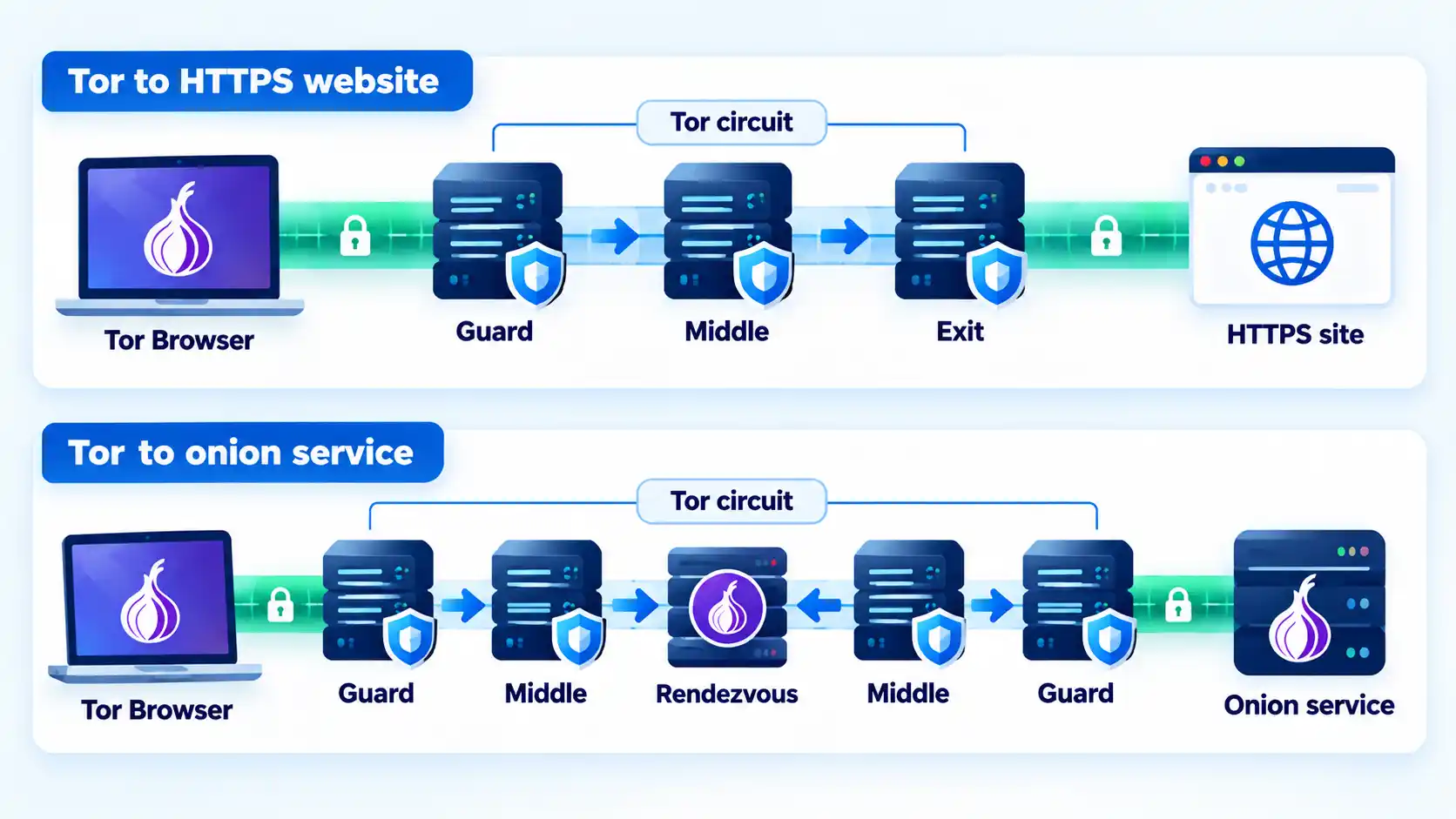
Onion services use a different path
An onion service does not use the same public-internet exit pattern. The Tor Project’s onion-service documentation explains that both the client and service establish Tor circuits and meet through a rendezvous point, while onion-service traffic is encrypted between the client and onion host.
A `.onion` service is therefore not simply an ordinary website viewed through a Tor exit. The service connection remains inside Tor rather than emerging through a public exit relay to reach an ordinary public web server.
Tor Distributes Trust, but It Still Has Limits
Tor’s distributed design prevents one ordinary relay from simply receiving the complete source-and-destination relationship, but that is not the same as protection against every possible observer.
The Tor Project explicitly documents traffic-correlation and timing attacks as a remaining limitation. An observer capable of seeing both the user’s side of a connection and the relevant destination or exit side may compare timing patterns. Tor’s documentation on remaining attacks states that Tor does not defend against an observer that can see both ends of the communication channel.
That limitation does not make the relay architecture meaningless. It defines the threat model. Tor still prevents ordinary single relays, destination websites, and local network observers from automatically receiving the complete source-to-destination relationship.
Tor can also lose anonymity through application behavior rather than a break in onion routing. The Tor Project notes that circuits may carry multiple TCP connections, so mixing anonymous and identifying traffic or using applications carelessly can create additional correlation risks.
The more detailed architecture behind Tor guards, middle relays, exit nodes, and onion routing explains why these protections and limitations follow from the network design.
VPN vs Tor for Speed and Everyday Compatibility
A VPN and Tor both alter the normal network path, but they do so differently.
A conventional VPN generally sends covered traffic through one VPN endpoint before forwarding it toward the destination. Real performance depends on factors such as server location, congestion, protocol, route quality, device limits, and the underlying internet connection. If a VPN is unusually slow, VPN slowdown diagnosis works best by comparing the same connection with the VPN off and on before changing several settings at once.
Tor routes traffic through multiple volunteer relays. The Tor Project says Tor Browser can sometimes feel slower because traffic passes through relays in different locations and performance depends on network load and latency. It also notes that users may not always notice a meaningful speed difference.
The distinction matters most for workloads that are sensitive to latency. Interactive voice, video, gaming, and similar applications may react more strongly to additional delay than ordinary page loading, although actual results depend on route and network conditions.
Application coverage also differs. Many VPN clients are designed to route broad device traffic according to their routing policy. Tor Browser is configured for safe web browsing through Tor by default. Core Tor can be used by other compatible applications, but the Tor Project says it has not researched safe anonymity configurations for every program and recommends Tor Browser for normal browsing.
Tor should therefore not be reduced to “a slower VPN.” Its extra relays and application constraints follow from a different privacy architecture.
Should You Use a VPN and Tor Together?
Not by default.
Combining two privacy technologies does not automatically create stronger privacy. It changes which parties occupy different positions in the connection, introduces additional configuration, and can create new failure modes.
The Tor Project’s current Tor Browser known-issues guidance says VPNs tend to interfere with Tor and does not recommend using VPN and Tor together unless the user is advanced and understands how to configure both without compromising privacy.
There is therefore no general rule that stacking the technologies provides “double anonymity.” Whether a combined design changes privacy in a useful way depends on the exact routing arrangement, threat model, VPN operator, and configuration.
This comparison does not provide VPN-over-Tor or Tor-over-VPN configuration instructions. Those designs require a more specific threat model than the general comparison here.
Which option should you choose?
VPN
Choose this if: you want broader device or application traffic routed through an encrypted client-to-server tunnel, ordinary application compatibility matters, and you are prepared to place substantial routing trust in the VPN provider or organization operating the endpoint.
Avoid this if: your main privacy requirement is to avoid relying on one routing operator that occupies both the incoming client side and the outbound destination side of the VPN path.
Main trade-off: broad traffic coverage and simpler application compatibility come with a concentrated provider trust relationship, while the VPN tunnel itself does not provide Tor Browser’s anti-fingerprinting defenses.
Tor / Tor Browser
Choose this if: distributing route knowledge across multiple relays matters to your threat model, browser-level anti-fingerprinting protections are important, or you need access to onion services without relying on one VPN operator for the full route.
Avoid this if: your primary requirement is straightforward coverage for arbitrary device applications or a workflow that depends heavily on low latency and does not fit Tor’s application model.
Main trade-off: Tor reduces reliance on a single routing intermediary but introduces a multi-relay route, application constraints, and an anonymity model that still depends on how you use Tor Browser and what information you reveal.
Bottom Line
VPN and Tor overlap in one visible result: either can cause a normal website to see an address other than your ordinary public IP. Their privacy architectures are otherwise substantially different.
A conventional VPN gives you an encrypted path to one VPN endpoint and asks you to trust the operator occupying that position. Tor distributes route knowledge across multiple relays and, when used through Tor Browser, adds browser-level privacy defenses that a VPN tunnel alone does not provide. The useful choice depends on your threat model, application needs, tolerance for latency, and whether concentrating or distributing network trust better matches the problem you are trying to solve.
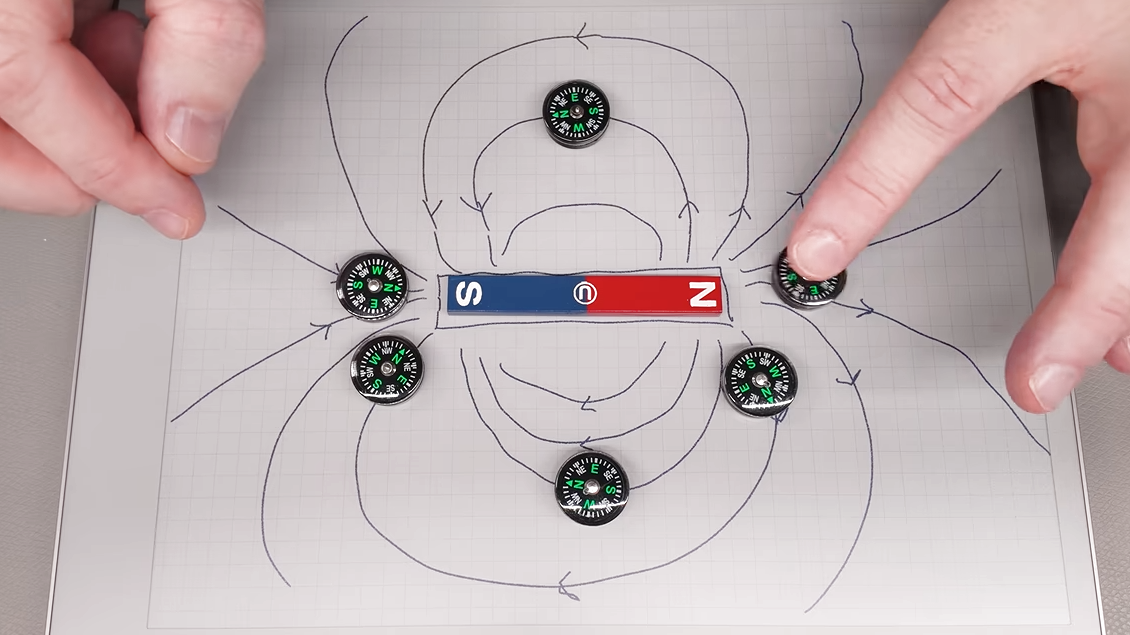
Every magnet has a north and a south pole, but which is which? Sometimes it matters. If a product one builds features a magnetic closure or other part, the polarity of those magnets should be consistent in assembly. So how does one ensure they never glue a magnet wrong again? [Clough42] shows several ways to identify a magnet’s north and south poles using things many of us probably have ready at hand, and goes into a bit of theory while he’s at it.
Probably the easiest way is to use a known-good and clearly labeled reference magnet. Same poles repel, and opposites attract. But if that’s not available, a simple magnetic compass can help. Because opposite poles attract, a compass’s north point will be attracted toward a magnet’s south pole, and vice versa.
A Hall effect sensor, or an electromagnet — the winding and current flow determine the polarity — are other ways to measure a magnet’s poles. And here’s where [Clough42] dives into some details of how magnetic fields actually act, because it explains some seemingly strange behavior.
For example, at around 4:08 he demonstrates a Hall effect sensor board that is documented as lighting an LED when the south pole of a magnet is held to its front. It does that, but it also lights the LED when the north end of the magnet is held to the sensor’s back. That’s because the sensor isn’t actually directly sensing the magnet’s pole, it’s sensing the orientation of a magnetic field. The lesson is clear: make sure you’re measuring what you think you’re measuring. Near the end of the video he demonstrates a similar experience with a handy mobile phone app that senses magnetic fields by reading the device’s internal magnetic compass; by waving a strong magnet around, the detected polarity flips back and forth even though the magnet’s orientation isn’t changed.
So what does one do after positively identifying a magnet’s north and south poles? Label it clearly for use as a known-good reference magnet in the future is our suggestion. Watch the whole video below, then take a few minutes to dive into the nitty-gritty of what magnets actually are and how they work.

How Apple’s entry into the foldable market could boost its biggest rival.

Apple recently unveiled the iPhone Duo, its first foldable phone. Although it won’t hit stores until next month, the announcement alone was enough to get the smartphone world talking. And while Apple is making its first attempt at the format, others, like Samsung, have been doing this for some time — the original 2019 Galaxy Fold was one of the first mainstream foldable devices.
As it turns out, the iPhone Duo announcement might also end up being a positive for competing devices like the Galaxy Z Fold 8. It’s not as if Samsung is celebrating the Duo, but the hype surrounding it ends up drawing more attention to the foldable category overall.
The iPhone Duo has sparked more interest in foldable phones
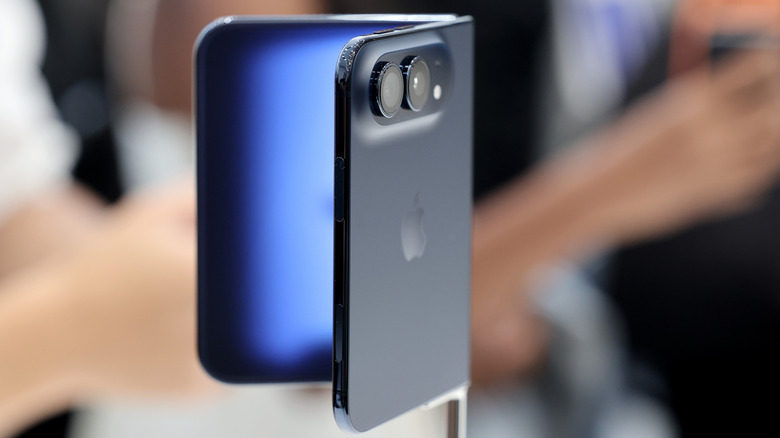
Samsung currently leads the foldable device segment, but that market slice doesn’t even come close to conventional smartphones. IDC estimates that about 20.6 million foldable phones were shipped last year, but that’s only a fraction of the overall smartphone market. Global smartphone shipments reached 1.25 billion last year, giving an idea of just how niche the foldable phone market still is. But the iPhone Duo has the potential to change that, and we’re already seeing the first effects.
Recent reports suggest that more people are buying the Samsung Galaxy Z Fold 8 following the announcement of the iPhone Duo. It’s possible that people are finally starting to pay attention to foldables, or maybe enthusiasts want to give the form factor a try before the iPhone Duo goes on sale. Either way, Samsung is well aware of this, and has already dropped the price of its foldable phones in some markets. This is just one of many examples of how competition ultimately benefits consumers.
With Apple now in the race, other players will have to step up their game to compete. The result will be more available options and likely broader price ranges, too. There’s only one iPhone Duo for now, but Samsung, for example, already has a variety of foldables available. These range from the relatively affordable Galaxy Z Flip7 FE to the chic and expensive Z Fold 8 Ultra. Eventually, the competition might even push Apple to make a cheaper iPhone Duo model.
Phone makers should give foldables more attention

There’s a benefit on the hardware and software side, too. Although foldable phones aren’t breaking news anymore, Apple has shown how it always finds a way to catch up. For instance, the company hasn’t completely solved the screen crease issue, but it looks significantly less noticeable on the iPhone Duo thanks to a matte nano-textured layer. There’s little doubt that other folding phone makers will follow suit soon.
The same goes for the new user interface designed specifically for the iPhone Duo. It’s still iOS, but clearly designed for a device that can be used in multiple layouts — folded, unfolded or half-open. Many current foldable devices simply stretch or shrink the same interface across all screens, which ends up looking unfinished. Also, there are already developers porting the iPhone Duo’s opening and closing animation to Android. It’s not hard to imagine this becoming an industry standard before long.
So yes, Apple wasn’t the first to make a foldable phone, and you may not even want to buy one. But this entry will likely end up shaping the entire foldable market anyway.

Business21 seconds ago
HYBE Plunges 48.9%, JYP Falls 41.4% as K-pop Stocks Suffer From Heavy Single-Artist Dependence, SM Fares Best

Tech4 minutes ago
Some Pancreatic Cells Are Just One Genetic Tweak Away From Treating Diabetes

Entertainment5 minutes ago
Dakota Johnson’s Fall Suede Jacket Style Is on Amazon





-

 Fashion2 days ago
Weekend Open Thread: J.McLaughlin – Corporette.com
-

 Crypto World5 days ago
Goldman Sachs and Deutsche Bank Agree: The S&P 500 Rally Isn't Over
-

 Tech7 days ago
Researchers escape OpenAI Codex sandbox to run commands on host
-

 Fashion3 days ago
8 iPhone Accessories That Add Personality
-

 Crypto World7 days ago
Who Needs CLARITY Anyway? ARB Could See 70X Increase: Hodler’s Digest
-

 Entertainment5 days ago
These 17 Fall Amazon Dresses Seriously Look Like Anthropologie
-

 Business7 days ago
Analog Devices (ADI) Bets $1.35 Billion on Chips that Let Machines Think for Themselves
-

 Crypto World7 days ago
Coinbase, Robinhood, Circle Seen as Tokenized-Stock Winners
-

 Crypto World5 days ago
This Bearish Netflix Stock Trade Can Cash In On Video Streaming Giant’s Woes
-

 Tech5 days ago
Reolink’s solar 4K security camera falls to its lowest price in months
-

 Crypto World5 days ago
Trump-Xi Polymarket Odds for Handshake Hit 50%
-

 Tech6 days ago
Google’s $899 Googlebook is a bet that you’ll buy a new laptop for Gemini
-

 Crypto World4 days ago
Crude Oil Prices Pressured by Diplomatic Hopes in the Middle East
-
 Business5 days ago
Oil Price Today (September 23): Crude oil below $100 on hopes of US-Iran talks. What did Trump say?
-

 Crypto World4 days ago
Bitcoin price tests $83,600 Supertrend support after $87K rejection
-

 Crypto World4 days ago
Bitcoin Threatens Sub-$84,000 Breakdown as Long Liquidations Spike
-

 Crypto World6 days ago
Meta Jumps 11% As Muse Shines and Investors Show an Appetite for Advancing AI
-

 Crypto World5 days ago
Did Jim Cramer Just Give GameStop Stock the Kiss of Death When He Said the Turnaround Is Working?
-

 Crypto World6 days ago
Bitcoin price holds above $81K as key catalysts line up
-

 Crypto World5 days ago
BitGo says Bitcoin absorbed Fed hike, CLARITY failure
You must be logged in to post a comment Login