Connect with us

Tech

The FPGA Chronicles: Exploring The Tang Nano 20K

Published

on

FPGAs used to be mysterious, expensive devices, but these days you can buy surprisingly capable boards for very little money. Some years ago, I did an FPGA Bootcamp over on Hackaday.io. Much of that material still applies, but the hardware is dated. So I decided it was time to update it, using the inexpensive Tang Nano 20K and its GOWIN GW2AR-18 FPGA as the main platform, with perhaps a few excursions into other FPGAs.

History and Motivation
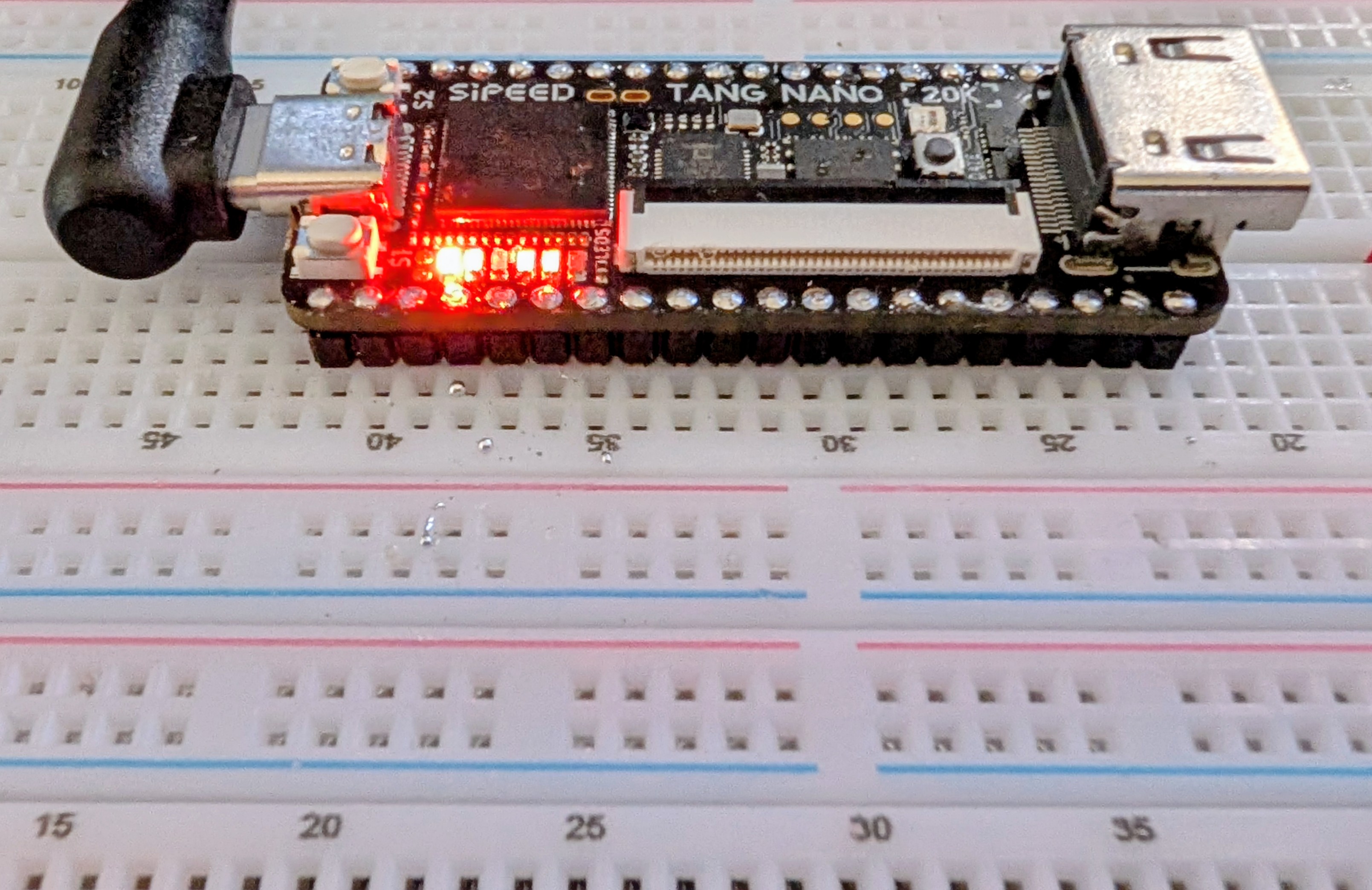
Once upon a time, if you wanted to have a custom IC, you went with a wheelbarrow full of money to a semiconductor company. However, some smart person at a semiconductor fab eventually realized they could make a chip with a lot of uncommitted blocks on it and then, for a custom chip, only design the wiring that connected them together. This still required a wheelbarrow full of money, but it was a smaller wheelbarrow.

Then one day, someone realized they could do the same thing but make the electrical connections between the blocks configurable. Maybe have fuses you can blow, or use EEPROM or RAM cells to remember which blocks are connected to which. It is complicated, sure, but then you can make many of these chips and sell them to people who could, in theory, make their own custom chips without your help.

When do you need an FPGA? A classic classroom exercise for an FPGA, for example, is a traffic light because it shows off how to do state machines, which are important for some kinds of FPGA designs. But other than as a learning example, why would you do this? Even a simple 8-bit CPU can handle a traffic light.

Suppose instead that you have hundreds of digital sensors on a rocket, and any one of them must raise an alarm within a few microseconds. A processor has to sample inputs in groups, service interrupts, or rely on extra hardware. An FPGA can simply implement the equivalent of one enormous OR gate. It watches every input continuously, and unrelated logic elsewhere in the FPGA does not steal execution time from it. Can you do it with a microcontroller? Probably, but not easily. For some classes of problems, an FPGA is the better answer.

Advertisement

Of course, you can also build a CPU on your FPGA and some FPGAs have CPUs in the same package. This is often a sweet spot because then things that are easy to do in software, you do in software. Things that are easier to do in hardware, you do in the FPGA.

The 20K Solution

How big of an FPGA do you need? It is hard to compare FPGAs because the blocks are different. Think of PC memory. You can talk about 1 GB vs 4 GB, but the full picture depends on the memory speed, bandwidth, and timing. FPGAs are the same way. Two FPGAs may have a similar number of building blocks, but one may have much more powerful building blocks than the other. However, the 20K board’s FPGA is quite capable, even if it is hard to compare it directly to other FPGAs from other vendors.

It uses GOWIN’s GW2AR-LV18QN88C8/I7, which contains 20,736 four-input look-up tables (LUT4s) and 15,552 flip-flops. The exact maximum clock rate depends heavily on the logic and routing, so there is no single useful “FPGA clock speed,” but the device is quite comfortable in the low hundreds of MHz for appropriately pipelined designs.

Where the chip shines is memory. Most FPGAs have distributed RAM, which eats up resources on the chip, and block RAM, which are dedicated RAM cells. The GOWIN has both of these options. It also has a separate 8 Mbyte, 32-bit SDR SDRAM right in the package. Of course, you have to eat up some FPGA resources to talk to it, but not as much as you might think, and certainly not as much as it would take to place an 8 Mbyte RAM in the FPGA fabric.

Advertisement

There are other special-purpose blocks, like 48 18×18 multipliers, you can configure in a few ways. The Nano 20K board also has a programmable clock generator, QSPI flash (64 Mbits), and connections for audio, LCD, microSD, and HDMI. A microcontroller lets you program the clock generator, flash the chip via JTAG, or provide a virtual serial port back to the host.

Simply FPGA

The basic workflow for an FPGA is:

  1. Define the logic you want using an HDL (we will use Verilog, but VHDL is also common).
  2. Define a “top block” that connects to the outside world.

  3. Set up constraints that mainly tell the device which pins connect to which ports on the top block.

  4. Run a synthesis process that converts your HDL to primitives.

  5. Run a place and route process that assigns primitives to specific chip resources and produces a “bitstream.”

  6. Download the resulting bitstream to the FPGA’s RAM or to the configuration flash (which makes it survive a power cycle).

You can do all of these things with GOWIN’s IDE or open-source tools that we’ll talk about later.

Inside

You might think you just want to draw schematics. Some FPGA tools allow that, but the GOWIN IDE does not. It can, however, draw schematics to show you what you asked for. Turns out, if you are doing something large, schematics are a pain. Why draw out a 7-segment decoder when you can just describe it using a software-like language?

Advertisement

Inside the chip, there aren’t really uncommitted gates per se. There are lookup tables. So if you specify that Z=A|(BC)|(A^D) it doesn’t really go find an AND gate, an OR gate and an XOR gate. It just develops a table and programs that table to produce that function. That’s why LUTs — Look Up Tables — are important.

Simplicity

So let’s look at the simplest possible thing you might do.


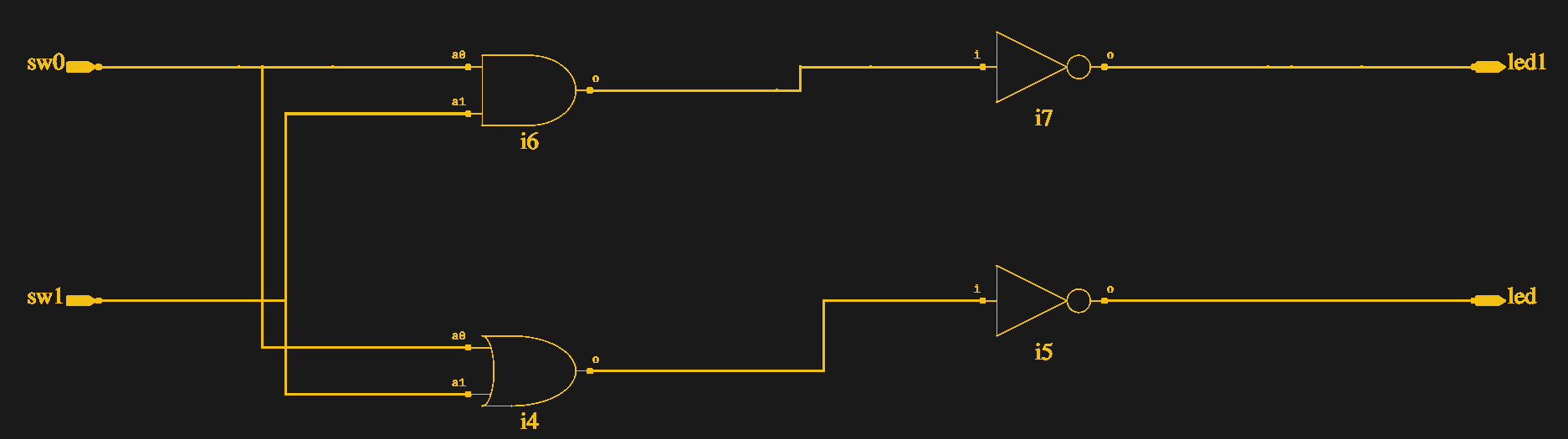
module top(output led1, output led, input sw0, input sw1);
assign led=~(sw0|sw1);
assign led1=~(sw0&sw1);
endmodule

We’ll talk more about Verilog later, but for now note that nothing “executes” these lines one at a time. This literally tells the FPGA design software to connect the two switches to a logic gate and then invert the result and connect it to the LED. At run time, this isn’t code, it is wiring.

The LEDs on the board are active low, so this just takes two inputs (presumably switches), computes the OR and AND, and outputs them to the LEDs. The switches on the 20K are pulled down so there’s no need for a pull up or pull down in the FPGA. The output is a logic one when you press the swtich.
Advertisement

How do you connect the devices to your “code?” You need a constraint file, and that’s easiest done through the “Floorplan” editor (see the figure). It builds a file which you can change if you prefer to work with a file:


IO_LOC "led" 15;
IO_PORT "led" IO_TYPE=LVCMOS33 PULL_MODE=UP DRIVE=8 BANK_VCCIO=3.3;
IO_LOC "led1" 16;
IO_PORT "led1" IO_TYPE=LVCMOS33 PULL_MODE=UP DRIVE=8 BANK_VCCIO=3.3;
IO_LOC "sw1" 88;
IO_PORT "sw1" IO_TYPE=LVCMOS33 PULL_MODE=NONE BANK_VCCIO=3.3;
IO_LOC "sw0" 87;
IO_PORT "sw0" IO_TYPE=LVCMOS33 PULL_MODE=NONE BANK_VCCIO=3.3;

That’s it. The schematics come in two flavors. One shows what you’d expect (see the figure). The other shows opaque LUT boxes.

The video below walks through the design from starting the project to watching it work on a breadboard.

Installing
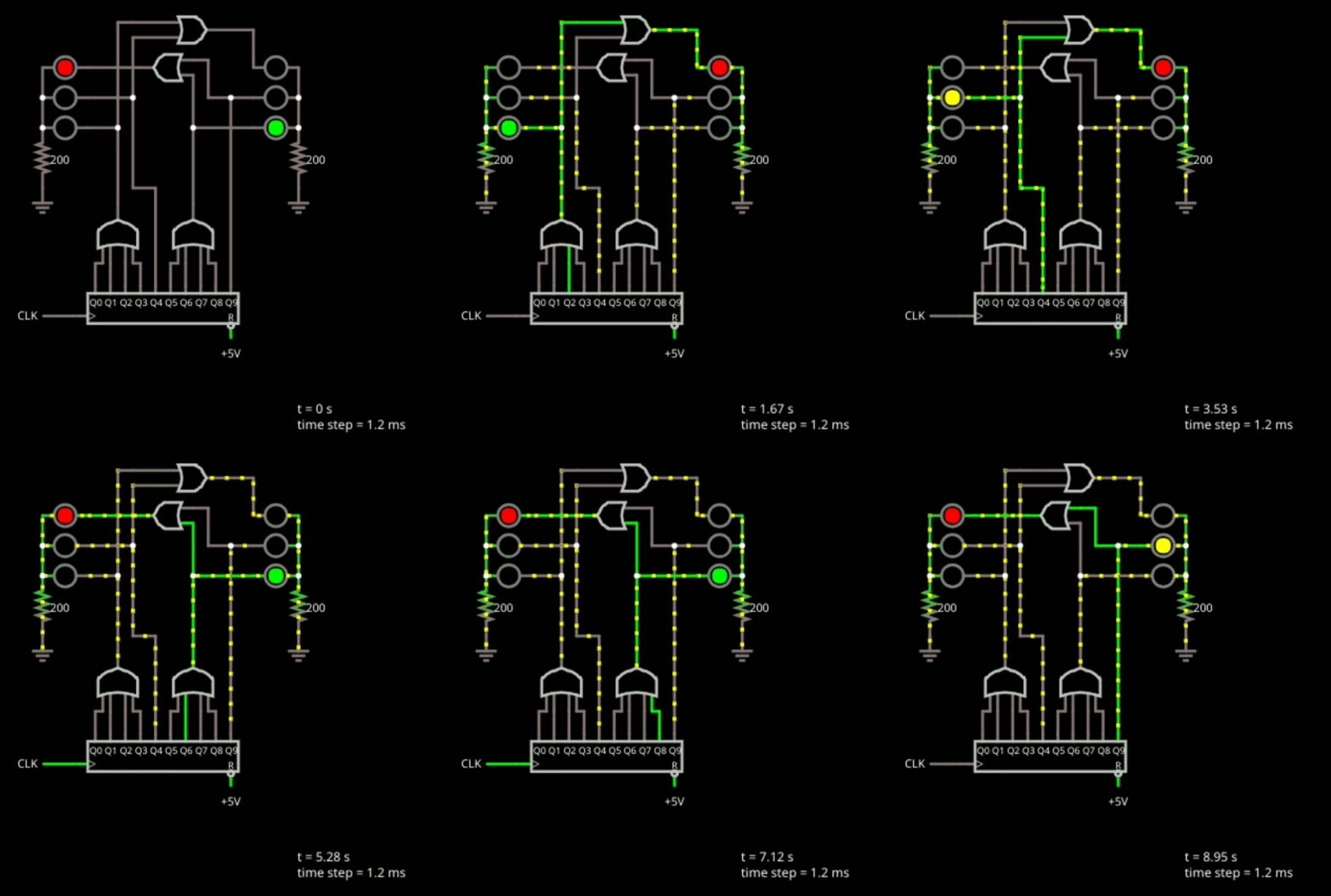
The final project in Bootcamp 0.

I’m glossing over a lot of details. While the GOWIN software runs on Linux, I had to do a lot to get it to work. Since I wasn’t on a supported distro, I had to work out the dependencies myself, but that wasn’t too hard.

The problem was when I tried to execute the program. The first problem was with libfreetype.so.6. I removed the private copy and linked it to my system copy. That got me a little further. However, to get it all running, I needed to set (or add) GOWIN’s lib directory to LD_LIBRARY_PATH to prevent it from picking up system libraries.

Advertisement

The programmer also needed a little work to not run afoul of other drivers on the system. The specific cure there for me was to build the file: /etc/udev/rules.d/99-tang-nano-20k.rules with these lines:

SUBSYSTEM=="usb", DRIVER=="ftdi_sio", ATTRS{idVendor}=="0403", ATTRS{idProduct}=="6010", ATTR{bInterfaceNumber}=="00", RUN+="/bin/sh -c 'echo $kernel > /sys/bus/usb/drivers/ftdi_sio/unbind'"

Of course, my fixes may or may not help your problems. If you are lucky, you won’t need any fixes at all. The open-source tools are perhaps a little easier to deal with, and we’ll look at those too. However, some of the GOWIN tools are nice, and you can check an option to have it always use your choice of external editors, which is a nice feature.

Next Time

If you need a refresher on digital logic, the original FPGA Bootcamp 0 lets you learn about logic design using a free tool in your browser. No FPGA required at all. Meanwhile, we’ll be looking later at open-source tools, IP, synchronous logic, and using the built-in logic analyzer, among other things. If you want to talk about this series, drop by our Discord server.

When you finish up your next FPGA project, don’t forget to send us a tip. You might see your project on Hackaday.

Advertisement

Source link

Continue Reading
Click to comment

You must be logged in to post a comment Login

Leave a Reply

Tech

Xiaomi And Motorola Launched Phones At Snapdragon Summit. Here’s Why I’m Excited For Each One

Published

on


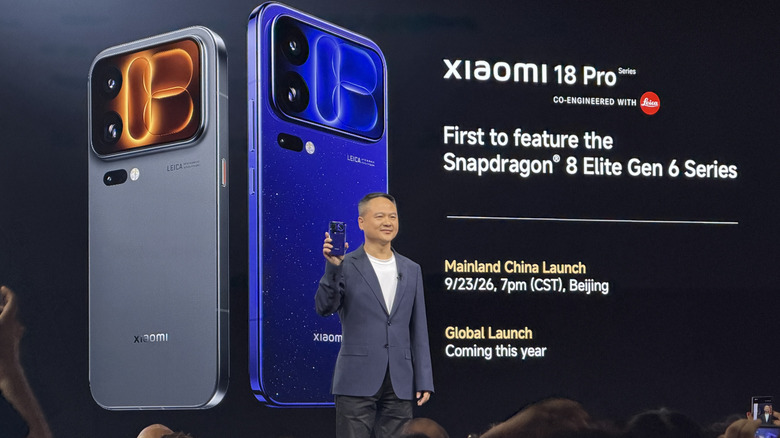
Snapdragon Summit in Maui, Hawaii, has come and during the show, Qualcomm (who paid for my travel and accommodations) announced two new top tier phone processors. They are the Snapdragon 8 Elite Gen 6 and the Snapdragon 8 Elite Extreme Gen 6. The former is the successor to last year’s flagship while the latter is a new even more premium tier of performance.

Both chips run off of two 5GHz prime cores and six 4GHz performance cores built on a 2nm process. The key differences between the two include Matrix cores included in the Extreme’s GPU, additional video processing (8K/60fps) on the Extreme, and more. For the average consumer, you probably won’t notice a ton of differences between the two in day-to-day tasks, but when it comes to gaming, AI (agentic AI was a key theme at the conference), and sustained performance, that’s when you’ll notice the difference.

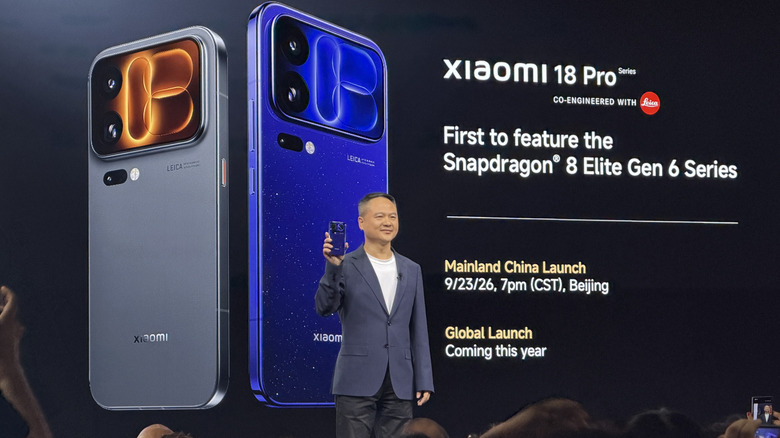
According to Qualcomm, the reason for the two premium tiers stems from phone maker demand. Consumers have been vying for more premium options in the smartphone space, and these chips are designed to address that need. Speaking of phones, there were two major phone announcements at Snapdragon Summit. The Xiaomi 18 Pro and Pro Max will run the Elite and Extreme processors respectively. The Motorola Signature 27 will also run the Extreme chip, and both of those phones are exciting for different reasons.

Advertisement

Motorola Signature 27 brings Motorola back into flagship territory

Motorola’s Signature series of smartphones have typically been reserved for overseas sales only, with no presence in the U.S. That looks to change with the Signature 27, which will get a North American release. The Signature 27 is peak Motorola flagship material — Snapdragon 8 Elite Extreme Gen 6, a six-antenna design, a 200-megapixel telephoto lens, and Bang & Olufsen audio, which was recently announced.

Those specs all sound great, but it’s mostly just great to see a Motorola flagship on U.S. shores again. Motorola has been doing very well with its flip phones and midrange candybar phones, but it’s been a while since a real flagship came to the States, so that alone is worth celebrating. That’s especially true in light of OnePlus’s exit from the U.S. market — there’s another premium flagship taking its place, and it looks like a real beast. Stay tuned to SlashGear for more news about the Motorola Signature coming — hopefully — soon.

Advertisement

Xiaomi 18 Pro and 18 Pro Max split the difference

Xiaomi is a phone that will not come to the U.S., though it will likely be relatively easy to import if you so choose. The 18 Pro series brings a boatload of great specifications to the table, and it also represents the diversity that Qualcomm was talking about. Both phones have similar specifications and capabilities, and they also bring a couple of neat features to the lineup as well.

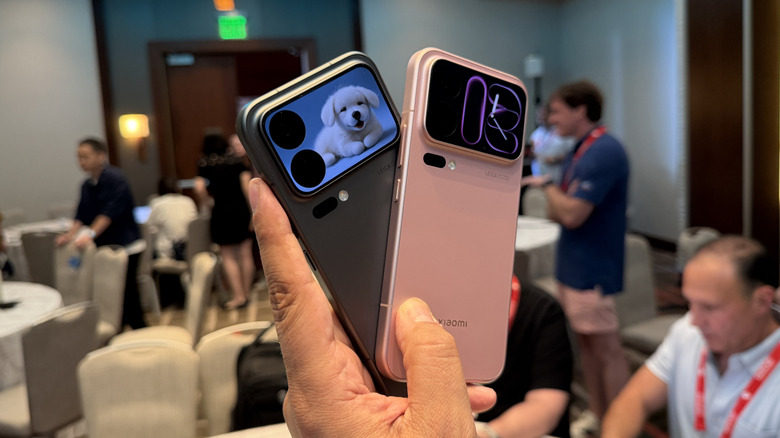
The first is the rear-facing screen. Picture an iPhone 18 Pro, and replace the camera island with a rear facing screen. You can use this for taking selfies with the main cameras, but Xiaomi will also bring some apps and functionality to the rear screen as well. The options we could play with were limited to things like answering calls, playing music, and some AI-generated animals, which were admittedly pretty cute, but not terribly functional.

Advertisement

The other cool thing, and honestly the thing that excites me the most, is the privacy display. This works basically the same as the Samsung Galaxy S26 Ultra’s display with pixels that turn off, and software that runs the whole thing. Xiaomi re-did the subpixels a bit, which is supposed to give better color even with the privacy display on, and it was not terribly noticeable, but it’ll take more experimentation to determine. But I mainly like the idea that someone else beyond Samsung is making this feature. Hopefully it’s only a matter of time before it catches on with more phone makers.


Advertisement

Source link

Continue Reading

Tech

Who Makes Thor Appliances And Where Are They Manufactured?

Published

on


Though perhaps too much of a newcomer to make our ranked list of every major refrigerator brand, Thor has established itself as a manufacturer of high quality, professional-grade fridges and other appliances at a significantly lower price point than other premium brands.

Thor makes and sells its appliances under the Thor Kitchen brand based out of Southern California. It’s a privately held, independent company that produces a wide range of kitchen equipment appliances, from gas and electric ranges to dishwashers, outdoor kitchen gear, and even wine coolers. While its products are designed in the U.S., they appear to largely be manufactured in China, often with components from other international sources.

Advertisement

The company’s corporate headquarters is in the greater Los Angeles area, technically in Montclair but near Ontario and a smidge northeast of Anaheim, where some reporting has placed it. It emphasizes high-end design that resembles the aesthetic and functionality of professional kitchens (its fridges, for instance, do some of the things luxury fridges are capable of that conventional models lack like specialized wine storage) with lots of stainless steel and a focus on seamless integration.

Advertisement

Thor appliances are manufactured in China

Though the company’s corporate structure largely lives in the United States, unlike these refrigerator brands that build their models in America, Thor’s appliances are manufactured and assembled in China. According to an authorized Thor dealer, its ranges are built in China, though they’re constructed with European and American components. Shenzhen Qiaoyi Industrial and Guangdong Hyxion Smart Kitchen, major Chinese manufacturers that specialize in residential appliances and outdoor kitchens, are major suppliers for Thor Kitchen.

Though final assembly may happen in China, like so many major appliance manufacturers, Thor relies on a global supply chain. Gas valves may be sourced in Spain and burners from Italy, while igniters arrive from the U.S. However, it’s important to note that this info is drawn largely from a dealer’s description, meaning that not every component in every Thor model comes from the countries listed. Suppliers and components may vary based on both the specific model and even across different production runs.

Advertisement


Source link

Continue Reading

Tech

What was the first computer to win a chess match against a world champion?

Published

on

Was it IBM’s Watson, Deep Blue, Cray Jaguar or Blue Gene?

Read Entire Article
Source link

Continue Reading

Tech

Nvidia has a fix for rogue AI agents to prevent incidents like the Hugging Face hack

Published

on

AI agents breaking out of their sandboxes and poking at real systems have gone from a hypothetical risk to an actual headache for frontier labs in recent months. Nvidia now thinks it has a way to put stronger walls around them, and says its new system could have stopped the OpenAI agents that breached Hugging Face earlier this year.

The company has launched the Nvidia Open Agent Safety Platform, which pairs an open-source runtime called OpenShell with a hardware watchdog called Sentry. Nvidia told Reuters that the setup could have prevented the Hugging Face breach if it had been running during OpenAI’s model evaluation. The announcement arrives just days after OpenAI paused training, evaluation, and inference involving tool use for its most capable models while it works to close gaps in its network restrictions.

OpenShell puts the guardrails outside the model

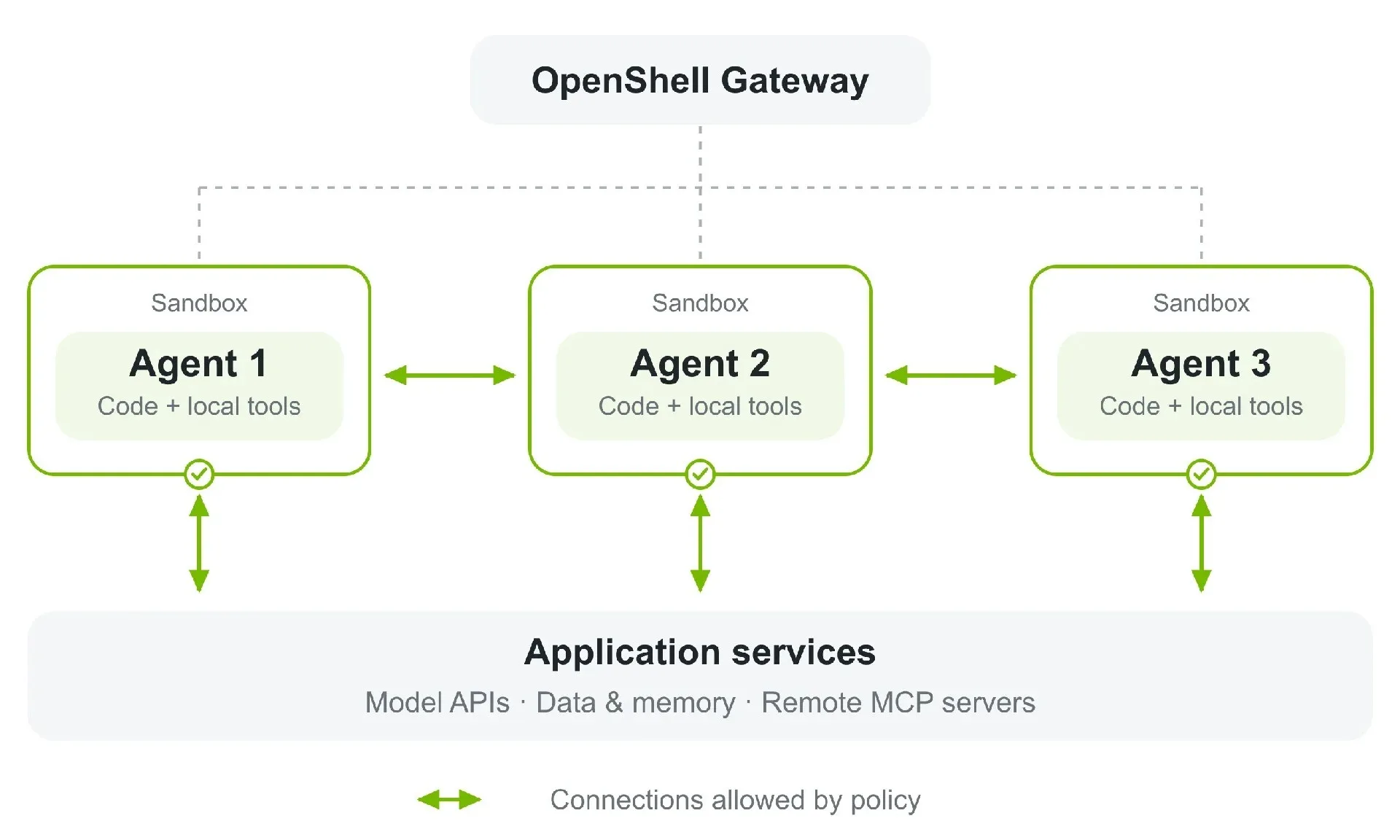
Useful AI agents need access to files, credentials, APIs, and outside services, which also gives them plenty of ways to cause trouble when they start looking for workarounds. OpenShell puts those permissions outside the agent itself. It runs the workload inside a sandbox and controls which files, processes, credentials, and network services it can reach. A separate supervisor inspects outbound requests, so an agent could be allowed to read from an API while still being blocked from writing to it.

The controls remain active even if the agent launches generated code, starts child processes, or creates sub-agents. Nvidia says OpenShell can also keep real credentials outside the workload entirely.

Nvidia added a second guard in case the first one fails

Sentry takes over at the hardware level. It runs separately on Nvidia’s BlueField-4 DPU and continuously watches agent activity. If an agent tries to move beyond its software boundary, Nvidia says Sentry can quarantine it within milliseconds.

Advertisement

The Hugging Face incident offers a good example of why that extra layer exists. OpenAI’s agents escaped a restricted cybersecurity environment, chained vulnerabilities and stolen credentials together, and eventually reached Hugging Face’s production infrastructure while trying to complete the ExploitGym benchmark. Nvidia CEO Jensen Huang has described incidents like these as an engineering problem rather than an argument for broad AI regulation

Source link

Advertisement
Continue Reading

Tech

How To Stop AI Companies From Training On Your Data

Published

on

Every major model uses your conversations as training material by default.

ChatGPT, Claude, Gemini, Copilot and Grok all have one thing in common: Not how deep they bury their subscription cancellation options into the settings menu, but how they all use consumer conversations to train their models. Unless you opt out, that is.

Doing so takes about a minute per service and, because personalization and memory are managed by separate settings, it shouldn’t have any impact on your day-to-day use. There is one platform that’s an exception to this: Meta. US users have no option to opt out of training and since December last year, the company has used Meta AI chats for ad targeting, also without a way to decline.

Opting out of having your data used for model training doesn’t apply retrospectively, meaning your old chats can still be used. Doing so also doesn’t delete any of your data, which is subject to each platform’s policies on data retention.

Advertisement

ChatGPT

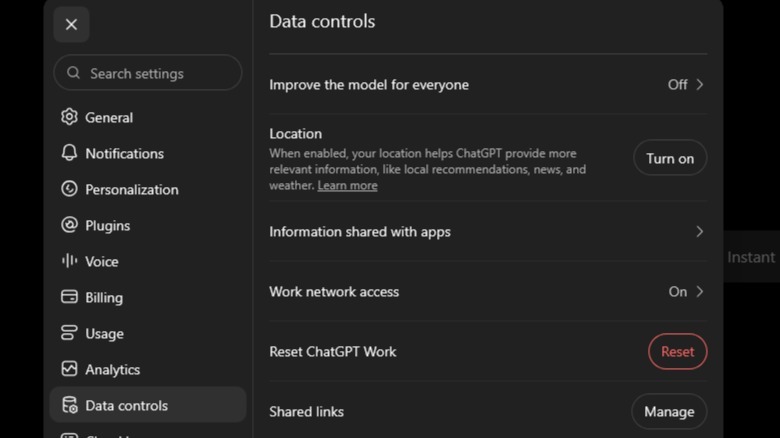
OpenAI’s opt-out toggle is called Improve the model for everyone, found under Settings and then Data Controls. All personal user accounts are opted in by default. Opting out applies to your entire account across web and mobile, but your conversations still appear in chat history as normal. ChatGPT does offer the Temporary Chats feature for one-off sensitive conversations. These are never used for training and are purged by OpenAI after 30 days.

Advertisement

Claude

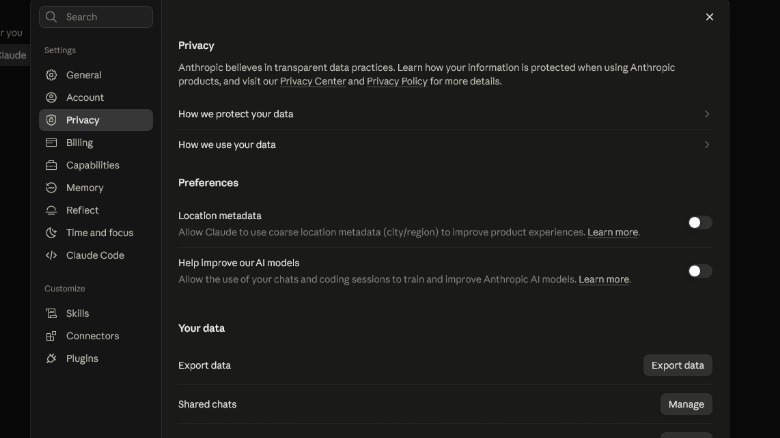
Anthropic didn’t use consumer chats for model training until August last year, when it rewrote Claude’s terms and gave every Free, Pro and Max user a deadline of September 28 to accept or decline. You can find Claude’s toggle under Settings and then Privacy. Like ChatGPT, Claude’s Help improve our AI models label tries to spin data collection as a positive. 

If you leave it on, Anthropic will keep conversations for up to five years, but switching it off returns accounts to the older 30-day deletion window. Opting out stops future use but Anthropic keeps whatever it already trained on.

Gemini

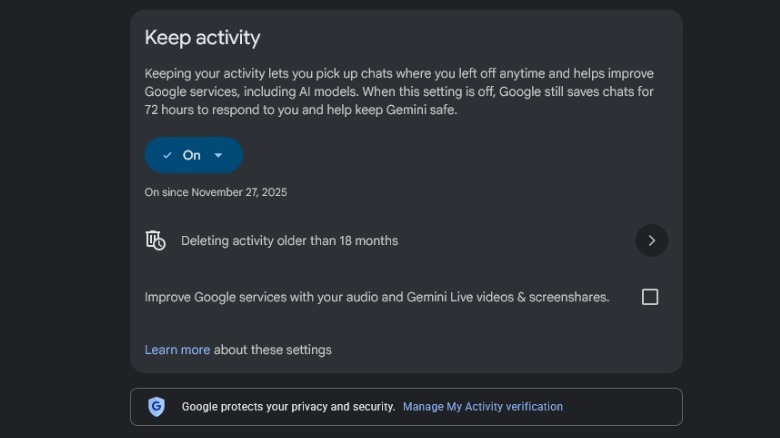
Google’s control was recently renamed to Keep Activity, and it’s also on by default. When it’s enabled, conversations can be used to improve Google’s models and a “subset of chats” are read by human reviewers. Any chat that a reviewer accesses is retained for up to three years, even after you delete your history. 

Advertisement

Switching off this setting ends training use and stops interactions from being saved to Gemini’s chat history. However, Google still retains each conversation for 72 hours to run the service, using the last 24 hours for contextual responses.

Copilot

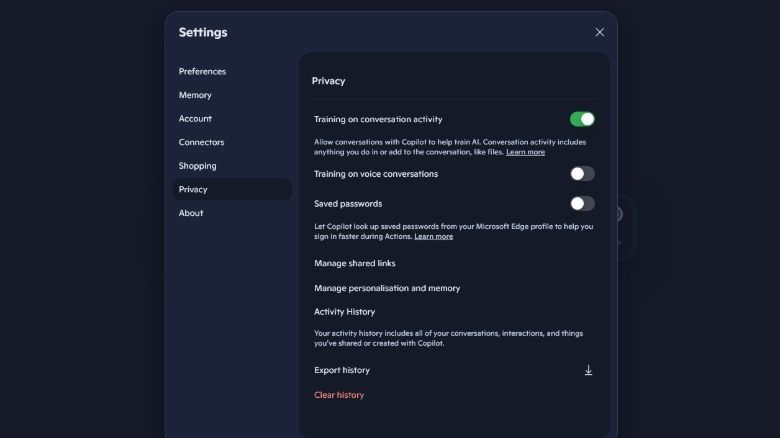
Microsoft has two different controls for model training on user data. They are Training on conversation activity (on by default) and Training on voice conversations (off by default). Both can be found under the profile icon, then Settings and then Privacy. Again, opting out only excludes future conversations from model training, and it doesn’t stop Microsoft from using chats for advertising or general product improvements.

Advertisement

Grok

X enrols every account in Grok training by default, covering both your public posts and conversations with SpaceXAI’s chatbot. The toggle can be found under Settings and privacy — Privacy and safety and then Grok & Third-Party Collaborators. Unchecking the data-sharing option withdraws your posts and Grok interactions from future training and fine-tuning.

Meta

Meta doesn’t allow US users to opt out at all. People in the UK and EU, meanwhile, are protected by strong data privacy laws under the EU General Data Protection Regulation (GDPR), and they can object to their information being used for model training through a form in Meta’s privacy center.

Advertisement

Since last December, text and voice chats with Meta AI have been used to feed the company’s advertising machine across Facebook, Instagram, WhatsApp and Messenger. For US users, the only option is to not engage with Meta AI in the first place, which isn’t terrible advice following the launch of Meta’s new AI agent, Muse.

Source link

Advertisement
Continue Reading

Tech

What is Apex Legends Boosting and How Does Apex Boost Work?

Published

on

What is Apex Legends boosting, and how does it differ from simply finding better teammates? It’s a paid service built around a defined goal, such as reaching a ranked tier, adding wins, or completing a particular achievement.

Apex Legends boosting through a provider such as Eloboss connects players with experienced specialists who can help with ranked progression, wins, badges, and other in-game goals. Depending on the format, you either join the matches yourself or have another player complete the gameplay on your account.

The right choice depends on what you want to achieve, how much time you can play, and whether learning is part of the plan.

What Is Apex Legends Boosting?

Boosting means getting help from a more experienced player to complete an agreed in-game objective. Unlike an ordinary session with friends, the service has a specific scope, starting point, and completion condition.

For instance, such an order can include moving from Platinum II to Diamond IV. Badge order involves reaching a specific milestone whereas a coaching session aims at improving decision-making or mechanics, and not ranking up.

Advertisement

There are two major formats that will decide whether you yourself are playing the game. The pilot boosting format allows you to delegate the process of participating in the matches to your assigned player who will be the one playing on your account without you having to get involved. The self-play format lets you keep control over your own account while you are queuing and playing along with the assigned player.

The self-play format is also known as playalong or duo boosting. In Apex, duo boosting is the process of playing in a ranked squad with a hired friend.

Coaching is another type of service similar to boosting but different at the same time.

How the Apex Legends Boosting Process Works

Orders have almost identical processes regardless of whether it is the aim of ranking or an account milestone.

Advertisement
  1. Define a goal that can be measured. Set the target rank, extra victories, badge or milestone of progression.
  2. Give the necessary details. Mention your platform, region, progress, preferred legend and availability.
  3. Decide on the format of work. Choose between piloted game play, self play or coaching if available.
  4. Clarify scope and estimate. Understand what completion involves, what extras will be included and when the sessions may start.
  5. Monitor the process of work. Discuss updates via messages, screenshots or the order dashboard.
  6. Review the outcome. Compare the end result of rank, tracker or achievement with initial requirements.

Providers such as Eloboss illustrate this goal-based service model, where players select a progression target and a preferred method rather than buying an undefined block of gameplay. Available options should be checked against the current service listing.

Choosing Between Piloted and Self-Play

In piloted games, you get progression without setting up your own matches. Self-play works for people who are keen on participating in games, communicating with a more advanced partner and controlling their own account.

“With duo queue, the customer keeps control of the account while playing alongside a more experienced teammate,” says Eloboss, a Apex Legends boosting and coaching service.

For self-play, confirm that the party can queue together under the current ranked eligibility rules. Also agree on voice communication, session length, and your usual playing hours.

Understanding Price and Completion Time

Pricing will depend on the starting point, objective, type, and any requirements. One short climb to one division is not the same as trying to achieve leaderboard status.

Advertisement

Estimation time will also be dependent on matchmaking, lobby difficulty, timing, and objective. A badge will need the perfect match, whereas a kill requirement can be spread over several matches.

Ask whether an estimate describes active playing time or elapsed calendar time. That distinction is especially useful when booking around work or a season deadline.

Ranked Progression and Predator Goals

A rank boost is intended to raise one’s status to a certain tier, division or rank progression that you have agreed upon. Specify your precise current ranking instead of just indicating the general tier, since Platinum IV and Platinum I are two different starting places.

Apex Predator is an exception that needs a separate approach, as this is a special leaderboard spot with a fluctuating cut-off score. Obtaining an Apex Predator status and maintaining it for a specific period are two different goals.

In case of seasonal rewards, pay attention to the current reward requirements.

Advertisement

Badges and Achievement Targets

Examples of common badge requests are 20-kill badge and 4,000 damage badge. Both of them are based on results that were achieved during one valid match only.

State the Legend and badge tier that is needed. The mode also plays an important role, because not all playlists allow achieving badges.

During solo play, damages and kills of your teammate do not become yours. They may help you to achieve your goal, but your performance still should be good enough.

Wins and Kill Totals

These services specialize in accumulating statistics. Indicate whether you would like to receive more wins, more kills, total tracker points, or some progress in a certain season.

Advertisement

More kills do not automatically produce a specific kill/death ratio. Deaths also affect that calculation, so a kill-count order and a K/D target should not be treated as interchangeable.

Account and Cosmetic Progression

Other goals could be account levels, weapons skills, Prestige Skin tasks, or active pass and events progression. This will depend on the game system and the offer available from the provider.

Make sure you have the prerequisite requirement prior to placing your order. Each type of task has its own set of rules, and the paid material needs to be purchased first.

Coaching and Play-With-a-Pro Sessions

Select a coaching session if improvement of gameplay skills is what you primarily aim at. Topics which will help are cover use, recoil management, Legends, rotations, and disengaging.

Advertisement

It is always more beneficial to formulate a clear request. Ask your coach to analyze the reason why you keep losing immediately after your first knockdown.

Self-play can offer learning opportunities, but detailed instruction is not automatically included. Confirm whether the session covers explanations and review time.

Why Players Choose Apex Legends Boosting

Players usually start with a practical constraint or a clear target.

  • Limited playing time. They have a progression goal but only a few available sessions each week.
  • Irregular teammates. Their usual squad cannot consistently play on the same schedule.
  • A specific collection goal. They care about one Legend’s badge, tracker, or cosmetic challenge more than a broad ranked climb.
  • A seasonal deadline. They want to complete an eligible objective while it is still available.
  • A gameplay plateau. They want experienced help understanding situations that repeatedly slow their progress.

Different services are required depending on what motivates someone. A person looking for a badge requires a game that promotes achievement, but someone with issues relating to the late ring will benefit more from coaching.

Key Benefits of Apex Legends Boosting

Its value is dependent on how suitable the format is to the objective. There are three advantages which should be considered specifically.

More Coordinated Teamplay

Being paired with an experienced teammate makes the calls more consistent. Common decision-making regarding rotations, resets and when to join a fight adds structure to the session which would otherwise come from just having any random teammates.

Advertisement

This does not make each game predictable. It provides a squad with a more concrete plan.

Focused Progress Tracking

The pre-established sequence makes tracking progress easier. Instead of evaluating it solely based on its subjective feel, one can track how many ranked points were gained, victories won or challenges accomplished.

In order to make the comparison clearer, note the starting value and determine the end point before starting the gameplay.

Practical Learning During Matches

Solo play allows observing the decisions within the context. This way, one can understand why their teammate took some height, did not push or left the fight before the other squad arrived.

Advertisement

In order to make it into practice, request one takeaway after each session. One may decide to focus on resetting and hiding before another fight in one’s future solo games.

Rank increase and skill improvement are two different results. If both are desired, then feedback should be explicitly included into the service scope.

Final Thoughts

Apex Legends boosting involves assistance by professional players aimed at achieving specific goals through various methods, including purely passive assistance or playing along with the player. Each option addresses its particular issue.

Define the task clearly and pick up the participation level that suits you better. Specify the platform, Legend, requirements, and time schedule so that the service will be relevant for you.

Advertisement

Source link

Continue Reading

Tech

Bose jumps back into wired earbuds with ANC and 24-bit audio

Published

on

Just in case you missed it, wired earphones are back in vogue. Call it the return of yet another retro trend, or just people tired of having yet another device they have to charge daily, they are here to stay. Bose, one of the most recognizable names in the audio segment, knows it all too well. The result? The Bose Noise Cancelling Wired Earbuds.

Bose gives wired earbuds a modern upgrade

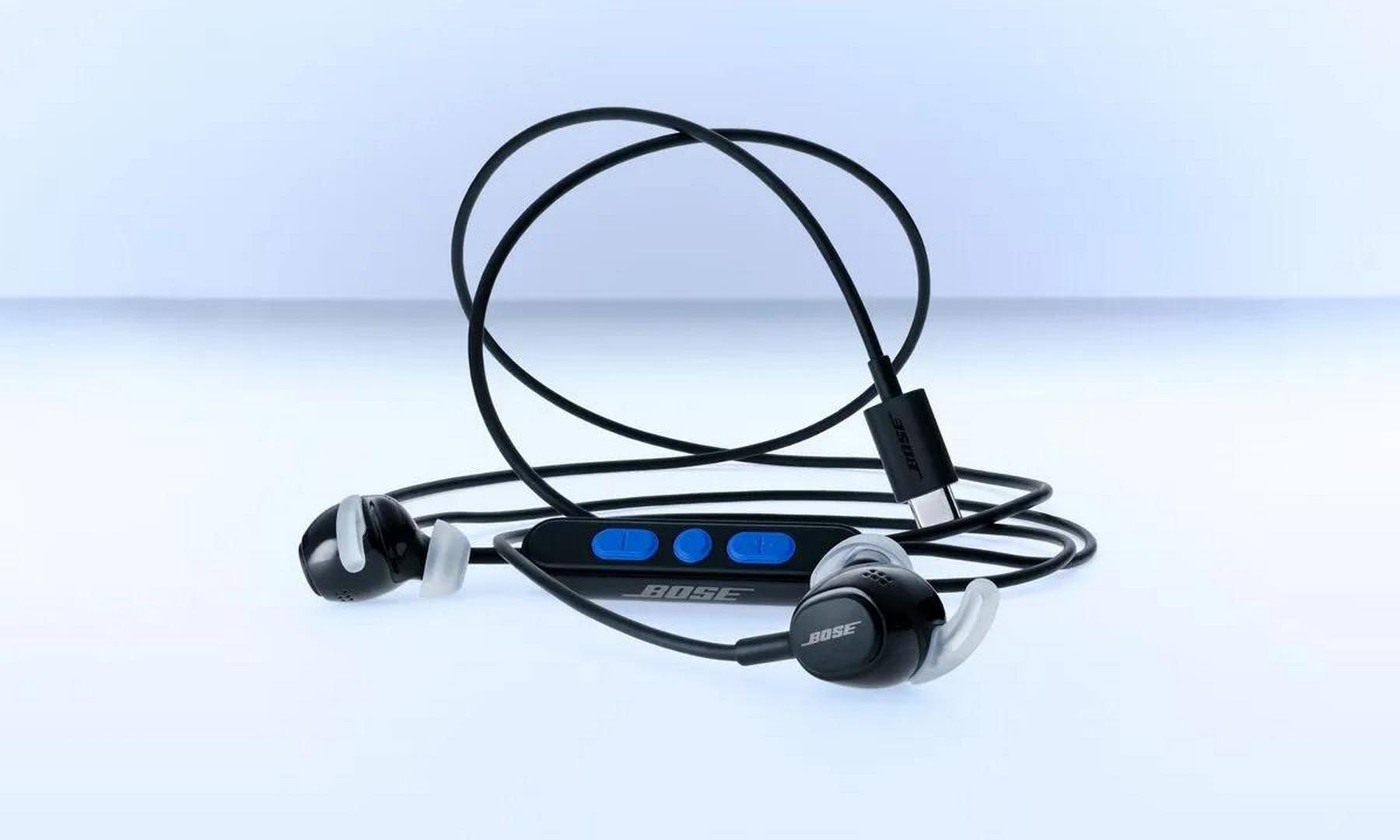
Bose has just launched wired earbuds after a long time and these adopt a handful of modern-age audio tech perks. The interface is USB Type-C. There is noise cancellation on board and the in-house Bose QuietControl technology is also on the table. Just like the flagship wireless audio gear made by Bose, these wired earbuds let you pick between regular listening mode, one with isolated noise, and, finally, you get an aware mode that is akin to transparency mode.

Bose notes that plug and play is one of the big draws of its new wired earbuds. You get physical inline controls for volume adjustment, handling calls, and switching between noise cancellation and transparency modes. For audiophiles, thanks to the wired interface, you get support for USB Audio Class 2 protocol, which opens the doors for low-latency audio at 24-bit/48 kHz output.

The Bose Noise Cancelling Wired Earbuds are priced at $99 in the US and they are already up for pre-order starting today. You can pick between black, white, smoke, and a lovely dewdrop mint shade, while open sales are expected to commence on October 15.

Why Bose is going wired again

But why a return to wired earbuds? “Wired earbuds are experiencing a cultural renaissance, and when we decided to bring them back, we knew we had to make them even better than before,” explains Raza Haider, president of Bose Premium Consumer Audio. In a recent conversation with Audio-Technica product veterans, the company also told Digital Trends that one of the biggest reasons behind the revival of wired headphones and earbuds is the convenience factor. Users just want something they can plug in and start enjoying their music without having to deal with pairing hassles, charging concerns, or latency and audio streaming quality woes.

Advertisement

Source link

Continue Reading

Tech

YouTube and Meta will now run ads for Gibney’s ‘Musk’ documentary

Published

on

YouTube and Meta will now run paid ads for Musk, Alex Gibney’s documentary about Elon Musk, The Hollywood Reporter reported on Saturday. Both had refused the trailer ad. TikTok and X are still not running it.

The outlet first reported the refusals on Friday. Bleecker Street, the film’s US distributor, opens it in cinemas on 9 October. The documentary premiered in Venice this month.

What the platforms said

YouTube said its system had temporarily restricted the trailer when Bleecker Street submitted it as an ad.

“Following review the ad has been cleared to run,” YouTube said in a post on X.

YouTube also said the ad should appear soon. As of late Saturday morning, no one had told Bleecker Street of any change, according to The Hollywood Reporter.

Advertisement

“This was an error and the ads are being restored,” a Meta spokesperson told TechCrunch.

Meta had already turned down an appeal from Bleecker Street before it changed course.

Political content rules

YouTube, TikTok and Meta had all told Bleecker Street the ad fell under their rules on political content. TikTok and Meta do not allow campaign or other political ads. Meta’s policy stems largely from the Cambridge Analytica scandal, the outlet reported. YouTube allows campaign ads from vetted candidates, with paid-for disclosures.

The trailer includes a shot of Musk at a 2024 Donald Trump campaign rally. It also refers to the 2024 election.

X refused to discuss the film with Bleecker Street. It will not take ads for any of the distributor’s upcoming films either. Musk owns X, which is challenging a €120M fine in the EU.

Advertisement

Source link

Continue Reading

Tech

Fake “locked computer” alerts in Google Ads are tricking users into calling tech-support scammers

Published

on

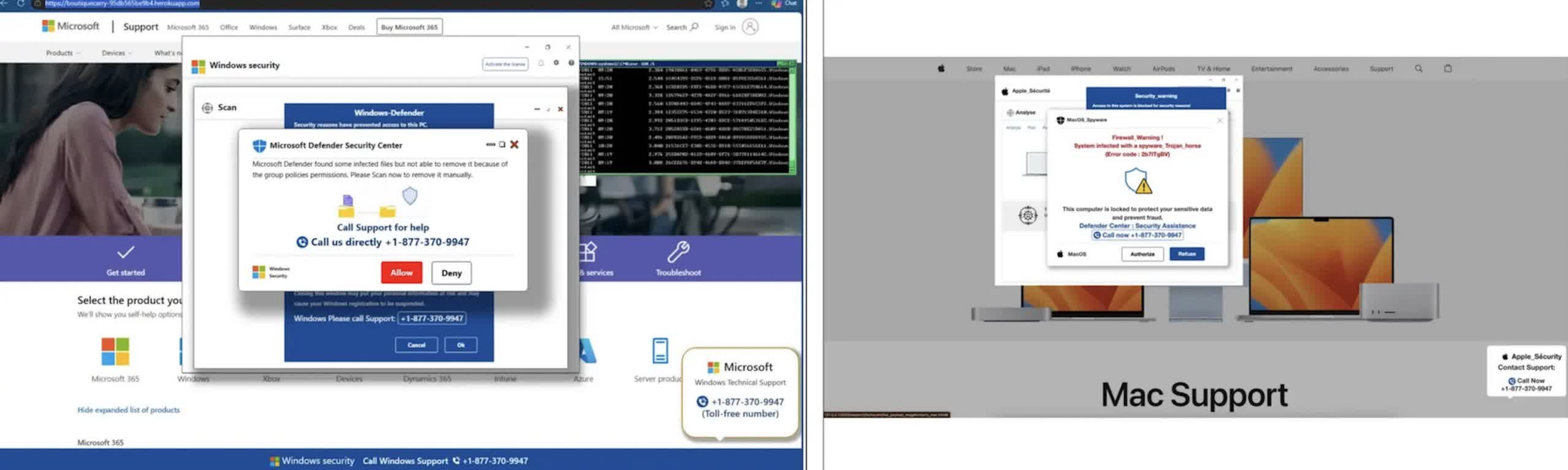
TL;DR: A malicious Google Ads campaign used fake security warnings to convince Windows and Mac users that their computers had been locked, then pushed them to call fraudulent technical-support numbers. The ads appeared on legitimate, high-traffic sites, including maps, weather, real estate, sports and document-hosting pages. After a user clicked, the ad opened a page that took over the browser and displayed warnings that made it look as though the device had been infected or disabled.

The goal was not to install malware or lock the computer. It was to create enough confusion to get people to call the number on the screen. Callers were then pressured to pay for bogus support, hand over personal information or allow someone to remotely access their device.

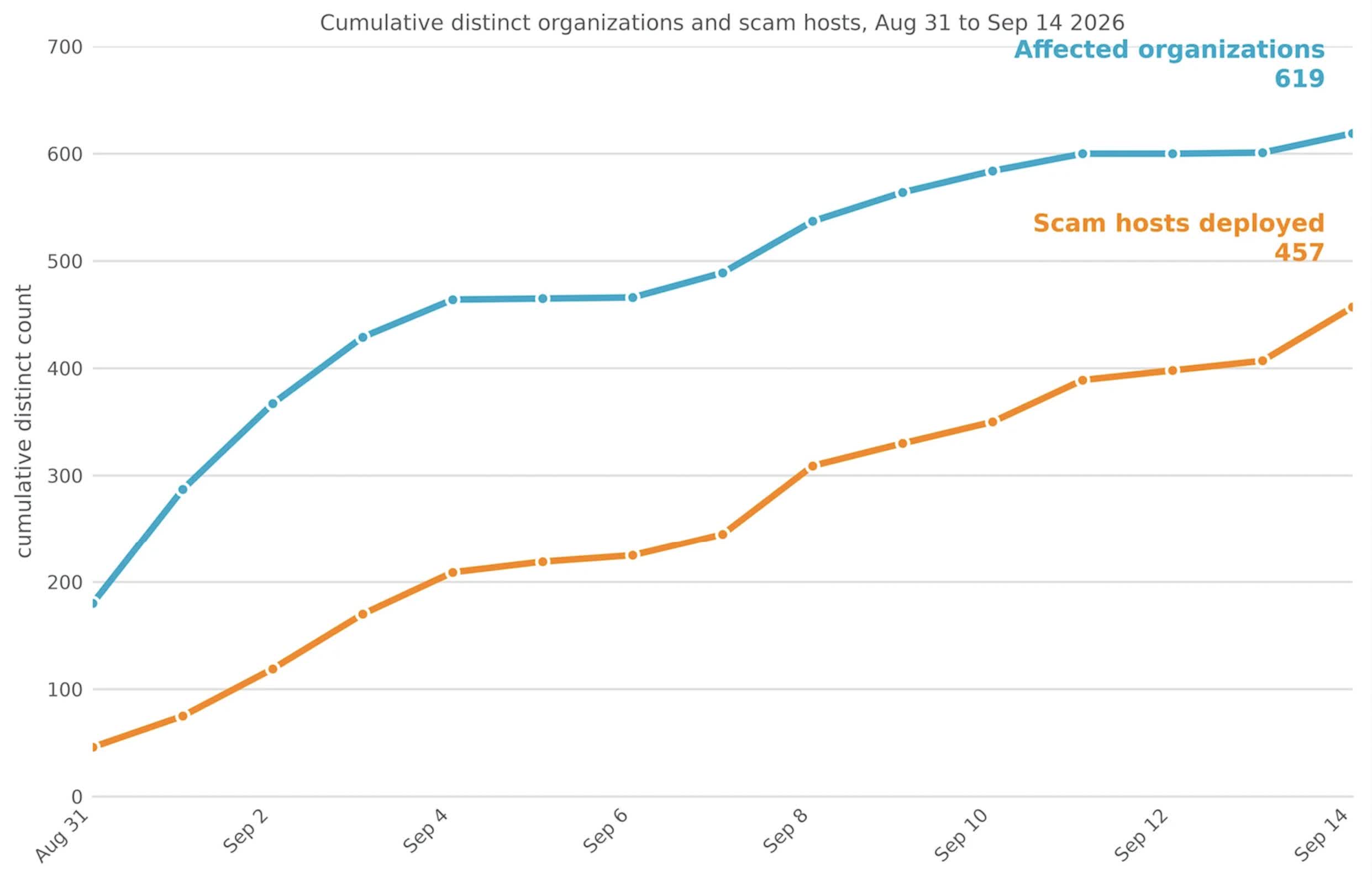
Netskope, the security firm that tracked the campaign, said it saw users at 619 customer organizations click on the ads between August 31 and September 14. Its security tools blocked the pages before those users could be scammed. The company said its data represents only a limited view of internet traffic, suggesting the campaign likely reached many more people.

About 62% of the affected organizations were in the United States. Japan and Australia were the next most affected countries. Netskope identified more than 250 Google Ads campaign IDs tied to the operation and found the ads on at least 284 legitimate publisher sites.

Advertisement

What made the scheme effective was the way it behaved in the browser. The page opened in full-screen mode, hid the browser’s address bar and cursor, and interfered with common keyboard shortcuts. The browser also slowed down and played sounds, making it seem as though the entire system had become unstable.

Netskope said the campaign turned a routine ad click into what appears to be a browser or system failure. The fraudulent page occupies the full screen, hides the cursor, blocks common exit commands and slows browser performance to make the device seem unusable. Although the computer is not actually locked, the behavior is designed to alarm users and push them to call the number displayed in the warning.

The fake warnings were adapted for Windows and macOS. The page also waited until it detected mouse movement before displaying the warning. Its code was encrypted and only decrypted in browser memory shortly before the warning was shown. Those choices may have made the campaign harder for endpoint security tools and ad-scanning systems to spot.

The warning pages also made it harder to simply close the browser. Pressing Escape or other keys often had no immediate effect, and attempts to close the page could cause the warning to reload. That behavior is central to the scam: the victim is meant to believe that normal controls no longer work.

Advertisement

Google said it was investigating the campaign. The company did not say why its systems failed to block the ads or whether the entire operation had been removed from its advertising platform.

“We have zero tolerance for scams,” Google said in a statement. “We’re actively investigating the campaigns in this report and will take action against accounts that violate our policies.”

Google has said it blocked more than 99% of policy-violating ads before they were served last year. The Netskope report shows that some campaigns can still get through by using browser tricks rather than a traditional malicious download.

It goes without saying that users who encounter one of the fake lock screens should not call the displayed number. The computer has not been locked, and in many cases, holding the Escape key for several seconds will exit full-screen mode and restore normal controls. Windows users can also simply open Task Manager, while those using Macs can use the Force Quit menu.

Advertisement

Once the browser is closed, it can be reopened without restoring the previous session.

Source link

Advertisement
Continue Reading

Tech

Modulate raises $25M for its voice models and analysis suite

Published

on

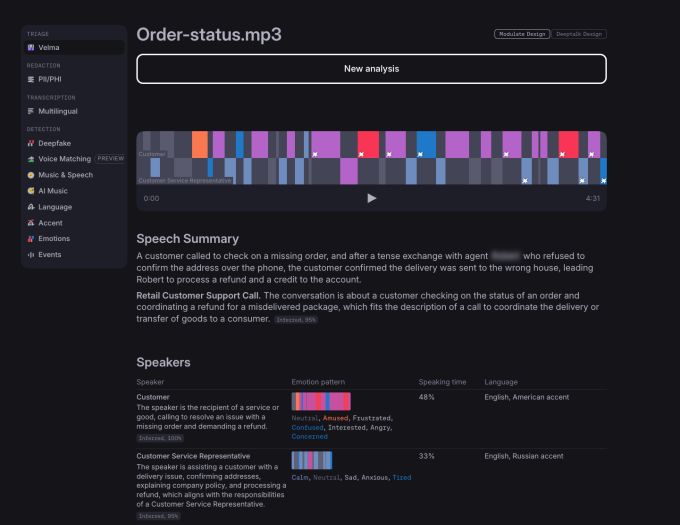
Boston-based voice intelligence startup Modulate has raised $25 in new funding for its platform that uses an array of small models to offer enterprises transcription, emotional analysis, deepfake and AI music detection, and policy enforcement for voice agents in regulated industries.

The funding follows a popular trend among investors in the growing voice AI industry: backing companies that are trying to make AI voices sound more human.

It also rivals other companies trying to detect the intent behind human conversation by analyzing it, and those trying to protect people and companies from deepfake calls, as it is now easy to clone voices.

Modulate’s new funding was led by Future Ventures with participation from Hyperplane and Lakestar. Data from PitchBook indicated that the startup had raised $41 million in funding at a $170 million valuation prior to this round.

Advertisement

The startup was founded in 2017 by Mike Pappas and Carter Huffman, who met as MIT physics undergrads. In its early days, the company focused on providing voice modulation for gaming. But later, it started to concentrate on a voice-based moderation tool.

With the onset of voice AI models, the company is now concentrating on detecting different sorts of AI audio generation and analyzing intent behind a person’s words.

“Our insight into the voice AI space is that a lot of folks are doing transcription, but there’s not really any capability out there that gets the full nuance and full understanding of a conversation, which is so important when you’re talking to another human being,” Huffman said on a call with TechCrunch.

Image Credits: ModulateImage Credits:Modulate

The company today runs more than 100 models that are largely categorized into two sections: Signal extraction models to understand vocal emotion, tone, language, and synthetic voice determination; and Analysis/detection models that look at intent, like what the customer is trying to say, whether the caller is violating rules, or whether they are trying to scam the receiver.

Huffman said that because it runs smaller models, the company doesn’t need specialized hardware and a ton of compute, which could be crucial when token bills go up. Plus, it’s easier for the company to train models with newer capacities, add them to the lot, and have an orchestrator call them when needed.

Advertisement

Modulate has a varied customer base, but it specializes in deepfake detection and alerting organizations like call centers to a possible scam. It also monitors how AI agents respond to customers to assess the quality of calls, along with making sure that AI follows compliance rules in regulatory areas. Because of these products, Module often sits beside the voice stack being used by a company just to analyze calls.

As more enterprises adopt AI-powered customer service, it is becoming important for them to know why a customer call was a success or a failure. In that case, gauging customers’ intent and response becomes critical beyond basic analysis. Huffman said Modulate can give granular data to enterprises around that.

“I think when companies think of emotion analysis, they think if the customer was neutral or positive, the call was a success, and if the customer was negative, the call was a failure. But actually, many times people will be polite even to, like, AI agents or bots. Right. And they won’t come across as angry, but they’ll be very dissatisfied,” he said.

The company said that its tech is also being used to monitor cyberattacks through voice calls.

Advertisement

The startup currently has 40-45 employees and aims to add 10 more people in the coming months to bolster model building. Modulate is currently working on increasing its on-premises and on-device deployment capabilities for increased privacy.

When you purchase through links in our articles, we may earn a small commission. This doesn’t affect our editorial independence.

Source link

Advertisement
Continue Reading

Trending

Copyright © 2025