Among the major vendors that listed Discover-Tech as a “certified” or “verified” vendor were Google and the advertising industry association IAB Europe. The Israeli firm also used European General Data Protection Regulation (GDPR) consent frameworks to target users within the European Union. Discover-Tech has served ads through major networks such as Google, Yandex, and Beeswax.
Google and IAB Europe have since removed Discover-Tech from their ad vendor registries, and Google further terminated Discover-Tech’s access to its ad exchange platforms. Beeswax has removed Discover-Tech from its ad buying platform. Fellow ad platform Vungle (Liftoff) paused Discover-Tech’s access while conducting a review, and Eskimi blocked Discover-Tech’s accounts and domains.
Thursday’s report said that Discover-Tech ad impressions have appeared on government and national-security-linked networks throughout the world: NATO, United Nations networks, European lawmaking bodies, critical infrastructure providers in Australia, and armed forces and government agencies in Norway and Sweden.
“Discover-Tech’s mass abuse, privacy invasion, and facilitation for mercenary spyware attacks illustrates structural flaws with the online advertising system, which failed to detect or prevent the abuse documented in this report,” Citizen Lab said.
Advertisement
The research lab said that the mercenary malware installed through AdFection was developed and distributed by Candiru (rebranded as “Integrity Labs”). Under the arrangement with Discover-Tech, targets with specific profiles of interest to the Candiru customers received ads that carried JavaScript or other code that connected to Candiru’s control servers. In response, those servers delivered an exploit that served the zero-click payload when the ad appeared on an individual’s device.
The research doesn’t describe the vulnerabilities exploited in the zero-click attacks or the final malware that was installed in them. It’s likely they were zero-days that have been fixed after Citizen Lab discovered the campaign. Citizen Lab didn’t immediately respond to questions.
Messages sent to Discover-Tech and Candiru went unanswered.
Citizen Lab called on advertisers and government officials to take concrete action to proactively prevent campaigns like AdFection. Beyond that, the researchers said users can reduce the risk of being infected by installing ad blockers, resetting mobile advertising ID in iOS and Android settings (it’s unclear why the researchers didn’t advise turning off personalized ads altogether), and installing ad-blocking software on home or office networks. As always, installing updates in a timely manner is also a must.
Get Apple’s Mac Studio desktop for $2,299 at Amazon.
Save $200 on Apple’s new Mac Studio that’s equipped with an M5 Max chip with an 18-core CPU and 32-core GPU. This desktop also has 36GB of unified memory and a 512GB SSD. Retailing for $2,499, Amazon’s $200 discount brings the price down to $2,299, delivering the lowest price seen since its September 22 release. Save $200 on Mac Studio Continue Reading on AppleInsider | Discuss on our Forums
As NASA continues humanity’s slow march back to the Moon, different pieces of the puzzle of establishing a more permanent base there are falling into place. One of these pieces is the the Lunar Terrain Vehicle (LTR), and [Cleo Abram] and [Michelle Khare] got a look at the LTR candidate from Lunar Outpost.
Designed to help astronauts traverse the lunar surface as well as function as a semi-autonomous rover when uncrewed, the LTR will be an integral part to any future Moon base. NASA announced earlier this year that it would be moving forward with the LTR featured in this video and another from competitor Astrolab. Regardless of manufacturer, the LTR will have to deal with some wild conditions in the lunar environment.
Lunar dust is abrasive, so the LTR generates an electric current to pull the dust under the truck to prevent it from entering the cab of the vehicle as it moves along. Given the extreme temperature swings on the moon (-200˚C to 200˚C), the space truck will also be fitted with wire mesh tires as nobody wants to be changing a flat in space. The two seats in the cab are oversized and can help lift the astronauts up as space suits hamper their agility to a significant degree. There are compartments for storing samples, and the truck has a robot arm that can grab samples to bring back if no one is along for the ride.
Ask most people how Black Friday and Cyber Monday differ, and you’ll hear the same answer: one happens in stores, the other happens online. That was true ten or fifteen years ago, but it isn’t really true now. Both events are mostly online, and both have been stretched from a single day into something closer to a week. The differences that matter today are smaller and easier to miss.
Where Each Day Came From
Black Friday started as an in-store event, one where shops opened early the day after Thanksgiving and slashed prices to get the holiday season moving.
Cyber Monday arrived later, as online retailers wanted a day of their own after a weekend that was all about queues and parking lots, so they made one.
Even though the line between online and in-store shopping has mostly disappeared, those origins still explain which products tend to be cheapest on each day.
Advertisement
Big Items on Friday, Digital Ones on Monday
Black Friday is usually the better day for large, physical purchases such as washing machines, sofas, TVs, and the cut-price electronics retailers use to pull people in. Stores build their whole campaign around that Friday, so it’s often when prices on these items are at their lowest.
Cyber Monday tends to be better for things you do not need to see in person, such as streaming plans, software licenses, online courses, and small tech accessories. Prices on these often fall further on Monday than they did on Friday, especially at retailers that sell mostly online or hold back their best web deals until after the weekend.
Consider How Long the Deals Last
Black Friday deals often go live before Thanksgiving, reach their lowest price on the Friday, and sell out or end soon after. Cyber Monday prices tend to stay put all day, and some carry over into Tuesday or Wednesday. Without crowds at the door, retailers have less reason to squeeze everything into a few hours.
If you need a new fridge, buy it on Black Friday before stock runs out. A software subscription or digital gift card can usually wait until Monday, and it may cost a little less by then.
Advertisement
Don’t Pick a Favorite
It’s tempting to treat the two days as rivals and put all your shopping into one of them. That’s a mistake. They suit different kinds of purchases, and you’ll save the most by matching each item on your list to the day it’s likely to be cheapest.
Checking You’ve Got the Best Cyber Monday Price
Since Cyber Monday deals don’t vanish within a few hours, you’ve got time to double-check a price before you pay.
Discoup has a page just for Cyber Monday that lists active codes as retailers release them. It’s a quick way to see whether the price in your cart is already the lowest one or whether there’s a code you can add on top.
It’s also worth checking a second coupon site before any bigger purchase. A few extra minutes won’t usually cost you anything, because these offers stick around far longer than Black Friday’s doorbusters.
Advertisement
Before You Check Out
Of course, you do not have to choose one day over the other. You could buy large, physical items on Black Friday while the lowest prices are available, and leave your software and other digital purchases for Cyber Monday, when discounts last longer. Whichever day you shop, compare prices first, since the first item marked as a sale often isn’t the cheapest option.
Welcome back toPower Play! Each week, senior writer Molly Taft tackles a topic around this midterm season’s biggest issue: data centers. They’re out this week, so Caroline Haskins is reporting for duty. If you’ve got a question or thought for the column, feel free to shoot Caroline an email at [email protected]or reach her securely on Signal at carolinehaskins.61.
The nonprofit 7×24 Exchange International wants to promote data centers, which they believe are “mission critical” infrastructure. As part of this work, the group recommends a children’s story, “What is a Data Center?,” which follows a honey badger named Honey who gets a guided tour of a data center from a worker named Oliver. Oliver explains that the job of data center employees is to make sure that the “functions supported by the data center” are available to anybody, “no matter what time it is.”
“Like when my mom shops online late at night because my dad is sleeping and won’t know about it?” Honey asks.
The story is part of a broader pattern across the data center industry. In addition to lobbying, job creation programs, tax breaks, companies and interest groups are trying something a bit more creative: winning over the youth. As pushback to massive data center build-outs and energy-guzzling campuses intensifies, the industry is apparently taking a softer approach to community building using a tactic other industries with a public relations problem have tried.
Advertisement
Alex Molnar, a research professor at the University of Colorado Boulder and the director of the National Education Policy Center, tells WIRED that, for over a century, industries with an image problem—fast food, tobacco, oil and gas—have brought their messaging to schools.
“A very, very big reason why corporations get involved in the schools is, quite simply, corporate propaganda—for the purpose not necessarily of selling a product, but of telling their ‘story,’” Molnar says.
In May, the Potomac chapter of the Association for Computer Operations Management (AFCOM), a trade group for the data center industry, sponsored Memorial Day-themed flag-making kits to be distributed to 3,100 first graders across 37 schools in Loudoun County, Virginia, also known as Data Center Alley. In addition to the flag kits, kids received an informational card with statistics about “the positive impact” that the data center industry has on the local economy.
Arm’s AGI CPU nearly doubles AMD’s modelled rack-level performance across seven workloads
A 24-kW rack accommodates up to 23 Arm servers under the assessment’s assumptions
Arm’s rack-level advantage reaches 3.19x in the strongest individual workload
Arm’s AGI CPU has recorded nearly twice the modelled rack-level performance of AMD’s EPYC 9755 across seven workloads designed to evaluate agentic artificial intelligence.
The assessment, conducted by Signal65 with Arm’s cooperation, compared measured processor results before estimating performance across racks operating within a fixed power budget.
The findings rely partly on power-based modelling, while testing on final production hardware remains outstanding.
Latest Videos FromTechRadar
Advertisement
Rack density gives Arm a substantial advantage
The assessment examined workloads involving software tools, autonomous task execution, information retrieval, and support for AI model serving, including Terminal-Bench 2 and SWE-bench.
Across the seven tests, Arm’s processor achieved an average performance ratio of 1.99x, with individual results ranging from 1.43x to 3.19x compared with AMD’s EPYC 9755.
The modelled advantage partly comes from differences in server power consumption, allowing more Arm systems within the same electricity allocation.
A 24 kW rack could accommodate 21 to 23 AGI CPU servers, compared with 13 dual-socket EPYC 9755 systems.
Sign up to the TechRadar Pro newsletter to get all the top news, opinion, features and guidance your business needs to succeed!
That configuration provides between 5,712 and 5,888 physical cores for Arm, compared with 3,328 for AMD, although the comparison depends on the rated power assumptions.
Advertisement
Individual server power ranges from 950 to 1,050 watts for Arm’s systems, while AMD’s dual-socket configurations carry a rated consumption of 1,700 watts.
Across workload categories, Arm recorded modelled rack-level advantages averaging 1.7x for tooling, 2.0x for agentic workflows and 2.2x for reasoning and planning.
The report also estimated that database and vector-search operations could require 30% to 35% fewer racks for equivalent processing workloads.
Advertisement
Faster sandbox creation and the x86 challenge
Separate testing compared Arm’s processor against AMD’s EPYC 9965 using Sandbench, which measures the time required to establish isolated execution environments.
Arm completed cold starts 45% faster, warm starts 27% faster, and its worst-case scenario under fourfold oversubscription 41% faster.
These improvements matter because AI agents frequently create execution environments while accessing services, running code, and processing information.
Advertisement
Faster setup can reduce delays, although the results do not demonstrate equivalent gains across all applications or complete data center deployments.
Arm executive vice president for Cloud AI Mohamed Awad said, “The industry needs to measure how well systems handle the work agents actually complete,” describing the need for workload-specific performance evaluation.
The company developed its evaluation framework with support from Fujitsu, Meta and OpenAI, while Signal65 independently verified the reported processor results.
Arm also acknowledged that further testing on final production systems would cover additional workloads and competitive comparisons.
Advertisement
For AMD and Intel, the findings suggest that Arm-based servers could challenge x86 infrastructure in agentic AI deployments where rack power limits constrain computing capacity.
Higher rack-level performance could let operators accommodate more AI workloads within existing power allocations.
However, the benchmark does not establish that Arm will outperform x86 across general-purpose computing or justify replacing existing servers across entire data centers.
Software compatibility, deployment costs and real-world operating conditions will influence whether the modelled advantage translates into wider adoption.
The generative AI revolution hasn’t been kind to Vanniall, an OnlyFans creator who lives in New York City. She now constantly finds hyperrealistic deepfakes—AI-generated images and videos that copy everything about her—circulating online and often isn’t able to get them removed.
On top of that, Vanniall struggles to build an audience on popular social media platforms, like Instagram, without getting in trouble. “There’s always some sort of report or appeal that I’m going through with them,” she tells WIRED. Vanniall’s Instagram account, which has over 100,000 followers, is currently restricted and cannot be viewed without logging in.
So, when I tell her that Meta allows its AI agent, called Muse, to engage in explicit sexting with adult users, she seems frustrated by the decision: “It’s not fair that they get to pull money out of people with their sexually active AI agent, but they won’t let real people, real adults, engage in any sort of sensuality or sexuality.”
It’s a common refrain I heard from other adult content creators, who questioned why their accounts on Meta platforms often seem restricted, while Meta’s AI agent is now allowed to talk dirty with millions of adult users.
Advertisement
“A private, one-to-one conversation between an adult and an individualized AI agent on a platform restricted to people 18 and over is very different from the marketing and promotion of services on a social media platform,” Meta spokesperson Tracy Clayton tells WIRED.
Meta’s Muse is the first always-on AI agent to break out of early adopter circles in San Francisco. The Muse app is like a message thread; text the digital assistant, give it access to your personal data, like calendar and email, and have it proactively find ways to help, like canceling a workout class that overlaps with your dinner reservation. Meta’s large distribution network, through platforms like Instagram and Facebook, helped catapult the app to the top of the download charts during its first month, as millions of new users experimented with an agent for the first time.
In addition to having it organize your calendar, Meta says, it’s OK for users of the adults-only app to engage in X-rated AI conversations with Muse. A Meta spokesperson previously told WIRED the company wouldn’t “block legal adult behavior.” Meta’s Muse generates explicit text but not images or videos.
While Meta takes a different approach to moderation on Instagram, other social media platforms in the United States do allow sexually explicit content. X remains one of the most popular platforms for many OnlyFans creators to draw in new subscribers and connect with fans. Many adult performers have also migrated to Bluesky after Elon Musk took over the platform formerly known as Twitter, where users can also share adult content.
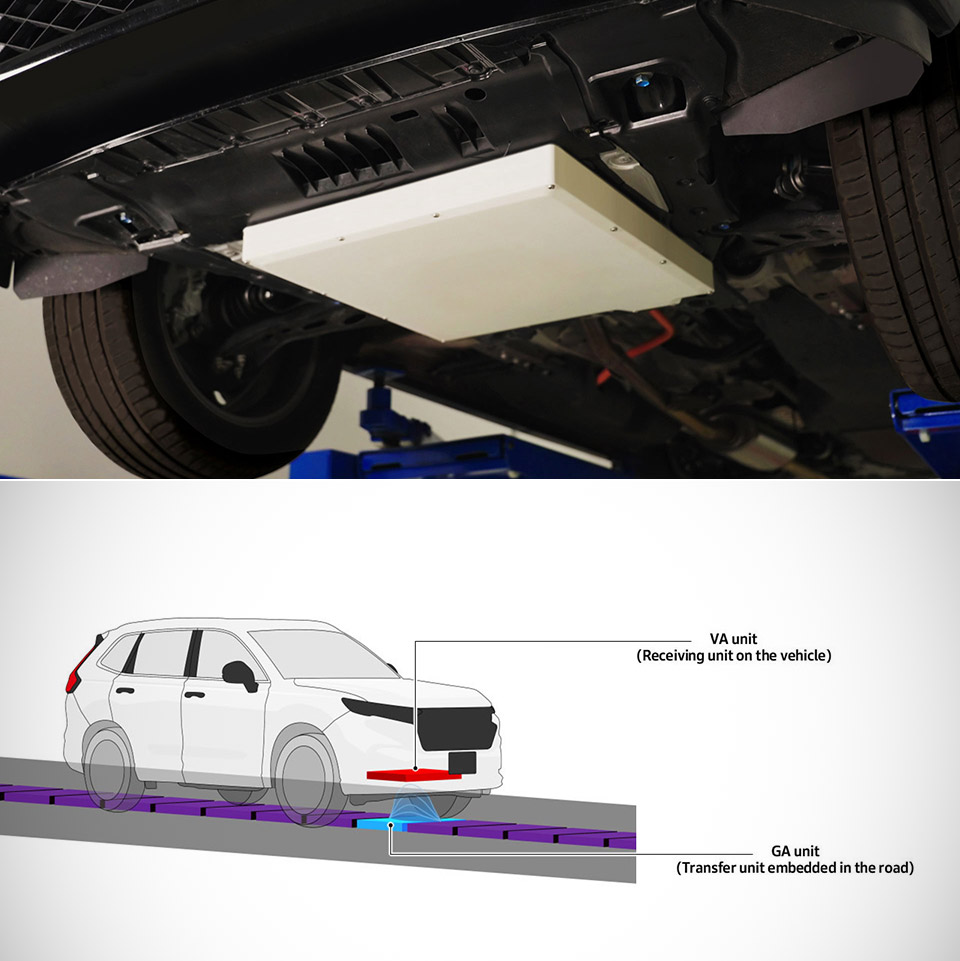
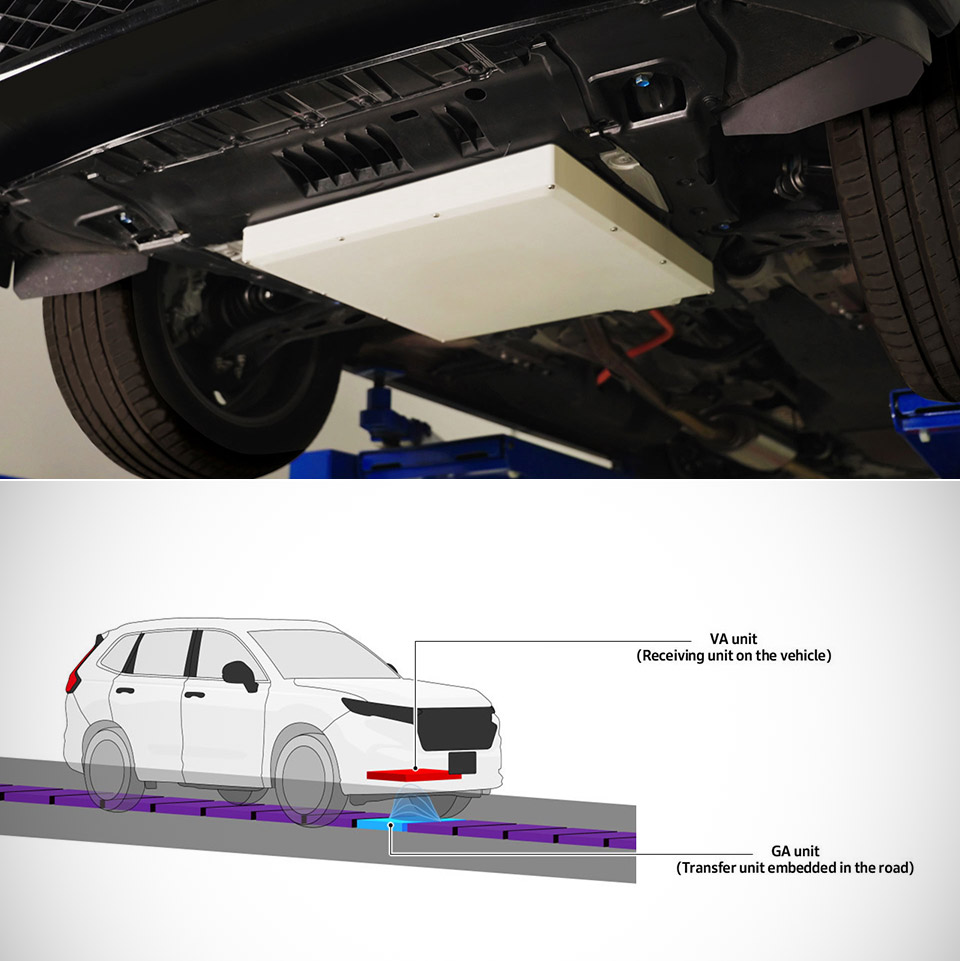
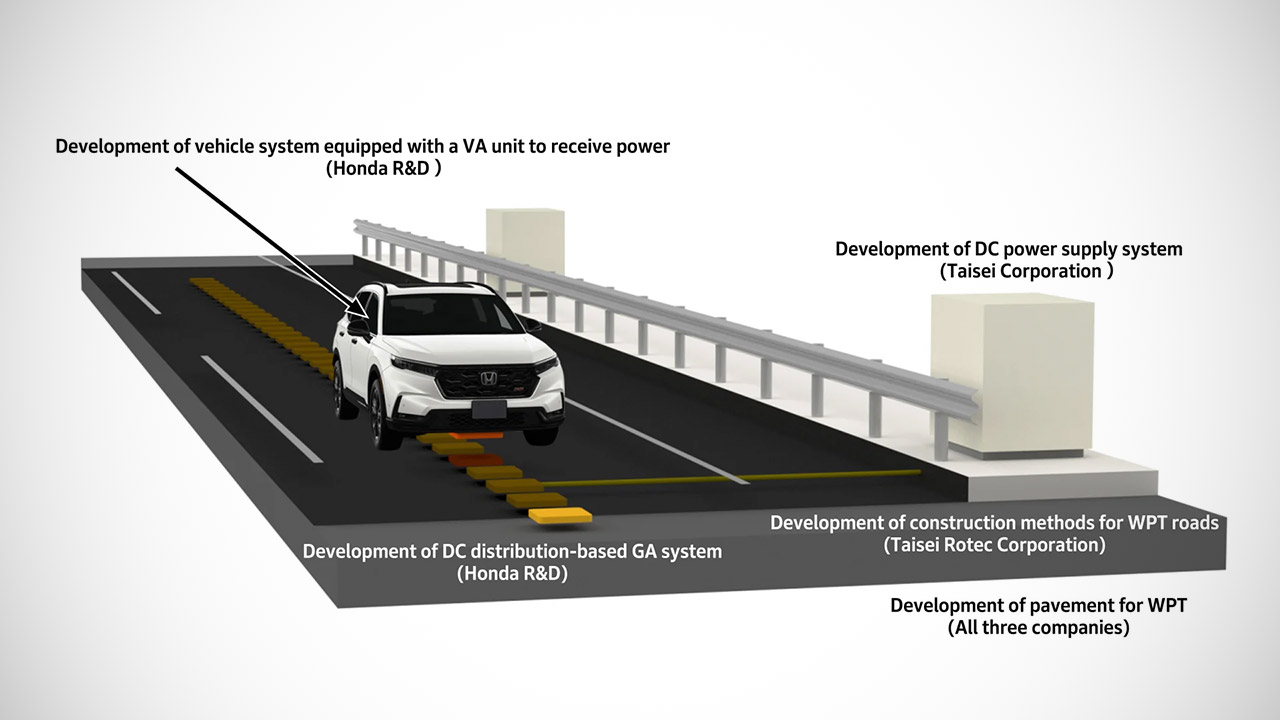
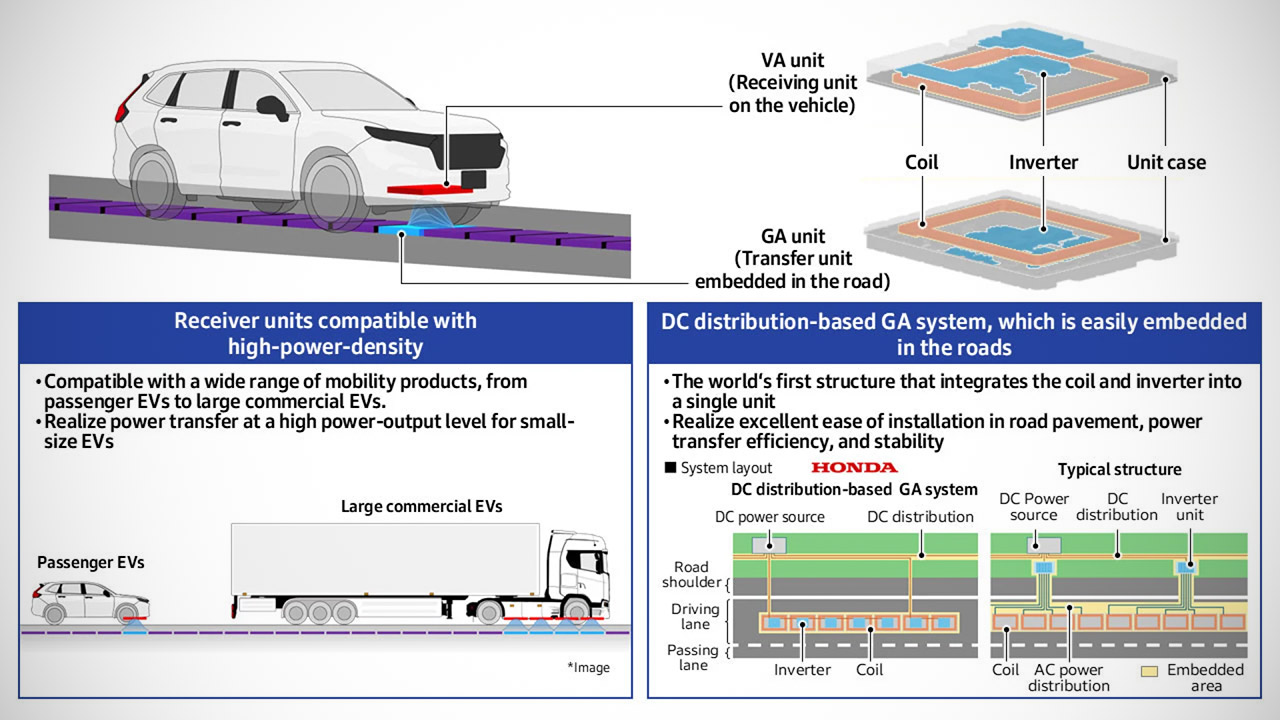
Drivers of electric trucks could soon keep rolling without pulling over for a plug if a new system from Honda works as planned. The company has spent the past several years on dynamic wireless power transfer, the idea of sending electricity from the pavement into a moving vehicle. In early October 2026 Honda R&D said it had finished the underlying technology with two construction firms, Taisei Corporation and Taisei Rotec. Together they built a magnetic coupling road system that places transmitter units under the surface so a matching receiver on the vehicle can pick up power while the wheels turn.
As of the end of September, each ground unit now houses both the inverter and the coil in a single housing, which Honda claims is a global first. That single package connects to a roadside direct current source, reducing the amount of wiring and various parts need to run into the pavement. Taisei is in charge of the power supply, which must respond quickly enough to keep the entire field steady, whilst Taisei Rotec is working on getting the technology to work in conjunction with milling into existing roadways and laying in the units without having to pull out the entire lane. We’re talking about a pavement that can support commercial cars weighing up to 20 tons, and will eventually bring the power up to 150 kilowatts.
Smaller Than Ever: Anker’s new MiniCell technology delivers identical charging performance with fewer components. This means it’s smaller and lighter…
Pocket-Sized Power: At just 4.13 × 2.62 × 0.45″ and 4.41 oz, it snaps to your phone and fits effortlessly into your bag, purse, or pocket
Strong Attachment: Equipped with ultra-strong magnets that firmly attach to the back of the iPhone 15 or 14 so you can single-handedly take selfies…
A private test road at one of Taisei’s facilities has already put the basic equipment through its paces with significant loads. Starting in late 2026, the partners will begin construction on another stretch at a second site, this time for longer durability tests. Those tests will simulate a million wheel loads, which are approximately 49 kilonewtons each, using real automobiles, while simultaneously determining how much electromagnetic field is escaping off the surface. Once they have some firm figures in place, the next destination will be a brief public segment of the Tateyama Expressway in Chiba. That 300-meter piece is part of a project they’re completing with the East Nippon Expressway Company, and it’s set to open for demo runs in Japan’s fiscal year 2027, which begins in April.
Honda has made it clear that the first individuals to use this technology will be logistics fleets, not conventional passenger automobiles. A vehicle that can charge its battery while driving down the highway may require a smaller battery pack overall, resulting in less weight, lower costs, and more cargo space. The same concept could ultimately trickle down to smaller vehicles, but the company has been open about the fact that commercial routes provide the most immediate benefit because those trucks currently travel the same routes on a daily basis. There is still a lot of work to be done, such as determining efficiency at full highway speed, as well as the expense of installing the hardware and the fact that each vehicle would have to carry its own receiver… the list goes on. For the time being, the focus is on demonstrating that the system can withstand real pavement, trucks, and traffic without prompting cars to pull over. [Source]
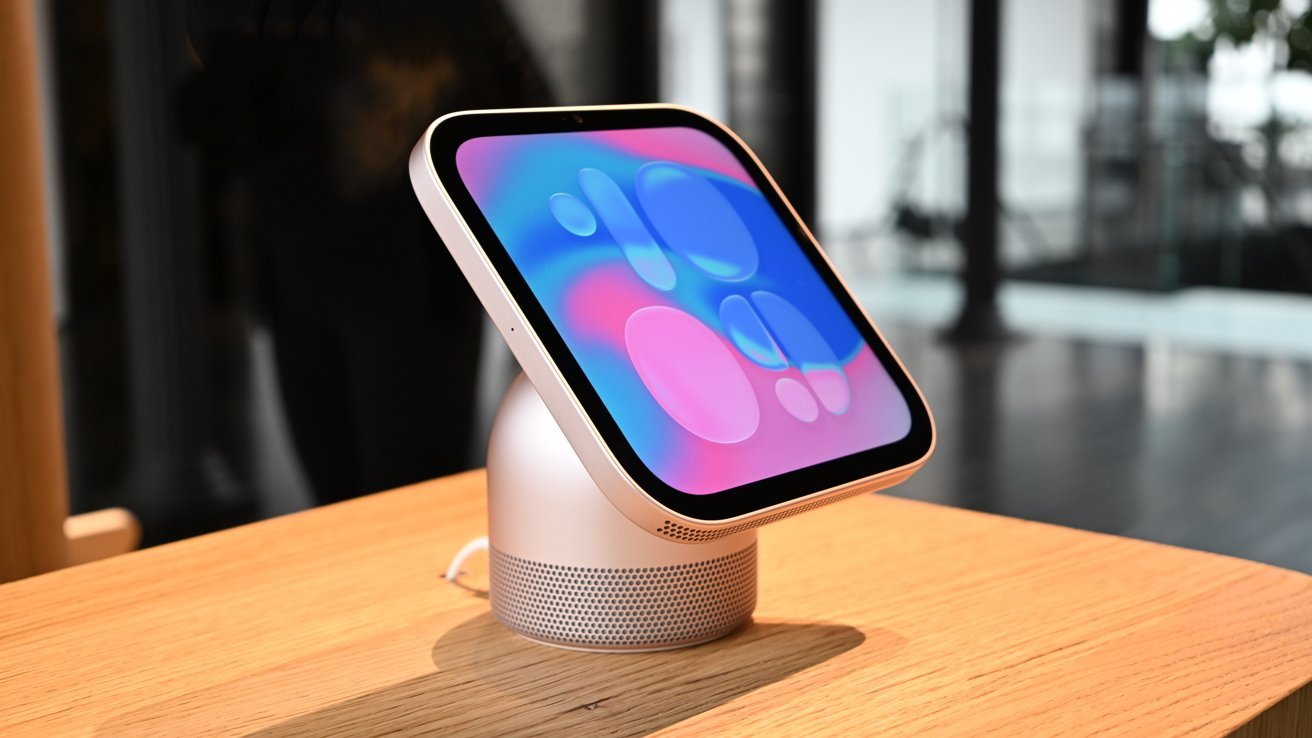
In this week’s Sunday Reboot, Apple’s HomeView is an interesting smart home launch, but it will probably play better in some countries than others.
The HomeView looks nice, but probably wouldn’t work with my household.
Sunday Reboot is a weekly column covering some of the lighter stories within the Apple reality distortion field from the past seven days. All to get next week underway with a good first step. Continue Reading on AppleInsider | Discuss on our Forums
I like an automated house, with things happening automatically for convenience and simplicity.
For the most part, I try to have automations run with definite actions, such as when my office door locks or unlocks.
However, there’s a certain degree of power that comes from using motion detection, but I’ve found motion detectors to be inflexible for a lot of what I want, which is why I’m switching to presence detection.
What’s the difference?
Motion detectors are very simple devices that use PIR to pick up large movements, such as a person walking into a room. They’re good at generic things, such as turning on a security light or lights in a corridor that you’ve just entered.
Advertisement
But, motion sensors are terrible when it comes to someone sitting still, such as at a desk. I’m sure we’ve all had that situation where we’ve been the last person in an office, and the lights keep turning out. The general response is to quickly stand up and wave your hands, but who wants to do that?
Advertisement
Indeed, that’s the issue that I have in my office. I have a motion sensor that will turn off lights and the heating if motion isn’t detected, but I have to set the limit quite high, otherwise, tapping away at my keyboard will leave me in darkness.
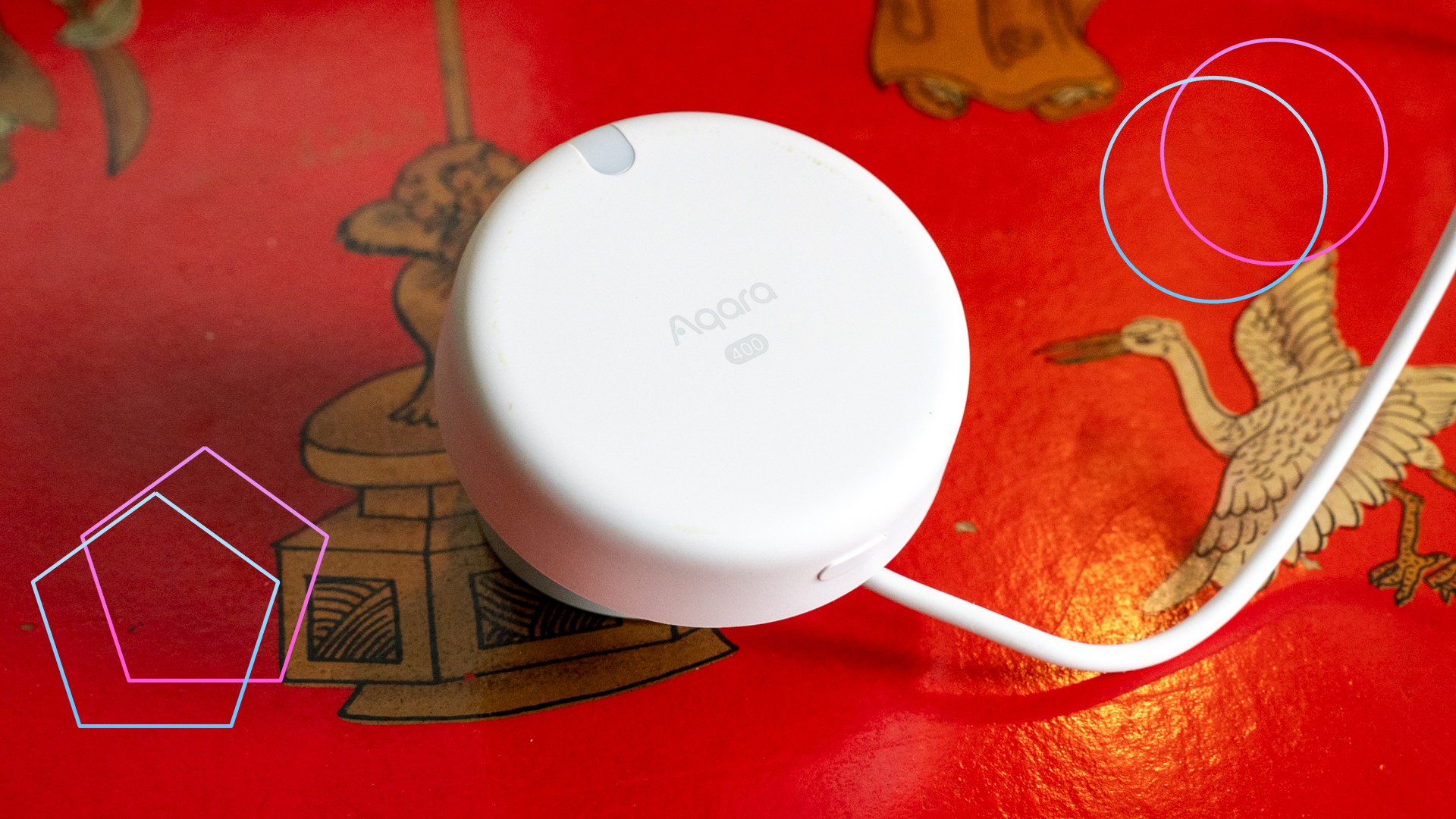
A presence sensor is different, as they use millimetre wave (mmWave) sensing, a type of radar. This makes them more precise when it comes to detecting motion, but also allows them to detect tiny physical movements, such as a person breathing.
Advertisement
The difference is that you can sit absolutely still and a presence sensor will still know you’re in a room. It will only turn off when you move outside of the detection zone. So, you can sit there at your desk and your lights will turn on, and they’ll only go off when you leave the room.
More power
Presence detection is super powerful because it doesn’t rely on exaggerated movements, and my lighting example is just the first example. I’m currently building out my automation system with Homey and presence sensors to make my heating more efficient.
I use Tado X for heating, with individual room control. Largely, I have rooms set to a cooler temperature, and turn the heat up when I want to use one, using timers. That’s fine, but presence sensors are better.
Using Homey, I can tell Tado X to turn on a room when presence has been detected for more than five minutes (enough of a gap so that the heating doesn’t turn on when I walk in to grab something), and to turn off when presence isn’t detected for five minutes (again, enough time to pop out and grab a drink from the kitchen).
Advertisement
Advertisement
While presence is detected, the heating will stay on. And, because it’s presence detection, I can sit on the sofa and watch a film without worrying about the heating turning off.
Battery power for the win
A big difference with presence sensors is that there are now multiple battery-powered models available, whereas originally mmWave sensors were mostly USB-C powered. Battery sensors are cheaper and easier to locate, while Matter means you can connect them to the smart home system of choice.
Whether you’re getting into digital watches for the first time, or transitioning to Galaxy watches from another brand (such as from the Apple Watch Ultra 4 to the Galaxy Watch Ultra 2), Samsung’s wrist-worn tech has its fair share of unique attributes. One such feature is the little orange dot that appears to the far left of your watch screen. While it might be a strange quirk if you’re not used to it, it’s pretty simple to explain.
Throughout the history of the Galaxy Watch, one little orange dot has been a constant. In fact, the dot is present on the latest watch models (including both the Galaxy Watch 8 and the Galaxy Watch 9, as well as the Ultra 2). This little dot is a minimalist way for the Galaxy Watch to display some important information.
The meaning of the Samsung Galaxy Watch’s orange dot
daily_creativity/Shutterstock
The orange dot on Galaxy Watches is a notification indicator — specifically for unread notifications. This dot will remain on your watch’s face until you’ve read all of those outstanding notifications, at which point it will then scurry off. If the dot on your screen is red instead of orange, that means you have an urgent message that you ought to check as soon as possible.
An orange dot is nonetheless common and harmless, but it can be toggled off if it doesn’t suit your fancy. Simply head to Settings > Notifications > Advanced Settings and toggle off New notification indicator on watch face. You can also turn the indicator off via a Samsung phone linked to your watch, where you’ll simply need to go to the Wearable app and head Watch Settings > Notifications > Advanced notification settings and toggle off New notification indicator on watch face.
Advertisement
Other symbols on the Galaxy Watch
Ahmad wakhid arf/Shutterstock
This dot isn’t the only symbol of its kind on Galaxy Watches; like with all the best smartwatches, saving space on such a small screen is key to making a solid wearable. While an orange or red dot can be found on the far left of your watch face, other symbols can appear at the top and bottom of the watch. At the top, you might see a phone icon with a slash through it (meaning your watch has lost its Bluetooth connection with your phone), a rectangle with a cloud in the middle (indicating that your watch is connected to your phone with mobile data or Wi-Fi instead of Bluetooth), or a padlock (which means the watch is locked and you’ll need your password or PIN to open it).
At the bottom, a blue music note may appear, which tells you whether any app is playing music, as well as if that music is paused — and you can tap the icon to control that audio. Alternatively, a green phone icon could show up in that same spot. This appears when the watch or a connected phone is being used for a call.













































You must be logged in to post a comment Login