


Family is a core mechanic in Idle Mafia Game that allows players to create their own factions. Upon creating or joining a Family, players can donate money and Gold Bars to the Family Funds to unlock Perks. Working with other players is essential for a Family to claim a territory in the city and increase its notoriety. In exchange for their contributions, each Family member receives a variety of bonuses that help them increase their money gain and stats.
Let’s go over how the Family system works in Idle Mafia Game.
An overview of Families in Idle Mafia Game
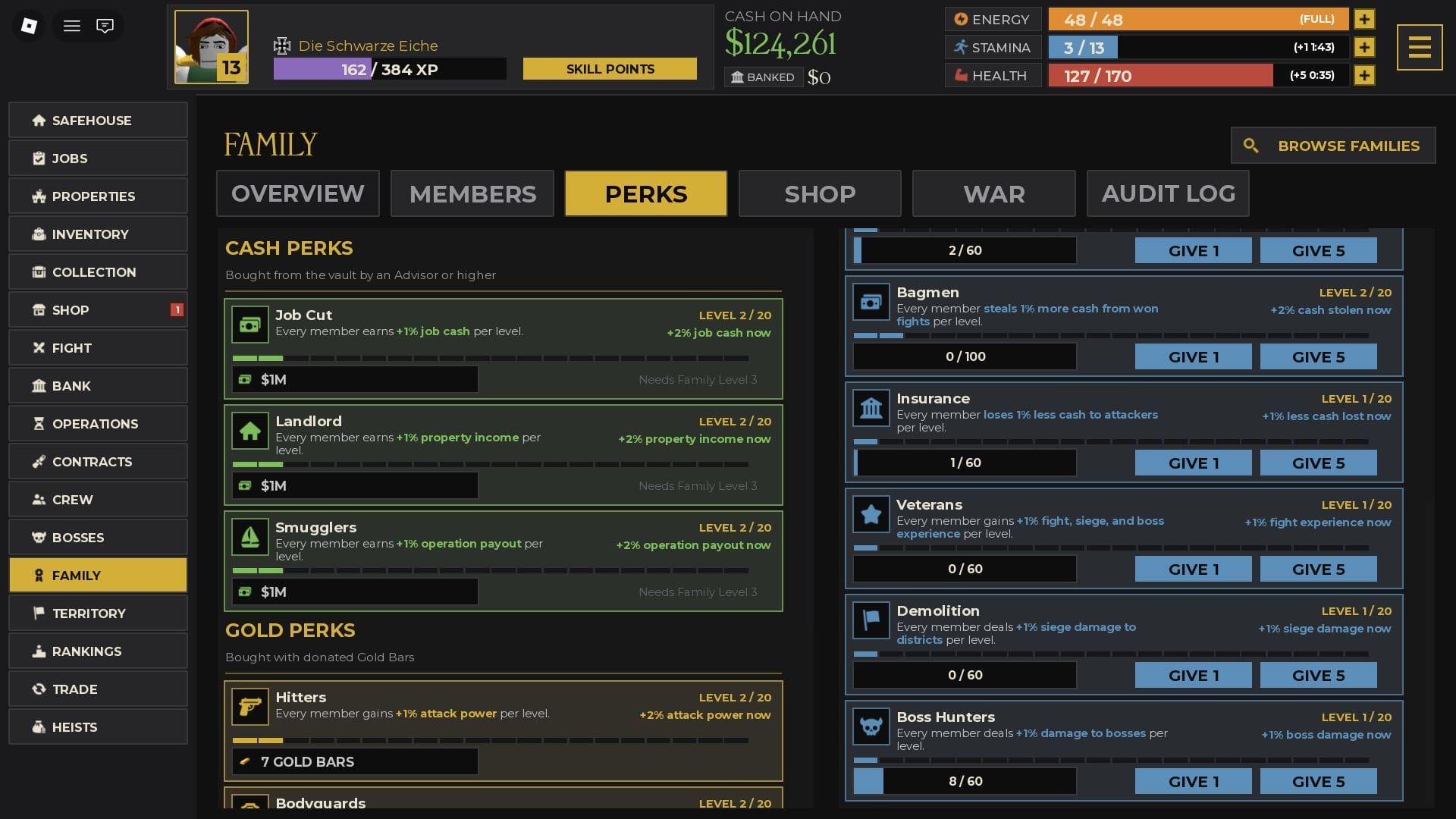
The Family system works akin to the Guild system seen in most RPGs. It allows players to create or join a Family, after which they may start adding funds to the Family’s vault to unlock perks and bonuses.
To create a Family, you must not be a part of an existing Family. If you are a member in another Family, you can use the “Leave Family” option in the Family Overview screen to exit the faction. Then, you can use 10,000 Cash to create a faction. You can customize the name, description, and icon of the Family, which will be displayed to players searching for a faction to join.
If you wish to join a Family, you can view a list of available options and either send a join request or receive one from the leader of a Family. Upon joining a Family, you will gain access to its Overview, Members, Perks, Shop, War, and Audit Log menus.
Below, you can find everything these menus do.
Overview
Overview provides you with a quick look at the current status of the Family. You can check the following information on this screen:
- Name
- Creation date
- Level
- Number of members
- Number of unlocked Perks
- Family notice
- Family Vault
- Active Perks
- Occupied Territories
This is where you can make donations to the Family using Cash or Gold Bars. Cash is passively earned through Properties, while Gold Bars require you to perform a successful Heist.
Also read: Idle Mafia Game: A beginner’s guide
Members
The Members screen is where you can view the various members of the Family. This screen showcases each member’s money, Gold Bars, and Stamina donations, along with their respective ranks. There are a total of six different ranks: Boss, Underboss, Advisor, Associate, Capo, and Soldier.
The Boss, Underbosses, and Advisors have special privileges, such as being able to write the Family notice, spend the faction resources, give war orders, etc. Among these roles, only the Boss can alter some of the most fundamental aspects of the faction, such as the Family name, icon, and description.
Below, you can find the number of seats reserved for each role in a Family:
- Associate: No limit
- Soldier: No limit
- Capo: 15 seats
- Advisor: 5 seats
- Underboss: 3 seats
- Boss: 1 seat
Perks
There are two types of Perks for Advisors, Underbosses, and the Boss to unlock: Cash Perks and Gold Perks. Cash Perks can be unlocked using Cash, and they affect each member’s job cash, property income, and operation payout. Gold Perks are unlocked with Gold Bars, and they affect each member’s attack power, defense power, and job item drops with each level.
There is a third type of Perk that can be unlocked by all members through Stamina contribution: Stamina Perks. Stamina Perks affect the following stats for all members:
- Attack power
- Defense power
- Job experience
- Health regeneration rate
- Stamina regeneration rate
- Amount of Cash earned upon winning fights
- Amount of Cash lost upon losing fights
- Fight, siege, and boss experience
- Siege damage to districts
- Damage to bosses.
Shop
The Shop allows players to reserve the Spotlight spot on the Family screen for new players to discover. This involves donating either 10 Gold Bars to reserve the spot for 8 hours or 25 Gold Bars to do so for 24 hours.
Additionally, the Boss, the Underbosses, and the Advisors can buy additional member slots for 250 Gold Bars each. Up to 10 slots can be unlocked through this screen.
War
The War system allows the Family Boss and Underbosses to declare war upon another Family. This instigates a conflict with another clan, where the winner is decided based on the number of Points scored. Points are scored by Family members winning fights against the rival faction members.
Declaring war takes a fixed percentage of the net Cash in the Family vault. If the Family that declares war wins, the deposited money is returned, and the same amount is stolen from the losing clan’s vault. If a war is inconclusive, the two participating factions can sign a truce to mark an end to the conflict.
Audit Log
The Audit Log screen allows every member to view the contributions and performances of all members in a chronological order. This includes Perk upgrades, Family notices, donations, war declarations, and more. The purpose of this screen is for the faction leaders to view how well the group is doing in terms of daily activity.
Also read: Unique Roblox username ideas for new players
FAQs on Idle Mafia Game
How do I create a Family in Idle Mafia Game?
You can make a Family for 10,000 Cash from the Family screen, provided you are not part of another faction already.
How do I unlock Family Perks in Idle Mafia Game?
Family Perks can be unlocked by Bosses, Underbosses, and Advisors.
Can anyone declare war on another Family in Idle Mafia Game?
Only Advisors, Underbosses, and the Boss can declare war on another Family in Idle Mafia Game.
Edited by Swapnil Joshi





















































You must be logged in to post a comment Login