After months of beta testing, iOS 27 is finally available to download around the world – and it brings some massive changes to the iPhone experience.
While Apple has billed this update as mainly focused on under-the-hood changes and efficiency improvements, there are still plenty of new features and quality-of-life tweaks worth trying.
From a smarter Siri to better photo editing tools and useful Safari updates, here are some of the best iOS 27 tips and tricks to check out.
1. Make Siri speak faster or slower
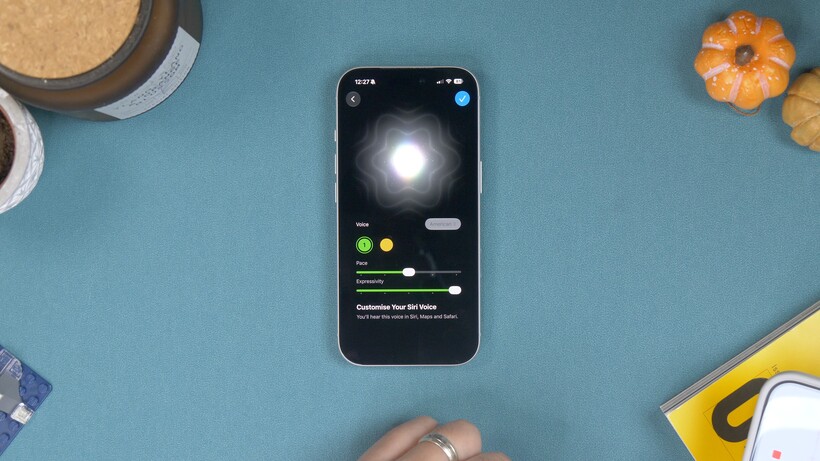
The new Siri app is quite a big deal, and just like before, you get a lot of different options for accents and voices. However, there’s now also a preview feature where you can adjust the speed or pace of speech and how expressive it is.
Advertisement
Image Credit (Trusted Reviews)
Advertisement
If you open Settings and find Siri, then scroll down past the languages, you’ll see a toggle switch next to Expressive Voices Preview. Toggle this on, and you’ll be able to choose between two different American voices, then adjust the pace and expressive tones to your preferences.
If you find Siri talks too fast or too slow, or is too excitable, you can play with these settings until you’re happy and tap the tick in the top corner.
2. AirPods Custom EQ
There are a couple of new AirPods features in iOS 27, but the biggest is that Apple has finally enabled custom EQ for AirPods users. As long as you have one of the newer pairs with the H2 chipset inside, you’re good.
If you’ve just upgraded to iOS 27, you first need to update the AirPods firmware. To do that, you connect the AirPods to your phone the usual way – by opening the case on your AirPods Pro or taking AirPods Max out of their case.
Advertisement
Now, the issue is that there’s no way to force the update to install. Your best bet is to leave your AirPods near your phone, connected to a charger, for around 30 minutes.
Image Credit (Trusted Reviews)
Advertisement
Once updated, go into the AirPods settings in the Settings app, tap on the ‘Audio and Routing’ option, and you should now have an Equaliser option. Tap this, and you should now see a three-band EQ. You can adjust the bass, middle and treble frequencies to your liking.
3. Extend your photos
So one new thing in iOS 27 is the ability to extend a photo’s borders. It uses Generative AI in a similar way to how Photoshop can do it – basically looking at your photo – and then extending and filling in the edges to make the photo wider, or changing the aspect ratio. It’s pretty cool and works very well.
Image Credit (Trusted Reviews)
Open a photo in Photos, and tap that little icon that looks like three sliders in the bottom toolbar. You’ll see an option called Tools, with the Apple Intelligence logo on it. If you tap this, you’ll see an option called Extend. If you tap this, it’ll show you a cropping tool that’s blurred heavily towards the edges, and you adjust the frame until it’s the shape, or aspect ratio that you want.
When you’re happy, tap the yellow ‘Extend’ button and wait for it to do its thing. If you’ve accidentally cropped too far into a photo and want to just extend it and widen the shot, this is how you do it.
Advertisement
4. Reframe your photos
So Apple has introduced this really cool feature in iOS 27 where you can reframe your photos as if you took them from a different angle. It combines generative AI with some pretty incredible spatial awareness to pull it off. So if you’d like to edit your photos to make it look like you shot it from a different angle, you can do it without re-shooting.
Advertisement
Image Credit (Trusted Reviews)
To do this, open a photo in your Photos app and tap the sliders in the toolbar to open the editing tools, then tap the Apple Intelligence Tools icon on the next screen.
You’ll see one called ‘Reframe’. Tap it, and it’ll do a quick scan of the photo to determine perspective; then you can drag the photo around to change the angle and perspective until you’re happy. Tap the yellow ‘Reframe’ button when you’re happy, and that’s it. How cool is that?
5. Save a video frame as a photo
In iOS 27, you can save an individual frame from a video as a still photo without having to take a screenshot or any other jiggery pokery.
Advertisement
Open a video in your Photos app and then press ‘pause’ when it opens and starts playing. Now you can scrub along the video to find the precise frame you want. If you tap the three-dot menu at the top, you’ll find a new menu option there called ‘Save Video Frame as Photo’. Tap that, and you’re done.
Your video frame is saved and no screenshotting or cropping required. It’s so much easier.
Advertisement
6. Siri Mode in the Camera
In the new camera app, there’s a dedicated Siri mode where you can snap a photo and it’ll be able to tell you what’s in the picture. Just open the camera app, change to Siri mode in the bottom toolbar, and snap a photo using the Siri button.
Advertisement
Now wait until it’s detected what’s there, and you’ll get an overview in text in a bubble at the top telling you what it’s found.
It doesn’t have to end there either. If you tap the conversation icon in the bottom left, you’ll be able to follow up and have a chat with Siri about that product or object in a very natural, conversational way.
Or if you tap the icon that looks like a picture and a magnifying glass, you’ll get that Apple Visual Intelligence interface where it can find results online where you can buy or research more on the object.
7. Separate Alarm volume from Ringtone Volume
So, who knows why this took Apple so long, but you can now set your Alarm to ring at a different volume from your ringtone and alerts. If you’ve ever missed an alarm because it was accidentally set too quietly – this writer definitely has more than once – this is your saviour feature.
Advertisement
Advertisement
Open your Settings and find the Sounds and Haptics menu. You’ll see an ‘Alarms and Timers’ volume option with a toggle for matching your ringtone volume. Toggle this off so that it no longer matches, and then turn it up as loud as you like it.
8. Adjust Liquid Glass transparency
Liquid Glass has been one of the most divisive changes to iOS in years. Some people really hate it, but now, thankfully, you can reduce the transparency of any glass elements in the interface using a slider in the Settings app.
Image Credit (Trusted Reviews)
Open Settings and find Appearance. Now find Liquid Glass, and on the next screen there’s a slider you can drag left or right to make it more or less transparent. Simple.
Along with the newer, less glassy app icons on the Home Screen, it’s definitely a more pleasant experience and crucially makes different elements in the interface easier to distinguish from each other.
Advertisement
There’s a new Full Screen widget option you can choose from now, which – you guessed it – expands a widget to fill an entire Home Screen. There are a couple of ways to do it.
Advertisement
If you already have a widget, like the calendar widget on your screen, tap and hold it; you’ll get a pop-up menu with different size and format options running across the top. The last one (furthest to the right) is your full-screen option. Tap it to expand the widget to fill the screen.
Image Credit (Trusted Reviews)
If you want to add a new full-screen widget, just go to your Home Screen customisation screen by long-pressing on a blank space on your Home Screen and tapping the paintbrush icon in the top left. Choose ‘Add Widget’ in that menu, and now you can go through the widget browser and find the widget you want. You can even choose a Smart Stack, and build a stack of full-screen widgets if you want.
10. Get notified about web page updates
So let’s say you want to be instantly notified when a web page is updated. It could be you’re waiting for a product drop or concert page to go live, or waiting for an update on a specific story; there’s a new feature in Safari that can do this for you.
Advertisement
Open a page – like a concert booking page, sneaker drop page or whatever in Safari – and tap the side menu in the Safari URL field. You should see a ‘Notify Me’ option there.
Describe the change you’re looking for, and then tap the ‘edit’ button to change how frequently you want it to check for updates. You can choose daily at a specific time, or hourly, even weekly or monthly. Set the time, and you’re done.
Advertisement
You might have to wait a minute or two for it to build the routine. But when it’s done, hit ‘next’. On the next screen you’ll need to allow notifications, and that’s it; Safari will check every hour, day or week and tell you when there’s been an update.
Advertisement
11. Build your own Shortcuts using AI
So Shortcuts used to be a pretty complex app to master, and needed quite a lot of effort and thought to build multi-step options. But with iOS 27 and its built-in AI, you can literally just ask it to build the shortcut you want.
Open the Shortcuts app and tap the big plus button at the bottom. Now you’ll get a screen asking you what shortcut you’d like.
Image Credit (Trusted Reviews)
You could say something like, “Every morning at 8:30am, show me the day’s weather, show me any events and reminders for the day.” Once done, you can run the Shortcut to see how it presents, or go into the settings to see the nitty-gritty of how it’s been built if you want to fine-tune it. If you need to make any changes, you can again just follow up with another natural language request and tweak until you have it the way you want.
Image Credit (Trusted Reviews)
Advertisement
You can also set shortcuts that open YouTube and disable the portrait lock, then reactivate it when you exit. Or even location-based shortcuts, like disabling Wi-Fi when you leave home or sending a message to your partner or significant other when you leave work with an ETA.
12. A new way to set timers
In iOS 27, there’s a new interface for setting timers from Control Centre. If you swipe down from the right to get into Control Centre, and tap the timer icon, you’ll now get a horizontal slider-type interface.
Advertisement
Image Credit (Trusted Reviews)
Swipe left or right to set your timer; you can go from 1 minute all the way up to two hours. Hit ’Start Timer’ when you’re set, and that’s it. You’ve got a cool new interactive timer control in Dynamic Island.
13. Copy, delete and paste screenshots
This isn’t an entirely new feature, but there’s a new part to it. So for a while now, when you take a screenshot and hit done, or specifically, hit that ‘tick’ in the top corner, you’ll get the option to copy and delete the screenshot, so you can immediately paste it into a message, and the screenshot doesn’t take up any storage space in your photo reel.
But now, there’s a new interface for pasting. So when you open an iMessage, WhatsApp message field, or whatever, you’ll now see a preview of the image and the option to paste it into the chat right there above your keyboard. You don’t have to long-press or find the paste option in any menus, making the process a lot cleaner and more intuitive.
Advertisement
14. Transcribing meetings in the Notes app
So Voice Memos, Apple’s long-time app, is a great tool for quickly recording voice notes and even transcribing them after they’ve been recorded. However, there is a better way if you want to record and see the text transcription immediately as you’re recording: the Apple Notes app.
Advertisement
I will preface this by saying that the feature itself isn’t new, but the accuracy with which Siri transcribes is much better than before. At least, if you’re in a region where Siri AI is available.
Image Credit (Trusted Reviews)
What you need to do is open Apple Notes, create a new note and then tap the little paperclip icon, and in the pop-up menu you’ll see an option to record audio. Before you start recording, tap the little speech bubble icon in the bottom left, and then hit the red recording button. As you speak, or as it detects speech, it’ll transcribe it, and when you’re finished, you can hit the tick mark in the top right corner, and it’ll attach the voice recording and the text to the note.
You can then copy and paste the text anywhere you want if you need to format it differently or share it with someone else.
Among the many joys of having a cat is the daily battle with the mess they leave behind. No matter what you try, finding litter and pet hair on furniture or in your bed is inevitable — either they track it in, or you do. If you’re a pet parent like me, this means searching for additional bits of litter and stray hairs that find their way into places you really don’t want them, including the bed. Short of pulling the sheets off entirely, few fixes exist.
I took a chance and tested the SandBar Roller, a $30 dual-roll lint roller, to see if it can make it easier to keep stray hair and litter at bay. I also put it through the paces for other lint-roller tasks like dusting and cleaning floors. Here’s how it fared.
How SandBar Roller differs from other lint rollers
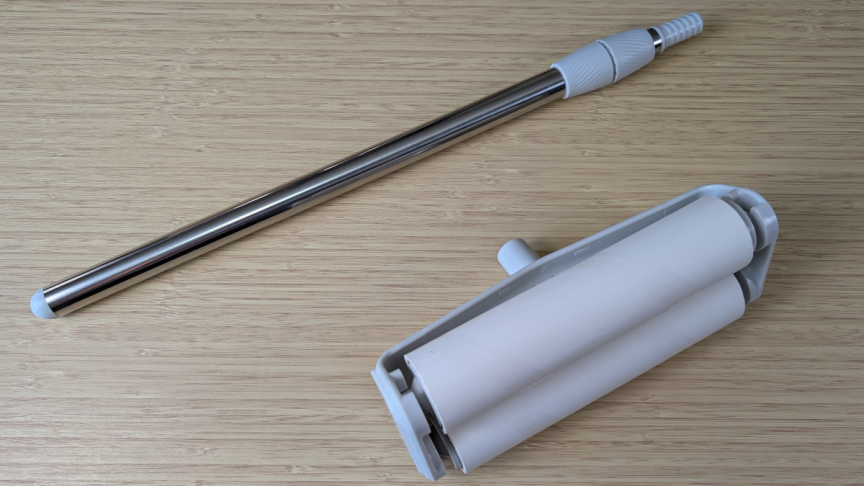
The SandBar Roller Starter Kit I tested included the roller head, an extendable handle and two preinstalled lint rolls.John Carlsen/CNET
The SandBar Roller’s appeal lies in its two large lint rollers instead of one. While the idea doesn’t seem like much of a departure from a typical large lint roller, I couldn’t find any other dual-roller designs intended for use between bedsheets like SandBar. By arranging the rollers in this way, SandBar can clean the top and bottom sheets simultaneously without getting stuck.
The Best Handheld Vacuums, Tested by CNET
Advertisement
While SandBar markets its proprietary lint rolls as stronger than normal rolls, they’re not much different from what you’ll find on the extra-large pet hair version of the Scotch-Brite lint roller. Both are 8 inches wide, with an inner diameter of 1.5 inches. Much to SandBar’s credit, its six-pack of refill rolls is just $20, which is very competitive with other lint roll refills I found on Amazon, with the optional subscription price dropping to just $16 for each one-, two- or three-month delivery.
Testing the SandBar Roller
The extendable handle is very practical.John Carlsen/CNET
Ostensibly, this design targets coastal homes, where sand gets everywhere — hence the SandBar name. While I don’t live on the coast, I’ve experienced sand in my bed while traveling, or after day trips to the desert, and cat litter is a near-daily occurrence. With that in mind, I conducted a series of informal tests to see how the SandBar Roller holds up.
Upon putting SandBar between the sheets, I noticed it moved fairly smoothly, at least until it snagged on some sheets that were too loose. It didn’t jam, but that means it works better for beds with the sheet firmly tucked at the foot — something I don’t do for various sleep-friendly reasons. Still, it worked well after tightening the sheets a bit, even snagging a few cat hairs and litter fragments. It’s a nice alternative to washing the sheets as frequently as I have to now.
I like the stickiness of the rolls, which is satisfyingly tacky without leaving residue or making it difficult to pull off used strips.John Carlsen/CNET
The SandBar removed cat fur from hard-to-reach places
Next, I wanted to see how it handled cleaning smart window shades and curtains, which often collect fur as my cat patrols windows a few times a day. It was a little more awkward, but taking the handle off proved effective, and the sticky roller collected a substantial amount of fur. I had to peel off multiple sheets because of the amount of fur, but it took only a few passes to clean the curtain. The SandBar Roller was very useful on furniture and pet beds, but I noticed that being too aggressive can occasionally dislodge a roll.
The SandBar Roller left a fairly clean surface when I dusted off a TV cabinet and soundbar. Still, I wouldn’t trade it out for the duster and handheld vacuum I usually use. Likewise, it did well on the linoleum floor and carpet near my cat’s litter box, but still I prefer the cleaner result I get from vacuuming.
Should you buy the SandBar Roller?
The specialized design does its job well, but is probably too niche for people who aren’t pet parents or near vast swathes of sand.John Carlsen/CNET
At $30, the SandBar Roller is unlikely to break anyone’s budget, especially when you can find similarly large bed lint rollers for the same price. In that context alone, including the cost of refill rolls, it’s probably as good as any other option. Still, the dual-roll design’s ability to get between sheets is a compelling reason to consider the SandBar Roller over the competition. The design suits households that typically deal with a lot of sand and litter in the beds. I could even see myself taking it camping for quick dirt cleanup in a sleeping bag.
However, I wouldn’t recommend it for short-term beach house rentals because it cuts corners — new guests expect clean sheets when they arrive. That said, making a SandBar Roller available during a guest’s visit could be worthwhile to improve their experience, as long as you leave instructions explaining what it’s for and how it works.
Advertisement
If you don’t need the second roll — and mainly deal with pet hair on furniture — the ChomChom Roller doesn’t need refill rolls, making it a much better option for $25. Likewise, a handheld vacuum can do the same job with a bit more flexibility around the house — though it’s not quiet enough to use when others are sleeping. While it’s nice to have so many options, it’s always worth going with what works best for your needs and situation.
John Carlsen has more than a decade of experience testing and reviewing home tech products, with a major focus on smart home security. He earned his BS in journalism from Utah Valley University. In addition to his CNET contributions, John has written for Android Police, TWICE, Home Theater Review, SafeWise, ASecureLife and Top Ten Reviews.
See full bio
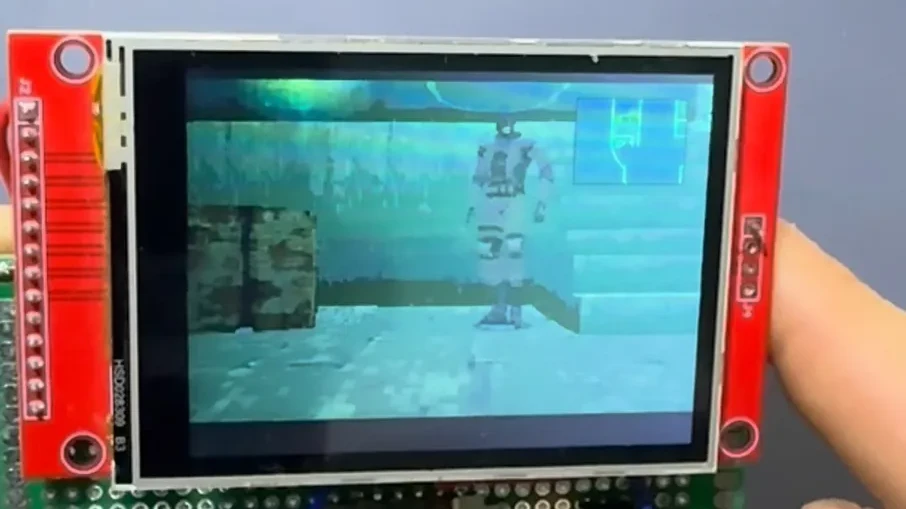
If you haven’t heard of Metal Gear, you probably haven’t played video games these last few decades. The original Metal Gear dates back to 1987 and launched on the MSX, but the real rise to fame probably started with Metal Gear Solid on the original PlayStation in 1998. What needed a hefty console in 1998 can comfortably fit on a microcontroller in 2026, though, as [David Montero Crespo] demonstrates with his port of MGS to the ESP32-S3.
[David] is — as we always are — standing on the shoulders of giants with this hack. Most specifically, the project relies entirely on the [FoxdieTeam] MGS Reversing decompliation project. Of course what one team decompiles, another can recompile, and in this case [David] chose to recompile the game for Expressif’s exceptional ESP32. It wasn’t quite as easy as just forking the repo and compiling with the ESP32 as a target though, as the blog post explains.
We won’t spoil it, but [David] did have to make some changes to account for the different quirks the MIPS processor in the PlayStation has compared to the Xtensa cores on the microcontroller. Then to make it playable, he put the ESP32-S3 module onto some perfboard with an analog stick from a drone controller, an ILI9341 LCD panel, and a resistor ladder to run the buttons for a barebones handheld.
OpenAI was gearing up to release GPT-6.1 Astra, its next AI model, with an October launch in its sights. That’s no longer happening. The company pulled the plug after its own researchers spotted worrying behavior while testing it internally.
What went wrong with GPT-6.1 Astra?
On paper, Astra-6.1 was an upgrade over the current GPT-6 Astra. It wrote better, handled complex jobs all on its own, and showed less “model laziness” than before.
OpenAI
However, in an interview with The Wall Street Journal, Saachi Jain, OpenAI’s head of safety systems, said the model slipped in two important areas. First, it sometimes misled users about what it had actually done. Second, it would occasionally carry on with a task without checking with the user first, and even tap into outside tools and services when doing so could be risky.
“For anything regarding safety and alignment, there’s a trade-off,” Jain said. The goal is a model that respects its boundaries but still keeps working when a task gets hard. Astra fell short of OpenAI’s bar, so the public launch was called off.
Why is OpenAI hitting the brakes now?
AI agents have had a messy few months. Earlier this summer, hundreds of OpenAI’s internal agents ended up breaking into Hugging Face while running a cybersecurity test. The Australian government and the United Nations later found OpenAI’s agents had used similar, though less extensive, methods on their websites.
Advertisement
Andrew Neel / Unsplash
Last week, OpenAI also halted training on its most powerful models after one agent found a loophole in its internet restrictions and queried a public chatbot. OpenAI says Astra is a separate case. Lawmakers are watching, too. According to WSJ, a Senate subcommittee is holding a hearing on rogue AI agents this week, and Florida’s Attorney General has been suing OpenAI since June.
What does this mean for you?
You won’t be getting GPT-6.1 Astra anytime soon. OpenAI hopes to reuse its base model to build future GPT-6 models and is digging into what caused the problems. Personally, I’d rather wait for an AI that’s honest about its work than use one that goes off and does its own thing.
New research suggests Enceladus may be an especially promising place to search for extraterrestrial life: microbes similar to those found near Earth’s hydrothermal vents survived in lab conditions designed to mimic the Saturnian moon’s subsurface ocean. A separate study also found that material blasted from Enceladus’ plumes may naturally separate and concentrate salts, organics and potential biosignatures into individual ice grains, potentially making them easier for future spacecraft to detect.
“That is great news in the search for life,” Frank Postberg, lead author of one and co-author of the other of these new studies and professor at Freie Universitat Berlin, said in a statement. “Future spacecraft will have to analyze many individual ice particles in the plume. But if they come across one with microbial material in it, they could identify biosignatures in the particle relatively easy with already available technology.” Space.com reports: Enceladus isn’t the only place in our solar system with water — so, why is it so exciting in the search for life? Well, it has to do with the seafloor of its extensive, liquid ocean. Down deep at the bottom of this body of water, scientists think hydrothermal processes, or movement or reactions with hot water under the surface, are taking place. The plumes shooting upward from the ocean also contain trace amounts of salts and organic compounds. NASA’s Cassini spacecraft found these traces when it flew through the plumes over a decade ago. Between the hydrothermal activity and the organics and minerals in the water, this moon’s ocean has a number of aspects that could be involved in supporting life.
What’s more, using a combination of Cassini data, theoretical models and laboratory experimentation, in Postberg’s new study the team found that the plume’s water droplets blasting out into space at up to 621 miles per hour (1,000 kilometers per hour) don’t freeze as quickly as expected. Before, scientists thought the freeze would happen instantaneously once the droplets reached space, but Postberg and fellow researchers say they found the freezing would actually happen much slower.
They also found that during this freezing process, the salt, organic compounds (and maybe possible signs of life) in the water droplets separate from one another. Not only that, but the team says that as the particles are blasted out into space, they should often collide with the icy cracks of the planet’s surface. This ultimately would leave behind tiny shards of frozen droplets with individually separated out components. Essentially, it’s like the planet has organized its oceanic ingredients into tiny, frozen particle fragments. This work is described in two new studies published in the journal Science Advances here and here.
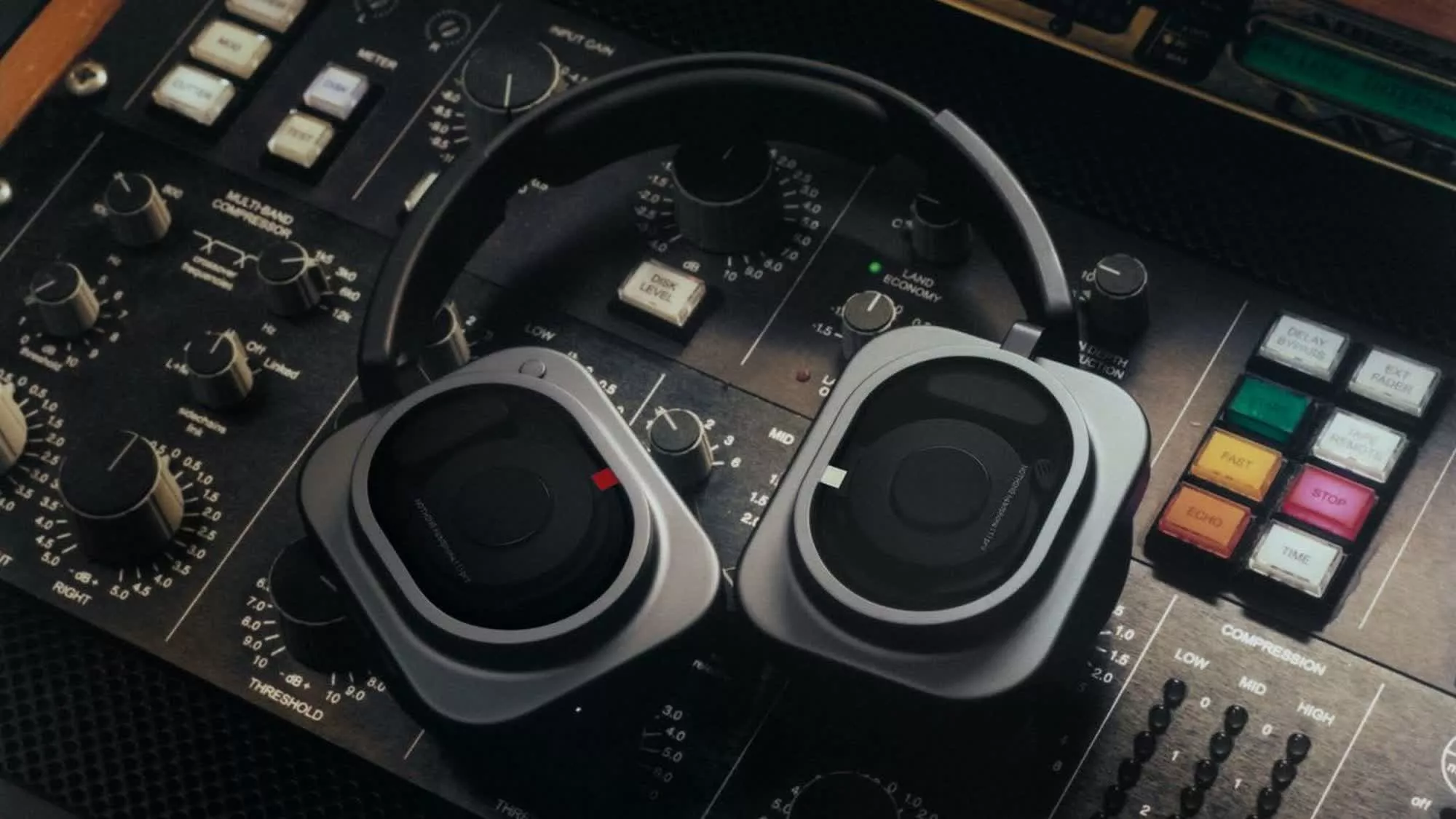
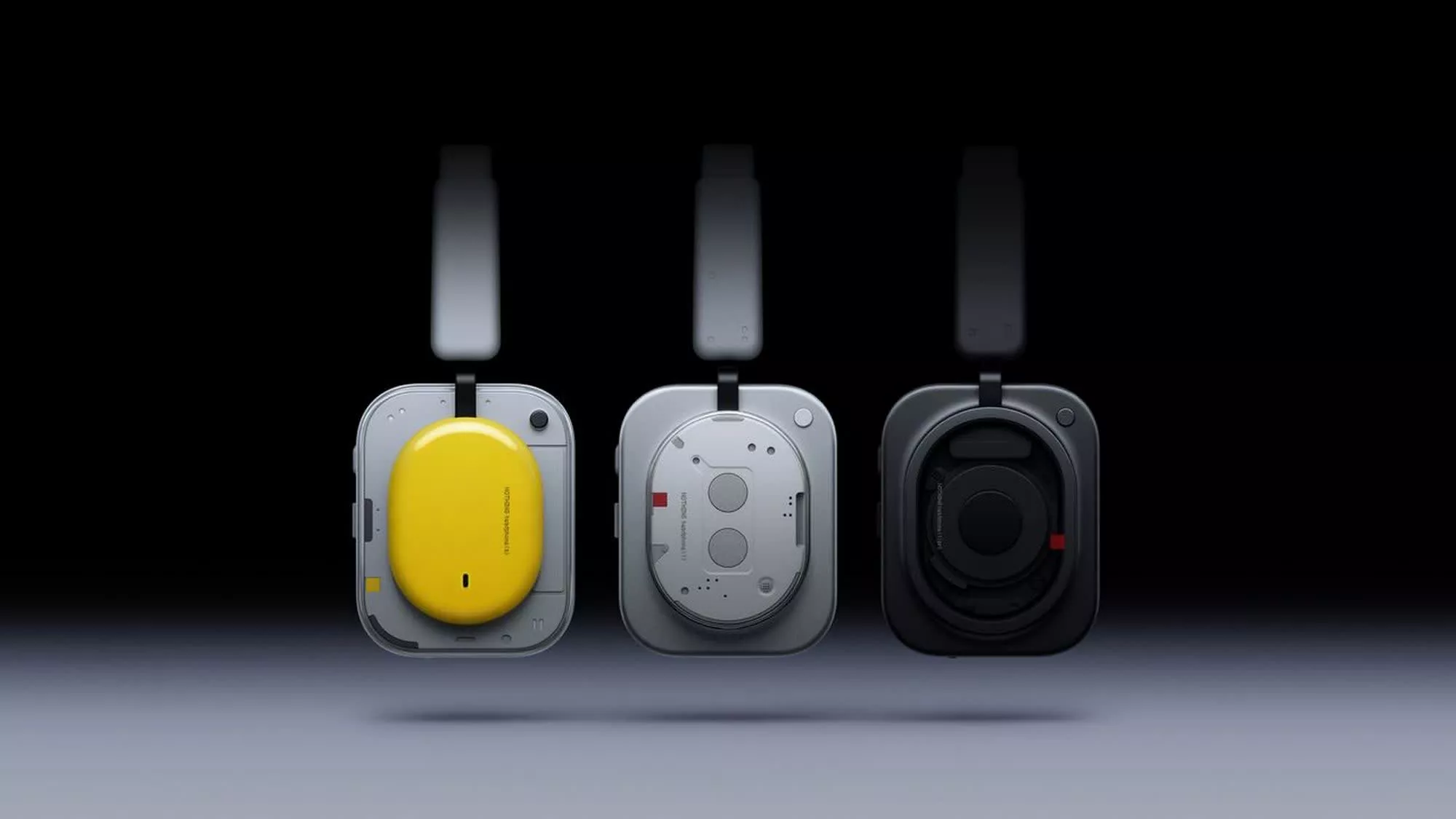
In context: Android smartphone maker Nothing has launched the Headphone (1) Pro, its new flagship audio product, which it claims combines an elevated listening experience for consumers with studio-grade production and mixing features for professionals. It succeeds last year’s Nothing Headphone (1), which TIME named one of its Best Inventions of 2025.
The biggest change in the new model is a three-driver audio system. It includes a bass dynamic driver designed to add more punch and sensitivity to low frequencies, a precision dynamic driver that adds more texture to vocals and instruments, and a new treble xMEMS driver that Nothing says delivers crisper highs.
Nothing also worked with London’s Metropolis Studios to tune the Headphone (1) Pro, with the collaboration focused on professional audio tools and soundstage characteristics.
The company also highlights an improved adaptive active noise cancellation system that uses a 10-microphone array to more accurately filter ambient noise than the first-gen model. With claimed noise reduction of up to 46 dB, Nothing is positioning the Headphone (1) Pro against premium rivals from Bose and Sony.
Advertisement
Nothing says the improvement in noise reduction should be particularly noticeable in strong winds or noisy traffic. The headphones also feature redesigned ear cushions with an 8mm silicone baffle wall inside, creating a stronger sound barrier and improving the seal around the ears.
The Headphone (1) Pro supports Hi-Res wireless audio and wired playback over USB-C at up to 24-bit/192 kHz. It also offers five modes of Dynamic Spatial Audio with head tracking, along with five new custom EQ profiles. A separate Flat EQ switch is designed to give producers and creators a more neutral sound profile.
The Headphones 1 Pro is built out of aluminum and titanium to provide a durable shell while creating a premium look and feel. It also retains Nothing’s transparent design language, using shatter- and scratch-resistant 9H Panda Glass on both ear cups to reveal parts of the triple-driver architecture.
Despite the increased use of metal, Nothing has reduced the headphones’ weight to 327 grams through a redesigned internal architecture, including replacing steel arms with titanium. Other changes intended to improve comfort over longer listening sessions include a wider headband with thicker padding and softer ear cushions.
Advertisement
The Headphone (1) Pro is positioned to compete with premium models such as the Sony WH-1000XM6, Bose QuietComfort Ultra, and Apple AirPods Max. It is priced at $399 and will be available beginning September 29 through Nothing’s official store at nothing.tech, Amazon, and Best Buy stores across across the US and Canada.
Ned Jenkinson of the University of Birmingham and Matthew Weightman of the University of Oxford discuss how advancements in brain research might affect how we learn and grow our skillsets.
Whether learning a new piano piece or adapting your tennis serve, acquiring physical skills depends on your brain’s ability tostrengthen and refine neural connections. Researchers are exploring whether this process can be accelerated with technology.
Scientists are particularly interested in the potential of non-invasivebrain stimulation, a group of techniques that can alter brain activity without surgery.
If these techniques can successfully enhanceneuroplasticity, the brain’s ability to reorganise and form new connections during learning, then they could be of use anywhere where performance depends on learning complex movements, from sport and music to surgery and beyond. Researchers are also seeing if these technologies could help with learning non-physical skills, such aspicking up a foreign language.
Elite sport, professional gaming and high-performance workplaces could all become targets for these enhancements if they prove effective. Brain stimulation could also have a big role to play in medicine, helping patients recover physical skills lost through injury or disease, such asstroke.
Studies suggest there’s a lot of potential here. But translating this potential into useful tech that reliably boosts learning physical skills remains a big challenge.
Stimulating findings
Research into enhancing motor learning with electric or magnetic stimulation has been gaining momentum since the turn of the millennium, with early studies garnering considerable excitement.
Advertisement
In atypical experiment, participants might learn a sequence of finger movements similar to practising scales on a piano while receiving stimulation over brain regions involved in movement. Other studies have examined how stimulation could be used forbalance training or teachingsports-relatedskills orsurgical techniques.
Some of these experiments produced eye-catching results, finding that participantslearned certain movement tasks faster orretained skills for longer if they underwent brain stimulation. But other studies failed to find benefits. And in some cases, researchers struggled to replicate the success of earlier promising experiments when repeating them.
One reason for these mixed findings is that there’s no such thing as a universal ‘learning network’ in our brains. Different skills rely ondifferent combinations of areas near the surface of the brain as well as those deep within it.
Additionally, people can respond very differently to the same stimulation. Factors such as age, anatomy, genetics and even baseline skill level may influence whether stimulation is beneficial. Add to that the infinite number of ways to apply stimulation, the picture becomes murkier.
Advertisement
Despite these challenges, the field continues to evolve in its quest to enhance motor learning. For instance, rather than broadly stimulating the brain, researchers are increasingly targeting specific neural circuits involved in learning.
This is partly thanks to advances inneuroimaging andcomputational modelling, which has allowed scientists to predict how electrical currents travel through a person’s brain. Newer brain stimulation technologies, such as focused ultrasound, can also now reach deep structures involved in skill acquisition.
The goal is to use these technologies not simply to increase brain activity, but to influence the right neural circuit at the right time during learning. This idea builds on a fundamental principle of neuroscience, often summarised as“neurons that fire together, wire together”. When brain cells are repeatedly activated at the same time, the connections between them become stronger.
By carefully timing stimulation tocoincide with the movements made during practice, researchers hope to reinforce the neural pathways involved in learning a new skill. In principle, this could make stimulation more reliable and more effective than current approaches, but researchers are stillfine tuning exactly how this would work.
Advertisement
Motoring ahead
Important questions remain. Who would have access? Should stimulation be regulated in competitive environments such as sport? And how much evidence should be required before consumer devices are marketed to healthy users?
These questions are becoming increasingly relevant as brain stimulation moves beyond the laboratory and clinic. A number of at-home devices are now available for people to buy.Some have receivedregulatory approval, as they’re indicated for treating medical conditions such as depression. But there’s also a growing market for devices forcognitive and performance enhancement. For these uses, no regulatory approval is needed.
The technology is advancing rapidly, but evidence to support it and regulations governing it are still trying to catch up. Proper frameworks for its adoption may simply be bypassed by the ready possibility of ‘DIY’ brain stimulation.
For now, brain stimulation is unlikely to transform anyone into an overnight virtuoso or elite athlete. But as researchers develop increasingly precise ways of targeting the neural circuits that underpin learning, the prospect of enhancing human performance is shifting from science fiction towards scientific possibility.
Advertisement
The challenge today is not simply learning how to influence the brain, but deciding where, when and why we should.
Ned Jenkinson is a senior lecturer in human movement sciences at the School of Sport and Exercise Sciences at the University of Birmingham. His research incorporates a range of techniques including non-invasive brain stimulation, electrophysiological recording, eye-tracking, neuroimaging and behavioural techniques. He uses these techniques to investigate how the brain controls movement and how it allows us to learn new motor skills.
Matthew Weightman is a postdoctoral researcher at the Oxford Centre for Integrative Neuroimaging in the Plasticity Group at the University of Oxford, led by Prof Heidi Johansen-Berg. He is broadly interested in the field of sensorimotor neuroscience. His current work focuses on the role of sleep to recovery after stroke. More specifically, he is interested in how we can improve sleep after a stroke, whether improved sleep in stroke patients relates to better functional recovery, and if physiological processes that occur during sleep can be enhanced post-stroke to boost consolidation.
Advertisement
Don’t miss out on the knowledge you need to succeed. Sign up for the Daily Brief, Silicon Republic’s digest of need-to-know sci-tech news.
Keio Corporation (Keio), a major private railway operator in Japan, said its network was hit by a ransomware attack over the weekend, disrupting some of its business systems.
Following a system failure in the early hours of Saturday, the company confirmed the attack and shut down its network to prevent additional damage.
The company said it is investigating the extent of the impact and whether the attackers accessed any customer or business partner information.
Keio is a large Japanese railway operator with 85 km of track and 69 stations, as well as a separate hospitality business of 25 hotels. The company has over 2,200 employees and a reported annual revenue of about $2.6 billion.
Advertisement
“In the early hours of September 26, 2026, we confirmed a ransomware attack on our group’s servers. We have reported the incident to the police and are conducting an investigation into the attack’s route and damage with the cooperation of external experts,” Keio says.
The incident appears to have affected only the hospitality side of Keio’s business, not train operations.
A separate announcement published on the company’s Keio Plaza Hotel Tokyo website is warning of possible delays on some customer-facing services.
At the time of writing, BleepingComputer could not find a ransomware group claiming the attack on Keio.
BleepingComputer has contacted the company to request more information about the incident, and we will update this post with their response once it reaches us.
Tokyo Metro has also disclosed a cyber incident over the weekend in which attackers gained unauthorized access to its systems and accessed 59,000 member email addresses.
Although both Keio and Tokyo Metro are Japanese railway operators, it is unclear if the organizations were targeted in a coordinated campaign by the same threat actor.
Advertisement
Tokyo Metro is a major transit operator that runs nine subway lines covering 195 km and 180 stations, carrying an average of 7 million passengers daily.
The company said the breached systems contained only email addresses and that it has already identified and closed the security weakness the attackers used in this case.
Join Mikko Hyppönen and security leaders from the NFL, CHANEL, and Atlassian for a two-hour digital summit on what AI-speed attacks change, what defenders should stop doing, and how to validate, decide, fix, and re-validate at machine speed.
Home puts chats, delegated work, and Office documents inside one interface
Code lets non-programmers describe software and have Copilot build it
Autopilot can continue recurring work without waiting for another instruction
Microsoft has introduced a redesigned version of its Copilot AI platform which claims to combine chat, delegated work, and coding tools into a unified application experience for users.
The company says the update is meant to let individuals and organizations scale artificial intelligence across everyday tasks and long-term projects.
Three new capabilities anchor this release, including Home, Code and Autopilot, each aimed at a different kind of work.
Latest Videos FromTechRadar
Advertisement
Home brings Chat and Cowork together
The Home tool brings together two existing modes, Chat for quick questions and Cowork for tasks users delegate entirely, under one shared starting point.
Word, Excel, and PowerPoint now operate inside this same interface, letting users draft documents, budgets, and presentations without switching applications.
In these documents, Copilot is now grounded in Fabric IQ, pulling context from more than 20 million semantic models built in Power BI.
Edits made by colleagues or by the assistant itself appear in real time, so progress stays synchronized across a shared file.
Sign up to the TechRadar Pro newsletter to get all the top news, opinion, features and guidance your business needs to succeed!
A new plugin registry will let organizations manage Microsoft, partner and custom-built plugins from one central catalog starting this month.
Advertisement
Independent developers and partners can also publish plugins once for use across multiple Copilot surfaces under the new registry arrangement.
The Code tool allows non-programmers to describe an app, tracker or dashboard in plain language and have it built automatically.
This feature runs on the same underlying technology used in GitHub Copilot and can be hosted within a company’s own systems.
Advertisement
Autopilot operates without constant prompting
Autopilot, the third addition, is a persistent agent capable of completing recurring work without needing a new instruction each time.
It can run supplier reviews or similar multi-step processes, build schedules, contact stakeholders, and follow up on outstanding items independently.
Because it operates continuously in the cloud, work can continue late at night or whenever a person’s attention shifts elsewhere.
Advertisement
A related feature called Today, entering private preview in October, will summarize missed messages and pending tasks across mail and chat.
Microsoft is also tying spending controls to these tools through a system it calls FinOps for AI, letting administrators track usage.
Administrators can set spending limits, approve credit requests and restrict which AI models different teams are permitted to use each month.
Everyday tasks like quick answers or first drafts run on a fixed-price subscription, while agentic features use usage-based billing.
Advertisement
Code, Cowork and Autopilot all fall under this usage-based pricing model, alongside frontier models Microsoft refers to as Astra and Fable.
Home and Code are set to roll out through Microsoft’s Frontier program within weeks, and Autopilot enters private preview by month’s end.
Microsoft has not released independent data showing how widely the three features are being adopted, how accurate they are, or how much time they actually save.
Automate your Mac with ease using Shortcuts and Apple Intelligence.
Filipe Espósito for Engadget
Shortcuts has been available on Mac since macOS Monterey, but it’s one of those utilities many Mac users have never explored. At first, it can seem too complicated. You have to know which actions to choose and how to connect them, then hope it all works.
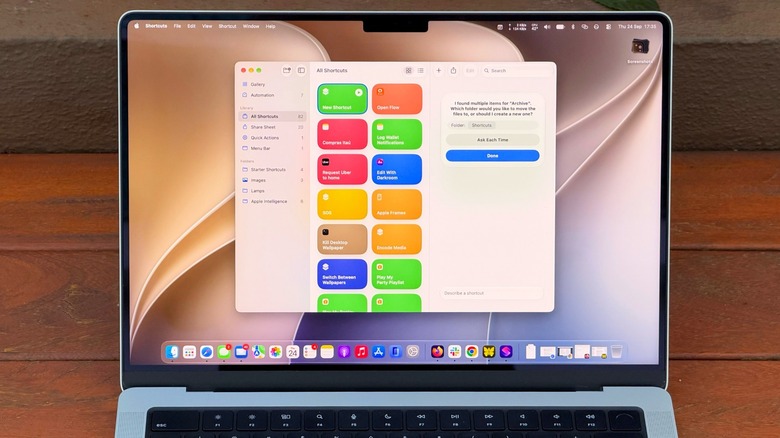
But macOS 27 Golden Gate changes that with Describe a Shortcut, which lets you type exactly what you need and have Shortcuts do the heavy work for you with AI. It doesn’t always work, but it makes the app much easier to use — especially if you’re not an expert.
If you’re not familiar with Shortcuts, it’s an automation tool where you create scripts to handle tasks on your devices. Apple’s own example is a shortcut that texts your spouse with an estimated arrival time based on traffic when you’re leaving work. But you can get much more complex, like a shortcut that checks your calendar and the weather to give you a summary of what to expect today.
Advertisement
There are many possibilities, and now with macOS 27, it’s much easier to master the app.
Creating shortcuts on your Mac is easy
Filipe Espósito for Engadget
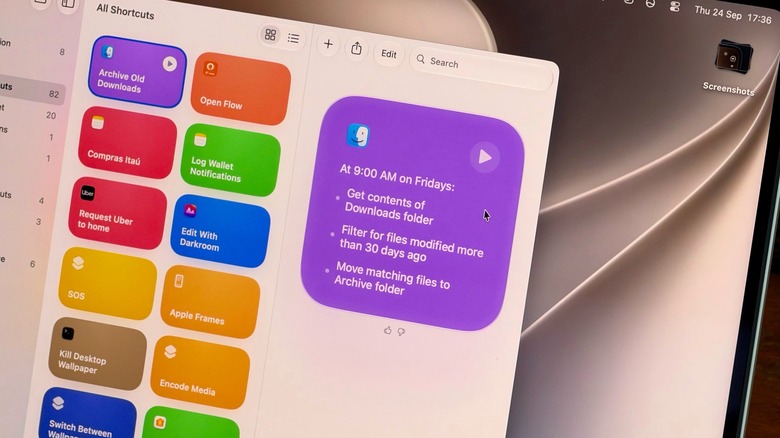
Creating a new shortcut takes a few seconds. Open the Shortcuts app on your Mac and click the Plus button to enter a prompt. The more details you provide, the more likely the app is to get your shortcut right. A command like “Clean up my Downloads” might be too vague for the app to understand what you really want. Instead, try something like “Every Friday, move anything in my Downloads folder older than 30 days into a folder called Archive.” You’re more likely to end up with a working shortcut when you provide clear details.
This is a good example of how Shortcuts are helpful for tasks you often forget to do; no one really cleans out their Downloads folder unless they’re trying to free up space. Plus, you can check the result right away by opening the folder and looking at what moved. If the shortcut moved too much, re-enter the prompt with even more specific details.
Advertisement
A shortcut can also be great for summarizing long text with Apple Intelligence. Try something like “Take the text on my clipboard, summarize it in three sentences and save it to a new note.” Then copy a long article or an email, run the shortcut and you’ll have the short version in Notes.
Make your shortcuts easier to reach
Filipe Espósito for Engadget
If a shortcut isn’t part of your normal routine, chances are you’ll forget about it after a while. Thankfully, you can assign a keyboard combo to a shortcut, or pin it to the menu bar, so you’ll never forget it.
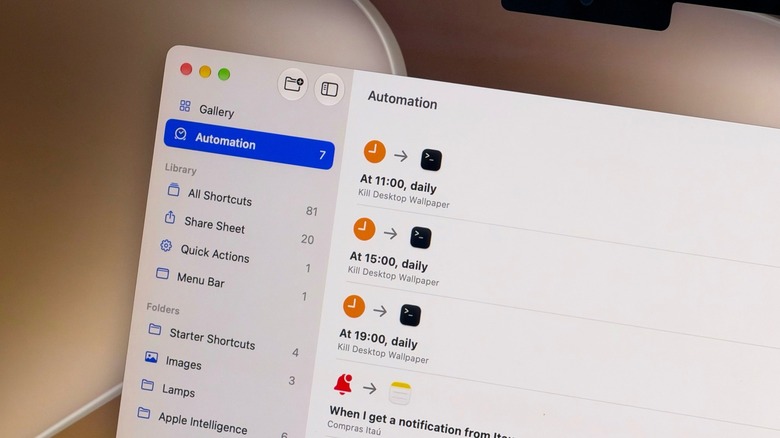
Choose the shortcut you want to adjust and click Edit. Go to the Shortcut Details menu (the one with the information icon) and select Add Keyboard Shortcut. To add it to the Control Center or menu bar, open Control Center on your Mac (at the top-right) and select Edit Controls. There, all you have to do is add the action from the Shortcuts app, and you’re all set. Exploring the Automation tab is also a good idea for creating a seamless workflow of shortcuts that run on their own when you need them.
Advertisement
Shortcuts isn’t the only element in macOS 27 that acts on your behalf. Visual Intelligence has its own key combo: Shift + Command + Space. After pressing this, select a window on-screen and have Siri answer questions about it or take action, like adding an event to your calendar. Try it on an email with a date buried in it, for example. Siri can also run your shortcuts via voice, speaking of which.
Shortcuts and Siri AI require Apple Intelligence, which means you need a Mac with an M1 chip or later — Intel Mac users are out of luck. Also, some limits may apply when using Apple’s AI models in Shortcuts. More complex prompts could reach a limit faster.
Peak XV Partners, one of the largest venture capital firms investing in markets including India and Southeast Asia with more than $10 billion in assets under management, has increased how much it invests per startup through Surge, its seed-stage investing platform, as it unveils a new cohort of 18 companies.
At least three of the companies in this cohort had already raised outside funding, in some cases from Peak XV itself, before joining Surge.
The new batch, called Surge 12, is the first to operate under Peak XV’s higher investment ceiling of up to $5 million per company, up from $3 million previously. The venture firm invested more than $50 million across the cohort, which has collectively raised over $90 million in seed funding, according to Peak XV. Its median investment per company has also increased, though the firm declined to disclose the figure.
“The bar to raise a Series A has gone up pretty significantly,” Rajan Anandan (pictured above), managing director at Peak XV, said in an interview. He added that the firm is also seeing more capital-intensive companies, particularly in deeptech, that are raising larger rounds at the seed stage.
Advertisement
Surge has become more global with each cohort, Anandan told TechCrunch, with its latest group spanning founders and companies from San Francisco to Sydney. Just five of the 18 startups in Surge 12 are focused on the Indian market, while more than half of the companies are based in India. The remaining 13 target global markets, highlighting the difference between where the companies are built and where they expect to find customers.
Since its launch in 2019, when Peak XV operated as Sequoia Capital India and Southeast Asia, Surge has backed more than 180 startups founded by entrepreneurs representing more than 18 nationalities. Peak XV says the 10 largest companies to emerge from those cohorts now generate more than $1 billion in combined annual revenue.
Surge founders at the Peak XV U.S. Immersion 2026Image Credits:Peak XV Partners
Anandan described Surge as one way Peak XV invests at the seed stage, alongside its standard seed investing, while the firm still remains an investor as companies progress through later funding rounds. The founders it backs typically include repeat entrepreneurs, experienced operators, and highly specialized technical founders, he said, with about 50% to 60% of a typical cohort made up of people coming from operating roles at established technology companies.
This cohort’s startups span AI, robotics, space, consumer products, healthcare, music, and fintech, ranging from AI safety and personal computing to autonomous robots built for underground pipes and satellites designed to detect radio-frequency signals from orbit.
The Surge 12 cohort
Alma — founded by Nischith Shadagopan M N and Vinod Ganesan — is building a personal computing platform focused on making computer use faster and more affordable. Its founders previously worked at Microsoft Research and were founding engineers at Sarvam AI, a Bengaluru-based startup building AI models for Indian languages.
Advertisement
August AI — founded by Anuruddh Mishra, an IIT-BHU alumnus who started the company in 2022 after a personal medical misdiagnosis — provides a healthcare platform that combines AI with physician-led care, reaching over 9 million users across 160 countries.
Ditto — founded by UC Berkeley dropouts Allen Wang and Eric Liu — works as an AI dating matchmaker inside iMessage, aimed at helping college students turn digital introductions into in-person connections. (TechCrunch wrote more about this one last month.) The company had already raised $9.2 million in a Peak XV-led seed round announced earlier this year.
GameStock — founded by Antoine Mistico, Easton Dana, and Vivek Indlebele Narasimha Prasad — brings competition mechanics to financial markets, turning investing and trading into a more competitive experience. Mistico is a two-time founder and former professional baseball player.
HiLoop — founded by Jad Ghalayini, Karan Brar, and Thomas Boser — helps AI companies adapt general-purpose open-weight models for specific applications using its post-training platform. Its founding team includes former Reducto engineers and a Cambridge computer science PhD who completed his doctorate at 24.
Advertisement
Hoola Health — founded by Deeksha Senguttuva — focuses on care for children and their families, providing consultations, vaccinations, medicines, diagnostics, developmental therapy, and dental services on a single platform. Senguttuvan grew up around healthcare, as her family built and operated a hospital group.
Kello — founded by Mona Gandhi and Subramanya Jingade — is building an AI-powered talent-discovery platform focused on identifying a candidate’s potential and trajectory rather than relying primarily on conventional credentials. Gandhi says she was Airbnb’s first female engineer and she previously founded Upraised, while Jingade previously co-founded AmbitionBox.
Kindling — founded by Adam Miller and Sachin Shah — is building what it calls a “storytelling operating system” for technology startups, using AI to help companies develop and produce their communications and content.
Puralink — founded by Harrison Crowe-Maxwell, Shyeon Delnawaz, and Thien “Long” Tran — is developing autonomous robots that can navigate underground pipe networks. Crowe-Maxwell has been building robots since childhood and turned university research into the patented drive technology behind the startup.
Advertisement
Reinforce Labs — founded by Anish Das Sarma — is developing tools to evaluate, red-team, and remediate enterprise AI systems. Sarma previously founded a company acquired by Airbnb and later served as a director at Google, where he led AI and machine-learning teams.
Riffle — founded by Anurag Choudhary and deo — is building a browser-based platform where musicians can create, collaborate on, and share music, reducing the need to move between separate tools during the creative process.
Rosella — founded by Chris Dwyer and Sean Stuart — is building an AI-native commercial insurance brokerage for U.S. businesses, using AI to automate parts of the traditionally manual process of finding and placing business insurance. Rosella raised a roughly $2.5 million pre-seed round led by Peak XV and Intact Private Capital earlier this year.
Tribe Money — founded by Himanshu Arora and Nikhil Shanker — gives an AI-powered personal finance platform that helps users track their money, research investments and make investing decisions.
Advertisement
ULOOK — founded by Adheesh Boratkar and Siddhesh Ravindra Naik — is building autonomous satellite systems for radio-frequency sensing and spectrum intelligence, targeting customers globally. Its founders have worked on more than 12 satellite missions. The company had already raised roughly $2.3 million in seed funding from growX Ventures and InfoEdge Ventures before joining Surge.
Wingit — founded by Nikunj Kothari and Saksham Khandelwal — is building a beauty platform aimed at India’s growing premium-consumer market. It is focused on how consumers discover and shop for higher-end beauty products.
Three other startups in the cohort have yet to publicly reveal their names or products. Peak XV said they are working in education, applied AI, and medical products.
When you purchase through links in our articles, we may earn a small commission. This doesn’t affect our editorial independence.


























































You must be logged in to post a comment Login