

Roborock Qvero 2 Pro: 30-second review
The Qrevo 2 Pro is the latest robot vacuum and mop combo cleaner from Roborock and includes detachable mop plates to help ensure it doesn’t get carpets wet while cleaning.
Cleaning performance is a match for some of the most expensive options on the market with its mopping being as good as I have ever tested making it a fantastic pick for the price.
It is relatively tall so it can’t clean under low furniture and its hard floor cleaning isn’t flawless but it is an excellent option, especially when on sale.
Latest Videos FromTechRadar
Roborock Qrevo 2 Pro: price & availability
- List price: $799.99 / £649.99 / AU$1,199
- Launch date: August 2026
- Availability: worldwide
The Roborock Qrevo 2 Pro sits right on the line between premium and mid-range robot vacuums, with a list price $799.99 / £649.99 / AU$1,199. However, almost immediately after launch I have already seen it get a significant discount to $549 / £549.99, tipping it firmly into the more affordable category — especially considering the features and performance.
Even at full price it sits below the Roborock’s Curv models and produces similar results (although it doesn’t have the AdaptLift chassis for getting over higher thresholds between rooms) making it an excellent value pick. If you’re looking to spend less, the Roborock Q7 is a good alternative although it has much lower suction power and doesn’t have an auto-empty dock.
A branded floor cleaner compatible with the Qrevo 2 Pro is available on Roborock’s website but they don’t push this hard and after testing it without it, it’s definitely not required.

What you will need to buy are disposable dust bags as these are thrown away once full. A three-pack costs $39.90 in the US, and a six-pack is £31.99 in the UK, so this needs to be considered in the running costs. I have tested Roborocks with cheaper unbranded dust bags in the past and not encountered problems, but check model compatibility before ordering.
You can also buy replacement brushes, mop pads, filters and other parts in case anything breaks.
Roborock Qrevo 2 Pro review: design
- Smart-looking robot and dock
- Can’t get under low furniture
- Smart home integration
Available in all white or black (currently only available in white in the UK and Australia) it is pretty unfussy in terms of design with the dock a bit squarer than the slightly bulbous base stations of Roborock’s Curv series.
The robot is circular, measuring 14 inches wide with a 6-inch cleaning opening underneath for picking up dirt.
The lidar scanner the robot uses to navigate sits in a cage on top of the robot, increasing its height and reducing its clearance so it won’t be able to vacuum under low furniture like a sofa, unlike Roborock’s Qvrevo CurvX with its retractable lidar scanner.

(Image credit: Future)


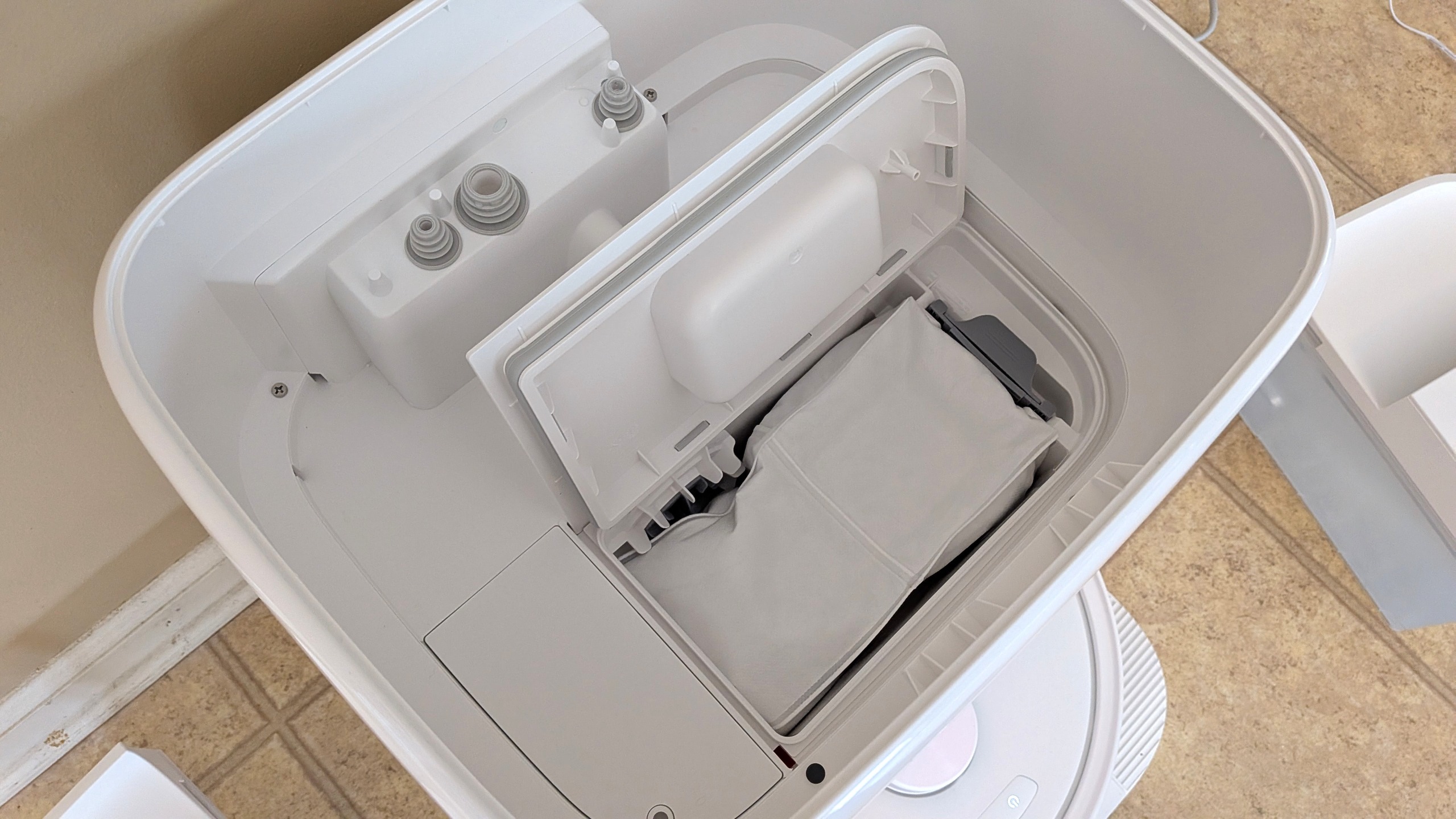
Setting the dock up is easy, involving just attaching the ramp to the front of the dock, filling the clean water tank and plugging it in. The more difficult part may be finding a place for it as it needs to sit on a hard floor with at least 1.5 inches either side and 27.5 inches of clear space in front of the dock. It also needs to be within reach of a power socket and somewhere you won’t trip up over it or mind looking at it everyday.
Smart home integration is included with it compatible with the Matter standard, Google Home, and Amazon Alexa
Roborock Qrevo 2 Pro: performance
- Excellent mopping on maximum settings
- Good vacuum performance
- Did get caught on charging cable
Set up is simple, you will need to find an appropriate spot for the dock on a hard floor with plenty of space either side. You then download the app, pair the robot and then you can send it on a discovery run around your house to build a map.
Once it has scanned the space you can then edit the map to combine or divide spaces into rooms, mark areas as no-go zones, manually designate floor types and mark things like curtains and furniture. I found that aside from ensuring the rooms are divided correctly I didn’t have to make any changes to get it to work well, with the carpeted areas successfully detected.

After setup you can use the app to kickstart cleans of the whole map, one or more selected rooms or a designated zone clean you can mark on the map. As well as ad hoc cleans you can set routines for different types of cleans from deep intensive cleans, to specific after dinner cleans of smaller zones or light maintenance vacuuming without mopping.
As the Qrevo 2 Pro has detachable mops, rather than vacuuming and mopping room by room it first goes around the carpeted areas of the whole space you are cleaning first. Once that is complete it returns to the dock to reattach the mop heads before cleaning the rest of the hard floors.

Cleaning performance is OK on hard floors, although it can lead to some spreading of larger debris as the edge cleaning arm sent rice grains skittering across the floor. It did better with fine particles, although there was still some tea visible on a pass on the standard cleaning settings.
It handled larger particles much better on carpet, picking up almost every single grain of rice, although there was some tea left after the first pass.
As with most robot vacuums, its edge cleaning wasn’t great on carpet, but the sweeping brush does well to move material into the vacuum’s path on hard floors..
During the obstacle avoidance tests it did well to identify the shoe and sock, staying clear as it cleaned around them but it did go over the charging cable, getting it stuck in the cleaning brushes and needing me to rescue it before it could continue cleaning.
During my mopping tests on first pass it did a reasonable job taking up a fair bit of the ketchup although there was a hint of the soy sauce remaining. Trying a second clean on maximum water flow and cleaning settings it did a fantastic job cleaning off even the dried on patches of ketchup.
While the most intensive cleaning took some time and left the floor relatively wet, it was some of the best mopping I have ever seen from a robot. You do need to delve into the settings to get the best performance and it probably is only practical for small zone cleaning but it’s still a lot less effort than getting out a mop and bucket.
On regular cleaning settings it can manage around five regular rooms before needing recharging so depending on your home it may need to recharge before completing a full clean. Recharging takes around four hours.
It’s not loud in operation, registering around 60db while cleaning on carpet. The dock emptying is a little louder, topping out at 69db (around the level of normal conversation), although this is pretty brief so shouldn’t be too disruptive.
The Qrevo 2 Pro uses dust bags so emptying it of dirt is quick and neat, although that does add ongoing costs to using it. You will also need to empty the waste water and refill the clean water tanks regularly which is easy to do (as long as you leave enough clearance room above the robot) as these lift out of the dock and then can be unclipped open for emptying or filling.
Smart home integration worked well for starting a whole house clean but I did have a little trouble using the room clean function for custom named rooms. Naming a room one of the default names such as Kitchen or Living Room worked fine, but a custom name such as Utility Room sparked a whole house clean instead.
While custom room names would be helpful, even getting default room cleaning to work is not a guarantee with any of the robot vacuum cleaners I have tested so, relatively, this is a success.
- Performance score: 4.5 out of 5
Roborock Qrevo 2 Pro: app
- Easy setup
- Clear house map
- Can set frequent types of clean and schedule cleans
The app is simple to use, although I did find it can sometimes get a little lost if you select your cleaning mode too quickly, meaning you have to move to another mode and back again before getting the options you need.
Once you select the robot you are shown the map of your home and have four tabs to select the type of clean you want, ‘Full’, ‘Room’, ‘Zone’ and ‘Routine’. ‘Full’ starts a clean of the whole map and to the left of the play button there is a button for adjusting the type of clean including whether you want to vacuum and mop, just vacuum or just mop. There are also controls for the level of suction, waterflow, amount of times you want the robot to clean the area and the intensity of the cleaning pattern.

(Image credit: Future)


Room allows you to select one or more rooms to clean, while Zones lets you pick multiple rectangular sections of your chosen size on the map for it to clean, allowing you to spot clean specific sections of floor.
‘Routine’ is the final option and allows you to create shortcuts for regular types of clean that will then be available from the opening screen on the app. This is useful for setting up things like zone cleans that focus around a dining table following a meal or if you want a predefined deep clean compared with a light maintenance clean.
Despite the name, ‘Routine’ doesn’t include any scheduling functionality by default. That is hidden somewhat in the settings menu, but can be used with scheduled cleans (if your home doesn’t regularly have bits of Lego on the floor like mine does).
Should you buy the Roborock Qrevo 2 Pro?
|
Attribute |
Notes |
Score |
|---|---|---|
|
Value for money |
Even at full price the Qrevo 2 Pro represents good value and at a discount price it is a fantastic deal. You will need to consider the price of disposable dust bags in the running costs but you’ll be hard pressed to find these features and performance for less. |
5/5 |
|
Design |
The design is more focused on function than form but it is unfussy and designed to fit into most homes. The tall mounting of the lidar scanner will stop it from cleaning under low furniture. |
4/5 |
|
Performance |
Vacuuming performance is good and mopping is excellent although It did have trouble picking up on a charging cable in our object avoidance tests leading it to get stuck. |
4.5/5 |
|
App |
The app makes it easy to control, with simple options for choosing the type and location of cleans as well as a clear map of your home. |
5/5 |
Buy it if
Don’t buy it if
How I tested the Roborock Qrevo 2 Pro
I tested the Roborock Qrevo 2 Pro over a period of over two weeks, using it as an everyday cleaner of a busy household.
As well as day to day use I put it through a series of tests, assessing its performance picking up fine particles and larger debris on carpet and hard floor by having it clean an area with a set amount of rice and tea sprinkled on the surface. Edge cleaning was also tested using tea on the edge of a carpet and hard floor area.
Mopping performance was tested by having the robot clean up a spill of soy sauce, as well as tackling a patch of dried ketchup. After an initial pass on regular settings, this was then retested with cleaning settings set to maximum.
First reviewed September 2026

Follow TechRadar on Google News and add us as a preferred source to get our expert news, reviews, and opinion in your feeds.







.jpg)

















































You must be logged in to post a comment Login