Keep track of important updates without having to open the app every two minutes.
Adnan Ahmed for Engadget
At a time when most Android phones had already switched to tiny hole-punch cutouts to house their front-facing cameras, the iPhone 14 Pro launched with a long pill-shaped cutout. Apple has used this as its standard since then, aside from the budget “e” phones and iPhone Duo, and even made it smaller for the iPhone 18 Pro series.
This is because iPhones pack more than just a camera inside the cutout; there are additional sensors required for Face ID to work. Instead of hiding the pill with cleverly designed wallpapers, Apple leaned into it with the Dynamic Island, using the surrounding area to turn an otherwise awkward design constraint into a useful part of the iOS experience.
Your iPhone’s Live Activities show up on the Dynamic Island when using your phone. They display information you might want to keep an eye on without having to constantly switch back to the associated app: timers, navigation directions, music playback and sports scores can be displayed as Live Activities. Many third-party apps like food delivery and flight tracking services have also adapted to use the Dynamic Island.
Advertisement
Live Activities should be enabled by default, but if you don’t see them for certain apps, check if they’ve accidentally been turned off. On your iPhone, navigate to Settings > Apps and select any app that’s been giving you trouble. Make sure the Live Activities slider is enabled. Though Live Activities work independently of regular notifications, you might want to also enable notifications for the app if you’re not seeing the expected updates.
These activities will also appear on the Lock screen when you’re not using your device. To make sure this is enabled, visit Settings > Face ID & Passcode. Confirm your passcode, then scroll down to the Allow Access When Locked section and be sure Live Activities is on.
Advertisement
Using Live Activities on CarPlay
Adnan Ahmed for Engadget
CarPlay makes it easy to access vital info from your iPhone without getting too distracted while driving. As part of this, it can display Live Activities so you can track the status of a food delivery or updates for an upcoming flight.
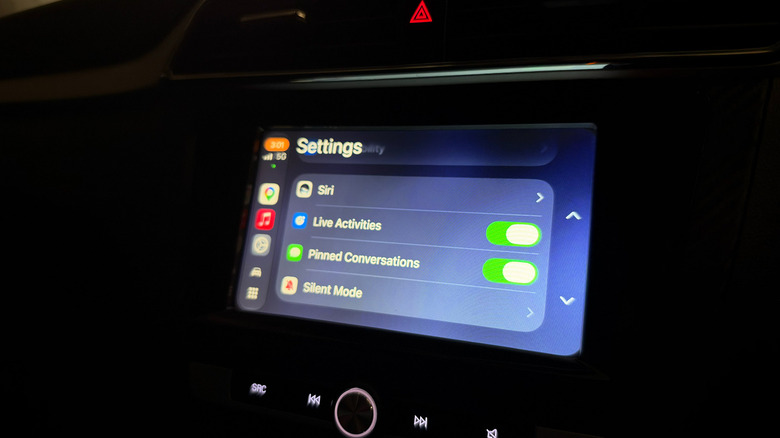
Live Activities from your iPhone are automatically displayed on the CarPlay Dashboard, the split-screen view to the left of your app list. If you’re using an app that covers the entire screen, Live Activities will still be shown as notifications at the bottom of the display. If they become too distracting, you can always turn the feature off in CarPlay or disable Live Activities for specific noisy apps, as above.
In case you’re not seeing them, open the Settings app in CarPlay, scroll down and make sure the Live Activities toggle is enabled. You should also confirm the Suggestions in CarPlay (or Suggestions in Dashboard) option is turned on. If they still don’t appear, try turning off Driving Focus if it’s running.
Besides this, you can add widgets to CarPlay for quick controls and information from apps without having to open them. Widgets live in the leftmost section of the CarPlay Dashboard. Spend a little more time in the Settings app, and you’ll discover more ways to customize how CarPlay looks on your car’s display.
The Telegraph reports that the nutritional value of fruit and vegetables has fallen by up to 50% since the Sixties, according a new study from researchers at startup studio Deep Science Ventures.
The study “found that humans needed to consume twice the number of vegetables to get the same level of minerals such as potassium, magnesium or copper as would have been present in their food 60 years ago.”
The study found that many crops had lost 20% to 50% of several key nutrients… The decrease in nutrient and vitamin value is thought to be down to declining soil quality and crops being selectively bred for their ability to grow quickly, rather than there being any focus on their health benefits… It raises the prospect that the advice to eat five portions of fruit and vegetables a day, introduced in the UK in 2003, may need to be updated. The report added that people on weight-loss drugs could be most at risk from the lack of nutrients, as the treatments could cause them to consume less food…
Nature-friendly farming techniques, such as planting crops that restore nutrients to the soil, could help improve the health benefits of vegetables, according to the researchers.
Advertisement
In short, according to
Will Summers, a senior associate at the firm, “we’ve been quietly hollowing out what’s inside our food.”
Thanks to Slashdot reader Bruce66423 for sharing the article.
3D scanners are useful for everything from reverse engineering and automotive work to creating digital models of physical objects. However, many professional scanners still rely heavily on a connected computer, which can make scanning large objects or working in the field more cumbersome. To address this problem, Creality launched the Sermoon P1S. The scanner has onboard processing, 256GB of storage, and a 6-inch touchscreen, letting users capture objects, check scan coverage, and do common processing tasks without constantly connecting to a computer.
Four Scanning Modes & High-End Hardware
The Sermoon P1S combines 34 cross laser lines, seven parallel laser lines, a blue laser line, and NIR structured light. These modes are designed for different types of objects and surfaces. The 34 cross laser lines focus on larger surfaces, while the seven parallel lines target finer details. The single blue laser line can help capture recessed areas such as grooves and deep holes. NIR structured light is designed for smaller and medium-sized objects and detailed surface capture.
For blue-laser scanning, Creality claims up to 0.02mm accuracy, with volumetric accuracy of 0.02mm + 0.08mm/m. Blue-laser scanning reaches up to 60fps in standalone mode and 100fps when connected to a PC.
The scanner weighs 807 grams with its battery and runs on an 8-core Qualcomm CPU clocked at up to 3.36GHz, an Adreno 740 GPU, and an FPGA. It also has 16GB LPDDR5X RAM and 256GB UFS 4.0 storage. Users can operate the scanner independently or connect it to a PC wirelessly or through USB 3.0. Wi-Fi 7 enables wireless connectivity, while two replaceable 3,300mAh batteries and PD 3.0 fast charging support longer scanning sessions. The P1S can also operate outdoors, with blue-laser scanning supporting environments up to 110,000 lux. With the included NIR filter, NIR scanning supports up to 80,000 lux.
Creality’s software supports scanning, optimization, and basic model processing, with support for STL, OBJ, and PLY formats. It also includes AI-assisted hole filling to help repair missing surfaces. Users can then move the resulting models into CAD, 3D modeling, or fabrication software. Creality says it will continue updating the scanner through OTA updates. The Creality Sermoon P1S is available worldwide from September 22, 2026, through the Creality Store. It normally costs $2,299, but an early-bird price of $2,099 is available through October 12, offering a $200 discount.
Apple could add a personal touch to its upcoming iPhone Duo launch, letting buyers see their names on the screen the first time they turn on their new phones. According to Bloomberg journalist Mark Gurman, Apple retail stores in the US will have a system to customise the device’s initial greeting, so it displays a message such as “Hello, Mark” instead of the usual generic welcome.
Fun little touch for the iPhone Duo launch: Apple retail stores will have a system to customize the boot of the device with the buyer’s name so it says “Hello, Mark” (for example) when it turns on for the first time. (US only, Duo only, English and Spanish).
The feature is expected to be exclusive to the iPhone Duo and limited to the US, with support for English and Spanish. It is a small change, but one that could make unboxing a new iPhone feel a little more personal.
Apple is adding a personal touch to the iPhone Duo experience
The custom greeting is a small software detail, but it fits Apple’s broader approach of making its products feel personal from the moment users start using them. Instead of seeing the same welcome screen as everyone else, buyers could see their own names appear during the initial setup.
Advertisement
Apple
According to Gurman, the feature will be available only at Apple retail stores in the US, and only on the iPhone Duo. Customers can choose between English and Spanish. Apple has not announced whether the personalisation will extend to online orders or other iPhone models.
The feature is also a reminder that Apple’s first foldable iPhone is being treated as a special launch. The iPhone Duo opens into a 7.6-inch display and has a 5.4-inch outer screen when folded. Apple has positioned it as a device for multitasking, gaming, and watching content, rather than simply a conventional iPhone with a hinge.
iPhone Duo starts at $1,999 in the US
The timing is notable because Apple’s first foldable iPhone is approaching its retail launch. The company says US pre-orders begin on October 16, with availability starting October 23. The iPhone Duo starts at $1,999 for 256GB, with higher-capacity versions costing more.
Apple
The device opens into a 7.6-inch inner display and has a 5.4-inch outer screen when folded. Apple is pitching it as a device for multitasking, gaming and watching content, combining the flexibility of a larger screen with a phone-sized design.
For US buyers considering a $2,000 phone, a personalised greeting will hardly be the deciding factor. Still, it is a memorable flourish for a product that marks Apple’s entry into the foldable-phone market. The bigger questions remain how well the folding design holds up, how useful the larger display proves in everyday use, and whether buyers think the price is justified.
For now, the name-on-screen feature remains an unconfirmed retail detail. Apple has yet to explain exactly how stores will set it up or whether the option will expand to other devices.
[This is a sponsored article withMDEC, but the editorial team had full control over the content. ]
If you haven’t been living under a rock, you’d know that Malaysia is now at the centre of Southeast Asia’s AI infrastructure boom.
New data centres are continuously being announced across Johor and the Klang Valley, with the most recent ones being China’s Alibaba and Singapore-based Digital Decarbonization Solutions Platform (DDSP).
As more and more global technology firms expand their cloud and AI capabilities here, it’s easy to get awed by the billion-ringgit investment flowing into our digital economy. These investments also reflect Malaysia’s growing strengths under the Malaysia Digital (MD) national strategic initiative, which is accelerating the development of a robust digital and AI ecosystem.
Advertisement
But have you ever wondered why Malaysia is chosen for these expansions?
Out of all our SEA-blings, why Malaysia?
Today, Malaysia is one of the few countries in the Southeast Asia region that has built something worth betting on before the hyperscalers arrived.
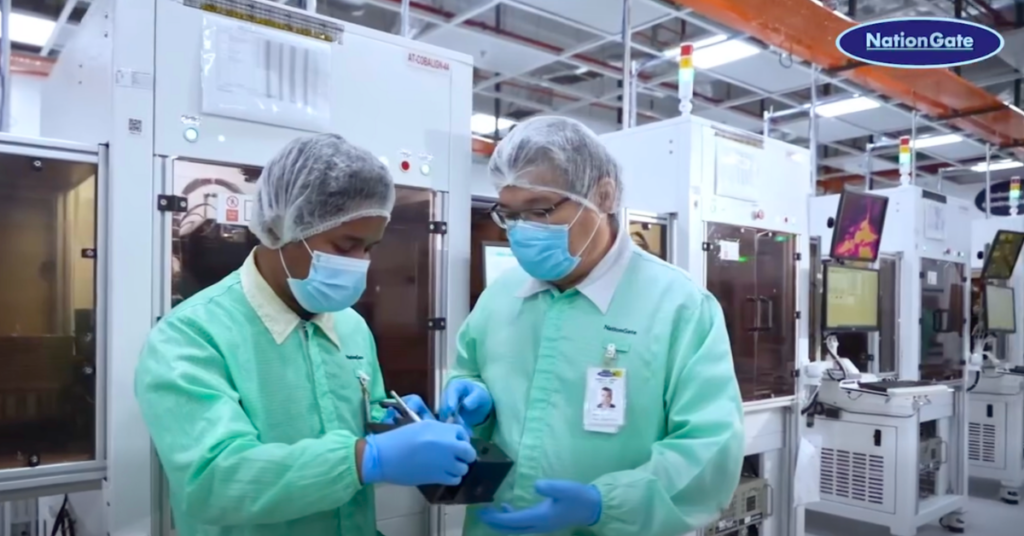
NationGate, a Penang-based manufacturer, had spent years quietly qualifying for one of NVIDIA’s most exclusive global partnerships. They’re currently one of only four companies across all of Asia that have earned the right to assemble NVIDIA’s most advanced AI servers.
Similarly, SNS Network in Cyberjaya is making high-performance GPU computing accessible to businesses that would otherwise struggle to afford the hardware themselves.
Advertisement
MDEC’s Founders Center of Excellence (FOX) programme has also assembled a cohort of high-growth Malaysia Digital (MD) status software companies, giving them the strategic support to scale, expand regionally and contribute to Malaysia’s growing AI ecosystem.
So how does each layer actually work? Let’s break it down.
The hardware layer: Building the machines that power AI
Image Credit: NationGate
You probably won’t see NationGate’s name on your AI tools, but their systems run on the infrastructure the firm helped build.
Founded in 2010 by Datuk Ooi Eng Leong and his wife Tan Ah Geok, NationGate started as a general electronics manufacturing services provider before pivoting into AI server assembly. That pivot proved timely.
Image Credit: NationGate
As demand for AI infrastructure accelerated worldwide, NationGate emerged as one of its beneficiaries. In just 2024 alone, the firm’s revenue reportedly surged from RM638 million to RM5.27 billion, an increase of more than eightfold.
Beyond the NVIDIA partnership, what makes NationGate’s position defensible is its operational depth. The company assembles servers using NVIDIA’s H200 and B200 AI GPU chips—among the most sought-after in the world—and ships them primarily to Singapore, Malaysia, and Thailand.
Advertisement
Image Credit: NationGate
It also offers servers using the older H100 chips and Intel rack servers, positioning NationGate to serve both cutting-edge AI workloads and more cost-sensitive enterprise deployments. This diversification is highly important as AI infrastructure demand continues to expand faster than supply can keep up.
The access layer: Putting GPU power within local (and global) reach
As one of Malaysia’s leading ICT distributors and super server suppliers, SNS Network is far from a new player in the AI boom.
The Ipoh-founded company built its name in the local tech supply chain as a distributor of hardware and servers to businesses. But as competition in AI server distribution grew, SNS Network shifted its focus into GPU-as-a-Service (GPUaaS).
Image Credit: SNS Network
Called SNS AI Factory, it’s a fully managed AI cloud infrastructure service built with NVIDIA and Dell Technologies. Instead of buying expensive hardware, companies can rent computing power for workloads across industries like financial services, healthcare, retail, manufacturing, and telecommunications.
Its GPUaaS also addresses another challenge facing AI adoption: data sovereignty.
For banks, hospitals, and government agencies, sensitive data often cannot be freely stored or processed overseas due to regulatory and security requirements. By keeping the infrastructure in Malaysia, companies can easily overcome these barriers to adopting AI.
Advertisement
Image Credit: SNS Network
Pricing starts at around RM35,000 per GPU per month, as SNS Network aims to offer more companies access to AI infrastructure without large upfront costs. “[This] allows (companies) flexibility to scale their computing needs on demand,” stated its Managing Director, Ko Yun Hung.
The intelligence layer: What gets plugged in
Hardware alone doesn’t build an AI economy. Data centres and GPU clusters are only the foundation. What matters is what gets built on top of them.
That’s where Malaysia’s MD status ecosystem and the MDEC Founders Centre of Excellence (FOX) programme come in. An invitation-only initiative, FOX provides Malaysian companies with strategic support, investor access, and regional expansion opportunities to scale up.
Three MD status companies show how this plays out.
Glem.ai tackles the deployment gap. Its AI platform helps large organisations, regulated industries, and government users scale AI deployments without being locked into a single vendor.
Advertisement
Image Credit: Glem.ai
This addresses the practical roadblocks that often prevent AI projects from moving past the pilot stage. As its CEO, Ryan Tay, puts it plainly: “Our focus has always been on solving the real barriers that stop enterprises and institutions from deploying AI at scale: data sovereignty, governance, and production reliability.”
Since its launch last year, the company has won the Talent Innovation Award at ITEC 2025 in Beijing, showing what’s possible when local innovation is nurtured with the right support and opportunities to scale internationally.
Image Credit: Glem.ai
On the other hand, DeltaSpike addresses the blind spot that tends to get discovered too late. As AI becomes more integrated in critical business workflows, it also becomes a target. This gap is what DeltaSpike aims to fill with its Agentic SOC: an intelligence-drive, automation-first security operations model designed to proactively contain security threats.
“Our goal is to embed intelligent, proactive protection into the DNA of business growth. This investment serves as a mandate to accelerate Malaysia’s cybersecurity capability while providing a robust security anchor for Southeast Asia,” shared its Chairman,Taufik Othman.
Image Credit:DeltaSpike
DeltaSpike’s vision has since attracted institutional backing. In April 2026, DeltaSpike secured a strategic investment from VentureTECH to accelerate its capabilities and regional expansion across Southeast Asia.
Last but not least is Cloud Space, a cloud and AI infrastructure solutions provider focused on helping businesses deploy scalable digital systems across regional markets.
Google Cloud’s President of Global Partner Ecosystem, Kevin Ichhpurani, commended the firm in 2025, stating, “Cloud Space’s commitment to delivering innovative cloud solutions and measurable outcomes for clients has made a significant impact over the past year.”
Image Credit: Cloud Space
More than the sum of its parts
Taken on their own, NationGate, SNS Network and MD status companies Glem.ai, DeltaSpike, and Cloud Space are already strong stories. But what makes Malaysia’s position interesting is how they connect.
Each layer feeds the next. Easier access to GPU infrastructure lowers the barrier for enterprises to experiment with AI, which drives demand for local AI applications. As adoption grows, it increases the need for more computing capacity underneath.
Over time, this builds a full ecosystem that continues to attract foreign investment, accelerate AI adoption and reinforce Malaysia’s position as a regional digital hub.
As Malaysia’s AI ecosystem continues to grow, the capabilities being built today will help advance the aspirations of Malaysia Digital 2030 (MD2030) while laying the foundations for Malaysia’s vision of becoming an AI Nation by 2030.
Turkey will bar social media platforms from serving children under 15 from 1 November, under rules published in the country’s Official Gazette, Inci Ozbek reported for Bloomberg.
Platforms must check users’ ages when they sign up, using a token from Turkey’s e-government system. Anyone found to be under 15 must be blocked.
Existing accounts must be checked by 31 March 2027, and those held by under-15s shut down.
Strict limits for older teens
Accounts for 15 to 17-year-olds will be private by default and filtered. They cannot show personalised ads or offer livestreaming, and platforms must block screenshots of them.
Advertisement
Teens can only message accounts they already follow, and endless scrolling feeds must be switched off, Daily Sabah reported.
Parents must get tools to manage settings, limit screen time and approve purchases.
The rules cover platforms including Instagram, Facebook, X, TikTok, Snapchat, YouTube, WhatsApp, Telegram, Discord and Reddit, Daily Sabah said.
Fines of up to 3%
Firms that break the rules face fines of up to 3% of global revenue, ad bans and cuts to their internet bandwidth under Turkey’s internet law.
Advertisement
Parliament passed the law in April, a week after a school shooting.
Turkey joins a growing list of countries trying to keep children off social media. Australia led the way, but its under-16 ban has struggled with enforcement.
Valve recently began shipping its long-awaited VR headset, the Steam Frame. Now, there is a hardware reference repository that includes everything a budding modder might need, and then some.
No need to 3D scan or break out the calipers if one wants to design their own add-ons.
Want to design and 3D print some add-ons, or a carrying case, or some other doodad? There’s no need to break out the calipers or 3D scan the hardware. The repository contains STEP format models of the VR core module, head strap, and controllers, so it’s as easy as possible to design things that’ll fit. The location of the IR tracking LEDs embedded in the controllers is also documented, so one can ensure their design doesn’t occlude them.
That’s not all. The Frame has a user-accessible hardware expansion port at its front. This port exposes two interfaces: high-speed MIPI camera and PCI Express. This expansion port is documented in the repository, and even has a simple reference design built in both KiCad and Altium.
We’re glad to see Valve maintain their hacker-friendly hardware design with the Steam Frame. Demand for The Frame outstrips supply so far, so if you’re on the waitlist, you might want to browse the repository and get an early start on whatever customizations you have in mind while you wait for your confirmation. And when you get something working, drop us a note on the tips line!
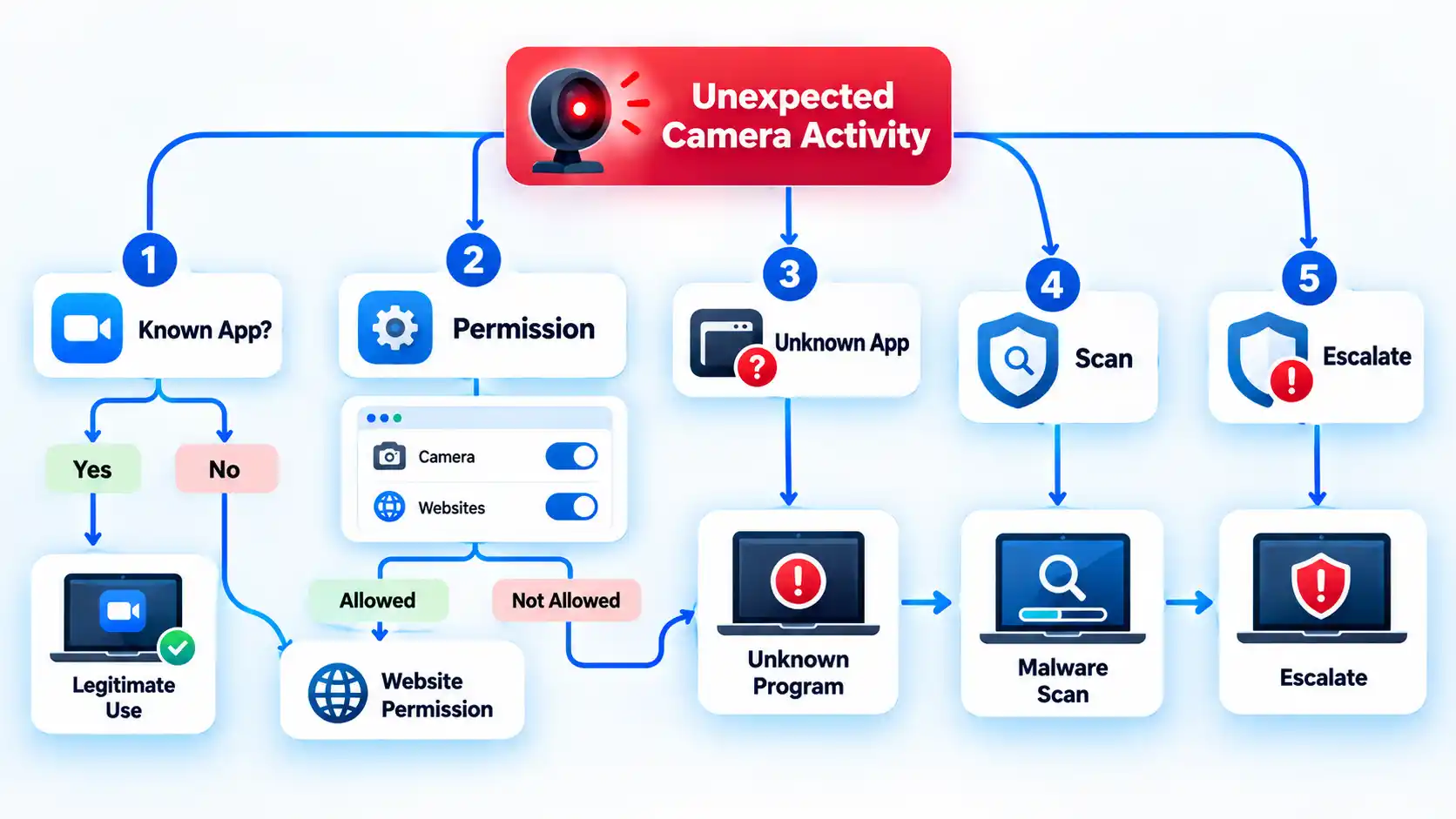
If your webcam turns on when you did not expect it, investigate the activity before assuming someone has hacked your computer. A Windows camera light or notification, or the green camera indicator on a Mac, can confirm that the camera is active, but you still need to identify what is using it and whether that use is legitimate.
Start with ordinary causes such as a video-call app, browser tab, or facial sign-in feature. If those do not explain the activity, check camera permissions and then move to malware checks only when the evidence justifies it.
What an Unexpected Webcam Indicator Can Tell You
A camera-use indicator answers one important question: is the camera active? It does not automatically tell you who started it or why.
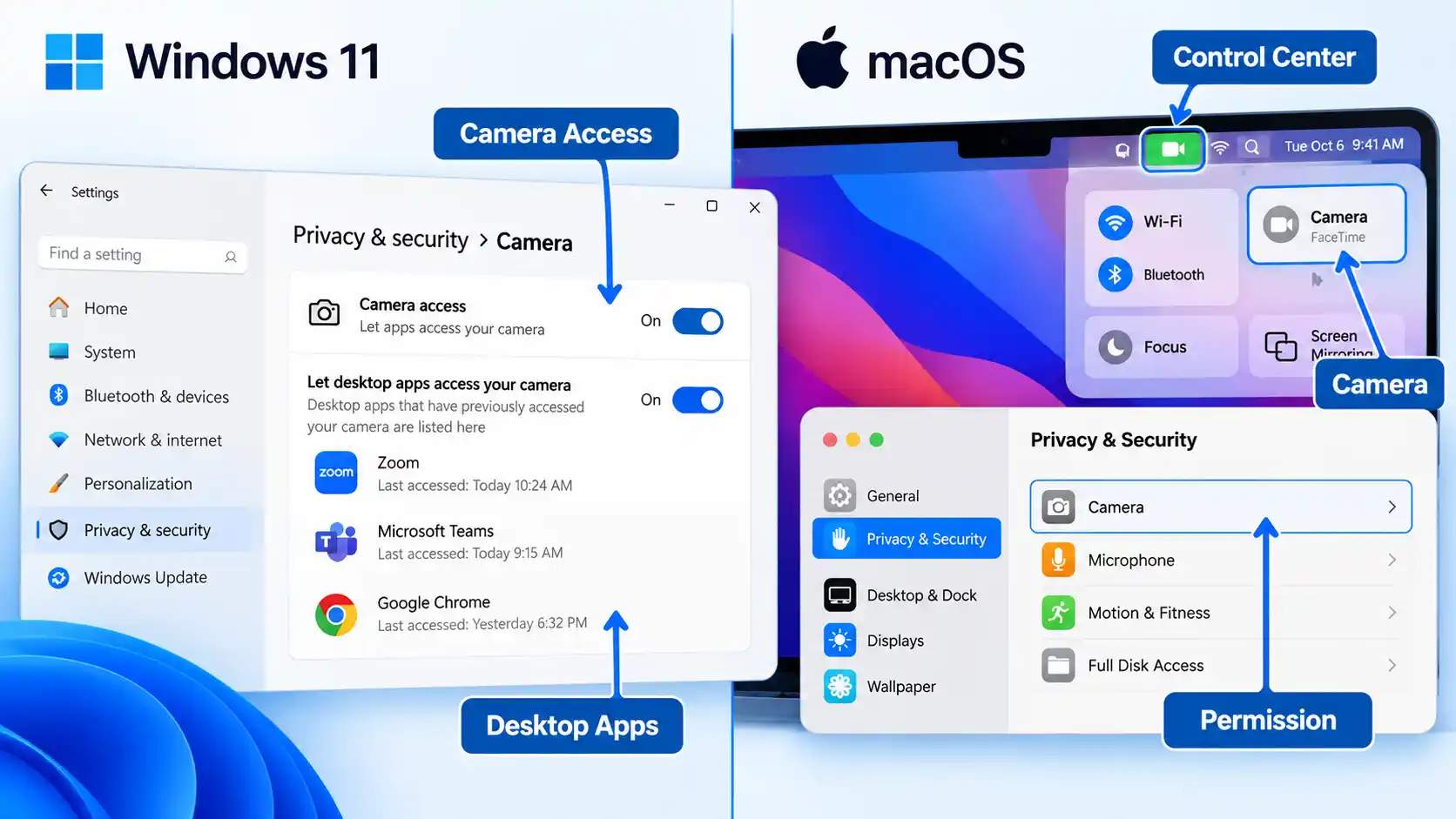
On Windows 11, a hardware camera light turns on when the camera is active if the device has one. On computers without a camera light, Windows shows a notification when the camera turns on or off. That activity may come from software you intentionally opened, a website, a Windows feature, or something you do not recognize.
On a Mac, a green privacy indicator means a camera is being used. Opening Control Center may also show which app is currently using the camera. For the built-in Mac camera specifically, Apple says the hardware is engineered so that the camera cannot activate without its green indicator light also turning on. Do not assume the same hardware behavior applies to every external USB webcam.
General symptoms such as a slow computer, crashes, redirects, or unfamiliar browser additions can occur with malware, but they are weak evidence of webcam misuse by themselves. The FTC lists these kinds of behaviors as possible signs of a broader malware infection, not proof of camera compromise. A camera-specific indicator or identifiable camera-using process is more useful when answering the narrower question of what used your webcam.
Understanding camera and microphone permissions also helps you interpret what your operating system can actually block, record, or show.
Advertisement
Check Your Webcam for Unauthorized Use Step by Step
Use the least disruptive checks first. The aim is to find a normal explanation where one exists, then narrow the investigation only if the camera activity remains unexplained.
Note exactly when the camera activates. Check whether the light or notification appears during sign-in, after opening a browser tab, when a meeting app starts, or while no obvious camera-using software is open. The timing gives you a starting point without treating the event as proof of compromise.
Close software that normally uses the camera. Quit video-call apps, messaging programs, camera utilities, and browser tabs that recently requested video access. If the indicator turns off after you close one of them, that software may explain the activity. Reopen it intentionally and close it again before treating the match as confirmed. If the indicator stays on, continue checking.
Use your operating system to look for the responsible software. On Windows 11, open Start > Settings > Privacy & security > Camera and review the apps Windows shows. Under the desktop-app section, Windows can list programs it has detected interacting with the camera; selecting a listed app can provide information about the specific file involved. On a Mac, open Control Center while the green privacy indicator is visible and check whether macOS identifies the app currently using the camera.
Review camera permissions. In Windows 11, remain at Settings > Privacy & security > Camera and turn off access you do not need. Microsoft Store apps can have individual switches, while traditional desktop programs use the broader Let desktop apps access your camera control. On a Mac, open Apple menu > System Settings > Privacy & Security > Camera and review the installed apps that have requested camera access.
Check website camera permissions. If the unexplained activity happened while browsing, inspect the browser separately. In Safari, open Safari > Settings > Websites > Camera. In Microsoft Edge, open Settings > Privacy, search, and services > Site Permissions > All sites, select the relevant website, and review its Camera setting. A browser can have operating-system camera access while individual sites still have their own permission decisions.
Revoke questionable access and test again. Remove camera permission from an app or site you do not recognize or no longer need, close it completely, and watch what happens. If the unexplained activation stops, that software becomes a likely explanation, but the result does not prove that it was malicious or that no other camera user was involved.
Escalate if the camera activity remains unexplained. If the camera repeatedly activates after known apps, sites, and legitimate system features have been ruled out, move to the security checks below. Repeated unexplained use is more concerning when it appears alongside an unfamiliar program, a security warning, or a suspicious download.
What Windows 11 Can and Cannot Show About Camera Access
Windows can provide useful clues, but its Camera privacy page is not a complete history of every program that could ever reach the camera.
Open Start > Settings > Privacy & security > Camera. Microsoft Store apps that use the Windows permission system can appear with individual camera controls. Desktop apps work differently: browsers, traditional Windows programs, and many video-call applications are controlled through the broader Let desktop apps access your camera setting.
Windows can also show desktop applications it has detected interacting with the camera. For a listed desktop app, Microsoft says you can select it to see details about the specific file that accessed the camera or microphone. That can help when the displayed app name is unfamiliar.
There is an important limit. Some desktop apps can interact with camera hardware in ways Windows privacy controls do not fully govern. An application may install a driver, for example, and communicate more directly with the hardware. Microsoft also warns that desktop apps may not always appear in the Camera settings list.
Advertisement
For that reason, an empty or familiar-looking app list is useful evidence, but it is not absolute proof that no desktop program touched the camera. If unexplained activity continues, combine the permission check with the timing of the camera indicator and the security checks later in this article.
Also account for Windows Hello before treating sign-in activity as suspicious. Facial sign-in can use the camera even when ordinary app camera access is disabled.
What macOS Can Show About Camera Access
A Mac gives you two different clues: a live privacy indicator and a list of installed third-party apps that have requested permission to use the camera.
A green privacy indicator beside Control Center means a camera is in use. If you open Control Center while the indicator is present, the top of the panel may identify which app is using the camera. Check this before closing everything if you are trying to find the source of unexpected activity.
Advertisement
You can then open Apple menu > System Settings > Privacy & Security > Camera. The list contains installed apps that have asked to use the camera. Turn access off for software that does not need it.
Built-in Apple apps are an important exception to how that list should be interpreted. FaceTime, Photo Booth, and other apps included with macOS automatically have camera access and do not need to appear as third-party permission requests. Their absence from the list therefore does not mean they cannot use the camera.
Safari website access is separate as well. Open Safari > Settings > Websites > Camera to review site-level camera permissions. This matters when the camera activity began while a browser tab was open.
For the Mac’s built-in camera, the green hardware indicator has unusually strong diagnostic value because Apple states that the built-in camera is engineered not to activate without the indicator. Keep that claim within its proper scope: it does not establish how every third-party external camera behaves.
Advertisement
When Unexplained Camera Activity Becomes a Security Problem
One unexplained camera light deserves investigation. It becomes more concerning when the camera keeps activating after ordinary causes have been ruled out or when other evidence points to unwanted software.
For example, repeated activation deserves more attention if you also find an unfamiliar program, a security alert, or software you did not intend to install. By contrast, slow performance, crashes, browser redirects, or other general symptoms can occur for many reasons and should not be presented as proof that someone is watching through the webcam.
Malware is harmful software that can run on a device without the user’s knowledge and may steal information or perform other unwanted actions. Once credible malware evidence appears, the investigation should shift from one camera permission to the security of the entire computer.
On Windows 11, open Windows Security and select Virus & threat protection. You can start with a Quick scan, choose a Full scan to check every file and program, or open Scan options for other choices. If you are particularly concerned about persistent malware, Microsoft Defender Offline restarts the PC and scans without loading normal Windows, making persistent malware more difficult to hide or defend itself. Save open work before choosing the offline scan because the computer restarts.
Advertisement
macOS takes a different approach. It includes built-in protections such as Gatekeeper, Notarization, and XProtect. XProtect automatically detects and blocks known malware and can remediate infections. Apple describes these protections as automatic; it does not provide a universal user-facing “run XProtect scan” control comparable to Windows Security’s on-demand scan choices.
Broader habits that reduce malware risk while browsing can lower the chance of another infection, but they do not replace investigating the camera activity that brought you here.
The camera stays active after I close my video-call app
Check whether the app is still running in the background and close browser tabs that may have camera permission. Then use the Windows Camera privacy page or macOS Control Center to look for another camera user. If the indicator remains active after every known legitimate user is closed, continue with the malware and unfamiliar-software checks instead of assuming the first app was responsible.
Advertisement
The camera activates when I sign in to Windows
If Windows Hello facial recognition is enabled, camera activity during sign-in can be normal. Microsoft allows Windows Hello to use the camera even when regular app camera access is disabled. Investigate further only when the camera activates at times that facial sign-in does not explain.
My Mac’s green camera indicator appears unexpectedly
Open Control Center before closing apps and check whether macOS identifies the program currently using the camera. Then review System Settings > Privacy & Security > Camera. If no legitimate app or feature explains the activity and it keeps returning, move to the broader device-security checks above.
I revoked camera access, but the webcam still activates
First confirm that another app, browser site, or operating-system feature is not using the camera. On Windows, remember that desktop-app controls have limitations and some programs may not appear individually. If the activity remains unexplained after those checks, treat the permission change as inconclusive and continue with the security investigation.
How to Secure the Webcam After the Check
Once you have identified the cause or completed the security investigation, remove access that no longer has a clear purpose. Do not uninstall or delete unfamiliar software solely because its name looks strange; identify what it is first and use credible security findings to guide removal.
Advertisement
Turn off camera permission for apps that no longer need video access.
Remove persistent browser-site permissions that you do not recognize or use.
Uninstall software only after you have identified it as unwanted or a trusted security tool has detected it as harmful.
Keep the operating system, browser, conferencing apps, and security tools updated.
Use a built-in hardware shutter when your computer provides one, or unplug an external USB webcam when you want a clear physical barrier.
For the broader preventive setup, including physical camera controls and platform-specific permission hardening, you can secure your webcam on Mac and Windows PCs without turning every future camera event into a security investigation.
A webcam cover and camera permissions solve different problems: one physically blocks the lens, while the other controls software access. Neither should be treated as a complete substitute for the other.
Verify That the Camera Is Back Under Your Control
The investigation is complete when normal camera use still works, unnecessary access has been removed, and the unexplained activity that triggered the check no longer appears during ordinary use.
Verify the result
Your normal video-call or camera app can still use the webcam when you intentionally open it.
Apps that do not need camera access no longer have unnecessary permission where your operating system exposes that control.
Browser sites do not retain camera permission unless you intentionally want them to.
The Windows camera light or notification, or the Mac privacy indicator, appears during intentional camera use and stops after the legitimate camera-using app or site closes.
The unexplained camera activity that started the investigation does not immediately recur during normal use.
If malware was suspected, you have run the appropriate security scan or remediation steps and handled any detections before resuming sensitive account activity on the device.
If the webcam begins activating unexpectedly again and you still cannot connect the activity to a legitimate app, website, or operating-system feature, do not treat the earlier quiet period as proof that the problem is fixed. Return to the diagnostic steps and escalate the security investigation when the evidence calls for it.
According to Microsoft, the certificates used by Windows Update services have a preset expiration date and must be replaced periodically for devices to keep receiving monthly updates. The company noted that devices running Windows 11 25H2 and later already have the latest certificates, but those in older versions of Windows… Read Entire Article Source link
Seth Paul of Front Burner Studios and security startup Qinsay at the studio near Pike Place Market. (GeekWire Photo / Todd Bishop)
This week, we take the GeekWire Podcast to Front Burner Studios in Seattle, where we’re hosted by studio co-owner Seth Paul, who’s co-founder and CEO of security startup Qinsay.
We discuss the White House crackdown on Microsoft’s green-card sponsorships, which Vice President JD Vance announced just hours before President Trump awarded Satya Nadella the National Medal of Technology and Innovation. We talk about the contrast, and about how Nadella himself traveled that same path from H-1B visa to U.S. citizenship.
We also look at how Seattle-area startups raised a record $3.5 billion, driven largely by companies building physical things like rockets and satellites.
That leads us to Shield AI’s plans to build AI-piloted fighter jets in Des Moines, Wash., where a city FAQ assures residents the facility is not a data center.
The vintage Trident Series 70 console in the control room at Front Burner Studios, which Seth Paul drove across the country from Detroit in the middle of winter. (GeekWire Photo / Todd Bishop)
After we catch up on the news, Seth joins us to tells us about the studio, including the vintage console he drove from Detroit, and how he brings a musician’s approach to the startup world.
And in the final segment, it’s the return of the GeekWire Trivia Challenge.
Modders have spent years trimming Nintendo Wii motherboards down to the absolute minimum so they fit inside handheld shells that resemble the original Game Boy. Xenii refined that approach across earlier Xii-Boy versions until the latest Ultra revision arrived as a fully modular kit. Tito from Macho Nacho Productions assembled one, and the result sits at roughly 145 by 86 by 27 millimeters while still containing a genuine Wii board that has undergone the standard OMGWTF trim.
Assembly is based on Super Friction Fit connectors and custom boards that simply click together, with no messy internal wiring. Seven specialty PCBs handle power management, audio quality, visual output, and controller inputs. The RVL-DD board is essential for driving a high-quality 3.5-inch, 480p screen that looks far better than Composite Video ever did. With two 18650 cells producing 7000 milliamp-hours, you can play for two to three hours, depending on the game. The USB-C port not only charges but also transfers files, and a microSD card keeps the games once the optical drive is removed, which is a significant plus for space and power savings.
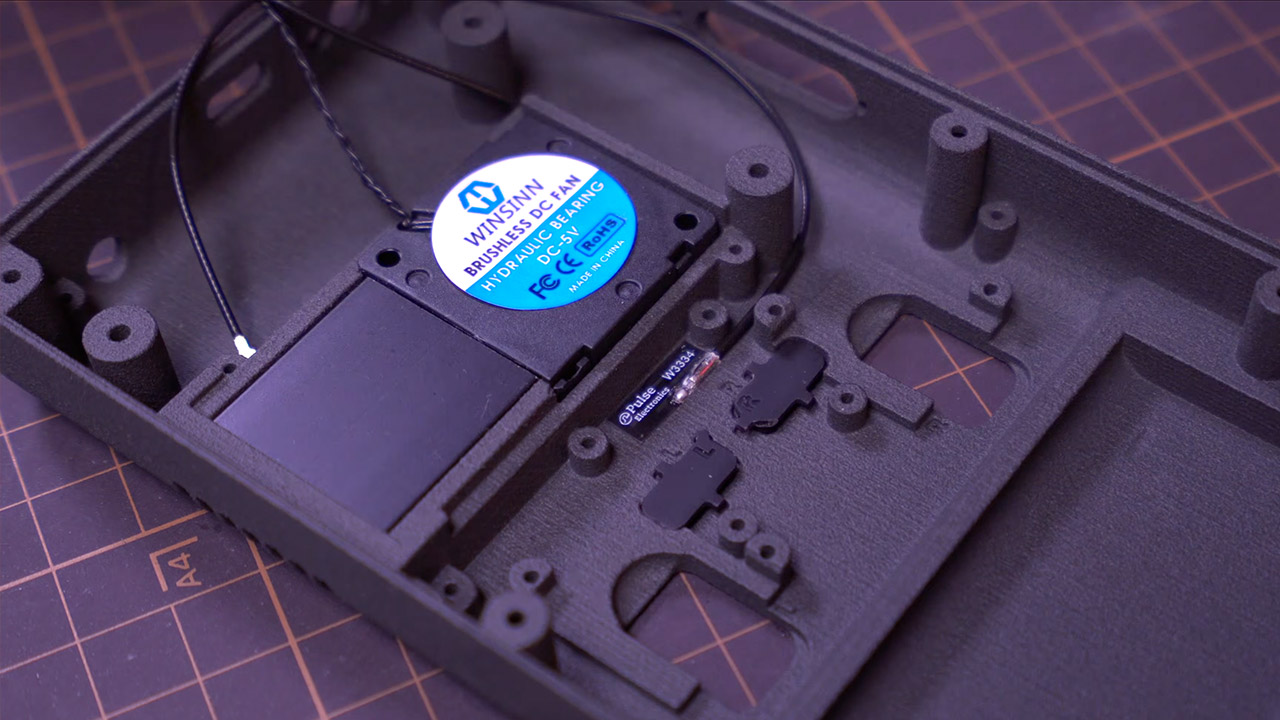
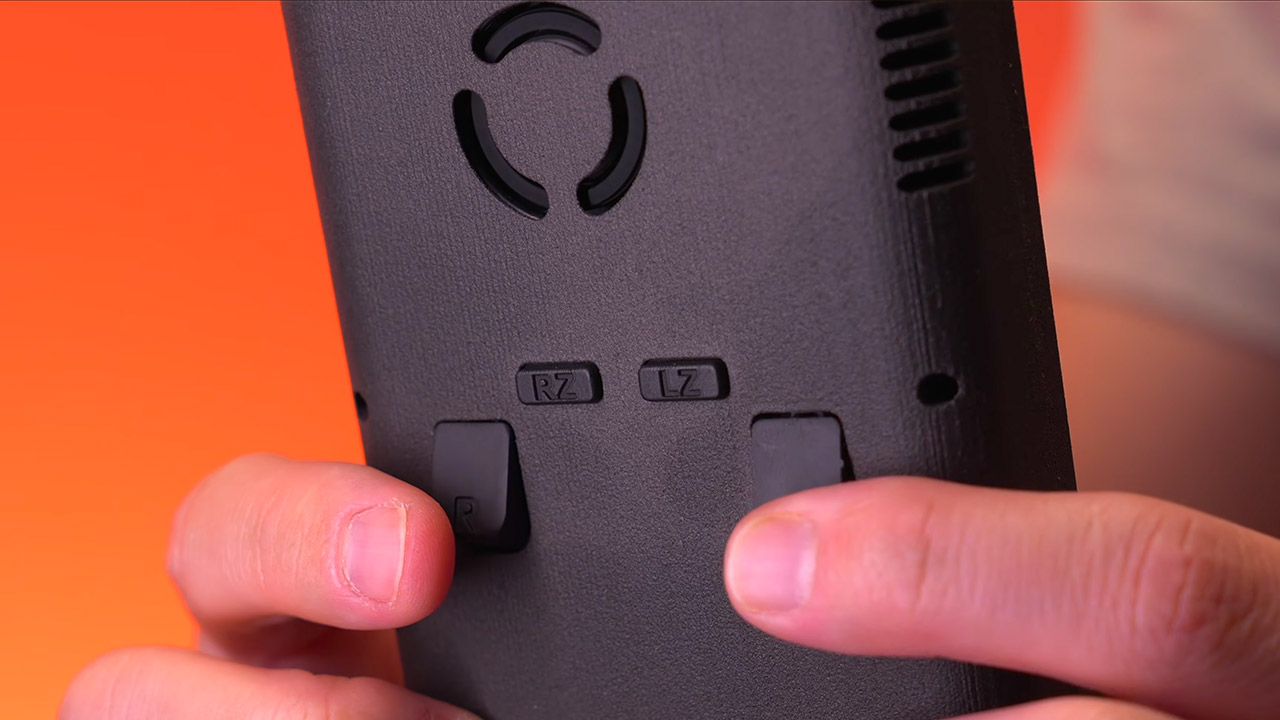
Face buttons and membranes are obtained from a donor DSi or DS Lite, or from aftermarket sets that the modder acquires separately, as the kit excludes these. With analog triggers employing the same Joy-Con mechanisms as the Switch, original GameCube titles retain full pressure sensitivity. Want to bring back online multiplayer? Simply plug in the extra WiFi and Bluetooth modules, and you can connect original Wii remotes for motion controllers as well as the infrared pointer. It also has an adjustable fan to keep the temperature down, volume and brightness can be controlled directly from the keys, and an RGB led indicates how the battery is doing. If you ever need to repair a part, the entire device can be disassembled with a screwdriver, and the design allows the key components to be pulled out with no issues.
Want to run Wii, GameCube, Virtual Console, or homebrew games at full speed? No problem, as long as you softmod the board and load it with the right software. The same board can also be inserted into a second Wii for larger screen viewing and shared saves. The alternative portable Wii builds required hours of soldering and permanent cabling, making repairs a headache.
This mod takes a step back and ensures that there is a clear separation between the main motherboard, power system, screen, as well as controls, so that the entire system remains functional and parts can be readily swapped out if necessary. Tito’s build demonstrates how all of the components fit together after they’re all plugged in, combining years of community changes into a single great-looking handheld that plays the whole library of original hardware titles without the need for software emulation.
































































You must be logged in to post a comment Login