

Join Mikko Hyppönen and security leaders from the NFL, CHANEL, and Atlassian for a two-hour digital summit on what AI-speed attacks change, what defenders should stop doing, and how to validate, decide, fix, and re-validate at machine speed.
Tech & AI
I Tested Two Groundbreaking Security Sensors in Spots Other Systems Can’t Go



Abode Security Sensors 2026
Pros & Cons
-
Accurate and speedy sensors for areas other security sensors aren’t made for -
Tests showed excellent performance on garage door and fence gate -
Abode’s hub automatically connects to sensors and makes setup one of the easiest I’ve done -
Offers a variety of automations and alert options through Abode’s intuitive app -
Sensors have many additional applications for sheds, tilting windows and more
-
Abode’s standard hub requires a permanet Ethernet connection -
The outdoor contact sensor design could use another pass
Security systems have stayed the same for years, with only minor advances, but 2026 is changing that. I’ve seen new sensors start to hit the shelves, from presence-sensing devices that can detect people without needing security cameras to small sensors that monitor tilting, opening and tampering all at once. But Abode’s latest offering is even more unique.
Abode has two new products available now, a sensor made to monitor garage door access ($35), and an outdoor access sensor ($50) designed for gates, sheds, barns and any door open to the elements. I got to try them both around my home, and found them particularly effective and easy to set up compared to many of the sensors I’ve tested.
If you’ve been looking for a special device to help monitor access to backyards, detached buildings on your property, or garage doors that always seem to get left open, these sensors are a remarkable answer, particularly if you already have an Abode system. If not, I’ll cover what you need to know from my testing.
Unboxing and setup

I was able to fully test an Abode starter security kit as well as its two new sensors for this review, providing a clear look at how the security brand functions. As far as setup experiences go, this has been one of my speediest. And I’ve tested many different systems.
Abode’s beginner’s kit is small, offering an indoor sensor, motion sensor and fob, along with the hub. I was pleased to find out, after downloading the app and connecting the hub, the other base devices automatically added themselves and made the setup process effortless, smoother than nearly any other security system except possibly Ikea’s affordable sensors.
Adding the new garage and outdoor sensors also proved quick, with pairing happening only seconds after I installed the batteries and typed in the activation code.

The one problem I have with Abode’s system is how the standard hub connects to Wi-Fi. This hub requires an Ethernet connection to your router or gateway, not only during setup but all the time. That’s a not-so-small problem if, like me, you have a router, gateway and other necessary devices already taking up all nearby outlets, which forced me to jury-rig a solution for the hub while I was testing.
Abode’s Iota hub does offer Wi-Fi, but that requires a more expensive upgrade to a $200 starter kit, not including extra sensors. It’s baffling that Abode’s standard hub still doesn’t support Wi-Fi when every other brand does. Check the outlets near your router before you choose this solution.
Garage sensor installation and performance

Equipped with internal gyroscope technology, Abode’s garage door sensor is made to detect orientation, and setup couldn’t be simpler. Using the included adhesive strips, I slapped the small monitor on my closed garage door, and it began accurately detecting open/closed states immediately in the Abode app.
Smart garage door motors and controllers can also do something like this, plus app controls, but this is one of the first standard home security systems to expand to the garage, and adding a single $50 sensor is far more affordable than replacing your garage controller entirely. Abode let me know if the garage was left open, and advised me on unexpected garage door movement when no one was at home, just as advertised.
Placing the sensor shouldn’t be any trouble, no matter what kind of garage you have. It sticks onto the inside of the garage door where there is plenty of space, and doesn’t require any complicated calibration. You may have to reset the sensor after placement to make sure it’s reading open and closed states correctly, but that, too, takes only moments.
Finally, you could use this sensor on anything that tilts up and down like a garage door, such as tilting windows, so it could have other applications in your home.
Gate sensor installation and performance

Abode’s outdoor access sensor proved more complicated than the garage monitor. Bulkier than most access sensors and equipped with weather-resistance capabilities, it’s made to tell when anything outdoors opens and shuts. The two parts sense when they are close or when they’ve moved apart, with a bit of extra leeway compared to indoor sensors, since outdoor fences and other access zones have varied designs and gaps.
The complex housing proved adequate, but was more frustrating to install and is in need of some future refinements. The screw-in backplate, for example, had pop-out sections to make room for the screws, but the plastic base was so thick I couldn’t put out the sections at all, not even with a hammer that nearly destroyed the base itself (I used another tool to carve them out eventually, not an ideal situation). And the battery casing was so tight and awkwardly designed, I was afraid forcing the batteries in would harm the nearby, unprotected circuitry.
In these ways, the design feels a little too close to a prototype model for me, and it probably needs another pass or two. But it works, and works very well, when it’s finally set up.
Connected to my old fence gate, the sensor accurately and immediately told me whenever it was opened or closed. I’ve found that gate left open more than a few times, so this gave me welcome peace of mind. I also tested it during a stormy downpour, which did nothing to affect the performance of the sensor.
You may want to turn off beeps from the hub that sound every time it alerts to the sensor being opened, but Abode provided a setting to do just that. However, alerts and monitoring aren’t the only things these sensors can do.
App automations that benefit from Abode’s support

One of the most impressive parts of Abode’s security platform is how it maintains connections to other third-party smart home gadgets, from Google Home connections to the rare-to-find Apple support for certain devices. There are also Abode’s own devices, including cameras and smart locks, which naturally work with the system

When Abode’s system is armed, triggering one of these garage or gate sensors can trip the system and sound a siren. But using the CUE automation tool in the Abode app, I found you can also set up many other types of automations, depending on what you want to activate.
This can include setting lights to turn on a warning glow if a fence gate is left open, or automatically unlocking your door when the garage is opened. You can also set times for these triggers to work, so they only function in the evening, on weekdays or only trigger after a certain time (the gate has been left open for 2 hours, for example). This adds more possibilities if you want to expand your smart home, but it’s not necessary to get value out of these sensors.

If you want to pay for an Abode subscription, you can add more features with plans starting at $80 a year, but these are mostly camera-focused, and I don’t think they’re necessary for these sensors at all.
Final thoughts on Abode’s new access sensors

Abode’s newest sensors offer exceptional performance in spots other sensors aren’t really made for. They’re also more expensive than typical sensors, and the outdoor sensor might need another design pass in the future, but I otherwise found them easy to set up and start using for customized, helpful alerts.
One word of caution: Abode’s standard hub requires an Ethernet connection, so consider where you’ll put it, and if you’ll need to run Ethernet cable anywhere during installation. Otherwise, this system sets itself up in minutes.
I’m enjoying this 2026 wave of security tech innovations. They’re finding new applications in the home – and finding them with success. Aqara’s multipurpose sensor is one such model. Abode’s proved another strong example, so if you’ve been looking for extended security capabilities outdoors or in the garage, take note of this update.

Continue Reading


Keio Corporation (Keio), a major private railway operator in Japan, said its network was hit by a ransomware attack over the weekend, disrupting some of its business systems.
Following a system failure in the early hours of Saturday, the company confirmed the attack and shut down its network to prevent additional damage.
The company said it is investigating the extent of the impact and whether the attackers accessed any customer or business partner information.
Keio is a large Japanese railway operator with 85 km of track and 69 stations, as well as a separate hospitality business of 25 hotels. The company has over 2,200 employees and a reported annual revenue of about $2.6 billion.
“In the early hours of September 26, 2026, we confirmed a ransomware attack on our group’s servers. We have reported the incident to the police and are conducting an investigation into the attack’s route and damage with the cooperation of external experts,” Keio says.
The incident appears to have affected only the hospitality side of Keio’s business, not train operations.
A separate announcement published on the company’s Keio Plaza Hotel Tokyo website is warning of possible delays on some customer-facing services.
Local media outlets have reported that the cyberattack disrupted the firm’s payment systems.
At the time of writing, BleepingComputer could not find a ransomware group claiming the attack on Keio.
BleepingComputer has contacted the company to request more information about the incident, and we will update this post with their response once it reaches us.
Tokyo Metro has also disclosed a cyber incident over the weekend in which attackers gained unauthorized access to its systems and accessed 59,000 member email addresses.
Although both Keio and Tokyo Metro are Japanese railway operators, it is unclear if the organizations were targeted in a coordinated campaign by the same threat actor.
Tokyo Metro is a major transit operator that runs nine subway lines covering 195 km and 180 stations, carrying an average of 7 million passengers daily.
The company said the breached systems contained only email addresses and that it has already identified and closed the security weakness the attackers used in this case.

Tech & AI
Microsoft may have just pushed Copilot into a completely different phase of its AI ambitions

- Home puts chats, delegated work, and Office documents inside one interface
- Code lets non-programmers describe software and have Copilot build it
- Autopilot can continue recurring work without waiting for another instruction
Microsoft has introduced a redesigned version of its Copilot AI platform which claims to combine chat, delegated work, and coding tools into a unified application experience for users.
The company says the update is meant to let individuals and organizations scale artificial intelligence across everyday tasks and long-term projects.
Three new capabilities anchor this release, including Home, Code and Autopilot, each aimed at a different kind of work.
Latest Videos FromTechRadar
Home brings Chat and Cowork together
The Home tool brings together two existing modes, Chat for quick questions and Cowork for tasks users delegate entirely, under one shared starting point.
Word, Excel, and PowerPoint now operate inside this same interface, letting users draft documents, budgets, and presentations without switching applications.
In these documents, Copilot is now grounded in Fabric IQ, pulling context from more than 20 million semantic models built in Power BI.
Edits made by colleagues or by the assistant itself appear in real time, so progress stays synchronized across a shared file.
A new plugin registry will let organizations manage Microsoft, partner and custom-built plugins from one central catalog starting this month.
Independent developers and partners can also publish plugins once for use across multiple Copilot surfaces under the new registry arrangement.
The Code tool allows non-programmers to describe an app, tracker or dashboard in plain language and have it built automatically.
This feature runs on the same underlying technology used in GitHub Copilot and can be hosted within a company’s own systems.
Autopilot operates without constant prompting
Autopilot, the third addition, is a persistent agent capable of completing recurring work without needing a new instruction each time.
It can run supplier reviews or similar multi-step processes, build schedules, contact stakeholders, and follow up on outstanding items independently.
Because it operates continuously in the cloud, work can continue late at night or whenever a person’s attention shifts elsewhere.
A related feature called Today, entering private preview in October, will summarize missed messages and pending tasks across mail and chat.
Microsoft is also tying spending controls to these tools through a system it calls FinOps for AI, letting administrators track usage.
Administrators can set spending limits, approve credit requests and restrict which AI models different teams are permitted to use each month.
Everyday tasks like quick answers or first drafts run on a fixed-price subscription, while agentic features use usage-based billing.
Code, Cowork and Autopilot all fall under this usage-based pricing model, alongside frontier models Microsoft refers to as Astra and Fable.
Home and Code are set to roll out through Microsoft’s Frontier program within weeks, and Autopilot enters private preview by month’s end.
Microsoft has not released independent data showing how widely the three features are being adopted, how accurate they are, or how much time they actually save.

Follow TechRadar on Google News and add us as a preferred source to get our expert news, reviews, and opinion in your feeds.
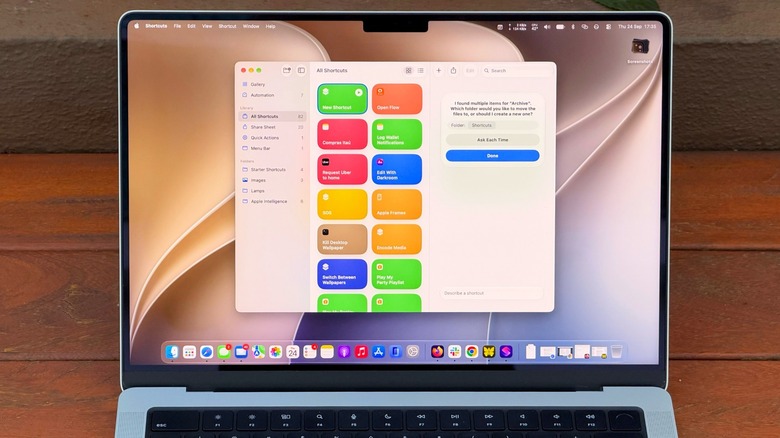
Automate your Mac with ease using Shortcuts and Apple Intelligence.
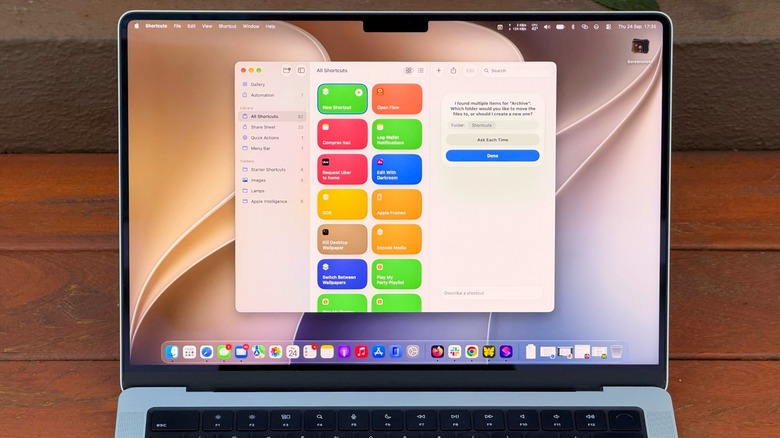
Shortcuts has been available on Mac since macOS Monterey, but it’s one of those utilities many Mac users have never explored. At first, it can seem too complicated. You have to know which actions to choose and how to connect them, then hope it all works.
But macOS 27 Golden Gate changes that with Describe a Shortcut, which lets you type exactly what you need and have Shortcuts do the heavy work for you with AI. It doesn’t always work, but it makes the app much easier to use — especially if you’re not an expert.
If you’re not familiar with Shortcuts, it’s an automation tool where you create scripts to handle tasks on your devices. Apple’s own example is a shortcut that texts your spouse with an estimated arrival time based on traffic when you’re leaving work. But you can get much more complex, like a shortcut that checks your calendar and the weather to give you a summary of what to expect today.
There are many possibilities, and now with macOS 27, it’s much easier to master the app.
Creating shortcuts on your Mac is easy
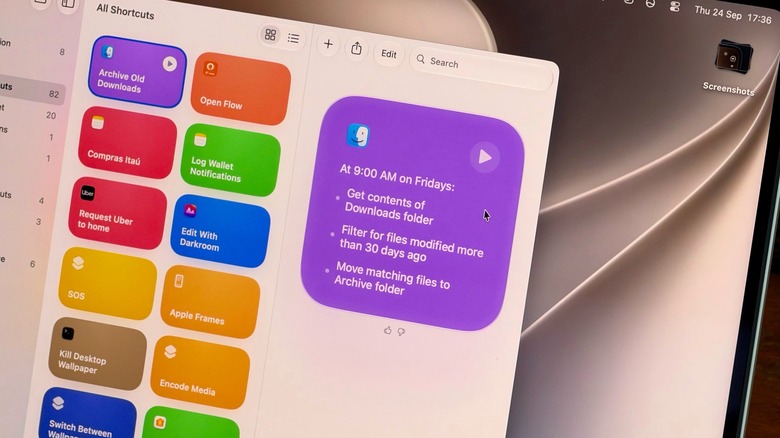
Creating a new shortcut takes a few seconds. Open the Shortcuts app on your Mac and click the Plus button to enter a prompt. The more details you provide, the more likely the app is to get your shortcut right. A command like “Clean up my Downloads” might be too vague for the app to understand what you really want. Instead, try something like “Every Friday, move anything in my Downloads folder older than 30 days into a folder called Archive.” You’re more likely to end up with a working shortcut when you provide clear details.
This is a good example of how Shortcuts are helpful for tasks you often forget to do; no one really cleans out their Downloads folder unless they’re trying to free up space. Plus, you can check the result right away by opening the folder and looking at what moved. If the shortcut moved too much, re-enter the prompt with even more specific details.
A shortcut can also be great for summarizing long text with Apple Intelligence. Try something like “Take the text on my clipboard, summarize it in three sentences and save it to a new note.” Then copy a long article or an email, run the shortcut and you’ll have the short version in Notes.
Make your shortcuts easier to reach
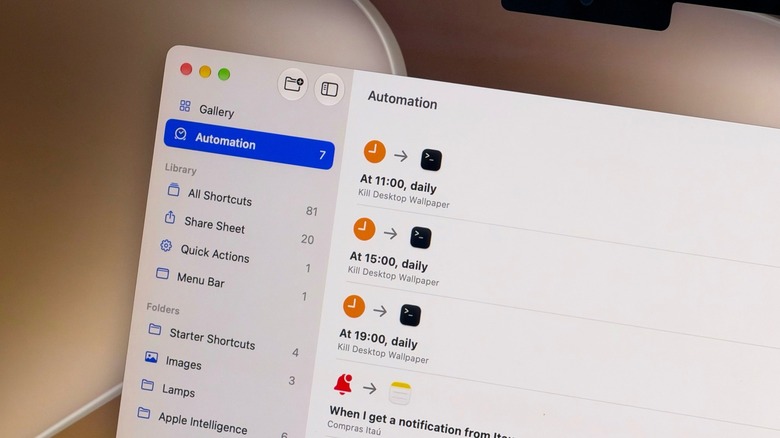
If a shortcut isn’t part of your normal routine, chances are you’ll forget about it after a while. Thankfully, you can assign a keyboard combo to a shortcut, or pin it to the menu bar, so you’ll never forget it.
Choose the shortcut you want to adjust and click Edit. Go to the Shortcut Details menu (the one with the information icon) and select Add Keyboard Shortcut. To add it to the Control Center or menu bar, open Control Center on your Mac (at the top-right) and select Edit Controls. There, all you have to do is add the action from the Shortcuts app, and you’re all set. Exploring the Automation tab is also a good idea for creating a seamless workflow of shortcuts that run on their own when you need them.
Shortcuts isn’t the only element in macOS 27 that acts on your behalf. Visual Intelligence has its own key combo: Shift + Command + Space. After pressing this, select a window on-screen and have Siri answer questions about it or take action, like adding an event to your calendar. Try it on an email with a date buried in it, for example. Siri can also run your shortcuts via voice, speaking of which.
Shortcuts and Siri AI require Apple Intelligence, which means you need a Mac with an M1 chip or later — Intel Mac users are out of luck. Also, some limits may apply when using Apple’s AI models in Shortcuts. More complex prompts could reach a limit faster.
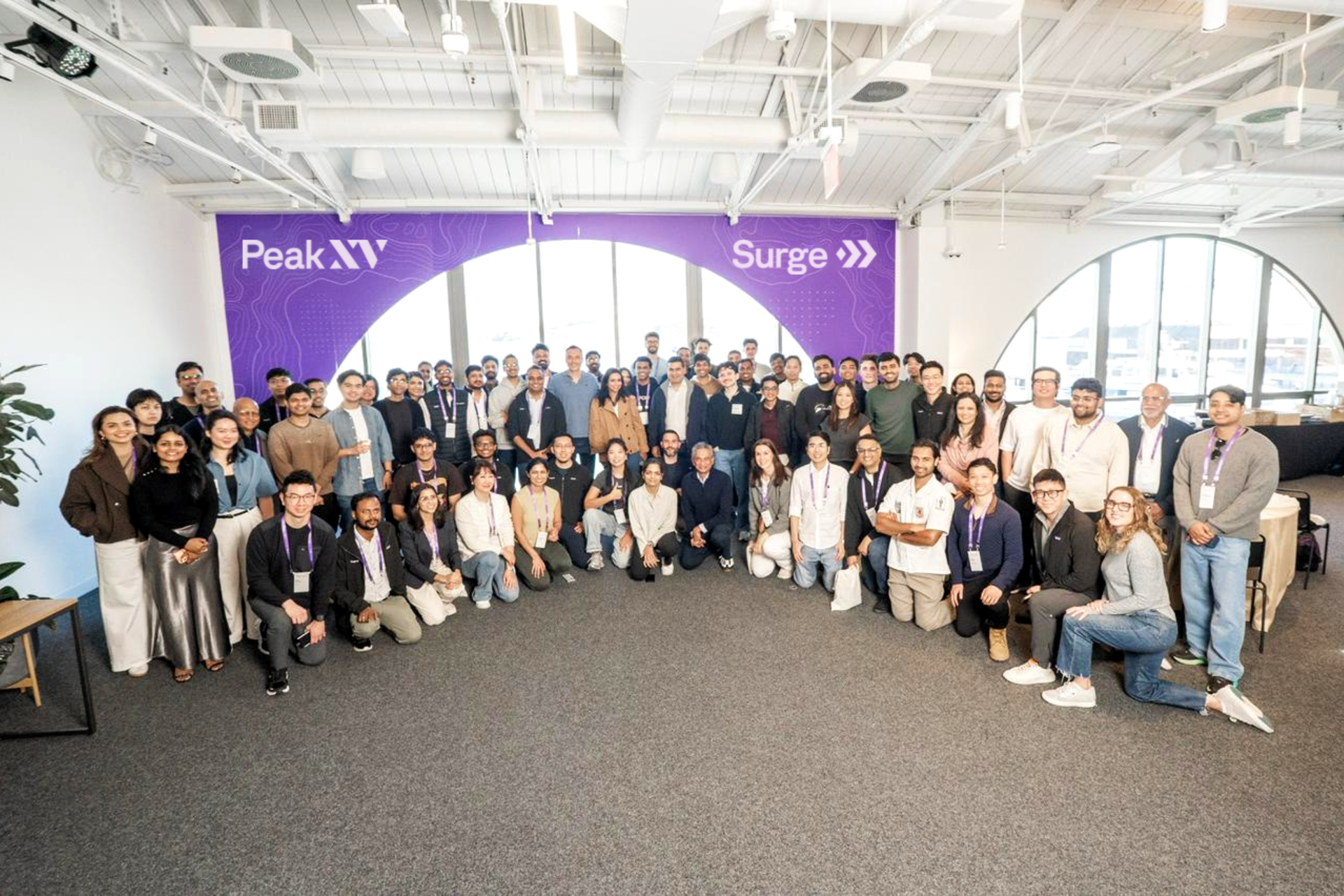
Peak XV Partners, one of the largest venture capital firms investing in markets including India and Southeast Asia with more than $10 billion in assets under management, has increased how much it invests per startup through Surge, its seed-stage investing platform, as it unveils a new cohort of 18 companies.
At least three of the companies in this cohort had already raised outside funding, in some cases from Peak XV itself, before joining Surge.
The new batch, called Surge 12, is the first to operate under Peak XV’s higher investment ceiling of up to $5 million per company, up from $3 million previously. The venture firm invested more than $50 million across the cohort, which has collectively raised over $90 million in seed funding, according to Peak XV. Its median investment per company has also increased, though the firm declined to disclose the figure.
“The bar to raise a Series A has gone up pretty significantly,” Rajan Anandan (pictured above), managing director at Peak XV, said in an interview. He added that the firm is also seeing more capital-intensive companies, particularly in deeptech, that are raising larger rounds at the seed stage.
Surge has become more global with each cohort, Anandan told TechCrunch, with its latest group spanning founders and companies from San Francisco to Sydney. Just five of the 18 startups in Surge 12 are focused on the Indian market, while more than half of the companies are based in India. The remaining 13 target global markets, highlighting the difference between where the companies are built and where they expect to find customers.
Since its launch in 2019, when Peak XV operated as Sequoia Capital India and Southeast Asia, Surge has backed more than 180 startups founded by entrepreneurs representing more than 18 nationalities. Peak XV says the 10 largest companies to emerge from those cohorts now generate more than $1 billion in combined annual revenue.

Anandan described Surge as one way Peak XV invests at the seed stage, alongside its standard seed investing, while the firm still remains an investor as companies progress through later funding rounds. The founders it backs typically include repeat entrepreneurs, experienced operators, and highly specialized technical founders, he said, with about 50% to 60% of a typical cohort made up of people coming from operating roles at established technology companies.
This cohort’s startups span AI, robotics, space, consumer products, healthcare, music, and fintech, ranging from AI safety and personal computing to autonomous robots built for underground pipes and satellites designed to detect radio-frequency signals from orbit.
The Surge 12 cohort
Alma — founded by Nischith Shadagopan M N and Vinod Ganesan — is building a personal computing platform focused on making computer use faster and more affordable. Its founders previously worked at Microsoft Research and were founding engineers at Sarvam AI, a Bengaluru-based startup building AI models for Indian languages.
August AI — founded by Anuruddh Mishra, an IIT-BHU alumnus who started the company in 2022 after a personal medical misdiagnosis — provides a healthcare platform that combines AI with physician-led care, reaching over 9 million users across 160 countries.
Ditto — founded by UC Berkeley dropouts Allen Wang and Eric Liu — works as an AI dating matchmaker inside iMessage, aimed at helping college students turn digital introductions into in-person connections. (TechCrunch wrote more about this one last month.) The company had already raised $9.2 million in a Peak XV-led seed round announced earlier this year.
GameStock — founded by Antoine Mistico, Easton Dana, and Vivek Indlebele Narasimha Prasad — brings competition mechanics to financial markets, turning investing and trading into a more competitive experience. Mistico is a two-time founder and former professional baseball player.
HiLoop — founded by Jad Ghalayini, Karan Brar, and Thomas Boser — helps AI companies adapt general-purpose open-weight models for specific applications using its post-training platform. Its founding team includes former Reducto engineers and a Cambridge computer science PhD who completed his doctorate at 24.
Hoola Health — founded by Deeksha Senguttuva — focuses on care for children and their families, providing consultations, vaccinations, medicines, diagnostics, developmental therapy, and dental services on a single platform. Senguttuvan grew up around healthcare, as her family built and operated a hospital group.
Kello — founded by Mona Gandhi and Subramanya Jingade — is building an AI-powered talent-discovery platform focused on identifying a candidate’s potential and trajectory rather than relying primarily on conventional credentials. Gandhi says she was Airbnb’s first female engineer and she previously founded Upraised, while Jingade previously co-founded AmbitionBox.
Kindling — founded by Adam Miller and Sachin Shah — is building what it calls a “storytelling operating system” for technology startups, using AI to help companies develop and produce their communications and content.
Puralink — founded by Harrison Crowe-Maxwell, Shyeon Delnawaz, and Thien “Long” Tran — is developing autonomous robots that can navigate underground pipe networks. Crowe-Maxwell has been building robots since childhood and turned university research into the patented drive technology behind the startup.
Reinforce Labs — founded by Anish Das Sarma — is developing tools to evaluate, red-team, and remediate enterprise AI systems. Sarma previously founded a company acquired by Airbnb and later served as a director at Google, where he led AI and machine-learning teams.
Riffle — founded by Anurag Choudhary and deo — is building a browser-based platform where musicians can create, collaborate on, and share music, reducing the need to move between separate tools during the creative process.
Rosella — founded by Chris Dwyer and Sean Stuart — is building an AI-native commercial insurance brokerage for U.S. businesses, using AI to automate parts of the traditionally manual process of finding and placing business insurance. Rosella raised a roughly $2.5 million pre-seed round led by Peak XV and Intact Private Capital earlier this year.
Tribe Money — founded by Himanshu Arora and Nikhil Shanker — gives an AI-powered personal finance platform that helps users track their money, research investments and make investing decisions.
ULOOK — founded by Adheesh Boratkar and Siddhesh Ravindra Naik — is building autonomous satellite systems for radio-frequency sensing and spectrum intelligence, targeting customers globally. Its founders have worked on more than 12 satellite missions. The company had already raised roughly $2.3 million in seed funding from growX Ventures and InfoEdge Ventures before joining Surge.
Wingit — founded by Nikunj Kothari and Saksham Khandelwal — is building a beauty platform aimed at India’s growing premium-consumer market. It is focused on how consumers discover and shop for higher-end beauty products.
Three other startups in the cohort have yet to publicly reveal their names or products. Peak XV said they are working in education, applied AI, and medical products.
When you purchase through links in our articles, we may earn a small commission. This doesn’t affect our editorial independence.

The Metric Is Not the Mission is a ten-part examination of how Big Tech moved from building and expanding the open internet to increasingly shaping it around its own metrics, incentives and assumptions. Across the series, the argument follows the evolution of the platform economy—from the optimism of the early internet to the growing tensions around power, prediction, geopolitics, accountability and the future of digital life.
The series will be published in two parts each week over five weeks, with each installment building on the one before it. At the end of the series, the complete essay will be brought together in a single PDF edition, providing the full argument in one place.

Part III: When the Maps Became the Territory
In Part II, the story turned on a crucial distinction: measuring behavior is not the same as understanding people. Part III takes that idea further, examining what happens when the platforms’ representations of the world begin to substitute for the world itself.
There is a curious tendency among successful technologies to disappear. Not physically, of course, but cognitively. Once they become sufficiently embedded in everyday life, they cease to be experienced as technologies at all. Electricity is no longer a marvel of engineering but an expectation. We do not admire the plumbing each time we turn on a tap, nor do we reflect on the extraordinary complexity of global logistics every time fresh fruit appears on supermarket shelves in the middle of winter. The greatest infrastructures become invisible because they succeed so completely that we mistake them for part of the natural order.
The internet reached that point sometime during the second decade of the twenty-first century. Yet something else happened along the way that proved far more consequential. As the network itself faded into the background, the platforms through which most people experienced it moved decisively into the foreground. Increasingly, users no longer spoke about “going online.” They spoke about opening an app.
That linguistic shift deserves more attention than it usually receives. Language often reveals structural change before statistics do. To “browse the web” implied movement across an open landscape whose boundaries were undefined. One followed links, discovered obscure websites, stumbled upon ideas that had not been recommended by anyone, and occasionally became gloriously lost. The experience resembled wandering through an unfamiliar city with no particular destination in mind. Serendipity was not a flaw in the architecture; it was one of its defining virtues.
Applications altered that relationship almost without anyone noticing. They replaced geography with destination. Instead of entering a network whose possibilities remained unknown, we entered environments that had already been organized on our behalf. The internet did not disappear, but it became increasingly hidden beneath layers of interface, recommendation and curation. Like passengers traveling through an airport without ever seeing the city beyond the terminal, we continued moving through digital space while encountering only the carefully managed environments that had been prepared for us.
This transformation is often described as an inevitable consequence of convenience. While accurate in its own right, this explanation offers an incomplete narrative. Convenience was certainly the language through which the platforms justified many of their design choices. Friction was treated as the great enemy of the digital age. Every additional click became an obstacle to be eliminated. Every decision that users might otherwise make for themselves could instead be anticipated by software. Recommendation replaced search. Autoplay replaced choice. Infinite scrolling replaced endings. The future, we were told, belonged to experiences so seamless that they would feel almost effortless. And they did.
It is difficult to criticize convenience because convenience is genuinely valuable. Few people wish to return to an internet in which finding information required memorizing obscure web addresses or navigating labyrinthine directories. The platforms did not succeed by forcing people into inferior experiences. They succeeded because, for many years, they built better ones.
Yet convenience has always carried an intellectual cost. Every technology that removes friction also removes moments of deliberation. The elevator spares us the staircase but also the awareness of distance. Satellite navigation ensures that we rarely become lost, while quietly diminishing our ability to construct mental maps of the places through which we travel. Streaming services relieve us of searching for entertainment, but in doing so they also shape the boundaries of what we are likely to discover. Every act of technological simplification transfers a small measure of agency from the individual to the system.
The internet had originally been built on a different assumption. Its underlying protocols did remarkably little. They did not decide which website deserved prominence, which ideas should travel furthest, or which communities ought to flourish. Their genius lay precisely in their restraint. They created conditions under which others could innovate without first requesting permission. The web itself functioned less like a product than like a constitutional order: a simple framework within which extraordinary diversity could emerge.
Platforms gradually adopted the opposite philosophy. They did not merely provide the rules of the game; increasingly, they became active participants in every interaction taking place within it. They selected what deserved attention, inferred what users might prefer before users themselves knew it, prioritized certain relationships over others and determined, through millions of microscopic computational decisions, the contours of everyday experience. The architecture became less constitutional than managerial.
There is an illuminating parallel here with the history of cities. The most enduring cities are rarely the ones that have been planned in every detail. They are those that accumulated layer upon layer of human activity over centuries, adapting continuously to changing needs without ever fully surrendering their unpredictability. One finds unexpected bookshops beside cafés, workshops hidden behind apartment blocks, public squares appropriated for demonstrations one week and festivals the next. Their vitality emerges not from perfect organization but from the freedom they grant people to appropriate space in ways that planners never anticipated.
Shopping malls operate according to an altogether different logic. They are meticulously designed environments in which every entrance, corridor, sightline, and seating area has been carefully considered. Music, lighting, and architecture work together to produce an experience that feels spontaneous while being anything but. There is comfort in their orderliness. They are clean, efficient, and reassuringly predictable. Yet no one mistakes a shopping mall for a city. Its purpose is not to cultivate civic life but to optimize a particular set of behaviors within a privately governed space.
The analogy is imperfect, as all analogies are, but it captures something essential about the transformation of the internet. The early web invited participation because it remained fundamentally unfinished. It assumed that users would contribute to shaping it. Today’s dominant platforms present themselves as complete worlds. Participation still exists, but it takes place within boundaries established elsewhere. Users generate the content while the architecture remains firmly in corporate hands.
Perhaps this is why the language of “community” has begun to feel strangely hollow. Communities, in the classical sense, are rarely designed. They emerge through shared experience, mutual obligation, and a degree of unpredictability that no algorithm can fully reproduce. Platforms, by contrast, increasingly treat community as an engineering problem to be optimized. They recommend friendships, suggest conversations, rank relevance, suppress friction, and amplify interaction according to models whose objectives are necessarily commercial because the organizations that develop them are commercial enterprises.
None of this should be understood as an accusation of bad faith. Many of the engineers responsible for these systems genuinely believed they were improving people’s lives. The difficulty lies elsewhere. Every large institution eventually begins to confuse the optimization of its own internal metrics with the fulfillment of its original purpose. Universities sometimes mistake publication counts for scholarship. Hospitals occasionally confuse efficiency with care. Governments become preoccupied with administrative process rather than public service. Technology companies are no different. The indicators that make sense within an organization slowly become proxies for the world outside it. The metric is not the mission. This is the point at which the maps begin to replace the territory.
The extraordinary quantities of behavioral data collected by digital platforms produce an understandable confidence. When one can observe billions of interactions each day, it becomes tempting to believe that society itself has become legible. Human behavior appears measurable, predictable and, increasingly, governable. The platform begins to resemble reality because so much of reality passes through the platform.
Yet the map is never the territory. It captures what can be measured, not everything that matters. A map records roads but not the reasons people travel. It identifies cities without conveying the lives unfolding within them. Likewise, recommendation systems observe behavior with astonishing precision while remaining largely indifferent to experience itself. They recognize patterns without necessarily understanding meaning.
That distinction mattered little while the platforms continued solving the problems that had made them indispensable. It becomes far more consequential once they begin confronting a world that no longer resembles the one for which they were originally designed. Because societies have changed; politics has changed; and, the internet has changed. The question is whether the companies that grew powerful by interpreting one era have noticed that another has already begun.
Konstantinos Komaitis, PhD, is a veteran of developing and analysing Internet policy to ensure an open and global Internet.
Filed Under: behavior, big tech, metric not mission, open internet, optimization, platforms, understanding

While smartphones won’t stop getting bigger, e-readers seem to be getting smaller. Boox has been at the forefront with one of the most popular small e-readers, the Boox Palma, and now it is adding an even smaller model.
Boox announced the Picco, with preorders opening today. Its screen is just under 4 inches (3.97 to be exact), making it about the size of a playing card. It’s even smaller than the Xteink X4 Pro I tested earlier this year, which has a 4.3-inch screen (but just slightly larger than the 3.7-inch Xteink X3), and considerably smaller than the upcoming Boox Palma 3’s 6.19-inch screen. I liked the size of the Xteink in my hand, but navigating the interface and getting books were challenging, so I’m excited to see another option in that smaller size from a maker with more accessible ebooks (though still not as convenient as a Kindle or Kobo with their built-in stores).
The Picco will cost $100 and is expected to ship in November. I’ll be testing it soon, but in the meantime, here are the details if you’ve been eyeing a tiny e-reader.
An E-Reader for Productivity

Courtesy of Boox
The Boox Picco has a monochrome screen with a resolution of 235 pixels per inch and an adjustable front light that switches between warm- and cool-toned lighting. The microSD card slot supports up to 2 TB of flash memory storage (a 16 GB card is included). There are both a touchscreen and physical page-turning controls, thanks to the buttons on the side of the device. The case has a magnetic ring so you can attach it to the back of a smartphone, though I’ll have to see how well it fits when I test it, as I had mixed results attaching an Xteink to my phone due to both fit and magnet strength.

Courtesy of Boox
Boox says the Picco will have a streamlined operating system focused on reading and digital utility tools. It’s also the first in what Boox calls its Tiles lineup, which is how you’ll access ebooks on this device. You can also use web and USB-C file transfers (the Picco has Wi-Fi and Bluetooth connectivity) to get ebooks onto the Picco. The Picco also has the Pomodoro, Todo, and Countdown apps, so you can use it as both an e-reader and a productivity gadget—handy, and a bigger motivation to keep it attached to the back of your phone even when you aren’t reading.
I’m intrigued to see it in action. Boox’s most popular e-reader could become the Picco over the Palma 3, but we’ll have to wait for both devices to become available to see which is the better buy. Stay tuned for my reviews of both when they come out.
Power up with unlimited access to WIRED. Get best-in-class reporting and exclusive subscriber content that’s too important to ignore. Subscribe Today.

But a Chromium-based design means it can only be so efficient.

Discord is working on a new mode for its social platform that it says might be less resource-intensive. Screenshots of an option called Game Mode began circulating on social media over the weekend. The description shown for the Game Mode toggle states that it will “Reduce Discord’s CPU and GPU usage while a game is running.” By making the chat platform less resource-intensive, concurrently running software should be able to run more smoothly.
Today, the company confirmed on X that this experimental mode will begin rolling out to its users next week. The brief official announcement about Game Mode added that Discord is “aiming to add more resource-saving features over time.”
Discord is based on the Electron web app framework, which uses Javascript and Chromium for creating software. The open-source Chromium, which is the basis for Google’s Chrome and several other browsers, is not known as the most efficient tool for web development. A feature like Game Mode could offer some performance improvements, especially while also running a beefy AAA game on the same machine, but there may only be so far that Discord will be able to streamline on its current architecture.
Six of the nine independent experts on the advisory board of the Global Internet Forum to Counter Terrorism—a consortium run by several of the biggest US tech companies—resigned on Monday, according to a letter seen by WIRED and interviews with three of the people.
The tensions between the independent advisory committee and the GIFCT date back to an email the counterterrorism and free speech experts received in July from Meta’s Nell McCarthy, a vice president overseeing content policy. For years, the group had advised the GIFCT on how to prevent platforms from becoming havens for the radical organizations and individuals blamed for some of the world’s worst mass violence.
But McCarthy wrote that while the consortium welcomed the experts’ insights on violent trends, it no longer desired their scrutiny on the effectiveness of Big Tech’s efforts to curtail violence. Meta and other leaders wanted to “refresh” the 6-year-old independent advisory committee the experts sat on, she wrote. Meta currently serves as chair of GIFCT’s operating board, giving it outsized influence over policy changes, though other companies on the panel must ultimately approve.
New additions to the rotating advisory committee had previously been elected by current members; under the plan laid out in July, they would instead be picked by tech companies. The committee would be barred from weighing in on key topics such as the consortium’s performance and making recommendations together as a group. Its role as a watchdog would be neutered, advisers believed.
In their resignation letter, the departing members of the committee wrote that their appeals against the plan had been “ignored” and that, in turn, they had “lost confidence in the GIFCT’s ability to deliver effectively on its founding mission” to prevent terrorists from exploiting online services. “We all know that a body that cannot scrutinise, take a position, or evaluate is not an advisory body at all,” the letter stated. “It is decoration and accountability theatre.”
Meta deferred comment on the resignations to the GIFCT. An unsigned statement sent to WIRED by a GIFCT spokesperson on behalf of the consortium’s leadership and the Meta-chaired operating board says the proposed changes have been “informed by several rounds of feedback” and are not yet final. They came out of discussions on “how to more effectively engage civil society and governments for substantive input” as “multi-stakeholderism is a core principle” for the GIFCT.
The consortium has about 35 members; other long-time board members include Microsoft and YouTube. A small staff alerts members to violent content, helps them exchange threat intelligence, and commissions research on countering extremism. While the coordination has helped some platforms combat problematic content, critics believe the group isn’t living up to its potential.
A WIRED investigation in 2024 uncovered several issues with GIFCT, including Meta delaying TikTok’s membership bid and poor relations between the companies at the helm and the unpaid independent advisory body. It also revealed failures in the tip-sharing database the consortium oversees to coordinate takedowns of problematic content.
The dismantling of the advisory group threatens to deteriorate the organization’s work further at a time when balancing free expression and online safety has become more challenging. Generative AI tools have simplified content creation but imposed limited guardrails.
Extremist content, including some that is now AI-generated, that promotes organizations such as Islamic State remains a persistent issue. Newer nihilistic collectives have turned to AI-supported scams such as sexploitation to coerce young victims into carrying out violence and abuse. Several AI chatbots have been accused of facilitating violence.
“A Shame”
The experts who resigned include university researchers and representatives of civil society organizations. They had agreed with McCarthy on the need for changes to improve the results of the decade-old anti-terrorism consortium. But they believe the proposal, which could be finalized soon, amounts to a step backward.
“There won’t be critical voices raising concerns about what GIFCT is doing or is not doing,” one of the departing experts says. “It may seem politically convenient for them to abolish the independent advisory committee, but they are going to regret it in the longer term.”

The successful mission also deployed 26 of SpaceX’s latest Starlink satellites.

For its 14th flight, SpaceX’s Starship powered by its Super Heavy megarocket has entered low-Earth orbit for the first time. SpaceX kicked off this major undertaking early Monday morning but had to deal with some hiccups on the way, including losing one of its six Raptor engines. Ultimately, SpaceX decided to push on with the mission and successfully reached orbit albeit with some compromise.
SpaceX originally planned to have Starship orbit Earth six times over a span of nearly 10 hours for the Flight 14 mission. With one of the engines offline, the plan changed to only spend approximately three hours in orbit before reentering the Earth’s atmosphere and landing in the Pacific Ocean. As part of the same mission, SpaceX managed to deploy 26 of its Starlink V3 satellites into orbit. SpaceX said that its Starlink team has made contact with all newly-deployed 26 satellites in orbit, which will eventually be used to improve Internet speeds for customers. While previous Starship missions also carried several V3 satellites, they only remained in suborbital space and served as test flights to see if the new satellites would connect to the existing Starlink constellation.
While Starship’s flight 14 marked a major milestone of reaching orbit, the mission also served as a test of the reusability of its Super Heavy rocket. After providing the necessary boost to Starship, Super Heavy landed in the Gulf of Mexico, where it will eventually be retrieved, but not by a launch tower‘s “chopsticks” as previously demonstrated.

Mipmapping is a good way to add a lot more detail to a 3D scene without overburdening the rendering hardware with detail that won’t be seen by the user. This level-of-detail rendering technique was demonstrated on the N64 console hardware a few years ago by [James Lambert] with [Michael Biggins], also known as [PhonicUK], now demonstrating it on the ESP32-S3 using his own Jet rendering engine.
Although level-of-detail rendering really speeds things up, it does also require far larger texture sizes, with [James]’s N64 demo taking up 40 MB of a 64 MB cartridge. To fit it on an ESP32-S3 with 16 MB of PSRAM and no SD card expansion or such the textures were further compressed to use 8-bit indexing, resulting in a mere 5.01 MB of textures.
There’s a demonstration video over on the associated Reddit thread, which shows the camera moving through the scene. Even if not as exciting as the Wipeout port by [Michael] that we previously covered, it does make clear that even without a proper 3D GPU the ESP32-S3 is already a pretty capable gaming machine that can go toe-to-toe with some 1990s consoles.

Crypto1 minute ago
BTC, ETH price news: Bitcoin slips to $83,000 as ZEC drops 12% and oil climbs again

Tech & AI38 minutes ago
Japan’s Keio confirms ransomware attack disrupted business systems

Crypto1 hour ago
Tether is a ‘lifeline’ for Iranian regime, Senate Dems say in new report


-

 Fashion3 days ago
Weekend Open Thread: J.McLaughlin – Corporette.com
-

 Tech & AI1 day ago
Anthropic turns Claude into an AI marketplace with 2,000+ plugins and connectors
-

 Crypto6 days ago
Goldman Sachs and Deutsche Bank Agree: The S&P 500 Rally Isn't Over
-

 Tech & AI1 day ago
OpenAI is preparing “o,” an always-on ChatGPT assistant that could handle email
-

 Fashion5 days ago
8 iPhone Accessories That Add Personality
-

 Entertainment6 days ago
These 17 Fall Amazon Dresses Seriously Look Like Anthropologie
-

 Tech & AI6 days ago
Reolink’s solar 4K security camera falls to its lowest price in months
-

 Crypto7 days ago
Trump-Xi Polymarket Odds for Handshake Hit 50%
-

 Crypto6 days ago
This Bearish Netflix Stock Trade Can Cash In On Video Streaming Giant’s Woes
-

 Crypto5 days ago
Bitcoin price tests $83,600 Supertrend support after $87K rejection
-

 Crypto5 days ago
Crude Oil Prices Pressured by Diplomatic Hopes in the Middle East
-

 Crypto6 days ago
BitGo says Bitcoin absorbed Fed hike, CLARITY failure
-
 Business & Hussles6 days ago
Oil Price Today (September 23): Crude oil below $100 on hopes of US-Iran talks. What did Trump say?
-

 Crypto5 days ago
Bitcoin Threatens Sub-$84,000 Breakdown as Long Liquidations Spike
-

 Crypto7 days ago
Meta Jumps 11% As Muse Shines and Investors Show an Appetite for Advancing AI
-

 Crypto6 days ago
Did Jim Cramer Just Give GameStop Stock the Kiss of Death When He Said the Turnaround Is Working?
-
 Tech & AI5 days ago
UiPath’s Dines says AI needs a manual and launches Cartographer to write it
-

 Crypto5 days ago
As Amazon Stock Prospers, Traders Might Consider This Option Play
-

 Crypto5 days ago
Strategy resumed Bitcoin buying, but Strive gained more BTC per share
-

 Tech & AI6 days ago
Sega nearly killed Sonic before the movies revived the franchise
You must be logged in to post a comment Login