GitHub COO Kyle Daigle, who now also leads developer marketing for all of Microsoft, speaks at GitHub Universe last year. (Microsoft Photo)
GeekWire is profiling over the next few weeks some of the people and teams that are shaping the evolution of Microsoft in what we’re calling its “Microsoft 2.5” era.
A delicate dance: In August 2025, Microsoft moved to integrate GitHub into the mothership, under its CoreAI division, after having allowed it to run as a quasi-independent entity since acquiring it in 2018. At the same time, GitHub CEO Thomas Dohmke announced he would leave the company at the end of the year.
A number of developers feared the worst: GitHub would become just another arm of Microsoft and lose the community-mindedness that had made it attractive to developers of all stripes, and especially open-source ones.
GitHub Chief Operating Officer Kyle Daigle — a 13-plus-year GitHub veteran — had been one of the main champions of the need to “keep GitHub GitHub.” He maintained that stance even after he added the “Chief Marketing Officer of Developer” title for all of Microsoft to his COO role in January 2026.
So, how has Microsoft done this past year with managing GitHub? In an interview with GeekWire, Daigle acknowledged that GitHub’s relationship with Microsoft has changed since the end of the standalone CEO era. But the goal is no longer just “don’t break GitHub.” It’s to export GitHub’s community, developer-first ethos and learnings across Microsoft.
GitHub has influence beyond just the GitHub product set now, Daigle said. And the fact that Microsoft opted to consolidate its developer-facing messaging and community outreach under Daigle, someone who came from GitHub, not from Microsoft’s traditional DevDiv organization, gives weight to his claim.
“Bringing teams together — engineering teams and marketing teams and everyone that wasn’t talking to each other before — has been a really big part of the work,” Daigle said. “I see all these opportunities for GitHub to directly help and impact the overall mission of Microsoft versus keeping it cloistered in a way that isn’t helping either GitHub’s mission or Microsoft’s mission.”
Advertisement
These days, developer teams across Microsoft and GitHub are sharing foundations and the GitHub Copilot software development kit across organizations “in a way that would have seemed improbable before,” he said.
As Microsoft historians know, “Microsoft’s challenge isn’t creating products. It’s connecting them,” Daigle said.
Growing pains: At the same time, the rise of AI agents has strained GitHub’s infrastructure. Over the past few months, GitHub has experienced some significant outages, including one in August that lasted nearly eight hours.
GitHub officials have said they are migrating from their own datacenters to Azure to try to ease some of the capacity issues. Daigle said it’s not a simple lift-and-shift process; rather, it’s a major re-architecture for the platform.
Advertisement
GitHub is roughly 60% through its Azure migration as of early October, he said.
It’s working with Azure storage teams on separating compute and storage for the Git distributed version control system to help alleviate bottlenecks caused by developers and agents working concurrently in the same repositories. Developers and agents made 7.38 billion commits on GitHub in September alone, according to the company.
GitHub’s recent growth would not have been manageable without Microsoft scaling expertise and Azure support, Daigle said. GitHub is in a unique position of being able to request major additional capacity, such as millions of CPUs, and work with Microsoft teams to provision it, he said.
The GitHub app and agent store: GitHub got its start as a platform for source control and collaboration. But its role is evolving as part of its Microsoft integration. In addition to developing and supporting Microsoft’s most successful Copilot, GitHub Copilot, GitHub has an important place in Microsoft’s agent-centric strategy.
Advertisement
GitHub is becoming “the store for anything that needs to be coded and needs some verification,” Daigle said. “We’ll connect you to whatever the right tool inside of Microsoft is for you to run that or whatever tool you’re using, not just (from) the Microsoft product suite.”
In the new world order, GitHub isn’t just the store for apps. Increasingly, it’s also the store for agents, which means GitHub is acting as the developer layer for Microsoft’s “agent factory” strategy.
(Microsoft co-founder Bill Gates envisioned Microsoft as a “software factory” that could produce software at scale. These days, CEO Satya Nadella and team talk about Microsoft as an “agent factory,” helping customers create agents at scale.)
GitHub currently serves more than 200 million developers, plus an unknown but quickly growing number of agents.
Developers need to be thinking in new ways when it comes to agents, Daigle said. They need to consider ideas such as scaling application programming interfaces (APIs) for agents separately from humans, creating APIs designed specifically for agents, rewriting documentation and tooling so agents can consume GitHub efficiently, and treating agent access as a fundamentally different workload from human access.
Advertisement
In the longer term, Daigle said he expects AI to make software economically viable for smaller audiences, such as a family, an individual or a single team. The app-store model may change substantially in the coming years, as people create highly specialized applications. GitHub could help like-minded users discover software for specific interests, such as a narrowly focused household or community use case.
GitHub historically has considered anyone who has seen or touched code to be part of the developer community. Daigle’s vision is for GitHub and Microsoft to let both professional developers and newer builders create and run software and agents without needing to manage token costs, uptime, monitoring or operational overhead.
GitHub will have more to say about its plans at the GitHub Universe conference in San Francisco, Oct. 28-29. The event won’t focus on code generation alone; it will include information on tools covering the full lifecycle, proactive security approaches and how to determine whether software is working well after deployment.
“We’re looking to solve the core parts of the platform, like Git, like Actions, in a way that I hope will make people excited and feel like they can absolutely trust GitHub for the next decade to come,” Daigle said.
Valve recently began shipping its long-awaited VR headset, the Steam Frame. Now, there is a hardware reference repository that includes everything a budding modder might need, and then some.
No need to 3D scan or break out the calipers if one wants to design their own add-ons.
Want to design and 3D print some add-ons, or a carrying case, or some other doodad? There’s no need to break out the calipers or 3D scan the hardware. The repository contains STEP format models of the VR core module, head strap, and controllers, so it’s as easy as possible to design things that’ll fit. The location of the IR tracking LEDs embedded in the controllers is also documented, so one can ensure their design doesn’t occlude them.
That’s not all. The Frame has a user-accessible hardware expansion port at its front. This port exposes two interfaces: high-speed MIPI camera and PCI Express. This expansion port is documented in the repository, and even has a simple reference design built in both KiCad and Altium.
We’re glad to see Valve maintain their hacker-friendly hardware design with the Steam Frame. Demand for The Frame outstrips supply so far, so if you’re on the waitlist, you might want to browse the repository and get an early start on whatever customizations you have in mind while you wait for your confirmation. And when you get something working, drop us a note on the tips line!
If your webcam turns on when you did not expect it, investigate the activity before assuming someone has hacked your computer. A Windows camera light or notification, or the green camera indicator on a Mac, can confirm that the camera is active, but you still need to identify what is using it and whether that use is legitimate.
Start with ordinary causes such as a video-call app, browser tab, or facial sign-in feature. If those do not explain the activity, check camera permissions and then move to malware checks only when the evidence justifies it.
What an Unexpected Webcam Indicator Can Tell You
A camera-use indicator answers one important question: is the camera active? It does not automatically tell you who started it or why.
On Windows 11, a hardware camera light turns on when the camera is active if the device has one. On computers without a camera light, Windows shows a notification when the camera turns on or off. That activity may come from software you intentionally opened, a website, a Windows feature, or something you do not recognize.
On a Mac, a green privacy indicator means a camera is being used. Opening Control Center may also show which app is currently using the camera. For the built-in Mac camera specifically, Apple says the hardware is engineered so that the camera cannot activate without its green indicator light also turning on. Do not assume the same hardware behavior applies to every external USB webcam.
General symptoms such as a slow computer, crashes, redirects, or unfamiliar browser additions can occur with malware, but they are weak evidence of webcam misuse by themselves. The FTC lists these kinds of behaviors as possible signs of a broader malware infection, not proof of camera compromise. A camera-specific indicator or identifiable camera-using process is more useful when answering the narrower question of what used your webcam.
Understanding camera and microphone permissions also helps you interpret what your operating system can actually block, record, or show.
Advertisement
Check Your Webcam for Unauthorized Use Step by Step
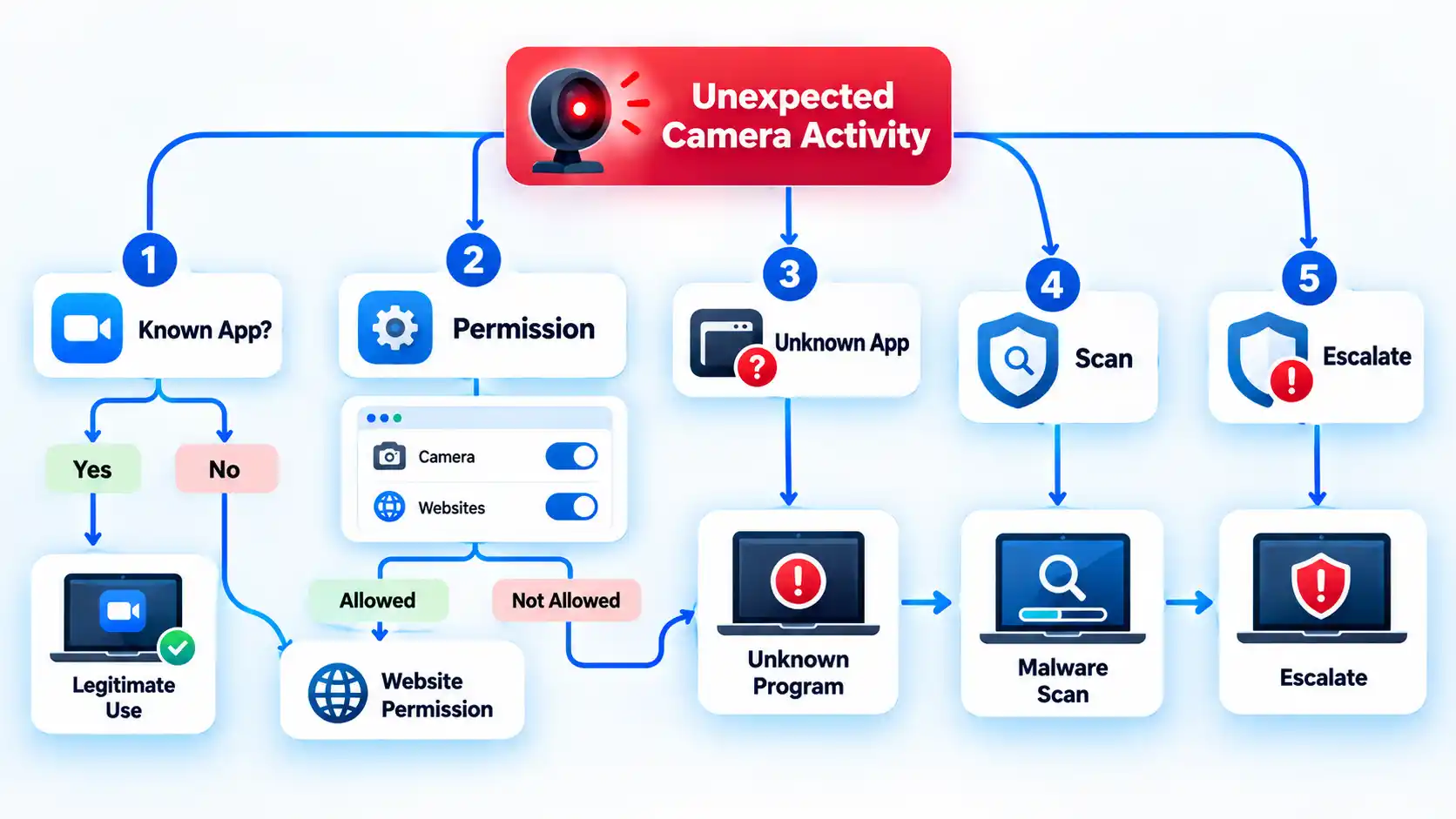
Use the least disruptive checks first. The aim is to find a normal explanation where one exists, then narrow the investigation only if the camera activity remains unexplained.
Note exactly when the camera activates. Check whether the light or notification appears during sign-in, after opening a browser tab, when a meeting app starts, or while no obvious camera-using software is open. The timing gives you a starting point without treating the event as proof of compromise.
Close software that normally uses the camera. Quit video-call apps, messaging programs, camera utilities, and browser tabs that recently requested video access. If the indicator turns off after you close one of them, that software may explain the activity. Reopen it intentionally and close it again before treating the match as confirmed. If the indicator stays on, continue checking.
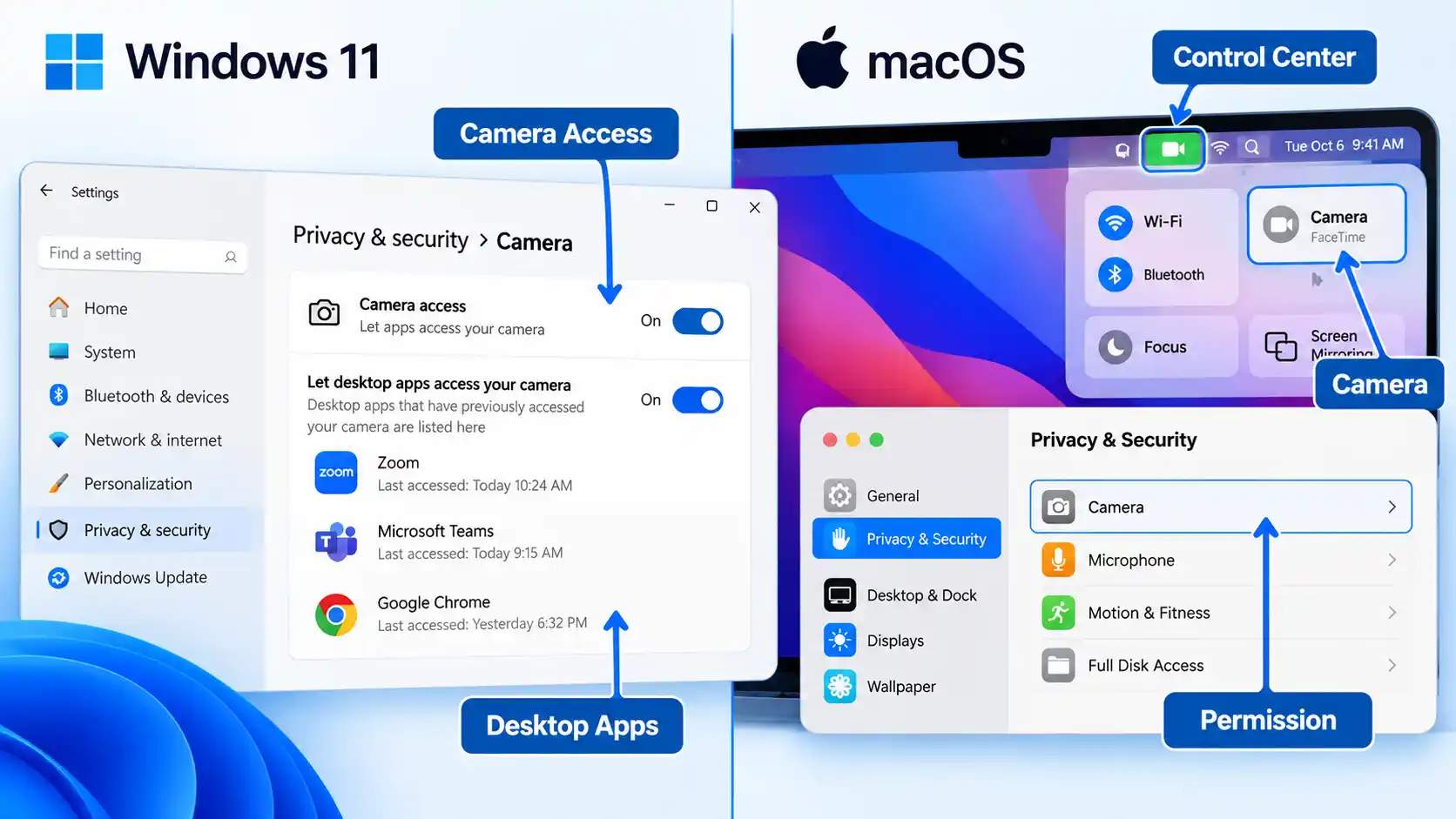
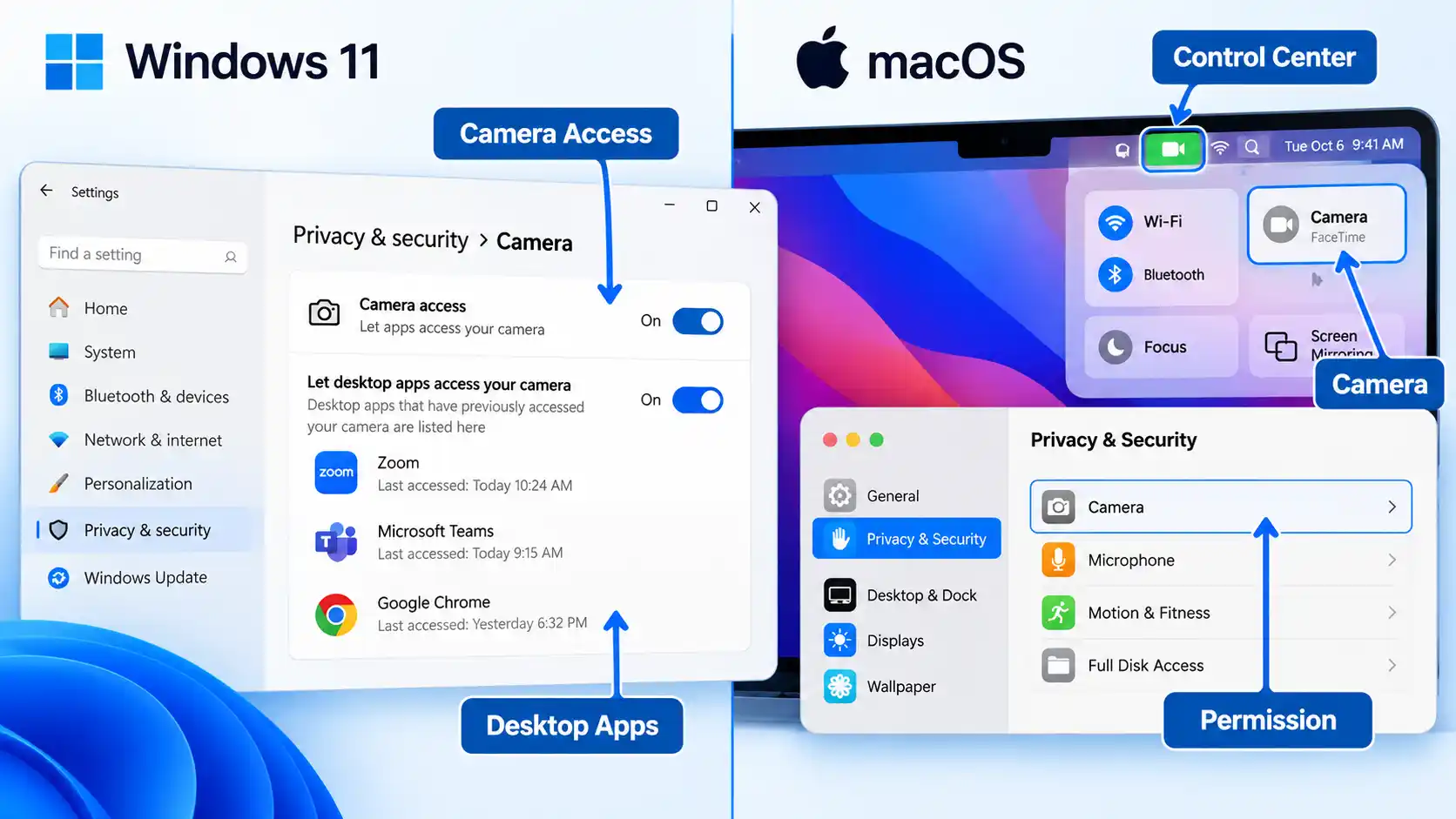
Use your operating system to look for the responsible software. On Windows 11, open Start > Settings > Privacy & security > Camera and review the apps Windows shows. Under the desktop-app section, Windows can list programs it has detected interacting with the camera; selecting a listed app can provide information about the specific file involved. On a Mac, open Control Center while the green privacy indicator is visible and check whether macOS identifies the app currently using the camera.
Review camera permissions. In Windows 11, remain at Settings > Privacy & security > Camera and turn off access you do not need. Microsoft Store apps can have individual switches, while traditional desktop programs use the broader Let desktop apps access your camera control. On a Mac, open Apple menu > System Settings > Privacy & Security > Camera and review the installed apps that have requested camera access.
Check website camera permissions. If the unexplained activity happened while browsing, inspect the browser separately. In Safari, open Safari > Settings > Websites > Camera. In Microsoft Edge, open Settings > Privacy, search, and services > Site Permissions > All sites, select the relevant website, and review its Camera setting. A browser can have operating-system camera access while individual sites still have their own permission decisions.
Revoke questionable access and test again. Remove camera permission from an app or site you do not recognize or no longer need, close it completely, and watch what happens. If the unexplained activation stops, that software becomes a likely explanation, but the result does not prove that it was malicious or that no other camera user was involved.
Escalate if the camera activity remains unexplained. If the camera repeatedly activates after known apps, sites, and legitimate system features have been ruled out, move to the security checks below. Repeated unexplained use is more concerning when it appears alongside an unfamiliar program, a security warning, or a suspicious download.
What Windows 11 Can and Cannot Show About Camera Access
Windows can provide useful clues, but its Camera privacy page is not a complete history of every program that could ever reach the camera.
Open Start > Settings > Privacy & security > Camera. Microsoft Store apps that use the Windows permission system can appear with individual camera controls. Desktop apps work differently: browsers, traditional Windows programs, and many video-call applications are controlled through the broader Let desktop apps access your camera setting.
Windows can also show desktop applications it has detected interacting with the camera. For a listed desktop app, Microsoft says you can select it to see details about the specific file that accessed the camera or microphone. That can help when the displayed app name is unfamiliar.
There is an important limit. Some desktop apps can interact with camera hardware in ways Windows privacy controls do not fully govern. An application may install a driver, for example, and communicate more directly with the hardware. Microsoft also warns that desktop apps may not always appear in the Camera settings list.
Advertisement
For that reason, an empty or familiar-looking app list is useful evidence, but it is not absolute proof that no desktop program touched the camera. If unexplained activity continues, combine the permission check with the timing of the camera indicator and the security checks later in this article.
Also account for Windows Hello before treating sign-in activity as suspicious. Facial sign-in can use the camera even when ordinary app camera access is disabled.
What macOS Can Show About Camera Access
A Mac gives you two different clues: a live privacy indicator and a list of installed third-party apps that have requested permission to use the camera.
A green privacy indicator beside Control Center means a camera is in use. If you open Control Center while the indicator is present, the top of the panel may identify which app is using the camera. Check this before closing everything if you are trying to find the source of unexpected activity.
Advertisement
You can then open Apple menu > System Settings > Privacy & Security > Camera. The list contains installed apps that have asked to use the camera. Turn access off for software that does not need it.
Built-in Apple apps are an important exception to how that list should be interpreted. FaceTime, Photo Booth, and other apps included with macOS automatically have camera access and do not need to appear as third-party permission requests. Their absence from the list therefore does not mean they cannot use the camera.
Safari website access is separate as well. Open Safari > Settings > Websites > Camera to review site-level camera permissions. This matters when the camera activity began while a browser tab was open.
For the Mac’s built-in camera, the green hardware indicator has unusually strong diagnostic value because Apple states that the built-in camera is engineered not to activate without the indicator. Keep that claim within its proper scope: it does not establish how every third-party external camera behaves.
Advertisement
When Unexplained Camera Activity Becomes a Security Problem
One unexplained camera light deserves investigation. It becomes more concerning when the camera keeps activating after ordinary causes have been ruled out or when other evidence points to unwanted software.
For example, repeated activation deserves more attention if you also find an unfamiliar program, a security alert, or software you did not intend to install. By contrast, slow performance, crashes, browser redirects, or other general symptoms can occur for many reasons and should not be presented as proof that someone is watching through the webcam.
Malware is harmful software that can run on a device without the user’s knowledge and may steal information or perform other unwanted actions. Once credible malware evidence appears, the investigation should shift from one camera permission to the security of the entire computer.
On Windows 11, open Windows Security and select Virus & threat protection. You can start with a Quick scan, choose a Full scan to check every file and program, or open Scan options for other choices. If you are particularly concerned about persistent malware, Microsoft Defender Offline restarts the PC and scans without loading normal Windows, making persistent malware more difficult to hide or defend itself. Save open work before choosing the offline scan because the computer restarts.
Advertisement
macOS takes a different approach. It includes built-in protections such as Gatekeeper, Notarization, and XProtect. XProtect automatically detects and blocks known malware and can remediate infections. Apple describes these protections as automatic; it does not provide a universal user-facing “run XProtect scan” control comparable to Windows Security’s on-demand scan choices.
Broader habits that reduce malware risk while browsing can lower the chance of another infection, but they do not replace investigating the camera activity that brought you here.
The camera stays active after I close my video-call app
Check whether the app is still running in the background and close browser tabs that may have camera permission. Then use the Windows Camera privacy page or macOS Control Center to look for another camera user. If the indicator remains active after every known legitimate user is closed, continue with the malware and unfamiliar-software checks instead of assuming the first app was responsible.
Advertisement
The camera activates when I sign in to Windows
If Windows Hello facial recognition is enabled, camera activity during sign-in can be normal. Microsoft allows Windows Hello to use the camera even when regular app camera access is disabled. Investigate further only when the camera activates at times that facial sign-in does not explain.
My Mac’s green camera indicator appears unexpectedly
Open Control Center before closing apps and check whether macOS identifies the program currently using the camera. Then review System Settings > Privacy & Security > Camera. If no legitimate app or feature explains the activity and it keeps returning, move to the broader device-security checks above.
I revoked camera access, but the webcam still activates
First confirm that another app, browser site, or operating-system feature is not using the camera. On Windows, remember that desktop-app controls have limitations and some programs may not appear individually. If the activity remains unexplained after those checks, treat the permission change as inconclusive and continue with the security investigation.
How to Secure the Webcam After the Check
Once you have identified the cause or completed the security investigation, remove access that no longer has a clear purpose. Do not uninstall or delete unfamiliar software solely because its name looks strange; identify what it is first and use credible security findings to guide removal.
Advertisement
Turn off camera permission for apps that no longer need video access.
Remove persistent browser-site permissions that you do not recognize or use.
Uninstall software only after you have identified it as unwanted or a trusted security tool has detected it as harmful.
Keep the operating system, browser, conferencing apps, and security tools updated.
Use a built-in hardware shutter when your computer provides one, or unplug an external USB webcam when you want a clear physical barrier.
For the broader preventive setup, including physical camera controls and platform-specific permission hardening, you can secure your webcam on Mac and Windows PCs without turning every future camera event into a security investigation.
A webcam cover and camera permissions solve different problems: one physically blocks the lens, while the other controls software access. Neither should be treated as a complete substitute for the other.
Verify That the Camera Is Back Under Your Control
The investigation is complete when normal camera use still works, unnecessary access has been removed, and the unexplained activity that triggered the check no longer appears during ordinary use.
Verify the result
Your normal video-call or camera app can still use the webcam when you intentionally open it.
Apps that do not need camera access no longer have unnecessary permission where your operating system exposes that control.
Browser sites do not retain camera permission unless you intentionally want them to.
The Windows camera light or notification, or the Mac privacy indicator, appears during intentional camera use and stops after the legitimate camera-using app or site closes.
The unexplained camera activity that started the investigation does not immediately recur during normal use.
If malware was suspected, you have run the appropriate security scan or remediation steps and handled any detections before resuming sensitive account activity on the device.
If the webcam begins activating unexpectedly again and you still cannot connect the activity to a legitimate app, website, or operating-system feature, do not treat the earlier quiet period as proof that the problem is fixed. Return to the diagnostic steps and escalate the security investigation when the evidence calls for it.
According to Microsoft, the certificates used by Windows Update services have a preset expiration date and must be replaced periodically for devices to keep receiving monthly updates. The company noted that devices running Windows 11 25H2 and later already have the latest certificates, but those in older versions of Windows… Read Entire Article Source link
Seth Paul of Front Burner Studios and security startup Qinsay at the studio near Pike Place Market. (GeekWire Photo / Todd Bishop)
This week, we take the GeekWire Podcast to Front Burner Studios in Seattle, where we’re hosted by studio co-owner Seth Paul, who’s co-founder and CEO of security startup Qinsay.
We discuss the White House crackdown on Microsoft’s green-card sponsorships, which Vice President JD Vance announced just hours before President Trump awarded Satya Nadella the National Medal of Technology and Innovation. We talk about the contrast, and about how Nadella himself traveled that same path from H-1B visa to U.S. citizenship.
We also look at how Seattle-area startups raised a record $3.5 billion, driven largely by companies building physical things like rockets and satellites.
That leads us to Shield AI’s plans to build AI-piloted fighter jets in Des Moines, Wash., where a city FAQ assures residents the facility is not a data center.
The vintage Trident Series 70 console in the control room at Front Burner Studios, which Seth Paul drove across the country from Detroit in the middle of winter. (GeekWire Photo / Todd Bishop)
After we catch up on the news, Seth joins us to tells us about the studio, including the vintage console he drove from Detroit, and how he brings a musician’s approach to the startup world.
And in the final segment, it’s the return of the GeekWire Trivia Challenge.
Modders have spent years trimming Nintendo Wii motherboards down to the absolute minimum so they fit inside handheld shells that resemble the original Game Boy. Xenii refined that approach across earlier Xii-Boy versions until the latest Ultra revision arrived as a fully modular kit. Tito from Macho Nacho Productions assembled one, and the result sits at roughly 145 by 86 by 27 millimeters while still containing a genuine Wii board that has undergone the standard OMGWTF trim.
Assembly is based on Super Friction Fit connectors and custom boards that simply click together, with no messy internal wiring. Seven specialty PCBs handle power management, audio quality, visual output, and controller inputs. The RVL-DD board is essential for driving a high-quality 3.5-inch, 480p screen that looks far better than Composite Video ever did. With two 18650 cells producing 7000 milliamp-hours, you can play for two to three hours, depending on the game. The USB-C port not only charges but also transfers files, and a microSD card keeps the games once the optical drive is removed, which is a significant plus for space and power savings.
Face buttons and membranes are obtained from a donor DSi or DS Lite, or from aftermarket sets that the modder acquires separately, as the kit excludes these. With analog triggers employing the same Joy-Con mechanisms as the Switch, original GameCube titles retain full pressure sensitivity. Want to bring back online multiplayer? Simply plug in the extra WiFi and Bluetooth modules, and you can connect original Wii remotes for motion controllers as well as the infrared pointer. It also has an adjustable fan to keep the temperature down, volume and brightness can be controlled directly from the keys, and an RGB led indicates how the battery is doing. If you ever need to repair a part, the entire device can be disassembled with a screwdriver, and the design allows the key components to be pulled out with no issues.
Want to run Wii, GameCube, Virtual Console, or homebrew games at full speed? No problem, as long as you softmod the board and load it with the right software. The same board can also be inserted into a second Wii for larger screen viewing and shared saves. The alternative portable Wii builds required hours of soldering and permanent cabling, making repairs a headache.
This mod takes a step back and ensures that there is a clear separation between the main motherboard, power system, screen, as well as controls, so that the entire system remains functional and parts can be readily swapped out if necessary. Tito’s build demonstrates how all of the components fit together after they’re all plugged in, combining years of community changes into a single great-looking handheld that plays the whole library of original hardware titles without the need for software emulation.
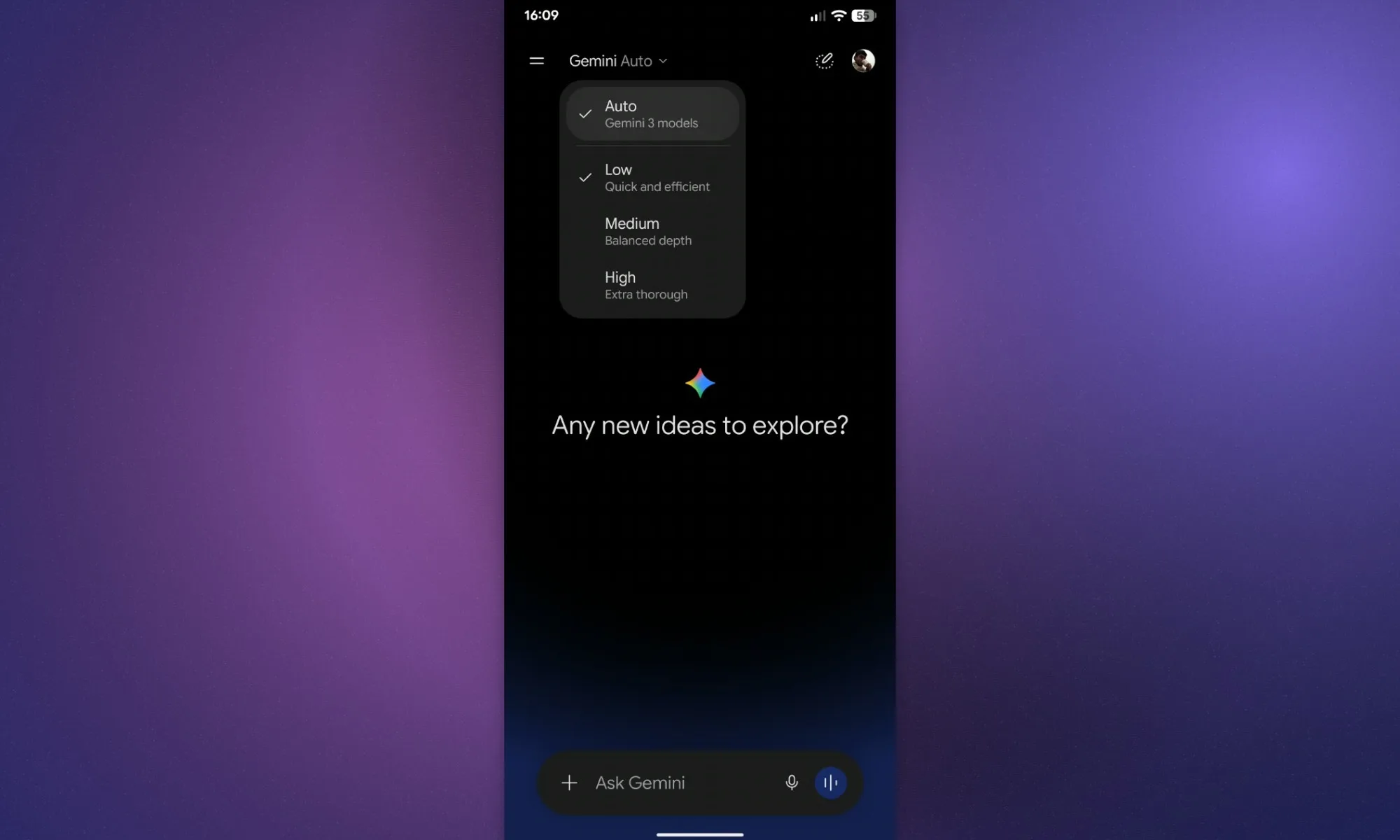
The downgrade Google announced last week is now starting to show up on free Gemini accounts. The old model picker is disappearing, leaving a single Auto option in its place. Instead of deciding whether to use Flash, Pro, or another available model, free users now hand that choice over to Google.
Auto will handle most everyday prompts with Flash-Lite. If Gemini decides a request needs more reasoning, it can move the task to Flash or Pro on its own. There is one important catch, though. Turning off smart model selection means every response falls back to Flash-Lite, so the only way free users can reach stronger models is by letting Google make the call (via 9to5Google). Google is giving people another kind of control at the same time, but it works very differently from choosing a model yourself.
Google is giving users effort controls instead
Digital Trends
Low, Medium, and High effort levels are rolling out across Gemini, replacing the previous Extended option. Low prioritizes speed, High gives the system more room to work through difficult prompts, and Medium sits between the two. The result is a slightly odd split in how much control free users actually have. They can choose how much reasoning they want Gemini to apply, but the model doing that work is now largely out of their hands.
Gemini is becoming harder to use without paying
Shimul Sood / Digital Trends
Google has been pushing Gemini deeper into its hardware and software ecosystem. The new Pixel phones already have a boatload of AI features, and now the new Googlebook laptops, which put Gemini at the center of the experience, have also arrived. The company is also bundling paid AI plans with some of that hardware, and of course, once you get used to these more capable models, you will feel the difference when you switch back to the free tier. Google has not said the change is meant to push free users toward a subscription. Still, taking direct model choice away gives paying customers another clear advantage.
Road signs should be very distinct from one another, but some signs out there look somewhat similar. One such example of this is the added-lane sign and the merge sign. Both of these are yellow, diamond-shaped signs to signal a warning to drivers, and they feature an arrow pointing up with another line curving to point up as well. With a merge sign, the curve line folds right into the main arrow, but with the added-lane sign, it’s its own separate arrow that runs parallel to the main arrow. Plus, there will be a dotted vertical line between the two arrows.
The merge sign is signaling to drivers that two lanes of traffic are about to combine into a singular lane. The added-lane sign, on the other hand, is signaling that a separate lane of road will be joining the flow of traffic. This may seem self-explanatory, but there may be instances where drivers are confused by road signs or misjudge what’s expected of them when they see these signs. This falls on drivers on both the road going straight and the road joining it, whether merging or not.
In the case of added-lane signs, there are some drivers who see this as a merge sign. Roadway joining drivers immediately try to move into the main road lane, while the other drivers have the right to maintain exactly how they’ve been driving. The opposite is true, too. Some main road drivers may try to move into the adjoining lane too soon and dangerously pull in front of those drivers. When you see this sign, expect to stay in your own lane for a little bit before trying to switch lanes.
Advertisement
The many mistakes of merging
Konia4ka/Shutterstock
Drivers who are merging onto the main road don’t have the right of way. You must adjust to the rhythm of the flow of traffic, not the other way around. This is why there will often be yield signs at the merge point as well. Mergers also need to be aware of how much roadway there is to merge. Sometimes there are signs that read “No Merge Area,” meaning there’s no buffer; if you’re merging, you must do it immediately. It’s also important for merging drivers to speed up to meet the speed limit as they enter the main road, so as to not disrupt the flow of traffic. Mergers must always use their turn signals, arguably the most important action of all.
There are things drivers on the main road need to keep in mind here, too, as just continuing forward without a care because you have the right of way is dangerous. If possible, give room to those who are merging. You can do this by switching lanes to open up space on the road, but if that’s not possible, it’s good to adjust your speed a bit to best find a way for the merging driver to get in behind or in front of you.
Advertisement
Another important thing to remember is if traffic is backed up and moving slowly, don’t use the merge lane to try and get around that standstill traffic. This is both incredibly dangerous and could result in fines and/or citations, depending on where you live. Merging is one of the trickiest parts of driving, so minimizing its risk is always a good thing.
Phoronix reports on a presentation this week by Meta engineer Gregory Price at the Linux Plumbers Conference in Prague:
With today’s memory shortages, high prices, and ever increasing memory capacity needs, Meta engineers have been working on Compressed RAM (“CRAM”) for Linux.
This hardware-offloaded compression still allows cacheline/byte access to compressed memory and in turn a better implementation than the likes of ZRAM and Zswap. Very promising is that there is near-native performance to raw DRAM speeds with CRAM… For end-users that may already be relying on the likes of Zswap or ZRAM, CRAM is offering near-native DRAM speeds. Read-only data is shown to be as fast as the raw DRAM performance. And for memory writes, CRAM is much faster than ZRAM or Zswap or plain swap.
“Most of the individual pieces needed to support CRAM are already mainline,” the article points out.
Tom’s Hardware writes that “It uses a private NUMA node (essentially, a ghost CPU) instead of pretending to be a block device, and this lets Linux continue using all of its memory semantics, including migration and ballooning, to manage CRAM.”
Advertisement
Because CRAM is stored in RAM and treated as RAM, with full cacheline/byte access, it can be accessed in a read-only fashion with little delay; just the cost of hardware-offloaded compression…
Even when you enable writes, CRAM is still much faster than ZRAM; 5.4x in the worst tested case of 20% writes. That’s a huge drop from the 452x read-only case, but keep your context; a 5.4x speedup is still titanic. The massive performance cliff when writes are involved comes down to the need to page fault and migrate folios back to the original NUMA domain, as you can’t write directly to compressed data; you’d corrupt everything…
While the obvious target of the work here (given its origin at Meta Platforms) is big Linux servers, ZRAM and Zswap are used all over the Linux ecosystem, even on machines as constrained as the Steam Deck. Many distributions enable one or the other by default. CRAM seems like it could offer a considerable speed-up for some of these machines, so hopefully it finds its way into the kernel once the remaining implementation questions are answered.
Developer: Third Shift Publisher: Annapurna Interactive Platforms: Steam (Windows; Steam Deck Verified), Epic Games Store, PlayStation 5, Nintendo Switch 2, Xbox Series X/S, Xbox for PC Price: Usually $20, with a 10 percent launch discount (PS Plus required for the PS5 discount). Also available on Game Pass Ultimate and PC Game Pass
There are several aspects of Forever Ago that didn’t totally work for me. The storytelling is occasionally clumsy and it’s sometimes functionally clunky. For instance, prompts to interact with items tended to disappear and it often took a few moments of adjustment for them to pop back up. But despite these issues, I feel like I was supposed to play this game right now.
Advertisement
Forever Ago is a road trip adventure that tells the story of Alfred, an older man who’s on a scavenger hunt of sorts. It factors in several of the places and memories that shaped his relationship with his late wife, Audrey, who set up this quest for him. As you might imagine, things don’t really go according to plan. It’s a tale about dealing with grief, discovering one’s self after losing a defining part of their life and the incessant march of time. You’ll explore, take photos, do some light puzzle solving and meet other characters.
The story is affecting (if not particularly novel) while the writing and Piotr Michael’s portrayal of Arthur make it easy to sympathize with this abrasive, struggling character. Clark Aboud’s lovely score even helped me get that one Bon Iver song the title references out of my head.
What strikes me the most about Forever Ago is its slow, deliberate pace, even if it’s not particularly long. My mind is often racing at 100 miles an hour and distractions snatch away my attention more often than I’d like. Forever Ago was absorbing enough to capture my full focus. Most importantly, it feels honest and sincere. I found it soothing and had to sit with my thoughts for a while after finishing it, which means it achieved what the developers intended.
Advertisement
The Traitors: Interactive Game
Developer: Fusebox Games Platforms: iOS, Android Price: Free, with in-app purchases
Despite my best intentions, I am hooked on the latest season of The Celebrity Traitors. I am generally terrible at social deception games since I’m a rotten liar so, as with the aforementioned Among Us spinoff, a single-player spin on the format could be fun.
The action plays out in similar fashion to the show. The aim is to survive until the end of the game, either as a Faithful or Traitor. After picking a character trait, you’ll choose daily outfits, tackle missions to increase the prize pot, forge alliances with other characters and either try to vote out Traitors or eliminate Faithfuls. I don’t love that there are microtransactions here, but I’ll still give it a go.
Advertisement
Shil
Developers: OSM Games, Nuostabūs Žaidimai Publisher: OSM Games Platform: Meta Quest. Coming to Steam later Price: $15
The last time I heard about this trippy-looking puzzle platformer, back in May, it was supposed to be hitting Steam and VR next year, but it’s already out on Meta Quest. The developers used silhouettes and a two-tone art style to create some striking visuals that mask secrets and threats.
Advertisement
The latest trailer for this horror-inflected game is almost enough to make me want to snap up a Quest headset so I can play it now. Maybe the Steam version (a release date for which is said to be coming “very soon”) will prompt me to finally hook up the PS VR2 adaptor that’s been next to my PC for over a year.
Echo Weaver
Developer: Moonlight Kids Publisher: Akupara Games Platforms: Steam (Windows, Mac; Steam Deck Verified; demo available), Xbox Series X/S, Xbox One, Xbox for PC, PS5 (with a one-hour trial for PS Plus Premium members), Switch 2 Price: Usually $20, with a 10 percent discount on Steam until October 22. Also available on Game Pass Ultimate and PC Game Pass
Advertisement
In similar fashion to my favorite game from last year, a “Metroidbrainia” calledÖoo, you’ll need to have your thinking cap on while playing Echo Weaver. Unlike in many Metroidvanias, your progress here is gated by your knowledge rather than unlockable powers. You’ll start with all of the abilities you need to beat the game, but it might take you a while to figure out what they are and how to use them.
You’ll also need to conquer a time loop. Here, time is a resource you can consume to heal, trade and even open up new routes. I’m into the art direction of this game, and I always enjoy having a glaive as a weapon. This particular one has reality-bending powers, which makes it even more appealing. While I may sometimes struggle with puzzles, there’s little I like more in games than that “a-ha!” moment when you hit upon a solution. Echo Weaver seems like it could have quite a few of those.
Today’s engineers face an unprecedented acceleration in AI hardware complexity, as explained in the recent research article “Revisiting Edge AI: Opportunities and Challenges.” The article examines the rapid growth of edge AI and the challenges it creates, including resource constraints, model architecture limitations, and network demands across edge-AI deployments.
The acceleration is driven by a fundamental shift in how modern AI models are built and scaled. As the models have become much larger and more complex, they are computationally more demanding because they contain more parameters and require more calculations.
To meet the demands of scaling deep neural networks, the industry is increasingly developing AI chips that are designed for specific tasks.
One major reason is that moving data between memory and the processor has become a major limitation on AI performance.
Advertisement
The movement to confront the hardware bottleneck—the AI memory wall—has altered the trajectory of semiconductor innovation, shifting architectural priorities toward domain-specific accelerator platforms.
The five-course program provides a structured exploration of AI processor technologies, from fundamental design principles to advanced architectures and real-world deployment.
Advertisement
The topics are:
Fundamental principles of design and functionality.
Practical insights into advanced architectures.
Understanding neural processing units for industry deployment.
The program addresses the needs of professionals across the AI hardware ecosystem, including hardware architects, chip designers, embedded systems developers, data‑center hardware engineers, and innovators exploring next‑generation processor ecosystems.
It is also valuable for those transitioning into AI chip design or seeking to understand the architectural forces shaping modern machine learning acceleration. For many, it provides the bridge between theoretical knowledge and the collaborative, cross‑disciplinary reasoning required in engineering environments.
The program is designed to explore how modern AI processors are conceived, structured, and optimized. The architectural layers that define contemporary AI hardware will be covered, including compute units, memory hierarchies, dataflows, and the performance characteristics that emerge from design decisions. The curriculum bridges theory and application, enabling participants to interpret architectural foundations, analyze trade‑offs, and understand how hardware structures shape computational efficiency across diverse environments.
By the end of the courses, learners will be able to evaluate processor behavior with the analytical precision expected of professionals working at the frontier of AI hardware design.
Advertisement
AI-generated avatars explain concepts
The program also uses a dialogue‑driven learning approach. Learners view conversations between AI-generated avatars that engage in scenario‑based dialogues. The avatars represent engineers tackling the same problems from various perspectives based on their different roles. The simulated storytelling and dialogues make advanced engineering concepts approachable without sacrificing depth or interactivity, because the user is occasionally challenged to decide the correct answer that leads to the best course of action.
A hardware engineer might push back against a systems engineer’s demands, for example, revealing the friction between physical constraints and algorithmic ambition. A computational validation specialist might interrogate a chip performance engineer’s optimism, exposing the gap between theoretical throughput and real‑world behavior. A heterogeneous systems architect could debate a multiprocessor coordination specialist about synchronization overheads, while a standards development engineer discusses regulatory implications with a technology strategy and compliance architect.
In the final course, an IoT systems architect and an embedded AI optimization engineer dissect the realities of deploying AI in constrained environments.
By the end of the course, learners will be able to evaluate processor behavior with the analytical precision expected of professionals working at the frontier of AI hardware design.
Advertisement
The avatar-driven learning environment creates a psychologically safer environment for learners, who might feel intimidated by traditional expert‑led videos. Research published in 2024 in IEEE Transactions on Learning Technologies showed that avatar‑based instruction can increase a learner’s confidence by up to 25 percent and improve retention of complex technical material.
Each course concludes with a module in which the two experts from different disciplines debate, question, and challenge each other’s assumptions.
Modeling expert reasoning through dialogue
The cross‑disciplinary conversations can do more than explain concepts; they can model how experts think. They can reveal the negotiations behind architectural choices, the competing priorities that shape system design, and the analytical rigor required to balance performance, efficiency, scalability, and compliance.
Learners observe engineering discourse, gaining insight into the reasoning patterns that drive innovation in AI processor development.
Advertisement
The program goes further by interrupting the dialogue at key moments and inviting the learner to step in. Instead of passively absorbing information, the learner decides how to resolve a trade‑off, predict the outcome of a design choice, or select the most defensible engineering path. The experience can feel less like a course and more like an apprenticeship inside an engineering team.
By merging rigorous technical content with an innovative, dialogue‑driven delivery model, the program sets a standard for teaching advanced engineering. It captures the complexity of real‑world problem‑solving, humanizes the learning experience, and challenges participants to think like the engineers who are defining the future of AI hardware. It is not simply a new course; it is a new way of learning.



























































You must be logged in to post a comment Login