

This week, juries in California and New Mexico dealt a pair of landmark verdicts against America’s social media giants.
Tech
5 Things You Need To Stop Doing If You Drive A Motorcycle

Riding a motorcycle is one of the most freeing experiences you can have. Even if you have all the luxuries of being inside a car and even a chauffeur to drive you around in it, sitting astride a bike is just a different feeling. Modern motorcycles offer a ton of features that make for a more comfortable ride. However, doing so will always be a high-stakes game of focus, physics, and continuous learning. It doesn’t matter if you have the one of the safest and most beginner-friendly motorcycles ever built — you still need to take care while on the road.
After years on two wheels, I have realized that the most dangerous habits aren’t only the obviously reckless ones like performing stunts on highways or unnecessary speeding through traffic. For serious riders who really want to drive safely, you can’t overlook even minor issues; a small lapse in judgment can result in la life-altering injury on a bike. It’s not always about wearing a well-ranked bike helmet or sturdy, protective riding jacket; you can avoid major accidents by simply removing unnecessary risks from your ride.
Dangerous behavior can include things like wearing the wrong shoes, adopting bad driving habits, allowing yourself to get distracted, or blindly trusting what you see while on the road. It’s time to unlearn some of these bad behaviors. Here are five things that you need to stop doing if you drive a motorcycle.
Stop wearing loose shoelaces
It may sound like something your mom would tell you, but it’s a crucial point. You don’t want a loose shoelace getting tangled in your bike. It even happened to me very recently. As I went to put my left foot down to stabilize the bike, I realized I couldn’t move as my shoelaces had gotten themselves tangled around the gear lever. Thanks to my years of experience, I avoided a drop that would have otherwise led to some bruises and scratched fairings, but others might not be able to save themselves.
Loose laces can easily end up tangled at the same spot of your own bike, preventing you from shifting gears when you need to change speed. Things get especially dangerous when you have someone riding pillion, though; their loose laces can get into the most dangerous moving parts of a motorcycle like the rear wheel, drive, and sprockets. If their laces get stuck into any of these parts at speed, it doesn’t just snap the lace — it can pull their foot right into the machinery, resulting in something dreadful.
For all these reasons, many state DMVs will highlight the issue. An example of this is how the Washington Department of Licensing explicitly advises keeping all your gear secure to avoid interference with controls, stating that “laces should be tucked in to prevent them from catching on parts of the bike.” To avoid such mishaps, you should be rigorous about the type of footwear you wear. The California DMV Motorcycle Handbook likewise warns against the dangers, clearly suggesting wearing sturdy, over-the-ankle or closed-toe shoes.
Stop changing speed or gears mid-corner
Riding a motorcycle on a mostly-straight highway or freeway is a totally different skill from riding over hills or through twisty mountain roads. I’ve been a rider for more than a decade, but when I took my bike to Ladakh in the mountainous region of northern India, I learned a lot of new things about riding. One of the most crucial new lessons was you need to stay calm when approaching a sweeping curve so as to avoid slamming on the brakes or grabbing the clutch and downshifting.
Downshifting or braking might feel like a smart move, but it is actually one of the quickest ways to crash. Motorcycles rely on a limited amount of traction. When you lean your bike into a curve (the most common way of turning for heavy bikes those loaded down with gear), your tires are already using almost all the traction available. Downshifting or braking spikes your power delivery, and the bike loses traction.
Experts also agree that gear shifting and braking should happen before you are ready to lean the bike. According to a driving manual published by the Kentucky State Police (via DrivingTests.org), it is recommended to change gears before entering a turn. The manual notes that if shifting is necessary, it should be smooth and there should be no sudden change in power delivery, as it can cause the vehicle to skid. TVS Motor, one of the biggest manufacturers of two-wheelers in India, also suggests that you should enter the curve in the smoothest way possible. In other words, its safer to finish gear shifts and braking before entering the corner.
Stop watching the speedometer or using a phone
Modern-day motorcycles are equipped with TFT or LCD screens that are compatible with Apple CarPlay and Android Auto, allowing users to view all of their phone’s content, sometimes use apps on the display, and view other metrics. Even bikes that don’t support these features can often be fitted with a smartphone mount to use for navigation or other purposes. But because of all this, it becomes quite tempting for riders to spend too long looking down at these screens.
This distraction is often the cause of major accidents on the road. Looking down at the display or taking your eyes off the road, even for a fraction of a second, can result in a crash. While driving, your eyes are your primary tool. Not only should you stay vigilant about what’s happening in front of you, but you should also check your bike’s rear-view mirrors for possible dangers behind. You should be scanning the horizon for safely overtaking, avoiding potholes, or swiftly changing lanes, not flicking your eyes down to whatever’s on your phone screen.
Distracted riding is quite lethal, and even the best riding gear might not be able to save you from accident or injury. The NHTSA (National Highway Traffic Safety Administration) reports thousands of lives lost annually due to distraction, with more than 3,000 deaths in 2023 alone. Even manufacturers of smartphone mount holders like Mob Armor stress that paying too much attention to your phone can lead to catastrophic consequences while riding.
Stop blindly trusting brake lights
One of the biggest mistakes, often committed by beginners and experienced bikers alike, is believing that if the car in front isn’t showing red brake lights, it isn’t slowing down. If you rely solely on this signal, then you may end up kissing the trunk of someone’s car with a bang. This most commonly comes up with with manual transmission cars, which is very common where I’m from. A car with a manual transmission often uses engine braking to slow down, which doesn’t require a driver to step on the brake.
Brake lights only tell you that the driver is depressing the brake pedal. It doesn’t tell you if the driver is just coasting to a stop or downshifting. If you’re in the habit of following vehicles too closely, it’s all too easy for this to result in an accident. As per the Motorcycle Safety Foundation, a rider should remain highly engaged when on the road, doing your best to anticipate what’s coming down the road or to look for signs that the cars in front of you are slowing down.
This is why you should always leave adequate space between your motorcycle and the vehicle in front. By leaving a visible gap between you and them, you will have sufficient time to react and bring your bike to a stop safely. A good cue to look for is whether the tires of the vehicle in front of you are exhibiting signs of slowing. You should also evaluate whether the gap between the two of you is shrinking faster than normal. Is this a lot of work? Sure. It’s also critical for your safety.
Stop riding behind the center of a car
Riding a motorcycle can make you feel like royalty. It’s only natural to feel like you’ve got the right to cruise right down the dead center of your lane. However, that’s often considered the most dangerous spot for a two-wheeled vehicle. Since cars have four wheels, drivers usually center their vehicles over hazards to protect their own tires. This means the center of the lane becomes the collection point for all the stuff that cars have avoided, such as potholes, broken vehicle parts, and even spilled or leaking vehicle fluids.
Riding in the middle puts your front tire at great risk of hitting any of these obstacles. The last thing you want is ending up wrecked because you hit a pothole or slipped on an oil slick that accumulated in the center. More importantly, driving directly behind a vehicle in this way might make it hard for that driver in front of you to see you in their side mirrors, leaving you in their blind spot.
This is why your best bet is often to drive aligned with the left bumper of the car ahead of you. This places you squarely in view of the driver’s side mirror, making you harder to ignore. And second, it gives you a clearer view as you can more easily see past that vehicle, letting you avoid trouble down the road and minimizing your risk of an accident.
Continue Reading


A new malware-as-a-service called CrystalRAT is being promoted on Telegram, offering remote access, data theft, keylogging, and clipboard hijacking capabilities.
The malware emerged in January with a tiered subscription model. Apart from the Telegram channel, the MaaS was also promoted on YouTube, via a dedicated marketing channel that showcased its capabilities.
Kaspersky researchers say in a report today that the malware features strong similarities to WebRAT (Salat Stealer), including the same panel design, Go-based code, and a similar bot-based sales system.
CrystalX also includes an extensive list of prankware features designed to annoy the user or disrupt their work. Despite its “fun” side, CrystalX offers a large set of data theft capabilities.
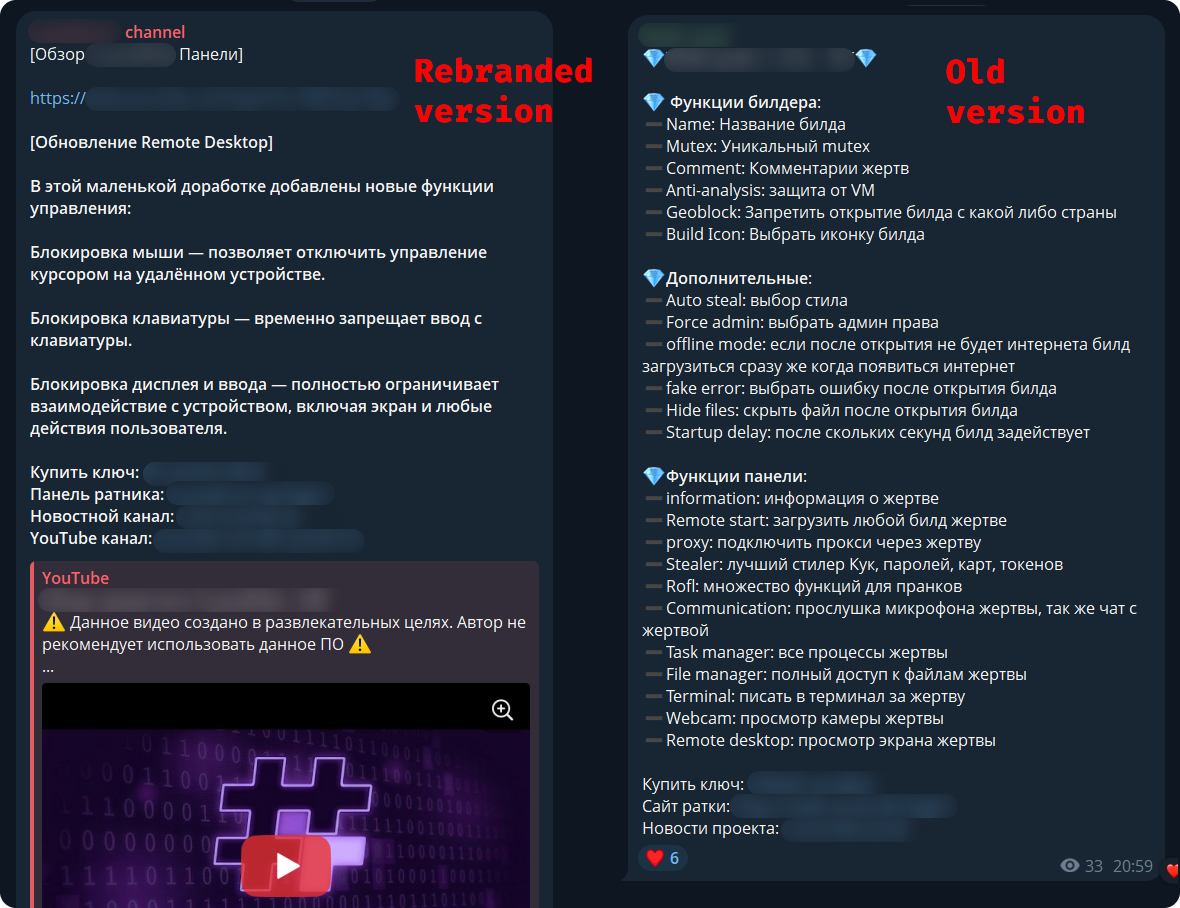
Source: Kaspersky
CrystalX RAT details
Kaspersky says that the malware provides a user-friendly control panel and an automated builder tool that supports customization options, including geoblocking, executable customization, and anti-analysis features (anti-debugging, VM detection, proxy detection, etc.).
The generated payloads are zlib-compressed and encrypted with the ChaCha20 symmetric stream cipher for protection.
The malware connects to the command-and-control (C2) via WebSocket and sends info about the host for profiling and infection tracking.
CrystalX’s infostealer component, which Kaspersky found to be temporarily disabled as it is being prepared for an upgrade, targets Chromium-based browsers via the ChromeElevator tool, Yandex, and Opera. Additionally, the tool collects data from desktop apps such as Steam, Discord, and Telegram.
The remote access module can be used to execute commands via CMD, upload/download files, browse the file system, and control the machine in real time via built-in VNC.
The malware also exhibits spyware-like behavior, as it can capture video and audio from the microphone.
Finally, CrystalX features a keylogger that streams keystrokes in real time to the C2, and a clipper tool that uses regular expressions to detect wallet addresses in the clipboard and replace them with ones the attacker provides.

Source: Kaspersky
Putting some “fun” in the package
What sets CrystalX apart in the crowded MaaS space is its rich set of prankware features.
According to Kaspersky, the malware can do the following on infected devices:
- change desktop wallpaper
- alter display orientation to various angles
- force system shutdown
- remap mouse buttons
- disable input devices (keyboard/mouse/monitor)
- show fake notifications
- change cursor position on the screen
- hide various components (desktop icons, taskbar, the Task Manager, and the Command Prompt executable)
- Provide attacker-victim chat window
While the above features do not improve the attack’s monetization potential for cybercriminals, they certainly make the product distinctive, and could bait script kiddies and low-skilled/entry-level threat actors into getting a subscription.
Another reason for the prank features could be potential for victim manipulation, or even distraction, while the data theft modules run in the background.
To reduce the risk of malware infections, users are advised to exercise caution when interacting with online content and avoid downloading software or media from untrusted or unofficial sources.

Automated pentesting proves the path exists. BAS proves whether your controls stop it. Most teams run one without the other.
This whitepaper maps six validation surfaces, shows where coverage ends, and provides practitioners with three diagnostic questions for any tool evaluation.

from the getting-the-fix-in dept
Because South Dakota governor Larry Rhoden is forever obligated to serve Kristi Noem and Kristi Noem is forever obligated to serve Donald Trump, he and his GOP buddies are making America MAGA again, starting with his home turf.
Non-citizens have never really disrupted voting. But they’re the convenient scapegoat for a party that’s justifiably worried it’s going to lose its majority during the mid-terms. Multiple efforts are being made all over the nation to disenfranchise anyone that’s not part of Trump’s most rabid voting base. Pretending people not allowed to legally vote are somehow flipping elections for the Democratic Party is more than merely obnoxious. It’s actually harming the democratic process.
Here in South Dakota, two laws have been passed in recent weeks with the express purpose of keeping non-white people from showing up to vote. The first, passed at the beginning of this month, allows any rando to claim a person they saw voting shouldn’t be allowed to vote.
Voters in South Dakota will soon be able to challenge other voters’ citizenship.
Republican Gov. Larry Rhoden signed legislation into law last week that authorizes challenges by individuals and election officials.
[…]
State law already allows challenges to a voter’s registration up to the 90th day before an election, if a person is suspected of lacking South Dakota residency, voting in another state or being registered to vote in another state. The new law adds citizenship as a justification for a challenge.
Challenges may be filed by the South Dakota Secretary of State’s Office, the auditor in the county where the voter is registered, or a voter in the same county. The challenge must be in the form of a signed, sworn statement and must include what the law describes as “documented evidence.”
Now, we can all see what the law is. But we all know how it will be applied. State employees with access to voter rolls will raise challenges against anyone with a foreign-sounding last name. While it’s unlikely few citizens will actually file challenges, they’ll certainly feel comfortable accosting anyone standing in line to vote whose skin is darker than their own. Given the inevitability of these responses, it’s easy to see the law accomplishing exactly what it’s supposed to: limit the number of non-white voters at the polls during the mid-terms and beyond.
But that’s not the only suppression effort signed into law this month. There’s also this one, which raises the bar for participating in the democratic process with the obvious intention of limiting participation to the sort of voters the GOP thinks with vote for it:
New voters in South Dakota will have to prove that they are United States citizens in order to cast a ballot in state and local races under a bill signed on Thursday by Gov. Larry Rhoden.
The new law, which does not apply to South Dakotans already on the voter rolls, comes amid a national push by Republicans to tighten voting rules and root out voting by noncitizens, which is already illegal and believed to be rare.
“This bill ensures only citizens vote in state elections, keeping our elections safe and secure,” said Mr. Rhoden, who is seeking election to a full term this year and is facing a crowded Republican primary field.
It’s already illegal in South Dakota to vote if you’re not a citizen. This bill addresses a completely imaginary “problem.” And it forces voters to provide a passport, birth certificate, and other documents proving citizenship before they’re allowed to vote. While it may be easy for many people to present these documents, the simple fact is that they’ve never been asked to do this before, and anyone who’s not aware this law has been passed will be denied the opportunity to vote because the GOP decided to move the goalposts during an election year.
Non-citizens voting in South Dakota has never been an issue. The fact that 273 non-citizens were recently removed from the state’s voting rolls may seem a bit sketchy but there’s a good reason there might be a few hundred non-citizens with voter registrations:
Noncitizens can obtain a driver’s license or state ID if they are lawful permanent residents or have temporary legal status. There’s a part of the driver’s license form that allows an applicant to register to vote. That part says voters must be citizens.
The problem is that this is all on the same form. The voter registration part of the form has a signature line, which many applicants will fill out and sign even if their intention is only to get a drivers license or ID card, especially since it appears before the final signature block for the entire application.

If applicants are not asked to affirmatively state their intention to register to vote (as the Department of Public Safety employees ask now, along with asking applicants to write “vote” on the form to signal their affirmation), their applications might be processed, along with the voter registration applicants didn’t realize they enabling.
The Secretary of State’s office (the office that’s supposed to be reviewing voter registrations for eligibility) threw the Department of Public Safety under the bus:
Rachel Soulek, director of the Division of Elections in the Secretary of State’s Office, placed blame on the department in her response to South Dakota Searchlight questions about the situation.
“These non U.S. citizens had marked ‘no’ to the citizenship question on their driver’s license application but were incorrectly processed as U.S. citizens due to human error by the Department of Public Safety,” Soulek wrote.
That’s not what happened. Their ID applications were processed and the Soulek’s department failed to catch the inadvertent errors. And it doesn’t really even matter who’s at fault because despite the errors, this is still a non-issue.
Soulek said only one of the 273 noncitizens had ever cast a ballot. That was during the 2016 general election.
A handful of clerical errors that resulted in a single illegal vote in the past decade cannot be a rational basis for a new law. And there’s a good chance the sole vote was made in error, rather than maliciously. After all, if the state told this person they could vote, who were they to question that determination?
This is nothing more than state governments stepping up to do what Trump can’t. His SAVE Act is stalled and lots of last-minute gerrymandering at the behest of the president is tied up in court. His loyalists are doing what they can to make his perverted dreams a reality in states that are most likely to lean Republican in the first place, which makes all of this as pointless as it is stupid. But the underlying threat to democracy remains, ever propelled forward by the people who claim to love America the most.
Filed Under: immigration, larry rhoden, racism, south dakota, trump administration, voter fraud, voter suppression

In Los Angeles, jurors awarded $6 million to a young woman who alleged that Instagram and YouTube had damaged her mental health. A day earlier, a jury in Santa Fe ruled that Meta had designed its social media platforms in a manner that harmed minors — and ordered the company to pay $375 million in recompense.
These decisions constituted a breakthrough for a legal movement that sees social media companies as the new “Big Tobacco” — an industry that knowingly peddles harmful and addictive products. And it was a triumph for advocates of “child online safety,” who believe that social media is corrosive to minors’ psychological well-being. With thousands of similar lawsuits pending, the California and New Mexico verdicts could prove to be transformative precedents.
Yet the decisions have also raised alarm bells for many free speech advocates. To organizations like FIRE — and civil libertarian writers like Reason’s Elizabeth Nolan Brown — these decisions will do more to undermine free expression online than to safeguard young people’s mental well-being.
To better understand — and interrogate — this perspective, I spoke with Nolan Brown. We discussed how the recent verdicts could open the door to broader censorship, the evidence for social media’s psychological harms, and whether parents can sufficiently protect their kids from problematic internet use without the government’s help. Our conversation has been edited for clarity and concision.
You’ve written that these verdicts are “a very bad omen for the open internet and free speech.” How so?
One key protection for online speech is Section 230 of the Federal Communications Decency Act, which prevents online platforms from being held liable for speech they host but don’t create.
What we’re seeing in these cases is an attempt to get around Section 230 by recharacterizing speech issues as “product liability” issues. Instead of saying, “We’re going after platforms for hosting harmful speech,” the plaintiffs are saying, “We’re going after them for negligent product design.”
In other words, the choices that social media companies make about how to curate their feeds or encourage engagement.
Right. Some of the things they complained about were “endless scroll” (where you keep going down and the feed doesn’t stop at the end of a page), recommendation algorithms that promote content that a user is more likely to engage with, and beauty filters.
But ultimately, if you look at what they’re actually going after, it comes down to speech. When you talk about TikTok or YouTube being so engaging that it’s “addictive,” you’re talking about content: No matter how TikTok’s algorithm is designed, it wouldn’t be compelling to people if the content wasn’t compelling.
Similarly, in the California case, the plaintiff argued that Meta allowing beauty filters on images was a negligent product design, since they promote unrealistic beauty standards, which caused her to develop body image issues.
But that really just comes back to speech: The choice to use a filter is something that individual users do to express themselves. Providing those tools for users is a form of speech.
But aren’t many of these product design choices content-neutral? A defender of these verdicts might argue: Social media companies are manipulating minors into compulsively using their platforms, in a manner that’s bad for their mental health. And they’re doing this, in part, through push notifications, autoplaying videos, and endlessly scrolling feeds. So, why can’t we legally restrict their use of those features — without constraining the kinds of speech they’re allowed to platform?
Some people will say, “Why don’t we limit notifications — or kick people off after an hour — if they’re minors?” But in order to implement any set of rules or product design choices just for young people, these platforms would need to have a foolproof way of knowing who is a minor and who is an adult.
And that means age verification procedures, where they’re either checking everyone’s government-issued ID, or they’re using biometric data — or something else that requires everyone to submit identification before they can speak anywhere on the internet.
And that creates a lot of problems. It makes people’s data more vulnerable to identity theft, hackers, and scammers. It also means that your identity is tied to everything you do online. And that can be dangerous, especially for people who are talking about sensitive issues or protesting the government. The ability to speak and organize online anonymously is very important.
What if the product design restrictions applied to adults and minors alike? If we barred social media companies from issuing push notifications for everyone, that would avoid the age verification issue, right?
Many platforms give people the tools to do these things already. You can turn autoplay off. You can have a chronological feed. You can tailor your settings so that you don’t have these features.
If we’re saying, “Why can’t the government mandate these options?” I think that’s a very slippery slope. You might think, “Okay, who cares about push notifications? Why can’t the government just mandate that they not do push notifications?” But the rationale for that gets us into much broader territory.
It’s effectively saying: Since some people will have a problem with this, the government must micromanage the way that the product is made. Yet people can use all sorts of products in a problematic way: Fitness regimes, streaming services, food. And we’re not saying like, okay, the government gets to step in and tell these companies exactly how to do business in the way that would be least harmful to people. And that attitude is particularly dangerous when we’re talking about products involving speech.
A skeptic might argue that the slope here isn’t actually that slippery. After all, the government has already shown that it can enact targeted, content-neutral restrictions on speech without triggering a cascade of censorship.
For example, since 1990, there have been limits on the amount of advertising that can air during children’s programming in a given hour — and also a requirement that ads and content be clearly separated. Those measures are arguably more intrusive on speech than, say, banning autoplay of videos on a social media platform. And yet, the Children’s Television Act of 1990 didn’t lead to any really sweeping constraints on First Amendment rights.
I just think it makes a big difference if you’re talking about restricting speech for minors and restricting it for adults. And what you were just mentioning were restrictions that would apply to everybody.
Beyond the First Amendment issues, you’ve expressed some skepticism about the specific causal claims made by plaintiffs in these cases: Specifically, that social media caused their mental health difficulties. Yet many social psychologists — most prominently Jonathan Haidt — have argued that these platforms are corrosive to children’s psychological being. So, why do you think the allegations here are overstated?
In the California case specifically, this young woman is alleging that, because she was on social media since she was very young, she developed mental health issues. But there was a lot of testimony showing that there were many other things going wrong in her life. She was exposed to domestic violence. She had troubles with her parents, troubles at school.
So the idea that social media directly caused her difficulties — rather than these life stressors that are well-known to cause harm — I think that’s kind of suspect.
And I think you see this problem in the broader research on social media’s mental health impacts. There’s often a correlation between depressive symptoms and heavy social media use because people who are having a difficult time at home and at school — people who are socially isolated — tend to use social media more than people in better circumstances.
How much do your views on the regulation of social media hinge on skepticism about the actual harms of these platforms? If we acquired evidence that there really were major impacts here — that autoplay and beauty filters were dramatically worsening kids’ mental health — would you support legal restrictions on these features? Or would First Amendment considerations override public health concerns, irrespective of the evidence?
The strength of the evidence is important for guiding the decision-making of individuals, parents, families, communities, and school districts. But even if we knew that beauty filters caused a lot of harm, the government still would not be justified in banning them, since they are avenues for speech. Plenty of people are not harmed by them.
There are so many things that harm some people, but that are useful to others. And I don’t think the existence of problematic use justifies banning those things for everyone.
I think talk of social media “addiction” can be unhelpful on this front. That language suggests that this is something that’s automatically harmful for everyone. And that just isn’t the case. Plenty of people use social media in a healthy way, in the same way that countless people can drink alcohol without it harming them, or eat a bag of chips without bingeing on them.
I think it’s the same way with social media. This is a technology that can harm some people, particularly those who already have psychological issues.
But it isn’t this addictive substance or a poison where you can’t even be exposed to it, or else. I think that view imbues smartphones with an almost mystical quality.
There are many cases, though, where we choose to heavily regulate a substance or practice — not because it harms everyone who engages with it — but rather, because it imposes massive harms on a minority of problem users. Gambling and alcohol are two examples. But even with opioids, many people can pop some pills and never develop a dependency. Yet some end up addicted and dying of overdoses. And for that reason, we heavily restrict access to opioids.
So, I feel like the question here might be less about whether social media is bad for everyone than whether it has truly large harms for problem users.
I think there are people who talk about it the way you do. But others describe social media as if it’s something that people are powerless against. But yes, I don’t think we have strong evidence that this is harmful in the way that addictive substances are. In fact, I think the evidence is really mixed. Some studies suggest that moderate smartphone use is actually correlated with better mental health outcomes.
You argue that, instead of seeking government restrictions on social media, parents should exercise more responsibility over their kids’ use of smartphones and apps.
Many parents argue that their capacity to monitor their children’s social media use is really limited and that they lack the tools to protect their kids from the harmful effects of these platforms. What would you say to them?
I think this is straightforward with very young children. Like, why is a 6-year-old having unfettered alone time on a digital device? In the California case, the plaintiff was using social media as a very young child. And at that age, parents definitely have control over what their kids do and see online; you can control whether your kid has access to a smartphone. With adolescents, there are areas where tech companies are working with parents. We’ve seen more parental controls being introduced in recent years. We’ve seen Meta roll out specific accounts for minors that have some restrictions on them. We’ve seen things like the introduction of phones that allow basic texting but not certain apps. So, I think private solutions are possible here. I think we can address people’s legitimate concerns without having the government infringe on free expression.


Apple has now made it possible for more iPhones still running iOS 18 to receive security updates that protect against the actively exploited DarkSword exploit kit.
“We enabled the availability of iOS 18.7.7 for more devices on April 1, 2026, so users with Automatic Updates turned on can automatically receive important security protections from web attacks called DarkSword,” reads a note in today’s iOS 18.7.7 security update changelog.
“The fixes associated with the DarkSword exploit first shipped in 2025.”
In March, researchers at Lookout, iVerify, and Google Threat Intelligence revealed a new “DarkSword” exploit kit that targeted iPhones running iOS 18.4 through 18.7.
The six vulnerabilities used by the DarkSword exploit kit are tracked as CVE-2025-31277, CVE-2025-43529, CVE-2026-20700, CVE-2025-14174, CVE-2025-43510, and CVE-2025-43520.
While iOS exploits have typically been used in highly targeted spyware campaigns, this iOS exploit kit was used much more widely, including by Turkish commercial surveillance vendor PARS Defense, a threat actor tracked as UNC6748, and a suspected Russian espionage group tracked as UNC6353.
In these attacks, GTIG observed three separate information-stealing malware families deployed on victims’ devices: a highly aggressive JavaScript infostealer named GhostBlade, the GhostKnife backdoor, and the GhostSaber JavaScript malware, which can execute code and steal data.
Since July 2025, with the release of iOS 18.6, Apple has been steadily fixing the flaws as they are disclosed in security updates pushed out to compatible devices.
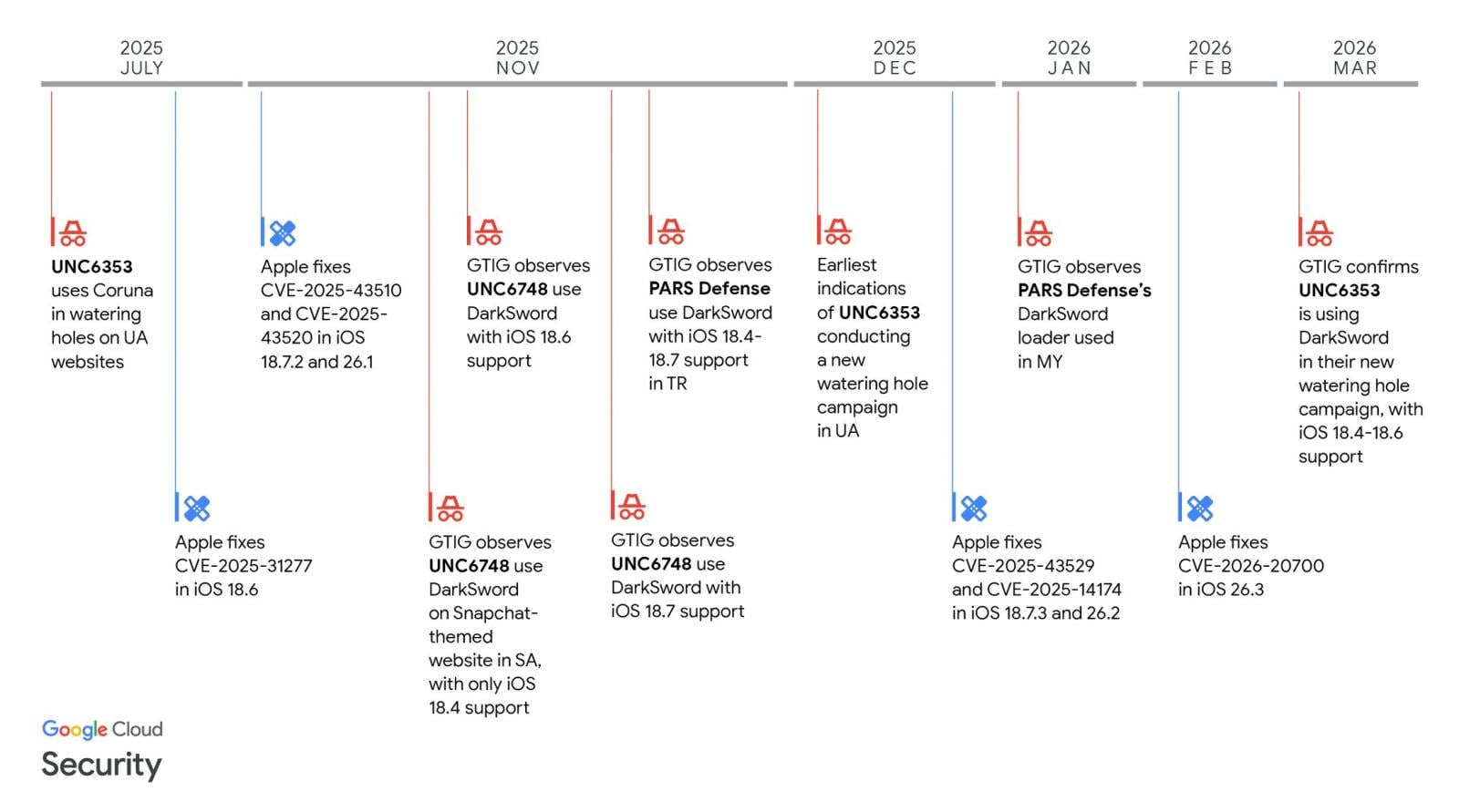
Source: GTIG
However, by late 2025, Apple stopped offering iOS 18 updates to newer devices capable of running the newer iOS 26.
For those who decided not to upgrade and stay on iOS 18, availability to the security updates became limited, with newer devices no longer receiving patches for DarkSword vulnerabilities released in 2026.
Since then, only a small number of devices remained able to receive iOS 18 updates, and the last 18.7.6 update was offered only to iPhone XS, iPhone XS Max, and iPhone XR devices.
To make matters worse, a researcher released the DarkSword exploit kit on GitHub last month, making it accessible to other threat actors who wanted to target older iPhones.
Today, Apple has released iOS 18.7.7 to make it available to more devices that want to stay on the older operating system while remaining protected from the latest threats.
Devices eligible to receive the new update now include iPhone XR, iPhone XS, iPhone XS Max, iPhone 11 (all models), iPhone SE (2nd generation), iPhone 12 (all models), iPhone 13 (all models), iPhone SE (3rd generation), iPhone 14 (all models), iPhone 15 (all models), iPhone 16 (all models), iPhone 16e, iPad mini (5th generation – A17 Pro), iPad (7th generation – A16), iPad Air (3rd – 5th generation), iPad Air 11-inch (M2 – M3), iPad Air 13-inch (M2 – M3), iPad Pro 11-inch (1st generation – M4), iPad Pro 12.9-inch (3rd – 6th generation), and iPad Pro 13-inch (M4).
iPhone users still running iOS 18 with Automatic Updates enabled will now receive the latest version and protections against the DarkSword exploit kit.
Automated pentesting proves the path exists. BAS proves whether your controls stop it. Most teams run one without the other.
This whitepaper maps six validation surfaces, shows where coverage ends, and provides practitioners with three diagnostic questions for any tool evaluation.

It will consolidate production in its Johor and Selangor plants
Yeo Hiap Seng (Yeo’s) announced today (Mar 31) that it will retrench 25 employees at its Senoko facility in Singapore as it shifts its can manufacturing operations to Malaysia.
The company explained that consolidating production in its Johor and Selangor plants will help “optimise capacity utilisation and strengthen overall manufacturing efficiency” across its network.
Despite the move, Yeo’s Senoko site will remain its headquarters, as well as a hub for cross-border logistics and limited-scale production.
Yeo’s added that it will support affected staff through job placement services, career guidance, and counselling, and may offer them opportunities in Malaysia where suitable roles are available.
The company said it worked closely with the Food, Drinks and Allied Workers Union to ensure that the retrenchment package and transition support “reflect appreciation for the contributions of affected staff”.
The compensation packages will follow guidelines from Singapore’s Ministry of Manpower and will be based on each worker’s salary and length of service.
“These benefits will be commensurate with each employee’s salary and years of service.”
This is not the first round of layoffs for Yeo’s.
In Dec 2024, it cut 25 jobs after Oatly shut its Singapore plant—roles that had been created specifically for that production. Earlier, in 2022, the company retrenched 32 employees, citing shifts in consumer behaviour, retail challenges, and rising costs.
Financially, the SGX-listed firm reported a net profit of S$21.1 million for the year ending Dec 31, 2025, a significant increase from S$6.9 million the year before.
However, both overall revenue and core food and beverage revenue declined, which the company attributed to softer consumer spending and stronger competition in key markets.
- Read other articles we’ve written on Singaporean businesses here.
Featured Image Credit: Google Street View/ Yeo’s via Facebook

Longtime Slashdot reader Elektroschock writes: When Ubisoft pulled the plug on The Crew’s servers without warning, players were left with a worthless game they’d already paid for. Now, consumer watchdog UFC-Que Choisir is fighting back, demanding gamers’ right to play regardless of publisher whims. Supported by the “Stop Killing Games” movement, this landmark case challenges unfair terms before the Creteil Judicial Court (Val-de-Marne near Paris), and aims to protect players from disappearing games. The lawsuit that UFC-Que Choisir filed against Ubisoft on Tuesday alleges that the video game publisher “misled consumers about the permanence of their purchase and imposed abusive contractual clauses stripping players of ownership rights,” reports Reuters.


When Intuit shipped AI agents to 3 million customers, 85% came back. The reason, according to the company’s EVP and GM: combining AI with human expertise turned out to matter more than anyone expected — not less.
Marianna Tessel, the financial software company’s EVP and GM, calls this AI-HI combination a “massive ask” from its customers, noting that it provides another level of confidence and trust.
“One of the things we learned that has been fascinating is really the combination of human intelligence and artificial intelligence,” Tessel said in a new VB Beyond the Pilot podcast. “Sometimes it’s the combination of AI and HI that gives you better results.”
Chatbots alone aren’t the answer
Intuit — the parent company of QuickBooks, TurboTax, MailChimp and other widely-used financial products — was one of the first major enterprises to go all in on generative AI with its GenOS platform last June (long before fears of the “SaaSpocalypse” had SaaS companies scrambling to rethink their strategies).
Quickly, though, the company recognized that chatbots alone weren’t the answer in enterprise environments, and pivoted to what it now calls Intuit Intelligence. The dashboard-like platform features specialized AI agents for sales, tax, payroll, accounting and project management that users can interact with using natural language to gain insights on their data, automate tasks, and generate reports.
Customers report invoices are being paid 90% in full and five days faster, and that manual work has been reduced by 30%. AI agents help close books, categorize transactions, run payroll, automate invoice reminders and surface discrepancies.
For instance, one Intuit customer uncovered fraud after interacting with AI agents and asking questions about amounts that didn’t add up. “In the beginning it was like, ‘Is that an error? And as he dug in, he discovered very significant fraud,” Tessel said.
Why humans are still in the loop
Still, Intuit operates on the principle that humans are “always accessible,” Tessel said. Platforms are built in a way that users can ask questions of a human expert when they’re not getting what they need from the AI agent, or want a human to bounce ideas off of.
“I’m not talking about product experts,” Tessel said. “I’m talking about an actual accounting expert or tax expert or payroll expert.”
The platform has also been built to suggest human involvement in “high stakes” decision-making scenarios. AI goes to a certain level, then human experts review and categorize the rest. This provides a level of confidence, according to Tessel.
“We actually believe it becomes more needed and more powerful at the right moments,” she said. “The expert still provides things that are unique.”
The next step is giving customers the tools to perform next-gen tasks like vibe coding — but with simple architectures to reduce the burden for customers. “What we’re testing is this idea of, you can actually do coding without realizing that that’s what you are doing,” Tessel said.
For example, a merchant running a flower shop wants to ensure that they have the right amount of inventory in stock for Mother’s Day. They can vibe code an agent that analyzes previous years’ sales and creates purchase orders where stock is low. That agent could then be instructed to automatically perform that task for future Mother’s Days and other big holidays.
Some users will be more sophisticated and want the ability to dive deeper into the technology. “But some just want to express what they want to have happen,” Tessel said. “Because all they want to do is run their business.”
Listen to the full podcast to hear about:
-
Why first-party data can create a “moat” for SaaS companies.
-
Why showing AI’s logic matters more than a polished interface.
-
Why 600,000 data points per customer changes what AI can tell you about your business.
You can also listen and subscribe to Beyond the Pilot on Spotify, Apple or wherever you get your podcasts.

My life has changed so much since my time as a Voices of Change fellow during the 2023 school year. As I wrote in my final essay of the fellowship, the beautiful, imperfect school I loved and helped build had closed. With the support of my fellowship editor, Cobretti Williams, I applied and was admitted to the Creative Writing Workshop at the University of New Orleans, where I am taking graduate classes and teaching a freshman English composition course.
In deciding what to write as a reflection on my time since the fellowship, I started three different essays and hated all of them. I did a lot of cursing, went on a couple of brooding walks and wondered why I agreed to write this in the first place. During the similarly maddening process of designing the syllabus for the first college course I taught, I took a break to write my students a letter. Here is an excerpt:
Before we start this course together, it’s important for me to name something foundational to how I approach teaching it: Writing is hard for everyone. I love writing and I believe that, if I keep practicing, I can become great at it… and I still hate doing it a lot of the time. This is why writing is so important. Almost everything we want is on the other side of making ourselves do things we don’t want to do. When we sit down to write, whether we want to or not, and we keep writing when we hit that initial point where we want to stop, and continue when those moments arise again and again like waves, we are getting vital practice. This skill, ignoring the complacent you, the you that would rather do the thing tomorrow, or tomorrow’s tomorrow, and doing the thing now instead is an act of becoming the you that has the things you want. Like anything else, this becomes easier the more you do it.
This excerpt reminds me that writing is much more difficult than most of the things we do in a world that commodifies ease and comfort, upholds them as desirable and makes us feel we are entitled to them while simultaneously less and less able to tolerate their lack.
There is a common misconception that my students come to me with that manifests most often in the statement “I don’t know what to write.” They think this means they are not ready to begin, because they believe that writing is putting what you already know onto paper. I understand why this misconception exists. So often in life, we only see finished products. The published novel, the final cut, the social media post depicting the outcome and not the process and the struggle. It’s easy to think that everyone else has things figured out, that what you see is how something was from the beginning. This can trick us into believing that if something isn’t good right away, we should abandon it. Drafting insists that we try before we feel sure, finish something even if it is not yet “good.” Revision insists that what we have can be something different, something better, and teaches us to hold multiple things in our heads at the same time. Throughout this process, we gain clarity.
Each time we give or receive feedback and assess whether it moves us closer to or further from our vision, we get better at articulating what we want and closer to achieving it. When teachers and students do this work together and commit to improvement, even when we both have moments of uncertainty about what to do next, we are practicing true collaboration. We both grow. What a way to become more skillful at building the world we want.
It is a strange time to be devoting so much of my life to writing, to be telling students that they should care about writing too. Just this week, an article came out detailing pervasive, undisclosed AI use to grade and give feedback to student writing in some New Orleans schools. A study conducted in May of 2025 showed that 84 percent of high school students used generative AI to complete their school work. I understand intimately the overwhelm of educators and students, and the temporary relief that cognitive offloading with AI can provide.
However, what we lose in the long term by not engaging deeply in the writing process, the practice of giving and receiving feedback, of watching revision unfold, is so much greater than the gains we feel in accepting AI’s “help” in our moments of overwhelm. What world are we building when we delegate the human work of communication through writing to machines? We would do better to engage in a process of re-evaluating our priorities, taking on fewer assignments for longer and working collaboratively as educators and administrators to redesign curricula and systems so that teachers have the capacity to get to know their students through repeated contact with their written work.
Sometimes, it feels like we are already living in a completely different world from the one in which I grew up and was educated. Luckily, these times, despite how often folks like to say they are not, are precedented. In these times, I have been turning to Black women writers like Toni Morrison, Toni Cade Bambara, Audre Lorde and June Jordan for guidance, and they all insist writing only becomes more urgent the more dire the times. In facing what Toni Morrison described in 2004 as “a burgeoning ménage a trois of political interests, corporate interests and military interests” working to “literally annihilate an inhabitable, humane future,” I have been especially steeled by Audre Lorde’s words, “In this way alone we can survive, by taking part in a process of life that is creative and continuing, that is growth.”
In the face of a world that would automate us right out of existence, I intend for us to survive, and so I insist we write.

Let’s be honest, the modern web is… a mess. Pop-ups, autoplay videos, cookie banners, ads everywhere. In fact, sometimes it feels like actually reading something online is the hardest part. And that’s exactly where Textise comes in.

Think of it as a “strip everything away” button for the internet. Textise is a simple web tool that converts any webpage into a clean, text-only version, removing ads, images, scripts, and all the extra clutter. What you’re left with is just the content: no distractions, no loading bloat, no nonsense. It’s fast, lightweight, and honestly feels like going back to a simpler version of the web.
Why does it feel so refreshing?
Modern websites are built for engagement, not readability. That means heavy layouts, tracking scripts, and design choices that often get in the way of just consuming information. Tools like Textise flip that on its head by streamlining content into plain text, making it easier to read and more accessible. In fact, for long articles or research-heavy pieces, it can genuinely feel like a productivity boost: less scrolling, fewer distractions, and quicker load times.

You can even tweak how Textise looks and behaves, from fonts and text size to background colors and link styles. It’s a surprisingly flexible tool, letting you tailor the reading experience exactly the way you like it. Of course, you lose things along the way. Images, videos, interactive elements — all gone. But that’s also what makes it work. Textise isn’t trying to enhance the web; it’s trying to simplify it to the bare minimum. And weirdly enough, that’s exactly why it feels so useful in 2026.
So… who is this for? Well, pretty much anyone who reads a lot online. Whether it’s articles, blogs, or even cluttered news pages, Textise makes everything feel cleaner and easier to digest. It’s especially handy for people who just want to focus on content without distractions.
Same idea, very different vibe
If this all sounds familiar, that’s because most modern browsers already have a built-in Reader Mode, like the one in Safari or Chrome. These features clean up a webpage by removing ads, menus, and distractions, and reformat the article into a more readable layout with better fonts and spacing.

But here’s where Textise feels different. Reader modes are still design-aware, meaning they keep images and basic formatting and rely on the browser to figure out what the “main article” is. Textise, on the other hand, goes full savage mode. It strips everything down to raw text, no images, no styling, no fluff. In a way, Reader Mode is like switching to a clean reading theme… while Textise is like opening the internet in Notepad. And honestly, depending on the day (or how chaotic the webpage is), both have their moment.
And maybe that’s the best part about it. In a web that’s constantly trying to grab attention, Textise just quietly steps back and lets you focus. Sometimes, all it takes to make the internet better… is less internet.

Batteries are notoriously difficult pieces of technology to deal with reliably. They often need specific temperatures, charge rates, can’t tolerate physical shocks or damage, and can fail catastrophically if all of their finicky needs aren’t met. And, adding insult to injury, for many chemistries, the voltage does not correlate to state of charge in meaningful ways. Battery testers take many efforts to mitigate these challenges, but often miss the mark for those who need high fidelity in their measurements. For that reason, [LiamTronix] built their own.
The main problem with the cheaper battery testers, at least for [LiamTronix]’s use cases, is that he has plenty of batteries that are too large to practically test on the low-current devices, or which have internal battery management systems (BMS) which can’t connect to these testers. The first circuit he built to help solve these issues is based on a shunt resistor, which lets a smaller IC chip monitor a much larger current by looking at voltage drop across a resistor with a small resistance value. The Pi uses a Python script which monitors the current draw over the course of the test and outputs the result on a handy graph.
This circuit worked well enough for smaller batteries, but for his larger batteries like the 72V one he built for his electric tractor, these methods could draw far too much power to be safe. So from there he built a much more robust circuit which uses four MOSFETs as part of four constant current sources to sink and measure the current from the battery. A Pi Zero monitors the voltage and current from the battery, and also turns on some fans pointed at the MOSFETs’ heat sink to keep them from overheating. The system can be configured to work for different batteries and different current draw rates, making it much more capable than anything off the shelf.

Entertainment11 seconds ago
Weezer’s Rivers Cuomo Graduated From This Ivy League School at the Height of Their Fame

Politics2 minutes ago
Trump gets his way as UK gets more entangled with Iran war

NewsBeat4 minutes ago
Artemis II system fault repaired as launch ‘all systems go’


-

 News Videos7 days ago
Parliament publishes latest register of MPs’ financial interests
-

 Business6 days ago
Instagram, YouTube Found Responsible for Teen’s Mental Health Struggle in Historic Ruling
-
 Tech6 days ago
Intercom’s new post-trained Fin Apex 1.0 beats GPT-5.4 and Claude Sonnet 4.6 at customer service resolutions
-

 NewsBeat5 days ago
The Story hosts event on Durham’s historic registers
-

 Sports5 days ago
Sweet Sixteen Game Thread: Tide vs Michigan
-
Entertainment2 days ago
Fans slam 'heartbreaking' Barbie Dream Fest convention debacle with 'cardboard cutout' experience
-
 Entertainment4 days ago
Lana Del Rey Celebrates Her Husband’s 51st Birthday In New Post
-
Crypto World1 day ago
Dems press CFTC, ethics board on prediction-market insider trades
-

 Tech3 days ago
The Pixel 10a doesn’t have a camera bump, and it’s great
-

 Sports1 day ago
Tallest college basketball player ever, standing at 7-foot-9, entering transfer portal
-

 Crypto World3 hours ago
Gold Price Prediction: Worst Month in 17 Years fo Save Haven Rock
-

 Tech2 days ago
EE TV is using AI to help you find something to watch
-

 Entertainment7 days ago
HBO’s Harry Potter Series Will Definitely Fail For One Big Reason, And It’s Not J.K. Rowling Or Snape
-

 Tech2 days ago
Apple will hide your email address from apps and websites, but not cops
-

 Tech2 days ago
How to back up your iPhone & iPad to your Mac before something goes wrong
-

 Tech2 days ago
Flipsnack and the shift toward motion-first business content with living visuals
-

 Fashion6 days ago
En Vogue in Brown Leather and Tailored Neutrals by Atelier Savoir, Styled by J Bolin
-

 Politics2 days ago
Should Trump Be Scared Strait?
-

 Crypto World2 days ago
U.S. rule change may open trillions in 401(k) funds to crypto
-

 Fashion5 days ago
Weekly News Update, 3.27.26 – Corporette.com
You must be logged in to post a comment Login