Working from home is awesome. We all learned that during the pandemic, when the majority of work went remote. We’re nowhere near that number these days, but it’s still higher than pre-pandemic levels. Not only did it give people a far healthier work-life balance and save them a crap ton of money on transportation and meals, but even the Bureau of Labor Statistics couldn’t deny it made us more productive. WFH is the best, case closed. If you’re free from the confines of a work machine running an operating system you might not even use, you’re free to use the productivity apps you need to get the job done.
I’ve been working from home for a while, and I think I’ve mostly settled into a software rut of sorts that has helped me get more done faster and easier. I’ve covered extensively the best Mac apps to improve your experience, and the “ride-or-die” apps every Windows user should have, many of which are productivity apps that I use on a daily basis. While my primary recommendations are for macOS software, every option on this list has a Windows or Linux alternative that will get the job done.
Advertisement
Clipboard manager
Jordan Wirth/SlashGear
If you find yourself frequently copying and pasting throughout the day, you need to start using a clipboard manager. Clipboard managers store everything you’ve copied in one convenient place that you can summon with a shortcut, instead of having to go back to re-copy a particular item. This feature is built into macOS and Windows. On macOS, open Spotlight with Command + Spacebar and then the clipboard with Command + 4 or a click. On Windows, press the Windows key + V. Clipboard history on Windows is turned off by default, so make sure it’s enabled before you copy like there’s no tomorrow.
Both are solid options, but they’re more like better-than-nothing solutions. The world of third-party clipboard managers is a beautiful thing, and most people would benefit from one. Maccy is the king of macOS clipboard managers, at least in my opinion. One simple keystroke brings up a searchable list of clipboard items that, with another quick keystroke, can be re-copied or instantly pasted to your cursor’s current location. It only costs $9.99 through the App Store and has worked virtually bug-free for me. There are other macOS alternatives, like PastePal, and many apps that incorporate a built-in clipboard manager, like Raycast.
On Windows, you can try the excellent (and free) Pasteboard app. It has a sleeker, more Windows-suited interface that works great if you’re going to be copying media, like images. Linux users might try CopyQ, which also supports macOS and Windows. The only complaint I have about CopyQ is that the interface feels a bit dated. Another option is to just use a pastebin, like PrivateBin, which is basically just a big web-based text field where you can copy and paste anything you want as you work.
Advertisement
Dictation apps
Jordan Wirth/SlashGear
Spending long hours clacking away at a keyboard — even with good posture, wrist rests, and a mechanical keyboard — is a great way to get RSI, a debilitating injury that could make it excruciatingly painful to do even something as simple as flipping on a light switch. Unless you’re penning the next great American novel, most of the things you write on your computer (emails, messages, etc.) are simple enough that they could be dictated. Dictation software in recent years has gotten incredibly good and affordable, enough that, frankly, you should dictate virtually everything to spare your fingers and produce words much faster than you could type them. It takes a while to train your brain to dictate things as well as you can type them, but it’s easier than you think.
Both macOS and Windows have a built-in dictation feature that handles very basic stuff, especially anything that doesn’t have complex vocab and/or personalized and esoteric words. MacBooks have a dictation key, but if you’re using an external keyboard, you can set it to a shortcut or a double press of Command or Control. Windows Dictation works with the Windows Key + H.
Advertisement
There are some great free options, too. On macOS, MacWhisper is an app I could not live without; it supports ultra-fast and accurate Whisper and Parakeet dictation models that run locally on your device. macOS has tons of alternatives to MacWhisper, but many of them only offer a subscription model. The best option on Windows is Nuance Dragon, which sadly costs hundreds of dollars and has an interface that looks like it hasn’t gotten an update since Windows 95. I’d recommend something like WhisperWriter instead. Linux users should try Speech Note. Google Docs has built-in dictation too, and since it’s web-based, it works anywhere.
Advertisement
Screenshotting tool
Jordan Wirth/SlashGear
For screenshots, nothing is stopping you from hitting Print Screen and then copying the result where you need it. That said, both macOS and Windows have great built-in screenshotting tools that make it easy to capture exactly what you want, quickly and easily. On macOS, either bring up the entire screenshot app with Shift + Command + 5, or use Shift + Command + 3 or 4 to capture the entire screen or part of the screen (and add the spacebar to capture a single menu), respectively. Here is our guide covering every way to take a screenshot on Mac. The Windows 11 Snipping Tool does most of that, plus options to annotate, add captions, edit text, and more.
Of course, we’re not here to use what’s built in. We’re here to suggest third-party options that take things to the next level. The two heavyweights on macOS are Shottr and CleanShot X. I like Shottr because it’s free to use, lightweight, and packed to the gills with features. Shottr’s paid upgrade is priced incredibly well, too, at a $12 one-time license. CleanShot X isn’t free, but if you do a lot of screenshotting, screen capturing, and editing, then it’s probably a cost that pays itself off tenfold in productivity dividends. It costs $29 for a one-time license, but this only guarantees a year of software updates. You’d need to pay $19 each year thereafter to keep getting all the latest features and cloud storage.
I admit, on the Windows front, there isn’t much in the same league as Shottr and CleanShot X. ScreenPal is my personal recommendation. It’s free to use provided you never record for longer than 15 minutes, after which you’d need to pay a minimum of $4 a month to get the Pro features.
Advertisement
Link Cleaner app
Working from home, you likely find yourself sharing a ton of links. But the problem with links is that advertisers and data-mining companies slip in a lot of junk that they hope you won’t notice, such as tracking information that tells them who opened a link you shared. Unless you’re using one of the most secure browsers for maximum web privacy, like Tor, it’s good practice to clean links — the ones you receive and the ones you send.
The best all-rounder for anyone — macOS, Windows, Linux, and even mobile devices — is Link Cleaner. The web-based link cleaner does it all, and does so ad-free. It also allows you to paste in a batch of links and clean them in one click, or shorten links for certain websites, like YouTube. If you’d rather not keep it pinned as a tab, you can install it as a web browser app or add it to the macOS Share Sheet. If you end up using this one frequently, consider donating, as it does not monetize itself otherwise. If your concern is more about opening dirty links from coworkers, you can download ClearURLs as a web extension to clean pasted-in links automatically in Firefox and Chromium-based browsers.
Personally, I prefer an app that’s always within a one-click distance rather than a web page or an extension. On macOS, I’ve been using the excellent Clean Links app. It lives in the menu bar, and with one click cleans the link and copies it to your clipboard so you can paste it. Better yet, you can give it clipboard-monitoring permissions to automatically clean all links as you copy them.
Advertisement
File transfer app
Sure, you could send someone a file by either dropping it in an email or messenger, or linking to the cloud storage download page it’s hosted on. But there are better ways. Regardless of which operating system you use, my instant, no-notes recommendation is Blip. It’s awesome. No other app, in my humble opinion, is as fast, easy, and convenient for sending files. On top of that glowing recommendation, it’s free. It’s a great choice whether you’re sending files to yourself on other devices or to co-workers, though bear in mind that for commercial usage, you should be paying for it. Maybe convince your boss to put it on the corporate tab for everyone to use.
Advertisement
If that last bit disqualifies Blip for you, then worry not. The list of file transfer alternatives is long and diverse. My recommendation for sharing files on a local network is LocalSend. If you don’t want to download an app, there are a ton of browser-based options. My personal recommendation is Wormhole. Other options include SwissTransfer and Send. Despite being free to use, these services support big file sizes and end-to-end encryption. I could make a list as long as the day, but these should get the job done nicely.
If your smartphone factors into your workflow, there are plenty of options beyond Android’s Quick Share and Apple’s AirDrop. Several of the options we’ve mentioned, like Blip and LocalSend, support Android and iOS. Check out our list of the best mobile apps for sharing large files.
Advertisement
File compression app
While we’re on the subject of sending files, how often do you send files in an uncompressed format, i.e. not in a .zip file? At some point, you’ve likely been unable to send multiple files (or a folder), you’ve run into file size limitations on email attachments, or your file transfers have run slowly because they’re so big. All of this can be solved by compressing files. Zipping up files has been a thing for ages, yet anecdotally, I see very few people ever actually zip files before sending them. I’d assume that the average person perhaps feels a bit intimidated by the built-in options on macOS and Windows, or that the options are just inconvenient enough that it’s not worth the bother. Fortunately, there are a whole bunch of apps that take away any excuses not to compress files for transit.
macOS users, you’re going to love Keka since it’s arguably the easiest and fastest way to zip files. Simply drag whatever you’re zipping onto Keka’s icon on the dock, and you’re done. It’s free, but please consider the paid Mac App Store version or donating. It supports a huge range of formats, too, and can extract from even more. Password encryption and file splitting are also supported. For Windows users, 7-Zip never fails to disappoint. It integrates into your context menu and is blazing fast compared to alternatives like WinRAR — at least in my testing. It also works on Linux.
If neither of those options appeals to you, PeaZip is the best all-rounder on Windows, macOS, and Linux. Though it’ll work great for everyone, it’s especially great for power users since it supports the command line and adds extra security features like two-factor authentication. It’s designed to be lightweight, portable, and powerful.
Advertisement
How we chose these apps
Strixcode/Getty Images
I’ve been working from home for years now, as stated earlier, and I’ve streamlined and increased my productivity thanks in large part to the apps on this list. Rather than address apps specific to one type of work, we zoomed out to focus on everyday clerical tasks: writing reports, sending emails, working with documents — things that most WFH workers do — anything requiring a lot of typing, a lot of copying and pasting, and a lot of working with (and sending) basic files. The apps we chose generally stay out of your way and don’t overwhelm you with features.
It was important to us to provide quality apps that work on multiple operating systems. A lot of work-from-home employees may be using personal devices, like a personal MacBook, when company PCs run Windows. This article also assumes you have more freedom to install software and use your device as you please. We tried as hard as we could to find free software, but some of the best options on this list (like Maccy) require you to pay. Still, we’d argue the productivity boost they provide (and the opportunity to support good software in the long term) is worth the cost.
It’s easy to assume that Robert Woo was defined by the accident that took away his ability to walk.
Certainly, the day of his accident—14 December 2007—was a turning point. Woo, an architect working on the new Goldman Sachs headquarters in New York City, hadn’t attended his company’s holiday party the night before, and that morning he was the only one in the trailer that served as the construction-site office. He was bent over his laptop when, 30 floors above, a crane’s nylon sling gave way, sending about 6 tonnes of steel plummeting toward the trailer. The roof collapsed, folding Woo in half and smashing his face into his laptop, which smashed through his desk.
“I was conscious throughout the whole ordeal,” Woo remembers. “It was an out-of-body experience. I could hear myself screaming in pain. I could hear the voices of the rescue workers. I heard one firefighter say, ‘Don’t worry, we’re getting to you.’” The rescue workers hauled him out of the rubble and got him to the emergency room in 18 minutes flat; with one lung crushed and the other punctured, he wouldn’t have lasted much longer. In those frantic early moments, a doctor told him that he might be paralyzed from the neck down for the rest of his life. He remembers asking the doctors to let him die.
Woo simply couldn’t imagine how a paralyzed version of himself could continue living his life. Then 39 years old, he worked long hours and jetted around the world to supervise the construction of skyscrapers. More important, he had two young boys, ages 6 months and 2 years. “I couldn’t see having a life while being paralyzed from the neck down, not being able to teach my boys how to play ball,” he recalls. “What kind of life would that be?”
Advertisement
Robert Woo walks inside the Wandercraft facility in New York City using the company’s latest self-balancing exoskeleton. Nicole Millman
But in a Manhattan showroom last May, Woo showed that he’s not defined by that accident, which left him paralyzed from the chest down, but with the use of his arms. Instead, he has defined himself by how he has responded to his injury, and the new life he built after it.
In the showroom, Woo transferred himself from his wheelchair to a 80-kilogram (176-pound) exoskeleton suit. After strapping himself in, he manipulated a joystick in his left hand to rise from a chair and then proceeded to walk across the room on robotic legs. Woo’s steps were short but smooth, and he clanked as he walked.
This exoskeleton, from the French company Wandercraft, is one of the first to let the user walk without arm braces or crutches, which most other models require to stabilize the user’s upper body. The battery-powered exoskeleton took care of both propulsion and balance; Woo just had to steer. The bulky apparatus had a backplate that extended above Woo’s head, a large padded collar, armrests, motorized legs, and footplates. Walking across the room, he appeared to be half man, half machine. On the other side of the showroom’s plate-glass window, on Park Avenue, a kid walking by with his family came to a dead halt on the sidewalk, staring with awe at the cyborg inside.
Advertisement
Robert Woo prepares to walk in a Wandercraft exoskeleton; the device’s controller enables him to stand up, initiate walk mode, and choose a direction. Bryan Anselm/Redux
The amazement on the boy’s face was reminiscent of Woo’s young sons’ reaction when they saw a photo of Woo trying out an early exoskeleton, back in 2011. “Their first comment was, ‘Oh, Daddy’s in an Iron Man suit,’” he remembers. Then they asked, “When are you going to start flying?” To which Woo replied, “Well, I’ve got to learn how to walk first.”
The title of exoskeleton superhero suits Woo. He’s as soft-spoken and mild-mannered as Clark Kent, with a smile that lights up his face. Yet the strength underneath is undeniable; he has built a new life out of sheer determination.
For 15 years, he’s been a test pilot, early adopter, and clinical-study subject for the most prominent exoskeletons under development around the world. He placed the first order for an exoskeleton that was approved for home use, and he learned what it was like to be Iron Man around the house. Throughout it all, he has given the companies detailed feedback drawn from both his architectural design skills and his user experience. He has shaped the technology from inside of it.
Saikat Pal, a researcher at the New Jersey Institute of Technology, in Newark, met Woo during clinical trials for Wandercraft’s first model. Like so many others in the field, Pal quickly recognized that Woo brought a lot to the table. “He’s a super-mega user of exoskeletons: very enthusiastic, very athletic,” Pal says. “He’s the perfect subject.”
Advertisement
By pushing the technology forward, Woo has paved the way for thousands of people with spinal cord injuries as well as other forms of paralysis, who are now benefiting from exoskeletons in rehab clinics and in their homes. “Our bionics program at Mount Sinai started with Robert Woo,” says Angela Riccobono, the director of rehabilitation neuropsychology at Mount Sinai Hospital, in New York City, where Woo became an outpatient after his accident. “We have a plaque that dedicates our bionics program to him.”
Robert Woo walks down a sidewalk in New York City in 2015 using a ReWalk exoskeleton, one of the first exoskeletons designed for use outside the rehab clinic. Eliza Strickland
It’s a fitting tribute. Woo’s post-accident life has been marked by victories, frustrations, deep love, and one devastating loss, and yet he has continued to devote himself to bionics. And while his vision for exoskeletons hasn’t changed, experience has reshaped what he expects from them in his lifetime.
Long before Woo ever stood up in a robotic suit, he had developed the habits of mind that would later make him an unusually perceptive test pilot.
Advertisement
Woo has always been a builder, a tinkerer, a fixer. Growing up in the suburbs of Toronto, he put together model kits of battleships and airplanes without looking at the instructions. “I just put things together the way I thought it would work out,” he says. He trained as an architect and in 2000 joined the Toronto-based firm Adamson Associates Architects, a job that soon had him traveling to Europe and Asia to work on corporate high-rises.
Adamson specializes in taking the stunning designs of visionary architects and turning them into practical buildings with elevators and bathrooms. “Most of the design architects don’t really have a clue about how to build buildings,” Woo says. He liked solving those problems; he liked reconciling beautiful designs with the stubborn reality of construction. That talent for understanding a structure from the inside and spotting the flaws would prove essential later.
After his accident, Woo had two major surgeries to stabilize his crushed spine, which required surgeons to cut through muscles and nerves that connected to his arms. For two months, he couldn’t feel or move his arms; there was a chance he never would again. Only when sensation began creeping back into his fingertips did he allow himself to imagine a different future. If he wasn’t paralyzed from the neck down, he thought, maybe more of his body could be brought back online. “My focus was to walk again,” he says.
Woo was discharged in March 2008 and went back to his New York City apartment. He was still bedridden and required around-the-clock care. He doesn’t much like to talk about this next part: By May, his then-wife had moved back to Canada and filed for divorce, asking for full custody of their two children. Woo remembers her saying, “I can’t look after three babies, and one of them for life.”
Advertisement
It was a dark time. Riccobono of Mount Sinai, who met Woo shortly after he became an outpatient there in 2008, recalls the despondent look on his face the first time they talked. “I wasn’t sure that he wasn’t going to take his life, to be honest,” she says. “He felt like he had nothing to live for.”
Angela Riccobono of Mount Sinai Hospital (left) credits Woo with jump-starting the hospital’s bionics program; a plaque in the department of rehabilitation medicine recognizes his role.
Yet Woo harbors no animosity toward his ex-wife. “If we hadn’t separated and gone through the custody hearing, I don’t think I would have gotten this far,” he says. To win partial custody of his children, Woo had to become independent. He had to get off narcotic pain medications, regain strength, and learn how to navigate life in a wheelchair. He had to show that he no longer needed constant nursing, and that he could take care of both himself and his boys.
There were milestones: learning how to get back into his wheelchair after a fall, learning to drive a car with hand controls, learning to manage his body as it was, not as it had been. The biggest change came when he reconnected with his high school sweetheart, a vivacious woman named Vivian Springer. She was then dividing her time between Toronto and New York City, and she had a son who was almost the same age as Woo’s two boys. Springer had worked in a nursing home and knew how to change the sheets without getting him out of bed; she was currently working in human resources and knew how to deal with insurance companies. “You wouldn’t believe how much stress it lifted off of me,” Woo says. Over time, they became a family.
Robert Woo’s wife, Vivian, was trained in how to operate the device he used at home. His sons, Tristan (left) and Adrien, grew up watching their dad test exoskeletons. Left: Lifeward; Right: Robert Woo
Once Woo had that foundation in place, Riccobono witnessed a profound change. “He went from focusing on ‘what I can’t do anymore’ to ‘What’s still possible? What can I do with what I have?’” At Mount Sinai, Woo remembers asking his doctor Kristjan Ragnarsson, who was then chairman of the department of rehabilitation medicine, if he would ever walk again. “His response was, ‘Yes, you can walk again,’” Woo remembers, “‘but not the way you used to walk.’”
Advertisement
First Steps in an Exoskeleton
As soon as he had regained use of his hands, Woo had started googling, looking for anything that could get him back on his feet. He tried rehab equipment like the Lokomat, which used a harness suspended above a treadmill to enable users to walk. But at the time, it required three physical therapists: one to move each leg and one to control the machine. It was a far cry from the independent strides he dreamed of.
Several years in, he learned about two companies that had built something radically different: exoskeleton suits for people with spinal cord injuries. These prototypes had motors at the knees and the hips to move the legs, with the user stabilizing their upper body with arm braces. Woo desperately wanted to try one, although the technology was still experimental and far from regulatory approval. So he took the idea to Ragnarsson, asking if Mount Sinai could bring an exoskeleton into its rehab clinic for a test drive. Ragnarsson, who’s now retired, remembers the request well. “He certainly gave us the kick in the behind to get going with the technology,” he says.
Robert Woo tries out an early exoskeleton from Ekso Bionics at Mount Sinai Hospital, where he first began testing the technology. Mario Tama/Getty Images
Ragnarsson had seen decades of failed attempts to get paraplegics upright, including “inflatable garments made of the same material the astronauts used when they went to the moon,” he says. All those devices had proved too tiring for the user; in contrast, the battery-powered exoskeletons promised to do most of the work. And he knew one of the founders of Ekso Bionics, a Berkeley, Calif.–based company that had built exoskeletons for the military. In 2011, Ekso brought its new clinical prototype to Mount Sinai.
The day came for Woo’s first walk. “I was excited, and I was also scared, because I hadn’t stood up for almost five years,” he remembers. “Standing up for the first time was like floating, because I couldn’t feel my feet.” In that first Ekso model, Woo didn’t control when he stepped forward; instead, he shifted his weight in preparation, and then a physical therapist used a remote control to trigger the step. Woo walked slowly across the room, using a walker to stabilize his upper body, his steps a symphony of clunks and creaks and whirs. He found it mentally and physically exhausting, but the effort felt like progress.
Advertisement
Robert Woo stands using an exoskeleton and embraces his wife, Vivian. Woo says that exoskeleton use has both physical and psychological benefits. Mt. Sinai
Riccobono was there for those first steps, with tears running down her face. “I remembered how he looked the day I first met him, so defeated,” she says. “To see him rise from the chair, to see him rise to a standing position, to see how tall he was, to see him take those first steps—it was beautiful.” Ragnarsson saw clear benefits to the technology. “Any type of walking is good physiologically,” he says. “And it’s a tremendous boost psychologically to stand up and look someone in the eye.” Woo remembers hugging his partner, Springer, and for the first time not worrying about running over her toes with his wheelchair. I first met Woo a few days later, during his third session with the Ekso at Mount Sinai.
Ann Spungen (left), a researcher at a Veterans Affairs hospital, led early clinical trials of exoskeletons. Her research focused on the medical benefits of exoskeleton use. Robert Woo
Later that same year, at a Department of Veterans Affairs (VA) hospital in the Bronx, Woo got to try a prototype of the world’s other leading exoskeleton: the ReWalk, from the Israeli company of the same name (since renamed Lifeward). VA researchers, led by Ann Spungen, were keen to determine if exoskeleton use had real medical value for veterans with spinal cord injuries. Woo was part of that clinical trial, for which he had more than 70 walking sessions, and he’s since been in many others. But he remembers the first VA trial with the most gratitude. “Dr. Spungen’s first exoskeleton clinical trial really turned things around for me,” he says.
Over the course of the trial’s nine intense months, Woo says he saw noticeable improvements to many facets of his health. “By the end of the trial, I eliminated about three-quarters of my medication intake,” he says, including narcotic pain pills and medication for muscle spasms. He grew fitter, with less body fat, more muscle mass, and lower cholesterol. His circulation improved, he says, causing scrapes and cuts to heal more quickly, and his digestion improved too. The results Woo experienced have generally been borne out in research studies at the VA and elsewhere—exoskeletons aren’t just good for the mind, they’re good for the body.
Advertisement
Improving Exoskeletons From the Inside
During the VA trial, Woo began to think of exoskeletons not as miraculous machines, but as works in progress.
Pierre Asselin (right), a biomedical engineer, worked with Robert Woo during clinical trials of exoskeletons. He says Woo was always pushing the limits of the technology. Robert Woo
Pierre Asselin, the biomedical engineer coordinating the VA’s study, watched participants respond very differently to the equipment. “These devices are not the equivalent of walking—you’re tired after walking a mile,” he says. He notes that later models of both the Ekso and ReWalk enabled users to initiate each step through software that recognized when they shifted their weight. Asselin adds that the cognitive load is “like learning to drive a manual transmission car, where at first you’re really struggling to coordinate the clutch and the brake.” Woo picked it up immediately, he remembers.
Robert Woo uses an exoskeleton to reach items in a kitchen cabinet during a test of the device’s utility for everyday tasks. Eliza Strickland
Woo became an invaluable partner, Asselin says. “When we first started with the devices, there was no training manual. We developed all of that through collaboration with Robert and other participants.” Woo pushed the limits of the technology, Asselin says, whether it was seeing how many steps he could take on one battery charge or simulating a failure mode. “He’d say, ‘What happens if I was to fall? What would be the approach to getting up?’”
Woo approached the ReWalk the way he had approached buildings in his previous life: He looked inside the structure and found the weak points. An early model left some users with leg abrasions where the straps rubbed—a small injury for most people, but a serious risk for someone who can’t feel a wound forming. Woo suggested better padding and stronger abdominal supports to redistribute the load. He also hated the heavy backpack that carried the battery and computer, so one afternoon he grabbed an old pack, cut off the straps, and rebuilt it into a compact hip-mounted pouch. Then he snapped photos and sent them to the company. The next model arrived with a fanny pack.
Advertisement
Robert Woo sent detailed design sketches as part of his feedback to exoskeleton engineers. Robert Woo
Sometimes his fixes were more ambitious. One Ekso unit that he used at Mount Sinai kept shutting down after 30 minutes. Woo felt the hip motors and found them hot to the touch. “I said, ‘Can I remove these? I’m going to make a really quick fix, okay? Give me a drill and I’ll put a couple of holes in it,” he recalls telling the therapists, proposing to create a DIY heat sink. He wasn’t allowed to modify the prototype, but a year later the company introduced improved cooling around the hip motors. “There is a Robert Woo design on this device,” one therapist told him.
Eythor Bender, who was then the CEO of Ekso, called Woo to thank him for his feedback and invite him to spend a week at Ekso’s headquarters. “There was no lack of engineering power in that building,” says Bender. “But sometimes when you work with engineers, they overlook important things.” Bender says Woo brought both design skills and lived experience to his weeklong residency. “He told the engineers, ‘Guys, this has to be something that people actually like to wear.’”
Ekso Bionics CEO Eythor Bender and Mount Sinai physician Kristjan Ragnarsson were both on hand for Woo’s early trials of the Ekso device. Ragnarsson says he saw physical and psychological benefits of exoskeleton use. Robert Woo
The longer Woo tested, the further ahead he started thinking. With motors only at the hips and knees, every exoskeleton still required crutches. Add powered ankles, he told the Ekso and ReWalk teams, and the suits could balance themselves, freeing the user’s hands. But Woo was ahead of his time. “They said they weren’t going to do that. They weren’t going to change their whole platform,” he remembers. Years later, though, hands-free exoskeletons like those from Wandercraft would emerge built around exactly that principle.
When the Exoskeleton Came Home
By the mid-2010s, Woo had pushed the technology as far as he could in clinics. What he wanted now was to use an exoskeleton at home.
Advertisement
That milestone came after ReWalk’s exoskeleton became the first to win FDA approval for home use in 2014. ReWalk engineers still remember Woo’s help on the final tests for that personal-use model. It was the end of May in 2015, recalls David Hexner, the company’s vice president of research and development. “He said, ‘Guys, this is great. I’m going to buy it.’”
Woo was the first customer to buy an exoskeleton to bring home, paying US $80,000 out of pocket. His insurance wouldn’t cover the cost, but he was able to make the purchase in part because of a legal settlement after his accident. The home-use model came with a requirement that the user have at least one companion who was fully trained in operating the device. In Woo’s case, that meant that Springer learned to suit him up, realign his balance, and help him if he fell.
On delivery day, two SUVs drove up to a hotel down the street from Woo’s condo in the Toronto area. The technicians hauled two huge boxes into a hotel room and assembled his personal exoskeleton. They took Woo’s measurements, made adjustments, checked the software. This latest version could be controlled by either weight shifting or tapping commands on a smartwatch, and Woo had the app ready. He tested out everything in the hotel room, signed off, and then the technicians drove his robot legs to his home.
That was the start of his golden period with the ReWalk—similar to the excitement many people experience with a new piece of exercise equipment. “I used it every day for a few hours, and then I started logging how many steps I’d done,” Woo says. “My last count was probably just slightly over a million steps,” he says, with half of those steps taken in his home unit and half in training programs and clinical trials.
Advertisement
The ReWalk was the first exoskeleton available for use outside the clinic. Robert Woo’s ReWalk arrived in two large boxes. ReWalk engineers assembled it in a hotel room, and Woo tried it out in the hallway before taking it home. Robert Woo
Tristan, Woo’s eldest son, remembers doing laps with his dad in the condo’s underground parking garage while his dad was training for a 5-kilometer race in New York City. Tristan admits that he had previously been embarrassed about his dad, but training for the race shifted something for him. “I was so used to not wanting to tell people that my dad was in a wheelchair, but then I shared his passion for the training,” he says. “When people would come up to us, I’d tell them about it.”
The ReWalk could turn ordinary moments into small engineering projects. On weekends, Woo would take his boys to the golf course behind their condo and bring a baseball. He had rigged two holsters to the sides of the suit so he could stash a crutch and stand on three points (two legs and one arm) while he pitched or caught. Throw, switch crutches, catch. On the day of his accident, he never thought such a scene would be possible. But with the exoskeleton, it became just another design problem to solve. “It’s a little more work. It’s not perfect,” he says. “But in the end, you still get to do what you want to do—which is play ball with your sons.”
Tristan, now a college student, says he didn’t realize at the time how hard his dad worked to make those mundane activities possible. “Reflecting on it now,” he says, “he has shaped almost every element of my life, and he definitely is my hero.”
But even during that golden stretch, the ReWalk had a way of asserting its limits. Every so often it would freeze mid-stride and require a reboot—a small technical hiccup in theory, but a serious problem when there’s a person strapped inside. Once, when he was walking on his own in the parking garage (without his mandated companion), the suit glitched and went into “graceful collapse” mode, lowering him to a seated position on the ground. Woo had to ask security to bring his wheelchair and a dolly.
Advertisement
He had imagined the exoskeleton would be most useful in the kitchen. Woo loves to cook, and he had pictured himself standing at the stove, looking down into pots, and moving easily between counter and sink. The reality, he found out, was more complicated. “It’s actually very time-consuming and troublesome” to cook in an exoskeleton, he says.
Preparing a meal meant first rolling through the kitchen in his wheelchair to gather every ingredient and utensil, then transferring himself into the ReWalk and moving himself into position at the counter, stopping at just the right moment. “That’s when I fell once,” Woo says. “I collided with the counter and then lost my balance and fell backward.” If all went well, he’d lean either on one crutch or the counter to keep his balance while he worked. But if he’d forgotten to grab the vinegar from the cabinet, he’d have to go into walk mode, crutch over to it, and figure out how to carry the bottle back to his workstation.
Sitting unused in Robert Woo’s home, his ReWalk exoskeleton reflects both the promise and the limits of early devices. Robert Woo
Gradually, he stopped trying. The suit, which he’d once worn every day, spent more time sitting idle in the hallway; like so many abandoned treadmills and stationary bikes, it gathered dust. Part of the reason was the exoskeleton’s practical limitations, but part of it was a shocking development: In 2024, Vivian was diagnosed with an aggressive form of breast cancer. She died in November of that year, at the age of 54.
Woo was scheduled to begin a new round of clinical trials for the Wandercraft home-use exoskeleton that month. In the aftermath of Vivian’s death, he postponed his sessions and questioned whether he would ever go back. “At the time, I thought, ‘What’s the point?’” he remembers.
Advertisement
He did go back, though. “He just rolled up, right into my office,” says Mount Sinai’s Riccobono. “He still had Vivian’s box of ashes on his lap. That’s how fresh it was.” Woo brought the box into a meeting of spinal cord injury patients and shared the story of losing the love of his life. And he told them that he heard his wife’s voice in his head every day, telling him to get back to work. Once again, he was figuring out how to move forward with what he had.
How Close Are We to Everyday Exoskeletons?
In the Wandercraft showroom last May, Woo steered toward the door to the street, technicians flanking him like spotters. The slope down to the sidewalk was barely an inch high, but everyone tensed. He shifted his weight and took a step forward. The suit halted automatically. He tried again—step, stop; step, stop—as the suit kept detecting the slight decline and a safety feature kicked in. The Wandercraft isn’t yet rated for slopes of more than 2 percent, and even the gentle pitch of Park Avenue was enough to trigger its safeguards. When he finally reached the sidewalk, Woo broke into a grin. A man in the back seat of a stopped Uber leaned out his window, filming.
During testing of the Wandercraft exoskeleton, straps caused an abrasion on Robert Woo’s leg, which he documented as part of his feedback to the company. Robert Woo
Woo had recently completed seven sessions with the Wandercraft at the VA hospital and had been impressed overall. But at the showroom, he rolled up his pants leg to reveal an abrasion on his shin, the result of a strap that had worn away a patch of skin during a long walking session. He would later send Wandercraft a nine-page assessment with photos and a technology wish list, asking the company to work on things like padding, variable walking speeds, and deeper squats.
Wandercraft’s engineers relish that kind of user feedback, says CEO Matthieu Masselin. Exoskeletons are a far more difficult engineering problem than humanoid robots, he explains. “You basically have two systems of equal importance. You know about the robot—it’s fully quantified and measured. But you don’t know what the person is doing, and how the person is moving within the device.”
Advertisement
Since Woo began testing exoskeletons 15 years ago, both the technology and the market have made strides. ReWalk and Ekso won FDA clearance for clinical use in the 2010s, and both now sell home-use versions. The companies have sold thousands of exoskeletons to rehab clinics and personal users, and they see room for growth; in the United States alone, about 300,000 people live with spinal cord injuries, and millions more have mobility impairments from stroke, multiple sclerosis, or other conditions. The VA began supplying devices to eligible veterans in 2015, and Medicare recently established a system for reimbursement, a move that private insurers are beginning to follow. What was once experimental is slowly becoming established.
Researchers who test the devices say the technology still has significant limits. Pal, of the New Jersey Institute of Technology, mentions battery life, dexterity, and reliability as ongoing challenges. But, he says with a laugh, “Our bodies have evolved over many millions of years—these machines will need a bit more time.” Pal hopes the companies will keep pushing the technological frontier. “My lifetime goal is to see the day when someone like Robert Woo can wake up in the morning, put this device on, and then live an ordinary life.”
For Woo, the real question about the self-balancing Wandercraft was: Could he cook with it? In the VA hospital’s home mockup, he tried it out in the kitchen, stepping sideways to retrieve items from cabinets and squatting to grab something from the fridge’s lower shelf. For the first time in years, he could work at a counter without leaning on crutches. “The self-standing exoskeleton changes everything,” he says. He imagines a user placing a Thanksgiving turkey on a tray attached to the suit and walking it into the dining room.
Back in the showroom, Woo finishes the demo and brings the suit to a seated position before transferring back to his wheelchair. After so many years of testing prototypes, he’s now realistic about the technology’s timeline. A truly all-day exoskeleton—the kind you live in, the kind that replaces a wheelchair—may be a decade or more away. “It may not be for me,” he says. But that’s no longer the point. He’s thinking about young people who are newly injured, who are lying in hospital beds and trying to imagine how their lives can continue. “This will give them hope.”
Whether you simply like to keep entertained on your commute or you generally prefer mobile gaming, a decent mobile game controller will significantly level up your experience.
Regardless of whether you favour free-to-play titles or more premium console-level games, you’ll likely agree that playing on a phone isn’t always the most seamless experience. Sure, many of the best gaming phones and best smartphones are powerful enough to run more graphic-hungry titles, tapping away at a touchscreen is certainly not reminiscent of the traditional gaming experience.
And that’s where one of the best mobile game controllers comes in. Essentially, a mobile game controller is a brilliant portable accessory that slots onto your phone and offers you more of that typical game controller experience you’re likely used to.
However, with so many options on the market, it can be difficult to determine which mobile controller is actually worth it. Are some options fitted with more features than others – and if so, how relevant are those additions to your own gaming preferences? Does it matter if you own an iPhone or an Android smartphone?
Advertisement
As not all mobile controllers are built equally, we’re here to help. We’ve reviewed a plethora of mobile controllers, from budget friendly options designed for casual use to the more hefty models for hard-core gamers. Regardless of their price, we put every controller through the same range of strict tests and have handpicked the best performers for this guide.
Read on to see our round-up of the best mobile game controllers we’ve reviewed below. Otherwise, if you’re more of a traditionalist, our list of the best game controllers reveals the best options to enhance your PC and console gameplay. Finally, if you want to enjoy the big-screen gaming experience, visit our best games consoles and best gaming monitors guides instead.
Advertisement
Best mobile controllers at a glance
SQUIRREL_ANCHOR_LIST
Advertisement
Learn more about how we test mobile controllers
Every mobile controller we test is used by the reviewer as their main gamepad for at least a week. During that time, we’ll test it on a variety of mobile games, from FPS shooters to racing games.
We’ll test both wired and wireless connectivity where available to ensure there’s no latency or issues that may impede your gaming experience. In instances where the controller needs power for use, we’ll also check the pad’s battery life, measuring how much playtime it offers before needing to be charged.
Where applicable, we’ll also test how customisable they are and delve into the companion apps to see what they offer.
Advertisement
Pros
Excellent mobile gaming controls
Improved and updated hardware compatibility
Excellent all-encompassing UI
Cons
Still expensive
Can be fiddly to fit your phone
Not very different from the original
Pros
Chunky and comfortable frame
Precise and solid-feeling triggers and thumbsticks
Clever software integration
Pros
Superb build quality and controls
Replaceable Hall Effect analogue sticks
Works with a wide range of phones
Cons
Iffy software, especially for iPhone users
Not the most portable controller of its kind
Not cheap
Pros
Bluetooth connectivity means wider game compatibility
Ergonomic design
Clever portable design
Cons
Clunky sticky pad mounting system
Bluetooth means no pass-through charging or wired headphones
Controls not as premium-feeling as top rivals
Pros
Compact and light
Solid gaming performance
Bonus trigger controls
Cons
Overpriced
HyperSense haptics not entirely successful
Doesn’t feel as premium as BackBone One
Pros
Unique active cooling system
Chunky, comfortable holding position
Flexible control set-ups
Cons
Need to plug in for cooling
Janky, unintuitive software
Controls don’t feel the most premium
Pros
Hall Effect joysticks
Clicky microswitch buttons
Good fit for players and devices
Cons
Passthrough charging port can’t be used to connect to other devices
Not quite as portable as some other mobile controllers
No 3.5mm headphone passthrough
Pros
Superb build quality and controls
Replaceable Hall Effect analogue sticks
Works with virtually everything
Cons
GameSir app needs work
Big and heavy
Requires charging
Pros
Comfortable in-hand
Excellent compatibility
Responsive inputs
Cons
Rivals have more advanced features
No software support
Excellent mobile gaming controls
Improved and updated hardware compatibility
Excellent all-encompassing UI
Still expensive
Can be fiddly to fit your phone
Not very different from the original
The Backbone One (2023) is the best mobile controller for iOS and Android that we’ve tested. It not only looks and feels great, but it offers wide compatibility with both USB-C and Lightning variants, and its companion app is one of the better options around right now.
Advertisement
While the Backbone One might not look all that different from the swathe of clamp-style mobile controllers on the market, small tweaks to its already premium design make it all the more accommodating. These include new swappable magnetic adapters that allow support for phones of all shapes and sizes, along with returning favourites like a 3.5mm headphone jack for wired audio and a USB-C port for passthrough charging.
The Backbone One offers your usual slate of console-esque controls including analogue sticks, a D-pad, buttons and rear triggers, with the company offering both PlayStation and Xbox-specific branding for compatibility with their respective cloud game streaming apps. The quality and build are top-notch, with a tight tolerance on both the buttons and triggers that make them feel ultra-responsive in titles like Resident Evil Village.
The accompanying Backbone app is also polished to a high level, providing shortcuts to installed games on your phone as well as links to cloud gaming services in a PlayStation-esque UI. And for games that don’t offer controller support, Backbone’s clever TouchSync software automatically maps controls.
It might be pricey, but it offers a top-notch gaming experience.
Advertisement
Chunky and comfortable frame
Precise and solid-feeling triggers and thumbsticks
Clever software integration
While there are plenty of options on this list for casual gamers who just like to drop into a bit of Stardew Valley or Balatro when the mood strikes, the Razer Kishi Ultra is for the gamers on the other end of that equation, the ones who simply have to play the latest titles as they launch and are obsessed with having the best input method money can buy.
Advertisement
As you might expect, the Razer Kishi Ultra works with both Android phones and USB-C touting iPhones, but what’s quite surprising is that it also works with the iPad Mini. If you’re a fan of gaming on Apple’s tablet range, this controller will help you to make the most of the form factor, especially if you have access to Apple Arcade.
Having that extra bit of device compatibility is great but what really sets the Razer Kishi Ultra apart is its use of haptic feedback to elevate the gaming experience. Having the sensation of rumble as you play just makes the game at hand feel far more immersive – we delved into a session of Dirty Rally 2.0 via Steam Link and it was incredible to feel the car’s movement over gravel.
Because the Kishia Ultra is large enough to accommodate an iPad Mini, the controller itself is nice and chunky in the best way possible. You can get a comfortable grip on this thing, a feeling that’s only emboldened by the responsive triggers and thumb sticks that really help you to get lost in the enjoyment of whichever game you’re playing.
As if all that wasn’t enough, there’s also RGB lighting on this thing which can be customised via the Razer Nexus app, giving you the chance to add a bit of personal flair to the overall design. For all that you get with the Razer Kishi Ultra, it’s hard to imagine recommending anything else for seasoned gamers who want a console-like experience on their smartphone.
Advertisement
Superb build quality and controls
Replaceable Hall Effect analogue sticks
Works with a wide range of phones
Iffy software, especially for iPhone users
Not the most portable controller of its kind
Not cheap
Advertisement
When it comes to mobile gaming hardware, it’s hard to fault the GameSir G8 Galileo. It’s one of the more premium options from the accessory maker, but it’s well worth the cost.
It sports the same clamp-style design as most other mobile controllers, but the expanding mechanism offers less of a fight to get the phone into place. It features a wide and smooth-sliding bridge, the open rubberised grip system means you don’t need any fiddly adapters to make phones fit into place, and the experience is further improved by a hinged USB-C connector.
The controller is big and heavy at 253g, but that’s because the G8 Galileo adopts a full-size controller shape – like an Xbox controller that has been split in two. It includes the regular combination of buttons and analogue sticks, and you can swap the sticks for Hall Effect alternatives that come in the box to further tailor the experience. There are two remappable controls on the rear too.
With hardware like that, the G8 Galileo was in the running for our ‘best overall’ award – but the GameSir companion app puts a dampener on things compared to the likes of the Backbone One and Razer Kishi V2 Pro.
Advertisement
The app not only lacks the general polish of the competition, but it regularly failed to recognise the controller on iOS (though it still worked fine in games) and even though it provides profiles for games that lack controller support like Call of Duty Mobile, these didn’t work in testing.
Bluetooth connectivity means wider game compatibility
Ergonomic design
Clever portable design
Advertisement
Clunky sticky pad mounting system
Bluetooth means no pass-through charging or wired headphones
Controls not as premium-feeling as top rivals
The Turtle Beach Atom is a rather unique mobile controller as, unlike the majority that are connected by some kind of spring mechanism, the Atom is made of two distinct parts that connect via a proprietary 2.4GHz wireless link. So rather than fiddling with a clamp mechanism, the left and right portions attach snuggly to the sides of your phone using vertical clamps.
The only downside to this approach is how Turtle Beach handles securing phones into place, providing a couple of sizes of sticky pads that stick on each side of controller. It feels comparatively cheap compared to the magnetic alternative from Backbone, and the spongey texture will likely flatten and become less useful over time.
Fit niggles aside, the Atom’s design allows for it to be impressively portable, with magnets holding the two halves together when not in active use. The use of Bluetooth instead of USB-C also allows for wider compatibility with both Lightning and USB-C devices, though as a result, you’ll have to charge the controller separately to use it.
Advertisement
Importantly, the gaming experience from the full-size controls is solid, if not quite as premium as other options in our chart. The accompanying Turtle Beach Atom app not only provides shortcuts to games, but allows you to customise elements like analogue dead zones and responsiveness to get the best performance possible from the accessory.
Compact and light
Solid gaming performance
Bonus trigger controls
Advertisement
Overpriced
HyperSense haptics not entirely successful
Doesn’t feel as premium as BackBone One
The Razer Kishi V2 Pro started life as a dedicated controller for the Razer Edge gaming tablet, but the company has since started offering the controller separately – and with its USP, it’s not hard to see why.
You see, unlike most mobile controllers on the market, the Razer Kishi V2 Pro actually offers haptic feedback in the form of the company’s HyperSense system. It might seem odd, but iOS and Android don’t officially offer haptic feedback for controllers – it’s one of the biggest disparities between mobile gaming and PC/console gaming.
Razer got around this issue by taking audio input as a cue to generate rumbling haptic feedback to explosions, gunshots, and the like. The downside is that the rumble sometimes kicks in at odd times. It’s not explicitly programmed, as would be the case with PC and console gaming, but it does help bridge the gap somewhat.
Advertisement
Elsewhere, the Razer Kishi V2 Pro is a familiar device with the same expanding design as most other options in our chart. It’s complete with the usual smattering of controls and triggers, though there are additional digital buttons on the top edge to help give you an edge in online games. The performance is refreshingly solid, too, with clicky responsive feedback that translates well to games like Dead Cells.
The big issue right now is compatibility; even with a USB-C connection suited to the iPhone 15 range, the controller doesn’t currently work with iOS devices. Razer claims a fix is on the way, but for now, this one is for Android gamers only. It’s also very expensive compared to other options in our chart, so be sure you’ll make the most of the haptics before investing.
Advertisement
Unique active cooling system
Chunky, comfortable holding position
Flexible control set-ups
Need to plug in for cooling
Janky, unintuitive software
Controls don’t feel the most premium
The GameSir X3 may not achieve the same lofty heights as the company’s own Galileo G8, but it does offer something that most competitors don’t: active cooling.
You don’t need us to explain that smartphones can get pretty hot when playing games, especially over longer periods, but you might not know that this can have a negative impact on performance as phones essentially throttle performance to keep things cool. The GameSir X3 helps negate this issue with the use of a Peltier cooling system that draws heat away from your phone’s body using a combination of silicone plates and a big old fan.
Advertisement
This does mean that the USB-C-enabled GameSir X3 is a chunky, hefty controller that, at 292g, is a whopping 40g heavier than the already-cumbersome G8 Galileo. You do get a carry case with the controller, but it doesn’t really make it that much more portable.
The bigger downside is that the controller needs to be plugged into a wall outlet to be powered, which pretty much makes the X3 an at-home device. And that’s a bit of a shame, considering the Nintendo Switch-esque design and digital triggers for fast response times deliver a pretty solid gaming experience, improved by the active cooling of the controller.
Advertisement
Hall Effect joysticks
Clicky microswitch buttons
Good fit for players and devices
Passthrough charging port can’t be used to connect to other devices
Not quite as portable as some other mobile controllers
No 3.5mm headphone passthrough
You’ll have already spotted from the contenders on this list that GameSir has given some of the more widely known brands a run for their money, and that continues to be the case when shopping for more budget friendly mobile controllers.
At just £49.99/$46.99, it’d be easy to assume that the GameSir X2s would offer a serviceable, albeit compromised gaming experience in order to meet its budget price but in spite of those assumptions, it actually offers up some premium specs in a few areas – most notably in its joysticks.
Advertisement
The GameSir X2s utilises Hall Effect joysticks which don’t rely on friction in order to register an input, meaning that they won’t develop any issues with joystick drift. This design also makes the joysticks more durable in the longrun, which is great to see.
The shoulder buttons also feel incredibly tactile thanks to their use of microswitches to register trigger-finger inputs. For fast paced games like Dead Cells, these types of buttons can make all the difference.
The GameSir X2s itself features a more playful aesthetic than some of its competitors, making it feel more accessible from the jump. In fact GameSir has supposedly taken some design cues from the Nintendo 2DS of all things for the development of this device.
It’s certainly an impressive package for the price, but the GameSir X2s isn’t completely without fault. One of the biggest omissions is the lack of a 3.5mm headphone jack, which many mobile game controllers tend to have. If you use Bluetooth headphones then this won’t be a dealbreaker, but it’s sure to put off those who prefer using a wired connection for high fidelity audio.
Advertisement
The X2s is also a bit chunkier than other controllers when not in use. There’s a sizeable bit of a space between each end of the controller when it’s retracted, so it won’t fit into a pocket quite in the same way that the Turtle Beach Atom can.
Superb build quality and controls
Replaceable Hall Effect analogue sticks
Works with virtually everything
Advertisement
GameSir app needs work
Big and heavy
Requires charging
While there are plenty of great games to play on mobile, if you have another portable console like the Nintendo Switch, it may be a better shout to pick up a controller that works across your main devices. With that in mind, the GameSir G8 Plus is the perfect pick.
Because this controller uses Bluetooth instead of a direct connection via USB-C or Lightning, it is able to pair wirelessly with your smartphone, Nintendo Switch and PC/laptop. That level of versatility is a rare thing to come by, but it means that you can jump from one device to another without ever feeling like you need to downgrade your control set-up in the process.
Just like many of GameSir’s other products, the G8 Plus utilises Hall Effect analogue sticks that prevents them from succumbing to the ‘drift’ problem that plagues other controllers, which in turn makes the accessory a better alternative to the problematic Joy-Cons that come with the Nintendo Switch.
Advertisement
Even though there isn’t a physical connector to keep devices in place, the G8 Plus uses a rubberised grip in its interior, alongside a tight clasp to make sure that everything stays where it needs to be during gaming. Our reviewer never had an issue during testing wherein they felt that a device could have been at risk of falling out of the controller.
Because of the lack of a physical port however, this does mean that the G8 Plus also ships without a 3.5mm headphone jack. While that’s unlikely to be a dealbreaker for most people, it will be an annoyance to anyone who swears by wired headphones for their audio fidelity.
In order to fit larger devices like the Nintendo Switch, the G8 Plus isn’t the most pocketable controller that GameSir has ever made either, although it’s still small enough to be transported in a backpack.
A great controller that goes well beyond the realm of mobile gaming, there’s a lot to like about the GameSir G8 Plus.
Advertisement
Comfortable in-hand
Excellent compatibility
Responsive inputs
Rivals have more advanced features
No software support
Advertisement
If you’ve invested in a budget gaming phone and you don’t have too much cash left over for picking up accessories, then you might want to check out the Acer Nitro Mobile Gaming Controller. Despite having a big name brand like Acer on the box, this controller still packs an affordable price point of £69.99 which is brilliant for all the features you get with it.
For starters, you don’t have to worry about compatibility as this controller thankfully works with both Android phones and iPhones that use USB-C, so if you do ever swap from one ecosystem to another then you’ll still be able to use the controller to enjoy your favourite games.
When it comes to the design, Acer has done an excellent job here. The buttons are wonderfully tactile and responsive, and we found the performance to be up to scratch when delving into a bit of Forza Horizon 5 and EA FC 24 via the Games Pass cloud service. When you’re done, the Nitro is also collapsible, so it can easily fit into a small back after the fact, making for a more portable experience than some of the larger gaming handhelds provide nowadays.
It’s also worth mentioning that the controller just feels great in the hand, and is very comfortable to hold for long periods of time. It can be easy to overlook comfort when you’re distracted by software features, but as far as we’re concerned, this is a crucial part of any mobile gaming controller that’s worth investing in, as the last thing you’d ever want is to buy a controller and then discover that it cramps your hand after just a short while of use.
Advertisement
As a final note, the Nitro is also plug-and-play so you don’t have to waste any valuable time with a laborious set-up process. Just attach the controller to your phone and you’re away. There’s even a USB-C slot to allow for up to 18W of charging as you play, keeping any pangs of battery anxiety at bay.
FAQs
Do all USB-C controllers work with the iPhone 16?
Advertisement
They should, but we’ve mentioned specific cases above (like the Razer Kishi V2 Pro) where support is not yet available.
Should I buy a wired or wireless controller?
It depends on your use case. Wired controllers deliver lower latency and potentially features like passthrough charging and a 3.5mm headphone jack, but you’ll also be tied to whatever connector is used. Wireless Bluetooth controllers, on the other hand, are compatible with a wider range of devices, though they’ll need charging separately.
Australian clothing brand Cotton On has no plans to exit Asia, nor close any operations in the region, said the retail store giant in a statement on Tuesday (Mar 31).
The statement came after media reports suggested that Cotton On stores in Asia were shutting down, citing a Government Gazette notice on Monday (Mar 30).
The notice referred to the winding up of Cotton On Asia and an extraordinary general meeting held via video call last Wednesday (Mar 25), during which PwC Singapore was appointed as liquidator to wind up the business. A separate notice also called on creditors to submit details of outstanding debts or claims.
“There have been misleading media reports suggesting that Cotton On stores operating in Asia are being closed, this information is incorrect and we have no plans to exit the Asia region,” the company said.
Advertisement
Cotton On clarified that Cotton On Asia, the liquidated entity, never operated any stores or employed staff. “It was an inactive holding company that was no longer required. This has no impact on customers, team members, stores, suppliers, or operations within the Asia region,” the statement added.
Cotton On Singapore, a second entity, continues operating as a retail business.
Cotton On was first started by Nigel Austin in Australia back in 1991. It opened its first Singapore store at Wisma Atria in 2007 and later established its Asia headquarters here in 2014, employing more than 90 staff. As of Mar 31, the Cotton On website listed over 30 stores in Singapore.
According to the group’s website, it operates eight brands across 20 countries and 1,300 stores, employing about 20,000 people.
Advertisement
Read other articles we’ve written on Singaporean businesses here.
The exposure traces back to version 2.1.88 of the @anthropic-ai/claude-code package on npm, which was published with a 59.8MB JavaScript source map intended only for internal debugging. The map file enabled the reconstruction of roughly 512,000 lines of TypeScript code powering Claude Code’s orchestration layer and CLI. Within hours of… Read Entire Article Source link
Nothing ever made is truly perfect and indeed, CPU architectures like x86, RISC-V, ARM, and PowerPC all have their own upsides and downsides. Today, I aim to make an architecture that learns from all these mistakes and improves architecture design for everyone.
I’ve consulted with many people opinionated on the matter, both from a software perspective, and from a hardware perspective. I have taken all their feedback in mind while creating this initial draft of the WheatForce architecture (PDF). It is inspired by pieces from many architectures: segmentation inspired by x86, hash table-like paging from PowerPC, dynamic endianness control from RISC-V and PowerPC, and more. Let’s look into each feature in a little bit more detail.
Segmentation is a powerful virtual-memory feature that is tragically underused today. I believe this is due to limited flexibility, so I have added an improvement above the model that x86 had used: every single register can now use its own segment selector. With this added flexibility, one can surely make better use of the address translation powers of segmentation with minimal extra overhead.
Hash Table-Like Paging
PowerPC’s hash table-like paging makes its paging vastly superior to the likes of x86, RISC-V and ARM by decreasing the number of required cache line fetches drastically. Much like a true hash table, the keys (or input addresses) are hashed and then used as an index into the table. From there, that row of the table is searched for a cell with a matching virtual address, which can be accelerated greatly due to superior cache locality of the entries in this row.
Dynamic Endianness Control
A diagram of PowerPC’s paging structures from the PowerPC manual
RISC-V and PowerPC both have some real potential for better compatibility with their dynamic endianness control. However, both these architectures can only change the endiannes from a privileged context. To make this more flexible, WheatForce can change the data endianness at any time with a simple instruction. Now, user software can directly interoperate between big-endian and little-endian data structures, eliminating the need for a costly byte-swap sequence that would need many instructions. Finally, you can have your cake and eat it to!
Conclusion
WheatForce has observed the mistakes of all architectures before it, and integrates parts of all its predecessors. You can read the full specification on GitHub. After you’ve read it, do let me know what you think of it.
In a new interview, Apple CEO Tim Cook talks about how the company’s 50th anniversary is making him remember Steve Jobs, and insists that working with Trump doesn’t mean its values are changing.
Tim Cook (left) with Steve Jobs — image credit: Apple
Before Apple’s birthday celebrations began, and even before Tim Cook wrote an open letter about the anniversary, he spoke to Esquire magazine about planning for the 50th — and thinking back to Steve Jobs. “I think about him often — and in the last few months, thinking about the fiftieth anniversary, even more so, honestly,” said Cook. “You think about the things he believed in.” Continue Reading on AppleInsider | Discuss on our Forums
The 400 new jobs are understood to break down as 300 in Ireland and 100 in the US, bringing total headcount to more than 570.
Dublin’s Manna Air Delivery, Bobby Healy’s drone delivery company, has officially confirmed a $50m Series B funding round and announced plans to create 400 new jobs across Ireland and the US.
The round, which brings total investment in the company to $110m, sees funding from ARK Invest -the fund known for backing OpenAI, Anthropic, Tesla and SpaceX – Boston-based Schooner Capital and the Ireland Strategic Investment Fund (ISIF), alongside existing investors Enterprise Ireland, Coca-Cola HBC and Molten Ventures.
Today’s (1 April) announcement confirms details first reported last week by Sky News City editor Mark Kleinman, who said that Manna was close to finalising the round, with ISIF, ARK Invest and Schooner Capital among the backers.
Advertisement
The 400 new roles will span robotics, software engineering, mechanical engineering, aviation operations, ground operations and regulatory functions, with a strong focus on STEM disciplines. The positions will be spread across Manna’s Irish operational hubs and its expanding US operations, bringing the company’s total headcount from 170 to more than 570.
The Irish roles are understood to number some 300, with 100 in the US. In Ireland, roles are expected to be split between those working on manufacturing and developing drones, and aviation personnel at operational bases.
“Ireland is the foundation of everything we do. We design and build our drones here, develop our software here, and have spent seven years refining our operations in communities across the country,” said Bobby Healy, CEO and founder of Manna. “These 400 new roles are high-quality STEM positions and we’re competing with some of the largest companies in the world and winning.”
Manna, which was founded in 2019, designs, builds and operates its drones and software in Ireland. The company says it has completed more than 250,000 regulated drone flights, including 60,000 in Blanchardstown.
Advertisement
It currently operates in Dublin (Blanchardstown), Balbriggan, Moneygall, Oranmore and Cork, as well as internationally in Texas and Finland. The company delivers food, clothing, books and over-the-counter pharmaceuticals, and recently simulated hospital sample transport with The Rotunda Hospital. Its principal competitors include Wing and Zipline.
Visiting Manna’s Dublin headquarters today, where the company designs, builds and flies its drones, Minister for Enterprise, Trade and Employment Peter Burke, TD welcomed the announcement saying it represented “a powerful endorsement of Ireland’s standing as a global centre for innovation and advanced manufacturing”.
“The creation of so many highly-skilled positions across robotics, software engineering, aviation and regulatory disciplines underscores the depth and quality of Ireland’s STEM talent base.”
Rebekah Brady, interim director at ISIF, said the fund is “committed to supporting Manna as part of our mandate to invest commercially in ways that deliver long-term economic impact for Ireland”.
Advertisement
Kevin Sherry, executive director at Enterprise Ireland, described Manna as “a standout example of an Irish company with clear global growth opportunities driven from an Irish headquarters”.
One investor source cited in Kleinman’s original Sky News report suggested that the successful conclusion of this round could herald a further, larger capital injection, so Manna certainly continues to be one to watch.
Don’t miss out on the knowledge you need to succeed. Sign up for the Daily Brief, Silicon Republic’s digest of need-to-know sci-tech news.
Anthropic has accidentally revealed a huge chunk of how its AI coding tool actually works.
A debug file bundled into version 2.1.88 of its Claude Code package briefly exposed a 500,000+ line codebase (via VentureBeat). This gave developers an unusually detailed look at the system behind one of the fastest-growing AI tools right now.
The file was pulled quickly, and Anthropic says no customer data or credentials were exposed. However, the damage, at least from a competitive standpoint, is already done. The code has been widely mirrored and picked apart online.
At a glance, the leak confirms that Claude Code is far more than just a chatbot wrapper. In fact, it’s effectively a multi-layered system for managing long-running AI tasks. There is also a heavy focus on memory, specifically solving the problem of AI “forgetting” or getting confused over time.
Advertisement
Developers analysing the code pointed to a “self-healing memory” system that avoids storing everything at once. Instead, it keeps a lightweight index (called MEMORY.md) and pulls in relevant information only when needed. The idea is simple: less clutter, fewer hallucinations.
Advertisement
Another standout is something called KAIROS, which hints at a shift towards more autonomous AI. Rather than waiting for prompts, Claude Code can run background processes. This includes a feature dubbed autoDream that tidies up its own memory while idle. Consequently, it’s a more proactive approach than most current AI tools.
The leak also reveals internal model codenames and performance struggles. Notably, one newer model variant reportedly shows a higher false-claim rate than earlier versions. This suggests Anthropic is still ironing out reliability issues even as it scales.
Advertisement
There are also signs of more experimental features, including an “undercover” mode designed to let the AI contribute to public codebases without revealing it’s AI-generated.
For users, Anthropic says there’s no immediate risk. However, the company has warned developers to update away from the affected version and avoid npm installs from a specific window tied to a separate supply-chain attack.
For everyone else, this is a rare glimpse behind the curtain, and a reminder that the race to build smarter, more autonomous AI is still very much in progress.
The company declined to comment on the total scope of the layoffs, though some estimates suggest they could affect as many as 20,000 to 30,000 workers. Oracle employed about 162,000 people worldwide as of the end of May. Read Entire Article Source link
S’pore employers are moving towards skills-based hiring
The Ministry of Manpower released its 2025 jobs report on Mar 20, and the numbers tell a story that would have seemed improbable just a decade ago.
Academic qualifications were not the main determinant in hiring for 79.6% of job vacancies last year, up from 78.8% in 2024 and 74.9% in 2023. The movement is slow enough to miss if you’re not looking, but steady enough to reshape who gets hired in Singapore.
Employers who have made the shift to skills-based hiring report faster recruitment, access to a broader talent pool, and improved employee performance.
Specifically, the change is taking hold in software development, data analytics, and AI-enabled roles across technology, finance, and engineering—the very positions where Singapore is concentrating its growth, and can see some of the highest pay.
Advertisement
A shift driven by tech giants
Image Credit: Framalicious via Shutterstock
This movement did not begin with Singaporean startups going out of the ordinary to see beyond academic qualifications. It actually started with multinational corporations that had the data and scale to test what actually predicted job performance.
Between 2017 and 2022, the share of Google job postings requiring a college degree dropped from 93% to 77%, according to analysis by the Burning Glass Institute.
Today, IBM’s share of United States hires without degrees approaches 20%. The company has proven that capability can precede credentials—and that the door opens wider when employers look at what candidates can do, not where they studied.
Firms in S’pore are starting to follow, particularly in the age of AI
Image Credit: Freepik
Now, firms in Singapore across finance, logistics, and retail are starting to follow.
Beyond academic degrees, companies now look for curiosity, problem-solving, and the ability to learn. This is skills-based hiring—and it’s becoming the default, particularly in the age of artificial intelligence.
More companies are adopting AI into digital workflows, and the tech is rewriting what “entry-level” and “job-ready” mean.
A Sept 2025 report from Morgan Stanley predicts that AI could impact 90% of occupations to some extent. This shift means hiring teams must focus on candidates whose skills align with long-term company goals, many of which will increasingly involve AI.
Advertisement
Thus, what matters is not what someone learned five years ago, but their capacity to learn what is needed five years from now.
Singaporeans are increasingly embracing this mindset, with growing numbers tapping into lifelong learning initiatives like SkillsFuture to stay relevant in a rapidly changing job market.
Over 606,000 Singaporeans tapped into SkillsFuture-supported training in 2025, up from 555,000 in 2024. Of these, 458,000 used their SkillsFuture Credits—a sharp increase from 260,000 the year before.
Nearly 123,000 mid-career individuals specifically chose courses designed to boost employability, up from 112,000 in 2024. These are not hobbyists killing time, but workers betting that skills, not credentials, will be the currency of the next decade.
Advertisement
The results suggest they are not wrong. 73% of respondents to SkillsFuture surveys reported that training improved their work performance, up from 69% in 2024. Moreover, two in three respondents attributed career advancements directly to their courses.
The door is still there, but it is no longer the only way in
It’s no longer about where you went to school. The pathway to hiring has become more flexible, as seen from how a portfolio can open doors that a transcript cannot.
2p2play via Shutterstock
But here comes the uncomfortable reality: Singapore’s education system and its labour market are running on slightly different timelines.
The system still sorts students by qualifications. The market increasingly sorts them by capabilities. The firms now following, in finance, logistics, and retail, are playing catch-up in a game where the rules are still being written.
But that doesn’t mean your degree is useless—it’s just insufficient, as nearly 80% of job vacancies don’t consider your educational qualification when hiring.
Advertisement
What you can do is starting to matter more than what you studied. The workers who understand this distinction—and who invest accordingly in skills that demonstrably transfer to the work itself—are the ones who will define the next decade of Singapore’s economy.
The door is still there, but it is no longer the only way in.
Read other articles we’ve written on Singaporean businesses here.



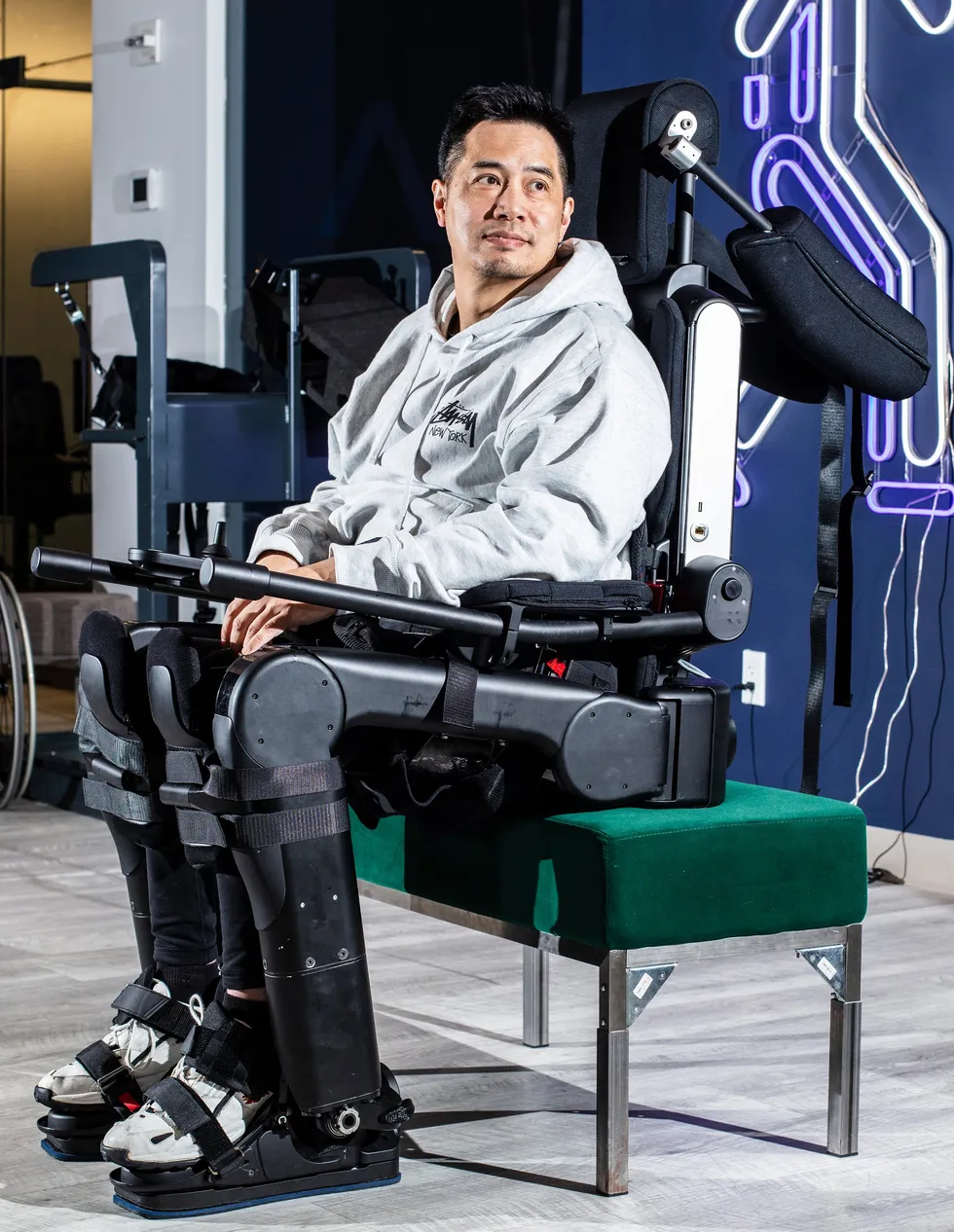

 Robert Woo prepares to walk in a Wandercraft exoskeleton; the device’s controller enables him to stand up, initiate walk mode, and choose a direction. Bryan Anselm/Redux
 Angela Riccobono of Mount Sinai Hospital (left) credits Woo with jump-starting the hospital’s bionics program; a plaque in the department of rehabilitation medicine recognizes his role.
 Robert Woo’s wife, Vivian, was trained in how to operate the device he used at home. His sons, Tristan (left) and Adrien, grew up watching their dad test exoskeletons. Left: Lifeward; Right: Robert Woo
 Robert Woo tries out an early exoskeleton from
  Ann Spungen (left), a researcher at a Veterans Affairs hospital, led early clinical trials of exoskeletons. Her research focused on the medical benefits of exoskeleton use. Robert Woo
 Pierre Asselin (right), a biomedical engineer, worked with Robert Woo during clinical trials of exoskeletons. He says Woo was always pushing the limits of the technology. Robert Woo
 Robert Woo uses an exoskeleton to reach items in a kitchen cabinet during a test of the device’s utility for everyday tasks. Eliza Strickland
 Robert Woo sent detailed design sketches as part of his feedback to exoskeleton engineers. Robert Woo
 Ekso Bionics CEO Eythor Bender and Mount Sinai physician Kristjan Ragnarsson were both on hand for Woo’s early trials of the Ekso device. Ragnarsson says he saw physical and psychological benefits of exoskeleton use. Robert Woo
 The ReWalk was the first exoskeleton available for use outside the clinic. Robert Woo’s ReWalk arrived in two large boxes. ReWalk engineers assembled it in a hotel room, and Woo tried it out in the hallway before taking it home. Robert Woo
 Sitting unused in Robert Woo’s home, his ReWalk exoskeleton reflects both the promise and the limits of early devices. Robert Woo
 During testing of the Wandercraft exoskeleton, straps caused an abrasion on Robert Woo’s leg, which he documented as part of his feedback to the company. Robert Woo
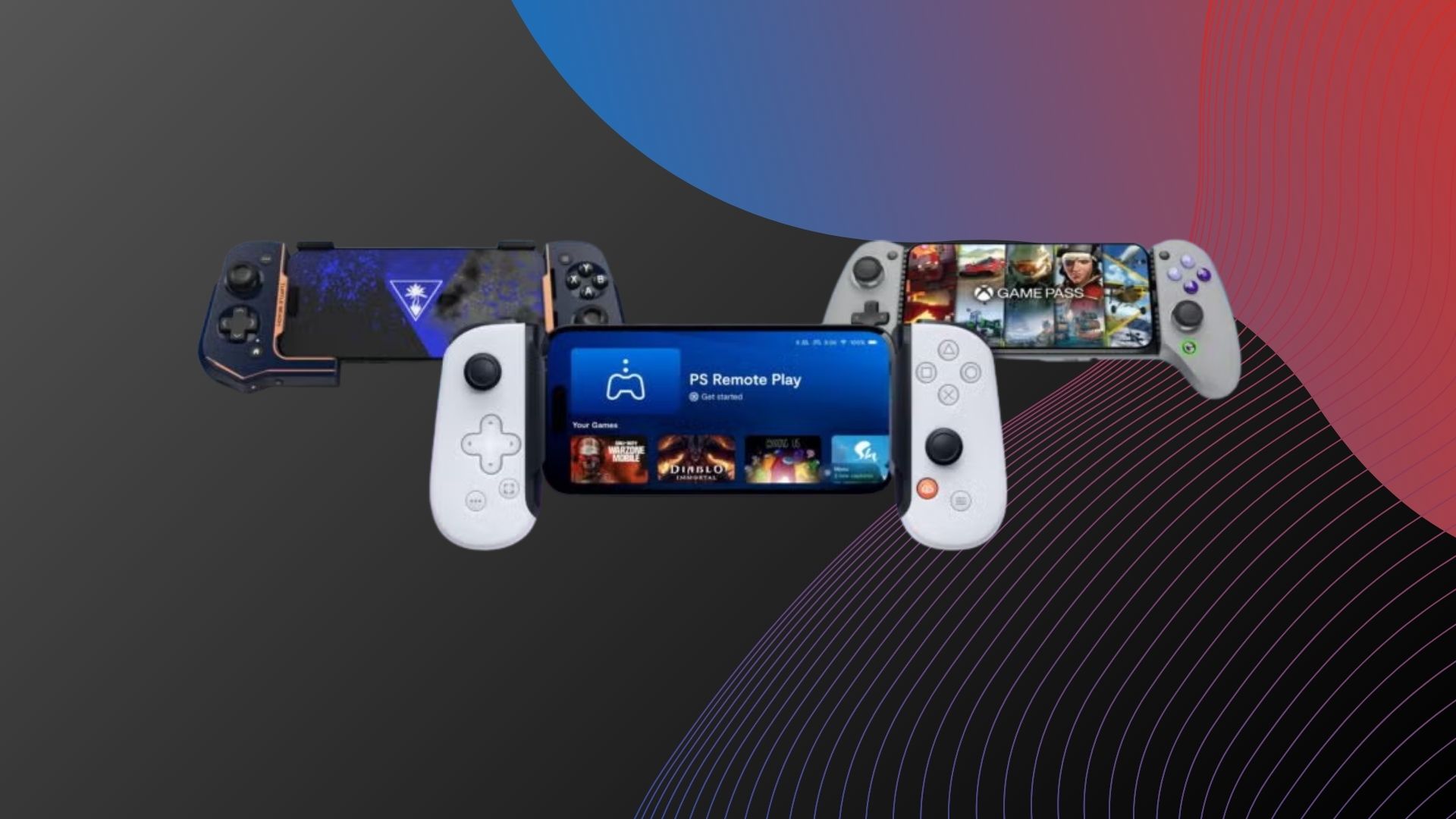



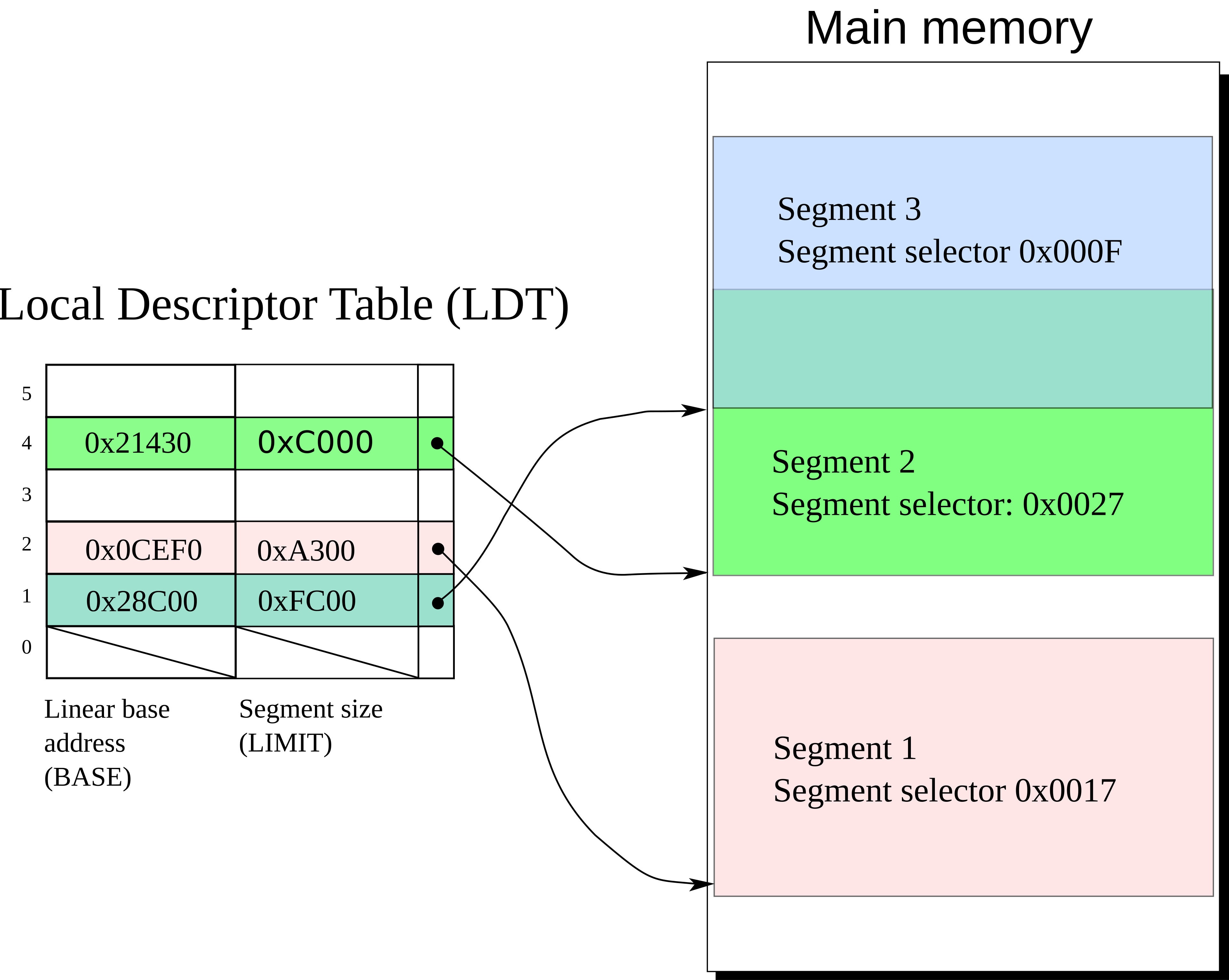
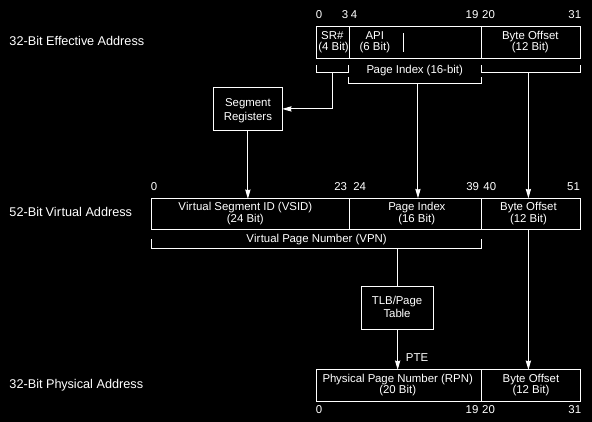


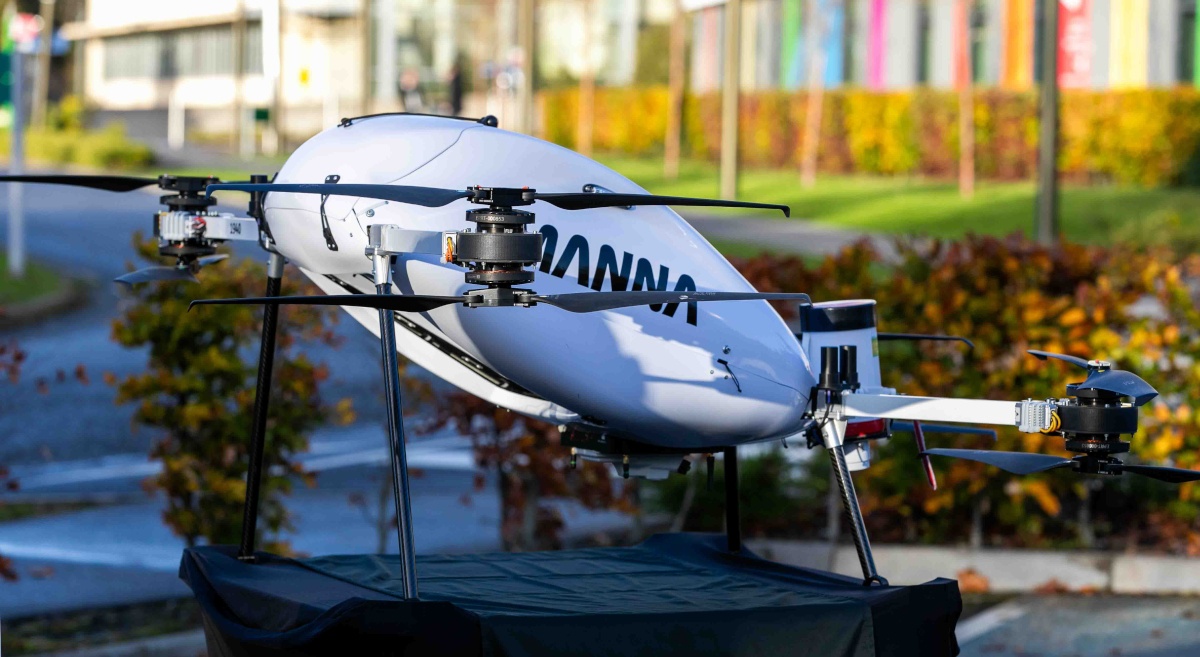








































You must be logged in to post a comment Login