Whether you simply like to keep entertained on your commute or you generally prefer mobile gaming, a decent mobile game controller will significantly level up your experience.
Regardless of whether you favour free-to-play titles or more premium console-level games, you’ll likely agree that playing on a phone isn’t always the most seamless experience. Sure, many of the best gaming phones and best smartphones are powerful enough to run more graphic-hungry titles, tapping away at a touchscreen is certainly not reminiscent of the traditional gaming experience.
And that’s where one of the best mobile game controllers comes in. Essentially, a mobile game controller is a brilliant portable accessory that slots onto your phone and offers you more of that typical game controller experience you’re likely used to.
However, with so many options on the market, it can be difficult to determine which mobile controller is actually worth it. Are some options fitted with more features than others – and if so, how relevant are those additions to your own gaming preferences? Does it matter if you own an iPhone or an Android smartphone?
Advertisement
As not all mobile controllers are built equally, we’re here to help. We’ve reviewed a plethora of mobile controllers, from budget friendly options designed for casual use to the more hefty models for hard-core gamers. Regardless of their price, we put every controller through the same range of strict tests and have handpicked the best performers for this guide.

Read on to see our round-up of the best mobile game controllers we’ve reviewed below. Otherwise, if you’re more of a traditionalist, our list of the best game controllers reveals the best options to enhance your PC and console gameplay. Finally, if you want to enjoy the big-screen gaming experience, visit our best games consoles and best gaming monitors guides instead.
Advertisement
Best mobile controllers at a glance
SQUIRREL_ANCHOR_LIST
Advertisement
Learn more about how we test mobile controllers
Every mobile controller we test is used by the reviewer as their main gamepad for at least a week. During that time, we’ll test it on a variety of mobile games, from FPS shooters to racing games.
We’ll test both wired and wireless connectivity where available to ensure there’s no latency or issues that may impede your gaming experience. In instances where the controller needs power for use, we’ll also check the pad’s battery life, measuring how much playtime it offers before needing to be charged.
Where applicable, we’ll also test how customisable they are and delve into the companion apps to see what they offer.
Advertisement
Pros
Excellent mobile gaming controls
Improved and updated hardware compatibility
Excellent all-encompassing UI
Cons
Still expensive
Can be fiddly to fit your phone
Not very different from the original
Pros
Chunky and comfortable frame
Precise and solid-feeling triggers and thumbsticks
Clever software integration
Pros
Superb build quality and controls
Replaceable Hall Effect analogue sticks
Works with a wide range of phones
Cons
Iffy software, especially for iPhone users
Not the most portable controller of its kind
Not cheap
Pros
Bluetooth connectivity means wider game compatibility
Ergonomic design
Clever portable design
Cons
Clunky sticky pad mounting system
Bluetooth means no pass-through charging or wired headphones
Controls not as premium-feeling as top rivals
Pros
Compact and light
Solid gaming performance
Bonus trigger controls
Cons
Overpriced
HyperSense haptics not entirely successful
Doesn’t feel as premium as BackBone One
Pros
Unique active cooling system
Chunky, comfortable holding position
Flexible control set-ups
Cons
Need to plug in for cooling
Janky, unintuitive software
Controls don’t feel the most premium
Pros
Hall Effect joysticks
Clicky microswitch buttons
Good fit for players and devices
Cons
Passthrough charging port can’t be used to connect to other devices
Not quite as portable as some other mobile controllers
No 3.5mm headphone passthrough
Pros
Superb build quality and controls
Replaceable Hall Effect analogue sticks
Works with virtually everything
Cons
GameSir app needs work
Big and heavy
Requires charging
Pros
Comfortable in-hand
Excellent compatibility
Responsive inputs
Cons
Rivals have more advanced features
No software support
Excellent mobile gaming controls
Improved and updated hardware compatibility
Excellent all-encompassing UI
Still expensive
Can be fiddly to fit your phone
Not very different from the original
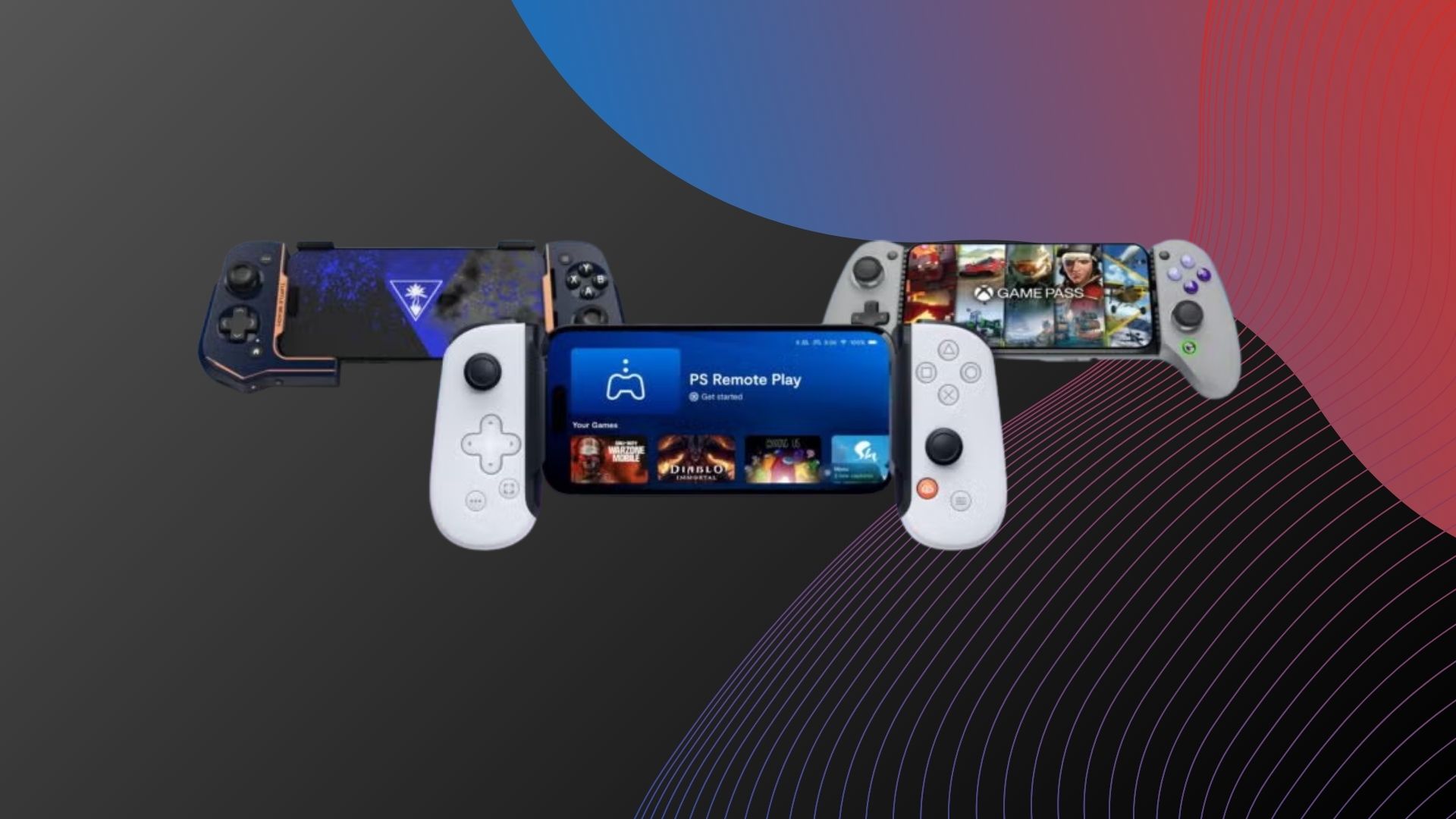
The Backbone One (2023) is the best mobile controller for iOS and Android that we’ve tested. It not only looks and feels great, but it offers wide compatibility with both USB-C and Lightning variants, and its companion app is one of the better options around right now.
Advertisement
While the Backbone One might not look all that different from the swathe of clamp-style mobile controllers on the market, small tweaks to its already premium design make it all the more accommodating. These include new swappable magnetic adapters that allow support for phones of all shapes and sizes, along with returning favourites like a 3.5mm headphone jack for wired audio and a USB-C port for passthrough charging.
The Backbone One offers your usual slate of console-esque controls including analogue sticks, a D-pad, buttons and rear triggers, with the company offering both PlayStation and Xbox-specific branding for compatibility with their respective cloud game streaming apps. The quality and build are top-notch, with a tight tolerance on both the buttons and triggers that make them feel ultra-responsive in titles like Resident Evil Village.
The accompanying Backbone app is also polished to a high level, providing shortcuts to installed games on your phone as well as links to cloud gaming services in a PlayStation-esque UI. And for games that don’t offer controller support, Backbone’s clever TouchSync software automatically maps controls.
It might be pricey, but it offers a top-notch gaming experience.
Advertisement
Chunky and comfortable frame
Precise and solid-feeling triggers and thumbsticks
Clever software integration
While there are plenty of options on this list for casual gamers who just like to drop into a bit of Stardew Valley or Balatro when the mood strikes, the Razer Kishi Ultra is for the gamers on the other end of that equation, the ones who simply have to play the latest titles as they launch and are obsessed with having the best input method money can buy.
Advertisement
As you might expect, the Razer Kishi Ultra works with both Android phones and USB-C touting iPhones, but what’s quite surprising is that it also works with the iPad Mini. If you’re a fan of gaming on Apple’s tablet range, this controller will help you to make the most of the form factor, especially if you have access to Apple Arcade.
Having that extra bit of device compatibility is great but what really sets the Razer Kishi Ultra apart is its use of haptic feedback to elevate the gaming experience. Having the sensation of rumble as you play just makes the game at hand feel far more immersive – we delved into a session of Dirty Rally 2.0 via Steam Link and it was incredible to feel the car’s movement over gravel.
Because the Kishia Ultra is large enough to accommodate an iPad Mini, the controller itself is nice and chunky in the best way possible. You can get a comfortable grip on this thing, a feeling that’s only emboldened by the responsive triggers and thumb sticks that really help you to get lost in the enjoyment of whichever game you’re playing.
As if all that wasn’t enough, there’s also RGB lighting on this thing which can be customised via the Razer Nexus app, giving you the chance to add a bit of personal flair to the overall design. For all that you get with the Razer Kishi Ultra, it’s hard to imagine recommending anything else for seasoned gamers who want a console-like experience on their smartphone.
Advertisement
Superb build quality and controls
Replaceable Hall Effect analogue sticks
Works with a wide range of phones
Iffy software, especially for iPhone users
Not the most portable controller of its kind
Not cheap
Advertisement
When it comes to mobile gaming hardware, it’s hard to fault the GameSir G8 Galileo. It’s one of the more premium options from the accessory maker, but it’s well worth the cost.
It sports the same clamp-style design as most other mobile controllers, but the expanding mechanism offers less of a fight to get the phone into place. It features a wide and smooth-sliding bridge, the open rubberised grip system means you don’t need any fiddly adapters to make phones fit into place, and the experience is further improved by a hinged USB-C connector.
The controller is big and heavy at 253g, but that’s because the G8 Galileo adopts a full-size controller shape – like an Xbox controller that has been split in two. It includes the regular combination of buttons and analogue sticks, and you can swap the sticks for Hall Effect alternatives that come in the box to further tailor the experience. There are two remappable controls on the rear too.
With hardware like that, the G8 Galileo was in the running for our ‘best overall’ award – but the GameSir companion app puts a dampener on things compared to the likes of the Backbone One and Razer Kishi V2 Pro.
Advertisement
The app not only lacks the general polish of the competition, but it regularly failed to recognise the controller on iOS (though it still worked fine in games) and even though it provides profiles for games that lack controller support like Call of Duty Mobile, these didn’t work in testing.
Bluetooth connectivity means wider game compatibility
Ergonomic design
Clever portable design
Advertisement
Clunky sticky pad mounting system
Bluetooth means no pass-through charging or wired headphones
Controls not as premium-feeling as top rivals
The Turtle Beach Atom is a rather unique mobile controller as, unlike the majority that are connected by some kind of spring mechanism, the Atom is made of two distinct parts that connect via a proprietary 2.4GHz wireless link. So rather than fiddling with a clamp mechanism, the left and right portions attach snuggly to the sides of your phone using vertical clamps.
The only downside to this approach is how Turtle Beach handles securing phones into place, providing a couple of sizes of sticky pads that stick on each side of controller. It feels comparatively cheap compared to the magnetic alternative from Backbone, and the spongey texture will likely flatten and become less useful over time.
Fit niggles aside, the Atom’s design allows for it to be impressively portable, with magnets holding the two halves together when not in active use. The use of Bluetooth instead of USB-C also allows for wider compatibility with both Lightning and USB-C devices, though as a result, you’ll have to charge the controller separately to use it.
Advertisement
Importantly, the gaming experience from the full-size controls is solid, if not quite as premium as other options in our chart. The accompanying Turtle Beach Atom app not only provides shortcuts to games, but allows you to customise elements like analogue dead zones and responsiveness to get the best performance possible from the accessory.
Compact and light
Solid gaming performance
Bonus trigger controls
Advertisement
Overpriced
HyperSense haptics not entirely successful
Doesn’t feel as premium as BackBone One
The Razer Kishi V2 Pro started life as a dedicated controller for the Razer Edge gaming tablet, but the company has since started offering the controller separately – and with its USP, it’s not hard to see why.
You see, unlike most mobile controllers on the market, the Razer Kishi V2 Pro actually offers haptic feedback in the form of the company’s HyperSense system. It might seem odd, but iOS and Android don’t officially offer haptic feedback for controllers – it’s one of the biggest disparities between mobile gaming and PC/console gaming.
Razer got around this issue by taking audio input as a cue to generate rumbling haptic feedback to explosions, gunshots, and the like. The downside is that the rumble sometimes kicks in at odd times. It’s not explicitly programmed, as would be the case with PC and console gaming, but it does help bridge the gap somewhat.
Advertisement
Elsewhere, the Razer Kishi V2 Pro is a familiar device with the same expanding design as most other options in our chart. It’s complete with the usual smattering of controls and triggers, though there are additional digital buttons on the top edge to help give you an edge in online games. The performance is refreshingly solid, too, with clicky responsive feedback that translates well to games like Dead Cells.
The big issue right now is compatibility; even with a USB-C connection suited to the iPhone 15 range, the controller doesn’t currently work with iOS devices. Razer claims a fix is on the way, but for now, this one is for Android gamers only. It’s also very expensive compared to other options in our chart, so be sure you’ll make the most of the haptics before investing.
Advertisement
Unique active cooling system
Chunky, comfortable holding position
Flexible control set-ups
Need to plug in for cooling
Janky, unintuitive software
Controls don’t feel the most premium
The GameSir X3 may not achieve the same lofty heights as the company’s own Galileo G8, but it does offer something that most competitors don’t: active cooling.
You don’t need us to explain that smartphones can get pretty hot when playing games, especially over longer periods, but you might not know that this can have a negative impact on performance as phones essentially throttle performance to keep things cool. The GameSir X3 helps negate this issue with the use of a Peltier cooling system that draws heat away from your phone’s body using a combination of silicone plates and a big old fan.
Advertisement
This does mean that the USB-C-enabled GameSir X3 is a chunky, hefty controller that, at 292g, is a whopping 40g heavier than the already-cumbersome G8 Galileo. You do get a carry case with the controller, but it doesn’t really make it that much more portable.
The bigger downside is that the controller needs to be plugged into a wall outlet to be powered, which pretty much makes the X3 an at-home device. And that’s a bit of a shame, considering the Nintendo Switch-esque design and digital triggers for fast response times deliver a pretty solid gaming experience, improved by the active cooling of the controller.
Advertisement
Hall Effect joysticks
Clicky microswitch buttons
Good fit for players and devices
Passthrough charging port can’t be used to connect to other devices
Not quite as portable as some other mobile controllers
No 3.5mm headphone passthrough
You’ll have already spotted from the contenders on this list that GameSir has given some of the more widely known brands a run for their money, and that continues to be the case when shopping for more budget friendly mobile controllers.
At just £49.99/$46.99, it’d be easy to assume that the GameSir X2s would offer a serviceable, albeit compromised gaming experience in order to meet its budget price but in spite of those assumptions, it actually offers up some premium specs in a few areas – most notably in its joysticks.
Advertisement
The GameSir X2s utilises Hall Effect joysticks which don’t rely on friction in order to register an input, meaning that they won’t develop any issues with joystick drift. This design also makes the joysticks more durable in the longrun, which is great to see.
The shoulder buttons also feel incredibly tactile thanks to their use of microswitches to register trigger-finger inputs. For fast paced games like Dead Cells, these types of buttons can make all the difference.
The GameSir X2s itself features a more playful aesthetic than some of its competitors, making it feel more accessible from the jump. In fact GameSir has supposedly taken some design cues from the Nintendo 2DS of all things for the development of this device.
It’s certainly an impressive package for the price, but the GameSir X2s isn’t completely without fault. One of the biggest omissions is the lack of a 3.5mm headphone jack, which many mobile game controllers tend to have. If you use Bluetooth headphones then this won’t be a dealbreaker, but it’s sure to put off those who prefer using a wired connection for high fidelity audio.
Advertisement
The X2s is also a bit chunkier than other controllers when not in use. There’s a sizeable bit of a space between each end of the controller when it’s retracted, so it won’t fit into a pocket quite in the same way that the Turtle Beach Atom can.
Superb build quality and controls
Replaceable Hall Effect analogue sticks
Works with virtually everything
Advertisement
GameSir app needs work
Big and heavy
Requires charging
While there are plenty of great games to play on mobile, if you have another portable console like the Nintendo Switch, it may be a better shout to pick up a controller that works across your main devices. With that in mind, the GameSir G8 Plus is the perfect pick.
Because this controller uses Bluetooth instead of a direct connection via USB-C or Lightning, it is able to pair wirelessly with your smartphone, Nintendo Switch and PC/laptop. That level of versatility is a rare thing to come by, but it means that you can jump from one device to another without ever feeling like you need to downgrade your control set-up in the process.
Just like many of GameSir’s other products, the G8 Plus utilises Hall Effect analogue sticks that prevents them from succumbing to the ‘drift’ problem that plagues other controllers, which in turn makes the accessory a better alternative to the problematic Joy-Cons that come with the Nintendo Switch.
Advertisement
Even though there isn’t a physical connector to keep devices in place, the G8 Plus uses a rubberised grip in its interior, alongside a tight clasp to make sure that everything stays where it needs to be during gaming. Our reviewer never had an issue during testing wherein they felt that a device could have been at risk of falling out of the controller.
Because of the lack of a physical port however, this does mean that the G8 Plus also ships without a 3.5mm headphone jack. While that’s unlikely to be a dealbreaker for most people, it will be an annoyance to anyone who swears by wired headphones for their audio fidelity.
In order to fit larger devices like the Nintendo Switch, the G8 Plus isn’t the most pocketable controller that GameSir has ever made either, although it’s still small enough to be transported in a backpack.
A great controller that goes well beyond the realm of mobile gaming, there’s a lot to like about the GameSir G8 Plus.
Advertisement
Comfortable in-hand
Excellent compatibility
Responsive inputs
Rivals have more advanced features
No software support
Advertisement
If you’ve invested in a budget gaming phone and you don’t have too much cash left over for picking up accessories, then you might want to check out the Acer Nitro Mobile Gaming Controller. Despite having a big name brand like Acer on the box, this controller still packs an affordable price point of £69.99 which is brilliant for all the features you get with it.
For starters, you don’t have to worry about compatibility as this controller thankfully works with both Android phones and iPhones that use USB-C, so if you do ever swap from one ecosystem to another then you’ll still be able to use the controller to enjoy your favourite games.
When it comes to the design, Acer has done an excellent job here. The buttons are wonderfully tactile and responsive, and we found the performance to be up to scratch when delving into a bit of Forza Horizon 5 and EA FC 24 via the Games Pass cloud service. When you’re done, the Nitro is also collapsible, so it can easily fit into a small back after the fact, making for a more portable experience than some of the larger gaming handhelds provide nowadays.
It’s also worth mentioning that the controller just feels great in the hand, and is very comfortable to hold for long periods of time. It can be easy to overlook comfort when you’re distracted by software features, but as far as we’re concerned, this is a crucial part of any mobile gaming controller that’s worth investing in, as the last thing you’d ever want is to buy a controller and then discover that it cramps your hand after just a short while of use.
Advertisement
As a final note, the Nitro is also plug-and-play so you don’t have to waste any valuable time with a laborious set-up process. Just attach the controller to your phone and you’re away. There’s even a USB-C slot to allow for up to 18W of charging as you play, keeping any pangs of battery anxiety at bay.
FAQs
Do all USB-C controllers work with the iPhone 16?
Advertisement
They should, but we’ve mentioned specific cases above (like the Razer Kishi V2 Pro) where support is not yet available.
Should I buy a wired or wireless controller?
It depends on your use case. Wired controllers deliver lower latency and potentially features like passthrough charging and a 3.5mm headphone jack, but you’ll also be tied to whatever connector is used. Wireless Bluetooth controllers, on the other hand, are compatible with a wider range of devices, though they’ll need charging separately.
Traffic lights can be tricky, depending on where you go. The response you have to a red light at an intersection in one state may not be the same response you need at an intersection in another state. Turning right on red can even get you a ticket in some U.S. cites. But in Florida, a right turn traffic light may still allow a right turn after stopping. But there’s also a bit more to it than that.
First off, you must come to a complete stop at the red light. If you keep rolling through the turn instead, you could get a ticket. Next, if there are no posted warning signs at the light, Florida law says you can go ahead and turn right once it’s clear to do so. But if you have a sign warning you that there’s no turn on red, then you’re stuck. Stay where you are until you get the green light.
Similarly, if you have a red right arrow, you of course must fully stop then as well. But don’t let the arrow fool you, as it’s not an automatic signal that you can just turn once the way is clear. If there are no signs posted that say otherwise (such as a “No turn on red” sign), you may proceed after determining that it is safe to do so. This is the case whether you’re at an intersection or a crosswalk.
Advertisement
Crosswalks and malfunctioning traffic lights
Monticelllo/Getty Images
If you come to a right turn traffic light at a crosswalk in Florida, keep in mind that you are expected to yield to any pedestrians who are crossing. Even if you’ve come to a complete stop and are otherwise allowed to turn, you must wait. If your light turns green and someone is still in the process of crossing, you should wait then as well. Additionally, if you’re at an intersection with sidewalks but no clearly marked crosswalk present, you still have to yield.
However, there could be times you arrive at a right turn traffic light that’s malfunctioning. Maybe it’s blinking, stuck, or completely dead. If this happens, Florida law states that you must treat it as a four-way stop sign. That means you must come to a complete stop and yield right of way to traffic coming from all directions. Of course, you must also yield to any pedestrians crossing in front of you. Once the way clears and you have an open right turn, you’re free to go. Always be cautious when arriving at a light that’s out of order and make sure the intersection is fully clear before you continue.
Meta has found a new source of training data for its AI models: its own employees. The company plans to use data culled from the mouse movements and keystrokes of its own staff in its pursuit to build more capable and efficient artificial intelligence.
The story, which was first reported by Reuters, shows the lengths to which tech companies are going to find new sources of training data — the lifeblood of AI models that helps the programs learn how to more effectively carry out tasks and respond to user queries.
When reached for comment by TechCrunch, a Meta spokesperson provided the following statement: “If we’re building agents to help people complete everyday tasks using computers, our models need real examples of how people actually use them — things like mouse movements, clicking buttons, and navigating dropdown menus. To help, we’re launching an internal tool that will capture these kinds of inputs on certain applications to help us train our models. There are safeguards in place to protect sensitive content, and the data is not used for any other purpose.”
This trend reveals a troublesome privacy dimension of the AI industry. Last week it was reported that old startups are being scavenged for their corporate communications (like Slack archives and Jira tickets), and converted into AI training data.
The Game Pass front page on Microsoft’s website now shows revised pricing for the service’s two most expensive plans. Although delaying the addition of new Call of Duty titles marks a reversal of the company’s earlier strategy, the expanded library introduced during last year’s major price increase remains intact. Read Entire Article Source link
Cash App, the banking and payments app run by Block, has added support for parent-managed kids accounts. The new accounts include key benefits from the service’s normal account, with an eye towards teaching financial literacy to younger users ages 6 to 12. Cash App first allowed teenage users on its platform in 2021.
As part of the “expanded Cash App Families experience,” eligible legal guardians and parents can create managed accounts that offer “a dedicated place on the platform to send allowances, set aside savings, and track spending for their child, kickstarting their path to financial independence,” Cash App says. Adults managing these accounts will be able to set up recurring transfers, see how their child is spending and do things like lock their child’s account to prevent transactions. Kids will get a custom debit card and the ability to receive payments from up to five trusted accounts, though notably they won’t be able to access Cash App itself.
Cash App says managed accounts are designed for kids 6 through 12. Once those kids turn 13, Cash App says parents will be able to choose to convert their account to a “sponsored account” to unlock more features, like the ability to send and receive payments, invest in stocks or trade crypto. Those sponsored accounts are technically still monitored and controlled by a parent or legal guardian, but they do give 13-year-olds more control over how they use their money.
A parent-managed account for kids is not a new idea in the fintech space, though Cash App is trying to reach a younger audience than some of its competitors. Venmo rolled out access to its payment platform to teens between the ages of 13 to 17 in 2023. Separately, both Apple and Google also offer their own kids accounts in Google Wallet and Apple Cash Family.
Florida’s attorney general has launched a criminal investigation into OpenAI over allegations that the accused gunman in a shooting at Florida State University last year used ChatGPT to help plan the attack. OpenAI says the chatbot is “not responsible for this terrible crime” and only provided factual information available from public sources. NPR reports: The Republican attorney general, James Uthmeier, said at a press conference in Tampa on Tuesday that accused gunman Phoenix Ikner consulted ChatGPT for advice before the shooting, including what type of gun to use, what ammunition went with it, and what time to go to campus to encounter more people, according to an initial review of Ikner’s chat logs. “My prosecutors have looked at this and they’ve told me, if it was a person on the other end of that screen, we would be charging them with murder,” Uthmeier said. “We cannot have AI bots that are advising people on how to kill others.”
Uthmeier’s office is issuing subpoenas to OpenAI seeking information about its policies and internal training materials related to user threats of harm and how it cooperates with and reports crimes to law enforcement, dating back to March 2024. At the press conference, Uthmeier acknowledged the investigation is entering into uncharted territory and is uncertain about whether OpenAI has criminal liability. “We are going to look at who knew what, designed what, or should have done what,” he said. “And if it is clear that individuals knew that this type of dangerous behavior might take place, that these types of unfortunate, tragic events might take place, and nevertheless still turned to profit, still allowed this business to operate, then people need to be held accountable.”
[…] Ikner, 21, is facing multiple charges of murder and attempted murder for the April 2025 shooting near the student union on FSU’s Tallahassee campus, where he was a student at the time. His trial is set to begin on Oct. 19. According to court filings, more than 200 AI messages have been entered into evidence in the case.
Anthropic’s buzzy announcement about using AI to improve cybersecurity earlier this month was met with plenty of skepticism. However, Mozilla shared some details that support use of the company’s special Claude Mythos Preview model as a way to protect critical services. Using Mythos helped Mozilla’s team find and patch 271 vulnerabilities in the latest release of the Firefox browser. “So far we’ve found no category or complexity of vulnerability that humans can find that this model can’t,” the foundation said.
The blog post from Mozilla feels like a positive sign for Anthropic’s Project Glasswing. Obviously the AI company would want to put itself in the best possible light while presenting its own initiative, but there’s something encouraging about hearing the benefits from a third party. Mozilla also noted that in its time with Claude Mythos, the AI wasn’t able to turn up any bugs that a human wouldn’t have been able to find, given enough time and resources, which indicates that AI isn’t presently able to do more to crack cybersecurity protections than a person can.
An organizaion successfully using AI for good is certainly a refreshing change of pace in tech news. And for those Firefox users who aren’t personally interested in applying any generative AI in their browsing, Mozilla has given the option to turn it all off for the past several months.
Google on Monday unveiled the most significant upgrade to its autonomous research agent capabilities since the product’s debut, launching two new agents — Deep Research and Deep Research Max — that for the first time allow developers to fuse open web data with proprietary enterprise information through a single API call, produce native charts and infographics inside research reports, and connect to arbitrary third-party data sources through the Model Context Protocol (MCP).
The release, built on Google’s Gemini 3.1 Pro model, marks an inflection point in the rapidly intensifying race to build AI systems that can autonomously conduct the kind of exhaustive, multi-source research that has traditionally consumed hours or days of human analyst time. It also represents Google’s clearest bid yet to position its AI infrastructure as the backbone for enterprise research workflows in finance, life sciences, and market intelligence — industries where the stakes of getting information wrong are extraordinarily high.
“We are launching two powerful updates to Deep Research in the Gemini API, now with better quality, MCP support, and native chart/infographics generation,” Google CEO Sundar Pichai wrote on X. “Use Deep Research when you want speed and efficiency, and use Max when you want the highest quality context gathering & synthesis using extended test-time compute — achieving 93.3% on DeepSearchQA and 54.6% on HLE.”
Both agents are available starting today in public preview via paid tiers of the Gemini API, accessible through the Interactions API that Google first introduced in December 2025.
Advertisement
Why Google built two research agents instead of one
The launch introduces a tiered architecture that reflects a fundamental tension in AI agent design: the tradeoff between speed and thoroughness.
Deep Research, the standard tier, replaces the preview agent Google released in December and is optimized for low-latency, interactive use cases. It delivers what Google describes as significantly reduced latency and cost at higher quality levels compared to its predecessor. The company positions it as ideal for applications where a developer wants to embed research capabilities directly into a user-facing interface — think a financial dashboard that can answer complex analytical questions in near-real time.
Deep Research Max occupies the opposite end of the spectrum. It leverages extended test-time compute — a technique where the model spends more computational cycles iteratively reasoning, searching, and refining its output before delivering a final report. Google designed it for asynchronous, background workflows: the kind of task where an analyst team kicks off a batch of due diligence reports before leaving the office and expects exhaustive, fully sourced analyses waiting for them the next morning.
The Google DeepMind team framed the distinction on X: “Deep Research: Optimized for speed and efficiency. Perfect for interactive apps needing quicker responses. Deep Research Max: It uses extra time to search and reason. Ideal for exhaustive context gathering and tasks happening in the background.”
Advertisement
“Deep Research was our first hosted agent in the API and has gained a ton of traction over the last 3 months, very excited for folks to test out the new agents and all the improvements, this is just the start of our agents journey,” Logan Kilpatrick, who leads developer relations for Google’s AI efforts, wrote on X.
MCP support lets the agents tap into private enterprise data for the first time
Perhaps the most consequential feature in today’s release is the addition of Model Context Protocol support, which transforms Deep Research from a sophisticated web research tool into something more closely resembling a universal data analyst.
MCP , an emerging open standard for connecting AI models to external data sources, allows Deep Research to securely query private databases, internal document repositories, and specialized third-party data services — all without requiring sensitive information to leave its source environment. In practical terms, this means a hedge fund could point Deep Research at its internal deal-flow database and a financial data terminal simultaneously, then ask the agent to synthesize insights from both alongside publicly available information from the web.
Google disclosed that it is actively collaborating with FactSet, S&P, and PitchBook on their MCP server designs, a signal that the company is pursuing deep integration with the data providers that Wall Street and the broader financial services industry already rely on daily. The goal, according to the blog post authored by Google DeepMind product managers Lukas Haas and Srinivas Tadepalli, is to “let shared customers integrate financial data offerings into workflows powered by Deep Research, and to enable them to realize a leap in productivity by gathering context using their exhaustive data universes at lightning speed.”
Advertisement
This addresses one of the most persistent pain points in enterprise AI adoption: the gap between what a model can find on the open internet and what an organization actually needs to make decisions. Until now, bridging that gap required significant custom engineering. MCP support, combined with Deep Research’s autonomous browsing and reasoning capabilities, collapses much of that complexity into a configuration step. Developers can now run Deep Research with Google Search, remote MCP servers, URL Context, Code Execution, and File Search simultaneously — or turn off web access entirely to search exclusively over custom data. The system also accepts multimodal inputs including PDFs, CSVs, images, audio, and video as grounding context.
Native charts and infographics turn AI reports into stakeholder-ready deliverables
The second headline feature — native chart and infographic generation — may sound incremental, but it addresses a practical limitation that has constrained the usefulness of AI-generated research outputs in professional settings.
Previous versions of Deep Research produced text-only reports. Users who needed visualizations had to export the data and build charts themselves, a friction point that undermined the promise of end-to-end automation. The new agents generate high-quality charts and infographics inline within their reports, rendered in HTML or Google’s Nano Banana format, dynamically visualizing complex datasets as part of the analytical narrative.
“The agent generates HTML charts and infographics inline with the report. Not screenshots. Not suggestions to ‘visualize this data.’ Actual rendered charts inside the markdown output,” noted AI commentator Shruti Mishra on X, capturing the practical significance of the change.
Advertisement
For enterprise users — particularly those in finance and consulting who need to produce stakeholder-ready deliverables — this transforms Deep Research from a tool that accelerates the research phase into one that can potentially produce near-final analytical products. Combined with a new collaborative planning feature that lets users review, guide, and refine the agent’s research plan before execution, and real-time streaming of intermediate reasoning steps, the system gives developers granular control over the investigation’s scope while maintaining the transparency that regulated industries demand.
How Deep Research evolved from a consumer chatbot feature to enterprise platform infrastructure
Today’s release crystallizes a strategic narrative Google has been building for months: Deep Research is not merely a consumer feature but a piece of infrastructure that powers multiple Google products and is now being offered to external developers as a platform.
The blog post explicitly notes that when developers build with the Deep Research agent, they tap into “the same autonomous research infrastructure that powers research capabilities within some of Google’s most popular products like Gemini App, NotebookLM, Google Search and Google Finance.” This suggests that the agent available through the API is not a stripped-down version of what Google uses internally but the same system, offered at platform scale.
The journey to this point has been remarkably rapid. Google first introduced Deep Research as a consumer feature in the Gemini app in December 2024, initially powered by Gemini 1.5 Pro. At the time, the company described it as a personal AI research assistant that could save users hours by synthesizing web information in minutes. By March 2025, Google upgraded Deep Research with Gemini 2.0 Flash Thinking Experimental and made it available for anyone to try. Then came the upgrade to Gemini 2.5 Pro Experimental, where Google reported that raters preferred its reports over competing deep research providers by more than a 2-to-1 margin. The December 2025 release was the pivot to developer access, when Google launched the Interactions API and made Deep Research available programmatically for the first time, powered by Gemini 3 Pro and accompanied by the open-source DeepSearchQA benchmark.
Advertisement
The underlying model driving today’s improvements is Gemini 3.1 Pro, which Google released on February 19, 2026. That model represented a significant leap in core reasoning: on ARC-AGI-2, a benchmark evaluating a model’s ability to solve novel logic patterns, 3.1 Pro scored 77.1% — more than double the performance of Gemini 3 Pro. Deep Research Max inherits that reasoning foundation and layers autonomous research behaviors on top of it, achieving 93.3% on DeepSearchQA (up from 66.1% in December) and 54.6% on Humanity’s Last Exam (up from 46.4%).
Google’s new Deep Research Max agent outperformed its December predecessor across nearly all qualitative dimensions in internal expert evaluations — but the older version held an edge in internal consistency and faithfulness. (Source: Google DeepMind)
Google faces a crowded field of competitors building autonomous research agents
Google is not operating in a vacuum. The launch arrives amid intensifying competition in the autonomous research agent space. OpenAI has been developing its own agent capabilities within ChatGPT under the codename Hermes, which includes an agent builder, templates, scheduling, and Slack integration, according to reports circulating on social media. Perplexity has built its business around AI-powered research. And a growing ecosystem of startups is attacking various slices of the automated research workflow.
What distinguishes Google’s approach is the combination of its search infrastructure — which gives Deep Research access to the broadest and most current index of web information available — with the MCP-based connectivity to enterprise data sources. No other company currently offers a research agent that can simultaneously query the open web at Google Search’s scale and navigate proprietary data repositories through a standardized protocol. The pricing structure also signals Google’s intent to drive adoption: according to Sim.ai, which tracks model pricing, the Deep Research agent in the December preview was priced at $2 per million input tokens and $2 per million output tokens with a 1 million token context window — positioning it as cost-competitive for the volume of research output it generates.
Advertisement
Not everyone greeted the announcement with unalloyed enthusiasm, however. Several users on X noted that the new agents are available only through the API, not in the Gemini consumer app. “Not on Gemini app,” observed TestingCatalog News, while another user wrote, “Google keeps punishing Gemini App Pro subscribers for some reason.” Others raised concerns about the presentation of benchmark results, with one user arguing that Google’s charts could be “misleading” in how they represent percentage improvements. These complaints point to a broader tension in Google’s AI strategy: the company is increasingly directing its most advanced capabilities toward developers and enterprise customers who access them through APIs, while consumer-facing products sometimes lag behind.
Deep Research Max led all competitors on DeepSearchQA and BrowseComp, but GPT 5.4 edged ahead on Humanity’s Last Exam, a benchmark measuring reasoning and knowledge. All results were evaluated by Google DeepMind using publicly available model APIs. (Source: Google DeepMind)
What Deep Research Max means for finance, biotech, and the future of knowledge work
The practical implications of today’s launch are most immediately felt in industries that depend on exhaustive, multi-source research as a core business function. In financial services, where analysts routinely spend hours assembling due diligence reports from scattered sources — SEC filings, earnings transcripts, market data terminals, internal deal memos — Deep Research Max offers the possibility of automating the initial research phase entirely. The FactSet, S&P, and PitchBook partnerships suggest Google is serious about making this work with the data infrastructure that financial professionals already use.
In life sciences, the blog post notes that Google has collaborated with Axiom Bio, which builds AI systems to predict drug toxicity, and found that Deep Research unlocked new levels of initial research depth across biomedical literature. In market research and consulting, the ability to produce stakeholder-ready reports with embedded visualizations and granular citations could compress project timelines from days to hours.
Advertisement
The key question is whether the quality and reliability of these automated outputs will meet the standards that professionals in these fields demand. Google’s benchmark numbers are impressive, but benchmarks measure performance on standardized tasks — real-world research is messier, more ambiguous, and often requires the kind of judgment that remains difficult to automate. Deep Research and Deep Research Max are available now in public preview via paid tiers of the Gemini API, with availability on Google Cloud for startups and enterprises coming soon.
Eighteen months ago, Deep Research was a feature that helped grad students avoid drowning in browser tabs. Today, Google is betting it can replace the first shift at an investment bank. The distance between those two ambitions — and whether the technology can actually close it — will define whether autonomous research agents become a transformative category of enterprise software or just another AI demo that dazzles on benchmarks and disappoints in the conference room.
SpaceX and AI company Cursor have struck a new partnership that could see the owner of X buy the AI company for $60 billion later this year. “SpaceXAI and @cursor_ai are now working closely together to create the world’s best coding and knowledge work AI,” SpaceX wrote in a post on X.
According to SpaceX, the deal allows for it to either invest $10 billion into the company known for its AI coding tool, or acquire it entirely “later this year” for $60 billion. If an acquisition were to happen, it’s not clear at what point Cursor could officially join the fold of Elon Musk’s rapidly expanding and increasingly enmeshed web of companies. SpaceX bought xAI, the billionaire’s AI company that also controls X, earlier this year. SpaceX is currently getting ready to go public this summer in what will likely be the biggest initial public offering (IPO) in history.
Cursor, which has reportedly been in talks to raise its own $2 billion round of funding, is known for its AI coding tool of the same name that’s become the vibe coding platform of choice for many developers. It allows people to use either its own models or those from other leading AI companies, including OpenAI, Google, Anthropic and xAI.
In a statement, Cursor said its partnership with SpaceX will “accelerate our model training efforts” while addressing infrastructure-related issues that have slowed it down in the past. “We’ve wanted to push our training efforts much further, but we’ve been bottlenecked by compute,” the company said. “With this partnership, our team will leverage xAI’s Colossus infrastructure to dramatically scale up the intelligence of our models for coding and beyond.”
The Angle Computer of the B-52, opened. (Credit: Ken Shirriff)
In the ages before convenient global positioning satellites to query for one’s current location military aircraft required dedicated navigators in order to not get lost. This changed with increasing automation, including the arrival of increasingly more sophisticated electromechanical computers, such as the angle computer in the B-52 bomber’s star tracker that [Ken Shirriff] recently had a poke at.
We covered star trackers before, with this devices enabling the automation of celestial navigation. In effect, as long as you have a map of the visible stars and an accurate time source you will never get lost on Earth, or a few kilometers above its surface as the case may be.
The B-52’s Angle Computer is part of the Astro Compass, which is the star tracker device that locks onto a star and outputs a heading that’s accurate to a tenth of a degree, while also allowing for position to be calculated from it. Inside the device a lot of calculations are being performed as explained in the article, though the full equations are quite complex.
Not burdening the navigator of a B-52 with having to ogle stars themselves with an instrument and scribbling down calculations on paper is a good idea, of course. Instead the Angle Computer solves the navigational triangle mechanically, essentially by modelling the celestial sphere with a metal half-sphere. The solving is thus done using this physical representation, involving numerous gears and other parts that are detailed in the article.
Advertisement
In addition to the mechanical components there are of course the motors driving it, feedback mechanisms and ways to interface with the instruments. For the 1950s this was definitely the way to design a computer like this, but of course as semiconductor transistors swept the computing landscape, this marvel of engineering would before long find itself too replaced with a fully digital version.
A new NYT Strands puzzle appears at midnight each day for your time zone – which means that some people are always playing ‘today’s game’ while others are playing ‘yesterday’s’. If you’re looking for Tuesday’s puzzle instead then click here: NYT Strands hints and answers for Tuesday, April 21 (game #779).
Strands is the NYT’s latest word game after the likes of Wordle, Spelling Bee and Connections – and it’s great fun. It can be difficult, though, so read on for my Strands hints.
Want more word-based fun? Then check out my NYT Connections today and Quordle today pages for hints and answers for those games, and Marc’s Wordle today page for the original viral word game.
Advertisement
SPOILER WARNING: Information about NYT Strands today is below, so don’t read on if you don’t want to know the answers.
Article continues below
NYT Strands today (game #780) – hint #1 – today’s theme
What is the theme of today’s NYT Strands?
• Today’s NYT Strands theme is… Earth Day
NYT Strands today (game #780) – hint #2 – clue words
Play any of these words to unlock the in-game hints system.
Advertisement
RINSE
SORE
CREATOR
LATER
DOVE
REPAID
NYT Strands today (game #780) – hint #3 – spangram letters
How many letters are in today’s spangram?
• Spangram has 12 letters
NYT Strands today (game #780) – hint #4 – spangram position
What are two sides of the board that today’s spangram touches?
First side: left, 4th row
Last side: top, 4th column
Advertisement
Right, the answers are below, so DO NOT SCROLL ANY FURTHER IF YOU DON’T WANT TO SEE THEM.
Advertisement
NYT Strands today (game #780) – the answers
(Image credit: New York Times)
The answers to today’s Strands, game #780, are…
REPAIR
RECYCLE
DONATE
REFILL
REUSE
REDUCE
SPANGRAM: CONSERVATION
My rating: Easy
My score: Perfect
Today, is of course Earth Day, an annual event where we all, as a human race, can show our support for the environment by behaving sustainably and thinking about how we can protect the planet for the future. Not blowing it up would be a good start, perhaps.
Sign up for breaking news, reviews, opinion, top tech deals, and more.
Despite the theme being obvious I was quite slow to get going today and saw plenty of words that I should have clocked as game words.
In fact, I saw “repaid” before I saw REPAIR, “conserve” before the spangram CONSERVATION and “cycle” before RECYCLE.
Advertisement
Unlike previous games this one was decidedly lacking in ridiculously long words — perhaps the game makers were choosing not to be wasteful with their letters.
Yesterday’s NYT Strands answers (Tuesday, April 21, game #779)
BOLD
INTREPID
GUTSY
COURAGEOUS
ADVENTUROUS
SPANGRAM: DAREDEVILS
What is NYT Strands?
Strands is the NYT’s not-so-new-any-more word game, following Wordle and Connections. It’s now a fully fledged member of the NYT’s games stable that has been running for a year and which can be played on the NYT Games site on desktop or mobile.
I’ve got a full guide to how to play NYT Strands, complete with tips for solving it, so check that out if you’re struggling to beat it each day.
You must be logged in to post a comment Login