We spend hours testing every product or service we review, so you can be sure you’re buying the best. Find out more about how we test.
Think portable PC monitor and something pretty puny probably comes to mind. What you’re probably not imaging is folding contraption with dual 24-inch 1080p displays. What you probably didn’t think of is the extraordinary Acer PD243Y E Portable Monitor.
It’s immediately obvious that the term “portable” is being used pretty liberally by this unusual dual-screen monitor. You’re not going to be slipping it into a small bag with your 13-inch thin-and-light laptop.
Advertisement
However, it is much more compact and transportable than a typical 24-inch PC monitor, let alone a pair of them. So, it’s not designed to be taken to the coffee shop, even if that isn’t actually out of the question if you could put up with the attention you’d surely attract.
Latest Videos From
Instead, the Acer PD243Y E Portable Monitor makes more sense for someone wanting, perhaps, to take an additional screen with them on a long trip or for work presentations, that sort of thing. And for those kinds of remits, the basic ergonomics make sense. But what about the features and performance? Time to find out.
Acer PD243Y E: Design and features
Image 1 of 3
Advertisement
(Image credit: Future)
(Image credit: Future)
(Image credit: Future)
Surprisingly portable for a dual 24-inch display
Clever hinge and ergonomics
No USB-C power delivery
Specs
Panel size: Dual 24-inch
Panel type: IPS
Resolution: Dual 1,920 x 1,080
Brightness: 250 nits
Advertisement
Contrast: 800:1
Pixel response: 4ms
Refresh rate: 100Hz
Color coverage: 72% NTSC
Advertisement
HDR: No
VESA: 100mm x 100mm
Connectivity: HDMI 1.4 x1, 2x USB-C
We’ll come to the performance of the Acer PD243Y E Portable Monitor’s dual 24-inch panels momentarily. But the real novelty here involves packaging them into something relatively portable.
Advertisement
OK, you’re not going to sling this dual-24-inch contraption into your shoulder bag. But Acer has done a good job of keeping the chassis compact and the bezels slim. All told, it weighs in at 4.4kg, which really is pretty impressive given the sheer amount of screen on offer.
The ergonomics are clever, too. The two screens are attached via a sturdy hinge which folds around over 300 degrees. Combined with a kickstand on the lower panel, you can arrange the displays in a variety of configurations, including vertically stacked or tent mode. The latter setup could be handy for making presentations and screen sharing.
Sign up to the TechRadar Pro newsletter to get all the top news, opinion, features and guidance your business needs to succeed!
Incidentally, the displays automatically reorient in Windows when you fold into tent mode and both panels run off a single USB-C connection. However, all of that only applies to Windows. Support for Apple Macs is more limited. A MacBook Air, for instance, can only drive one external display, so won’t output to both panels.
Advertisement
Speaking of connectivity, there’s a single HDMI input and two USB-C ports. Either of later can be used for powering the displays via the included adapter or video input. Sadly, however, neither provides power-out. So, you can’t, for instance, hook up a laptop via USB-C and both drive the display and keep the laptop charged.
That’s a bit of a pity because it increases cable clutter. You’ll need two power adapters, one for your laptop and one for this display, for long-duration use. What’s more, all the ports are located on one side of the lower display. Ideally, at least one USB-C on the other side to give you more cable management options would have been welcome.
Acer PD243Y E: Performance
Image 1 of 3
Advertisement
(Image credit: Future)
(Image credit: Future)
(Image credit: Future)
Relatively low resolution
No HDR support
Good viewing angles
Dual 24-inch displays undeniably provide a huge amount of physical screen real estate in the context of a portable monitor. But usable screen space also depends on resolution, and here the Acer PD243Y E Portable Monitor is less impressive.
The 24-inch panels are native 1080p or 1,920 by 1,080 pixels. That kind of resolution would be pretty low spec these days on a 15-inch laptop, let alone panels this size, even if the comparison with conventional desktop monitors is probably more apt.
Anyway, the point is that, physically, these screens have plenty of space to run two app windows per panel and thus four across the two displays. But because of the relatively low resolution, you may find limitations in that regard. You only have 960 horizontal pixels each for two two app windows on one panel, for instance.
But whatever your metric, 1080p certainly isn’t a huge resolution when applied to a 24-inch in terms of pixel density, too. That means fonts look pretty rough and the image detail just isn’t terribly sharp.
In other regards, these displays are tolerable but inferior to what you’d expect from a conventional display, be that a desktop monitor or laptop panel. Peak brightness is 250 nits, which means they struggle a bit in really bright ambient light, and there’s no HDR support at all.
Advertisement
That said, they do support 100Hz refresh and so feel fairly responsive, and the basic calibration is decent. Thanks to IPS panel tech, the viewing angles are good too, which will be appreciated for presentations and screen sharing.
Acer PD243Y E: Final verdict
Image 1 of 3
(Image credit: Future)
(Image credit: Future)
(Image credit: Future)
There’s a lot to like about the Acer PD243Y E Portable Monitor. It’s surprisingly portable for something that offers dual 24-inch displays making it usable in a pretty wide array of contexts.
The ergonomics and build quality are good, too. The hinge and kick stand offer a wide range of configuration options both for personal use and for presentations or screen sharing. In those regards, this dual-screen monitor could be an extremely useful tool. The connectivity on offer via HDMI and USB-C is reasonable, too.
Advertisement
The quality of the panels is mostly acceptable, too. OK, the IPS panels only hit 250 nits, and there’s no HDR support. But the colours and calibration are good enough for a portable monitor setup.
What isn’t so impressive is the 1080p-per-panel resolution. It somewhat limits the utility of the Acer PD243Y E Portable Monitor in terms of multitasking and it definitely has an obvious impact on image clarity and text crispness.
If this display was 1440p per panel it would make for a pretty fantastic proposition for all round usage, including productivity work. As it is with dual-1080p, the appeal is narrowed somewhat. As a device for presentation and screen sharing, 1080p will often be just fine. But if you were hoping to use this dual-display contraption for, say, video editing or day trading while travelling, the low resolution is a bit of a pity.
So much for Microsoft and CrowdStrike’s plans for consistent names across the industry
Google has created a new taxonomy to describe cybercrime outfits, seemingly abandoning a Microsoft-led effort to create consistent names.
The Big G announced its new schema on Saturday in a post that notes its 2022 acquisition of Mandiant and its subsequent incorporation into a new team called the Google Threat Intelligence Group (CTIG).
Advertisement
Now that two have become one, Google reckons they need consistent naming conventions to describe cybercrime crews.
The result is a two-word schema in which the first word “is a unique and memorable term chosen to represent the specific actor.” If security folk have already applied a particular moniker Google will use it, otherwise it will randomly generate a word “to remove bias.”
Google says the second word “categorizes threat clusters by motivation, attribution, or activity type based on which category we consider to be most important for defense and response strategies.”
More on that later.
Advertisement
Google has decided on the following names:
CASTLE to describe crews from the People’s Republic of China
ION for threats from Iran
NEPTUNE for North Korean attackers
RELIC for Russians
COMET for cybercrims who aren’t backed by a state
Google’s post notes that other infosec industry players have developed their own schemas for describing threat actors and says the web giant is therefore “intentionally seeking to keep this system as simple as possible to streamline operations and facilitate mapping to other naming taxonomies.”
That’s an odd position, given that in 2025 Microsoft and CrowdStrike tried to spark an industry-wide effort to apply consistent names to threat actors. As we noted at the time, the existence of multiple naming schemas means that researchers often refer to the same group by ten different names. Researchers use the names Seashell Blizzard, IRIDIUM, VOODOO BEAR, BE2, UAC-0113, Blue Echidna, PHANTOM, BlackEnergy Lite, and APT44 to refer to the same entity – Russia’s Military Intelligence Unit 74455.
With most orgs using multiple security tools and therefore receiving threat intelligence security info from many vendors, users must try to understand which crews they’re trying to defend against.
Advertisement
At the time, sources told us Google and Mandiant were keen to adopt the Microsoft-led scheme.
Google’s new announcement suggest the relationship either wasn’t consummated or didn’t last.
Back to the issue of possible bias, as in 2024 China’s National Computer Virus Emergency Response Center (CVERC) complained that western companies choose names like “Typhoon,” “Panda,” or “Dragon” to describe Chinese cybercrime groups.
CVERC suggested names that reflect English language idioms, such as “Hurricane” or “Koala” are more appropriate.
Advertisement
For what it’s worth, “Koala” is a word from the language spoken by the Darug people, the indigenous tribe who lived around Sydney, Australia, prior to British colonization. Koalas are utterly supine creatures that sleep 18 to 22 hours a day, and a mention of the marsupials may therefore not spur defenders to action, even if the creatures’ habits do perhaps describe the behavior of some sleeper malware. ®
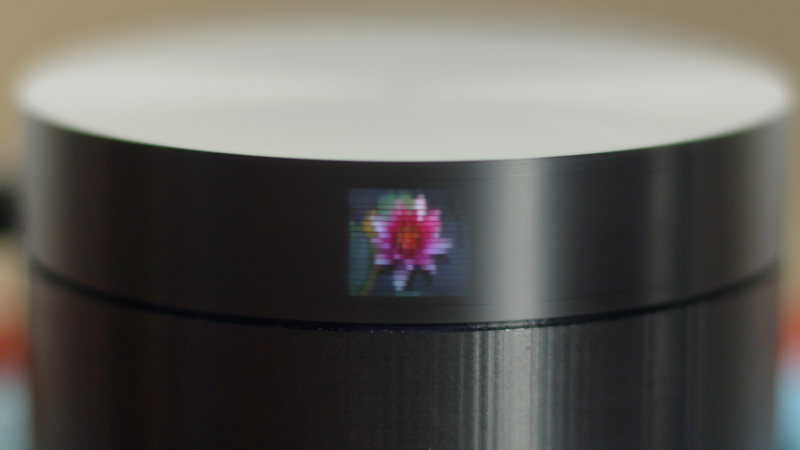
When you hear the word TV, you probably think of a big LED screen, maybe even the old CRT TVs, but in either case it’s something large and fairly complicated. However, thanks to the persistence of vision, it doesn’t have to be. In this handheld-sized project from [Ancient], the Scanwheel is born, a miniature mechanical TV that uses a spinning disk and some LEDs to produce an image.
The electronics of the Scanwheel are pretty straightforward. The smarts come from a Raspberry Pi Pico, an A4988 motor driver, a couple of LEDs, and a small 21-02485 stepper motor. The Raspberry Pi Pico is used to command the motor speed as well as coordinate the LEDs to turn on at the right time. The case is 3D printed; the base includes space for the various support electronics as well as some small light baffles to ensure the LEDs don’t bleed over outside their intended area. The top of the case is a disk that includes 20 small holes spaced evenly around the perimeter at varying heights, allowing light to only leave the disk when one of these holes is in front of the LEDs.
When you put all these pieces together, spin the motor up to roughly 900 RPM, and turn the LEDs on in a precise order, you end up with a really cool result: a miniature TV. And due to the five different LEDs in this build, you actually have a color 20×20 pixel display in the center and, on either side of that, two more 20×20 black-and-white displays capable of showing different images. Thanks [Ancient] for sharing this awesome build that takes advantage of the persistence of vision effect to create a unique display. Be sure to check out the video below as well as the instructions on how to build your own. And if you enjoy this sort of thing, check out some of our other persistence-of-vision projects as well.
Yeast spends its days chewing through sugar and splitting the leftovers into alcohol and carbon dioxide. Most people chasing homemade ethanol treat the second half of that reaction as pure waste and let the gas drift away. One maker decided the gas was too useful to ignore and set out to trap every molecule, dry it, chill it, and pack it into the same kind of high-pressure bottles that drive paintball markers and soda siphons.
The numbers appear almost too clean, since 4 kilograms of ordinary sugar dissolved in 14 liters of water already gives a solution that is nearly 22% sugar. If the yeast performs its job and converts everything, the process should result in little more than 2 kg of CO2. That’s enough liquid to fill nearly four 20-ounce paintball cylinders. The problem is that the gas comes out of the fermenter wet and diluted, making the first job (gathering it) difficult, as does maintaining the pressure up and preventing air from entering the system.
QUICK & ACCURATE: Built with the highest quality materials, Airmoto is a portable tire inflator for car, trucks, SUVs, motorcycles, and bicycles…
AUTO SHUT OFF: Use the “+” and “-” control buttons on the Airmoto to easily select your desired pressure, simply connect the air hose to your…
MAIN HIGHLIGHTS: Easily change between PSI, kPa, BAR, and KG/CM pressure units with a push of a button; Easy to read large LCD; Digital Tire Pressure…
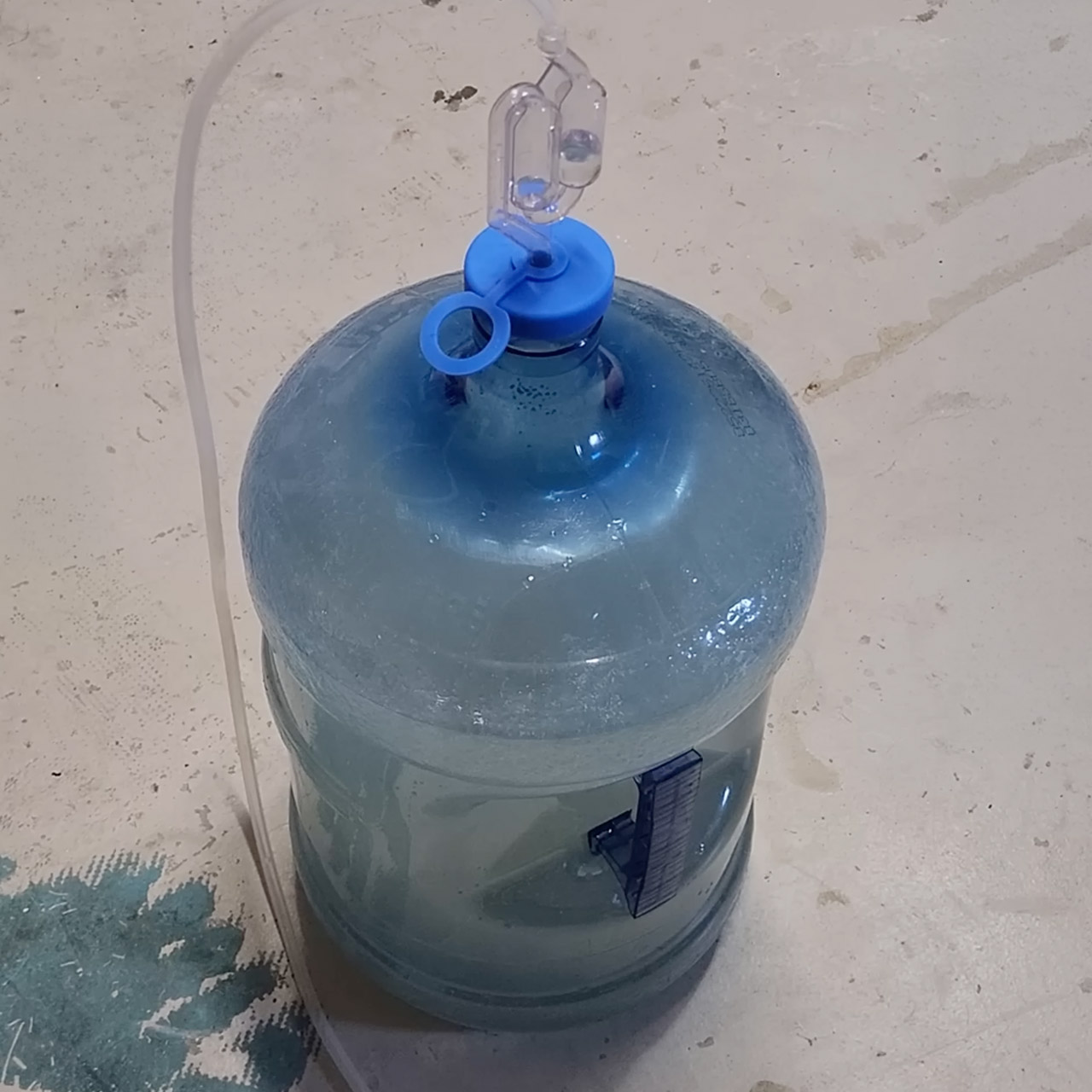
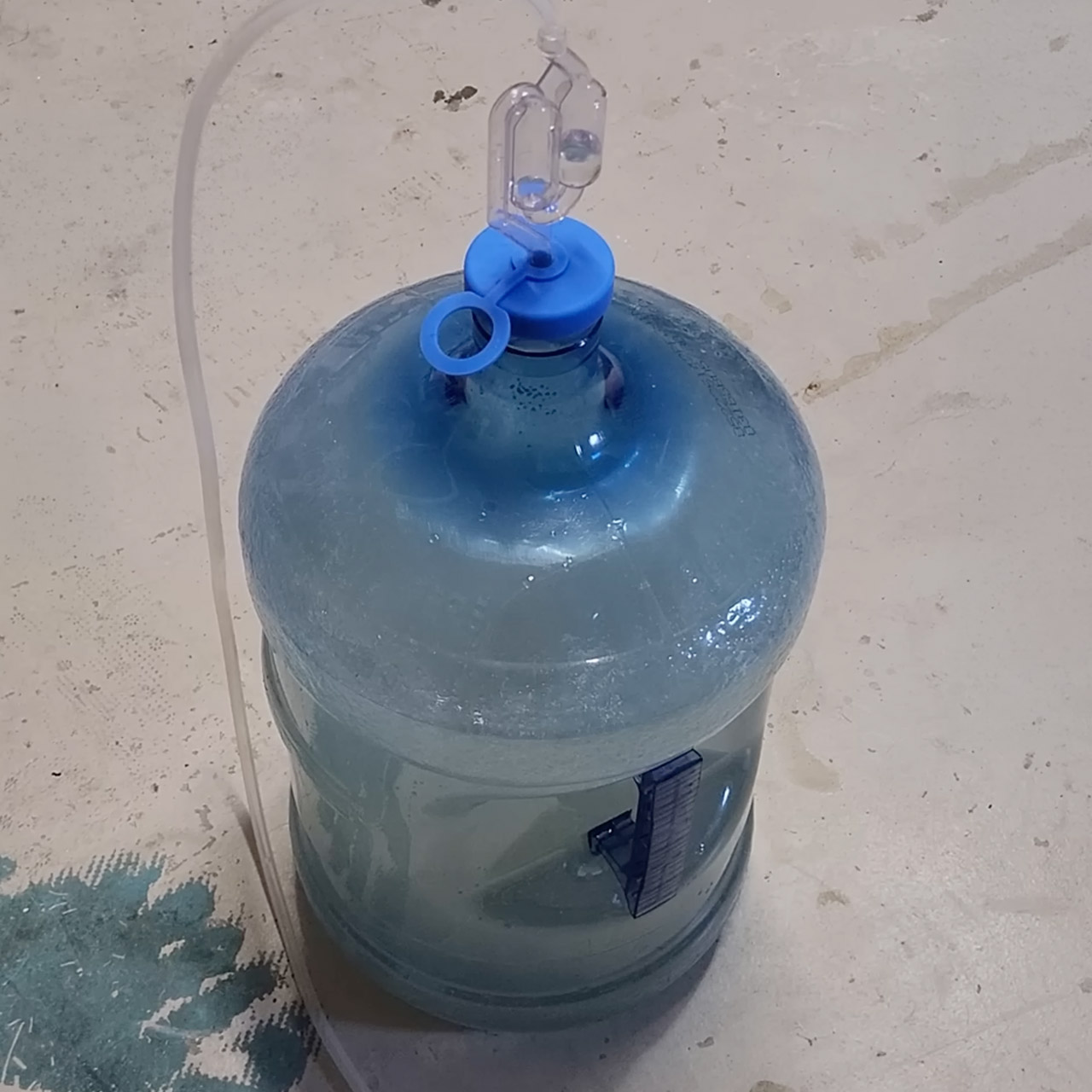
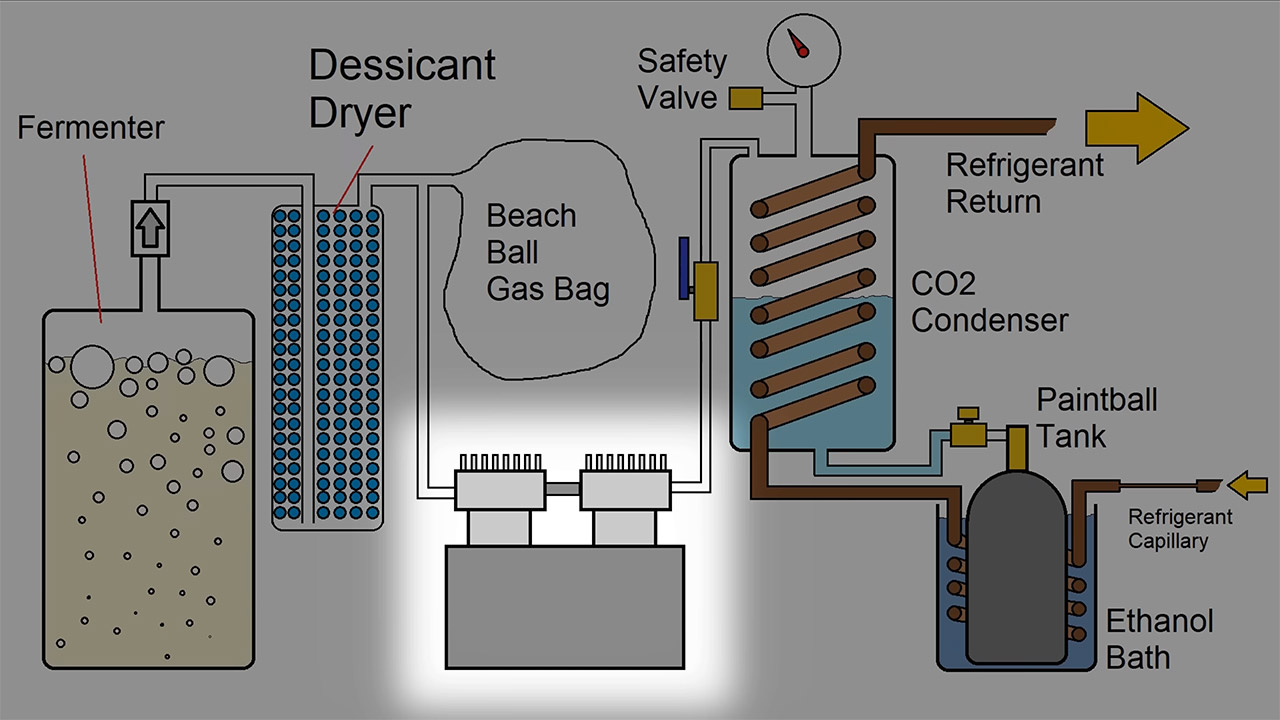
A 5-gallon water jug serves as a fermentation tank. The carbon dioxide is routed out via an airlock tube and into a recycled water-filter canister. The works is stuffed with silica-gel beads, which reduces moisture slightly, but we later discovered that the dew point remains too high, causing ice to form inside the valves. The next step is to transfer the gas to a beach ball. It takes a few days, but the ball eventually fills up with hundreds of gallons of CO2. It serves the purpose of providing some extra room to keep the pressure near the proper level while the yeast is still active.
Advertisement
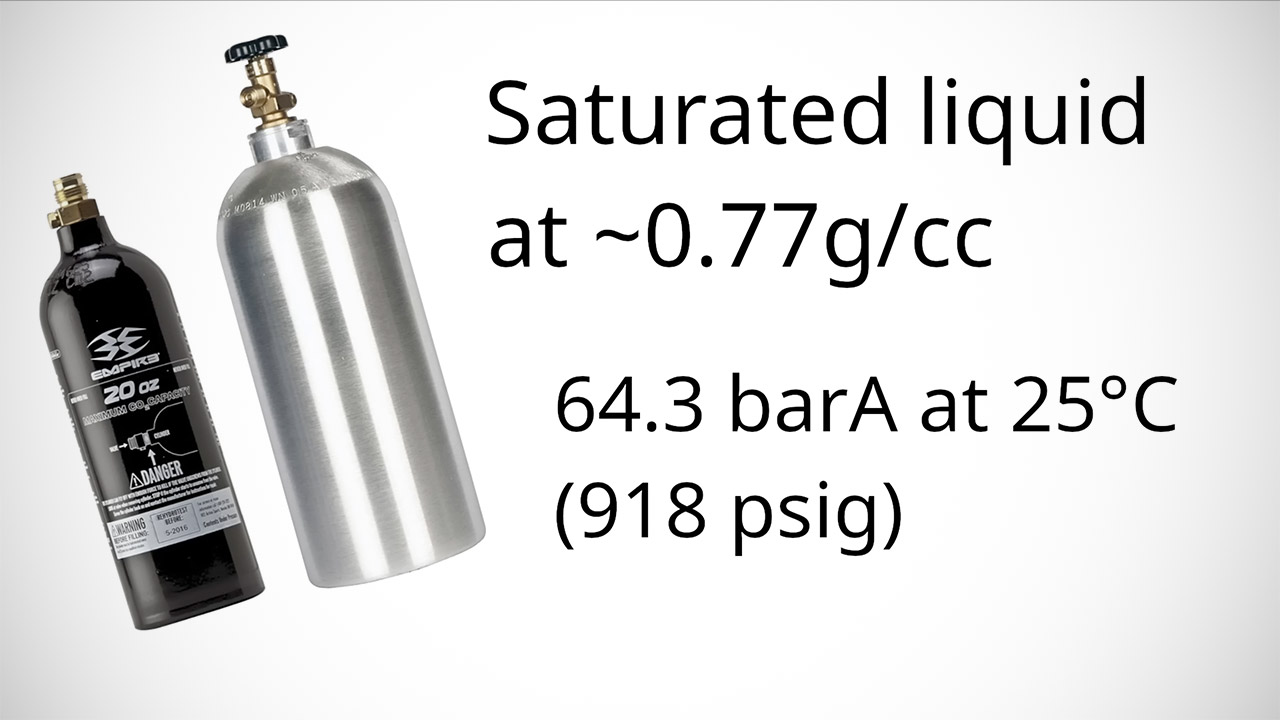
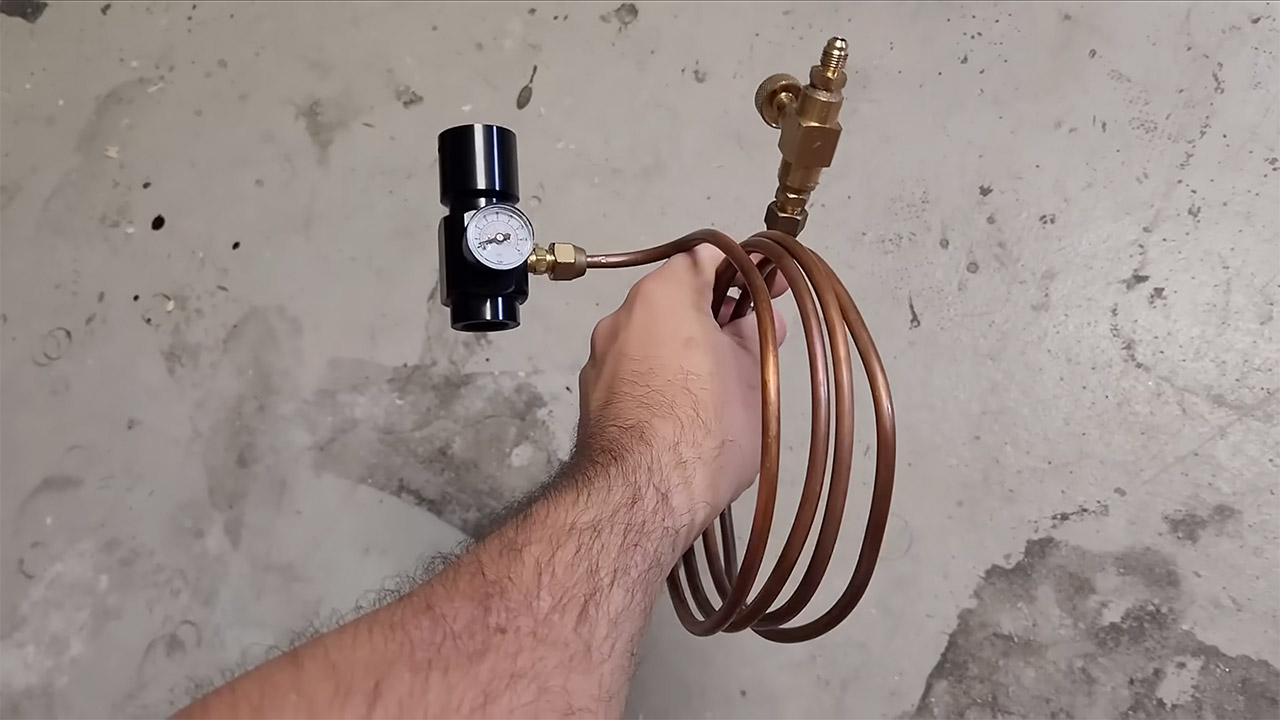
The major issue is turning the squishy substance into liquid. At room temperature, the CO2 must be compressed to roughly 64bar before it can condensate. The problem is that standard shop compressors can only reach a fraction of that capacity. The solution is to simply leave it in the air box. To cool a copper coil, a DIY system makes use of propylene as a refrigerant. This lowers the temperature to roughly -33 degrees Celsius and reduces the condensation pressure to about 13 bar absolute, which is well within the capabilities of a severely modified oil-less air compressor with its over-pressure cut-out switch disabled.
That copper coil is a 2-inch pipe, approximately 2 feet long, with a thinner copper coil within to convey the propylene. The CO2 from the beach ball enters at the top, meets the chilly surface, and condenses into a liquid that gathers at the bottom. A second coil (the same as the first) is housed in a 96% ethanol-lined thermos. A paintball tank sits in that bath, keeping the metal cool. Once some liquid has accumulated in the coil, a valve opens and the liquid flows into the chilled tank.
An typical oil-free compressor can move the gas, but only at a very sluggish rate; at 17 bar, it moves like a snail. Switching to a refrigerated compressor provides the necessary pressure, 400 psi or greater, and reduces fill time to 10 or 15 minutes. But now we have a new problem: oil separation. Any lubricant that gets into the tank degrades the purity. Then there’s water, which still freezes inside the tank valve while we pump it out, and this can jam the nozzle until the metal heats up again.
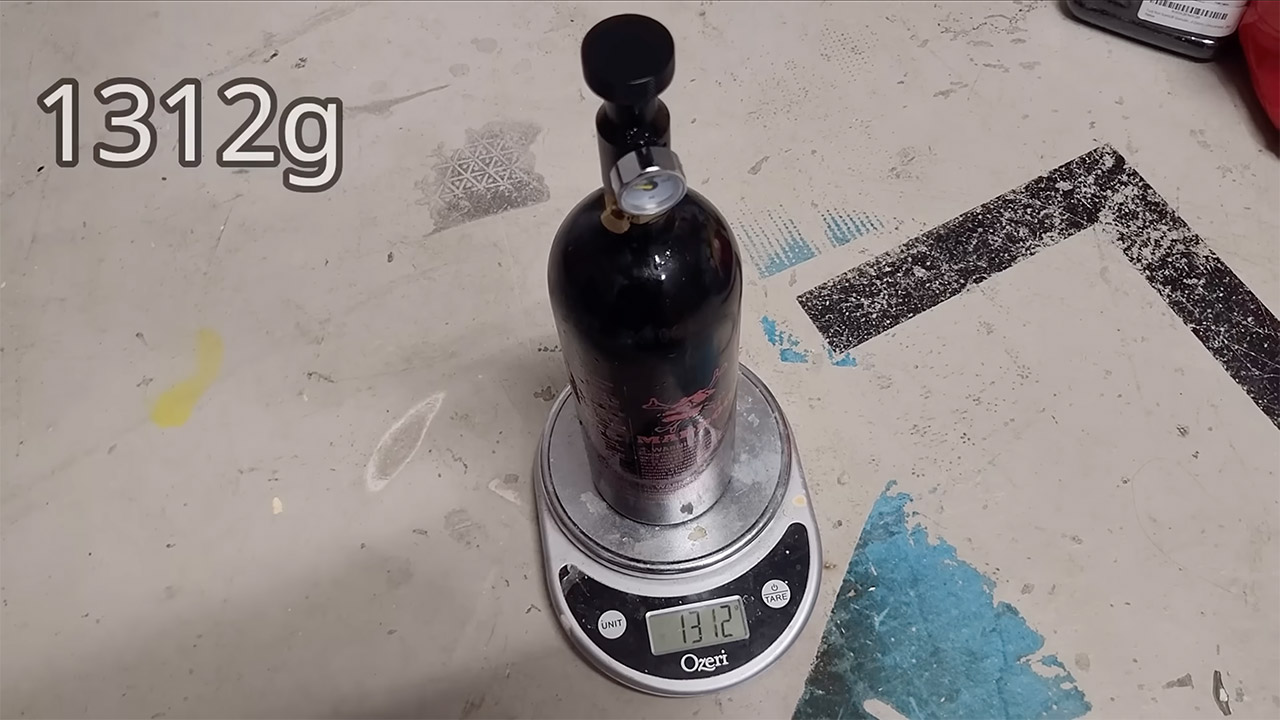
After filling the bottle to capacity, the scales read 1312 grams with the valve still connected. When the contents were drained, 974 grams remained, indicating that 338 grams of liquid carbon dioxide had been trapped inside. The container wasn’t even full to the brim, but that liquid was unmistakable, and when that valve was opened quickly, the temperature of the tank dropped to the point where it iced over. If you discharge it completely and quickly, you could bring it down to the temperature of dry ice.
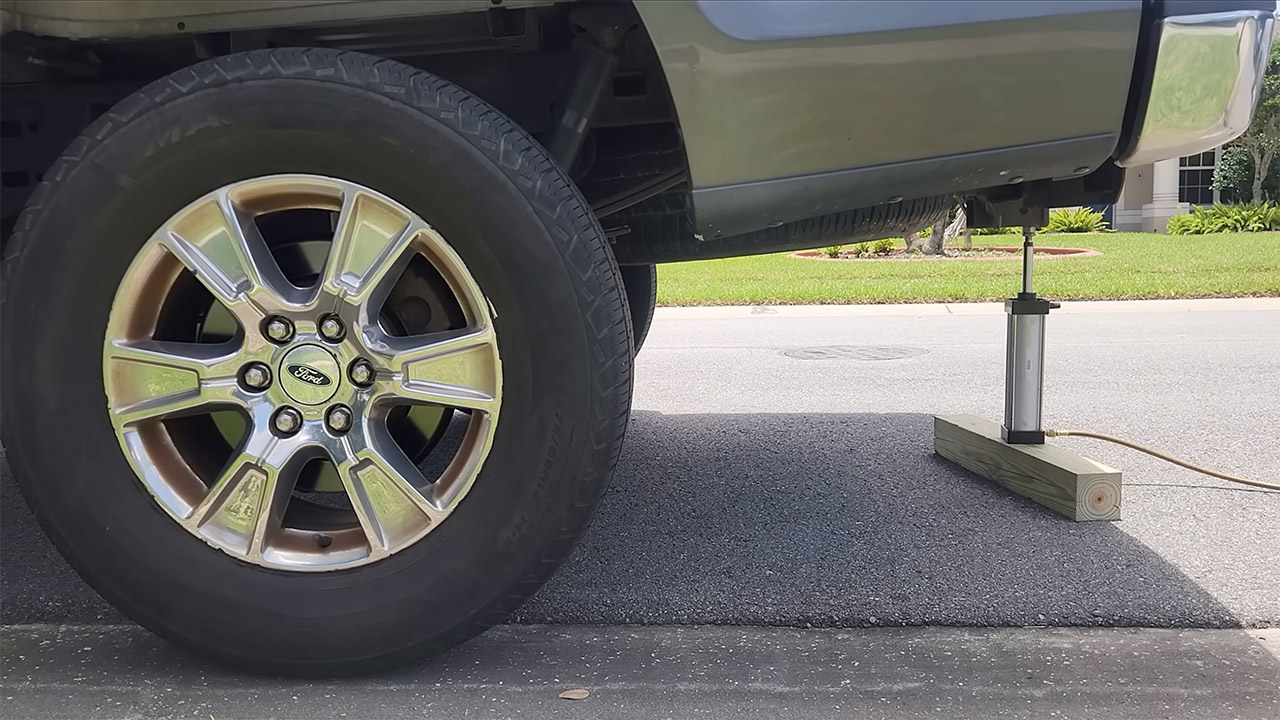
That small charge of ours already has some substantial practical power behind it. By connecting it to a short-stroke pneumatic actuator, he was able to elevate the back end of a full-size pickup approximately 200 millimeters off the ground. The same gas, linked to a vane motor, was able to power a small generator for a few minutes, but you can probably predict where this is going: the intense chill that comes in as the liquid boils away causes the pressure to drop and the motor to turn off. [Source]
Every accelerator makes a version of the same offer: capital, mentorship, a network, three months of support, and materially better odds of survival. Evidence suggests that little of it actually works.
In April, Youn Baek and Deepak Hegde of NYU Stern published a working paper through the National Bureau of Economic Research examining nearly 750,000 American startups across 329 programs. Between 60 and 80 percent of accelerators, they found, leave the companies that join them worse off than if they had never applied. A smaller group does the opposite, raising funding, growth and exit rates by a wide margin. Among them, Y Combinator, Techstars and Endless Frontier Labs.
The study establishes which programs work, but it does not explain why. For that, we asked founder and product-market fit expert Yann Goarin.
Goarin spent a decade at Google and YouTube, where he launched more than twenty products in Europe and the United States, and has since led product and marketing at several venture-backed startups. He founded Zag Labs in 2023, an advisory firm that has helped more than a hundred early-stage companies go to market and accelerate their path to product-market fit. He developed the “PMF System”, a method that treats product-market fit as a problem-solving process rather than an event or a vibe. He is currently Founder in Residence at AAXIS, where he leads the enterprise technology firm’s venture-building work. He also mentors and judges at five accelerator programs across the US (Techstars, gener8tor, FoundersBoost, Expert Dojo, and USC’s Iovine and Young Academy), which gives him a unique perspective on how different programs support their founders.
Advertisement
The 💜 of EU tech
The latest rumblings from the EU tech scene, a story from our wise ol’ founder Boris, and some questionable AI art. It’s free, every week, in your inbox. Sign up now!
Most accelerators take equity in exchange for a check and three months of support, and their return depends on whether a few companies in each cohort raise at scale or exit. What they offer founders is leverage in several forms: capital, introductions to investors and customers, brand recognition, and knowledge.
Like top universities, the best accelerators attract and select the best founders. Even so, the odds of success are very low. Building a category-defining, venture-backed company is incredibly difficult, and luck and timing decide a great deal of it. But it is not magic. There is a method to the madness, and that method, Goarin claims, is either not taught or not taught well.
Advertisement
Research shows that knowledge is the form of leverage that appears to matter most. Susan Cohen, Benjamin Hallen and Christopher Bingham, who spent years studying the original American accelerator programs, found that where accelerators do improve their companies, the primary driver is what those companies learned inside them. But it is also the hardest to scale.
Goarin remembers one client engagement, a seed-stage AI startup that had built a video production platform. Its founders had come through one of the world’s most selective accelerators. It raised $4 million and within twelve months passed $1.2 million in annual recurring revenue. However, churn was running above 30 percent. The response was to sell harder and build faster, adding features as customers asked for them, and investors supported that on the view that revenue was the number that mattered most.
What the founders failed to realize was that the three segments they were selling to (small marketing agencies, independent video creators, and boutique production companies) were not a cohesive market. While they appeared to need faster and cheaper video production, they differed in how much video they produced, how polished it had to be, how it fit in their workflow, and where it was distributed. The product tried to stretch across all three, and served none of them well. Customers left faster than sales could replace them. After cutting half the team and pivoting, they failed to secure a bridge round and ran out of runway.
Goarin came in near the end, too late to change the outcome. “I assumed that founders coming out of a program like that would be better at testing their assumptions and diagnosing their issues. I was wrong. They were just as clueless as most of the others I advise.”
Advertisement
Around that time he started mentoring at Techstars. That’s where he saw an opportunity to address the problem at scale. From inside a program, it becomes clear how knowledge actually reaches founders, and what never does.
The programs that do teach tend to teach in fragments: a product expert teaches product, a sales executive covers sales, someone who has raised four rounds helps with fundraising. Founders are expected to assemble them into a working company. Most fail. There is something odd in that, viewed from outside. Accelerators and venture funds spend enormous effort on selection, screening thousands of applicants to find the few worth backing, and then just hope they figure it out.
What goes untaught is product-market fit itself, i.e., the correct assembly of these fragmented pieces that ultimately leads to widespread demand for something people badly need, delivered profitably every time. There are two reasons it does not appear on syllabuses. Product-market fit is not understood as a discipline in its own right, so there is no settled body of practice to teach from. And the mentorship model recruits subject matter experts by function, so PMF, which sits between and over the functions, isn’t owned by anybody. Until now.
What Goarin teaches in these programs runs end-to-end, and his objective is straightforward: avoid building something nobody wants.
Advertisement
“Accelerators give founders access and funding, and of course that matters,” says Goarin. “But where they can have an even bigger impact is teaching first-time founders to operate like second-time founders. That means going beyond the surface-level material and breaking down the mechanics of startups.”
User experience went through the same thing. Usability testing, information architecture and interaction design were practiced separately for years before the field recognized them as one discipline and created roles for people who worked across all of them. Naming it is what made it possible to teach.
The case for teaching product-market fit as its own subject is getting stronger. As technology levels the playing field on building and execution, what separates companies is judgment: Is this problem worth solving? Is this the right customer segment? Can I deliver my solution repeatably and profitably? Is it time to pivot? None of those questions can be answered well without knowing what to look at, and that is what Goarin focuses on.
“In the early days only three things matter,” Goarin claims. “Speed of learning, speed of decision-making, speed of execution. A startup is a learning machine before it is anything else, and learning is the part founders struggle with the most. Building is fast and cheap now, so the temptation is to ship something and see if it sticks. But that’s how you end up with a product in search of a problem. That’s how you end up in pivot hell.”
Advertisement
His work has been expanding. He was a Lead Mentor at Techstars for the Spring 2025 and Spring 2026 cohorts and a judge in Mentor Magic, the program’s week of back-to-back mentoring and evaluation sessions. He has advised two gener8tor cohorts and judged USC’s Venture Showcase. He is in discussions with other top programs in the United States and Europe.
Top accelerator entry requirements have been rising. Joshua Lu, who runs Speedrun, told TechCrunch this year that because AI has made building and testing so much faster, the program now expects market validation or early traction before it will admit a company. That created a new market of programs beneath the accelerators. The best of them are focusing on education, and have invested accordingly. FoundersBoost, one of the world’s best pre-accelerators, brought Goarin in to strengthen its programming and asked him to teach its last two cohorts.
The gap is about to matter more. AI is accelerating a trend already underway, in which smaller and smaller teams, working alongside swarms of agents, can perform like much larger companies. That does not reduce the value of knowing what to build. Rather, it concentrates it. Judgment, pattern recognition, knowing what to focus on and when, the confidence to make a decision and move: these have always been the unfair advantage, but are ever more critical in the AI age.
“Fundraising used to be something most founders didn’t understand,” says Goarin. “Now every program teaches it. Product-market fit is more complex, but it is a subject, and I expect it will be taught the same way before long.”
Advertisement
Baek and Hegde could not say what separates the accelerators that work from the ones that do not. If the answer is what they teach, the programs that work it out first will be the ones worth applying to.
We spend hours testing every product or service we review, so you can be sure you’re buying the best. Find out more about how we test.
TP-Link Tapo C660 Kit: One-minute review
The TP-Link Tapo C660 Kit is a feature-packed 4K outdoor security camera that delivers many of the perks usually reserved for pricier models, including solar charging, pan-and-tilt coverage, color night vision and local microSD storage.
That last feature means you won’t need to pay for a subscription for video playback and download, but there are still some great (but non-essential) features in the paid Tapocare subscription, especially if you plan to expand your home’s security with more than a single camera.
Advertisement
The Tapo app is also easy to use, and the C660 Kit will slot in alongside other Tapo smart home gear like lights, plugs and more to form its own smart home ecosystem. On the other hand, if you have other smart devices in the mix and would prefer a hub to control them all, Alexa has the strongest support, while Google Home only works with voice commands and video streaming to smart displays and TVs. There’s no native support for Apple HomeKit.
Latest Videos FromTechRadar
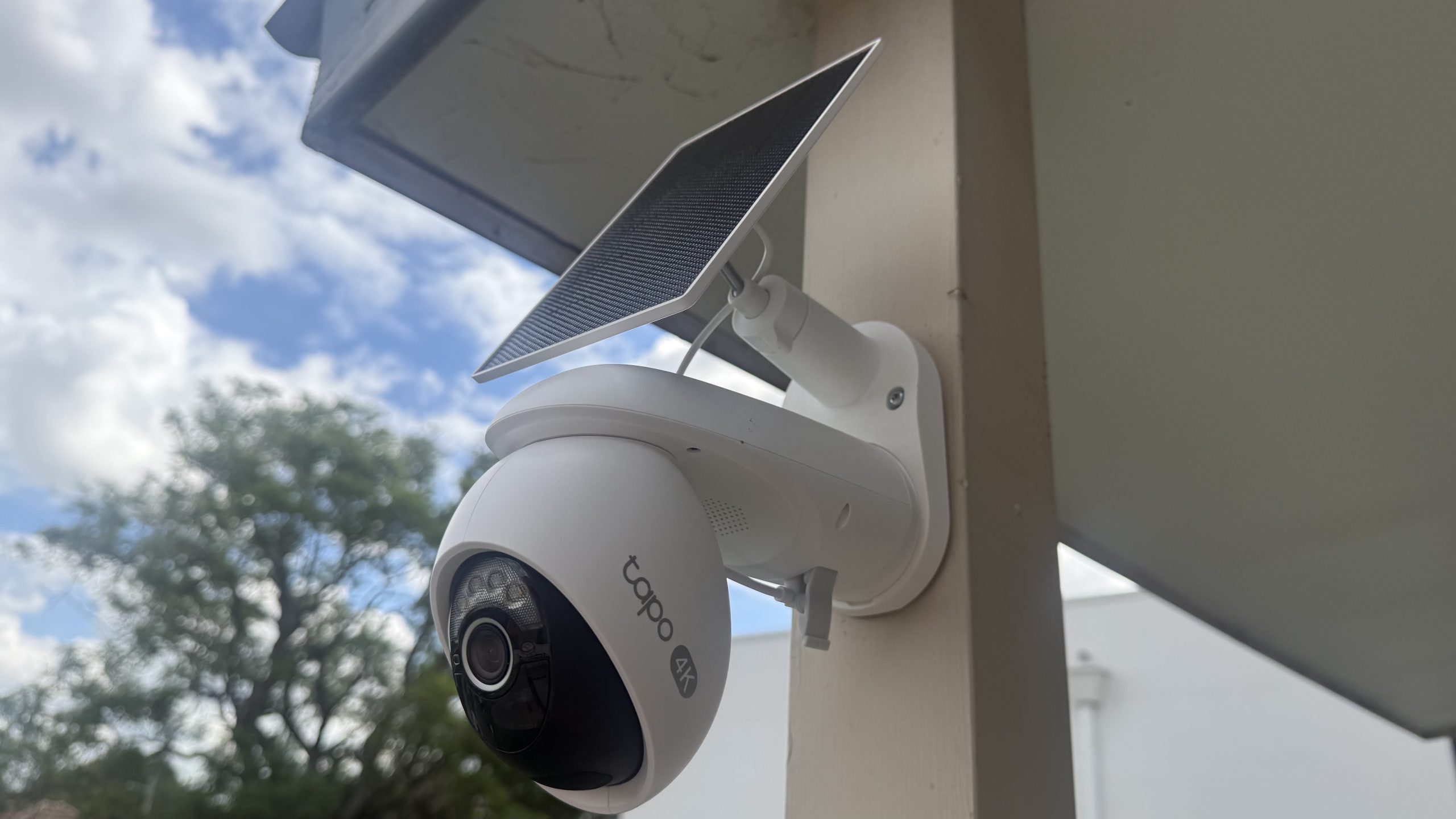
While it doesn’t necessarily stand out in a crowded market with its design, the white casing looks sleek and stylish, and the IP65 waterproof rating means the C660 Kit is dust-tight and can withstand low-pressure water jets from any direction (aka rain, splashes or hose spray).
Advertisement
(Image credit: Future | Nico Arboleda)
TP-Link Tapo C660 Kit review: Price and availability
Starts at $169.99 / £179.99 / AU$299 for a single camera unit
Available in multipacks of 2, 3 and 4-camera bundles
Optional Tapocare subscription plans start at $3.49 / £2.99 / AU$3.99 per month
The Tapo C660 Kit costs $169.99 / £179.99 / AU$299 for a single camera unit, although multipacks of 2-, 3- and 4-camera kits are available either as set bundles or as part of a build-your-own package option directly from Tapo as well as through third-party retailers like Amazon.
While you may not need a subscription package, especially if you use a single camera unit, Tapocare might well be worthwhile for some users. It offers cloud storage, extended video clip history for up to 30 days and enhanced notifications, with plans starting at $3.49 / £2.99 / AU$3.99 per month for one camera on the Basic Tapocare tier. Prices increase as you add more cameras.
You can also buy the camera on its own without the solar panel under the TP-Link Tapo C560WS name for $99.99 / £109.99 / AU$199.
Sign up for breaking news, reviews, opinion, top tech deals, and more.
Advertisement
TP-Link Tapo C660 Kit review: Specs
Swipe to scroll horizontally
Price
$169.99 / £179.99 / AU$299
Megapixels
Advertisement
8MP
Resolution
4K / 3840 x 2160 pixels
Field of view
Advertisement
105º
Pan/tilt
360º horizontal rotation, 90º vertical
Storage
Advertisement
microSD up to 512GB (not included)
Smart home
Alexa, Google Home, Siri Shortcuts; no HomeKit
Battery
Advertisement
10,000mAh
Connectivity
2.4GHz / 5GHz Wi-Fi 4
IP Rating
Advertisement
IP65
TP-Link Tapo C660 Kit review: Design and installation
Sleek black and white color scheme
Straightforward installation with easy-to-follow instructions
Recommended mounting height is between 2.5m and 3m (8-10 feet)
The Tapo C660 Kit has a sleek white plastic body with black accents around the lens, with IP65 rating for dust ingress protection and resistance to low-pressure water jets from any direction. This means water from rain, splashes or hose spray will be fine, but it won’t withstand immersion and pressure washing.
The solar panel is just the right size relative to the camera — it isn’t small and subtle by any means and it’s definitely noticeable once installed, but it isn’t too imposing either. As mentioned above, there is a rubber flap underneath the camera lens concealing the power button, a reset button and a microSD card slot.
Installing the Tapo C660 Kit is straightforward thanks to the easy-to-follow instructions included in the box. You start by drilling holes where you want to mount the base plate, then slot the camera in. The solar panel is screwed on top, then plugged into the camera’s USB-C port located on the bottom.
Advertisement
(Image credit: Future | Nico Arboleda)
It’s worth taking some time to think about where you want the camera placed before you install it, though. While the Tapo C660 Kit can pan and tilt the camera, getting the full view of an entire space isn’t guaranteed if it’s mounted too low since it doesn’t tilt upward. TP-Link recommends mounting it between 2.5m and 3m (8-10 feet) and in a location where the solar panel gets the most sunlight throughout the year.
TP-Link also recommends that the camera shouldn’t point at swaying trees and other moving objects like vehicles and pedestrians to prevent an avalanche of notifications, but if it’s unavoidable, the C660 lets you set motion detection zones via the app to reduce or minimize notifications of movement within those zones.
(Image credit: Future | Nico Arboleda)
One thing to note about the installation is that the camera has a manual power button tucked away beneath a flap under the lens. Unlike other security cameras that power up automatically when plugged into a power source (like the solar panel or a USB-C cable), this button needs to be switched on before mounting (especially when it’s in a hard-to-reach height) and pairing with the Tapo app.
Pairing the camera to the app is quick and straightforward, with only a few setup options at the beginning, like Wi-Fi connection type (2.4GHz for longer range or 5GHz for better video streaming quality, both using the Wi-Fi 4 standard), assigning the camera’s location and even the icon you want displayed in the Tapo app home screen.
Advertisement
TP-Link Tapo C660 Kit review: Software and smart home support
Tapo app is intuitive and easy to use
Alexa has full support, while Google Home is limited
Motion detection zones move with the camera instead of a fixed area
TP-Link’s Tapo C660 Kit natively integrates with the Tapo smart home app, allowing the camera to slot into any existing Tapo smart home ecosystem that might include lights, plugs, switches, robot vacuums, door locks and more.
If you have devices from other brands and use a smart assistant to consolidate them into one interface, the camera supports Amazon Alexa and Google Home. Alexa supports both live footage playback and voice commands, while Google Home only supports voice controls and video streaming on select devices. Apple HomeKit isn’t supported, but alerts and automations can still be done through Siri via iOS shortcuts enabled through the Tapo app.
(Image credit: Future | Nico Arboleda)
The app works well, with an intuitive interface using tiles to show all your Tapo devices, with dedicated tabs for the different gadget categories (like cameras, vacuums and ‘Smart’ for automations). You can play the live feed and adjust settings by tapping on the tile for the camera (or cameras if you have more).
Camera settings include two-way audio, a toggle for the built-in spotlight and adjustments for panning and tilting the camera. There’s also an option to ‘save’ a set camera position via ‘Viewpoints’ and easily access those positions without manually adjusting each time. Those views can be used for automations, too.
Advertisement
To try out the feature, I set the camera to monitor the rear of the house instead of the driveway and front stairs for just a few hours during the day, and it would activate as scheduled each time. Patrol Mode also lets you move the camera between those set positions, but the Tapo app warns that this mode may impact the camera motor’s longevity.
(Image credit: Future | Nico Arboleda)
One annoyance I found with the Viewpoints feature was that the motion detection zone that I set also moved with the camera and there’s no option to lock it to a specific spot. Thankfully, I didn’t have to move my camera too often for that to personally impact me, but I can see it being inconvenient for some users.
Adding to the motion tracking is a setting subject detection like person, pet or vehicle, and it can also be set for different motion detection zones as well.
Advertisement
TP-Link Tapo C660 Kit review: Performance
Crisp 4K image quality from 8MP lens
Built-in spotlight provides color at night
Solar panel keeps the unit running 24/7
The Tapo C660 Kit captures videos through its 8MP lens with 4K (3840 x 2160 pixels) resolution, with a frame rate of 15 or 20 frames per second. The recorded video clips were crisp and detailed when viewing live or when playing back previously recorded footage. It was clear enough for me to see details like faces, vehicle license plates and larger text from further away, while the 18x digital zoom provided more detail than lower-resolution cameras.
It managed to retain detail in brighter areas and the video wasn’t washed out, like when direct sunlight was hitting the driveway. There’s built-in wide dynamic range to prevent overexposure in bright sunlight or underexposure in dark shadows.
Motion tracking was responsive, and the C660 Kit could track me moving when I was walking quickly, running or cycling (although I wouldn’t necessarily call myself a fast runner or cyclist to try and avoid the tracking). I also liked that the camera automatically reverts to the original position after detecting movement, so I didn’t have to adjust it manually as some security cameras require you to do.
At night, the f/1.6 aperture takes in enough light to provide a clear image, and the built-in spotlight adds more low-light visibility. There’s also an infrared sensor as an alternative to color night vision. While I found both modes were able to detect movement almost instantly, the image quality isn’t as crisp as daytime mode, but it was still decent enough to be clear and fully visible.
The built-in microphone produced clear audio and was loud enough for a conversation even when I wasn’t at home.
Advertisement
(Image credit: Future | Nico Arboleda)
The solar panel kept the battery topped up, with the camera almost always running at 100% apart from some overcast days. It was only when I switched on 24/7 Capture (which frankly most people won’t need) that the solar panel struggled to keep the camera charged, and I eventually had to bring it indoors (it can be removed from its base plate easily) for a top-up via a USB-C cable.
In a different test, I tried running the camera without the solar panel plugged in, and the camera ran uninterrupted for just over 2 weeks before it needed charging.
(Image credit: Future | Nico Arboleda)
The Tapo C660 Kit isn’t necessarily the cheapest 4K security camera, but having local storage via a microSD card makes it a great value option compared to others that require a subscription to access cloud storage for recorded footage. It supports up to 512GB, though you’ll need to purchase the microSD card separately as it doesn’t come with one in the box.
TP-Link says that’s enough for around 16 complete days of recording, which is plenty for most people. Local storage means you can also back up those recordings to your home computer or another drive for redundancy. The Tapo app also lets you password-protect the microSD card for an extra layer of security.
Advertisement
Accessing footage from the card is easy through the app, and notifications reliably link to recordings with almost no delay after the camera detects motion. Video playback is also very smooth in the app. If you prefer cloud storage, you can opt for the aforementioned Tapocare subscription and choose a plan based on the number of connected cameras you plan to have.
Other features in Tapocare include 30 days of encrypted video storage for events, rich notifications and video summaries.
Should I buy the TP-Link Tapo C660 Kit?
Swipe to scroll horizontally
TP-Link Tapo C660 Kit report card
Attribute
Advertisement
Notes
Score
Value
You get some premium features like 4K resolution and 360º views for an affordable price, while on-device storage means you don’t have to pay for a subscription.
Advertisement
5/5
Design
It features a clean, sleek white design that’s relatively sturdy, and the solar panel that helps to extend its battery life is a proportionate fit.
5/5
Advertisement
Software
The Tapo app is clean and intuitive, with plenty of adjustments to fine-tune the settings. Alexa has the strongest support for smart home integrations, with Google Home at a distant second.
4/5
Performance
Advertisement
It captures crisp 4K footage well, and also performs reasonably well in low-light situations thanks to a built-in spotlight.
4/5
Buy it if
Advertisement
Don’t buy it if
How I tested the TP-Link Tapo C660 Kit
I installed the Tapo C660 Kit to a porch post on my property for a few months to get a sense of both its recording capabilities and whether its solar panel would keep the camera’s battery charged.
I tested all the settings, but had the alarm and spotlight mostly turned off to avoid disturbing neighbors, only doing one-off tests to see if they perform as advertized. I would also check captured footage whenever I got a push notification.
The smart home integrations were tested with smart displays (a 2nd-gen Google Nest Hub and an Amazon Echo Show 5) in addition to the Alexa and Google Home mobile apps.
An Illinois man was sentenced on Tuesday to 76 months in prison and three years of supervised release for hacking the Snapchat accounts of over 750 women to steal nude photos, which he later traded or sold online.
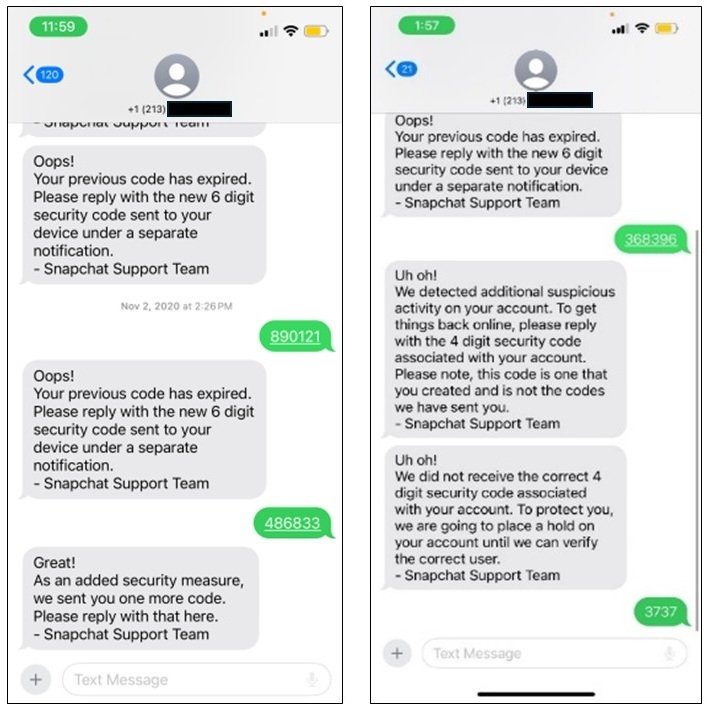
After being charged in December, 26-year-old defendant Kyle Svara admitted in February to having used various social engineering tactics to phish Snapchat access codes from over 750 women.
Between May 2020 and February 2021, he targeted more than 4,500 victims while posing as a representative of Snap Inc and using anonymized phone numbers.
After stealing the victims’ credentials, Svara accessed approximately 517 women’s Snapchat accounts without permission to download nude or semi-nude photos and activated two-factor authentication to lock them out of the compromised accounts.
The investigators also found that Svara distributed child sexual abuse material (CSAM), finding approximately 530 images and 600 videos depicting CSAM in his Mega account.
“When Svara was interviewed by investigators, he falsely stated that he did not know anything about hacking Snapchat,” the Justice Department said in February.
Advertisement
“Additionally, he falsely stated that had no interest in child pornography and had never actively sought out or accessed child sexual abuse material (CSAM). Contrary to these statements, the defendant collected, distributed and solicited CSAM.”
According to court documents, he also advertised his “services” online, trading the stolen images, offering to “get into girls snap accounts,” and asking potential clients to reach out through the Kik encrypted messaging app.
Svara offering to hack Snapchat accounts (Justice Department)
Steve Waithe, a former Northeastern University track and field coach and one of his clients, hired Svara to hack the Snapchat accounts of students at Northeastern and members of the women’s track and field and soccer teams.
After being found guilty of targeting at least 128 women and stealing thousands of explicit photos from more than 100 women, Waithe was sentenced in March 2024 to five years in prison for cyber fraud, cyberstalking, and sextortion.
Between paid hacking jobs, Svara also independently hacked into the accounts of many women in Plainfield, Illinois (including neighbors, family friends, classmates, his own personal friends), as well as students at Colby College in Waterville, Maine.
Advertisement
Security teams log 54% of successful attacks and alert on just 14%. The rest move through your environment unseen.
The Picus whitepaper shows how breach and attack simulation tests your SIEM and EDR rules so threats stop slipping by detection.
Forget cheating on homework and chatbot friends. Some kids are getting in on a new AI trend: thinking it sucks.
In the four years since chatbots went mainstream, and their marketing campaigns went into overdrive, young people have grown increasingly skeptical of the hype around LLMs. Yes, many of them still use the tech for school assignments and companionship, but according to market research firm YPulse, 37 percent of teens aged 13 to 17 cringe when they see AI content like music and videos, and more than half worry about misinformation and deepfakes.
The polling on youthful AI attitudes shows a great deal of contradiction. Adoption rates are high, with a majority of America’s teens reporting they use chatbots, but enthusiasm is mixed. A recent Pew Research report found that while many teens think AI will be good for them personally, over a fourth of their cohort believe AI will have a negative impact on society in the next 20 years, citing job loss, the decline of critical thinking skills, and environmental impacts as concerns.
Young people typically adopt new consumer technology eagerly, but Melanie Green, a communications professor at the University at Buffalo, says AI is different. This time, the moral panic isn’t coming from older generations—in fact, kids are turned off by the way AI is being pushed on them by adults and tech corporations. They’re also, Green says, “acutely aware that whatever disruption happens, their generation is going to be bearing the brunt of it.”
Advertisement
Ergo, the eye-rolls. On Bluesky, parents bond over their kids’ distrust of AI, with many claiming that their children come home saying “that’s AI” to mean “that’s BS.” On Reddit, educators share that students—even those who use AI—worry about its consequences and can’t stand the art it produces. WIRED spoke to young people, their parents, and their teachers to find out why some kids don’t want to be on the AI bandwagon.
Super Heavy booster had a super heavy landing, but other reusability tech did the trick
The 13th flight of SpaceX’s Starship made it off the launchpad on Friday and ticked off just about everything on the company’s to-do list.
After delays and engine replacements, Elon Musk’s colosso-launcher took to the skies at beer-o’clock on Friday evening – 5:51PM Texas time.
Advertisement
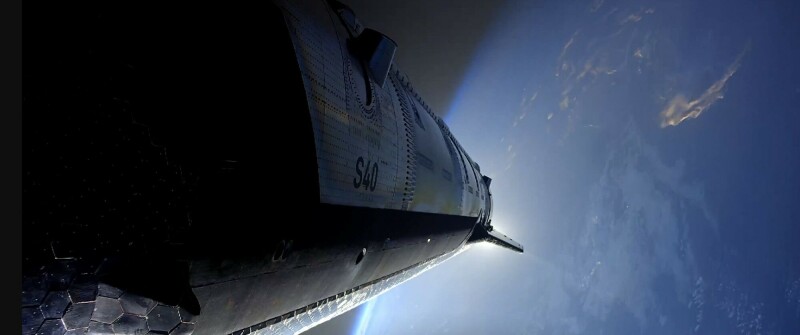
One hour, five minutes and 21 seconds later, Starship made a controlled splashdown in the Indian Ocean, where it floated after landing.
SpaceX says it was able to gather critical data on the performance of Starship’s heatshield, and that the craft made “a dynamic banking move to mimic the trajectory that future missions returning to Starbase will fly.”
Gathering data on Starship’s heatshield performance will help SpaceX ensure the craft is re-usable. Simulating missions that land at Starbase, SpaceX’s Texas home, builds toward future missions that launch and land at the same facility, speeding turnarounds for re-usable hardware.
The test flight also saw SpaceX test a new routine for de-orbiting the Super Heavy booster used to hoist Starship into space. “The booster successfully completed the high thrust portion of the boostback burn with all 33 engines, the first time with a Super Heavy V3, before ending the burn early,” SpaceX said. “It attempted to relight its engines for the landing burn, with a subset successfully igniting before experiencing a hard splashdown in the Gulf.”
Advertisement
That part of the mission didn’t go perfectly, as SpaceX hoped for a softer landing and more engines lighting to make it possible.
Once Super Heavy and Starship separated, the latter vehicle used its six Raptor engines to reach desired speed and orbit. It then deployed 20 Starlink V3 satellites. SpaceX crew verified the sats worked and half a dozen of them got a look at Starship’s heatshield. While the satellites were functional, SpaceX did not intend them to form part of the Starlink constellation and allowed them to re-enter Earth’s atmosphere. Or as the company’s mission report put it, the satellites “demised upon reentry approximately 20 minutes after deployment.”
Starship performed one more trick on its way back to Earth, by starting one of its Raptor engines while coasting through space. The success of that test again demonstrated tech that will be needed for future missions, in this case flights that push Starship into sustainable orbit – or allow it to reach a trajectory capable of reaching the Moon, as NASA envisages will be the case for future Artemis missions that land humans on Earth’s permanent natural satellite.
SpaceX boss Elon Musk said he hopes the next Starship test flight will see the Super Heavy booster caught by robot arms at Starbase, another step towards improved reusability and turnaround times between flights. ®
Televisions spent decades getting larger, thinner and increasingly difficult to move without a second person, a furniture dolly and a brief argument about who scratched the wall.
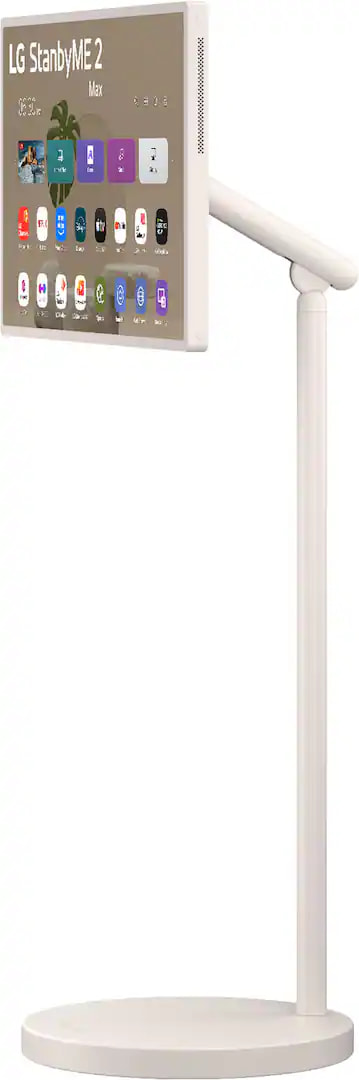
LG took a different approach with StanbyME: put the display on wheels, add a battery and let it follow you between rooms without requiring an electrician or a marriage counselor.
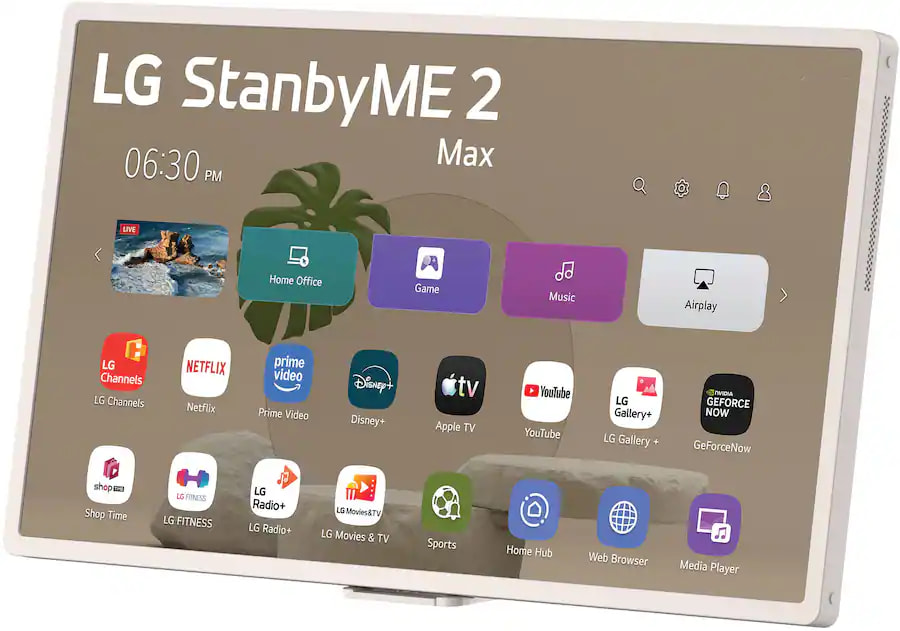
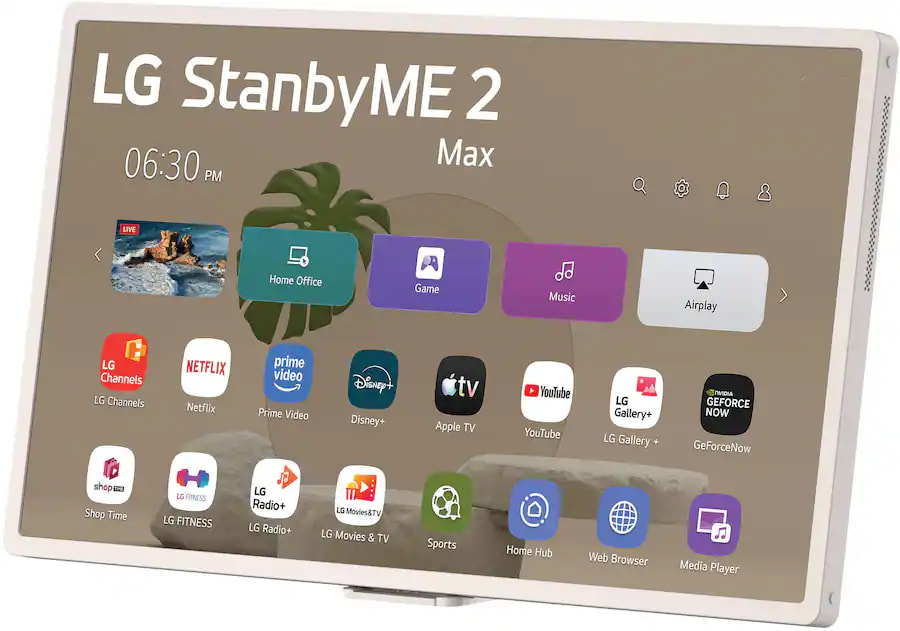
The original idea was clever, but the 27-inch StanbyME 2 still felt more like an oversized tablet than a television. LG’s new StanbyME 2 Max moves the concept considerably closer to being a legitimate secondary TV with a 32-inch 4K touchscreen, improved wireless connectivity and the same $1,299.99 launch price as its smaller predecessor.
That is still a lot of money for 32 inches of LCD real estate, but conventional televisions cannot follow you into the kitchen, rotate into portrait mode for a workout or detach from their stands when you need the screen on a desk.
Advertisement
Bigger Screen, Sharper Picture
The most important upgrade is the display itself. StanbyME 2 Max increases the screen size from 27 to 32 inches while jumping from QHD resolution to full 4K UHD at 3840 x 2160 pixels. It remains an edge-lit LCD panel with a native 60Hz refresh rate, so nobody should confuse it with one of LG’s premium OLED TVs. Mobility, not reference-level black performance, is the reason this exists.
LG has equipped the new model with its Alpha 8 AI Processor Gen3, including AI Picture Pro, AI Super Upscaling and Dynamic Tone Mapping Pro. Dolby Vision HDR is supported, while Dolby Atmos and LG’s AI Sound Pro processing can create a virtual 11.1.2-channel presentation through the built-in side-firing 2.0-channel speaker system.
A 32-inch television is never going to replace a proper home theater system, but that is not really the assignment. StanbyME 2 Max is intended for recipes, exercise videos, casual streaming, gaming, video calls and those moments when somebody else has taken control of the main television and refuses to surrender the remote.
More Tablet Without Becoming an Actual Tablet
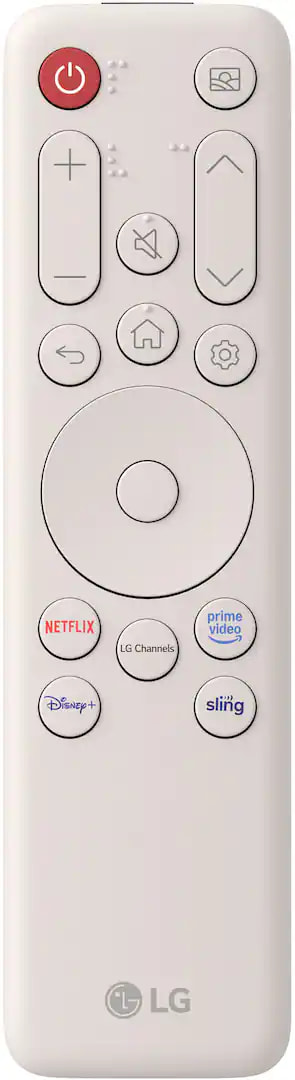
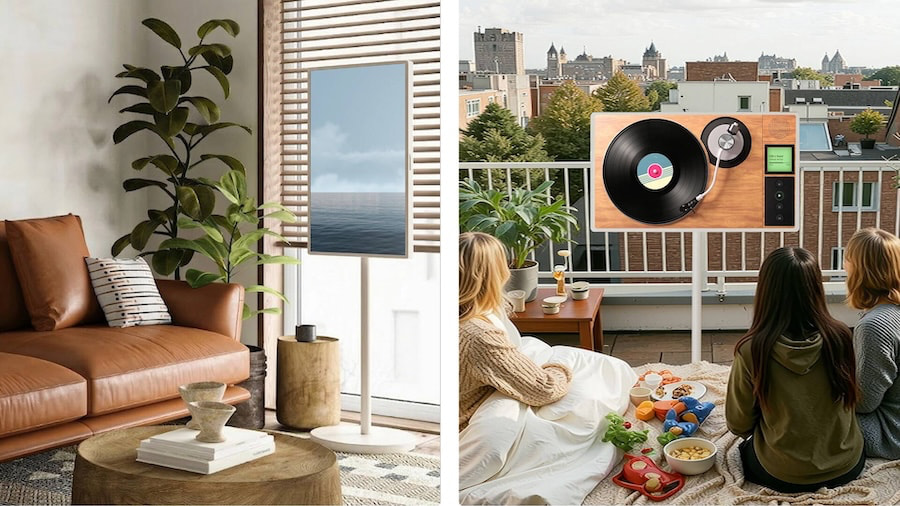
The touchscreen can rotate 90 degrees in either direction for landscape or portrait viewing, tilt up to 25 degrees and swivel as much as 90 degrees. The display also detaches from the rolling stand and can be placed on a table using the included one-click tabletop stand. A small magnetic remote clips directly to the enclosure, which should reduce the likelihood of it disappearing into the sofa cushions within the first 48 hours.
The screen weighs approximately 12.3 pounds on its own, while the complete display and rolling stand weigh 44.8 pounds. In other words, roll the complete unit between rooms and save the lifting for when the display is detached.
Battery life has increased slightly from four to a claimed 4.5 hours, which should cover two average-length films or approximately one modern streaming drama whose director was never told that editing exists. The screen can also be powered or charged over USB-C, including through a compatible external battery.
Connectivity represents another meaningful improvement. The previous StanbyME 2 was saddled with Wi-Fi 5, which felt dated on a premium wireless display. The Max moves to Wi-Fi 6 and Bluetooth 5.3, while supporting Apple AirPlay, Google Cast and mobile-device screen mirroring. LG also includes HDMI, USB and dual USB-C connectivity, with USB-C DisplayPort Alt Mode supported for compatible computers and mobile devices.
Advertisement
Advertisement. Scroll to continue reading.
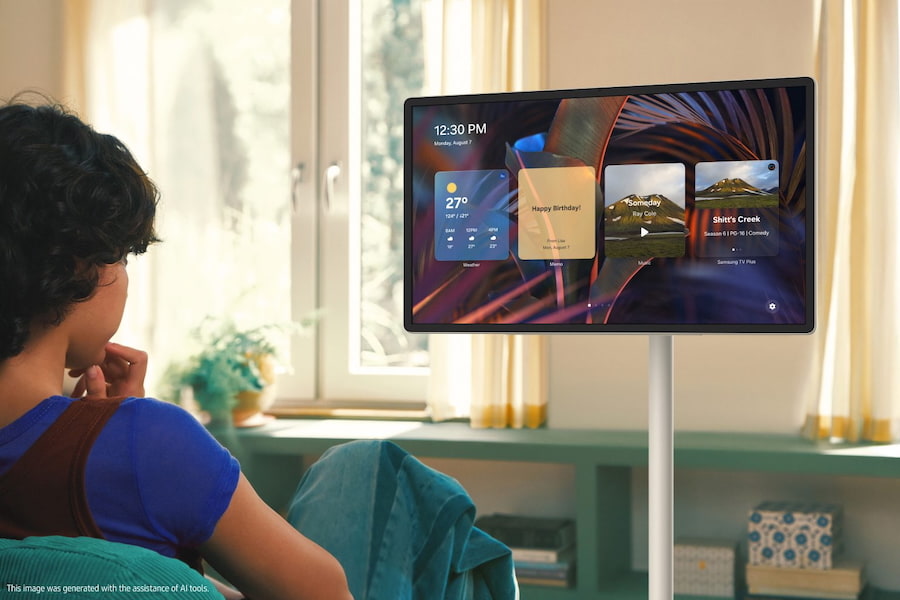
LG’s webOS platform provides access to streaming applications and more than 400 free LG Channels in the United States. Gallery+ can turn the display into a mobile digital-art frame, while Mood Maker, touchscreen board games and the generative AI-powered Let’s Draw application provide something to do when another season of television about wealthy people behaving badly begins to feel repetitive.
There is an important distinction, however: StanbyME 2 Max runs a television operating system rather than iPadOS, Android or Windows. It offers touch controls and tablet-like flexibility, but it is not a general-purpose tablet capable of running every mobile productivity or creative application.
LG Is No Longer Rolling Alone
Samsung Movingstyle M7 Smart Monitor
Samsung’s closest rival is the 27-inch Movingstyle, which offers a QHD touchscreen, 120Hz refresh rate, HDR10+, Dolby Atmos, a detachable display and approximately three hours of battery life for a $1,199.99 MSRP. Samsung has the advantage for gaming and faster motion, but LG provides a larger 4K screen, longer battery life and Dolby Vision for an additional $100.
Samsung also sells the 32-inch Movingstyle M7 for $699.99. It provides a 4K display and rolling stand at nearly half the price of the LG, but it requires continuous AC power and lacks both touchscreen operation and the ability to detach the display for portable use. It is closer to a smart monitor on wheels than a battery-powered personal screen.
The more serious threat might be the Hisense S6 FollowMe, which combines a 32-inch 4K touchscreen with an anti-glare panel, Wi-Fi 6, an integrated camera and a claimed battery life of up to 10 hours. Hisense announced U.S. availability for May 2026, but its official launch materials still did not provide pricing, which is an effective way to win a specifications comparison without asking anyone to open their wallet.
Advertisement
What makes the StanbyME 2 Max different is not any single feature. It is the combination of a 32-inch 4K touchscreen, detachable battery operation, a mature smart TV platform, Dolby Vision and Atmos support, extensive wired and wireless connectivity and confirmed U.S. pricing in one relatively polished product.
The Bottom Line
At $1,299.99, the LG StanbyME 2 Max will never win a dollars-per-inch contest. The same money can purchase a substantially larger conventional 4K TV with better picture quality, greater brightness and possibly enough left over for a soundbar.
That television will not roll next to a treadmill, rotate vertically for a recipe, detach for use on a desk or operate for more than four hours without an electrical outlet.
LG has addressed the two most obvious limitations of the previous model by increasing the screen size and resolution, while Wi-Fi 6 fixes a networking specification that should never have been missing from a premium wireless display.
Advertisement
The edge-lit panel, 60Hz refresh rate and high price still require some perspective. This is not the television for someone building a dedicated home theater or chasing premium HDR performance. It makes far more sense for apartments, bedrooms, kitchens, home offices, workout spaces and households where a flexible secondary screen would actually move throughout the day.
The StanbyME concept is no longer unique, but the 2 Max may be its most convincing execution so far. LG did not reinvent television. It simply gave one better resolution, a battery and permission to leave the living room.
Price & Availability
The LG StanbyME 2 Max, model 32LX6BWGA, is priced at $1,299.99 in the United States. LG opened preorders on June 29, 2026, with initial shipments expected to begin during the week of July 26, 2026.
Apple Upgrade, the company’s new installment program, will be going live on July 28, coinciding with the ending of sign-ups for the iPhone Upgrade Program.
On July 21, a report surfaced claiming that the iPhone Upgrade Program was on borrowed time, and was due to be replaced. It seems that the replacement, Apple Upgrade, will be arriving very soon.
Posted as part of Sunday’s “Power On” newsletter for Bloomberg, Mark Gurman writes that Apple Upgrade will launch on Tuesday. At the same time, Apple will stop new enrollments for the iPhone Upgrade Program.
Consumers already on the iPhone Upgrade Program can continue to use it, but new plans will not be set up.
Advertisement
While a leasing program at its core, Apple Upgrade differs from the iPhone Upgrade Program in a few ways.
The first big change is that it’s not just limited to iPhones. Consumers will be able to sign up for an iPhone, iPad, Mac, or Apple Watch.
Plans will last 24 or 36 months, depending on the product, and subscribers will be allowed to upgrade early to newer models instead of completing the entire term.
Not every model will be available either, with budget-oriented options like the Apple Watch SE and the MacBook Neo apparently off-limits. Business and education purchases will not be able to use the facility, either.
Advertisement
A second variation from the old program is that there won’t be AppleCare included in the plan. The iPhone Upgrade Program included it as standard, but now consumers have to pick it up separately.
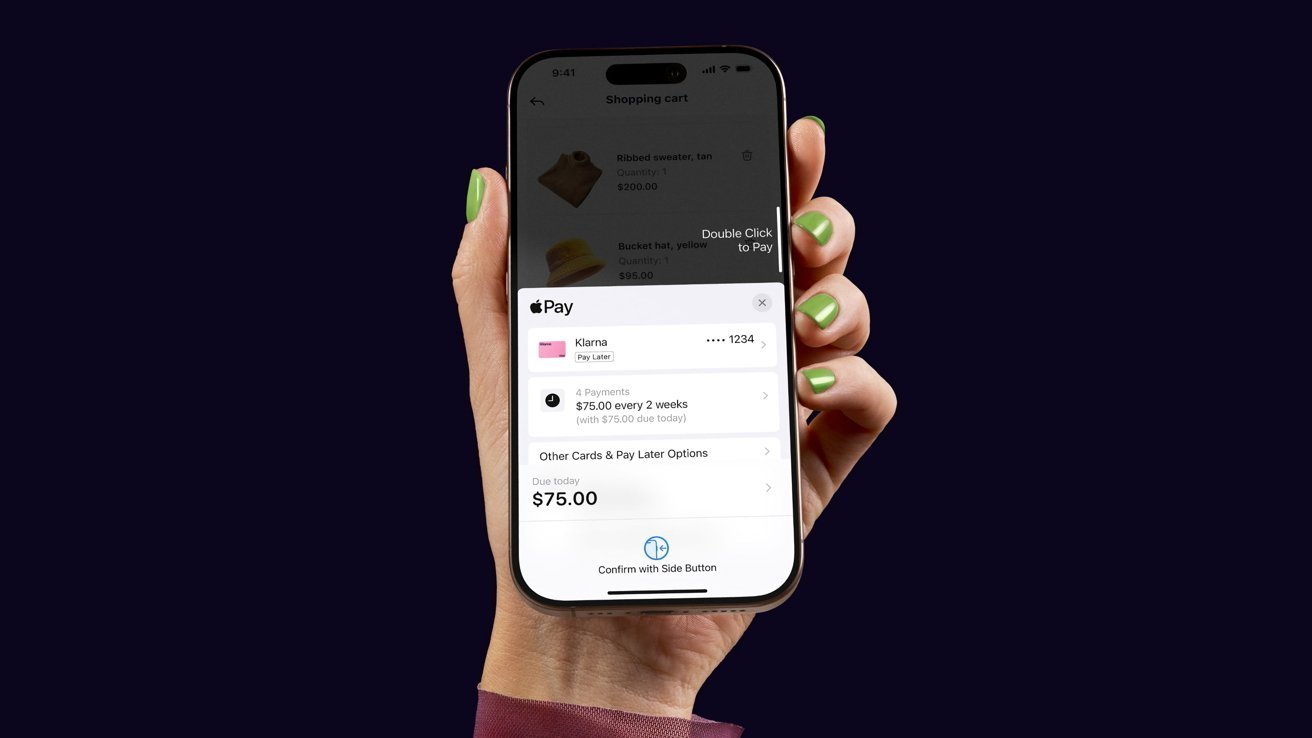
Lastly, the backer of the program is different. The iPhone Upgrade Program was backed by Citizen Bank, but now Apple Upgrade will be handled financially by Klarna.























































You must be logged in to post a comment Login