
TL;DR
FBI warns Russian hackers are phishing Signal users for backup recovery keys, giving persistent access to message history.





security
Researchers warn many AI coding assistants now execute commands from project configurations
A high-severity flaw in Amazon’s AI coding assistant for Visual Studio Code meant that opening the wrong Git repository could allow an attacker to execute code on a developer’s machine and potentially hand them the keys to the dev’s cloud environment.
The bug, tracked as CVE-2026-12957 and assigned a CVSS 4.0 score of 8.5, centers on how Amazon Q handled Model Context Protocol (MCP) server configurations. Wiz found the extension would automatically load a repository’s .amazonq/mcp.json file and execute the commands it contained when a developer opened the project and activated Amazon Q.
“The security model assumes the user explicitly configures these servers. After all, you’re granting an AI assistant permission to run arbitrary commands on your machine. This should require informed consent,” the researchers write. “The vulnerability arose when this assumption was violated: Amazon Q automatically loaded MCP configurations from .amazonq/mcp.json within the workspace – no prompt, no consent, no workspace trust check.”
MCP lets AI assistants launch local processes to carry out tasks. In Amazon Q’s case, those processes inherited the developer’s environment, giving them access to AWS credentials, API keys, authentication tokens, SSH agent sockets, and other secrets already loaded into the session.
“The combination meant that a single malicious config file could execute arbitrary commands with full access to the developer’s credentials – no user interaction required beyond opening the folder and activating Amazon Q,” Wiz said.
To prove the attack worked, Wiz built a repository with a malicious MCP configuration. Opening the project and activating Amazon Q caused the extension to execute a command against AWS using the developer’s existing credentials.
Amazon fixed the bug in version 1.65.0 of its language server, which powers Amazon Q’s IDE integrations. Existing installations should receive the patched component automatically unless you’ve blocked automatic updates.
“We would like to thank Wiz for collaborating with us on this issue. We have remediated this issue in language server version 1.65.0,” Amazon said in an advisory, though it didn’t respond to The Register’s questions.
Wiz argues the bug is less an Amazon problem than an industry one. More and more AI coding assistants are adopting MCP to connect models to local tools and services, allowing them to execute commands on developers’ machines.
According to the researchers, similar workspace configuration flaws have recently surfaced in other AI coding tools. It suggests attackers have found a new place to lurk: the hidden files that developers rarely think twice about trusting. ®


Anyone who has squinted at a cramped laptop screen while trying to reference one document and type in another understands the daily friction of limited space. This monitor from ASUS cuts through that friction on its 15.6″ MB169CK portable monitor, priced at $75.05 (was $109), with a design focused on simplicity and adaptability.
A single USB-C cable connects to the screen and supplies both the video feed and power for the display, eliminating the need to carry a separate power adapter. This is especially beneficial if your laptop supports pass-through charging, as it will keep your primary computer running while you’re connected to this display. The weight is slightly under 800 grams with the stand attached, and the design is only 12 millimeters thick. That means it will fit easily into most laptop bags and you won’t have to rearrange your things.
Sale

The supplied stand is detachable, screws into the rear, and can spin 360 degrees. You can set it to landscape for a large spreadsheet or portrait for reading long reports or cramming code into a compact space. If you need to get the stand out of the way, you simply remove it and the entire unit will sit flat. Alternatively, use the stand’s cutout to hang the screen from the rear of a hook.

We’re talking Full HD resolution on that 15.6-inch IPS panel, so image quality is a big plus here. The viewing angles are also excellent, so it doesn’t matter if there are a lot of people staring over from the side, and the IPS display easily handles wide angles. We’ve also included an anti-glare coating to keep everything looking beautiful even with normal indoor lighting, as well as a blue light filter and flicker-free technology to help you get through your workflow without straining your eyes.

At home, this becomes a useful little station for doing serious work. You can arrange it in portrait next to your laptop, with reference materials on one side and the main task on the other, and then simply pack it away when you’re finished. There is no need to leave any permanent mounts or extra cables behind. Students will find that this monitor is a game changer in the library or dorm room; with the extra real estate, you can have a notebook and your source materials on one screen and only use the other for the task at hand, eliminating the need to constantly switch windows, and because it’s so portable, it’s easy to throw in a backpack alongside your books and laptop.

This is a lifesaver for professionals who are constantly on the run. You can simply plug it in and go, making it ideal for presentations, data review, or client work where you need to be able to wrap your head around a variety of different bits of information at the same time. The mini-HDMI port is a nice touch, allowing old systems with a USB-C connection to breathe a little easier.

Of course, for travelers, the lightness is what saves the day. Even with a full laptop set up inside your luggage, you won’t feel too burdened down. Setup in a hotel room or cafe takes seconds, and the 360-degree stand adapts to any surface you place it on. ASUS’ software even allows you to instantly switch between landscape and portrait mode based on how you hold the device, eliminating the need to navigate the menus.


Security
Personal cell phones on protective missions, no threat detection on government-issued devices among the litany of sins
It seems like nobody wants to carry a work phone and that includes even those charged with protecting the US president. The US Secret Service’s extremely lax mobile phone security practices – including using unsecured personal devices during mission operations – put America’s leaders’ and agents’ lives at risk, according to a government-issued report.
Secret Service agents routinely used personal cell phones to communicate with law enforcement and each other, including during protective operations in the US and overseas, because their government-issued devices lacked the capabilities they needed to perform their missions, according to a federal review ordered after the 2024 assassination attempt against President Trump in Butler, Pennsylvania.
Even when Secret Service employees did use government-furnished equipment (GFE), these mobile devices didn’t have sufficient security to “ensure real-time, continuous protection from cyberattacks by foreign adversaries or individuals,” according to a report by the Department of Homeland Security inspector general.
The inspector general’s investigation also found vulnerable apps on these GFE mobile devices.
In addition to being prohibited – Homeland Security policy only allows Secret Service employees to use GFE devices for official business – using personal cell phones is especially bad from a cybersecurity perspective.
As we have seen time and time again, government employees’ personal devices and private communications provide highly attractive targets for foreign spies or even homegrown criminals plotting attacks against elected leaders.
Secret Service agents’ phones can also reveal mission-related details, geolocation – and, by proxy, the US president, vice president, and visiting heads of state’s geolocations – as well as photos, contacts, and other personal information such as family members and home addresses.
Since these personal devices are not managed or secured by the US government, it’s much easier for attackers to plant surveillanceware and other malware on them.
“If a personal device is jailbroken, infected with malicious code, or not up to date on security software, an adversary could intercept device communication,” according to the report. “Outdated and vulnerable apps could enable malicious actors to conduct surveillance, track locations, or record employees’ communications. Connecting to unsecured networks may also allow cybercriminals to access data or install malware.”
The inspector general reviewed call and text logs from Secret Service GFE mobile device records from October 2022 through May 2025, and found more than 15,000 instances among 4.8 million calls in which employees sent and received calls from colleagues’ personal phones while working protective events.
Investigators also examined travel vouchers for Secret Service employees who travelled internationally between October 2022 and April 2025. They found 30 employees who claimed reimbursement for using personal phones for official, government business. Most of these (23 of the 24 interviewed) said they needed to use their personal cell phones during nearly every foreign assignment.
Plus, they used personal mobile devices as hotspots to provide internet access for government-issued laptops, or to access websites blocked on GFE phones.
Even when employees did use government-issued devices on overseas trips, these phones also lacked basic security, the investigation found. For example: the Secret Service did not begin installing mobile threat defense software on any GFE phones until August 2025. Nor did the agency consistently wipe data from GFE devices after employees returned from international missions despite Secret Service policy requiring employees to do this within 24 hours of returning to the US.
As a result of its findings, the inspector general made five recommendations to improve mobile device security. These include implementing a formal policy to ensure government-issued devices have all the needed capabilities to ensure mission functions can be conducted securely, and also ensure all employees complete cybersecurity awareness training, as required by the Secret Service.
The report also recommends the Secret Service office of the chief information officer do a better job communicating to employees that the use of personal devices is not allowed for official business, and implement controls to wipe all mobile devices returning from international missions.
Finally, the inspector general also recommends an updated vulnerability testing policy be applied to all mobile app code.
The Secret Service “concurred” with all five recommendations.
We reached out to the Secret Service about the report and recommended actions, and a spokesperson declined to comment beyond a letter from Secret Service Director Sean Curran included in the report.
Curran said, among other things, that in response to the inspector general’s findings, the agency made “several comprehensive enhancements to Secret Service communications policies and protocols to both mitigate the potential for adversaries to intercept and exploit Secret Service information, as well as further strengthen the protective environment.”®
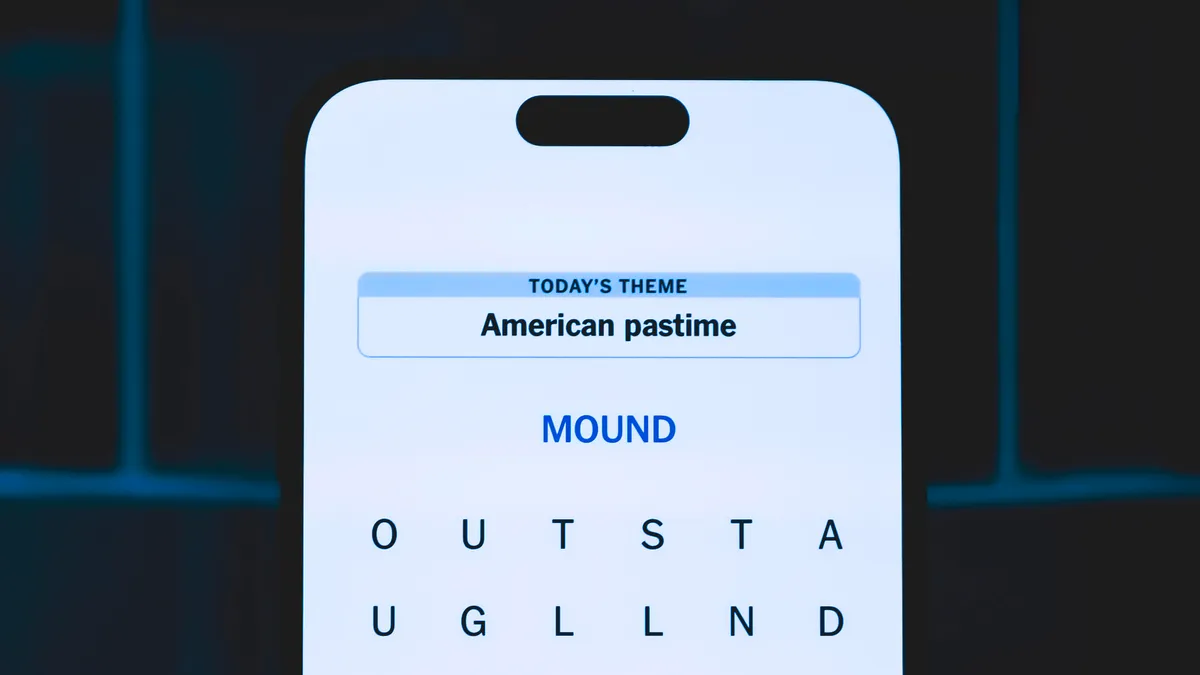
Looking for the most recent Strands answer? Click here for our daily Strands hints, as well as our daily answers and hints for The New York Times Mini Crossword, Wordle, Connections and Connections: Sports Edition puzzles.
Today’s NYT Strands puzzle was tough at first, but eventually I figured it out. Some of the answers are difficult to unscramble, so if you need hints and answers, read on.
I go into depth about the rules for Strands in this story.
If you’re looking for today’s Wordle, Connections and Mini Crossword answers, you can visit CNET’s NYT puzzle hints page.
Read more: NYT Connections Turns 1: These Are the 5 Toughest Puzzles So Far
Today’s Strands theme is: March in June.
If that doesn’t help you, here’s a clue: Month-long event.
Your goal is to find hidden words that fit the puzzle’s theme. If you’re stuck, find any words you can. Every time you find three words of four letters or more, Strands will reveal one of the theme words. These are the words I used to get those hints but any words of four or more letters that you find will work:
These are the answers that tie into the theme. The goal of the puzzle is to find them all, including the spangram, a theme word that reaches from one side of the puzzle to the other. When you have all of them (I originally thought there were always eight but learned that the number can vary), every letter on the board will be used. Here are the nonspangram answers:
The completed NYT Strands puzzle for June 28, 2026.
Today’s Strands spangram is PRIDEMONTH. To find it, start with the P that is the first letter on the top row, and wind down and across.

Now that Amazon Prime Day is over, it’s time to start gearing up for Fourth of July sales. Most large retailers pivoted their summer-sale timing to compete head-on with Amazon’s accelerated schedule, but you can still snag great deals this July 4th, particularly in active and outdoorsy categories.
REI has the hottest sale of the weekend as far as the WIRED Reviews team is concerned, but there are notable midsummer sales on other sites we shop, like Backcountry, Home Depot, and Lululemon. Also, make sure you don’t sleep on Duer.
The outdoorsy Canadian clothing brand makes highly functional classics that subtly incorporate performance elements like Tencel fabric and strategic triple-stitching. The No Sweat Relaxed Taper pants have been a weekly wear for me for years; they’re as comfy as sweatpants but look dapper enough to wear to a business meeting, while being durable enough for a weekend camping trip.
Duer rarely has sales, and prices typically hover around $100 for pants and $50 for a shirt. Those aren’t outrageous prices, but most guys I know won’t build a wardrobe primarily from $50 tees. In the run-up to July 4th, you can save around 20 percent on a few of the brand’s most popular pants and up to 35 percent on some styles of shorts and long-sleeve shirts.
For the last few months, I’ve had a handful of Duer garments in rotation: Performance Denim+ Straight, Live Lite Traveller Pant, Air Flow Pique Polo, PurePima Only Tee, and the aforementioned No Sweat Relaxed Taper.
In addition to my beloved No Sweat pants, the pima cotton tee (some styles of which are on sale) is a big winner. It’s soft and still fits great after two trips through the washer and dryer. It’s getting serious consideration for being my new favorite black T-shirt. (I would suggest the brand start claiming it’s the best T-shirt in the world so as to be eligible for our tailor-judged shootout of men’s shirts.)
The pique polo is also great (the Hazy Mauve color is currently discounted), as it’s super breathable, holds an appropriately stiff collar without feeling too rigid, and also keeps its shape perfectly through two washing cycles.
If you’ve got summer travel or a camping trip coming up, this clothing could be nice to bring with you.
Power up with unlimited access to WIRED. Get best-in-class reporting and exclusive subscriber content that’s too important to ignore. Subscribe Today.


It’s going to be a “messy” summer for security folks, especially when it comes to fixing the open source code that underpins their organizations.
That’s according to Dan Lorenc, CEO and co-founder of Chainguard, a software supply-chain security company leading Athena, a newly formed coalition of about two dozen companies that wants to make the process of finding and fixing open source bugs “as easy to consume as possible.”
The members have committed to using AI to prevent attacks on open source software. In addition to Chainguard, other founding member companies include BNY, Cisco, Cloudflare, Corridor, DepthFirst, Docker, JPMorganChase, Kyndryl, LTM, and PwC.
Many of these member companies are also partners with Anthropic’s Project Glasswing and OpenAI Daybreak, which allow them to try out the pair’s most advanced bug-hunting models. The coalition accepts vulnerability findings generated by all frontier models, according to Lorenc.
Athena has already processed more than 20,000 findings and developed over 2,000 patches across 500 open source projects.
In about three weeks, the coalition’s first wave of bug disclosures will begin.
“This is going to be a messy summer for everyone,” Lorenc told The Register in a phone interview.
“I know there’s still a percentage of people who think it’s all fake and marketing,” he said, talking about the newest, most advanced frontier models like Anthropic’s Mythos and OpenAI’s GPT‑5.5‑Cyber.
“The stats and data we’re seeing are so scary – if you just keep running scans on the same libraries and same code, it just keeps finding more [vulnerabilities],” Lorenc said. “We haven’t seen that curve start to bottom out yet.”
Chainguard isn’t part of Glasswing or Daybreak, but many of its customers and partners are.
“Put yourself in the shoes of someone with Glasswing access,” he said. “You get this crazy, new model that can find vulnerabilities everywhere, that no one had seen and you had missed for years with all of your other tooling. You run it on your code, and it finds tons of stuff in your first-party code, the stuff that you’ve written, and you fix all of that.”
After running Mythos Preview on all of your organization’s proprietary code, imagine pointing the model at an application. Most modern apps contain a mixture of code from different sources, mostly third-party. According to Lorenc, 95 percent of the code in any of these codebases is open source.
“When you run [advanced models] at the application level, you find a ton of vulnerabilities in open source code that you can’t fix for yourself the same way you can that first-party code,” Lorenc said. “So then you’re left with: what to do?”
By now, most people are familiar with vulnerability disclosure processes and know they need to report these flaws to open source project maintainers.
“But when the numbers start getting this large, and you’re finding thousands of these [bugs] at a time, and they’re across tons of projects you didn’t even know you were using before you ran this tool, and you don’t even know how to contact the people, you kind of get stuck,” he said.
The only guarantee in the entire disclosure process is that attackers are moving quickly and the time to exploit – that’s the time between a CVE’s public disclosure and first confirmed in-the-wild exploitation – has essentially collapsed.
This may mean that your application is vulnerable to attack even before someone develops a patch. “Then you’re putting yourself at risk – and you were already at risk before you ran these scans, but no one else knew about it,” Lorenc said. “In an unintended way, [AI] has created this pickle for everyone.”
In May, Anthropic said it used Mythos Preview to scan more than 1,000 open-source projects, which also underpin much of its own infrastructure, and found an estimated 6,202 high or critical-severity vulnerabilities in these projects.
“It’s a super awkward, strange world and timeline we are all living in,” Lorenc said. “There’s a ton of pressure because all of the frontier models are getting better, and the open models are getting better, and they’re going to be able to start discovering these at the same time, too. So, that’s what we’re trying to help with: to be that clearinghouse for critical industry.”
Athena coalition members submit vulnerabilities they find in open source code using any frontier model. Sometimes they find these bugs while scanning their own apps. In other cases they discover them after pointing Mythos or GPT‑5.5‑Cyber at a commonly used library, Lorenc said.
The companies submit a full report to Chainguard, which acts as a clearinghouse, deduplicating, correlating, and addressing findings from members in batches across entire libraries, hardening them against classes of vulnerabilities instead of just one bug.
Affected projects are rebuilt as private, hardened versions available to Athena members through Chainguard Libraries before vulnerabilities are publicly disclosed – and hopefully addressed upstream – a month later. For maintainers that can’t make a permanent fix, Athena acts as a “maintainer of last resort,” according to Lorenc.
On Thursday, the Linux Foundation joined the effort and announced Akrites, an industry coalition to defend open source software against AI-enabled threats, by finding and fixing vulnerabilities. Akrites establishes a shared Security Incident Response Team (SIRT) and a standardized Coordinated Vulnerability Disclosure (CVD) process.
Founding companies include Amazon Web Services, Anthropic, Chainguard, Cisco, Citi, Endor Labs, Ericsson, Google, IBM, JPMorganChase, Microsoft and GitHub, Nvidia, OpenAI, RapidFort, Red Hat, Rust Foundation, Sonatype, Vodafone, and Zscaler.
“As AI finds more vulnerabilities, the industry will rush to patch them. Without coordination, those fixes will fragment across different patches and forks, and maintainers who are already overwhelmed, unreachable, or haven’t touched a project in years,” Lorenc said, adding that Akrites provides a coordinated way to fix flaws upstream before criminals exploit them.
Plus having a dedicated SIRT gives maintainers a single partner – and disclosure -to work with on remediation instead of a hundred uncoordinated reports.
“Now the work is making sure there’s always someone on the other end to catch them,” Lorenc said. ®

FBI warns Russian hackers are phishing Signal users for backup recovery keys, giving persistent access to message history.
The FBI and CISA have warned that Russian intelligence hackers are now targeting Signal users’ backup recovery keys, an escalation of a phishing campaign that has already compromised thousands of accounts worldwide. The updated advisory, published Thursday, says that handing over the key once gives attackers the ability to restore an account’s backup, read its entire private and group message history, and take over the account.
The key keeps working even after the victim changes phones. If a target creates a new account on the same phone number, the old recovery key can still be used to access future backups, the advisory warns. The only fix is to generate a new key in Signal’s settings, which invalidates the old one for future downloads but cannot recover anything the attacker has already pulled.
The advisory, designated PSA I-062626-PSA, adds two public tracking names the FBI’s March notice did not include: UNC5792 and UNC4221. The bureau ties the activity to multiple Russian Intelligence Services groups, including FSB officers embedded with the FSB Border Guards and others working for the Russian military. The campaign targets both Signal and WhatsApp, though the recovery key tactic is specific to Signal.

The 💜 of EU tech
The latest rumblings from the EU tech scene, a story from our wise ol’ founder Boris, and some questionable AI art. It’s free, every week, in your inbox. Sign up now!
The targets are individuals the FBI describes as being of “high intelligence value,” including current and former US and international government officials, military personnel, political figures, journalists, and officials in Ukraine. The March advisory said the broader campaign had already compromised thousands of accounts worldwide.
The phishing messages pose as Signal support. Earlier waves asked for SMS verification codes and account PINs, or used doctored “group invite” links that silently linked an attacker’s device to the victim’s account. The updated version walks targets through turning on Signal backups, opening the recovery key screen, and pasting the key into the chat.
The FBI published two sample messages used in the campaign. One is disguised as a mandatory two-factor authentication rollout, and the other poses as an urgent “data recovery” fix for messages supposedly at risk of being lost. Both are social engineering attacks that exploit trust in a platform’s own interface rather than technical vulnerabilities.
The agencies are clear that none of these techniques break Signal’s encryption or the app itself. The attackers compromise individual accounts through social engineering, then walk in through a legitimate feature. It is a pattern that has become increasingly common across security products, where the weakest link is the person holding the device, not the cryptography protecting the data.
Alongside the advisory, the State Department’s Rewards for Justice programme is offering up to $10 million for information on UNC5792. The activity overlaps with earlier warnings from Dutch intelligence agencies AIVD and MIVD, Germany’s BfV and BSI, and France’s ANSSI. Google’s Threat Intelligence Group first documented UNC5792 abusing Signal’s linked-device feature in early 2025 and later observed the same tradecraft targeting WhatsApp and Telegram.
The campaign is a reminder that end-to-end encryption protects messages in transit but cannot protect users who are persuaded to hand over the keys themselves. Anyone who receives a message inside Signal asking for a recovery key, verification code, or PIN should treat it as hostile, regardless of how convincing the sender appears. Signal does not message users inside the app to request credentials.

There’s a deadly, record-breaking heat wave spreading east across Europe, reports the Washington Post — and it’s even worse than a dire earlier forecast:
The forecast was recorded in 2014 as part of a campaign coordinated by the World Meteorological Organization (WMO) that invited about 60 presenters worldwide to imagine a weather report from the year 2050. In one clip, Ãvelyne Dhéliat from French television network TF1 presented a hypothetical scenario of high temperatures 36 years into the future — during a heat wave in a warmer climate in 2050… One of the maps that Dhéliat shared was lit up in shades of orange, filled with temperature predictions of 40 degrees Celsius (104 degrees Fahrenheit), reaching as high as 43 degrees Celsius (109.4 degrees Fahrenheit).
But it turns out, it didn’t take 36 years for those imagined temperatures to be reached — and even exceeded. The heat on Wednesday alone, when the temperature soared as high as 112.3 degrees Fahrenheit (44.3 degrees Celsius), exceeded the 2050 projections in 19 out of 34 locations across mainland France — far sooner than some may have expected. Some places surpassed those hypothetical future temperatures by more than 20 degrees Fahrenheit. It’s part of a dramatic shift in heat wave frequency across the country. Half of the heat waves observed since 1947 have occurred since 2010. “By 2100, heat waves could last up to two months continuously,” the country’s weather agency, Météo-France, said this week.
It was hotter in France on Wednesday than in Las Vegas and Phoenix and just two degrees Fahrenheit shy of what was observed in Death Valley, California. An estimated less than one percent of the planet was hotter than France’s hottest place… [T]he heat dome, which will linger into early next week, is only part of the story. This type of extreme heat is becoming more common as the planet warms, especially in Europe.
Climate scientist Robert Rohde said in a post explaining the heat wave’s causes that France and Western Europe should expect many more heat waves like this over the coming decades. “This isn’t a fluke, but simply part of the new normal,” he said.
Thanks to Slashdot reader fjo3 for sharing the news.
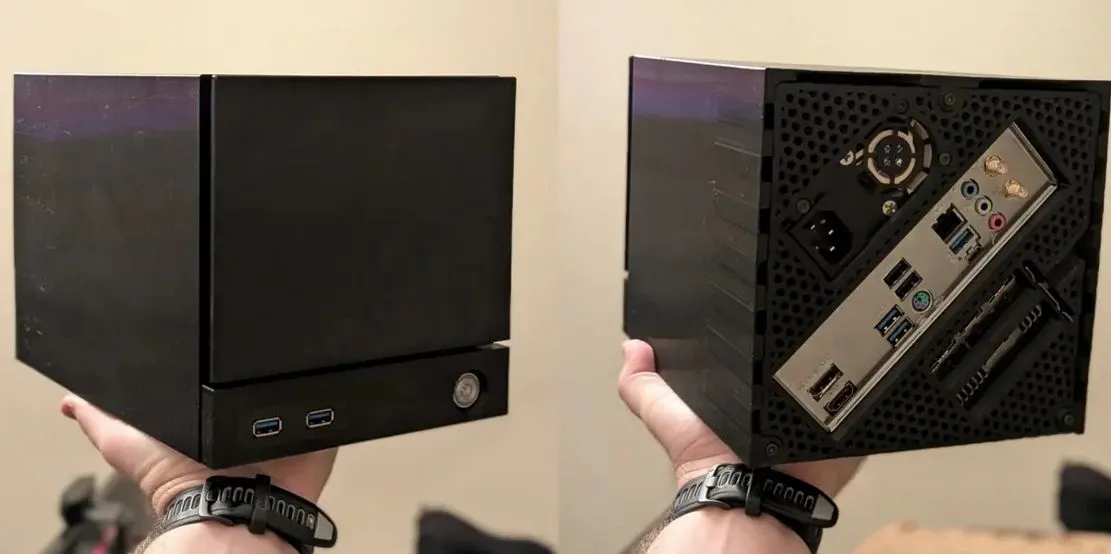
The recently released Valve Steam Machine is somewhat awkward in that it uses a custom, non-standard PCB and non-standard power supply. This fact apparently has irked some people who decided that it makes perfect sense to try and cram a Mini-ITX board, Small Form Factor (SFF) PSU and full-sized discrete GPU into an enclosure of the same size. Cue the SFF Mini-ITX Steam Machine Case project by [3DCatt] over at Printables.
This is apparently a project done in cooperation with AMD’s [Jacob Terkelsen], who showed off the 3D printed case stuffed full with the aforementioned parts, which includes a GeForce RTX 5060 GPU. Of note is that the Valve Steam Machine uses a different cooling configuration as it has both the CPU and GPU on the same PCB. These share the same massive heatsink, as can be seen in e.g. the [Gamers Nexus] teardown video.
For this angular imitation machine it would have been nice to use a blower-style GPU, to exhaust the hot air rather than dump it all into the case. This is also an issue that was raised by [Jacob], with more ventilation added to mitigate the issue. What the overall performance will be compared to regular compact Mini-ITX cases remains to be seen, but if you really want to live the Steam Machine life and have some parts kicking around along with a 3D printer, it might be worth a shot.
Every year, the U.S. sees about 100,000 thunderstorms across the country. They occur in every state and can happen day or night. Most common during the warmer months, thunderstorms require three ingredients: moisture, unstable air, and a source of lift. According to the National Weather Service, only about 10% of storms in the U.S. are considered severe, but that doesn’t make them harmless — they have the potential to wreak havoc on your electronics.
We know how to protect ourselves in the event of a severe storm: stay inside, away from windows, and avoid electrical equipment. You should also take steps to protect expensive or susceptible electronics. Even if lightning only strikes nearby and doesn’t hit your home, it can send a surge of electricity that may destroy anything that’s plugged in.
According to the National Centers for Environmental Information, the damage caused by storms added up to over $46 billion in the U.S. in 2024. Filing an insurance claim for storm-related damage is something many homeowners hope to avoid, which is why unplugging certain devices is a good idea. Here are five things you should unplug before a storm hits your neighborhood, including TVs, computers, and AC units.
We know, we know, this one may be a pain if you have cords hidden behind an entertainment center or even your wall. But your television and gaming systems likely represent a hefty investment. A power surge caused by lightning might not only fry electronics, but it may also void any manufacturer’s warranties that protect these products.
According to CNET, the average American expects to spend $1,177 on a new TV, so it’s likely one of the most expensive electronics in your home. Consoles aren’t cheap, either: A new Switch 2 currently costs $449.99 (and that price is going up by $50 in the fall), and a PS5 retails for at least $599.
When a thunderstorm is on the horizon, turn off your TVs and gaming systems and unplug them from the wall. If you want to make things a bit easier on yourself, you can invest in a power strip with surge protection, but most experts recommend that you unplug that power strip as well. If you’re not home to unplug your system, that surge protector may provide protection, and if you are home, it’s easier to unplug one thing than every device separately.
Your boss may think you’re just dreaming up an excuse to take a break from work, but if you have a desktop PC at home, you should turn it off during a storm. If your boss gives you a hard time about prioritizing your safety during a thunderstorm, remind them that the CDC recommends that you do not touch anything connected to an electrical outlet during a storm, including computers! Laptop users are out of luck — it’s safe to keep using it as long as it’s not plugged into the wall.
To protect your desktop computer, shut down and then unplug all components, including the tower, monitor, keyboard, mouse, modem, router, and printer. If all items are plugged into a power strip, simply unplug the power strip from the wall. Your computer is susceptible to any power surges, even from an indirect strike, and while the damage may be repairable, it’s likely to be pricey. In the case of a power surge, items with delicate circuitry are most at risk, including the motherboard, and replacing the motherboard often carries other costs, such as a new power supply or processor.
Your toaster or blender may be the last thing on your mind when severe weather strikes, but even small appliances contain complex electric components that may not survive a lightning strike or power surge. Major kitchen appliances like your refrigerator and stove can remain plugged in. You certainly don’t want your food to spoil, but if you’re evacuating due to a weather event, you should unplug larger appliances except the refrigerator until you get home.
When the thunder starts to boom, unplug smaller appliances like toasters, coffee makers, mixers, air fryers, and even microwaves. A power surge may affect the digital displays and internal circuitry. In fact, experts recommend that you unplug some small appliances when they’re not in use, including toasters and coffee makers, to reduce the risk of fire. You may be more worried about expensive electronics like your television, but small appliances don’t have the built-in protection that larger appliances boast, and are more vulnerable.
While it’s easy to take modern conveniences for granted, the rapid integration of technology has almost entirely rewritten how we live. Most of us carry tiny computers in our pockets, wear smart devices on our wrists, use GPS when we drive somewhere unfamiliar, and meet virtually with people who may live thousands of miles away.
Technology has also changed how we live in our homes. Doorbell cameras allow us to see who’s knocking without leaving our living room, and smart thermostats automatically adjust the temperature to keep us comfortable. Robot vacuums can do housework while we’re away, and voice-controlled systems allow us to easily check the weather. Even if you only have one or two smart devices, you should consider unplugging them during a storm. Devices that are connected to cable, internet, and even satellite systems are especially vulnerable, as power surges can pour through those pathways.
You may not be able to unplug your doorbell camera, but you can protect any smart hubs like Amazon Alexa, smart plugs, and your streaming devices. Even if the devices are turned off, they’re often still drawing some power, and a lightning strike could be disastrous.
Many of us have some form of air conditioning in our homes, whether it’s central AC or a few window units. It’s probably the last thing you want to do when a thunderstorm hits on a hot, muggy summer evening, but experts agree that both types of systems should be shut off during a storm.
Turn off your central air conditioning during a thunderstorm. In the event that lightning strikes your home, it can cause a power surge that could significantly damage the system. If it’s the compressor that gets damaged, replacing it might be almost as expensive as simply installing a new one in its place.
Debris can also damage the exterior portion of your unit and block airflow, causing additional damage to other areas of the system, while a power surge potentially causes heat spikes that melt plugs and components like control panels. Prevent all this by simply turning off the system at your thermostat.
If you have a window unit, you can leave it plugged in if it’s difficult to unplug, but you should turn it off. Window unit lightning strikes don’t happen often, so the biggest threat is a power surge that could damage the unit.


In an age when everyone seems to have their phone out at every imaginable event, Sky Yang still envisions a need for real photographers to capture the moment.
Yang is the founder of SnapMatePhoto, a Seattle-based digital marketplace connecting customers with photographers for graduation portraits, weddings, maternity shoots, and more.
An amateur photographer himself, Yang created his idea while a senior at the University of Washington. Friends kept asking him to take their graduation photos, and even offered to pay him for his services. He realized there were limited resources online for people to easily find an affordable photographer.
“A lot of people couldn’t afford a professional photographer, but I think they still deserve a nice graduation photo — because that’s an important moment in their life,” Yang said.
Yang started building the website while still at UW, initially focused on connecting students with student photographers looking to build their portfolios. The startup got into the UW’s Buerk Center for Entrepreneurship accelerator program.

Yang, who is originally from China and majored in economics with a minor in business, has since graduated and now works in logistics operations at Amazon. SnapMatePhoto launched last October and now lists more than 120 photographers in the Seattle area.
Photographers on the platform list their specialties, portfolio images, and rates — ranging from $35 to $700 — and customers can browse and book directly through the site. SnapMatePhoto handles payments through Stripe, charging roughly 15% from photographers and 11% from clients.
Yang sees the rise of AI-generated imagery as validation for his business, not a threat. He said he briefly experimented with AI-generated videos to promote SnapMatePhoto early on, but pulled them down within a couple of weeks after backlash from both photographers and customers, who called it AI slop.
“The real image, the real human connection is only going to be more and more important in this AI age,” Yang said.
The company is bootstrapped, with Yang raising a small amount from friends. Revenue has grown quickly — from roughly $3,500 in its first month to nearly $7,500 in May. Yang said the company is reinvesting heavily in marketing and advertising and is not yet profitable.
Yang mentions competitors in the space including Snappr and Flytographer, as well as Airbnb. The short-term property rental platform offers a photographer marketplace under its varied services, which Yang sees as another validation for what he’s building.
SnapMatePhoto operates with a small team — Yang, one developer, one designer, and a handful of UW interns focused on photographer acquisition and influencer outreach. Mentors with the Buerk Center accelerator advised Yang to focus on Seattle before expanding too soon, but he does have his eye on California.
For now, Yang is leaning into the grind of building a startup while working long days at Amazon, but he says the hard work genuinely makes him happy.
“Yesterday I was reviewing a photographer’s work for a wedding, and I see all the moments from the beginning to the end — the whole ceremony just brought me a lot of joy,” he said.




Two goals and an assist by sheer aura: Cristiano Ronaldo just entered the World Cup chat


Microsoft accidentally kills epic Outlook email threads

Weekend Open Thread: Staud – Corporette.com


The House | Manchesterism won’t survive the painful trade-offs unless it gets citizens on board


Potential 2028er World Cup attendee leaderboard


Asia stock markets slide as tech shares slump


A Look At A Gaggle Of Transputer Boards
Bitcoin (BTC) Dips Below $62K, Ethereum (ETH) Plunges 6% Daily: Market Watch


Securitize Wraps Roubini's SEC-Registered ETF as Dubai VARA Digital Security

Dell (DELL) Shares Tumble Over 5% Following Analyst Downgrade to Hold
Entergy settles forward sale agreements, raises $672 million in cash proceeds


Kraken's xStocks Opens Bending Spoons IPO Registration to EEA Retail


FIH Pro League: India defeat Pakistan 7-1, register biggest win of campaign | Other Sports News


RTX holders must register wallets before token distribution begins

Hyperliquid Named on Singapore MAS Investor Alert Register


India vs Bangladesh LIVE Score, Women’s T20 World Cup: Bangladesh Opt To Bat; India Enter ‘Do-Or-Die’ Stage As Semi-Final Race Heats Up
The DATA Foundation Launches to Tackle AI’s Multi-Billion Dollar Training Data Bottleneck

Signal’s Meredith Whittaker says AI chatbots ‘are not your friends’ and calls Copilot agents a backdoor


Strategy (MSTR) has a 10-month cash runway for dividends, but retail investors are losing faith

AAVE price tests 9-month trendline after 17% rebound as breakout hopes build


You must be logged in to post a comment Login