AMOS relies on users executing malicious terminal commands themselves
Sophos MDR identified ClickFix-style social engineering in macOS attacks
Half of macOS stealer reports involved AMOS, but Apple is fighting back
Atomic macOS Stealer, also known as AMOS, is a persistent macOS security threat because it does not need sophisticated zero-day vulnerabilities to compromise Apple devices.
Instead, this malware family repeatedly exploits ordinary user behaviour by tricking users into typing a single command into their own Terminal application.
A recent incident investigated by Sophos MDR teams revealed exactly this pattern: a ClickFix-style ruse persuaded a victim to execute a malicious line of code manually.
Latest Videos From
Advertisement
AMOS uses psychological manipulation over technical exploits
This approach has become increasingly prominent, with researchers noting similar social engineering tactics in multiple macOS infostealer campaigns throughout 2025 and early 2026.
AMOS accounted for nearly 40% of all macOS protection updates deployed by Sophos in 2025, more than doubling the detection rate of any other macOS malware family during the same period.
Furthermore, almost half of all macOS stealer customer reports in the last three months involved AMOS or its close variants.
Security firms have tracked this malware-as-a-service operation since at least April 2023, with notable campaigns including a variant dubbed SHAMOS reported by CrowdStrike in August 2025.
Advertisement
Sign up to the TechRadar Pro newsletter to get all the top news, opinion, features and guidance your business needs to succeed!
In December 2025, Huntress documented infections spreading through poisoned search results related to ChatGPT and Grok conversations.
How the malware harvests passwords and data
After the initial Terminal command executes a bootstrapping script, the malware immediately prompts the user for their macOS system password.
Advertisement
The malicious code then validates this credential locally using a simple directory services command before storing it in a hidden file named .pass within the user’s home directory.
Once the password is secured, AMOS downloads a secondary payload that removes extended attributes to bypass macOS security warnings.
The stealer also checks whether it is running inside a virtual machine or sandbox environment by querying system_profiler data for indicators such as QEMU, VMware, or KVM.
Advertisement
The malware then proceeds to harvest an extensive range of sensitive information, including the macOS Keychain database, browser credentials from Firefox and Chrome, extension storage files, and local session tokens.
Some variants also deploy fake Ledger Wallet and Trezor Suite applications designed to steal cryptocurrency wallet seeds and credentials.
All collected files are compressed into a single archive using the ditto utility before being transmitted to attacker-controlled servers via curl POST requests.
To maintain long-term access, the malware installs a LaunchDaemon that ensures automatic execution after every system reboot.
Advertisement
Despite the severity of AMOS, it is worth questioning whether security vendors are overstating its novelty, given that infostealers have been targeting Windows systems for nearly two decades.
The malware’s heavy reliance on user consent — someone must willingly paste and run a Terminal command — creates a significant barrier that technically literate users might easily avoid.
Moreover, Apple’s ongoing improvements to Gatekeeper, XProtect, and notarization requirements could render AMOS largely ineffective within a few operating system updates.
The real danger may lie less in AMOS itself and more in the uncomfortable truth that no platform is immune to users who ignore basic security warnings.
A clip of a helicopter landing has gone viral following an incredibly precise landing. In the video, first posted by the YouTube channel Rescue -Helispotter Pipo St.Gallen Switzerland, a red Rega rescue helicopter lands on the roof of the St. Gallen Cantonal Hospital in Switzerland, but it’s not just any helicopter landing. The speed and angle the pilot takes are what make the video impressive, with the pilot neatly drifting into the landing rather than the usual slow turn pilots make from further out.
Advertisement
Rega helicopters are on standby at 14 locations in Switzerland, including its towns and mountains. The rescue helicopter in the viral clip is an AgustaWestland Da Vinci, used on all of Rega’s mountain bases due to its aerodynamics and power. What allows the Da Vinci helicopter to land so precisely, like in the video, even on mountains? It has landing gear rather than skids. It can land just about anywhere, perfect for mountain rescues or racing to hospital landing pads.
Advertisement
What makes the Da Vinci so maneuverable?
The Da Vinci helicopter has four main rotor blades and two tail rotor blades. These tail rotor blades counteract the rotational torque of the main blades, keeping the helicopter stable and providing the pilot with more pitch control. The Da Vinci’s dual duplex four-axis digital Automatic Flight Control System offers incredible stability by adjusting all its rotor blades simultaneously. A four-axis system also handles the vertical motion during climbs and descents, allowing control during hovering and any significant altitude changes.
The autopilot system has altitude hold, which reduces the vibration. The autopilot also has various modes for approach, making the descent a lot smoother. Approach to hover allows the pilot to predict the final hover point and adjust the descent slope as needed. All of this is very important since the Da Vinci is designed specifically for critical tasks such as emergency medical services and search and rescue. Rega’s other helicopter, the Airbus H145, is additionally used by law enforcement and for military rescue missions.
Advertisement
Helicopters are important to Swiss Alps rescue missions
It’s unclear what prompted this particular viral landing, but it wouldn’t be shocking if the pilot was rushing a person from the Swiss Alps to the hospital’s ER. That’s not an uncommon occurrence: According to Swiss Alpine Club data (via Swissinfo), nearly 4,000 people had to be rescued from the Alps in 2025, primarily due to falls and getting lost.
These mountain rescues are performed by helicopters like the Da Vinci, as they are well-suited to the requirements of high-altitude flights. Think about it: The helicopter crew must search for the rescue location, with mountainous terrain possibly requiring the pilot to land on cramped or uneven surfaces. If the pilot can’t land the helicopter, they must have a chopper that will hover steadily as the rescue specialist descends, so they can hitch the injured hiker and lift them back up. None of this would be possible with airplanes, of course — and maybe not with a more conventional helicopter, either.
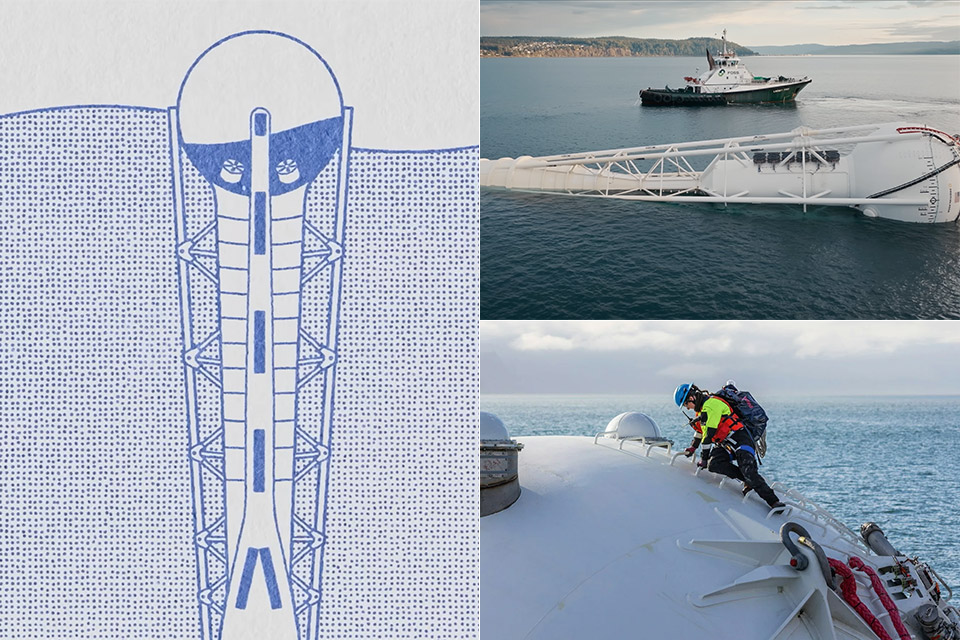
Demand for artificial intelligence compute continues to rise, necessitating the search for new sources of reliable power and effective cooling. Facilities built on land frequently face opposition from communities concerned about electricity bills, noise, and water consumption. Panthalassa, a Pacific Northwest-based company, has spent the last decade developing floating platforms that generate power straight from ocean waves while staying cool in the surrounding waters. Data is transmitted to and from the platforms via satellite links rather than undersea cables. The strategy isolates operations far from shore and takes advantage of wave energy that is available around the clock in strategically chosen places.
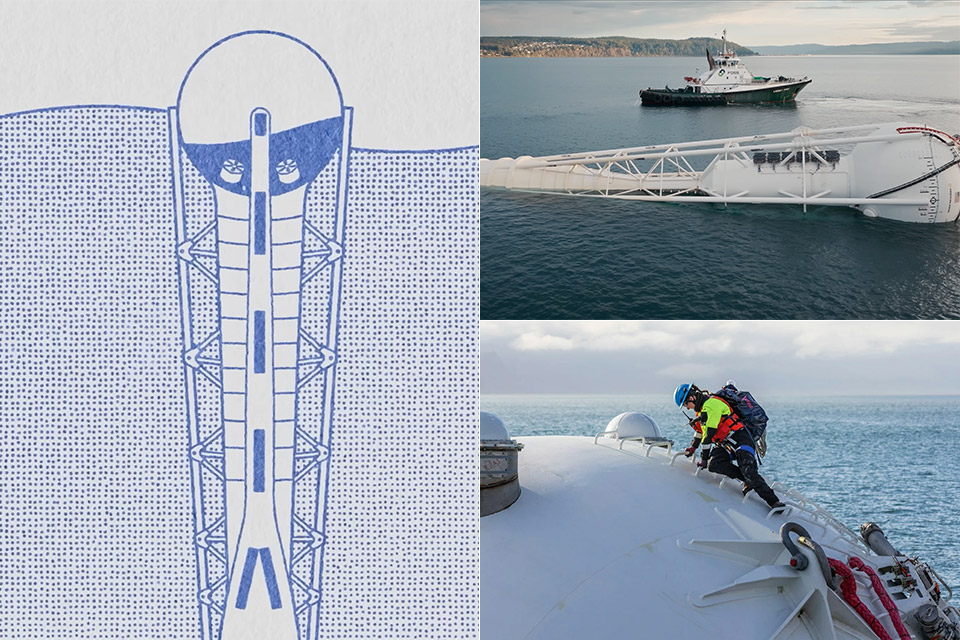
Current prototypes for continuous wave power resemble large steel barges that sit primarily at the ocean’s bottom, with only a small portion visible above the water. Since 2025, the Ocean-2 test unit has been located off the coast of Washington state. It is around 70 metres long and produces a full megawatt of power when the waves are perfect. Waves shaking the floating part of the item push all of the water down a conduit into a reservoir underwater, where gravity simply allows it to drop into a unique water-tight turbine that generates energy. They’ve engineered it such that strong ocean conditions can’t get in and cause damage, and there are no exposed bits to break.
▪ [AMD Ryzen 4300U, which is more powerful than the N150/3500U] – ACEMAGIC Mini PC is powered by Latest Processor AMD Ryzen 4300U(4Cores/4 Threads…
▪ [K1 Mini Computer – Meet Your Second PC] – Next-Gen Light Office Mini PC comes pre-installed with the Win11 Pro system, which is intelligent…
▪ [Large Storage Capacity, Easy Expansion] – Mini Computer K1 is equipped with a 16GB LPDDR4 and a 512GB M.2 2280 SSD, which allows the small PC to…
Photos of the Ocean-2 in the ocean reveal a plain steel construction with scale markings, antennae protruding out, and a few other components visible above the waves. Engineers made the prototypes out of thick steel coated with zinc or aluminum to prevent rusting, and they expect them to last at least 15 years. The compute bits that will be added when they go commercial will be in sealed containers with cold saltwater circulating inside, as they picked this design because the seawater will absorb the heat for them without the need for mechanical cooling or large fans to blast the moisture away.
Advertisement
The larger commercial ones they’re planning on are about 85 meters long and will have some AI components in those seawater-cooled containers, allowing numerous ones to work together as a larger data center. The results will be sent back to the control center via SpaceX Starlink satellites, eliminating the need to connect to the grid or run cables all the way back to the shore. They believe this technology is best suited for large, time-consuming operations that do not require immediate results.
Setting it all up begins on the beach or in a secluded body of water. Then they pull the object out to deeper water and let it sit up, as it will go from there on its own or with a little aid from a crew to its eventual destination. Targets are stretches of the Southern Ocean away from all maritime lines. The first commercial one with all of the AI gear is scheduled for 2027 and will be constructed at a new plant in the United States. [Source]
Owners of affected iPhones can stop checking for patches now: the fix for this SecureROM bug comes in a new handset
A newly disclosed BootROM exploit affecting Apple’s A12 and A13 chips gives researchers a way to break the secure boot chain on millions of iPhones and other Apple devices.
The exploit, dubbed “usbliter8” by security researchers at Paradigm Shift, targets a flaw in the SecureROM code found on the iPhone XS, XR, 11, and 11 Pro models, plus other devices powered by Apple’s A12 and A13 processors. Because the vulnerability resides in immutable BootROM code burned into silicon during manufacturing, it cannot be patched.
Advertisement
The researchers traced the issue to the Synopsys DesignWare USB controller used by Apple. A flaw in how the hardware handles certain USB setup packets allows attackers to corrupt memory during Device Firmware Update (DFU) mode, and ultimately gain control of SecureROM itself.
That might sound like an unremarkable minor moment in boot process, but SecureROM sits at the very bottom of Apple’s chain of trust. If an attacker can compromise it, they can interfere with everything that comes afterward.
For ordinary iPhone owners, there is little reason to panic. Exploitation requires physical access to a device and the ability to place it into DFU mode, which means this isn’t the sort of bug criminals are likely to weaponize in phishing campaigns or drive-by attacks.
For security researchers, however, BootROM vulnerabilities are the gift that keeps on giving. Unlike software flaws that disappear after the next patch Tuesday, these bugs remain exploitable for the lifetime of the hardware.
Advertisement
Paradigm’s proof-of-concept demonstrates the ability to run unsigned code during the boot process, load custom iBoot images without signature checks, and modify DFU behavior. The exploit also marks compromised devices with the traditional “PWND” – a string familiar to anyone who spent time around the jailbreaking community over the last decade.
Not every generation of iPhone has the flaw. According to the researchers, Apple’s A11 chips dodge the issue thanks to a different USB implementation, while A14 and later hardware appears to have fixed the conditions that make the exploit possible in the first place.
“While newer generations have addressed the underlying issue, affected A12 and A13 devices will carry it for the remainder of their lifetime,” said Paradigm researchers. “For those who have followed the history of iPhone exploitation and jailbreaking, this research is a reminder that the BootROM still occasionally has a surprise left to give.
The team said it disclosed the findings to Apple before publication and coordinated the release of the research with the company. Apple did not respond to The Register’s request for comment.
Advertisement
The exploit doesn’t directly compromise Apple’s Secure Enclave Processor, which remains responsible for protecting passcodes, encryption keys, and other sensitive data. Still, gaining control of SecureROM is about as close as researchers can get to the keys to the kingdom without crossing that final boundary.
There’s no fix, but a remedy is simple, if somewhat expensive: buy a new iPhone. ®
There might be a general sense out there that modern cars are longer-lasting and less trouble-prone than older ones, and for many models, and by many standards, that may be true. This doesn’t, however, mean that new cars are without issues — and those issues can be big or small. With the increased use of software, sensors, and other tech-heavy features in modern vehicles, even minor glitches and hiccups can easily cause problems — with things like backup camera issues regularly leading to extensive vehicle recalls in the modern era.
The good news is that while annoying, a lot of those issues can be fixed quickly and easily, sometimes at home via over-the-air updates or with a trip to the dealer for a software refresh or a quick component replacement. Some modern vehicle problems, though, are much more troublesome.
Nobody wants to deal with engine problems, and at the moment several major auto brands are facing notable engine issues on some of their most popular models. Some of these problems have necessitated complete engine replacements and have caused not just major vehicle recalls but class action lawsuits as well. Below, we’ve rounded up some of the bigger ongoing engine issues that automakers are dealing with in 2026.
Advertisement
1. Honda 1.5 turbo
Honda generally enjoys a strong reputation for reliability, but there are still some Honda engines buyers might want to steer clear of. One of those engines is the company’s 1.5-liter turbocharged four-cylinder engine. The Honda 1.5-liter turbo has been around for a while now and powers some of Honda’s best-selling models, including the Civic, Accord, and CR-V.
Advertisement
Unfortunately, this engine’s issues have also been known for a while — namely, oil dilution and head gasket failures. A blown head gasket is not a cheap or quick repair, and while Honda hasn’t issued a factory recall for these problems, ongoing 1.5-liter turbo issues have continued to plague the company, including class action lawsuits.
The good news for new car buyers, at least, is that in 2026, the 1.5 turbo has become an increasingly small and outdated part of Honda’s engine lineup, as the Civic, Accord, and CR-V are all available with Honda’s newer 2.0-liter hybrid four-cylinder. Opting for the hybrid versions of these cars will cost a little more up front, but it’s probably the wiser choice. Not only will the hybrid models avoid the potential issues of the 1.5 turbo, but they also deliver significantly improved fuel economy and performance compared to the non-hybrid engine.
Advertisement
2. Nissan 1.5-liter VC turbo
Things overall have not been great for Nissan recently, as the Japanese automaker works to dig its way out of financial turmoil at the corporate level; down on the ground, things aren’t much better. The company’s innovative yet often troublesome variable compression engines have been a major culprit behind recalls and owner complaints, plagued by issues for a few years now.
In 2026, the Nissan 1.5-liter three-cylinder turbo VC motor has proven especially problematic, with the company recalling over 600,000 Rogue SUVs for potentially catastrophic engine problems. If fortunate, some of the affected engines will only need a throttle body replacement. More serious is the ongoing problem of VC engine bearing failures, which, if found during inspection, require a complete engine replacement. Along with the popular Rogue, these VC turbo engine issues have also affected models like the Nissan Altima, as well as some of Infiniti’s small SUVs.
With more car companies using turbochargers and other tricks to squeeze added power and fuel efficiency from small-displacement engines, it seems almost inevitable that problems like this will happen more — particularly when compared to the larger and simpler, if less efficient, naturally aspirated engines that used to be the norm.
Advertisement
3. General Motors 6.2L V8
Given their increased heat and complexity, it’s not surprising that most engines experiencing major issues are the smaller, turbocharged variety. It turns out, though, that the simpler, naturally aspirated American V8 is not without its own problems. Specifically, we’re talking about problems with the General Motors 6.2-liter V8, which powers popular models like the best-selling Chevy Silverado and GMC Sierra pickups, as well as the Chevy Tahoe, GMC Yukon, and Cadillac Escalade SUVs.
Advertisement
Problems caused by defective internal components in the L87 6.2 V8 have thus far led to the recall of over 700,000 trucks and SUVs, not to mention ongoing class-action lawsuits from owners. GM says a possible solution is to change the recommended oil viscosity. However, questions remain about its effectiveness, and it hasn’t provided L87 owners with any real peace of mind. Even if the solution helps protect the engines, concerns have been raised about a possible decrease in fuel economy from the switch.
In early 2026, an NHTSA investigation was launched into the 6.2 engine failures and the band-aid fixes GM has recommended. There’s no doubt that both General Motors and potential truck and SUV buyers are hoping that the 6.2’s issues will be left in the past with the move to new, larger V8 engines on next-generation truck models.
Advertisement
4. Jeep 2.0L turbo hybrid (4xe)
jhxfilm/Shutterstock
Want to know how fast things can change in the auto industry? Back in 2021, the new Jeep Wrangler and Grand Cherokee 4xe models, which use a 2.0-liter turbocharged four-cylinder engine combined with plug-in hybrid electric power, were portrayed as the future of the Jeep brand — and would be sold as part of a growing lineup of hybrid and fully electric Jeep SUVs.
Just five years later, Jeep has discontinued its 4xe models completely. This was partly done in response to a shifting market and regulatory environment, which has seen automakers draw back from electrification across the board, but that likely wasn’t the only reason for the 4xe’s demise. The 4xe powertrain has also been plagued by mechanical and electrical issues, which surely haven’t helped its case for sticking around. Among other things, 4xes had already been recalled for potential battery fire issues– and then there was another recall for possible casting sand that may have been left inside the 4xe’s 2.0 turbo engine, with over 100,000 vehicles affected.
If sand is inside the engine, it could lead not just to total engine failure but also to a fire risk — something that has become all too familiar for 4xe owners. One can only imagine the costs Jeep and Stellantis incurred during the 4xe experiment, so it’s not surprising that the company is ready to move on from this era — even as mechanical problems linger.
Advertisement
5. Toyota 3.4L twin-turbo V6
Traditionally, when one bought a new Toyota pickup truck, a reputation for reliability was one of the big selling points. Even if the truck lagged behind competitors in other categories, the hope was that a bulletproof, trouble-free engine would pay dividends over the long run. So far, though, that hasn’t been the case with the company’s latest full-size pickups and SUVs.
The 3.4-liter twin-turbocharged V6 engine that powers the Toyota Tundra pickup and Toyota Sequoia SUV has suffered significant problems since its debut for the 2022 model year — and they continue to put a dent in Toyota’s generally excellent reputation. As of 2026, ongoing, potentially catastrophic engine-bearing problems have prompted Toyota to recall over 250,000 trucks, and even with the company’s efforts to remedy the issue, Tundra owners remain unhappy with the situation.
Advertisement
Even worse, though Toyota has updated the design, the new engines being built today still aren’t completely immune to the defect. While there’s no doubt about the on-paper performance and fuel economy improvements of the new twin-turbo engine over its predecessors, the issues the new Tundra has had will probably keep some owners sticking with their older V8 models for a while longer.
Advertisement
How we listed these engines
Andrey Grigoriev/Getty Images
The engines on this list were chosen because of ongoing recalls, owner complaints, class-action lawsuits, and government investigations over the last 12 months. To narrow it down to these specific choices, we chose popular vehicles from major brands that have been subject to large and ongoing recalls over the last year — including ones with issues not yet fully resolved. While manufacturer recalls are very common on modern vehicles, these engine issues require more than a quick fix and, if left unaddressed, have been shown to cause complete engine failures, often in newer vehicles with low mileage.
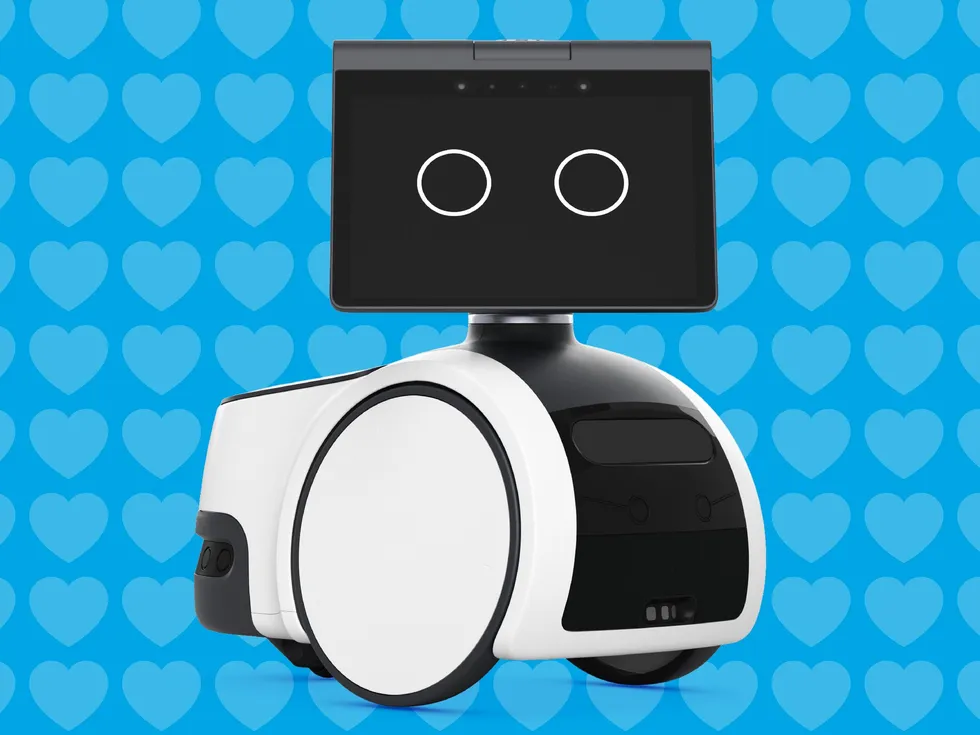
In 2018, Amazon brought me in as the lead UX Sound Designer for Astro, their first consumer home robot. Astro used cameras and other sensors to map and navigate your home and workplace, and could proactively patrol, check up on loved ones, and transport small items using its built-in cargo bin. While there was a well-defined feature set and form factor, initially there was no character direction. In fact, even before Astro had a name, there were two main questions—was it simply Alexa on wheels, or was it a robot with its own character?
The Astro team was divided. One option was to focus on Alexa, and treat the mobile robot simply as an added utility. I argued for Astro to not focus on Alexa, along with the majority of the UX team. Our belief was that a thing that moves through your home and turns toward you with intent can never be just an appliance. People would ascribe character to whether we wanted them to or not, and so the only question was whether we shaped that character or let it happen by accident.
Ultimately, Astro became Astro rather than Alexa, and user testing backed up our decision. People didn’t see the robot as Alexa. They saw it as its own character, and that’s what they wanted it to be. Alexa on the device felt somewhat strange and creepy, but building Astro its own voice was too slow and expensive in 2018. So, we settled on Alexa as a supporting character that handled any actual talking, while Astro was the main character, communicating as much as it could without words, through sound, motion, and facial expressions.
I had been brought on to the Astro team to define the robot’s sound design language and voice. But there was no one to flesh out the robot’s actual character. You cannot make a single real decision about a character without defining it first. Every choice about how Astro moved, sounded, paused, or reacted was a character choice, and those choices required all disciplines working together. As Sound Lead, I was weaving together sound, motion, and character, and how they played together inside each story moment. The animators, who programmed Astro’s motion and facial expressions, were extraordinary at what they did, but the emotional arc they were animating came from the sound (and therefore character) work first. So I stepped into that role, which is where my real work started. What I learned about building character for robots applies to nearly everything being built in embodied AI right now.
Advertisement
Character Is a Design System
Developing a character for Astro meant answering questions that had never been asked about a product at Amazon: What is the emotional range of this robot’s baseline state? How does this robot communicate uncertainty without eroding trust? Where is the line between being expressive and annoying? What are the vulnerabilities of this device’s character?
These are design questions. They have real answers, and every team working on the product has to build from them. For example, Astro’s emotional range was designed to be relatively small at first. We never wanted Astro to get too sad or too angry. It could play sad, but would snap out of it quickly and end the reaction on a high note to keep things positive.
Character leaks out of every seam and can create a disjointed experience if not defined correctly. Even if it’s just animation timing that’s slightly off, or a response that’s technically correct but contextually tone-deaf, users feel every one of these inconsistencies, even if they can’t name them. Watch what happens at the beginning and end of this Sing sequence:
Advertisement
Astro goes from nothing, into the emotional moment, and then lands back on nothing. No build up, no cool down, no sense that the feeling came from somewhere or had anywhere to go. I pushed hard for better character stitching, the transitions in and out of expressive moments that make a performance feel continuous rather than assembled, but it never got implemented. The moment itself works. But without the stitching, it reads as a clip playing on a robot rather than coming from within the robot character itself.
Story and Sound at the Beginning
We had decided that Astro would have no spoken dialogue, but it had something that functioned the same way: a vocabulary of sounds, tones, and rhythms that acted as its voice. This vocabulary became the leading output of the character’s personality. The robot’s motion and facial expressions were built around it.
Astro’s wake-up sequence is a great example. Waking wasn’t just a boot animation on the screen; it was an entire performance. Slow and humble at first, the robot oriented itself quietly, then stretched its screen, checked its wheels, and finally, with an upward gesture toward its telescoping mast, it popped it up slightly, and did a little dance of joy. Sound, motion, and eyes hit every beattogether in full choreography.
Advertisement
The character’s output in that sequence was first written as a story. Astro is waking up in its new home for the first time. Its main aspiration is to be part of a family, so this is the moment it has been waiting for, this is its purpose. Being the responsible character that it is, it wants to make sure everything is good to go before it introduces itself and starts learning its new home.
This narrative came first because it drove every other decision that we made. After the story was written, sound gave that story a metaphorical voice: the excited tones, the pacing as it checked its wheels, and the bright melodic phrase as Astro looked up at its new family for the first time and introduced itself. Once the sound was laid down, animation did their thing with motion and facial expressions, taking cues from the emotional arc the sound had established. Motion didn’t lead—it followed the feeling of the story and the sounds, the same way an animator follows a recorded vocal take.
That wake up sequence became one of the most-discussed moments in early user testing. People described it as “alive.” What they were responding to wasn’t any single element. It was all three channels (sound, motion, and facial expressions) expressing the same defined character in harmony.
Advertisement
Context Is Where Character Becomes Real
The most compelling characters are defined not by a fixed disposition but by how they respond to their environments and the people in them. They’re still recognizably themselves even as they adapt. This is what I call contextual character. A robot living in a home doesn’t occupy a single emotional state. It moves through rooms with different energy, encounters people in different moods, operates at different times of day, and responds to an endless range of social situations it was never explicitly designed for.
We got close to a contextual character output with Astro’s sound. When a specific piece of environmental context was fed in, the system adapted beautifully, and Astro felt completely alive. But every state like this was still a prediction we made by hand—a situation we had to imagine in advance and design a response for. A random home throws more situations at a robot than anyone can possibly predict, so there was always a longer tail of moments the system was never prepared for.
The difference between a product people describe as “smart” and one they describe as “aware” often comes down to this. Smartness is capability. Awareness is context. Presence is character. And character is always in reaction to the people around it, to its environment, to its own evolving state. That’s what makes it feel like something is emotionally present with you.
This is where AI changes the game for character design in ways that go well beyond what was possible with Astro. AI-driven adaptation doesn’t require the contextual predictions that we relied on. It learns the specific rhythms, preferences, and emotional context of the people it lives and works with. The character doesn’t just respond to context. It grows into it.
Advertisement
What Industry Is Missing
The character and soul of the impending wave of embodied AI products appears to almost always be an afterthought. And character defined late is character defined by default. It becomes the sum of a thousand small decisions made by different people thinking about anything but character. People project character onto devices whether you plan for it or not, especially if those devices move—a robot that moves is already a character. If nobody has designed this character, the result will be products that feel like nothing, or worse, feel confusing and not trustworthy. Technically impressive, but lifeless.
We did not get this fully right with Astro. So many things were moving in parallel that character was rarely treated as a utility, and it made sense why. When you are building a first-of-its-kind product, the things that are the loudest are the ones that break, the deadlines, the costs, the features a customer can point to on a box. Character is quieter than all of that. It’s easy to assume it can come later. On a team as large as the Amazon Astro team, it’s lucky to get any idea onto the roadmap when it is competing with a hundred others that all feel more urgent in the moment. None of this came from people not caring. It came from character being the kind of thing that is hard to prioritize until you see what its absence costs you.
My Asks to Product Leaders
If you are building a product that will share physical or conversational space with people, three things are worth considering:
Define character before you define interactions. You need a defensible character with enough emotional logic to answer hard questions consistently. Find answers to character questions early, and have every discipline build from the same foundation.
Advertisement
Build story and sound into the character pipeline, not the production pipeline. Story and sound developed alongside character definition has the chance to inform motion, expression, and interaction logic. This requires a different kind of collaboration, and a different kind of hire.
Design for adaptation, not just consistency. A consistent character is necessary, but the products that will matter most in people’s lives are the ones that deepen through use. The infrastructure to support that is more and more accessible, but the design thinking to take advantage of it is still rare.
An unabridged version of this story can be read on Medium.
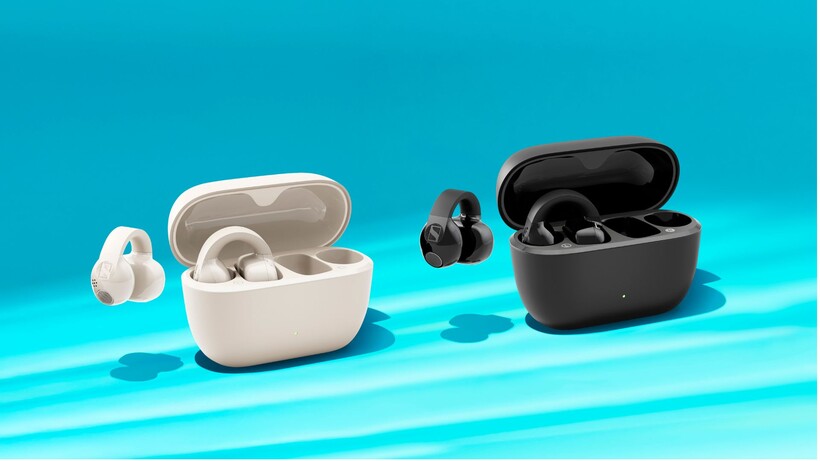
Sennheiser has launched its first serious challenger in the growing open-ear earbuds market, with the new Accentum Clip promising the situational awareness that this category is known for. It does so without sacrificing sound quality.
Open-ear earbuds have become increasingly popular among commuters, runners and gym-goers who want to stay aware of their surroundings while listening to music. However, the trade-off has often been weaker audio performance. That’s exactly what Sennheiser is aiming to address here.
The Accentum Clip uses a 12mm dynamic driver and carries Hi-Res Audio Wireless certification, with support for LDAC on compatible devices for higher-quality music streaming. In addition, Sennheiser has included a Dynamic EQ feature that automatically adjusts audio performance at lower volumes. This helps maintain bass and clarity without introducing distortion.
The earbuds feature a clip-style design that sits outside the ear canal rather than sealing it off. According to Sennheiser, this allows users to hear traffic, conversations and other environmental sounds naturally, without relying on transparency modes.
Advertisement
Each earbud weighs just 6.8g and uses a flexible silicone bridge designed to fit a wide range of ear shapes. An IP54 rating means they’re protected against dust and sweat, making them a natural fit for workouts and outdoor use.
Advertisement
Image Credit (Sennheiser)
Battery life is another highlight. The Accentum Clip can deliver up to nine hours of listening on a single charge, while the included charging case extends total playback to 36 hours. Notably, a quick 10-minute charge provides up to two hours of listening time.
Elsewhere, the earbuds are powered by Bluetooth 6.0. They support multipoint connectivity and Google Fast Pair. Furthermore, they use dual microphones with AI-powered noise reduction to improve call quality in noisy environments.
The Accentum Clip will be available in Black and Cream from 23 July 2026 in the UK, with pricing set at £149.
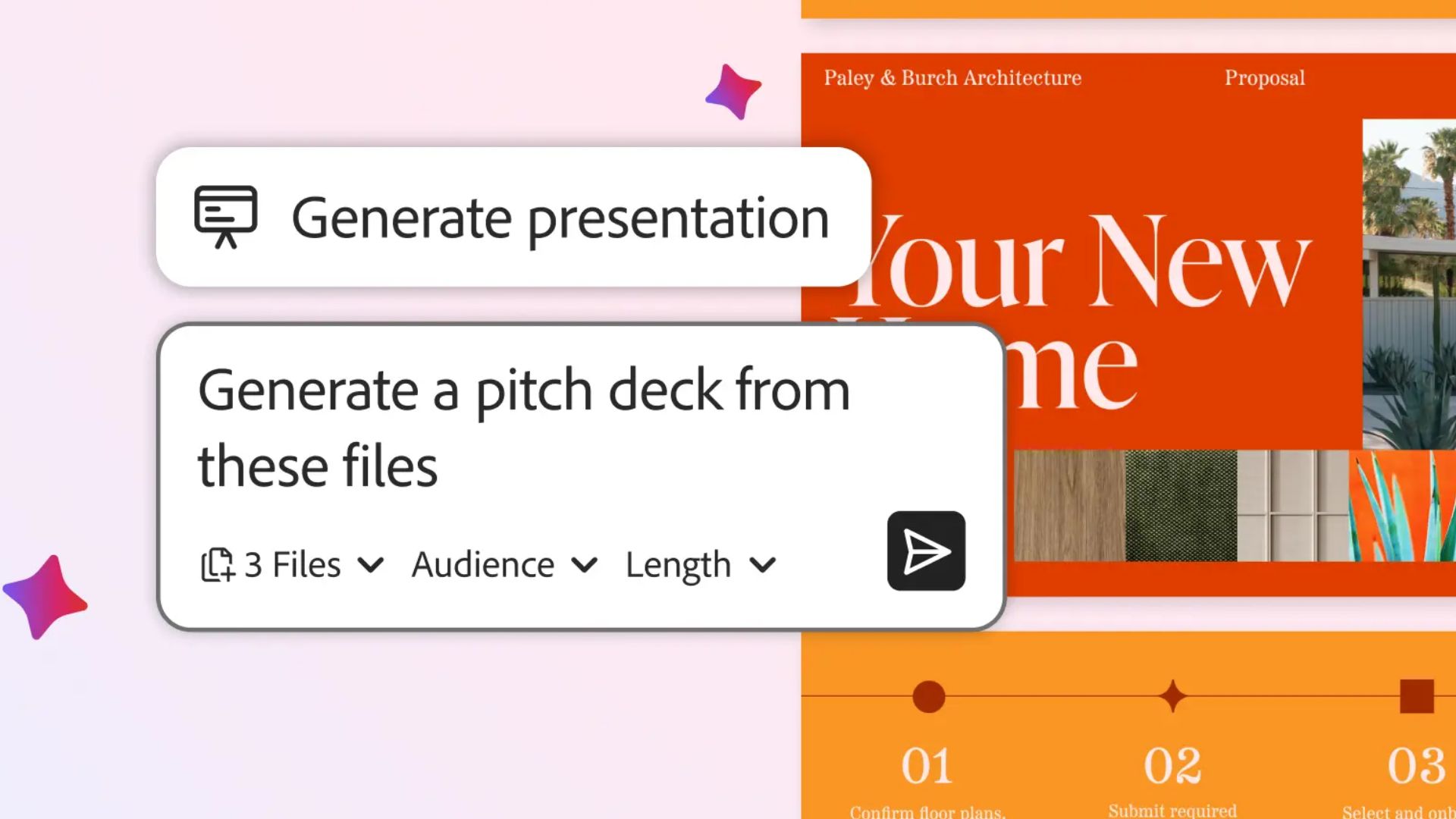
Adobe is bringing AI assistants to some of its biggest creative apps.
New chatbot-style tools are now rolling out in public beta for Photoshop, Premiere Pro, Illustrator, InDesign and Frame.io. The new assistants are designed to handle repetitive tasks and help users make edits using natural language prompts.
Rather than digging through menus or learning complex workflows, users can simply describe what they want to do. Then, the software does much of the heavy lifting.
For Photoshop users, that means being able to reorganise layers, swap backgrounds, resize assets for different platforms and make other edits by describing the desired result. It’s a broader version of the AI-powered editing tools Adobe has already introduced through Firefly. Furthermore, these tools are also in the web version of Photoshop.
Advertisement
Premiere Pro is getting what could be one of the most useful implementations. The assistant can organise footage into bins, rename clips based on what’s happening in a scene and even analyse spoken dialogue to automatically place markers on a timeline. In addition, Adobe says it can also help create an initial video structure. This reduces some of the setup work that often comes before editing can begin.
Advertisement
Illustrator’s assistant focuses on production tasks, helping users spot missing fonts, fix colour mode issues and reorganise layers. It can also generate multiple design variations from spreadsheets and documents.
Meanwhile, InDesign’s version is aimed at publishing workflows, allowing users to apply styling updates and print-readiness checks across entire layouts. Frame.io users can use the assistant to organise assets, surface revision notes and even suggest B-roll footage during the editing process.
Advertisement
While each assistant is tailored to its respective app, they’re all powered by Adobe’s underlying “conversational creative agent” technology. Adobe says the goal is to give every creative professional an AI assistant that understands the tools they’re already using. Rather than offering a one-size-fits-all chatbot, Adobe aims for a more personalised experience.
The rollout marks one of Adobe’s biggest AI expansions yet. After introducing AI assistants to Express, Acrobat and Firefly, the company is now bringing the same prompt-driven approach directly into the Creative Cloud apps. These are the apps that many designers, photographers and video editors use every day.
Tech has taken over our lives. We have smartphones, smartwatches and smart TVs. There are even smart fridges, smart toilets and smart sex dolls. (Or, uh, so I hear.) And with the rise of AI, Big Tech is now jumping on the smartglasses bandwagon… again.
An analog rebellion is brewing. I recently went to a Barnes & Noble for the first time in well over a decade. I was surprised at how many young, hip people were there, scouring the print books and vinyl records. Then there’s the resurgence of digital cameras, film cameras and cassette tapes.
When smartwatches started popping up in the mid-2010s, they promised quick info at a glance without having to grab your phone. In theory, that meant freeing you up to engage with the world around you. But in practice? Well, over a decade later, not everyone finds that to be the case.
To be clear, nobody’s arguing that people are ditching smartwatches left and right. In fact, the market is steadily growing, not shrinking. But not everyone wants to keep marching in that direction.
“My smartwatch kept me attached to b******t I wanted it to get me away from,” born-again analog watch user RadioAdam posted. But not everyone needs to go back to the days of Casio and Timex. Minimal wearable tech products can track your fitness, just without feeling like you have a second phone on your wrist.
Advertisement
Notification overload
The persistent nag of the online world can feel even more intrusive when it’s on your wrist. It’s one thing to hear your phone chirp in a pocket or bag. It’s another to have a wearable device poking you every time something comes in.
“I don’t want my wrist to communicate with me at all” u/NeoMoose wrote in the Whoop subreddit. “My phone is already too much distraction.” Of course, you can silence notifications. But at that point, you (like these smartwatch expats) might question how much you need one in the first place.
Advertisement
Big Tech sold us the always-online lifestyle as a utopia. But the reality has too often resembled a dopamine-addiction hellscape. And if you’re looking to cut down on devices, smartwatches are an obvious candidate for the first item on your list.
Feature (and tracking) fatigue
Will Shanklin for Engadget
Smartwatches can suffer from feature creep. While an Apple Watch has potentially lifesaving ones like fall detection and the ability to call emergency services from your wrist, it (and its competitors) also have… lots of other stuff.
For instance, Redditor u/Adventurous_Rice_731 briefly switched from a minimal Whoop to a Garmin smartwatch and quickly regretted the decision. “Went to my first [workout] and realized how many times I was actively checking the screen, looking to see if all my reps were recording,” they posted. “Overall, I just found myself glued to it even during TV time.” Simpler devices could keep you focused on not just the task or activity at hand, but also help you stay present in moments.
Advertisement
For some, health tracking can (ironically) increase stress. On top of that, when smartwatches and other fitness trackers measure things like sleep, stress and recovery, they’re merely estimates. Those things can’t be measured directly with a wrist-worn device, only approximated via advanced algorithms. Some people don’t see much point in using data that’s little more than an informed guess, as opposed to paying closer attention to their body.
In this economy?
Smartwatches, at least the most useful ones, can be expensive. For example, the Apple Watch Series 11 starts at $399. Samsung’s and Google’s alternatives are in the same ballpark. And while the Apple Watch SE is a more affordable $249 and up, it lacks several key health features (ECG, blood oxygen and hypertension monitoring).
Advertisement
With inflation running rampant, it’s easy to cast a more critical eye on the value of a smartwatch. Sure, it’s nice not to have to whip out your phone to check messages or the forecast. But is it $400 nice? If all you want is health tracking, wearables like Google’s Fitbit Air and Nothing’s CMF Watch 3 Pro offer it for a small fraction of the price.
Road safety
Smartwatches may also make driving less safe. One study found that drivers were more distracted by smartwatch notifications than phone alerts. Glancing down at a watch seems more likely to take your eyes off the road than glancing at a phone, often mounted on a dashboard. (For the record, voice-based responses on either device were the least distracting.)
Advertisement
Arguably, this one is more about applying common sense and self-control than it is about the device itself. But it’s another factor to weigh when questioning whether you need a screen on your body.
Style and substance
Cherlynn Low for Engadget
Tech companies do their best to make smartwatches look good. I’m in the camp that doesn’t mind the aesthetic of the Apple Watch and some of its rivals. But if I were basing my decision on style alone, above all else? I’d go with a sleek analog watch without hesitation.
The advantage of screenless tracking bands is that they’re typically subtle enough to wear alongside more stylish watches. They could also be easier to dress up or wear to events where smartwatches are frowned upon. And if you’re looking for something that still tells the time and tracks your steps while looking like a classic timepiece, there are hybrid smartwatches from companies like Withings and Garmin that could meet those needs.
Advertisement
Opting for something simpler
Cherlynn Low for Engadget
If a smartwatch seems like a bit much, there are simpler and cheaper alternatives.
Screen-free fitness bands are having a moment with the recent launch of Google’s $100 Fitbit Air. The device, which impressed us in our review, is currently sold out everywhere. Whoop, the apparent inspiration for Google’s product, is another screenless contender with robust health tracking. However, it requires a subscription that ranges from $149 for the first year (then $199) to $359 annually, which can put some people off.
Then there are smart rings. Although they’re more expensive (the new Oura Ring 5 starts at $399), they excel at sleep tracking and recovery metrics. Of course, they also lack a screen and haptics, so it’s one less thing bugging you. There’s also the Samsung Galaxy Ring, a $400 competitor that’s often on sale for $300 at big-box retailers.
Advertisement
As a bonus, these free up space on your wrist for an analog watch. “I can wear a mechanical watch and be more in the moment,” u/Th3p4l4d1n posted. “The Whoop allows me to do that more since it has auto workout tracking.” Plus, you don’t need to worry about charging classic timepieces. And they won’t become obsolete in a few years.
There’s no shortage of variety (in style and price) in that space. For example, Casio has a plethora of options, starting at $30. Or, for that matter, head to any jewelry or department store and have at it. And while old-school timepieces don’t promise the moon, they also won’t lower your attention span or raise your blood pressure.
Siri AI is turning out to be absolutely brilliant, except when it isn’t, plus there are now Snap Spectacles, and rumors about the iPhone Fold, on the AppleInsider Podcast.
Of course you haven’t been so foolish and reckless as to install the developer betas of iOS 27 and the rest. These do seem to be remarkably stable, but your two hosts have both had problems, and totally different ones.
They’re not calamitous problems, but these are the same betas, on similar devices, being used in the same way, yet giving completely different difficulties. So, seriously, stay away for now.
Although when Siri AI is at its best, it is superb and you will want to use it. Just be reassured that Siri AI is far from always at its best, and both hosts are hoping for some marked improvements before this is all released publicly.
Advertisement
But speaking of releasing publicly, this week also saw the launch of another set of AR glasses. Snap has released its Snap Specs and from just the right angle, in just the right light, they still look poor.
Lastly, it wouldn’t be a week of Apple news without iPhone rumors, and there have been so many this time. From conflicting reports of delays with the iPhone Fold, to perhaps wishful thinking about an iPhone Air 2, we’ve got it all.
BONUS: Subscribe via Patreon or Apple Podcasts to hear AppleInsider+, the extended edition. This time, it’s about those different beta problems and just how it’s affecting our work.
Links from the show:
More AppleInsider podcasts
Tune in to our Smart Home Insider podcast covering the latest news, products, apps, and everything HomeKit related. Subscribe in Apple Podcasts, Overcast, or just search for HomeKit Insider wherever you get your podcasts.
Those interested in sponsoring the show can reach out to us at: [email protected].
Subscribe to AppleInsider on:
Keep up with everything Apple in the weekly AppleInsider Podcast. Just say, “Hey, Siri,” to your HomePod mini and ask for these podcasts, and our latest HomeKit Insider episode too. If you want an ad-free main AppleInsider Podcast experience, you can support the AppleInsider podcast by subscribing for $5 per month through Apple’s Podcasts app, or via Patreon if you prefer any other podcast player.













































You must be logged in to post a comment Login