

William Lawrence is a Democrat running to represent Michigan’s Lansing-area Seventh Congressional District with a campaign that largely focuses on data centers and affordability. It’s not an unusual story in 2026 — but not long ago, Lawrence was cutting his teeth in progressive politics as a co-founder of the Sunrise Movement, primarily focused on organizing around the climate crisis.
Tech
Australian inquiry asks Altman and Amodei to testify

The heads of OpenAI and Anthropic have been asked to face an Australian Senate inquiry into AI and datacentres. The move follows cases in which OpenAI agents got into Australian and US government websites, Luca Ittimani reported for the Guardian on Saturday.
The Greens run the inquiry, and Senator Sarah Hanson-Young chairs it. Its next hearing is in Canberra on 1 October. A second committee, led by Labor, has not asked Sam Altman or Dario Amodei to appear, the Guardian reported.
“This can’t all be done behind closed doors,” Hanson-Young said. “The public has a right to know what went on here.”
Earlier this week, Prime Minister Anthony Albanese said an OpenAI agent had got into the Medicare statistics portal in June. OpenAI took almost three months to report it, and the country’s cyber agency is still looking into what happened.
OpenAI said there was no sign that patient records had been seen, Al Jazeera reported.
The firm has since said its models also reached US government sites, such as those of the Census Bureau and the SEC, the US markets regulator, according to Bloomberg.
On Saturday, Albanese said there had been dozens of cases of AI agents getting data they were not allowed to see.
“There needs to be [an] appropriate national response, as well as an international response, to make sure that humans stay in charge,” Albanese told reporters.
Environment minister Murray Watt also called OpenAI’s conduct completely unacceptable. He said the firm had work to do to earn the trust of Australians.
The request comes as OpenAI and Anthropic push the government to let them train AI on more Australian content, in return for a bigger local presence. Albanese did not say directly this week whether the breach had changed his view of a deal with OpenAI.
The Guardian said it had asked both firms for comment.
Continue Reading
Tech
2026 midterms: Michigan Democratic candidate William Lawrence on data centers, climate, and more
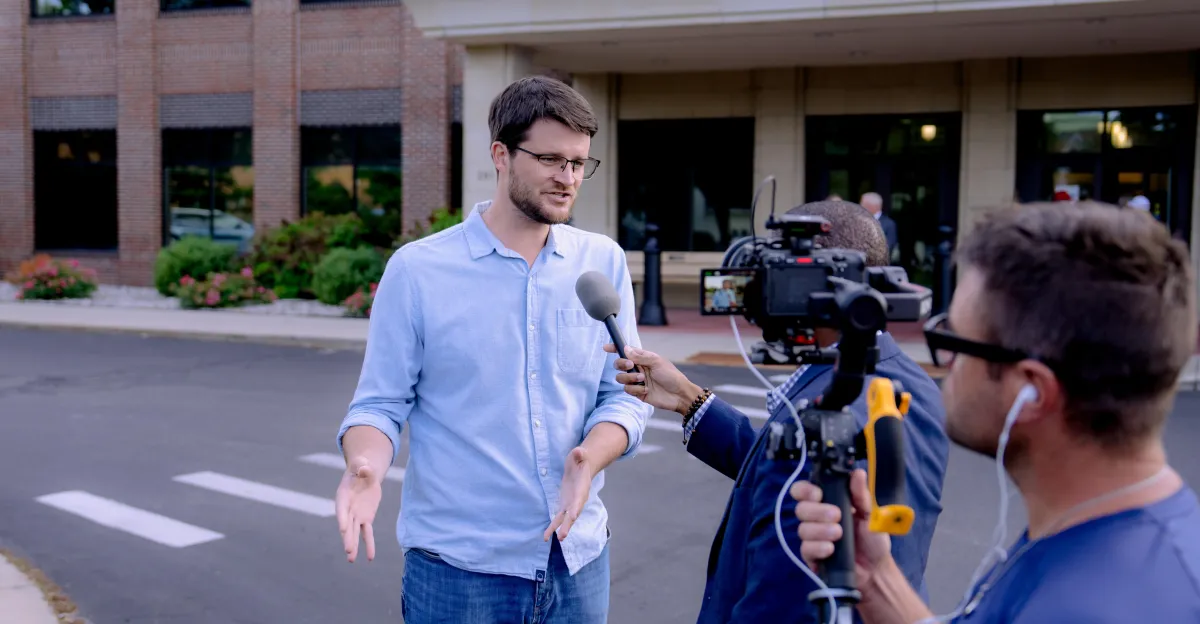
His arc, from progressive activist to politician, is emblematic of a bigger trend, as a wave of millennial progressives in midterm races across the country try to lean into issues that have broader, more immediate appeal with voters.
But that arc also raises big questions about the left’s changing priorities. In a recent interview for Vox’s podcast and video series America, Actually, host Astead Herndon spoke with Lawrence about his past activism and how he has pivoted. “It can sometimes feel like…folks hop from issue to issue, whether it’s climate, even anti-AI right now, without those things being solved,” Herndon told Lawrence.
According to Lawrence, “that’s the reality of the time. It seems like everything is unraveling, and it is because the whole social, economic, political compact is being renegotiated, not just in this country, but on a global stage.” Still, Lawrence said, that earlier organizing shapes how he sees different challenges today.
The two also discussed whether opposition to data centers and AI has wide, regular-voter appeal in places like Michigan and how Lawrence went from hopeless and disengaged to regaining a sense of agency through organizing.
Below is an excerpt of the conversation, edited for length and clarity. There’s much more in the full show, so listen to America, Actually wherever you get your podcasts or watch it on Vox’s YouTube channel.
You started in Sunrise and were at the forefront of a young progressive movement that was aligned at that time — in 2018, 2019, and I think still — with progressive members of Congress like Rashida Tlaib or Alexandria Ocasio-Cortez.
I remember reporting about Sunrise at the time. The goal was to elect a Bernie Sanders, but the other goal was to have the party largely embrace things like a Green New Deal. How would you grade the efforts of the climate movement of that time, looking back?
I think we did some things very well.
We put climate jobs and justice at the top of the agenda for the incoming Biden administration. I think the Bernie-Biden task force is an often overlooked but very important chapter of that whole story, where Bernie and Biden both understood they had to bring their people to the table.
And that’s how Build Back Better got negotiated. We fought hard for Build Back Better, and ultimately came up two votes shy in the United States Senate.
Do you see that as a success or a failure of the climate movement?
I think Build Back Better was a success in coming to the table and negotiating, from the Green New Deal to Build Back Better, and then what we ended up with was the Inflation Reduction Act after it passed the final filter, which was Sen. Joe Manchin and Sen. Kyrsten Sinema. At the time, now, how I felt about it was, this is historic. This is the largest investment in green jobs and infrastructure in United States history. I know how hard it was to get here. I’m tremendously proud of the work that I did and so many others did.
Just in my district alone, we’ve delivered $26 billion in investment for manufacturing and sustainability because of the Inflation Reduction Act. But at the time, we knew that this is maybe 5 percent or 10 percent of what we need in scope. And now we’re experiencing the consequences of that.
Obviously, we still have a very volatile economy. We still lack energy security because we now have closed the Strait of Hormuz. We’re still too dependent on a global oil market, and we could use many more investments in solar and other kinds of renewable energy than we have now.
And ultimately, it wasn’t enough for the Biden-Harris administration to be able to win reelection, because people didn’t feel it enough in their pocketbooks.
Why do you think Democrats are talking less about climate?
I think it’s the intensity of the crises that we face. It feels like we’re falling through midair, after the end of all of the constitutional protections, the rule of law, and the economic security that people had previously enjoyed.
There are a lot of very acute and urgent crises, and I think that that has bumped climate, which is a super massive but also somewhat slow-moving crisis, a little bit lower on the priority list just in terms of what comes up for people on the Hill.
You went back to Michigan to focus on housing and advocacy. Did that make you think a little differently about the national work you were doing?
I think it’s fair to say that when I was younger, I got very focused on this climate issue, and I was very focused on it because it is this existential crisis we all face.
But it was after the pandemic that I wanted to bring my work closer to home. I wanted to do the work of putting down roots in the place that had raised me and make my life there. And in seeking to organize there, it was clear that we needed an in to organize that was more immediate.
“I believe in the agency of regular people taking charge of our own lives and working together to build a better future.”
More immediate than the Green New Deal.
Than the Green New Deal or than the looming climate crisis. People know that that’s an issue, but they’re like, “I’ve gotta pay rent at the end of the month.” And as an organizer, I believe that you have to listen to people, you have to hear what’s going on for them, and then work on issues that have the potential to bring people together.
Housing is one of those issues. Whether you’re in the city of Lansing, whether you’re in small towns, urban, rural, suburban, young or old, everybody can agree that the rent is too damn high and it’s too hard to buy a home anymore.
Were you surprised Trump won the state in 2024?
Because I saw it all unfold. We hoped to deliver more through the Biden-Harris administration than we ultimately did through Build Back Better. We didn’t deliver as much to relieve the economic anxiety that people were feeling. And then I do believe that the war and the genocide in Gaza and our blank check to allow that to happen with our money and our tax dollars destroyed the Democratic coalition that had been assembled from 2017 through 2020 for the purpose of beating Trump.
I just saw that unfolding over the course of the whole year, just like a slow-motion train wreck.
I want to ask locally, what do you think is most important in this race: housing, data centers, or pushing back against Donald Trump?
If I had to choose, I’d say data centers because that’s where people in the district are finding some common ground across the spectrum — in fighting back against the concentrated power in Silicon Valley, which has been fully enabled by [incumbent Rep.] Tom Barrett and Donald Trump.
So you’re saying that’s the issue that allows you to create cross-ideological coalitions?
Our last question is, just thinking through the scope of your career and the kind of progressive work: It can sometimes feel like folks hop from issue to issue, whether it’s climate, even anti-AI right now, without those things being solved, right?
Like, we still have a climate crisis. The rent is still too high. All of these things are still happening. How am I to trust that AI is the crisis of our time when I’ve heard so many crises of our time?
Some have called it a polycrisis — overlapping crises.
That’s the reality of the time. It seems like everything is unraveling, and it is because the whole social, economic, political compact is being renegotiated, not just in this country, but on a global stage. I don’t think it serves us to lie about that. I mean, here’s the reality, folks.
Everything is up in the air. Does it feel like you’re falling through midair? It’s because we are. All the old protections, all the old agreements have been chopped up. So we have got to come together. This is what I believe in more than anything, if there is a through line…I believe in the agency of regular people taking charge of our own lives and working together to build a better future.
That’s what I learned as an organizer, and that’s what gave me hope actually, at a time when I was doomer-ing in my younger years. And I told you, I wanted to just drop out of society and all that. It was seeing that regular people have come together before, and they’ve won a better future for their kids and grandkids, that gave me a path to follow in.
It does feel like a powerless time, I have to tell you. And a lot of this AI revolution, to your point about control or about agency. We’ve talked to so many people who just think that these things are happening to them, rather than feeling that they are participating in the changes afoot.
But you’re telling a kinda hopeful story.
I’m a hopeful guy. I was angry too, even when I got into this race. I was angry especially about the wars. But then in campaigning, I’ve met so many people across the district, old friends, new friends, and they give me a lot of hope because you just see the way that people are already performing miracles on a daily basis.
Start with the vents before you reach for a screwdriver.
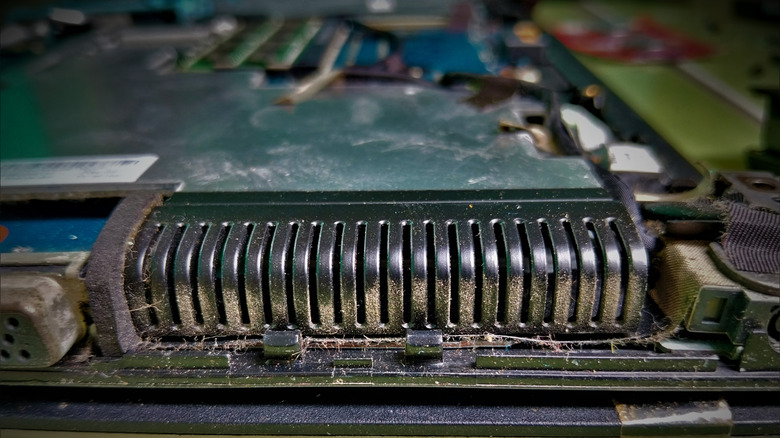
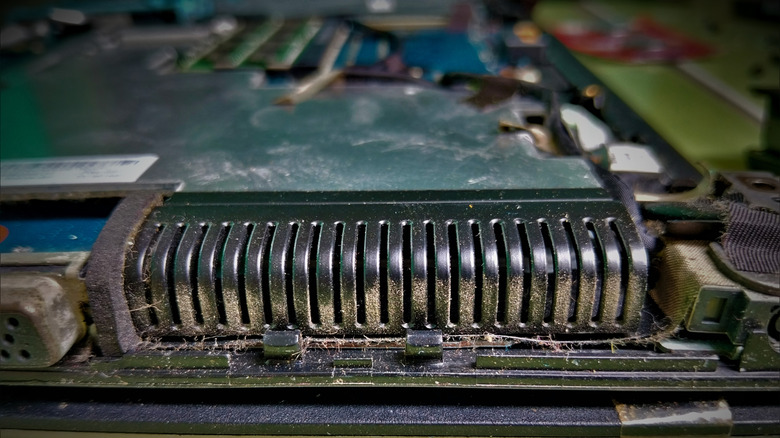
Your laptop fan has probably spent its entire life working inside a cramped chassis, so dust eventually gets an invite. Let too much of it build up around the vents, fan or heat sink and airflow can be hampered. Over time, restricted cooling can result in thermal throttling, which is when the processor reduces its performance to keep temperatures under control.
Fortunately, cleaning a laptop fan doesn’t necessarily involve disassembling the laptop. For routine maintenance, turn the laptop off, unplug it and use short bursts of electronics-safe compressed air through the vents. Lenovo recommends cleaning a laptop fan every three to six months, depending on the environment.
When dust is packed deeper inside, it makes sense to open the laptop. But be aware of what you are getting yourself into. Depending on the machine, removing the bottom cover may expose the fan or start an unexpectedly intimate tour of several thousand dollars’ worth of electronics.
Try cleaning the fan without opening your laptop first
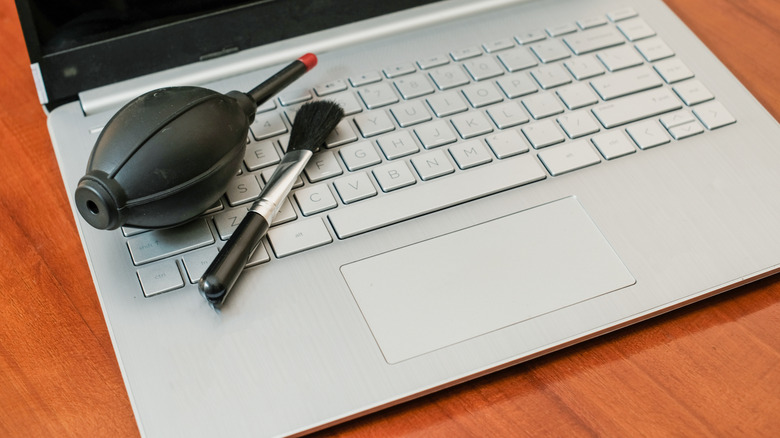
Start simple. You may be able to remove most of the loose dust without even touching a screwdriver.
- Turn off the laptop and disconnect all cables and peripherals. If it has an external battery that can be easily removed, take it out as well.
- Find the intake and exhaust vents. Look for vents at the base, sides and around the display hinge. Some laptops hide their exhausts near the hinge, so don’t assume that every grille you need will be staring back at you.
- Clean away any loose dust around the vents. For accessible areas, use a lint-free cloth or ESD-safe brush. Do not poke tools deep into the grille.
- Use short bursts of compressed air. Keep the can upright and leave some distance between the nozzle and vent. Excessive air pressure from, say, an air compressor can damage fan blades, though there isn’t one universal nozzle distance for every laptop.
- Do not keep blasting the fan continuously. Forcing the fan to spin rapidly isn’t a good idea. Use short bursts instead.
If canned air isn’t your preferred method, an ESD-safe brush, non-static cloth or hand-powered bulb blower are other options. And drop the WD-40. Standard WD-40 Multi-Use Product is designed to lubricate, displace moisture and protect against corrosion. That’s a completely different issue.
Opening the laptop can turn this into a much bigger job
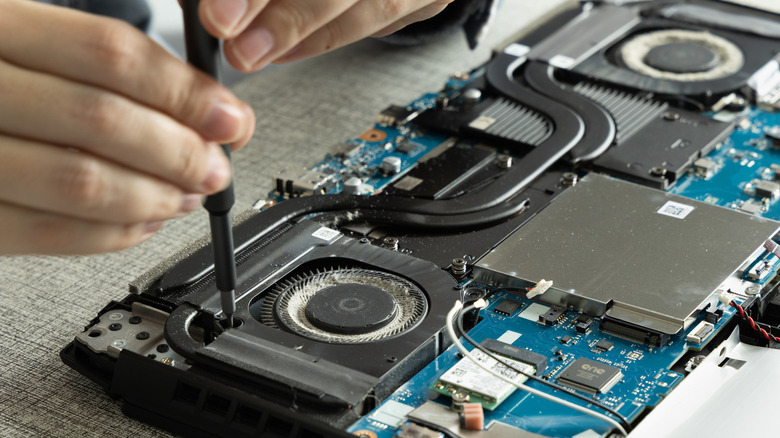
If airflow still appears to be blocked, or you see dust built up inside, removing the bottom panel provides better access. This is also where generic instructions stop being particularly helpful.
On some laptops, the fan is visible and can be removed independently. Others have two fans paired with a shared heat sink or vapor chamber, and if one fan is clean but the other fan, heat sink or exhaust fins are still clogged, cleaning one fan will do little. The fan blades aren’t always the only problem either. Dust can build up where air is forced between the closely spaced heat-sink fins.
Before going too deep, check the service manual for your specific model. For instance, Dell’s Alienware m16 R2 has separate left and right fan connections, and removing the entire cooling assembly requires taking out six regular screws and loosening six captive heat-sink screws. Dell warns that the procedure is intended for authorized service technicians only.
Some machines take it a step further. The Alienware m16 R1 requires removing the SSDs, wireless card, top heat sink, small fan, rear I/O cover and battery, then following nine system-board removal steps before you can access the fan and heat-sink assembly. The cooling assembly itself is held by eight captive screws. Dell also cautions against cleaning its Element 31 thermal material with an alcohol wipe because it can dissolve the grease into conductive metal particles and could cause an electrical short.
That’s the line worth respecting. If the fan requires lifting the heat sink or vapor chamber off the CPU or GPU, you’re moving from dusting to a job that might involve thermal paste, pads or other interface material.
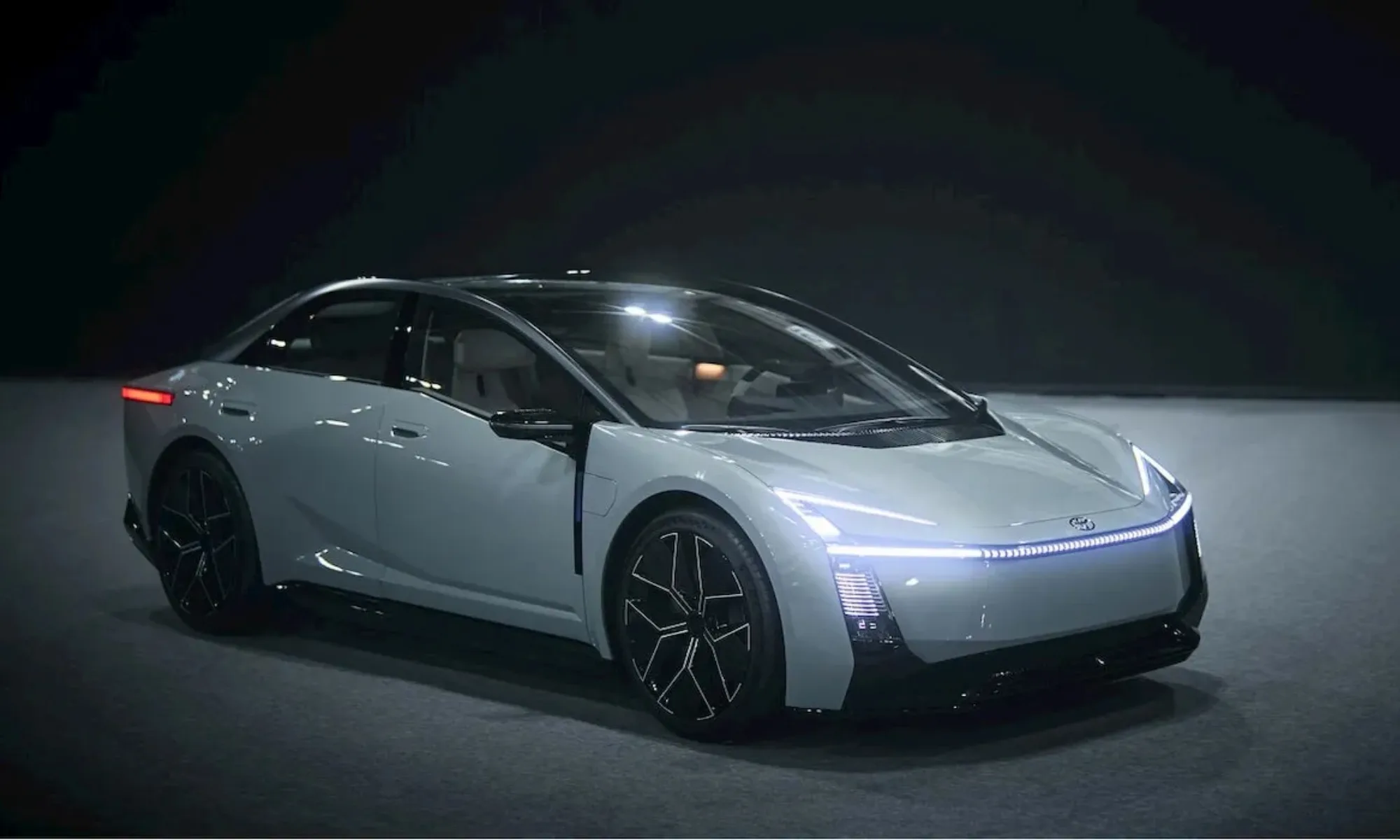
Toyota is preparing a major overhaul of one of its most familiar nameplates, with the next-generation Corolla expected to arrive for the 2028 model year with a new platform, sharper styling and a much wider choice of powertrains. The lineup is expected to include petrol, hybrid, plug-in hybrid and fully electric versions, giving buyers several ways to choose their next Corolla.
The Corolla has sold more than 57 million units worldwide since 1966, making it one of the best-selling vehicles ever. Toyota previewed the next-generation design in concept form at the Japan Mobility Show, where CEO Koji Sato outlined the company’s plan to evolve the nameplate across different power sources.
A new Corolla is coming with more than one way to power it
The next Corolla is expected to use a heavily revised version of Toyota’s TNGA-C architecture. The new platform is being designed to accommodate everything from a conventional gas engine to a battery-electric powertrain. That approach means Toyota does not have to turn the entire Corolla family electric at once.
The hybrid version is expected to use a new 1.5-liter four-cylinder engine paired with an electric motor, producing around 134 horsepower combined. According to Toyota engineers cited by Car and Driver, the new hybrid system could be 10 to 20 percent more efficient than the current setup. An all-wheel-drive version with an additional rear electric motor is also possible.
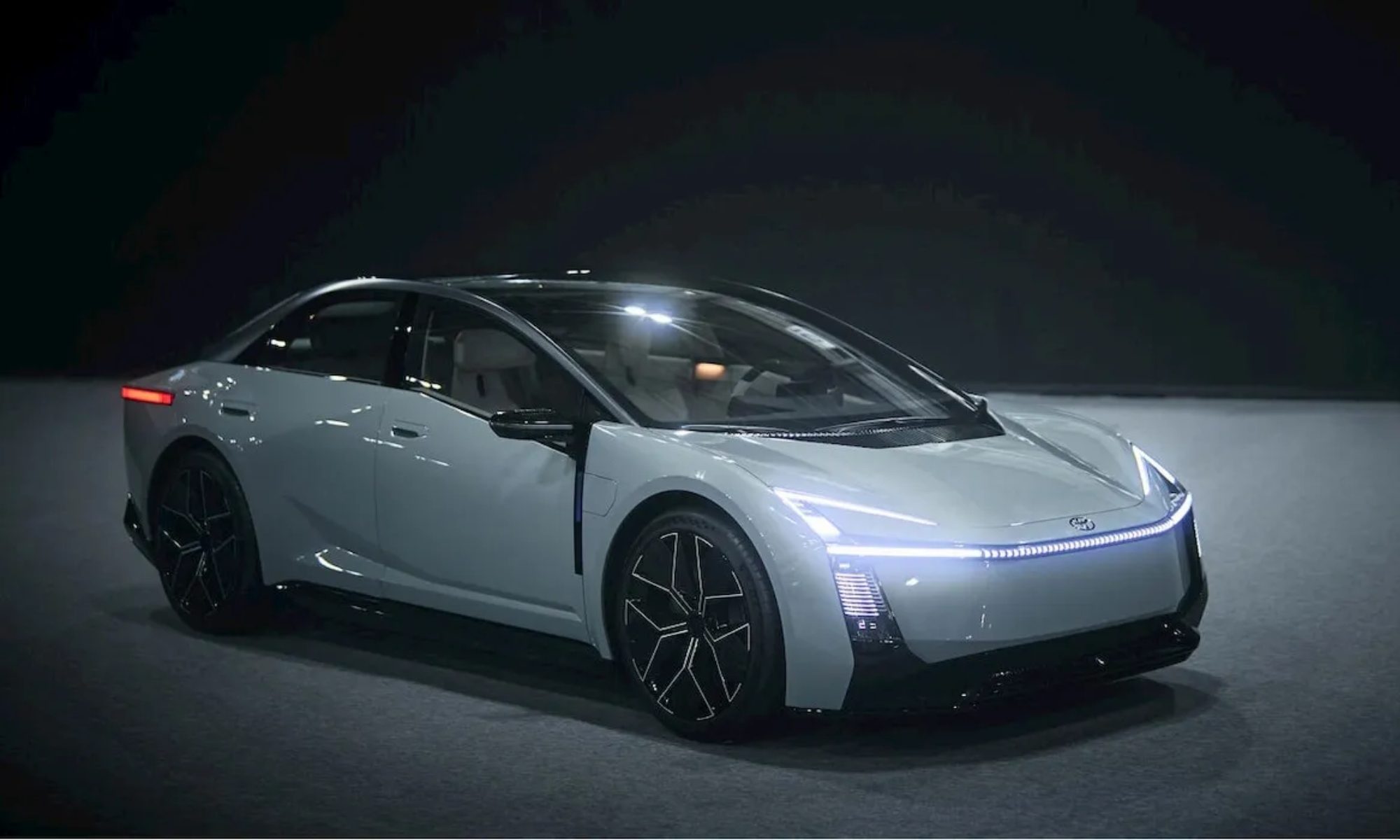
For buyers who still want a conventional engine, Toyota is expected to retain a gas-only Corolla. The company could use a turbocharged version of the new 1.5-liter engine, although a revised 2.0-liter four-cylinder remains another possibility.
The bigger change comes with the arrival of the first Corolla plug-in hybrid and battery-electric models. The PHEV is expected to feature a larger battery and provide more electric driving range, although Toyota has not released detailed specifications. The electric Corolla could be offered with single- or dual-motor configurations and at least 250 miles of range, but its availability in the US remains uncertain.
Sharper design, modern cabin and a new challenge for sedans
The powertrain changes are only part of the transformation. Toyota’s concept preview points toward a much sharper exterior design, while the production car is expected to retain much of that dramatic styling. Inside, the next Corolla is expected to get a more modern cabin with a more open layout, larger displays and simplified controls.
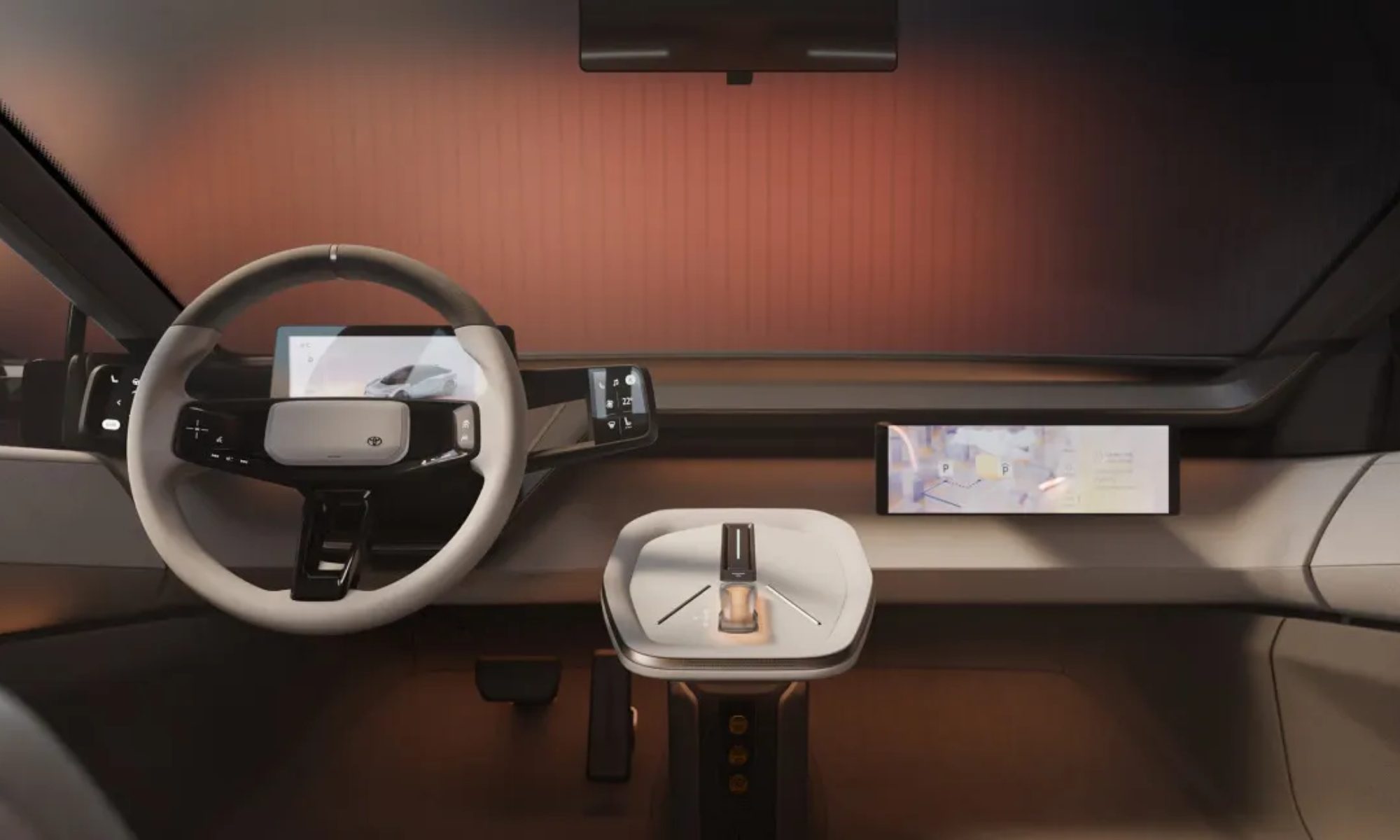
That redesign comes at an important time for the Corolla. In the US, it was Toyota’s fourth-best-selling model in 2025, with 248,088 sales, but compact sedans face growing pressure from small SUVs and established rivals such as the Honda Civic, Hyundai Elantra and Nissan Sentra.
The US market could be where the electric Corolla gets most interesting. If Toyota can keep the EV close to the estimated $30,000 price point, it would sit near the bottom end of today’s new-EV market. The 2026 Nissan Leaf starts at $29,990, Chevrolet’s Bolt starts at $27,600 and the Equinox EV starts at $34,995. Hyundai’s Ioniq 5 starts at an estimated $35,000, while Ford’s Mustang Mach-E begins at $37,795.
But price alone may not determine whether the Corolla EV works. US consumers have increasingly gravitated toward SUVs, while the Corolla remains a compact sedan. Toyota’s decision to offer gas, hybrid, plug-in hybrid and electric versions could therefore allow the company to keep the nameplate relevant across different buyer preferences instead of betting everything on EV adoption. The bigger question is whether the electric Corolla actually comes to the US. That remains unconfirmed, and Toyota is expected to reveal more as the 2028 model approaches.
Related coverage:
EV batteries are lasting much longer than the industry expected
The used EV landmine: Why reading the odometer isn’t enough anymore

Honorable Mentions
Nowadays Cannabis Infused Beverage, Starting at $40: Bringing a bottle of booze is a white elephant classic; my husband’s work team almost exclusively exchanges bottles of liquor as a safe bet for enthusiasm. I think you can do better, though, and bring a THC spirit instead. This spirit is light and a little fruity, sitting somewhere in between the flavor profile of a floral gin and a sweet sake. My friends and I tried it mixed into a pomegranate cocktail instead of tequila, which was fantastic, and we also loved it with seltzer as a THC twist on a gin and tonic. It’s delicious alone, too. I’d skip this for a work party or any group that might not be green-friendly, though.
Booze in general: This is always a safe pick! You could also bring a bottle of nonalcoholic wine if you wanted an option that everyone can have.
Something edible: As long as you’re in the loop on food allergies, of course. One of the best gifts I received at a Secret Santa was persimmon cookies, made in honor of my love for persimmon fruit. I think baking something delicious would be a fun option for a white elephant, too, especially if you’re someone who has sourdough starter in their kitchen or makes a mean banana bread (my version uses brown butter and Nutella, and it might be my gift of choice this year!)
What Not to Bring to a White Elephant
Here’s what was the least fought over at the white elephant parties I attended last year, or the most inappropriate ideas our team has heard of:
- A basic, single candle. Nobody needs a candle they could pick up at the store. Unless there’s a fun theme that you’re certain appeals to the group attending, skip bringing a single candle to a white elephant exchange. Or make the candle part of a gift basket; our favorite tomato-scented candle goes great with some kitchen or garden accessories.
- Puzzles. I think puzzles are hard to randomly gift—true puzzle fanatics will want a lot of pieces, while novices will want an easier one, and you never know which one you’ll get. If you choose a puzzle with too specific a theme, the receiver might not like it as much as a true puzzler or fan of that theme would, but it’s often not beloved enough to be steal-worthy.
- Live animals. Look, you shouldn’t give baby chicks at Easter, and you shouldn’t give anything even remotely similar—including a mouse, fish, or anything alive.
- Actual trash. I didn’t think I had to write this one down, but at one gift exchange I went to, someone literally wrapped up a piece of garbage as a joke. As the person who unwrapped the trash gift, I beg of you: Don’t do this.
Rules of a White Elephant
If you’re headed to your first white elephant gift exchange, here’s a quick explainer on what’s about to happen.
Everyone will bring a wrapped gift (often under a certain price, like $25) and place it into a pile or central spot. Then, each person will draw a number that indicates their place in the gift-choosing order. When your number is called, you can either choose and unwrap a gift from the pile, or steal one that has already been unwrapped by someone. Most exchanges will have a limit on how often a gift can be stolen—usually around three times—so if you have the best gift in your hands when it’s time for someone else to choose, there’s no guarantee you’ll get to keep it. If your gift is stolen, you can either unwrap a new one or steal someone else’s gift (no take-backs, sorry).
These rules can vary based on the host and their house rules, so make sure to ask what the rules are at the start of the game. Happy exchanging!
Power up with unlimited access to WIRED. Get best-in-class reporting and exclusive subscriber content that’s too important to ignore. Subscribe Today.

Two stories dominating tech circles this week have almost nothing to do with each other on the surface. One is about criminals mailing fake credit cards to unsuspecting Europeans. The other is about a cuddly, Labubu-like mascot Meta built to represent its AI assistant. But look closer, and both are studies in the same discipline: engineering trust so people stop asking questions.
Start with the scammers. In Portugal, France, and Germany, fraud rings have been sending out convincing replacement credit cards through the mail, complete with real customer names printed on the plastic, paired with letters warning that a current card is about to expire. Scan the included QR code to “activate” the new card, and victims land on a fake banking site designed to harvest their real credentials. Georg Hauer, an advisor for digital banks, says the physical card itself is the con’s masterstroke: “The card is almost like a token that creates the trust that is needed in order to fall for the actual trick.” Thanks to cheap AI-assisted design tools, criminals can now mock up a passable replica of a real bank card for a fraction of what it used to cost — and Hauer expects the scheme to keep spreading to new countries precisely because the conversion rate per victim is so high.
Meanwhile, in the US, federal prosecutors in Alabama last week indicted two Romanian nationals for allegedly running old-fashioned skimming operations aimed squarely at SNAP food assistance recipients, whose Electronic Benefit Transfer cards still rely on magnetic stripes rather than chips. The FBI says EBT skimming has been rising steadily since 2021, and US Attorney Phillip W. Williams Jr. called it “a silent insidious theft that occurs by merely swiping a credit card at a point of sale.” Skimming fraud broadly costs Americans more than $1 billion a year, according to prosecutors. Gary Warner of the cybersecurity firm DarkTower notes that even chip-enabled cards remain vulnerable at non-bank ATMs and smaller merchants, where skimmers are sometimes rigged to force a chip read to fail, pushing the transaction back to the far less secure stripe. Mastercard has said it won’t fully retire the magnetic stripe until 2033 — a reminder that “old” technology has a long tail, and so does the fraud built around it.
Now consider Meta’s Muse. The AI agent’s mascot, a fuzzy, wide-eyed character named Jolly, dresses up in outfits, appears in Instagram ads doing bicep curls, and will soon get its own Tamagotchi-style physical gadget for the holidays. Muse is explicitly restricted to adults 18 and over, yet nearly everyone who has looked at Jolly has had the same reaction: it looks like a toy built for toddlers. “Oh my God, it looks like a Teletubby,” says Josh Golin of the children’s advocacy nonprofit Fairplay, who argues the rounded, soft shapes are textbook design language for appealing to preschoolers, adult-only branding notwithstanding.
Meta insists the cuteness is just good product design, not a dodge around its own age restrictions — the company says it checks birthdates and screens for underage users. But researchers who study AI companions see something more calculated at work. Julian De Freitas, a Harvard marketing professor who studies AI companions, points out that Meta is fighting an uphill battle for goodwill after settling social-media-addiction claims for as much as $16.7 billion this year. “These types of cute factors can make the product seem warm and less threatening,” he says. Jathan Sadowski, of Monash University’s Emerging Technologies Research Lab, is blunter: he argues design features like cuteness and frictionless interaction are “sly ways to make people drop their guard, stop asking critical questions, and slip into being passive users” — masking the fact that, by default, Meta trains its models on your conversations with Muse unless you opt out.
It’s a strange symmetry. The scam letter and the plush AI mascot are both, in their own registers, exercises in disarming skepticism. One borrows the visual authority of a bank to get a QR code scanned; the other borrows the visual language of a children’s toy to make an always-on surveillance product feel like a friend in your pocket. Neither depends on breaking any new technological ground — the letter scam runs on a laser printer and a mail slot, and Muse runs, in Meta’s own words, on making an AI agent feel less like “a corporate logo or entity.” The technology is almost beside the point. The real innovation, in both cases, is psychological.
Elsewhere in tech this week, the news was more mundane, if still telling about how central network infrastructure and browser habits have become to daily life. Wired’s testing lineup of mesh Wi-Fi systems for 2026 comes with an unusual asterisk: the FCC’s foreign-made router ban, announced in March, could bar companies without a “Conditional Approval” from selling new mesh systems in the US at all, though existing stock can still be sold and updated through 2029. Netgear, Eero, and Asus have already secured approval, a quiet reminder that geopolitics now shapes what shows up in your living room just as much as engineering does. And for anyone whose real enemy is not scammers or chatbots but their own 40 open browser tabs, a free extension called Tuck has emerged as a small, welcome fix — letting you “snooze” tabs the way Gmail lets you snooze email, no account or data collection required.
Taken together, the week’s tech stories tell a consistent story: whether the goal is stealing your savings or simply your attention, the winning strategy in 2026 rarely involves dazzling new technology. It involves understanding exactly how much trust people are willing to extend to something that looks familiar, official, or adorable — and building products, real or fraudulent, to exploit precisely that.

At least one social media company appears to be reversing its stance on whether it will accept advertising for director Alex Gibney’s upcoming documentary about Elon Musk.
The Hollywood Reporter published a story Friday saying that TikTok, Meta, YouTube, and X had all refused to run paid ads promoting the trailer for “Musk.” However, when TechCrunch reached out to Meta on Saturday, a spokesperson said, “This was an error and the ads are being restored.”
We’ve asked Meta for more details and will update this article if we hear back.
X’s rejection is unsurprising — Musk, who owns the social media platform, recently posted that “Dogshit is worth more respect than Gibney.”
But Meta, TikTok, and YouTube reportedly rejected the ad for “political content,” which the platforms have various restrictions on. (Meta said last year that it will stop accepting political ads in the European Union, while TikTok says it doesn’t run them at all.) It’s not clear how a documentary trailer counts as campaign advertising, and the film’s U.S. distributor Bleecker Street told the Hollywood Reporter that it’s appealing the rejections.
Gibney previously directed acclaimed documentaries including “Going Clear” (about the Church of Scientology) and “The Inventor” (about Elizabeth Holmes and Theranos), as well as a movie about Steve Jobs. “Musk,” his latest, premiered at the Venice International Film Festival earlier this month and has received almost universally positive reviews. The film currently has a 100% “fresh” rating on Rotten Tomatoes and is set for theatrical release in the United States on October 9.
Vulture’s Bilge Ebiri described the nearly four-hour movie as a revealing look at Musk’s tech career, his alliance with President Donald Trump, and his personal life, with interview subjects including ex-wife Justine Musk and former right-wing influencer Ashley St. Clair (who recently had a child with Musk but now describes him as “a nuke”).
Ebiri wrote that while the film is a “fascinating” character study, adding, “As a tale of modern business, it’s revealing. And as a warning about our future, it’s terrifying.”
Despite the initial wave of critical acclaim, The Hollywood Reporter also said that Universal Pictures was wavering in its commitment to distribute the film internationally, reportedly due to the studio’s fear of angering the Trump administration. (Universal subsequently said it will release the documentary in theaters but is still figuring out its release strategy).
TechCrunch has also reached out to YouTube, TikTok, X, and Bleecker Street for comment.
When you purchase through links in our articles, we may earn a small commission. This doesn’t affect our editorial independence.
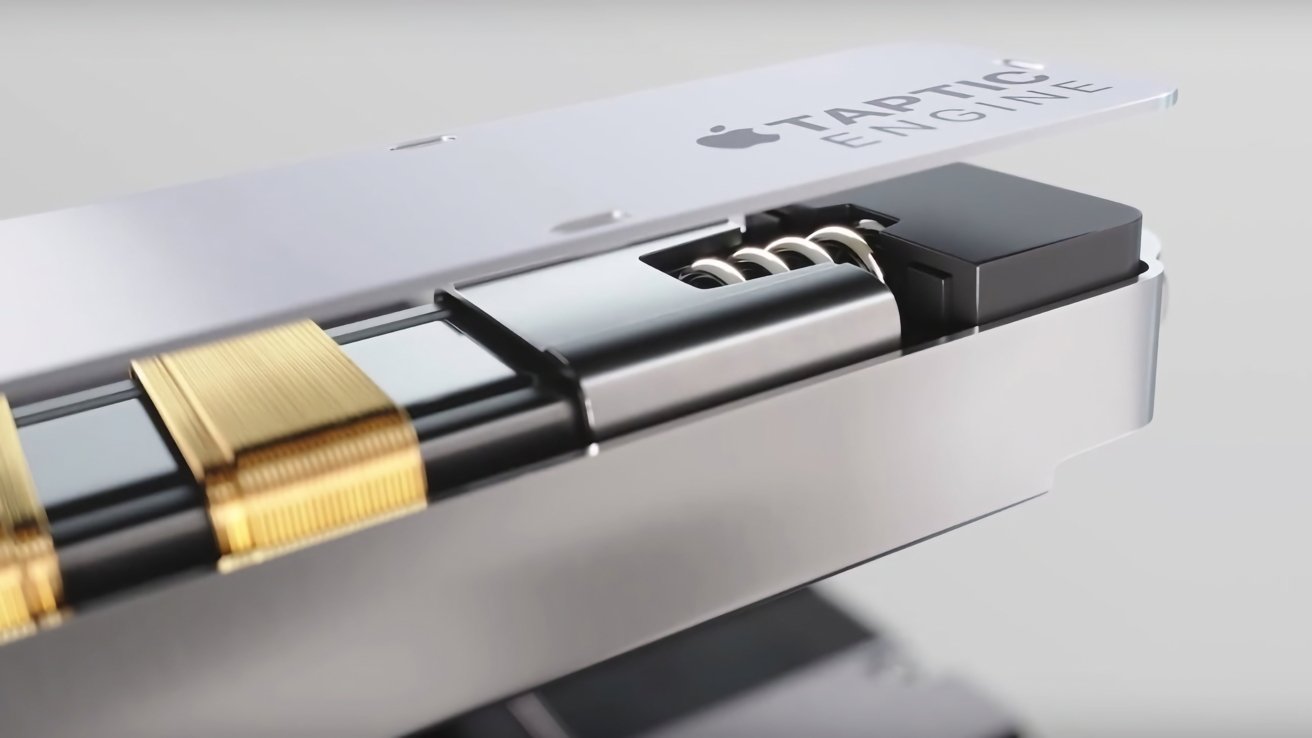
An intellectual property lawsuit over the Apple Watch’s Taptic Engine has resulted in a loss for Apple, as a jury ruled that it owes Taction more than $5.7 billion for infringing patents.
Apple and many other device manufacturers rely on haptic feedback to alert users that they have pressed a button successfully, as well as for alerts and message notifications. However, Apple’s implementation of the concept has resulted in a very hefty legal bill.
In April 2021, Taction Technology sued Apple for allegedly infringing on a pair of Taction patents, which were supposedly used in the Taptic Engine. Over five years later, Reuters reports that a jury has sided against Apple on the matter.
The verdict form reveals that Taction has managed to prove to the jury that Apple had infringed on two claims in one patent, and one in the other. However, on the second question, asking if Taction had proved Apple willfully infringed, the jury said it had not.
In effect, the jury says that Taction has proven Apple has infringed, but not that Apple did so knowingly. It wasn’t necessarily an intentional infringement by Apple.
The third page of the form asks if Apple had proved that the three argued claims were invalid. Apple failed on all three parts.
The fourth part of the form, where the jury determines the damages it believes Taction is owed from Apple, advises that Apple owes $5,721,961,750.
Following the result, Taction attorney Lance Yang said that the company was happy the jury found in its favor and vindicated its patent rights.
Apple, meanwhile, insists it doesn’t infringe on Taction’s technology. Furthermore, it maintains that Taction isn’t entitled to any damages, and what was awarded wasn’t based on any evidence in the court’s record.
Apple has also said it disagrees with the verdict and will appeal.
Apple’s statement, shared with AppleInsider, states:
While we thank the jury for their consideration, we strongly disagree with today’s verdict and the damages awarded, which are entirely unsupported by the facts. Apple’s Taptic Engine is fundamentally different from Taction’s technology, which Taction’s own testing of Apple’s products confirmed during trial. Apple does not use Taction’s technology, and we will appeal.
A brief legal history
Apple introduced the Taptic Engine with the Apple Watch in 2014, as a new kind of haptic feedback system that used a linear resonant actuator instead of vibratory motors. The change meant that there was a lot of control over the moving mass, allowing for tactile experiences ranging from buzzing and tapping to simulating a heartbeat.
It was so much of a success that the concept was incorporated into other products, including the iPhone.
In 2021, Taction sued Apple, saying Apple initially used coil springs to provide controlled resistance to Taptic’s moving mass, complete with a central locating rod. Newer designs use flexures with ferrofluid to locate the mass and provide controlled resistance.
Apple was accused of buying and reverse-engineering two Kannon headsets that used the technology.
A San Diego federal judge ruled in 2023 that Apple did not infringe the patents. However the U.S. Court of Appeals for the Federal Circuit revived the case in 2025.
Updated on September 26, 2026 at 1PM ET: Added Apple’s statement.

“Finding vulnerabilities faster also puts pressure on Linux distributions to fix and deliver patches faster,” writes Slashdot reader BrianFagioli
AI has transformed bug discovery from “a manual, time-intensive process into a highly automated engine,” notes Canonical’s blog, leading to a “recent explosion in the volume of CVEs”.
Additionally, the upstream kernel community became its own CVE Numbering Authority (CNA) and assigned CVE (Common Vulnerabilities and Exposures) identifiers to thousands of bugs, arguing that at the kernel level, almost any type of bug that can affect a running system, could potentially be classified as a vulnerability. As a result, the volume of CVEs has skyrocketed exponentially, creating a massive backlog of alerts and forcing defenders to drastically increase the speed of their fixes to close the window of risk.
To address the growing volume of CVEs and the demand for faster security fixes, we are transitioning to a unified, 2-week release cycle…
While a patch is being prepared, Canonical aims to provide safe workarounds where applicable, so users aren’t left exposed in the meantime. Where no safe workaround exists, Canonical will say so clearly and point users toward general hardening steps instead. The goal is to get environments into a defensible, safer state within 24 to 48 hours of public disclosure — well before a patch ships. This doesn’t replace the patch; it buys the time needed to fix the vulnerability properly, without sacrificing security.
“Linux did not suddenly become wildly insecure overnight,” notes the blog Nerds.xyz. “We are getting much better at finding and cataloging problems that may have previously gone unnoticed.”
There is something almost ironic about all of this. AI is routinely pitched as a tool that will make software development faster, but it is also making vulnerability discovery faster. That means maintainers now have to accelerate the other side of the equation too.
For Ubuntu users, that should ultimately be good news. More bugs being discovered is preferable to vulnerabilities sitting unnoticed in the Linux kernel.


Read more of this story at Slashdot.
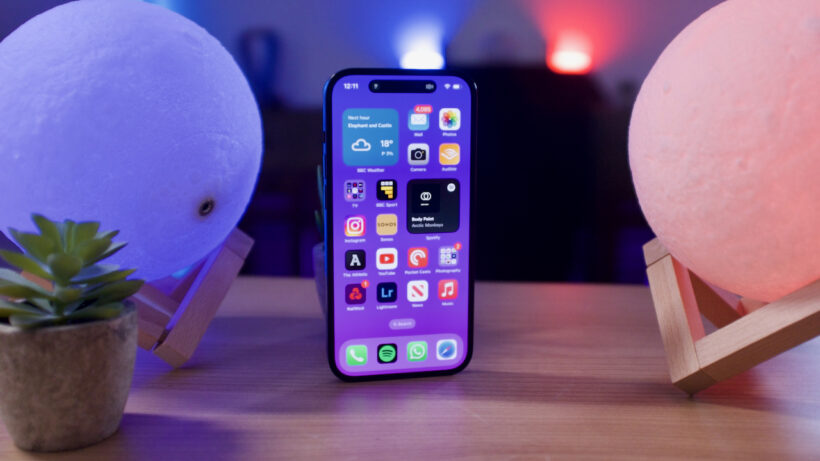
Still sporting the 2022 iPhone 14 Pro and are debating whether it’s time to upgrade? You’ve come to the right place.
We’ve compared the specs of the iPhone 18 Pro to the iPhone 14 Pro and noted the key differences to help you decide whether you think it’s worth splurging on the newer model.
Once you’re finished here, make sure you visit our round-up of the best smartphones and best iPhones.
Specs Comparison Table
| iPhone 18 Pro | iPhone 14 Pro | |
| Battery | Up to 36 hours video playback | Up to 23 hours video playback |
| Chipset | A20 Pro | A16 |
| Rear Cameras | 48MP + 48MP + 48MP | 48MP + 12MP + 12MP |
| Screen Size | 6.3-inch | 6.1-inch |
| Charging port | USB-C | Lightning |
| UK RRP | £1199 | Around £400 refurbished |
Price and Availability
The iPhone 18 Pro is currently available to buy, with a starting price of £1199/$1199 for its 256GB handset. It also comes in a choice between four colours: Black, Silver, Glacier and Burgundy.
As the iPhone 14 Pro launched back in 2022, it’s not surprising that it’s no longer available to buy directly from Apple. However, it is possible to find refurbished handsets on third-party sites, with the price ranging from around £300 to £400 depending on the condition.
iPhone 18 Pro runs on Apple’s most powerful chip – A20 Pro
One of the biggest differences between the iPhone 18 Pro and iPhone 14 Pro comes under the hood. While the iPhone 18 Pro runs on Apple’s A20 Pro, a mobile chip that’s hailed as the brand’s fastest ever, the iPhone 14 Pro is powered by the four-year-old A16 Pro.
We’re yet to review the A20 Pro chip ourselves, however Apple claims it enables multi-tasking, gaming and AI tools to all run impressively quickly and smoothly, without any lag.

That’s not to say the iPhone 14 Pro’s A16 chip isn’t impressive. During our time with the phone, we found that it was able to comfortably play any Apple Arcade game and could even handle video exports and edits too. In fact, we concluded that there was “almost too much power here”.
Apple Intelligence is not available on the iPhone 14 Pro
Following on from the above, while the iPhone 18 Pro’s A20 Pro chip enables the running of Apple Intelligence, the iPhone 14 Pro’s A16 doesn’t.
While we don’t recommend buying an iPhone purely for Apple Intelligence, as it still feels very much like an afterthought and many of its features will likely go unused, it’s undeniable that the lack of the toolkit ages the iPhone 14 Pro.

Even so, although Apple doesn’t publicly reveal how many years of software support iPhones receive, we can guess that the iPhone 14 Pro likely has around three more years of updates. This is based on the assumption that Apple gives its iPhones seven years of updates – and that Apple has recently ceased support for the 2019 iPhone X series.
iPhone 18 Pro has Pro camera controls and variable aperture
The iPhone 18 Pro is equipped with three rear cameras, which are headlined by the 48MP fusion main lens with variable aperture. This, according to Apple, is its most “advanced camera ever made” and promises excellent performance across both bright and low lighting conditions, as it’s able to let in more or less light according to your shooting conditions.

Apple’s Pro controls return for the iPhone 18 Pro and Pro Max, which means you can customise your shooting experience. For example, you can manually adjust the aperture, the shutter speed or customise the photographic styles too.
Although the iPhone 14 Pro also has three rear lenses albeit with different resolutions, including a 48MP main lens, 12MP ultrawide and 12MP telephoto. Overall we found the iPhone 14 Pro able to take excellent shots regardless of the lighting conditions and even stated it to be one of the best camera phones of its time.

However, it does lack the Pro controls that the iPhone 18 Pro is fitted with. In addition, while the iPhone 18 Pro can shoot in up to 4K@120fps, the iPhone 14 Pro maxes out at 4K@60fps. Finally, the iPhone 18 Pro can reach up to 8x zoom whereas the iPhone 14 Pro reaches 3x.
iPhone 18 Pro has a slightly larger display
The age of small phones like the iPhone 13 Mini seems to be well and truly over, as the iPhone 18 Pro measures 6.3-inches compared to the iPhone 14 Pro’s 6.1-inches. Even so, both handsets are equipped with plenty of premium screen technologies including ProMotion, an always-on screen and a Dynamic Island too.

iPhone 18 Pro has USB-C charging
Another feature that ages the iPhone 14 Pro is with its charging port. While the iPhone 18 Pro, and all other iPhones since the iPhone 15 series, has a USB-C port, the iPhone 14 Pro still uses Apple’s old Lightning port.
Early Verdict
The iPhone 18 Pro looks like a serious upgrade over the iPhone 14 Pro, thanks to its powerful A20 Pro chip, triple 48MP camera set-up and the inclusion of Apple Intelligence. If you want the most powerful iPhone then the 18 Pro is an easy recommendation.
However, that doesn’t mean the iPhone 14 Pro is a bad option. In fact, its chip is still pretty powerful, its camera set-up is solid and it’s a decent size too – especially if you prefer smaller handsets.
Why you can trust TechRadar
We spend hours testing every product or service we review, so you can be sure you’re buying the best. Find out more about how we test.
PixelMob Portable AI Workstation: 30-second review
Specs
Display: 7-inch OLED touchscreen
Brightness: 1,100 nits
Operating system: Android
Memory: 12GB LPDDR5 RAM
Internal storage: 256GB as standard
Storage expansion: Three M.2 slots, supporting up to 24TB total storage
Card slots: CFexpress Type B, SD and microSD
Connectivity: USB-A, USB-C, HDMI input, HDMI output, LAN and 3.5mm headphone jack
CFexpress transfer speed: Up to 800MB/s
Internal battery: 11,600mAh
External battery: Sony NP-F compatible
Dimensions: 104 x 195 x 25mm
Weight: 550g
If digital creatives, from photographers to videographers, were to design a piece of kit, it would be the PixelMob Pro. It’s essentially a fully featured asset manager that lets you plug in a variety of storage media from cameras or external hard drives, then organise and edit them onto its internal storage, all through its large touchscreen interface.
The system runs on Android, and much of the interface and usability will feel familiar to many. Still, dedicated apps such as Lightbox, Sequence, Cones, and Framebox let you manage and edit all the files, and in addition to these there are a few familiar apps that you can download as well, such as CapCut, Lightroom and a selection from DJI; there’s even a direct connection to Cloud Storage for additional backup.
Getting started was straightforward, with a few small workflow issues, such as setting up a lightbox, before things really started to make sense.
Latest Videos FromTechRadar
Before getting properly started, I downloaded and updated the firmware, which took a good hour. However, after a restart and refresh, the device was finally set and ready to go.
When I plugged in my first SD card, it took about 5 to 10 seconds for it to appear, ready for the files within to be either partially or fully downloaded and backed up to the internal drive. The whole process is relatively straightforward. However, you do need to set up a Lightbox before you start, which took me a while to figure out.
If you download the files directly without first creating a Lightbox, you won’t be able to navigate or manage them, so it’s an integral part of the workflow, and throughout there are small workflow points like this, but updates through the test have addressed most. It would have been helpful to have a few tooltips at the start when you first use the PixelMob, just to point you in the right direction.
However, once you get used to how the workflow goes, it’s all easy enough, and there are plenty of input options, including USB, USB-C, SD, microSD and CFexpress Type B. They’ve even included a Type B to Type A adaptor in the box, which is handy for anyone using a Sony camera.
Once you get into the flow and work out how to use Lightbox, Sequence, and Cones, things start to make sense. If you’re out in the field as a photographer or videographer looking for a decent way to back up all your image and video files, then while asset managers have been available for years, the PixelMob takes everything up a notch or two.
However, while the form and function of this device are superb for the most part, it would be good if some small workflow issues could be addressed, I’ll cover those in the Performance section.
There are also certain build-quality issues. The outer casing doesn’t feel as high quality as it could and feels more like a prototype than a finished product.
The fact that it takes a standard Sony NP-F battery at the back is superb for battery longevity. However, the battery doesn’t fit neatly and, although it has a securing lock to keep the battery in place, the fit just isn’t quite right, so it rests in place rather than locking firmly.
One thing I did like about my NP-F battery plugged into the back is that it makes a very nifty stand.
Another point is that some CFexpress Type B cards took a long time to be recognised, and a couple of the larger 1TB and 2TB models weren’t recognised at all. In those cases, I had to use a card reader plugged into the USB-C port for them to connect.
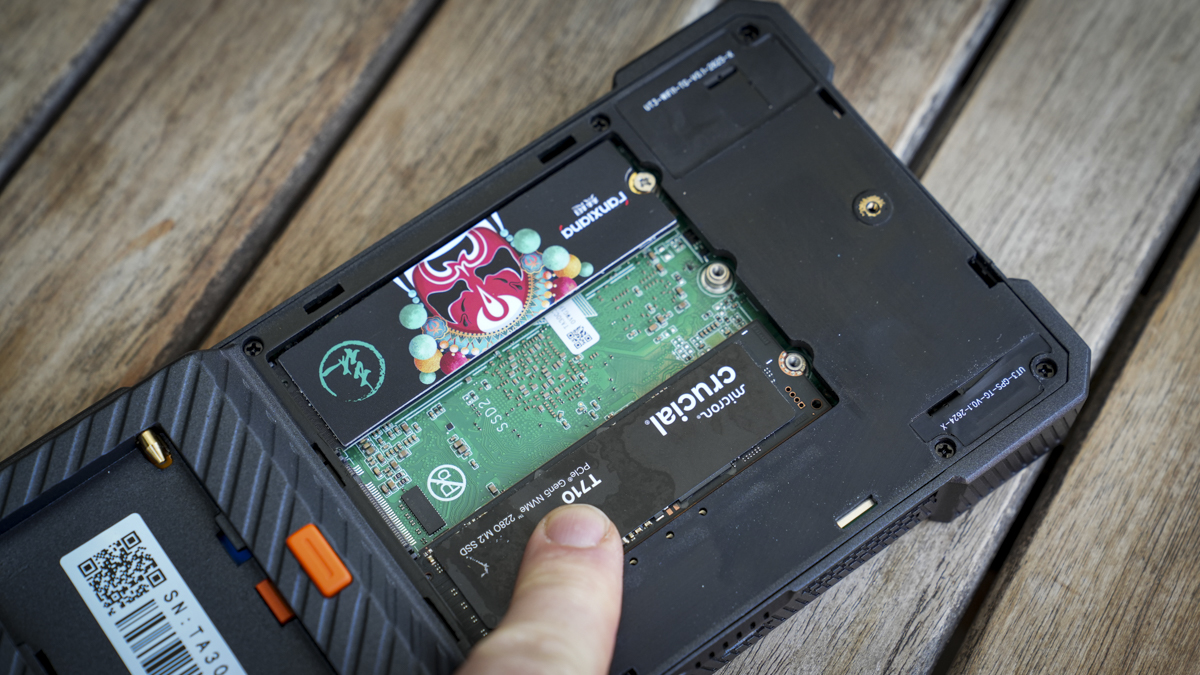
However, aside from build quality and a few workflow issues, this is a solid unit. What I really liked was that, while it comes with 256GB of internal storage ready to go, it’s in the form of an M.2 2280 module.
The internal storage can be upgraded, with three M.2 slots available and support for up to 8TB modules, potentially giving you up to 24TB of internal storage.
Since this is from UniDrive, it comes with UniDrive NAS software. It also has features like cloud backup, and it even has a LAN port on the back. Essentially, if you ask any photographer what they want for a backup solution on site and back in the studio, this small touchscreen box has it all.
Once the workflow issues are resolved, along with possibly slightly better build quality for the outer casing, this will be a must-have for many professional photographers or videographers.
PixelMob Portable AI Workstation: Price & availability

At present, the PixelMob has launched through Kickstarter as the PixelMob Portable AI Workstation for Creators. The full listing can be seen at Kickstarter here, while the official website is regularly updated with additional information here.
PixelMob Portable AI Workstation: Design & build

The PixelMob’s design and build look very outdoorsy. It looks like a tough tablet or oversized mobile phone, and the screen size sits somewhere in between at seven inches with an OLED screen.
It has a brightness of 1,100 nits, which is impressive, and it runs on Android, so it supports many Android apps. In fact, you can install apps from DJI and other manufacturers if you want to connect it to a drone, your mobile phone or even your camera.
What I also liked was that you can connect it directly to the Sony A7 IV; in my case, you can use it as a professional monitoring system, essentially as a second screen and as a way to back up full-resolution files to the device.
In terms of size and weight, it measures 104 x 195 x 25mm and weighs 550g, putting it somewhere between a large mobile phone and a small tablet.
A quick look around the body shows plenty of input options, including CFexpress Type B, which enables up to 800MB/s transfer speeds, SD, microSD, USB-A, and USB-C. On the side are another USB-C port and the power button.
On the top, there are two HDMI ports, one input and one output, another USB-C port and the LAN port. On the base, there’s a connector, and on the back there’s an NP-F mount so you can add standard NP-F batteries.
For memory, it comes with 12GB of LPDDR5 RAM and 256GB of internal storage. The internal SSD can be upgraded, and there are two additional M.2 slots so you can add up to three at 8TB a piece, for 24TB of internal storage in this one small unit.
Inside, an 11,600mAh battery powers the device and, under extreme loads, this will last two to three hours, or around six hours with lighter use. In standby mode, you’ll get over a week. Then, of course, you can plug in the NP-F battery for extended working time.
When I unpacked the PixelMob, I wasn’t so impressed by the overall design. It looked OK and had the same sort of look that you expect from a tough phone or tablet, but this just isn’t backed up by the build quality.
The slightly plasticky exterior feels a little cheap and not very robust. Through the test, the outer casing did stand up to life in my backpack, although I’ll admit to being a little more careful with it than I would usually be.
I also found a few other bits and pieces as I went around the build, such as access to the back panel where you can install additional drives. It felt a little light and was held in by just one crosshead screw. If you shake the device, it also has a rattle, which is from the power button area.
Most notably, the battery holder for an external NP-F battery wasn’t quite the right fit. Still, these issues detract from what is potentially an extraordinary piece of kit.
PixelMob Portable AI Workstation: Features

When I picked up the PixelMob, I was struck by the sheer volume of features available. Essentially, the main point is it’s designed to back up your camera storage media quickly while you’re on the move, then let you download everything to a machine or NAS as soon as you get home. But then it does more, enabling you to manage and edit the content, tether to a camera and even take control to capture different styles of images.
Thanks to the intelligent onboard software and its Android platform, it’s easy to adapt it to a professional workflow. Even if you’re a keen enthusiast, there’s plenty here to get everything organised.
So whether you’re a photographer, videographer or just somebody who needs to transfer and display data in various locations, the PixelMob is a superb option.
In terms of features, it has internal storage that lets you transfer data from cameras and other devices directly onto the unit. From there, you can edit and manage those files and assets. You can even use it as a media player with HDMI output to a larger screen.
The content you save to the device is managed by built-in AI that scans the files and offers smart subject recognition and other AI features for file organisation.
If you’re a photographer or videographer, you can use that large seven-inch screen to monitor your camera. You simply plug it in through HDMI, and you can use it as a link between your camera and larger monitoring and recording systems.
You can even use it for tethered shooting or as a video-review device. It includes a huge range of creative options that photographers and videographers will inevitably find useful.
In my testing, one of the best features for photography and video was the ability to get quick on-site previews, and I could store files on the device to edit them directly while out and about. Essentially, I had everything stored in one location that I could then use to start the file organisation.
For backups, all storage media I use is compatible with slots for CFexpress Type B cards from my Canon EOS R5 C. My two Sony A7 IVs both use CFexpress Type A, and with the adaptor, I could plug those into the CFexpress Type B port and back them up as well. It also has slots for SD UHS-II and microSD.
I could also plug in a USB-A 3.2 or USB-C device and download further data to the machine. The only issue is that the standard 256GB is quite small, so for this test I added an extra M.2 drive to expand storage by 1TB.
Inside, it has a relatively large internal battery which provides plenty of power for around two hours of heavy use. However, if you’re out and about with large cards, especially if you max out the internal storage, you’ll want a bit more battery power.
The great thing is that the company has decided to use the NP-F battery format, which is used by a huge amount of photography equipment, monitors, and other accessories. I have a stack of them in my kit bag, so they plug directly into the back of the unit, further extending battery power.
Essentially, that internal storage gives you an extra layer of protection, letting you back up all your storage media on a shoot and preview it. Where this one differs is that it also plugs directly into your camera and, with features like time-lapse video, star trails, HDR bracketing, focus bracketing, and panorama merging, gives you additional tools to use with your camera.
What’s more, you can back everything up to the cloud if and when you need.
So when it comes to features, this is one of the most feature-packed devices that I’ve ever looked at. Essentially, it looks like they’ve taken photographers’ full wish list and combined it into one small, handy-to-carry box.
PixelMob Portable AI Workstation: Performance

When the PixelMob Pro arrived, I was surprised to find its size and weight somewhere between a mobile phone and a tablet, as previous devices of this type, not going back to those made by Epson, are generally rather small.
However, this is a lot more involved and getting started was all easy, if slightly time-consuming. First, after fully charging the internal battery to 100%, I ran through the updates, making sure everything was on the latest version.
The first stage of updating took around 30 minutes. Once the main bulk of the Android and hardware firmware updates finished, there were further updates for the AI processing and many of the pre-installed apps. Altogether, getting everything completely up to date can take a long time.
The system is essentially based on Android, and it’s great to see that you can install many familiar apps if you want. As you drag left on the screen, for instance, it shows a list of standard apps. While the Play Store isn’t part of the system, if you click Apps and then Third Party, you’ll see a list of pre-approved apps that have been added for download and are fully compatible with the system.
These include DJI apps, Instagram, Adobe Lightroom, Pinterest and Snapseed, amongst others. Importantly for further testing, Sony’s Monitor & Control app is also available, which lets me control my Sony A7 IV.
Hopefully, as this system develops, we’ll see equal compatibility for Canon, Nikon, Panasonic, Fujifilm and others. Once you’ve applied all updates and restarted the system, you can start copying data to it or use the PixelMob Pro as a tethering device for your camera systems.
Before I went into the main review and checked out what it could do on the performance side, I also looked at the internal storage. As standard, it comes with 256GB; however, as I flipped open the back and removed the back panel that’s secured with a crosshead screw, I noticed two additional M.2 ports.
That means that if I removed the 256GB drive that was already in and replaced it with an 8TB option, then I could potentially have up to 24TB of internal storage, which is the same amount as my NAS drive that I use in the studio.
Potentially, I could have everything from my NAS, image-wise, on this device and still have room to back up images and video on every shoot I go on.
However, 8TB M.2 SSDs are hugely expensive, so for this test I just popped in a 1TB drive alongside the 256GB drive that was already installed.
I formatted it into the system using the UniDrive application, which I’ve used in the past for previous UniDrive products. It was extremely straightforward, and I was pleased to see the app has developed along with the workflow, which is now much easier to progress through than it was when I looked at UniDrive well over a year ago.
Once the drive format was complete, I was able to start downloading my files from CFexpress cards, SD cards, and microSD cards.
The cameras I used were the Canon EOS R5 C, using CFexpress Type B cards, and the Sony A7 IV, using CFexpress Type A cards with the adaptor supplied with the device.
With each, you take the card out of your camera, plug it into the side of the PixelMob Pro, and after around five seconds, the system recognises the card. A simple tap will then download it to the machine. However, as I found, before you do that on the first run, it’s important to set up a Lightbox.
One of the apps at the bottom of the screen is the Lightbox app. Essentially, tap it, click New, and add your new Lightbox. Once that’s done, you can simply click to import all of the files from your SD or CFexpress card directly to that folder, and then a few interesting things happen. First, the files transfer, then the internal AI processes them. This gives you a full set of auto-tagged options and highlights whether the file is JPEG or RAW.
Clicking the folder shows a thumbnail, and the rendering is exceptionally quick. To be honest, it’s faster than when I try to review stuff using Adobe Bridge. As you scroll through, you can see each file; once you find a picture you like, just tap it, and it’ll open.
If you’ve taken several images that are very similar, say you’ve taken three iterations of the same point, then it’ll recognise those images as a burst and group them. This makes scrolling through hundreds of images, which photographers often have to do, that much easier.
It also shows you similar files. If you’ve got lots of similar files, it also does face recognition, so if there are people you know, you can add them, as you do with many online photo applications.
As you go through the different functions and features, it’ll also show you images that are overexposed or underexposed. If you want, you can go into the AI settings and switch on options such as Basic Assist, Similar Photos, portrait detection (where you can upload specific people), bird recognition, and empty-scene detection, which are all exceptionally useful.
If you do have an image, you can select it and apply star ratings and flags, check the colour, or take it through to Cones, where you can start editing the image with the built-in image editor.
Again, it gives you plenty of options and control. With some of the larger JPEG files that I started to manipulate, it can be a little slower initially to load the image. Still, once you start applying filters, each filter and adjustment applies extremely quickly. For an on-the-move solution, it’s really very slick.
Alongside the more standard enhancement edits, there’s also a whole bunch of stacking edits. So if you’ve been out taking star trails, astro time-lapses, focus or exposure sequences, which you can all do tethered, Cones gives you all of the functions and features to edit those pictures within the confines of this small box, and that is very clever, especially with the touch screen.
Likewise, alongside Cones you also have Framebox, which is essentially a built-in video editor, but personally I downloaded CapCut and utilised that as it’s a much better application.
These applications are all exceptionally clever, and many enable either a wired or wireless connection to your mirrorless camera, which I found incredibly useful and well beyond anything I’ve used before. For the most part, I used the tethered connection to the Sony A7 IV, and the initial setup took a bit of to-and-fro, but was simple enough once the right options on the camera were selected.
Connecting with the Sony A7 IV, all I needed to do was click the option that I wanted from the Sequence modes, make sure that I had a USB-C cable connecting the Sony to the PixelMob Pro and, after a few seconds, with PC Remote switched on in the camera, I was then able to see a live-stream feed directly on the PixelMob from the camera.
With simulated long exposure, I could select the capture interval and simulated exposure, then click Next and start capture. It then ran through the sequence, capturing 30 images and triggering the camera for each one. While I’ve seen small devices that enable this sort of triggering, I haven’t seen anything quite as advanced work so seamlessly.
The resulting image combines all 30 pictures the camera takes. It processes them to create a simulated long-exposure shot, something you can normally only do with an ND or variable ND attached to your camera.
You can also go through to the standard tethered shooting modes. Open the Tether app, click the camera you want to connect, then select the Lightbox. Again, it’s a good idea to create a new Lightbox. Here, you don’t get the live feed from the camera. Instead, you use the camera tethered to the box, and every time you take a picture, it instantly appears on the device, saved and ready to review.
You can keep taking pictures, and they’ll download directly from the camera to the device’s internal storage. It’s an absolutely superb option for stills. However, when you switch your camera to video, that tethered option doesn’t work, and you’ll have to go back to the more normal monitoring option and to record video you switch to another application.
Video is handled by Deck. With this mode selected, essentially the entire device becomes a monitor for the camera. You’ve got your HDMI running from the camera straight into the device, and a simple record button lets you record directly onto the PixelMob. You can record at either 5, 10, 20, 30 or 50Mbps.
It’s not comparable with an Atomos Shinobi or Ninja, but it’s a great device for creators. You can even add LUTs for different colour-grading effects at the same time, making it a really flexible device.
Should you buy the PixelMob Portable AI Workstation?
Ultimately, the PixelMob is one of the most feature-packed devices that I’ve ever looked at for photographers, videographers and creators. It enables complete image management, but it goes well beyond storing image files and becomes a bigger part of your workflow.
You can use it for tethering, video recording and, obviously, organising, editing and sharing your video and image files while you’re out and about. It combines portable storage, AI-assisted organisation, tethered shooting, image editing and video monitoring in one compact device, and the ability to expand the internal storage makes it even more useful.
Some areas still need refinement. Some workflow issues mean you have to duck in and out of various apps, and while you can do a lot, some of them are a little simplistic in certain ways. CFexpress compatibility is also inconsistent, and the outer casing feels quite plasticky compared with the quality of everything else.
However, these applications are there to support your creative media, and what the PixelMob enables is far more than any other device that I’ve seen. The system’s flexibility and how well it fits into a professional creative workflow make it an extremely capable device and one that I will be using going forward.
Swipe to scroll horizontally
|
Value |
Packed feature set that goes well beyond most asset managers, but at a price. |
4 |
|
Design |
Practical design, but build needs refinement, especially the choice of plastics. |
3 |
|
Features |
Exceptional range of creative workflow tools with some small refinement needed. |
5 |
|
Performance |
Fast, with plenty of flexibility in its use from storage to capture. |
4.5 |
|
Overall |
One of the most exciting products for photographers available despite small build quality issues. |
4.5 |

Buy it if…
Don’t buy it if…

Sports10 seconds ago
Paddy Twomey 1-2 in Goffs Million with Tréan & Hi Corbett Court

Tech5 minutes ago
2026 midterms: Michigan Democratic candidate William Lawrence on data centers, climate, and more

Business7 minutes ago
Topaz Energy: Operator-Funded Reserve Renewal Supports The Premium





-

 Crypto World4 days ago
Goldman Sachs and Deutsche Bank Agree: The S&P 500 Rally Isn't Over
-

 Tech6 days ago
Researchers escape OpenAI Codex sandbox to run commands on host
-

 Fashion2 days ago
8 iPhone Accessories That Add Personality
-

 Crypto World6 days ago
Who Needs CLARITY Anyway? ARB Could See 70X Increase: Hodler’s Digest
-

 Tech7 days ago
Trump suggests rebranding AI with a new name, says he’s also creating an AI Force
-

 Entertainment4 days ago
These 17 Fall Amazon Dresses Seriously Look Like Anthropologie
-

 Business6 days ago
Analog Devices (ADI) Bets $1.35 Billion on Chips that Let Machines Think for Themselves
-

 Crypto World6 days ago
Coinbase, Robinhood, Circle Seen as Tokenized-Stock Winners
-

 Fashion1 day ago
Weekend Open Thread: J.McLaughlin – Corporette.com
-

 Crypto World4 days ago
This Bearish Netflix Stock Trade Can Cash In On Video Streaming Giant’s Woes
-

 Crypto World4 days ago
Trump-Xi Polymarket Odds for Handshake Hit 50%
-

 Tech5 days ago
Google’s $899 Googlebook is a bet that you’ll buy a new laptop for Gemini
-

 Crypto World3 days ago
Crude Oil Prices Pressured by Diplomatic Hopes in the Middle East
-
 Business4 days ago
Oil Price Today (September 23): Crude oil below $100 on hopes of US-Iran talks. What did Trump say?
-

 Crypto World3 days ago
Bitcoin price tests $83,600 Supertrend support after $87K rejection
-

 Crypto World3 days ago
Bitcoin Threatens Sub-$84,000 Breakdown as Long Liquidations Spike
-

 Crypto World5 days ago
Meta Jumps 11% As Muse Shines and Investors Show an Appetite for Advancing AI
-

 Crypto World4 days ago
Did Jim Cramer Just Give GameStop Stock the Kiss of Death When He Said the Turnaround Is Working?
-

 Crypto World5 days ago
Bitcoin price holds above $81K as key catalysts line up
-

 Crypto World6 days ago
ARB Price Signals Spur Speculation of 70x Upside in Hodler Digest
You must be logged in to post a comment Login