While there’s no denying the convenience of a TV, there’s just something about a projector that lends itself so well to recreating the feeling of a cinema at home, or having a more bespoke-feeling entertainment set-up in your bedroom. Thankfully, those who might be interested in taking the plunge will find an abundance of choice, and thanks to the diligent work of our tech experts, we know exactly which options are the best projectors to buy.
Much like with buying a TV however, it helps if you have a clear idea of what you plan on doing with a projector before you buy one. For example, if you are looking to go all in on building a home theatre then you’ll need top-shelf features like 4K resolution and a seriously high contrast ratio that can draw out all of the colours needed to give depth to a particular scene.
Alternatively, if you just want to have a more relaxed projector that’s easy to use and can be carried from room to room when needed, then a streamlined UI and a compact chassis will be the order of the day. There’s quite a lot to be aware of, but you don’t have to worry about being overwhelmed by any of it when you shop with the verified buying advice that our team has put together following hours upon hours of testing.
When a new projector comes to our offices, we set it up in our bespoke testing facility and run through everything from films on Netflix to gaming on a PS5 to get a solid idea as to how it performs during everyday use. We also use industry-standard benchmarking to test the brightness and contrast levels so you never have to rely on marketing jargon that companies love to flog alongside their products.
Advertisement
Our processes mean that we know exactly which are the best projectors for a bedroom and a home cinema, and we’ve made sure to include the very cream of the crop in this very list. If you decide that you’d rather buy a projector that’s better suited for the elements and simple to transport from one location to another then you’ll find exactly what you want in our round-up of the best portable projectors.
We test projectors by, well, watching lots of movies on them. But not just movies: we watch sports and TV programmes to get a sense of how they work in terms of motion, sharpness, detail and overall image fidelity.
Depending on the projector, we’ll test them in a bespoke home cinema room or in our own rooms and gardens to see if they live up to the manufacturer’s claims about their performance.
If it’s an HDR projector, we’ll watch plenty of HDR content to determine if colours are correct and whether the projector can do a decent approximation of HDR. If it’s a gaming projector we’ll test the latency to determine how responsive it is.
Advertisement
We’ll also assess the projector in terms of its size and whether it needs a dedicated installation, as well as how much noise it makes during operation and whether that can be a hindrance to watching content. Are they easy to use? And do they require more expert knowledge to operate are considerations we also take into account.
With our reviewers knowledge of previous projectors tested, they’ll be considered to what’s come before to determine whether they offer good value, regardless of how much or how little they cost.
Advertisement
Best overall
Sony Bravia Projector 9
Pros
Spectacular picture quality, especially with HDR
Outstanding image processing
Easy set up for such a high-end projector
Cons
It’s eye-wateringly expensive
More consistent black levels available elsewhere
No Dolby Vision or 3D support
Runner up
Sony Bravia Projector 7
Pros
Superb picture quality
Good enough for serious gaming
Quiet operation
Cons
Focus and image correction are manual only
Requires a fully dark room to shine
Menu text size is too small
Best gaming projector
BenQ X3100i
Pros
Bright and long-life LED light source
Good 4K HDR picture quality
Very low input lag for gaming
Cons
Android TV poorly implemented
No 4K/120Hz support
Possible rainbow artefacts
Best mid-range projector
Optoma UHZ68LV
Pros
Loads of lumens
Excellent connectivity
Superb colour reproduction
Cons
Slight DLP rainbow fringing could annoy
Black levels can’t quite match D-ILA and SXRD rivals
Size and weight really warrant ceiling mounting
Best ultra short-throw projector
Samsung Premiere 9
Pros
Triple-laser delivers bright and saturated images
Comprehensive smart platform
Sound quality is impressive
Excellent image accuracy
Cons
No built-in tuners
No Dolby Vision
Possible ‘rainbows’
Best affordable ultra short-throw projector
Hisense PL1
Pros
Excellent picture with SDR and HDR
Extensive smart features
Competitively priced
Cons
Limited brightness compared to competition
Only two HDMI inputs
No built-in tuner
Best portable projector
Epson EF-22N
Pros
Flexible design
Strong picture quality
Stylish looks
Cons
Sometimes slow performance
No iPlayer/Channel 4
Relatively weak speaker
Best affordable portable projector
Samsung Freestyle 2nd Gen (2023)
Pros
Hassle-free big screen images
Surprisingly good sound
Extensive streaming apps
Good for casual gaming
Cons
Limited to Full HD resolution
Possibility of seeing rainbows
Best compact projector
BenQ GV50
Pros
Portable battery-powered convenience
Google TV smart platform
Long lasting laser light source
Cons
Not bright enough for daylight use
Battery only lasts around 2.5 hours
Token HDR support
Best-looking projector
Dangbei Freedo
Pros
Very portable
Generally picture quality
Premium looks
Cons
Not the longest battery life
Doesn’t have the brightest picture
Google TV lacks major UK services, like BBC and Channel 4
Best JVC projector
JVC DLA-NZ700
Pros
Impressive HDR performance
Sharp and detailed images
Excellent contrast ratios
Cons
No low latency mode
No 4K/120Hz support
No 3D support
Best ViewSonic projector
ViewSonic LX700-4K
Pros
Bright and punchy HDR
Excellent motion handling
Extremely low input lag
Cons
Poor native black levels
Wide colour gamut limited
Possibility of rainbows
Best high-end projector
JVC DLA-NZ900
Pros
Fantastically sharp and detailed images
Superb black level and contrast ratio
Exceptional dynamic tone mapping
Cons
Represents a significant investment
It’s very large and heavy
Sony Bravia Projector 9
Best overall
Trusted Score
Advertisement
Pros
Spectacular picture quality, especially with HDR
Outstanding image processing
Easy set up for such a high-end projector
Cons
It’s eye-wateringly expensive
More consistent black levels available elsewhere
No Dolby Vision or 3D support
Sony has long been one of the go-to names in the world of home theatres, but never has that brand appeal felt more fitting than with the Sony Bravia Projector 9 – this is a true beast of a machine that builds upon the outstanding feature set of its predecessors, but kicks things up a notch in all of the key areas you’d want to see. So long as your budget can match it, there is no better projector right now.
In terms of the raw image, you’re getting a crisp 4K resolution that really goes above and beyond in making the latest films and TV shows look their very best. The image is made even better thanks to the Sony XR for Projector chipset which is able to deliver a billion colour tones and, from our testing, can cover 95% of the DCI-P3 colour spectrum. This means that you’ll be getting an image that pops with colour, exactly what you want in a darkened cinema room.
Advertisement
That chipset also does an incredible job when it comes to upscaling content that sits below the 4K threshold, so if you want to catch a bit of classic Hollywood or even chuck on some home movies of holidays past, you can do so and still enjoy them as if they had been shot with more modern cameras. Visual fidelity isn’t the only selling point here as the Projector 9 is a far more capable gaming machine than its predecessor.
There’s now support for 4K gaming at 120Hz which is a big win for anyone playing the on latest high-end consoles who wants an unparalleled experience. With that kind of speed in tow, fast paced titles like Forza Horizon 5 or Hades 2 just feel even more immersive to the point where it’ll have you wondering how you ever made do with 60Hz.
Input lag is also incredibly low so you won’t have to worry about feeling disconnected from the action during a frenetic online match. As a final point worth noting, the Projector 9 is very easy to set up so if this is your first projector of any kind then you won’t have to worry about getting bogged down by a complicated installation that could otherwise hamper your enjoyment.
Advertisement
Sony Bravia Projector 7
Runner up
Trusted Score
Advertisement
Pros
Superb picture quality
Good enough for serious gaming
Quiet operation
Cons
Focus and image correction are manual only
Requires a fully dark room to shine
Menu text size is too small
As much as we love the Sony Bravia 9 Projector and would still recommend that to anyone who has a fairly sizeable budget in tow, there’s no denying that the next option down is also a spectacular feat of engineering. Available for slightly less than its full-fat sibling, the Sony Bravia 7 Projector is an impressive piece of kit.
Although it’s not quite as expensive as the Bravia 9, the Bravia 7 Projector still boasts the same 4K resolution which is a big win on value for money, and as ever it means that you’re getting a level of quality that really elevates the experience of kicking back and catching your favourite films. It’s hard to quantify but when you see it for yourself, the idea of ever going back to 1080p seems preposterous.
Advertisement
Helping to give the image quality an extra boost is the 2200-lumen laser light engine which is wonderfully bright and paves the way for some outstanding colour contrast, although there’s also one of Sony’s XR Processor Projector chipsets on board which can handle the upscaling process of old content with ease. Even things you’ve shot on an old camcorder can have a new lease of life here.
Just like with the pricier Bravia option, gaming performance here is top-notch. You’re also getting a 120Hz refresh rate which is just begging for a high-end PC or something like the PS5 Pro to make the most of. What’s surprising is that with all of this tech built into the Bravia 7 Projector it still manages to run at a fairly silent level, so you won’t have to crank up the volume in order to drown out the noise of internal fans at work.
Depending on the type of content you want to watch, it’s possible to quickly swap between a standard 16:9 ratio and a 2.35:1 alternative which is better suited for films shot in IMAX. The main allure of opting for the Bravia 9 is the higher 3400 lumens count for a brighter image, but given what you’re getting with the Bravia 7, it’s hard to imagine anyone feeling hard done by except for home theatre purists.
Advertisement
BenQ X3100i
Best gaming projector
Trusted Score
Advertisement
Pros
Bright and long-life LED light source
Good 4K HDR picture quality
Very low input lag for gaming
Cons
Android TV poorly implemented
No 4K/120Hz support
Possible rainbow artefacts
Looking for a projector that’s explicity for gaming? BenQ’s X3100i is what you’re looking for with its solid 4K HDR picture and low input lag.
There’s a range of gaming features available with multiple modes with low input, 1080p/120Hz support, an FPS Crosshair feature and BenQ’s SettingXchange, which allows you to import custom gaming modes and colour parameters that have been created by experts and professional gamers. We measured input lag at an impressively low 16ms, and at 1080p/240Hz that figure falls to 4ms.
Advertisement
The picture puts in a bright, colourful and punchy performance. At its maximum output, the X3100i offers 3300 ANSI lumens of brightness (cinema mode reduces it to 2000 ANSI lumens). Black levels are more grey than black, but the performance we see with the X300G is consistent with other single chip DLP projectors, so contrast doesn’t deliver on what BenQ claims the projector does out of the box. Motion handling is superb, and overall, its wide colour performance and brightness makes up for its lack of deep blacks.
The sound system is pretty good for more casual viewing, but the 2.1 channel system (device Bon Jovi’s cousin) doesn’t have the scale or power to create a soundstage that complements its big screen images. They can’t go too loud without starting to distort.
Advertisement
Optoma UHZ68LV
Best mid-range projector
Trusted Score
Pros
Advertisement
Loads of lumens
Excellent connectivity
Superb colour reproduction
Cons
Slight DLP rainbow fringing could annoy
Black levels can’t quite match D-ILA and SXRD rivals
Size and weight really warrant ceiling mounting
You know as well as we do that if you’re serious about building a true home entertainment system for films, games and TV shows that’s built around one truly outstanding projector, then you’re not going to skimp on your investment. Case in point, a price tag of £3999/$5999 is likely to deter some buyers, but for those who value the finer things in life, the Optoma UHZ68LV is worth every penny.
Just look at the UHZ68LV and you can tell that this is a projector that does not mess around, something that’s only confirmed once you switch it on and see the unbelievable brightness that’s achieved by its dual laser light engine. Colours end up being so right from the brightness available that even if you have plenty of natural light seeping in from a nearby window, you’ll still get a good view of what’s on.
What really helps is the PureEngine Ultra processor working tirelessly under the hood to optimise what’s being shown at all times. This ensures that whether you’re watching an old Hollywood classic or a new must-see show, you won’t be missing out on any of the included details that the filmmakers want you to see.
Advertisement
While the projector can easily please the home theatre crowd, it also works brilliantly well when it comes to gaming. The combined metrics of 4K resolution running at 120Hz, along with super-low latency to prevent input lag, all go above and beyond to create an immersive experience like no other. It’s exactly the type of projector you’d want for detailed and paced titles like Forza Horizon 5 or Returnal.
There are three HDMI ports (one of which is HDMI 2.1) so you have more than enough room to plug in a games console, streaming stick and a soundbar if needed, although we found the audio clarity to be quite good by default. Plus, with the twin lasers having a lifespan of up to 30,000 hours, you won’t need to upgrade to a different projector until long into the future.
Advertisement
Samsung Premiere 9
Best ultra short-throw projector
Trusted Score
Pros
Advertisement
Triple-laser delivers bright and saturated images
Comprehensive smart platform
Sound quality is impressive
Excellent image accuracy
Cons
No built-in tuners
No Dolby Vision
Possible ‘rainbows’
The Samsung Premiere 9 is an ultra short-throw laser with smart features make it more accommodating and accessible to those looking to ditch the TV and get an even bigger screen experience.
As an ultra short throw projector it can be placed close to a wall for the space conscious, and while it’s large for a projector, aesthetically its soft rounded corners and white colour can see it disappear in the right room.
It doesn’t come with a built-in tuner like the LS9PT predecessor did, which is disappointing, but it would appear that Samsung is putting the emphasis on its Tizen interface with the likes Netflix, Prime Video and iPlayer, as well as its free-to-access TV Plus service. HDR support equals HDR10, HLG, and HDR10+. Once again for a Samsung product, Dolby Vision is noticeable by its omission.
Advertisement
With 3450 ISO lumens of brightness, the Premiere 9 delivers big, bright images with both SDR and HDR content. Blacks can, however, be more of a dark grey, but the real impressive aspect about the Premiere 9 is the range and variety of colours that it can display. Motion handling is also superb, delivering smooth movement when it is activated.
Hisense PL1
Best affordable ultra short-throw projector
Trusted Score
Advertisement
Pros
Excellent picture with SDR and HDR
Extensive smart features
Competitively priced
Cons
Advertisement
Limited brightness compared to competition
Only two HDMI inputs
No built-in tuner
Not everyone can afford the Samsung Premiere 9, which commands a price of £5999. In which case, if you’re looking for a TV replacement in the form of a projector, the Hisense PL1 is a more affordable option at less than £1999.
We found its design less intrusive than a TV as it can sit in front of a wall, and a screen up to 100-inches possible would be our recommendation. It’s much more convenient than a long-throw projector like the similarly priced BenQ W270i, as we found you could use the Hisense in a relatively small room.
We were impressed by the picture quality of the PL1. Packing 2100 lumens of brightness, it’s not the brightest UST and so for the best performance we would recommend that you draw the curtains for a proper cinema experience.
HDR support includes HDR10, HLG, HDR10+ and Dolby Vision; the latter helps the projector deliver a sharp image, with excellent colour vibrancy and motion handling. While projectors can’t match TVs for HDR output, we found the PL1 gives it a good go. It can’t manage deep blacks, reaching dark grey instead but for most dark content, the PL1 should look fine.
Advertisement
The system’s stereo sound system is serviceable enough for news but anything more challenging and you should consider adding additional speakers.
Epson EF-22N
Best portable projector
Trusted Score
Advertisement
Pros
Flexible design
Strong picture quality
Stylish looks
Cons
Advertisement
Sometimes slow performance
No iPlayer/Channel 4
Relatively weak speaker
As the market surrounding the best portable projectors continues to open up, we’ve seen more standout devices in this category over the last few years, but at the time of writing it’s the Epson EF-22N that shows just how far these miniature entertainment hubs have come.
Aside from its smaller stature, what helps the EF-22N’s portability, particularly when needed to be used in the great outdoors, is the 360-degree swivel base that makes it incredibly easy to find the right level of framing without needing to constantly move the projector from place to place. The charging port is also conveniently located in the base of the device, so the power cable won’t get tangled up as the projector moves.
When it is set up, you can enjoy all of the smart features and apps that Google TV has to offer on the Epson EF-22N. This includes access to key streaming services like Netflix and Disney Plus, although irritatingly we were unable to access iPlayer or Channel 4 due to licensing issues. Still, there’s plenty on offer here and it’s handy to know that you don’t need to throw an extra device like the Fire TV Stick 4K Max into the mix.
In spite of its portable ambitions, the Epson EF-22N is still able to reach some impressively high levels of brightness, up to 1000 ISO lumens to be exact. At that level, it’s easy to make out plenty of detail in whatever it is that you’re watching. Even in darker scenes, the visuals never became muddy in our testing, so you’ll never be taken out of the immersion due to lacklustre visual quality.
Advertisement
While the Samsung Freestyle is still a better portable option for those tied to a budget, we can’t recommend the Epson EF-22N enough if you have the money to spend.
Like the Freestyle 2019 version, this new model looks not unlike Luxor Jr. of Pixar fame, dressed in a white finish with its cylindrical shape and adjustable stand. Like before, the stand can be adjusted from 90 to 180 degrees, allowing for an image to be projected on a wall or even the ceiling.
It’s in the features area where the new Freestyle begins to diverge from the old Freestyle. There’s support 21:9 for screen ratios as well as Samsung’s Gaming Hub for cloud gaming. The Smart Edge Blending combines the images of two Freestyles into, a image we found to be even bigger and brighter than using one by itself. It also increases the minimum screen size from 100-inches to 130-inches that allows users to get the full benefit of the 21:9 ratio.
The micro-HDMI input can accept HDR signals and supports ARC for adding a soundbar. There’s a USB-C port for connecting to the power adapter or connecting the projector to an external battery. Its wireless support includes Wi-Fi 5, Bluetooth 5.3 and Apple AirPlay 2. Wi-Fi offers access to the Tizen-powered smart platform where you can find streaming apps such as Disney+, Netflix, and Apple TV+.
Advertisement
There’s built-in Bixby and Alexa voice assistance along with SmartThings support, which like before is an app that we found makes set-up and installation very simple. The Smart Calibration feature allows images to be calibrated with a smartphone, accurately compensating for colours if you’re watching on a non-white coloured wall or surface.
Our reviewer measured the amount of the noise the projector produced from two feet away, and found it matched the original with only 25dB of noise. In general we found picture quality to be very good with images that look clean and detailed, and though the projector is limited to 1080p resolution, we did not see any distracting image artifacts when the projector downscales content from 4K.
It is slightly brighter than the original at 550 lumens, which is not as bright as the Yaber K2S‘ 800 ANSI lumens, but we found its tone mapping to be very good, producing HDR images with plenty of pop. Unfortunately, the Freestyle 2023 does suffer from limitations such as weak blacks, contrast and possible colour fringing (rainbow effect) for some people.
It’s a decent option for gaming with a 40ms gaming lag (better than the original), and the built-in speaker system spreads audio in all directions, and we found it could go loud without distorting or losing its composure.
Advertisement
The new Freestyle takes what made the original good and adds a few more useful features and refines the overall performance. This is a fun, hassle-free smart projector that’s easy to use for big screen viewing in your home. The original Freestyle is still available at around £499, though the Samsung has recently reduced the price of the new model to £699.
BenQ GV50
Best compact projector
Trusted Score
Advertisement
Pros
Portable battery-powered convenience
Google TV smart platform
Long lasting laser light source
Cons
Advertisement
Not bright enough for daylight use
Battery only lasts around 2.5 hours
Token HDR support
As tempting as it can be to have a full-on projector that remains stationary for the purpose of building a home cinema, if you have lifestyle that’s a bit more on the go, or you like to enjoy entertainment in different rooms of your abode, then a portable projector makes a lot more sense. There are plenty of great options out there but one of the absolute best that we’ve tested is the BenQ GV50.
With a built-in handle, the GV50 is meant to be carried around, so if you fancy moving a film from the living room to the bedroom then you absolutely have the freedom to do so here. Similarly, if you want to have a more cinematic experience in your gaming room, when the projector isn’t in use for movie night, you can always hook up the GV50 to your console of choice and enjoy a massive screen for your next playthrough.
You’re getting crisp, 1080p video from this projector, which does a great job at unearthing the finer details in all types of entertainment. You don’t even have to worry about the longevity of the device as it uses a laser light engine, pacing the way for a full 30,000-hour lifespan. In terms of battery life, you can get up to 150-minutes of use on a single charge, which is more than enough for most blockbuster films.
One of the best things about this projector is that it comes with Google TV built-in as its default operating system. If you haven’t yet experienced the joys of Google TV, simply know that it does a great job at centralising all of the content that’s available to you via your various subscriptions, and it gives you a quicker means of diving back into any films or TV shows that you’re currently watching.
Advertisement
Far too often with portable projectors, the speaker quality can take a hit in order to keep things compact, but this issue does not exist with the GV50. With a 2.1 speaker configuration, we were surprised not just by how clear the audio was, with plenty of attention paid to dialogue, but also its ability to get quite loud without losing that fidelity.
Dangbei Freedo
Best-looking projector
Trusted Score
Advertisement
Pros
Very portable
Generally picture quality
Premium looks
Cons
Advertisement
Not the longest battery life
Doesn’t have the brightest picture
Google TV lacks major UK services, like BBC and Channel 4
Usually, whenever you shop around the budget-end of the market (and this goes for all products, not just projectors), there’s an implicit understanding that you may be getting a couple of key features that are crucial to the visual experience, but the design and build quality won’t be turning heads compared to pricier options. Well, it seems like the Danbei Freedo didn’t get the memo on that one.
Despite its comparatively affordable price tag of £449, the Freedo boasts a wonderfully sleek aesthetic that makes it resemble a podcast microphone when in use or a smart speaker when packed away. Given that one of the nicer aspects of owning a projector is that you don’t have to look at a blank black box when it’s switched off, it’s nice to also have it fit seamlessly with your decor when you would rather just read or listen to music.
Of course, because the Freedo is such a small projector, and it has a built-in battery, you can easily move it from room to room – great for watching shows in the bedroom – or take it with you to the great outdoors and enjoy a film under the stars during your next camping trip. It doesn’t have to be a short flick either, thanks to a runtime of up to 2.5 hours on a single charge.
Shifting over to the picture quality, there’s plenty to love about this portable projector. With a crisp 1080p resolution, you can pick up on plenty of detail in just about anything you plan on watching, and the peak brightness of up to 500 lumens also goes a long way to ensuring that you’re never squinting at what’s happening. There’s a nice degree of contrast too, so you can really feel the depth of the setting, whether that be a real location or a CGI-constructed world.
Advertisement
When it comes to deciding what to watch, the use of Google TV as the projector’s operating system is a big win. Google TV does a great job of offering up quick access to all of your favourite apps, alongside an eye-catching carousel of new content that might take your fancy. There’s a lot to love here, and the projector is certainly a go-to option for anyone who appreciates style and portability in equal measure.
JVC DLA-NZ700
Best JVC projector
Trusted Score
Advertisement
Pros
Impressive HDR performance
Sharp and detailed images
Excellent contrast ratios
Cons
Advertisement
No low latency mode
No 4K/120Hz support
No 3D support
JVC has quite a few projectors available so to simplify things a bit, just know that the JVC DLA-NZ700 is designed for the enthusiast crowd who might be shopping with a mid-range budget (comparatively speaking). Even though this isn’t the most high-end projector within JVC’s range, you’d be hard pressed to find fault with it once you switch the thing on. The type of image quality you can get with this projector is just stunning.
What really sets the NZ700 apart from so many of the other projector we’ve tested over the years is its HDR performance. Thanks to its Gen2 Frame Adapt HDR feature, the NZ700 is able to analyse every scene frame by frame to make sure that each one is optimised to the fullest, so you’re always treated to a rich and vibrant image that’ll have you absorbed completely.
Complementing that HDR processing is the fact that this is a native 4K projector, so there’s tons of detail to go with every image you see. This is brilliant for animated films where there are tons of fun details to find in the periphery, and it’ll make any future movie nights with the kids feel like a true trip to the cinema from home.
If you don’t have a cinema room that’s fully blacked out with no external light creeping in then fear not as the powerful BLU-Escent laser diode is able to reach a peak brightness of 2300 lumens, which almost makes it feel as if you’re getting the same experience that you would through a traditional backlit television.
Advertisement
In fact, the NZ700 also does a great job in more dimly lit scenes courtesy of an 80,000:1 contrast ratio, which can go a long way towards making horror films feel even more immersive. If things do get a bit too tense however, you can quickly pause a film with the backlit remote that’s bundled in.
ViewSonic LX700-4K
Best ViewSonic projector
Trusted Score
Advertisement
Pros
Bright and punchy HDR
Excellent motion handling
Extremely low input lag
Cons
Advertisement
Poor native black levels
Wide colour gamut limited
Possibility of rainbows
If you know next to nothing about projectors but you’re looking to buy one that features high-end features and an easy-to-understand set-up process that makes the installation of a home theatre as simple as possible, then the ViewSonic LX700-4K is definitely the option for you.
On the quality front, there’s very little here to leave you wanting. The LX700-4K, as its name implies, is able to output content at a 4K resolution, so there’s no detail lost when enjoying the latest films and TV shows, plus the HDR performance kicks it up to a whole other level.
With support for HDR10 and HLG, this projector is able to emit a jaw-dropping image at all areas of the screen. This is brilliant if you’re enjoying an animated film with the family as younger viewers will marvel over the vibrant colours found in these fictional worlds. Part of this is achieved thanks to a super bright 3500 ANSI lumens, which still lasts for a whopping 30,000-hour lifespan for tons of entertainment.
As mentioned, the LX700-4K is one of the easier projectors to set up, partially due to the intuitive remote that comes with the device. You have instant controls for zooming and focusing the image, so it doesn’t take a great deal of work to find the point that works best for your screening room.
Advertisement
If you also like to mix things up with a bit of gaming then you’ll appreciate the smooth motion handling which keeps you locked in with every step of the action. The incredibly low latency also works in tandem with fast-paced titles like first-person shooters, so you’ll never be at a disadvantage when playing online.
JVC DLA-NZ900
Best high-end projector
Trusted Score
Advertisement
Pros
Fantastically sharp and detailed images
Superb black level and contrast ratio
Exceptional dynamic tone mapping
Cons
Advertisement
Represents a significant investment
It’s very large and heavy
There’s no way around it, at £24,999/$25,999 the JVC DLA-NZ900 is a sizeable investment and one that’s really meant for the true home theatre aficionados out there who obsess over the tiniest details and really getting that cinema style experience from the comfort of their living room or dedicated cinema room. If your budget does stretch to cover it however then you will not be disappointed.
In terms of resolution, you’re definitely future proofed with the NZ900 as it can support 8K at 60Hz and a faster 120Hz refresh rate when outputting at 4K. With these resolutions available, you’re getting the best of both worlds when it comes to both film and gaming.
The ability to output at 8K means that even older, classic Hollywood films can appear at their best, making it feel as it you’ve gone back in time to watch them when they first appeared onscreen, while the super fast 120Hz refresh rate is just the ticket for high-speed games like Forza Horizon 5 or Marvel Rivals.
If you’ve ever bought at the lower end of the projector market then you’ll know that brightness can sometimes be an issue, but the NZ900 has no such problem. JVC’s BLU-Escent laser diode can crank up the brightness to 3300 lumens which is just mind-blowing, and ends up being a true visual feast for the eyes.
Advertisement
Even with such high levels of brightness to hand, the NZ900 can still deliver on the lower end with a contrast ratio of 150,000:1. That type of performance is just on a whole other level, producing truly inky blacks that give so much depth to every single frame. Trust us when we say that this is a level of cinematic luxury like no other.
FAQs
Is a projector better than a TV?
Advertisement
In some ways, a projector is better than a TV, but it depends on what you want. If you’re after a big viewing experience, then projectors deliver an image much bigger than any TV can. However, TVs can go brighter, have a wider range of features and can operate in both bright and dark living room conditions. Not all projectors are bright enough to handle ambient light in bright rooms.
Advertisement
Test Data
Sony Bravia Projector 9
Sony Bravia Projector 7
BenQ X3100i
Optoma UHZ68LV
Samsung Premiere 9
Hisense PL1
Epson EF-22N
Samsung Freestyle 2nd Gen (2023)
BenQ GV50
Dangbei Freedo
JVC DLA-NZ700
ViewSonic LX700-4K
JVC DLA-NZ900
Input lag (ms)
–
–
16 ms
–
–
–
–
–
–
–
51 ms
–
–
Full Specs
Sony Bravia Projector 9 Review
Sony Bravia Projector 7 Review
BenQ X3100i Review
Optoma UHZ68LV Review
Samsung Premiere 9 Review
Hisense PL1 Review
Epson EF-22N Review
Samsung Freestyle 2nd Gen (2023) Review
BenQ GV50 Review
Dangbei Freedo Review
JVC DLA-NZ700 Review
ViewSonic LX700-4K Review
JVC DLA-NZ900 Review
UK RRP
£25999
£6999
£1949
£3999
£5999
£1349
£999.99
£699
£629
£429
£9499
£1199
£24999
USA RRP
$31999
$9999
$2199
$5999
–
$1999
$999.99
–
–
$549
$8999
$1599
$25999
EU RRP
€25999
–
€2599
–
–
€1499
€999.99
–
–
–
€8999
€1699
€25999
AUD RRP
–
AU$13999
AU$3199
–
–
AU$2995
–
–
–
–
AU$14999
AU$1999
AU$40999
Manufacturer
Sony
Sony
BenQ
Optoma
Samsung
Hisense
Epson
Samsung
BenQ
Dangbei
JVC
ViewSonic
JVC
Size (Dimensions)
x x INCHES
460 x 1472 x 200 MM
272 x 259 x 213 MM
498 x 171 x 331 MM
550 x 384 x 141 MM
531 x 335 x 120 MM
236 x 191 x 193 MM
104 x 95 x 173 MM
130 x 191 x 211 INCHES
109 x 131 x 239 MM
450 x 479 x 180 MM
286 x 216 x 129 MM
500 x 528 x 234 MM
Weight
14 KG
13 KG
6.8 KG
9.2 KG
11.6 KG
8.5 KG
3 KG
0.8 KG
2.1 KG
1.4 KG
15.2 KG
3.3 KG
25 KG
ASIN
–
B0F8WV3HMH
B0CMHBJ7W3
–
–
–
B0DHYB315G
–
B0DL9HH3VR
B0DM8X8L1P
–
B0CHF5CTTW
–
Release Date
2024
2025
2024
2025
2024
2023
2024
2023
2024
2024
2024
2024
2024
Model Number
–
–
X3100i
–
SP-LPU9DS
PL1TUKSE
–
–
–
–
DLA-NZ700
LX700-4K
DLA-NZ900
Model Variants
–
–
–
–
–
–
EF-22N
–
–
–
–
–
–
Resolution
3840 x 2160
3840 x 2160
3840 x 2160
3840 x 2160
3840 x 2160
3840 x 2160
1920 x 1080
1920 x 1080
1920 x 1080
1920 x 1080
4096 x 2160
3840 x 2160
x 2160
Projector Type
SXRD
SXRD
DLP projector
DLP projector
DLP projector
Ultra Short-throw
Portable
DLP projector
Portable
DLP projector
–
DLP projector
D-ILA
Brightness Lumens
3400
2200
3300
5000
3450
2100
1000
550
500
450
2300
3000
3300
Lamp Life
20,000
20000
30000 hours claimed
30,000
20,000 hours
25,000 hours
20,000
30,000 hours
20000
–
20,000
20,000
20000
Contrast Ratio
350,000:1 (dynamic)
Infinity:1
600,000:1 dynamic
3,200,000:1
1,500:1
3000:1
5,000,000 :1
–
1000,000:1
–
80,000:1 (Native)
3,000,000:1
150,000:1 (Native)
Max Image Size
300 inches
300 inches
150 inches
300 inches
130 inches
120 inches
150 inches
100 inches
120 inches
180 inches
200 inches
300 inches
300 inches
HDR
Yes
Yes
Yes
Yes
Yes
Yes
Yes
Yes
Yes
Yes
Yes
Yes
Yes
Types of HDR
HDR10, HLG
HDR10, HLG
HDR10 and HLG
HDR10, HLG, Dolby Vision, HDR10+
HDR10, HLG, HDR10+
HDR10, HLG, HDR10+, Dolby Vision
HDR10
HDR10, HLG, HDR10+
HDR10, HLG
HDR10, HLG
HDR10, HLG, HDR10+
HDR10, HLG
HDR10, HLG, HDR10+
Refresh Rate
120 Hz
120 Hz
240 Hz
240 Hz
120 Hz
60 Hz
240 Hz
60 Hz
–
60 Hz
60 Hz
240 Hz
120 Hz
Ports
2 x HDMI 2.1
2 x HDMI
2 x HDMI 2.0b
Three HDMI, Digital optical Audio Output, 3.5mm minijack
3 x HDMI 2.0
1 x HDMI 2.1; 1 x HDMI 2.0
USB 2.0-A, USB 2.0 Mini-B, Jack plug out, HDMI ARC, HDMI (HDCP 2.3)
The vacuum failed to clean up two of the three test Cheerios that I strategically placed around my main floor to see which nooks and crannies it could reach. Both had small overhangs (one was an Ikea Billy bookshelf and the other a freestanding cabinet) that the Spot+Scrub couldn’t get under. It doesn’t have an extendable arm to help fix the issue.
I ran into a similar issue upstairs. My bathroom cabinets are the same basic builder-grade set as my downstairs kitchen, but the Spot+Scrub managed to wedge itself underneath my primary bathroom cabinets and then struggled to remove itself. It did the same thing with my low bed frame, forcing itself underneath after many attempts, and then it couldn’t get out. I marked the bed as a no-cleaning zone in the app, but, like the kitchen island, since the Dyson map doesn’t know where my bed is, I had to guesstimate, leaving a good portion of the bedroom without any vacuuming.
Photograph: Nena Farrell
Still, it did a good job of cleaning my upstairs carpet. While this robot vacuum can map multiple floors, the operation wasn’t as completely smooth as I had hoped. When the Spot+Scrub finishes cleaning on a floor without a base station, it’ll return to the starting position. Once you move it to the dock, it’ll just start charging without emptying. That means when it goes to work on my main floor, the mop pad isn’t cleaned, dry debris is still left in the vacuum, and the dirty water chamber isn’t dried. It’s almost like it resets itself, forgetting its last function.
Advertisement
So if you’re using it on multiple floors, save the one with the docking station for last. I ended up having the Spot+Scrub clean my main floor after the upstairs, just to make sure the vacuum would be fully emptied and dried. You also have to activate the cleaning function while the robot is still in its docking station, so it can prep for mopping, then pause the cleaning (you can do this in the Dyson app or on the vacuum itself) once it rolls out of the docking station to then lift and move it to another floor.
AI Wars
Photograph: Nena Farrell
Of course, there’s the feature this vacuum is named for: its built-in AI that spots stains and scrubs them away. The Spot+Scrub uses an HD camera to inspect the floors, then uses AI to analyze what it sees and know when to scrub trouble spots. It’ll go back and forth over those spots, and the AI will calculate how often it needs to do so to remove the stain.
alternative_right quotes a report from the New York Post: The CIA used a futuristic new tool called “Ghost Murmur” to find and rescue the second American airman who was shot down in southern Iran, The Post has learned. The secret technology uses long-range quantum magnetometry to find the electromagnetic fingerprint of a human heartbeat and pairs the data with artificial intelligence software to isolate the signature from background noise, two sources close to the breakthrough said. It was the tool’s first use in the field by the spy agency — and was alluded to Monday afternoon by President Trump and CIA Director John Ratcliffe at a White House briefing. “It’s like hearing a voice in a stadium, except the stadium is a thousand square miles of desert,” a source briefed on the program told The Post. “In the right conditions, if your heart is beating, we will find you.” The relatively barren landscape made for “an ideal first operational use” of Ghost Murmur, the first source noted.
“Normally this signal is so weak that it can only be measured in a hospital setting with sensors pressed nearly against the chest,” the source said. “But advances in a field known as quantum magnetometry — specifically sensors built around microscopic defects in synthetic diamonds — have apparently made it possible to detect these signals at dramatically greater distances.”
“The capability is not omniscient. It works best in remote, low-clutter environments and requires significant processing time,” this person added.
OnePlus has been everywhere in the news lately, and not always for the calmest reasons. Reports recently suggested the brand was pulling back from several major markets, right after the exit of its India CEO, which is a pretty big deal considering how important India is for the company. And yet, here it is, doing the exact opposite of slowing down.
Just this month, OnePlus dropped the Nord 6, and now fresh reports hint that it’s stepping into the handheld gaming space as well. It’s an interesting move, especially in a year that already feels like a turning point for the brand. If anything, this new direction makes it clear that OnePlus isn’t retreating, it’s reshuffling and trying something bold.
OnePlus just teased something that refuses to be boring
A well-known tipster, Digital Chat Station, has shared what appears to be the first look at OnePlus’s upcoming gaming handheld on Weibo. And from that single image, there’s already quite a bit to unpack. The device seems to lean into a clean, almost boxy design, with a square-ish profile that makes it stand out from the usual rounded handhelds. Interestingly, there’s also a rear camera module on the back panel, which adds a bit of curiosity to the mix.
Digital Chat Station on Weibo
Another tipster, Bald Panda, also on Weibo, claims the handheld could feature an 8-inch display and run on a MediaTek Dimensity chipset. While the exact processor hasn’t been confirmed yet, all signs point towards MediaTek being the brains behind it. As for the design, it’s got a sleek black finish paired with a contrasting purple hand rest, which honestly sounds like a bit of a flex. It gives the device a premium, slightly playful look, rather than going all-in on the usual serious gamer aesthetic.
I’m genuinely excited to see OnePlus step into a completely new space. It’s not an easy category to crack, and building credibility here will take time. That said, OnePlus doesn’t exactly have a history of doing things halfway. When it commits to something, it usually brings a certain level of polish and thoughtfulness to the table. So while this handheld might be new territory for the brand, there’s a good chance it won’t feel like a first attempt. If anything, this could be OnePlus testing its limits a little, and that’s where things tend to get interesting.
The Sennheiser Momentum 4 has earned a reputation as one of the most capable over-ear headphones at its price point, and this discount makes a strong case for picking one up right now.
The 42mm dynamic drivers are a meaningful part of that story, delivering a frequency range of 6Hz to 22kHz that captures both the deep sub-bass rumble in electronic music and the fine harmonic detail in acoustic recordings that smaller drivers tend to smear.
Advertisement
AptX Adaptive Bluetooth helps maintain that audio quality wirelessly, adjusting the bitrate dynamically so that the signal holds up even when you are moving through environments with heavy wireless interference, like a crowded commuter train or a busy airport.
Adaptive noise cancellation handles the environmental side of things, and the transparency mode lets you flip back into the world around you without removing the headphones, which matters when you are navigating a city or need to catch a platform announcement.
Advertisement
Four beamforming microphones handle calls with enough directional precision to suppress wind and ambient noise independently, so the person on the other end hears your voice rather than the background of wherever you happen to be.
Advertisement
Battery life is where the 4.5-star Momentum 4 genuinely separates itself from the competition in this category, with 60 hours of playback on a single charge, meaning most users will go weeks between top-ups under realistic daily use patterns.
The foldable design and included carry case make the headphones practical for travel as well, and the package also includes a USB-C cable and a 3.5mm to 2.5mm audio cable for wired listening when Bluetooth is not an option.
Sennheiser’s Smart Control Plus app rounds out the experience, giving you access to a parametric equaliser, preset sound modes, and granular controls over noise cancellation and transparency levels.
For commuters and frequent travellers who will lean on both the ANC and the battery capacity daily, the Momentum 4 at $199.95 represents one of the strongest value propositions currently available in the premium over-ear headphone market.
Advertisement
Advertisement
An excellent pair of wireless headphones that deliver a balanced, neutral presentation, long battery life and very good noise cancellation. The Sennheiser Momentum 4 Wireless all-round performance is excellent though the Sony WH-1000XM5 are better in most respects, and available for similar money
AI agents run on file systems using standard tools to navigate directories and read file paths.
The challenge, however, is that there is a lot of enterprise data in object storage systems, notably Amazon S3. Object stores serve data through API calls, not file paths. Bridging that gap has required a separate file system layer alongside S3, duplicated data and sync pipelines to keep both aligned.
The rise of agentic AI makes that challenge even harder, and it was affecting Amazon’s own ability to get things done. Engineering teams at AWS using tools like Kiro and Claude Code kept running into the same problem: Agents defaulted to local file tools, but the data was in S3. Downloading it locally worked until the agent’s context window compacted and the session state was lost.
Amazon’s answer is S3 Files, which mounts any S3 bucket directly into an agent’s local environment with a single command. The data stays in S3, with no migration required. Under the hood, AWS connects its Elastic File System (EFS) technology to S3 to deliver full file system semantics, not a workaround. S3 Files is available now in most AWS Regions.
Advertisement
“By making data in S3 immediately available, as if it’s part of the local file system, we found that we had a really big acceleration with the ability of things like Kiro and Claude Code to be able to work with that data,” Andy Warfield, VP and distinguished engineer at AWS, told VentureBeat.
The difference between file and object storage and why it matters
S3 was built for durability, scale and API-based access at the object level. Those properties made it the default storage layer for enterprise data. But they also created a fundamental incompatibility with the file-based tools that developers and agents depend on.
“S3 is not a file system, and it doesn’t have file semantics on a whole bunch of fronts,” Warfield said. “You can’t do a move, an atomic move of an object, and there aren’t actually directories in S3.”
Previous attempts to bridge that gap relied on FUSE (Filesystems in USErspace), a software layer that lets developers mount a custom file system in user space without changing the underlying storage. Tools like AWS’s own Mount Point, Google’s gcsfuse and Microsoft’s blobfuse2 all used FUSE-based drivers to make their respective object stores look like a file system.
Advertisement
Warfield noted that the problem is that those object stores still weren’t file systems. Those drivers either faked file behavior by stuffing extra metadata into buckets, which broke the object API view, or they refused file operations that the object store couldn’t support.
S3 Files takes a different architecture entirely. AWS is connecting its EFS (Elastic File System) technology directly to S3, presenting a full native file system layer while keeping S3 as the system of record. Both the file system API and the S3 object API remain accessible simultaneously against the same data.
How S3 Files accelerates agentic AI
Before S3 Files, an agent working with object data had to be explicitly instructed to download files before using tools. That created a session state problem. As agents compacted their context windows, the record of what had been downloaded locally was often lost.
“I would find myself having to remind the agent that the data was available locally,” Warfield said.
Advertisement
Warfield walked through the before-and-after for a common agent task involving log analysis. He explained that a developer was using Kiro or Claude Code to work with log data, in the object only case they would need to tell the agent where the log files are located and to go and download them. Whereas if the logs are immediately mountable on the local file system, the developer can simply identify that the logs are at a specific path, and the agent immediately has access to go through them.
For multi-agent pipelines, multiple agents can access the same mounted bucket simultaneously. AWS says thousands of compute resources can connect to a single S3 file system at the same time, with aggregate read throughput reaching multiple terabytes per second — figures VentureBeat was not able to independently verify.
Shared state across agents works through standard file system conventions: subdirectories, notes files and shared project directories that any agent in the pipeline can read and write. Warfield described AWS engineering teams using this pattern internally, with agents logging investigation notes and task summaries into shared project directories.
For teams building RAG pipelines on top of shared agent content, S3 Vectors — launched at AWS re:Invent in December 2024 — layers on top for similarity search and retrieval-augmented generation against that same data.
Advertisement
What analysts say: this is not just a better FUSE
AWS is positioning S3 Files against FUSE-based file access from Azure Blob NFS and Google Cloud Storage FUSE. For AI workloads, the meaningful distinction is not primarily performance.
“S3 Files eliminates the data shuffle between object and file storage, turning S3 into a shared, low-latency working space without copying data,” Jeff Vogel, analyst at Gartner, told VentureBeat. “The file system becomes a view, not another dataset.”
With FUSE-based approaches, each agent maintains its own local view of the data. When multiple agents work simultaneously, those views can potentially fall out of sync.
“It eliminates an entire class of failure modes including unexplained training/inference failures caused by stale metadata, which are notoriously difficult to debug,” Vogel said. “FUSE-based solutions externalize complexity and issues to the user.”
Advertisement
The agent-level implications go further still. The architectural argument matters less than what it unlocks in practice.
“For agentic AI, which thinks in terms of files, paths, and local scripts, this is the missing link,” Dave McCarthy, analyst at IDC, told VentureBeat. “It allows an AI agent to treat an exabyte-scale bucket as its own local hard drive, enabling a level of autonomous operational speed that was previously bottled up by API overhead associated with approaches like FUSE.”
Beyond the agent workflow, McCarthy sees S3 Files as a broader inflection point for how enterprises use their data.
“The launch of S3 Files isn’t just S3 with a new interface; it’s the removal of the final friction point between massive data lakes and autonomous AI,” he said. “By converging file and object access with S3, they are opening the door to more use cases with less reworking.”
Advertisement
What this means for enterprises
For enterprise teams that have been maintaining a separate file system alongside S3 to support file-based applications or agent workloads, that architecture is now unnecessary.
For enterprise teams consolidating AI infrastructure on S3, the practical shift is concrete: S3 stops being the destination for agent output and becomes the environment where agent work happens.
“All of these API changes that you’re seeing out of the storage teams come from firsthand work and customer experience using agents to work with data,” Warfield said. “We’re really singularly focused on removing any friction and making those interactions go as well as they can.”
The case for AI prescription renewals is real. So is the case against trusting a state sandbox to catch the risks.
In January, a security research firm called Mindgard sat down with a chatbot. The chatbot had been built by Doctronic, a health technology startup that had just become the first company in American history to receive state approval to autonomously renew medical prescriptions using artificial intelligence.
Doctronic and Utah’s Office of Artificial Intelligence Policy were quick to clarify that the vulnerable chatbot was Doctronic’s public-facing tool, not the hardened system running the actual prescription pilot. That distinction matters, and it is worth taking seriously.
But it does not resolve the deeper question that the exchange raises, which is not whether this particular system was compromised, but whether a 12-month state sandbox programme, run by a commerce department with a mandate to encourage AI innovation, is the right mechanism for answering that question at all.
Advertisement
Start with what is genuinely true about the problem Utah is trying to solve. Prescription renewal is, for enormous numbers of Americans, a bureaucratic obstacle that serves no clinical purpose. About half of all people with chronic conditions do not take their medications as prescribed, according to the CDC. The broader challenge of making healthcare accessible and preventative, rather than reactive, is one the tech industry has been grappling with for years.
A significant portion of that non-adherence traces directly to the renewal process: the two-week wait for a primary care appointment, the missed call from the surgery, the lapsed prescription that means starting over. Managed Healthcare Executive reported that Doctronic’s co-founder Matt Pavelle puts the figure at around 30% of all non-adherence.
That is a large number attached to a concrete and fixable problem. Medication non-adherence costs the American healthcare system somewhere between $100 billion and $300 billion annually, depending on which set of studies you consult, and is associated with around 125,000 preventable deaths per year. Those are not made-up numbers from a startup’s pitch deck. They come from peer-reviewed literature and from the CDC.
The access argument for AI prescription renewals is therefore not trivial. It is strongest precisely where the care system is thinnest: rural areas, low-income patients, older Americans who struggle to attend in-person appointments.
Advertisement
Adam Oskowitz, the vascular surgeon who co-founded Doctronic, put it plainly in January: patients are waiting weeks for an appointment to renew a prescription for a medication they have been taking for years, for a condition that has not changed. That wait is not a feature of the system. It is a failure of it. If AI can fix that failure safely, it should.
The problem is the word safely. Doctronic’s benchmark for safety is that its AI matched human clinicians’ treatment plans 99.2% of the time across 500 urgent-care cases. The company shared those figures with Utah regulators, and they were persuasive enough.
But 500 cases is a small number for a system that will eventually process prescriptions at scale. And the 0.8% that did not match represents, at any meaningful volume, a meaningful number of patients receiving something other than what a clinician would have recommended.
More fundamentally, matching what a clinician recommends in a structured evaluation is not the same as being robust against the full range of real-world inputs, including the adversarial ones.
Advertisement
The Mindgard test was not a stress test of the live system; it was a demonstration that the company’s publicly accessible AI could be manipulated with a fabricated press release. That the live system is different is reassuring. It is not conclusive.
What makes the Utah arrangement specifically worth scrutinising is the regulatory mechanism it uses. The state’s Office of Artificial Intelligence Policy, created in 2024, has the authority to waive its own unprofessional conduct laws for companies that enter its regulatory sandbox. That is what it did for Doctronic.
The three-phase pilot begins with physician review of every renewal, which sounds rigorous. Phase three, the operational phase, involves physician review of between five and ten per cent of renewals. The rest proceed autonomously. STAT News raised the question of whether an AI system that evaluates clinical information and issues prescriptions should be regulated as a medical device by the FDA.
That question remains unanswered. Utah does not have the authority to answer it, and its agreement with Doctronic does not require the FDA to be satisfied before the system scales.
Advertisement
The American Medical Association and the Utah Academy of Family Physicians both raised formal objections. The AMA’s CEO, Dr John Whyte, said in a statement that removing physicians from clinical decisions puts patients at risk. The Utah Academy said the programme demonstrated an apparent willingness to move forward with AI without the necessary guardrails.
Those are physician groups, and physician groups are not always disinterested observers when it comes to AI that might reduce demand for their services. But the concern about guardrails is separable from guild interest. A state commerce department has different incentives from a regulator whose primary mandate is patient safety.
Utah’s OAIP is explicitly tasked with encouraging AI adoption. That is fine as a policy goal. It should not be the primary lens through which prescription safety is evaluated. The WHO warned in 2021 that existing policies and regulations were insufficient to protect patients from AI in healthcare. Four years later, that gap has not closed.
None of this means the Doctronic pilot is wrong. It might turn out to be genuinely valuable and genuinely safe. The phased approach, the monthly reporting requirements, the exclusion of controlled substances and injectables, the malpractice insurance holding the AI to the standard of a physician: these are serious design choices, not window dressing.
Advertisement
If the programme runs for 12 months and the data shows clean outcomes, that evidence will matter for every state considering whether to follow.
But evidence is the point. The question is not whether AI can help with prescription renewals. It probably can. The question is who is responsible for generating the evidence that would let us know. A state commerce office running a 12-month pilot with a startup founded in 2023 is not obviously that entity.
The FDA exists precisely because the history of American medicine is full of innovations that seemed obviously beneficial until, at scale, they were not.
The thalidomide that never made it to the US market did not fail because a startup’s pilot showed worrying results. It failed because the FDA’s Frances Kelsey demanded the kind of evidence that a sandbox programme is not designed to produce.
Advertisement
Patients waiting weeks for a prescription renewal deserve a better system. They also deserve to know that the AI renewing their prescription has been tested by someone whose job is safety, not innovation.
In the first days after Pam Bondi was appointed attorney general last year, the Department of Justice began shutting down pending criminal cases at a record pace.
The cases included an investigation into a Virginia nursing home with a recent record of patient abuse; probes of fraud involving several New Jersey labor unions, including one opened after a top official of a national union was accused of embezzlement; and an investigation into a cryptocurrency company suspected of cheating investors.
Advertisement
In total, the DOJ quietly closed more than 23,000 criminal cases in the first six months of President Donald Trump’s administration, abandoning hundreds of investigations into terrorism, white-collar crime, drugs and other offenses as it shifted resources to pursue immigration cases, according to an analysis by ProPublica.
The bulk of these cases, which were closed without prosecution and known as declinations, had been referred to the DOJ by law enforcement agencies under prior administrations that believed a federal crime may have been committed. The DOJ routinely declines to prosecute cases for any number of reasons, including insufficient evidence or because a case is not a priority for enforcement.
But the number of declinations under Bondi marks a striking departure not only from the Biden administration but also the first Trump term, according to the ProPublica analysis, which examined two decades of DOJ data, including the first six months of Trump’s second term. ProPublica determined the increase is not the result of inheriting a larger caseload or more referrals from law enforcement.
In February 2025 alone, which included the first weeks of Bondi’s tenure, nearly 11,000 cases were declined, the most in a month since at least 2004. The previous high was just over 6,500 cases in September 2019, during Trump’s first administration.
Advertisement
Some of the cases shut down were the result of yearslong investigations by federal agencies such as the FBI and the Drug Enforcement Administration. For complex cases, the DOJ can take years before deciding whether to bring charges.
The shift comes as the DOJ has undergone an extraordinary overhaul under the Trump administration, with entire units shuttered, directives to abandon pursuit of certain crimes and thousands of lawyers quitting or, in some cases, being forced out of the agency.
In doing so, the DOJ is retreating from its mission to impartially uphold the rule of law, keep the country safe and protect civil rights, according to interviews with a dozen prosecutors and an open letter from nearly 300 DOJ employees who have left the department under Trump. The Trump DOJ, the employees wrote, is “taking a sledgehammer” to long-standing work to “protect communities and the rule of law.”
The change in priorities was outlined in a series of memos sent to attorneys early last year. Trump’s DOJ has said it is “turning a new page on white-collar and corporate enforcement” and emphasizing the pursuit of drug cartels, illegal immigrants and institutions that promote “divisive DEI policies.” Trump, in an address last March at the department, said the changes were necessary after a “surrender to violent criminals” during the past administration and would result in a restoration of “fair, equal and impartial justice under the constitutional rule of law.”
Advertisement
The department prosecuted 32,000 new immigration cases in the first six months of the administration, which was nearly triple the number under the Biden administration and a 15% increase from the first Trump term. It has pursued fewer prosecutions of nearly every other type of crime — from drug offenses to corruption — than new administrations in their first six months dating back to 2009.
The DOJ has also closed hundreds of cases involving alleged crimes that the administration has publicly emphasized as enforcement priorities. Even as the Trump administration unleashed Elon Musk’s Department of Government Efficiency operatives to root out waste, fraud and abuse in the federal government, the DOJ declined over 900 cases of federal program or procurement fraud. About three times as many cases of major fraud against the U.S. were declined under Trump compared with the average of similar time periods under prior administrations. And while the Trump administration has promised to “make America safe again,” its DOJ has declined more than 1,000 terrorism cases, also more than prior administrations.
Federal prosecutor Joseph Gerbasi had spent years in the department’s Narcotic and Dangerous Drug Section helping build cases against major suppliers of fentanyl ingredients in India and China. After Bondi came in, he was left bewildered when his team was ordered to abandon its work.
“All of the building blocks of what would become successful prosecutions were pulled out,” said Gerbasi, who retired as the section’s acting deputy chief for policy in March 2025 after 28 years with the department.
Advertisement
The move had an “overwhelming deflating effect on morale,” he said.
Barbara McQuade, who worked as a federal prosecutor in Michigan for two decades until 2017 during Republican and Democratic administrations, said it was not unusual for new administrations to come to office with a few “pet priorities” — such as a focus on violent crime or drug trafficking. But she said those changes usually involved modest adjustments in policy and that most of the decisions on what crimes to focus on were typically made at the local level by the district U.S. attorney in coordination with the FBI or other agencies.
“We would revise those about every five years, not having anything to do with any administration, just because it made sense,” she said.
A DOJ spokesperson, in an emailed response to questions about the spike in declinations, said that in “an effort to clean, remediate, and validate data in U.S. Attorneys’ case management system,” the department reviewed all pending criminal matters opened prior to the 2023 fiscal year, which included updating the status of closed cases. “This Department of Justice remains committed to investigating and prosecuting all types of crime to keep the American people safe, and the number of declinations is a direct result of our efforts to run the agency in a more efficient manner.”
The agency did not respond to questions about the types of cases declined.
Advertisement
The spike of declined cases began in February 2025 when the department ordered prosecutors to review every open case launched prior to October 2022 and determine whether to close it. Such a review would typically take months, according to one attorney tasked with reviewing cases. A memo, which was described to ProPublica reporters, ordered the review to be completed within 10 days.
Former DOJ prosecutors told ProPublica that they typically reviewed caseloads every six months with supervisors and that closing out languishing cases wouldn’t ordinarily be cause for concern. They said the February directive, however, was unusual. None could recall a similar order.
The directive came as higher-ups in the department had begun making frequent demands for data about specific types of cases and charging decisions, such as the outcome of fentanyl cases, according to former prosecutor Michael Gordon. Gordon, who helped prosecute Jan. 6 cases before moving to white-collar crime prosecutions, said the “fire drills” from officials in Washington became so regular that he grew used to the forlorn look on his supervisor’s face when he showed up at Gordon’s door, apologetically delivering yet another frantic request.
“It was either ‘give us stats we can use to make ourselves look good’ or ‘give us the stats to show how bad things are in this area,’” Gordon said. “It was never productive fact-finding.”
Advertisement
Though Gordon didn’t see the memo, he remembered getting the request to review all cases that had been open for more than two years and report back on their status, entering into a master spreadsheet basic information about any that he wanted to keep pursuing.
“The office was pushing us to close everything by a certain date so that when they had to report up to D.C. they had a low number of open cases,” he said. “You really had to go to bat to keep open a case that was more than two years old.”
Gordon said he was fired by the DOJ last June. He has filed a lawsuit alleging his termination was politically motivated. The department did not respond to questions about Gordon’s comments or his lawsuit. The government filed a motion to dismiss the case late last year, arguing that the federal court did not have jurisdiction over the matter. The court has not yet ruled on that motion, and the case is still pending.
Investigations into individuals or corporations declined for prosecution are generally not reported to courts and usually only disclosed in summary form by the DOJ in annual reports. To conduct its analysis, ProPublica obtained declination data from the DOJ and the Transactional Records Access Clearinghouse, a center that obtains data through Freedom of Information Act requests.
Advertisement
Here are some of the areas most impacted by the spike in declinations.
Drugs
As president, Trump has spoken frequently about the “scourge” of drugs coming into the country. At the same time, the Justice Department has declined to prosecute nearly 5,000 cases of federal drug law violations, including trafficking and money laundering. The number of declinations were 45% higher than the average of the prior three new administrations.
Gerbasi, the counternarcotics prosecutor, declined to comment on specific cases that might have been declined in his office. But, he said, once Bondi was appointed, the priority in the office became building cases against Tren de Aragua, a Venezuelan group that the Trump administration has labeled a foreign terrorist organization.
“Tren de Aragua was not anywhere close to the scale or impact of the cartels we were focused on,” Gerbasi said. “But we were told to generate those cases.”
He said his office had to scramble to fly people to investigate local gangs in small towns that were reportedly affiliated with Tren de Aragua. “They never would have merited a full-scale federal investigation,” he said.
Advertisement
“It told me that decisions were going to be based on political appearances and not based on the merits of where investigative resources should be placed.”
The DOJ declined to comment on Gerbasi’s remarks.
National Security
Under Bondi, the DOJ declined more than 1,300 cases involving terrorism and national security, nearly twice what was typical at the start of the most recent new administrations. While domestic terrorism was the hardest-hit program, just over 300 cases involving charges of providing material support to foreign terrorist organizations were also dropped.
The DOJ program handling matters relating to national internal security — which considers cases of alleged spy activity and the security of classified information — saw over 200 declinations, which is four times as many as typical in the first six months of a new administration. Some of the cases related to serving as an unregistered foreign agent, a charge Bondi ordered prosecutors to stop pursuing unless they involved “conduct similar to more traditional espionage by foreign government actors.”
Jimmy Gurulé, a former federal prosecutor and George W. Bush appointee to the U.S. Treasury Department who investigated the financing of terrorism, said the decline in terrorism cases was troubling.
Advertisement
“The Trump DOJ has been used as a political weapon,” he said. “It’s a question of prioritizing resources. Are they going to be used for national security threats or to prosecute his political enemies and critics?” The DOJ did not respond to a request for comment on Gurulé’s remarks.
Labor
The DOJ shut down over 60 union corruption and labor racketeering cases, 2.5 times the number in Trump’s first term. Nearly half of the cases turned down for those offenses were out of the New Jersey U.S. attorney’s office, which in the past has aggressively pursued alleged union corruption. All were noted as declined for insufficient evidence.
Most of those cases had been opened by Grady O’Malley, an assistant U.S. attorney who oversaw several prosecutions of union corruption while working in the New Jersey office over four decades. He retired in 2023 and was disturbed to learn from former colleagues that the office was shutting down the open union probes.
A Trump supporter, O’Malley said that while he doesn’t blame the president, he worries the decision to drop so many cases could embolden unions that he and his colleagues spent years working to hold accountable. “No one is assigned to do labor union cases, and the unions have every reason to believe no one is looking.”
Advertisement
The New Jersey U.S. attorney’s office said it had no comment on the declination of labor cases.
White-Collar Crime
The Trump administration has pledged to root out “rampant” fraud in federal benefit programs like food stamps and welfare. The controversial surging of federal agents to Minnesota in January began as a stated crackdown on noncitizens allegedly ripping off nutrition and child care programs.
The DOJ, however, shut down more than 900 cases of federal program or procurement fraud in the first six months of the administration, including one targeting a mortgage lender accused by several state regulators of defrauding the Federal Housing Administration. The case was dropped due to “prioritization of federal resources and interests.” The U.S. attorney’s office for the Northern District of Alabama, which declined the case, did not reply to a request for comment. The number of fraud cases closed was about double that in the same time period of the Biden and first Trump administrations.
The agency also closed over 100 health care fraud cases as a result of “prioritization of resources and interests” even though the Trump administration has said it is making this area of enforcement a priority.
Advertisement
Among other cases the DOJ determined weren’t a priority: the probe into the Virginia nursing home accused of abuse, as well as investigations in Tennessee into fraud at a national hospital chain and one of the largest Medicaid managed care companies.
The Western District of Virginia U.S. attorney’s office, through a spokesperson, declined to comment on the nursing home case. A spokesperson for the U.S. attorney in the Middle District of Tennessee said the office does not comment on investigations that do not result in public charges.
The DOJ’s Antitrust Division, which focuses on preventing big businesses from creating harmful monopolies, also declined an unusually high number of cases in Trump’s second term. More than 40 cases were dropped within the first six months of Bondi’s tenure. That’s more than double the number declined in the same time period by the prior three new administrations.
Despite the declinations, the department said it charged slightly more people with fraud in 2025 compared with the final year of the Biden administration, and those cases alleged larger financial losses.
Advertisement
Promises Kept
The DOJ under Bondi has also rapidly pursued many of the priorities laid out in Trump’s early executive orders and her own “first day” directives to staff.
Trump in February 2025 issued an executive order pausing new investigations under the Foreign Corrupt Practices Act, which prohibits citizens and companies from bribing foreign entities to advance their business interests. The order asked the attorney general to review and “take appropriate action” on any existing probes to “preserve Presidential foreign policy prerogatives.”
In the first six months, Bondi’s DOJ shut down 25 such cases, which is more than the combined number dropped by the prior three new administrations over the same time period. One of the cases declined for prosecution involved a major car manufacturer, which had reported possible anti-bribery violations to federal investigators involving a foreign subsidiary. The DOJ declined the case for prosecution last June, citing the “prioritization of federal resources and interests.”
On her first day, Bondi ordered a review of criminal prosecutions under the Freedom of Access to Clinic Entrances, or FACE Act, which prohibits people from illegally blocking access to abortion clinics and places of worship. The department dropped as many cases under the act in its first six months as the past three new administrations combined, over the same time frame. Bondi’s order focused on “non-violent protest activity,” although at least one of the closed cases was being investigated as a violent crime. The DOJ has since charged protesters against Immigration and Customs Enforcement and journalists in Minneapolis under the FACE Act. The defendants in the case have pleaded not guilty.
Advertisement
The agency closed three times the number of cases alleging environmental crimes as the Biden administration did and one-and-a-half times as many as compared with Trump’s first term. The declinations came as the DOJ reassigned and cut prosecutors working on environmental cases. One-fifth of all of the dropped environmental protection cases were shut down for “prioritization of federal resources and interests.”
Don’t be blue: Google is releasing an Isai blue edition of the Pixel 10A to celebrate the Android phone line’s 10th anniversary, setting it apart with its own sticker set, specialized wallpaper and custom icons. But it’ll only be available in Japan.
The Isai blue Pixel 10A’s wallpaper was created by an artist contracted by the Japanese design company Heralbony.
Advertisement
Google
Announced Tuesday on the Google Japan blog, the Isai blue Pixel 10A has a dark blue look and includes bonus decorations designed in collaboration with Japan’s Heralbony art company. These include an exclusive bumper case and stickers for customization.
The stickers have a hand-drawn look.
Google
This edition of the Pixel 10A will arrive in Japan on May 20, following the April 14 release of the Pixel 10A in its original colors of lavender, berry, fog and obsidian. The Isai blue model costs 94,900 yen, which roughly translates to $595, and includes 256GB of storage.
Advertisement
This makes it slightly less expensive than the US model’s 256GB edition, but it comes with a number of fun extras at no additional cost.
Google’s creation of a country-specific model for Japan may also reflect strong sales in that market. In 2023, the IDC analytics firm (via 9to5Google) reported that the Pixel 7 series accounted for 10.7% of the country’s market share, a 527% increase from 2022.
Half of IT professionals say they’re pestered with simple, everyday tech problems
AI at the helpdesk could troubleshoot and potentially fix without distracting IT teams
Cross-department collaboration could also iron out frequent issues
New research has claimed most companies still lack the right IT tools to get work done efficiently, leading to huge losses in time for workers at all levels.
More than half (53%) of UK IT professionals surveyed by TOPdesk admit they’re frequently asked to fix everyday tech problems that employees could probably resolve themselves with the right tools and resources.
A lack of self-service systems in particular is pushing employees to rely on IT teams for even the most minor disruptions, pulling them away from more meaningful work.
Article continues below
Advertisement
IT teams are wasting time on trivial issues
At the same time, there’s a clear mismatch in terms of responsibility – 52% of IT workers think employees cause most issues, but 64% agree that employees don’t understand IT well enough to fix them even if they are relatively simple fixes.
As for the fix, more than half (55%) believe AI could improve IT helpdesks by adding automation and self-service support to reduce some of the unnecessary workload. However at this stage, only around one in three use automation in service desk tickets (36%) or first-line IT support (34%). A fifth (19%) of IT workers also cite outdated service management tools and processes holding them back.
Advertisement
“Businesses need to recognise that investment in the right tools will enable employees to resolve many of the disruptions they face autonomously,” TOPdesk Head of Customer Enablement Hannah Salt wrote.
Besides getting access to the right tools, human connection is a clear demand too. The majority (84%) believe improved cross-department collaboration could further reduce disruptions.
Sign up to the TechRadar Pro newsletter to get all the top news, opinion, features and guidance your business needs to succeed!
The right tools “will repair fractured relationships, improve internal culture and leave IT more time for higher value work and increased collaboration,” Salt concluded.
This year at CES 2026 everybody was pretty confused about the new “Micro RGB” and “RGB Mini LED” TVs that use similar technology but carry different names. Now, Sony has come up with another label for its own Mini LED TVs with RGB backlighting: True RGB. The idea is to emphasize that the individual red, green and blue LED backlights allow for “purer color, greater brightness, and the largest color volume ever achieved in Sony’s home TV history,” the company said.
To be clear, this is not some new technology that Sony just came up with — it’s the same Micro RGB tech we saw earlier this year from Samsung, LG, HiSense and others. These TVs use pure red, green and blue LED backlights along with an LCD layer (rather than solid blue LEDs and quantum dots like Mini LED TVs) to produce the final picture. This display tech is supposed to deliver better color accuracy and more brightness than regular Mini LED TVs. (It’s not the same as OLED tech, in which each pixel acts as a light source.)
Sony’s True RGB backlight tech (right) compared to current Mini LED TVs (Sony)
However, Sony says that the way it processes the image makes its True RGB TVs stand out from rivals. To control the LEDs more precisely, it borrowed algorithms from its wildly expensive professional reference monitors. That supposedly allows for more precise color control and higher brightness that allow movies and series to look more like the creators intended. It also reduces the “blooming” that occurs when light leaks into neighboring pixels, while improving color accuracy when viewing the TVs from an angle.
Every TV maker claims to have the best technology, but Sony has a lot of credibility due to its history with cinema cameras, Hollywood productions and reference monitors. We’ll have to wait until spring this year to see the new Bravia True RGB TVs for ourselves, but prior to that, the company has promised to release “additional details” about them in the near future.


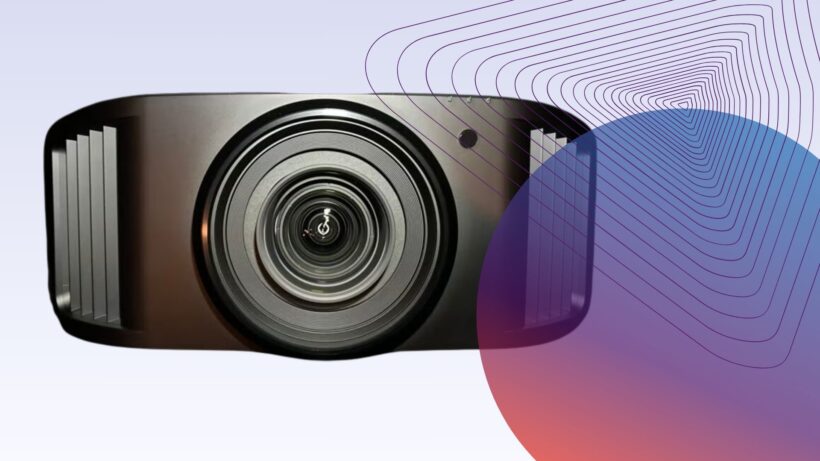



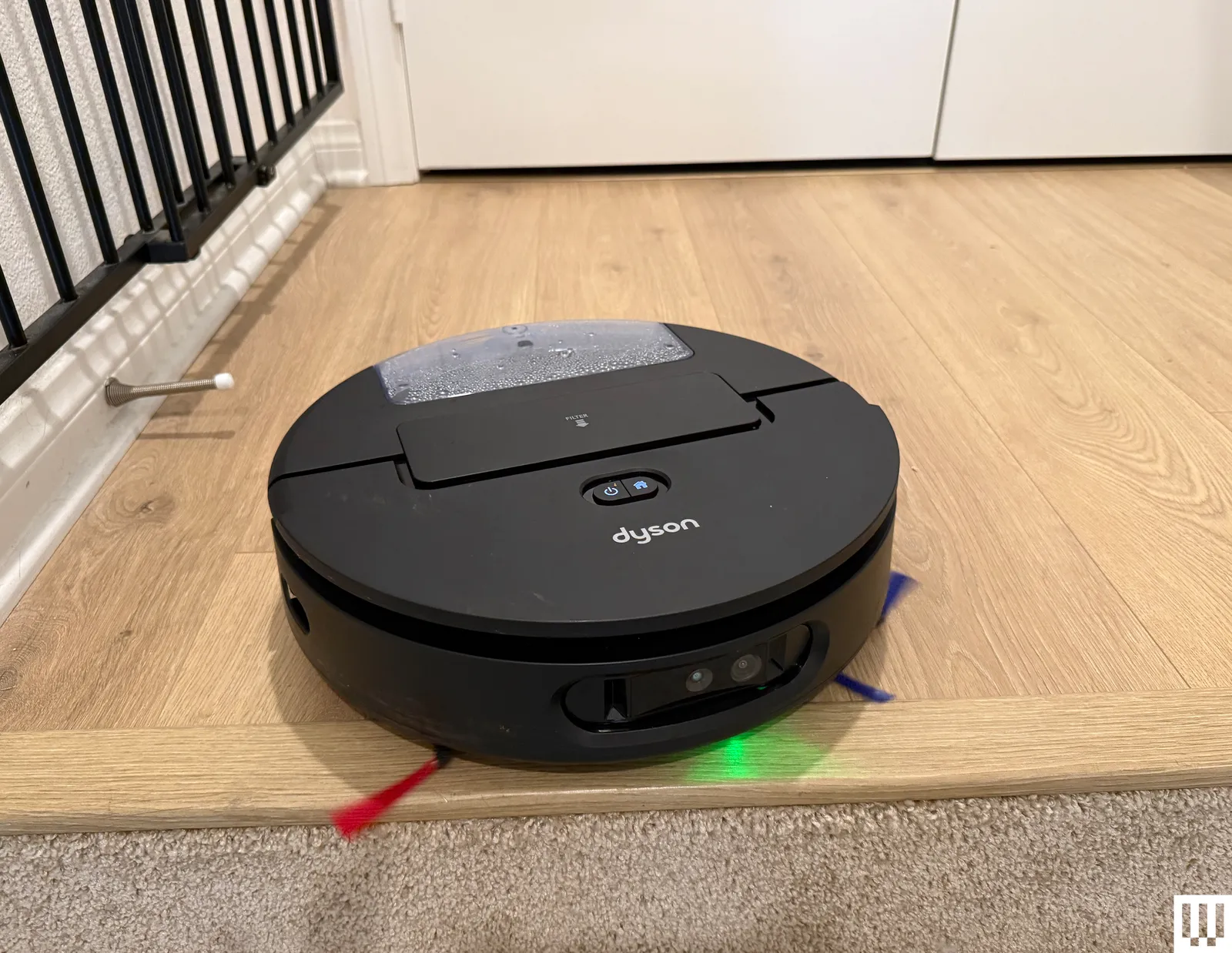




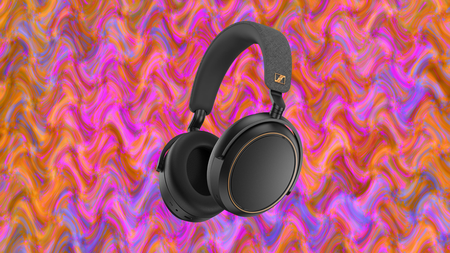





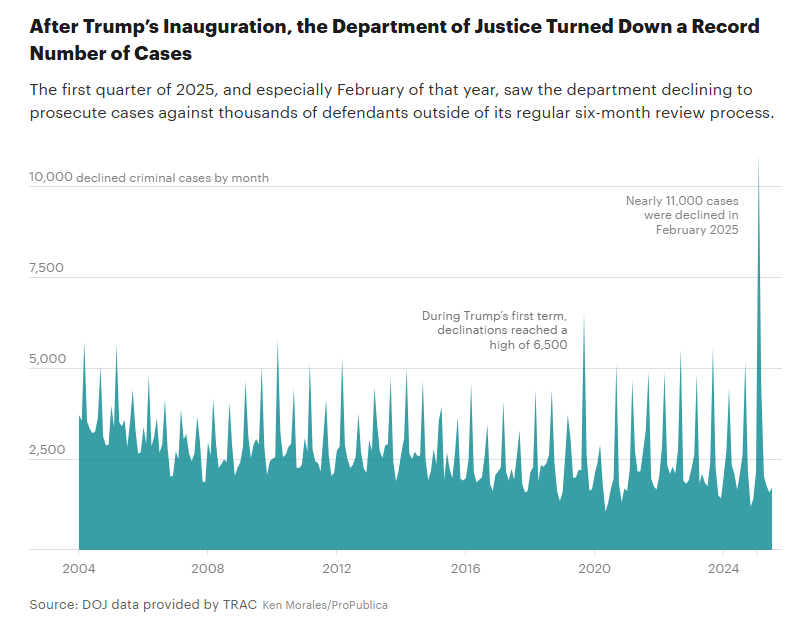







![*SOLO* GTA ONLINE CAR DUPE MONEY GLITCH! [XBOX/PS/PC]](https://wordupnews.com/wp-content/uploads/2026/04/1775646733_hqdefault-80x80.jpg)

































You must be logged in to post a comment Login