
If you feel it is time to upgrade your shared hosting to one of the best VPS providers, Bluehost looks like a good place to start. With its managed VPS offering, you potentially get the benefit of the performance boost that comes with a VPS without the headache of supporting the website software yourself.
To find out if Bluehost’s managed VPS option is as attractive as it looks, we’ve evaluated it, comparing the plans and pricing options, the server infrastructure, and features. We also assessed performance of Bluehost VPS hosting with benchmark tools, and spent some time with its site building tools, which are aimed at anyone launching a small business website.
How does a managed VPS differ?
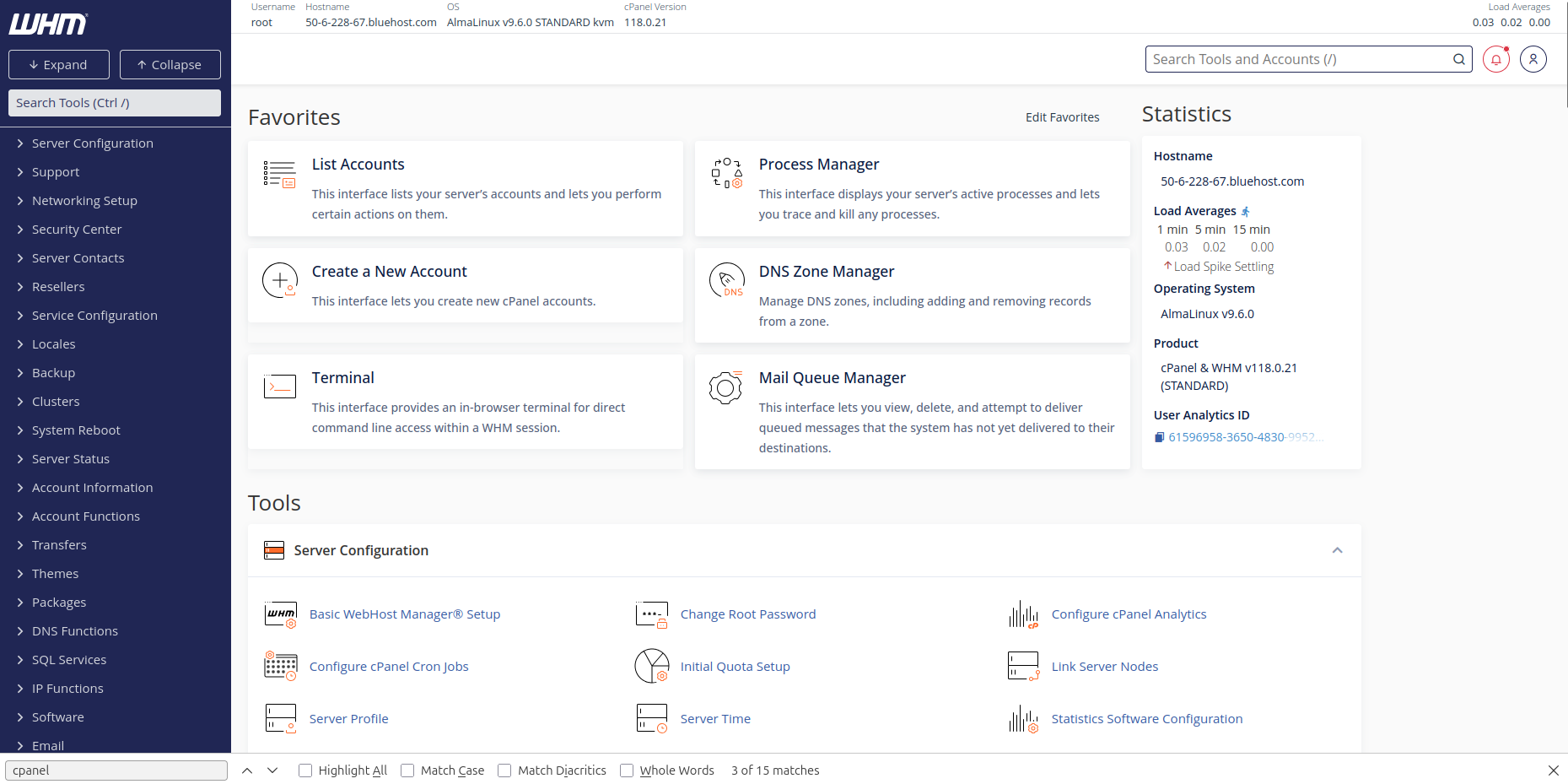

A Virtual Private Server plan typically comes in two flavors: managed, and self-managed. The former means the host will provide assistance with issues such as setup or implementing updates of security software, while the latter leaves everything up to you.
If you have experience of managing web servers on a day-to-day basis, the self-managed option is probably more appropriate. For everyone else, a managed VPS is the smart alternative, particularly if you’re scaling up from shared or cloud hosting.
NOTE: Bluehost offers self-managed VPS and managed VPS plans. These are closely positioned on the site’s menu, so be careful which one you select!
Bluehost plans and pricing
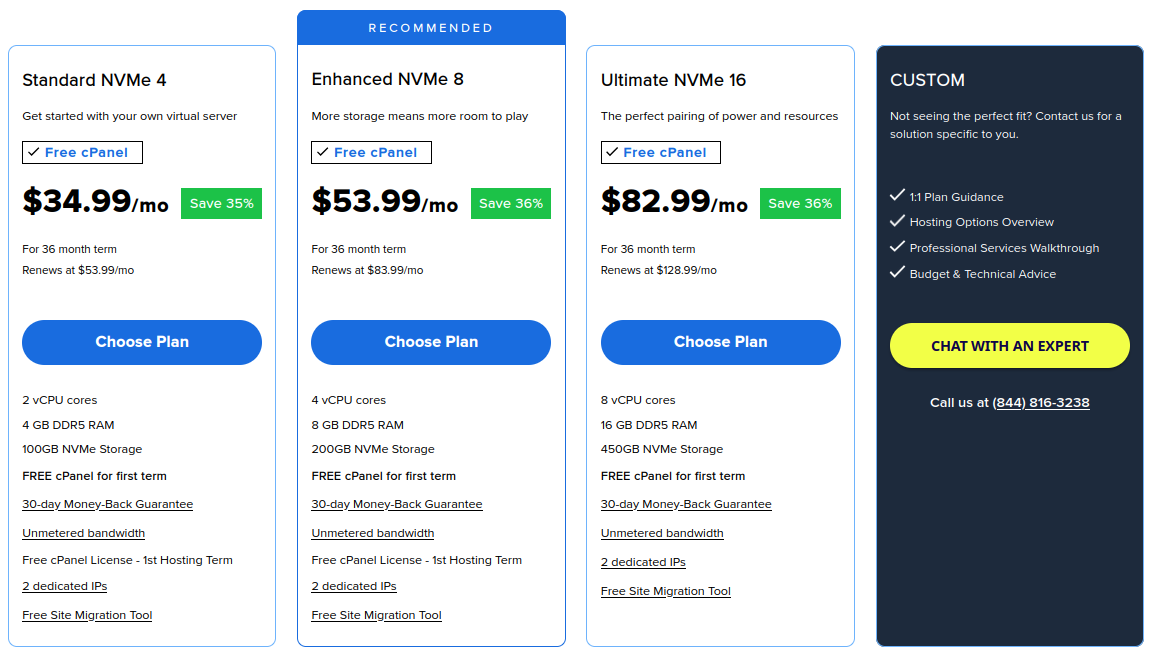

Three managed VPS plans are available from Bluehost: Standard NVMe 4, Enhanced NVMe 8, and Ultimate NVMe 16. Each plan is more expensive than the previous, with a growing server hardware spec. The names relate to the spec – for example, Standard NVMe 4 reflects a server with 4GB RAM. All servers have virtual CPU cores (as expected with a VPS) and NVMe storage.
Plans are available as a monthly rolling deal, or for 12 or 36 months with appropriate discounts. These plans come with free cPanel (depending on selected term), and Let’s Encrypt SSL is included. A premium SSL certificate is available, but at extra cost, as is Sitelock security. Unmetered bandwidth, and two dedicated IPs are included in the price, and all plans have a 30-day money-back guarantee.
Building a website with Bluehost
Creating a website means first manually attaching the domain with the hosting, something that may seem unfamiliar if you’re used to shared hosting, as it doesn’t typically require customer input.


Two options are available for building a website. You can install WordPress and use the included WP builder, or employ Sitejet. This is a cPanel-based solution that is useful for a quick start, but (certainly based on its implementation at Bluehost) results in somewhat generic sites. However, the website editor offers good control over the layout, and compared with WordPress, Sitejet is a simpler solution for quickly creating an attractive website for your business.
Speed and performance
We installed a WordPress site on our Bluehost VPS and ran a couple of benchmarking tests, first with WordPress Benchmark (a plugin you can install in WordPress) and then with YABS (Yet Another Bench Script).
|
CPU & Memory |
Row 0 – Cell 1 |
|
Operations with large text data |
7.87 |
|
Random binary data operations |
9.15 |
|
Recursive mathematical calculations |
8.92 |
|
Iterative mathematical calculations |
10 |
|
Floating point operations |
9 |
|
Filesystem |
Row 6 – Cell 1 |
|
Filesystem write ability |
8.54 |
|
Local file copy and access speed |
8.77 |
|
Small file IO test |
9.95 |
|
Database |
Row 10 – Cell 1 |
|
Importing large amount of data to database |
8.44 |
|
Simple queries on a single table |
10 |
|
Complex database queries on multiple tables |
10 |
|
Object cache |
Row 14 – Cell 1 |
|
Persistent object cache enabled |
0 |
|
WordPress core |
Row 16 – Cell 1 |
|
Shortcode processing |
8.19 |
|
WordPress Hooks |
10 |
|
WordPress option manipulation |
9.84 |
|
REGEX string processing |
8.92 |
|
Taxonomy benchmark |
9.8 |
|
Object capability benchmark |
9.78 |
|
Content filtering |
5.7 |
|
JSON manipulations |
10 |
|
Network |
Row 25 – Cell 1 |
|
Network download speed test |
10 |
|
Overall |
8.8 |
Bluehost support for VPS customers
Various support options are available, from a dedicated telephone team to live chat. There is also an AI-powered chatbot, although I found this didn’t provide accurate information regarding Bluehost’s VPS plans.
I ran into some problems with the hosting. The instructions for this did not match what I was seeing, so I spoke to a support assistant (following a brief and fruitless chat with the BLU chatbot, which left a lot to be desired when I asked it about setting up a website, too). Unfortunately, the agent seemed too concerned with delivering cookie cutter answers than delivering a swift answer to my specific concerns.
Bluehost also provides a searchable knowledge base and a free WordPress course in conjunction with Yoast, the SEO company that is part of “the Bluehost family.”
Final verdict
Bluehost’s features and helpful customer support make its Managed VPS plans extremely attractive. I’ve used VPS hosting several times over the years, and seen it evolve from the self-managed options to the state where more hosting companies offer managed options.
Meanwhile, the testing demonstrates that Bluehost’s Managed VPS is ideal for WordPress hosting. While there is a considerable difference in price between the two options, its Managed VPS is priced as a logical progression from its higher performance WordPress shared hosting for their business. That makes it a smart option for anyone looking for first-time VPS hosting.