We spend hours testing every product or service we review, so you can be sure you’re buying the best. Find out more about how we test.
If you feel it is time to upgrade your shared hosting to one of the best VPS providers, Bluehost looks like a good place to start. With its managed VPS offering, you potentially get the benefit of the performance boost that comes with a VPS without the headache of supporting the website software yourself.
To find out if Bluehost’s managed VPS option is as attractive as it looks, we’ve evaluated it, comparing the plans and pricing options, the server infrastructure, and features. We also assessed performance of Bluehost VPS hosting with benchmark tools, and spent some time with its site building tools, which are aimed at anyone launching a small business website.
Advertisement
How does a managed VPS differ?
(Image credit: Christian Cawley)
A Virtual Private Server plan typically comes in two flavors: managed, and self-managed. The former means the host will provide assistance with issues such as setup or implementing updates of security software, while the latter leaves everything up to you.
Advertisement
If you have experience of managing web servers on a day-to-day basis, the self-managed option is probably more appropriate. For everyone else, a managed VPS is the smart alternative, particularly if you’re scaling up from shared or cloud hosting.
NOTE: Bluehost offers self-managed VPS and managed VPS plans. These are closely positioned on the site’s menu, so be careful which one you select!
Bluehost plans and pricing
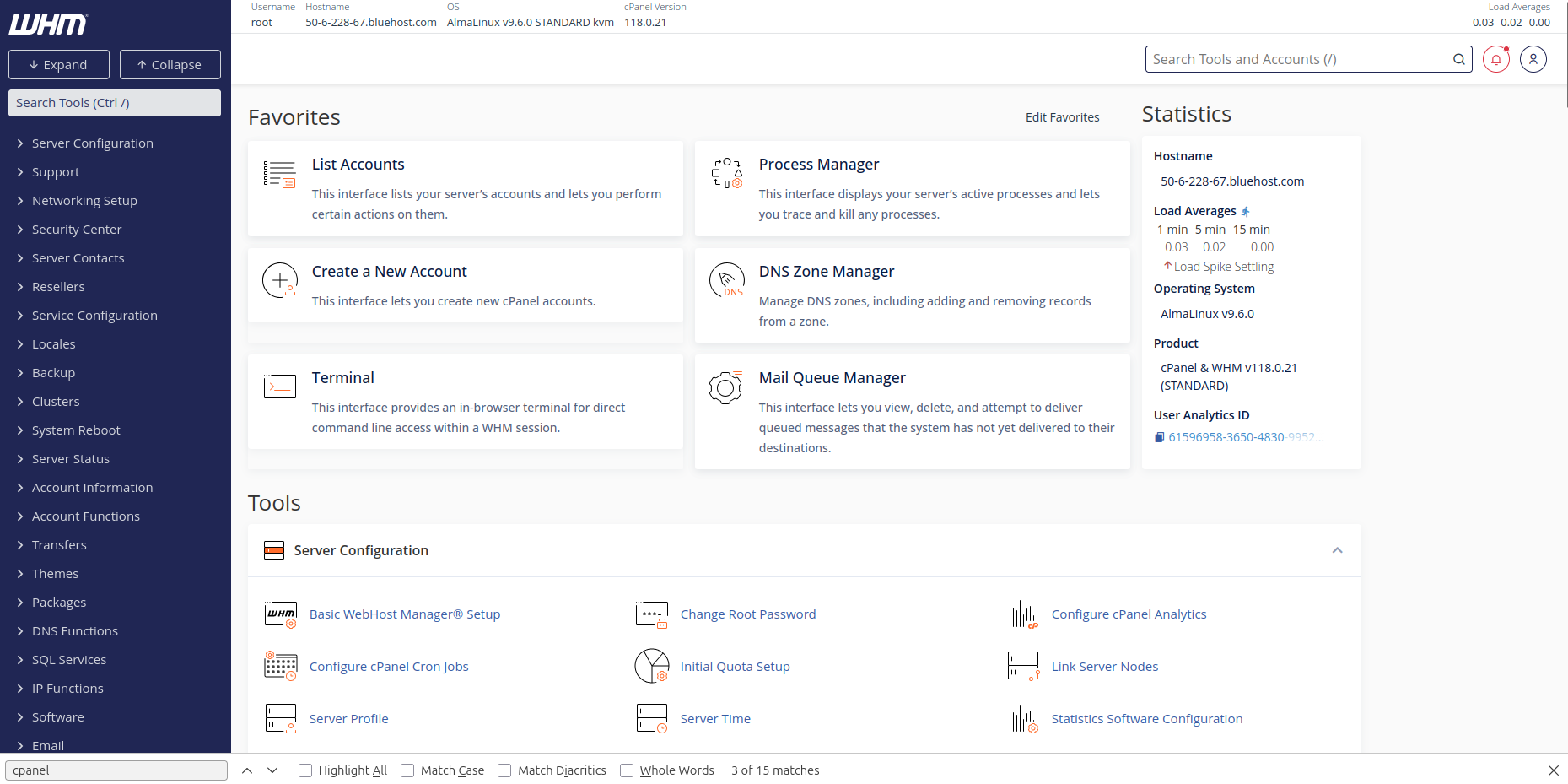
(Image credit: Christian Cawley)
Three managed VPS plans are available from Bluehost: Standard NVMe 4, Enhanced NVMe 8, and Ultimate NVMe 16. Each plan is more expensive than the previous, with a growing server hardware spec. The names relate to the spec – for example, Standard NVMe 4 reflects a server with 4GB RAM. All servers have virtual CPU cores (as expected with a VPS) and NVMe storage.
Advertisement
Plans are available as a monthly rolling deal, or for 12 or 36 months with appropriate discounts. These plans come with free cPanel (depending on selected term), and Let’s Encrypt SSL is included. A premium SSL certificate is available, but at extra cost, as is Sitelock security. Unmetered bandwidth, and two dedicated IPs are included in the price, and all plans have a 30-day money-back guarantee.
Sign up to the TechRadar Pro newsletter to get all the top news, opinion, features and guidance your business needs to succeed!
Building a website with Bluehost
Creating a website means first manually attaching the domain with the hosting, something that may seem unfamiliar if you’re used to shared hosting, as it doesn’t typically require customer input.
Advertisement
(Image credit: Christian Cawley)
Two options are available for building a website. You can install WordPress and use the included WP builder, or employ Sitejet. This is a cPanel-based solution that is useful for a quick start, but (certainly based on its implementation at Bluehost) results in somewhat generic sites. However, the website editor offers good control over the layout, and compared with WordPress, Sitejet is a simpler solution for quickly creating an attractive website for your business.
Speed and performance
We installed a WordPress site on our Bluehost VPS and ran a couple of benchmarking tests, first with WordPress Benchmark (a plugin you can install in WordPress) and then with YABS (Yet Another Bench Script).
Swipe to scroll horizontally
WordPress
CPU & Memory
Row 0 – Cell 1
Operations with large text data
7.87
Random binary data operations
Advertisement
9.15
Recursive mathematical calculations
8.92
Iterative mathematical calculations
Advertisement
10
Floating point operations
9
Filesystem
Advertisement
Row 6 – Cell 1
Filesystem write ability
8.54
Local file copy and access speed
8.77
Advertisement
Small file IO test
9.95
Database
Row 10 – Cell 1
Importing large amount of data to database
Advertisement
8.44
Simple queries on a single table
10
Complex database queries on multiple tables
Advertisement
10
Object cache
Row 14 – Cell 1
Persistent object cache enabled
0
Advertisement
WordPress core
Row 16 – Cell 1
Shortcode processing
8.19
WordPress Hooks
Advertisement
10
WordPress option manipulation
9.84
REGEX string processing
Advertisement
8.92
Taxonomy benchmark
9.8
Object capability benchmark
Advertisement
9.78
Content filtering
5.7
JSON manipulations
Advertisement
10
Network
Row 25 – Cell 1
Network download speed test
10
Advertisement
Overall
8.8
Bluehost support for VPS customers
Various support options are available, from a dedicated telephone team to live chat. There is also an AI-powered chatbot, although I found this didn’t provide accurate information regarding Bluehost’s VPS plans.
Advertisement
I ran into some problems with the hosting. The instructions for this did not match what I was seeing, so I spoke to a support assistant (following a brief and fruitless chat with the BLU chatbot, which left a lot to be desired when I asked it about setting up a website, too). Unfortunately, the agent seemed too concerned with delivering cookie cutter answers than delivering a swift answer to my specific concerns.
Bluehost also provides a searchable knowledge base and a free WordPress course in conjunction with Yoast, the SEO company that is part of “the Bluehost family.”
Final verdict
Bluehost’s features and helpful customer support make its Managed VPS plans extremely attractive. I’ve used VPS hosting several times over the years, and seen it evolve from the self-managed options to the state where more hosting companies offer managed options.
Advertisement
Meanwhile, the testing demonstrates that Bluehost’s Managed VPS is ideal for WordPress hosting. While there is a considerable difference in price between the two options, its Managed VPS is priced as a logical progression from its higher performance WordPress shared hosting for their business. That makes it a smart option for anyone looking for first-time VPS hosting.
Gemini 3.1 Pro is a surprisingly large upgrade from Gemini 3. The decimal point hides what feels more like a generational leap designed to tackle the messy, non-linear logic of the real world. In practice, Gemini 3.1 Pro offers fewer generic answers and more specific help. But to really showcase what it can do takes some creativity. To demonstrate, I came up with some prompts designed to push different aspects of the model, each leaning into a specific capability.
1. Date night debate
(Image credit: Shutterstock)
Gemini 3.1 includes a specialized reasoning layer that allows it to simulate adversarial scenarios. Instead of producing the first sensible answer, it slows down and stress tests ideas from multiple angles. By asking it to find the holes in a plan, you are effectively hiring a world-class strategist to sabotage your own ideas so you can build them back stronger. I decided to weaponize that to make a foolproof date night. I told Gemini:
Advertisement
“I’m planning a surprise date night involving a late romantic dinner and rooftop stargazing. Find three ways this plan could realistically go wrong and then revise the itinerary to include Plan B backups for each.”
The response noted that a late dinner before stargazing might create a massive “low-energy valley,” potentially ruining the romantic atmosphere. It suggested that a sudden cloud cover is not the only weather risk, but that dew point spikes can make outdoor furniture damp and uncomfortable for evening wear. The itinerary came back rewritten as a layered plan with decision points.
The same adversarial approach can be applied to business proposals, travel itineraries, or even big career moves where hidden weak points tend to surface at the worst possible moment. Letting the model simulate failure scenarios in advance turns vague anxiety into concrete contingency planning.
Advertisement
2. Cinematic geography
(Image credit: HBO Max/Studio Ghibli)
Gemini 3.1 can do some amazing video analytics, picking out patterns and details of people and locations, and connecting them to the real world. I wanted to see how well it could extract the aesthetic DNA of a video and pull out the intangible qualities that give it a certain feeling. I tested that with the prompt:
“Analyze this video of Studio Ghibli landscapes. Find locations in New York State that match the vibe of the scenes.”
Sign up for breaking news, reviews, opinion, top tech deals, and more.
Advertisement
Gemini broke down the visual motifs in the compilation and mapped those traits onto real places. It translated animation into geography.
The AI suggested places like the Ashokan Reservoir in the Catskills for its broad reflective water and mountain backdrop, and the village of Cold Spring for its river views and tree-lined streets. Each location came with a short paragraph explaining how the quality of light and terrain echoed specific animated scenes. This kind of aesthetic translation can help with everything from scouting filming locations to designing a themed party that captures a specific cinematic mood.
3. Lego intervention
(Image credit: Lego)
Gemini 3.1 Pro can analyze the space in images just as well as it can analyze the spirit of a video. Its spatial reasoning extends to seeing how things fit together, even if you can’t. I asked it to:
Advertisement
“Use this photo of a half-built Lego car and a pile of leftover pieces and show me exactly where these remaining technical pins should go to stabilize the chassis and allow the wheels to turn smoothly.”
The model identified the front axle as slightly misaligned relative to the rear assembly and noted that two blue technical pins in the leftover pile appeared to match open connector holes near the mid-frame. It then walked through a fix.
The attention to balance was notable, and the wheels spun without scraping after I followed the instructions. The spatial reasoning on display here can extend to far more than toys. Anything from home repairs, furniture assembly, or diagnosing why a shelf keeps leaning could be assisted by the AI. When a model can reason about forces, alignment, and structure from a single image, it becomes a practical troubleshooting partner rather than a passive observer
Advertisement
4. Instant animation
Native SVG rendering allows Gemini 3.1 tp serve as both front-end developer and graphic designer. Instead of just giving you code to copy and paste, it can now generate and preview interactive animations directly in the interface. For a test, I came up with a fun little gimmick, asking the AI to:
“Write the code for an interactive animated SVG for a kid named Orion. Create a night sky where the stars twinkle and the Orion constellation is highlighted, and the name is spelled out. When I click his name, have a rocket ship blast across the screen from bottom to top.”
The response included a complete SVG block with embedded CSS animations and a small JavaScript function to handle the click event. You can see a video of how it worked above.
Advertisement
It’s simple but polished. Gemini 3.1 Pro handled the animation timing cleanly and structured the code, so it was easy to tweak colors and speeds. It felt like a personalized digital card rather than a code dump.
Native code rendering opens the door to creating interactive invitations, personalized learning tools, or lightweight web experiments without hiring a developer. Instead of static designs, you can generate living graphics that respond to clicks and feel tailored to a specific person or moment.
5. Literary ambition
(Image credit: Tosnail)
Gemini 3.1’s Deep Research mode is built for projects that live in the space between hobbyist enthusiasm and professional standards. In this case, I wanted a real guide toward making my own book covers. I told Gemini:
Advertisement
“I want to create high-end, custom hardcovers for my existing paperback collection without removing the original covers or using glue on the books themselves. Run a Deep Research session to find the best ‘removable’ case-binding method and a step-by-step guide for calculating the ‘spine gap’ so the new cover stays snug when the book is opened and closed.”
The AI didn’t just skim a few high-ranking tutorials. It cross-referenced niche craft forums, supply store documentation, and long-form guides, then synthesized them into something usable. The most impressive section was its explanation of how to calculate the right sizes to maintain a snug fit without pinching. It was easy to follow despite the technical details. The guide respected the integrity of the original books while elevating them into something that looks and feels like a bespoke special edition. You can check it out here if you’re so inclined.
Deep Research like this can be applied to any specialized hobby where advice is scattered across forums, manuals, and niche communities. It helps synthesize professional standards and DIY ingenuity into a single, coherent starting point that lowers the barrier to trying something ambitious.
AMD’s Ryzen 5 Zen 4 prices jumped from $200 to $400 without warning
Average pricing chart shows an abrupt sustained spike beginning in February 2026
Inventory shifts and supply constraints could explain the surge
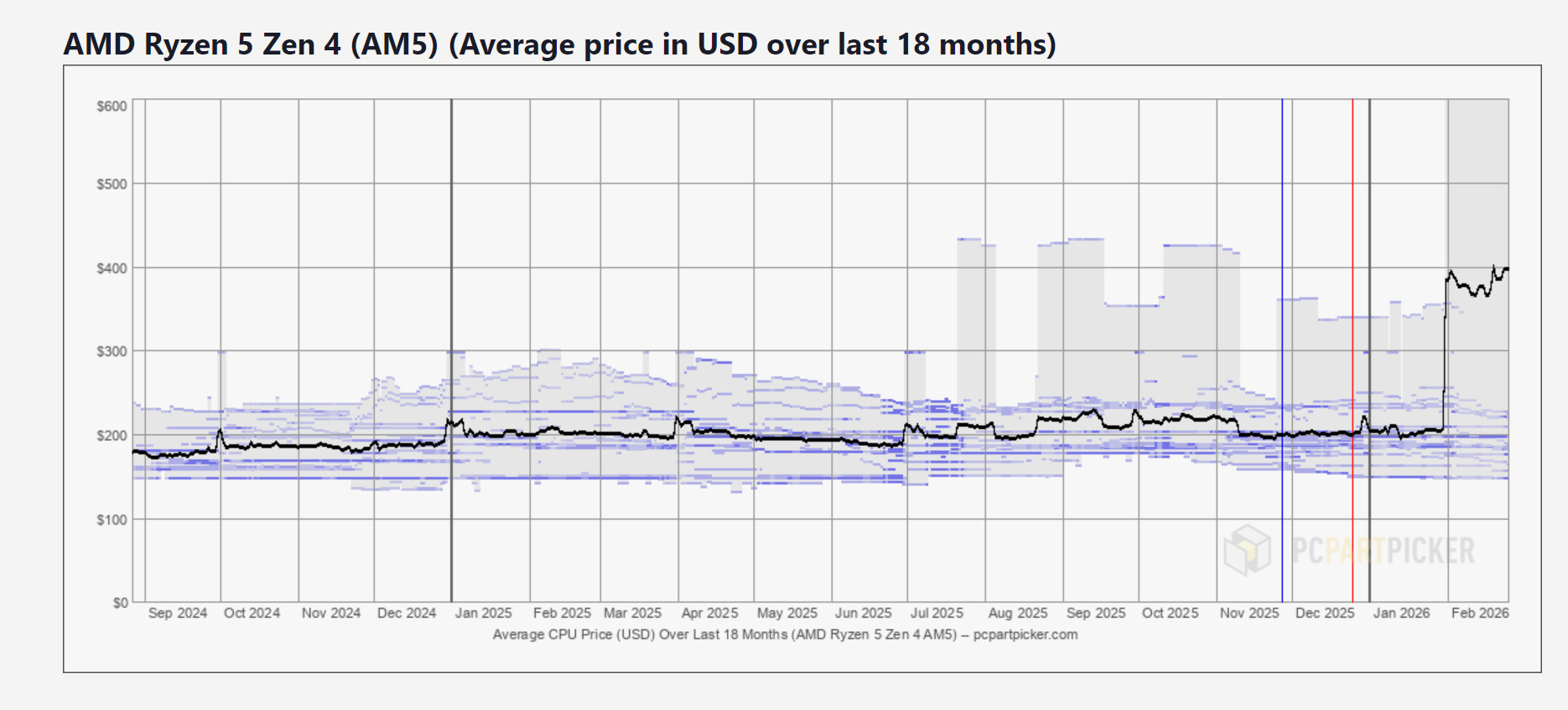
Anyone tracking PCPartPicker’s pricing charts may have noticed a sudden upward spike in the average price of AMD’s Ryzen 5 series.
For more than a year, the selling price for models such as the Ryzen 5 7600X and 9600X sat between $170 and $220. That changed at the start of February 2026, when the average price suddenly shot up toward $400 and stayed there.
The chart shows not a gradual upwards trend but rather a sudden leap. One week the chip was a reliable midrange option, the next it cost nearly twice as much.
(Image credit: PCPartPicker)
Advertisement
Memory crisis inevitably a factor
There hasn’t been a public statement from AMD outlining a formal price change, so it’s likely down to a mix of supply pressure and shifting priorities across the semiconductor market.
One factor, to the absolute surprise of no one, is memory. Large manufacturers including Samsung and Micron have moved production capacity toward HBM and enterprise DDR5 to serve AI data centers.
This has pushed consumer DRAM prices up massively year over year. As memory costs rose, distributors and retailers appear to have adjusted CPU pricing to protect margins across full system builds.
Advertisement
Production capacity is another piece of the puzzle. Ryzen 5 chips share advanced process nodes at TSMC with high margin AI accelerators.
Sign up to the TechRadar Pro newsletter to get all the top news, opinion, features and guidance your business needs to succeed!
When wafer supply tightens, higher priced silicon tends to get priority. Retail stock at major online stores thins out, leaving more listings in the hands of third party sellers, where prices climb quickly.
Even older AM4 Ryzen 5 parts have seen price pressures. With DDR5 kits reaching around $350 in some cases, some builders have shifted back to DDR4 platforms, straining remaining AM4 inventory.
Advertisement
The scale of the price increase is impossible to miss. Ten or twenty percent swings are common in the DIY market, but a sustained doubling for a mainstream CPU is more than a little unusual.
For now, the pricing chart shows a market out of balance. A processor that long defined the $200 sweet spot now sits at roughly $400, leaving buyers weighing their options.
AirSnitch “breaks worldwide Wi-Fi encryption, and it might have the potential to enable advanced cyberattacks,” Xin’an Zhou, the lead author of the research paper, said in an interview. “Advanced attacks can build on our primitives to [perform] cookie stealing, DNS and cache poisoning. Our research physically wiretaps the wire altogether so these sophisticated attacks will work. It’s really a threat to worldwide network security.” Zhou presented his research on Wednesday at the 2026 Network and Distributed System Security Symposium.
Previous Wi-Fi attacks that overnight broke existing protections such as WEP and WPA worked by exploiting vulnerabilities in the underlying encryption they used. AirSnitch, by contrast, targets a previously overlooked attack surface—the lowest levels of the networking stack, a hierarchy of architecture and protocols based on their functions and behaviors.
The lowest level, Layer-1, encompasses physical devices such as cabling, connected nodes, and all the things that allow them to communicate. The highest level, Layer-7, is where applications such as browsers, email clients, and other Internet software run. Levels 2 through 6 are known as the Data Link, Network, Transport, Session, and Presentation layers, respectively.
Identity crisis
Unlike previous Wi-Fi attacks, AirSnitch exploits core features in Layers 1 and 2 and the failure to bind and synchronize a client across these and higher layers, other nodes, and other network names such as SSIDs (Service Set Identifiers). This cross-layer identity desynchronization is the key driver of AirSnitch attacks.
Advertisement
The most powerful such attack is a full, bidirectional machine-in-the-middle (MitM) attack, meaning the attacker can view and modify data before it makes its way to the intended recipient. The attacker can be on the same SSID, a separate one, or even a separate network segment tied to the same AP. It works against small Wi-Fi networks in both homes and offices and large networks in enterprises.
The Huawei Watch GT Runner 2 is a better running smartwatch than the GT Runner, offering great features and impressive tracking for less cash than the competition.
Comfortable to wear and two strap options
Useful new training and racing modes
Plenty of smartwatch features and other sports modes
User interface is the same as other Huawei Watches
Some tracking inaccuracies
App is full of bloatware
Key Features
Review Price: £349
Compact, lightweight design
With a 43mm case that weighs in at just 43.5g, you won’t feel the GT Runner 2 on the wrist.
In-depth running features
Advertisement
Alongside standard run tracking, the GT Runner 2 offers extras like marathon training.
Dual antenna design
The GT Runner 2’s GPS tracking is impressively accurate, even in challenging conditions.
Introduction
The Huawei Watch GT Runner 2 is, as the name suggests, a smartwatch made for runners.
Advertisement
After launching the first GT Runner in 2022, Huawei returns with an updated version that adds new hardware to boost tracking accuracy. There are new software features that Huawei hopes will make the new Runner a better training companion for runners of all levels.
At a price that sees it competing with some great running watches from the likes of Garmin, Suunto and Coros, Huawei had to come up with something pretty special to convince it should be playing in this space. I’ve been wearing the GT Runner 2 for a few weeks to find out whether it’s up to the job.
Advertisement
Design and screen
One case size option
Comes with two straps
New Kunlun glass for improved screen protection
The GT Runner 2 has dropped in size from the first GT Runner, moving from a 46mm case to a 43mm one. So this is a watch that sits a lot smaller on your wrist and is going to appeal if you like your watches more on the compact side.
Image Credit (Trusted Reviews)
That 43mm case is made from a titanium alloy, with two physical buttons on the right side, including a twisting crown. That’s matched up with either a woven or fluoroelastomer strap, both of which are included in the box.
Front and centre is a vibrant 1.5-inch AMOLED screen that’s covered in a new version of Huawei’s Kunlun glass, which previously featured on its smartphones. This gives you tough protection against drops and scratches, all without adding considerable weight to the watch. It weighs 43.5g, making it one of the lightest running watches you can currently put on your wrist.
Advertisement
Advertisement
While it’s primarily designed for running, it’s also suitable for submersion. It’s fit for pool swimming, open-water swimming, and free diving.
Image Credit (Trusted Reviews)
In running watch terms, the Watch GT Runner 2 pretty much fits the bill. It’s lightweight, feels well-built and comfortable. I like that you get two straps and that the screen is bright and visible. While I’d take more buttons, I think it gets most things right here.
Performance and software
Runs on Harmony OS
Includes key smartwatch features from other Huawei watches
Compatible with Strava, Komoot and other leading fitness apps
Interacting with the Runner 2 is the same as picking up most other Huawei smartwatches. There’s the same HarmonyOS and Huawei Health app (iOS and Android) to get things set up, view your stats and adjust settings.
On the watch, barring needing to give consent to most apps and features, the experience is pretty strong. You’ve got a nice mix of watch faces to pick from, with more available via the Health app. The top crown button takes you to the main menu screen, and you can swipe left or right on the main watch screen to see full-sized widgets showing data like activity tracking progress or your current emotional state.
Advertisement
Advertisement
Image Credit (Trusted Reviews)
It’s when you head to the app that things start to get a bit more cluttered. I’ve been using a beta version of the Health app on an iPhone to get early access. What’s striking me, along with recent experiences with Huawei smartwatches, is that there’s a lot going on.
The running tab, for instance, includes links to syncing data with third-party apps like Strava and Komoot, along with guides, AI-powered suggestions, and recommended training sessions. This is all useful stuff, just not necessarily presented in the most inviting way.
As a smartwatch, there’s pretty much everything here that you can find on other Huawei smartwatches. You’ve got a notification feed where the source of notifications is clearly communicated. While the music player doesn’t support offline playback for streaming services like Garmin or Apple does, it does make it relatively straightforward to drag and drop files onto the watch in the app.
Image Credit (Trusted Reviews)
There’s a Find My Phone mode and well-presented weather forecasts, along with a quality speaker and microphone that make handling Bluetooth phone calls worthwhile. You do have access to the Huawei AppGallery, but app support remains pretty limited. Huawei is now adding payment support in the UK too, so you can now pay your way if you want to leave your phone behind on runs.
Advertisement
Tracking and features
Dual antenna design for improved GPS performance
Updated TruSense system
Marathon mode and personalised training plans
While this is a smartwatch predominantly designed for tracking runs, it’s more than capable of doing other things. Outside of running, I’ve used it for swimming, general gym workouts, ECG and skin temperature readings, and even to monitor my emotional well-being.
From a hardware perspective, Huawei has introduced a floating antenna design. This uses a titanium bezel and what Huawei calls a dielectric bezel to boost the performance of dual-band GPS technology included. This dual-band positioning technology is available on the Apple Watch Ultra and the likes of the Garmin Forerunner 970, though it doesn’t use a floating antenna design.
Advertisement
Image Credit (Trusted Reviews)
I’ve been testing that GPS against other top-performing running watches, including Garmin’s Forerunner 970. That includes using it for a 10k race in the centre of London, where there are a lot of tall buildings to wreak havoc on GPS.
For most runs, the GPS has looked good. When tested in more challenging conditions, it did still encounter some issues, and I didn’t find it necessarily better performing than other leading multi-band sports watches.
Advertisement
It is worth pointing out that those two watches cost about double what the Huawei watch costs, and comparing it with a similarly priced Forerunner 570, it outperformed the lower-tier Garmin comfortably, at least in two key areas.
One thing that was consistently better on the Huawei was the time it took to lock onto the GPS signal at the start. From starting a workout to it notifying me that it was locked onto the satellite signal was 2-3 seconds at most. With the Garmin, I would often be waiting – sometimes unpleasantly out in the cold – for upwards of 10-15 seconds. If you want a watch you can just launch quickly into a run, walk or hike – the Huawei won’t leave you waiting.
Advertisement
Huawei was quite bold about its watch’s algorithm and AI’s ability to measure distances accurately, even if you go through a tunnel, and so, on a walk which was covered by trees for a lot of the way, I wanted to test this theory.
Again, testing alongside the Garmin Forerunner 570, with another wearable on my wrist which used my phone’s GPS for location tracking, I got three different results. But as Huawei said, the GT Runner 2 appears to be the watch that’s least troubled by these blank spots in GPS signal.
Image Credit (Trusted Reviews)
Looking at the route on the Huawei Health app, you can see it continues cleanly along the path through the tunnel underground in both directions. Garmin – it’s safe to say – did not. Once it got lost underground, it got confused and drew plot lines between points somewhere near the tunnel, but not cleanly through it – even suggesting I went on a little bit of a paddle in the lake at one point.
Advertisement
The end result was that, by the end of that walk, the Garmin had overestimated my distance by about 200 metres, and that was a short 3km stroll with the family. Even the Withings watch, using my phone’s GPS, did a better job of estimating distance after it lost signal in the tunnel.
Advertisement
Huawei has upgraded its TruSense optical sensor setup on the case rear, which, alongside new algorithms, promises improved heart rate tracking accuracy for runs.
Image Credit (Trusted Reviews)
I would say the accuracy has been fine for some runs, but not so much for others. I still found that it reported higher maximum readings and, at times, higher average readings than a heart rate monitor chest strap. You can pair with an external monitor if you crave the best heart rate data.
On the software front, there are new running modes and metrics to make use of. Some of these features have been developed in collaboration with the professional running team DSM-Firmenich. This is a running team that includes an elite roster of marathon runners, including Eliud Kipchoge.
Image Credit (Trusted Reviews)
Advertisement
That includes a running power metric for those who want another way to gauge effort during runs. There’s the ability to detect your lactate threshold, which is related to how well you can sustain intensity of longer periods of running. Huawei has also added adaptable training plans and AI-powered running coach suggestions based on metrics like training status and load. There’s also a marathon mode.
The marathon mode includes features designed to help you train and finish a marathon. It can also be customised to work with races of distances ranging from 3km up to the marathon distance. This mode offers unique features, such as guidance on pace during a race and reminders on when to fuel. The core of these training features is good and can be useful tools for shaping training; it’s the presentation that needs some work.
Advertisement
Battery life
Up to 14 days battery life
Up to 32 hours battery life
Uses proprietary charging cable
The GT Runner 2 includes a 540mAh battery, up from the 455mAh cell on the original Runner. Huawei promises the same 14-day battery life when using it primarily as a smartwatch. When you factor in GPS-based run tracking, the promised numbers are good. Huawei says you can enjoy up to 32 hours of GPS battery. That’s more battery while tracking runs than big hitters like the Garmin Forerunner 970.
Image Credit (Trusted Reviews)
The reality is that you won’t be charging this watch every few days, even if you keep the screen on all the time. If you do that, then you’re going to get less than a week out of it. I found you can get a good week out of it, which matches most other running watches it’s competing against.
Advertisement
When it comes to charging, it’s a proprietary setup that at least powers the watch up quickly when you do need to charge. An hour’s charge can get you enough battery for a week’s worth of run tracking and everything else in between.
Should you buy it?
You want a smartwatch with running features and good battery life
Advertisement
The GT Runner 2 offers a better running experience than most smartwatches at a price that’s more affordable than a range of other options.
Advertisement
You want one of the best running watches
The GT Runner 2 does a good job as a running watch, but still has a bit to do to be a better match for the likes of Garmin, Coros and Suunto.
Advertisement
Final Thoughts
The Huawei Watch GT Runner 2 offers improvements over the first GT Runner and is a better running watch, with some intriguing and thoughtful new features and impressive GPS tracking that not only bests similarly priced GPS watches, but also those that cost over double.
It’s not perfect, especially on the smartwatch and companion app side of things, but it should still be considered among the best fitness trackers around right now.
How We Test
We thoroughly test every smartwatch we review. We use industry-standard testing to compare features properly and we use the watch as our main device over the review period. We’ll always tell you what we find and we never, ever, accept money to review a product.
Worn as our main tracker during the testing period
Thorough health and fitness tracking testing
FAQs
Can you connect the Huawei Watch GT Runner 2 to Strava?
Yes, the Huawei Watch GT Runner 2 can be linked to Strava to share workout data from activities like runs, cycles and swims.
Advertisement
Can you make calls on the Huawei Watch GT Runner 2?
You can make calls on the Huawei Watch GT Runner 2, but only when the watch is connected to your phone. There is no standalone connectivity support.
Japanese cybersecurity software firm Trend Micro has patched two critical Apex One vulnerabilities that allow attackers to gain remote code execution (RCE) on vulnerable Windows systems.
Apex One is an endpoint security platform that detects and responds to security threats, including malware, spyware, malicious tools, and vulnerabilities.
The first critical Apex One security flaw patched this week (CVE-2025-71210) is due to a path traversal weakness in the Trend Micro Apex One management console, allowing attackers without privileges to execute malicious code on unpatched systems.
The second, tracked as CVE-2025-71211, is another Apex One management console path traversal vulnerability, similar in scope to CVE-2025-71210 but affecting a different executable.
As Trend Micro explained in a Tuesday security advisory, successful exploitation requires attackers to “have access to the Trend Micro Apex One Management Console, so customers that have their console’s IP address exposed externally should consider mitigating factors such as source restrictions if not already applied.”
Advertisement
“Even though an exploit may require several specific conditions to be met, Trend Micro strongly encourages customers to update to the latest builds as soon as possible,” it warned.
To address these critical security flaws, Trend Micro has patched the vulnerabilities in the SaaS Apex One versions and released Critical Patch Build 14136, which also fixes two high-severity privilege escalation flaws in the Windows agent and four more affecting the macOS agent.
While Trend Micro has not flagged these vulnerabilities as exploited in the wild, threat actors have abused other Apex One in attacks over the last several years.
For instance, Trend Micro warned customers to patch an actively exploited Apex One RCE vulnerability (CVE-2025-54948) in August 2025, and addressed two other Apex One zero-days exploited in the wild in September 2022 (CVE-2022-40139) and in September 2023 (CVE-2023-41179).
Advertisement
The U.S. Cybersecurity and Infrastructure Security Agency (CISA) currently tracks 10 Trend Micro Apex vulnerabilities that have either been or are still being exploited in the wild.
Modern IT infrastructure moves faster than manual workflows can handle.
In this new Tines guide, learn how your team can reduce hidden manual delays, improve reliability through automated response, and build and scale intelligent workflows on top of tools you already use.
Apple TV is teaming up with Netflix to stream the new season of Formula 1: Drive to Survive, which will debut on both platforms at midnight PT/3 a.m. ET on Feb. 27. The series will be available for Apple TV subscribers in the US only, the tech giant announced Thursday. The move comes as part of Apple’s expansive — and exclusive — F1 programming after the company inked a five-year deal with Formula 1 to broadcast races starting this year.
Drive to Survive has been a top performer in the docuseries category on Netflix, with viewership exceeding 10 million in the first half of 2025. Sticking with its insider, behind-the-scenes style, season 8 will follow the motorsport’s leading contenders in the lead-up to the FIA Formula 1 World Championship. Follow your favorite drivers’ stories while they’re on the track — and off — to see how they weather the competition.
Apple TV subscribers can begin streaming F1’s 2026 season when it kicks off on March 6 with the Australian Grand Prix. As an added perk of the collab, Netflix will also broadcast F1’s Canadian Grand Prix from May 22 to May 24 for its US subscribers.
A fictional memo set in June 2028, published by short seller Citrini Research, wiped roughly $10 billion off Indian IT stocks in a single trading session on February 24 and sent the Nifty IT index down as much as 5.3% — its worst single-day fall since August 2023 — on the argument that AI coding agents have collapsed the cost advantage of Indian developers to the price of electricity. The index has shed more than $68 billion in market value in February alone, its worst month since 2003.
But the core claim that India’s entire $205 billion software export industry rests on cheap labor is roughly 15 years out of date, an analysis argues, custom application maintenance alone accounts for about 35% of a typical Indian IT firm’s revenue, per HSBC, and enterprise platforms require deterministic outputs that probabilistic AI systems cannot wholesale replace. HSBC estimates gross AI-led revenue deflation for the sector at 14-16%, a measured headwind rather than an extinction event. The story adds: 24 years of software export data that has never posted a decline, $200 billion in annual revenue, partnerships with the very AI labs whose products are supposed to be the instrument of the sector’s destruction, possibly a new $1.5 trillion market category emerging at the intersection of services and software, and the largest U.S. corporates in the middle of mapping their entire workforces into process architectures that require technology partners to modernise. I think India’s IT is going to be fine.
Most of Trump FCC boss Brendan Carr’s time lately has been split between destroying all consumer protection oversight and threatening media companies with fake investigations if they’re not appropriately deferential to our mad idiot king. The latter has tended to overshadow the former, but it’s all been an ugly combination of authoritarianism, regulatory capture, and rank corruption.
But every so often Carr pauses to do other stuff to show daddy Trump he’s a very good boy. Like his latest announcement that he’s creating a new “Pledge America Campaign” ahead of the country’s 250th birthday this July 4th. The campaign features a demand by Carr that U.S. media outlets make sure they’re airing “pro-America” programming through the summer holiday:
“Consistent with their longstanding public interest obligations, America’s broadcasters play a key role in educating, informing, and entertaining viewers and listeners all across America, and they are particularly well suited to air programming that is responsive to the needs and interests of their local communities.
The Pledge America Campaign enables broadcasters to lend their voices in support of Task Force 250 and the celebration of America’s 250th birthday by airing patriotic, pro-America content that celebrates the American journey and inspires its citizens by highlighting the historic accomplishments of this great nation from our founding through the Trump Administration today.”
While this is framed as a “voluntary initiative,” Carr’s recent history of launching costly and pointless investigations into companies that aren’t dutifully obedient lurks quietly in the background. You can clearly infer that Carr defines “programming that is responsive to the needs and interests of their local communities” as programming that kisses Republican ass and ignores criticism of Republican policy.
“If Carr’s pledge is truly voluntary, there would be no reason to limit it to broadcasters, said Harold Feld, a longtime telecom attorney who is senior VP of consumer advocacy group Public Knowledge. “If this were genuinely intended as voluntary, and genuinely about celebrating America, there is no reason to limit this to broadcasters,” Feld told Ars. “Cable operators are equally free to celebrate America, as are podcasters for that matter.”
The Trump FCC’s lone Democratic Commissioner (the authoritarians refuse to fill the other vacant commission seat), Anna Gomez, had this to say about the campaign over at Elon Musk’s right wing propaganda website:
Carr’s other effort to “empower local communities” has involved destroying popular media consolidation limits so that Trump-friendly broadcasters like Sinclair can merge and become more powerful than ever. It’s really not subtle how badly the MAGA movement wants a North Korea, Hungary, or Russia style media that delivers nothing but 24/7 agitprop blindly praising dear leader.
They’ll keep pushing toward their goal until they run into something other than soft pudding in response.