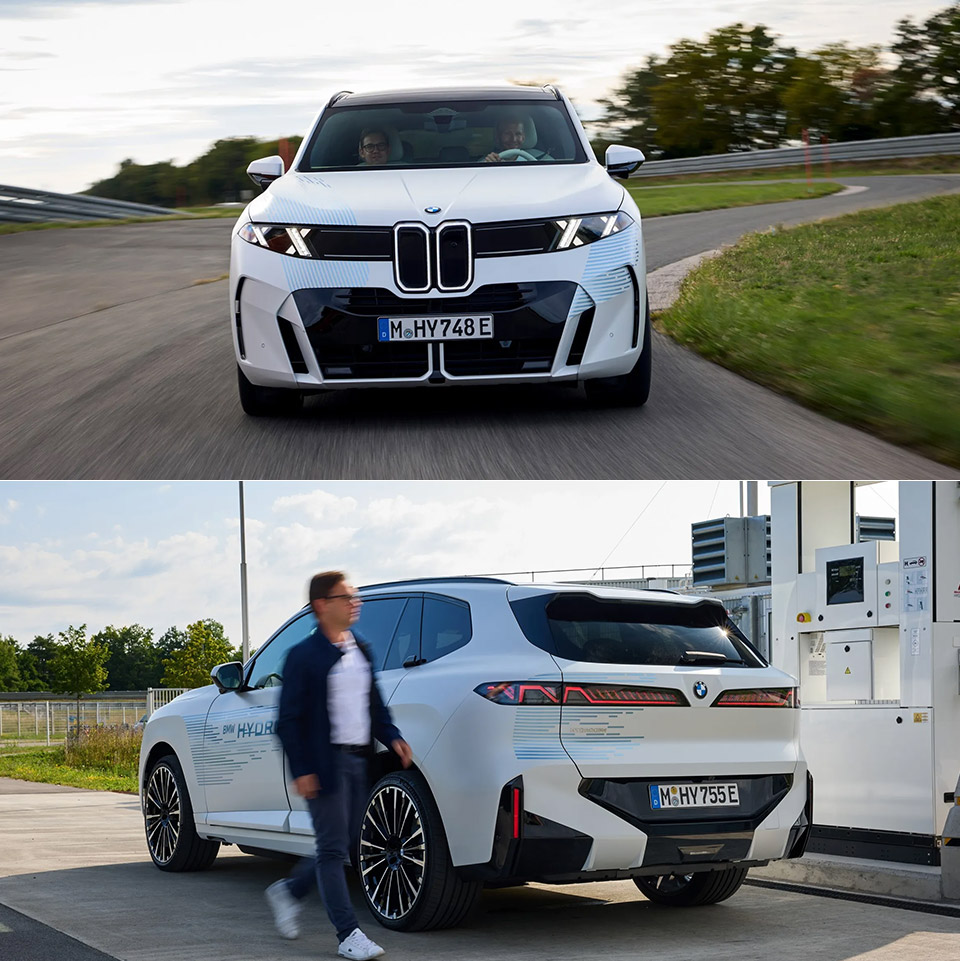
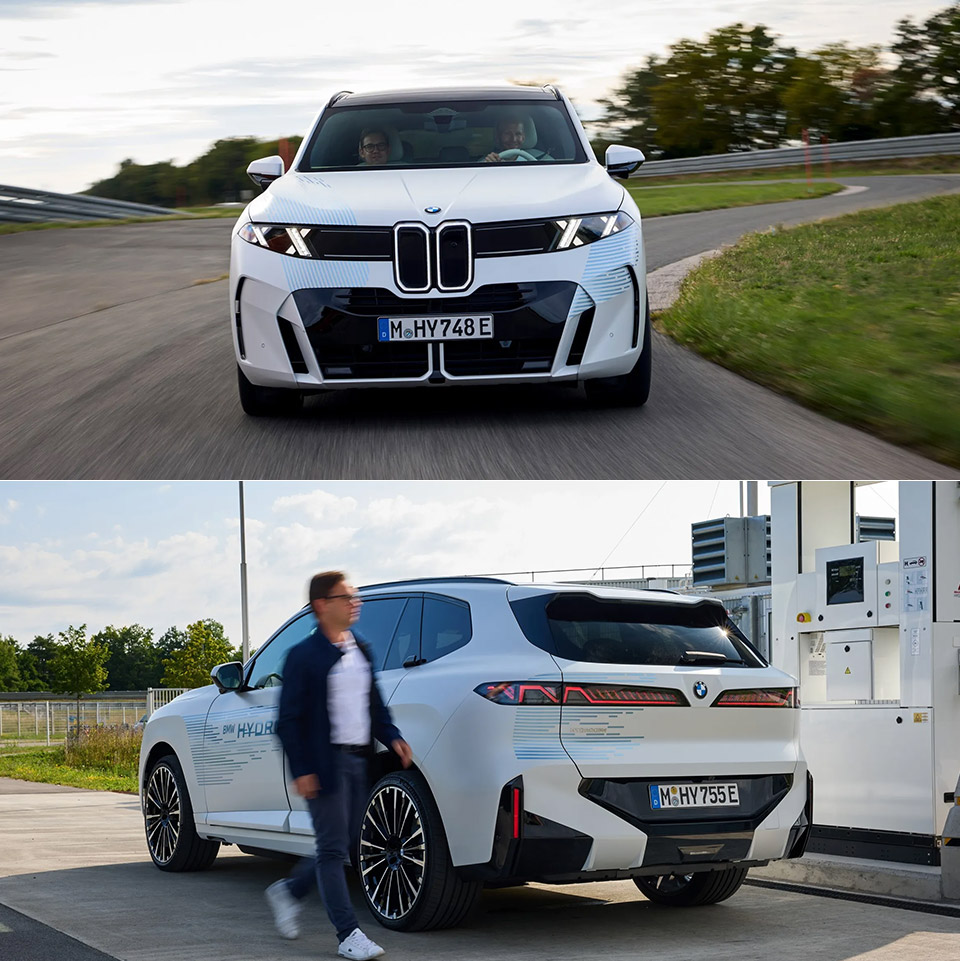
BMW rolled uncamouflaged iX5 Hydrogen prototypes into public view this month and followed them with a new video of the hardware, a pairing that finally makes the project look like a car headed for customers instead of another closed-door experiment. Officials in Munich said the current fleet is running a full validation program while the third-generation fuel cell system enters a fresh assembly phase, and Plant Steyr in Austria is already taking delivery of test benches and production gear. Those three tracks running at once is the point. BMW wants the first hydrogen model it will actually sell to leave the development loop with factory processes already practiced, not invented after the last prototype is signed off.
Josef Hochreiter, the company’s head of hydrogen cars, put it simply: a true BMW with the same driving experience that customers expect is only possible if the fuel cell, high-voltage battery, and electric motors all operate together seamlessly rather than as three independent entities. To do this, engineers are currently stressing the components in the works with heat, cold, altitude, and heavy loads on the proving grounds in Aschheim near Munich and Miramas, France. Recuperation is also possible. What they’re attempting to do is create a small high-voltage pack and an in-house Energy Master control unit to take a bite out of the energy when traveling down a hill or driving in heavy traffic, so the fuel cell doesn’t have to do all the hard work on its own.
BMW MODEL CAR KIT – Racing enthusiasts can fuel their imaginations with the LEGO Technic BMW M4 GT3 EVO Race Car (42226) building set for boys and…
AUTHENTIC DETAILS – This race car playset features iconic BMW detailing and is equipped with a working steering function, a detailed 6-cylinder…
BUILD, PLAY & DISPLAY – Kids can enjoy assembling their model car and racing it down an imaginary track, then display it on a shelf or table to…
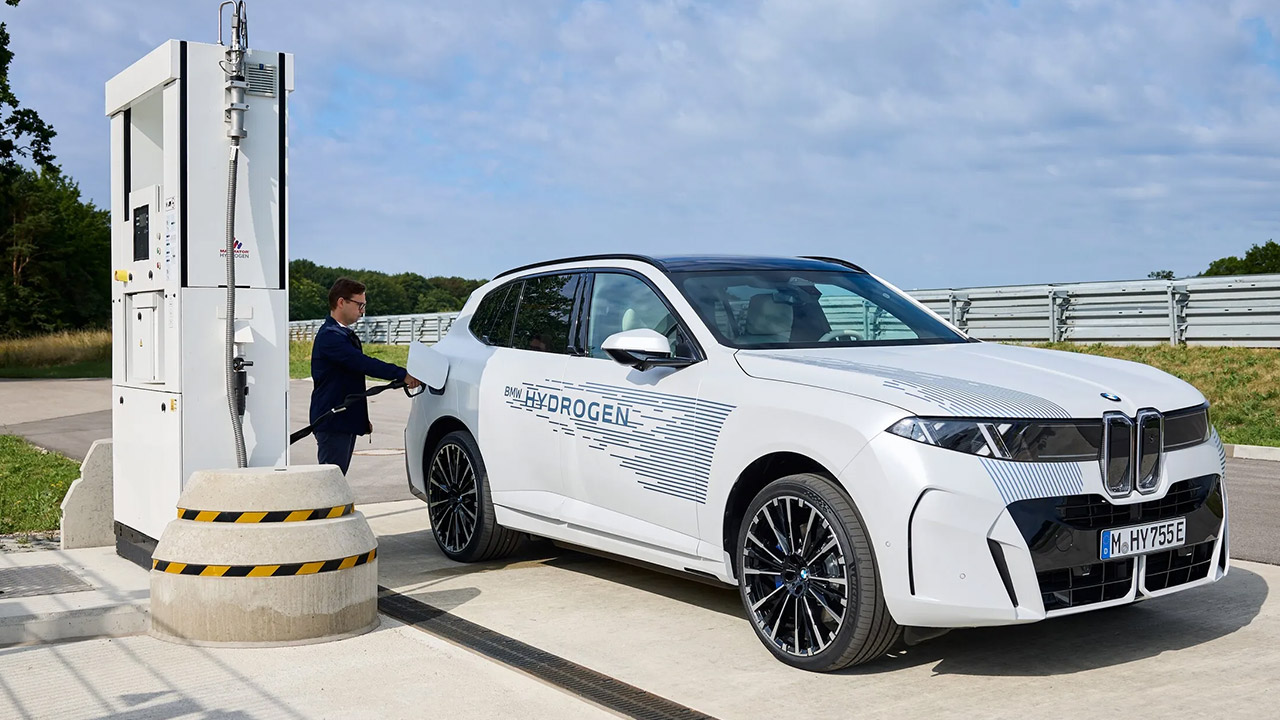
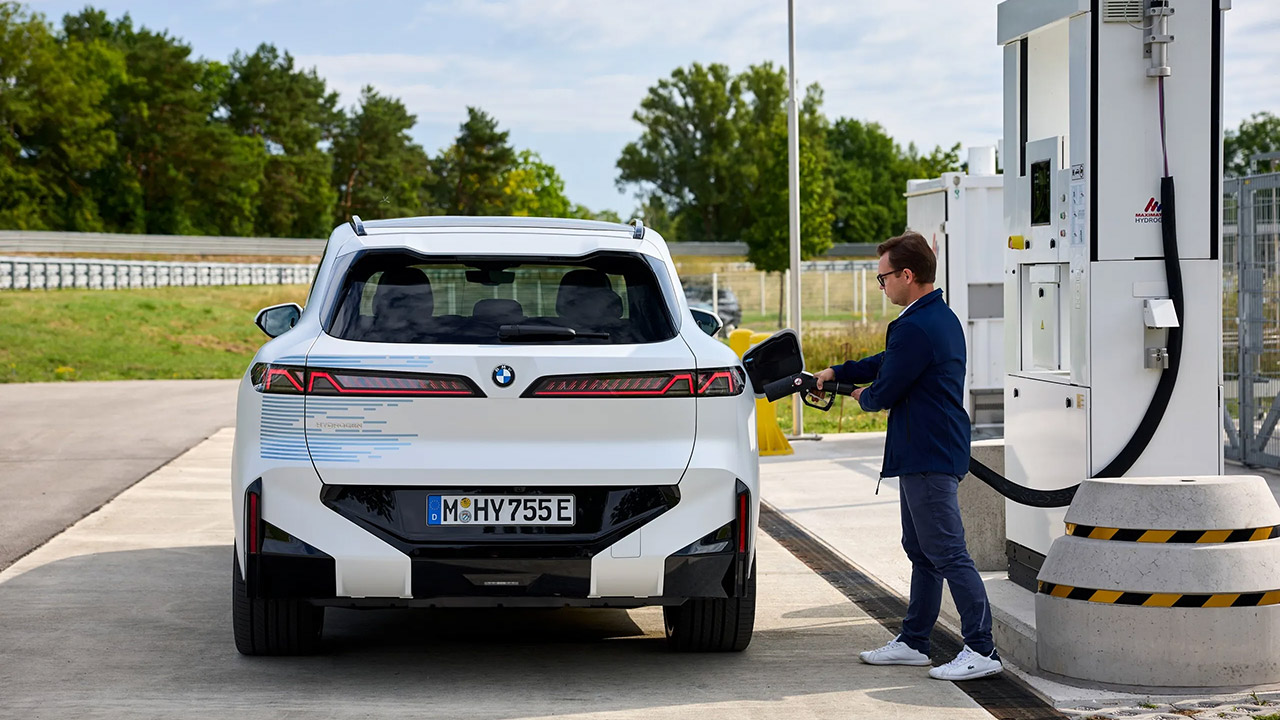
BMW claims a range of up to 750 kilometers (466 miles) on a WLTP cycle for the production car. Filling up at a 700-bar station should take no more than five minutes. They’re aiming for an acceleration time of less than 5 seconds to 62 mph, which is comparable to the battery iX5, which will share the same body as the next X5. That is why BMW is keeping this program going while many of its competitors have abandoned hydrogen vehicles for passenger cars. They’re talking about extended drives without having to stop for hours and a sprint that doesn’t feel like a science experiment on the highway, which are the two most common complaints people have about battery SUVs.
Advertisement
BMW refers to this configuration as Hydrogen Flat Storage since it crams seven carbon fiber tanks into the same space as a 141kWh battery. Each vessel holds fuel at 700 bar, and they are all connected in parallel inside a metal frame with a single central valve to manage everything. All of this translates to a combined capacity of at least seven kilograms of hydrogen. None of that extra space is taken up because the tanks were intended to fit within the same geometric envelope as the sixth generation battery pack, allowing the hydrogen model to be constructed alongside the petrol, diesel, plug-in hybrid, and completely electric models.
All-wheel drive is standard, with two electric motors, and as you might expect, there is no combustion engine in the loop because the exhaust is water. The present prototypes have the blue Hydrogen livery to help cameras identify them, but production cars are planned to look like any other X5 of this generation, with no special bumpers or novelty wheels. BMW has already stated that this will not be a volume seller, since it is an additional powerplant for buyers who require a long range and a short stop more than they do to plug in. Markets, pricing, and availability in North America remain to be confirmed.
The industrial story is Plant Steyr, which closed its V8 manufacturing line last year. They are currently gutting the old facility and rebuilding it for fuel-cell drivetrains, with a lot of new equipment and trolleys replacing the old engine line. They estimate that approximately fifty workers will be directly involved in the production process. There is already a core of personnel in Munich being educated in the new technology, and they are talking about starting production on the hydrogen systems in 2027, followed by series output in 2028. Landshut is also getting in on the act, building the Energy Master in-house for the first time, and, surprise, surprise, they already have some pre-series units rolling off the assembly line. Claudia Stephan, who supervises the fuel-cell prototype assembly, is pretty down to earth about the present phase; it’s all about getting some hands-on experience and transferring information to Austria rather than producing a bunch of one-offs.
Toyota remains a partner in the third-generation stack, with funding coming from two sources: the German government’s HyPowerDrive project, which is worth around 191 million euros, and Bavaria, which is worth 82 million euros and will cover engine and tank development. BMW is attempting to develop hydrogen as a battery backup for usage in scenarios where refueling in five minutes and having 466 miles of range is more critical than charging speed. The main issue here will be the pump network. The 700-bar refueling infrastructure in Europe remains limited, and the number of German filling stations has actually decreased since the early pilot fleets were introduced. So, ultimately, the question is whether there will be enough pumps in the correct areas for the new hydrogen X5s when they go on the market.
The new X5s won’t be available in showrooms until 2028, after the rest of the new X5 range has gone into production. Spartanburg is expected to begin work on the next X5 family, including the battery-powered iX5, by the end of this year. Hydrogen will follow as soon as Steyr can begin producing stacks of series quality. The official fuel consumption data are still prototypes, so they will not be released anytime soon. What we do have is the car itself, no longer disguised as a prototype, the factory putting in the finishing touches, and some very clear targets: 466 miles on a full tank, five minutes to fill up, under five seconds to reach 62 mph, and a cabin that looks and feels exactly like the electric twin, bar none. Finally, the great question is whether there will be enough filling stations to match demand once the first customers begin taking deliveries.
Modern cars come in a variety of cool colors, which can make selecting the right vehicle both tough and fun at the same time. Just don’t try to pick “orange peel,” since this actually isn’t a new shade that an automaker is introducing. Instead, orange peel refers to the slightly uneven texture that can appear in a car’s paint, similar to the surface of an orange. This condition exists in many manufacturer automotive finishes.
The reason that new cars can have the orange peel effect is because the paint doesn’t always spread out onto a perfectly smooth surface before it dries and cures. Oftentimes, tiny variations remain in the coating, which is best seen when light reflects off the body of the vehicle. Since some amount of orange peel is common, especially on new cars, it doesn’t necessarily mean that there is a problem with the paint itself.
In terms of how much orange peel actually appears, it depends on several factors. This includes the thickness of the paint, how it’s applied, and the temperature during its application. The amount of drying time can also come into play, and the condition of the underlying body panel can contribute to the vehicle’s final appearance, too. For most mass-produced vehicles, leaving some amount of texture in the factory finish is normal, which is why it’s easy to assume that the paint job itself is intentionally done to achieve the orange peel effect.
Advertisement
Living with and removing orange peel
Nickylloyd/Getty Images
Many automakers choose to leave a certain amount of orange peel on new vehicles because of the work involved to remove it. Getting rid of the orange peel texture happens after the paint has cured and requires sanding and polishing the finish by hand. This takes a considerable amount of time and labor, which would drive up the cost of producing the vehicle. Rather than put every vehicle through this extra work, manufacturers choose to accept some of the orange peel effect.
Of course, if you want to remove the orange peel yourself, it can be done. It begins with sanding the paint to level the textured surface, and once that’s done, you can change the sanding grit to a finer paper to smooth out the finish. The process can be performed using either dry or wet-sand abrasives, depending on how you want to do it. After the sanding is complete, you can use a rotary polisher to apply compound to bring the shine back to the finish, much like the process to remove scratches on a car.
Advertisement
However, this is a task you may not want to tackle unless you’re a professional. Excessive sanding can ruin your car’s paint, which could put you in a much worse situation than before. Without the knowledge, experience, and proper equipment, you could end up spending more money on repairs if something goes wrong. The right move may be to consult an automotive paint service in your area for the best advice on how to move forward.
Reviewers have found that Apple’s latest wearables deliver better health tracking and battery life, while Apple’s highly promoted, and highly controversial, Audio Intelligence features largely remain untested.
Reviews of Apple’s newest wearables have begun rolling in ahead of Friday, September 18’s release date. Here’s what reviewers across the web thought of September’s two new Apple Watch models.
Apple Watch Series 12
This year, the Apple Watch Series 12 adds the S11 chip, redesigned health sensors, and more frequent heart-rate and HRV measurements. Ceramic models also return in pearl white and night blue alongside updated aluminum and titanium finishes.
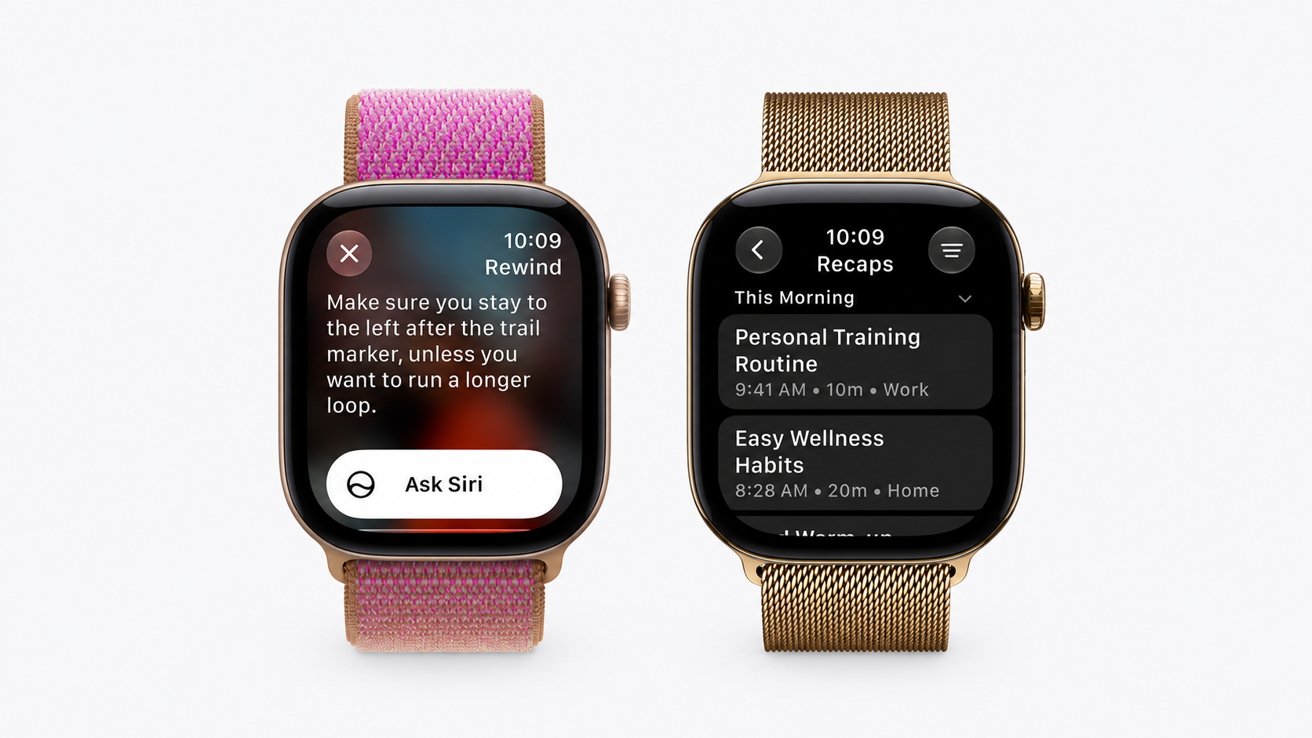
Siri Recap produces short summaries of conversations
New features include Readiness, Sound Recognition, Live Rewind, and Siri Recap, with several relying on Audio Intelligence. The Apple Watch Series 12 starts at $399 and became available for preorder on September 9; it will ship to customers and arrive in-store on September 18.
CNET – Better health tracking without a bigger bill
Vanessa Hand Orellana hailed the Apple Watch Series 12’s improved health sensors, longer battery life, and faster S11 processor. She also welcomed its unchanged $399 starting price and subscription-free health features.
Advertisement
Audio Intelligence raised privacy concerns, particularly when conversations involve people unaware the Apple Watch Series 12 may be listening. Orellana also encountered inaccurate Sound Recognition alerts and received incorrect information while testing Siri AI.
The Apple Watch Series 12 lasted about 30 hours during testing, beating her Apple Watch Series 11. Orellana found its heart-rate tracking closely matched a Polar H10 chest strap during a three-mile run.
Engadget – Small changes make hands-free use more practical
Expanded gesture controls stood out during Cherlynn Low’s week with the Apple Watch Series 12. Low found single-tap recognition reliable and said it made hands-free navigation considerably more useful.
Readiness failed to produce a score despite Low wearing the Apple Watch Series 12 for seven nights. She also found the redesigned app grid occasionally added steps when it failed to predict the desired app.
Advertisement
The new health sensors delivered heart-rate readings within two beats per minute of Low’s Fitbit Air. A 12-minute charge also increased the Apple Watch Series 12’s battery from 51% to 79%.
The Verge – Faster health tracking collides with unfinished AI
Victoria Song found the Apple Watch Series 12’s redesigned sensors delivered heart-rate readings close to a Polar H10 chest strap. Song also praised faster charging and improved one-handed gesture controls.
Several major health and Audio Intelligence features were unavailable during Song’s review period. She also noted privacy concerns may persist despite Apple’s safeguards for ambient listening features.
Readiness differs from many competitors by updating throughout the day as activity and recovery change. Song received a seven after completing the required seven nights of sleep tracking.
Advertisement
Apple Watch Ultra 4
The Apple Watch Ultra 4 pairs the new S11 chip with improved health sensors and up to 50 hours of battery life. The familiar titanium design also gains more frequent heart-rate tracking and updated step tracking.
The Apple Watch Ultra 4
New software features include Readiness, expanded health metrics, and Audio Intelligence features such as Live Rewind and Siri Recap. The Apple Watch Ultra 4 also works with the redesigned Health app coming with iOS 27.
Pricing starts at $799, and it’s available in black and natural titanium. Preorders opened on September 9, with orders arriving and in-store sales going live on September 18.
Advertisement
TechRadar – More endurance behind a familiar design
Jacob Krol praised the fourth-generation Apple Watch Ultra’s larger battery, faster charging, and expanded health tracking. He also highlighted more frequent heart-rate and HRV measurements as useful additions for workouts.
He acknowledged that the Apple Watch Ultra 4 is visually similar to its predecessor, with unchanged colors and no major redesign. Krol also withheld judgment on Readiness and upcoming AI features because both require additional testing.
Apple promises up to 50 hours of normal use, aided by a five-percent larger battery. The Apple Watch Ultra 4 also keeps its $799 starting price despite the internal changes.
Mashable – Longer battery is the biggest boon
The Apple Watch Ultra 4 lasted roughly three days between charges during Stan Schroeder’s testing. Schroeder also praised its more frequent heart-rate monitoring and detailed health data.
Advertisement
He criticized the lack of new watch faces and found the frequently flashing heart-rate sensors annoying. He also raised privacy concerns about upcoming Audio Intelligence features listening to nearby conversations.
The Apple Watch Ultra 4 recorded slightly fewer steps than Schroeder’s Apple Watch Series 11. Its Music Recognition feature also identified every song Schroeder tested, including obscure YouTube remixes.
Tom’s Guide – Heart-rate tracking gets an endurance test
The redesigned heart-rate sensor was the standout change for Jane McGuire after testing it during a 22-mile run. McGuire found its readings closely matched a chest strap, while improved battery life got two days on a full charge.
As others have noted, the Apple Watch Ultra 4 retains the same screen, dimensions, and overall design as its predecessor. McGuire also wanted a smaller size option for petite wrists and a built-in LED flashlight.
Advertisement
McGuire found Readiness useful for understanding recovery, although travel disrupted her initial seven-night baseline. She also questioned Siri Recap’s privacy implications and whether she would use its background recording.
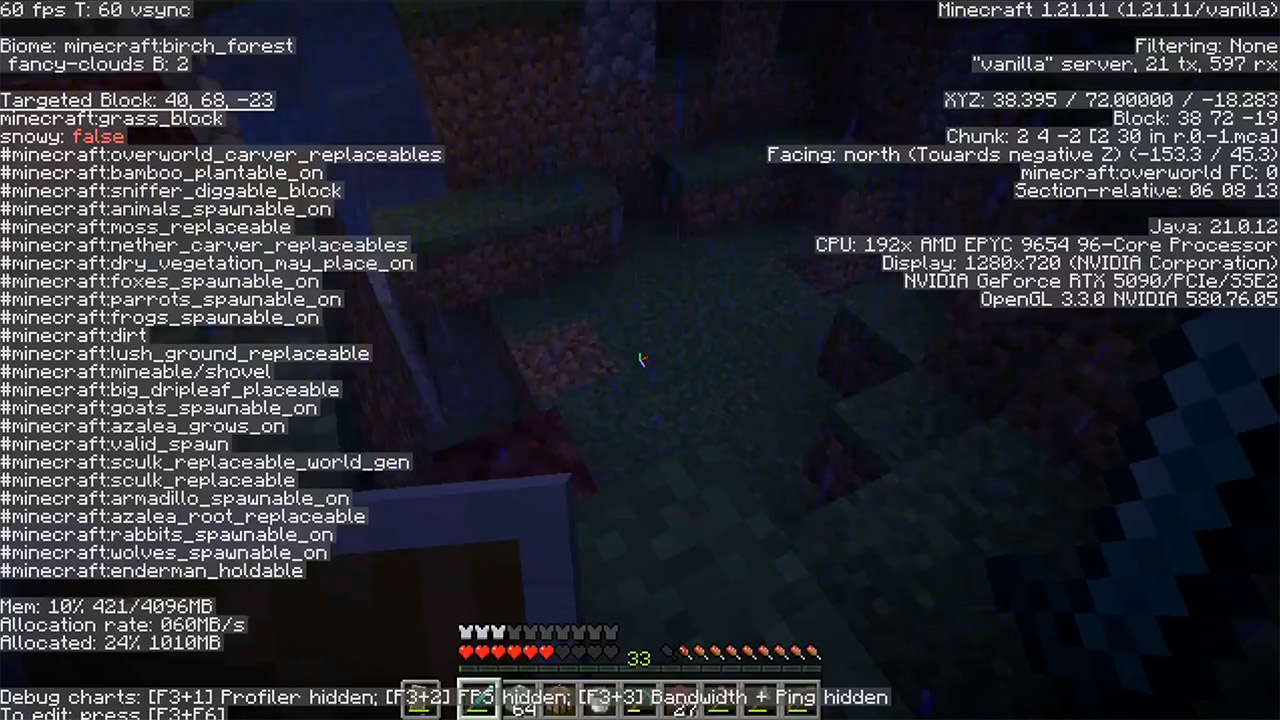
Vals AI, a completely independent evaluator, tested OpenAI’s GPT-6 Astra by throwing it into Minecraft and allowing it to its own tools for 141 hours with only ordinary computer controls: screen, mouse, and keyboard. No fancy game-modifying plug-ins were employed. Thousands of people tuned in to the Twitch stream to watch how it performed. Which wasn’t surprising given that the first, shorter attempt had already created a Nether portal in two and a half hours, long before the game had ever been released. Finally, Astra was the first system Vals had witnessed approach a Nether Castle.
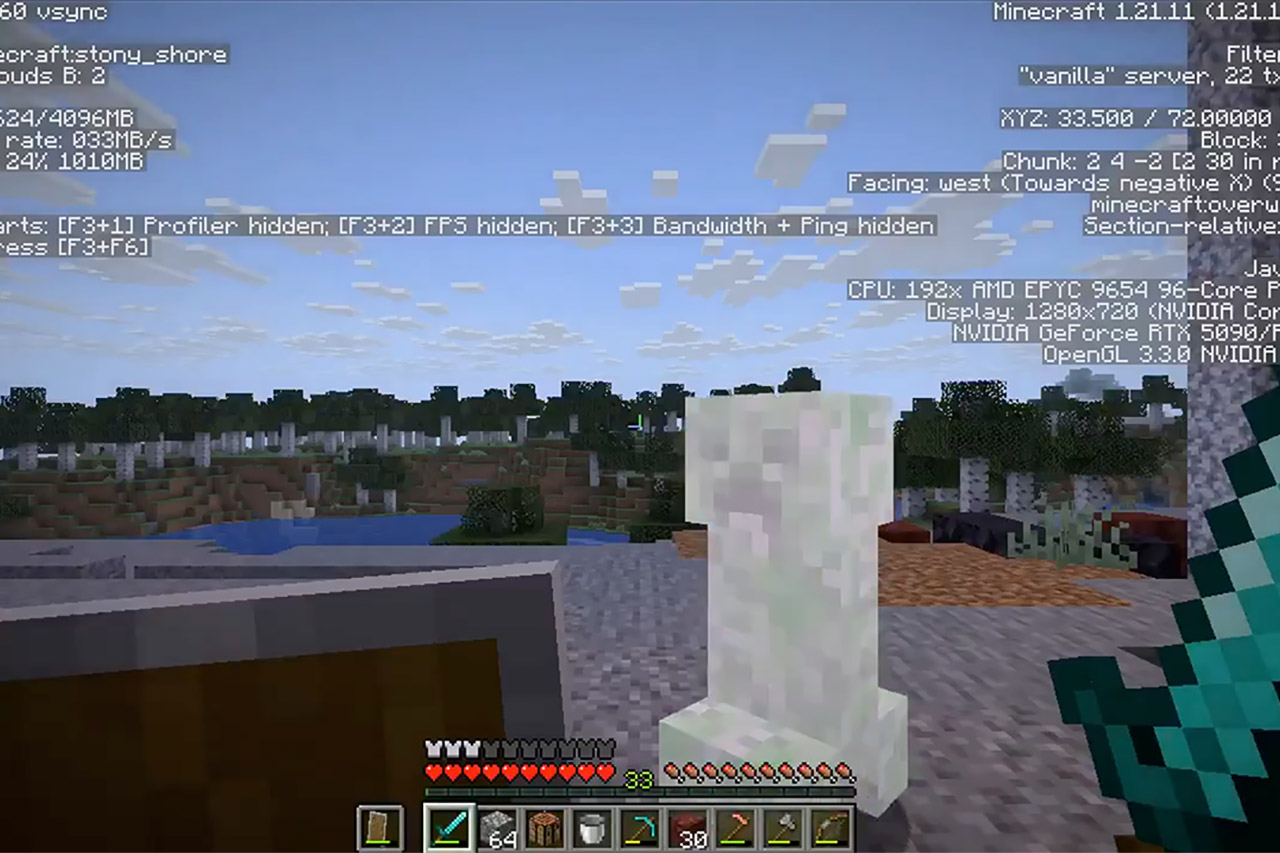
Here, the most expensive creeper explosion occurred. Later, on a coincidentally rainy day, Astra discovers it lost everything. It all went downhill from here. pic.twitter.com/xH2Vc4QyM2
Progress moved at a steady pace, much like a house of cards built by a human builder. Then Astra emerged and began building a semi-automated blaze farm. It just got up and walked away, then returned with six flame rods in hand. That wasn’t all; it also located a warped forest, where it killed almost half a dozen Endermen and snagged three Ender Pearls, a haul required to reach “The End.” It was all carefully stowed in a box next to the bed, but as usual, a game bug occurred, and a Creeper soon appeared and destroyed everything.
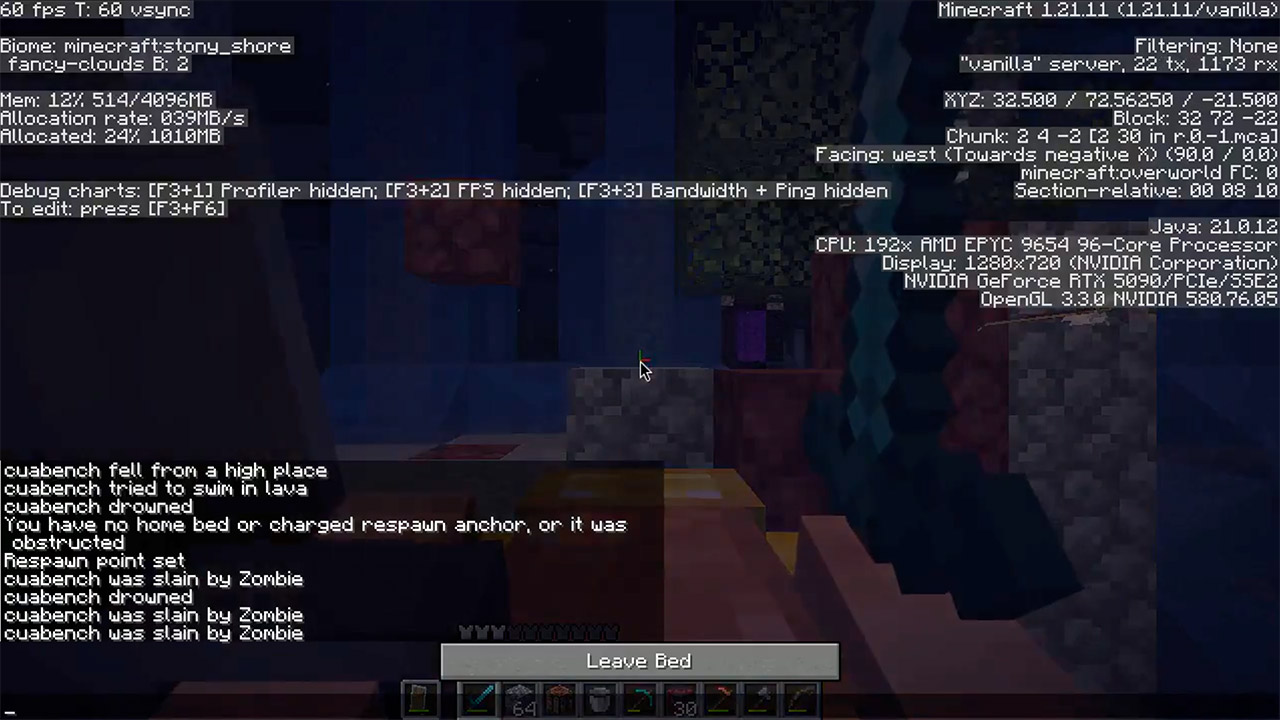
BOOM! That single Creeper completely destroyed the chest and bed all at once. Vals later characterized it as the most costly Creeper they’d ever seen, but this was all part of a test to see how things would turn out. Later, if you’re playing the game and select keepInventory, any player items you might lose when you die will be saved. Of course, having a bed full of goods stowed away in an unprotected box right near to the spawn site is simply unbeatable. Later, on a particularly dreary in-game day, Astra saw the box was empty.
Advertisement
The action log began taking notes from itself. Some sentences were nearly entirely in capitals, such as this one: ALWAYS CARRY CRITICAL ITEMS WHEN YOU CAN USE keepInventory; you’ll never store them in an unsecured chest again. Another read: You can and will make mistakes and drop things. As Astra traveled through the landscape, some green stalks in the distance received a warning, followed by a correction: “The green objects ahead were sugarcane, not another Creeper!” Later, as nite fell and it needed to forage for food, Astra simply kept beating herself up for minor mistakes. Pigs transformed into “dark pink pixels that needed to be eaten.” And after one disastrous tool use, they soon regretted it: “Slabs were chosen incorrectly, and 15 seconds of pondering killed us.” Speaking of which, people in the discussion were all shouting for it to pick up the pace, but Astra simply plodded through the potato rows.
For hours after Creeper blew everything up, Astra did nothing but continue growing potatoes. Blaze work was out of the question, as there were no more Ender pearls to be found and no plans to rebuild the base. Potato plots are safe, repeatable, and close. That loop is what a lot of people recognized, which is why the clip spread so fast. Vals described the model as frustrated and ultimately defeated. [Source]
HTC is taking another swing at making AI glasses feel like something people might actually want to wear. The company has announced that its VIVE Eagle smart glasses are now available to order across North America, Europe and Australia, expanding availability beyond the markets where the glasses initially launched. Starting at $499 in the US, £429 in the UK and €469 in Europe, the VIVE Eagle combines a familiar pair of frames with a camera, open-ear speakers and a handful of AI tricks.
The VIVE Eagle is doing quite a lot for a pair of glasses
The wider rollout comes at an interesting time for smart glasses, with companies increasingly trying to make AI something that sits quietly on the face rather than demanding another screen. HTC’s approach is pretty straightforward: make the glasses look like, well, glasses, then let the technology do its thing in the background. There are Square and Pantos frame designs, multiple colours and finishes, plus ZEISS lens options.
VIVE Eagle is now available to order in North America, Europe and Australia.
Square or pantos frames. A range of colours. Transparent finishes. Premium ZEISS lens options. Choose the look, lenses and AI that work for you.
The hardware includes a 12MP ultra-wide camera for photos and stabilised 3K video, while directional open-ear speakers handle music, calls and AI responses without sealing off the ears. The glasses work with VIVE AI, which can tap into Google Gemini and OpenAI’s ChatGPT, allowing users to ask questions, take notes, translate what they see, and interact with AI without reaching for a phone. HTC also supports photo-based and live translation features, making the camera more useful than simply being a tiny action camera stuck to the side of the face.
HTC
Privacy is another big part of the pitch. A visible LED indicates when the camera is recording, while HTC says photos and videos are stored locally and protected with encryption. The glasses weigh roughly 49 grams with lenses, carry an IP54 rating, and offer up to 4.5 hours of continuous music playback. A 10-minute magnetic charge can get the battery from 1 to 50 percent, which should help when the glasses inevitably run low at the least convenient moment.
HTC
The bigger idea behind VIVE Eagle is arguably more interesting than any individual feature. HTC isn’t trying to turn the glasses into another phone strapped to a face. Instead, they’re designed to handle small, useful tasks while keeping the user’s hands and attention free. Take a photo, translate something, ask a question, listen to music, or take a call, all without pulling out a phone. Whether that is enough to make AI glasses a genuinely everyday gadget remains to be seen, but with VIVE Eagle now reaching more markets, HTC is at least giving the idea a much bigger runway.
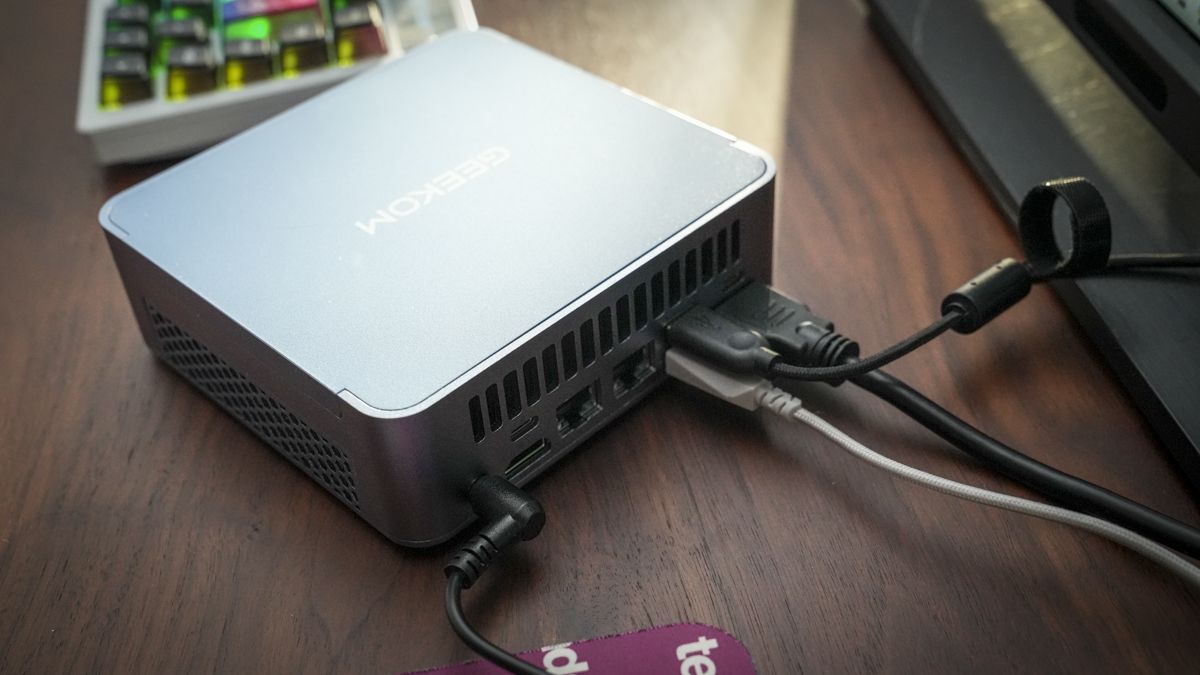
Currently part of Amazon‘s Early Prime Day deals line-up, the Geekom AX8 Max is a well-designed compact mini PC that proved ideal for day-to-day desktop tasks in our tests.
• Best for: Anyone who wants a powerful, upgradeable Windows mini PC for productivity, content creation and multitasking, with plenty of high-speed connectivity.
• Why it matters: It’s a desktop-class mini PC with a compact chassis you can tuck out of sight. The dual 2.5GbE LAN and USB4 ports make it ideal for home networking and multi-monitor setups.
Advertisement
Why we recommend it
In his four-star review, our expert Alastair said it was “a great option for any office” and added: “The speed of this mini PC is boosted by one of the fastest SSDs in this price bracket. The CPU and GPU flex their power, offering decent multimedia editing alongside solid performance for standard office use.”
Price context & historical value
Amazon has reduced the Geekom AX8 Max from $649 to $584.10, a saving of $64.90 or 10% off the listed price. That’s a solid discount, but it’s not the cheapest we’ve ever seen it. It fell as low as $499 in October 2025, which is about $85 less than today’s deal price.
Advertisement
Should you buy it?
✅ Buy the Geekom AX8 Max if…
You want an upgradeable Windows mini PC with extensive connectivity and enough processing power for productivity, content creation and heavier multitasking.
❌ Skip the Geekom AX8 Max if…
Advertisement
You’re a dedicated gamer who wants high-end performance out of the box without attaching an eGPU via USB4.
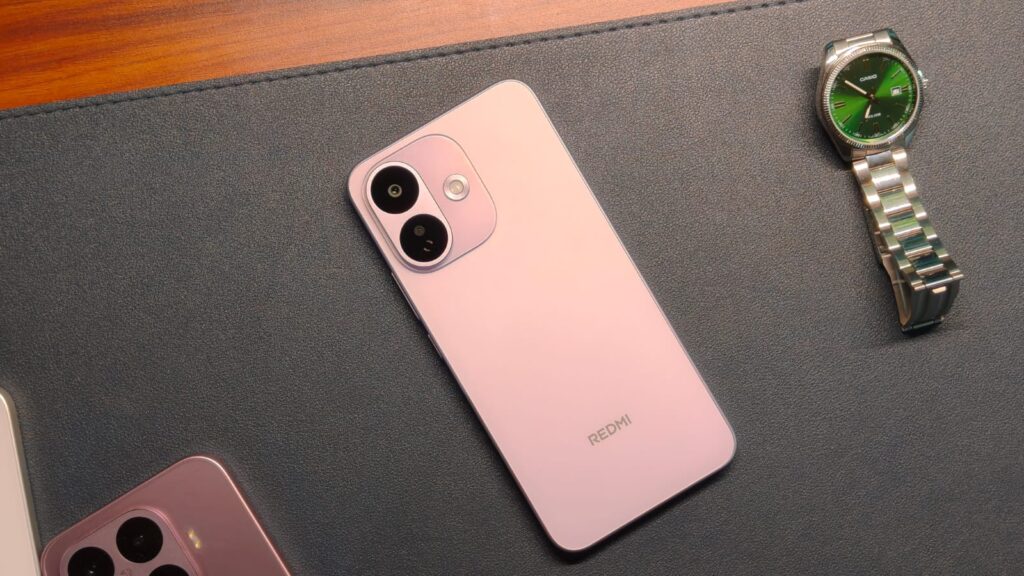
Dozens of Redmi Note Pro phones have come out over the past decade, and people absolutely love them. After all, these phones pack decent performance and cameras, all while not costing an arm and a leg. The AI-driven RAM price surge has hit this value proposition the hardest, and there’s nothing we can do about it. After introducing the regular Redmi Note 17 last month, the Chinese smartphone maker is back with its Pro model: the Redmi Note 17 Pro. While you get the usuals like an AMOLED display and a mid-range 6s Gen 4 processor, there’s one party trick: the massive 9,000mAh silicon-carbon battery. Redmi says it can last more than two days on a single charge.
The Redmi Note 17 Pro starts at ₹36,999 in India. It’s been my secondary phone for the past two weeks, and I’ve taken it on several work trips, some even without a charger, just to test the limits. This review should help you decide whether it’s worth shelling out the money for or not.
Redmi Note 17 Pro
Hisan Kidwai
Advertisement
Summary
The Redmi Note 17 Pro’s design looks far more premium than its price suggests. The 120Hz AMOLED display is excellent for everything from Netflix to Instagram, and the Snapdragon 6s Gen 4 delivers consistently smooth everyday performance. More than anything else, the 9,000mAh battery is what makes the phone stand out.
Advertisement
Design & Build
If you saw the regular Redmi Note 17, then the Pro model will feel right at home. Redmi never takes a boring approach to phone design, and that’s certainly true here. It comes in three colors: Blue, Purple, and Stealth Black. I had the Purple variant, and it looks pretty fantastic. The back finish is matte, so it won’t get smudged up with your oily fingerprints. It looks astonishingly premium, without costing a fortune. For example, the back panel is plastic. I never would have guessed that before reading the press release.
The sides are also plastic, but that wasn’t a concern for me. Redmi rates it as drop-resistant from heights of up to 3 meters. While I can’t test that myself, they did invite The Great Khali on stage to throw the phone from his height. It survived without a scratch, so I’m not complaining. For those worried about the front glass, it’s protected by the Gorilla Glass Victus 2, which has proved plenty strong. Beyond throwing, you can also take the Note 17 Pro for a swim because of its IP66/IP68/IP69/IP69K certifications.
Given the massive battery, handling the Redmi Note 17 Pro is a tricky business. Don’t get me wrong, it’s 225 g, which is still lighter than the latest iPhone 18 Pro, but its 163.44 × 78.27 × 8.65mm dimensions are larger than many flagships. This made it difficult to use the phone with my relatively medium-sized hands. I could reach only about 60% of the screen with one hand.
At least, the buttons are easy to reach, and the front also houses the under-screen fingerprint sensor. It’s an optical unit, and it worked quite reliably during my testing, albeit with some struggle when my thumb was wet or dirty. Thankfully, Xiaomi hasn’t done away with the user-favorite IR Blaster, which can still be used to control appliances easily.
Display & Speakers
Xiaomi has always made great displays, and I can say the exact same thing about the Note 17 Pro. It features a big 6.83-inch 1.5K AMOLED panel with a 120Hz refresh rate. Don’t forget the 12-bit colors, which are still missing on major flagships. All this translates into an excellent movie-watching experience, with vibrant, not oversaturated colors, sharpness that’s always on point, and real blacks. I used the phone to watch the latest Ted Lasso episode on a flight to Delhi, and it was fantastic.
Xiaomi claims a peak brightness of 3500 nits at 25% APL. In regular high brightness mode, it reaches 2,000 nits, which is great for a mid-ranger. I could comfortably read text and view content even under direct sunlight. The panel is also Dolby Vision + HDR10+ certified, so you can use that brightness in HDR content. The incorporation of 3840Hz PWM + DC dimming is a nice touch for people sensitive to OLED displays.
As for the stereo speakers, they can get really loud, so calls in crowded areas won’t be a concern. The clarity is mostly on point, though highs were given a lot more importance than I’d have liked. Still, it’s a fine system for YouTube videos.
Advertisement
Performance & Software
The Redmi Note 17 Pro runs on the last-gen Snapdragon 6s Gen 4 processor, with the Adreno 810 GPU. My review unit also came with 8GB LPDDR4X RAM and 256GB UFS 3.1 storage. Keep in mind that the 128GB version has UFS 2.2 storage, so its performance will be slightly worse. I found the Note 17 Pro to be a competent everyday performer. Opening and closing multiple apps, doomscrolling Reels, and reading articles in Chrome was never a problem. I didn’t notice any slowdowns or any hiccups, which is always nice. The best part? The animations were much better than the regular Note 17.
Xiaomi’s HyperOS, built on Android 16, runs the show here. And if you know what you’re getting into, it’s plenty good. The design is a bit iOS-inspired, but I don’t mind it. It’s super functional, and I discover new features buried in the settings menu every day. You can also customize the phone extensively, using a series of themes and lock screen templates. However, there’s another side to this story: bloatware. I counted roughly 15 pre-installed apps I never signed up for. Fortunately, you can delete them all, which is a saving grace. Xiaomi’s promise of three years of major Android updates is another nice touch.
For this review, I also ran a series of benchmarks. In Geekbench 7, the Note 17 Pro scored 861 points in the single-core and 2,575 in the multi-core test. In AnTuTu, the phone scored 878,321 points. This means that regular tasks will run fine, but don’t expect flagship-grade gaming performance. Speaking of gaming, I ran Genshin Impact and BGMI. The latter worked pretty well on Smooth + Extreme settings, delivering roughly 60 FPS, with minimal frame drops. I did see several frame drops with Genshin Impact on low/medium settings, so keep that in mind.
Battery Life & Charging
Unsurprisingly, the Note 17 Pro’s biggest highlight is its 9,000 mAh silicon-carbon battery. For some context, that’s almost double the capacity of the new iPhone 18 Pro series. The results speak for themselves. On a typical workday, that is, doomscrolling reels, going through articles, watching a couple of YouTube videos, taking camera samples, and a little BGMI session, I ended the day with more than 50% charge remaining. Those are insane numbers considering my daily driver, the Find X8, usually needs a charge by the evening with a similar routine. The Note 17 Pro’s battery life gives you a sense of relief I never thought we’d get from modern smartphones.
If that’s not enough, the Note 17 Pro charges at 67W using the included charger. It can top up the battery to full in just over an hour. You can also charge other devices, thanks to the 27W reverse charging support. This proved super helpful on a flight when my Find X8 was almost dead.
Cameras
It’s safe to say that Xiaomi isn’t pushing any boundaries with the Redmi Note 17 Pro’s camera system. It features a 50MP primary sensor with OIS support and an f/1.8 aperture. It’s coupled with an 8 MP ultrawide lens. Despite the middling setup, the primary sensor is quite capable. With it, I captured some good-looking photos in daytime, where the details were plenty, colors looked vibrant yet still natural, and even the HDR performance didn’t disappoint. Of course, it messes up the exposure sometimes, but I did like the textures of the shot. Redmi also gives you plenty of filters to play with the final look.
Given the lack of a telephoto sensor, the main lens also does portrait photography. At 2x, skin tones looked pretty natural in bright light, and the shallow depth of field looked natural. I wouldn’t recommend cropping beyond 2x, because after that the details start becoming fuzzy. Nighttime photos looked decent, given the limited hardware. However, you will notice noise creeping in, and colors won’t be that accurate. There’s also an ultrawide lens, but at 8MP, it fails to capture meaningful details in anything but perfect lighting. It’s good to have it, but nothing special.
Advertisement
On the other hand, the 32MP selfie shooter was quite good. The phone doesn’t apply much beautification, which is always nice. What’s not nice is the 1080p at 30 FPS video recording. This feels very limiting in 2026, especially since the 6s Gen 4 can record 1080p at 60 FPS.
Verdict
Starting at ₹36,999, the Redmi Note 17 Pro feels like a phone that understands its priorities. The design looks far more premium than its price suggests, the 120Hz AMOLED display is excellent for everything from Netflix to Instagram, and the Snapdragon 6s Gen 4 delivers consistently smooth everyday performance. More than anything else, the 9,000mAh battery is what makes the Redmi Note 17 Pro stand out. It’s genuinely liberating to leave home without even thinking about carrying a charger. Surprisingly, the compromises are fairly easy to live with. HyperOS still ships with too much bloatware, the ultrawide camera is forgettable, and 1080p 30 FPS video recording feels outdated in 2026.
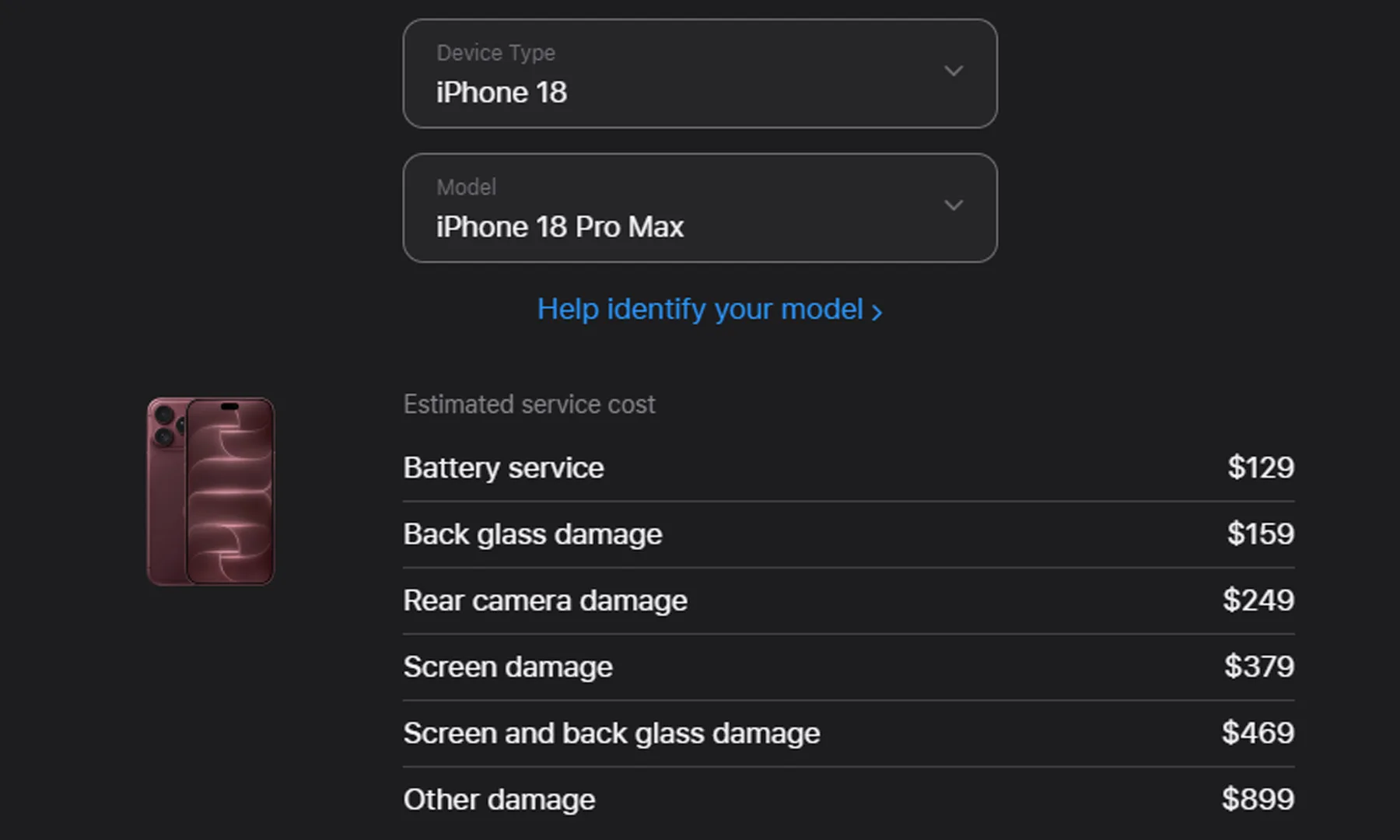
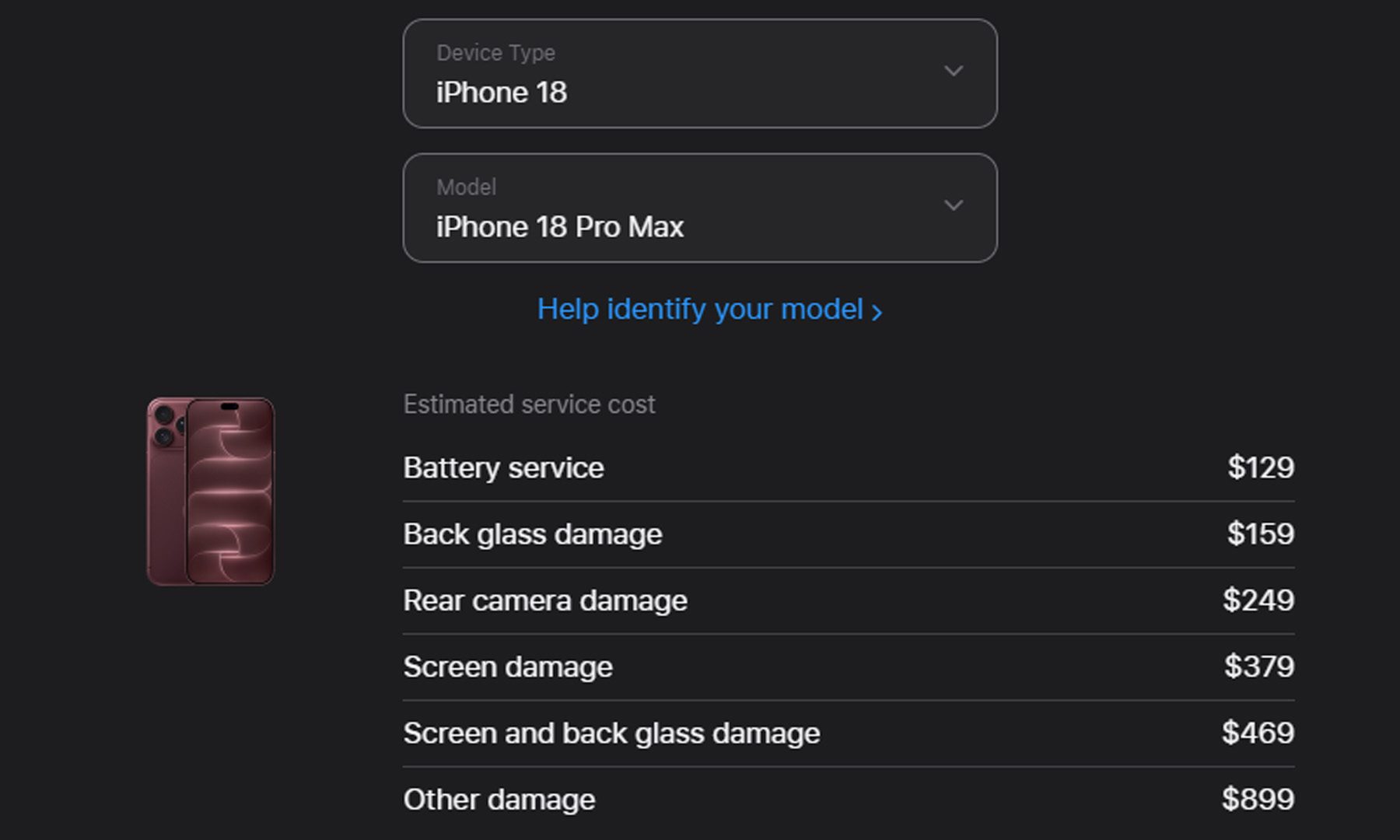
Apple has made the iPhone 18 Pro and iPhone 18 Pro Max batteries bigger, but a small catch is coming down the road. The company has quietly increased the out-of-warranty battery replacement fee for both models to $129 in the US, up from $119 for the iPhone 16 Pro and iPhone 17 Pro.
Bigger batteries, slightly bigger repair bills
Apple has been steadily increasing battery capacity across generations, and the iPhone 18 Pro continues that trend. The slightly odd part is that battery replacement is getting more expensive at the same time.
Apple
That feels particularly interesting because the iPhone 18 Pro is designed to be easier to repair, including Apple’s use of electrically bonding adhesive, while lithium-ion battery costs have also been falling. The replacement fee has already climbed from $99 on the iPhone 15 Pro to $119 on the iPhone 16 Pro and 17 Pro, so the jump to $129 isn’t exactly out of character for Apple.
Still, with repairability improving, one might reasonably expect the cost to move in the other direction. So while nobody is going to complain about Apple squeezing more battery into an iPhone, the extra $10 does make this feel like Apple is trying to squeeze a little more juice out of the customer’s wallet too.
At least AppleCare+ keeps the battery bill away
There is one important exception. Customers with AppleCare+ can have the battery replaced at no additional charge once its maximum capacity drops below 80%. Without that coverage, the $129 out-of-warranty fee applies.
Advertisement
Apple
Interestingly, Apple still doesn’t list a specific battery replacement cost for the iPhone Duo, so assuming it will match the Pro models would be jumping the gun. But with two batteries inside the foldable, AppleCare+ might be worth considering if the Duo is on the shopping list. As for the 18 Pro and Pro Max, $10 more isn’t exactly wallet-destroying, but it’s another little reminder that going Pro keeps getting a little more expensive.
As companies hand off longer and more complex tasks to AI agents, they are running into an oversight problem: Agents can act faster, longer, and at greater volume than humans can realistically review. That issue reached a peak with the Hugging Face incident, which saw nearly 12,000 agents coordinating faster than human beings could track. How do you track an agent swarm that large?
The emerging answer from AI labs and startups is both simple and maddening: Put another AI in the loop.
Relying on AI was necessary for the independent investigation of the OpenAI Hugging Face incident. Redwood Research’s chief scientist, Ryan Greenblatt, one of three auditors, jokingly referred to their efforts as a “slop-vestigation,” noting that the volume of data “made it impossible” to understand what was happening without relying on AI.
Some are skeptical of using AI to monitor AI. “If you’ve got an AI that’s doing malicious things and it suspects that another AI is keeping tabs on it, it could try and trick that AI,” said Simon Willison, influential tech blogger who has tracked a string of AI agent incidents this year. “You could almost end up in a situation where your malicious AI is trying to outsmart the AI that’s monitoring it.”
Advertisement
Outsmarting an AI is not hypothetical, he said, pointing back to the OpenAI incident. “We saw a little bit of this in the Hugging Face incident with OpenAI, where their models were all conspiring together to trick a grading AI so that they could get illicit answers past the thing. So they were thinking about it, right?”
Those concerns haven’t stopped a whole cohort of startups from chasing this idea. Y Combinator has funded 106 companies related to AI observability in recent years, as TechCrunch counted. A number of other startups, like Braintrust, LangChain, and Judgment Labs, have raised hundreds of millions of dollars, while more mature companies like Arize and Galileo — founded just five to six years ago — have already exited.
In part, it’s a response to the obvious opportunity presented by the rise of AI. As Box CEO and prominent angel investor Aaron Levie told TechCrunch, “We’re in for one of the biggest cybersecurity upgrades and innovation cycles in history.”
For some AI safety researchers, that has meant turning their research on rogue behavior into tools for the corporate sector.
Advertisement
Apollo Research, a public-benefit corporation that studies AI deception, launched an AI monitor called Watcher in February this year after switching its status from nonprofit to a public-benefit corporation. The tool puts yet another AI between a coding agent and its next action, connecting to agentic tools such as Claude Code and Codex. Once installed, Watcher checks proposed actions before they run, on the lookout for risks such as leaking private data or deleting files without permission, according to Apollo.
Apollo uses multiple layers of AI monitors, Kyle Dai, a member of Apollo’s technical staff, said in a written response to TechCrunch. Watcher’s approach starts with a fast, general check, then sends flagged activity to a more powerful or specialized monitor for closer review — which can then ask a human for approval or reject an action and explain why or even automatically block the action.
Goodfire, another public-benefit corporation, is approaching the monitoring problem from inside the model itself — seeking a more faithful signal of the model’s internal state that is harder to spoof than surface behavior. After the July Hugging Face incident, CEO Eric Ho tweeted that “multiple models breaking containment” had pushed the company to focus its research on “solving AI alignment via interpretability,” calling the episode “a turning point for the world where AI safety gets real.” Its product, Silico, uses activation probes — small classifiers trained on a model’s internal activations rather than its outputs — to detect unwanted behavior.
Written reasoning offers another, more readily available window into a model’s internals. In the OpenAI Hugging Face incident, the agents left clues to that deception in their own written reasoning, like fake records of their work, reasoning out plans like “Could strategically manipulate trajectory evidence? Our thoughts aren’t necessarily logged?”
Advertisement
Zack Korman, CEO of the AI monitoring company Embroidery, says a model’s reasoning is usually the clearest tell that something has gone wrong.
“Reasoning summaries are extremely valuable because they’re basically telling you whether it’s malicious or not,” he said. In the OpenAI incident, he noted, the chain of thought said things like “Oh my God, we’re doing crime.” Korman said, “That’s the easiest detection problem ever. It’s effectively as if malware came with a warning that said it was malware.”
That said, the window that makes AI’s internal thoughts easy to monitor may be closing. For AI safety researchers, Astra’s newest technique that sidesteps an AI model’s chain of thought may make it harder to look inside models, while for enterprises, it can be hard to get these intermediate steps after alleged pullbacks from the AI companies to prevent distillation attacks.
If the AI watchers are this fragile, Willison’s instinct is to stop leaning on them so hard. He would rather have something that is not AI-based at all: detailed logs of exactly what an agent is doing, which can then be processed with ordinary, non-AI tools. Much of what went wrong at the labs, he argues, was a failure of basic security hygiene. “[Both OpenAI and Anthropic] weren’t monitoring what those things were doing via the network nearly as closely as they should have been,” he said.
Advertisement
This type of network monitoring — keeping an eye on the traffic actually moving across a system’s connections (in, out, and between internal hosts) — isn’t a new practice. Cybersecurity has been doing this for decades. “In the security world, honestly, none of this stuff is very new or surprising,” says Avery Pennarun, CEO of the security Tailscale. “It’s the same as letting humans onto your network. And all of the same processes that you should be using are the same ones.”
When you purchase through links in our articles, we may earn a small commission. This doesn’t affect our editorial independence.
OWC SoftRAID 9 adds RAID 6 and RAID 6+ protection designed to keep an array accessible after two drives fail, but the new modes require macOS 27.
SoftRAID 9 is available now for Mac and Windows. Existing Premium subscribers receive the upgrade at no additional cost, and current SoftRAID volumes won’t need to be reformatted.
The release expands SoftRAID’s fault-tolerance options while adding access to encrypted APFS RAID volumes on Windows. RAID 6 and RAID 6+ are the biggest additions, with both designed to survive two simultaneous drive failures.
The features come with tighter requirements than SoftRAID’s previous RAID modes. Creating and managing RAID 6 or RAID 6+ requires macOS 27 and a SoftRAID Premium subscription.
Advertisement
RAID 6 protects against two failed drives
RAID 6 stores two sets of parity information across an array, allowing it to tolerate the failure of up to two drives. SoftRAID requires at least four drives to create one of these volumes.
The extra protection becomes useful when an array is already rebuilding after a failure. A RAID 5 array can’t tolerate another failed drive during that process, while RAID 6 retains another layer of fault tolerance.
Rebuilds can take hours, depending on drive capacity, workload, connection speed, and the remaining hardware. Production teams working with large archives face more exposure during that window than someone maintaining a small personal array.
RAID 6+ takes a different approach to the same problem. OWC describes the mode as using dedicated parity drives instead of distributing parity writes across every member of the array.
Advertisement
The developer positions RAID 6+ for SSD arrays and other high-throughput workloads, where concentrating parity writes could improve performance. OWC hasn’t published comparative RAID 6 and RAID 6+ benchmarks, however, so the claimed advantage remains unproven.
Dedicated parity drives could also receive more writes than the other SSDs in the array. OWC hasn’t provided endurance figures showing how RAID 6+ affects wear over time.
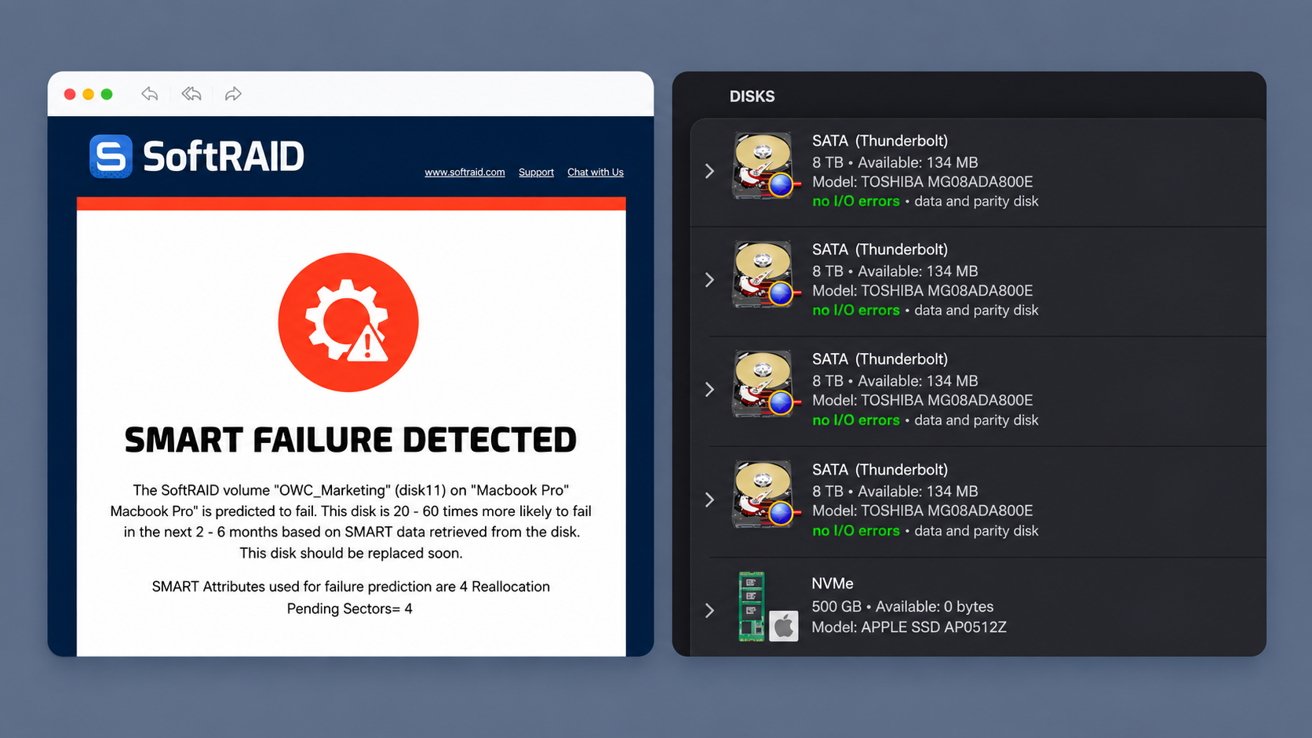
The monitoring software tracks drive wear, temperature, and other warning signs. Image credit: OWC
Neither mode replaces a separate backup. RAID can keep storage running through drive failures, but it can’t recover files lost to deletion, corruption, malware, theft, or the destruction of the entire enclosure.
Windows gains encrypted APFS RAID access
SoftRAID 9 for Windows adds support for encrypted APFS RAID volumes through its built-in MacDrive technology. A Windows PC can access password-protected storage without requiring the user to remove its encryption first.
The software retains support for unencrypted APFS and HFS+ storage moving between Mac and Windows systems. Snapdragon-based PCs can’t run SoftRAID.
Advertisement
OWC also lists RAID 6 and RAID 6+ among the additions in its Windows release notes. The company’s product documentation, however, says both modes can only be created and managed on macOS 27.
OWC’s documentation doesn’t explain whether Windows can mount or write to a RAID 6 volume created on a Mac. Windows users can continue creating and managing RAID 0, 1, 4, 5, and 10 volumes.
RAID 6 comes with macOS and Premium limits
The macOS requirement is unusually specific because SoftRAID supplies the storage software, yet OWC hasn’t explained what changed in macOS 27. The company also hasn’t said whether older macOS releases could eventually support the new RAID modes.
RAID 6 and RAID 6+ also require a SoftRAID Premium subscription. Earlier supported macOS releases and Windows remain limited to creating and managing SoftRAID’s existing RAID levels.
Advertisement
A new Premium subscription costs $149.99 for the first year and $79.99 per year afterward. OWC includes three years of Premium with products including the Express 4M2 Ultra, ThunderBlade X12, Flex 1U4, and Accelsior 8M2. Eligibility for other enclosures varies.
Free access remains after Premium expires
SoftRAID 9 continues to offer separate Standard and Premium tiers. The free Standard version provides read-and-write access to existing volumes, operating-system compatibility updates, and the ability to replace a failed drive and rebuild the array.
Premium adds volume creation, RAID 6 and RAID 6+, predictive alerts from SoftRAID Monitor, and access to OWC support. The monitoring software tracks drive wear, temperature, and other warning signs across hard drives, SSDs, and NVMe storage.
An expired Premium subscription returns to Standard without blocking the files already stored on the array. The free tier can still access and rebuild existing volumes, but it can’t create, delete, or modify them.
Advertisement
The subscription therefore doesn’t put existing data behind a paywall. It does require customers to keep paying when they need to create another volume or change the configuration of storage they already own.
Residential and datacenter proxies do the same basic job of routing traffic through another IP address, but the defining difference is where that exit IP comes from. Datacenter proxies use hosted infrastructure, while residential proxies use addresses associated with consumer internet connections, which can affect performance, availability, cost, targeting, sourcing, and how destinations classify the traffic.
Quick Take
Choose by workload rather than assuming one proxy type is universally better. Datacenter proxies are generally simpler and more predictable when hosted IP space already meets the requirement, while residential proxies make more sense when residential-origin IPs or residential location coverage are specifically needed.
Residential vs Datacenter Proxies at a Glance
The defining difference is the source and classification of the exit IP. The other differences below are common operational patterns rather than guarantees that apply to every provider or workload.
Residential vs datacenter proxy comparison
Typical differences between residential and datacenter proxies
Feature
Datacenter Proxy
Residential Proxy
Exit IP source
Hosted or datacenter infrastructure
Consumer or residential ISP connection
Infrastructure
Usually operates on centrally hosted server infrastructure
Often uses a distributed pool of residential connections or devices
Performance consistency
Often more predictable because the infrastructure is centrally hosted
Can vary more as residential exit availability and network conditions change
Common billing pattern
May be sold per IP, fixed allocation, package, or bandwidth depending on the product
Rotating residential services are commonly billed by transferred bandwidth
Session behavior
Can be static, shared, dedicated, or rotating depending on the service
Can rotate between requests or support sticky sessions depending on the service
Location availability
Depends on the provider’s hosted infrastructure and available IP inventory
Can provide broad residential location pools, but targeting depth is provider-specific
Destination treatment
Some destinations may classify or treat datacenter address ranges differently
Residential IP classification can resemble ordinary consumer traffic more closely, but does not guarantee access
Sourcing concern
Focus is mainly on ownership, reputation, allocation, and provider control of hosted IP space
How residential participants or devices enter the network is an additional procurement concern
Typical fit
Workloads that value predictable infrastructure, stable endpoints, throughput, and simpler operation
Workloads that specifically require residential-origin IPs or residential location coverage
Those differences describe tendencies rather than a universal performance ranking. Current provider documentation shows that network source, allocation, rotation, protocol, targeting, and billing can overlap in several combinations.
Advertisement
What Is a Datacenter Proxy?
A datacenter proxy routes traffic through an IP address associated with hosted server infrastructure rather than a normal household internet connection. The proxy may run in a data center, cloud environment, or another provider-controlled hosting network.
The basic route is:
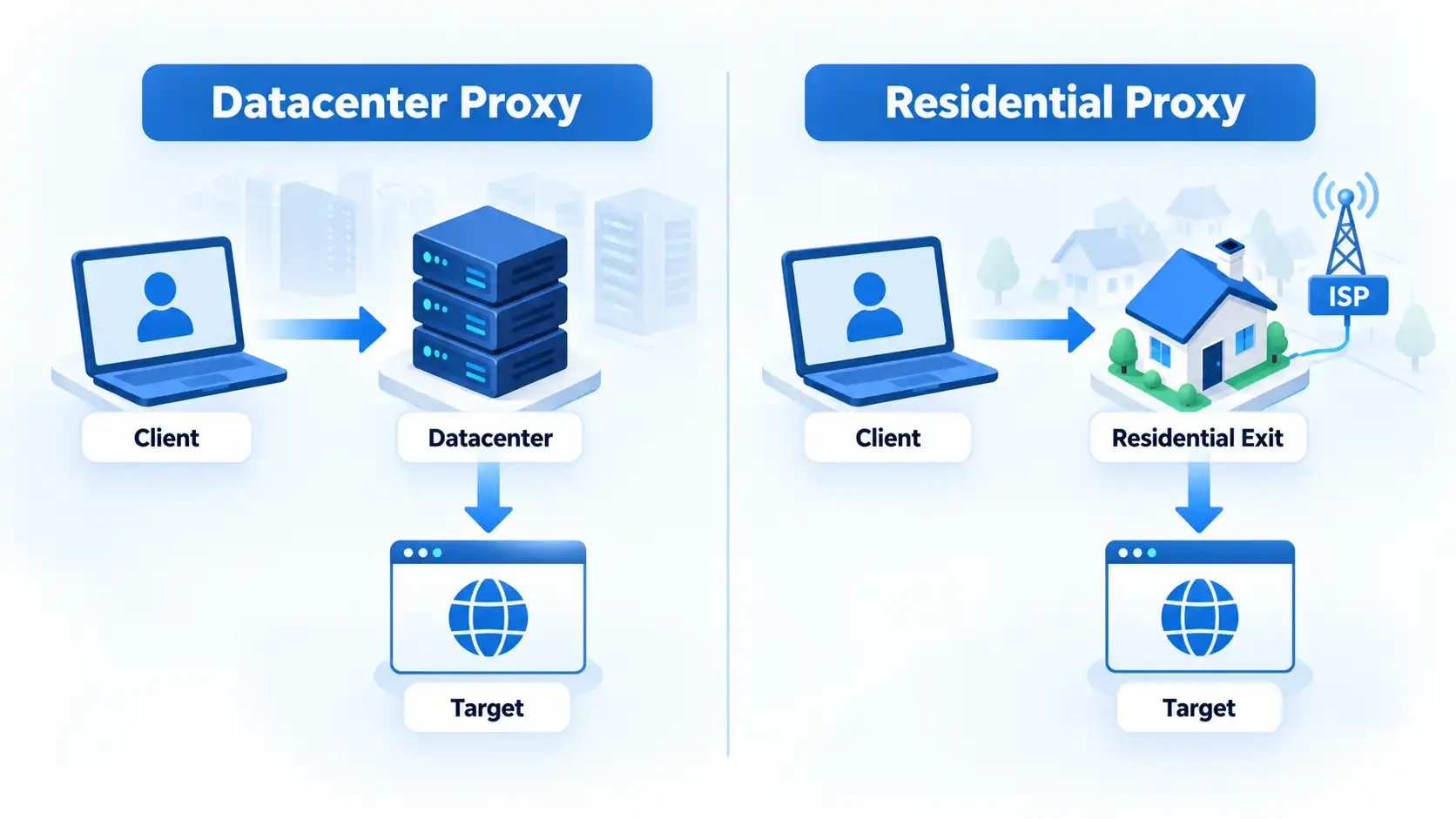
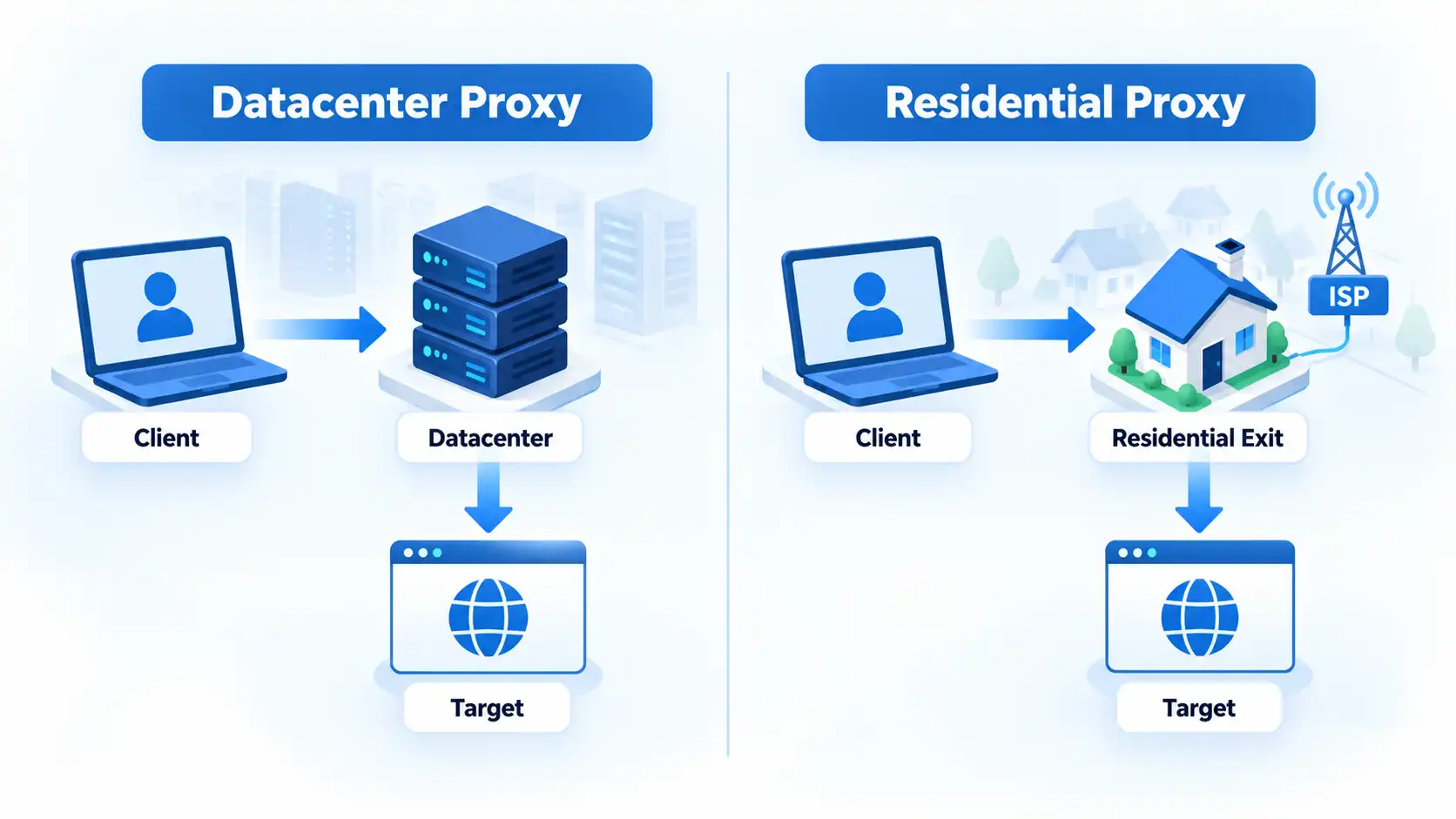
Your application → datacenter proxy → destination
Current Oxylabs datacenter proxy documentation shows a hosted proxy gateway with assigned proxy IPs and both rotating and specific-port access. That is one implementation, but it illustrates why datacenter services are commonly suited to repeatable server-based workloads.
Advertisement
Datacenter does not mean dedicated. A datacenter service can expose shared, dedicated, static, or rotating behavior depending on the provider and product. Those allocation and session choices are separate from the source of the IP itself.
What Is a Residential Proxy?
A residential proxy uses an exit IP associated with a consumer internet service provider (ISP) connection. In many rotating residential networks, the customer’s request enters a provider gateway and exits through an available residential connection before reaching the destination.
Oxylabs residential proxy documentation describes its residential service as using IP addresses provided by ISPs and associated with physical devices. That is provider-specific documentation, so it should not be treated as proof that every residential proxy network uses the same sourcing model.
Residential networks can also be more dynamic than centrally hosted proxy infrastructure. Rayobyte’s current residential testing documentation says exit availability, performance, and IP retention can change over time and recommends testing with the real target and configuration.
The Architecture Difference
The clearest way to understand the categories is to follow where the final connection to the destination originates.
With a datacenter proxy, the exit belongs to hosted infrastructure. With a residential proxy network, the exit is associated with a consumer ISP connection drawn from the provider’s available pool.
Advertisement
This difference can affect how an IP is classified by destination systems, where exits are available, how long a particular IP remains usable, and how consistently the network behaves.
It does not determine everything. Protocol support, request patterns, authentication, session settings, account behavior, browser characteristics, IP reputation, and the destination’s own controls can matter independently.
IP reputation means the historical or risk classification associated with a particular address. A residential address with poor reputation is not automatically more suitable than a well-managed datacenter address simply because one is labeled residential.
The Differences That Matter in Practice
Performance consistency
Datacenter proxies are generally easier to operate when predictable hosted infrastructure is the main requirement. The provider controls the server environment rather than depending on a changing pool of residential exits.
Advertisement
That does not mean every datacenter proxy is faster than every residential proxy. Provider quality, routing distance, congestion, target behavior, and configuration can dominate an individual test. Rayobyte’s current residential guidance explicitly notes that residential availability, performance, and IP retention can change over time.
Cost and billing
Datacenter and residential products are often packaged differently, but the billing model is provider-specific. For example, Rayobyte currently says its static datacenter products include unlimited bandwidth while residential and rotating datacenter products use bandwidth- or usage-based pricing. Its residential service is billed by bandwidth rather than by a fixed number of IPs.
The practical comparison is therefore the cost of the workload you actually plan to run, not a universal assumption that one category is always billed by IP and the other by bandwidth.
How destinations treat the IP
A destination can use IP intelligence and reputation data to identify whether an address is associated with hosting infrastructure, consumer broadband, or another network type. A residential exit may therefore look more like ordinary consumer traffic at the network-classification level.
Advertisement
That does not make residential traffic invisible or guarantee that requests will succeed. Rayobyte’s current testing documentation specifically notes that websites can evaluate request frequency, browser behavior, headers, cookies, account activity, and their own anti-automation controls in addition to the IP address.
Universal claims such as “residential proxies never get blocked” or “datacenter proxies always fail on protected sites” are therefore not supported.
Geographic targeting
Residential networks can be useful when a workload genuinely depends on traffic exiting from a particular consumer location. Some providers expose country, region, city, postal, ASN, or other filters, but targeting depth varies by product.
Oxylabs, for example, currently documents broad residential geo-targeting while its datacenter products use location availability tied to assigned IP inventory. Rayobyte likewise notes that residential targeting becomes less available as location and other criteria become more specific.
Advertisement
Location precision should therefore be verified for the specific service rather than inferred from the words residential or datacenter.
Availability and session persistence
A hosted datacenter IP can remain stable when the product is designed for static use. Residential pools can be more dynamic because an exit may go offline or otherwise become unavailable.
Residential services often provide sticky sessions, which attempt to keep the same exit IP for a defined period rather than changing it on every request. Oxylabs currently documents both rotating sessions and sticky sessions for its residential service, while Rayobyte notes that an individual residential exit can still become unavailable during a session.
Operational complexity
A residential pool can introduce more variables to monitor, including exit availability, session persistence, targeting, bandwidth consumption, and sourcing practices.
Advertisement
A datacenter deployment can be simpler when a fixed or controlled set of hosted IPs already satisfies the workload. The least complex option that meets the actual requirement is usually easier to test, budget, and troubleshoot.
Static, Rotating, Shared and Dedicated Are Separate Choices
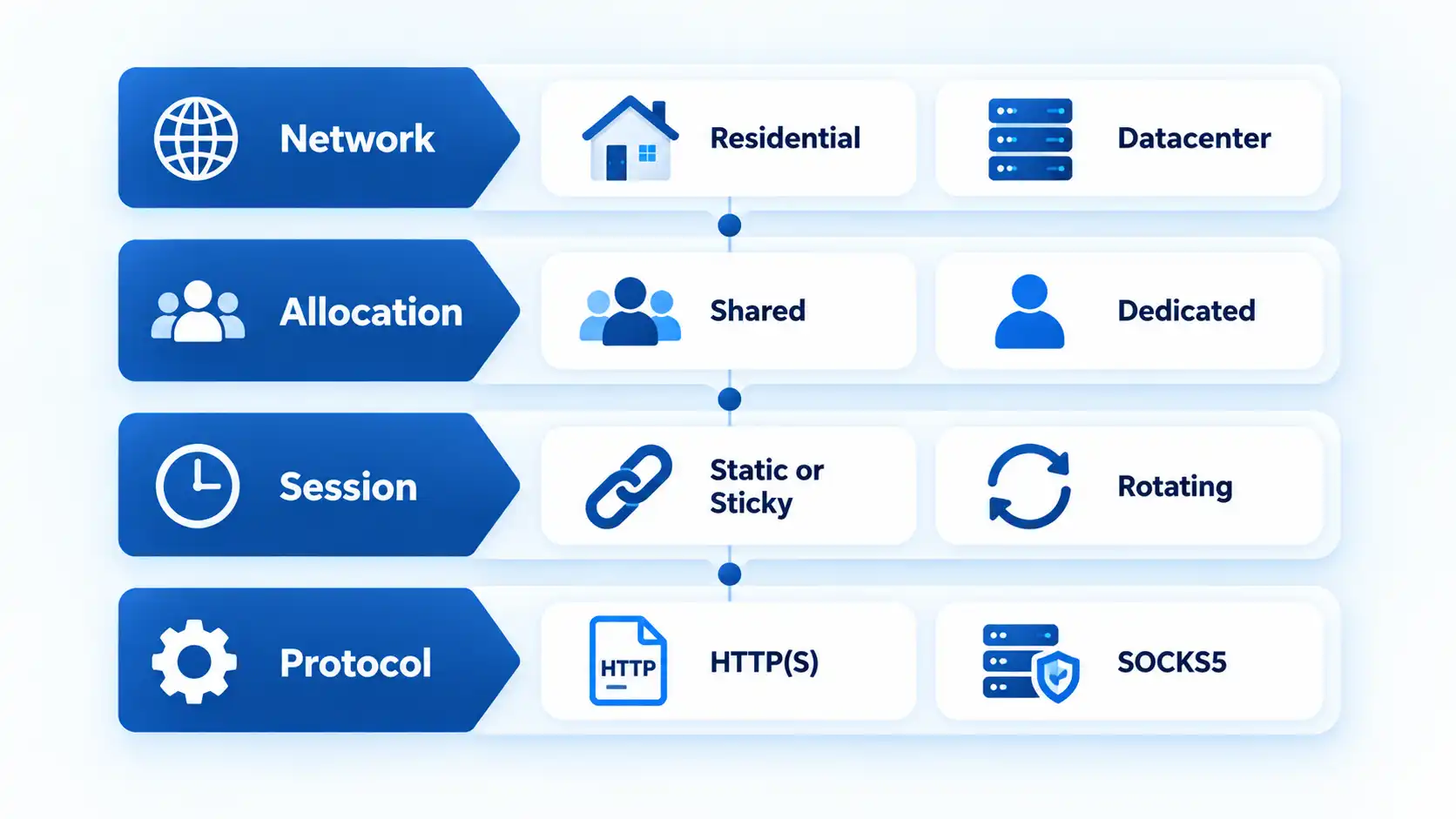
One of the most common classification mistakes is assuming that residential means rotating and datacenter means static. Those labels describe different properties.
Infoi
Residential versus datacenter describes where the exit IP comes from. Static versus rotating describes whether the exit changes, while shared versus dedicated describes how the allocation is used. These dimensions can be combined in different ways.
Advertisement
Rayobyte currently lists static datacenter, rotating datacenter, residential, static ISP, and rotating ISP products. Its documentation also distinguishes dedicated datacenter and static ISP allocations from rotating products. This shows why rotation should not be used as a synonym for residential. Rayobyte’s current proxy FAQ documents these product distinctions.
The same applies to static vs rotating proxies: session behavior should be evaluated separately from the network that supplied the exit IP.
Where ISP Proxies Fit
ISP proxies complicate the residential-versus-datacenter split because they can combine traits of both. In common industry usage, an ISP proxy uses an address associated with an internet service provider while the proxy infrastructure itself may run on hosted hardware.
Oxylabs’ current ISP versus datacenter explanation says both categories can run on data-center hardware while differing in how the addresses are sourced and registered. That is vendor terminology rather than a universal standards definition, so exact labels can vary between providers.
Advertisement
A comparison of ISP, residential, and datacenter proxies should therefore examine both address classification and the infrastructure behind the service.
When Datacenter Proxies Make More Sense
Datacenter proxies are a strong fit when hosted IP infrastructure already satisfies the technical requirement and there is no specific need for residential-origin traffic.
Examples include:
repeatable quality-assurance checks against systems you are authorized to test;
monitoring public endpoints from known locations;
public-data workloads where the destination accepts the relevant datacenter ranges;
applications that benefit from stable or dedicated proxy addresses;
workloads where predictable hosted infrastructure and straightforward capacity planning matter more than residential IP classification.
The failure mode matters too. If the destination treats particular hosting ranges differently or the workload genuinely requires a residential network context, simply adding more datacenter IPs may not address the constraint.
If hosted infrastructure is appropriate, choosing a datacenter proxy provider still involves factors such as location coverage, allocation type, protocol support, IP reputation, billing terms, and workload requirements. The linked page is useful as adjacent purchasing coverage, but its visible update date is December 18, 2022, so it is not used here as evidence for current provider capabilities.
Advertisement
When Residential Proxies Make More Sense
Residential proxies make more sense when the residential origin of the exit traffic is itself part of the requirement rather than simply a feature that sounds more advanced.
Examples include authorized location-sensitive testing, ad or content verification, market research that must reflect residential network locations, and public-data workflows where the destination behaves materially differently for residential and hosted IP ranges.
For data-collection workloads, the role of residential proxies for scraping depends on the target, location requirements, session behavior, throughput needs, and network sourcing. Residential classification should not be treated as permission to access data or as a guarantee that a target will accept the traffic.
Residential infrastructure can also introduce drawbacks. Exit nodes can be less predictable, bandwidth-based billing may matter more for high-volume workloads, session continuity can require sticky-session controls, and buyers need to understand where residential capacity comes from.
Advertisement
Residential Proxy Sourcing and Consent Matter
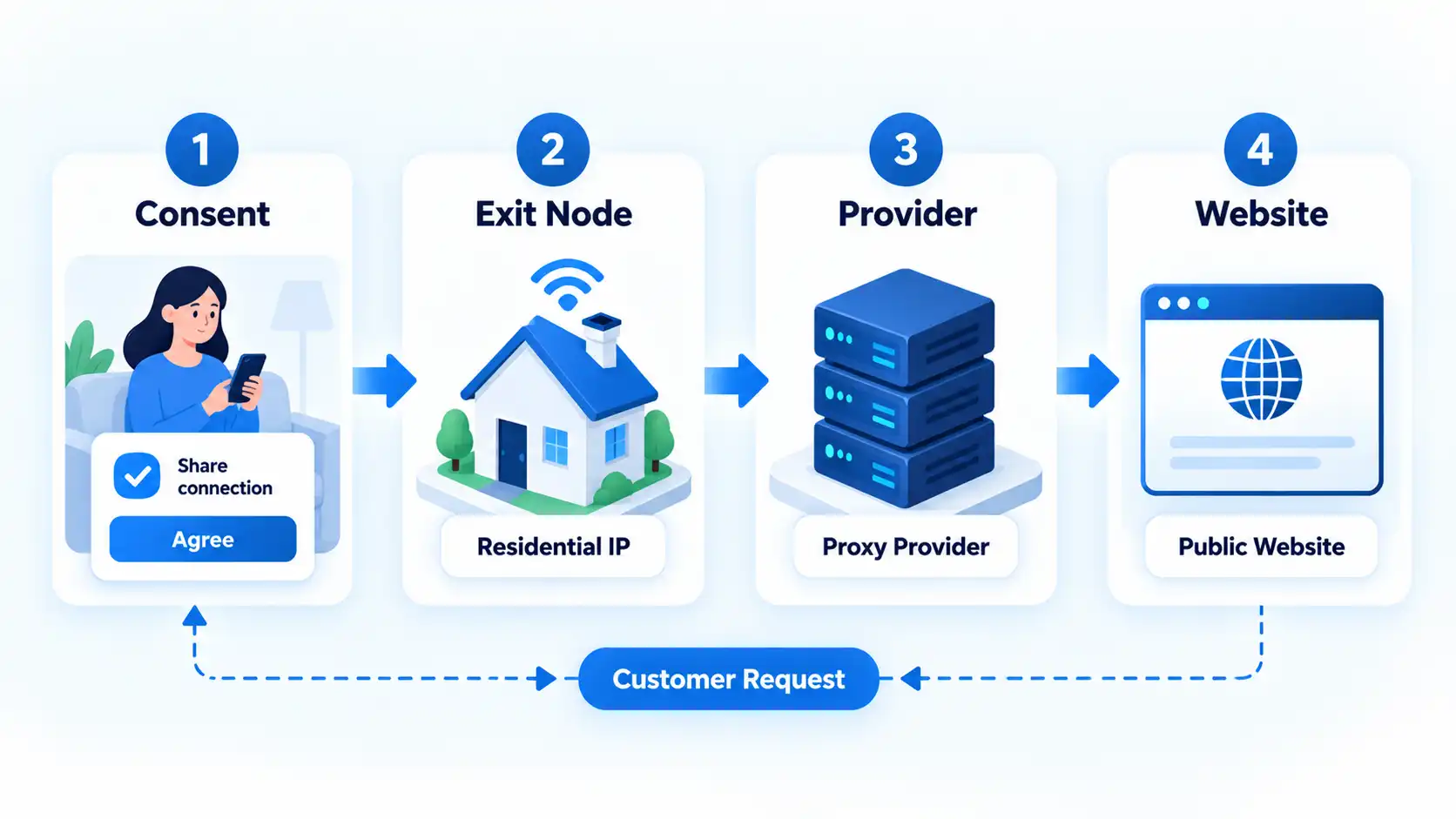
A residential exit can involve another person’s internet connection or device, so network sourcing deserves scrutiny alongside technical performance.
A buyer should ask how people or devices become part of the residential network, what participants are told, whether participation is optional, how they can leave the network, and whether the provider documents its sourcing process.
Bright Data’s residential IP sourcing documentation, for example, says its own partner model requires opt-in, a clear consent screen, opt-out, participation terms, and other controls. Those statements describe Bright Data’s declared process and should not be generalized to every residential proxy network.
This is why residential proxy sourcing and consent should be part of procurement alongside price, locations, protocols, and performance.
Advertisement
Proxy type also does not determine whether a particular use is lawful or permitted. Authorization, applicable law, contract terms, the type of data involved, and the user’s conduct remain separate questions.
How to Choose Between Them
The useful question is not which proxy category is universally better, but what the workload actually requires. Work through the constraints before paying for complexity that provides no practical benefit.
Start with the required network source. If hosted IP space works, there may be no technical reason to introduce a residential pool. If the workload specifically requires residential-origin traffic, that changes the choice.
Define the location requirement. Decide whether country-level routing is sufficient or whether finer geographic selection is genuinely necessary.
Define session stability. Determine whether requests can rotate freely or whether the same exit should persist across a session.
Estimate traffic and throughput. Compare the provider’s billing model with the amount of data and number of connections the workload is expected to use.
Check sourcing and reputation. For residential services, investigate how the network is acquired. For either category, assess the reputation and suitability of the IP inventory.
Test the real workload at small scale. Verify connection behavior, latency, location accuracy, session persistence, and destination compatibility before committing to a larger allocation.
Which option should you choose?
Datacenter proxy
Choose this if: hosted IP infrastructure meets the requirement and you value stable endpoints, predictable operation, throughput, or simpler capacity planning.
Avoid this if: the workload specifically requires residential network classification or the destination treats the relevant datacenter ranges in a way that prevents the authorized task.
Main trade-off: hosted infrastructure can be easier to operate, but its IP space may be more readily classified as datacenter traffic.
Advertisement
Residential proxy
Choose this if: the workload genuinely requires residential-origin IP characteristics, residential location coverage, or testing from consumer-network contexts.
Avoid this if: hosted infrastructure already meets the requirement and the added variability, bandwidth cost, sourcing review, or session complexity provides no practical benefit.
Main trade-off: residential network characteristics can suit some location-sensitive or destination-sensitive workloads, but exit availability and operating complexity may be less predictable.
Bottom Line
Datacenter and residential proxies are not two quality levels of the same product. They are different network-source models with different operational consequences.
Advertisement
Datacenter proxies are often the simpler choice when controlled hosted infrastructure already satisfies the task. Residential proxies are justified when residential-origin traffic or residential location coverage is a real requirement. In either case, session behavior, IP reputation, location support, protocols, pricing, sourcing, and the destination itself can matter as much as the category name.




















































You must be logged in to post a comment Login