Connect with us
DAPA Banner
DAPA Coin
DAPA
COIN PAYMENT ASSET
PRIVACY · BLOCKDAG · HOMOMORPHIC ENCRYPTION · RUST
ElGamal Encrypted MINE DAPA
🚫 GENESIS SOLD OUT
DAPAPAY COMING

Tech

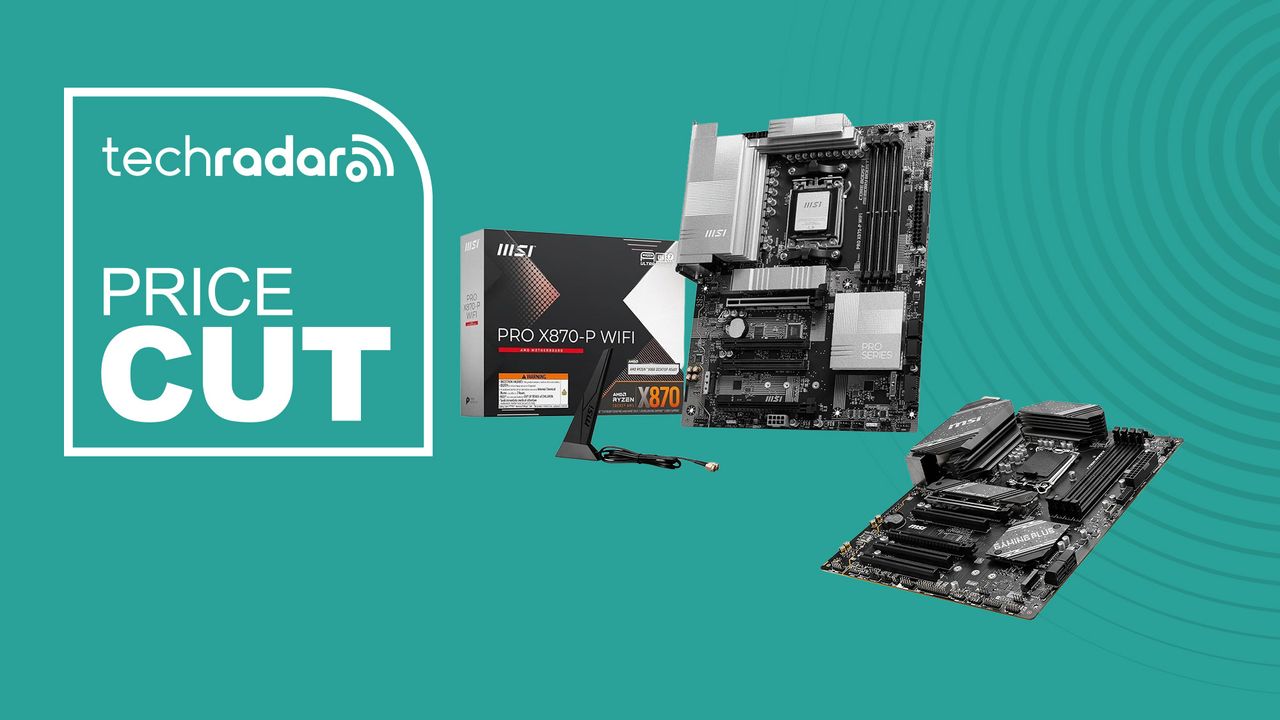
Building a PC? MSI has two top motherboard deals for Prime Day

Published

on

Motherboard deals at this level of discount don’t come around that often. Right now, Amazon has the MSI PRO X870-P WiFi at $152 (was $170) for AMD Ryzen and the MSI B760 Gaming Plus WiFi at $133 (was $200) for Intel in the Prime Day sale.

Both are well-regarded ATX boards with built-in Wi-Fi, and both represent meaningful savings if you’re mid-build or planning an upgrade. And both punch above their discounted price.

The two boards target different platforms entirely — one is AMD AM5, the other Intel LGA 1700 — so this isn’t a true apples-to-apples comparison. Think of them as two separate opportunities: one for Ryzen 7000/8000/9000 builders, and one for 12th/13th/14th Gen Intel builders.

Advertisement

Today’s top computer deals

More on the PRO X870-P WiFi — AMD AM5

At this price, the PRO X870-P Wi-Fi sits in an interesting spot: it’s the X870 chipset — AMD’s current-gen platform with full PCIe 5.0 support — at a price that previously would have bought you a mid-range B650 board. The X870 chipset brings wider PCIe 5.0 support and Wi-Fi 7 as a platform requirement (rather than an optional add-on), and AMD has committed to AM5 support through at least 2027, which means whatever Ryzen processor you pair with this board today will have a clear upgrade path for several years.

The connectivity package at this price is genuinely impressive. Wi-Fi 7 with its 320MHz channel width delivers noticeably lower latency and higher throughput than Wi-Fi 6E — the kind of upgrade you notice on a busy home network. The 5Gbps Ethernet port, USB4 at 40Gbps, and Thunderbolt 4 are the kind of specs that usually appear on more expensive boards. Three M.2 slots (including one Gen5) gives you flexibility for fast SSDs now and room to expand later.

MSI’s PRO series is positioned more toward productivity and professional use than the flashier gaming-branded boards, which means the design is restrained — minimal RGB, clean silver heatsinks, no aggressive aesthetics. Whether that’s a positive depends entirely on what you want your build to look like. Best Buy reviewers have praised it as straightforward to install and stable from the first boot, with multiple builders noting it’s working well with everything from Ryzen 7700X to the 9800X3D.

Advertisement

One honest note: the PRO X870-P is tuned more for stability and accessibility than aggressive overclocking. If you’re planning to push DDR5 kits to their absolute limits or run a flagship Ryzen 9 chip at sustained all-core maximum TDP, a higher-end X870E board would give you more VRM headroom. For the majority of builds — including enthusiast setups — it handles everything without issue.

More on the B760 Gaming Plus WiFi Gaming Motherboard

The B760 Gaming Plus WiFi is the more straightforward recommendation of the two — it’s a well-established board with a substantial real-world track record. The 840+ reviews on Amazon at 4.4/5 tell a consistent story: this board works reliably, installs without drama, and delivers good performance across a wide range of Intel builds.

Intel’s LGA 1700 platform supports 12th, 13th, and 14th Gen Core processors, which means there’s a wide choice of CPUs available at various price points — everything from a budget Core i3 to the Core i9-14900K. It’s worth noting that Intel has moved on to the LGA 1851 socket for its newest Arrow Lake generation, so this platform won’t support 15th Gen CPUs. That said, for builds centered on a 13th- or 14th-Gen processor, the B760 remains a very solid foundation.

Advertisement

Wi-Fi 6E built-in is a practical inclusion at this price — it saves you from buying a separate wireless adapter and keeps the build clean. 2.5 Gbps Ethernet provides fast wired connectivity for those who prefer a cable. Two M.2 Gen4 slots comfortably handle primary and secondary NVMe SSDs, and PCIe 4.0 x16 is more than adequate for any current GPU.

Reviewers have specifically praised the B760 Gaming Plus WiFi for its stability across sustained workloads — one reviewer noted it handled “AAA applications and multitasking effortlessly” over ten months of use without a single stability issue. The reinforced PCIe slots and robust VRM heatsinks contribute to a build quality that feels more substantial than budget Intel boards at a similar price.

Also consider: Pre-built PC deals

Source link

Advertisement
Continue Reading
Click to comment

You must be logged in to post a comment Login

Leave a Reply

Tech

YouTube Shorts are getting even shorter with an update that lets you double the playback speed

Published

on

YouTube is rolling out a series of changes to Shorts, including a new method that lets users shrink the duration of short-form videos.

The Google-owned platform announced Thursday that Shorts now comes with a setting that allows users to double their playback speed. The point of making what is an already brief experience even briefer is to let users “absorb information more quickly or find your favorite part faster,” the platform said.

In an apparent bid for a more positive web, YouTube has also nixed the Shorts dislike button. Instead of disliking a video, users will now have to rely on the “Not Interested” and “Don’t recommend this channel” functions to disincentivize certain kinds of content.

Similarly, instead of clicking on a thumb’s up button if they like a video, users will now have access to a heart emoji.

Advertisement

Finally, YouTube is also introducing a new “Clear Screen mode,” which is designed to temporarily hide “all icons and text from your playback view,” giving users a clean view of their content unencumbered by floating distractions.

All of these changes have been made in the service of creating “a more intuitive Shorts experience,” the company said. It’s not exactly clear when the updates will take effect. The company said that the features would be rolling out over time, but didn’t give exact dates.

TechCrunch reached out to Google for more information.

YouTube was late to the short-form video space (it launched Shorts in 2024, several years after the launch of TikTok and Instagram Reels), but has managed to attract an audience since then. YouTube Shorts was averaging 200 billion daily views as of June 2025, CEO Neal Mohan said at his keynote in Cannes last year. (We may qualify this impressive metric with the context that YouTube counts a “view” as the very first moment that a video is opened.)

Advertisement

A report earlier this year showed that Shorts were increasingly being watched on viewers’ TV screens — and that as much as 2 billion hours of such content was being consumed per month.

When you purchase through links in our articles, we may earn a small commission. This doesn’t affect our editorial independence.

Source link

Advertisement
Continue Reading

Tech

ICE Detention Center Contractor Endangered Detainees, Destroyed Homicide Evidence

Published

on

from the breaking-people,-blowing-money dept

One of ICE’s largest detention centers is conveniently located only miles from the US border in El Paso, Texas. Erected on an apparently unused section of the Ft. Bliss military base, the detention center was crafted to hold up to 5,000 detainees at a time.

Camp East Montana has already earned the reputation as one of the worst places for detainees to be sent. Previous reporting has uncovered nasty things like guards setting up suicide death pools, rather than… you know… doing whatever they could to deter detainees from committing suicide.

In addition to this, there have been measles outbreaks and inspections detailing dozens of violations at the facility, including a seemingly deliberate unwillingness to provide basic medical care for detainees.

The Government Accountability Office (GAO) has just released its report [PDF] on Camp East Montana and it doesn’t contain anything ICE (or its contractors) might legitimately consider to be a “win,” much less a “barely perceptible improvement.”

Advertisement

As NPR notes in its reporting on the GAO’s report, ICE is running through contractors rapidly, which suggests the companies hoping to get in on the temporary jail business aren’t particularly qualified to do so. To date, three different contractors have been in charge of this prison camp: Creative Corrections, Amentum Services, and this company (I guess it’s technically a company?) that was recently kicked to curb by ICE shortly after the GAO began its investigation:

When the Trump administration awarded a $1.26 billion contract this summer to build and operate a new tent city detention center in Texas, it made headlines, and not just because the facility, located at the Fort Bliss Army base, was expected to be the biggest of its kind in the country. The company that won the job, Acquisition Logistics, was so small it operated out of a single-family home in Richmond, Virginia. Almost nobody had heard of it. “A random house…just won $1.26 billion from ICE,” wrote the New Republic.

That likely explains a lot of the flaws the GAO uncovered. But the federal government has to take a lot of the blame itself. First off, this contract was somehow secured by the US Navy on behalf of ICE, which definitely makes it seem more shady than it already seems.

But ICE was so busy blowing billions on satisfying Trump’s bigoted fantasies that it couldn’t even be bothered to craft a contract that wouldn’t screw taxpayers out of even more money. In most prisons and detention centers, those being held by the government are often underfed. In the early days of Camp East Montana, it was the complete opposite:

The contract identified pricing for services needed to reach initial operational capacity of 1,000 detained noncitizens, along with pricing to increase the capacity of the facility by 250 detained noncitizens every week until it reached its full operational capacity of 5,000. Based on our review of contract documents and invoices, the Army began paying the full cost for guards, medical services, transportation, meals, and other services on August 1, 2025. However, there were no detained noncitizens at the facility until August 16. Between August 1 and August 15, 2025, the Army wasted up to $11.5 million for these services. Further, because the Army set a fixed price for meals based on the capacity of the facility, it paid about an additional $423,000 for meals it did not need when the facility was operating below its designated capacity from August 16, 2025, through September 30, 2025.

That’s the good news… somehow. It gets so much worse after that. While wasting food is certainly problematic when so many detainees at other prison facilities go hungry, this contractor was apparently so inept and inexperienced that pretty much everything it did made things worse or more dangerous for detainees.

Advertisement

According to an ICE report, there were no security cameras on the perimeter fencing and there were blind spots in the placement of cameras throughout the facility, increasing the risk of a sexual assault or an escape. In addition, during our visit to the facility on September 16, 2025, officials told us that the post responsible for monitoring security camera footage for all areas of the facility was understaffed.

[…]

Contractors told ICE they were unable to accommodate detained noncitizens using wheelchairs. According to an ICE report, the facility did not have any Americans with Disabilities Act-compliant showers in the housing units when it opened.

[…]

In January 2026, a contract security guard at Camp East Montana lost their loaded firearm at the facility. According to an ICE official, despite several searches of the facility, as of March 2026 the firearm had not been recovered.

Advertisement

[…]

[D]etained noncitizens with chronic conditions did not receive treatment and care in accordance with National Detention Standards. For example, none of the detained noncitizens with diabetes or HIV had treatment plans in place.

[…]

On March 3, 2026, ICE issued a discrepancy report related to a detained noncitizen escaping from Camp East Montana in October 2025. ICE oversight officials attributed the escape to the contractor’s inability to account for detained noncitizens

Advertisement

Your severity mileage may vary, but this covers everything from a lack of ADA compliance to losing a loaded handgun, with plenty of ineptitude/indifference in between.

There’s more. And it’s even worse than what’s seen above.

On February 20, 2026, ICE issued a discrepancy report for a detained noncitizen death by use of force in January 2026. The coroner’s autopsy found the death to be a homicide due to asphyxia. However, the contractor did not provide use of force and death reports to ICE, as required. In addition, evidence associated with the incident was missing or destroyed.

Don’t let the “or” fool you. Reports written by agencies that strive to be as neutral and non-judgmental as possible don’t tend to engage in speculation. If the GAO thinks evidence has most likely been destroyed, it’s going to portray it as just being one of two options. If the GAO thought it was more likely the evidence had just been misplaced or perhaps never gathered correctly, it would not have added “or destroyed” to this sentence.

What’s absolutely unclear is whether or not the contractor acted alone. The GAO doesn’t discuss this further, which does leave this part open to speculation. Either the contractor acted alone because it felt it might be held accountable for this death, or it was urged to eternally “misplace” evidence that might implicate the contractor and/or ICE itself.

Advertisement

Either way, there’s nothing in this report that suggests ICE or its contractors are going out of their way to ensure the health and safety of detainees. And if this is happening here, it’s certainly happening anywhere else ICE is stashing arrestees.

The government has decided the best use of our resources is rounding up as many non-white migrants as possible and toss them into prison camps. And it has decided it doesn’t care how this is done. It only cares that it gets done. This nation — if it manages to survive this constant onslaught on our ideals — will have to deal with repercussions of the actions of a handful of hateful people for decades to come.

Filed Under: camp east montana, detention facilities, dhs, el paso, ice, mass deportation, rights violations, trump administration

Companies: acquisition logistics, amentum services

Advertisement

Source link

Continue Reading

Tech

The White House is asking OpenAI to slow roll the release of its new model over safety concerns

Published

on

OpenAI’s release of its newest model, GPT 5.6, reportedly won’t be like its previous releases. Instead of distributing it to the public, the company plans to share it only with a select group of close partners because the Trump administration told it to, reports The Information.

At a meeting this week, CEO Sam Altman reportedly told staff that the government would be “approving access customer by customer” during a preview period. Altman reportedly added that if the limited release goes well, OpenAI hopes to follow with a general, broader release a “couple of weeks later.”

In other words, the Trump administration appears to be pressuring OpenAI to do what Anthropic is already voluntarily doing: keeping its most powerful AI models under wraps.

According to The Information, OpenAI’s new model is not only being reviewed by the administration, but its staffers also “worked closely” with the government on the upcoming release. The agencies that reportedly asked for a limited release were the Office of the National Cyber Director and the Office of Science and Technology Policy.

Advertisement

The Trump administration — which originally positioned itself as taking a “hands off” approach to AI — has in recent months pushed for federal oversight of new models. Earlier this month, Trump signed an executive order directing certain AI companies to voluntarily submit new models to the government for testing and evaluation before releasing them publicly. 

Earlier this year, Anthropic sparked no small amount of controversy when it announced that its new frontier cyber model, Claude Mythos, would only be released to a small coterie of partners through a program called Project Glasswing. Anthropic argued that its model was simply too powerful and could, in the wrong hands, cause more harm than good. Observers have since debated whether Anthropic’s rhetoric is a mere marketing gimmick or a legitimate attempt to keep a powerful model from being misused. The answer may be somewhere in between.

Cybercriminals have used automated tools for a very long time, but in the age of generative AI, they now have more digital ammunition than ever before. LLMs have proven adept at writing malware, and some can even execute entire ransomware attacks autonomously.

The specific concern with frontier cyber tools like Mythos is that they are ostensibly capable of both identifying and exploiting software vulnerabilities at speeds that no human analyst could match. Since many software systems contain hidden bugs that act as entry points into enterprise networks, this obviously poses an obvious and significant problem for any organization running complex software infrastructure. That said, since these models remain closed to the public, it’s difficult to tell just how much of a threat they really are.

Advertisement

When you purchase through links in our articles, we may earn a small commission. This doesn’t affect our editorial independence.

Source link

Continue Reading

Tech

Best Battery Life Laptops of 2026

Published

on

There are a ton of laptops on the market at any given moment, and almost all of those models are available in multiple configurations to match your performance and budget needs. So if you’re feeling overwhelmed with options when looking for a new laptop, it’s understandable. To help simplify things for you, here are the main things you should consider when you start looking.

Price

The search for a new laptop for most people starts with price. If the statistics chipmaker Intel and PC manufacturers hurl at us are correct, you’ll be holding onto your next laptop for at least three years. If you can afford to stretch your budget a little to get better specs, do it. And that stands whether you’re spending $500 or more than $1,000. In the past, you could get away with spending less upfront with an eye toward upgrading memory and storage in the future. But laptop makers are increasingly moving away from making components easily upgradable, so again, it’s best to get as much laptop as you can afford from the start. 

Generally speaking, the more you spend, the better the laptop. That could mean better components for faster performance, a nicer display, sturdier build quality, a smaller or lighter design from higher-end materials or even a more comfortable keyboard. All of these things add to the cost of a laptop. I’d love to say $500 will get you a powerful gaming laptop, for example, but that’s not the case. Right now, the sweet spot for a reliable laptop that can handle average work, home office or school tasks is between $700 and $800 and a reasonable model for creative work or gaming upwards of about $1,000. The key is to look for discounts on models in all price ranges so you can get more laptop for less. 

Operating system

Choosing an operating system is part personal preference and part budget. For the most part, Microsoft Windows and Apple’s MacOS do the same things (except for gaming, where Windows is the winner), but they do them differently. Unless there’s an OS-specific application you need, go with the one you feel most comfortable using. And if you’re not sure which that is, head to an Apple store or a local electronics store and test them out. Or ask friends or family to let you test theirs for a bit. If you have an iPhone or iPad and like it, chances are you’ll like MacOS too. 

Advertisement

But when it comes to price and variety (and, again, PC gaming), Windows laptops win. If you want MacOS, you’re getting a MacBook. While Apple’s MacBooks regularly top our best lists, the least expensive one is the M1 MacBook Air for $999. It is regularly discounted to $750 or $800, but if you want a cheaper MacBook, you’ll have to consider older refurbished ones. 

Windows laptops can be found for as little as a couple of hundred dollars and come in all manner of sizes and designs. Granted, we’d be hard-pressed to find a $200 laptop we’d give a full-throated recommendation to, but if you need a laptop for online shopping, email and word processing, they exist. 

If you are on a tight budget, consider a Chromebook. ChromeOS is a different experience than Windows; make sure the applications you need have a Chrome, Android or Linux app before making the leap. But if you spend most of your time roaming the web, writing, streaming video or using cloud-gaming services, they’re a good fit. 

Size

Remember to consider whether having a lighter, thinner laptop or a touchscreen laptop with a good battery life will be important to you in the future. Size is primarily determined by the screen — hello, laws of physics — which in turn factors into battery size, laptop thickness, weight and price. And keep in mind other physics-related characteristics, such as an ultrathin laptop isn’t necessarily lighter than a thick one, you can’t expect a wide array of connections on a small or ultrathin model and so on. 

Advertisement

Screen

When it comes to deciding on a screen, there are a myriad considerations: how much you need to display (which is surprisingly more about resolution than screen size), what types of content you’ll be looking at and whether you’ll be using it for gaming or creative work.

You really want to optimize pixel density; that is, the number of pixels per inch the screen can display. Though there are other factors that contribute to sharpness, a higher pixel density usually means sharper rendering of text and interface elements. (You can easily calculate the pixel density of any screen at DPI Calculator if you don’t feel like doing the math, and you can also find out what math you need to do there.) We recommend a dot pitch of at least 100 pixels per inch as a rule of thumb.

Because of the way Windows and MacOS scale for the display, you’re frequently better off with a higher resolution than you’d think. You can always make things bigger on a high-resolution screen, but you can never make them smaller — to fit more content in the view — on a low-resolution screen. This is why a 4K, 14-inch screen may sound like unnecessary overkill but may not be if you need to, say, view a wide spreadsheet.

If you need a laptop with relatively accurate color, that displays the most colors possible or that supports HDR, you can’t simply trust the specs — not because manufacturers lie, but because they usually fail to provide the necessary context to understand what the specs they quote mean. You can find a ton of detail about considerations for different types of screen uses in our monitor buying guides for general purpose monitors, creators, gamers and HDR viewing.

Advertisement

Processor

The processor, aka the CPU, is the brains of a laptop. Intel and AMD are the main CPU makers for Windows laptops, with Qualcomm as a new third option with its Arm-based Snapdragon X processors. Both Intel and AMD offer a staggering selection of mobile processors. Making things trickier, both manufacturers have chips designed for different laptop styles, like power-saving chips for ultraportables or faster processors for gaming laptops. Their naming conventions will let you know what type is used. You can head to Intel’s or AMD’s sites for explanations so you get the performance you want. Generally speaking, the faster the processor speed and the more cores it has, the better the performance will be.

Apple makes its own chips for MacBooks, which makes things slightly more straightforward. But, like Intel and AMD, you’ll still want to pay attention to the naming conventions to know what kind of performance to expect. Apple uses its M-series chipsets in Macs. The entry-level MacBook Air uses an M1 chip with an eight-core CPU and seven-core GPU. The current models have M2-series silicon that starts with an eight-core CPU and 10-core GPU and goes up to the M2 Max with a 12-core CPU and a 38-core GPU. Again, generally speaking, the more cores it has, the better the performance. 

Battery life has less to do with the number of cores and more to do with CPU architecture, Arm versus x86. Apple’s Arm-based MacBooks and the first Arm-based Copilot Plus PCs we’ve tested offer better battery life than laptops based on x86 processors from Intel and AMD.

Graphics

The graphics processor handles all the work of driving the screen and generating what gets displayed, as well as speeding up a lot of graphics-related (and increasingly, AI-related) operations. For Windows laptops, there are two types of GPUs: integrated (iGPU) or discrete (dGPU). As the names imply, an iGPU is part of the CPU package, while a dGPU is a separate chip with dedicated memory (VRAM) that it communicates with directly, making it faster than sharing memory with the CPU.

Advertisement

Because the iGPU splits space, memory and power with the CPU, it’s constrained by the limits of those. It allows for smaller, lighter laptops, but doesn’t perform nearly as well as a dGPU. In fact, there are some games and creative software that won’t run unless they detect a dGPU or sufficient VRAM. Most productivity software, video streaming, web browsing and other nonspecialized apps will run fine on an iGPU, though.

For more power-hungry graphics needs, like video editing, gaming and streaming, design and so on, you’ll need a dGPU; there are only two real companies that make them, Nvidia and AMD, with Intel offering some based on the Xe-branded (or the older UHD Graphics branding) iGPU technology in its CPUs.

Memory

For memory, we highly recommend 16GB of RAM (8GB absolute minimum). RAM is where the operating system stores all the data for currently running applications, and it can fill up fast. After that, it starts swapping between RAM and SSD, which is slower. A lot of sub-$500 laptops have 4GB or 8GB, which in conjunction with a slower disk can make for a frustratingly slow Windows laptop experience. Also, many laptops now have the memory soldered onto the motherboard. Most manufacturers disclose this, but if the RAM type is LPDDR, assume it’s soldered and can’t be upgraded. 

However, some PC makers will solder memory on and also leave an empty internal slot for adding a stick of RAM. You may need to contact the laptop manufacturer or find the laptop’s full specs online to confirm. And check the web for user experiences, because the slot may still be hard to get to, it may require nonstandard or hard-to-get memory or other pitfalls.

Advertisement

Storage

You’ll still find cheaper hard drives in budget laptops and larger hard drives in gaming laptops, but faster solid-state drives have all but replaced hard drives in laptops. They can make a big difference in performance. But not all SSDs are equally speedy, and cheaper laptops typically have slower drives; if the laptop has only 4GB or 8GB of RAM, it may end up swapping to that drive and the system may slow down quickly while you’re working. 

Get what you can afford, and you likely need less than you think. If you need to go with a smaller drive, you can always add an external drive or two down the road or use cloud storage to bolster a small internal drive. The one exception is gaming laptops: We don’t recommend going with less than a 512GB SSD unless you really like uninstalling games every time you want to play a new game. 

Source link

Advertisement
Continue Reading

Tech

Today’s NYT Mini Crossword Answers for June 26

Published

on

Looking for the most recent Mini Crossword answer? Click here for today’s Mini Crossword hints, as well as our daily answers and hints for The New York Times Wordle, Strands, Connections and Connections: Sports Edition puzzles.


Need some help with today’s Mini Crossword? It’s one of those grids with no blank squares–every part of it is filled with a letter. Read on for all the answers. And if you could use some hints and guidance for daily solving, check out our Mini Crossword tips.

If you’re looking for today’s Wordle, Connections, Connections: Sports Edition and Strands answers, you can visit CNET’s NYT puzzle hints page.

Advertisement

Read more: Tips and Tricks for Solving The New York Times Mini Crossword

Let’s get to those Mini Crossword clues and answers.

completed-nyt-mini-crossword-puzzle-for-june-26-2026.png

The completed NYT Mini Crossword puzzle for June 26, 2026.

Advertisement

NYT/Screenshot by CNET

Mini across clues and answers

1A clue: Where you’ll find two hands on one arm
Answer: WATCH

6A clue: State that’s home to Shoshone Falls
Answer: IDAHO

7A clue: Linking point
Answer: NEXUS

Advertisement

8A clue: Vote into office
Answer: ELECT

9A clue: Seats for office workers
Answer: DESKS

Mini down clues and answers

1D clue: ___ and dined
Answer: WINED

2D clue: Singer of “Hello” and “Skyfall”
Answer: ADELE

Advertisement

3D clue: Some paycheck withholdings
Answer: TAXES

4D clue: Apt name for a pet groundhog?
Answer: CHUCK

5D clue: “S.N.L.” V.I.P.s
Answer: HOSTS

Advertisement

Source link

Continue Reading

Tech

Ukraine tests autonomous interceptor drones designed to stop Russian Shahed attacks in Kharkiv region

Published

on


  • Ukraine’s autonomous interceptors stalk and destroy Russian Shaheds without human controls
  • Ukraine compressed years of drone development into twelve battlefield months
  • Brave1’s interceptor automates 95% of the kill chain — the human only picks the target

Ukraine has cleared its first autonomous drone interceptor for battlefield deployment following combat testing completed recently in the Kharkiv region.

The system was developed under the Brave1 defence accelerator specifically to counter Shahed drones, which Russia increasingly launches in coordinated saturation attacks against Ukrainian cities and infrastructure.

Source link

Continue Reading

Tech

Xtra Muse Pocket Camera (DJI Osmo Pocket 3 Clone) for $329 and 5 More Prime Day Tech Deals (Part 3)

Published

on

Xtra Muse Osmo Pocket 3 Prime Day Tech Deal
Xtra’s Muse, priced at $329 on Prime Day (was $449), fits into a pocket like the more well-known DJI Osmo Pocket 3 and produces the same buttery-smooth stabilized 4K footage that makes everyday walks or fast vlogs appear finished and planned. The built-in gimbal keeps the picture steady even when you move naturally, and the large sensor and quick lens capture good clarity and color in a variety of lighting conditions without the need for additional lights or complicated settings. A recent update included direct wireless microphone compatibility, allowing you to pair a tiny microphone and capture clear sound without using extra cables or receivers. The rotatable screen flips around for convenient self-framing, and the controls are familiar enough that you can begin shooting straight away without having to sift through a lengthy manual.

5. Jackery Solar Generator 1000 v2 with 200W Solar Panel$1,299 $599.99


Jackery’s Solar Generator 1000 v2 bundle features a compact power station and a folding solar panel, allowing you to charge it from the sun all day and have reliable electricity accessible whenever you need it, whether you’re deep in the woods or the power goes out at home. The station is light enough to carry in one hand and runs quietly, giving enough power through ordinary wall outlets to power a small fridge, lights, or electronics for hours on a single charge. App monitoring on your phone shows exactly how much power is left and how quickly the sun restores it, giving you peace of mind that your essentials will continue to work without any guesswork. Product page.


4. Apple iPad Pro 13-inch (M5)$1,499 $1,199


The Apple iPad Pro 13-inch (M5) is small enough to fit in a notebook case, while still possessing a screen that displays movies, images, and drawings in vivid hues and high contrast levels that can easily withstand being exposed to direct sunlight. The chip inside the tablet is robust enough to handle complex processes like video editing and multitasking of numerous applications without any lag whatsoever, so you can quickly switch from drawing, watching a movie, and responding to a message all at once. The battery of the device will last an entire day of work without recharging, and its size makes it easy to carry around. Product page.

3. Samsung Galaxy S26 Ultra$1,299.99 $919.99


For starters, the Samsung Galaxy S26 Ultra is easy to hold despite being a larger phone with a 6.9-inch display. Second, the main camera with the 200 MP sensor can shoot crisp photos regardless of lighting conditions, whereas the additional lenses help in achieving great zoom functionality for distant subjects. The latest Qualcomm Snapdragon 8 Elite Gen 5 for Galaxy chip ensures smooth performance of the device at any actions such as video editing, switching from application to application, and gaming. Additionally, a built-in stylus allows one to take notes and draw something directly on the large screen in the same way it would be done with a regular pen and paper. Product page.

2. Apple Watch SE 3 [GPS 40mm]$249 $199


The Apple Watch SE3 retains its typical thin aluminum design, which feels lightweight when worn throughout the day and functions well thanks to its updated S-series chip. When you lift your wrist, the brilliant Retina screen displays alerts, heart rate statistics, and activity updates even in direct sunlight, while internal sensors monitor heart rhythm and detect falls and crashes to notify you promptly. The battery will last all day, giving alerts, activity tracking, calls, and sleep monitoring before needing to be recharged, and the 50-meter water resistance ensures that you may swim or wash your hands without worry. The watch rapidly connects to your iPhone and controls messages, music, and application shortcuts with a few touches or voice commands. Product page.

Advertisement

1. Hisense 65“ Hi-QLED S7 CanvasTV$1,299.99 $849.99


Hisense’s 65-inch Hi-QLED S7 CanvasTV mounts flat against the wall and transforms into a huge displayed artwork when the screen is turned off, displaying selected paintings or images that make the area appear more finished without the need for extra frames or effort. Thanks to its brightness levels and processing, the Hi-QLED screen produces rich colors and powerful contrast during movies or shows while preserving excellent detail even when the room lights are turned on. Google TV instantly loads apps and suggestions on a simple home screen, allowing you to start streaming without having to navigate intricate menus first. Product page.

Source link

Advertisement
Continue Reading

Tech

Anthropic Thinks Its Own Success Is Key to Making AI Safe

Published

on

Anthropic has spent the last five years warning the world about how advanced artificial intelligence could enable mass destruction, destabilize society, and cause a litany of other grave harms. But simultaneously, it has become one of the most powerful forces pushing AI capabilities forward. The company is now among the top developers and distributors of cutting-edge AI models and courts customers like the US military. It was recently valued at almost $1 trillion.

At first glance, Anthropic’s stark messaging and its actions seem fundamentally at odds.

But inside the company, many people don’t see a contradiction. To understand why, you first have to understand that Anthropic operates based on two core beliefs. The first is that artificial intelligence is the most transformative technology in human history, and its arrival is inevitable. The only real question is whether it leads to catastrophe or extraordinary prosperity.

The second is that Anthropic believes the world will be better off if it remains at the frontier of the AI race, according to several former employees who spoke to WIRED on the condition of anonymity. Internally, leaders and employees at the company often refer to themselves as the “good guys,” meaning the ones being responsible stewards of AI technology, two of the sources said. The company sees accumulating power—whether in the form of capital, compute, research talent, or political influence—not as an end in itself, but as the price of fulfilling its mission: “to ensure the world safely makes the transition through transformative AI.”

Advertisement

Helen Toner, executive director of Georgetown’s Center for Security and Emerging Technology and a former OpenAI board member, uses an analogy to describe Anthropic’s worldview. She compares powerful AI to a forest filled with both magical treasures and dangerous monsters. All the villagers nearby are rushing in, lured by the treasure. In her telling, Anthropic wants to venture farther into the forest than anyone else while investing heavily in taming the monsters—that is, capturing AI’s benefits while containing its catastrophic risks.

“What’s distinctive about Anthropic is they’re like, ‘People are going in the forest anyway, we have to do it first.’ This is very explicitly their strategy: build cutting-edge AI in order to be a serious player at the table who can talk about what cutting-edge AI systems look like, what risks they pose, and pushing for reasonable safeguards,” Toner tells me. “They’re very straightforward about this. It’s just a weird enough strategy that people have a hard time hearing it.”

Anthropic CEO Dario Amodei outlined this approach plainly in a conversation with his cofounders posted on the company’s career page: “You have to find a way to actually be competitive, to actually lead the industry in some cases, and yet manage to do things safely,” he says. “If you can do that, the gravitational pull you exert is so great.”

Anthropic was founded in 2021 by a group of former OpenAI employees who defected after losing faith in the ability of the company’s leadership—particularly CEO Sam Altman—to safely bring transformational AI into the world. That sentiment still shapes the company today. Two of the former employees I spoke with say that, in internal discussions, Anthropic executives often describe Altman and OpenAI—and, to a lesser extent, Meta and Elon Musk’s xAI—as cautionary examples that help define Anthropic’s own sense of responsibility.

Advertisement

In many regards, Anthropic is just like any other Silicon Valley company. Many startups market themselves as David fighting the outdated, entrenched Goliaths of the industries they want to disrupt. Google, Facebook, and Apple were all founded upon idealistic principles, which later became muddied or were abandoned altogether as they became richer, larger, and more influential.

Source link

Continue Reading

Tech

The four-star Echo Show 11 is down to its lowest ever price for Prime Day

Published

on

One of our favourite Amazon Echo devices is down to its lowest ever price for Prime Day. As tomorrow’s the last day of the sale, we’d recommend acting fast.

Save 40% and get the Echo Show 11 for just £132.99 in the Amazon Prime Day sale.

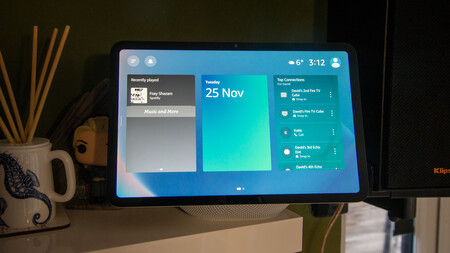
Amazon Echo Show 11 widgetsAmazon Echo Show 11 widgets

The four-star Echo Show 11 is down to its lowest ever price for Prime Day

One of our favourite Amazon Echo devices is down to its lowest ever price for Prime Day.

Advertisement

View Deal

With an 11-inch, full HD screen, the Echo Show 11 is a good-sized smart home hub for streaming content, viewing recipes and managing your paired smart home devices. Although there’s no HDR support, the display size and resolution ensure content looks clear, with bright images and decent contrast too.

Advertisement

By default, the display will show a slideshow of either your own or pre-set Amazon photos, alongside additional information including news headlines and recipe ideas – making this an ideal device for the kitchen. The display is customisable too, so you can pick and choose exactly what you want to see.

There’s also Visual ID built-in which uses the camera to detect who’s standing in front of the device, and will show personalised information accordingly too.

Advertisement

Naturally as an Amazon device, the Echo Show is fitted with Alexa, which means you won’t even need to lift a finger to control your devices, as you can simply just use your voice to turn certain gadgets on or off. You can also use Alexa to set timers, alarms and get reminders on your calendars and reminders.

Advertisement

However, you don’t have to use your voice for everything – though it’s certainly a convenient way of controlling the device. Instead, you can control your connected devices simply by the touchscreen. 

Otherwise, the Echo Show 11 is fitted with a 2.8-inch woofer and dual full-range drivers. In real-world terms, that means it’s powerful enough to handle bass at volumes up to around 75%.

Overall we awarded the Echo Show 11 with a four-star rating, with Home Technology Editor Dave Ludlow concluding “excellent audio and zippy performance, built around a large screen makes this the ultimate smart display.”

Advertisement

Advertisement

Source link

Continue Reading

Tech

Today’s NYT Connections: Sports Edition Hints, Answers for June 26 #641

Published

on

Looking for the most recent regular Connections answers? Click here for today’s Connections hints, as well as our daily answers and hints for The New York Times Mini Crossword, Wordle and Strands puzzles.


World Cup watchers, there’s another category for you in today’s Connections: Sports Edition. If you’re struggling with the puzzle but still want to solve it, read on for hints and the answers.

Connections: Sports Edition is published by The Athletic, the subscription-based sports journalism site owned by The Times. It doesn’t appear in the NYT Games app, but it does in The Athletic’s own app. Or you can play it for free online.

Advertisement

Read more: NYT Connections: Sports Edition Puzzle Comes Out of Beta

Hints for today’s Connections: Sports Edition groups

Here are four hints for the groupings in today’s Connections: Sports Edition puzzle, ranked from the easiest yellow group to the tough (and sometimes bizarre) purple group.

Yellow group hint: Hoosier schools.

Advertisement

Green group hint: Fore!

Blue group hint: Gridiron guides.

Purple group hint: Stopping the scoring.

Answers for today’s Connections: Sports Edition groups

Yellow group: Indiana colleges.

Advertisement

Green group: Golf equipment brands.

Blue group: First-year NFL head coaches.

Purple group: USMNT World Cup goalkeepers. 

Read more: Wordle Cheat Sheet: Here Are the Most Popular Letters Used in English Words

Advertisement

What are today’s Connections: Sports Edition answers?

completed NYT Connections: Sports Edition puzzle for June 26, 2026

The completed NYT Connections: Sports Edition puzzle for June 26, 2026.

NYT/Screenshot by CNET

The yellow words in today’s Connections

The theme is Indiana colleges. The four answers are Butler, Indiana, Notre Dame and Purdue.

The green words in today’s Connections

The theme is golf equipment brands. The four answers are Callaway, Ping, PXG and Titleist.

Advertisement

The blue words in today’s Connections

The theme is first-year NFL head coaches. The four answers are Brady, Hafley, Minter and Monken.

The purple words in today’s Connections

The theme is USMNT World Cup goalkeepers. The four answers are Freese, Friedel, Howard and Meola.

Source link

Advertisement
Continue Reading

Trending

Copyright © 2025