YouTube is rolling out a series of changes to Shorts, including a new method that lets users shrink the duration of short-form videos.
The Google-owned platform announced Thursday that Shorts now comes with a setting that allows users to double their playback speed. The point of making what is an already brief experience even briefer is to let users “absorb information more quickly or find your favorite part faster,” the platform said.
In an apparent bid for a more positive web, YouTube has also nixed the Shorts dislike button. Instead of disliking a video, users will now have to rely on the “Not Interested” and “Don’t recommend this channel” functions to disincentivize certain kinds of content.
Similarly, instead of clicking on a thumb’s up button if they like a video, users will now have access to a heart emoji.
Advertisement
Finally, YouTube is also introducing a new “Clear Screen mode,” which is designed to temporarily hide “all icons and text from your playback view,” giving users a clean view of their content unencumbered by floating distractions.
All of these changes have been made in the service of creating “a more intuitive Shorts experience,” the company said. It’s not exactly clear when the updates will take effect. The company said that the features would be rolling out over time, but didn’t give exact dates.
TechCrunch reached out to Google for more information.
YouTube was late to the short-form video space (it launched Shorts in 2024, several years after the launch of TikTok and Instagram Reels), but has managed to attract an audience since then. YouTube Shorts was averaging 200 billion daily views as of June 2025, CEO Neal Mohan said at his keynote in Cannes last year. (We may qualify this impressive metric with the context that YouTube counts a “view” as the very first moment that a video is opened.)
Advertisement
A report earlier this year showed that Shorts were increasingly being watched on viewers’ TV screens — and that as much as 2 billion hours of such content was being consumed per month.
When you purchase through links in our articles, we may earn a small commission. This doesn’t affect our editorial independence.
The pilot programme will bring together graduates, employers and industry professionals to build skills for a future-focused workforce.
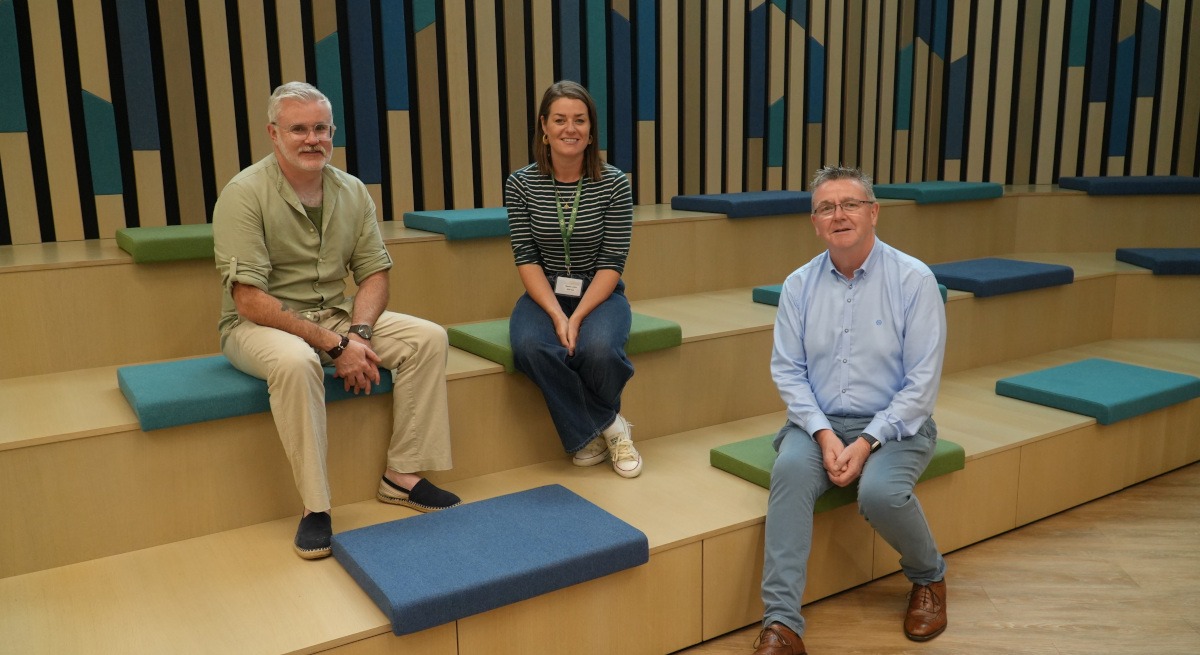
Tech Industry Alliance and RDI Hub have announced the launch of the Graduate AI Launchpad pilot, which is a new programme designed to prepare graduates, employers and industry professionals in the South-West, for an AI enabled workplace.
The inaugural programme, which aims to further expand across Cork and Kerry in the future, welcomed the first cohort this week to the RDI Hub in Killorglin. The four-week model will give graduates the opportunity to work on real industry challenges, learn from experienced professionals and build the confidence to apply AI in practical workplace settings.
Participants will work alongside industry mentors, collaborate on practical projects and hear from experienced speakers before presenting their own work at a showcase event upon the conclusion of the programme. Graduate AI Launchpad is built around practical learning, giving participants the opportunity to develop skills that will likely apply to future careers.
Advertisement
The first group of graduates involved were nominated by Astellas, Aspengrove, Fexco, Stingray Labs, TLI Group, ViClarity and MTU and are representative of a range of disciplines, such as engineering, quantity surveying, business, psychology and technology.
Commenting on the launch Juliette Crowley, the COO of the Tech Industry Alliance, said, “One of the Tech Industry Alliance’s core objectives is to strengthen the technology ecosystem across Cork and Kerry by creating meaningful collaboration between industry, education and the wider community.
“Graduate AI Launchpad is a wonderful example of that in action. By working alongside the RDI Hub and employers from across the South-West, we are creating opportunities that help graduates develop practical AI skills while giving businesses the talent they will need for the future.
“We hope this pilot will become the foundation for a programme that will support many more graduates across Cork and Kerry in the years ahead.”
Advertisement
Maeve Lyons, the programme manager at RDI Hub added, “AI is one of the RDI Hub’s key focus areas and for years we have been helping organisations understand, adopt and apply AI to solve real business challenges.
“Graduate AI Launchpad is a natural extension of that work, giving graduates the opportunity to learn directly from industry, work on practical projects and build confidence using AI in real-world settings.”
Don’t miss out on the knowledge you need to succeed. Sign up for the Daily Brief, Silicon Republic’s digest of need-to-know sci-tech news.
The Galaxy Z Fold 8 feels like a turning point for Samsung’s foldables, trading pure productivity for a lighter, more practical design that’s genuinely enjoyable day to day. It has compromises, especially around cameras, sustained performance and battery life, but it’s still the Samsung foldable I’d choose.
Fantastic passport-style design
Excellent inner display
Useful wide cover screen
Smooth everyday performance
Underwhelming dual cameras
Can stutter with more demanding tasks
SQUIRREL_PLAYLIST_10208646
Advertisement
Key Features
Review Price:
£1699
Advertisement
Content-first foldable design
A shorter, wider build makes the Z Fold 8 easier to use one-handed and better for videos, games and everyday apps.
Advertisement
Less visible crease
Samsung’s Flex Titanium tech helps reduce the crease while making the inner screen feel sturdier.
Advertisement
Flagship Snapdragon power
The Snapdragon 8 Elite Gen 5 and 12GB- or 16GB of RAM keep things feeling fast and fluid.
Introduction
The Samsung Galaxy Z Fold 8 is here, and it’s a completely different beast to last year’s Samsung Galaxy Z Fold 7.
Advertisement
Samsung has ditched the long-and-tall cover screen and boxy, productivity-focused inner panel for something more geared toward watching movies, gaming, messaging, and, y’know, most of the things we tend to do on our phones in day-to-day life. The productivity form factor remains, but that’s now under the upgraded (and more expensive) Fold 8 Ultra umbrella.
Honestly, I think Samsung might be onto something here. After a week of everyday use, the wider, squatter Z Fold 8 has changed how I think a book-style foldable should feel, with a far more approachable design that’s easier to use one-handed, better suited to apps and social media and surprisingly hard to put down.
Advertisement
Design
Shorter, squatter passport-style design
Easy to use one-handed
Very light at 201g
Despite the familiar naming convention, the Samsung Galaxy Z Fold 8 doesn’t look or feel like any other foldable we’ve seen so far. And that’s kind of the point.
Image Credit (Trusted Reviews)
It’s the first Samsung foldable to sport an entirely new book-style form factor, moving away from the long, tall cover screen and boxy inner panel that have become the norm over the past few years.
Instead, it’s pitched as a much more content-friendly foldable, with a smaller, squatter 5.5-inch 16:10 screen – similar in size and shape to a passport – on the outside, and a larger 7.8-inch panel on the inside with a more tablet-esque 3:4 aspect ratio.
Advertisement
Image Credit (Trusted Reviews)
Advertisement
Picking it up for the first time, I could already tell this thing was going to be popular – and that opinion hasn’t changed after a week or so of use. Even as someone who has used book-style foldables like the Z Fold 7 and Oppo Find N6 long-term, I don’t think I can go back to the boxier format after using the Fold 8.
The squatter cover screen makes it much easier to use one-handed, while still offering a proper smartphone experience. Apps like TikTok, YouTube and games all run perfectly well on that outer display, with more horizontal space to work with than Samsung’s previous Fold cover screens.
Image Credit (Trusted Reviews)
Then, when you want more room for browsing the web, scrolling through Instagram or watching something, you can unfold it into a larger 7.8-inch tablet-shaped display. It feels almost like a hybrid between a regular book-style foldable and the ultra-compact nature of flip-style foldables. It just makes sense.
Image Credit (Trusted Reviews)
It’s noticeably light too. At 201g, it’s the lightest book-style foldable by quite a margin, and also lighter than regular phones including Samsung’s own Galaxy S26 Ultra. For a device focused on social media, movies and gaming – something you’ll likely hold for extended periods – that matters.
Advertisement
That smaller footprint also means it slips nicely into pockets without the tall form factor or extra heft of previous book-style foldables.
Advertisement
Image Credit (Trusted Reviews)
The hinge isn’t as malleable as the Fold 8 Ultra’s, so it won’t easily sit open mid-way in a laptop-style position without a bit of fiddling. The flip side is that it’s much easier to open the foldable screen with one hand, popping open with very little effort. According to Samsung, that was a conscious decision based on how it expects people to use the phone.
You can still get it to stay open mid-way with some effort, whether that’s for watching YouTube on the cover screen in tent mode or using the internal screen in laptop mode without propping it up. That said, with the 3:4 aspect ratio, I can’t see many people using laptop mode all that often. If that’s your use case, the Z Fold 8 Ultra is the better choice.
Image Credit (Trusted Reviews)
As has been the case for a few years now, Samsung’s latest foldable also comes in some lovely finishes, including Graphite, Cream, Lavender and Pistachio, though the latter is a Samsung Store exclusive. That’s a shame – it’s definitely my favourite of the bunch – but the Lavender hue provided for review is a close second.
Advertisement
Image Credit (Trusted Reviews)
If there’s one area that hasn’t really changed, it’s dust and water resistance. The IP48-rated foldable remains water-resistant and can survive 1.5m dunks for up to 30 minutes, but there are no improvements to dust ingress; anything smaller than 1mm can still potentially cause an issue.
That said, it seems only Google has solved the ever-challenging issue of full dust and water resistance in foldables, so the Fold 8 isn’t much of an outlier – for now.
Screens
5.5-inch cover screen is genuinely useful
Larger 7.8-inch inner display is great for apps and video
Much less noticeable crease
While cover screens have long felt like an afterthought beside the big, shiny foldable displays, the Z Fold 8’s compact 5.5-inch screen is every bit as important as its foldable sibling.
The 16:10 aspect ratio works really well, offering a shorter but wider experience that doesn’t make replying to messages, scrolling through apps or doing everyday phone things feel awkward – something that hasn’t always been true of Samsung’s foldable cover screens.
Advertisement
Advertisement
Image Credit (Trusted Reviews)
The wider panel means bigger images on social media, more room to read messages, and easier Google Maps navigation without needing to unfold the phone. It’s also particularly well suited to gaming and watching 16:9 movies on Netflix, with only minor black bars above and below.
Despite its relatively dinky size, it doesn’t feel cramped or compromised, and there aren’t many foldable cover screens you can say that about – especially from Samsung’s own collection.
Image Credit (Trusted Reviews)
Specs-wise, it also closely matches, if not exactly matches, the inner panel, making it feel like a proper flagship screen in its own right.
But, of course, the inner display is still the main event – and what a display it is. The 7.8-inch foldable panel is bright, vivid and detailed, with Dynamic AMOLED 2X tech, an LTPO-enabled 120Hz refresh rate and a peak brightness of 3000 nits. Really, though, it’s all about two things: the aspect ratio and the lack of a noticeable crease.
Advertisement
Advertisement
Image Credit (Trusted Reviews)
It’s hard to convey just how much of an improvement the 4:3 aspect ratio makes to the foldable experience. Using a familiar tablet-style shape, practically every app I tried on the inner display ran without complaint in landscape mode, from WhatsApp and Slack to YouTube and Instagram.
For the first time, I didn’t have to ask myself whether an app I was using on the cover screen would work properly on a boxy foldable panel. I just opened it, and it worked. It sounds small, but it’s surprisingly freeing.
Image Credit (Trusted Reviews)
Video benefits too. The shorter, wider display better matches the aspect ratio of movies, so while there are still black bars, the video takes up more of the screen than it does on boxier foldables like the Z Fold 8 Ultra.
Image Credit (Trusted Reviews)
Advertisement
That said, I actually tended to use the inner screen in portrait orientation most of the time, essentially giving me a large smartphone display that’s perfect for scrolling through apps, playing portrait-oriented games and watching vertical video on TikTok in particular.
Image Credit (Trusted Reviews)
The trade-off is that it’s not quite as well-suited to intensive split-screen use, though I still found it perfectly capable of running two apps side by side for casual browsing or messaging. You don’t get as much space as you would on the Ultra, but it’s still far better than trying to do the same on a regular smartphone – so don’t let Samsung’s categorisation put you off entirely.
Image Credit (Trusted Reviews)
The other big leap comes from Samsung’s new Flex Titanium tech. It’s essentially two layers embedded in the inner folding panel, designed not only to reduce the crease but also to make the panel feel more solid under the finger – another long-running complaint about foldables and their plastic screens.
It works. The inner display is noticeably sturdier, and when paired with the same anti-reflective coating as the Galaxy S26 Ultra, it has less of that plastic sheen that can distort reflections. That alone is a big upgrade.
Advertisement
Advertisement
Image Credit (Trusted Reviews)
And then there’s the crease – or should I say, lack thereof. Put the phone down flat and, head-on at least, you can barely see a dip in the middle of the display. It’s still visible from an angle, and you can feel it if you run your finger across it, but I doubt it’ll bother many people.
I think Oppo’s Find N6 still has a slight edge when it comes to crease-less screen tech, but this is a big step forward from what Samsung offered just a year ago.
Performance
Snapdragon 8 Elite Gen 5 for Galaxy power
Snappy in everyday use
Can struggle with sustained demanding tasks
Despite sitting behind the all-singing, all-dancing Galaxy Z Fold 8 Ultra, the regular Z Fold 8 still gets the top-end Snapdragon 8 Elite Gen 5 for Galaxy, also found in the Galaxy S26 Ultra. That’s paired with 12GB of RAM and either 256GB, 512GB or 1TB of storage.
As we’ve already seen from the S26 Ultra and a host of other 8 Elite Gen 5 phones, it’s a very capable chipset, and that has largely reflected my day-to-day experience over the past week. Still, there are a few caveats.
Advertisement
Image Credit (Trusted Reviews)
I noticed the occasional stutter during particularly demanding tasks, like editing multi-track 4K video in CapCut Pad, and the phone doesn’t seem to love running massively demanding games like Wuthering Waves with top-end graphics enabled. It gets warm after only a few minutes.
The chipset is clearly capable on paper, then, but the Fold 8’s thinner body and smaller overall footprint compared to the Fold 8 Ultra seem to limit how well it can sustain that performance over longer periods.
Advertisement
Interestingly, Samsung appears to know this, as it has blocked the usual benchmarking apps – Geekbench 6, 3DMark and the like – that we use to test performance. That’s fairly common on pre-release phones from brands like Xiaomi and Honor, but it’s the first time I’ve seen Samsung do it. More tellingly, the Z Fold 8 Ultra doesn’t have the same blocks.
Image Credit (Trusted Reviews)
Luckily, Geekbench 7 launched during my testing period, and because it wasn’t on Samsung’s block list, I could get some numbers to back up the experience. They were pretty much as expected: despite the 8 Elite Gen 5 for Galaxy power, the Z Fold 8 can’t quite match the larger Fold 8 Ultra or other book-style foldables in CPU or GPU performance.
Advertisement
That has rarely been an issue in real-world use, however. The phone feels snappy and responsive when swiping through One UI, apps open instantly, and there’s no general stutter or lag when browsing. But if you’re a true power user, you might find the Z Fold 8 can’t always keep up.
Image Credit (Trusted Reviews)
Software
One UI 9 based on Android 17
A handful of new AI features
Seven years of OS upgrades
The Samsung Galaxy Z Fold 8, along with the Fold 8 Ultra and Flip 8, are the first phones to run Android 17 out of the box, beating Google’s upcoming Pixel 11 range to the punch by a few weeks.
Of course, this isn’t stock Android. It runs Samsung’s latest custom skin, One UI 9, and among Android skins from the likes of Honor, Xiaomi, Oppo and RedMagic, One UI remains one of the better options. It balances ease of use with genuinely useful extra features – most of the time, anyway.
Advertisement
Image Credit (Trusted Reviews)
Advertisement
It’s a pleasure to use day-to-day, with plenty of foldable-focused features to make the most of the larger internal display. The foldable taskbar, app tray, split-screen multitasking and floating window support are all present and accounted for, even if Samsung claims the regular Z Fold 8 isn’t its productivity-focused foldable.
Really, though, as with recent versions of One UI, the focus is AI. The usual suite of Galaxy AI features is here, including recent additions like Photo Assist from the S26 series, along with a few new tricks.
Image Credit (Trusted Reviews)
Content creators will appreciate the new MyFanCam shooting mode, which lets you crop in on and track a specific subject in a video you’ve already shot, adjusting things like the aspect ratio in the process. It works pretty well too, with smooth tracking that stayed locked onto the subject in my testing.
There are also a few Gemini-powered features previously exclusive to Pixel devices, including the upgraded Gemini advanced automation tech that rolled out in the US a couple of months ago.
It essentially allows Gemini to perform tasks in apps on your behalf, such as booking a stay in Expedia, though I couldn’t get it working during testing. Samsung has reassured me it is coming to UK users, but it likely won’t arrive until the phone’s official launch.
Advertisement
Advertisement
Image Credit (Trusted Reviews)
Now Brief has had some TLC too, pulling in more information from more sources to make it, y’know, actually helpful. It still works best with a Samsung wearable, where you’ll get health insights each morning, but the mix of weather, news, YouTube videos, Spotify playlists and weekly recaps of places I’ve been and photos I’ve taken feels much more personal than before.
You can even create your own custom Now Brief cards, again powered by Gemini, with over 100 combinations available. For now, though, it only covers weather, Samsung Health and YouTube videos. A wider selection would be nice.
One UI 9 also slips in a few, let’s say, iOS-inspired features, including AI-prioritised notifications that appear at the top of your lock screen and notification summaries for chat apps. The former is actually quite accurate, but given how meme-worthy Apple’s implementation of the latter was, it’s a bold move for Samsung to copy it. It’s there if you want it. I certainly don’t.
Image Credit (Trusted Reviews)
Like Samsung’s other flagship foldables, the Fold 8 also gets seven years of OS upgrades and security patches, so it should continue to improve for years to come.
Advertisement
Advertisement
Cameras
Dual 50MP rear camera setup
No dedicated zoom lens
Solid main and ultrawide performance
As irresistible as the new form factor is, Samsung’s decision to pair it with a fairly middling dual-camera setup will give some people pause for thought.
Image Credit (Trusted Reviews)
Yes, the Z Fold 8 is technically not Samsung’s top-end Fold this year, but it still costs comfortably more than phones like the iPhone 17 Pro Max and Oppo Find X9 Ultra, and the camera hardware should reflect that.
It’s a harder pill to swallow because last year’s Z Fold 7 offered a better camera setup for around the same price, with a 200MP main camera, an ultrawide and a dedicated zoom lens. This year, that trio is exclusive to the much pricier Z Fold 8 Ultra.
As it stands, the Z Fold 8 offers a dual 50MP setup made up of a main and ultrawide lens, with no dedicated zoom lens to help you get closer to the action. Samsung could have softened the blow by using the Ultra’s higher-res 200MP main sensor for better in-sensor zoom, but alas, that’s not the case. As such, zoom performance is pretty lacklustre.
Advertisement
It does a solid enough job at 2x, tightening the shot without a noticeable drop in quality, but that doesn’t last long. Push it far beyond the 2-3x mark, and you’ll start to see telltale signs of processing, from softer details to a flatter overall image. It’s just not a very versatile setup, even compared to similarly priced foldables.
Advertisement
Zoom aside, though, the two lenses fare pretty well in general use. Samsung’s signature vibrance is here, giving images a pop of colour that looks great on social media, while built-in filters – including one that lets you choose a colour profile from an existing image – mean you can tweak things to your liking.
Images are generally detailed, as you’d expect, and the main camera’s f/1.8 aperture pulls double duty, adding a nice natural bokeh to close-up shots while boosting light intake in darker scenes. It won’t work wonders with its smaller 1/1.57-inch sensor compared to most top-end camera phones, but it does a good job balancing lighter and darker areas in low-light scenes.
The ultrawide is pleasingly similar in most regards. Colours remain consistent across the two lenses for the most part, and there’s plenty of detail for scenic shots. It’s only when things get darker that you can tell the difference, with ultrawide shots looking a little dimmer and softer than those from the main lens.
Advertisement
Advertisement
They’re perfectly serviceable cameras, but if you want the best foldable camera experience Samsung has to offer, you’ll need to pony up for the 8 Ultra. It’s not the ideal solution – there are plenty of people, myself included, who prefer a content-focused foldable but still like taking great photos – but it’s the compromise you’ll have to make if you want this form factor.
Battery life
4800mAh battery gets through a full day
Around six hours of mixed screen time
45W charging with 20W wireless support
Considering the Z Fold 8 has a smaller overall footprint than the Z Fold 8 Ultra, the fact it has only a 200mAh smaller battery – 4800mAh compared to 5000mAh – is pretty impressive. For Samsung, anyway.
Yes, there are foldables with much bigger batteries out there – the 6600mAh Honor Magic V6, I’m looking at you – but for most people, what the Z Fold 8 offers will be absolutely fine.
Image Credit (Trusted Reviews)
Advertisement
I’ve been using the Z Fold 8 a lot over the past week, arguably more than I usually would because I’ve enjoyed the new form factor so much. That has meant an average of around six hours of screen time per day, yet I still managed to get to bed after 16- 18-hour days with battery left.
Granted, there wasn’t much left in the tank, usually around 5-10%, and there was one busier day when I had to top it up to get through the evening. But for more casual users, this shouldn’t be much of an issue.
Advertisement
Image Credit (Trusted Reviews)
45W charging isn’t the fastest we’ve seen on a foldable, but with the 4800mAh capacity, it doesn’t take too long to recharge. In my testing, a 15-minute charge got me to 35%, 30 minutes reached 67%, and a full charge took 68 minutes.
There’s also 20W wireless charging for added convenience, though there’s no MagSafe-like built-in magnet support, unlike the competing Pixel 10 Pro Fold. Given the Fold 8’s content-first focus, an easy way to mount it would have been a nice touch. There’s always next year, I suppose.
SQUIRREL_PLAYLIST_10208646
Advertisement
Final Thoughts
The Samsung Galaxy Z Fold 8 is a turning point for Samsung’s foldable line. By moving away from the productivity-first formula of previous Fold models, Samsung has made a book-style foldable that’s lighter, easier to handle, and far more enjoyable to use day-to-day.
Advertisement
There are compromises. The dual-camera setup feels underwhelming at this price, sustained performance can’t quite match the larger Fold 8 Ultra, and battery life will only just see heavier users through a long day. But none of that stops the Z Fold 8 from being one of the most refreshing foldables Samsung has made in years.
After a week of use, it has completely changed what I want from a book-style foldable. It still gives you that expansive inner display when you want it, but the wider, squatter design makes it feel far more natural as an everyday phone.
If you want Samsung’s most powerful, productivity-focused foldable, buy the Z Fold 8 Ultra. But if you want the foldable that’s the most fun, practical and genuinely easy to live with, the Galaxy Z Fold 8 is the one I’d choose.
We test every mobile phone we review thoroughly. We use industry-standard tests to compare features properly and we use the phone as our main device over the review period. We’ll always tell you what we find and we never, ever, accept money to review a product.
Used as a main phone for over a week
Thorough camera testing in a variety of conditions
Tested and benchmarked using respected industry tests and real-world data
FAQs
What’s the difference between the Galaxy Z Fold 8 and Z Fold 8 Ultra?
The Galaxy Z Fold 8 is the more content-focused foldable, with a shorter, wider design that’s easier to use one-handed and better suited to videos, games and everyday apps. The Z Fold 8 Ultra keeps the more productivity-focused form factor, with a boxier inner screen that’s better for split-screen multitasking.
Does the Galaxy Z Fold 8 have the best Samsung foldable camera?
Advertisement
Not quite. The Galaxy Z Fold 8 has a dual 50MP camera setup that seems capable from early testing, but it misses out on the Ultra’s higher-end camera hardware and dedicated zoom flexibility. If camera performance is your top priority, the Z Fold 8 Ultra is the better option.
How can one of the world’s largest smartphone companies lose money by selling more smartphones than ever? I think we all know the answer: soaring memory prices caused by the AI boom. Samsung just announced that despite “solid” smartphone sales and growing revenue, its DX division (which includes mobile) posted its first-ever loss of 800 billion won ($544 million) in the company’s second fiscal quarter.
“Although MX (Mobile eXperience) saw revenue growth year-over-year driven by solid sales of flagship products centered on the Galaxy S26 series and strong sales of the A series, operating profit decreased due to increased cost burdens across the industry, such as rising component costs,” the company said. (The DX division also includes TVs and appliances, but the loss was primarily in the mobile MX category.)
Samsung emphasized that flagship-level products like the Galaxy S26 Ultra and Galaxy Z Fold 8 series performed well, profit-wise. However, budget phones struggled to show a profit due to higher component costs and already-thin margins (Samsung foreshadowed this possibility back in April). As a result, the company plans to focus on “high-value-added products” in order to drive growth in future quarters.
With all that, consumers can expect higher smartphone prices across all categories from Samsung and other brands. This inflation will hit low-income buyers the hardest, as prices for smartphones in the $200-500 category will likely rise the most, percentage-wise.
Advertisement
Samsung, of course, has a huge advantage over most manufacturers, as it also manufactures the memory and storage components used in smartphones. In that area, the company absolutely smashed it this quarter.
“The Device Solutions (DS) Division posted a [quarter-on-quarter] sales increase of 56 percent, with the Memory Business setting an all-time high for quarterly revenue and operating profit,” Samsung wrote.
Overall, Samsung posted a record 171.5 trillion ($119 billion) won in consolidated revenue (up 28 percent from last year), an all-time quarterly high. Operating profit also hit an all time high of 89.5 trillion ($62.2 billion). “Earnings per share for both common and preferred shares increased by 52 percent to… among the highest levels for global tech companies,” Samsung added. With all that money rolling in and shareholders happy, that puts less pressure on its mobile division — unless the AI bubble bursts, of course.
Meta founder and CEO Mark Zuckerberg is trying to sell investors on his prediction for the future — one where billions of people will have their own personal AI agents in the next five years. (Let’s hope that future also comes with data centers efficient enough to power all those agents — without triggering a fresh wave of climate disasters.)
“I think that it’s extremely unlikely if you look out five years from now, for example — whatever period of time you want — that you don’t have billions of people with a personal agent that understands your goals and that is just working on your behalf 24/7 to achieve your goals in whatever the domain is that you care about,” Zuckerberg said on Wednesday’s quarterly earnings call with investors.
He added that he could see people using these agents to help them with their finances, health, interpersonal relationships, and household management.
“As we move toward a future where we’re all interacting with multiple agents, I think that WhatsApp and our other messaging surfaces are going to become increasingly important,” he said, noting that WhatsApp is already the leading platform where users interact with Meta AI.
Advertisement
Meta is not alone in setting high expectations for AI systems that can act on a person’s behalf rather than just answer questions. Google emphasized custom AI agents as a key new feature in its Search overhaul, which sparked outcry from users who felt bogged down by the constant onslaught of AI results on Google. Meanwhile, subscriptions to Anthropic’s Claude have skyrocketed as engineers fawn over the agentic coding assistant Claude Code.
Compared to its competitors, however, Meta may not enjoy as much confidence from investors as it continues dumping cash into innovative projects that may or may not pan out — Meta’s stock dropped almost 10% after posting this quarter’s earnings. Meta’s Reality Labs, the organization responsible for its AR glasses, VR headsets, and related software, lost around $4.6 billion this quarter, roughly in line with the losses the division has posted each quarter since 2021. That’s a running total now of around $88 billion.
Meta’s AI spending is likely to climb even higher, which is more of a concern at this juncture. The company reported free cash flow of $784 million this quarter, down from $8.55 billion the same quarter last year. That’s a 91% drop year over year, exacerbated by the company’s investments in AI infrastructure. This week, Meta and BlackRock announced a partnership to build a $14 billion data center in El Paso, Texas.
“We believe that there will continue to be a significantly higher margin on selling intelligence rather than selling compute directly, but we think that there’s a big opportunity, obviously, to sell compute as well,” Zuckerberg said.
Advertisement
Ultimately, he believes that the personal agents that Meta is developing will be “the foundation for our next wave of products and revenue lines in the months and years ahead.”
So far, Meta’s business agents, rolled out globally on WhatsApp and Messenger this quarter, have been adopted by more than one million businesses. It may be harder to get people to adopt consumer AI agents, but the road to “billions” has to start somewhere — the company can’t get there on enterprise agents alone.
When you purchase through links in our articles, we may earn a small commission. This doesn’t affect our editorial independence.
Thousands of ads for “nudify” apps on Meta-owned Facebook and Instagram have been traced back to GatherOne, one of Meta’s 11 Chinese advertising partners, according to a report published on Sunday by the Tech Transparency Project.
Nudify apps give users the AI tools to digitally remove clothing from photos of people, typically women and children, placing their faces in nonconsensual, pornographic images and videos. One of the advertised apps had Google Play reviews alerting others to what one reviewer called “illegal child porn.”
The ads themselves featured women simulating sex acts.
Meta’s community standards state that it doesn’t allow the promotion of nudify apps. Its advertising standards say that objectionable content includes ads that contain nudity, sexually suggestive activities or depictions of people in explicit or sexually suggestive positions.
Advertisement
TTP’s research also found that many of these ads appeared to come from fake accounts. This further violates Meta’s ad standards, which prohibit advertisers from using “inauthentic assets” to deceive Meta or its users about their identity.
Meta and GatherOne’s responses
Because Facebook and Instagram are banned in China, the Chinese government and Meta reached a compromise: Chinese advertisers must use a handpicked third-party agency, such as GatherOne, to run ads on these social media platforms.
While TTP was investigating the ads and the accounts behind them, it noticed that Meta had removed many of them.
“We do not allow non-consensual intimate imagery or nudify apps on our platform and we take aggressive steps to combat them: blocking links to sites that host this content, restricting related search terms, removing over 340,000 violating ads late last year alone and, when appropriate, taking legal action,” Cindy Southworth, Meta’s head of women’s safety policy, said in a statement provided to CNET. “Because confronting these persistent bad actors is an industry-wide challenge, we also proactively share information through Lantern so other platforms can act.”
Advertisement
Lantern is a Tech Coalition program that allows tech companies to share signals about child sexual abuse material, grooming manuals and other illegal content.
However, TTP said GatherOne’s accounts are still advertising, acknowledging that because the marketing agency generates so many ads — over 30,000 per month — Meta may be struggling to remove them all. While Meta’s ad review process includes multiple layers of analysis and detection, some of these occur only after an ad goes live.
Following publication of the report, GatherOne told TTP that it “suspended new ad account applications related to AI nudify, face swap and girlfriend services,” and told Bloomberg that it’s “undertaking a comprehensive compliance upgrade to address the technical evolution of synthetic [AI] media.”
In 2024, Meta reported that it generated $18.35 billion in China revenue, which accounted for 11% of its global revenue. Referencing Meta’s internal documents, Reuters said in December 2025 that more than $3 billion, or about 19%, of that 2024 China revenue came from ads for pornography, illegal gambling and other banned content.
Advertisement
What Meta is doing to address nudify apps
In a news release published by Meta in June 2025, the company said it’s taking action against nudify apps, stating that it filed a lawsuit in Hong Kong against Joy Timeline HK Limited, the company behind CrushAI, to prevent it from advertising on Meta’s platforms. Joy Timeline HK Limited isn’t one of Meta’s Chinese advertising partners.
Along with stating that it’s building new technology that can detect nudify app ads, Meta said in its release that it will “continue to take the necessary steps — which could include legal action — against those who abuse our platforms like this.”
In a March 2026 integrity report, Meta said that it removed 344,000 ads promoting nudify apps on Instagram and Facebook between November 2025 and January 2026. Cease-and-desist letters were sent to 46 companies that advertised these apps, but the company names aren’t listed.
“GatherOne works with companies across the internet, including Google, TikTok and X,” Ryan Daniels, Meta spokesperson, said in a statement sent to CNET. “All advertisers have to comply with our advertising standards, and failure to comply with our policies and standards can lead to the cancellation of ads placed, financial penalties and termination of ad accounts.”
Advertisement
Yet, while many of GatherOne’s ads were taken down, no action has been taken against GatherOne to prevent it from posting explicit or nudify app ads. A GatherOne representative didn’t respond to a request for comment.
Anna Gragert
Senior Editor, Health and Home
Anna Gragert (she/her/hers) was previously the lifestyle editor at HelloGiggles, the deputy editor at So Yummy and the senior lifestyle editor at Hunker. Over the past 12 years, Anna has also written for the LA Times, Elle, Bust Magazine, Dazed, Apartment Therapy, Well+Good and more. At CNET, she’s a senior editor on the Healthy Home team, and her coverage includes health, wellness tech, meal kits and home and kitchen tech with a focus on the technology that aims to help us live our healthiest, happiest lives.
See full bio
When I decided to take a last-minute ski trip, despite never having skied before, I went straight to Columbia. Was I shredding the slopes? Absolutely not, but at least I was warm, thanks to my Snowy Summit Insulated Jacket and Bugaboo II Pants. Here at WIRED, we’re fans of Columbia. The brand makes reliable, well-priced outdoor gear for skiing, hiking, hunting, or just a day at the beach. Plus, there’s almost always a deal to be found.
WIRED reviewer Chris Haslam loves the Columbia Konos Trillium ATR as a value all-around trail-running shoe for faster hikes, day trips, and mixed terrain excursions. The plush cushioning and 8-millimeter drop are ideal on packed dirt, gravel, and woodland paths. For hiking boots, he recommends the Tellurix Titanium OutDry, which are waterproof, offer serious traction on wet rock and mud, and are surprisingly lightweight at 1.6 pounds per pair.
With summer approaching, now’s the time to prepare for outings, and if you’re eyeing snow gear, the off-season is when prices hit their lowest. I’ve gathered the latest Columbia promo codes to sweeten the deal.
Don’t Miss the Columbia Summer Sale
Although we’re in peak camping season right now, it’s still not too late to upgrade your gear for the rest of the season and beyond. Take advantage of the Columbia Summer Sale and get outfitted for your next adventure for less, with discounts of $30 and more on men’s, women’s, and kid’s apparel, as well as shoes, accessories, and equipment. So whether you want to snag a packable Women’s Pouration II Jacket for 50% off, or a Men’s Strata Trail Low Waterproof Shoe for 40% off, there’s a Columbia discount for all of your outdoor adventure essentials.
Advertisement
Columbia Promo Code: 15% Off All Orders
Join Columbia’s Greater Rewards program—it’s free to sign up and you won’t need a Columbia promo code—to get 15% off your first online order. Note, this particular coupon can’t be combined with any other Columbia discount code or deal and expires if not redeemed within 30 days of the date of issuance. Plus, as a member, you’ll earn points on purchases, get free standard shipping, and receive a 20 percent discount on your birthday.
Unlock Columbia Discount Codes and Get $20 off
Once you sign up for Columbia’s Greater Rewards program and opt in for email notifications, you’ll acquire a unique Columbia coupon code for $10 off your online purchase when you spend $100 or more. If you subscribe to both email and text notifications, the single-use Columbia coupon will increase to $20 off your purchase of $100 or more.
Top Columbia Deals for Current Students
Columbia offers a 10% discount for students and teachers. You must log in to ID.me and verify your status to receive the Columbia promo code.
Columbia Military Discount: 10% Off
Active and retired military members, as well as first responders, are also eligible for a 10% discount. You must log in directly to ID.me and verify your status to receive the Columbia promo code.
Advertisement
Get Free Shipping With Columbia Codes
As a Greater Rewards member, you get free standard shipping on all online orders, with no minimum purchase requirement. As long as you’re signed into your account, the Columbia free shipping code will automatically be applied at checkout.
Give More With the Columbia Gift Card
Not sure what to get the adventurer in your life? If your loved one is a nature enthusiast, you need a great grad gift idea for someone taking their gap year, or the giftee is finally taking that backpacking trip, a Columbia gift card can be a thoughtful gift for many occasions. A Columbia gift card is a practical way to keep friends and family warm, dry, cool, and protected outdoors—and they can pick out what they want themselves, so you’re not left guessing. It’s also super easy to do: you pick out the design online and send them instantly by email.
How to Apply Your Columbia Coupon Code
So you’ve snagged a Columbia coupon code. Congrats! You’re on your way to big savings. There are two ways to use your Columbia promo code: you can see the first after you click on “Apply Promo Code or Discount” under the “order summary” tab. The second option will be shown during billing when you checkout, you’ll just need to click on the “Have a Promo Code or Gift Card?” text that lives right above where you enter card information during checkout. That’s it! Just ensure that the Columbia coupon code is entered exactly as it appears, including capitalization and hyphens.
A new NYT Connections puzzle appears at midnight each day for your time zone – which means that some people are always playing ‘today’s game’ while others are playing ‘yesterday’s’. If you’re looking for Wednesday’s puzzle instead then click here: NYT Connections hints and answers for Wednesday, July 29 (game #1144).
Good morning! Let’s play Connections, the NYT’s clever word game that challenges you to group answers in various categories. It can be tough, so read on if you need Connections hints.
What should you do once you’ve finished? Why, play some more word games of course. I’ve also got daily Strands hints and answers and Quordle hints and answers articles if you need help for those too, while Marc’s Wordle today page covers the original viral word game.
Advertisement
SPOILER WARNING: Information about NYT Connections today is below, so don’t read on if you don’t want to know the answers.
Latest Videos FromTechRadar
Advertisement
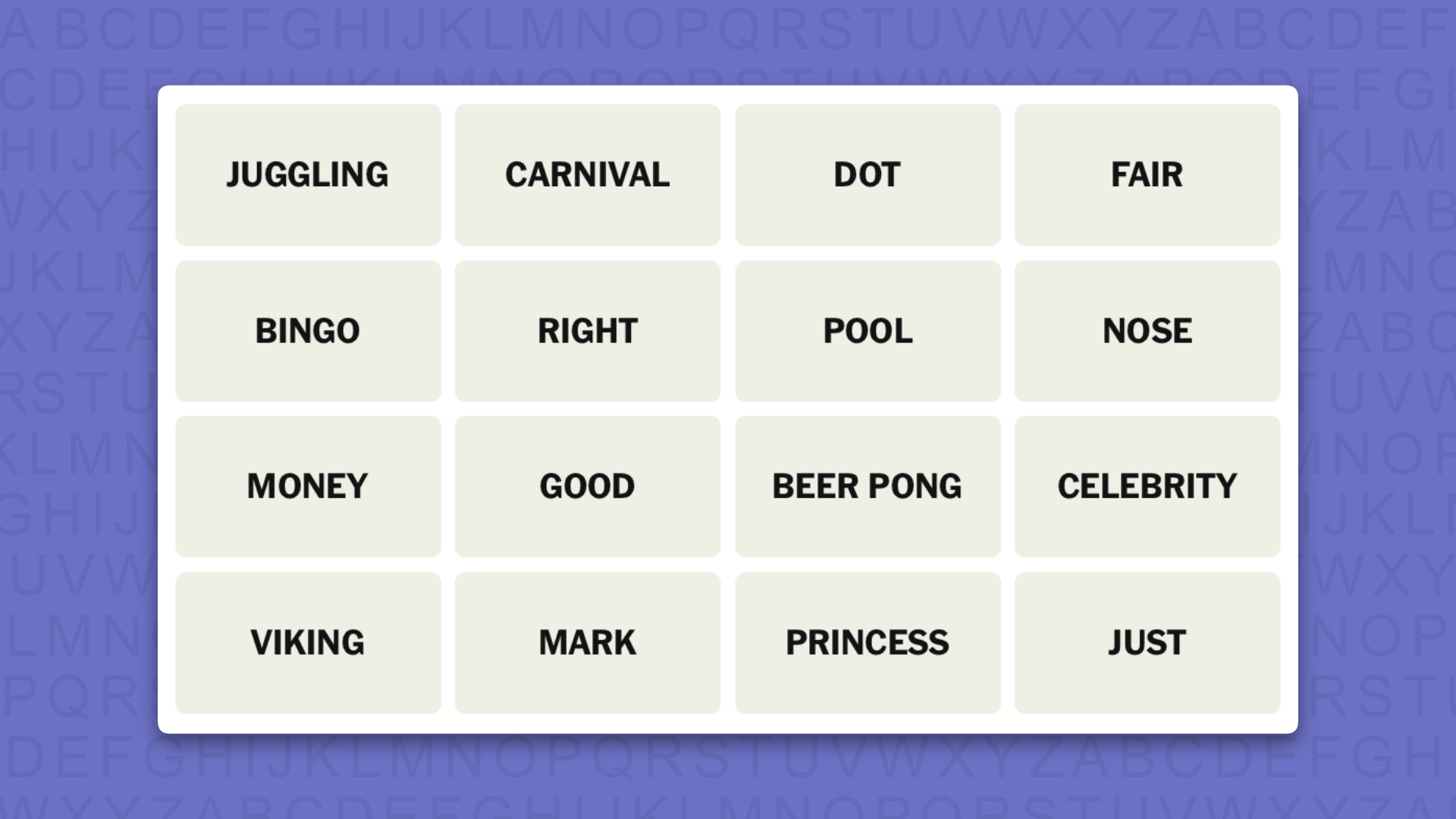
NYT Connections today (game #1145) – today’s words
(Image credit: New York Times)
Today’s NYT Connections words are…
JUGGLING
CARNIVAL
DOT
FAIR
BINGO
RIGHT
POOL
NOSE
MONEY
GOOD
BEER PONG
CELEBRITY
VIKING
MARK
PRINCESS
JUST
NYT Connections today (game #1145) – hint #1 – group hints
What are some clues for today’s NYT Connections groups?
YELLOW: Doing the correct thing
GREEN: Many spherical objects are involved
BLUE: Big ship fleets
PURPLE: Expressions meaning exact
Need more clues?
We’re firmly in spoiler territory now, but read on if you want to know what the four theme answers are for today’s NYT Connections puzzles…
Advertisement
Sign up for breaking news, reviews, opinion, top tech deals, and more.
NYT Connections today (game #1145) – hint #2 – group answers
What are the answers for today’s NYT Connections groups?
YELLOW: VIRTUOUS
GREEN: ACTIVITIES WITH MULTIPLE BALLS
BLUE: CRUISE LINES
PURPLE: ON THE __, TO MEAN “PRECISE”
Right, the answers are below, so DO NOT SCROLL ANY FURTHER IF YOU DON’T WANT TO SEE THEM.
Advertisement
NYT Connections today (game #1145) – the answers
(Image credit: New York Times)
The answers to today’s Connections, game #1145, are…
YELLOW: VIRTUOUS: FAIR, GOOD, JUST, RIGHT
GREEN: ACTIVITIES WITH MULTIPLE BALLS: BEER PONG, BINGO, JUGGLING, POOL
PURPLE: ON THE __, TO MEAN “PRECISE”: DOT, MARK, MONEY, NOSE
My rating: Hard
My score: 1 mistake
Apart from CRUISE LINES, which I saw immediately, this was a game where I sort of knew what the groups were about, but also sort of didn’t.
My mistake came in collecting VIRTUOUS and thinking that this was all about alignment and making something measure up correctly — so I had RIGHT, JUST, GOOD, and NOSE, as in “on the NOSE”, which I never considered could be a group.
Advertisement
Then I collected the four ACTIVITIES WITH MULTIPLE BALLS, but thought they were something about games that happen at parties; not that I have ever been to a party where a game of BINGO broke out.
Yesterday’s NYT Connections answers (Wednesday, July 29, 2026, game #1144)
YELLOW: FASTENERS: NAIL, RIVET, SCREW, STAPLE
GREEN: NONDESCRIPT: BASIC, MID, PLAIN, VANILLA
BLUE: UNITS OF WISDOM: GEM, NUGGET, PEARL, WORD
PURPLE: ____BOARDS IN A CLASSROOM: BLACK, CHALK, CORK, WHITE
What is NYT Connections?
NYT Connections is one of several increasingly popular word games made by the New York Times. It challenges you to find groups of four items that share something in common, and each group has a different difficulty level: green is easy, yellow a little harder, blue often quite tough and purple usually very difficult.
On the plus side, you don’t technically need to solve the final one, as you’ll be able to answer that one by a process of elimination. What’s more, you can make up to four mistakes, which gives you a little bit of breathing room.
Advertisement
It’s a little more involved than something like Wordle, however, and there are plenty of opportunities for the game to trip you up with tricks. For instance, watch out for homophones and other word games that could disguise the answers.
It’s playable for free via the NYT Games site on desktop or mobile.
Mythos helped to find a new meet-in-the-middle technique that relies on a Möbius Bridge, a more sophisticated fingerprinting algorithm used in meet-in-the-middle attacks. Using it, Green said, the code Mythos produced was able to reduce the number of required inputs to 289. Anthropic said that savings can reduce the time required for such attacks by 200- to 800-fold.
The ability to produce that many inputs makes the attack beyond reach outside of the laboratory. Further, the actual speed-up is unknown, since the weakened AES algorithm tested used only 7 rounds. Specification-compliant AES, Green said, uses 10, 12, or 14 rounds, depending on key size.
Anthropic is careful to explicitly spell out most of these caveats. The Monday blog post goes on to argue, however, that the results are nonetheless meaningful and could ultimately fundamentally disrupt the process of cryptanalysis, or the adversarial testing of cryptosystems.
“The cybersecurity community is now grappling with the fact that language models are able to discover so many bugs that the standard human processes (like vulnerability triage, verification, and remediation) struggle to keep up,” Anthropic wrote. “We predict that the same will soon be true in academic cryptography research. As language models increasingly produce novel research outputs autonomously, human researchers may become bottlenecked on studying and validating these results for technical validity, novelty, and utility.”
Advertisement
Not mentioned in Anthropic’s report is whether its researchers used Mythos to attack more tested cryptosystems, such as elliptic curve cryptography and RSA. Attack improvements against these systems would be more impressive. By achieving the most impressive result against an algorithm still in its infancy, it’s not clear how much of an advantage Mythos truly provided. There’s no way of knowing if researchers using conventional cryptanalysis techniques were already close to discovering the same attack.
Ultimately, the lesson from the research is simple. AI-assisted cryptanalysis remains untested, and providers of these platforms have a vested interest in exaggerating their benefits. At the same time, there’s growing evidence that LLMs may provide significant advantages in finding cryptographic weaknesses. It would be a mistake to conclude that LLMs won’t one day play an important role in the race between securing and compromising our most vital assets.
The headline and body of this story have been updated to reflect the withdrawing of HAWK.
The round builds on the company’s $4.2m pre-seed round in 2025 and will be used to scale and grow the organisation’s quantum ambitions.
Zuriq, a quantum computing company based out of Switzerland, has announced a seed funding round of $25.5m.
The round was led by Quantonation, with participation from Forward.one, Extantia, Firgun Ventures and additional previous round investors. The company raised a $4.2m pre-seed round in 2025.
Zuriq is a spin-out of ETH Zürich and intends to use the funds to scale its trapped-ion quantum processors and expand its team alongside research and development efforts as it works to significantly increase the number of qubits its architecture can support.
Advertisement
According to the organisation, the majority of trapped-ion quantum computers are based on a decades-old design in which ions are held in one-dimensional chains stitched together into larger grids using complex junction structures.
Zuriq claims to have taken a novel approach with processors that are natively two-dimensional and infrastructure that allows ions to move freely in any direction without the junctions that constrain reconfiguration.
Prof Jonathan Home, a scientific adviser at Zuriq and professor of the Department of Physics at ETH Zürich, said: “What makes this approach powerful is geometry. Hold ions in a line and the count grows one at a time, hold them in two dimensions and it grows with the area of the chip, on a standard chip, that is the difference between tens of ions and many thousands.
“Just as important, the ions can be moved freely in three dimensions, so they can be connected together far more flexibly, and that connectivity is what ultimately makes a quantum computer more capable. Reaching the scale and connectivity that real applications will need has been the central challenge for the whole field.”
Advertisement
Zuriq has stated it is now turning its attention to scaling its technology and plans to increase the number of ions on a chip to enable powerful, commercially useful machines.
Christophe Jurczak, a founding partner at Quantonation, said: “A common misconception is that the quantum race is already decided, but that is far from reality. Zuriq is demonstrating that there remain significant and transformational physics breakthroughs still to be made in quantum architectures.
“The scientific calibre of the team is world-class, which is why Zuriq has been phenomenally successful in attracting global talent to join them and build 2D-native quantum computers where trapped-ion qubits finally have the freedom to move and connect.”
Also this week (27 July), Multiverse Computing, which is based in San Sebastián, Spain, announced a $570m Series C funding round at a $1.7bn pre-money valuation.
Advertisement
The funds are expected to go towards expanding the company’s model library, continuing research and development, investing in sovereign AI infrastructure and building out a regional presence in east and south-east Asia, the Middle East, Canada and the US.
Don’t miss out on the knowledge you need to succeed. Sign up for the Daily Brief, Silicon Republic’s digest of need-to-know sci-tech news.
The Age Signals API will be available globally before the end of the year.
Jetcityimage/Getty Images
Google shared some details on how it will ask Android developers to handle age verification requirements. The platform it’s adopting is called the Google Play Age Signals API. The tool is currently being tested in Brazil, and it will arrive in Australia and Canada in mid-August ahead of a global rollout later in the year.
The Age Signals tool allows parents to share their own or their child’s age with devs as a range. This as a more private option than requiring age be shared as a specific number or birthdate while still helping devs meet a growing number of age verification requirements. If an adult shares their child’s age range, all apps using the API will have access to the information and the program will automatically deliver an age-appropriate experience. The parent controls will be available in the Google Family Link app.
“Rather than enforcing one-size-fits-all rules, we give developers the flexibility to choose how they integrate safety signals. With this reliable signal, you retain complete agency to tailor your app’s content, features, and settings to match your audience,” Google’s blog post states. Age verification has become a hot topic over the past year, with several countries and US states passing wide-reaching laws putting more responsibility on platform owners and app developers to make checks.
















































You must be logged in to post a comment Login