Connect with us
DAPA Banner

Tech

Caviar Packs a Genuine Piece of the Original iPhone Into the Latest Pro Model, Called iPhone 2007

Published

on

Caviar Original iPhone 2G Modded iPhone 17 Pro iPhone 2007
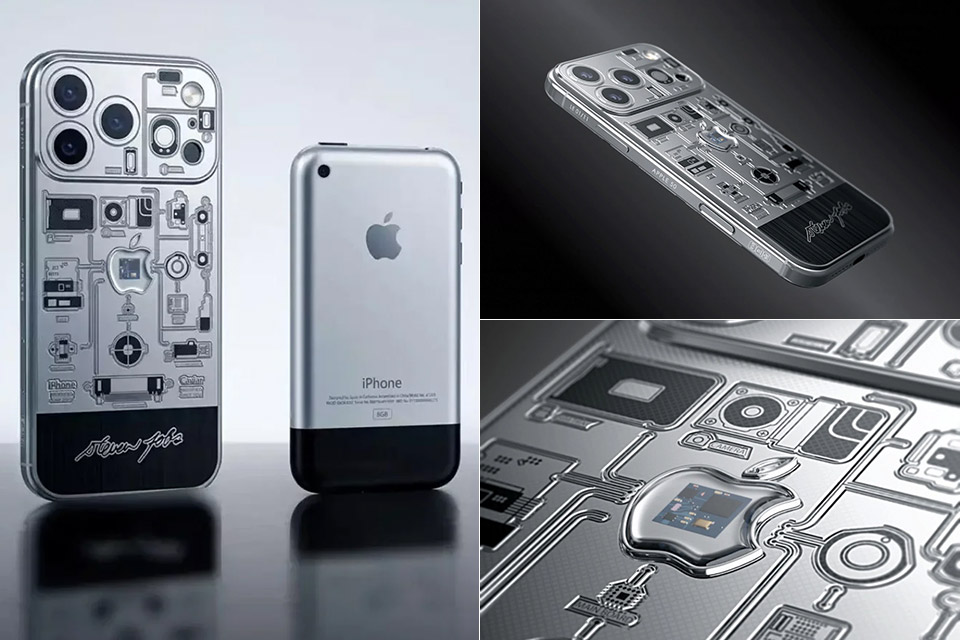
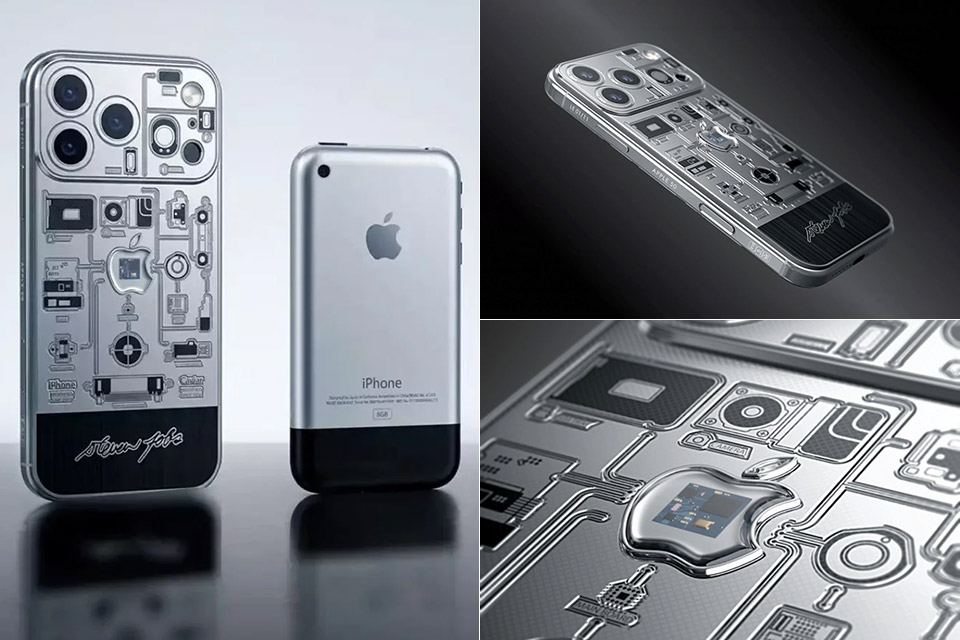
Caviar has packed over two decades’ worth of technology into a single smartphone, the iPhone 2007 Edition, which is an extravagant custom version of the iPhone 17 Pro. This ultra-limited edition of the flagship smartphone incorporates an actual piece of the 2007 iPhone 2G directly into its frame, a part literally pulled from Apple’s first handset.


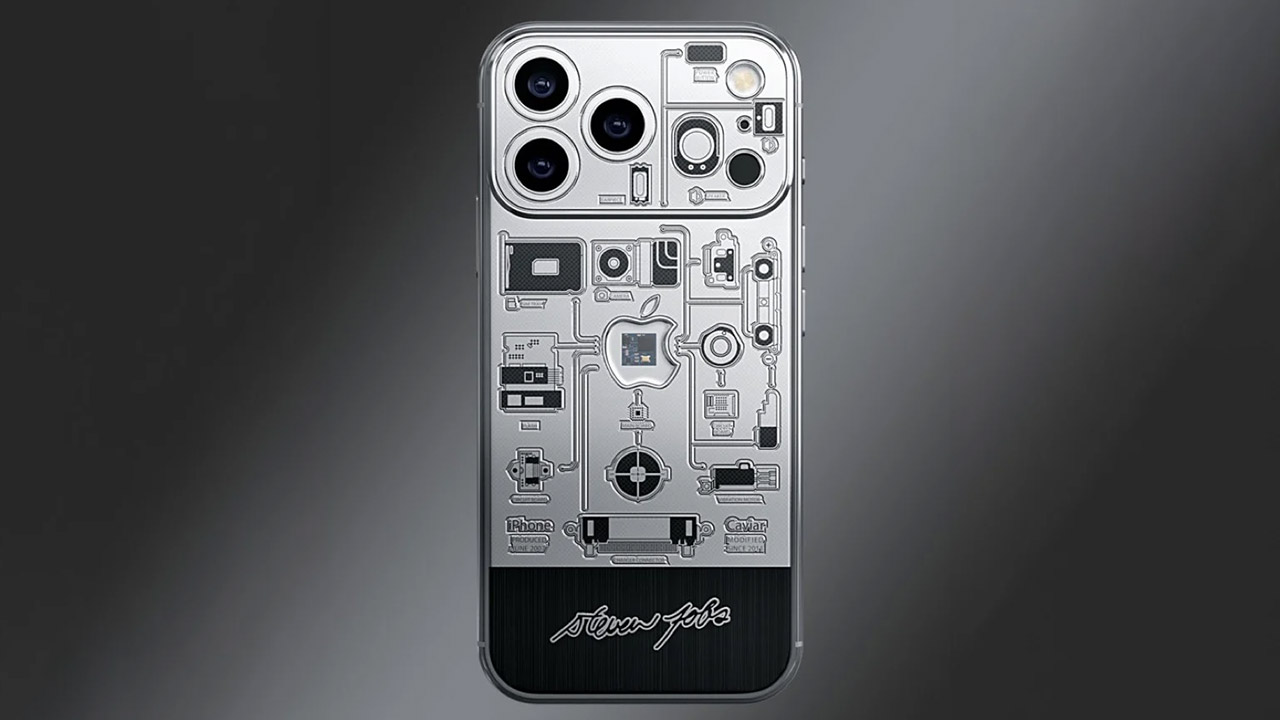
The chassis is composed of titanium, which is coated in a sleek PVD black that nods subtly to the colors of 2007. The silver bits cover the majority of the surface, while the lower part transitions to black, which provides visual interest. Delicate lines carved on the rear are a careful recreation of the original mainboard’s circuit designs, and they all appear to connect at a single central point.

Sale


TORRAS MiniMag Power Bank,Ultra-Slim 10,000mAh Magnetic Wireless Portable Charger, 22.5W Fast Charging…
Advertisement
  • 【Ultra-Thin Yet 10,000 mAh Capacity】Are you still struggling to find a slim power bank that can meet your charging needs? Look no further! TORRAS…
  • 【Portable Charger with Magnetic Function】The slim power bank is a portable charger with powerful magnetic attraction, allowing for easy attachment…
  • 【Super Fast Charging】Tired of waiting for your power bank to charge? This power bank fast charging supports 22.5W wired fast charging and 15W…

A transparent capsule shaped like the Apple logo lies in the center of the rear panel. Inside this sealed capsule is a certified piece of the 2007 iPhone 2G motherboard, securely stored away and entirely undamaged. The fragment is packaged in what appears to be a hermetically sealed little chamber. To top it all off, each device includes Steve Jobs’ signature inscribed around the frame, as well as a unique serial number etched into the titanium up to number 11.

Caviar Original iPhone 2G 17 Pro iPhone 2007 Edition
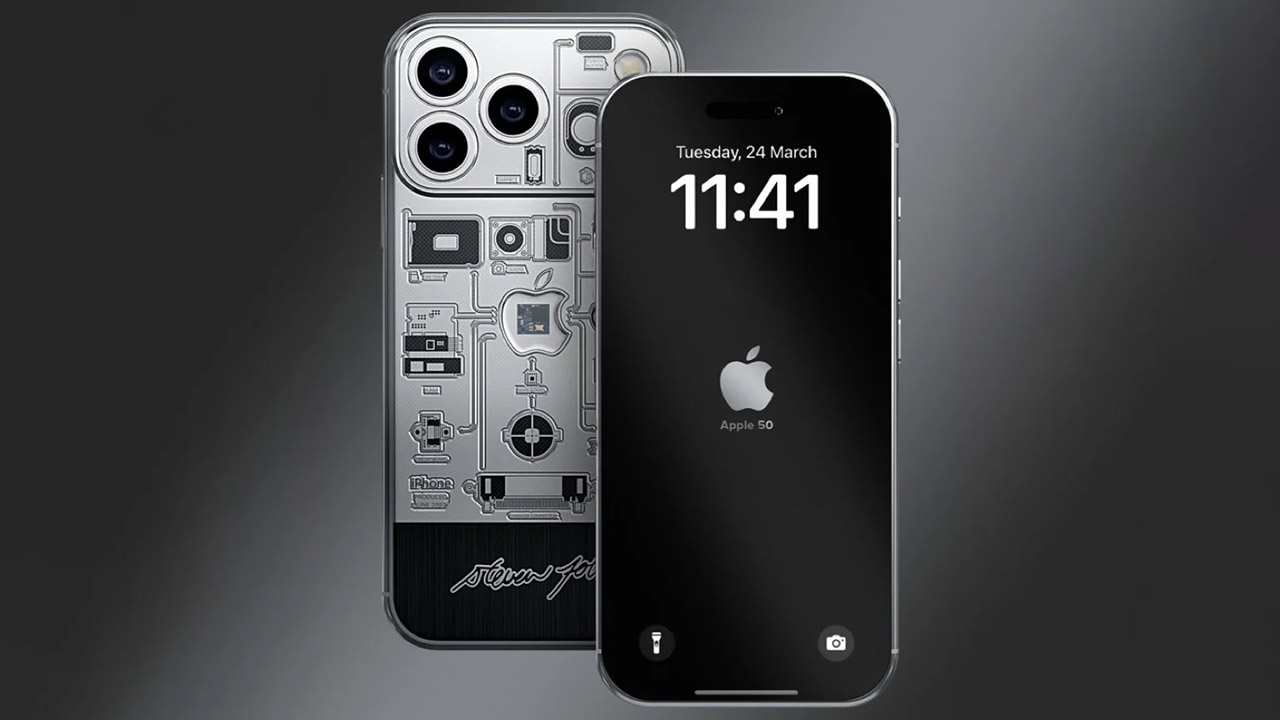
Every last detail ties in neatly to that historic hardware. The etchings that imitate the first smartphone’s technological schematics provide a nice visual connection to the capsule. Buyers of the iPhone 2007 Edition even receive a personalized screensaver. This one is custom-made for this collection and begins loading as soon as the phone is turned on. The phone comes in a luxury branded box with a characteristic Caviar key finished in 24-karat gold plating – the works. It comes with certified certificates that indicate the motherboard is a genuine 2007 iPhone 2G fragment, directly from the source.

Caviar Original iPhone 2G 17 Pro iPhone 2007 Edition
Pricing starts at $10,770 for the 256GB iPhone 17 Pro and goes up to $12,700 for the two-terabyte iPhone 17 Pro Max. Production is intentionally limited to just 11 pieces globally, making each one extremely uncommon. Orders are now open, with worldwide shipping handled by trusted couriers. It will take at least a week to arrive after a 1-4 business day wait for final assembly and inspection.
[Source]


Author
Jackson Chung

A technology, gadget and video game enthusiast that loves covering the latest industry news. Favorite trade show? Mobile World Congress in Barcelona.

Advertisement

Source link

Continue Reading
Click to comment

You must be logged in to post a comment Login

Leave a Reply

Tech

Testing common battery myths for your portable Mac

Published

on

Even though most of a Mac’s battery life is predestined by manufacturing variables out of your control, there are ways to prolong your Mac’s battery life. In some cases, they may not be worth the hassle.

With a smaller battery, most people talk about the best ways to extend both the battery life and overall battery health on iPhone. But your portable Mac is perhaps just as important.

Slowly, Apple has been building out its battery health features with new ones being added as recently as macOS 26.4. Here’s which ones to pay attention to and how they work.

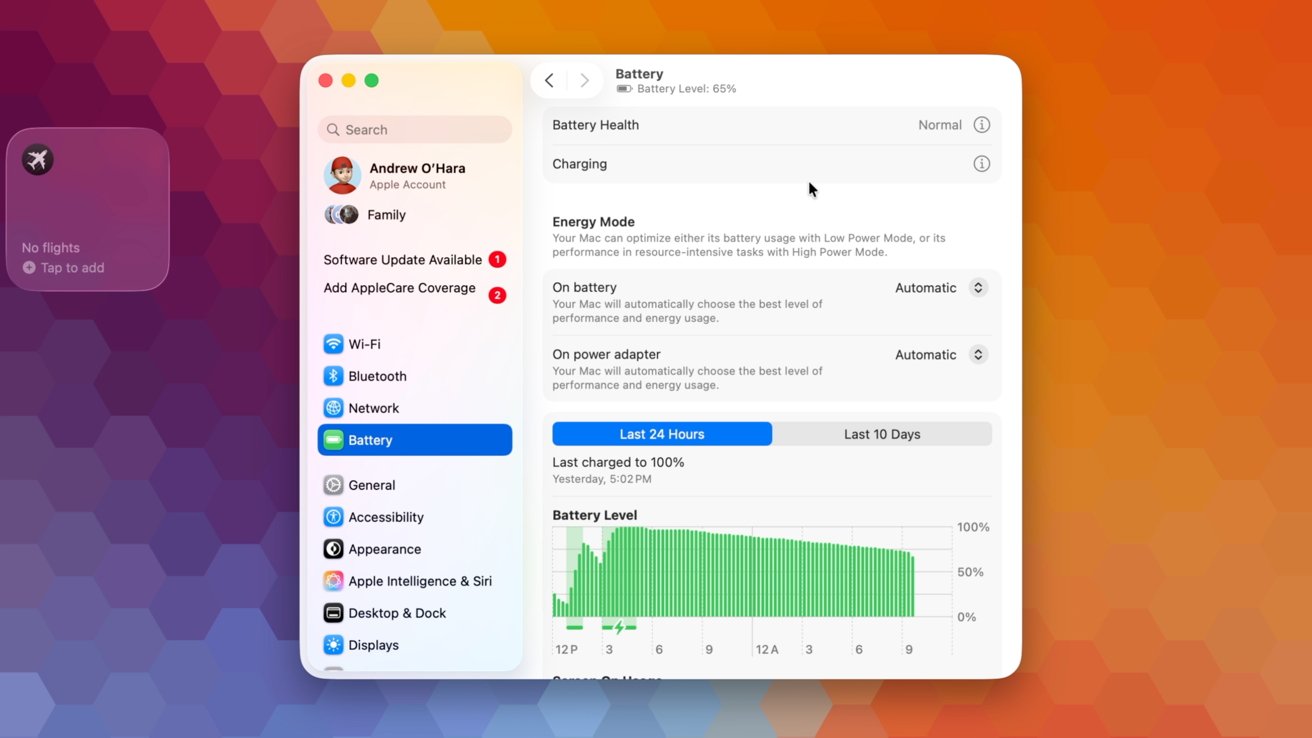
Many of these options can be found in System Settings. The Battery category contains the relevant settings and graphs.
Advertisement
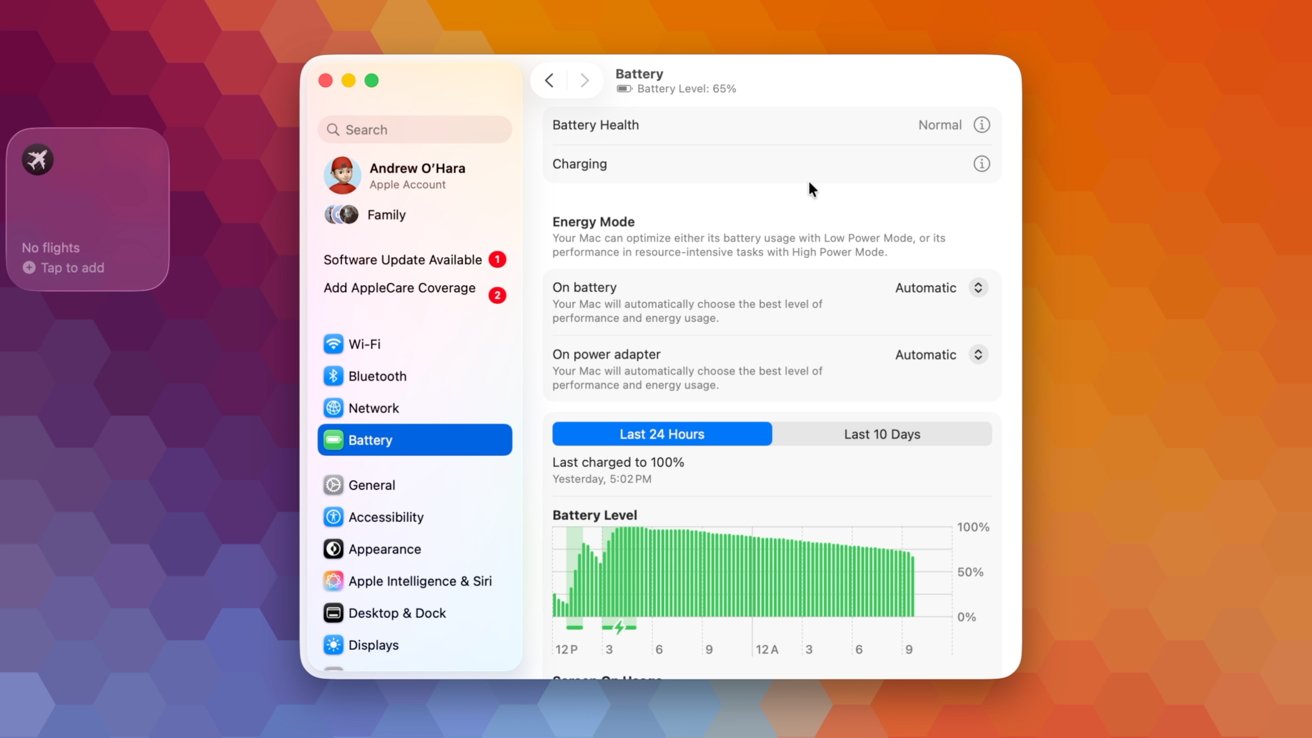
Mac laptop screen showing System Settings battery panel with usage graph, charging status, and sidebar options on a colorful orange and purple hexagon gradient background

Apple battery settings

Right at the top of the Battery category, you’ll see your battery health. It will tell you in plain text what your battery health is, such as “normal” or “service recommended.”

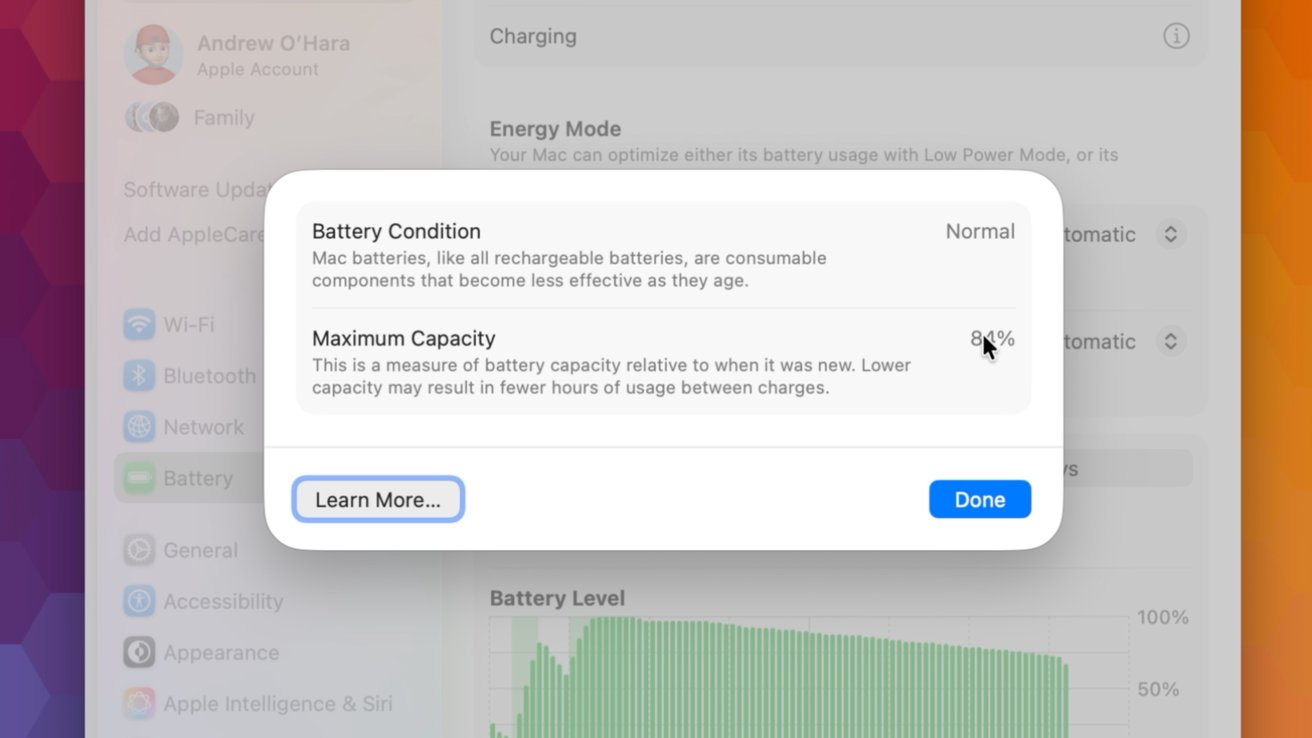
If you tap the encircled “i,” it breaks it down further to show the battery condition and the maximum capacity. For my 3-year-old MacBook Pro, my battery’s maximum capacity is sitting at 83% and considered normal.

Optimized charging on Mac

If you tap on the “i” next to Charging, you can turn on Optimized Battery Charging. This feature is available on many Apple products, including iPhone, Apple Watch, and AirPods.
Advertisement
MacOS battery settings window showing a Battery Condition panel with Normal status, explanation text about battery health and maximum capacity, and Learn More and Done buttons over a blurred desktop background

Check your battery health from System Settings

The idea is that your device won’t fully charge until you need it. It will keep your device at roughly 80% and then top off at the last minute.

For example, if you pick up your laptop to take to work or class at 7:30 AM, it will charge it to 80% and hold it there overnight, only reaching 100% around 7 AM, so it’s ready when you are. This way, it isn’t keeping the battery at full capacity for an extended period of time.

It’s so seamless that users shouldn’t even notice this happening.

Advertisement

Charge Limit

Another optional user-facing feature is Charge Limit. This does exactly what the name implies and sets a limit on how much your laptop can charge.
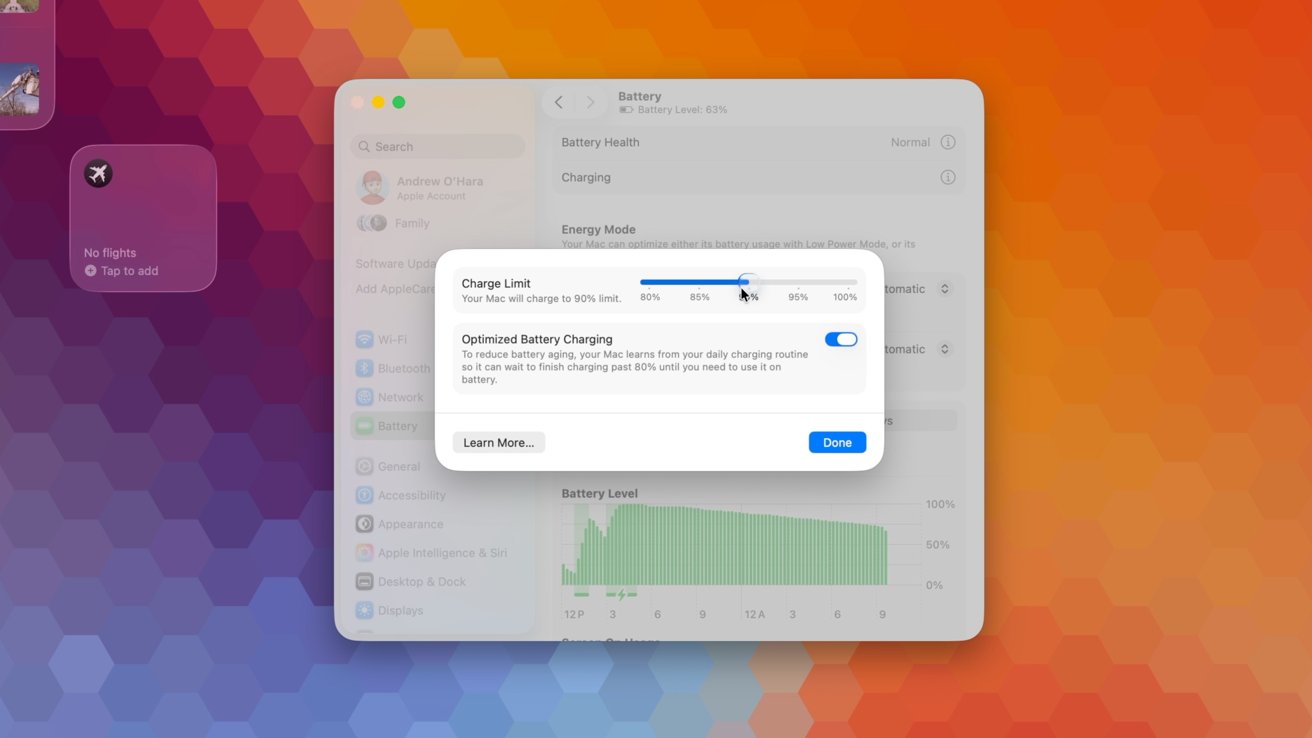
MacOS battery settings window with a centered dialog showing charge limit slider, optimized battery charging toggle, battery usage graph below, on a colorful hexagon gradient background

Set a charge limit for your Mac

Lithium-ion batteries take the most damage when charged to 100%. Efficiency drops as it tries to top off, creating more heat and degrading the battery faster.

If you limit your battery to 95%, 90%, or 80%, it will stay more efficient, produce less heat, and extend the overall lifespan of the battery.

Advertisement

When you do need to make sure your laptop is topped off, like for a trip, you can disable this charge limit just for the day, at which point it will automatically re-enable.

This feature was introduced to Macs with the recent macOS 26.4 update. For power users, the charge limit can be configured via Shortcuts, too.

High and low-powered chargers

Depending on your portable Mac, you can utilize chargers that offer up to 140W of power. You can still use lower-watt chargers, too.

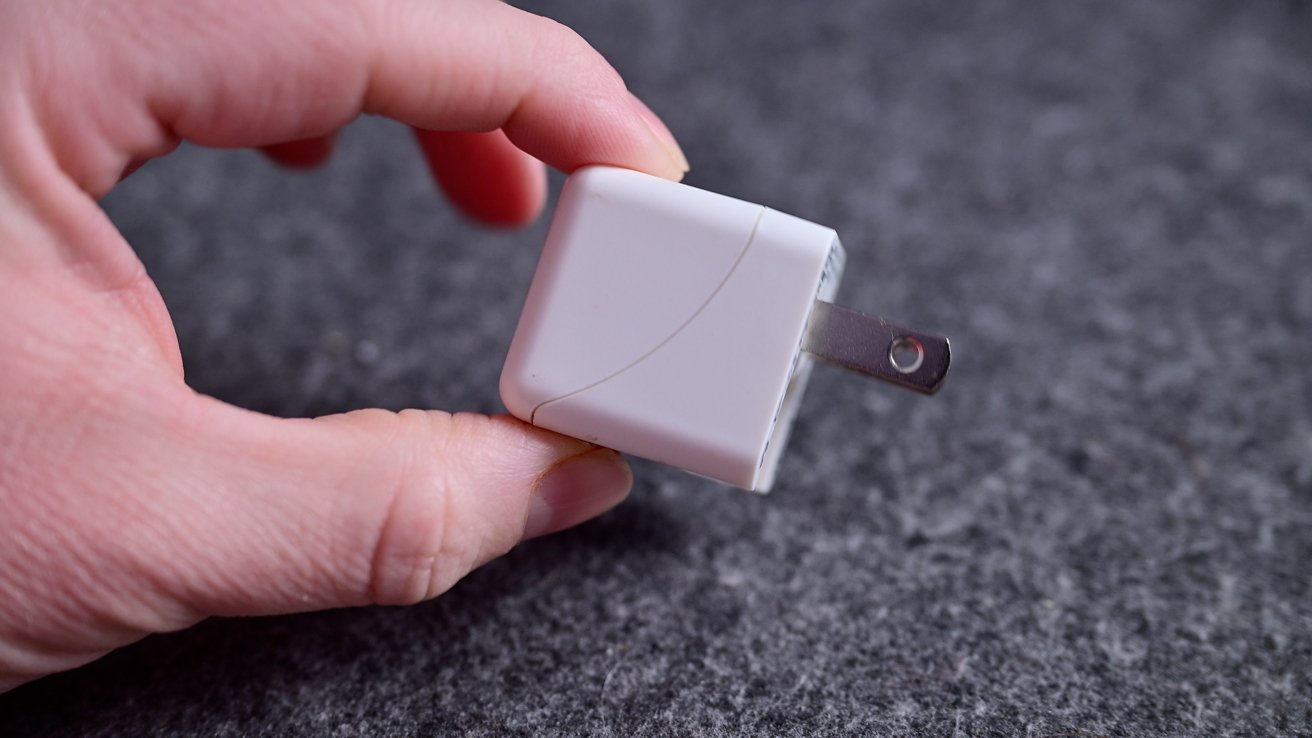
They’ll just charge your laptop more slowly. Sometimes users aren’t aware of these slower chargers.
Advertisement
Hand holding a small white USB wall charger with metal prongs extended, resting against a textured gray fabric background

A small 5W USB charger won’t adequately charge a Mac

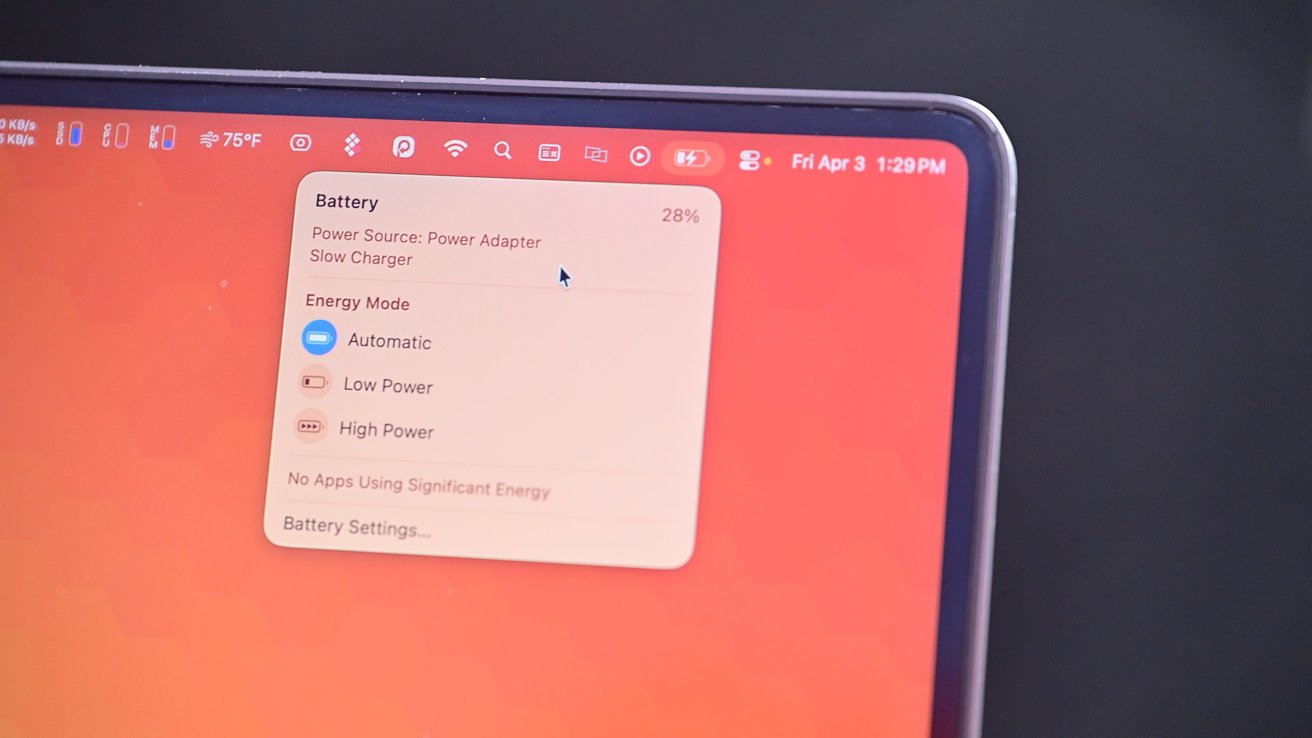
A new feature, again added with macOS 26.4, will alert you to insufficient chargers. If you grab a charger, perhaps meant for your iPhone, and connect it to your Mac, you’ll see an alert in the menu bar.
MacBook screen corner showing macOS menu bar and battery dropdown panel with power adapter source, energy modes like Automatic and Low Power, over an orange desktop background

The slow charging indicator in the menu bar

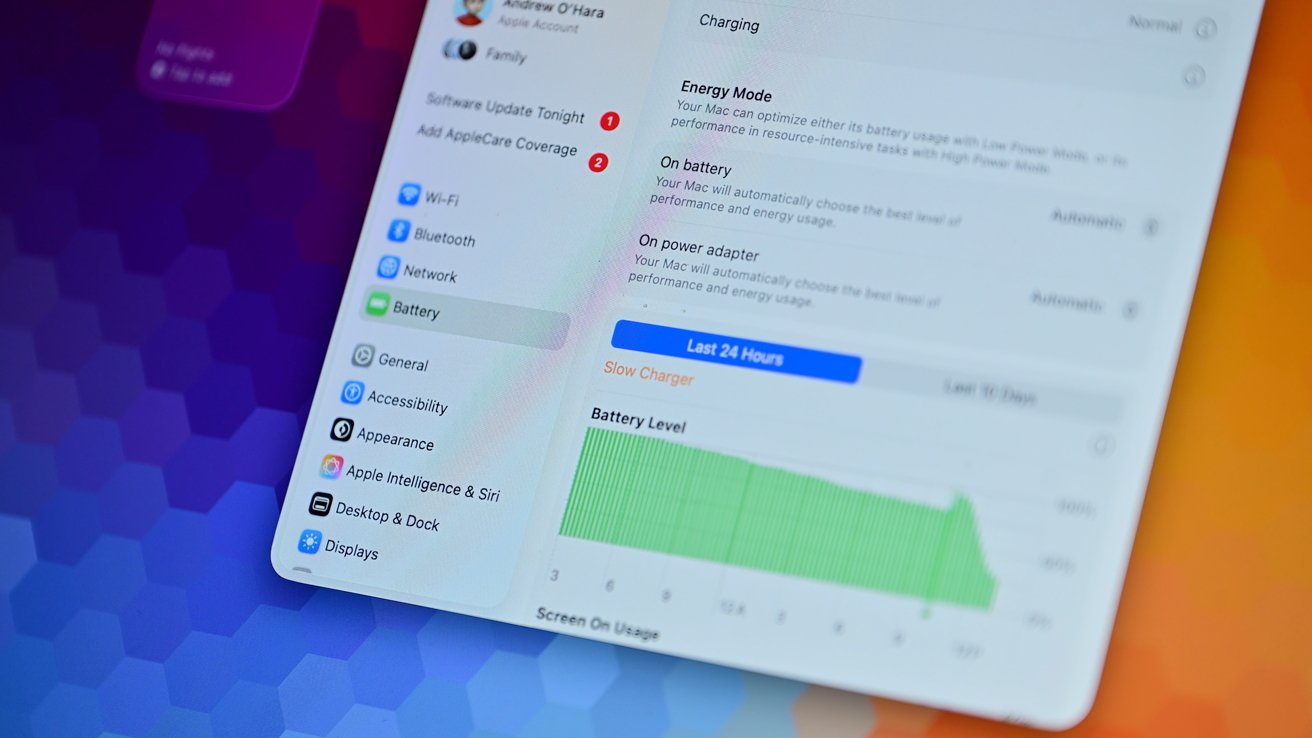
This subpar charger warning can show in System Settings, too, if you head to the battery settings. Slow charging will be shown graphically as well.
Advertisement
Tablet screen displaying battery settings and detailed battery usage graph, with menu options on the left and colorful blue and purple gradient wallpaper in the blurred background

Slow and fast charging can be seen in the battery settings

On the opposite end of the spectrum are fast chargers. For example, using the 140W power adapter that comes with the 16-inch MacBook Pro that yields 50% charge in only 30 minutes.

Users may be concerned about whether it is safe to use fast chargers with their Mac. Fast chargers will, of course, power your device more quickly, but this can significantly increase the heat output and hurt your battery health more.

As a starting point, your Mac will only draw the correct amount of power. It will never draw too much power.

Advertisement

If you have a MacBook Air and connect a 140W brick, that’s OK. Your Mac won’t try to accept 140W and damage your machine in any way — it’s perfectly safe.
Close-up of a laptop on a gray felt surface with a blue braided cable plugged into a side port, partially open screen slightly out of focus

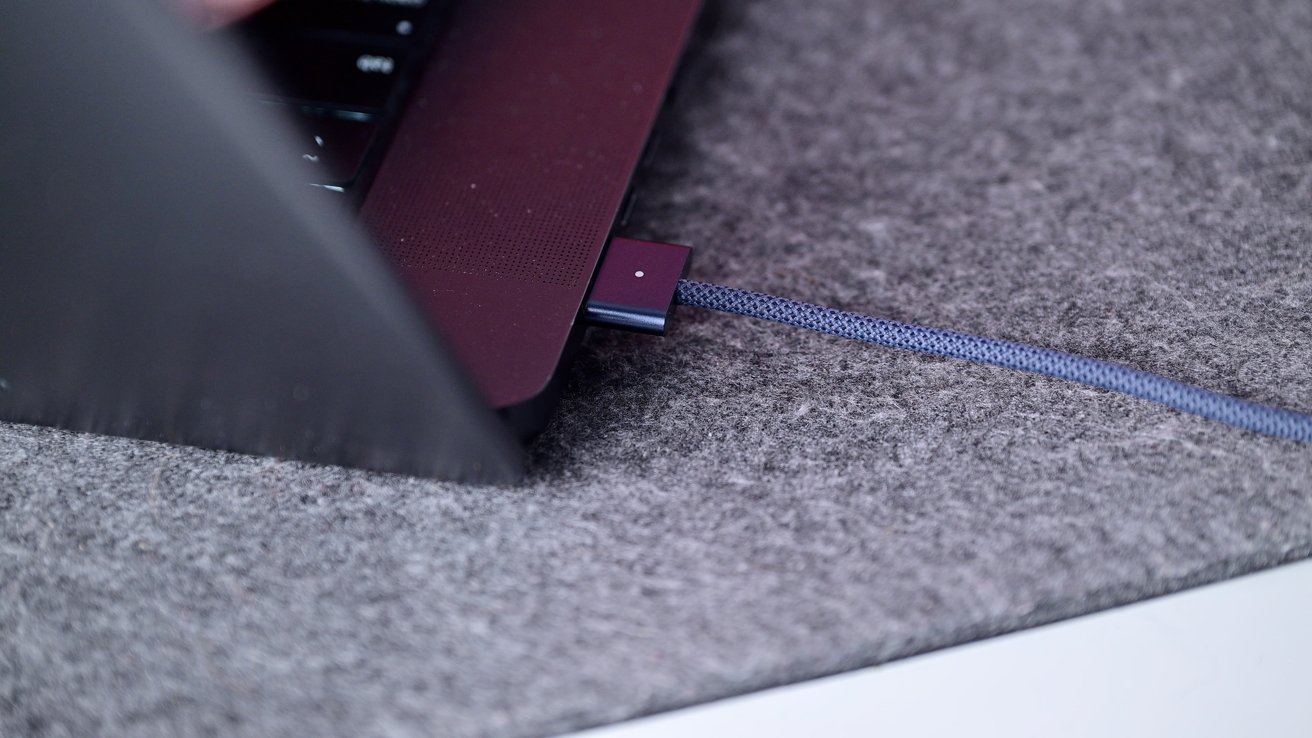
MagSafe 3 is a great way to charge your Mac

That also means it isn’t going to perpetually draw 140W of power on a 16-inch MacBook Pro. It will initially ramp up the speed to charge the battery to a certain percentage before slowing down to minimize any damage.

It’s more the heat that is generated that can damage your battery than the wattage. Your Mac monitors its temperatures, so if it is particularly warm out or you’re doing some intensive tasks on your machine, it likely may not be accepting 140W of power even though that’s what you connected.

Advertisement

Higher wattage does cause more heat, which has the potential to do more harm, but honestly, the amount of damage is negligible. My recommendation is just to use the fast charger.
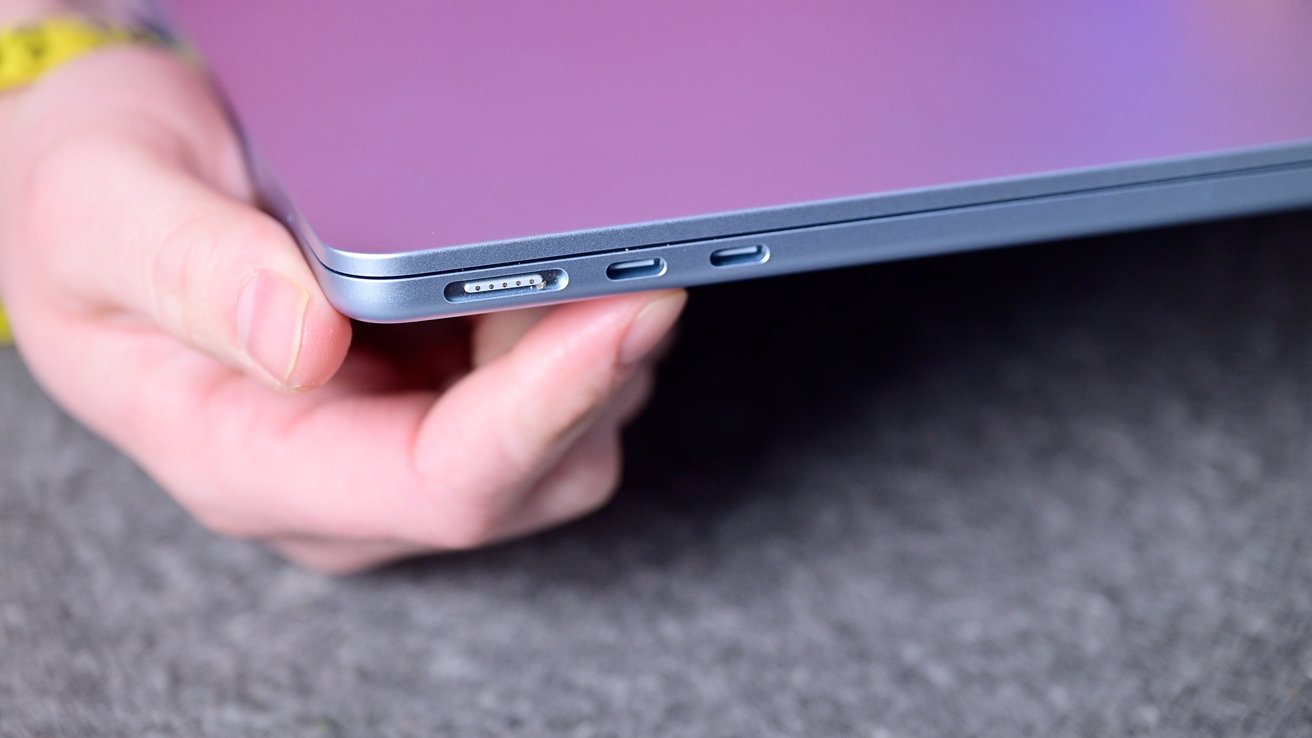
Hand holding a thin, metallic laptop showing its side edge with two USB-C ports and a headphone jack, against a soft gray surface background.

Your Mac can intelligently draw the correct amount of power

If you care a lot about your battery, make sure to use Optimized Charging or turn on the Battery Limit. That will help you more than the fast charger will hurt you.

Plus, fast charging is convenient. Your battery will inevitably fail regardless, and I’d rather make sure I can use my laptop than constantly worry about it.

Advertisement

If it’s any testament, I almost exclusively use a fast charger, and my 2023 16-inch MacBook Pro is still at 83% health after more than two years of use.

Leave your Mac plugged in

Finally, let’s talk about another oft-asked question — is it safe to leave your laptop plugged in?

Maybe you have a new Studio Display XDR and your Mac is always connected to power via Thunderbolt. Could this be bad for your battery to always be taking power?

The short answer is that it is perfectly safe. You can do this, and it will not hurt your battery health.
Advertisement
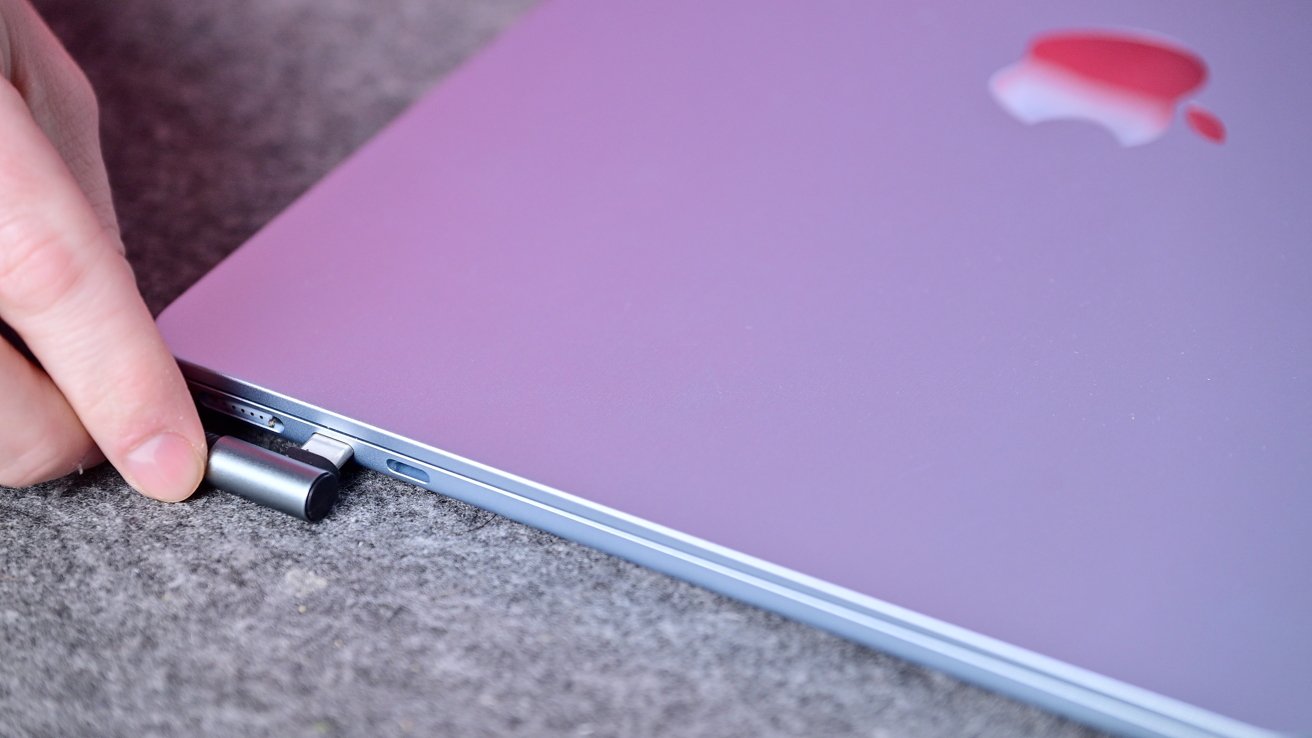
Hand plugging a small USB-C adapter into the side port of a closed silver MacBook with a pink-tinted Apple logo, resting on a gray surface

It’s safe to leave your Mac perpetually plugged in

If you’re looking for a longer answer, Apple essentially bypasses the internal battery when connected like this. It’s called “battery float” when you simultaneously charge and discharge the battery, and it’s obviously not good.

For the last many, many years, Apple has designed its portable machines to run off of that external power directly, reducing the wear and tear on your battery.

The end is the same

For all the worrying, at the end of the day, the result is the same. Your battery will, eventually, need to be replaced.

Advertisement

Batteries are consumables, and no matter how much you baby them, you won’t be able to avoid replacement. Fortunately, Apple makes this fairly easy.

For Apple’s most expensive laptop, battery replacements only cost $249 and get cheaper depending on your model. If you have AppleCare One or AppleCare+, these replacements are free once it drops below 80%.

If you are ambitious enough, you can even replace the battery by yourself and save some money. Apple and third-party sites offer components and tools to get the job done.

Apple’s emphasis on longevity with its products is to be applauded. I think for the average user, Optimized Charging is a great balance of utility and battery health.

Advertisement

The users who want to extend the battery health for as long as possible have their own built-in features. And Apple still is offering official replacements for laptops from nearly a decade ago when they do need replacing.

Battery health can be a bit anxiety-driving, but the tools and support options should come together to put your fears at ease. With some common-sense actions, you should be able to get the most out of your Mac and its battery for years.

Source link

Advertisement
Continue Reading

Tech

Next-gen MRDIMM standard nears completion targeting 12,800 MT/s DDR5 transfer rates for AI and data center workloads

Published

on


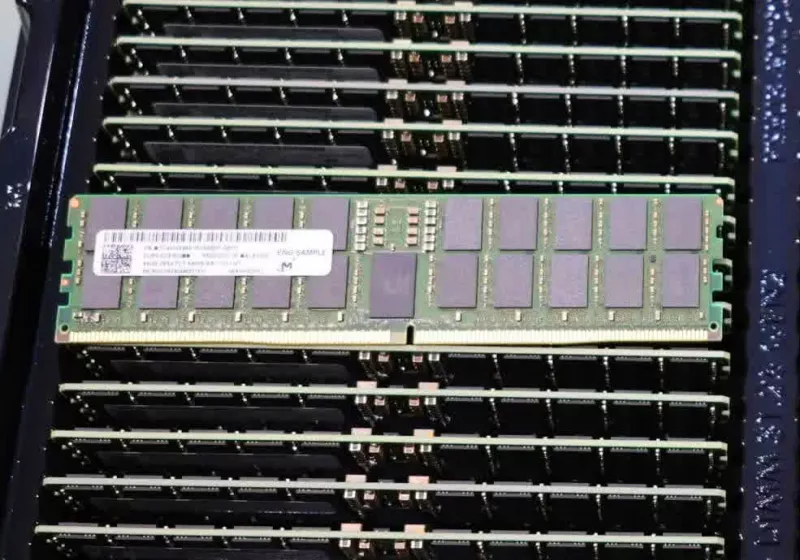
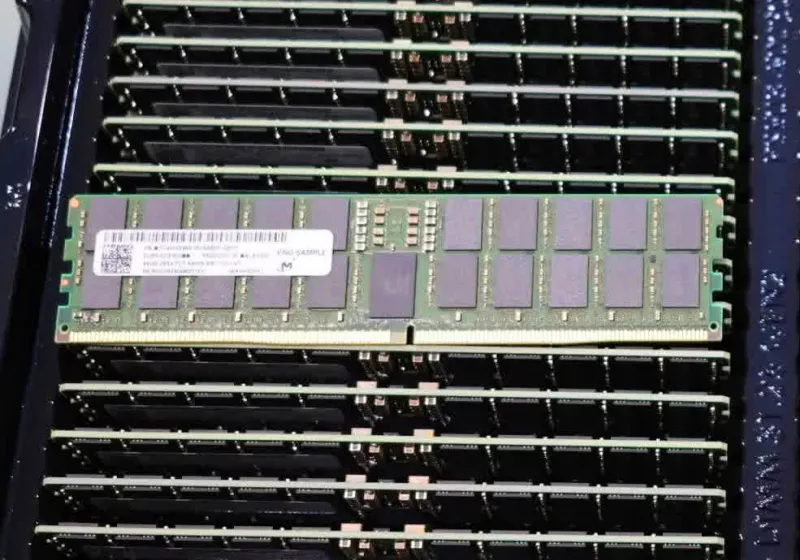
JEDEC’s latest announcement provides an updated timeline for the future of MRDIMM, a relatively new memory standard introduced a few years ago to support bandwidth-intensive data workloads. Multiplexed Rank DIMM technology uses a multiplexing register and buffers to allow two memory ranks to operate simultaneously on a single DIMM, effectively…
Read Entire Article
Source link

Continue Reading

Tech

Infrasound Waves Stop Kitchen Fires, But Can They Replace Sprinklers?

Published

on

An anonymous reader quotes a report from Ars Technica: In a makeshift demonstration kitchen in Concord, California, cooking oil splatters in and around a frying pan, which catches fire on an unattended gas stove. Within moments, a smoke detector wails. But in this demonstration, something less common happens: An AI-driven sensor activates and wall emitters blast infrasound waves toward the source of the fire in an attempt to put it out. The science of acoustic fire suppression, which has long been known and documented in scientific literature and the press, works by vibrating oxygen molecules away from a fuel source, depriving the fire of a critical component needed for combustion. Indeed, after just a few seconds of infrasound, the tiny kitchen blaze goes out.

“We were able to not just point-and-shoot like a fire extinguisher; we figured out how to run it through ducting and distribute it like a sprinkler system,” said Geoff Bruder, co-founder and CEO of Sonic Fire Tech, during the presentation. The company’s goal is to replace sprinklers, which are effective at stopping fires but can also do significant water damage to a property. Sonic Fire Tech appears to be the first company trying to commercialize the science of acoustic fire suppression. Its executives have already been touring Southern California; Wednesday’s event was the first in the northern half of the state.

The company aims to make this infrasound technique mainstream in both commercial (for instance, a data center, where sprinklers would damage electronics) and in-home installations, given that sprinklers are already required in all new California homes built in 2011 and later. Sonic Fire Tech also hopes to produce a backpack-based system that could be worn by wildland firefighters headed out into the field. “We are making meaningful technological improvements on a monthly basis,” Stefan Pollack, a company spokesperson, emailed Ars after the event. But two experts who spoke with Ars raised serious questions about the potential for this technology to supplant traditional sprinklers in a home. They are even more skeptical as to whether the technique can be effective in an uncontrolled wildfire situation, where flames can grow very quickly. Experts are concerned that infrasound may knock down small flames but does not cool hot surfaces or wet fuel like sprinklers do, which raises the risk of re-ignition, smoldering fires, hidden fires, or blocked fires. Sonic Fire Tech has claimed third-party validation and possible NFPA 13D equivalency, but it has not publicly released full testing details.

Fire officials and outside observers also want more information about reliability, maintenance, calibration, and how system failures would be detected and communicated.

Advertisement

Source link

Continue Reading

Tech

4 Upgrades The iPhone 18 Needs To Put Apple Ahead Of The Curve

Published

on


The iPhone is the most popular smartphone in the U.S., accounting for over 60% of the smartphone market share, according to Statcounter. Apple also enjoys a very strong presence in the global market, with the iPhone selling like hotcakes every time a new generation is launched. That said, iPhones are typically not at the top of the list when we talk about value for money. Heck, the iPhone 16 — an $800 smartphone — featured a 60Hz display in 2024. Yet, it sold well.  

Surprisingly, the iPhone 17 series that was unveiled in 2025 offered numerous great additions. There’s a reason why we called the base iPhone 17 the best model that Apple released last year. It comes with a 120Hz ProMotion display, a new Center Stage front camera, solid performance, and great optics. Turns out, people do, in fact, appreciate it when companies actually listen to feedback and pack in long-requested features, because Apple reported that the iPhone 17 lineup has been the most popular in the company’s history.

As we inch closer to the launch of the iPhone 18 series, expectations are higher than ever. As someone who regularly hops between Android and iOS, though, I have a few wishlist items that I hope Apple checks off this year that would truly solidify the iPhone as the best all-around smartphone that money can buy.

Advertisement

Improved battery technology

iPhones have always infamously boasted less on paper compared to their Android counterparts. Yet, the latest iPhone has always managed to deliver similar, if not better, performance, camera quality, and battery life. This is largely because Apple controls both the hardware and the software that builds an iPhone. For instance, the iPhone 13 Pro Max, with its 4,352 mAh battery, managed to outlast competitors packing in much larger batteries. Unfortunately, there’s only so far good optimization can take you.

After the honeymoon period ended, I never managed to get excellent battery life again on my iPhone 15 Pro Max. I spend most days plugging it in at least twice. Sure, in our review of the iPhone 17 Pro Max, we mentioned how its larger 5,088 mAh battery offered an excellent experience, but I feel Apple can do better. I recently picked up a OnePlus 15, and it packs in a mammoth 7,300 mAh battery that lasts me well beyond a day and a half — sometimes even two. This is all thanks to the advent of silicon carbon technology in phone batteries.

Advertisement

Many Chinese OEMs have been using Si-C batteries in their flagships for a while now, and it’s time the West caught up. Imagine an iPhone 18, still with its great battery optimization, just now with a denser Si-C battery. While we’re at it, let’s also drop faster wired charging speeds into the mix, please.

Advertisement

Upgraded camera hardware

The iPhone has a great camera system, no doubt — it manages to consistently rank as one of the best smartphone cameras available. My iPhone 15 Pro Max from 2023 still manages to capture better results than my newer OnePlus 15 in many scenarios. I feel Apple could take its smartphone camera experience to the next level, but not without a few hardware upgrades, especially one targeting the zoom lens.

The iPhone 17 Pro series has a 48-megapixel 4x telephoto lens that lets you capture 12-megapixel 8x optical zoom shots. You can zoom in much closer, though, and with ample light, the telephoto lens doesn’t disappoint. However, the competition has been catching up. For instance, Digital Camera World crowned the Oppo Find X9 Pro as the best zoom camera among current-gen smartphones. As reported by 9to5Mac, a reputable Weibo leaker has hinted that Apple may, in fact, pack the iPhone 18 Pro series with notable camera improvements.

This includes a bigger 1/1.12-inch sensor for the primary shooter, improved optical image stabilization for the ultrawide lens, and a refreshed 200-megapixel sensor for the telephoto lens. The iPhone 18 Pro is also rumored to sport variable aperture for its lens, allowing for better control over the depth of field. It’s unlikely for the base model iPhone 18 to also receive all of these upgrades, but last year’s Center Stage front camera was a welcome addition regardless.

Advertisement

A display with a smaller hole-punch cutout

The transition to bezel-less displays was a tough one, especially with smartphones featuring all sorts of notches, hole-punch cutouts, and even motorized pop-up cameras, but I’m glad we made it. Modern Android flagships now get you uniform bezels all around with a tiny hole-punch cutout for the front-facing camera. iPhones, however, also need to worry about housing other sensors required for Face ID, which is why they have a bigger cutout on the display.

Credit where credit is due — Apple made the most out of this hardware oddity by masking it with an excellent software feature — the Dynamic Island. It’s where Live Activities for the iPhone live. As useful as the feature is, the hole-punch cutout on the iPhone does get in the way sometimes, especially when watching content in the landscape mode. A fully immersive display is possible — we have a couple of Android phones that use under display front cameras. 

Though it’s unlikely that Apple would switch to this technology in its current state, another Weibo leaker shared images of what appears to be a much smaller hole-punch cutout for the upcoming iPhone 18. It would also be nice to see a 144Hz or 165Hz display on the Pro models — it would take proper advantage of Apple’s in-house silicon that seems to handle AAA titles just fine.

Advertisement

An iOS experience that doesn’t suck

One of the biggest reasons iOS was hailed as the better mobile operating system for years was stability. Despite it lacking many features and any form of advanced customizability, people liked it for the fact that it just worked great all the time. As years have passed, iOS has borrowed quite a lot of features from Android — goodies like always-on display, widget support, and Control Panel customization — but this has come at the cost of the stability that iOS was once praised for.

Even ignoring Apple’s failed attempts at delivering a revamped Siri, recent versions of iOS have been giving users performance and battery drain issues. With iOS 26, Apple introduced the new Liquid Glass design language, which looked amazing in demos but quickly fell apart when users actually got their hands on it. It took Apple several betas to find the right balance between transparency and readability, but the fact that Liquid Glass relies on real-time rendering has meant that older iPhones are struggling to offer a lag-free experience.

For once, it would be great to have a major iOS update that’s focused entirely on stability and performance rather than introducing flashy new features. There are already reports suggesting that iOS 27 will be exactly that — a return to form for the operating system. I, for one, would be delighted to see the iPhone 18 series launch alongside stable software, an improved keyboard, and, hopefully, a smarter Siri.

Advertisement

Why these features matter

Let’s face it, even without major upgrades, the upcoming iPhones will sell in the millions. The upgrades I’ve listed would be great to have, though. As much as I appreciate how well all my Apple devices talk to each other, there’s still plenty of room for Apple to push the envelope. One thing I always miss after switching from an Android smartphone to an iPhone is fast charging. I’ve also been spoiled by giant silicon carbon batteries — it would be great to see an iPhone offer unparalleled battery life with faster top up speeds.

It also feels like the iOS experience has been slowly falling apart with every update. I’ve previously expressed why the iPhone’s keyboard is flawed, and although Apple has addressed a few of these annoyances in a patch fix, the typing experience still feels lackluster — especially compared to how good Android users have it. Between performance issues and other bugs, a stability update for the iPhone’s software is what we need most.

Advertisement

Rest assured, the iPhone 18 lineup will likely still be an easy recommendation to those looking for a smartphone with a great camera. It’s just the few niceties that the iPhone still lacks that keep it from feeling like the complete package.


Advertisement

Source link

Continue Reading

Tech

Battery life on Bluetooth speakers is not always what you think it is

Published

on

With Bluetooth speakers (especially portable ones), battery life is an area that I don’t think gets enough attention.

Considering this a product you’ll be taking with you on your outdoor adventures, you will a) want to make sure it’s fully charged and b) that it lasts for as long as it says it does.

That’s not always the case.

What the brand says on its website and packaging is likely true, but there’s small print that buyers often overlook, resulting in performance that’s not always what you expect.

Advertisement

Is it the brand’s fault for not fully disclosing the details around battery life, or an issue that’s more complicated than just that?

Advertisement

Very hush hush

This has always been an issue for me, but in reviewing a number of Bluetooth speakers from JBL and Marshall, it highlighted the issue more.

Every reviewer has their approach to assessing battery life. Some will take the brand at its word and, in their review, declare the same figure. Others will use the speaker as their main one, and while they’re not totting up the exact hours, they’ll generally monitor how long (over several days) the battery life has lasted before the speaker needs a recharge.

Advertisement

Others will go into more depth but have different approaches. Speaking for myself, I use my own Spotify playlist, which is a library of all the tracks I’ve liked on the service since… forever. I’ll put it on shuffle so (in theory) it should never be the same tracks playing in the same order. There’s nothing scientific about it; I just prefer the variation that, in my head, mimics the different tastes of tracks that people might play on their speakers at any time. You might think that’s nonsense, but it’s my nonsense.

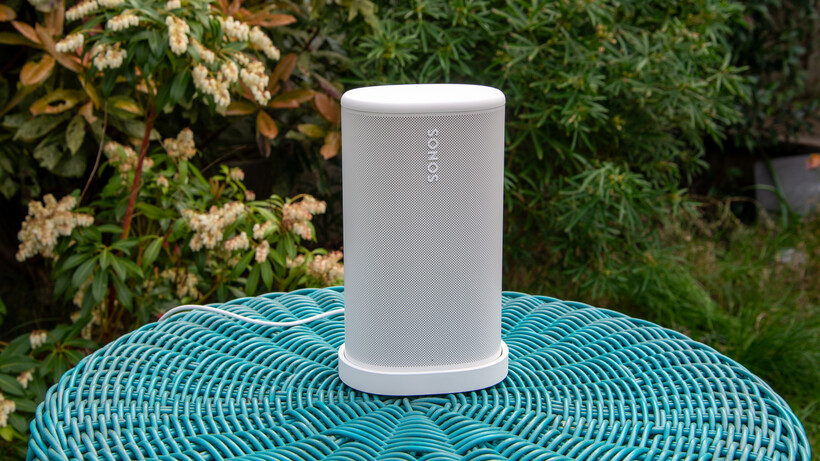
Sonos Play heroSonos Play hero
Image Credit (Trusted Reviews)

Most of the time I leave this playing at around 50% volume, and check in every hour to see how much battery has been depleted. I do not play the speaker until the battery dies. I’ll then take an average and calculate how much that would be and see if it adds up to the brand’s claimed battery life. Most of the time, it does not.

Advertisement

This is because when brands test battery life, they’re often testing at lower volume. The drivers inside a speaker generate magnetic fields that feed an electrical signal into the drivers, the push and pull motion of the drivers that’s converted into the sound energy that you hear. At higher volumes there’s obviously a greater sense of loudness, more energy being fed into the drivers and therefore more energy used – and vice versa for lower volumes.

JBL Grip speakerJBL Grip speaker
Image Credit (Trusted Reviews)

So technically speaking, it’s not as if brands are telling a lie. But if you’re like me, you’re playing music at 50% volume, if not higher. When you first turn on a speaker, it’s often at its default level. Rarely have I ever thought of lowering the volume from that point.

So if the volume is set at 50% by default, why bother testing at lower volumes? That I’m not altogether sure of. I could be cynical and say it’s for the marketing, but I suspect the sound has been tuned at a certain volume and then scaled to make sure the drivers offer a similar response across a range of volumes – high and low.

Advertisement

But still, why not just make it clearer that the volume is taken from a specific level?

No universal method

This has become a problem recently has brands seem to have a different approach to calculating the battery life for speakers. They don’t necessarily use a universal method. What JBL does is probably different from Sony, from Marshall, from Sonos, from Bose.

Advertisement

The equipment used is likely different based on what they think their customer base is most likely to use. So what can we do about it?

Advertisement

I have no idea.

Marshall Kilburn III side viewMarshall Kilburn III side view
Image Credit (Trusted Reviews)

There’s no incentive for anything to change; there aren’t any repercussions because, technically, the speaker can achieve that battery life – just probably not at the volume you’d normally play it at. If you complain that the battery life is not that good, they’re likely to ask you what volume you’re playing music at.

I should be fair and say that there are times when I’ve used my approach and battery life has been right on the money. But, in general, I think that audio brands should be a little upfront about what their speakers are truly capable of. I want a speaker to last, but it needs to meet the target in the first place.

Source link

Advertisement
Continue Reading

Tech

Progress warns of critical MOVEit Automation auth bypass flaw

Published

on

Progress MOVEit

Progress Software warned customers to patch a critical authentication bypass vulnerability in its MOVEit Automation enterprise-grade managed file transfer (MFT) application.

MOVEit Automation automates complex data workflows without requiring manual scripting and serves as a central automation orchestrator to schedule and manage file transfers between different systems, including local servers, cloud storage, and external partners.

Tracked as CVE-2026-4670, the security flaw affects MOVEit Automation versions before 2025.1.5, 2025.0.9, and 2024.1.8. Remote threat actors can exploit it without privileges on the targeted systems in low-complexity attacks that don’t require user interaction.

“We have addressed the vulnerability and the Progress MOVEit Automation team strongly recommends performing an upgrade to the latest version,” the company says in a Thursday advisory. “Upgrading to a patched release, using the full installer, is the only way to remediate this issue. There will be an outage to the system while the upgrade is running.”

Advertisement

The same day, Progress also released security updates to address a high-severity privilege escalation vulnerability (CVE-2026-5174) stemming from an improper input validation weakness in the same software.

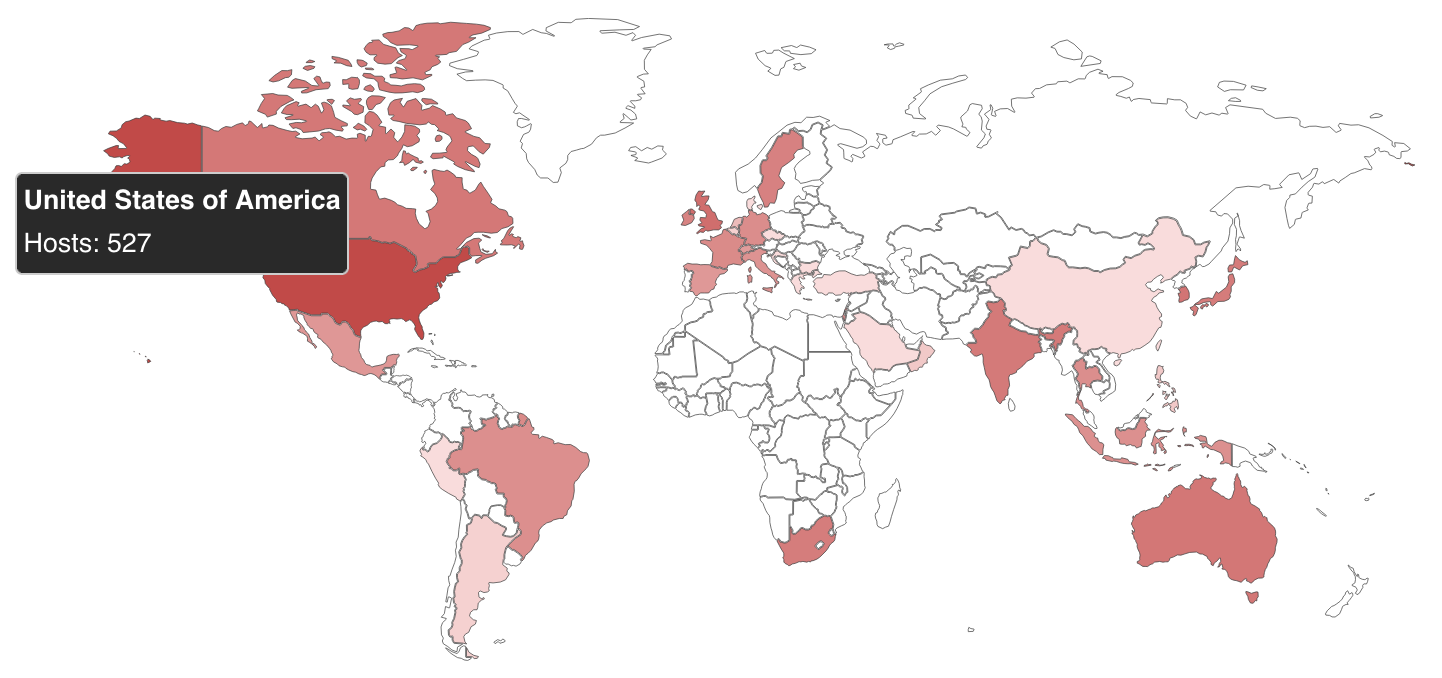
According to a Shodan search shared by PwnDefend cybersecurity consultant Daniel Card, over 1,400 MOVEit Automation instances are exposed online, and over a dozen are linked to U.S. local and state government agencies.

However, there is no information regarding how many of these systems have already been secured against CVE-2026-4670 attacks.

MOVEit Automation instances exposed online
Map of MOVEit Automation instances exposed online (Shodan)

While the company has yet to flag these security issues as exploited in the wild, other MoveIT MFT vulnerabilities have been targeted in attacks in recent years.

For instance, the Clop ransomware gang exploited a zero-day in the MOVEit Transfer secure file transfer platform in an extensive series of data theft attacks in 2023 that affected more than 2,100 organizations and over 62 million individuals, according to Emsisoft estimates.

Advertisement

MFT software is an attractive target for ransomware actors, as seen in previous Clop data-theft campaigns targeting security flaws in Accellion FTA, SolarWinds Serv-U, Gladinet CentreStack, GoAnywhere MFT, and Cleo.

Progress Software says its MOVEit MFT solutions are used by more than 3,000 enterprise organizations and over 100,000 users worldwide.


article image

AI chained four zero-days into one exploit that bypassed both renderer and OS sandboxes. A wave of new exploits is coming.

At the Autonomous Validation Summit (May 12 & 14), see how autonomous, context-rich validation finds what’s exploitable, proves controls hold, and closes the remediation loop.

Claim Your Spot

Advertisement

Source link

Continue Reading

Tech

How fraudsters target credit unions

Published

on

Fraud

Threat actors across underground forums and chat groups are increasingly crafting structured fraud methods aimed at exploiting weaknesses in work processes of financial institutions. Rather than isolated or opportunistic scams, these discussions reflect an organized, process-driven approach that combines stolen identity data, social engineering, and knowledge of financial workflows.

Within these conversations, smaller institutions, particularly small-sized to mid-sized credit unions, are often referenced as more attractive targets due to perceived gaps in verification systems and limited fraud prevention resources.

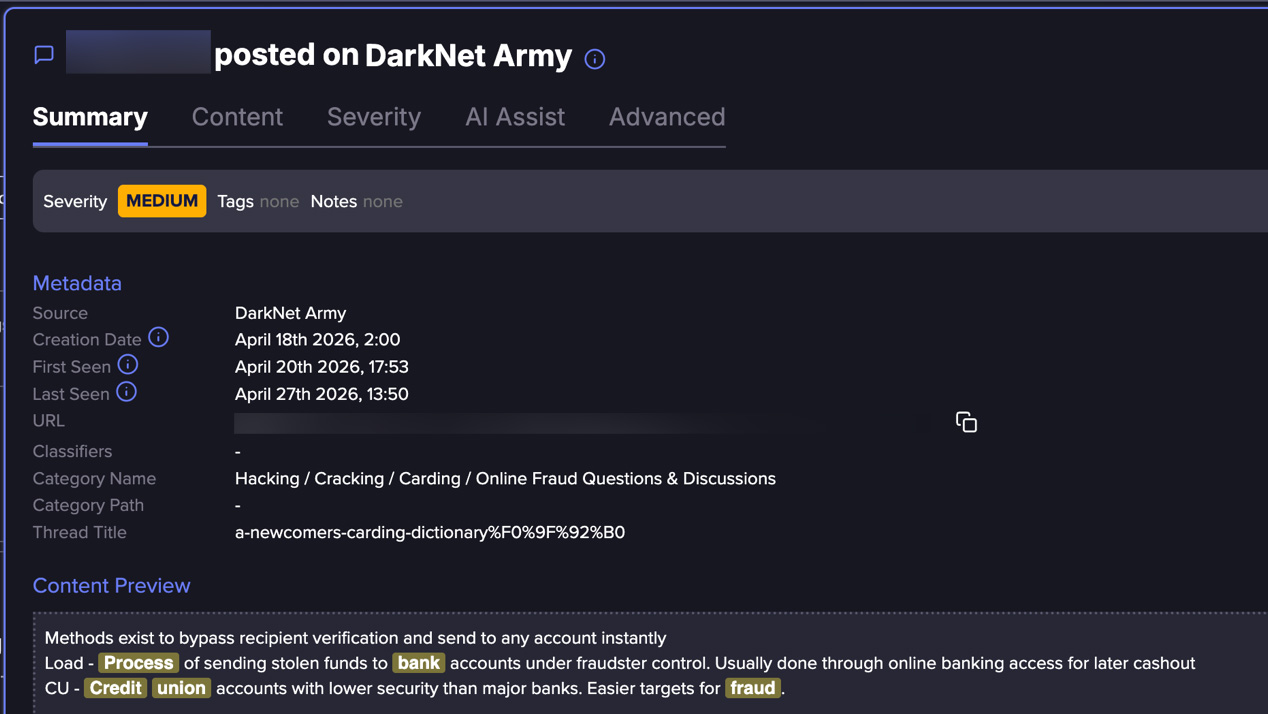
Flare researchers recently identified a detailed loan fraud method circulating within one such underground group, outlining how attackers can move through credit checks, identity verification, and loan approval processes using stolen identities while avoiding traditional security triggers.

The approach does not rely on exploiting software vulnerabilities, but instead focuses on navigating legitimate onboarding and lending workflows as if the applicant were genuine.

Advertisement

The structure of the post reflects a methodical approach, breaking down the process from identity use to loan approval in a way that can be consistently replicated, pointing to a more organized use of fraud techniques.

Screenshot from the method shared in the chat group, showing the threat actor’s opening
Screenshot from the method shared in the chat group,

showing the threat actor’s opening

A Process Built on Identity, Not Intrusion

At its core, this approach relies on obtaining sufficient personal data to convincingly impersonate a legitimate borrower. This includes identifiers such as names, addresses, dates of birth, and in some cases, credit-related details.

The process is all digitized, and the attacker is using false identity to submit for a loan. This distinction is critical: the attack does not “break the system,” but he exploits the flaws in its design.

A central component of the method is the ability to pass identity verification checks, particularly those based on knowledge-based authentication (KBA). These systems typically rely on questions derived from:

In practice, much of this information can be reconstructed or inferred from: publicly available data, social media profiles, previously leaked datasets, and aggregated identity records. 

Advertisement

This method highlights how attackers can anticipate and prepare for these checks in advance, effectively turning verification into a predictable step rather than a true barrier.

It demonstrates how what was once considered a strong identity control can quickly be learned, adapted to, and ultimately exploited by cybercriminals, who evolve their identity theft tools specifically to collect and bypass these requirements.

By the time a fraudulent application hits your queue, the hard work is already done. Attackers source stolen identities, KBA answers, and financial histories from dark web forums and underground markets—long before they ever contact your institution.

Flare monitors thousands of these sources continuously, so you can detect exposed data at the source, not after the damage is done.

Advertisement

Stay ahead of threats and try for free.

The Fraud Workflow – step by step

  1. Identity Acquisition

    Stolen personal data is obtained, including full identity details and background information sufficient to impersonate a legitimate individual.

  2. Credit Profile Assessment

    The attacker reviews the victim’s financial profile to determine loan eligibility and likelihood of approval.

  3. Verification Preparation (KBA Readiness)

    Additional personal details are gathered to anticipate and correctly answer identity verification questions.

  4. Target Selection

    Small- to mid-sized credit unions are selected based on perceived weaker verification processes and lower fraud detection maturity.

  5. Advertisement
  6. Loan Application Submission

    A loan application is submitted using the stolen identity, ensuring consistency across all provided data.

  7. Identity Verification Passed

    KBA and standard checks are successfully completed, establishing legitimacy.

  8. Loan Approval and Fund Release

    The institution approves the loan and releases funds through standard channels.

  9. Fund Movement and Cash-Out

    Funds are transferred to controlled accounts, moved through intermediaries, and withdrawn or converted to complete monetization.

Why Small/Mid Credit Unions Are More Targeted

One of the more notable aspects of the method is its focus on smaller financial institutions. Rather than targeting large banks or highly secured fintech platforms, the approach explicitly leans toward small-sized to mid-sized credit unions, which are perceived as:

Advertisement
  • More reliant on traditional identity verification methods 

  • Less equipped with advanced behavioral fraud detection 

  • More likely to prioritize customer accessibility over strict controls 

The threat actor explain that CU accounts are with lower security than major banks and thus easier to target for fraud
The threat actor explain that CU accounts are with lower security than major banks

and thus easier to target for fraud

Flare link to post, sign up for the free trial to access if you aren’t already a customer

While not universally true, this perception alone is enough to influence attacker behavior, driving targeting decisions toward institutions believed to offer a higher success rate.

Recent industry reporting supports this trend. In auto lending alone, fraud exposure is projected to reach $9.2 billion in 2025, with smaller and regional lenders facing increasing pressure from organized fraud schemes.

Cash-Out and Monetization

Once a loan is approved, the operation shifts into its most critical phase – turning access into money. At this point, the attacker has already done the hard part: passing identity checks and establishing trust under a stolen identity. From the institution’s perspective, the process appears legitimate, and funds are released through standard channels just as they would be for a real customer.

Advertisement

The focus then moves to speed and separation. Rather than leaving funds in place, they are quickly moved away from the originating account, often through intermediary accounts that create distance from the source.

This stage overlaps with broader fraud ecosystems, where access to additional accounts and financial channels enables funds to be routed, split, or repositioned to reduce traceability.

What makes this phase particularly effective (and difficult to detect) is that each step mirrors normal financial behavior. Transfers, withdrawals, and account activity are not inherently suspicious on their own.

Instead, the risk lies in how these actions are chained together within a compressed timeframe, allowing attackers to complete the cash-out before detection systems or manual reviews can intervene.

Advertisement

Who is Most at Risk?

The method provides indirect insight into which individuals and institutions are most frequently targeted for identity theft.

  • Individuals with Established Credit Histories – Attackers benefit from targeting individuals with strong or stable credit profiles, increasing the likelihood of loan approval.

  • Digitally Exposed Individuals – Those with a significant online presence may inadvertently expose personal details that can assist in passing verification checks.

  • Customers of Smaller Financial Institutions – Users of small-sized to mid-sized credit unions may face increased exposure if their institutions rely on less advanced fraud detection systems.

This loan scam method offers a clear example of how financial fraud is evolving. Instead of targeting systems directly, attackers are increasingly targeting the processes that surround them, leveraging identity, predictability, and trust to achieve their goals.

Advertisement

As these approaches become more structured and accessible, the line between legitimate activity and fraud continues to blur, making detection more complex and requiring a more adaptive defensive approach.

Learn more by signing up for our free trial.

Sponsored and written by Flare.

Advertisement

Source link

Continue Reading

Tech

Lego Is Releasing A Sega Genesis Set Complete With Little Controllers

Published

on


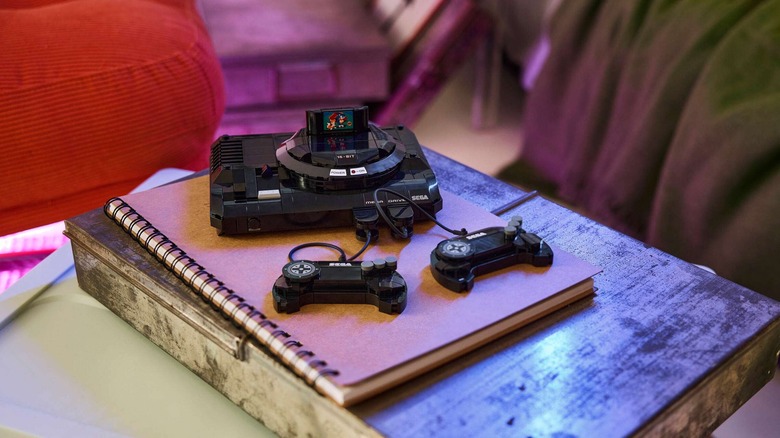
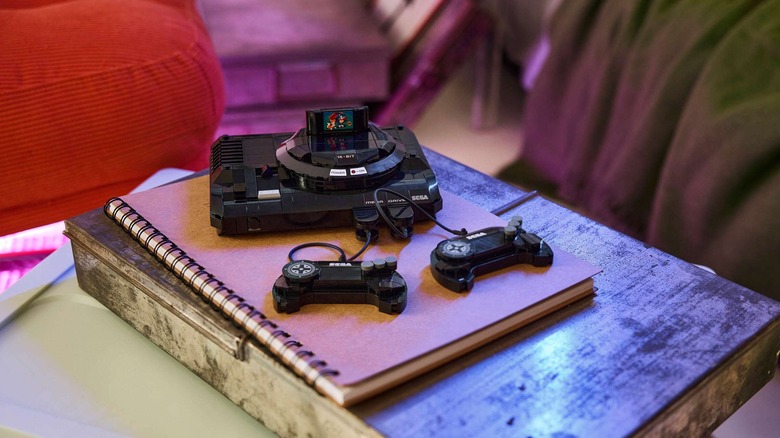
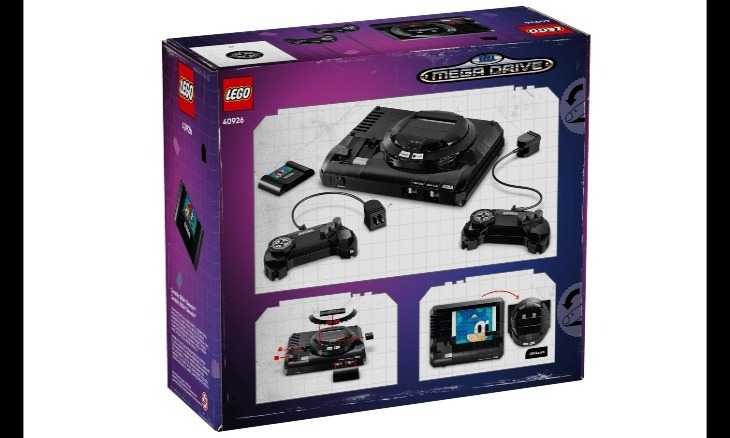
Lego and Sega have announced a new set coming next month that’ll hit you right in the nostalgia: the Lego Sega Genesis Console. The $40 model is a slightly scaled-down version of the gaming system, with the option to give it either the Genesis branding, as it was known in North America, or Mega Drive, as it was released in Japan and other regions. The Lego Sega Genesis Console will be available starting June 1 from Lego’s online and physical stores.

The set includes a total of 479 pieces, including two detachable controllers that are about three inches wide, a mock game cartridge featuring Sonic and Tails, and blocks to create a hidden Sonic portrait. Once assembled, the Lego Sega Genesis Console measures roughly 1.5 inches high, six inches wide and 4.5 inches deep. 

It’s the latest in a series of Lego game consoles that have been released over the past few years, including the Lego Game Boy (which someone modded to actually be playable) and the NES. Lego released a build kit for a standalone Sega Genesis Controller a little while back, too, and that sold out pretty quickly. The console version is likely to go the same way, so set a reminder for June 1 if you’re hoping to grab one.

Advertisement


Source link

Advertisement
Continue Reading

Tech

Instagram Is Testing Optional ‘AI Creator’ Labels

Published

on


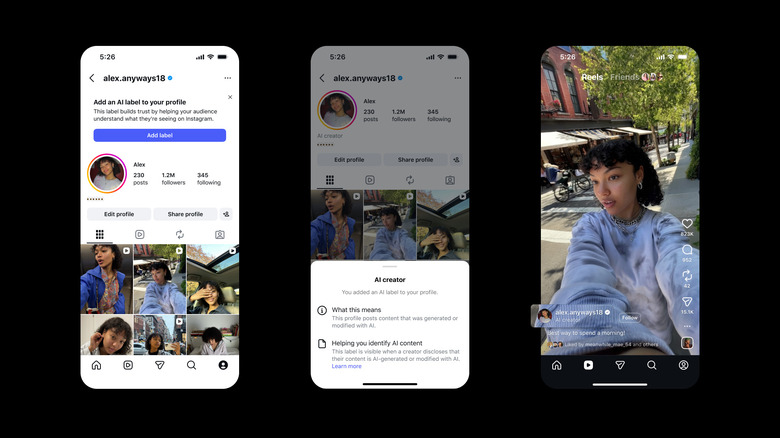
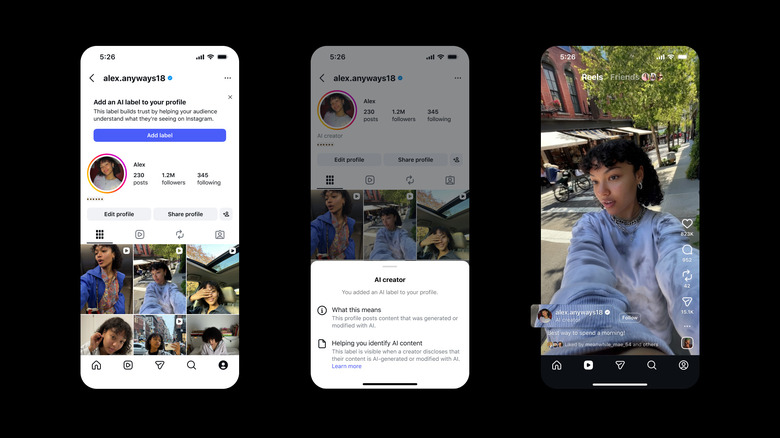
Instagram is taking a small step toward increasing transparency around AI-generated content on the service. The app is testing a new account-level label that will allow creators to self-identify as an “AI creator.”

The label will appear prominently both in creators’ profiles and alongside their posts and Reels elsewhere in the app. “This profile posts content that was generated or modified with AI,” it says. According to Meta, the new labels are an effort to “raise the bar on AI transparency on Instagram.” And the language in the new labels is notably more explicit than Meta’s “AI info” badges, which indicate that a given post “may” have been created or edited with an AI tool.

But, importantly, the “AI creator” labels are entirely optional. That means a lot of users are still likely to encounter AI content with the more vague “AI info” label or no label at all. As Meta’s Oversight Board recently pointed out, those disclosures are applied somewhat haphazardly as Meta lacks the ability to reliably detect all the AI-generated content that passes through its apps. (The company has yet to respond to the board’s recommendations on improving its AI-detection methods.)

Advertisement

Still, Meta is encouraging creators who frequently post AI content to use the feature. “This label builds trust by helping your audience understand what they’re seeing on Instagram,” an in-app message says. Of course, if the company really wanted to “build trust” it could turn them on by default, make them required or even throttle accounts that decline to use them. Meta is, for now, at least, opting for a much lighter touch. But as AI-generated content becomes more pervasive (and harder for our lowly human eyes to detect), the company may need to change up its approach to AI labeling yet again.


Advertisement

Source link

Continue Reading

Tech

We’ve Got Live Star Wars Deals for All, Not Just for Men, but for the Women and the Children

Published

on

Lego and Star Wars have a long history together, and it’s clear that the relationship is as strong as ever. I got to play with the new Lego Star Wars Smart Play sets and, despite being a little gimmicky, they are a whole heap of fun.

A lego X-Wing set built and ready to play

James Bricknell / CNET

The X-Wing build was a lot of fun, and I did get a kick out of the smart brick and the noise it makes. As you fly the X-Wing around, R2-D2 screams, and you can shoot lasers at the press of a button. 

It doesn’t add any bulk to the build either, just a simple brick that has a good volume and several accelerometers to add to the fun. One of the little buildings that comes in the box is an Empire laser turret that makes crashing sounds if you tip it over. It makes me giggle every time I do it.

The X-wing itself uses the brick to great effect. It makes all the movement noises as you fly around, but if you press the red button on top, it moves the brick forward, triggering the accelerometer and making the laser “pew pew” sound. Then, as it moves back into place, the NFC reads the R2-D2 tag and makes its noises as well. It really does work very well.

Advertisement

Overall, the $90 cost of the X-wing feels like a decent deal. The Smart Brick is not tied to the set you have, so it can be used in other sets eventually, and you get the X-wing and three mini sets to play with, too. Plus R2-D2, Leia and Luke minifigs that all make fun noises when they are near the brick. 

Source link

Advertisement
Continue Reading

Trending

Copyright © 2025