Comcast is promoting WiFi-based motion detection as a part of its new Xfinity Shield home protection platform, allowing routers and wireless devices to detect people moving through a home without cameras or motion sensors.
This feature was announced as part of a new Xfinity Shield product offering on Tuesday, a new application suite that combines cybersecurity, physical home monitoring, and family safety features through Xfinity WiFi and the Xfinity app.
Part of this new offering is WiFi Shield, which is included at no additional cost for Xfinity Internet customers with compatible gateways. It combines Xfinity’s CyberSecure network protection, Family Settings, and WiFi Motion, with Home Watch, Away Watch, and Dark Watch modes used to control when notifications are generated.
Comcast is also launching Shield Select for $15 per month, which adds an indoor camera, door/window sensor, cloud video storage, and 24/7 urgent response functionality.
However, while Comcast is now making WiFi Motion a major part of its WiFi Shield security offering, the motion detection feature isn’t new.
Advertisement
A Reddit post from August 21, 2024, shows an Xfinity customer receiving an email introducing WiFi Motion.
This email describes the same functionality as today’s announcement, stating that the feature detects disruptions to WiFi signals between the gateway and devices on the network and generates notifications in the Xfinity app.
“It works too. It detects motion to the point of raising your hand to change the channel with the remote control. Detects my cat walking across the living room,” reads another user using the feature in 2024.
WiFi NOW also reported in February that Comcast had offered WiFi Motion “for a long time” and was ramping up its marketing, including advertising it during Olympic hockey broadcasts.
Advertisement
Turning WiFi signals into motion sensors
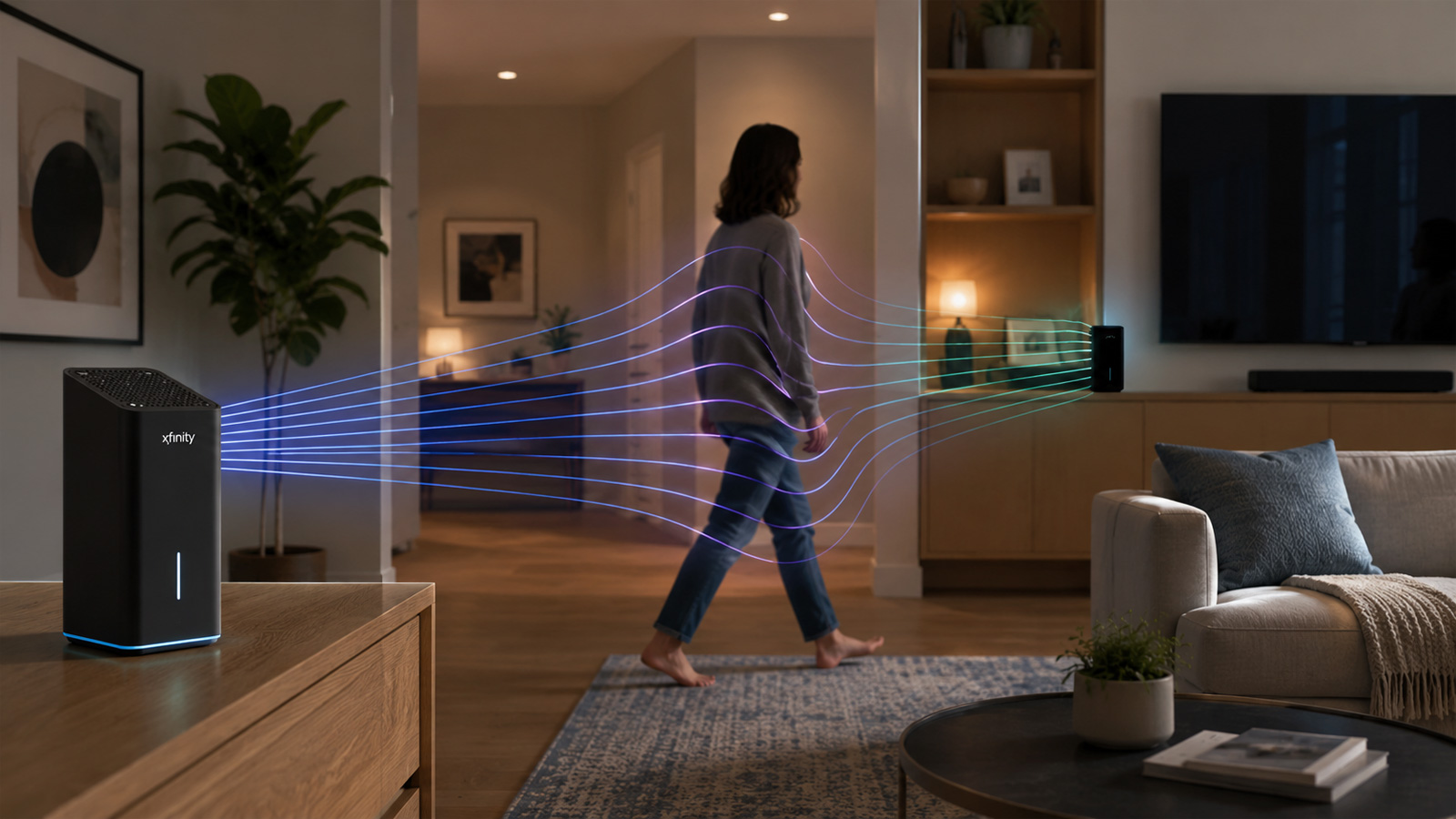
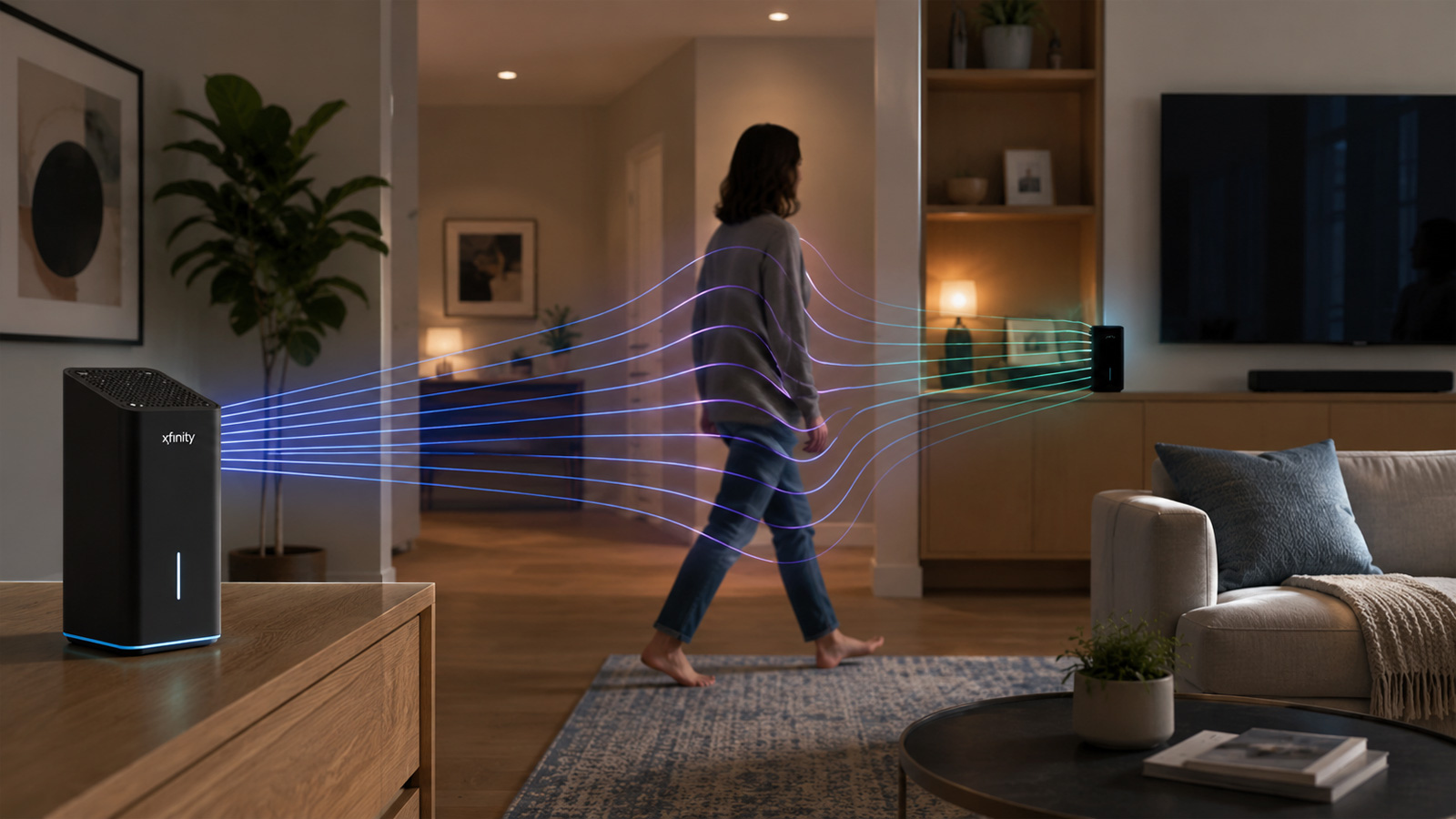
WiFi Motion works by turning the radio links between an Xfinity Gateway and stationary WiFi devices into virtual motion sensors.
According to support documents, customers select stationary WiFi devices, such as smart speakers or thermostats, positioned around the home. When someone moves through the area between the gateway or extender and one of those devices, their body changes how the WiFi radio signals travel.
Comcast says the system detects these changes in the home’s radio frequency signals and uses them to determine that movement has occurred. Customers will then receive notifications through the Xfinity app without installing a camera or motion detector.
Xfinity says the system does not identify who is moving or determine their exact location, and WiFi Motion is opt-in and disabled by default.
Advertisement
“It is designed to detect motion, not identify specific people, and does not track the exact location of movement. Notifications indicate when movement is detected between a connected device and the Xfinity Gateway,” explains an Xfinity support document.
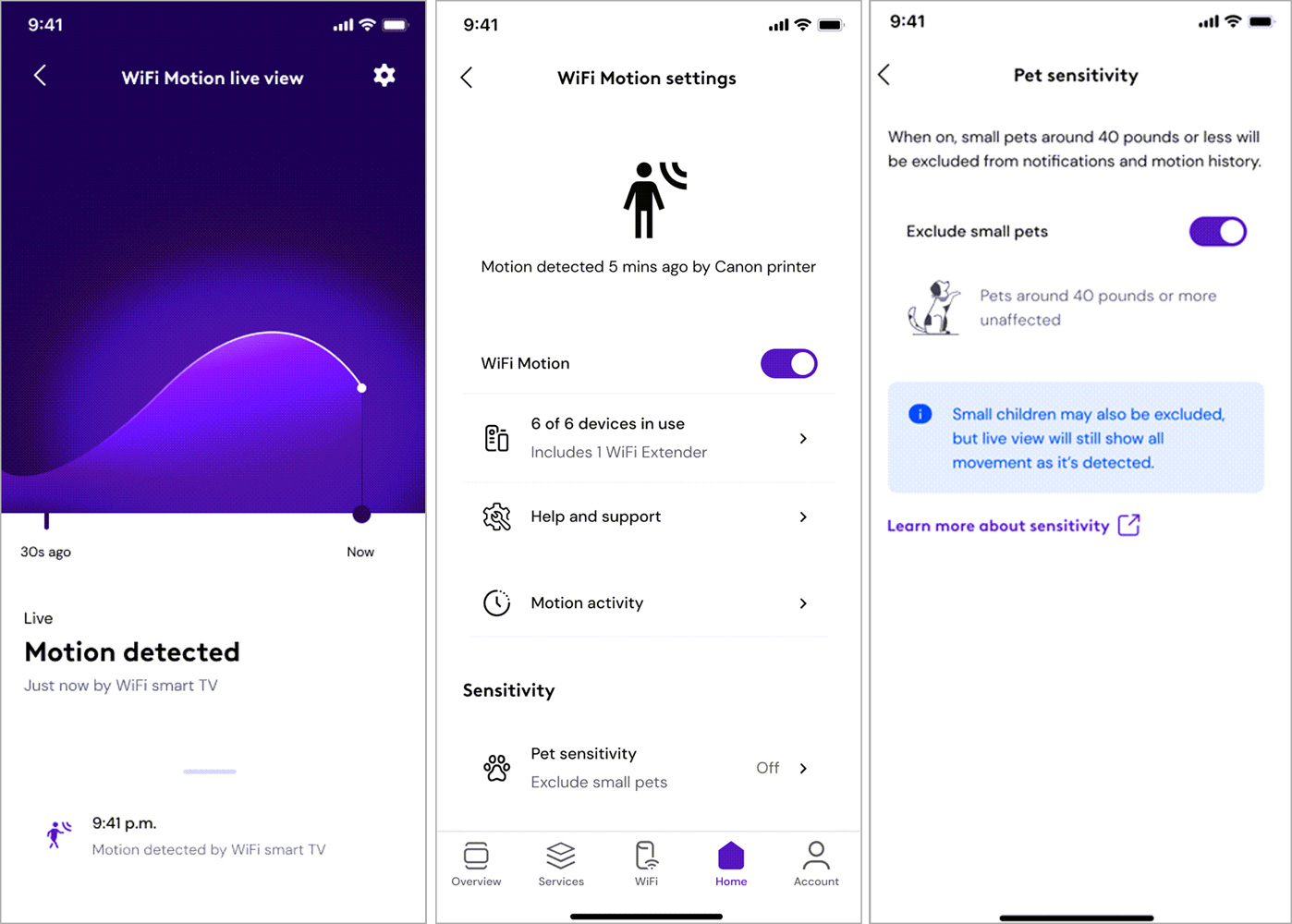
However, the technology can be sensitive, with Comcast providing different motion sensitivity levels to filter out movement from small pets weighing around 40 pounds or less.
The company warns that the system has no visual information and therefore may not always distinguish a small pet from a similarly sized child.
Various Wifi Motion screens in the Xfinity app Source: Xfinity
Comcast also advises customers in apartments and other buildings with shared walls to lower the sensitivity if movement outside the sensing zone causes unwanted detections.
A Comcast patent application provides a glimpse into how this type of system can work.
It describes using stationary network devices for motion detection and analyzing changes in characteristics such as the wireless signals to determine when an object or person has moved through a space.
The patent explains that WiFi signals can travel along multiple paths as they reflect or scatter off walls, people, and other objects. Movement changes those paths and the resulting wireless signal, allowing software to detect that something in the environment has moved.
Comcast’s patent cites several earlier Cognitive Systems patents related to WiFi motion detection, including technology for detecting motion from repeated wireless transmissions and motion detection in mesh networks.
Advertisement
Using WiFi as an invisible motion sensor raises questions about what happens to the data generated when people move around their houses.
As first spotted by TechCrunch, Comcast’s WiFi Motion documentation says the company may disclose information generated by the feature to third parties “without further notice to you” in connection with a law enforcement investigation or proceeding, a dispute involving Comcast, or pursuant to a court order or subpoena.
Comcast separately states that it does not monitor the motion or notifications generated by WiFi Motion.
The company’s documentation does not explain what WiFi Motion information Comcast retains, how long it keeps it, or what it could provide in response to a legal demand.
Advertisement
BleepingComputer contacted Comcast with questions about the generated data and will update the article if we receive any additional information.
Overall prevention scores can hide what happens after initial access. Once attackers are using valid credentials, prevention drops sharply.
The Blue Report 2026 measures defenses technique by technique across 338 million simulations run in customer production environments.
When you buy a new iPhone, you expect it to last. However, all rechargeable batteries are consumable components that chemically degrade over time. As a battery degrades, it can hold less charge, which ultimately affects your device’s daily use. Apple provides built-in tools that help you monitor cycle count — the number of full discharges and recharges it has undergone — and overall battery health. Understanding these metrics is essential for knowing if the batter is working as expected, when it might be time for a replacement or for better understanding the condition of a used iPhone before you buy it.
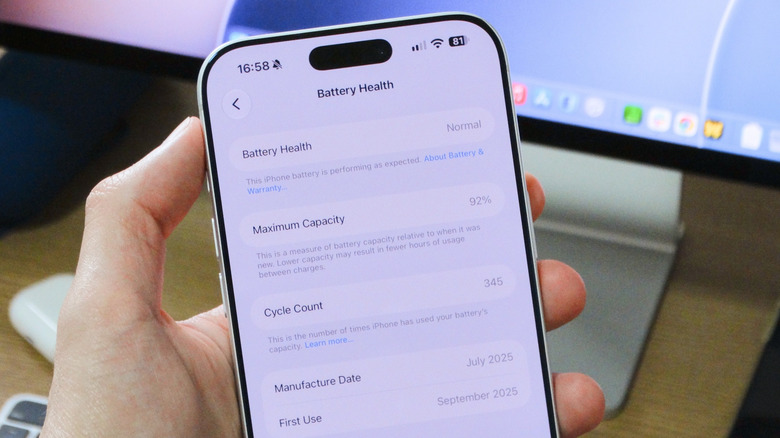
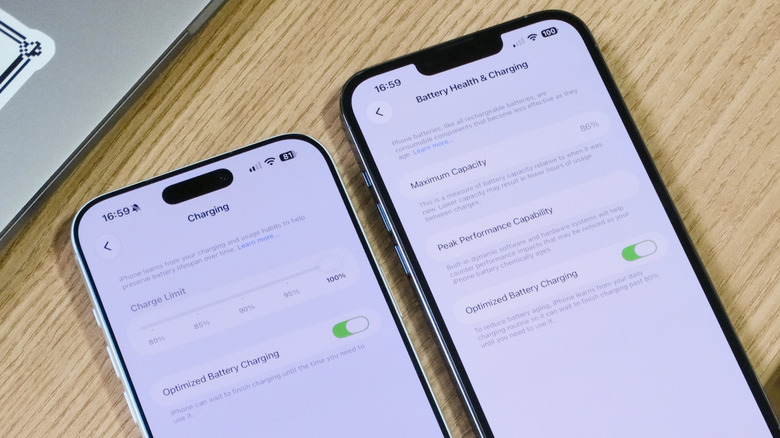
Checking your iPhone’s battery health is a pretty simple process. To get started, open the Settings app on your iPhone, tap Battery and look for the Battery Health section. On some older models, such as the iPhone 13, this section is called Battery Health & Charging. This screen will show you an estimate of your iPhone’s battery capacity relative to when it was new, along with other useful information.
Advertisement
What the health numbers actually mean
Filipe Espósito for Engadget
The Maximum Capacity percentage gives you a better idea of the overall condition of your iPhone’s battery. According to Apple, a typical battery is designed to retain up to 80 percent of its capacity when operating under normal conditions. For the iPhone 15 and later models, this estimate is based on 1,000 full charge cycles. For older models, the estimate is that the battery will last up to 500 cycles before degrading significantly. When the battery health drops below 80 percent, your iPhone may still work, but you’ll likely notice a significant decrease in battery life.
In some cases, iOS may even enable additional performance management features to prevent the iPhone from shutting down unexpectedly due to a severely degraded battery. In that case, you’ll see a warning below the Peak Performance Capability section. If you don’t see anything, it likely means your iPhone hasn’t had any battery issues and is still running at full performance.
To help preserve your iPhone’s battery health, you can enable the Optimized Battery Charging option in the battery settings. When enabled, this feature learns your daily routine and when you typically charge your iPhone, so that it temporarily pauses charging at 80 percent and only completes the charge to 100 percent around the time you need to use your iPhone again. On the iPhone 15 and later, you can also set a maximum charge limit for your device, which also helps preserve battery health for longer.
Advertisement
How to check your cycle count and why it matters
If you have an iPhone 15 or newer, Apple provides an easy way to check the cycle count directly in the Settings app. Go to Battery > Battery Health, and scroll down to find your cycle count. If you’re using an older model, Apple doesn’t provide battery cycle statistics natively. This means you’ll have to rely on third-party alternatives, such as the popular Mac app coconutBattery, to check your iPhone’s battery cycle count.
Knowing your device’s battery cycle count can be helpful for understanding its long-term lifespan, as well as how heavily you’ve been using your device. iPhone 15 models and later are rated to retain good battery health for up to 1,000 full charge cycles before experiencing battery issues, while older models are rated for up to 500 cycles. For reference, 1,000 cycles works out to two or three years’ use in under real-world conditions.
Keep in mind that one cycle represents expending 100 percent of your battery’s current capacity, though not necessarily all at once. For example, if you used 50 percent of your battery, recharged your device and then used another 50 percent afterward, that counts as one complete charge cycle.
Advertisement
Reaching these numbers doesn’t mean your iPhone’s battery will automatically fail, but it does mean its capacity will typically be lower, so you may notice shorter battery life. If your iPhone’s battery health is below 80 percent or if it has reached 1,000 charge cycles, you should consider replacing the battery to keep your phone running smoothly. To do so, your best option is to contact Apple Support to arrange for a replacement.
If you are a regular reader, then the odds are you have taken apart an electronic gadget, either for a fix, or simply because your curiosity got the better of you. Once inside, it’s all but impossible to help yourself from doing at least a little reverse engineering. That’s what happened when [PRBS23] took a look inside a Gravity 800 Grill for a simple wire fix. But one thing led to the next, and now open source firmware for the grill is freely available!Control board schematic.
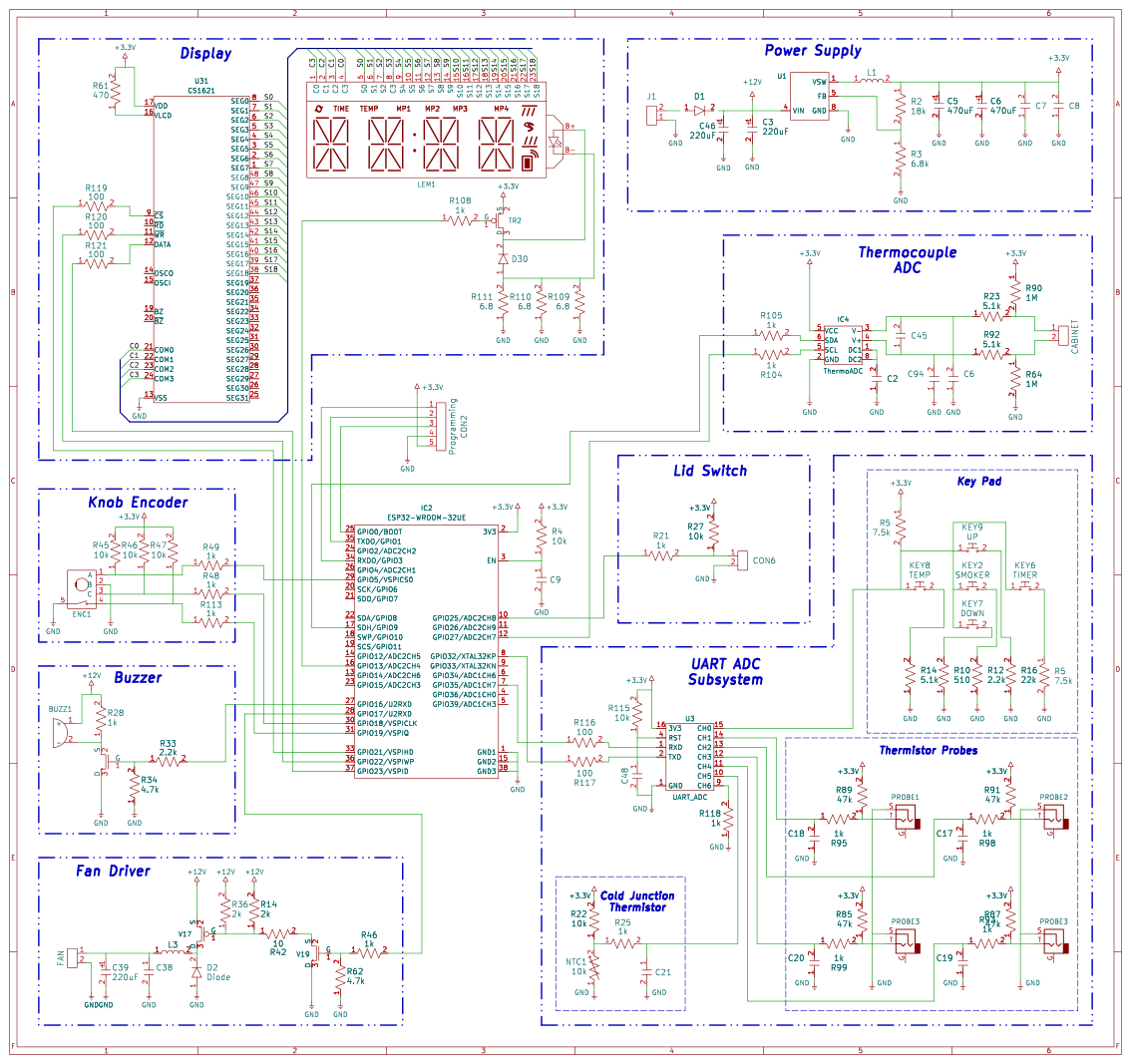
The thermistor along with the physical inputs are connected to a 16 pin chip, interfacing with the MCU over a 9600 baud UART connection. [PRBS23] cannot determine an ADC chip meeting these specifications, so the most likely answer is a cheap MCU programmed to act as a simple analog fronted.
The neatly labeled programming header is used to quite easily dump the firmware with the espflash utility. Analyzing this dump reveals a rather strange ADC correction function used by the original firmware. The necessity and overall utility of this function remains unclear, as it only corrects by a maximum of two or three degrees Fahrenheit.
Most of the other features ended up being at least somewhat easier. The CS1621 segmented display driver is reasonably well documented with datasheets making its implementation far easier. Likewise, the other odds and ends were implemented in a far more normal manner compared to the thermistors.
Yet if you’ve ever stumbled into a local TikTok livestream, the reality often looks very different.
Instead of thousands of viewers piling into a show, many sellers find themselves talking to a few dozen people waiting for the next voucher code before scrolling away.
The format has become almost routine across Southeast Asia. In 2023, nearly five in 10 consumers watched livestream sales at least once a week, and 63% of viewers went on to make a purchase.
In Singapore, that figure was just 40%. Still, a handful of local brands have managed to make livestreaming work.
The brands that have made it work
The three brands Vulcan Post spoke to—Tasty Toastys, Tap Space, and Emporal Co.—operate in completely different categories.
Advertisement
One sells bread-themed plushies, another sells MRT-inspired collectibles, and the third sells candles and haircare.
Yet they’ve all found growth through livestreaming.
1. Make the livestream itself entertaining
Tasty Toastys offers bread-themed merchandise such as plushies, tote bags, blind boxes, travel neck pillows, and insulated bottles./ Image Credit: Tasty Toastys
For Tasty Toastys, livestreams became less about pitching products and more about giving fans something fun to watch.
Founder Chanel Lee discovered that her bread-character collectibles naturally created “watchable” moments—whether it was unboxing plushies, showing new designs, or letting fans react together in real time.
That communal experience helped the brand grow beyond local consignment shelves into 12 Toys “R” Us outlets and even a dedicated US TikTok Shop.
Advertisement
If the product creates anticipation on screen, viewers stay longer.
2. Consistency pays off
Tap Space’s store at Burlington Square./ Image Credit: Tap Space
Transport-collectible brand Tap Space arguably had one of the toughest starting points. Founder Danial Sim launched with zero followers and a marketing budget of just S$50.
His solution wasn’t clever growth hacks—it was consistency.
Every night after dinner, he livestreamed himself showing the MRT station keychains he’d made.
Those sessions gradually brought in a few hundred followers each day, eventually snowballing into a business capable of selling 1,500 products in a single day at a Takashimaya pop-up before selling out by day three.
Advertisement
Consistency compounds, even when early audiences are small.
3. Putting a face behind the brand
Emporal Co. has expanded its product range beyond hand-poured candles into skincare, haircare, and scented products like sachets and perfumes./ Image Credit: Emporal Co.
The sisters behind skincare and candle brand Emporal Co., Grace and Lena Lim, spent two months making zero sales.
Then, one TikTok video went viral.
Instead of relying solely on that lucky break, they kept posting daily content featuring themselves and their products, turning followers into customers who later showed up in real life. Grace has even been recognised in public by people who’ve supported the brand for years, with one customer stopping her to ask for a selfie.
Today, the business generates six-figure annual sales, has sold over 17,000 bottles of leave-in hair conditioner in two years, and attracted around 400–450 people to a warehouse sale built largely through TikTok.
Advertisement
Their biggest advantage was familiarity.
A different playbook for live commerce
None of these brands relies on the tactics commonly associated with livestream commerce elsewhere.
Instead of aggressive countdown timers or endless discounts, they lean on three key pilars: Consistency, a strong visual hook, and a founder whose personality is the product.
Image Credit: Tasty Toastys/ Tap Space/ Emporal Co.
That matters because Singapore’s structural reality is very different from its neighbours’.
The single most important reason live commerce exploded across Asia is one Singapore simply doesn’t have: large populations living far from physical retail.
Livestreaming doesn’t just entertain these consumers, but brings the market to them.And in a way, residents in rural areas have become micro-retailers in their own homes. Farmers and artisans in rural China now sell directly to urban consumers through live broadcasts, bypassing the physical retail infrastructure they never had.
Image Credit: MIT
Unlike Indonesia or Vietnam, where millions of consumers live far from physical retail, Singapore has one of ASEAN’s highest concentrations of shopping malls. Most people can reach a mall within minutes.
Whereas in Singapore, the city-state has the highest retail space per capita in ASEAN, at 1.08 square metres per person — nearly double Bangkok’s 0.8 sqm and significantly above Kuala Lumpur’s 0.71 sqm. Total retail space on the island stands at 6.1 million square metres, making Singapore one of the most mall-dense cities in the world.
The urgency that drives impulse purchases on a livestream—”I can’t get this anywhere near me”—simply doesn’t apply in Singapore.
Advertisement
And vouchers, which dominate many local TikTok streams, don’t necessarily solve that problem. They can give viewers a reason to tune in briefly, redeem a code, and leave.
The brands succeeding in Singapore have therefore had to solve a different problem: not how to make people buy, but how to make them want to stay.
Trust is also a barrier
Trust is the foundation of live commerce. You’re buying from a person you’ve watched for 20 minutes, often without seeing the product in person first. And many viewers who find trust in a livestreamer will often return for more.
In markets where livestreaming took off early, before bad actors moved in, that trust was established before it could be eroded. However, Singapore got the livestream scams before the culture could concretise.
Advertisement
TikTok-related scam cases in Singapore rose nearly 38% in 2025, according to the Singapore Police Force’s Annual Scam and Cybercrime Brief, making it the only major platform where scam cases increased, even as Facebook, Instagram, WhatsApp, Telegram, and Carousell all saw declines.
On the bureaucratic level, TikTok itself rejected 1.4 million seller applications and removed 700,000 sellers for policy violations in H1 2025 alone, which tells you both how aggressive TikTok enforcement has become and how serious the underlying problem of scams really is.
When shoppers become wary of livestream sellers, every legitimate creator has to work harder to earn credibility.
Singapore’s version of live commerce may look smaller, but more personal
As Singapore’s live commerce ecosystem develops, some businesses are looking overseas for answers.
But importing the mechanics of a more mature market doesn’t necessarily mean importing its success.
The biggest takeaway from the brands that have made livestreaming work here is that Singapore may need its own version of live commerce.
The winning formula isn’t necessarily bigger audiences, more frequent streams, or deeper discounts. It’s giving a relatively small audience a reason to keep coming back.
Advertisement
Read other articles we’ve written on Singaporean businesses here.
Featured Image Credit: Tasty Toastys/ Emporal Co./ Tap Space
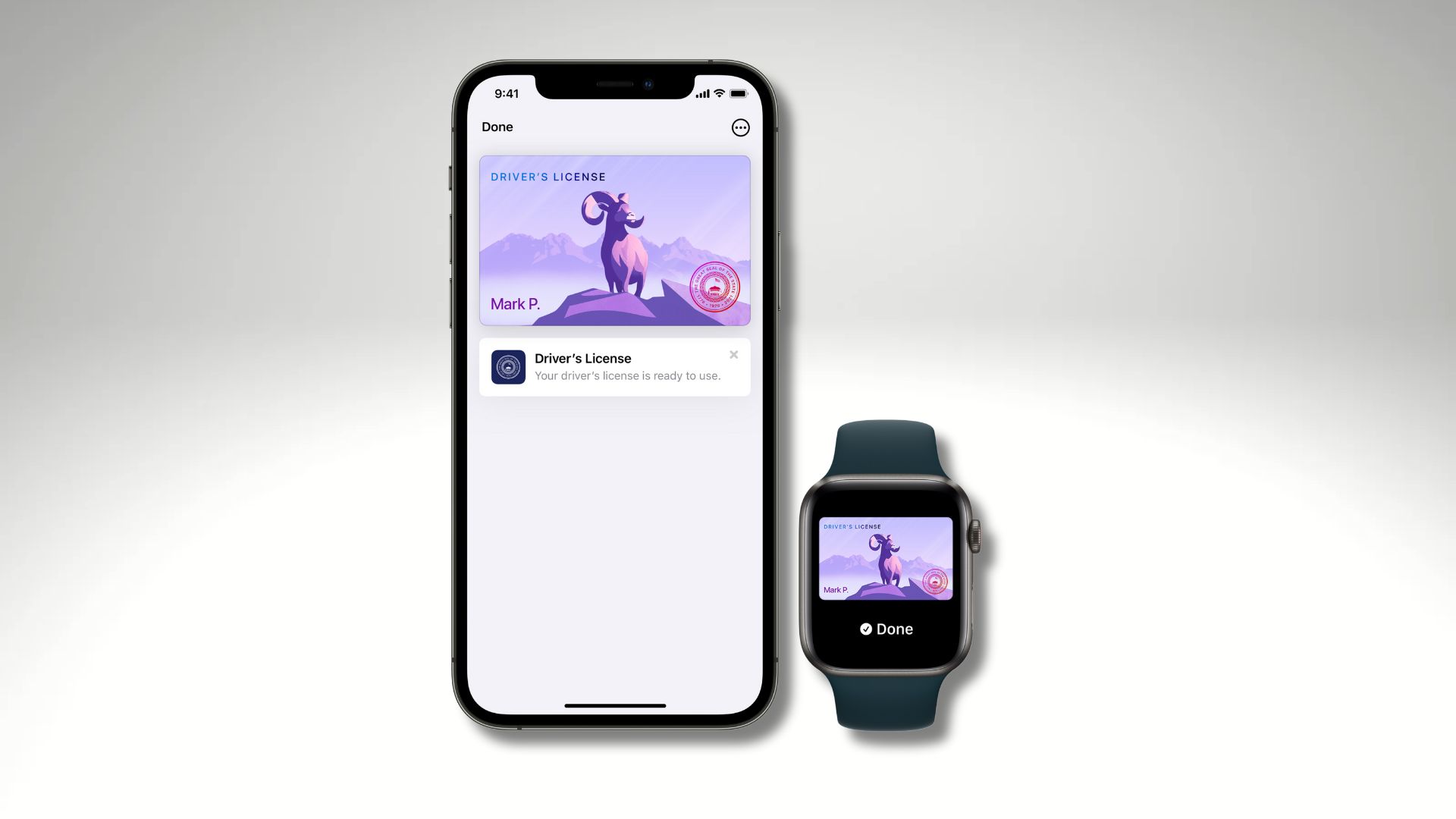
Apple is expanding one of the most useful features in Apple Wallet, with digital driver’s licences and state IDs set to arrive in four more US states.
According to evidence found in Apple’s code, Wallet IDs are coming to Oklahoma, Utah and Virginia. Meanwhile, North Carolina has separately confirmed plans to support Apple Wallet IDs in early 2027. That would take the number of US states offering the feature to 18.
The expansion gives more iPhone and Apple Watch users the option to store a compatible driver’s licence or state ID digitally. However, there are still important limitations around where these IDs can be used.
North Carolina is the only one of the four with a clearer launch window. The state’s DMV says it plans to introduce its own NC Wallet mobile ID programme in December. Support for Apple Wallet, Google Wallet and Samsung Wallet is expected to follow in early 2027.
Advertisement
The other three states – Oklahoma, Utah and Virginia – were identified through code spotted by MacRumors. However, there is currently no availability timeframe for their Apple Wallet implementations.
Advertisement
Apple first introduced digital IDs in Wallet in 2022, and the feature has gradually expanded across the US. The current supported locations include Arizona, Maryland, Colorado, Georgia, Ohio, Hawaii, California, Iowa, New Mexico, Montana, North Dakota, West Virginia, Illinois and Arkansas. Additionally, Puerto Rico is also supported.
Apple Wallet IDs can also be used at participating TSA checkpoints. Apple says they are accepted at more than 250 airports for domestic travel. Nonetheless, travellers should check TSA signage before relying on the feature.
Advertisement
Once a driver’s licence or state ID has been added, users can present it at supported identity readers using an iPhone or Apple Watch.
The process is designed to reveal only the information requested by the TSA or participating business. After tapping the device on the reader, the user reviews the requested information. The user then authorises its release using Face ID or Touch ID. That means there’s no need to unlock the iPhone, show the screen to someone or hand over the device.
There is, however, a significant caveat: Apple Wallet IDs aren’t generally accepted by law enforcement. This means users still need to carry a physical driver’s licence for situations such as traffic stops. Acceptance among businesses is also relatively limited.
North Carolina’s DMV similarly warns that retailers, restaurants and other businesses may not immediately be equipped to accept mobile IDs.
Advertisement
Advertisement
For now, then, Apple Wallet IDs are best viewed as a convenient alternative where supported rather than a complete replacement for a physical driver’s licence. However, the addition of four more states should make the feature considerably more useful for iPhone owners across the US.
Google is launching Gemini in Chrome for Android, the tech giant announced Tuesday. Originally teased back in May at the company’s I/O conference, the AI features are now available on mobile, following their launch on the Chrome desktop browser earlier this year.
Gemini in Chrome allows you to quickly summarize long web pages and ask questions — a useful tool if you’re looking for a specific answer in dense content. You can also connect to select Google apps, such as Calendar and Keep, without switching tabs.
Another feature of Gemini in Chrome is the ability to generate images with the AI image generator Nano Banana. Google gives the example of creating an infographic based on a web page you’re studying for an exam if you prefer a more visual learning experience.
Google’s also introducing auto browse for the Android Chrome browser, an agentic AI feature that lets you offload tasks to AI. You can have Gemini book event tickets, update online orders and more. Auto browse will also ask for explicit permission to proceed with sensitive tasks you assign it, such as processing payments. The feature is available for all US-based Android users on the AI Pro or AI Ultra subscription plans. Google did not provide a timeline for when auto browse would come to additional countries.
Advertisement
Agentic AI on smartphones is becoming increasingly common these days, and Google’s latest Pixel 11 phones are good examples of the technology, thanks to Gemini Intelligence. But agents can go too far to complete a task. Recently, an agent hacked an Australian gym’s website just to secure a spot in a class for a user. So while agentic AI can offer significant benefits, it is important to exercise caution when using these systems, as they may behave unpredictably or take unintended actions.
Google says it’s built Gemini’s features into Chrome with safety and security in mind, and has trained its models to identify common threats, like prompt injections. Prompt injections are a type of malicious cyberattack against AI chatbots that can result in the leakage of sensitive data and other security risks.
Blake has over a decade of experience writing for the web, with a focus on mobile phones, where he covered the smartphone boom of the 2010s and the broader tech scene. When he’s not in front of a keyboard, you’ll most likely find him playing video games or watching horror movies.
See full bio
Spending hours at a desk can make the right office chair feel less like an upgrade and more like an essential part of your workspace. Whether you’re a writer working from home, a corporate professional hopping between meetings, or someone whose “quick task” turns into three hours at a desk, your office chair gets far more use than you realize.
Finding the right ergonomic office chair isn’t just about fixing stiffness but about building a workspace that genuinely supports how you work. Adjustable lumbar support, seat depth, armrests, recline, and proper spinal alignment all make a measurable difference when you spend most of your day behind a screen. Just as importantly, a well-built chair allows you to shift positions naturally rather than keeping your body locked into one rigid posture for hours.
Because different budgets, body types, and work habits call for distinct setups, here are the top ergonomic office chairs to consider in 2026.
Secretlab ATLAS
Best ergonomic office chair overall
Advertisement
ATLAS / SecretLab
Pros
Cons
Highly adjustable ergonomic design
Premium positioning may not suit every budget
Supports both focused sitting and rest
120-degree tilt is more work-focused than deep reclining
Full-back, neck, and head support
Most of us don’t spend eight hours sitting the same way. You might be fully focused while replying to emails, lean back during a meeting, then shift again while reading through a report. The problem is that many office chairs are designed around just one ideal sitting position. Instead of expecting you to stay in one posture, the Secretlab ATLAS is designed to support the way your body naturally moves throughout the workday.
That flexibility starts with plenty of room for personalization. The seat height can be adjusted to help keep your feet firmly planted, while adjustable seat depth lets you slide the base forward or backward for a better fit. The RE-CURVE backrest follows the natural S-shaped contour of your spine, pairing integrated lumbar support with a hybrid spring-and-foam structure that moves with you. Its full-height frame extends support through your shoulders, neck, and head instead of stopping around the middle of your back. Clinical testing by United States Ergonomics found strong pressure distribution, with users noting freedom to move without feeling unsupported.
The ATLAS becomes particularly useful if your workday rarely involves sitting completely still. When you lean back, the synchronous tilt mechanism opens the angle between your hips and torso while keeping the seat stable. You can lock the chair at four angles between 100 and 120 degrees, or adjust the tilt force across four levels to find the resistance that feels right for you.
Secretlab puts just as much thought into what you’re actually sitting against. Rather than relying on standard foam or mesh, the ATLAS uses proprietary materials engineered to distribute weight evenly and reduce pressure hotspots. If long hours at a desk tend to leave you feeling warm, the SoftWeave Plus Fabric option uses a soft, breathable knit designed to promote airflow for a cooler sitting experience.
There are some practical details worth considering before buying, too. Starting at $519, the ATLAS Regular is recommended for users under 5 feet 10 inches and has a maximum load of 265 pounds. Secretlab backs the chair with a three-year warranty, with the option to extend coverage to five years by sharing a picture of your Secretlab chair. It also comes with an up to 49-day refund and return policy, giving you more time to decide whether it’s the right fit for your workspace.
Advertisement
For anyone looking for a chair that adapts to the way they naturally work, the Secretlab ATLAS combines extensive adjustability with movement-focused ergonomics, making it a compelling choice for long hours at a desk.
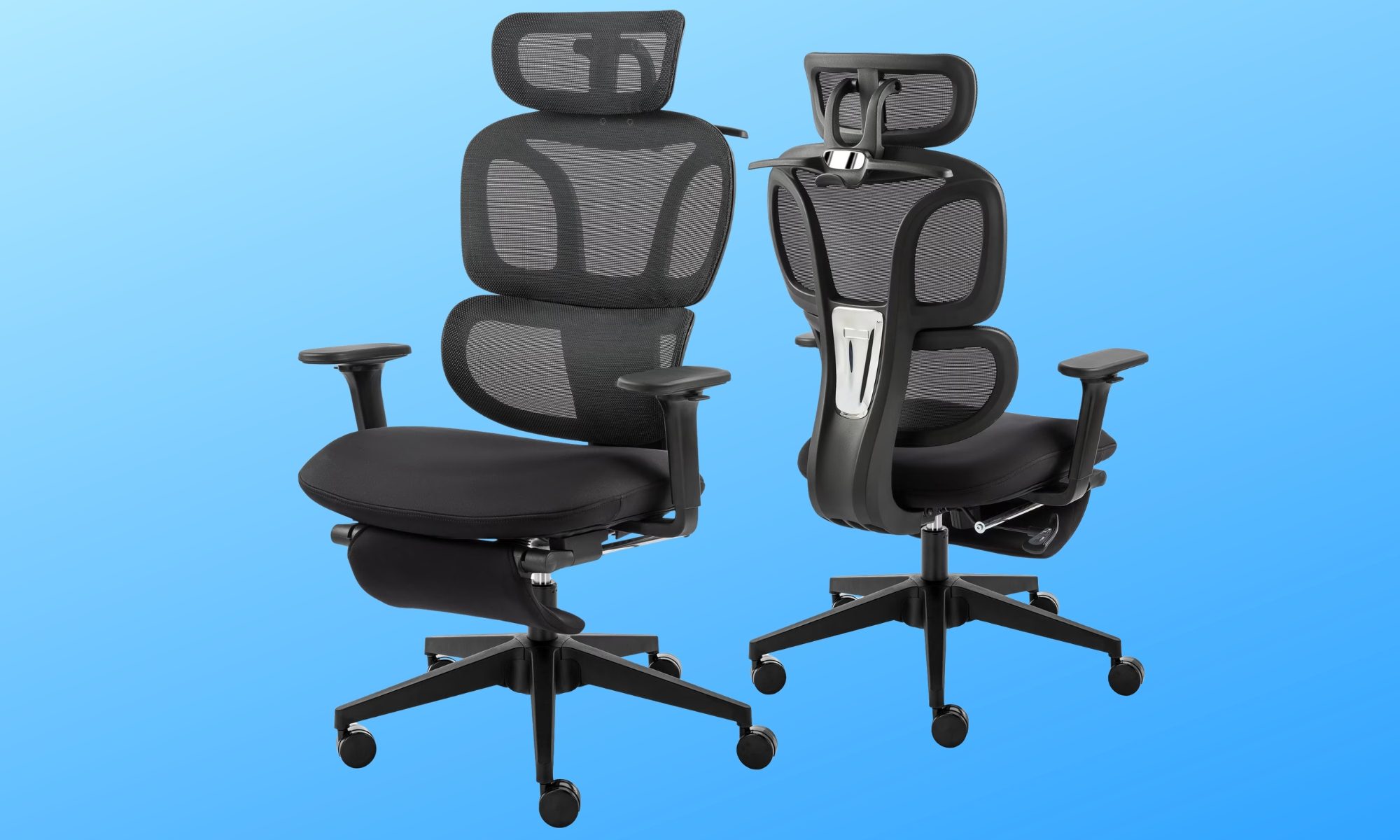
Hforesty Ergonomic Mesh Office Chair
Best for versatile comfortErgonomic Mesh Chair / Hforesty
Pros
Cons
Plenty of adjustable support
Bulky compared with simpler task chairs
Pull-out footrest for relaxing
Coat hanger may not be useful for everyone
Breathable mesh backrest
Not everyone needs an office chair packed with premium adjustments to stay comfortable throughout the day. For most people, a chair that nails the daily essentials right while offering a few extra comfort features strikes the perfect balance, and the Hforesty Ergonomic Mesh Office Chair lands in that very category.
The core design uses a double-back structure to cushion both your spine and lower back, paired with a breathable mesh backrest that prevents heat buildup during longer sessions. Underneath, Hforesty swaps mesh for a contoured, thick sponge cushion shaped to relieve pressure across your hips.
Adjustability covers all key touchpoints: chair height, headrest angle, armrest placement, and recline angle. You can set the backrest to 90 degrees for typing, 110 degrees for reading, or 135 degrees for a deep recline, while an adjustable tilt-tension dial unlocks a gentle rocking motion.
Advertisement
One feature that makes the Hforesty particularly versatile is its pull-out footrest. After a long stretch of work, you can extend it and give your legs somewhere to rest without leaving your desk. There’s even an integrated coat hanger on the back for keeping a jacket or other clothing off the floor.
With a 300-pound weight capacity and a practical mix of work and rest controls, Hforesty delivers strong daily ergonomics without bloated pricing.
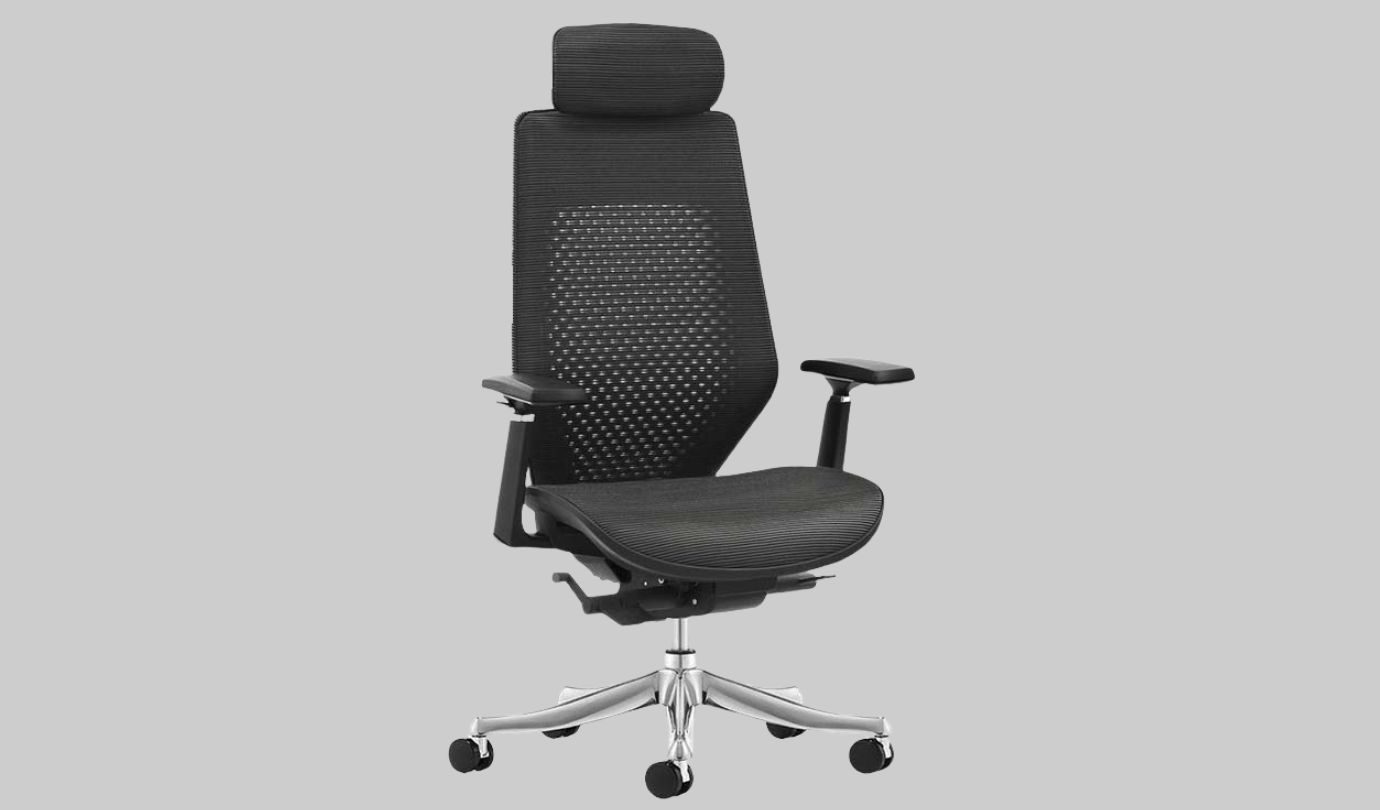
FlexiSpot C8 Exclusive Ergonomic Chair
Best for easy adjustabilityC8 Exclusive Ergonomic Chair / FlexiSpot
Pros
Cons
Automatic adaptive lumbar support
Relatively expensive at full price
Plenty of useful adjustments
More adjustments than casual users need
A chair can feature dozens of adjustment levers and still leave you wasting time wrestling with them. The FlexiSpot C8 Exclusive Ergonomic Chair automates key adjustments so you get personalized comfort without manual guesswork.
A big part of that comes down to its 2-way automatic adaptive lumbar support. Rather than relying entirely on manual positioning, the system is designed to adapt according to your body shape and weight. That can be especially useful if you tend to shift positions throughout the day or simply don’t want lumbar support to become another setting you have to repeatedly think about.
Advertisement
You aren’t giving up manual customization, either. The C8 lets you adjust the back height and slide the seat depth forward or backward, helping accommodate different body proportions and sitting preferences. Its additional 3D adjustable armrests give you control over where your arms rest while you’re typing or working at your desk.
When it’s time to move out of a focused working position, a three-level synchro-tilt recline gives you ample room to kick back during calls, and the mesh backrest ensures constant ventilation.
Built around a heavy-duty aluminum alloy chassis and smooth PU casters, the C8 is currently priced at $389.99, down from the original $599.99. It makes a compelling choice for anyone who prefers smart, hands-off lower-back support over manual levers.
COLAMY Ergonomic Executive Office Chair
Best big and tall ergonomic office chair
Advertisement
Ergonomic Executive Office Chair / Colamy
Pros
Cons
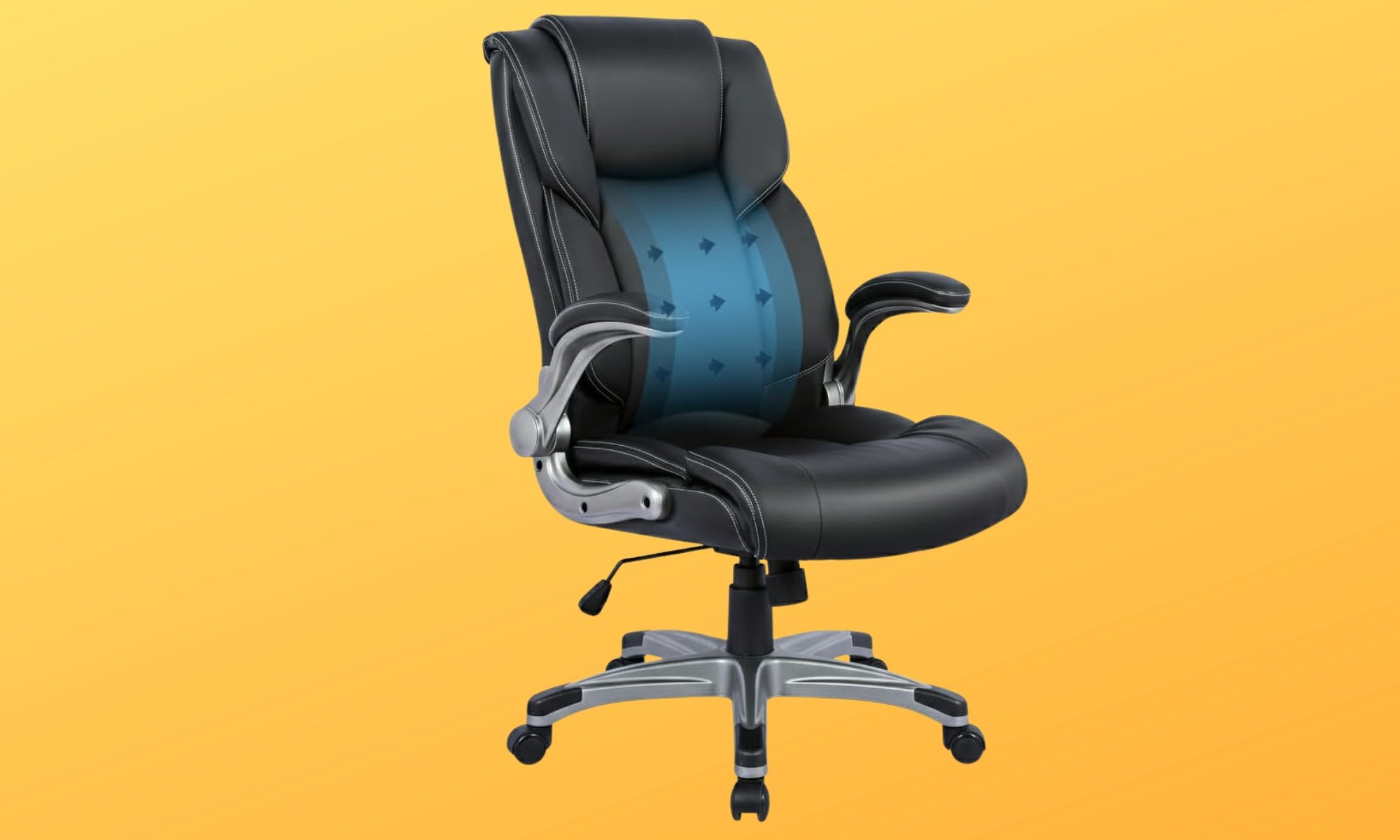
Inflatable lumbar support
Fewer fine-tuning options
Supports up to 300 pounds
Space-saving flip-up armrests
Not every office chair is designed with larger body types in mind. If you’ve ever felt squeezed into a narrow seat or wished for more support during long workdays, finding a chair with the right proportions can make all the difference. The COLAMY Ergonomic Executive Office Chair is built around that idea by combining a spacious executive design with practical ergonomic features.
A core feature is the built-in inflatable lumbar airbag. Instead of relying on a fixed lower-back cushion, you can increase or decrease the firmness until it feels right for your body. Paired with the high-back design, it delivers targeted support where many people need it most during extended hours at a desk.
The rest of the chair keeps things refreshingly simple. Pneumatic height adjustment, a tilt-lock mechanism, a 360-degree swivel base, and smooth-rolling casters cover the everyday essentials without overwhelming you with endless controls. The padded armrests also flip upward by 90 degrees, making it easy to slide the chair neatly under your desk or create extra room whenever you need it.
The black bonded leather upholstery gives the chair a classic executive look. Combined with its 300-pound weight capacity and generous seating dimensions, it offers a comfortable fit for larger users who want more room to settle in.
Priced at only $177.99, the COLAMY isn’t trying to compete with highly adjustable premium ergonomic chairs. Instead, it emphasizes the features that matter most for daily comfort. A spacious seat, adjustable lumbar support, and practical everyday functionality make it an appealing choice for anyone looking for dependable support without stretching their budget.
Advertisement
Steelcase Series 1
Best for shared workspacesSeries 1 / Steelcase
Pros
Cons
LiveBack system adapts to your spine
Price may be steep for multiple workstations
Compact, space-conscious design
Upright back lock offers limited recline positions
Wide range of customization options
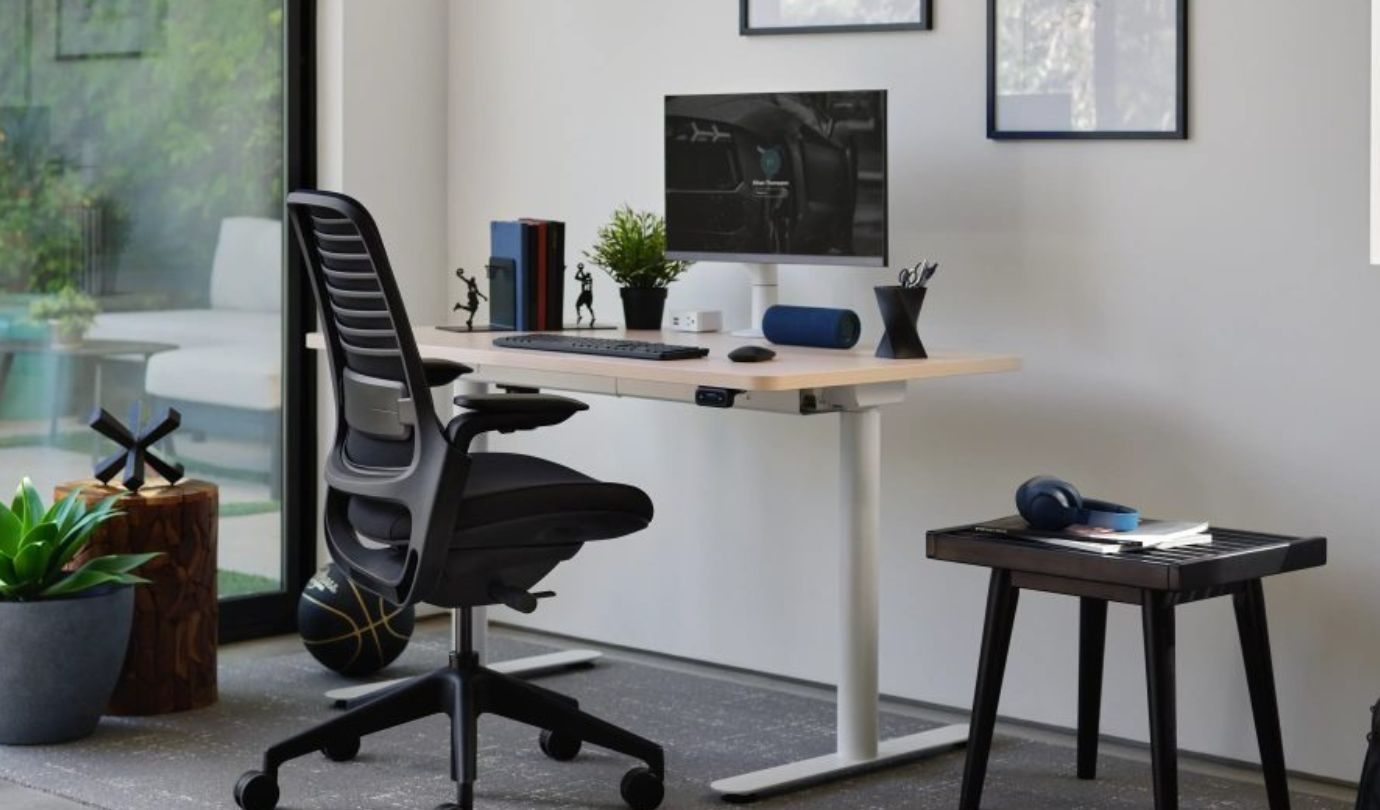
Unlike a home office, shared workspaces rarely have the luxury of a chair that’s adjusted once and left exactly the way you like it. Different people, body types, and working styles often use the same workstation throughout the day, making adaptability one of the most important features a chair can offer. That’s precisely what the Steelcase Series 1 is designed for.
Its LiveBack Flexor System is designed to move with your spine as you naturally shift positions, helping maintain support instead of forcing you into one fixed posture. A height-adjustable lumbar support system lets each user fine-tune lower-back comfort, making it easier to accommodate different preferences without overcomplicating the setup.
The Series 1 also keeps movement effortless. Its weight-activated recline automatically adjusts resistance based on who’s sitting in the chair, while an upright back lock provides extra stability when it’s time to focus. Flexible seat edges and adaptive foam cushioning are designed to distribute pressure more evenly, helping improve comfort during longer work sessions.
Its compact footprint also makes it particularly well suited to offices where space is at a premium. Steelcase also offers a variety of upholstery options, frame finishes, 3D Microknit back styles, and caster choices for carpet or hard flooring, giving businesses plenty of flexibility when furnishing different workspaces.
Advertisement
At $530, the Series 1 represents a premium investment. However, for offices that need a durable chair capable of comfortably supporting multiple users throughout the day, its combination of adaptive ergonomics, compact design, and thoughtful customization makes it well worth considering.
EZAKI High Back Ergonomic Executive Office Chair
Best executive office chairEzaki / Amazon
Pros
Cons
Plush memory foam and spring-pack seat
Armrest position may not suit everyone
Includes two sets of wheels
Limited 90 to110-degree recline only
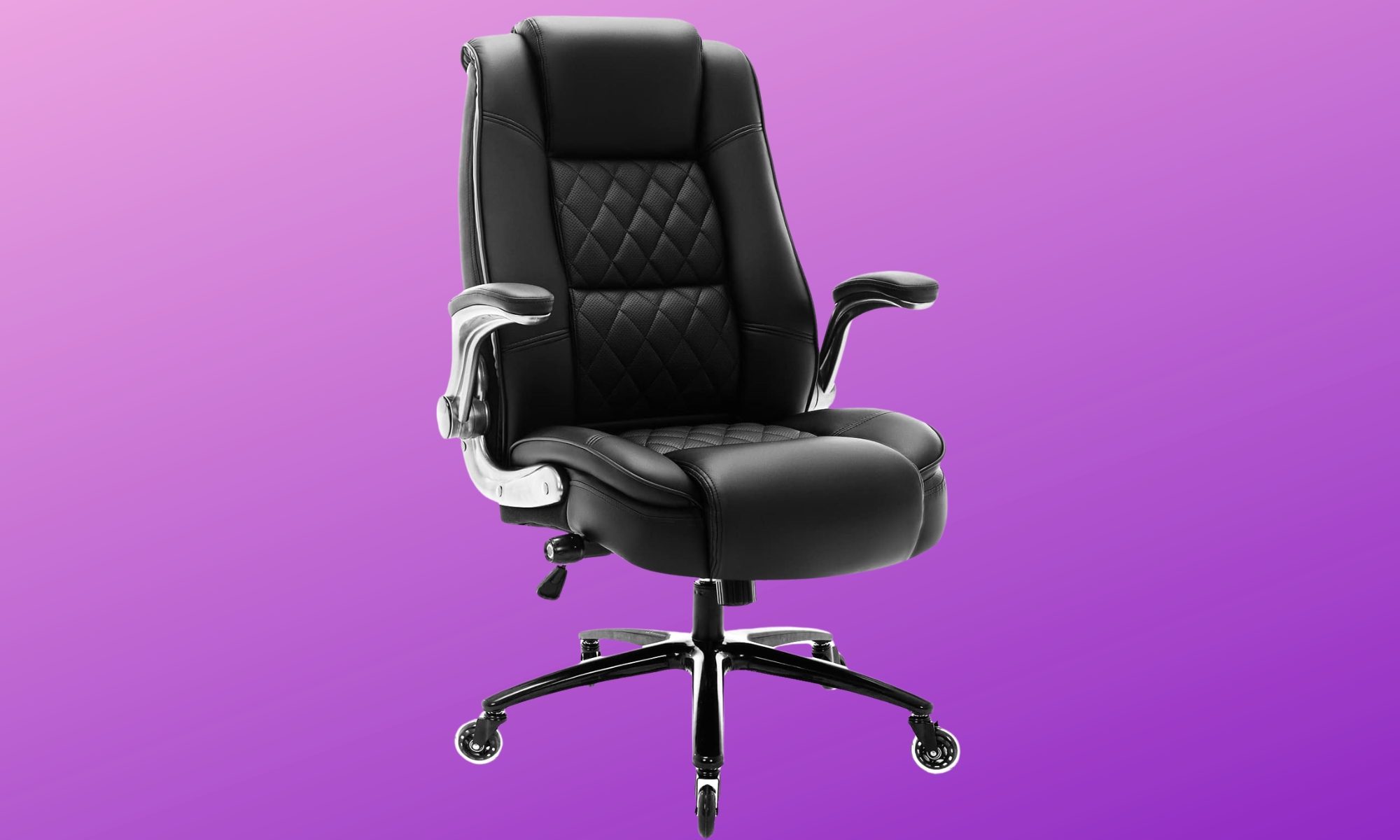
If your office doubles as a place where you meet clients, jump on video calls, or simply prefer a workspace that looks as polished as it feels, appearance matters just as much as comfort. The challenge is that many executive chairs prioritize style over long-term support. The EZAKI High Back Ergonomic Executive Office Chair aims to bring those two together.
Rather than relying on foam alone, it combines high-resilience spring packs with thick memory foam cushioning for a softer, more sofa-like sitting experience. Built-in adjustable lumbar support adds targeted support around the lower back, while the high backrest is designed to help maintain a more neutral spinal position.
There’s room to move around, too. The wide seat and 300-pound weight capacity make this another option worth considering for bigger users, while the armrests can be flipped upward when you want more space at your sides. That also lets you push the chair farther underneath your desk when the workday is over.
Advertisement
One practical addition is the choice of wheels. EZAKI includes traditional casters as well as inline rubber rollerblade-style wheels, giving you options for moving across hard flooring or thicker carpet without necessarily adding a separate chair mat.
Adjustment is relatively straightforward, with seat-height control and a rocking function that moves between 90 and 110 degrees. You can also alter the rocking resistance using the tension control.
Starting at around $229.99, depending on the color, the EZAKI isn’t trying to compete with highly configurable task chairs. If your priorities are comfort, practical ergonomic support, and a polished executive look, it brings those qualities together in a straightforward package that’s well suited to everyday office use.
NEO CHAIR Office Desk Chair
Best budget office chair
Advertisement
Ergonomic High-Back Office Desk Chair / Neo Chair
Pros
Cons
Adjustable lumbar support
Space-saving flip-up armrests
Breathable mesh back
Setting up a comfortable workspace can get expensive quickly. Between monitors, keyboards, desks, and accessories, an ergonomic chair often ends up being one of the biggest purchases. The good news is that improving your sitting posture doesn’t always require spending hundreds of dollars, and the NEO CHAIR Office Desk Chair is proof that a budget-friendly option can still cover many of the ergonomic essentials.
Its high-back design uses breathable mesh, which can be particularly appealing if you tend to feel warm after spending several hours at your desk. More importantly, adjustable lumbar support lets you fine-tune the lower-back support rather than relying entirely on a fixed backrest.
The seat brings another thoughtful detail to the equation. A waterfall-style edge is designed to reduce pressure around the backs of your legs, while the armrests can flip upward when you don’t need them. Besides letting you pull the chair closer to your desk, that extra room can come in handy if you’re someone who occasionally prefers sitting cross-legged while working.
The adjustments aren’t as extensive as what you’ll find on some of the more expensive chairs in this roundup, but the everyday essentials are covered. You can change the seat height and switch the tilt mechanism between tilting and rigid positions, while the swivel base makes moving around your immediate workspace easy.
Budget-friendly shouldn’t automatically mean cutting corners. The NEO CHAIR backs up its approachable price with practical build-quality features, including BIFMA-tested casters, an SGS-certified gas lift, and an internal cushion structure made with FSC-certified wood. While these aren’t features you’ll notice every day, they can provide extra confidence in the chair’s overall construction.
Advertisement
With support for approximately 270 to 275 pounds, the NEO CHAIR won’t be the right fit for every body type. But if you’re setting up a home office, upgrading from a basic desk chair, or simply trying to improve your workspace without stretching the budget too far, it covers many of the ergonomic essentials without piling on features you may never use.
How to pick the right ergonomic office chair
Choosing an ergonomic chair isn’t about picking the model with the longest feature list or the highest price tag. It comes down to selecting a seat that adequately supports your body, suits the way you work, and stays comfortable throughout your day. Whether you’re upgrading your home office, replacing an aging desk chair, or furnishing a brand-new workspace, keeping a few core factors in mind will steer you in the right direction.
Comfort should always come first, but that extends far beyond a soft seat cushion. A well-designed chair should support the specific areas of your body that experience the most strain during long hours at a desk. Lumbar support is particularly vital for maintaining the natural curve of your lower back, while supportive backrests and headrests make a noticeable difference during extended screen time. The best models also encourage natural movement, giving you the flexibility to shift positions throughout the day without locking you into one rigid posture.
Adjustability is another critical aspect that’s easy to overlook until you use your chair daily. Features like seat height, seat depth, recline mechanisms, tilt tension, and adjustable lumbar support allow the hardware to adapt to your unique frame rather than forcing your body to adapt to the chair. The more personalized your setup, the easier it becomes to stay comfortable through everything from quick emails to hours of deep work.
Advertisement
It’s also worth paying attention to the armrests. While terms like 2D, 3D, and 4D simply describe their range of motion, properly positioned armrests dramatically reduce strain on your shoulders and wrists. Some models even feature flip-up armrests, which make it effortless to slide the chair under your desk or open up extra space if you prefer sitting cross-legged.
Beyond adjustments, your chair simply has to fit your frame. Checking the maximum weight capacity is a crucial baseline, but it’s only part of the equation. Seat width, depth, backrest height, and the overall sizing range all dictate long-term comfort because even the most feature-packed office chair won’t feel right if its dimensions don’t match your body.
Ultimately, the ideal ergonomic chair is the one that fits your workspace, champions your posture, and keeps you comfortable from morning to evening. By prioritizing what matters most to your routine, you’ll secure a seat you’ll genuinely enjoy using long after the initial setup wears off.
A custom Java web shell likely linked to the Clop ransomware gang was designed specifically for PTC Windchill and FlexPLM servers, with built-in features to decrypt credentials, enumerate file repositories, and steal files.
Cybersecurity company ReliaQuest analyzed the web shell after it is believed to have been deployed in recent data theft attacks exploiting CVE-2026-12569, a critical remote code execution vulnerability affecting PTC Windchill.
ReliaQuest says the implant is not a generic web shell repurposed for the attacks, but was instead built with detailed knowledge of Windchill’s internal APIs, database schema, keystore, and file-vault structure.
“This appears to be an application-specific evolution of Clop’s established mass-exploitation playbook,” ReliaQuest said in a report shared with BleepingComputer.
The researchers say they found the web shell during the intelligence collection process.
Advertisement
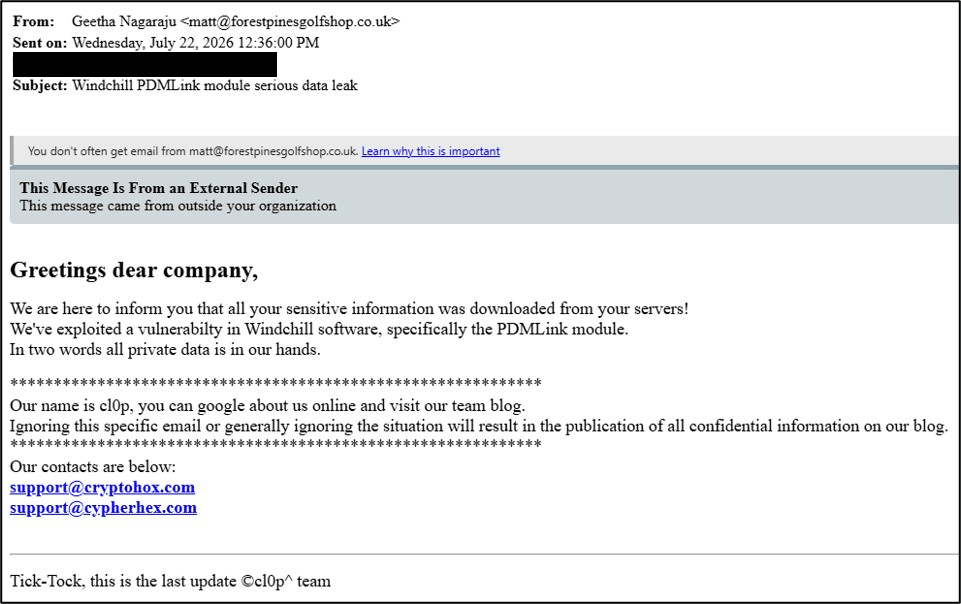
The researchers say the activity is likely linked to Clop based on extortion emails containing addresses used on the ransomware gang’s data leak site, previously observed X-windchill-req headers also used in the web shell, and TTps commonly used by the threat actors.
At the time, ReliaQuest said attribution was unconfirmed, but the attacks shared similarities with previous Clop data-theft campaigns targeting secure file-sharing applications.
Ransom-ISAC later confirmed Clop activity associated with the attacks, including extortion emails sent to hundreds of employees at affected organizations and containing the gang’s latest contact information.
Advertisement
PTC began releasing fixes for CVE-2026-12569 on June 17, and CISA later added the vulnerability to its Known Exploited Vulnerabilities catalog following warnings of heightened threat activity.
A web shell built specifically for Windchill
Analysis by ReliaQuest and BleepingComputer confirms the tool was designed to target Windchill servers rather than act as a generic web shell.
The malware is a JavaServer Pages (JSP) web shell that directly imports Windchill-specific classes, including MethodContext, WTConnection, and WTKeyStoreUtil.
These classes allow the shell to use Windchill’s own functions to access its database, decrypt stored credentials, and locate files stored in application vaults.
Advertisement
“The web shell connects to Windchill’s database through the application’s own MethodContext and WTConnection classes, meaning its queries run under the application’s existing database identity rather than through a separately configured attacker account,” explains ReliaQuest.
“As a result, database telemetry may attribute this activity to the application’s normal service identity, limiting the value of alerts that rely solely on detecting new accounts or unexpected source hosts.”
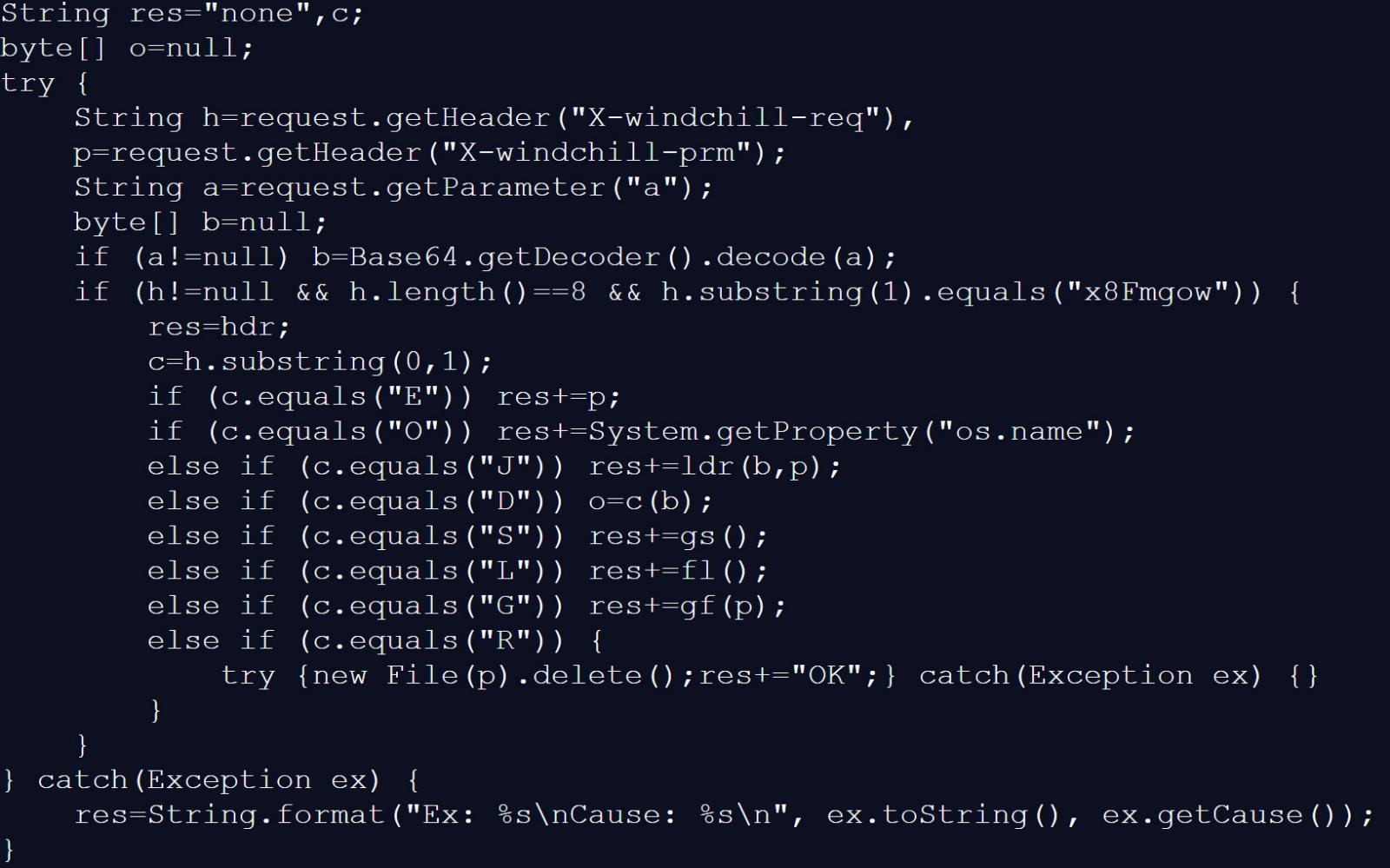
The web shell is controlled using a custom protocol sent through the HTTP X-windchill-req header, which contains eight characters, with the first character specifying the command and the remaining seven matching a fixed value.
Commands supported by the Clop Windchill web shell Source: BleepingComputer
The web shell supports the following commands:
S – Steal Windchill secrets and configuration: Reads Windchill’s LDAP configuration and uses the application’s own WTKeyStoreUtil.decryptProperty() function to decrypt the LDAP manager password and other encrypted application data.
L – Map Windchill’s file vault: Searches Windchill’s database for filenames, storage paths, and file sizes. The results are written to a file named flst.txt, which can then be retrieved by the attackers using G command.
D – Enumerate directories and retrieve files: Enumerates supplied paths and reads portions of files.
G – Read a file: Retrieves the contents of a specified file.
R – Delete a file: Deletes a specified file.
J – Load and execute additional Java code: Passes a Base64-encoded ZIP archive and loads compiled Java bytecode directly into memory and executes it within the Windchill process.
O – Identify the operating system: Returns the operating system name.
E – Echo supplied data: Echoes data in the X-windchill-prm header to verify the webshell is responding.
ReliaQuest says the web shell’s vault enumeration is also designed specifically to query certain tables in Windchill’s database. BleepingComputer’s analysis shows that these tables are ApplicationData, FVITEM, FVMOUNT, and MasteredOnReplicaItem.
The cybersecurity company recommends that organizations immediately patch vulnerable Windchill systems and look for unusual JSP files in Windchill directories, especially those containing reference to X-windchill-req.
Advertisement
Organizations that suspect their Windchill servers were compromised should also change the LDAP manager password and other Windchill credentials, as they should be considered compromised.
Overall prevention scores can hide what happens after initial access. Once attackers are using valid credentials, prevention drops sharply.
The Blue Report 2026 measures defenses technique by technique across 338 million simulations run in customer production environments.
Wi-Fi signals can reportedly reveal people from different viewing angles
A new study suggests that ordinary Wi-Fi networks could be repurposed to identify individuals without cameras, sensors, or their knowledge or consent.
Researchers from KASTEL, the Institute of Information Security and Dependability at KIT, tested the approach on 197 volunteers in controlled conditions.
Their system reportedly achieved nearly 100% identification accuracy regardless of a person’s viewing angle or the way that person walked.
Latest Videos FromTechRadar
Advertisement
The technique relies on beamforming feedback information, a type of signal that connected devices routinely send back to a router.
This information is transmitted without any encryption, meaning anyone within range of the network could potentially intercept and read it.
By analyzing these radio signals over time, the system reportedly builds images of people from multiple viewpoints inside a space.
Earlier wireless sensing methods often required specialized equipment, such as LIDAR sensors or detailed measurements of channel state information from a network.
Sign up to the TechRadar Pro newsletter to get all the top news, opinion, features and guidance your business needs to succeed!
By contrast, the researchers say a standard, unmodified Wi-Fi device is entirely sufficient to carry out this new identification process.
Advertisement
“By observing the propagation of radio waves, we can create an image of the surroundings and of persons who are present,” said Thorsten Strufe, a professor at KASTEL, KIT’s Institute of Information Security and Dependability.
“This works similar to a normal camera, the difference being that in our case, radio waves instead of light waves are used for the recognition.
A user does not need to carry a phone, smartwatch, or other Wi-Fi-enabled device for the system to work.
Advertisement
Turning off one’s own device would reportedly not prevent identification, since other active Wi-Fi devices nearby could still be used.
The researchers argue that widespread wireless networks could create privacy concerns because they operate throughout homes, offices, restaurants, cafés, and other public environments.
Felix Morsbach noted that intelligence agencies and cybercriminals already have simpler methods, including compromising CCTV systems and connected video doorbells.
Advertisement
“The omnipresent wireless networks might become a nearly comprehensive surveillance infrastructure with one concerning property: they are invisible and raise no suspicion,” Morsbach added.
Compared with existing surveillance options, such as CCTV footage or connected video doorbells, wireless signals leave no visible trace behind.
Professor Strufe cautioned that this same invisibility could make the technology particularly attractive within certain authoritarian political systems around the world.
“The technology is powerful, but at the same time entails risks to our fundamental rights, especially to privacy,” said Strufe.
Advertisement
Ordinary routers could potentially enable people to be recognized without their knowledge during routine movements, and this could be dangerous in the wrong hands.
Therefore, widespread deployment could make individual encounters difficult to distinguish from ordinary wireless activity.
The researchers argue that privacy safeguards should be incorporated into Wi-Fi technology before such capabilities become widely and easily exploited.
Specifically, they are calling for protections to be written into the forthcoming IEEE 802.11bf wireless standard currently under active development.
Enterprises that already got burned by an AI agent passing its evals and then failing in production are moving faster toward removing humans from deployment decisions, not slower — even as trust in automated evaluation is rising across the board, new VB Pulse research shows.
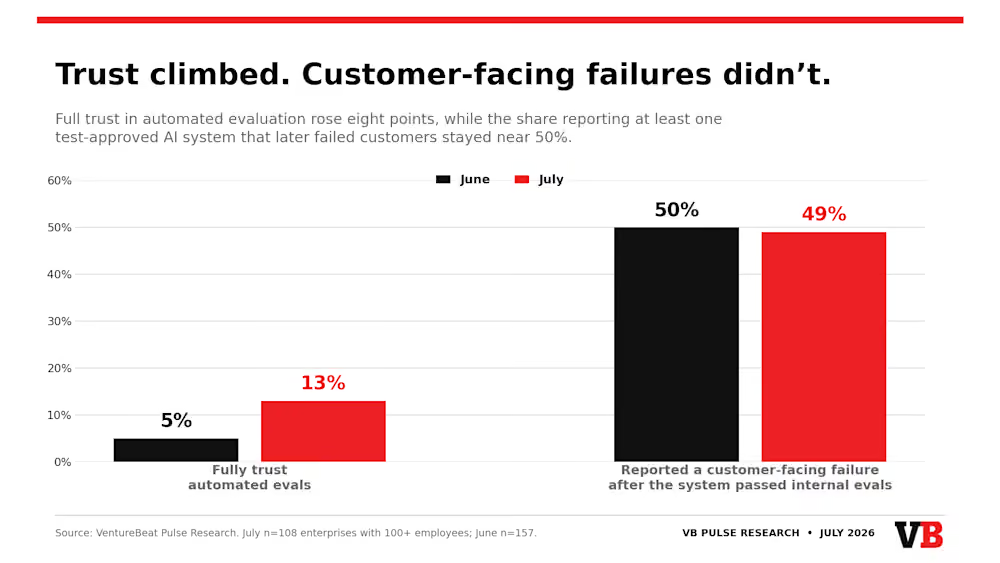
In July, 13% of 108 enterprises surveyed said they trust automated evaluation, up from just 5% the month prior. Meanwhile, survey respondents citing poor alignment between tests and real-world results as their biggest concern fell 10 points, from 29% to 19%, month over month.
Yet, 49% of survey respondents said that an AI agent or LLM-powered feature that had cleared company testing subsequently created a problem visible to customers, essentially unchanged from 50% in June. And nearly a quarter, 24%, said this troubling outcome had occurred more than once.
The latest findings from VentureBeat Intelligence uncovered a more troubling phase of the enterprise agent rollout: the gap is no longer only between how much autonomy companies give agents and how well they can verify them. It is increasingly a gap between confidence in the evaluation layer and evidence that the layer is getting better at preventing failures.
Advertisement
The most revealing split appears inside the July data.
Of the enterprises that experienced an AI feature clear testing only to go on to disappoint a customer, 4% placed complete faith in automated checks. Of those that had detected no comparable incident, 24% expressed full confidence — a sixfold difference.
It makes sense: those who experienced test-passing agents failing in live production are, unsurprisingly, more likely to doubt the automated checking process.
Perhaps it makes sense then, that companies geared toward tackling this problem — like automated agent error monitoring and mitigation platform Raindrop.ai — are seeing the market transform wildly from just a few months ago.
Advertisement
“We are seeing the great-decline of evals as we know them,” Raindrop CTO Ben Hylak told VentureBeat in a direct message. “The Fortune 100 are increasingly reducing eval sets and deprioritizing maintenance. As systems grow more complex (MCPs, subagents, etc.) it becomes impossible to fully enumerate the failure cases. Instead, they’re leaning on anomaly and issue detection solutions, both before and after production.”
A directional finding, not a market census
VentureBeat fielded the July wave among 108 people representing companies with workforces of at least 100. This is down from 157 respondents in June.
Of the 108, 69% described themselves as final AI-buying authorities or people who recommend and influence those purchases. The sample skewed toward midsize organizations: 63% worked at companies with 100 to 2,499 employees.
The findings should be read directionally. The survey is self-selected rather than a probability sample, and the burned-vs.-unburned splits cited throughout this piece rest on groups of 41 to 53 respondents, and other cross-tabs in the report range from 40 to 68.
Advertisement
The industry mix also changed: technology and software participation declined nine points, ending at 14%, while the retail and consumer share added four points and ended at 19%.
The report nevertheless identifies four month-to-month changes worth noticing: more respondents professing complete confidence, fewer naming poor real-world alignment, more choosing integration ease as the decisive buying factor, and Braintrust gaining primary-platform share.
Confidence in automated evals improved, but outcomes stayed flat
July preserves the key number from that first wave. Across 265 enterprise responses over the two months, the proportion reporting at least one test-approved system that disappointed customers stayed within a single percentage point: 50% in June and 49% in July.
This figure does not mean that 49% of all agent runs fail, or that any particular evaluation product has a 49% failure rate. The survey asks whether an organization experienced at least one customer-facing incident in the previous year after an AI feature passed its internal tests. Companies that deploy far more agents have more opportunities to encounter such an incident.
But that limitation does not make the result less important. An internal evaluation serves as a release gate. If roughly half of surveyed organizations have seen that gate approve a system that later fails in front of customers, a passing score cannot be treated as proof of production reliability.
The cross-tab reinforces the point. Ten of the 41 enterprises with no identified testing miss placed complete faith in automation.
Advertisement
Only two of the 53 previously burned enterprises said the same. Confidence is strongest among respondents with the least evidence that the release gate can fail.
The enterprises that got burned are moving faster toward zero-human deployment
The counterintuitive finding is what companies do after an evaluation miss.
Overall, 67% either let an agent push code or change a system without a person’s approval in certain low-risk cases, or are modifying their pipelines to support that practice during the coming year. That is unchanged from June. In July, 37% already permitted it in limited cases and another 30% were building toward it.
Among enterprises where a test-approved system had disappointed a customer, however, 85% were pursuing that no-approval model, compared with 61% in the group reporting no comparable incident. Only 11% of burned respondents rejected end-to-end deployment automation for the years ahead, versus 24% of unburned respondents.
It would be easy to read that as recklessness, but the data supports another plausible explanation: deployment maturity. Organizations running more agents, at higher volume and across more consequential workflows, are more likely both to encounter failures and to have the engineering infrastructure needed for automated deployment.
The survey cannot establish which explanation dominates. It does establish that a customer-visible incident does not appear to stop the move toward autonomy. Respondents with firsthand proof that testing can miss defects are also moving most aggressively to let those tests authorize production changes.
If their per-deployment failure rate remains constant while deployment volume rises, the total incident count could grow even without the percentage of affected companies increasing. The July data does not measure incident volume, so that remains a risk implied by the pattern rather than a measured outcome.
Advertisement
The release gate is automated, but production quality monitoring still lags
Pre-deployment evaluation and production monitoring answer different questions. An evaluation asks whether an agent appears ready to ship. Production monitoring asks what the agent is doing after release and whether its live outputs remain correct.
Most companies in the July sample still emphasize whether the system functions, not whether the answer is correct.
Among the 106 valid responses to this question, 26% used inline quality assertions — automated judges or guardrails checking live traffic for output-quality problems. Another 26% focused on transaction traces such as infrastructure spans, token usage and raw inputs and outputs, while 24% mainly tracked gateway metrics such as latency, errors and cost.
Trace and gateway data can reveal outages, slowdowns and broken requests. They may not flag a fluent, fast and confidently wrong answer. Grouped by the report according to what each architecture actually watches, half of respondents monitored whether an agent was functioning, while just over a quarter automatically monitored whether its production output was correct.
The gap is sharpest among the 40 respondents already permitting no-approval deployment in limited cases. Only 28% of that group automatically checked the meaning and correctness of live answers. In other words, most enterprises that have eliminated a person from at least some release decisions have not installed automated semantic-quality monitoring as the production backstop.
This is the clearest operational lesson in the data. A pre-deployment test suite and infrastructure observability are necessary, but they do not cover the same failure mode. Enterprises need a way to detect bad outputs after the agent begins interacting with real users, data and tools — especially when nobody reviews the deployment decision first.
An independent agent-evaluation market begins to take shape
The vendor data offers a more encouraging sign: enterprises are adding dedicated evaluation tools, and specialist platforms are gaining ground.
Advertisement
OpenAI’s native evals and traces narrowly led as the primary platform at 18%, followed by Confident AI’s DeepEval at 17% and Braintrust at 15%.
Anthropic’s Claude Console and Workbench held 12%, tied with organizations reporting no dedicated evaluation platform. Three options each held 6%: internally built tools, Promptfoo and LangSmith.
Braintrust’s primary share increased from 8% in June to 15% in July, the biggest gain by one vendor and the one the report flags as statistically significant. DeepEval rose from 12% to 17%. Use of no purpose-built platform declined five points to 12%, although that smaller change does not by itself confirm a trend.
Advertisement
Because many companies use more than one tool, the broader footprints are larger. OpenAI native evaluation appeared somewhere in 31% of stacks, DeepEval in 27%, Braintrust in 22% and Anthropic’s native tooling in 20%. Custom internal tooling reached 14%, while Weights & Biases Weave and open-source Langfuse each reached 11%.
These are adoption figures, not product-performance scores. The survey does not establish that one vendor produces more reliable agents than another. Still, the results point toward evaluation becoming a distinct enterprise software layer rather than a loose collection of internal scripts or a feature used only inside a model provider’s platform.
Purchasing priorities are changing with that market. The proportion choosing integration ease as the decisive factor climbed 12 points to 39%, displacing cost, which fell from 28% to 23%. Evaluation accuracy ranked second at 28%. The combined average for satisfaction, implementation simplicity and economic value was 3.9 out of five.
The move from price toward integration suggests enterprises increasingly want a tool they can install into existing development and monitoring pipelines now. Yet their leading success metric remains evaluation consistency at 38%, followed by fewer failures and regressions at 20%. Buyers are selecting for fit while still judging results on repeatability.
Advertisement
Switching intent also cooled: 56% still expected to add or replace a platform during the coming year, down from 64% in June.
The proportion staying put increased eight points, reaching 44%. Together with specialist adoption, they suggest some buyers are moving from evaluation to implementation.
Human review is becoming the hedge against automated misses
The budget data reveals how enterprises are managing the contradiction between greater autonomy and unreliable evaluation.
People-centered review workflows edged narrowly ahead of production observability as the most frequently cited area for increased investment, 31% to 30%.
Automated evaluation pipelines ranked third at 19%, followed by testing for safety and policy compliance at 16%. Only 6% said their reliability and evaluation budget was not increasing.
Among enterprises that had experienced a testing miss, 38% said people-centered review would receive the fastest investment growth, compared with 24% of organizations that had not been burned.
That produces an apparent paradox: the burned group is most likely to remove people from the release checkpoint and most likely to increase spending on people elsewhere in the process. The strategy appears to be automation with a human backstop — allow agents to move faster, then use reviewers to catch what automated evaluation misses.
Advertisement
The open question is whether that model scales. Agent deployments and automated checks can grow with software volume. Reviewer hours do not fall at the same rate. Enterprises may therefore be replacing a human approval step with a larger downstream review function rather than eliminating human oversight.
The narrow but consequential read
July’s data does not show that enterprise agent evaluation is failing everywhere, nor does it prove automated judges are getting worse. It shows something more precise: confidence rose before the measured failure incidence improved.
At the same time, the infrastructure around evaluation is maturing. More enterprises are adopting specialist tools, integration has become the leading purchase criterion and companies that have already experienced failures are increasing investment in human review. The market recognizes the problem and is spending against it.
But the central reliability result remains stubborn. Nearly half of surveyed enterprises still report that an AI feature cleared internal checks before disappointing a customer. Respondents with that experience place less faith in automation — and move faster toward deployments with no human approval.
Advertisement
The report frames this as an incomplete verification model: a passing pre-deployment score marks the start of monitoring, not the end of it. For most enterprises, the production quality checks and evaluation testing that would close that gap still aren’t in place.
The JBL Tune 680NC are a capable set of noise-cancelling on-ears with a fun, bass-forward sound, good battery life, reasonable noise cancellation and surprisingly capable app support. They’re light enough for extended listening, although the on-ear form factor means they aren’t as comfortable as over-ear rivals and the overall sound lacks a bit of refinement.
Lightweight and reasonably comfortable
Fun, bass-forward sound
Excellent endurance
Some may prefer an over-ear design
More generic looks
ANC could be stronger
Key Features
Advertisement
Review Price:
£89.99
Audio
Advertisement
JBL Pure Bass Sound with 33mm dynamic drivers
Wireless
Advertisement
Bluetooth 6.0 with Multipoint, Fast Pair and Swift Pair
Noise cancellation
Advertisement
Adaptive ANC controlled in JBL Headphones app
Introduction
The JBL Tune 680NC refresh the brand’s longstanding affordable noise-cancelling headphones and packs them to the brim with features.
Against some of its older models, there’s a new design, adaptive active noise cancellation, multipoint Bluetooth 6.0 connectivity and a battery boost up to 76 hours of runtime, the same as you’ll find on the JBL Tune 780NC.
Advertisement
The two cans are identical in features, save for their design and drivers, although by opting for on-ears, JBL is charging £89.99 / $109.95. That puts these more in the mid-range for noise-cancelling cans, an area we’ve seen gain some momentum with competing choices such as the Soundcore Space 2, the Sony WH-CH720N and the Final UX3000.
That’s some stiff competition to say the least – to see whether JBL can come out on top as some of the best noise-cancelling headphones we’ve tested, I’ve been putting the Tune 680NC through their paces.
Advertisement
Design
Lightweight, on-ear design
Convenient physical controls
Decent-feeling plastic chassis
For the Tune 680NCs, JBL has opted for a similar overall design to the more affordable Tune 530BT, sticking with an on-ear design, rather than the over-ear that’s prevalent among the competition.
Generally speaking, I’ve never been the biggest fan of on-ear headphones, but these JBL ones are light enough at just 161g to mean they aren’t fatiguing to wear for extended periods. The clamping force is on the tighter side out of the box, though, and the padding on the headband and earcups is just okay.
Advertisement
Image Credit (Trusted Reviews)
There isn’t any creaking from the plastic chassis, and it’s clear there has been some more thought that has gone into the fit and finish of the Tune 680NCs over the cheaper JBL on-ears, with better quality materials that are less scratchy.
Advertisement
As for portability, these JBL cans surprisingly don’t come with a case, but fold flat, and the earcups can fold into the chassis to a degree, although not to the point it slims down their overall profile.
Image Credit (Trusted Reviews)
Controls are all contained on the right earcup, where you’ll find a USB-C port for charging, a power button, Bluetooth pairing button, ANC toggle and volume controls. There isn’t a 3.5mm jack for wired listening, though.
JBL offers the Tune 680NC in four colours, with a black finish plus beige, white, and purple for added splashes of colour.
Features
Bluetooth 6.0 with Multipoint
More basic codec support
Excellent battery life and solid noise cancellation
JBL has maintained feature parity with the higher-end variants of its revitalised headphone line-up with the Tune 680NC for connectivity, meaning it ups the ante to Bluetooth 6.0 connectivity from the older Bluetooth 5.3 standard found on other headphones.
Advertisement
Advertisement
As with other iterations of the Bluetooth ‘standard’, the latest 6.0 variant adds niceties such as lower latency, longer range, and theoretically better sound quality thanks to the new LC3+ codec. It is only in its infancy, as there’s also only a handful of phones and devices that support it, too – my Honor Magic V3 isn’t one of them.
Image Credit (Trusted Reviews)
There is also multipoint connectivity, and the Tune 680NC can connect up to two devices at once. I didn’t have any issues pairing it to my phone and my MacBook Pro, and switching between the two. Google Fast Pair and Microsoft Swift Pair handle initial pairing on Android and Windows, respectively, too.
Codec support is more basic with AAC and SBC, and there is support for Bluetooth LE audio to unlock LC3, too. You’ll have to pay more to get aptX or LDAC, as these JBL ones don’t support it.
Image Credit (Trusted Reviews)
There is app support, with JBL’s Headphones app unlocking more of the functionality for these cans. Here, you can fiddle around with EQ presets or set up a custom one, enable Bluetooth LE audio, adaptive noise cancellation, JBL’s Spatial Audio settings, sort out firmware updates and more besides. It’s clean and easy to use.
Advertisement
As for battery life, JBL quotes the Tune 680NC to last for up to 76 hours on a charge without ANC and up to 50 hours with ANC enabled, which is solid for such an affordable set of cans. In my use, I only had to charge them up once after an intensive week’s use during work hours and afterwards for chatting to friends over Discord and WhatsApp.
Advertisement
Image Credit (Trusted Reviews)
If you are caught in a pinch, then a five-minute quick charge gives you five hours of playback, and a full charge will take around two hours via USB-C. You will need to provide your own cable, though, as JBL doesn’t give you one in the box. Handily, the battery is replaceable, which is a nice touch for sustainability.
Speaking of noise cancellation, JBL has employed an adaptive variant that samples the environment around you and adjusts the level of cancellation in real time. Generally speaking, it’s adequate for most commuting workloads, dulling down low-end frequencies of a Thameslink or Tube train and filtering out voices. Higher-pitched frequencies and wind noise are less adequately removed.
Image Credit (Trusted Reviews)
Calls are handled by a pair of beamforming microphones, with each earcup carrying one microphone. It does a decent job of suppressing unwanted noise in quieter environments, although busier ones can be a little tricky.
Advertisement
Sound Quality
Warm, bass-centric tone
Surprisingly forward mid-range
Treble feels a little smoothed over
The drivers inside the Tune 680NC are the same as you’ll find in the Tune 530BTs, meaning they’re 33mm dynamic drivers tuned with JBL’s signature PureBass sound tuning. In my experience, this means a generous helping of atmospheric low-end with good extension .
For instance, in Rush’s YYZ, the track’s relentless bass had good feel and weight. These JBL cans use the Studio EQ by default, which almost accentuated the bass a little too much for me, and it did encroach a little on the guitar work and drums.
Image Credit (Trusted Reviews)
That said, vocals and other mid-range elements were pleasantly forward and detailed in the mix, be it in the case of James Taylor’s October Road or in Last Chance to Evacuate Planet Earth Before It Is Recycled from Porcupine Tree. In the case of the latter, Steven Wilson’s vocals and the acoustic guitar riff had good body and detail retrieval.
I felt the treble of the Tune 680NC was inoffensive, tending to lack the bite or punch I’d have liked. With On The Other Side from The Strokes, the incessant cymbal hits throughout the track’s duration felt a little lacking in attack.
Advertisement
Advertisement
Image Credit (Trusted Reviews)
A listen to Brand X’s Not Good Enough, See Me! revealed the soundstage here to be more basic in its feel than other cans at this price, with it having a narrower feel – it’s perhaps to be expected for more affordable closed-back cans, but isn’t always the case.
Should you buy it?
You want excellent battery life
The Tune 680NCs outclass a fair few of their rivals with fantastic battery life, meaning you can keep listening for hours on end.
Advertisement
You want an over-ear form factor
Advertisement
If you’d prefer a more comfortable over-ear form factor, then you’ll want to look at other options, including some of JBL’s other new cans.
Final Thoughts
The JBL Tune 680NC are a capable set of noise-cancelling on-ears with a fun, bass-forward sound, good battery life, reasonable noise cancellation and surprisingly capable app support. They’re light enough for extended listening, although the on-ear form factor means they aren’t as comfortable as over-ear rivals and the overall sound lacks a bit of refinement.
Advertisement
Nonetheless, the JBL Tune 680NC remain a solid set of noise-cancelling on-ear headphones if you want a lightweight fit, fun sound and excellent battery life. For more choices, check out our list of the best noise-cancelling headphones we’ve tested.
How We Test
We test every set of headphones we review thoroughly over an extended period of time. We use industry standard tests to compare features properly. We’ll always tell you what we find. We never, ever, accept money to review a product.
Find out more about how we test in our ethics policy.
Tested across two weeks
Battery drain performed
Tested with real world use
Advertisement
FAQs
Does the JBL Tune 680NC have ANC?
Advertisement
Yes, the JBL Tune 680NC has ANC with its own adaptive noise cancellation.
Does the JBL Tune 680NC support LDAC?
No, the JBL Tune 680NC supports AAC, SBC and LC3 with Bluetooth LE, but no LDAC.





















































You must be logged in to post a comment Login