




Connect with us
DAPA Banner

Tech

CoreWeave signs multi-year Anthropic deal as nine of ten top AI model providers join its platform

Published

on

In short: CoreWeave announced a multi-year agreement with Anthropic on April 10, 2026, giving the Claude maker access to Nvidia GPU capacity across US data centres for production-scale AI workloads. Financial terms were not disclosed. The deal arrives one day after CoreWeave announced a $21 billion expansion of its Meta partnership, and adds Anthropic to a customer roster that now covers nine of the ten leading AI model providers. CoreWeave generated $5.13 billion in revenue in 2025 and is guiding for more than $12 billion in 2026, backed by a contracted backlog exceeding $66 billion.

Ex-crypto miner becomes AI’s landlord

CoreWeave was founded in 2017 as Atlantic Crypto, an Ethereum mining operation that bought Nvidia graphics processing units in bulk to mine cryptocurrency and rent spare GPU capacity to other miners. When crypto margins compressed in 2019, the company renamed itself CoreWeave and pivoted to GPU-on-demand cloud services for general computing purposes. The timing proved transformative: the AI model training boom that began in earnest in 2023 turned CoreWeave’s stockpile of Nvidia hardware into one of the most strategically valuable infrastructure positions in technology. The company went public on Nasdaq under the ticker CRWV on March 28, 2025, at $40 per share, raising $1.5 billion and valuing it at approximately $23 billion. CoreWeave operates 32 data centres with more than 250,000 GPUs and 1.3 gigawatts of contracted power capacity. Its 2025 revenue of $5.13 billion represented a 168 per cent increase year-on-year, and management has guided for more than $12 billion in 2026 revenue against a contracted backlog that now exceeds $66 billion.

The company’s rapid growth has come with a significant concentration risk: Microsoft accounted for approximately 67 per cent of CoreWeave’s 2025 revenue, a dependence that investors and analysts flagged in the run-up to the IPO. Microsoft’s push to develop its own AI models adds a further strategic variable, raising the question of how much of Microsoft’s compute demand will eventually shift toward in-house infrastructure rather than third-party GPU cloud rental. The Anthropic deal, arriving the day after a $21 billion Meta expansion, represents CoreWeave’s most visible effort to build a diversified customer base that reduces its dependence on any single hyperscaler.

What Anthropic is paying for

Anthropic’s compute strategy has grown more complex alongside its revenue. The company’s annualised revenue run rate surpassed $30 billion in early April 2026, more than three times the $9 billion figure it recorded at the end of 2025. That rate of acceleration, driven by enterprise Claude adoption and the breakout growth of Claude Code, has required Anthropic to expand its infrastructure commitments across multiple chip architectures simultaneously. Its primary training workloads run on Amazon Web Services Trainium hardware via Project Rainier, a large-scale cluster spanning hundreds of thousands of AI chips across multiple US data centres. Three days before the CoreWeave announcement, Anthropic’s deal with Google and Broadcom for multi-gigawatt TPU capacity secured access to approximately 3.5 gigawatts of next-generation tensor processing unit compute expected to come online in 2027. The CoreWeave deal fills a third lane: Nvidia GPU capacity for production inference workloads, running at the scale and latency performance that enterprise Claude deployments require. Anthropic’s $100 million commitment to its Claude partner network earlier this year signalled the company’s intent to expand the ecosystem of developers and enterprises building on Claude, and that ecosystem expansion is now directly driving the compute procurement decisions behind deals like this one.

Advertisement

CoreWeave co-founder and CEO Michael Intrator framed the deal in terms that go beyond raw infrastructure capacity. “AI is no longer just about infrastructure, it’s about the platforms that turn models into real-world impact,” he said. “We’re excited to work with Anthropic at the centre of where models are put to work and performance in production shows up. It’s exactly the kind of real-world deployment of AI that CoreWeave was built for.” Anthropic will initially deploy compute under a phased infrastructure rollout, with the option to expand the arrangement over time. The specific Nvidia chip architectures involved have not been publicly disclosed, though CoreWeave’s estate spans current and next-generation Nvidia GPU generations. Nvidia’s Vera Rubin GPUs, unveiled at GTC 2026, represent the next major architecture in CoreWeave’s deployment roadmap, with volume shipments expected in the second half of 2026.

Advertisement

Nine of ten, two deals in 48 hours

The Anthropic agreement means that nine of the ten leading AI model providers now use CoreWeave’s platform, a market penetration figure the company cited in its press release. The customer roster built alongside Microsoft includes Meta, OpenAI, Mistral, Cohere, IBM, and Nvidia itself, as well as a sub-leasing arrangement through which Microsoft supplies some CoreWeave capacity to third-party clients. The Meta relationship deepened significantly on April 9, 2026, one day before the Anthropic announcement: Meta committed an additional $21 billion to CoreWeave for dedicated AI cloud capacity running from 2027 through December 2032, bringing the total value of the two companies’ infrastructure relationship to approximately $35 billion. CoreWeave also expanded its agreement with OpenAI by up to $6.5 billion earlier in 2026. The two announcements in 48 hours, covering Meta and Anthropic, illustrate how CoreWeave is converting its infrastructure position into long-duration contracted revenue rather than spot-market GPU rentals. CoreWeave raised $8.5 billion in a GPU-backed debt facility in March 2026, with the Meta relationship used as collateral. The Anthropic deal, while undisclosed in value, will contribute to a backlog that analysts are watching as the primary indicator of the company’s long-term revenue predictability.

The infrastructure tells a story about dependence

The same day CoreWeave announced the Anthropic agreement, reports emerged that Anthropic is exploring the design of its own custom AI chips — a move that would, if realised, eventually reduce its dependence on the Nvidia-powered infrastructure that CoreWeave provides. The irony is deliberate: Anthropic’s current infrastructure commitments across AWS, Google Cloud, and now CoreWeave reflect a company that is simultaneously expanding compute dependency in the short term and exploring the routes to architectural independence in the long term. That tension is not unique to Anthropic. Meta, OpenAI, and Google have all invested heavily in custom silicon programmes while continuing to rent third-party Nvidia capacity, because the timelines for custom chip maturity and the demand curve for AI compute do not align closely enough to allow a clean transition. CoreWeave’s position as the GPU landlord of choice for the AI industry is therefore both a statement about the current moment and a structural bet that Nvidia-native cloud capacity will remain competitively necessary for at least the duration of the contracts now being signed. As AI infrastructure spending accelerated through 2025, the GPU cloud market began to look less like a transitional gap-filler and more like a permanent layer of the AI stack, and CoreWeave, two deals in two days, is the clearest evidence of that shift.

Source link

Advertisement
Continue Reading
Click to comment

You must be logged in to post a comment Login

Leave a Reply

Tech

This Emmy-nominated sci-fi series is one of 3 underrated Prime Video shows to watch this weekend (May 2-3)

Published

on

These three Prime Video shows have one thing in common. They are all brilliant, criminally overlooked, and none of them got the audience they deserved. A broken spy who processes trauma through folk songs. A woman who survives a car crash and can’t decide if she’s gifted or unraveling. And a small Ohio town sitting on top of a machine that quietly warps everything around it.

Prime Video built something quietly remarkable with all three, and then apparently forgot to tell anyone, but they are still worth a watch.

We also have guides to the best new movies to stream, the best movies on Netflix, the best movies on Hulu, the best free movies, and the best movies on Amazon Prime Video.

Patriot (2015–2018)

John Tavner is an intelligence officer assigned to stop Iran from going nuclear. His cover is a job at a Midwestern industrial piping company. That setup sounds like a straightforward spy thriller, but Patriot is one of the strangest, funniest, and most underrated Prime Video TV shows you’ve ever seen.

John processes his unraveling mental state by writing and performing folk songs, which the show uses as a kind of Greek chorus for the chaos around him. The comedy is bone dry, the plotting is absurdist, and the emotional core is genuinely devastating. It ran two seasons and despite an IMDB rating of 8.2, the series got cancelled, but the people who found it have never stopped being angry about it.

Advertisement

You can watch Patriot on Prime Video.

Undone (2019–2022)

Undone is the kind of Prime Video series that makes you question why more animation isn’t made this way. The show uses rotoscoping, a technique where animators trace over live-action footage frame by frame, to create something that feels like a waking dream.

Rosa Salazar plays Alma, a young Mexican American woman who survives a car crash and starts experiencing time non-linearly. Her dead father begins appearing to her, asking for her help. The show never fully commits to whether Alma is gifted or experiencing a psychotic break, and that ambiguity is exactly where it lives. It earned 8.2 rating on IMDB and still barely made a dent in mainstream conversation.

You can watch Undone on Prime Video.

Tales from the Loop (2020)

Based on the paintings of Swedish artist Simon Stalenhag, this underrated TV series on Prime Video is unlike anything else. Set in a small Ohio town built above a mysterious scientific facility called the Loop, each episode follows a different resident whose life quietly intersects with the unexplainable.

There are no villains, no chase sequences, and very little explanation. What the show offers instead is atmosphere, longing, and a quietly accumulated grief that hits you only after the credits roll. It picked up two Emmy nominations and an 7.4 on IMDB and somehow still slipped through the cracks entirely.

Advertisement

You can watch Tales from the Loop on Prime Video.

Source link

Advertisement
Continue Reading

Tech

Best Mobile Apps for Soccer Fans in 2026 (By Use Case)

Published

on

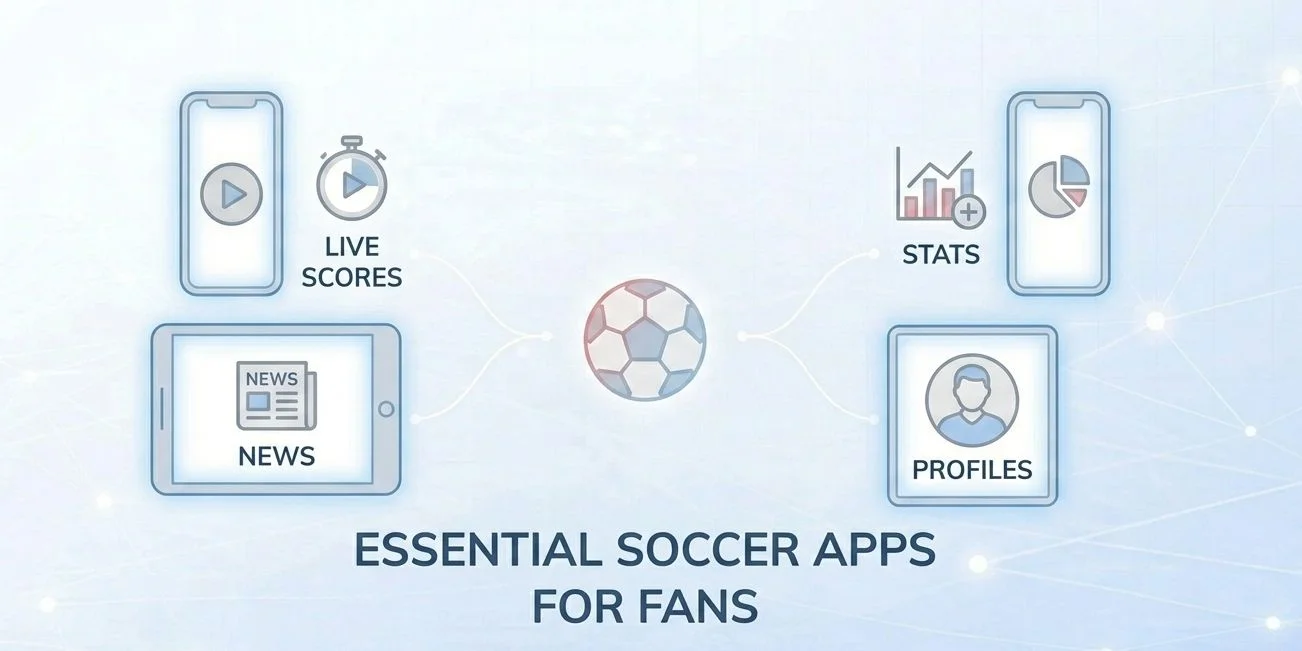
There are hundreds of soccer apps in the App Store and Google Play. Most are forgettable. A small number have become genuinely useful tools that serious fans check before, during, and after every match. This guide covers the best of them in 2026 — organized by what you actually want to do, not just ranked in a list.

Best App for Each Use Case — At a Glance

  • Free live streaming: FIFA+ (powered by DAZN)
  • Live scores, fastest updates: Flashscore
  • Deep in-match stats and xG: SofaScore
  • Clean matchday UI and notifications: FotMob
  • News and match previews: OneFootball
  • Fantasy Premier League: Official Premier League App
  • All-in-one (scores + AI predictions): Tiki Taka

No single app does everything equally well. The honest answer for most fans is two apps: one for live scores and stats during the match, and one for news and previews between gameweeks. Everything below is rated on what it actually does best — including what it does poorly.

FIFA+ — Best Free Streaming App

FIFA+ (Powered by DAZN)

Free | iOS + Android + Smart TV | Global availability

The biggest development in soccer fan apps for 2026 is the FIFA and DAZN partnership that relaunched FIFA+ as a free global platform ahead of the World Cup. The new FIFA+ combines what was previously a limited free-tier app with DAZN’s streaming infrastructure, creating a single destination for live matches, on-demand replays, highlights, and original documentaries — all at no cost.

The platform carries live content from more than 100 men’s and women’s leagues, with behind-the-scenes access from national teams and major clubs. For World Cup 2026, FIFA+ is the global home for tournament content, including match archive, player profiles, and exclusive video — making it the most important new soccer app of 2026 for fans who want professional-quality content without a subscription.

Advertisement

Best for: Fans who want free live matches, replays, and World Cup content on any device. Limitation: Does not carry top domestic league matches in most major markets (Premier League, Champions League, etc.) — those rights remain with national broadcasters.

Live Score Apps: Flashscore, FotMob, and SofaScore

These three apps dominate the live score category — but they’re not interchangeable. Each has a distinct strength, and the right choice depends on whether you prioritize speed, depth, or range.

Flashscore — Best for Speed Across Many Sports

Free (ads) / Premium tier available | iOS + Android | Global

Flashscore is the fastest live score app available, and it covers the widest range of competitions and sports of any tool in this category. If you follow multiple leagues simultaneously or want to track matches across different sports during the same evening, no other app matches its breadth. The interface is dense but efficient: fixtures, results, league tables, and H2H records are all one tap away.

Advertisement

Best for: Multi-league fans, fast score checking, fans who also follow non-soccer sports. Limitation: UI is data-heavy and can feel overwhelming for casual fans. In-match stats are shallower than SofaScore.

FotMob — Best Matchday Experience

Free / FotMob Pro (paid) | iOS + Android | Global

FotMob covers live scores, fixtures, tables, match stats, and personalized news from over 500 football leagues. Its edge over the competition is design: it’s the cleanest, most navigable soccer app on mobile. Match pages are well laid out, push notifications are reliable and configurable (goal, lineup, kickoff, final), and the player performance ratings system — where FotMob assigns a match rating to every player — is a feature fans check consistently after full-time.

Best for: Fans who want one polished app for their primary team or league. The “My Teams” personalization layer makes it the best daily companion for following specific clubs. Limitation: Less deep on expected goals (xG) and advanced stats compared to SofaScore.

Advertisement

SofaScore — Best for Deep In-Match Statistics

Free / SofaScore Premium (paid) | iOS + Android | Global

SofaScore is the most data-rich live soccer app available to general consumers. During a live match, it surfaces possession, xG (expected goals), shot maps, player heatmaps, pass accuracy, duel success rate, and a live match timeline that logs every event in sequence. SofaScore ranks best for broad match coverage and live event data among independent evaluations of 2026 football stat tools. The player ratings system covers over 5,000 leagues — a scope that few competitors match.

Best for: Tactically engaged fans, analysts, journalists, and FPL players who use xG and heatmaps as part of their research. Limitation: The free tier is ad-supported; some advanced filters are behind the paid tier. Less polished visually than FotMob.

OneFootball

Free | iOS + Android | Global

Advertisement

OneFootball is the best app for fans who want editorial content — match previews, post-match analysis, transfer news, and club-specific coverage — rather than raw scores. It covers over 100 international soccer leagues and competitions with live commentary and breaking news. For the 2025/26 season, OneFootball added individual player match stats, heatmaps, and shot charts — significantly closing the gap on SofaScore for stat-focused users who prefer a news-first interface.

Best for: Fans who want context alongside scores — club news feeds, manager quotes, pre-match analysis, and transfer rumors curated by competition. Limitation: Live scores are slightly slower to update than Flashscore or FotMob. Stats depth still trails SofaScore for advanced metrics.

Fantasy Premier League — Best Fantasy App

Official Premier League App (FPL)

Free | iOS + Android | Global

If you play Fantasy Premier League — and with tens of millions of managers globally it’s hard to avoid — the official Premier League app is the authoritative tool for managing your FPL squad, tracking points, and researching player history across 30+ years of match data. For 2025/26, the Premier League introduced meaningful rule changes: points now reward defensive contributions (not just clean sheets), and managers receive two full sets of chips across the season, including the new “Wildcard reset” mechanic that gave veteran players new strategic options mid-season.

Advertisement

Beyond FPL, the app includes official match highlights, the full Premier League fixture list, club news, and historical stats — making it a useful general companion for EPL fans even if you don’t play fantasy.

Best for: Fantasy Premier League players — no third-party app fully replicates the official FPL interface. Also strong for EPL-only fans who want an official, ad-light source. Limitation: Coverage is limited to the Premier League; no use for following other competitions.

How to Build Your App Stack (Practical Workflow)

Most fans don’t need seven apps — they need two or three that serve different moments in the matchday cycle. Here’s a practical structure by fan type:

Fan Type Primary App Secondary App Optional Add
Casual EPL fan FotMob (scores + news) Official PL App (FPL + highlights) FIFA+ (free streaming)
Multi-league follower Flashscore (breadth + speed) OneFootball (news by competition) SofaScore (deep stats)
Tactical / stats-focused fan SofaScore (xG, heatmaps, ratings) FotMob (notifications + match UI) OneFootball (previews + context)
Fantasy Premier League player Official PL App (team management) SofaScore (player form research) FotMob (live GW scoring)
World Cup 2026 casual fan FIFA+ (free streams + content) FotMob (scores + fixtures)

For more on where to find full live streams beyond what FIFA+ carries free, see our guide on the best official soccer streaming services by region — which covers Peacock, Paramount+, Stan Sport, beIN, and the other major paid platforms in detail.

Advertisement

What to Avoid

A note worth adding: the App Store and Google Play are full of apps with “Soccer 2026” or “Football Live” in their titles that are either clones, data scrapers, or ad-farms built to rank on search. The apps in this guide are independently developed, widely used, and actively maintained. Before installing any soccer app not mentioned here, check: when was it last updated? Does it have a verified developer? Is the review score based on genuine engagement or padding? These are small checks that save frustration. If you want to go deeper on how technology shapes the fan experience more broadly, our overview of how technology has transformed the soccer fan experience covers smart stadiums, AI officiating, AR tools, and streaming infrastructure in one place.


Key Takeaways

  • FIFA+ is the most significant new app development for 2026 — relaunched with DAZN as a free global platform covering 100+ leagues, live and on-demand.
  • Flashscore is the fastest live score app for fans who follow multiple competitions or sports simultaneously.
  • FotMob offers the most polished matchday experience, best push notifications, and the cleanest UI in the category.
  • SofaScore is the go-to for tactical fans who want xG, heatmaps, player ratings, and deep in-match data.
  • OneFootball added heatmaps and shot charts for 2025/26, making it a stronger all-round app for fans who want news alongside stats.
  • Official Premier League App is the only tool to use for FPL management; the 2025/26 season introduced defensive contributions scoring and two chip sets.
  • You don’t need six apps. Two or three, chosen by use case, covers everything most fans need.

Frequently Asked Questions

What is the best free soccer app in 2026?

For live streaming, FIFA+ (powered by DAZN) is the best free option — it carries content from 100+ leagues globally at no cost. For live scores, FotMob and Flashscore are both free at their base tier and cover the vast majority of what most fans need without paying. All three are available on iOS and Android.

What is the difference between FotMob and SofaScore?

FotMob is cleaner and better designed for casual matchday use — great notifications, smooth navigation, and strong player ratings. SofaScore goes deeper on data: expected goals (xG), player heatmaps, pass accuracy, and duel statistics are all available live during a match. For general fans, FotMob is the better daily driver. For tactical or analytically-minded fans, SofaScore provides more useful information.

Is FIFA+ actually free? What’s the catch?

Yes — the relaunched FIFA+ platform on DAZN is free globally. The trade-off is that it does not carry the major domestic league competitions (Premier League, La Liga, Serie A, Champions League) that are licensed exclusively to national broadcasters. What it does carry — international football, women’s football, lower-tier leagues, World Cup content, and documentaries — is genuinely high quality and available without any subscription or registration requirement.

Which soccer app is best for Fantasy Premier League players?

The official Premier League app is the primary tool for managing your FPL squad, transferring players, and tracking points. For research and player form analysis, SofaScore is the best complement — its player ratings, heatmaps, and match-by-match stats are directly useful for FPL transfer decisions. FotMob is useful during live gameweeks for tracking provisional points in real time.

Advertisement
Does OneFootball show live scores?

Yes. OneFootball shows live scores, live match commentary, and basic stats for over 100 competitions. For the 2025/26 season it added heatmaps, shot charts, and individual player match statistics. It is slightly slower to update than Flashscore or FotMob during live matches, but for fans who primarily want news, previews, and post-match analysis, it covers all the basics well.

What soccer apps work best outside Europe and North America?

SofaScore, FotMob, and Flashscore all have global league coverage that extends well beyond European competitions — including South American, Asian, and African leagues. FIFA+ is also fully global and covers women’s and lower-tier competitions often ignored by other platforms. For live streaming in MENA specifically, the TOD app (beIN Sports) is the primary option for top-tier European club football.

Are there soccer apps specifically designed for the 2026 World Cup?

FIFA+ is the official platform for World Cup 2026 content — free globally, covering live tournament matches, highlights, player profiles, and archive material. The BestFootball 2026 Cup app on iOS is a dedicated competition-tracking tool specifically built for the tournament, useful for bracket tracking and scheduling. All major score apps (FotMob, Flashscore, SofaScore) will also carry full World Cup live coverage.

Do I need to pay for any app to follow soccer in 2026?

For scores, stats, news, and some live content — no. FotMob, Flashscore, SofaScore, OneFootball, and FIFA+ all have robust free tiers that cover most of what casual to passionate fans need. Paid tiers on SofaScore and FotMob remove ads and unlock advanced filters, but are not necessary for core functionality. For full live streaming of the Premier League, Champions League, and other top competitions, a paid streaming subscription (Peacock, Paramount+, Stan Sport, etc.) is required — see our regional streaming services guide for details.
Advertisement

Source link

Continue Reading

Tech

Ottocast Cabin Care Wireless CarPlay Adapter Review: Tiny Tracker

Published

on

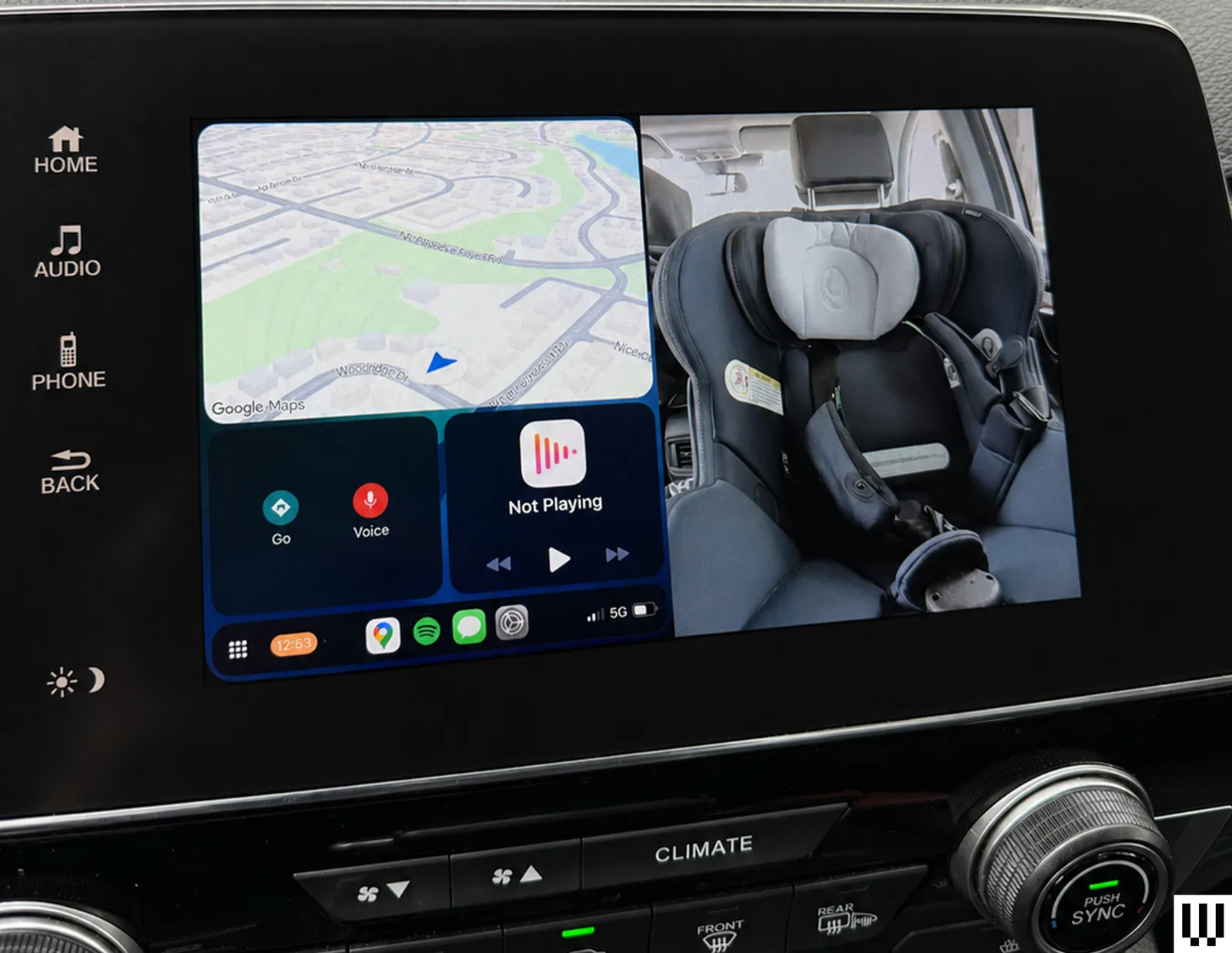
Because everything runs wirelessly via Bluetooth and Wi-Fi, there is also no cable clutter to deal with. This isn’t just a convenience thing. It means no wires dangling within reach of sneaky toddler hands.

Where Tech Collides

This is where the real test comes in. In split screen mode, the system shows CarPlay and the camera feed side by side, with CarPlay positioned on the left for easier tapping access. It’s a smart layout in theory because you get the best of both worlds, but there are some limitations. To fit the camera feed, the CarPlay interface is significantly condensed. It’s still usable, but small enough that I often touch the wrong icon, especially while driving, when precision tapping isn’t exactly my priority. It’s not a deal-breaker, but you’ll notice it, especially if your fingers aren’t very dainty.

Switching to camera mode gives a full-screen view of the back seat, but it comes at the cost of CarPlay controls. Music still plays and calls don’t drop, but I lose access to inputs like my steering wheel’s “skip track” and “end call” buttons. If you rely heavily on steering wheel controls, the trade-off is noticeable, but I find myself sticking with split screen mode most of the time anyway.


Advertisement
Image may contain Electronics GPS Car Transportation Vehicle Credit Card and Text

Photograph: Nicole Kinning

One more interface quirk worth flagging is that whenever I tap the screen, Ottocast overlays a back arrow in the top-left corner and a camera icon (the brand’s owl) in the top-right corner. The issue is that CarPlay uses these corners for key controls: the back button in Spotify, the exit button in Google maps, the now-playing shortcut. The Ottocast overlay gets in the way of your tap. It disappears after a few seconds, but if my next tap doesn’t land precisely where I want it, the Ottocast icons pop right back up and get in the way again.

Overall, the Ottocast Cabin Care works best when you treat it as a convenient upgrade, rather than a perfect solution. It solves the problem of being able to check on your kid in the car without turning around, and does so in a way that feels (mostly) seamless in daily use.

Source link

Advertisement
Continue Reading

Tech

Consumer Reports Stopped Recommending 18 Cars For 2026

Published

on


To earn a spot as one of Consumer Reports’ thoroughly tested top picks, cars not only have to drive well but also be reliable. Some models prove to be consistently durable and stay at the top of the outlet’s rankings year after year, but some slip down the table as owners begin to report issues. For 2026, Consumer Reports stopped recommending 18 models from 12 different manufacturers, primarily due to reliability concerns.

These models included a mix of EVs such as the Audi Q4 e-tron, which saw owners report a variety of issues with its onboard electrical systems, and gas-powered cars like the Chevrolet Equinox, which suffered transmission issues. The Chevy wasn’t the only car that lost its recommended status due to transmission issues, either, with the Chrysler Pacifica, GMC Terrain, and Ford Explorer all seeing similar problems reported.

Advertisement

Genesis told Consumer Reports that issues with the GV60 and GV80, both of which lost recommended status for 2026, had been fixed. However, owners of some other non-recommended vehicles are still waiting for remedial work to be carried out. Owners of the Chevrolet Traverse, as well as the related GMC Acadia and Buick Enclave, are affected by an all-wheel drive issue that GM currently doesn’t have a permanent fix for. In a bulletin, the company said its engineering department is reportedly working on solving it, but advised dealers to simply clear the fault code and hand cars back to customers for now.

Advertisement

Data suggests cars are getting more unreliable overall

The latest Consumer Reports data highlights several specific car models that have seen a rise in reported problems over the last year, but data suggests that decreasing reliability is a much wider problem. In its latest Vehicle Dependability Study, J.D. Power says that it received the highest level of reports from owners about reliability problems since its survey was launched in its current format.

On average, the 2026 study found that owners reported 204 problems per 100 vehicles after their cars had been on the road for three years. The majority of those problems were classified as infotainment problems, which can include issues with smartphone connectivity, wireless charging pads, and bugs and glitches with the car’s integrated apps. Tellingly, almost all of the cars that lost their recommended status from Consumer Reports suffered from issues with their in-car electrical systems or electrical accessories to some degree.

At the other end of the reliability spectrum, Consumer Reports’ most reliable manufacturers list was dominated by Japanese brands. Toyota, Subaru, Lexus, and Honda all scored highly, with one of those brands dethroning the previous year’s winner as the least-complained about on the market.

Advertisement


Source link

Continue Reading

Tech

Peripherals Hacks | Hackaday

Published

on

Custom peripheral projects are among the most rewarding. Especially if you’re like me and you sit at the computer eight hours per day, anything that you can use on a daily basis is super satisfying. This topic of DIY peripherals came up on the podcast while chatting with Kristina, who is no stranger to odd inputs herself.

We were talking about a trackball that had been modified to read twisting gestures, by a clever hijacking of the twin mouse sensors inside. If you do a lot of 3D modeling, you can absolutely get by with just a mouse and shift-ctrl-alt as modifiers, but it’s so much more immediate to use a dedicated 3D input device. (I’ve got an ancient serial Space Mouse just under my left hand as I type this.)

My old favorite, which I haven’t used in ages, is the guts of a 5” hard-drive platter stack that I turned into a scroll wheel. Unfortunately, I don’t have space for it on my desk anymore, but it was just so pleasing to scroll through a document with something that had some real chonky momentum to it.

Advertisement

And it’s easier than ever to make your own. The classic blocky macropad is a great introduction, but as long as you’re doing the design yourself, why not extend it, or at least make it fit your hand? Or take your flights of fancy even further away from the mainstream. Consider the Bluetooth mouse ring, for instance.

Point is, the software side of almost any peripheral device you can imagine is sorted out already, and interfacing with the hardware is equally simple. Peripheral hacks have such a low barrier to entry, but afford so many creative hardware possibilities. And nothing says “Jedi” like building your own lightsaber.

Advertisement

Source link

Continue Reading

Tech

Game Jam Winner Spotlight: Diary Of A Provincial Lady

Published

on

from the gaming-like-it’s-1930 dept

We’ve arrived at the end of our series of spotlight posts looking at the winners of our eighth annual public domain game jam, Gaming Like It’s 1930! We’ve already covered the Best Adaptation, Best Deep Cut, Best Visuals, Best Remix, and Best Digital Game winners, and now we’re wrapping things up with a look at the Best Analog Game: Diary of a Provincial Lady by donnabooby.

E. M. Delafield’s novel Diary of a Provincial Lady was a smash hit when it was published in 1930, and it’s remained in print ever since. Its success came from its combination of comedy with authentic slice-of-life insight into a particular lifestyle, and its stylistic influence can be seen even in modern classics like Bridget Jones’s Diary. This game of the same name might not quite achieve the same status, but there’s no reason it couldn’t: it’s an excellent little party game that blends the mechanics of games like Apples to Apples with the appropriation-and-remix techniques of blackout poetry and similar art forms.

Like many such games, it all starts with a randomly selected prompt — in this case, a random combination of an illustration from the novel with a short question or fill-in-the-blank sentence.

Players compete to impress the rotating judge (or Provincial Lady) for the round by deploying a card from their hand to match the prompt. But rather than just making a selection, first they make alterations. Players are asked to modify a diary entry from the novel by crossing out, changing, and inserting words, adding emphasis with underlines and circles, and otherwise editing the text on their card to craft the best prompt response.

Like any such party game, how it plays out depends entirely on the creativity and taste of the players. The creative freedom of the editing aspect opens it up to so many expressive possibilities beyond the acts of contrast and juxtaposition that dominate other similar games. The charming illustrations and tone-setting text of the diary entries give shape to this freedom, rooting everything in the sometimes-dated, sometimes-timeless atmosphere of the novel. Put it all together and you’ve got a genuinely fun and replayable exercise that is this year’s Best Analog Game.

Congratulations to donnabooby for the win! You can get everything you need to play Diary of a Provincial Lady from its page on Itch. That’s the end of our winner spotlights this time around, but don’t forget to check out the many great entries that didn’t quite make the cut. Thanks again to everyone who participated in the jam, and stay tuned for next year when we’ll be back for Gaming Like It’s 1931!

Advertisement

Filed Under: game jam, games, gaming, gaming like it’s 1930, public domain

Source link

Advertisement
Continue Reading

Tech

Apple AirPods Max 2 Review: The Best Over-Ears for iOS

Published

on

The Bluetooth connection has also been improved, from Bluetooth 5.0 to Bluetooth 5.3. As anyone who has ever experienced having 45 different strangers’ headphones pop up on your iPhone in an airport, the improvement in connection stability is the most noticeable in Bluetooth-heavy environments; I didn’t notice any dropouts. You can also now plug the headphones into your phone to reduce latency and for better sound quality, which is a bit useless for me since I’m one of the vast majority for whom lossless audio makes no difference.

As far as the sound goes: These are some of the best-sounding headphones I’ve ever tried. (I compared them in listening tests with the Sonos Ace.) Anything with a big bass line sounds amazing with Apple headphones, and that iconic “headbanger” intro to Missy Elliott’s “Get Ur Freak On” vibrated right through my skull without sounding muddy.

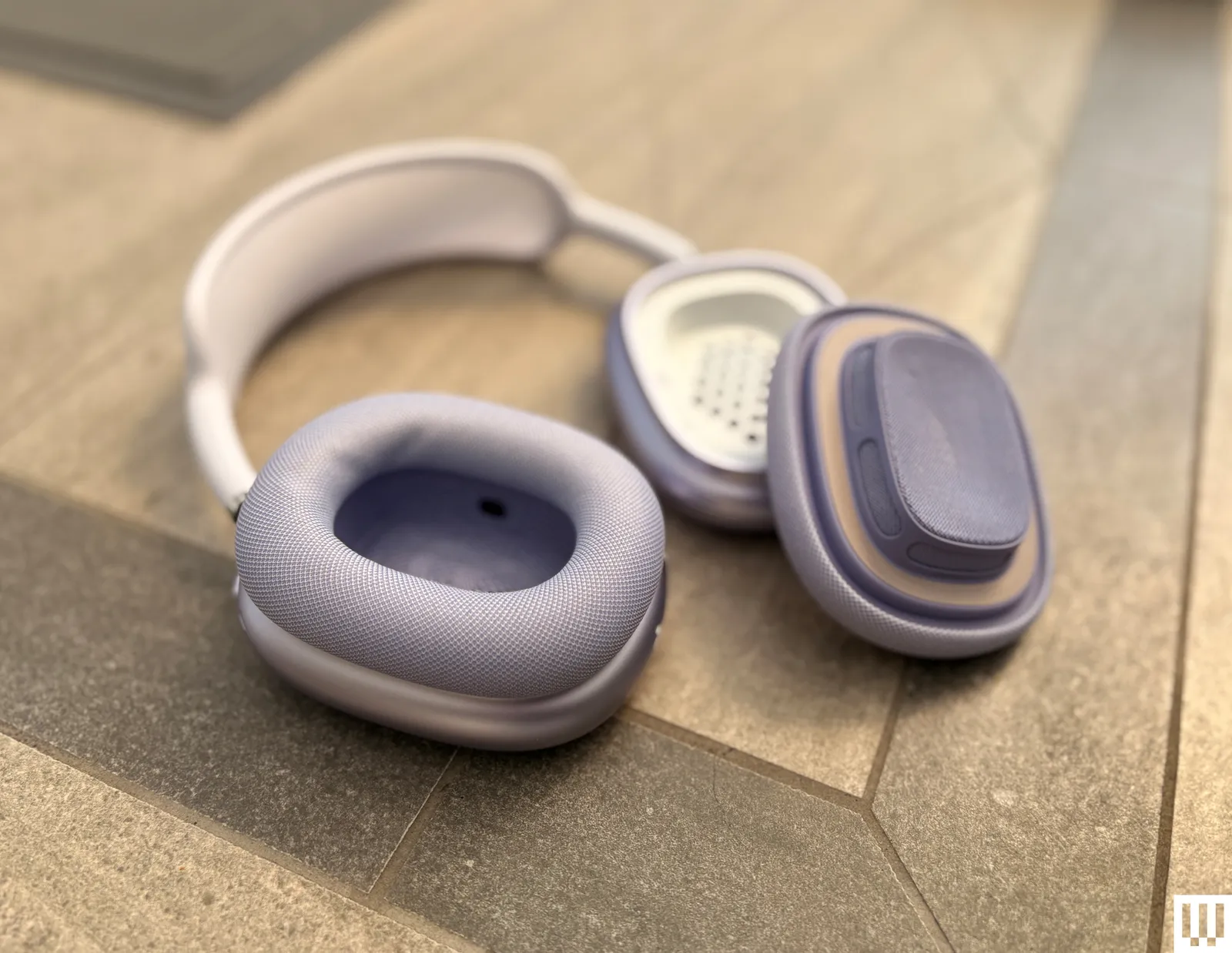
Image may contain Electronics and Headphones

Photograph: Adrienne So

The main criticism of the AirPods Max line in general is that the highs are painfully bright, but I didn’t notice this with Kacey Musgraves’ pure, clear vocals on “Everybody Wants to Be a Cowboy”. I could also enjoy the full speed and articulation of Billy Strings’ intricate fingerpicking. Dance music also sounds incredible—I loved the big brass in La Roux’s Trouble in Paradise and also found myself listening to a lot of Robyn’s Sexistential. There’s still no manually adjustable EQ, so you better be happy with how it sounds because you’re not changing it.

As is the case with most Apple products, if you already own a pair of the OG AirPods Max, you don’t really need to shell out the money to upgrade. However, if you own an iPhone and you’ve been considering whether to get these, the Sony pair, or the Bose, you should probably just get these.

Advertisement

They sound amazing; they block out the whirring of the giant propeller blades of death and your children shrieking while playing Paper Mario in the next room. They now come with a whole new set of software upgrades that make them, along with the AirPods Pro 3, the most useful headphones for iOS.

And if this matters to you—it probably does, since you’re reading this review—the AirPods Max 2 still look and feel totally different from every other headphone around. Why mess with a design that anyone can still spot at 100 yards away? I wish they still came in green, though.

Source link

Advertisement
Continue Reading

Tech

Let Twitch Chat Control Your LED Strings

Published

on

Once upon a time, someone set up a livestream wherein the messages from Twitch chat could control a game of Pokemon. Since then, we’ve seen Twitch control all sorts of things. If you’d like to have them play with some LEDs in your house, you might like this project from [pfeiffer3000].

The concept is simple enough. The heart of the build is an ESP32 microcontroller, which is easy to integrate with web services thanks to its onboard WiFi capability. It’s hooked upt o a string of WS2812B addressable RGB LEDs. The LEDs themselves are installed within table tennis balls to act as nice, spherical diffusers, and installed in a square frame made of PVC pipes. As for code, the rig uses the WLED library to drive the LED strings, and code from TwitchIO to interface with Twitch chat itself. It’s as simple as rigging up a bit of Python. With everything assembled, [pfeiffer3000] had an attractive LED grid that could be controlled directly by anyone watching their Twitch stream.

We’ve explored how to control things via Twitch before, too. It’s a fun way to add some interactivity to your livestream that really gets viewers involved. If you’ve been building your own audience-controlled projects, we’d love to hear about them on the tipsline!

Advertisement

Source link

Advertisement
Continue Reading

Tech

DJI Osmo 360 review: Specs, features, price

Published

on

The DJI Osmo 360 is an excellent example of how to do a 360-degree camera system right. Its massive optional selfie stick is overkill for most people.

Apple has, in recent years, made its iPhones more useful for videography. However, while it has features like Action Mode to make it useful for filming fast activities, it’s still not exactly the best choice for some more hazardous situations.

In cases where someone wants to ski down a mountain, the action camera is still king. In cases where you want more control over how a shot is framed instead of a fixed-on-body position that looks bad, you need a 360-degree camera.

The DJI Osmo 360 is DJI’s latest take on the action cam genre is the Osmo 360, a camera with a pair of fisheye lenses and cameras. Each camera and lens pair covers a 180-degree field of view, or half a sphere, which are then combined into a single image.

Advertisement

Like other 360-degree cameras, this can be used to capture footage from all possible angles. The resulting footage can then be viewed as a 360-degree video or cropped into a more standard video frame from the perfect angle.

The DJI Osmo 360 is a pretty good version of this form, and one that could be a viable choice for avid snowboarders and sports enthusiasts.

DJI sent over the DJI Osmo 360 Adventure Combo, which includes the camera, extra batteries and battery case, a rubber lens protector, protective pouch, cleaning cloth, a quick-release adapter mount, a USB-C PD cable, and a 1.2-meter (3.9 foot) Invisible Selfie Stick.

The Standard Combo includes all but the selfie stick, the quick-release adapter mount, and the battery case.

Advertisement

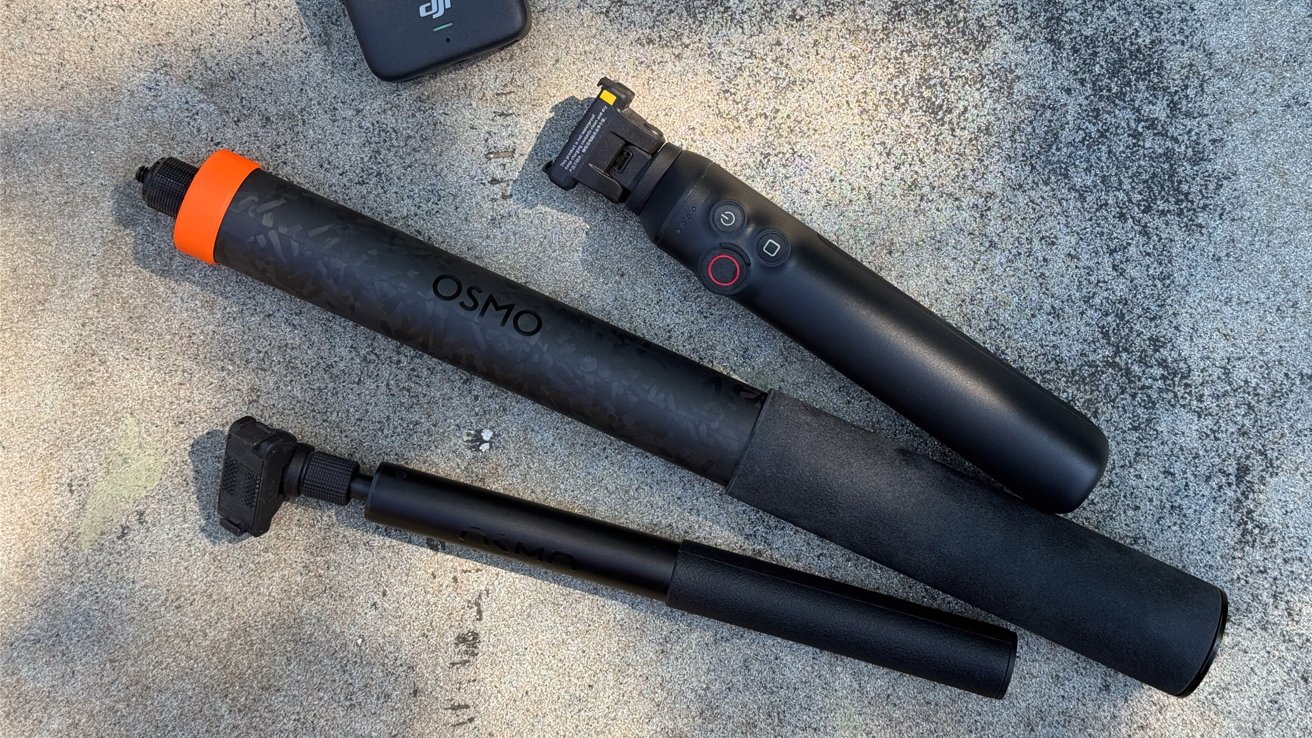
DJI also shipped along two accessories: the Osmo Battery Extension Rod and the Osmo 2.5-meter (8.2 feet) Extension Carbon Fiber Selfie Stick.

DJI Osmo 360 review: Physical design

The actual DJI Osmo camera is a chunky block of plastic, measuring 2.4 inches wide by 3.1 inches tall and 1.4 inches thick. At 6.5 ounces, it’s also pretty dense for a piece of kit, though not necessarily for something that will be used as an action camera.

Some of the thickness is due to the two camera lenses, which stick out from each side.

The front face has one camera lens with an indicator LED and DJI branding, while the other has the second lens and a large 2-inch touchscreen, as well as two physical buttons. That screen is nice and bright when turned on, and gives a view of what the cameras are picking up that you can quickly flick to change.

Advertisement

The two buttons below the screen deal with recording duties and changing the view for the screen, among other functions. On one edge side is the power, as well as a locked panel hiding a USB-C connection.

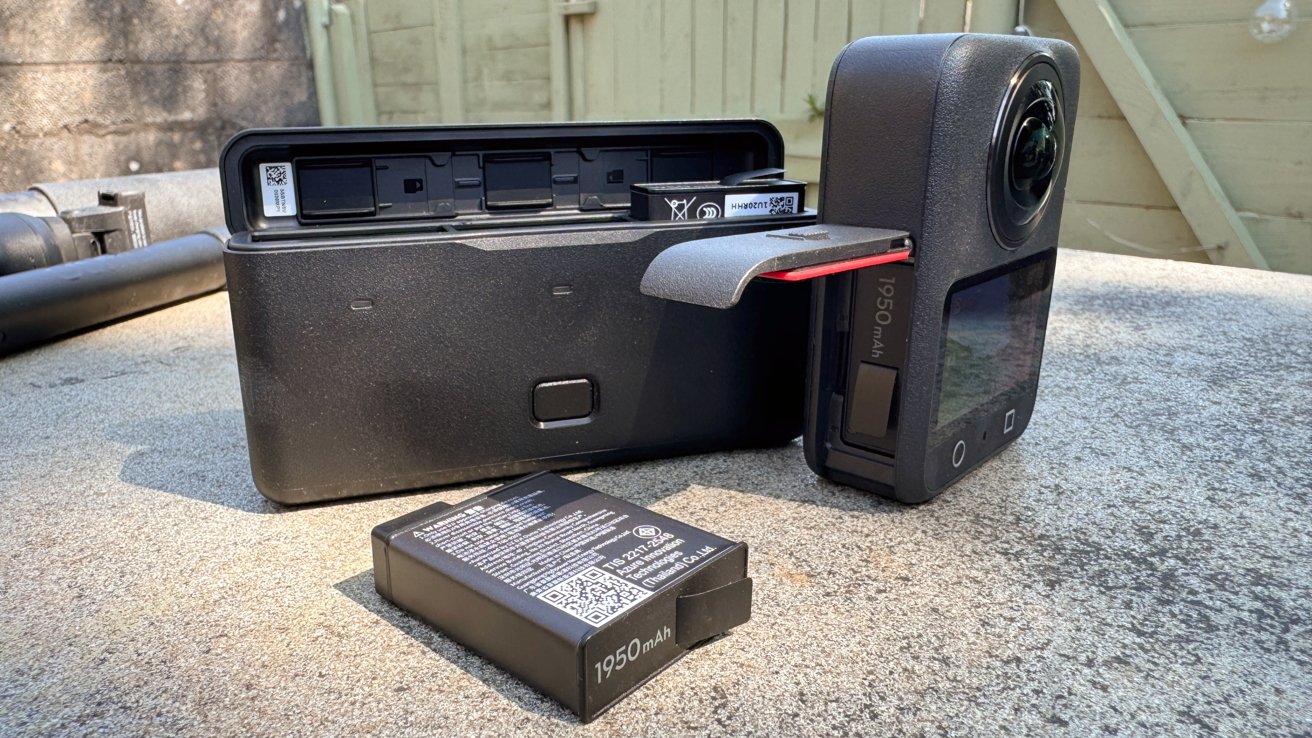
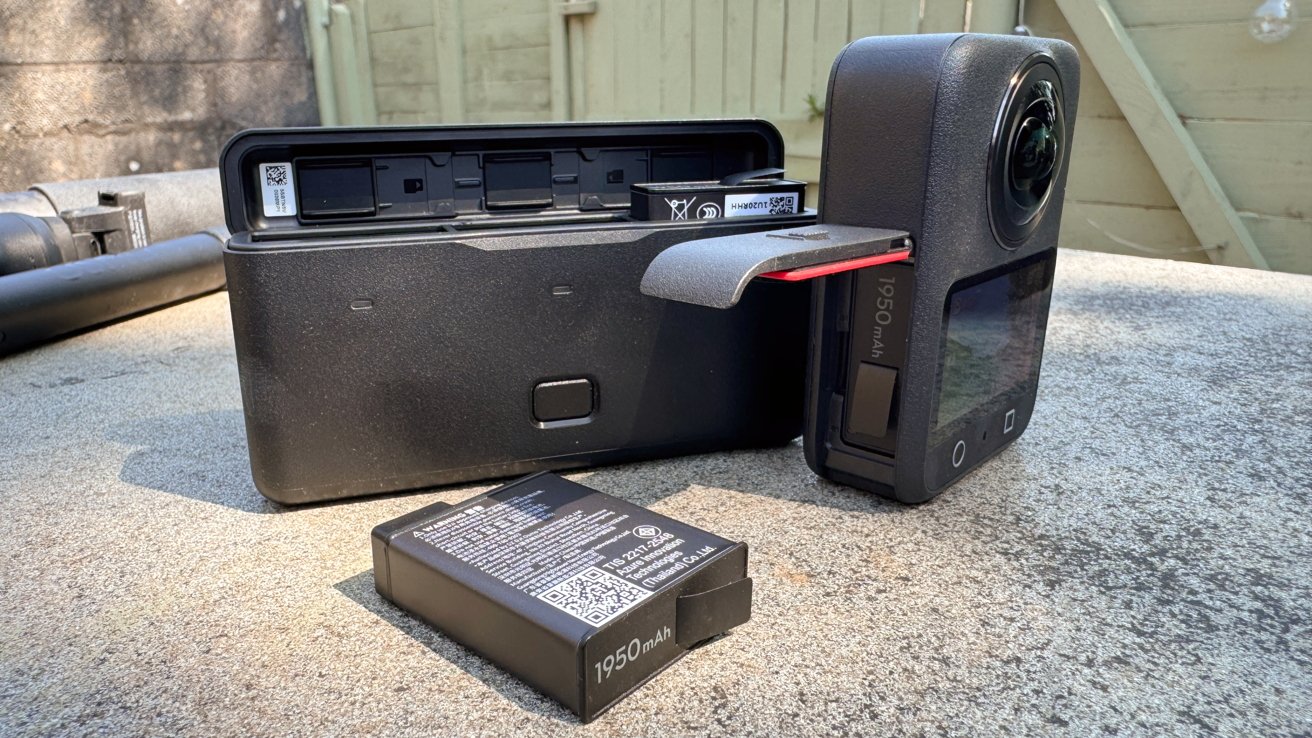
360 action camera with side door open showing battery slot, a separate rectangular battery charger behind it, and another spare 1950 mAh battery lying on a concrete surface outdoors

DJI Osmo 360 review: The battery charger also functions as a case.

The other edge side has another locked panel, which houses the battery compartment and a microSD card slot. DJI does include 105GB of built-in storage, which is great to have since you don’t specifically need a microSD card to use it.

Both of these panels are treated to prevent water from seeping in, which helps since it is billed as being waterproof. However, DJI does warn that while it has an IP68 rating, it shouldn’t be used for long underwater sessions, and to stick to a depth of at most 10 meters (32.8 feet).

Advertisement

Of the non-stick inclusions, the battery case is a similar rugged plastic design, and is capable of recharging up to three of the 1,950mAh batteries used by camera.

While the included case is just the right size for the Osmo 360, I get the feeling that the protective rubber lens cover will get more use. It’s easy to think of someone tossing the camera in its rubber cover into a bag along with a selfie stick for a weekend’s recording session.

DJI Osmo 360 review: Main specifications

The main feature of this action camera is that it uses square high-dynamic-range image sensors instead of rectangular versions. Instead of a trimmed rectangular sensor, DJI went with 1-inch image field square sensors to reduce the bulk.

The pixel allocation as a 4K-resolution square means it also uses more of the pixels than a rectangular counterpart.

Advertisement

This gives it quite a few benefits, such as shooting native 8K panoramic videos. It also uses 2.4-micrometer pixels which are quite large, allowing it to capture more light, including to a 13.5-stop dynamic range at 8K 50Hz.

Its connectivity goes further, including shooting at 4K 100Hz for panoramic slo-mo video, which can be pushed to 4K 120Hz for one lens.

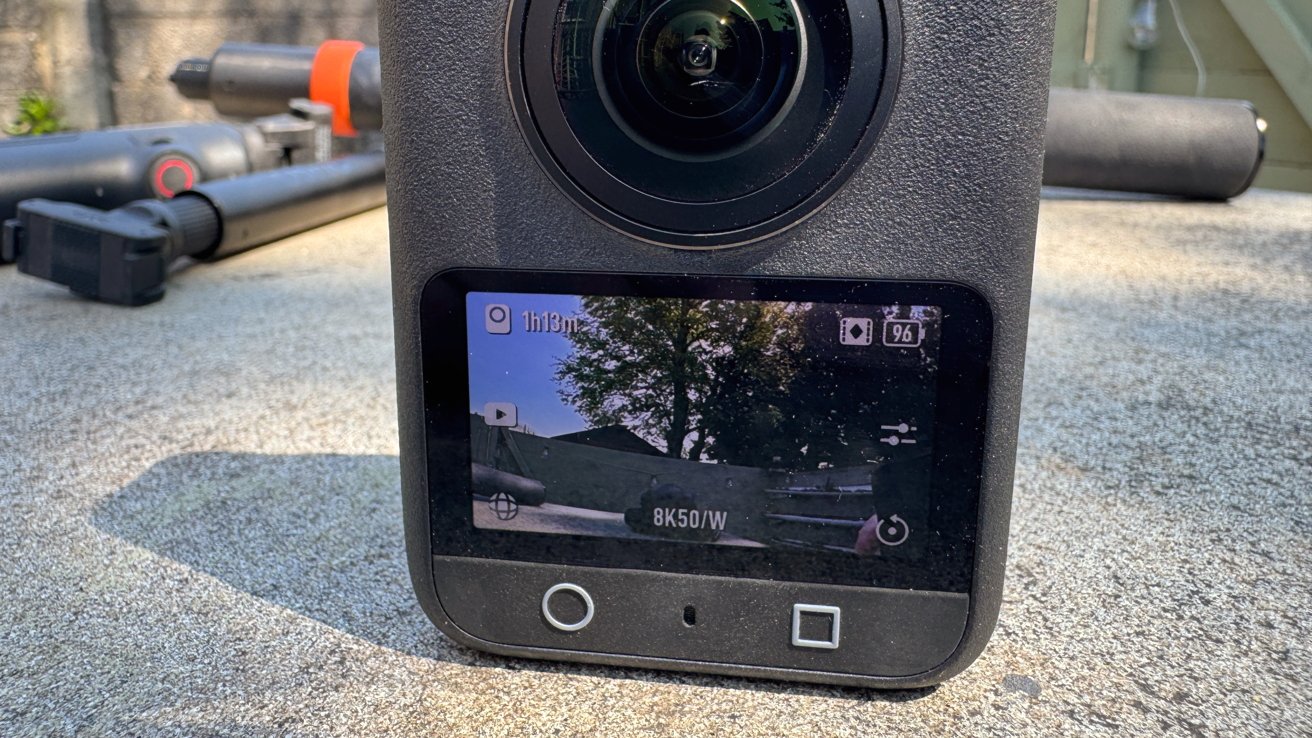
Close-up of a 360-degree action camera on concrete, showing its front lens and color screen displaying an outdoor scene with trees, battery status, recording time, and 8K50/W settings

DJI Osmo 360 review: The preview touchscreen can be scrolled around.

DJI also boasts that it has a SuperNight Mode for capturing late-night shots.

Advertisement

This is also recorded using built-in image stabilization systems, including RockSteady 3.0 and HorizonSteady. The former can be used when exporting via the mobile app, while the latter works with regular flat videos in a standard field of view, not 360 video.

When it comes to creating the actual 360-degree video, there’s a minimum stitching distance of 75 centimeters (2.4 feet), otherwise, you get artifacting for anything closer to the lens and at the edge of the image. It also has an invisible selfie stick feature which hides the mount, but that’s quite a standard thing to use now.

DJI Osmo 360 review: In use

Getting up and running with the Osmo 360 is fairly quick and easy when using it directly. Powering it up, you can then press the circle button to immediately start recording 8K 360-degree footage for up to an hour.

The two-inch screen gives one view, which you can scroll around with your finger. It’s a pretty neat system, and can help you visualize shots like a selfie on the fly.

Advertisement

Around the edge of the screen are indicators for different options, like viewing recorded local video, switching between modes, adjusting camera settings, and swiping down for the general settings.

The modes include Panoramic Video and Photo, as well as Supernight, Selfie, Vortex, and Hyperlapse for the 360-degree camera view. There are also single lens modes like Photo, Video, Supernight, and Boost, which is a wider field of view than normal.

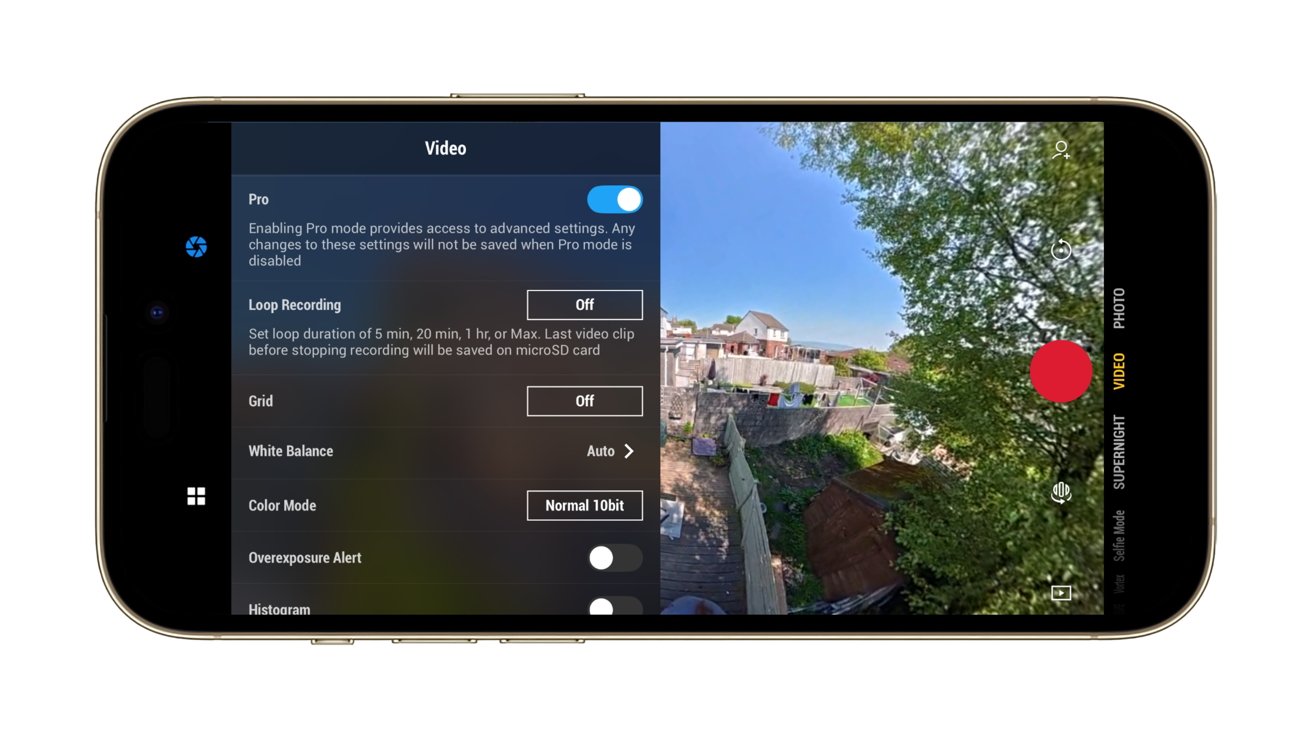
Going through the camera settings, there are options to enable Anti Motion Blur and to adjust the texture and noise reduction of an image, while a Pro button takes you to a lot more of the advanced settings. This includes things like exposure and white balance control, and whether you want 10-bit “Normal” color or the D-Log M 10-bit version.

The latter of the two will be of interest to videographers who want more control of the colors of the final clip.

Advertisement
Smartphone screen showing a video camera app: left side displays Pro video settings menu, right side shows backyard scene with houses, trees, and a large red recording button.

DJI Osmo 360 review:Using the camera from an iPhone

The main settings handles everything from connectivity to a mobile device, locking the orientation, enabling gesture controls, connecting wireless earbuds, if you’re using built-in storage or microSD, and other elements.

While there are four onboard mics that do a fairly good job of environmental recording, DJI does give the option to use its ecosystem of microphones with the Osmo 360. If you happen to own a Mic Mini or Mic 2, you can record two audio tracks with the cameras as well.

In our time with it, we found it to have pretty good image quality overall. You can still see seams where the two camera pictures meet up, but the majority of the time that is for items that are closer than the minimum advised join distance.

Advertisement

As a camera in its own right, it feels intuitive to use, even if you don’t consider using it with other devices. Though, for the purposes of editing, you really should.

DJI Osmo 360 review: Sticks

There are three selfie sticks for this review, including the default 1.2M Invisible Selfie Stick. Made from plastic with a rubber grip, it has a thread in the base and a screw thread at the other end, for attaching to the camera.

It’s a fairly beefy version of a selfie stick, and certainly isn’t flimsy. There’s no articulation at the business end, as you would anticipate with a fairly cheap and run-of-the-mill selfie stick, but you can remedy that with the Adjustable Quick Release Adapter Mount in the Adventure Combo.

Three black handheld camera accessories on rough concrete: a DJI Osmo grip with control buttons, a long OSMO-branded extension pole with orange end, and a shorter adjustable mounting arm

DJI Osmo 360 review: A trio of selfie sticks

Advertisement

While you can attach the camera using the typical thread method, the mount uses two side hooks and strong magnets to pull the camera into position and to dock. Pressing the side buttons to unhook and a small pull releases the camera again.

The mount doesn’t freely move from straight to angled, but instead uses a button to unlock the angular movement. On the one hand, this is really smart and prevents any unwanted movement, but it does also limit the mount to two locked positions.

The second sent for review is the Battery Extension Rod. As a selfie stick, it works like the included Invisible version, with the mount built-in, except it only extends to 2.9 feet.

It’s a chunkier version, because it has a built-in battery that feeds the camera for another four hours.

Advertisement

Handily, it also has limited controls for the camera, letting you start the record or switch the screen’s view without fiddling directly with the camera. This is very useful as a quality-of-life feature, but it’s the only one of the group to have it.

At $99.99, it’s an add-on that is probably worth it for the occasional holiday, especially since it would save you from carrying around extra batteries for the camera.

Person holding a long black telescopic pole with an orange ring, extending upward toward a clear blue sky, viewed from below with a wristband visible on their arm

DJI Osmo 360 review: The 2.5M Extended Carbon Fiber Selfie Stick at full stretch

The 2.5M Extended Carbon Fiber Selfie Stick is the last and somewhat absurd option. It’s an absurd length for a selfie stick, at 8.2 feet, making it taller than anyone actually using it. Few will probably have much use for it, aside from those who want selfies from really far away.

Advertisement

More practically, it could give the effect of having a drone nearby while not breaking any local laws surrounding drone usage. There’s also no buzzing blades either, so feasibly less of a problem for recording animals.

It too is $99.99, but it’s really only useful for a small number of people who want the drone effect without the drone hassle.

DJI Osmo 360 review: Mobile and Mac app

The mobile app that works with the DJI Osmo 360 is DJI Mimo, which handles multiple duties on an iPhone.

For live shooting, it provides a view from the Osmo 360, which you can again scroll around at will.. There are controls for resolution, frame rate, various shooting modes, and advanced “Pro” settings, which are easier to use than having to reach for the camera mid-use.

Advertisement

The mobile app also lets you watch footage stored on the Osmo 360, thanks to its Wi-Fi connection, which you can either stream from the camera or download locally for a better resolution.

In this view, you can scroll around the footage and change the camera angle, which then changes what the final standard non-spherical video shows on export. You can do this manually with swipes and keyframes, but there are options like GyroFrame that uses your iPhone’s movements to change what is in frame, as well as subject tracking.

If you can’t face going through that process, there’s also an AI-based Highlights feature that creates clips for you.

Video editing software window showing a fisheye aerial view of a green field, trees, a small shed, and distant coastline under blue sky, framed by desktop ocean wallpaper

DJI Osmo 360 review:DJI Studio can be used to edit videos.

Advertisement

While this is good for sharing and short clips, you can also import the videos to DJI’s Studio for macOS. It’s an application for viewing the files from the Osmo 360, complete with mouse drags to move around the frame, as well as for editing clips.

You can add clips, change the angle and set them with keyframes, and perform more advanced movements than you can on the iPhone app. The results will be much better from this tool, which may not necessarily need any further changes to the exported video in iMovie or Premiere afterward either, if you’re careful.

DJI Osmo 360 review: A good allrounder

DJI’s experience with drone videography and action cameras have resulted in a 360-degree camera that does an awful lot of work. It’s small enough to go on holiday with, and usable enough to treat like a typical action camera, in cases when you wouldn’t want to use your iPhone.

Despite its size, its resolution and capabilites makes it a viable option for videography usage. Its use of 10-bit footage and optional use of Log will be welcomed, along with the more advanced camera settings.

Advertisement

As a good action camera should, the DJI Osmo 360 is user-friendly for the general public, but with enough options to make more adventurous users happy.

The only real problem is finding a justifiable excuse to whip out the massive selfie stick.

DJI Osmo 360 pros

  • 8K resolution, 10-bit video
  • Easy to use, with expert options
  • Mobile and Mac apps are intuitive and useful
  • Pocketable design

DJI Osmo 360 cons

  • High MSRP, buy on a discount
  • Flaps are a litle fiddly to open

Rating: 4.5 out of 5

Where to buy the DJI Osmo 360

The Osmo 360 Standard Combo is $549.99, with the Adventure Combo at $699.99.

The two bundles are available on Amazon, at $357.49, discounted from $549 for the standard bundle. The Adventure combo can be bought for $493.70, discounted from $699.99.

Advertisement

Source link

Continue Reading

Tech

5 SUVs That Have Notoriously Bad Transmission Problems

Published

on


The transmission is one of the most critical components in any motor vehicle. It’s the mechanical bridge between the engine and the road. If it starts to fail, the entire driving experience can easily fall apart with it. A slipping, shuddering, or hesitating gearbox doesn’t just make a daily drive miserable. It can strand you in traffic or cause sudden power loss at high speeds. 

It can also be a safety hazard. When Consumer Reports made a list of the least satisfying cars to own, most were SUVs, and some were there because of the transmission. An expensive family hauler that lurches through gears poses a serious risk of rolling away or unexpectedly shifting into park because it feels like it has fundamentally broken its promise to the driver.

Moreover, transmission repair bills can easily run into the thousands — and in some cases, owners have needed multiple replacements on the very same vehicle. The worst part? Some of these issues were known to manufacturers long before customers started complaining about them. Here are five SUVs that have notoriously bad transmission problems.

Advertisement

1. Jeep Grand Cherokee

The Grand Cherokee — the worst Jeep model in terms of resale value — experiences transmission problems that are anything but anecdotal. They are documented across multiple recall filings. One of the most consequential is NHTSA Recall 16V-240, issued in 2016. Per the notice, certain 2014–2015 Jeep Grand Cherokees equipped with an eight-speed automatic transmission and monostable gear selector were prone to dangerous rollaways. FCA’s own defect description states that the spring-loaded shifter, which returns to center after each selection like a joystick, led drivers to incorrectly believe the transmission was in Park.

NHTSA (PE15-030) identified 306 rollaway incidents from this defect, resulting in 117 alleged crashes and 26 injuries. This wasn’t the only time the Grand Cherokee faced a rollaway threat. In November 2024, Kelley Blue Book reported that Jeep recalled another 206,502 SUVs — this time 2018–2019 Grand Cherokees — over a faulty ABS sensor that could allow the vehicle to start and shift out of Park without the driver pressing the brake pedal. These problems extend to the Grand Cherokee’s plug-in hybrid, too.

Advertisement

Consumer Reports noted that in 2023, Stellantis recalled 12,458 4xe SUVs after a fault caused the transmission to shut down the engine. NHTSA campaign number 25V-576 later expanded that recall to nearly 92,000 models from 2022 to 2026. A more recent problem involves the 2021–2024 Grand Cherokee. TSB 21-009-25, issued in 2025, documents D-clutch failure in this transmission, triggering DTCs P0733 (third-gear incorrect ratio) and P1DA8 (clutch defective). Owners reported the transmission slipping, failing to move in reverse, and not shifting above third gear.

Advertisement

2. Nissan Pathfinder

The Nissan Pathfinder’s CVT problems are documented in Nissan’s own filings with NHTSA — and the timeline is notable. In 2013, Nissan issued a TSB (NTB13-002) to reprogram the TCM on 2013 Pathfinders to “prevent a CVT belt slip condition from occurring.” The bulletin was dated the same month the 2013 Pathfinder went on sale. A second TSB followed in September 2013. Neither fixed the problem, and the situation turned to legal means. 

According to ClassAction, the class action alleged Nissan began reprogramming software in undelivered vehicles five weeks after the first sales. By the time Nissan issued a voluntary service campaign (PC500) — covering 2013–2014 Pathfinders and filed with NHTSA — the repair tree had three branches: reprogram the TCM, replace the valve body, or replace the entire CVT assembly. That a full CVT replacement was a documented option on vehicles still in their factory warranty window tells you everything about how far the defect had progressed.

The ClassAction page includes verbatim NHTSA complaints from owners — one driver described losing power while merging onto a freeway with a semi behind them; another reported the shuddering occurring on every drive. Nissan did not admit wrongdoing but agreed to a $277.7 million settlement covering 2015–2018 Pathfinders. The problems were severe enough that Nissan ultimately abandoned the CVT. In our own review of the 2022 Pathfinder, we noted that the switch to a 9-speed automatic was a major improvement over what we called the “unlovable old CVT.”

Advertisement

3. Ford Explorer

The 2020-generation Ford Explorer’s transmission problems aren’t singular — they are a cascade of different defects. Ford Safety Recall (23S05), issued in 2023 and covering 2020–2022 Explorers with the 10R60 transmission, documents an unintended PCM reset that could occur while driving. Per the dealer bulletin filed with NHTSA, when this happens, the park pawl engages unexpectedly. This leads to grinding noises, a loss of drive power, and the vehicle either rolling while in Park or becoming completely stuck in Park.

Another defect involves the rear axle horizontal mounting bolt fracturing under heavy torque loads, disconnecting the driveshaft, and eliminating transmission torque to the rear wheels. Consumer Reports reported that Ford recalled 238,000 2020–2022 Explorers under NHTSA campaign 23V675 after 396 reports of bolt failures. Critically, Ford had already attempted a fix on this same defect under a prior recall — and it had not worked. The 2020 Explorer accumulated 33 NHTSA recalls in total — seven directly related to the parking brake. 

This earned it a spot on Consumer Reports’ list of used cars to avoid. A separate TSB (22-2428) documents harsh and delayed shifts caused by sticking valves in the main control valve body, with the repair escalating from reprogramming to a full overhaul. The 2020 Explorer’s CarComplaints page shows over 1,000 NHTSA powertrain complaints, earning it a severity rating of 10 out of 10 — “Really Awful.”

Advertisement

4. Chevrolet Tahoe

The Chevrolet Tahoe’s 10-speed transmission has a documented paper trail stretching across two safety recalls, multiple TSBs, and nearly 1,900 field reports of rear wheel lockup — all filed with NHTSA. NHTSA Recall (24V-797), in 2024, covers 461,839 vehicles — including 2021 Tahoes — and stems from 1,888 lockup reports, 11 road incidents, and 3 injuries. NHTSA Recall (26V-085), issued in 2026, covers an additional 43,732 2022 vehicles (including the Tahoe) after the first recall’s software fix missed vehicles built with unique internal hardware.

GM’s own remedy for both recalls is a software patch, not a physical replacement of the defective valve. A separate GM TSB (22-NA-182) documents harsh shifts, shudder, surge, stall, neutral flare, and transmission overheating as known conditions. Another GM TSB (PIP5893) covering 2021–2023 Tahoes documents a broken or damaged park pawl actuator piston servo triggering a “Service Transmission — Unable to Shift Soon” dashboard message.

The Consumer Reports 2022 Tahoe reliability page lists rough shifting and slipping transmission among owner-reported problems, with one subscriber writing: “Shifts rough, and there’s a lot of slack in gears… I fear transmission will go out next.” As was the case with the Pathfinder, these problems have also attracted legal attention. ClassAction documents an active lawsuit investigation into GM’s 10-speed transmission covering the Tahoe, Silverado, and Sierra. Beyond the recalls, common problems with Chevrolet’s 10-speed transmission reported by owners include rough shifting, gear slippage, delayed engagement from park to drive, and overheating under towing loads.

Advertisement

5. Mercedes-Benz GLE

Spending a better part of six figures on a luxury SUV should buy refinement above all else. However, nothing undermines that promise faster than an unexpected transmission stall. NHTSA Recall (24V-118), issued in 2024, covers 105,071 model-year 2020–2023 GLE 450 and GLS 450 vehicles equipped with the 9-speed 9G-Tronic automatic. Per the filing, the transmission software fails to complete a downshift from 7th to 6th gear under certain braking conditions, causing the engine to stall.

Mercedes opened its investigation in March 2022 after receiving stall incident reports, but didn’t succeed in replicating the fault on a test vehicle until May 2023 — more than a year later. By the time of the recall, the manufacturer had logged 261 field reports and 730 warranty claims related to the condition, per Autoevolution. The stalling recall isn’t the only transmission-related issue on record. On MBWorld forums, owners report harsh, unpredictable downshifts from 5th to 4th during every deceleration.

Advertisement

One owner even described the 9-speed as a “trashcan transmission” that clunks on the 3-to-2 downshift across multiple vehicles. Consumer Reports named the GLE the least reliable mid-size SUV for 2025, with transmission listed among the problem categories driving that ranking. The 2020 GLE’s broader reliability record is so poor that it earned a spot on our list of used Mercedes-Benz models to avoid, which cited up to 36 NHTSA recalls for that model year alone.


Advertisement

Source link

Continue Reading

Trending

Copyright © 2025