
Join Mikko Hyppönen and security leaders from the NFL, CHANEL, and Atlassian for a two-hour digital summit on what AI-speed attacks change, what defenders should stop doing, and how to validate, decide, fix, and re-validate at machine speed.
Tech
Critical VMware RCE flaw now exploited by ransomware gangs



The U.S. Cybersecurity and Infrastructure Security Agency (CISA) warned security teams that ransomware gangs have now joined ongoing attacks exploiting a critical VMware vCenter vulnerability patched in July.
Broadcom addressed the security flaw (tracked as CVE-2026-59310) on July 29, describing it as a critical directory traversal vulnerability in the vCenter Syslog server that unauthenticated attackers can exploit to execute arbitrary code.
The company also warned customers in a supplemental FAQ at the time to treat fixing CVE-2026-59310 as an emergency and install patches as soon as possible.
Two weeks later, digital forensics and incident response (DFIR) company QUIRSO reported finding over 361 IP addresses across 47 countries compromised after a suspected advanced persistent threat (APT) actor began exploiting the vulnerability to deploy a reverse SSH tool for persistence and remote access.
Days later, the U.S. Cybersecurity and Infrastructure Security Agency (CISA) added CVE-2026-59310 to its Known Exploited Vulnerabilities (KEV) Catalog and ordered government agencies to secure their vCenter systems within three days.
Over the weekend, CISA updated its KEV catalog again to flag the security vulnerability as actively abused by ransomware gangs.
Internet security threat monitor Shadowserver currently tracks over 450 VMware vCenter servers exposed online; however, there is no information on how many have already been patched against this flaw.
VMware targeted by ransomware gangs
While the U.S. cybersecurity agency has yet to share any details about the ransomware attacks targeting CVE-2025-60710, VMware servers are commonly targeted because compromised vCenter or ESXi servers can provide access to an organization’s network and sensitive data stored on internal systems.
In recent years, multiple ransomware gangs have developed dedicated encryptors to target VMware virtual machines, as enterprise organizations now commonly use them to manage and store corporate data.
CISA also warned in February that ransomware groups began exploiting a VMware ESXi sandbox escape vulnerability (CVE-2025-22225), which Chinese-speaking threat actors have targeted in zero-day attacks since at least February 2024.
Since the start of the year, the cybersecurity agency has also flagged VMware Aria Operations (CVE-2026-22719) and VMware vCenter Server (CVE-2024-37079) flaws as exploited in attacks in February and March.
Over the last five years, CISA has tagged 26 VMware vulnerabilities as exploited in the wild, nine of them also abused by ransomware operations.


Continue Reading
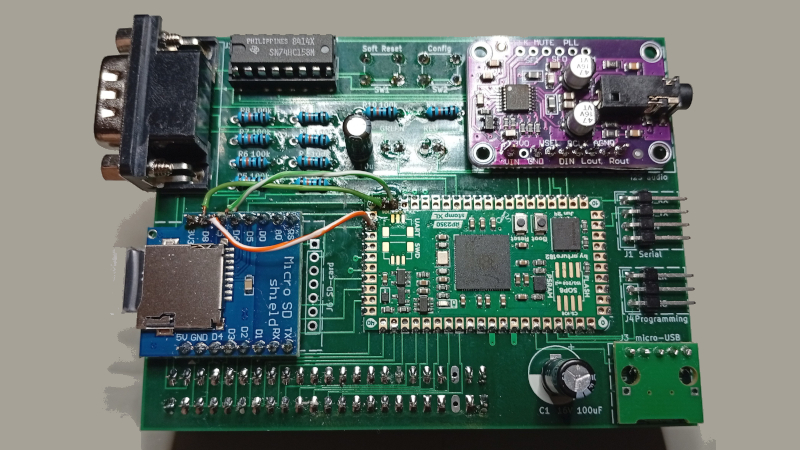
The Sinclair ZX81 was a masterpiece of Sir Clive’s desire to get the most out of the least hardware, being about as minimalist as it was possible to get and still be a home computer in 1981. As such it has a keyboard, a Z80, TC and cassette interfaces, 1K of memory, and that was it. There were any number of add-ons for it, but if you were a 1980s kid the chances are you couldn’t afford them. So 45 years later here’s [adam.klotblixt] with OpenSpand — every ZX81 expansion you could think of, all in one!
For a start there’s a RAM expansion. Not the paltry 16K of old, this is user-configurable and has the whole 64K address space minus the ROM to play with. Then there’s SD card storage, hijacking Sinclair BASIC’s LOAD and SAVE commands. It’s got high-res graphics, emulated sound chips, a joystick port, serial ports, a choice of ROMs, and a composite video output. Perhaps the only thing it doesn’t have from back in the day is a printer interface, but we’re sure the serial port could be pressed into service somehow.
It does this all as you might expect these days, with an RP2350 emulating the real parts. The microcontroller disables the onboard RAM and ROM and emulates those too, such is the disparity in power between it and a Z80. We would have done anything for this expansion, back in the day.
The ’81 features here quite often, most recently in a look at Sinclair’s own RAM expansion.
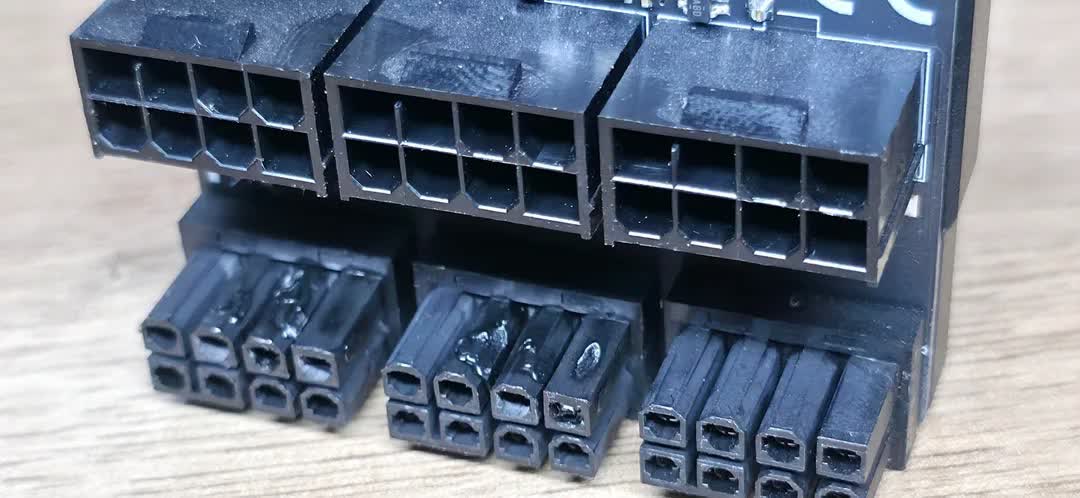
In brief: Nvidia’s RTX 4090 and 5090 have become notorious for melting power cable connectors. While the two flagship GPUs have drawn renewed attention to the problem over the past several years, users should remember that lower-wattage cards and cables aren’t immune, even with power monitoring devices, as one unlucky AMD Radeon RX 7900 XTX user recently discovered.
Redditor AwarenessHour9192 recently complained about a melted power connector on a PC graphics card, an issue commonly associated with Nvidia’s top-of-the-line GPUs. However, this time the affected card was an AMD Radeon RX 7900 XTX.
The user reported black screens and other problems with his PC over the course of months and could not diagnose the issue, even after a workshop reinstalled Windows and ran benchmarks. Only after disassembling the tower did he discover burn marks on the GPU’s power connector.

Nvidia’s RTX 4090 and 5090 have frequently experienced the same problem over the past few years. While the company attempted to close the issue long ago by blaming user error, users have largely blamed its 16-pin power connectors and the 5090’s near-600W power draw, with cases continuing to emerge. YouTube channel TecLab recently renewed awareness of the flaw by demonstrating two extreme ways to circumvent it.
First, they lowered a 5090’s operating temperature by soldering its PCB directly to the power cables, bypassing the connector entirely. On another unit, they proved that the 16-pin connector might be unnecessary by replacing it with a triple 8-pin setup without sacrificing performance, which also lowered temperatures.

AwarenessHour’s issue occurred with AMD’s last-gen flagship GPU, which draws only 400W via an 8-pin connector. Furthermore, instead of plugging the power connector directly into the graphics card, he passed it through a Thermal Grizzly WireView power monitor, which is designed to prevent this exact problem. Luckily, the monitor prevented the damage from reaching the GPU, whereas many other cases have left severe burns on Nvidia graphics cards that now cost over $5,000.
While AwarenessHour has not yet determined what caused the meltdown, Thermal Grizzly fortunately replaced the power connector and the WireView. The incident shows that even GPUs with modest TDPs and 8-pin power connectors can suffer from melted connectors. Users should still take care when installing them and check for physical damage if they experience video output issues.
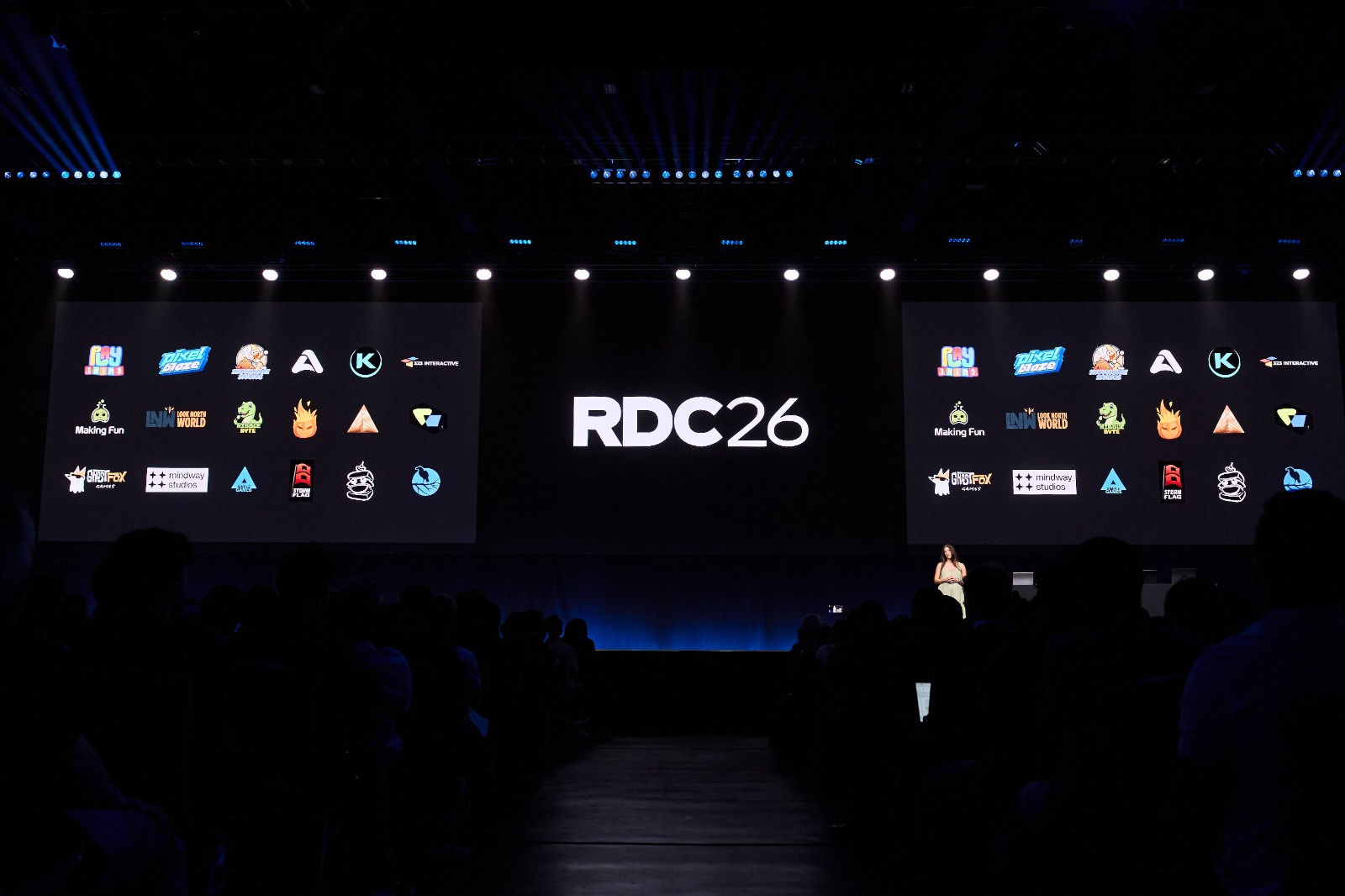
Roblox has announced several new updates at its 12th annual Roblox Developers Conference (RDC). The event brings together developers, artists, designers, brands, and influencers from the Roblox creator community. This year, the company focused on new ways to play, create, and earn on the platform. The announcements include Roblox Everywhere, browser and offline play, new AI creation tools, Roblox Wallet, and Moments. The event also marks 20 years of Roblox’s platform development with its community.
New Ways to Play and Stay Connected
Roblox is increasingly expanding how players can access games across different devices. The newly launched Roblox Everywhere program would let creators deliver their games as separate applications on mobile phones, PCs, and consoles. Roblox would provide the required technology and services behind these apps. Players could also launch games in the Chrome browser without downloading the Roblox application. This browser option will arrive by the end of this year, with more browsers planned later.
Roblox will also add an offline mode and merge it with online mode in the same game. This could mean more single-player modes and more gameplay for people who aren’t always online. Another platform development will be increased support for 2D and puzzle games, with more creation features. These will include an orthographic camera, animated image containers, and direct sprite sheet imports. The platform will also add new UI elements, including blur, text shadow, and gradients. Meanwhile, the Friends chat tab and voice typing will help players stay connected between games.
New Ways for Creators to Earn and Grow
Roblox is also giving creators new ways to earn and manage their income. Creators have earned more than $5 billion through DevEx since 2013. They earned around $1.7 billion on the platform over the past 12 months. Roblox is now introducing Roblox Wallet for eligible creators. The wallet will let creators receive earnings in real currency and get automatic payments each business day. Roblox will first launch it later this year for eligible independent creators in the US aged 18 and above. The company plans to expand it globally next year.
Roblox is also introducing the Roblox Card, which will connect to the Wallet balance. Creators will be able to spend their available balance wherever the card is accepted. The card will start rolling out next year. Meanwhile, Roblox is expanding Moments, where players can watch gameplay videos and jump directly into games. Moments is now fully available in the US. Videos from Experience Details Pages will also appear there soon. Roblox is also updating discovery rankings to match younger and older players better. It is testing rankings based on how many new players a game brings to the platform.

Read this if your phone has slowed down or you’ve been getting weird texts.

If you keep up with cybersecurity news, it’s impossible not to stumble across a headline about some newly discovered Android malware that lets criminals steal your banking info or passwords. Usually, however, these reports are directly tied to rogue apps that you hopefully avoided thus far.
Android is more open than iOS, allowing alternative app stores and app sideloading; it naturally attracts bad actors who use disguised utility apps, fake updates or phishing texts to deliver spyware. However, Android’s open ecosystem doesn’t mean your phone is a sitting duck. Spyware relies on stealth, but it rarely operates without leaving clues. Thankfully, removing spyware does not require a computer science degree, and most infections are super easy to remove in a few easy steps. We’re going to go over how exactly to spot spyware infections, how to safely remove malicious software and the simple habits that will help keep your device secure moving forward.
How can you tell if your Android has spyware?
Spyware often works quietly in the background, digging around for your information, waiting for you to type in a password or use an app. Rarely, however, does it operate without a trace. One of the things you have to watch out for is a sudden change in performance. If you notice unexplained slowdowns, overheating or a battery that’s draining way faster than usual, it could be a sign of spyware.
You could also notice a spike in mobile data usage or storage space vanishing without you installing anything new or taking a billion videos. Persistent ads, random browser redirects or suspicious text messages can also be a sign of spyware. If you notice unfamiliar apps or you get apps suddenly requesting or gaining access to your camera, mic or location, spyware could also be to blame.
None of these signs are proof on their own, because an aging battery can drain quickly for a plethora of reasons that have nothing to do with malware, and an aging phone can sometimes glitch here and there. But if you notice several of these issues appearing together or sudden changes to your device’s regular behavior, it’s worth looking into.
While it’s true that spyware can get on your phone through someone having access to your device and installing monitoring software without your knowledge, the most common infections happen remotely. Phishing scams trick people into clicking malicious links or downloading fake attachments; sideloading apps from outside the Google Play Store is also risky because they skip Google’s vetting process. The truth is that not even the Play Store is completely immune to rogue apps, although Google Play Protect catches most of them before they cause damage.
How to remove spyware from your Android phone

Despite the scary name, spyware isn’t impossible to remove from your device, and it’s not that difficult to do either.
-
Run a Google Play Protect Scan by launching the Google Play Store app, tapping the profile icon, selecting Play Protect and tapping Scan. Play Protect regularly scans your apps already, but you can always run your own check.
-
Install a trusted antivirus app. There are so many antivirus apps available, but Bitdefender Mobile Security and Malwarebytes are commonly recommended options that can detect threats a manual check on your device might miss.
-
Check device administrator permissions on your phone by going to Settings > Security & Privacy > Device Administrators, and revoke access for any app that looks suspicious.
-
Boot the phone into Safe Mode if you can’t seem to remove suspicious apps. Hold the power button, press and hold Power Off until the Safe Mode option appears. This will disable third-party apps temporarily, making it easier to delete any malicious apps.
-
Perform a factory reset if the spyware persists.
How to prevent spyware on your Android phone
Android is a genuinely secure operating system by default… as long as you stick to installing apps from Google Play and respect some basic online safety rules. Here are a few steps to keep your phone clean:
-
Stick to the Google Play Store for app downloads.
-
Even from the Play Store, don’t install just any app; look beyond star ratings. Check out the developer profile to be sure it comes from an established company, review the Data safety section to know what info it collects and whether data is encrypted, and analyze permissions requests — a PDF reader, for instance, shouldn’t ask for location data or SMS access.
-
Make sure you don’t allow installation from unknown sources in your Security settings.
-
Regularly check the list of installed apps and delete anything unfamiliar or unused.
-
Install system updates as soon as possible to patch known vulnerabilities.
-
Use strong passwords and enable two-factor authentication.
Android’s openness is part of what makes it flexible, but it also means the user has a lot of responsibility to keep their device safe. A quick Play Protect scan, an antivirus app and a habit of clearing out unfamiliar apps will handle the vast majority of threats.
At the recently concluded 2026 CEDIA Expo, Dirac announced that the NAD CI SA2-120 BluOS Streaming Amplifier Module and NAD CI S2 BluOS Streaming Module are now certified to support Dirac Live Room Correction. The addition expands access to advanced room optimization across NAD’s custom installation product lineup.
The NAD CI Modular Series is a flexible, high-performance audio solution engineered to simplify custom installation projects. Its compact modular architecture enables easier system expansion and more efficient installations while maintaining NAD’s well-regarded sound quality.
The timing is significant. CEDIA’s preliminary 2026 U.S. Professional Smart Home Market Analysis estimates the residential integration market at nearly $34 billion, underscoring just how substantial the custom installation business has become. That figure represents an extrapolated estimate of the overall professional channel rather than $34 billion in directly reported or audited sales.
An earlier CEDIA study estimated the U.S. market at approximately $29 billion, although changes in methodology and a much larger 2026 survey sample mean the two figures should not be treated as a precise measure of year-over-year growth. What is clear is that residential integration has become a very large market, creating considerably more opportunity for brands that can provide dealers with complete audio ecosystems rather than individual components.
That puts NAD and parent company Lenbrook in an interesting position. Lenbrook’s North American portfolio gives integrators access not only to NAD amplification and BluOS streaming products, but also to DALI’s extensive range of architectural loudspeakers. The DALI PHANTOM lineup includes in-wall, in-ceiling, on-wall, outdoor, and subwoofer solutions designed specifically for custom installation applications.
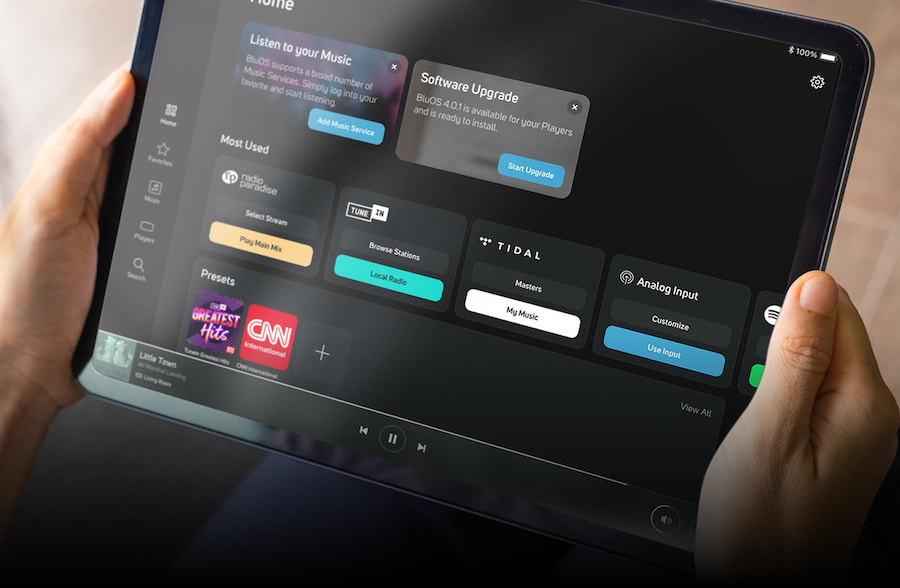
The combination allows integrators to build systems around NAD electronics, BluOS multi-room streaming, Dirac Live room correction, and DALI architectural loudspeakers without having to assemble every part of the system from unrelated brands and distribution channels.
Dirac Live Room Correction further optimizes performance for the unique acoustic characteristics of each listening space, helping integrators deliver clearer, more balanced sound throughout the home.
The technology addresses acoustic problems created by the interaction between a sound system and its surrounding environment. Dirac Live corrects both the magnitude and phase of a system’s response, helping reduce uneven frequency response, timing issues, and imprecise imaging. The result can be tighter and more accurate bass, improved clarity, and a more cohesive soundstage.
“Every room shapes sound in ways that even premium audio hardware cannot address on its own,” said Rikard Hellerfelt, VP and Head of Consumer Electronics at Dirac. “By expanding Dirac Live Room Correction to NAD’s CI SA2-120 and CI S2, we’re giving professional integrators a powerful tool to unlock the full performance of distributed audio systems while creating consistently exceptional listening experiences across the home.”
NAD CI SA2-120 Streaming Amplifier Module
Part of the NAD CI Modular Series, the NAD CI SA2-120 combines high-quality amplification and BluOS music streaming in a compact, space-saving design for single- and dual-zone applications. It is engineered for reliable, long-term operation.
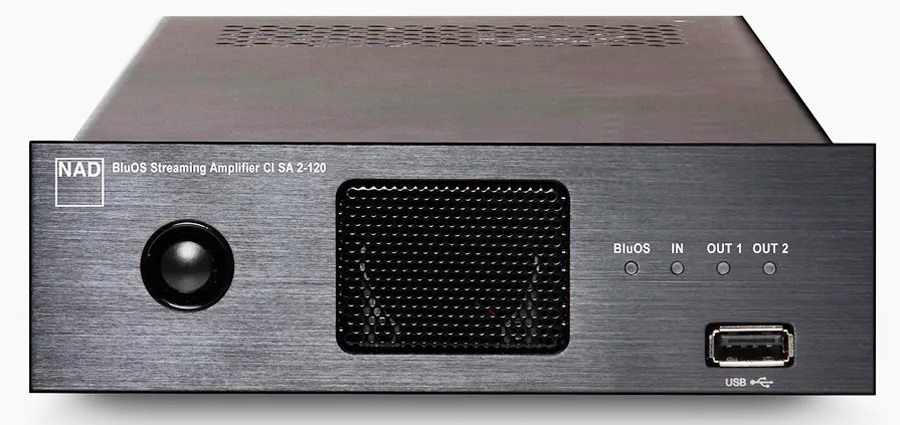
Feature Highlights:
- New: Dirac Live Ready for room correction
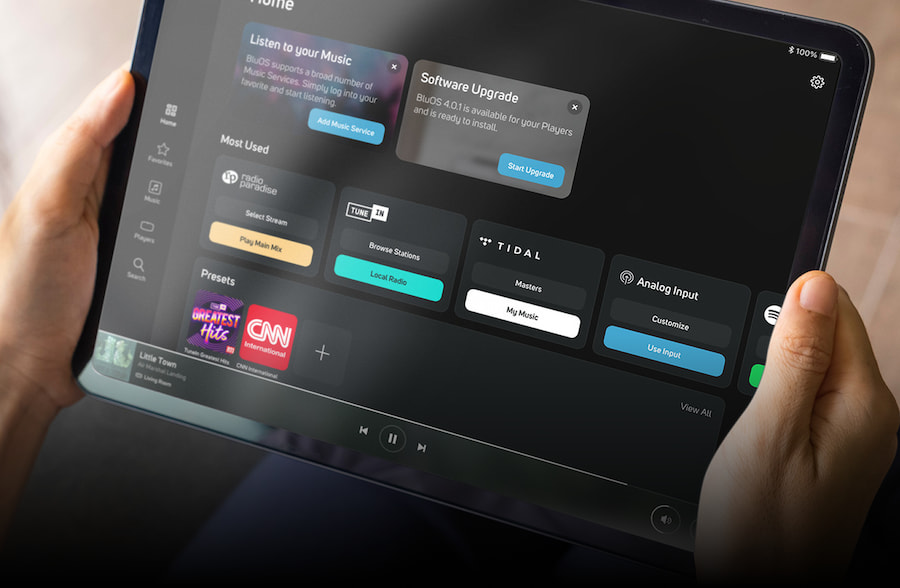
- BluOS Enabled: Includes multi-room streaming with access to 20+ services and internet radio, with dual independent BluOS Zones
- Bluetooth: aptX HD two-way Bluetooth, AirPlay 2, Spotify Connect, and TIDAL Connect
- Physical Inputs: HDMI eARC, combo analog/digital input, USB
- Physical Outputs: Subwoofer output, snap-on Phoenix speaker connection blocks
- Network Connectivity: Dual-band Wi-Fi and Gigabit Ethernet
- DirectDigital Amplification: 2 x 120 W or 4 x 60 W
- Dynamic Power Management: The CI SA2-120 automatically optimizes power distribution
- Control Options: IR input with learning via BluOS (IR extender kit required), programmable 12 V trigger input, drivers for Control4, Crestron, URC, RTI, NICE, Lutron, and KNX, plus remote monitoring via Domotz
- Power: Universal AC power supply
- Cooling: Thermostatic fan cooling with front-to-rear airflow for reliable stacking
- Placement Options: Compact 1/3-width x 1U-height chassis with ChassisLink
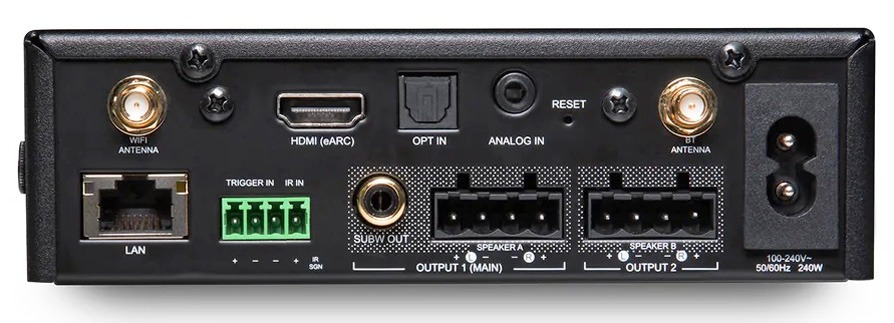
For complete details on the NAD CI SA2-120, refer to its Official Product Page
NAD CI S2 Streaming Module
The NAD CI S2 delivers two independent zones of BluOS streaming, giving integrators a flexible, scalable solution for multi-room audio systems.
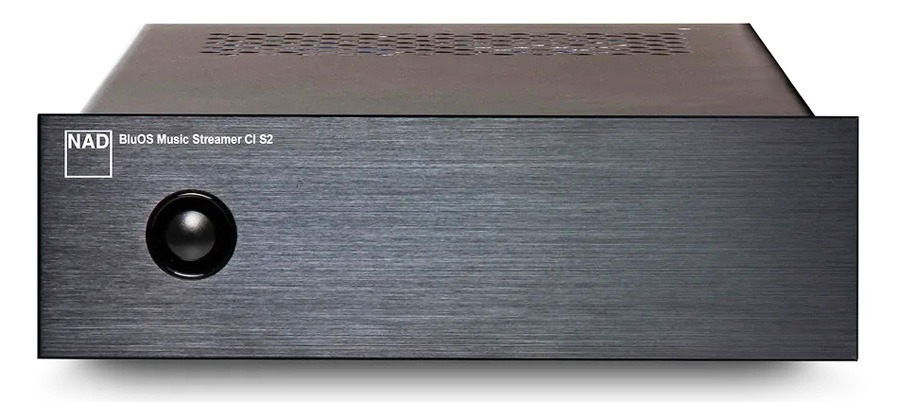
Feature Highlights:
- New: Dirac Live Ready for room correction
- BluOS Enabled: Supports dual independent BluOS Zones. Provides access to 20+ streaming services, internet radio, AirPlay 2, Spotify Connect, and TIDAL Connect
- Physical Inputs: TOSLINK, digital coaxial (with Dolby decoding), analog RCA
- Physical Outputs: 2 x stereo RCA, subwoofer output
- Hi-Res Audio: Supports up to 24-bit/192kHz high-resolution playback with no downsampling
- DAC: Audiophile-grade ESS Sabre ES9039Q2M DAC for detailed, low-distortion audio
- Control Options: IR input with learning via BluOS (IR extender kit required), programmable 12 V trigger input, and drivers for Control4, Crestron, URC, RTI, NICE, Lutron, and KNX
- Placement Options: Compact 1/3-width x 1U-height chassis with ChassisLink
- Network and Power Connectivity: Dual-band Wi-Fi and Gigabit Ethernet, with PoE or 12 V DC power input (<10 W power consumption)
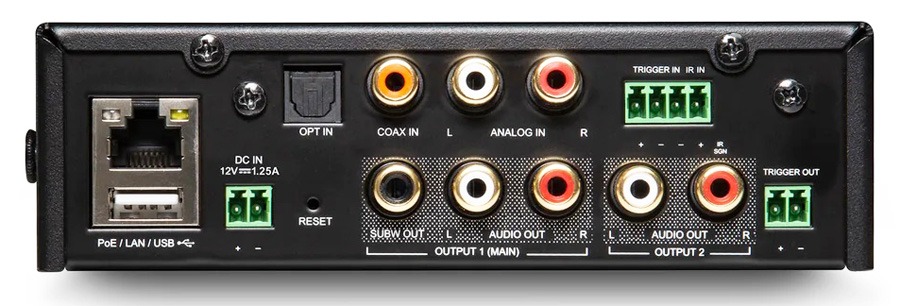
For complete details on the NAD CI S2, refer to its Official Product Page.
”For custom integrators, every project presents a unique acoustic environment,” said Peter Gibb, Custom Install Product Manager, NAD Electronics. “Bringing Dirac Live Room Correction to the CI SA2-120 and CI S2 pairs the flexibility of our modular CI platform with powerful room optimization, helping integrators achieve exceptional, consistent sound across a wide range of spaces and system configurations.”
CI PA4-60 Power Amplifier Module
The CI series also includes the CI PA4-60, a versatile four-channel power amplifier that expands system design options for larger distributed audio systems.
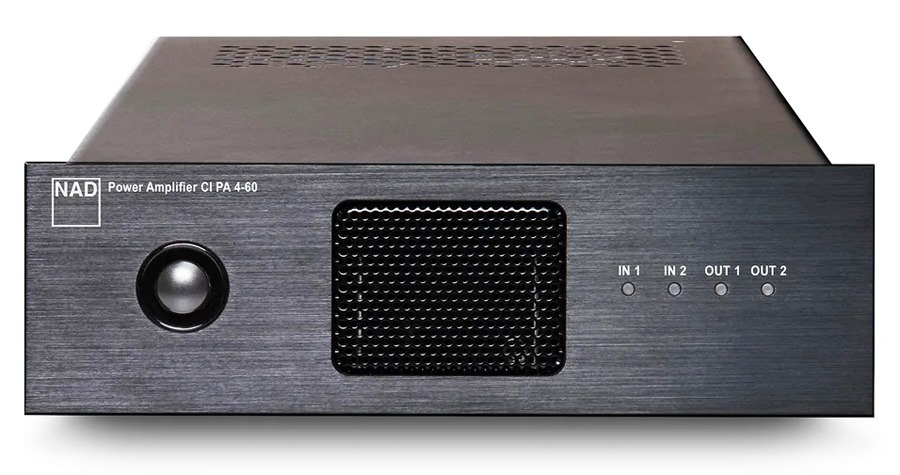
Feature Highlights:
- Note: Dirac Live is not applicable
- DirectDigital Amplification: 4 x 60 W or 2 x 120 W (continuous into 8 ohms)
- Dynamic Power Management: The CI PA4-60 automatically detects speaker loads and routes power accordingly
- Load-Invariant Design: This feature accommodates long cable runs and difficult speaker loads
- Inputs: Two RCA line inputs with gain control and stereo/mono selection. Global/local input switching provides flexible signal routing. Stereo/mono selection is available for Inputs 1 and 2.
- Outputs: RCA loop output from Input 1 for daisy-chaining, plus two 4-pin snap-on Phoenix speaker connection blocks
- Control Options: 12 V trigger input, 12 V trigger input/output, front-panel switch, and signal sensing
- Power: Universal AC power supply
- Cooling: Thermostatic fan cooling with front-to-rear airflow for reliable stacking
- Placement Options: Compact 1/3-width x 1U-height chassis with ChassisLink
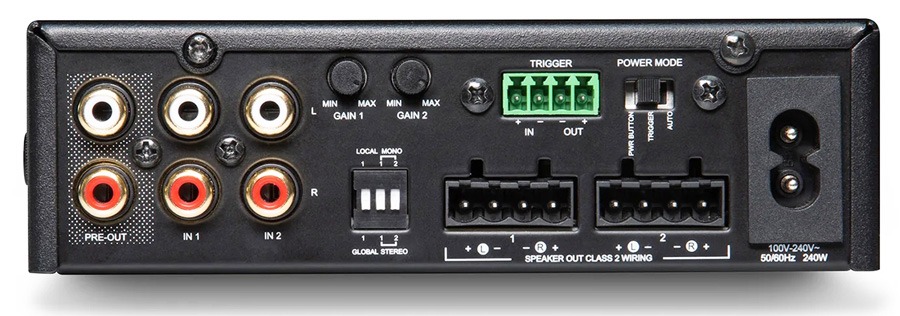
For complete details on the CI PA4-60, refer to its Official Product Page.
Competition
The CI (Custom Installation) category is becoming more competitive, and adding Dirac Live Compatibility to NAD’s entries helps to make their CI SA2-120 BluOS Streaming Amplifier Module and CI S2 BluOS Streaming Module stand out. However, if you take Dirac Live out of the equation, there is competition in the CI space for both streamers and streaming amplifiers, including: NAIM’s impressive CI-Uniti 102 ($1,499) streaming amplifier down to WiiM’s modestly-priced CI A80 Streaming Amplifier and CI MOD S Streamer ($449 each)
The Bottom Line
Dirac Live has proven to be one of the better room-correction platforms available for improving the sonic performance of a loudspeaker system. It can be deployed in everything from a DIY two-channel setup to a professionally installed system, making it especially useful when speaker placement and room acoustics are less than ideal.
Bringing Dirac Live into NAD’s CI lineup gives installers another level of control, but there are some caveats. First, it is not free; installers or end users must purchase a license to use Dirac Live Room Correction (pricing information is provided in the next section). It should also be noted that Dirac Live Bass Control and Dirac Live Active Room Treatment are not supported by the CI SA2-120 or CI S2 at this time.
That is somewhat interesting because Dirac Live Bass Control is available for several of NAD’s non-CI streaming components, including the M10, M10 V2, M10 V3, M33, M33 V2, C 658, and M66. However, Dirac’s current compatibility listings do not indicate support for Dirac Live Active Room Treatment on any NAD product.
What makes the new CI implementation noteworthy is not simply the presence of Dirac Live. The technology is already widely used in AV receivers, surround processors, integrated amplifiers, and other products aimed at both consumers and professional installers. What remains relatively uncommon is native Dirac Live Room Correction inside compact, rack-friendly streaming modules designed specifically for scalable distributed audio systems.
That gives the NAD CI SA2-120 and CI S2 a potentially meaningful advantage. Competing CI products from Naim and WiiM also provide DSP or room-correction capabilities, but they take different approaches. NAD is offering installers BluOS multi-room streaming, professional control-system integration, and Dirac’s automated measurement and correction platform within the same modular ecosystem.
Dirac has made significant headway in the room-correction market, with support from roughly 30 audio brands and numerous products within those lineups. It competes alongside platforms including Audyssey, Anthem Room Correction, Yamaha YPAO, Pioneer MCACC, Trinnov Optimizer, and proprietary systems from other manufacturers. They all attack the same fundamental problem in different ways: the room has an enormous influence on what ultimately reaches your ears.
Price & Availability
NAD CI Series Components can be purchased through Authorized Dealers at the following prices:
- NAD CI SA2-120 Streaming Amplifier – $1,899
- NAD CI S2 Streamer – $1,199
- CI PA4-60 Power Amplifier – $1,099
Dirac Live Room Correction Licenses for the NAD CI SA2-120 and NAD CI S2 are priced between $159 and $249.
The NAD Dirac Room Calibration Kit, which includes the equipment needed to perform precise Dirac Live room measurements, is available for $49 through NAD
Related Reading:

BGMI has introduced a new character designed especially for the Indian community. KRAFTON India has introduced Kiaraa, its first character designed from scratch by its internal India team. She will be introduced in BGMI 4.6, slated for October 8, 2026. Kiaraa will have her own story, location on Erangel, and a dedicated collection. She also takes forward the work started with Anamika in 2025.
Kiaraa Brings Her Own Story and World to BGMI
Kiaraa is the first BGMI character whose whole world revolves around her. KRAFTON India’s in-house artists crafted her entire character in India. Kiaraa’s storyline also has strong links to Erangel and its secret history. As per the story of Kiaraa, she manifests herself due to greed, betrayal, and cowardice among Erangel’s warriors.
Kiaraa is not coming to conquer Erangel or rule the land. She has come to judge the warriors fighting there. Her designated place in Erangel is the Bazaar, which also has significance in her story. The Bazaar is where Kiaraa’s Test and boss battle take place. KRAFTON has included Indian aspects in Kiaraa’s story and her character.
Kiaraa Brings a New Bazaar and Boss Battle to Erangel
The introduction of Kiaraa gives way to yet another spot on the map, known as the Bazaar, in Erangel. This makes the Bazaar BGMI’s second Indian-themed spot, after the Stepwell, introduced in 2025. The developers have added an interesting Diwali theme to the Bazaar map. Players can explore the Bazaar while watching out for possible ambushes.
The Bazaar is also the stage where Kiaraa’s Test occurs, and her boss battle takes place. Players need to locate four lamps that are shaped like peacocks and activate the summon points. There are blue signs that help players locate each summon point in the Bazaar. Kiaraa makes an appearance when players activate all the points. She attacks squads with arrows from her bow.
Kiaraa Nakshatra Collection and India’s First BGMI Prize Path
The Kiaraa Nakshatra Spin brings a range of themed items to BGMI:
- Kiaraa Nakshatra Set
- Divine Peacock Glider
- Divine Radiance SCAR-L
- Divine Chariot Buggy
- Arrow Rain Emote
- Divine Edge Machete
Alongside Kiaraa, BGMI will introduce its first Prize Path created specifically for India. The Diwali Prize Path will feature 20 levels of festive progression. It will run from October 22 to November 15. Players can unlock rewards as they progress through the path. These include the Revel 01 Set and Diwali Gold Set.

In the spring of 2020, as a new and highly contagious virus spread throughout the country, the US came to a standstill. The economy shut down, cities emptied, and white-collar workers were sent home en masse. Platforms like Zoom, Slack, and Microsoft Teams surged in usage as WFH became ubiquitous. From remote schooling and virtual weddings to app-based grocery delivery and livestreamed concerts, the pandemic accelerated and cemented society’s increasing reliance on digital platforms. Already one of the most powerful forces in the American economy, the tech sector suddenly became the infrastructure underpinning every aspect of life.
Tech giants went on an unprecedented hiring spree, scrambling to meet new demand and cement their dominance. Where tech workers already had tremendous labor market power in the preceding decade, the postpandemic boom for technology tilted the balance even more sharply in favor of workers. Demand for technical skills exploded, and tech companies scrambled to recruit engineers, designers, and data scientists, often without fully knowing what to do with them.
Between 2019 and 2022, Amazon and Facebook more than doubled their head count, growing by 92 percent and 93 percent, respectively. Microsoft added nearly 80,000 new employees, while Google brought on over 60,000. With so many workers joining the industry, many were onboarded to teams with no immediate tasks, held in reserve for future projects that hadn’t yet been planned—they were, in other words, hired with nothing to do.
Tech’s pandemic-era hiring boom was underwritten by an extraordinary financial backdrop shaped by over a decade of loose monetary policy. In the wake of the 2008 financial crisis, the Federal Reserve slashed interest rates to near zero to stimulate the economy. And for most of the 2010s, rates remained near zero, creating what economists call an era of zero interest rate policy, or ZIRP.
With money easy to borrow and venture funds flush with cheap capital, tech firms expanded aggressively, and office workers reaped the rewards: skyrocketing salaries, unprecedented job mobility, and the leverage to demand more from their employers. The result was a golden age for tech workers. Many could choose which projects to join, pursue skill development on the clock, or even negotiate permanent remote work arrangements. In this environment, tech workers were prized assets, courted and catered to in ways rarely seen in other industries.
Then inflation hit as an unprecedented flood of pandemic-era stimulus cash went into the hands of consumers, and the Fed responded with one of the most aggressive tightening campaigns in decades. Rates were raised from near zero to roughly 5.5 percent, with the bank making 10 consecutive hikes in just 15 months. As intended, the economy turned cold. The S&P 500 fell 19.4 percent, the largest drop since 2008. Sectors across the board felt the slowdown. Real estate activity plummeted as higher mortgage rates discouraged potential homebuyers. Top retail and entertainment firms, from Walt Disney to Nike to Home Depot, were similarly hit as consumer spending drew back.
But more than any other sector, the tech industry, which had soared to unprecedented heights during the pandemic, fell the hardest. Having experienced outsize gains during the easy-money boom years, tech’s rapid ascent was followed by an equally dramatic crash.
Major tech firms began missing Wall Street’s expectations. Amazon reported sluggish growth and razor-thin margins. Google saw four consecutive quarterly declines in profit, hit hard by a slowdown in digital ad spending. Microsoft also faced headwinds, with its cloud business, its key growth driver, showing signs of deceleration. The exuberance that had fueled the postpandemic rally evaporated, and the air came rushing out of the sector’s inflated valuations. Almost $4 trillion in combined market value vanished from Amazon, Facebook, Apple, Google, and Microsoft. Facebook lost two-thirds of its value. Amazon lost half. And nearly $1 trillion was shaved off Microsoft’s valuation. At year’s end, the industry fell 30 percent, making 2022 the third-worst year in the industry’s history, after the 2008 financial crisis and the bursting of the dot-com bubble in 2000.
Tech
Mondo Italiano Review: Blood, Bullets and Boogie from Italy Delivers Italian Crime Cinema on Blu-ray and 4K
My ancestors might not have invented motion pictures (we invented the telephone, but that’s a debate for another time), although we did give them our own unique flavor, as is our way. Recent weeks have brought us an assortment of tasty imports from il Bel Paese on Ultra HD and 1080p discs. Let’s dig into this eclectic Italian buffet, served up with operatic flair.
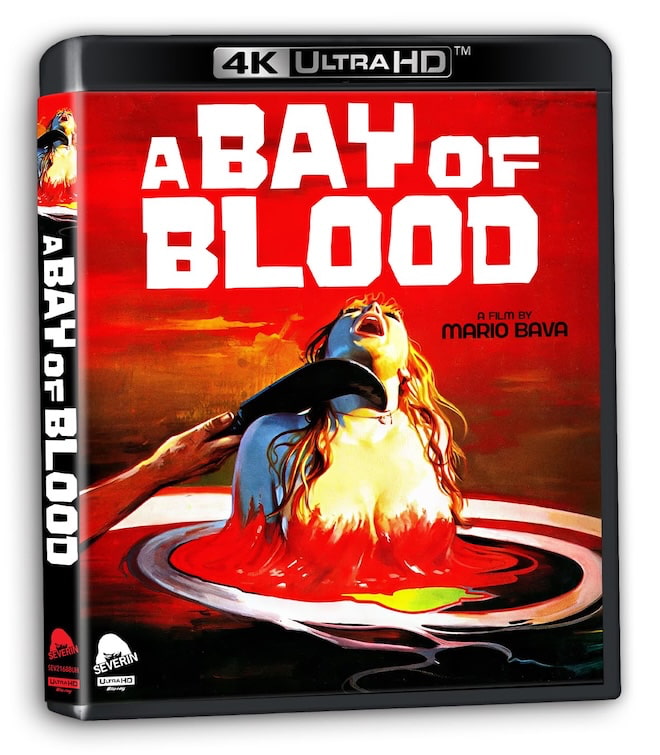
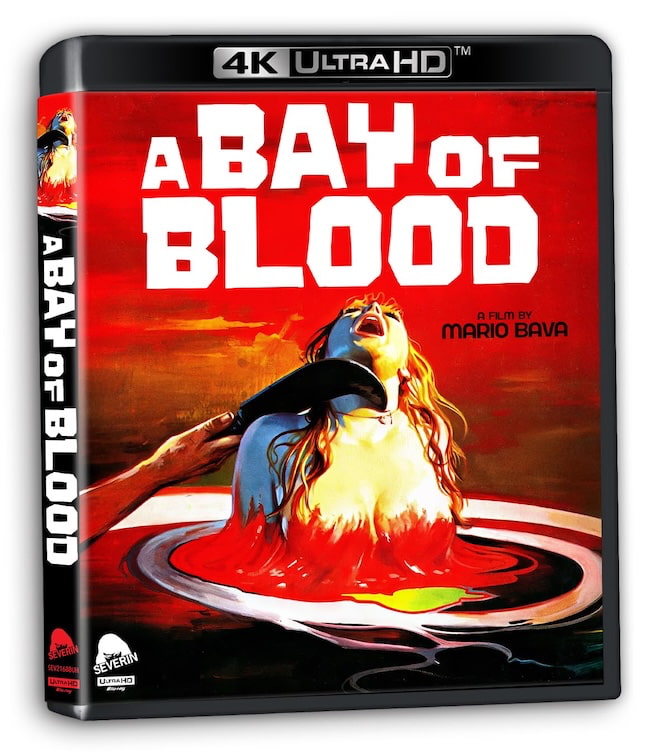
Bay of Blood Limited Edition 4K (Severin Films)
It’s Zillow gone wild as a greedy assortment of relatives, opportunists, and unsuspecting vacationers brutally slay one another in a series of grisly homicides in order to secure ownership of a wealthy heiress’s coastal estate. This 1971 giallo murder mystery holds an interesting place in horror history, deconstructing the genre with its subversion of the usual conventions while also giving rise to the slasher subgenre. Director/co-writer Mario Bava is, in fact, credited as the father of the “body-count” movie, and his penchant for promiscuous young adults wandering into a secluded, wooded retreat only to be picked off one by one—shot frequently through a disorienting, first-person killer’s perspective—is oft-copied, as are some of his specific kills.
To bring those to life, future Oscar winner Carlo Rambaldi designed a baker’s dozen of graphic set pieces, delivered with minimal cutaways. Combine all that with Bava’s high-art visual style on a shoestring budget, a cynical black-comedy tone, and a twist ending, and you’ve got an essential addition to any horror collection.
Severin’s impressive five-disc limited edition includes the English version and both the original and re-released Italian cuts, all in 4K as well as HD. There’s an expert commentary on the English discs and loads of new/archival supplements on both HD Blu-rays, among them cast/crew interviews and featurettes, plus storyboards. Exclusive to this boxed set is the soundtrack CD of the lush, loungey score composed by frequent Bava collaborator Stelvio Cipriani.
Furthermore, this limited edition arrives with an authentic (and fully functional) reproduction of the vintage Carnage* barf bag as distributed in select theaters, scanned from what may be the only original still in existence.
*One of several alternate titles for Bay of Blood dreamed up by the marketing team, along with Twitch of the Death Nerve, Blood Bath, and even Last House on the Left Part II.
Our Ratings
★★★★★★★★★★ Movie
★★★★★★★★★★ Picture
★★★★★★★★★★ Sound
★★★★★★★★★★ Extras
Where to buy: $34.99 at Amazon (September 1, 2026)

Italo-Crime Collection 4K (Kino Lorber Studio Classics)
The prolific, genre-fluid screenwriting duo of Vincenzo Mannino and Gianfranco Clerici turned their typewriters to several gritty poliziotteschi (“police-style”) thrillers made during the peak era of Eurocrime cinema. The international casts include Italian stars alongside well-known stateside thespians Stuart Whitman, Martin Balsam, John Saxon, Martin Landau, and a deliciously evil Henry Silva.
Lock and load for:
- The Counsellor (Il consigliori, 1973)
- Blazing Magnum (Una ombra nell’ombra, 1976)
- Weapons of Death (Napoli spara!, 1977)
Directed by Alberto De Martino, the first two are pretty blatant ripoffs of Hollywood hits The Godfather and Dirty Harry, respectively. In The Counsellor, a disillusioned consigliori tries to leave the mob, triggering a bloody syndicate war that pulls him back in to save his padrino. Blazing Magnum finds a ruthless Canadian detective (go with it) launching a violent investigation to avenge the death of his sister. Back in Naples, a relentless cop wages war against an unpredictable mob kingpin in Mario Caiano’s Weapons of Death. All are uniquely captivating, displaying that rough cinematic edge that only ’70s crime dramas managed to harness.
These are new 4K scans of the original camera negatives, presented in standard dynamic range, in their original Italian with available English dubs and optional subtitles. Magnum and Weapons share a single disc, and all three movies have a new historian audio commentary track. The third disc is an HD Blu-ray with an entire alternate version of Blazing Magnum (“Shadows in an Empty Room”), plus video essays, featurettes, and archival interviews.
Worth mentioning, the three movies are being released individually by Kino Lorber day-and-date as well, but as HD Blu-rays only.
Our Ratings
★★★★★★★★★★ Movie
★★★★★★★★★★ Picture
★★★★★★★★★★ Sound
★★★★★★★★★★ Extras
Where to buy: $49.99 at Amazon (September 22, 2026)

Disco Italiana and The Music Machine Blu-rays (Severin Films)
Back when I did celebrity interviews, I never had as many people asking to tag along as when I met John Travolta, his enduring foundational popularity built largely upon his back-to-back hits Saturday Night Fever and Grease. For further proof of just how big a deal he became, check out Severin’s four-disc Blu-ray/CD discoploitation box, dedicated to the late-’70s subgenre of low-budget films rushed into production to cash in on the global craze that J.T. inspired. Dubbed “Disco Italiana” (not sure why the noun and adjective don’t agree, but this isn’t a lesson in Italian grammar), it collects some peculiarly familiar stories and one familiar mug:
- American Fever (1978)
- Grease Rock (Brillantina Rock, 1979)
- John Travolto: The Face With 2 Left Feet (L’importante è non farsi notare, 1979)
In American Fever, a young mechanic with big dreams gets mixed up in some crazy schemes while moving up the ranks of the local disco scene. Grease Rock follows a conspicuously hair-gelled dude who pursues a wealthy American girl through street-gang rivalries and high-stakes dance-offs. Which brings us to John Travolto: The Face With 2 Left Feet, wherein a shy, clumsy cook takes advantage of his resemblance to a certain movie star to win the heart of a popular DJ. Each includes our choice of English or Italian mono audio.
Pure goofy ’70s fun.
The 12-track John Travolto soundtrack CD is split between the score by Burtt Asch (née Berto Pisano) and songs like “Disco Quando” and “Hot Cha Cha.” All three movies have commentary by well-credentialed authorities, plus a portion of an on-camera interview with Alan Jones, author of Discomania: Fantastic Beats and Where to Find Them.
Our Ratings
★★★★★★★★★★ Movie
★★★★★★★★★★ Picture
★★★★★★★★★★ Sound
★★★★★★★★★★ Extras
Where to buy: $37.49 at Amazon (July 28, 2026)
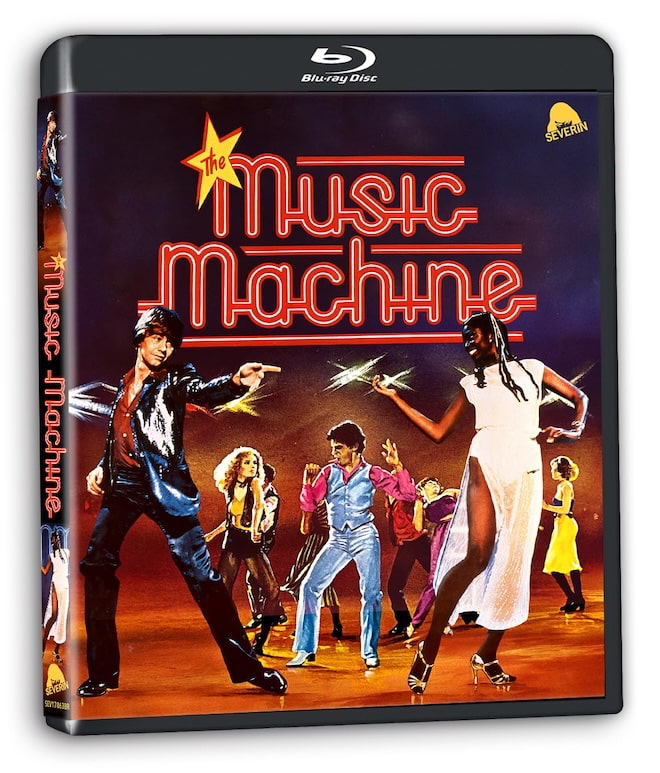
The Music Machine Blu-ray (Severin Films)
To be fair, discoploitation was not limited strictly to Italy, and The Music Machine (1979) is the definitive British example, produced at a time when pop cinema was pivoting more into mod revivals or punk rock. Another lovable loser aims to hustle his way into our hearts, this time an aimless North London bloke who teams with an upper-class partner to challenge the reigning dance champ and win a career-making competition. Like the three films noted above, Music Machine charms with its wholly unironic depiction of the dance floor as a sanctuary of total freedom.
Several of the actors, the choreographer, and a songwriter are interviewed, along with a returning Jones, who also takes us on a tour of the movie’s Camden Town locations.
Our Ratings
★★★★★★★★★★ Movie
★★★★★★★★★★ Picture
★★★★★★★★★★ Sound
★★★★★★★★★★ Extras
Where to buy: $14.99 at Amazon (July 28, 2026)
Related Reading:
After months of beta testing, iOS 27 is finally available to download around the world – and it brings some massive changes to the iPhone experience.
While Apple has billed this update as mainly focused on under-the-hood changes and efficiency improvements, there are still plenty of new features and quality-of-life tweaks worth trying.
From a smarter Siri to better photo editing tools and useful Safari updates, here are some of the best iOS 27 tips and tricks to check out.
1. Make Siri speak faster or slower
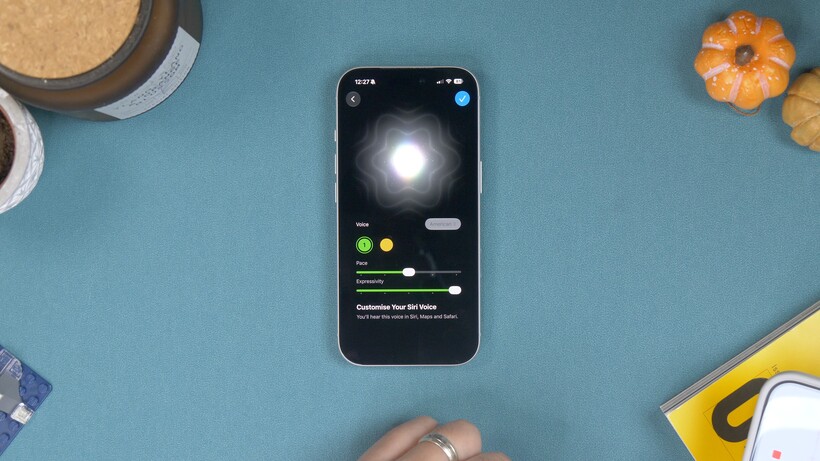
The new Siri app is quite a big deal, and just like before, you get a lot of different options for accents and voices. However, there’s now also a preview feature where you can adjust the speed or pace of speech and how expressive it is.

If you open Settings and find Siri, then scroll down past the languages, you’ll see a toggle switch next to Expressive Voices Preview. Toggle this on, and you’ll be able to choose between two different American voices, then adjust the pace and expressive tones to your preferences.
If you find Siri talks too fast or too slow, or is too excitable, you can play with these settings until you’re happy and tap the tick in the top corner.
2. AirPods Custom EQ
There are a couple of new AirPods features in iOS 27, but the biggest is that Apple has finally enabled custom EQ for AirPods users. As long as you have one of the newer pairs with the H2 chipset inside, you’re good.
If you’ve just upgraded to iOS 27, you first need to update the AirPods firmware. To do that, you connect the AirPods to your phone the usual way – by opening the case on your AirPods Pro or taking AirPods Max out of their case.
Now, the issue is that there’s no way to force the update to install. Your best bet is to leave your AirPods near your phone, connected to a charger, for around 30 minutes.

Once updated, go into the AirPods settings in the Settings app, tap on the ‘Audio and Routing’ option, and you should now have an Equaliser option. Tap this, and you should now see a three-band EQ. You can adjust the bass, middle and treble frequencies to your liking.
3. Extend your photos
So one new thing in iOS 27 is the ability to extend a photo’s borders. It uses Generative AI in a similar way to how Photoshop can do it – basically looking at your photo – and then extending and filling in the edges to make the photo wider, or changing the aspect ratio. It’s pretty cool and works very well.

Open a photo in Photos, and tap that little icon that looks like three sliders in the bottom toolbar. You’ll see an option called Tools, with the Apple Intelligence logo on it. If you tap this, you’ll see an option called Extend. If you tap this, it’ll show you a cropping tool that’s blurred heavily towards the edges, and you adjust the frame until it’s the shape, or aspect ratio that you want.
When you’re happy, tap the yellow ‘Extend’ button and wait for it to do its thing. If you’ve accidentally cropped too far into a photo and want to just extend it and widen the shot, this is how you do it.
4. Reframe your photos
So Apple has introduced this really cool feature in iOS 27 where you can reframe your photos as if you took them from a different angle. It combines generative AI with some pretty incredible spatial awareness to pull it off. So if you’d like to edit your photos to make it look like you shot it from a different angle, you can do it without re-shooting.

To do this, open a photo in your Photos app and tap the sliders in the toolbar to open the editing tools, then tap the Apple Intelligence Tools icon on the next screen.
You’ll see one called ‘Reframe’. Tap it, and it’ll do a quick scan of the photo to determine perspective; then you can drag the photo around to change the angle and perspective until you’re happy. Tap the yellow ‘Reframe’ button when you’re happy, and that’s it. How cool is that?
5. Save a video frame as a photo
In iOS 27, you can save an individual frame from a video as a still photo without having to take a screenshot or any other jiggery pokery.
Open a video in your Photos app and then press ‘pause’ when it opens and starts playing. Now you can scrub along the video to find the precise frame you want. If you tap the three-dot menu at the top, you’ll find a new menu option there called ‘Save Video Frame as Photo’. Tap that, and you’re done.
Your video frame is saved and no screenshotting or cropping required. It’s so much easier.
6. Siri Mode in the Camera
In the new camera app, there’s a dedicated Siri mode where you can snap a photo and it’ll be able to tell you what’s in the picture. Just open the camera app, change to Siri mode in the bottom toolbar, and snap a photo using the Siri button.
Now wait until it’s detected what’s there, and you’ll get an overview in text in a bubble at the top telling you what it’s found.
It doesn’t have to end there either. If you tap the conversation icon in the bottom left, you’ll be able to follow up and have a chat with Siri about that product or object in a very natural, conversational way.
Or if you tap the icon that looks like a picture and a magnifying glass, you’ll get that Apple Visual Intelligence interface where it can find results online where you can buy or research more on the object.
7. Separate Alarm volume from Ringtone Volume
So, who knows why this took Apple so long, but you can now set your Alarm to ring at a different volume from your ringtone and alerts. If you’ve ever missed an alarm because it was accidentally set too quietly – this writer definitely has more than once – this is your saviour feature.
Open your Settings and find the Sounds and Haptics menu. You’ll see an ‘Alarms and Timers’ volume option with a toggle for matching your ringtone volume. Toggle this off so that it no longer matches, and then turn it up as loud as you like it.
8. Adjust Liquid Glass transparency
Liquid Glass has been one of the most divisive changes to iOS in years. Some people really hate it, but now, thankfully, you can reduce the transparency of any glass elements in the interface using a slider in the Settings app.

Open Settings and find Appearance. Now find Liquid Glass, and on the next screen there’s a slider you can drag left or right to make it more or less transparent. Simple.
Along with the newer, less glassy app icons on the Home Screen, it’s definitely a more pleasant experience and crucially makes different elements in the interface easier to distinguish from each other.
There’s a new Full Screen widget option you can choose from now, which – you guessed it – expands a widget to fill an entire Home Screen. There are a couple of ways to do it.
If you already have a widget, like the calendar widget on your screen, tap and hold it; you’ll get a pop-up menu with different size and format options running across the top. The last one (furthest to the right) is your full-screen option. Tap it to expand the widget to fill the screen.

If you want to add a new full-screen widget, just go to your Home Screen customisation screen by long-pressing on a blank space on your Home Screen and tapping the paintbrush icon in the top left. Choose ‘Add Widget’ in that menu, and now you can go through the widget browser and find the widget you want. You can even choose a Smart Stack, and build a stack of full-screen widgets if you want.
10. Get notified about web page updates
So let’s say you want to be instantly notified when a web page is updated. It could be you’re waiting for a product drop or concert page to go live, or waiting for an update on a specific story; there’s a new feature in Safari that can do this for you.
Open a page – like a concert booking page, sneaker drop page or whatever in Safari – and tap the side menu in the Safari URL field. You should see a ‘Notify Me’ option there.
Describe the change you’re looking for, and then tap the ‘edit’ button to change how frequently you want it to check for updates. You can choose daily at a specific time, or hourly, even weekly or monthly. Set the time, and you’re done.
You might have to wait a minute or two for it to build the routine. But when it’s done, hit ‘next’. On the next screen you’ll need to allow notifications, and that’s it; Safari will check every hour, day or week and tell you when there’s been an update.
11. Build your own Shortcuts using AI
So Shortcuts used to be a pretty complex app to master, and needed quite a lot of effort and thought to build multi-step options. But with iOS 27 and its built-in AI, you can literally just ask it to build the shortcut you want.
Open the Shortcuts app and tap the big plus button at the bottom. Now you’ll get a screen asking you what shortcut you’d like.

You could say something like, “Every morning at 8:30am, show me the day’s weather, show me any events and reminders for the day.” Once done, you can run the Shortcut to see how it presents, or go into the settings to see the nitty-gritty of how it’s been built if you want to fine-tune it. If you need to make any changes, you can again just follow up with another natural language request and tweak until you have it the way you want.

You can also set shortcuts that open YouTube and disable the portrait lock, then reactivate it when you exit. Or even location-based shortcuts, like disabling Wi-Fi when you leave home or sending a message to your partner or significant other when you leave work with an ETA.
12. A new way to set timers
In iOS 27, there’s a new interface for setting timers from Control Centre. If you swipe down from the right to get into Control Centre, and tap the timer icon, you’ll now get a horizontal slider-type interface.

Swipe left or right to set your timer; you can go from 1 minute all the way up to two hours. Hit ’Start Timer’ when you’re set, and that’s it. You’ve got a cool new interactive timer control in Dynamic Island.
13. Copy, delete and paste screenshots
This isn’t an entirely new feature, but there’s a new part to it. So for a while now, when you take a screenshot and hit done, or specifically, hit that ‘tick’ in the top corner, you’ll get the option to copy and delete the screenshot, so you can immediately paste it into a message, and the screenshot doesn’t take up any storage space in your photo reel.
But now, there’s a new interface for pasting. So when you open an iMessage, WhatsApp message field, or whatever, you’ll now see a preview of the image and the option to paste it into the chat right there above your keyboard. You don’t have to long-press or find the paste option in any menus, making the process a lot cleaner and more intuitive.
14. Transcribing meetings in the Notes app
So Voice Memos, Apple’s long-time app, is a great tool for quickly recording voice notes and even transcribing them after they’ve been recorded. However, there is a better way if you want to record and see the text transcription immediately as you’re recording: the Apple Notes app.
I will preface this by saying that the feature itself isn’t new, but the accuracy with which Siri transcribes is much better than before. At least, if you’re in a region where Siri AI is available.

What you need to do is open Apple Notes, create a new note and then tap the little paperclip icon, and in the pop-up menu you’ll see an option to record audio. Before you start recording, tap the little speech bubble icon in the bottom left, and then hit the red recording button. As you speak, or as it detects speech, it’ll transcribe it, and when you’re finished, you can hit the tick mark in the top right corner, and it’ll attach the voice recording and the text to the note.
You can then copy and paste the text anywhere you want if you need to format it differently or share it with someone else.
Tech
Rare Frank Wess Quartet LP Returns in Stunning Stereo on Craft Recordings’ Acoustic Sounds Moodsville Series: Review

One reason audiophile-leaning reviewers like myself still exist is that we listen closely to ensure new releases are indeed as fabulous as the manufacturers would like you to think. Thankfully, these days, they often are, and sometimes we discover extra surprises.
Consider the new reissue from Craft Recordings of Moodsville Volume 8: The Frank Wess Quartet. Originally released in 1960 via Prestige Records’ then-new Moodsville line, the subsidiary was a clever way to champion respected players outside the maelstrom of rapidly evolving progressive jazz. Moodsville was a far cry from the cheesy lounge-jazz albums flooding the market at the time by relative unknowns (often budget-line releases). Prestige Records’ Ron Eyre described the Moodsville concept as “Jazz performances of ballads wherein the musical integrity of the artist is maintained and at the same time the original beauty and feeling of the ballad is not lost.”

While this music may not stir your musical moneymaker like Ornette, Miles, or Mingus might have at the time, it had a place serving up super enjoyable, swinging, melodic chill sounds for reflective moments. Moodsville released nearly 40 LPs, including albums by Gene Ammons, Coleman Hawkins, Yusef Lateef, and Kenny Burrell, most recorded by the legendary Rudy Van Gelder.
Official press materials confirm: “Each album will be released on vinyl in partnership with audiophile leader Acoustic Sounds, a partner Craft has previously collaborated with on its acclaimed Bluesville Records and Contemporary Records Acoustic Sounds series. Delivering the highest-quality listening experience, the LPs feature all-analog mastering (AAA) from the original tapes by GRAMMY-nominated engineer Matthew Lutthans (The Mastering Lab) and are pressed on 180-gram vinyl at Quality Records Pressing (QRP). Faithfully reproduced tip-on jackets round out every release.”
Original vinyl copies of Moodsville Volume 8: The Frank Wess Quartet are not easy to find in good shape. My so-so copy is the only one I’ve found to date (until now!). A lush treat, this reissue’s surprise is that it is in stereo. Nowhere on the cover, hype sticker, or in the press materials do the producers indicate that this is a stereo mix, so that’s a sweet bonus. Overall, it sounds markedly less compressed, more natural, and more alive than my mono original.

The mix places Bobby Donaldson’s drums off to one side and Wess on the other, glued together by bassist Eddie Jones and Tommy Flanagan’s piano in the center. This approach probably had something to do with how the mono mix sounds. Van Gelder’s recording process (confirmed for me years ago when researching some Blue Note reissue reviews) changed once stereo LPs became a commercial reality in 1958.
He switched over to stereo recording and pretty much never looked back, his subsequent mono mixes effectively folded down from two-channel. Nonetheless, his wizardry still made great, punchy-sounding mono releases. I suspect his recording design here could fold down neatly into mono.
Moodsville Volume 8: The Frank Wess Quartet delivers exactly what the label intended: fine moods equally enjoyable for attentive listening or background spins. What’s not to like?
Our Ratings
★★★★★★★★★★ Music
★★★★★★★★★★ Sound
★★★★★★★★★★ Packaging
Where to Buy
Mark Smotroff is a deep music enthusiast / collector who has also worked in entertainment oriented marketing communications for decades supporting the likes of DTS, Sega and many others. He reviews vinyl for Analog Planet and has written for Audiophile Review, Sound+Vision, Mix, EQ, etc. You can learn more about him at LinkedIn.
NewsBeat3 seconds ago
Astley’s Fresh Start wins Green Apple Environment Award
Business44 seconds ago
MUC stock hits 52-week low at 10.16 USD

Crypto World3 minutes ago
Bitcoin Short-Term Holders Win Streak as Bull Signs Rise



-

 Fashion4 days ago
Weekend Open Thread – Corporette.com
-

 Business5 days ago
Micron Stock Climbs Above $1,031 as AI Memory Crunch and a $50 Billion Outlook Fuel the Rally
-

 Tech2 days ago
The Latest Weird Thing to Play Doom Is the Mapped-Out Brain of a Fruit Fly
-

 Business6 days ago
AMD Stock Climbs After Management Lifts 2027 Data Center Outlook Toward $70 Billion in AI Sales
-

 Crypto World7 days ago
Robinhood Stock: How To Take Advantage With Reduced Risk
-

 Crypto World7 days ago
Bitcoin price risks $76K drop as $78K support weakens
-

 Crypto World4 days ago
XAG/USD: Silver’s Short-Term Rally Meets Its Moment of Truth
-

 Crypto World5 days ago
2 Chip Stocks Broke Out This Week. Neither Was Nvidia
-

 Business4 days ago
10 Most-Streamed Songs On Spotify In 2026 So Far, Led By Ella Langley’s Dominant Run On The Charts This Year
-

 Crypto World7 days ago
Ethereum price stalls below $2,500 as ADX drops to 11
-

 NewsBeat7 days ago
England up in reading, maths and science rankings as Scotland and Wales dip
-

 Tech5 days ago
Battery life is the only iPhone 18 Pro and iPhone Duo upgrade I care about. Apple didn’t disappoint
-

 Crypto World5 days ago
OKX launches 10x OpenAI, Anthropic X-Perps in Europe
-

 Crypto World7 days ago
Intel Stock Jumps 9% on Chip Price Hike Report, US Stake Gains $36 Billion
-

 Crypto World6 days ago
Pi Network ships Protocol 27 on a network with 14 million users and zero DeFi
-

 Crypto World4 days ago
Diesel Tops $6 a Gallon for the First Time as 28 States Set Records
-

 Tech6 days ago
Apple Watch Ultra 4 vs Watch Ultra 3: Should you really spend another $799?
-

 Crypto World7 days ago
CLARITY Act runs out of calendar as crypto regulation stalls
-

 News Videos4 days ago
Facing Financial Fears
-

 Crypto World6 days ago
Bitcoin price risks $70K if $78K neckline breaks
You must be logged in to post a comment Login