After imagining explosions, blackouts, and daring escapes, this techie decided the best thing to do was just not doing the job
ON CALL Making it through a working week can feel like a dangerous adventure. That’s why The Register offers a little certainty and safety by always using Friday morning to share a new edition of On Call – the reader-contributed column sharing your tales of tech support.
This week, meet a reader we’ll Regomize as “Socrates,” who many years ago was the “fresh-faced manager of a small software department.”
Advertisement
Socrates’ employer had sold some monitoring hardware to a client that made equipment for power stations, but whoever installed the system had neglected to document it properly.
Socrates’ boss asked him to visit the site and bring the client up to speed.
“In those days I considered myself to be a bit of a programming hot-shot, and a visit to a power station sounded really interesting, so off I went,” Socrates told On Call.
He therefore drove to the plant, presented himself at the security gate, and was eventually led to something called a “turbine overspeed detector.”
Advertisement
“This power station was seriously big and impressive; massive rotating machines humming away, with barely anyone around,” Socrates wrote. “In a dark remote corner, there it was, the equipment I had come here to see: a dusty CP/M computer with various I/O cards, connected to wiring that snaked off into the far distance.”
But Socrates had no idea what it did.
In his email to On Call, Socrates pointed out that at the time of this story, Tom Cruise was yet to appear in a Mission:Impossible movie, and The Matrix was still years from release.
But his memory of these events is is somehow entangled with both franchises.
Advertisement
“I didn’t know much about electricity generation, but I did know that a turbine is a thing with pointy blades, that are pushed around by steam to drive a generator,” he wrote. “And these turbines were absolutely enormous, and the thought of them overspeeding was truly scary.”
“You know the scene in Mission:Impossible where Tom Cruise is on the back of a train, pursued by a helicopter that crashes with its rotor blade just inches from Ethan Hunt’s throat?” he asked. “That image would have been uppermost in my mind; knife-like turbine blades being ejected in all directions, requiring all my Matrix-like skill to dodge them as they headed my direction.”
He then reasoned that an overspeed event would probably shut down the turbine – before imagining cascading faults blacking out an entire city.
Keen to avoid either scenario, Socrates sat down at the keyboard, opened the relevant software, and vowed not to break anything.
Advertisement
He got into the code and found it was “horrible.”
“Despite my tender years, I’d gained some exposure to well-structured programs, and this was truly awful,” he told On Call. “There were plenty of random GOTOs, a lot of I/O accesses to random addresses, with arithmetic, ANDing and ORing with arbitrary-looking numbers.”
And all without a single comment to help Socrates understand what he was seeing.
As he pondered what to do, only one sensible course came to mind: “Back away carefully from the keyboard and leave the system as-is.”
Advertisement
So that’s what he did.
Socrates now rates the experience as an important life lesson.
“Some things are best left alone,” he told On Call.
Have you bailed out of a tech support job? If so, click here to email us what happened and why. We promise not to give up on your story. ®
We’ve got an AppleInsider staffer inside Amazon’s new drone delivery range. After trying it out on Thursday, we can tell you that it’s effective, and we’re going to use it again.
Earlier this week, Amazon greatly expanded the service area of its drone delivery service. A little napkin math suggests that the airborne delivery service now covers about 3500 square miles more than it did a few days ago.
And, as part of this expansion, one of our staffers is now inside the footprint of that service.
Partly out of curiosity, and partly out of need, he ordered something to be delivered by drone. It wasn’t an iPhone or AirPods, as Amazon suggested, no, but that didn’t seem prudent to try first.
Advertisement
The box the package shipped in
An initial delivery time was given, and Amazon was close enough to that estimate. Delivery was only about 10 minutes later than expected. The drone approached from the north of his location, and buzzed into place.
It hovered for a moment. With a light click, and continued mad hornet buzzing, it dropped the package about four feet, accurately, onto the selected front yard landing zone.
We did see, though, that the package rolled a bit before it settled into place. Your mileage may vary on this, of course, depending on the slope of your yard, the surface it lands on, and the angle of impact of the box.
Advertisement
The drone, leaving, after having dropped its payload.
You get to fine-tune the drop zone on your property when you order, some, but don’t expect it to be precise enough to drop it on a second-floor balcony. It’s probably not wise to bombard your driveway or your roof with your Amazon box.
Time and costs for Amazon Drone delivery
All told, from order to delivery took about an hour and a quarter, with it launching about a half an hour after the order was placed. The box was better packed than most of Amazon’s packages these days, which you’d probably expect since they know they’re dropping it from a bit of a height.
Amazon drone delivery packaging for a very small and light item
Advertisement
Amazon deliveries by vehicle within an hour cost $9.99 in some metro areas. If you can accept delivery within three hours, it’s generally $3.99. This incurred no additional cost, for now, at least.
Limits on shipped items are about five pounds, and the package has to fit in a box about the size of a shoebox, as seen above. Our package contents weigh about the same as an AirPods 4 box.
So far, we’re pretty impressed with this service. We’re also sure there’s going to be incidents of packages rolling under cars and the like.
Plus, you probably want to be home, since the box will be in your yard somewhere.
Advertisement
For now, though, so far, so good. We’ll do it again. Just maybe not with a $1000 iPhone.
Investors hope Anthropic would be valued at $2trn or more – doubling its initial target and dwarfing SpaceX on the way.
Anthropic’s upcoming blockbuster initial public offering could match or exceed funds raised by SpaceX, more sources have confirmed with Bloomberg, as the five-year-old AI company reportedly aims for a listing as soon as the end of August.
Earlier this month, the Financial Times reported investors’ expectations that Anthropic would be valued at $2trn or more – doubling its initial target of $1trn and dwarfing SpaceX as the largest public listing in history.
Details of the IPO plans have been kept guarded, with the company yet to fix on a valuation. Anthropic was last valued at $965bn after a $65bn Series H in May.
Advertisement
Backers – including venture capitalists, other industry giants and institutional investors – have poured nearly $100bn into Anthropic just this year, fuelling the business as it looks to build its own AI chips to keep up with the surging demand for its AI products.
The company’s state-of-the-art Claude models are a repeat headline-maker, competing for industry dominance with its biggest rival, OpenAI, which also hopes to go public soon.
And despite the growing crop of cheaper Chinese models – especially in the open weights category – showcasing similar capabilities, investors seem confident in their support for the US giant.
Last month, AMD pledged $5bn to Anthropic and gave the AI giant access to 2GW of its latest-generation chips. In April, Amazon announced plans to invest $25bn into Anthropic – and Anthropic, in turn, pledged to spend around $100bn on the e-commerce juggernaut’s cloud technologies.
Advertisement
The AI giant does not share figures on its user-base, but Statista placed total Claude monthly users globally at around 245m as of June. Comparatively, OpenAI’s ChatGPT reached 1bn users in May.
These expectations for massive valuations come as a result of Anthropic’s rapidly growing revenue, which reportedly hit roughly $11bn in the second quarter of this year – more than double the $4.8bn of the first quarter.
The company posted a net loss of $42bn for the entirety of 2025. Despite this, backers expect rapidly growing sales to reach an annualised revenue of between $100bn and $120bn this year.
Advertisement
Don’t miss out on the knowledge you need to succeed. Sign up for the Daily Brief, Silicon Republic’s digest of need-to-know sci-tech news.
Scott Thurlow is founder of Last Fall Back Washington. (Photo courtesy of Scott Thurlow)
Scott Thurlow isn’t a morning person. So much so, he wants to change state law.
In 2019, Washington lawmakers voted to put the state on permanent daylight saving time if Congress ever allows it. Thurlow has a different idea: Stop changing the clocks now, even if that means staying on Pacific Standard Time for a while.
Thurlow spent 32 years at Microsoft in product management for franchises including the original Outlook, Teams and, most recently, Copilot. A constant stressor was working across time zones.
“We always dreaded the time zone changes on either end because it was meeting chaos,” he said. “Talking with India, which is like 12 hours off, went from really bad to worse.”
In July, Thurlow took part in Microsoft’s voluntary retirement program, and was featured in a GeekWire story along with several others. Last week, he launched Last Fall Back Washington, a nonprofit campaign built around what he’s calling the Last Fall Back Act. The idea is straightforward: Washington should move to permanent Pacific Standard Time immediately.
Advertisement
Thurlow’s campaign is timely: British Columbia is dropping its seasonal clock changes and moving to permanent daylight time, meaning Washington will fall an hour behind its northern neighbor from November until March. Thurlow argues the difference could complicate everything from cross-border travel to transportation schedules and business meetings.
His own proposal would make that gap year-round at first, since Washington would sit on the winter clock while B.C. stays on the summer one. He accepts the tradeoff: stop the switching now, and get back in sync later if Congress makes daylight time permanent nationwide.
He also points to research linking the spring clock change with short-term increases in heart attacks, workplace injuries and fatal crashes — in 2020, one study published in Current Biology reported that fatal crashes increase by about 6% in the week after the spring time change.
Under the federal Uniform Time Act, states can opt out of daylight saving time changes, but only by staying on standard time. Permanent daylight time requires an act of Congress. Permanent standard time does not, which is how Arizona and Hawaii do it. That’s the path Thurlow’s proposal would take.
Advertisement
“If and when Congress ever really does act,” Thurlow said, “we would snap into daylight time.”
Done waiting for Congress
In July, the House passed the federal Sunshine Protection Act by a 308-117 vote, sending the bill to the Senate. The legislation would make daylight saving time permanent nationwide, but the Senate has not taken it up. Thurlow isn’t counting on that changing — although President Trump is pushing for it.
“It’s going to end up withering on the vine and stalling,” Thurlow said.
Washington’s Legislature has also considered permanent-time legislation, but bills introduced since 2022 have stalled without reaching a floor vote.
Advertisement
Washington has two types of citizen initiatives: an initiative to the people, which goes directly to the ballot, and an initiative to the Legislature, which gives lawmakers the opportunity to pass the measure themselves or send it to voters.
Thurlow plans to spend the coming months building support for the latter approach and pushing legislators to introduce and pass the Last Fall Back Act when the 2027 session begins.
“The single most effective thing we can do is have lots of people contacting their legislators,” he said.
If lawmakers again decline to act, he expects to file an initiative to the Legislature around March 2027. The campaign would then need to collect about 386,000 signatures, providing a cushion above the 309,000 valid signatures required. If lawmakers still don’t pass the measure, it could go before voters in November 2028.
Advertisement
Experts are divided
Experts seem to agree Washington should stop changing its clocks — but disagree on how to go about it.
University of Washington law professor Steve Calandrillo has long advocated permanent daylight time, and has testified against Washington legislation that would put the state on standard time. He told GeekWire he appreciates Thurlow’s efforts to pressure Congress, but doesn’t want Washington to spend years on standard time while waiting for federal action.
“I don’t want to see us go in the wrong direction,” he wrote in an email.
Under Washington’s current system, daylight saving time effectively functions as the state’s default for about two-thirds of the year. Permanent standard time would move sunset an hour earlier throughout that period, Calandrillo argues, creating safety risks and other costs.
Advertisement
Evening darkness is more dangerous than morning darkness, he argues, because more people are traveling and spending time outside in the evening — and there’s a greater chance of crime.
Other UW researchers have split on the question. Biology professor and circadian researcher Horacio de la Iglesia has testified in favor of permanent standard time.
Environmental and forest sciences professor Laura Prugh testified against the 2024 bill alongside Calandrillo, citing research she co-authored that modeled about an 8% increase in deer-vehicle collisions in Washington under year-round standard time. She also worked on a study across 23 states that showed collisions with deer jump by 16% in the week following the autumn clock change.
National groups are similarly divided. Save Standard Time has supported Washington legislation favoring permanent standard time, while Lock the Clock has pushed Congress to give states more flexibility rather than taking a position on which permanent time is best.
Advertisement
Temporary costs for long-term gains
Thurlow’s campaign acknowledges the tradeoffs: permanent standard time would put Washington out of sync with Oregon and California for much of the year, shorten summer evenings and potentially increase deer collisions.
But those costs would be temporary, he argues. The twice-yearly clock changes, by contrast, would continue indefinitely unless someone breaks the stalemate.
Thurlow also expects opposition over winter darkness, particularly concerns about children walking to school before sunrise. His response is that many Washington students already do so under the current system, and that changing school start times can address the problem. Seattle and other districts have already adjusted schedules for other reasons.
“There’s sort of a set of gut reactions and instant responses that people have, which may not be grounded in truth,” he said.
Advertisement
Thurlow is betting that enough Washingtonians are tired of changing their clocks that the campaign can turn a decades-old annoyance into a political issue — and give the state a way out before Congress decides on the issue. His campaign is in early stages, with a handful of signups through his website.
Pew found strong signs of AI authorship in around 10% of a random sample of webpages in July 2026, rising to more than a third among pages published since ChatGPT’s release. Commercial domains carry most of it, at about 10% of .com against roughly 1% of .edu and .gov.
About a tenth of the web now shows strong signs of having been written by a machine. Pew examined a random sample of 10,000 pages in July 2026 and found roughly 10% carrying AI authorship signals.
The headline figure everyone is quoting is the other one. Among pages published since ChatGPT arrived in November 2022, more than a third show those signals, which is a different claim about a much smaller slice of the internet.
The distinction matters because the web is old. Most of what exists was published before the models did, so a page-level average across everything understates what is happening to new writing.
Advertisement
The method is worth stating plainly. Pew classified nearly 500,000 English-language pages from the Common Crawl archive between January 2021 and July 2026 using Open Pangram, the detector Substack adopted to catch machine-written newsletters.
Detectors get individual documents wrong, and Pew says so. Its argument is statistical, that across hundreds of thousands of pages the patterns separate reliably even when any single verdict might not.
The domain breakdown is the real finding. Around 10% of .com pages showed AI authorship against 4.6% of .org and roughly 1% each of .edu and .gov.
That is a map of where writing is a cost rather than a purpose. Commercial pages exist to be found, and search-optimised text is the cheapest thing a language model can produce.
Advertisement
Pew also catalogued the tells, which will be uncomfortable reading for anyone with a house style. Em dash use has doubled since 2023, Oxford commas are up 63%, and the words “delve” and “pivotal” keep turning up alongside the construction “it’s not just X, it’s Y“.
Platforms are already building detection into the plumbing. LinkedIn says its own system identifies generic content with 94% accuracy, and arXiv now bans researchers who submit unchecked AI text.
Volume is not the same as visibility, which is the sane part of this. Separate research from Graphite found AI articles approaching half of newly published ones, while human-written pieces still dominate Google results and AI citations.
What has actually changed is the default assumption. A page published this year was probably touched by a model somewhere, and the industry’s response is to sell everyone tools to check.
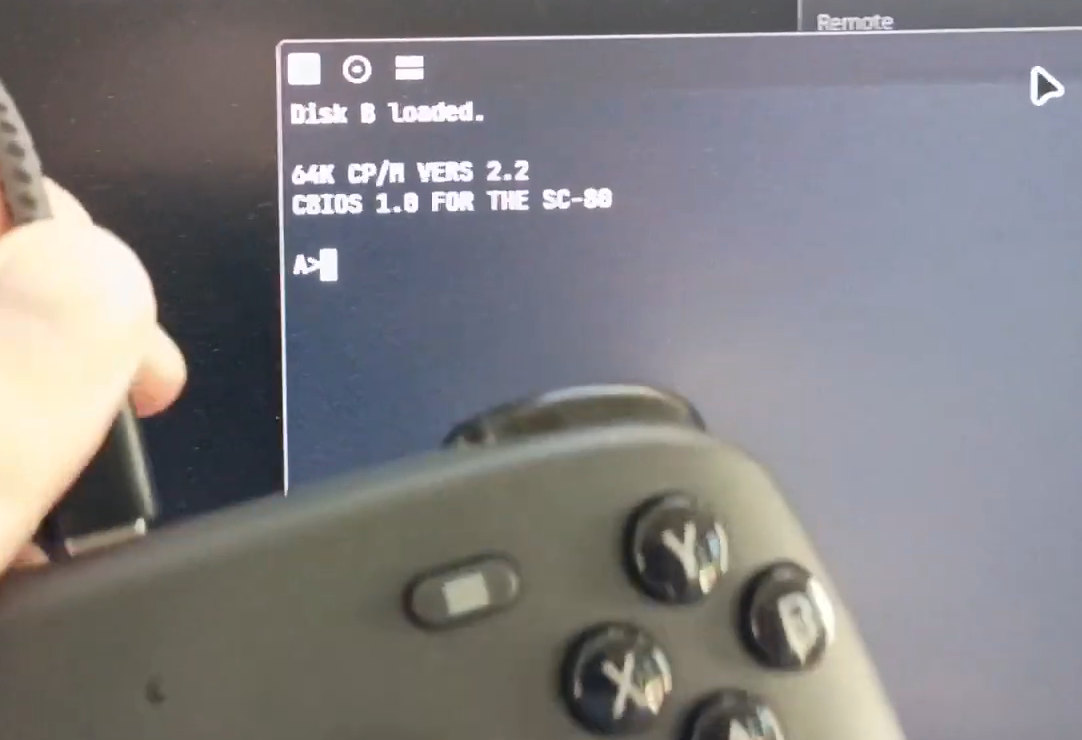
The Steam Controller is a device capable of many interesting feats. It’s intended to act simply as an input device, and yet, it can run games all on its own. As [Owen Feldman] has demonstrated, by having the Steam Controller play Zork.
[Owen] took quite an interesting route to get the there: he wrote a Rust program to emulate the Intel 8080 CPU and CP/M, as one does. This was ported to the Steam Controller, which emulates the CPU and memory on its own internal processor. I/O is streamed over USB, since the Steam Controller lacks a keyboard or screen. The CP/M disk lives in the controller, but the Zork disk data is streamed over USB as well.
If you’re wondering how [Owen] got all this running on the controller, he explains on his personal website. He used what appears to be an undocumented tool included with Steam that allows flashing firmware on the device. Helpfully, Valve also include the original firmware in the same folder, unsigned and only relying on a simple CRC checksum. [Owen] bricked his controller a couple times experimenting with this tool and loading his own firmware, but all came good in the end.
Advertisement
The Steam Controller is probably the oddest device to run CP/M for a while, but hey—it’s a neat party trick. Not much is going to top the auto-docking hack from a few months ago, though.
A critical vulnerability in the Elementor Pro WordPress plugin could allow attackers to upload executable files for remote code execution on the server.
Identified as CVE-2026-32475, the flaw affects Elementor Pro versions before 4.2.2 and stems from the File Upload module, which uses separate loops for file validation and processing that handle empty filename uploads differently.
“The problem is that these two loops disagree about what to do with an empty file entry (an upload part whose filename is blank, which PHP reports as UPLOAD_ERR_NO_FILE),” clarifies a report from Patchstack, a cybersecurity company focused on the WordPress ecosystem.
“The validation loop and the processing loop have different early-exit logic for these empty entries, so a carefully shaped multi-part upload can be seen one way by the validator and another way by the mover.”
An attacker could exploit this behavior by crafting a multipart upload in which the first entry has an empty filename, followed by a malicious PHP payload.
Advertisement
This causes the validation routine to exit after examining the first part, dismissing it with the UPLOAD_ERR_NO_FILE error and never checking the second part. The processing step skips the empty entry but goes through the rest of the upload and moves to a public directory (wp-content/uploads/elementor/forms/) the PHP in the second part.
Elementor Pro is the paid version of Elementor, a highly popular drag-and-drop website builder for WordPress that has more than 10 million active installs.
The Pro version adds more advanced features such as form creation, theme and popup builders, custom code and CSS, and e-commerce tools, and is generally used by higher-grade platforms.
According to Patchstack, exploiting CVE-2026-32475 requires only that the target site have a published Elementor form containing a File Upload field.
Advertisement
The researchers say that after uploading the malicious PHP, an attacker can determine its filename in the public directory because it is created using the uniqid() function, which is not random but time-based.
An attacker could determine the name of the payload through a timing brute-force. In some configurations, they can obtain its exact URL through an autoresponder email.
Once the attacker requests the uploaded file at that URL, the server’s PHP interpreter executes its contents, allowing arbitrary code to run with the privileges of the web server.
Patchstack learned of CVE-2026-32475 on July 16 from Tin Pham, the researcher who discovered it, and shared the information with the Elementor team.
Advertisement
The next day, the plugin developer prepared a fix, which Patchstack verified on August 3, and delivered it yesterday.
Elementor has also notified its subscribers of the vulnerability, noting that it puts at risk only “websites that use an Elementor Pro Form with an upload file form field, and the multiple file upload option enabled (it is disabled by default).”
“Every other Elementor site is unaffected, however we still recommend all sites update to the latest version to reduce the likelihood of security and incompatibility issues,” the vendor says.
Administrators should update to the latest Elementor Pro release and check the ‘wp-content/uploads/elementor/forms/’ directory for PHP files or other rogue files.
Advertisement
Patchstack notes that updating does not remove malicious files uploaded during the exposure period and recommends a thorough examination.
At this time, no cases of active exploitation have been observed in the wild.
Overall prevention scores can hide what happens after initial access. Once attackers are using valid credentials, prevention drops sharply.
The Blue Report 2026 measures defenses technique by technique across 338 million simulations run in customer production environments.
The common Ford F-150 isn’t what most people picture when someone mentions the word “fast.” Okay, granted, the Raptor and its many derivatives exist, such as the ludicrously powerful Raptor R boasting 900 horsepower. Let’s forget about all that, though — what about just the regular old F-150? Well, unsurprisingly, they are actually quite powerful as well, as many full-size trucks are these days, but normally we associate all that power with hauling cargo and towing. Not really on the drag strip.
We are not extolling the virtues of an F-150 at a drag strip — any modern purpose-built vehicle with similar power figures will blow the doors off one. These trucks are massive, packed with technology and features that acts as ballast to slow them down. However, the top-of-the-line hybrid model also boasts a combined 430 hp, plus it has that 4WD launch and a more modern chassis. That’s good enough to launch it a quarter mile in a respectable 13.5 seconds at 102 mph, according to a test conducted by Car and Driver. 13.5 seconds? That’s an easy target for most classic muscle cars, right?
Let’s rewind to the heyday of the drag strip: The Golden Years of the Muscle Era. We’re talking late-1960s, early-1970s, when passenger cars were pumping 400 horses or more. Sure, plenty of them can — and will — smoke a modern F-150 all day long, but an equal number of them get left behind, some being embarrassed by well over a second. Let’s take a look at some examples of the latter, particularly cars that are famous for their prowess on drag strips.
Advertisement
Pontiac GTO Ram Air IV
Madeline Cuccio / SlashGear
A quick disclaimer about the pass times — different magazines and journals generally post different times. Whether it’s due to shifting style or environmental conditions, the results are largely inconsistent, so we’re considering the best-case scenario here. However, that also opens up the door to other runs made a full second or so down, generally because of differing gear ratios or transmission types, as is the case here. Despite its immense reputation, the second-gen Ram Air IV GTO is, at best, a mid-13s car, if not a mid-14s car with a longer final drive. There’s actually quite a few muscle cars that make the GTO look slow.
Indeed, that is the case here as well, with the car running anywhere between a 13.6 and a 14.47 depending on who you ask and what options it has. This means that, at best, a bone-stock GTO in its heyday is almost exactly as fast down the drag strip as a modern F-150 hybrid. But how could that be?
First of all, let’s look at the physics. Acceleration is determined by force over mass, the fundamental equation we all know and love. An F-150 has a lot of mass, but so too does a GTO; a regular Judge weighs over 3,600 pounds. Next is power, and the GTO has far less. 370 break horsepower, not SAE Net horsepower, which is how we measure it today. That means it has 370 unladen horsepower at the crank, versus the F-150’s 430 horsepower at the wheels. This is a common theme among every one of these cars, and a key reason why modern cars seem so much faster, despite having similar on-paper statistics.
Advertisement
Ford Mustang Boss 429
Heritage Images/Getty Images
Absolutely no car enthusiast worth their salt would ever accuse a Boss 429 of being slow. These were purpose-built race engines, after all, highly specialized for the demands of NASCAR. In a world where your competition was the Dodge Charger Daytona, you had to bring something truly special to compete, which is exactly what Larry Shinoda did in 1969 with the baddest showroom Mustang ever built up to that point. The engine has a ton of interesting tidbits as well. And, appropriately-so, given its nature as a detuned NASCAR engine, the Boss 429 was indeed the most powerful Mustang out there. It is also slower than a modern F-150 hybrid.
That “slower” comes with a huge asterisk, granted. Yes, this is an incredibly potent vehicle, but it was not designed for drag racing. It is effectively a homologation special, a street-legal car produced to legitimize the stock car racing variant. In a phrase, this car exists as it is because Shinoda wanted an incredible race car, and it was absolutely a fine racer. But take note of that trap speed — 114 mph shows plenty of promise in the latter half of the stage, where the engine can really sing.
Whether it’s due to the old tires of the day, improper axle ratios, or just bad luck, you’ll find stock Boss 429 reports in the high-13 second range. These were exquisitely powerful top-end focused cars, not dragsters, despite the fact that they could easily hang with anything else on the drag strip in 1969.
Advertisement
Hurst/Olds 442
Madeline Cuccio / SlashGear
When people think of Hurst shifters, they think of drag racing. The company heavily sponsored the sport, after all, even outfitting show cars like the Hurst Hemi Under Glass Barracuda, the Hurst Hemi Super Stocks, and more. George Hurst and his traveling engineer Jack “Doc” Watson, better known as the “Shifty Doctor,” were instrumental in popularizing the image of a floor-shift 4-speed flying down the drag strip. And central to that image, at least in automotive showrooms, was the Hurst/Olds 442. Yes, the 4-4-2 actually has a meaning.
The Hurst/Olds was the brainchild of Doc Watson, built specifically with that clientele in-mind. Amateur drag racers rejoiced at the 390 horsepower and 500 lb-ft of torque delivered by the beefy 455 big block, propelling the A-body to the 1/4 mile mark in around 13.9 seconds, though some claim just over 14 seconds. In other words, this heavily-marketed drag special is a full half-second off the pace of an F-150 hybrid.
Granted, as far as drag specials go, the Hurst/Olds is a pretty tame one. These were fully-equipped cars, after all. Actual purpose-built dragsters built by Hurst, namely the Hurst Hemis, would absolutely blow an F-150’s doors off, but those were compact cars with specially-prepared body panels and put on extreme diets, whereas the Hurst/Olds is as big as any modern midsize sedan. That said, it’s certainly not a slow car, either, especially for its day and general class; these were some of the torquiest muscle cars of all time, and that torque carried it a long way.
Advertisement
Plymouth Barracuda 440
Kenmo/Getty Images
If intermediate muscle cars aren’t cutting it, what about a potent pony car? The Barracuda is a lightweight, stylish, and intimidating beast in Formula S trim, with most examples boasting a 383 ci (6.2-liter) V8 with 330 hp and 410 lb-ft torque from a fairly small body. If you ever see a late-1960s Barracuda in person, they’re quite narrow and almost diminutive in comparison to something like a B-body Charger. Granted, they’re far less powerful, but they’re also far lighter. How does that translate to the drag strip, though?
About the same, as it turns out. Okay, let’s discount the E-body Hemi ‘Cuda and its Challenger sibling because it’s no surprise that shoving an overpowered 426 Hemi in something so compact will turn it into a missile on wheels. This is specifically about the pre-Hemi model, the one where the top engine choices were the 383 or the 440. The 383 is out of the running already, crossing the line about a second slower than an F-150. The 440 fared better, as one might expect — granted, it’s not the Six-Pack, just a four-barrel, but it’s enough to clock an impressive 13.89 seconds from the Barracuda.
The caveat here is there isn’t much official data available on these cars; to be fair, 440 Barracudas themselves are scarce cars as well, but 1960s Chrysler certainly wasn’t shy at the drag strip, and the company demonstrated it with this car — a lightweight body with a massive engine. Pure muscle in every sense, yet it is still somehow slower than a regular F-150 hybrid.
Advertisement
AMC Javelin AMX 401
Madeline Cuccio / SlashGear
Much like Chrysler, AMC was heavily invested in motorsports, drag racing included. Sure, the defunct automaker is most famous for its SCCA races with the red, white, and blue livery on the Javelin, but these things saw plenty of drag strips as well, especially the massively-underappreciated AMX. Some were even outfitted by Hurst as specialty vehicles, much like the Hurst Hemis, built as direct competitors to those very cars in 1969. Naturally, the Hurst Lightweight AMX, as it was called, was no ordinary AMX, teasing 10-second territory in 1969. The company’s most powerful road car sadly a bit underwhelming by comparison.
AMC’s most formidable offering of any sort was the 401 cubic inch-equipped Javelin AMX, a 3,400-lb pony car that was on equal footing with cars well above its weight. These cars boasted 335 hp and 435 lb-ft torque, propelling them to a 14.3-second quarter-mile. In other words, the best AMC has to offer is a solid bus length behind the F-150 hybrid when it crosses the finish line.
That would be missing the point of this particular car, however. Like the Barracuda, the AMX was built from the ground up as a pony car. It primarily competed on the circuit, not the drag strip. These were certainly lightweight and powerful cars, but they were designed to be agile, not brutally fast-accelerating.
All that said, a modern F-150 hybrid holds a number of advantages over the AMX and, indeed, any car on this list. None of these cars are 4WD, they’re all running on 1960s and 1970s tires, they have four-speed manual or three-speed automatic transmissions, and so on. However, considering what they’re working with, even a 14.3-second time is impressive when put into context.
We may receive a commission on purchases made from links.
With major pickup truck brands rolling out new models each year, there’s bound to be one within your budget that fits your lifestyle. And once you’ve found it, you’ll need to make sure you can both take care of it and get the most out of it in the years to come. Since everyone uses their pickup differently, you might have slightly different needs than other people. For example, you might be a business owner who needs to bring equipment from one place to another. With this, your pickup offers a lot of flexibility for transport and storage. You might also be an undercover athlete whose gear doesn’t fit a small car, like if you kayak, surf, or bike. In some cases, this might also mean tackling different terrain that cars aren’t always built for, such as sand. This means adjustments not just to your tires, but also to your cleaning routine. To do this, you’ll need the right tools to maintain and optimize your truck to fit its environment, like those from Ryobi.
Advertisement
While Ryobi has a ton of tools that anyone with a vehicle can enjoy, there are products that truck owners can benefit more from. These range from tools for cleaning and maintenance to tools that ensure your safety during an emergency. So, if you have a pickup and a bunch of Ryobi batteries lying around, here are some tools from the portfolio that you might want to check out.
Advertisement
18V ONE+ Jump Starter Kit
Regardless of what type of car you own, a jump starter kit is always nice to have on hand because it can save your battery in emergencies. Compared with other jump-starting methods, the Ryobi 18V ONE+ Jump Starter Kit offers two key advantages, especially for truck owners. First, you can rely on it even for larger engines like those on trucks, since it can handle up to a 6.0L V8 Engine with a peak amp of 1,600. Second, it gives you the option to jump-start without another vehicle, which can be incredibly useful if you’re hauling things in remote locations. And if you ever find yourself stranded in bad weather, it can function even in colder temperatures, down to -4°F.
The kit includes a 2Ah battery and charger, which Ryobi claims can generate up to 20 jump starts for every full charge. The unit itself has a cable length of 12 inches and safety features such as anti-spark technology. Should you find yourself stuck in the dark, the jump-start kit comes with a built-in LED work light, so you have a backup if you don’t have a separate one. On the Ryobi website, it’s priced at $169.66 and has been rated 4.7 stars by 77 customers. Meanwhile, it enjoys a slightly lower but still mostly positive 4.5-star rating on Home Depot from more than 380 people, where it’s sold for $169.66.
Advertisement
18V ONE+ Cordless Compact Workshop Blower
For truck owners who use their extra space to transport items like leaves, grass, and other landscape debris, a blower can help reduce cleanup time before you bring out the vacuum to finish the job. During the colder months, leaf blowers can also be used to clear light snow from your driveways or your truck’s tires. And if you’re looking for a convenient option, the Ryobi 18V ONE+ Cordless Compact Workshop Blower could be a good fit for your post-landscaping needs. Weighing just 2.5 lbs, it has a maximum airspeed of 160 mph and a flow rate of 100 CFM. You can also adjust its speed in three ways.
One of the most popular products on this list, the tool can be bought for just under $65 on the brand’s website and has been rated 4.8 stars by more than 770 Ryobi customers. Alternatively, you can get it as part of a kit with a 2Ah battery and charger for $188.94. That said, Ryobi offers several other leaf blower products under its 18V ONE+ lineup, such as the Ryobi ONE+ 18V 350 CFM Leaf Blower and Ryobi ONE+ 18V 510 CFM Leaf Blower. There are also those that use its more powerful 40V battery system, like the 40V 550 CFM Cordless Leaf Blower and the 40V 450 CFM Jet-Fan Leaf Blower. Lastly, if you’re not a fan of cordless models, there are corded options like the Ryobi 440 CFM Corded Leaf Blower as well.
Advertisement
18V ONE+ Cordless Wet and Dry Hand Vacuum
Although any driver will benefit from having a hand vacuum, truck owners tend to need more help. Since many trucks are used for hauling, they tend to gather a lot of dust particles and even liquid spills in the process. Because of this, an ordinary hand vacuum might not be enough, so you’ll want to get an 18V ONE+ Cordless Wet and Dry Hand Vacuum.
Depending on what you’re cleaning, it can have a 1-cup capacity for wet items or 3.3 cups for dry items. It has a suction capacity of up to 40 IOW and an airflow of up to 23 CFM. Since it’s cordless, you can reach many tight corners that would have been difficult to access. Apart from its wet-and-dry dual filter, it has a dust cup that’s easy to empty. It ships with a slew of accessories that enhance its effectiveness, including a dust brush, squeegee, crevice tool, accessory adapter, and filter.
Advertisement
For just the tool, you can snag it on the Ryobi website for $74, where more than 260 people have rated it 4.7 stars on average. It’s also available as a kit with a 2Ah battery and charger for $119. On Home Depot, it’s sold at the same price and is even more popular, with a 4.1-star rating from 1,700+ customers. However, if you’re not sold yet, there are other top-rated Ryobi cordless vacuums to consider.
Advertisement
18V ONE+ Dual Function Digital Inflator/Deflator
When you’re planning to drive on beaches with your pickup, adjusting your tire pressure can help you manage terrain with packed or loose sand. To make sure you’re hitting the right numbers, the Ryobi 18V ONE+ Dual Function Digital Inflator/Deflator is a good addition to your gear. Using its digital pressure gauge, it automatically turns off when the set PSI is achieved. With this, you don’t have to guess whether or not it’s within the recommended range. It ships with multiple accessories, including a pinch valve adaptor, sweeper nozzle, sports ball needles, narrow pinch valve nozzle, and brass presta valve adaptor.
We’ve mentioned before that this surprisingly useful tool is perfect for a wide range of inflatables, both personal and professional. Capable of generating up to 160 PSI, it can do more than just adjust tire pressure. It’s also made to work with everything from pool inflatables and sports balls to mattresses. For business owners, if you’re using your truck to haul things for rental services like bounce houses or balloon decorations, you don’t have to bring a separate tool to blow them up. For just the tool, it retails for just under $70 on the Ryobi website, where more than 240 people have rated it around 4.6 stars on average. However, you can always get the kit for $139, which includes the 2Ah battery and charger.
Advertisement
18V ONE+ HP Brushless 8-inch Pruning Mini Chainsaw
In some cases, tree trunks and branches can be considered unsecured cargo and could potentially cause accidents if they end up spilling onto the road. To keep this from happening, you can cut excess material to a manageable size with the 18V ONE+ HP Brushless 8-inch Pruning Mini Chainsaw. Because it’s compact, it will easily fit in your truck bed toolbox. With its 8-inch bar and chain, it has a cutting capacity of 6 inches and can do up to 65 cuts with a single charge. Not to mention, it weighs just 4.3 lbs. On the Ryobi website, the 8-inch Pruning Mini Chainsaw kit retails for $179 and has an average rating of 4.8 stars from 130+ people. On Home Depot, it holds a 4.7-star average from 1,000+ customers. The kit includes both the 2Ah battery and charger.
However, if you do tend to work with thicker or harder-to-cut materials, there are several other highly-rated Ryobi chainsaw models that might be better suited to your needs. For those compatible with the same battery system, there’s the ONE+ HP 18V Brushless 10-inch Battery Chainsaw. Alternatively, there’s the 40V HP Brushless 14-inch Battery Chainsaw, which packs a stronger punch. As for a non-electric model, there’s the 14-inch 37cc 2-Cycle Gas Chainsaw. Additionally, you might also want to consider investing in truck bed covers, which can help prevent cargo from flying around.
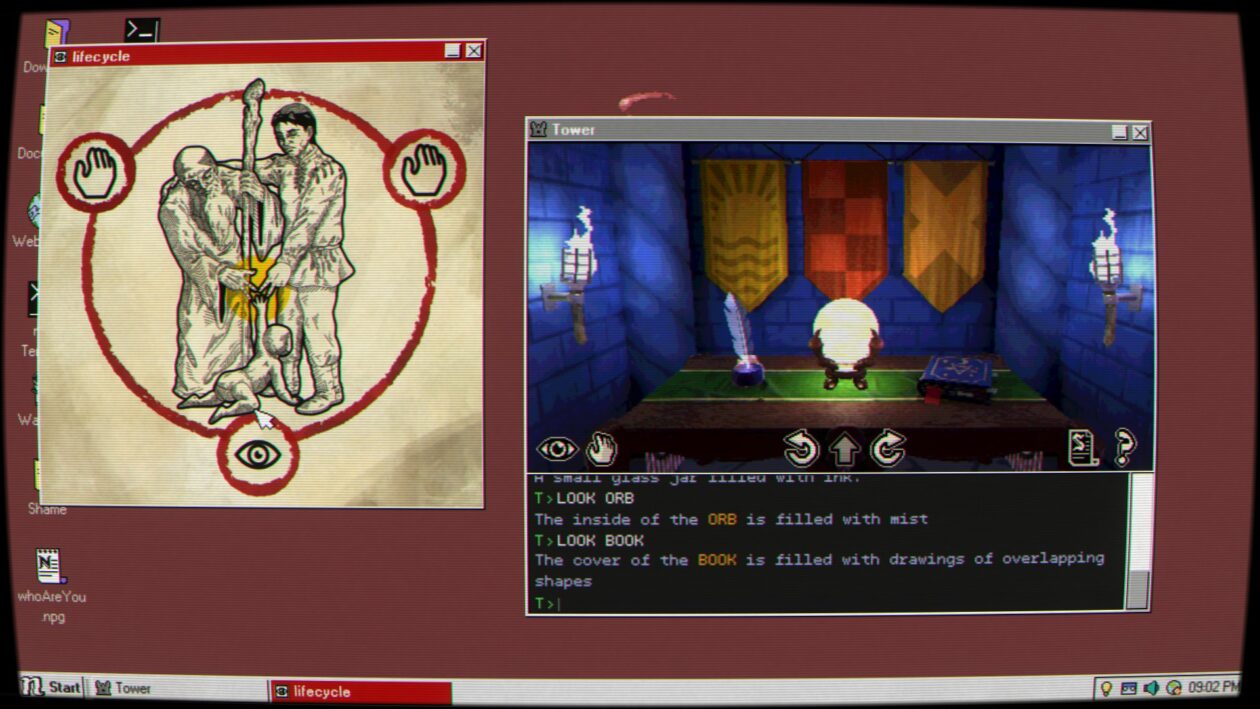
For the first hour or so, Desktop Explorer looks like a nostalgia project. The indie adventure game challenges the player to unravel a mystery by sorting through the files and programs on an old desktop computer.
Many of its puzzles are solved through clever usage of features and tools that will be immediately familiar to anyone who spent any amount of time with Windows 95.
On the other hand, many other puzzles in Desktop Explorer are too immediate and personal to be explained by an old OS on decaying hardware. Part of it comes from the fact that using someone else’s computer can feel like you’re crawling inside their brain, and this PC in particular has a glitchy virtual assistant that seems like it knows more than it should.
Maybe the computer’s actually haunted. Maybe it’s something else.
Desktop Explorer, now available for PC and Mac, is an indie adventure game developed by Recurring Dream, a Mexican-led studio based in Seattle, and co-published by Indienova and Redmond, Wash.-based Outersloth. Recurring Dream, formerly known as Crocodile Company, previously exhibited DE at the 2023 Seattle Indies Expo.
Advertisement
(Recurring Dream screenshot)
DE is a “screenlife” adventure game, in the spirit of earlier releases such as Emily is Away and Her Story. You never leave the protagonist’s perspective, who’s initially only known by her nickname “Guppy,” and she spends the entire game working on her uncle’s half-busted desktop PC. You only ever see Guppy herself through photos stored on the PC.
In August of 2012, Guppy inherits a computer from her uncle Hal, who’s just gone into the hospital for dementia treatment. The first time she boots the PC, she finds a message her uncle left behind that explains why he’s held onto it for so long. The PC used to belong to someone that Hal cared about, who’s since disappeared, and he was convinced that there’s still some information about her whereabouts on the computer. Guppy, who’s a lot more computer-literate than her uncle was, decides to pick up where her uncle left off.
The primary focus of your investigation is Desktop Explorer, an app found on the PC that comes with its own digital assistant. Desktop Explorer initially comes off like it might be a gamified teaching tool for new PC users, as its first couple of puzzles involve basic tasks like renaming and compressing files.
From there, DE‘s challenges rapidly get tougher and more abstract. Some require you to translate encoded messages or search for information via the cached files on the PC’s browser. For others, you need to edit an application’s source code, duplicate files, or change the date on the PC to match a specific point in time. While you can get a couple of hints in-game if you know where to look, Desktop Explorer is surprisingly challenging.
It can also be surprisingly creepy. While it never gets more intense than an average PG-13 thriller, there are a few genuine scares across Desktop Explorer’s 4- to 7-hour running time. Right from the start, it’s obvious there’s more going on inside this old PC than you’re initially allowed to see, and the closer you get to the truth, the more surreal it becomes.
Advertisement
(Recurring Dream screenshot)
Desktop Explorer sits at the center of an odd Venn diagram, between retro computer enthusiasts, people who enjoy mysteries, and the adventure-gaming community. It’s initially a nostalgic experience, but that’s a thin veneer over what becomes a sort of low-key psychological thriller.
As usual with this sort of game, the fun of it comes from being able to figure out its puzzles, which can be extraordinarily hit-and-miss. Some are clever, with just enough information to let you figure out the rest on your own, while others require you to make a big intuitive leap at some point or to have spent an unusual amount of time randomly clicking buttons on the desktop. One late-game puzzle involves looking up the browser history on the PC, which you’re never told how to do and which is never useful before or after that point.
(An accessibility note: I’m red-green color-blind. While Desktop Explorer has a number of puzzles that involve color-matching, there aren’t any options in place to tweak its palette. This is an increasing issue for modern video games, especially ones that were independently produced. DE isn’t the worst offender in that regard that I’ve played in recent memory, but there are a couple of parts of the game where I just had to brute-force a puzzle.)
Those mild issues aside, Desktop Explorer is a solid entry into the unique, narrow field of screenlife detective games. While not all of its puzzles are equally satisfying, it’s a short, memorable experience that rewards you for unconventional thinking. The appeal to nostalgia might get you in the door, but its unpredictability is what keeps you thinking about it until its end.
Desktop Explorer is out now for Windows PC and Mac via Steam for $17.99.
Lenovo is currently the biggest PC and laptop company in the world, and they just so happen to make some of our favorite laptops and PC peripherals. In fact, our list of the Best Laptops you can buy include a number of Lenovo devices that we’ve tested and fully recommend, ranging from high-end premium laptops to options for budget-minded shoppers. If you are looking to save a few bucks while shopping for a new Lenovo product, here are the Lenovo coupon codes and special offers you need to know about.
Score Weekly Tech Deals, Price Match Guarantee, and Free Shipping
In addition to the deals listed above, Lenovo has a number of other current offers available when shopping through Lenovo.com. There are weekly deals on PCs and tech that include free shipping with no minimums. For certain products, you can even choose to buy online and pick up in-store at Best Buy. If you’re looking for more Lenovo recommendations, we’re big fans of the Lenovo Idea Tab Pro, an Android tablet that’s currently on our Best Tablets list. It’s currently discounted by 26%, bringing the price down to $280.
Lenovo is also offering price-matching on any comparable PC, including from many online retailers. That’s really helpful, as it’s not uncommon to see price discrepancies between different retailers.
Photograph: Julian Chokkattu
Photograph: Julian Chokkattu
Get Exclusive Savings With Lenovo Discount Programs
Lenovo does offer a fairly generous discount program for certain demographics as well. These include a 5% off Education, Healthcare, First Responder, and Senior (over 55) discount.
Advertisement
You can use this discount on anything you find at Lenovo.com, which includes a lot more than just Lenovo-branded laptops. For example, Lenovo sells one of our favorite laptop docking stations, the Kensington Triple Video Mobile Dock. Despite its tiny size, this tiny device can power up to three 1080p (or two 4K) displays simultaneously. It’s a great example of the wide diversity of products you can use these discounts and coupon codes on.
Back to School: 10% Off for Students at Lenovo
It’s that time of year again—summer is winding down and fall will soon follow, bringing Back-to-School season—which means stocking up on all the tech essentials you (or your child) need to succeed this school year. Lenovo has a robust discount system for students, with a 10% off Lenovo discount for students, along with “Weekly Deals” on student-specific PCs and related accessories. With the Lenovo student discount code, you also get free shipping (with no minimum), price match guarantee, My Lenovo Rewards for rewards towards every purchase, and Lenovo financing to make those big purchases more attainable. There are tons of sales on Lenovo products to make your budget stretch further, including deals on monitors, laptops, tablets, phones, and storage solutions.
Buy More Save More With Lenovo
If you’re looking to buy multiple devices, or are planning to make a big tech purchase soon, I’d recommend buying now to get more savings. Use Lenovo promo code BUYMORELENOVO at checkout to save $15 on purchases of $500-$750, $25 off purchases of $750-$1,000, save $40 on purchases of $1,000-$2,000, and get $100 off when you purchase something $2,000 or more. (Excludes clearance and workstation items.)
Get 35% Off the Lenovo Tab Pro
The Lenovo Idea Tab Pro is a perfect tablet for students, with a vibrant nearly-13 inch 3K touchscreen display which is perfect for every day tasks, like reading, studying, and streaming. It also has a MediaTek processor, 8GB memory, and 128GB storage for seamless multitasking with ample storage for apps and files. Plus, it has dual cameras for Zoom calls. Although the Lenovo Idea Tab Pro is specifically designed with students in mind, it’s versatile enough to be a great fit for a multitude of people wanting a reliable tablet with tons of extra features. Plus, it’s 35% off right now. There’s no better time to buy.
Advertisement
Photograph: Julian Chokkattu
Photograph: Julian Chokkattu
Students Get More Savings at Lenovo
We all know being a student is expensive, and made even harder when you need pricey tech to thrive in academia. One of the easiest ways to save big on tech at Lenovo is with a student discount. All you need to nab this student discount at Lenovo is to verify your student or employee verification with a valid .edu email address or through ID.me verification. Then, create a Lenovo Education account to unlock benefits for one year, where discounts are automatically applied to eligible products. Once you log in with the verified account, you’ll save 5% off sitewide with your verified Lenovo Education account, and discounts will be automatically applied to eligible products. That means you’ll get 5% off in cart year-round—plus, you’ll be able to unlock even deeper discounts during special promo periods.
Enjoy Perks When You Join My Lenovo Rewards
Lenovo has a My Lenovo Rewards system that can earn you points that can be spent on future purchases from Lenovo.com. Almost everything you buy gets you between 3% and 9% back in the form of reward points, and you can start redeeming points right after signing up for an account. 1,000 points is equal to $1 that you can spend on future purchases. On top of this, you’ll benefit from frequent sweepstakes, exclusive member-only savings, birthday rewards, free expedited delivery, and more. Sign up today—it’s free.
Lenovo Financing and Lease-to-Own Options
Lenovo uses Katapult to offer financing and lease-to-own options on its laptops. That might be useful if you’ve been eyeing one of Lenovo’s higher-end laptops. One of our favorite of these is the Lenovo Yoga 9i, a gorgeous 2-in-1 with a bright OLED screen and a luxurious design. This laptop is currently listed as one of our top recommendations for the Best Laptops and Best 2-in-1 Laptop.
Katapult allows you to buy now and pay over time, without charging late fees. If you put down a $45 initial payment, you can check out the laptop today. Katapult offers up to $3,500 in pre-approved leases and allows you to make minimum payments over time or buyout early.








-xl.jpg)
















.png)

.png)











































You must be logged in to post a comment Login