Battery electric cars took 29% of new car sales in Europe in August, and across the European Union for the first eight months of the year they reached 21.7% of registrations, exactly level with petrol. Hybrids remain the largest single category on 36.6%, and the spread between Norway at 98% and Croatia at 4% is twenty-four fold.
Battery electric cars took 29% of new car sales in Europe in August, according to the International Council on Clean Transportation, InsideEVs reported. Registration data from the industry body ACEA puts the figure at 29.2% across the European Union, Britain and the EFTA countries. A year earlier it was 20.2%.
The year to date is tighter.
Across the European Union alone, battery electric reached 21.7% of registrations over the first eight months, on 1,641,333 cars, ACEA reported. Petrol reached 21.7% as well. The two are level for the year.
Advertisement
Diesel is close to a rounding error.
It took 7.3% of European Union registrations over the same period, down from 9.4% a year earlier. Petrol fell from 28% to its dead heat with battery electric. Battery electric itself rose from 15.8%, which is the fastest move of the three.
Hybrids remain the largest group.
They took 36.6% of European Union registrations to August, or 2,759,718 cars, with plug-in hybrids accounting for 10% of the market and 758,082 of those. That is nearly 15 points ahead of battery electric, which is bad news for 2035.
Advertisement
The continent does not move together.
Norway registered 98% electric from January to August, Denmark 82%, Finland 50%, Iceland 47% and Sweden 43%. Croatia managed 4%. A gap of twenty-four times sits inside a market that shares one set of emissions rules and one set of tariffs.
August was a step, not a drift.
The share sat at 25% in June and 25% in July, so August breaks a plateau rather than extending a trend. BMW Group led European manufacturers with 30% of its sales electric across the year, ten percentage points up on the same period last year. Registrations across the union rose 5.3% overall.
Advertisement
Germany has already turned.
Volkswagen is now taking more orders for electric cars than for petrol and diesel at home, and has cancelled extra shifts at Wolfsburg while adding them at Emden and Zwickau. Germany is Europe’s largest car market, and the four models driving that shift are all built in Spain. The continent is buying faster than its factories were arranged to supply.
Pasqal’s technology is built on Nobel Prize-winning research by co-founder Prof Alain Aspect.
French quantum company Pasqal reported a 14pc growth in revenue in the first half of this year and more than €300m in cash reserves to fund its upcoming commercialisation goals.
Pasqal went public late last month after merging with the special purpose acquisiton company Bleichroeder in a transaction that valued the new entity at around $2bn. That transaction left about €313m in cash to support its plans as a public business. The company’s current market valuation sits at just more than $1.5bn.
The quantum company reported a nearly €60m operating loss for H1, which included more than €37m in share-based payments and on-time charges.
Advertisement
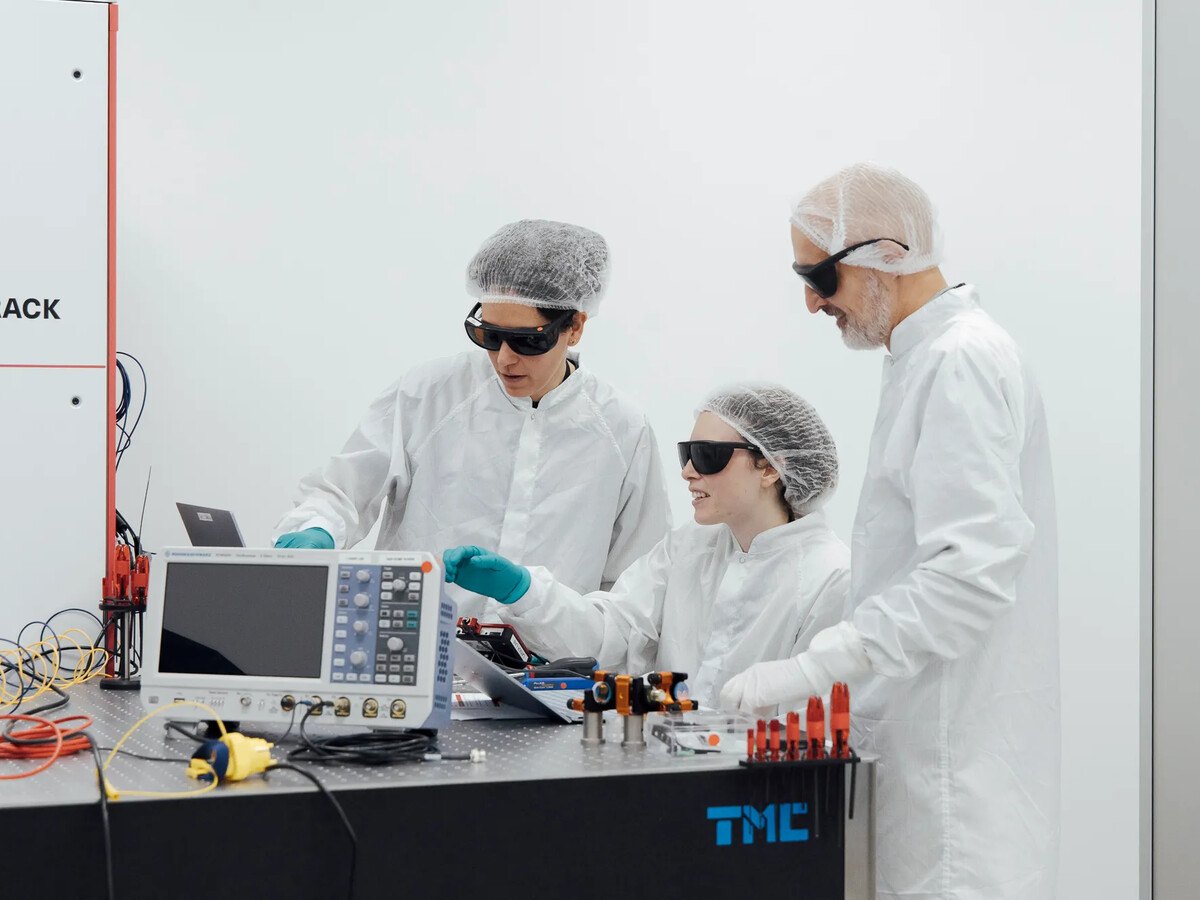
Founded in 2019 on Nobel Prize–winning research by co-founder Prof Alain Aspect, Pasqal builds and operates neutral-atom quantum computers, available both on-premises and through the cloud.
The company’s quantum systems are used across sectors by customers including Saudi Aramco, Crédit Agricole CIB and LG Electronics, and is supported by partnerships with Nvidia and IBM. Pasqal has additional offices in Saudi Arabia, Canada, the US and South Korea.
In its first financial report as a public company, Pasqal also reported a revenue of €3.9m in quantum processing unit-related services – up 34pc year-over-year, while booked and awarded business – such as grants, tax credit and multi-year customer contracts – sat at €70.4m.
The company received an European Innovation Council (EIC) Fund Award at the 2026 TechEU Equity Summit in Luxembourg earlier this week, a recognition which came after it became one of the first companies in the EIC Fund’s portfolio to go public.
Advertisement
“During the first half of 2026, we continued to deepen our engagement with our customers of choice across financial services, energy and advanced materials to solve high-value business problems and integrate quantum computing into real-world workflows,” said Dr Wasiq Bokhari, Pasqal’s CEO.
“At the same time, we continue to execute against our roadmap. Recent milestones, including the demonstration of more than 1,000 physical qubits, industry-leading progress in logical qubits, and the successful application of our systems to solve complex differential equations and simulate materials beyond the practical reach of classical computing, reinforce our confidence in the strength and differentiation of Pasqal’s neutral-atom approach.
“With a growing portfolio of customer engagements, a differentiated technology platform, a disciplined approach to capital allocation, and a strong balance sheet to support future growth, we remain focused on delivering practical quantum solutions that create value today while building the foundation for the next generation of quantum computing,” he said. Pasqal intends to also list itself on the European stock exchange Euronext by next year.
Don’t miss out on the knowledge you need to succeed. Sign up for the Daily Brief, Silicon Republic’s digest of need-to-know sci-tech news.
macOS offers two main options when you’re done using your Mac or MacBook: sleep and shutdown. At a high level, these are self-explanatory, but you might wonder when to use each mode and what exactly is going on during both of them.
As with most computing matters, the right option to use depends on the circumstances. Using the “wrong” mode will almost never cause a problem, but it’s best to be as efficient as you can.
Advertisement
Understanding a full shutdown
wadstock/Shutterstock
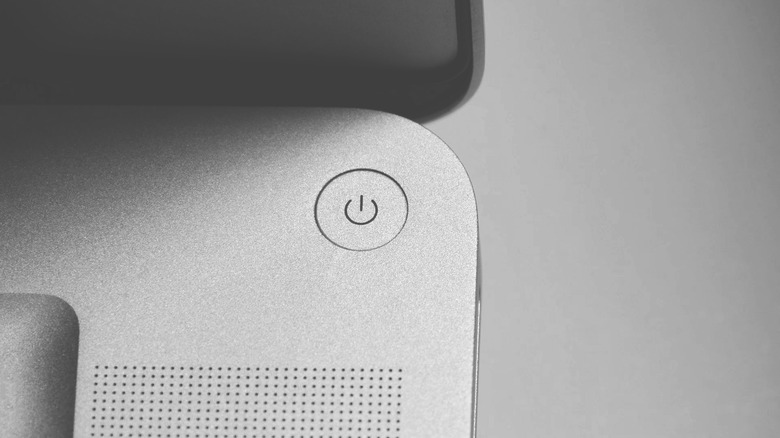
Shutting down your Mac is like turning off any other computer. During the process, every app closes, the operating system is shut down and RAM is cleared. To ensure a proper shutdown on your MacBook, don’t close the lid until the screen is off. Apple’s guidance states that closing the lid during the shutdown process can cause it to start more slowly next time. Once it’s fully shut down, the system is not drawing any power. You must open the lid or press the power button to turn the machine back on.
When you do a normal shutdown by clicking Shut Down from the Apple menu at the top-left, a one-minute countdown runs to allow you to cancel the action if you change your mind. Also on this window is a Reopen windows when logging back in box; check this, and when you reboot, macOS will relaunch the same apps you had open before shutting down. If you’re sure you want to shut down, hold the Option key when you click Shut Down to bypass the countdown. This will try to shut down apps gracefully, but you won’t get a prompt asking you to save changes if an app’s automatic save has trouble.
If needed, you can also Restart from the Apple menu. Restarting is good when an app or the entire system is acting up, but that process doesn’t fully power off the machine’s components. Thus, if you need to completely cut power to troubleshoot accessories or similar, a full shutdown is better. This is unlike Windows, where the Fast Startup option means shutting down isn’t a full power cycle by default and restarting is more thorough.
On your MacBook, the Touch ID button at the top-right (or Power button on older models) will lock your computer if you press it quickly while the computer is on. Let it sit locked for a while on battery, and it will go to sleep. Pressing and holding it for several seconds will force a shutdown, which you should only do if the entire system is unresponsive. You’ll lose any unsaved work.
Advertisement
Putting your Mac to sleep
ben bryant/Shutterstock
The easiest way to put your MacBook to sleep is by closing the lid, though you can also select Sleep from the Apple menu. While your Mac is sleeping, your session is kept in memory, so you’ll pick up right where you left off once you open the screen and authenticate your credentials. Thanks to a feature (sometimes) called Power Nap, your Mac can continue to run some tasks, such as grabbing emails, syncing Calendar data and responding to Find My pings. If your computer is plugged in, it can run more intensive activities like Time Machine backups and search indexing.
Your Mac should use very little battery while asleep (less than one percent per hour), especially modern Apple silicon models that are more power-efficient. When the battery gets critically low in sleep mode, macOS “hibernates” by saving your session to the disk and then shutting down so you don’t lose work. If you see high battery drain during sleep, unplug accessories like external drives and hubs. Also close apps that are constantly active, like Slack, cloud storage tools or a browser tab with a page that keeps refreshing.
To save power, your MacBook will automatically go to sleep if you don’t use it for a while. Adjust these timings by opening the Apple menu and clicking System Settings, then choosing Lock Screen from the left sidebar. Next to Turn display off on battery when inactive, select a period of time. Shortly after your Mac turns off its display, it will go to sleep if you don’t take any action. The Turn display off on power adapter when inactive option offers a separate control for when your laptop is plugged in.
Advertisement
Under System Settings > Battery > Options, you have other options. With Prevent automatic sleeping on power adapter when the display is off, the screen will turn off at your chosen time, but the system will stay running. Meanwhile, Wake for network access controls the Power Nap features mentioned earlier. Choose Only on Power Adapter or Never to prevent your Mac from working while asleep on battery.
When to use each option
Putting your Mac to sleep is most sensible when you’ll use it again soon. When you’re stepping away from your desk for lunch, done with work for the day or otherwise think you’ll use your MacBook in the next few days, sleep mode is fine. It enables quick resuming, keeps data syncing (if you’ve enabled this) and doesn’t use much power. Ideally, plug your MacBook in to charge so it’s ready for future travels, but you shouldn’t lose much battery if you forget.
Advertisement
Conversely, you should shut down your MacBook when you don’t plan to use it for a few days or even weeks. If you’re going on vacation and leaving your laptop at home, shut it down first. Modern Macs still start up quickly enough that you won’t be disrupted upon return. The other important time to shut down is when packing up your laptop, especially if you have Power Nap enabled while on battery. If your laptop doesn’t sleep properly, the heat it generates while working is dangerous in a trapped space like a bag.
Otherwise, outside of software updates, you don’t really need to shut your Mac down on any kind of schedule. A shutdown or restart once a week is a good idea, but it’s not necessary unless you run into problems. You don’t need to shut down your Mac every day.
American Toyota dealers sold 131,403 Corollas in the first six months of 2026, a 9.5 percent rise for a car that has been on the market nearly a decade. Industry analysts report that a replacement could reach showrooms sometime in 2027 as a 2028 model, which would put a new compact on lots while the current one is still moving in volume.
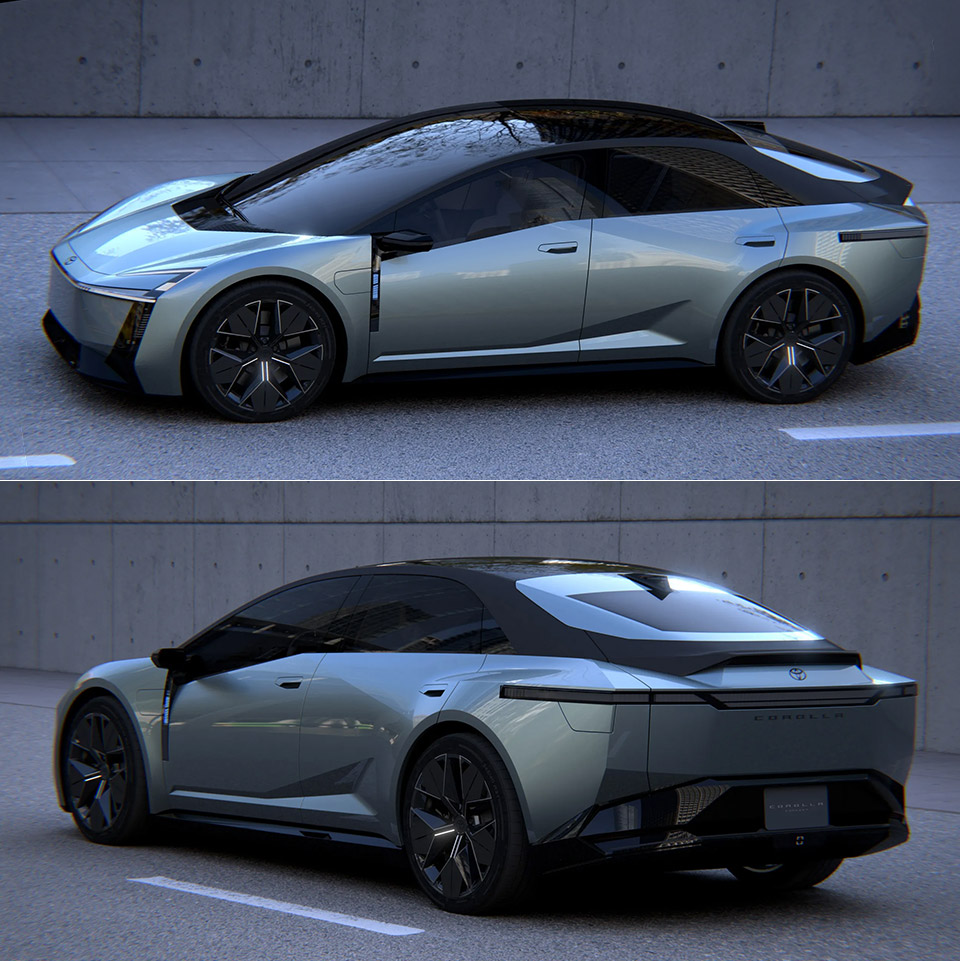
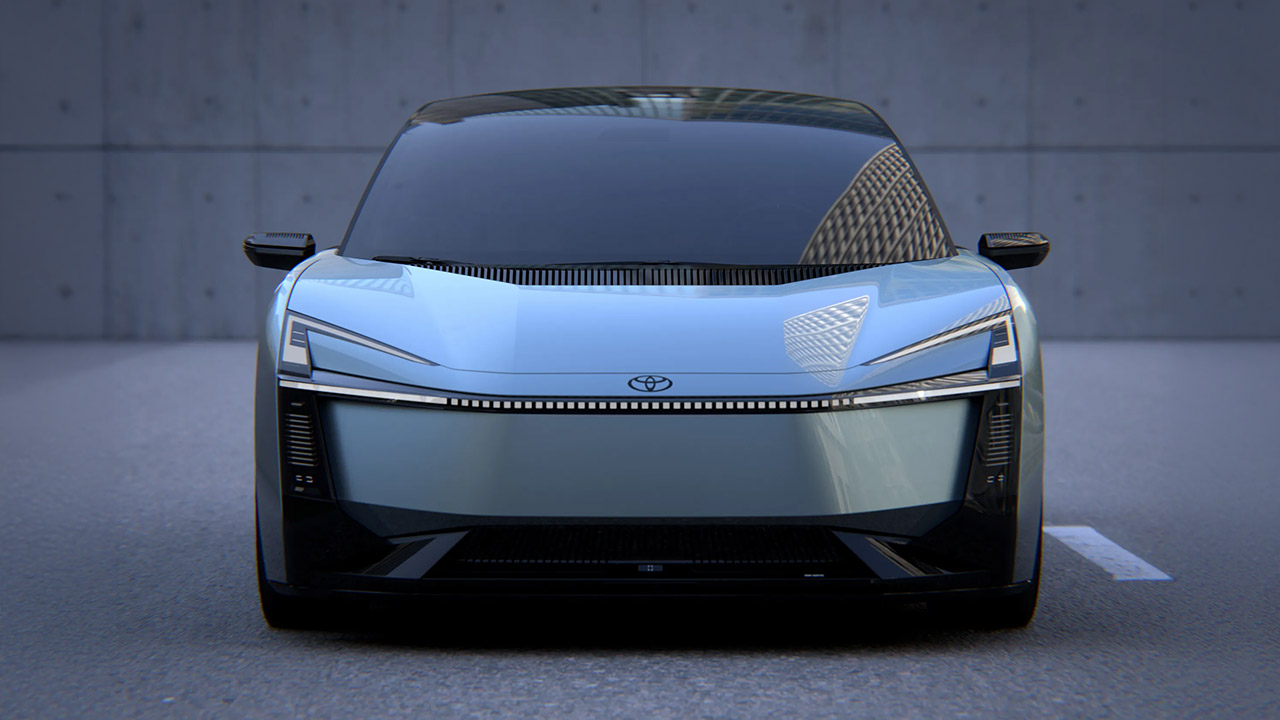
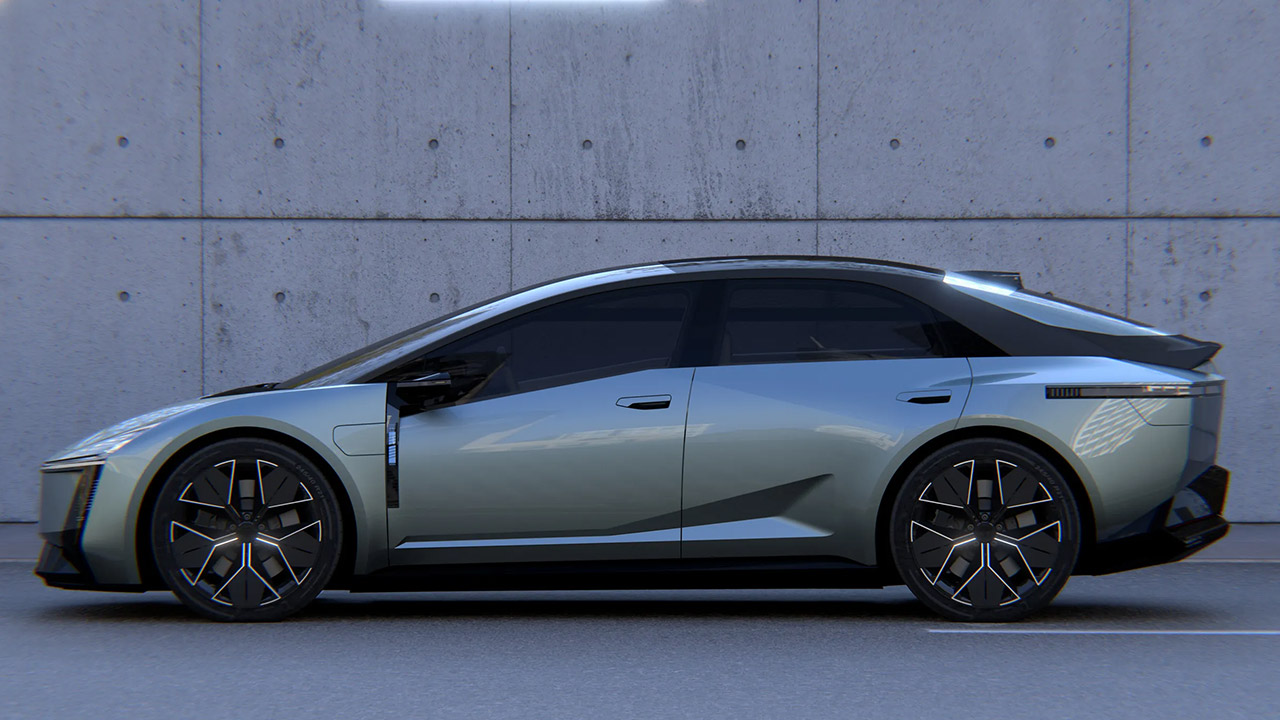
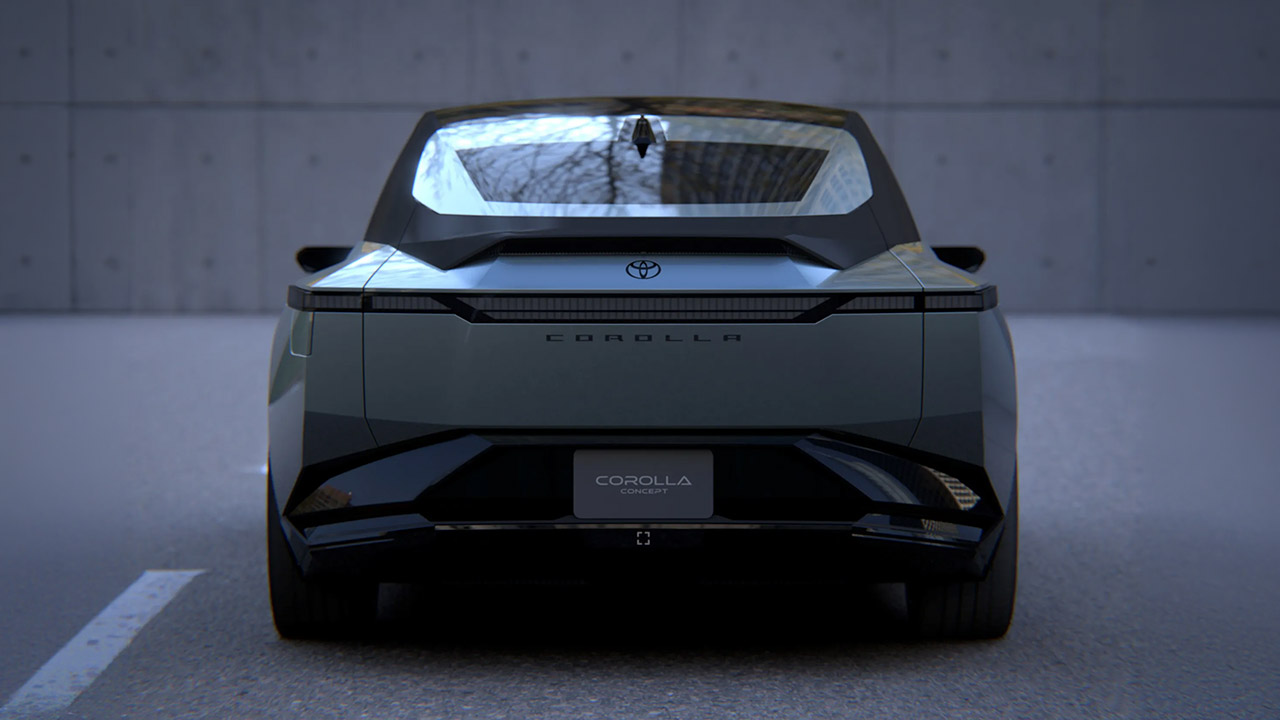
Toyota gave a sneak peek of their future direction at the 2025 Japan Mobility Show with that surprisingly sharp-looking Corolla concept, which featured a lower, four-door design with a long light bar that runs the full width of the car, windows that plunge way down, and a fastback rear end that was cleverly designed to hide a hatch, which was a game changer. Production models are expected to retain much of that look. One of the more interesting rumors is that the liftback design may eventually replace the two separate models for the sedan and hatch in the existing lineup, aligning with Toyota’s goal of streamlining its options.
CLASSIC FAST & FURIOUS CAR – Kids can build an iconic movie car and recreate their favorite scenes with the LEGO Speed Champions The Fast and The…
BRIAN O’CONNER MINIFIGURE – Includes a minifigure version of the popular Fast & Furious character Brian O’Conner, wearing his signature T-shirt and…
AUTHENTIC DETAILS – This collectible piece of Fast & Furious merch features design details that fans will recognize from the legendary 2001 movie…
Underneath it all, the new TNGA-C platform will be redesigned so that the same structure can support a gas engine, a hybrid, a plug-in hybrid, and even a battery electric version. They intend to switch hybrid models to a new engine, a 1.5 liter four-cylinder with about 94 horsepower, which will be paired with an electric motor with 40 horsepower, for a total of 134 horsepower, and they claim that this will be 10 to 20% more fuel efficient than the current 1.8 liter model. Another advantage is that all-wheel drive remains available via the rear motor. A gas-only vehicle will almost certainly feature a turbocharged 1.5-liter or a redesigned 2.0-liter four-cylinder engine.
In terms of electrification, buyers will have two decent options: a plug-in hybrid with a larger battery and a more powerful motor, but the range is still unknown, and a full electric car with single or dual motor layouts and a minimum of 250 miles of range….. if they decide to sell that specific version here in the US. Another rumor suggests that we may see another GR version with a 2.0 liter turbo and a top speed of 395 horsepower.
In terms of pricing, a gas model is likely to cost approximately $25,000, a hybrid around $27,000, and a plug-in or electric version in the $30k range, putting them in line with existing models. It remains to be seen how it all shakes out, and the release date is rumored to be 2027, although that has yet to be confirmed. This is major news for a nameplate that has already outlasted most of its generation, because for the first time, Corolla appears to be delivering a plug, a hatch, and a more dramatic form all at once. [Source]
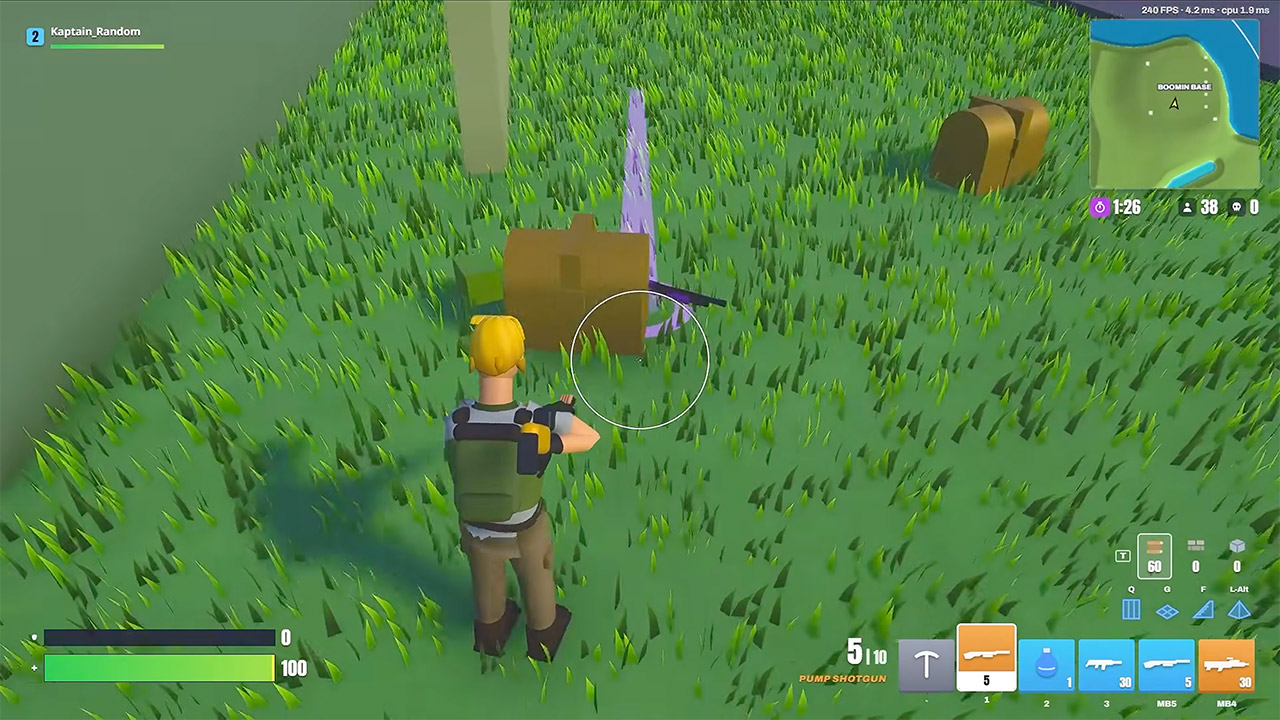
Minimunch opened Claude Opus 5.5 with a blunt claim and a harder job: make playable games from scratch, starting with Fortnite Battle Royale. About three and a half hours later, a browser build was running on very high settings, complete with a battle bus drop, loot boxes, building, a storm that actually kills people, and two wins in two matches. Character drawings and map pieces still look unfinished if you stare at them. Color and light do the rescue work. Gradation across the island is dense enough that the whole scene reads richer than the models deserve, which is exactly the gap you flagged.
Creative mode appeared first, and it made more sense. He discovered that 90-degree builds worked exactly as we anticipated, and that bouncing about had no effect on stamina, but a clean free build of the map still took a few tries to get a feel for. Some map pieces were still missing portions or weren’t finished yet, but Battle Royale stepped in and filled in all the gaps, and I’m sure he wasn’t surprised when he cracked open the first box and out came a golden object, and to top it off, his Scar turned gold as well.
FORTNITE BUILDING TOY – This video game toy for boys and girls ages 10 years old and up lets kids set out on adventures with the LEGO Fortnite…
FORTNITE BATTLE BUS COLLECTIBLE – Fortnite fans will be thrilled to create a brick-built version of the Battle Bus, a feature in the LEGO Fortnite…
AMAZING DETAILS – This Fortnite toy features accessories that include Slurp Juice, a Grappler, Pickaxes and Slap Juice
What really drew his attention was one player who was stuck in a room for the entire match since we only recently discovered that the crash boxes made the issue evident, and then there was the whole sniper shot situation, which required real bullet drops to be even halfway realistic. To be honest, a cone refused to close a box properly, therefore he was stuck there for a while. It didn’t help that storm deaths were still recorded in Competitive mode. Changing the competitive bots and team size from solo to 4 on 4 increased the tempo of play while maintaining the loop of play, and he won two matches. The lighting helped the clip stand out from anything else in the game.
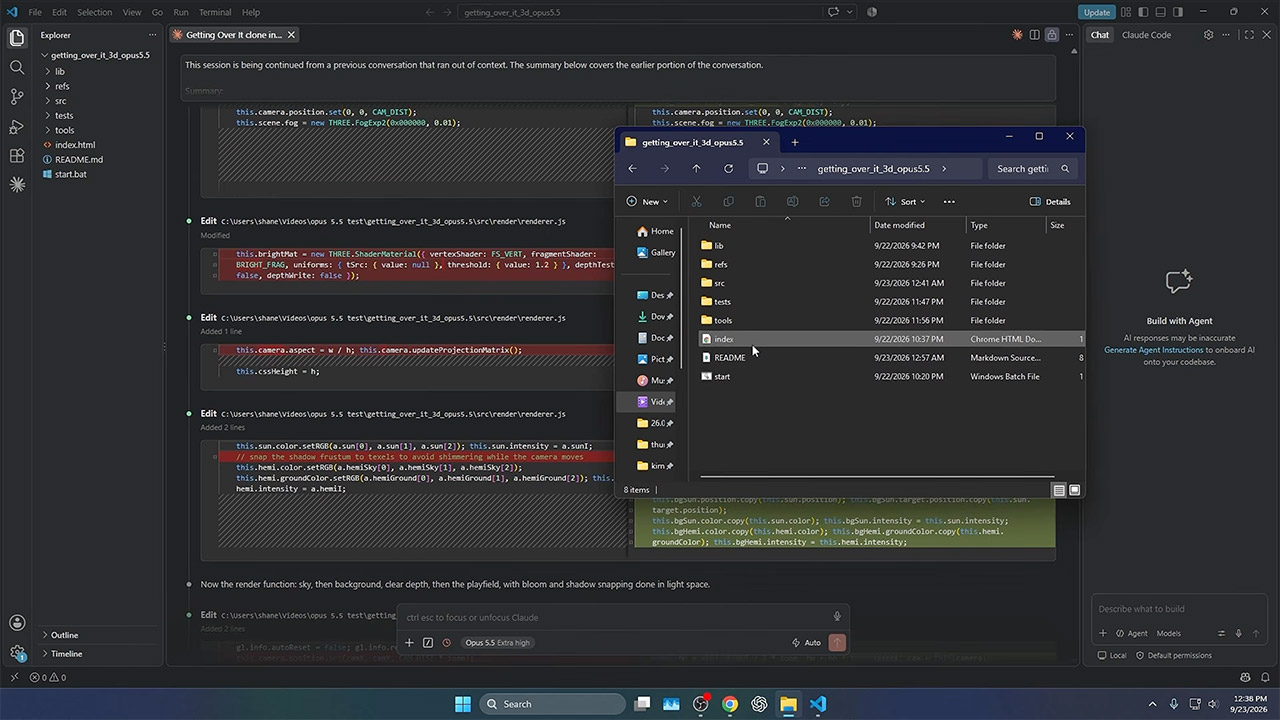
Getting Over It came next in two and a half hours, written in Three.js so every prop and collision existed as code. The hammer mechanics felt strange in a way that lined up with the original, which was both a tremendous praise and a bit of an issue at the same time. Help mode simply waited there for him, waiting for the areas of the game that often signal the end of a first run, such as the snake and bucket sections. You can cling to the side, pull yourself up, miss, and then start again.
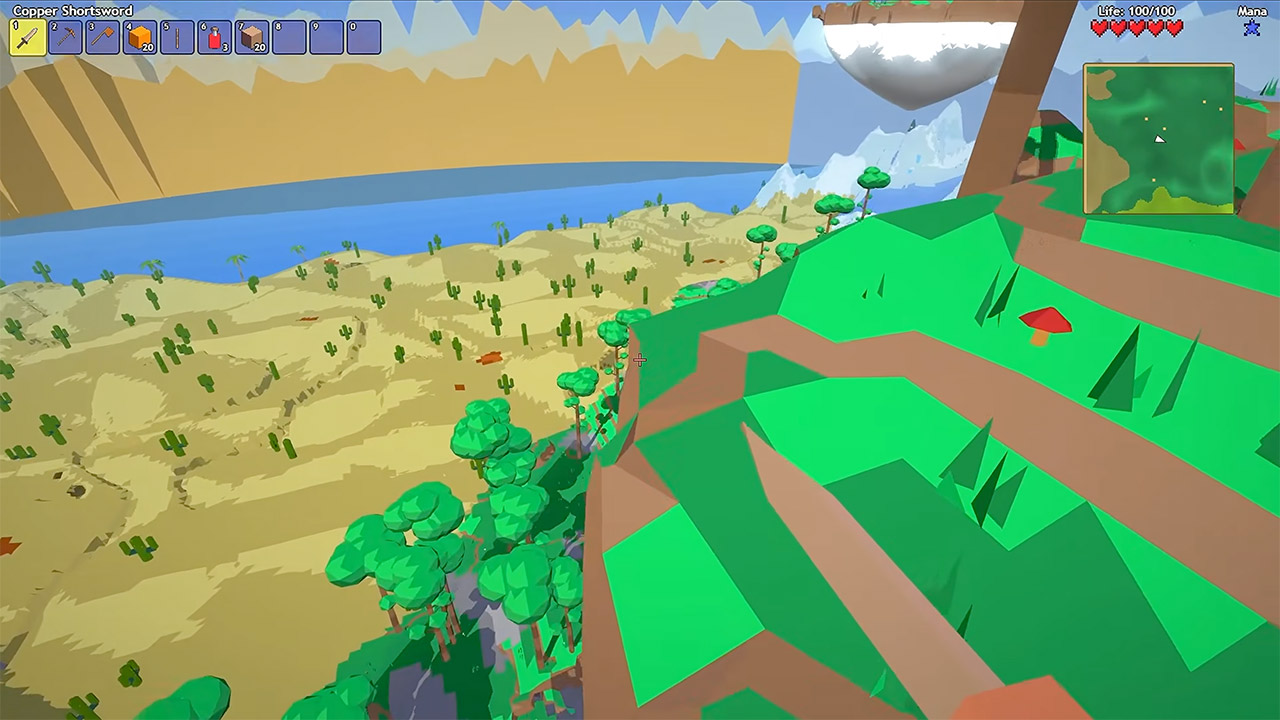
Terraria in 3D was the next hurdle, and it took approximately 3 hours to get started, although he had to make some significant changes. At first, the textures were bland and uninspiring. The spawn location also placed the player on a floating island, which provided for an unusual beginning. After a few passes of modifications, the planet began to take shape in a very low-poly 3D take that nevertheless read as Terraria rather than some other blocky sandbox. The nite lighting helped to make up for the early roughness somewhat. A short brass blade transformed into a workbench construct with a unique swing.
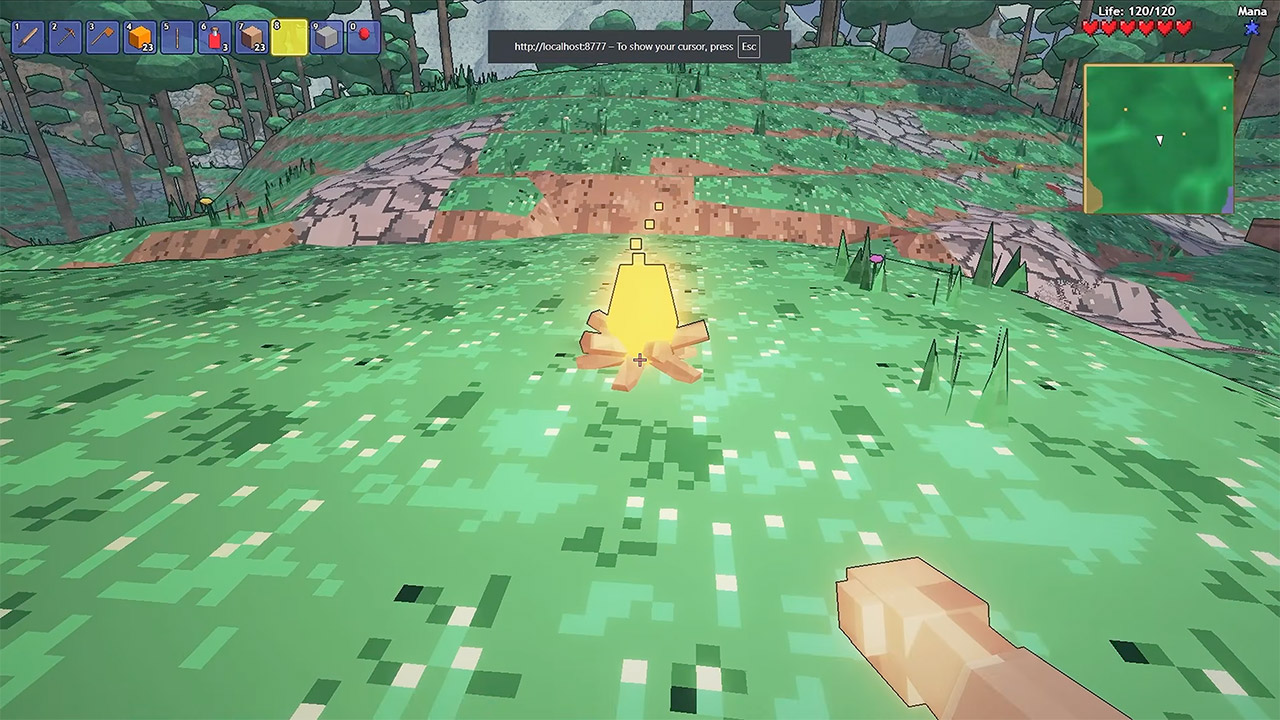
He added in some fun stuff such as campfires, ovens, life crystals, and even angel wings, which provided a lot of extra energy to each jump. Then there were the dungeon skeletons, which pack a powerful blow. The Eater of Worlds even broke into segments after summoning, and to make matters even more fascinating, Plantera and the Wall of Flesh appeared in the same session. He received some feedback from viewers who said that the build could easily be developed into a completely new game with a little more polish.
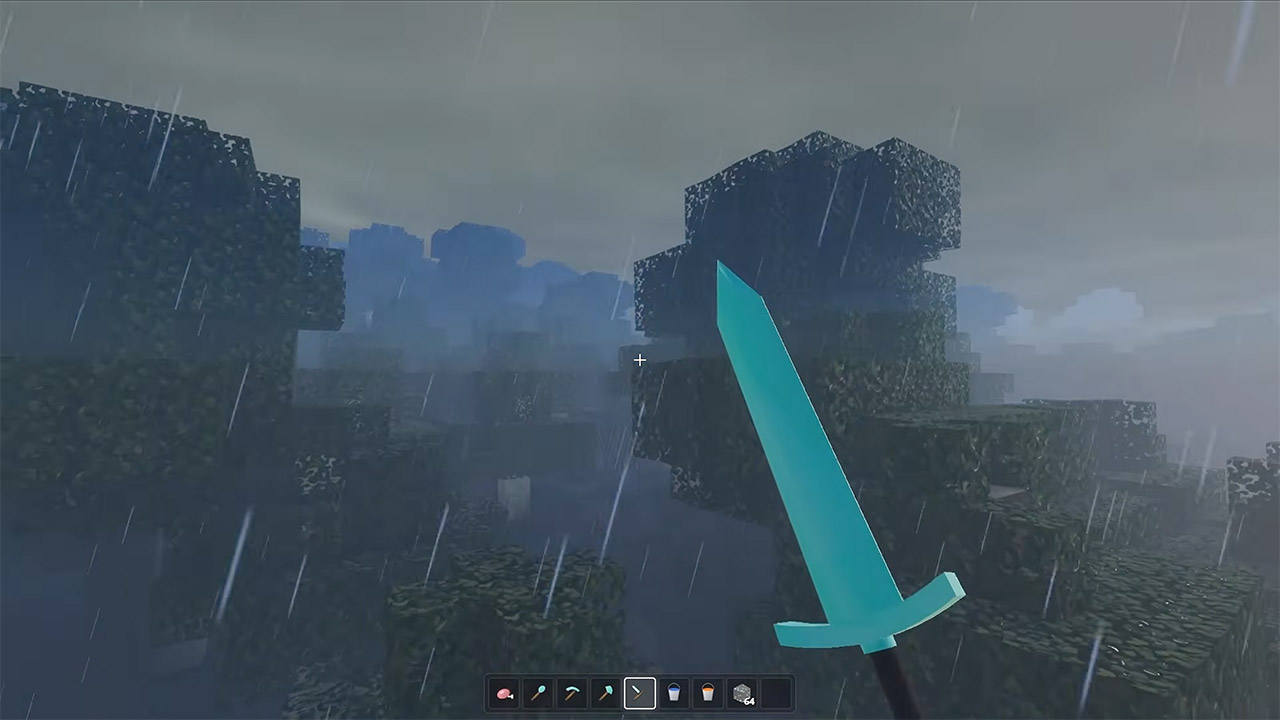
Minecraft closed the run after another three and a half hours, still in the browser, and this is where the lighting argument peaks. When rain falls on water in Minecraft, what happens? The weather just settles over the scene instead of floating above it, like it should. However, surfaces pick up a good bounce and gain a ‘wet’ look that’s remarkably close to an RTX pass, with Minimunch even saying it looked like Unreal at the time. The way caves, water flow, and time of day combine to enhance a landscape more than individual block textures ever could. It’s similar to what we saw with Fortnite in that you don’t need expensive models to make them stand out; all you need is light hitting them just right to have the frame truly hold.
Across four games the clock stayed in a tight band, roughly two and a half to three and a half hours each, with no separate art pipeline named in the video. Fortnite proved the systems. Getting Over It proved the physics. Terraria proved a 3D conversion nobody else on that channel had shown. Minecraft proved the lighting can make a browser scene feel heavier than the assets. Opus 5.5 still leaves characters and props looking like they need another pass. Light, color, weather, and collision already play like someone spent a week on the mood instead of an afternoon on the mesh.
“Copilot+ PCs” were Microsoft’s official branding for Windows 11 “AI PCs” that met their system requirements. But the 2024 launch “didn’t go smoothly,” writes Windows Central, after security researchers discovered its proposed “Recall” feature was woefully insecure:
This pretty much tarnished the Copilot+ PC brand, and over the last two years more and more OEMs have dropped the moniker from marketing materials and product names. In fact, even Microsoft has seemingly stopped mentioning it. I’ve noticed that none of the Surface PCs launched in 2026 include the Copilot+ PC moniker in their product names, unlike the Surface PCs that launched in 2025 and before. Now, you have to go digging to find any mention of Copilot+ compatibility in specification sheets… It’s also worth mentioning that NVIDIA hasn’t gone anywhere near the Copilot+ PC brand for its upcoming RTX Spark platform, even though all RTX Spark PCs meet the Copilot+ PC specification bar. I suspect that’s a deliberate decision.
It seems pretty obvious that the Copilot+ PC brand hasn’t resonated with the market, and OEMs and Microsoft itself are now quietly pulling back on that branding. The specification baseline for Copilot+ PC experiences still exists, it just no longer has a pretty marketing name tied to it.
Yes, Control Resonant is an indie game, even if it has a far bigger budget than most games we feature in this weekly roundup. I even saw a full-screen homepage ad for it when I opened my browser on Thursday, the day it was released. Still, Remedy is an independent studio, so it falls within our remit.
Advertisement
I’ve been looking forward to this ever since we learned five years ago that a sequel to Control was likely on the way. I figured we’d see more of Jesse Faden’s misadventures through The Oldest House. But that’s not the case here.
Remedy isn’t a studio known for sticking to convention. It defied expectations by making Jesse’s brother Dylan the protagonist, expanding the scope from the confines of a shape-shifting building to an open world and ditching the morphable service weapon in favor of melee combat.
I haven’t had time to jump in yet and I’m very much looking forward to doing that over the weekend. The reviews I’ve read have generally been positive, though some noted that the combat becomes repetitive. I don’t mind that much, though. The combat wasn’t what I cared about in Control. The world and story Remedy built in that game were confounding and captivating, and that’s what I’m ready to see more of in Control Resonant. If combat gets too tedious, there’s always the option to turn on invincibility and one-hit kills.
Advertisement
Stick It to the Stickman
Developer: Free Lives Publisher: Devolver Digital Platform: Steam (Windows, Mac, SteamOS/Linux; Steam Deck Verified) Price: Usually $12, with a 50 percent discount until October 1
I appreciate art that has a clear point of view, and Stick It to the Stickman doesn’t shy away from getting its point across. This is a satirical, anti-capitalist roguelite brawler. The main loop sees you rise up the corporate ladder (well, the floors of a building) to defeat your company’s CEO and take their job. Then you do it all over again as a new employee. The rate of turnover at this company is incredibly high, so I think it says something that the characters are effectively stick figures with few defining features.
Along the way, you’ll battle your coworkers using a wide range of attacks, from a staple gun and flying kick to a hadouken and a projectile coffee mug. You’ll start each run (which takes just a few minutes) with a certain character trait and a few moves, and unlock and upgrade abilities as you move through the building. There’s lots going on in the overworld too, where you might be tasked with tackling protestors or earn a Grand Theft Auto-style police wanted level.
Advertisement
I’ve played an hour or so of Stick It to the Stickman, which left early access this week and I’ve enjoyed my time with it so far. The animations are smooth and kicking enemies through windows or into electrical panels does not get old. I’m tickled by the frequent appearances of the former colleague who recommends your first character for a job and is immediately replaced by them. The short runs help make it a good Steam Deck game too.
It’s probably not best to think about what’s going on too closely, though. Spending your avatars’ hard-earned cash on expanding the company feels ghoulish, even if you do get some perks out of it.
Doggy Don’t Care
Advertisement
Developer: Rohan Nowell Publisher: Rotub Games Platform: Steam (Windows; Steam Deck Verified) Price: Usually $15, with a 10 percent discount until October 8
In Doggy Don’t Care, the outfits that you unlock for the trouble-making pup are called “pawjamas.” That’s all I really needed to know to realize this adventure game is for me. It helps that reviews have suggested fans of Untitled Goose Game and Little Kitty Big City (I like both of those!) will enjoy it.
You play as Charlie, a pup that’s left home alone by its owner, and your mission is to cause carnage and impress his friends. You’ll earn badges for your mischievous deeds, which may just involve a diamond heist. It looks chaotic and pretty cute. Sometimes, you just need something that’s chaotic and pretty cute.
Advertisement
Video Game Menu: The Game
Developer/publisher: Sebastian Gioseffi Platforms: Steam (Windows), Itch Price: Usually $4, with a 10 percent discount on Steam until September 30
Video Game Menu: The Game is one of the titles included in the Out of the Box showcase. It’s a short game that slots into the burgeoning Fake OS genre while simultaneously parodying that category. As you might imagine, it’s all about navigating a video game menu system. Things very quickly get utterly ridiculous.
I’ve played a bit of Video Game Menu and developer Sebastian Gioseffi sets the right tone immediately. As I do with pretty much every game, I opened the settings before doing anything else. I was tickled to see a drop-down menu that allowed me to choose from a range of emotional depth options for the challenges, ranging from “I Just Wanna Kill Some Zombies” to Sophie’s Choice. Turn on the gore option and every time you toggle a setting, there’s a splash of blood. If you like to see numbers arbitrarily go up, why not switch on the random score? You’ll never guess what happens when you enable airplane mode either.
Advertisement
I hadn’t even started the game yet and I was enjoying how the settings warped what I was seeing and hearing. I won’t give anything else away, but if you’re looking for something silly to play this weekend, Video Game Menu is right there.
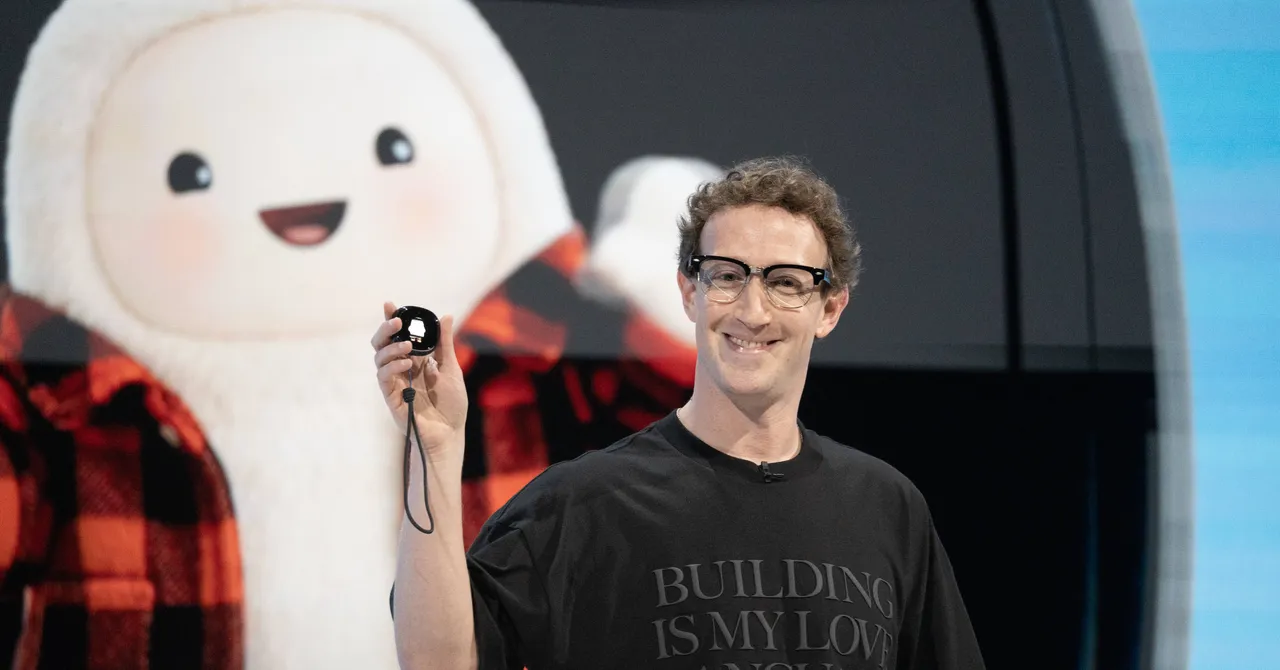
Meta’s Muse mascot is named Jolly. It’s an adorable, cuddly representation of Meta’s AI agent that you can dress however you want—like a doll. At the company’s recent Meta Connect event, CEO Mark Zuckerberg’s furry Muse donned a toga and laurel wreath. In Instagram ads I saw for Muse, the mascot wore exercise gear and boasted about helping with my fitness goals. Later this year, Meta plans to sell a Tamagotchi-style device for your Muse character. It’s all very kawaii-coded.
Although Muse’s ability to complete digital tasks rocketed it to the top of the app charts, its Labubu-adjacent mascot latched this agent onto the cultural zeitgeist. Alexandr Wang, Meta’s chief AI officer, recently posted nonstop memes of Jolly, sometimes in suggestive situations. What remains perplexing to me is why a product for adults—Muse is restricted to those 18 and over—looks just like a well-designed children’s toy.
“This is a story in search of a story,” Meta spokesperson Daniel Roberts tells WIRED. “People want to be able to create their own avatar with personality and unique style, because it’s fun and brings them joy. We require everyone using the Muse app to provide their date of birth, we block people we detect may be under 18 from creating an account, and we do additional checks to help ensure people who say they’re adults are actually over 18.”
Mona Sarantakos, vice president of Product Management at Meta Superintelligence Labs, describes the design process for Muse as leaning into “delightful” elements and meant to feel less awkward than chatting with “a corporate logo or entity,” in a blog post she co-authored around Muse’s release.
Advertisement
Youth advocates are already pushing back against Meta’s Muse mascot. “Oh my God, it looks like a Teletubby,” says Josh Golin, an executive director at Fairplay, a nonprofit that previously lobbied against Meta’s targeting of children. “It’s so clearly a character that would appeal to very young children,” he says. “People who study children’s media understand that those rounded shapes particularly appeal to kids in the preschool age.”
Jolly’s appeal is not limited to those in diapers. The adorable aesthetic of Muse’s mascot also draws me in, a 32-year-old man living in San Francisco. The branding may disarm people of all ages, especially since the backlash against Meta and generative AI continues to resonate with many Americans.
“These types of cute factors can make the product seem warm and less threatening,” says Julian De Freitas, an associate professor of marketing at Harvard who focuses on AI companions. “There’s a high bar that they have to overcome here, because attitudes toward Meta are quite negative after the social addiction rulings.” In August, Meta settled claims regarding social media addiction, agreeing to add restrictive features for teens on Instagram and Facebook as well as paying out up to $16.7 billion.
Some experts I spoke with were less convinced this design was meant to appeal to children, comparing Muse’s mascot to Japan’s long history of broadly relying on adorable characters to market technology. Meta’s approach is not unique either. From the annoying chirping of Microsoft’s Clippy to the more recent red-shelled OpenClaw lobster, AI assistants often revolve around anthropomorphized characters.
Advertisement
No matter your age, a cuddly creature representing an AI tool can be disarming, even to the point where you might forget about privacy concerns. For example, Meta trains its AI models on your Muse interactions unless you opt out.
More than 200,000 barrels of low-level radioactive waste were stored on the floor of the Atlantic Ocean between 1949 and 1982, reports ScienceAlert.
Whatever happened to those barrels?
Scientists have descended to the wreckage in a crewed submersible to investigate — and found many of the barrels corroded and degraded, their contents spilling across the seafloor. Surprisingly, this isn’t necessarily a subversion of the original plan… The International Atomic Energy Agency recommends that low-level waste be disposed of in robust containment in isolation for at least a few hundred years — but back in the mid-20th century, the recommendations were a little different. The contemporaneous guidelines recommended that containers needed to reach the seafloor intact and remain sealed only long enough for the short-lived radionuclides to decay. After that, the remaining waste was expected to slowly escape and disperse through the surrounding ocean. Not everything in the barrels would conveniently decay away, however. They contained a radioactive hodgepodge, including cesium-137, plutonium isotopes, and tritium, some of which can persist for thousands of years…
[A] few years ago, nuclear engineer Patrick Chardon and marine geologist Javier Escartín of the French National Center for Scientific Research started to wonder what had become of the dumped waste. That question eventually became NODSSUM — Nuclear Ocean Dump Site Survey Monitoring — an interdisciplinary project bringing together nuclear physics, geology, oceanography, biology, and marine chemistry to find the barrels and investigate what, if anything, they were doing to the surrounding environment…. [T]he barrels also appeared to function as tiny oases on the otherwise sparsely populated sandy seafloor. Anemones had attached themselves to the barrels. Sponges, sea cucumbers, fish, and crustaceans lived around them, with crabs apparently particularly fond of the artificial shelters…
Advertisement
Instruments aboard the ship detected significant signals of cobalt-60 and niobium-94, which the researchers could specifically link to the dumped waste… [Samples are now being analyzed] There is precedent, however, to suggest that even striking levels of radioactivity around a source don’t necessarily spread very far. A recent study of the sunken Soviet submarine Komsomolets found radionuclide levels hundreds of thousands of times above background immediately around the leaking reactor — but those levels dropped sharply within just a few meters as the material dispersed through the seawater. The NODSSUM team similarly found that, despite the significant radioactive signals around the barrels, activity levels weren’t high enough to pose major radiation-protection problems for the scientists handling the samples. [Their three-person submersible] Nautile and the instruments it carried showed no signs of contamination.
The real achievement was mapping the exact location of the barrels. “None of this means the waste is harmless,” the article concludes — but it also doesn’t mean we’re about to be overrun by radioactive crabs.”
An even better attempt at a pair of wireless headphones that shore up some of the weaknesses of the original and are boosted in other areas. Better sound, strong noise cancellation, longer battery life and better integration with a Sonos system make this a more convincing effort that is distinctly Sonos in flavour
Excellent comfort (again)
Strong noise-cancelling (again)
Better levels of detail than the original Ace
Headphone Linking
Longer battery life
ANC arguably just short of Sony and Bose
Sony and Sennheiser sound more musical
Call quality is average
Key Features
Advertisement
Review Price:
£399
Headphone Linking
Advertisement
Connect directly to any Sonos speaker in the home
Battery life
Advertisement
Up to 35 hours on a single charge
Wired listening
Advertisement
Up to 16-bit/44.1kHz over cable
Introduction
By all accounts, Sonos’ first pair of headphones were a solid affair. For a company not synonymous with the headphones, it was a good first effort. But good is the enemy of great.
So here we are, a couple of years later with the Ace Ultra. The noise cancellation has been beefed up, sound quality improved, battery life extended and still the same lovely ergonomics that worked so well the first time around.
Advertisement
There was room for improvement, and with the Ace Ultra, Sonos has learnt a few lessons for – spoiler alert – a pretty terrific pair of wireless headphones.
Advertisement
Design
Very comfortable
Replaceable battery
Physical buttons
If there’s a difference between the Ace and the Ace Ultra in terms of design, then I can’t see it. Unless something structurally inside has changed, these appear to be the same headphones with a slim profile that feel as if they’re vacuum-formed to my head.
Like the original, they fit like a pair of slippers, and while the sense of comfort is not as plush as others, they are very comfortable to wear, even for a glasses wearer like myself.
Image Credit (Trusted Reviews)
There’s plenty of space for my large lugholes to fit, and while the clamping force is on the tighter side, the pressure isn’t uncomfortable. The fit is secure, with a stepless slider to adjust things. I’ve worn these headphones for hours straight and the only problem I’ve had is a bit of pinching from not placing the headphones on properly.
They’re not collapsible, though, and left from right is easily figured out thanks to the contrasting colours inside the earcups. The earcups remain detachable, and you can replace the battery with Replacement Battery Kit for £25.
Advertisement
Advertisement
Image Credit (Trusted Reviews)
There’s no change in the way the Ace Ultra operate either, using physical controls over touch. The Content Key is where most of the action happens, covering playback, volume and calls. Just like before, hold it down and it initiates audio swap between the headphones and a Sonos soundbar, but Sonos has added another trick in the form of Headphone Linking. More on that later.
Other buttons include the Power/Bluetooth on the left earcup, while on the right it’s the ANC button for switching through the ambient sound modes. You can tweak the ANC button, but customisation is limited to which modes to cycle through.
Image Credit (Trusted Reviews)
I never really talked about the look of the original Ace but I did think they were a classy pair of headphones; the slim profile and minimal silhouette made for an elegant, sophisticated appearance that carries over to the Ace Ultra.
The black and white colourways made them less distinctive but this time around, Sonos has furnished the line-up with Agave and Sand finishes; the latter is the version you see. The glossy accents contribute to what feels like a premium pair of wireless headphones, not something you can say about the rest of the competition.
Advertisement
Advertisement
Image Credit (Trusted Reviews)
There’s a carry case for travel, and in a change from before, all the cases are black but the Sonos branding is etched in the colour of the headphones; and inside is the same colour too. The case can get marked and scruffy looking if you travel with it a lot, and the zip is still annoying to deal with as it doesn’t always easily unzip.
Sonos retains the smaller internal case where the cables reside, that detaches and attaches to the main case via a magnet. Cables include a USB-C to 3.5mm and USB-C cable for charging/audio (there’s no 3.5mm input on the Ace Ultra).
Image Credit (Trusted Reviews)
Features
Dolby Head-Tracking
Snapdragon Sound support
Works with refreshed Sonos app
Bluetooth-wise, not much has changed. Wireless support has been pushed to Bluetooth 6 but you won’t gain much from that unless you have a compatible source.
Advertisement
Codecs include SBC, AAC and aptX Adaptive (Snapdragon Sound), and the connection has barely faltered while walking through London or airports and train stations. For Snapdragon Sound, you’ll also need a compatible source to benefit from the higher level of performance that codec brings.
There’s Bluetooth multipoint to connect to two devices simultaneously, though this isn’t enabled by default in the app.
Advertisement
Image Credit (Trusted Reviews)
Speaking of the app, Sonos has overhauled it after the massive criticism it received around the time of the original Ace. I won’t write too much about the app itself here, but it does feel more responsive with many features that went missing restored.
To adjust the settings of the Ace Ultra, the app needs access to Wi-Fi, which feels like an odd restriction but the app is meant to run off a Wi-Fi signal and not your mobile data. If you’re out and about and want to adjust something, you’ll find there’s no access to the app. If you’re connected to a different Wi-Fi network, you can still adjust the headphones settings, though you won’t have access to your full Sonos set-up.
In the Headphones section of the app you can customise the headphones’ name, monitor battery life, adjust Noise Control (ANC), toggle on Adaptive ANC, Sidetone or Voice Boost with the Aware Mode.
Advertisement
The Ace Ultra also features more in-depth EQ settings. Before you could alter bass and treble, left/right balance and Loudness. Now you can customise the mids, give bass and treble a boost at lower volumes, and with the Adaptive EQ, the headphones can adapt based on how the headphones fit your head.
Advertisement
That’s further aided by the Advanced 8-band EQ that also allows you to play with the Gain setting of the headphones for the more advanced users out there.
Image Credit (Trusted Reviews)
TV Audio Swap is back, and if you have a Sonos soundbar, the Ace Ultra can connect directly over Wi-Fi to play audio through the headphones. The Ace proved it worked and nothing’s changed with the Ace Ultra. Press and hold the Content Key when you’re near the soundbar and it’ll zap audio to the headphones.
TrueCinema can adapt the tuning of the sound to your room, and there’s also spatialised audio and head-tracking so what you’re hearing stays in place while you move your head.
Of more interest is a feature I thought the Ace would bring but makes its debut with the Ace Ultra in Headphone Linking, which is currently in Early Access. It’s only been made possible thanks to improvements in the Sonos app platform (thanks to the Sonos27 AI upgrade), and the hardware in the Ace Ultra, but you can now extract audio from a nearby Sonos speaker and fling it back to and from the headphones.
Advertisement
Advertisement
Like with TV Audio Swap, you have to press and hold the Content Key to initiate the switch and it works, though I will caveat by mentioning that the first few times you try it, it does take slightly longer than you might expect for the exchange to work.
Image Credit (Trusted Reviews)
It’s meant to work by line of sight, figuring out which is the nearest speaker, but if you have multiple speakers near each other, the Ace Ultra may extract or pick up sound from a speaker you didn’t want to. In my living room, with a Beam Ultra and Era 300, the headphones picked up the audio of Project Hail Mary from the Beam and when I tried to send it back, it went to the Era 300 instead. It helps to be close to whichever speaker to avoid any issues.
But once it’s up and running, the Headphone Linking gets quicker. It gets used to where speakers are in your set-up, the linking gets the quicker the more you use it. It becomes a magic sleight of hand after a while, and speaks to what I wrote pre-release with this feature really tapping into what Sonos can offer with its ecosystem.
Battery Life
35 hours with ANC
Rapid Charging
Power Saving Mode
Battery life with the previous Ace was around 30 hours with ANC on, and that proved to be true via testing. Sonos claims the Ace Ultra pushes that to 35 hours with ANC or Aware mode on, and guess what, Sonos is on the money.
Advertisement
A three-hour battery drain at 50% volume saw the headphones fall by 8%. Do the maths and that’s around 38 hours of battery life, so arguably you can get a bit more life from the headphones over daily and weekly use.
Advertisement
Image Credit (Trusted Reviews)
Fast, or Rapid Charging, as Sonos calls it, provides three more hours from a three-minute charge. It’s enabled by default, but If you don’t want it, you can disable. If you have depleted the battery, a full recharge takes about three hours to do.
In the app there’s a Power Saving Mode, though enabling this does limit features such as volume, Noise Control and head tracking.
Noise Cancellation
Strong performance
Natural Ambient Sound mode
Average call quality
Here’s the thing about the Ace Ultra’s noise cancelling performance. It is better than the original Ace, but I can’t quite tell you how it’s better. Bear with me.
Advertisement
The levels of suppression seem fairly similar but it’s the tone, if that makes sense, that seems to cut through and thin out noise better than the previous model. In real-world use, the Ace Ultra is very good – it subdues most sounds walking through London and busy hubs such as Farringdon, Soho and Canary Wharf. Wearing these headphones feels like you’re in your own space, and it tackles people’s voices well, with traffic and footfall in places like Oxford Street not an issue.
On transport, it’s very effective too. Wearing them on a plane, the journey was quiet. On public transport and there were times where I forgot I was wearing the headphones – it’s a constant bubble of mostly silence.
Advertisement
Image Credit (Trusted Reviews)
The Aware Mode picks up from before in sounding so natural and clear that there’s no difference I can pick up on wearing the headphones or taking them off. This has always been a strength of the Ace headphones and you can pick up on announcements easily without straining to hear what’s said.
I did critique the older model as it wasn’t the best for having conversations with the headphones on. There’s now a Voice Boost mode that picks up on voices when the headphones are in Aware Mode, but I struggle to listen to music and hear someone speak at the same time, so I pause music and I’ve easily been able to have conversations with others while still wearing them.
Compared to the cream of the crop in the headphones market, I’d say the Ace Ultra are competitive but not at the top of the table. Both the Sony WH-1000XM6 and Bose QuietComfort Ultra Headphones Gen 2 squash sound slightly better, but the differences are minimal. I’d say the Sonos Ace Ultra is on the same level as the Sennheiser Momentum 5 Wireless, and that’s an excellent noise canceller.
Advertisement
Image Credit (Trusted Reviews)
There are a couple of other things to note though. There was some crackling as a plane shook during take-off but I’ve not had this issue anywhere else. On a more positive note it does handle wind noise very well, blustery conditions slide past the headphones’ microphones.
Call quality, however, is not the best. Like the Sennheiser, it focuses on your voice but also lets background sounds in, so your voice is still having to compete against what’s around you. The person on the other end did mention there was a slightly mumbly pick up to voice quality. Sony is better in this instance.
Advertisement
Sound Quality
More detail and insight than original
Weighty bass
USB-C audio
On the sound front it’s still a 40mm custom dynamic drivers, though Sonos says these are “all-new”. With the older model I mentioned that I could listen to them for hours, and the same is true with the Ace Ultra. They have a sound that’s very ‘comfortable’ and that’s assisted by increased levels of detail and clarity over the original.
An issue I found over time with the original was the tone of the headphones. As comfortable as they sounded, they weren’t the most defined or expressive compared to their rivals. The Ace Ultra sound more expressive, bring a few degrees more dynamism to tracks, and revealing more detail – these new headphones are more insightful and a better performer.
Advertisement
Bass has a nice weight and tone to it in a track like Faye Webster’s Better Distractions, the midrange comes through with good sense of clarity and detail, along with a soundstage that’s wide and spacious if a little flat in terms of depth compared to the competition.
Image Credit (Trusted Reviews)
The Sony WH-1000XM6 brings more presence to vocals in tracks, as well as more nuance emotion to voices too. But towards the edges of the soundstage, the Sony can sound a little squashed compared to the Sonos; but I’d still prefer the Sony as it sounds more expressive. Treble in Isfar Sarabaski’s Swan Lake also sound a little blunted, not as bright or as detailed as the Sony can manage.
And the Ace Ultra are still a pair of headphones that need a nudge on the volume level as they can sound flat in the energy and excitement stakes. The neutral, flat approach to the frequency range is what the headphones are going for, but I do find the likes of the Sony and Sennheiser to more expressive, fluid and musical.
Advertisement
I’d say Sony and Sennheiser sound more natural and defter with music than the Ace Ultra – the tone of instruments and voices that both those headphones hit with Phoebe Bridgers’ Haunted presents the track with more insight than the Ace Ultra. It’s not a massive difference, but tonally and in terms of detail and insight, I still find Sonos lacking a little. But this is just Sonos’ second headphone, Sony and Sennheiser have a leg up in terms of experience.
Image Credit (Trusted Reviews)
Advertisement
The Ace Ultra supports lossless audio via wired input, though Sonos says this is limited to 16-bit/48kHz – the Bose QC Ultra Headphones Gen 2 offer 24-bit/192kHz as a point of comparison.
The tone is the same but the sense of spaciousness goes up a level, as do detail, clarity and levels of insight. I’d still say that highs aren’t the brightest but the extra resolution does help the Ace Ultra sound better in all aspects compared to Bluetooth.
If you want the best sound from the Ace Ultra, hook them up via USB-C and give them a high quality source and they’ll shine.
Advertisement
Should you buy it?
You’re a Sonos customer
There are benefits in a few areas over the original Ace, but the one that will appeal to Sonos customers is flinging audio from the headphones to a speaker, and that works well. Here’s hoping there’s more integration planned for the future.
Advertisement
You are after the outright best
Sony and Bose are still, arguably, better for noise cancellation. Call quality could be better too, and in terms of sound, there are rivals who are music musical than the Sonos.
Advertisement
Final Thoughts
I described the original Ace headphones as “mostly a success”, and the Ace Ultra build on that to become one of the best wireless headphones you can buy at a less expensive price than the original.
That said, it’s not as if Sonos has to change much, but what it has tweaked and adapted has created a better all-round effort than before. Comfort remains excellent, as does the simple method of control.
Noise cancellation is competitive with the best, the Ambient Mode is excellent, and battery life has been improved. The new drivers reap more detail and clarity from music than before and more extensive EQ options give users the chance to tweak and shape the profile more to how they like.
As good as that sounds, there are better sounding efforts in the form of the Sony WH-1000XM6 and Sennheiser Momentum 5 Wireless, both of which sound more natural (in their own ways), more fluent, as well as offering more insight. But take nothing away from the Ace Ultra’s balanced and detailed approach. It’s better than the original and compares well to its major rivals.
The Ace Ultra headphones are a more successful effort, and benefit from Sonos being ‘more Sonos’ and leaning into what they do best, especially on the features side. Sonos’ headphone game is now on point, delivering a more convincing pair at the second time of asking.
Advertisement
Advertisement
How We Test
The Sonos Ace Ultra were tested over the course of two weeks, compared to price rivals, with the ANC and call quality tested in real world environments.
A battery drain was carried out over three hours; with the headphones also used with other Sonos speakers and the Beam Ultra soundbar.




































































You must be logged in to post a comment Login