The Gates Foundation marked its 25th anniversary in May 2025 with a panel, from left: Emma Tucker, Wall Street Journal’s editor-in-chief; Mark Suzman, CEO of the Gates Foundation; and Bill Gates. (GeekWire screenshot from live stream)
The Gates Foundation trust no longer owns any shares of Microsoft, the company that made Bill Gates one of the world’s richest people and ultimately led him to launch the Seattle-based global health organization 26 years ago.
The sale was disclosed in a Securities and Exchange Commission filing on Friday, with 7.7 million shares sold for approximately $3.2 billion, as first reported by The Times of India.
The move doesn’t reflect any souring on the Redmond, Wash., tech giant but is the continuation of a Microsoft selloff that began in the last quarter of 2023. The assets that fund the foundation are independently managed by a separate entity, the Gates Foundation Trust.
The foundation’s trust was once heavily concentrated in Microsoft stock — at its 2022 peak, those shares represented 27% of its holdings, per International Business Times.
One year ago, the foundation announced that it would sunset in 2045, with Gates pledging to give away $200 billion — nearly all of his wealth — over the next two decades through the organization.
Advertisement
Cascade Asset Management Company, which manages the foundation’s trust, did not respond to a request for comment.
On the same day as the foundation’s selloff, hedge fund manager Bill Ackman and his firm Pershing Square Capital Management snapped up approximately 5.65 million shares of Microsoft worth about $2.09 billion. The purchase was funded by the sale of Pershing Square’s Alphabet holdings.
“Microsoft operates two of the most valuable franchises in enterprise technology, which account for approximately 70% of the company’s overall profits: M365 and Azure,” Ackman said on X.
Wall Street was less enthusiastic following Microsoft’s quarterly returns in April, sending the company’s stocks down 5% after the disclosure that its capital expenditures would hit roughly $190 billion this year.
Advertisement
The Gates Foundation is the world’s largest philanthropy and has disbursed more than $110 billion since its founding, supporting global vaccinations, educational programs, women’s health and other initiatives. The organization has been ramping up its grantmaking, issuing $8.5 billion last year, and committing to distributing $9 billion this year.
“There are too many urgent problems to solve for me to hold onto resources that could be used to help people. That is why I have decided to give my money back to society much faster than I had originally planned,” Gates wrote in announcing his philanthropic plans last May.
By the end of last year, the foundation’s endowment was worth $89 billion.
I’ll admit it: I miss the simplicity of /etc/hosts. There was something elegant about it. You wanted laserprinter to mean 192.168.1.40, so you opened a text file and wrote:
192.168.1.40 laserprinter
Done. No cloud account, no discovery daemon, no dashboard with material-themed icons. Just a name and an address. The trouble, of course, is that /etc/hosts is only simple when you have one machine. The moment you have a desktop, a laptop, a Raspberry Pi, a NAS, a test box, and a phone or two, every little network change becomes a tiny distributed-database problem. Which copy of /etc/hosts is authoritative? Did you update the laptop? What about the machine you only boot once a month?
One Solution
Modern LANs solved this with mDNS, using Avahi on Linux. It resolves addresses that end in .local. Instead of asking a central DNS server “who is thing.local?”, a machine sends a multicast query on the local network: “who has thing.local?” The device that owns the name answers. This is why your Linux box named spock and usually be reached as spock.local on your LAN.
There are limits. mDNS is link-local; it is meant for the local LAN, not the whole Internet and shouldn’t route across subnets. Each device is supposed to publish its own name. That works fine when the device cooperates. But what about devices that do not publish mDNS? Or little embedded things that barely even have an IP address?
Advertisement
That is where I wanted the best of both worlds: keep a small authoritative /etc/hosts file on one Linux box, but publish selected entries onto the LAN using mDNS.
Publishing House
Avahi includes a handy tool for this:
avahi-publish-address widget.local 192.168.1.50
While that process is running, Avahi advertises widget.local as an mDNS address record. Kill the process, and the record goes away. So you could just write a script to publish all the addresses for things that won’t do it themselves and launch in in local.rc or a systemd unit. But that seems inelegant. I wanted to just pick things out of the /etc/hosts file. But not everything. Here is a simple publisher, installed as /usr/local/sbin/localip_pub:
Advertisement
#!/bin/sh
# Scan /etc/hosts for .local addressess and publish them using avahi

tmp="$(mktemp)"
pids=""

cleanup() {
   rm -f "$tmp"
   for p in $pids; do
      kill "$p" 2>/dev/null
   done
   wait
}


mdns_name_exists() {
   timeout 2 avahi-resolve-host-name -4 "$1" 2>/dev/null |
      awk -v h="$1" '
         BEGIN {
            sub(/\.$/, "", h)
            rc = 1
         }
      {
         n = $1
         sub(/\.$/, "", n)
      }
      n == h && $2 ~ /^([0-9]{1,3}\.){3}[0-9]{1,3}$/ {
      rc = 0
   }
   END {
      exit rc
   }'
}

trap cleanup INT TERM EXIT

awk '
   NF < 2 { next } # skip short lines
   $1 ~ /^127\./ { next } # skip local address
   # This assumes  .local
   # it will reject anything with an alias or subdomain or trailing comment
   # it also rejects any full comment lines or IPv6 addresses
   # although you could certainly patch it for IPv6 if you wanted to
   /^[[:space:]]*[0-9]+\.[0-9]+\.[0-9]+\.[0-9]+[[:space:]]+[^.]+\.local[[:space:]]*$/ {
      ip=$1
      name=$2
      if (!seen[ip]++) print name, ip
   }
' /etc/hosts > "$tmp"


while read name ip; do
   if mdns_name_exists "$name"
   then
      echo found $name
      continue
   fi
echo avahi-publish-address "$name" "$ip"
avahi-publish-address "$name" "$ip" &
pids="$pids $!"
done < "$tmp"
wait
The script is intentionally conservative. It ignores loopback, ignores IPv6, and only publishes single names that already end in .local. So consider this hosts snippet:
The script will publish oscope.local, but leaves server.example.com alone. That avoids accidentally dumping every fully qualified name in your hosts file into mDNS.
But Wait…
The wait at the end of the script matters. Each avahi-publish-address process has to stay alive for the record to remain published. If the shell script simply started them in the background and exited, systemd would consider the service finished and might clean up the child processes. By waiting, the script remains the service’s main process.
Of course, if you want to use this, it has to be a machine that knows to query mDNS. Ironically, your workstation probably does, but if it is configured to use /etc/hosts first, that won’t matter there. But it does lead to a practical annoyance: not every application on every platform uses mDNS the same way. Android itself only relatively recently grew better support for normal application-level mDNS resolution, so behavior can vary depending on Android version, app, and resolver path. Chrome on Android seems to resolve .local names correctly in my testing.
Advertisement
Firefox was a little more subtle. At first it looked like Firefox on Android simply did not understand mDNS, but the real culprit was Secure DNS. If Firefox is configured to use DNS-over-HTTPS, it may bypass the local resolver path that knows how to handle .local names. Turning Secure DNS off, or adding exceptions for the local names you care about, lets those names resolve normally. That is not really an Avahi problem; it is an application side effect. To be fair, even if you stood up a LAN DNS server to solve the problem, Firefox would have probably still have skipped it in favor of its “secure” DNS.
Conflicting Data
There is another gotcha: name conflicts are not the only kind of conflict. You might expect trouble if you try to publish widget.local when some other device already owns widget.local, but address conflicts can be troublesome too. If some device is already publishing mDNS information associated with a particular IP address, trying to publish a second name for that same address may fail. In my case, avahi-publish-address did not fail gracefully; it wandered into a collision path and crashed. The safe approach is to check before publishing, avoid duplicate names and duplicate addresses, and let the device itself publish its own mDNS name when possible.
Still, for a small LAN, this is a nice compromise. /etc/hosts remains the simple text file I wanted, but Avahi turns selected entries into something other machines can discover without copying that file everywhere. It is not a replacement for real DNS, and it is not quite as seamless as the old single-machine hosts file. But for those odd devices that sit quietly on the network with an IP address and no useful name, it is a handy little bridge between the old world and the new one. Were there other ways to solve this? There always are. But this works for me.
The Shark ChillPill is one of the best personal fans around, but it’s selling out fast, and if you want to grab one for delivery this week you’ll have to be quick. Right now the only option available for rapid delivery is the Shark ChillPill in Dragonfruit for £129 at Amazon.
I’ve been keeping a close eye on stocks of various fans during this summer’s heatwaves, and personal coolers have been especially popular. In fact, according to a report published by the Guardian this morning, Britons are expected to buy eight million mini fans this year. Most of those will be cheap, low-quality devices sold for just a couple of pounds or even given away free, and last year it was calculated that 55% ended up in landfill.
Advertisement
You certainly don’t have to spend £129 on a fan to keep yourself comfortable, and there are many cheaper options available. However much you spend though, it’s worth taking care of it, and hanging onto it for as long as possible to prevent unnecessary e-waste — and to make sure you’re ready when the temperature starts to climb again next year.
Hands-on with the ChillPill
If you do opt for the ChillPill, I think you’ll be pleased. It’s a compact and lightweight fan with 10 different speed settings, and a choice of three attachments: the standard fan, a misting fan with its own water reservoir, and a cooling plate to place against pulse points when you’re getting uncomfortably warm.
I bought a ChillPill myself after trying one out, and it’s been very welcome during my daily office commute — particularly when the train is replaced by a bus service. The misting attachment is especially effective, and can be filled from your drinking water bottle, though I recommend using the intermittent mode rather than continuous misting so the reservoir lasts longer between fills.
Advertisement
For more cooling options, take a look at our complete list of the best fans, which includes plenty of desk, standing, and tower fans to keep you comfortable at home.
DuckDuckGo announced that its browser can now block most video ads on YouTube, including those shown before the video starts playing and during playback.
The feature is enabled by default in the latest versions of DuckDuckGo for iOS, Mac, and Windows, while Android users can enable it manually by going to Settings > Ad Blocking.
YouTube is the world’s largest video platform, serving billions of users worldwide. Apart from YouTube Premium subscribers, free users are shown ads that help fund operational costs and creator payouts.
However, in recent years, these ads have become more frequent, longer, and in some cases, unskippable.
DuckDuckGo’s new ad-blocking mechanism is separate from ‘Duck Player,’ an embedded YouTube player in the browser that uses YouTube’s strictest privacy settings to prevent tracking cookies and personalized ads.
Advertisement
Instead, the new ad-blocking system relies on community-maintained filter lists from uBlock Origin to detect and block YouTube ads. It is supplemented by its own compatibility rules to further strengthen its effectiveness.
DuckDuckGo says users can enable both features simultaneously, allowing them to use Duck Player’s enhanced privacy protections while also using YouTube Ad Blocking when browsing the standard YouTube website.
“YouTube Ad Blocking blocks video ads on the YouTube website, so you can watch without interruption,” the feature announcement states.
“It’s the regular YouTube experience, just without ads […] so you’re free to take advantage of YouTube features like remembering your viewing history and saving your spot in playlists.”
Advertisement
Source: DuckDuckGo
DuckDuckGo noted that the ad blocking may introduce slightly longer buffering times, but once the videos have loaded and start playing, the experience should be as smooth as usual on the platform.
Another potential issue is that YouTube frequently changes how it serves ads, so any ad-blocking solution may periodically and temporarily stop working until its filter rules are updated.
The team behind DuckDuckGo invites users to test out the new feature and submit anonymous feedback right from the browser’s options menu.
Considering this is a new feature, it might not work reliably or be fully stable yet, so user testing and feedback are important at this stage to help the team fix any issues.
With this new feature rollout, DuckDuckGo joins Brave and Opera, both of which include built-in ad and tracker blockers that can block most YouTube ads without requiring third-party extensions.
Advertisement
Security teams log 54% of successful attacks and alert on just 14%. The rest move through your environment unseen.
The Picus whitepaper shows how breach and attack simulation tests your SIEM and EDR rules so threats stop slipping by detection.
An anonymous reader quotes a report from Reuters: Chinese startup DeepSeek is developing its own AI chip, according to three people familiar with the matter, a push that could reduce its reliance on Nvidia and Huawei chips, which it has depended on to train and run its globally popular models. The chip is designed for inference — the stage of AI computing in which a trained model generates responses for users — rather than for training new models, the sources said. If successful, DeepSeek’s expansion into semiconductor development would mark a major strategic shift for a company widely hailed in China as the country’s AI champion, potentially adding to challenges faced by Chinese tech giant Huawei.
New Zealand startup Zenno Astronautics has completed the first orbital test of its “Supertorquer,” a shoebox-sized superconducting magnet system that uses solar power and Earth’s magnetic field to help control a satellite without fuel. The company says the technology could eventually support fuel-free satellite maneuvers, docking, deep-space trajectory changes, and even magnetic radiation shielding for astronauts. Space Magazine reports: The tests began shortly after Mira’s launch in November last year aboard the SpaceX Transporter 12 mission and saw the shoebox-size device perform with flying colors, Zenno Astronautics CEO and founder Max Arshavsky, told Space.com. “It’s a technology that allows a spacecraft to not tumble violently in space and point in the right direction,” Arshavsky said. “The unit has multiple super-conducting magnets that are positioned in different axes. When we power up the magnets, they generate a magnetic field, which interacts with Earth’s magnetic field, and because we can control the magnetic field on the satellite, we can control the way in which it turns with respect to Earth.”
Superconducting magnets are made of coils of superconducting wire that have zero electrical resistance and can therefore conduct much larger currents than normal wires. That larger current translates into a greater magnetic force. There is, however, a catch: Superconducting materials need to be cooled to extremely low temperatures to gain their wonder properties. […] The unit housing the superconducting magnets is wrapped in layers of insulation and fitted with a heat pump that removes all the excess heat from the system. Every time the satellite needs a push, the superconducting coils power up, drawing energy from a battery charged by the satellite’s solar panels.
“It’s converting solar energy straight into useful work,” Arshavsky said. “Energy is the one thing that is abundant in space, and you can use it to energize the magnet to create a magnetic acceleration device. It gives you acceleration without fuel.” In the future, Zenno Astronautics plans to launch larger systems that could enable spacecraft to dock in space or conduct close proximity operations using just the power of their solar-powered superconducting magnets. Arshavsky envisions powerful magnets that could, in the future, propel spacecraft on missions to the moon and Mars using only solar power.
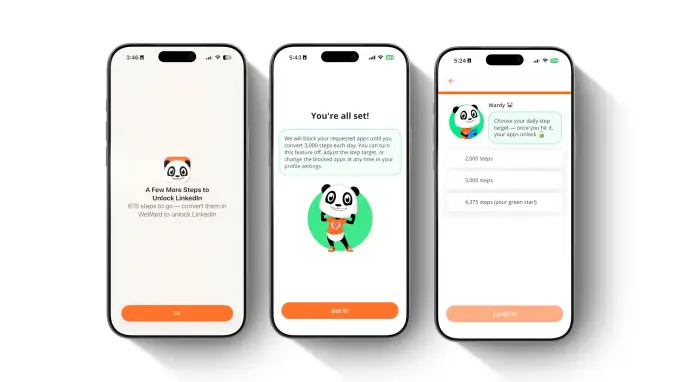
WeWard, an app that offers users rewards for logging their steps, is launching a feature called “Walking Mode” that allows users to restrict their use of chosen apps until they hit a certain step count. The feature is supposed to motivate people to walk while also helping them reduce their screen time, if that’s something they’re looking to do.
If a user wants to scroll less on TikTok or Instagram while also making sure they make time for a daily walk, they could restrict access to the apps until they walk 3,000 steps, for example. The step goals and apps locked are customizable.
Until now, WeWard encouraged users to go on a walk by awarding them “Wards,” an in-app currency that can be exchanged for cash, gift cards, or donations. There’s also a gamified leaderboard feature, so you can engage in some gentle competition with your friends. But the addition of screen time reduction features makes sense for the app, since many users are looking for new ways to limit unnecessary phone and social media use.
Image Credits:WeWard
With funding from tennis star and angel investor Venus Williams, the France-based app says that it has 30 million users across 29 countries, including 4 million U.S. users. The platform also says it has been shown to increase walking time by almost 25%.
“We believe the next generation of products should be designed to create healthier behaviors in the real world, not simply capture more attention,” WeWard co-founder Yves Benchimol told TechCrunch. “Walking Mode is our contribution to that vision, and we hope it inspires a broader conversation about mindful design and how the industry defines success.”
Advertisement
WeWard says that users spend only a few minutes per day in the app, which it considers a positive statistic, since the app isn’t trying to monopolize attention.
While some rewards apps fund their payouts by collecting and selling user data to third parties, WeWard says that it does not engage in these practices. Instead, it makes money from in-app purchases, affiliate marketing, premium subscriptions, and advertising.
When you purchase through links in our articles, we may earn a small commission. This doesn’t affect our editorial independence.
Kevin Weil, a veteran tech executive known for stints at Twitter, Meta, Planet Labs and OpenAI, has joined the board of Stoke Space, a well-funded Seattle startup building reusable rockets to compete with SpaceX.
“It’s real simple for me,” Stoke CEO Andy Lapsa told TechCrunch of meeting Weil when he cofounded Stoke in 2020 and soon after joined Y Combinator’s winter batch. “I came out of engineering, started a company, had no idea how to fundraise. I had no idea how Silicon Valley worked. I had no network. Kevin [an early investor in the company with his wife Elizabeth, through their fund Scribble Ventures] comes with all of that background and was able to help me think about fundraising and getting the company off the ground.
The two kept talking while Lapsa raised $1.34 billion — including a $510 million Series D funding round in 2025 — to build a rapidly reusable rocket that could fly this year. Now, the time is apparently right for Weil to join the board as a director to help continue scaling the company. Stoke declined to make Weil available for an interview, and he didn’t respond to TechCrunch’s outreach.
Weil’s past work has focused on digital products and platforms, which aren’t obviously on Stoke’s roadmap. He was most recently the head of OpenAI’s efforts to accelerate scientific research, leaving the company after that program’s work was spread more widely across the frontier lab in April. He had previously served as OpenAI’s chief product officer from June 2024 until October 2025.
Advertisement
Weil’s last job raises one obvious question: OpenAI’s Sam Altman was reportedly kicking the tires on Stoke last year, contemplating an investment in his own SpaceX competitor. Could Weil be the link between the frontier AI lab and a possible partner in space? Lapsa declined to comment on “gossip and rumors” about OpenAI, saying Weil’s role was to focus on Stoke itself.
Stoke is building a rocket, Nova, that is intended to be completely reusable and can be flown again and again. No one has ever done that before, with the SpaceX coming the closest with its enormous Starship rocket. The technological challenges of reusing a rocket—particularly its ability to survive the extreme heat of reentering the Earth’s atmosphere from space—deterred even space investors with the deepest pockets. Jeff Bezos’ Blue Origin, where Lapsa once worked, has flirted with the approach, but hasn’t prioritized it.
Now, though, SpaceX’s blockbuster stock market debut—with much of its value resting on Elon Musk’s promises that Starship will be flying operational missions this year—has proven Lapsa’s foresight. Despite many billions of dollars invested in new launch vehicles, there aren’t enough rockets to go around, and the next company to get a reasonably-priced rocket flying regularly promises to make a killing.
“The world is realizing that launch is still not solved,” Lapsa said. “The idea of full, rapid reuse was a little bit out there at that time…that’s now been rather normalized, and people see the inevitable now.”
Advertisement
Notably, the idea of building distributed data centers in space to leverage solar power and escape political restrictions on Earth has captured the imagination of some venture capitalists. The key obstacle there is the cost of getting all those computer chips into orbit. Space data centers “really only make sense with full rapid reuse,” Lapsa said, which could be a key differentiator for Stoke as its rocket starts flying.
Military contracts will also be key to the company’s success, and Weil has experience bridging the gap between Silicon Valley and the Department of Defense; he was one of four tech movers and shakers who joined the US Army Reserve in a bid to improve recruitment and cooperation between the Army and industry. And this isn’t his first time in the space business. Weil served as the president of Planet Labs, a satellite earth observation company, for three years as it went public 2021.
Whatever Weil can add to the company’s strategy as it closes in on delivering an operational launch vehicle, though, the company has to execute.
“We’ve got a good chunk of the risk behind us, we’ve got more to go,” Lapsa said. “We’ll work as hard as we can, and we’ll go when it’s ready.”
Advertisement
When you purchase through links in our articles, we may earn a small commission. This doesn’t affect our editorial independence.
DuckDuckGo announced that it can now block most video ads, particularly those on YouTube, when a video is playing in its browser.
In a blog post about the new feature, the company explained that its YouTube ad detection and blocking is based on the open-source community filter lists from uBlockOrigin. DuckDuckGo noted that it may also apply its own rules for better compatibility, but viewers may see longer buffering times when using the blocker and there may still be some unexpected hiccups.
The blocking feature will be on by default for most DuckDuckGo users on iPhone, Windows and Mac. It will be automatically enabled soon on Android but can be manually activated in the browser settings menu in the meantime. All platforms can also have YouTube ad blocking turned on or off from the settings menu. And just to state the obvious, remember you’ll actually have to be watching the video in the DuckDuckGo browser rather than the YouTube app in order to take advantage of the blocker.
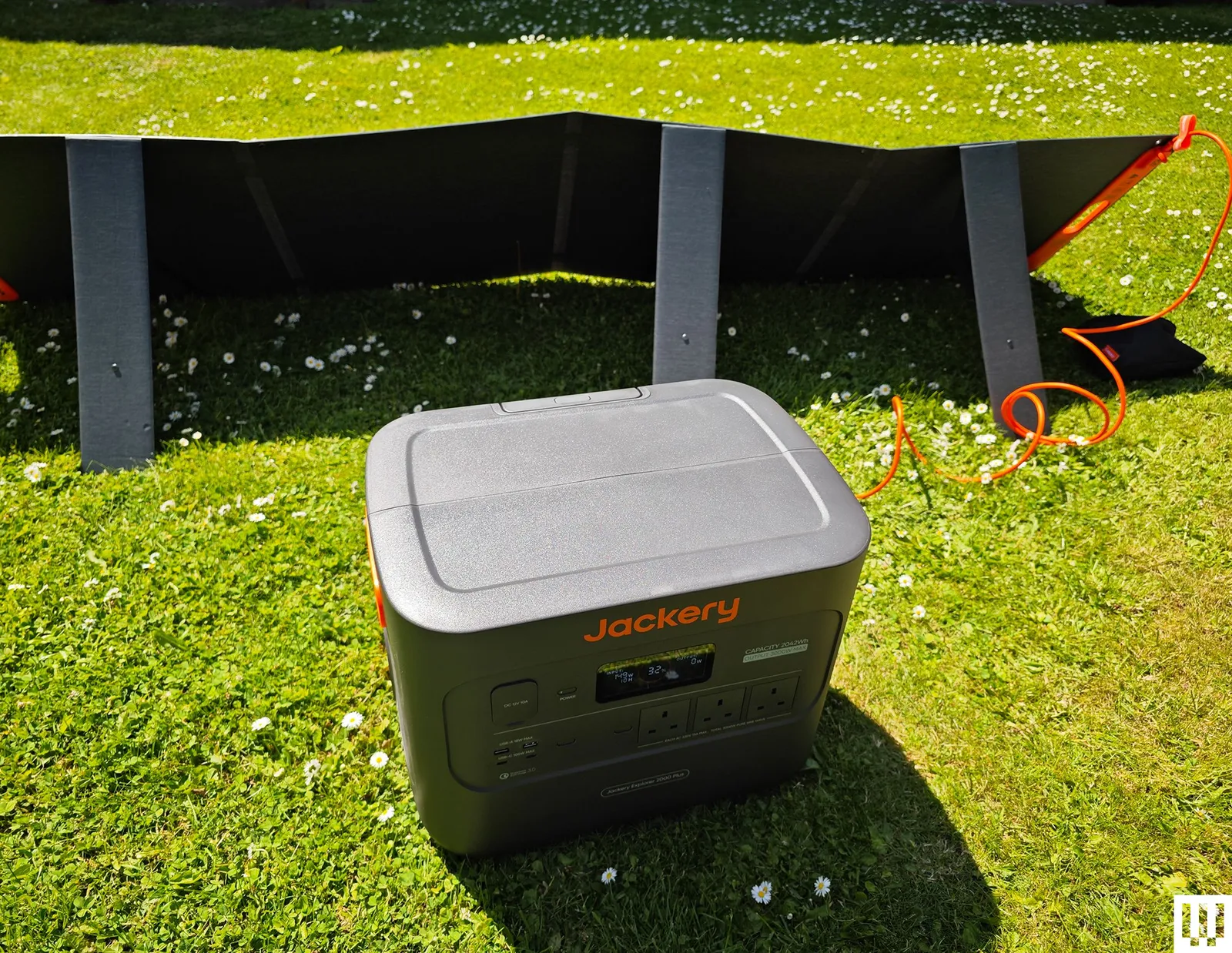
Jackery Portable Power Station Explorer 2000 Plus for $899: The versatile, expandable, durable, and dependable Explorer 2000 Plus was my top pick for a while, and it’s still a good choice if you find it on sale, though the Bluetti Elite 300 that unseated it packs more power into a smaller form. It does still offer some advantages, chiefly that you can double or triple the 2,042-watt-hour capacity by adding battery packs. In my tests, the capacity consistently matched up with Jackery’s claims. It had no trouble with the kettle test (UK kettles hit 3,000 watts), though it chewed through 6 percent of the power. You can charge it speedily from the mains (AC outlet), but it also works as a solar generator. I filled it from 32 percent in a single scorching day with Jackery’s SolarSaga 200-watt solar panel. The fan is relatively quiet at around 30 decibels, but it comes on frequently. It weighs a whopping 62 pounds, and though there are indented handles on either side, a telescopic handle, and two wheels, it can still be tough to move around. The covers on the car port, inputs, and expansion port on the back are annoyingly tight. (I sometimes had to use a screwdriver to open them.) The Wi-Fi connection is 2.4 GHz only, and it took me a while to figure out that the connection mode requires you to press the AC and DC buttons together, since that doesn’t seem to be documented anywhere. Minor niggles aside, this is a great power station to serve as a home backup or off-grid generator. The warranty is three years, but you can extend it to five years by registering with Jackery.
Photograph: Simon Hill
Bluetti Elite 200 V2 for $799: While the Elite 300 is my new recommendation, if a 2,074-watt-hour capacity is enough for you, this power station has similarly strong build quality and mostly the same features (wattage is 2,600 and 3,900 at peak, and UPS has a 15-millisecond delay). It’s relatively fast to charge, can easily power your gadgets and small appliances, and has an info-packed display that’s legible outdoors.
BioLite BaseCharge 1500 for $1,020: Weighing 29 pounds, it has recessed handles at each side for carrying, though this is as big a power station as I can imagine lugging any real distance. There’s no superfluous app. You can do everything using the buttons and the display on the front. It has a good mix of ports to cover a lot of small gadgets like phones, tablets, and laptops. There’s even a wireless charging pad on top. I wouldn’t run anything too demanding on it, but it coped fine with an electric drill and blender. I tested it with BioLite’s SolarPanel 100, but the BaseCharge 1500 has a standard High Power Port (HPP) input, so you don’t have to use BioLite’s solar panels. It finished just on either side of the stated capacity in my tests. Sadly, the BaseCharge 1500 takes a long time to charge. Even from a wall outlet, you need a day, though you can speed it slightly by using the PD USB-C as a second input. Solar charging from a single SolarPanel 100 takes several days. The battery is also a Li-NMC, so it likely won’t last as long as some of our other picks. The BaseCharge 1500 comes with a two-year warranty.
Advertisement
Ampace Andes 600 Pro for $449: This compact power station weighs 19 pounds and has an easy-carry handle on top. It stores 584 watt-hours of power and can be fully charged in an hour (30 dB sleep mode). It can deliver 600 watts (1,800 W surge), and has lots of ports (2 x AC, 2 x USB-C, 2 x USB-A, 2 x DC 5521, 1 x Car). There’s also a remote control app where you can change the light bar function or the colored light on top. It worked well in my tests and could be handy if you want something portable for small gadgets on a camping trip, but the EcoFlow River 2 Pro above gives you more power for less.
Photograph: Simon Hill
EcoFlow Delta 3 Plus for $519: I like the stylish, compact design of EcoFlow’s Delta 3 Plus, with the screen and ports at one end. It offers 1,024 watt-hours, can consistently provide 1,800 watts, and has a 2,600-W surge mode. It can also charge up in an hour and has lots of ports (6 x AC, 1 x Car, 2 x USB-A, 2 x USB-C, 2 x DC5521). You can add capacity with EcoFlow’s impressively compact and stackable add-on battery ($599), though it is pricey. The Plus version includes two solar ports for faster solar charging and can pull UPS duty with an impressive 10-millisecond response time. The reason it misses out on a full recommendation is the fan. The fan turned on all the time, even when I was only charging a single phone, and continued at around 55 decibels after it was fully charged and unplugged. It got louder when I charged the Delta 3 Plus from a wall outlet. It could disturb you, and it gave me concerns about overheating. Fan noise aside, I liked this power station, and the app also works well if you want to remote-control it. There is a quiet charging mode, but it drops the rate to 200 watts, meaning it will take more than five hours to fully charge.
Photograph: Simon Hill
Bluetti AC200L for $799: This was replaced by the Elite 200 V2 above, but it is still a decent power station with a similar feature set. It has slightly lower capacity, and it’s heavier and pricier right now, but it is expandable up to 8,192 watt-hours with Bluetti’s add-on batteries. The design and performance are similar, but the Elite 200 V2 edges it for me and is a better buy, especially if you can pick it up for less.
Advertisement
Dabbsson DBS1000 Pro Portable Power Station for $619: This 1024-watt-hour power station has a LiFePO4 battery and a decent mix of ports to charge and power your gadgetry. The US model has four AC outlets, three USB-A ports, three USB-C ports, a car socket, and two DC5521 barrel ports. It can charge to 80 percent in under an hour when plugged in, but expect some fan noise. You can also charge from solar panels or through the car port. You can connect via Wi-Fi and control it from the app, but the display still gives you the info you need without it, and it has a customizable light underneath. The 2,000-watt output is impressive, and there are boost and surge modes to briefly take it to 3,000 and 4,000 watts, respectively. It performed well in my tests and can act as an EPS with a 15-millisecond delay. It’s a solid alternative to our picks above, but doesn’t stand out. The fan comes on frequently and can be annoying. I also had an issue with one of the USB ports sometimes refusing to charge a phone. Buy the DBS2000B battery expansion to boost capacity to 3,072 watt-hours and increase output to 2,400 watts. It comes with a five-year warranty with registration.
Bluetti AC180 for $449: This small Bluetti power station is a solid option if you don’t need as much juice. The AC180 also has a LiFePO4 battery inside, but with a 1,152-watt-hour capacity. It maxes out at 1,800 watts but can surge up to 2,700 watts for short bursts. The US model has four AC outlets, one USB-C (100 W), and four USB-A ports (15 W apiece). There’s even a wireless charging spot on top that goes up to 15 watts. You can fully charge the AC180 from an outlet in an hour, and it comes with solar and car charging cables as alternatives. It can also act as a UPS with a 20-millisecond switching time. This power station is good for small gadgets and appliances like a TV or a mini fridge. Fan noise hit around 45 decibels under a heavy load, which isn’t too bad. What I don’t like is the weight (35 pounds seems relatively heavy for this capacity), and I’d prefer more USB-C ports.
Advertisement
Zendure SuperBase Pro 2000 for $1,200: With a whopping 2,096-watt-hour capacity, tons of outlets (6 x AC, 1 x Car, 3 x DC5521, 4 x USB-C), and a maximum output of 2,000 watts (surge 3,000 watts), this is a great portable power station. It is 47 pounds but has two wheels, a carry handle, and a separate telescopic handle. Zendure’s app is slick; this power station can serve as an uninterruptible power supply and performed well in my tests, though the fans were almost constantly on. I also have concerns about its longevity. The SuperBase Pro 2000 has a Li-NMC battery inside, probably because it offers greater energy density than LiFePO4 (the similarly sized SuperBase Pro 1500 has a LiFePO4 battery and just 1440-watt-hour capacity), but Li-NMC batteries don’t last as long. The warranty is 2 years, but you can extend it by a year by registering with Zendure.
Portable Power Stations to Avoid
Photograph: Simon Hill
Acer 600W Portable Power Station: This power station is certainly portable, with a LiFePO4 battery offering 512 watt-hours via nine ports (two AC, two USB-A, two USB-C, two DC5521, and a car port). It’s a decent size for a campsite and suitable for lighting and charging portable gadgets, but with a maximum output of 600 watts, I wouldn’t plug in anything too demanding. You can fully charge it from a wall outlet in around two hours. There’s a small LCD for remaining battery percentage, estimated remaining run time at current usage rates, and wattage input and output. It worked fine in my tests, but it seems to be available only in the UK and is pricey for the capacity.
Vtoman FlashSpeed Pro 3600: Huge and heavy for its capacity (3,096 watt-hours), this power station has wheels and a telescopic handle to enable you to move it around without injury. The first unit I tested was faulty, so Vtoman supplied me with a replacement. While it worked far better, I can’t recommend this power station. The Bluetti Elite 300 above is cheaper, far more compact, and will suit most folks better, though the Vtoman has a clear advantage in potential output (it can sustain 3,600 watts and peak at over 7,000 watts for short bursts). Unfortunately, I hate the plastic front panel that you must lift to access the ports; the display is too dim to read outdoors; the build quality is suspect (it’s all a bit creaky); and it’s way, way too big.
Advertisement
Power Stations: Frequently Asked Questions
How Expensive Are Portable Power Stations?
Portable power stations can be very expensive, but discounts, sales, and deals are common. If you can afford to wait, you can likely get your chosen power station for less than the listed MSRP.
What Capacity Do I Need?
Advertisement
Figure out how much power you need. The capacity is listed in watt-hours (Wh) or sometimes kilowatt-hours (kWh). If you think about the devices you want to run and how long you need to run them, you can start to calculate the capacity you need. Manufacturers will often display stuff like 12 hours of TV or 30 minutes of electric chainsaw use, but not all TVs draw the same amount of power. You must calculate how much the gadgets you own actually use.
How Portable Are Portable Power Stations?
The term “portable” is sometimes stretched. Batteries are heavy. The larger-capacity power stations are typically on wheels and have telescopic handles, and they are still tough to cart around. If you’re looking for something you can actually carry on foot for a distance, you may need to temper your expectations on capacity.
What Can You Run on a Portable Power Station?
Advertisement
All portable power stations can charge up small gadgets like phones and laptops or be used to power lighting. Most can handle small appliances like mini-fridges or TVs. If you want to use power tools, an AC unit, or, in the UK, a kettle, you need to be able to draw thousands of watts. Power stations all state the maximum output, but they often have a surge function that enables them to go higher for a short period. Sometimes, they give it a silly name. For example, Zendure calls this “AmpUp,” and EcoFlow calls it “X-Boost.” Make sure your chosen power station can handle the wattage you need.
How Do I Charge a Portable Power Station?
All portable power stations can be charged from a wall outlet and should come with a charging cable. Some power stations can also be charged via a car port from your vehicle or a solar port from solar panels. Make sure you check that the ports you want are available and necessary cables are included.
How Long Does a Portable Power Station Take to Charge?
Advertisement
Large-capacity power stations can take a long time to recharge. Be sure you understand how quickly your chosen power station can charge from wall power and other sources if you plan to use solar panels, a vehicle battery, or another power source for top-ups. Some power stations enable you to fast-charge from two or more inputs.
What Ports Should I Look for in a Portable Power Station?
While you will find certain ports across the board with portable power stations, from AC outlets to USB-A, it is crucial to check the maximum charging rate and supported charging standards to avoid disappointment. You might find USB-C ports, car ports, barrel connectors, and maybe solar panel inputs, but assume nothing. Check the specs before you buy.
How Many Years Do Portable Power Stations Last?
Advertisement
Power stations typically last between three and 10 years, but can last longer, depending on how they are used and maintained. It’s important not to let them completely discharge too often or leave them empty for extended periods. Usually, the manufacturer will provide an estimate of how many charge cycles you can expect before performance starts to degrade. Warranties typically range from two to five years, but make sure you retain the guarantee and proof of purchase.
What Battery Types Are Commonly Used in Portable Power Stations?
There are various battery technologies, but the main ones used in portable power stations today are types of lithium-ion (Li-ion) batteries, often lithium nickel manganese cobalt oxide (Li-NMC) or lithium iron phosphate (LiFePO4 or LFP). The latter is safer (less prone to combustion) and tends to last longer (more cycles) before it starts to degrade. Overheating can be an issue for Li-NMC batteries, and they degrade faster but have a higher energy density. Zendure also offers semi-solid-state batteries in its top-of-the-line SuperBase listed above, which it promises are more stable and resilient, therefore safer, and have a higher energy density.
Can You Use a Portable Power Station as a UPS?
Advertisement
Some power stations can act as an uninterruptible power supply (UPS); others are classed as an emergency power supply (EPS). If you have your power station plugged into wall power and then devices plugged into it, they will work from wall power, but if there is a power outage, a UPS will switch to battery power instantly (around 10 milliseconds). An EPS will also switch when there’s a blackout, but may take a bit longer (30 milliseconds or so).
What Is the Difference Between a Power Bank and a Portable Power Station?
Size is the main difference between the power banks and the portable power stations. Power banks are typically compact with small capacities designed to charge smartphones and other small gadgets. Power stations have far larger capacities and can potentially run small appliances and larger gadgets.
How to Care for Your Power Station
Advertisement
I already mentioned the importance of not leaving your power station empty. If you can avoid fully draining the battery, topping up when it hits 20 percent or below, that will increase its lifespan. You should also avoid leaving it plugged in all the time unless you are using it as an emergency backup (UPS or EPS). Unplug after it is fully charged. Be mindful of the charger and cable you are using to charge up your power station. It’s best to stick to the cables that came in the box. Store your power station in a cool, dry space, avoid extremes of temperature, and try not to expose it to lots of dust. A handful of power stations are built for extreme temperatures and a few can handle rain, but always check before you risk exposure.
What About Home Batteries?
A permanently installed home battery is a better solution for some folks than a portable power station. It will need to be professionally wired into your electrical panel, but it allows you to schedule and automate when you pull power from the grid or store power from solar panels on your home. If you don’t need it to be portable, you should read my guide on How to Buy a Home Battery. We have also tried the EcoFlow PowerOcean and the Anker Solix E10.
How I Test Portable Power Stations
Advertisement
I test every candidate for our best portable power station guide by using it around the house for at least a week (usually much longer). I plug gadgets into every port and outlet, from a TV and mini fridge to smartphones and laptops. For more capable power stations, I test power tools, a hair dryer, an AC unit, and a high-wattage UK kettle. I always check that there’s room to plug in the maximum number of devices. I test any stated surge or power-boost mode under a heavy load.
All additional ports are tested, from car ports to solar panel ports. I record the time it takes to charge from a wall outlet and from solar panels (weather permitting). I test the fan noise under low, medium, and heavy load, and also when charging from an outlet using the decibel meter on my Apple Watch. If there’s a quiet or nighttime fan mode, I test that too.
I also assess the design to check if the LED display is informative and legible in sunlight. I assess portability by lugging it around my home and garden to use and charge, noting the presence of ergonomic handles, telescopic handles, or wheels. If there are any accessories, I test them. If there’s an app, I connect it and test all the functions and features.
If it has EPS or UPS functionality, I test it with a router and a PC to ensure it switches over within the stated time frame. Finally, I run a set of tests to establish the capacity and note if it significantly deviates from the manufacturer’s claims.
Advertisement
How Did WIRED Select Products to be Reviewed?
I try to test a range of different power stations. It’s not possible to test every device, so while I typically test flagship releases, I also try to call in power stations with different capacities and at different prices. We are brand agnostic, so I will test power stations from any manufacturer, provided I can get hold of them. But I do lean towards testing more systems from the most popular brands. All the power stations I test are provided by the manufacturers or their PR companies.
Most are loaned for a month or so and then returned. A handful of our recommended picks are kept for longer-term testing. The remainder is donated to charities and other organizations. I recently donated two DJI power stations to UK police drone operators.
You almost certainly don’t have an application for the sort of accurate timekeeping that’s made possible by this enhanced version of [Cristiano Monteiro]’s satellite-backed time server. By his own admission, the vast majority of users will be more than happy to have their system’s time synchronized by the traditional Network Time Protocol (NTP). But if you’re really chasing those last few microseconds, that’s where the Precision Time Protocol (PTP) comes in.
With NTP, you can get within 10 milliseconds or so of your upstream time source — but PTP is accurate down to nanoseconds. Unless you’re performing some kind of scientific research, running a robotic assembly line, or perhaps doing high-speed financial trading, there’s no reason for this level of accuracy. In fact, PTP is such a niche technology that until the release of the ESP32-P4, [Cristiano] couldn’t even find an affordable enough chip that supported it.
Hardware-level support for PTP is important as there’s no way to achieve this level of accuracy with software alone, the capability needs to be baked into the Ethernet controller. As you might expect, it takes a highly accurate time source to make the most of PTP, and that’s where the navigation-grade Global Navigation Satellite System (GNSS) receiver comes in. All told the cost of the build is unsurprisingly higher than that of its predecessor, but [Cristiano] says it’s still a couple zeros shy of what a commercial offering would run.
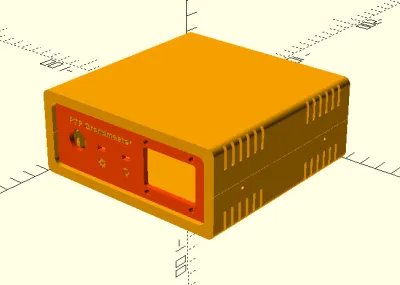
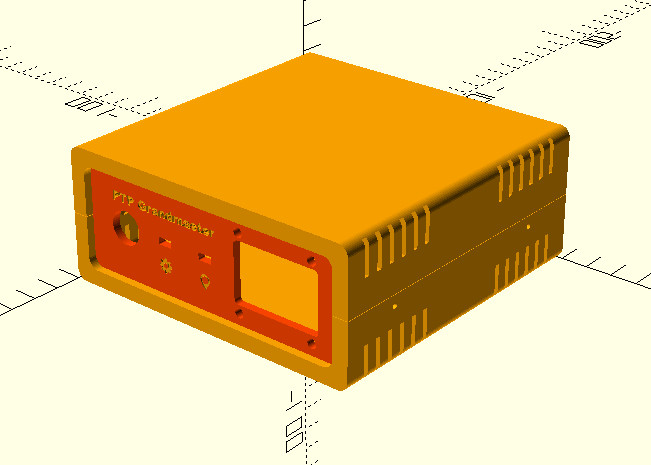
As with his original time server from 2021, [Cristiano] made sure this build was as friendly as possible for hackers and makers. We especially like the 3D printed case designed in OpenSCAD, and his insistence that the gadget have a front panel with blinking status LEDs. Again, the vast majority of us don’t need our clocks to be accurate down to the nanosecond…but it’s nice to know we have the option.



























































You must be logged in to post a comment Login